<?xml version="1.0"?>
<News hasArchived="false" page="38" pageCount="108" pageSize="10" timestamp="Tue, 21 Apr 2026 21:34:06 -0400" url="https://beta.my.umbc.edu/groups/training/posts.xml?page=38">
<NewsItem contentIssues="true" id="137987" important="false" status="posted" url="https://beta.my.umbc.edu/groups/training/posts/137987">
<Title>Apply for 2024 Accessibility Inclusion Fellowship</Title>
<Tagline>Program &amp; award provided by National Federation of the Blind</Tagline>
<Body>
<![CDATA[
    <div class="html-content"><span>The Accessibility Inclusion Fellowship is a one-year fellowship awarded by the <a href="https://nfb.org" rel="nofollow external" class="bo">National Federation of the Blind</a> to three Maryland professors to assist them integrate accessibility into their curriculum and incorporate non-visual teaching methods in at least one course. </span><div><span><br></span></div><div><span>In addition to providing a $2,000 financial award to each professor, the NFB works individually with the professors/instructors to brainstorm solutions to their accessibility challenges, help them develop and implement an accessibility action plan, and provide meaningful educational resources and tools.</span><br><br><span>The <a href="https://nfb.org" rel="nofollow external" class="bo">National Federation of the Blind</a> administers the Accessibility Inclusion Fellowship program under a non-visual accessibility initiative grant from the State of Maryland. Your existing course does not need to have an accessibility component. If chosen, the NFB will work with you through their Center of Excellence in Non-visual Access to enhance your course curriculum to include accessibility concepts by providing consultation and assistance with course instruction.</span><br><br><span>Apply today by submitting the application for the </span><a href="https://nfb.org/programs-services/center-excellence-nonvisual-access/accessibility-inclusion-fellowship-program/application" rel="nofollow external" class="bo">2024 Accessibility Inclusion Fellowship</a><span>. </span><span>Applications must be received by January 27, 2024.</span></div><div><br></div><div><span><strong>All institutional grants and faculty grants awarded to UMBC must be routed to the Office of Sponsored Programs prior to submission. Contact your unit's business manager or proposal development staff to discuss your application.</strong></span><br><br><span>For more information, please visit: </span><a href="https://nfb.org/programs-services/center-excellence-nonvisual-access/accessibility-inclusion-fellowship-program" rel="nofollow external" class="bo">https://nfb.org/programs-services/center-excellence-nonvisual-access/accessibility-inclusion-fellowship-program</a><span> </span><br><br><span>Please send any questions about this opportunity to </span><a href="mailto:nfb@nfb.org" rel="nofollow external" class="bo">nfb@nfb.org</a><span> </span></div></div>
]]>
</Body>
<Summary>The Accessibility Inclusion Fellowship is a one-year fellowship awarded by the National Federation of the Blind to three Maryland professors to assist them integrate accessibility into their...</Summary>
<TrackingUrl>https://beta.my.umbc.edu/api/v0/pixel/news/137987/guest@my.umbc.edu/ff85492ee072b3b47d7a7eda4db3a6ec/api/pixel</TrackingUrl>
<Tag>accessibility</Tag>
<Tag>fellowship</Tag>
<Tag>grant</Tag>
<Tag>inclusion</Tag>
<Tag>non-visual</Tag>
<Group token="instructional-technology">Instructional Technology</Group>
<GroupUrl>https://beta.my.umbc.edu/groups/instructional-technology</GroupUrl>
<AvatarUrl>https://assets2-beta.my.umbc.edu/system/shared/avatars/groups/000/001/164/dec3b026b81ee6d890a8f82f75c94a2e/xsmall.png?1446126703</AvatarUrl>
<AvatarUrl size="original">https://assets1-beta.my.umbc.edu/system/shared/avatars/groups/000/001/164/dec3b026b81ee6d890a8f82f75c94a2e/original.png?1446126703</AvatarUrl>
<AvatarUrl size="xxlarge">https://assets2-beta.my.umbc.edu/system/shared/avatars/groups/000/001/164/dec3b026b81ee6d890a8f82f75c94a2e/xxlarge.png?1446126703</AvatarUrl>
<AvatarUrl size="xlarge">https://assets1-beta.my.umbc.edu/system/shared/avatars/groups/000/001/164/dec3b026b81ee6d890a8f82f75c94a2e/xlarge.png?1446126703</AvatarUrl>
<AvatarUrl size="large">https://assets1-beta.my.umbc.edu/system/shared/avatars/groups/000/001/164/dec3b026b81ee6d890a8f82f75c94a2e/large.png?1446126703</AvatarUrl>
<AvatarUrl size="medium">https://assets4-beta.my.umbc.edu/system/shared/avatars/groups/000/001/164/dec3b026b81ee6d890a8f82f75c94a2e/medium.png?1446126703</AvatarUrl>
<AvatarUrl size="small">https://assets3-beta.my.umbc.edu/system/shared/avatars/groups/000/001/164/dec3b026b81ee6d890a8f82f75c94a2e/small.png?1446126703</AvatarUrl>
<AvatarUrl size="xsmall">https://assets2-beta.my.umbc.edu/system/shared/avatars/groups/000/001/164/dec3b026b81ee6d890a8f82f75c94a2e/xsmall.png?1446126703</AvatarUrl>
<AvatarUrl size="xxsmall">https://assets3-beta.my.umbc.edu/system/shared/avatars/groups/000/001/164/dec3b026b81ee6d890a8f82f75c94a2e/xxsmall.png?1446126703</AvatarUrl>
<Sponsor>Instructional Technology</Sponsor>
<ThumbnailUrl size="xxlarge">https://assets2-beta.my.umbc.edu/system/shared/thumbnails/news/000/137/987/6ac96085dcf42182665a958bab7476cd/xxlarge.jpg?1704301623</ThumbnailUrl>
<ThumbnailUrl size="xlarge">https://assets3-beta.my.umbc.edu/system/shared/thumbnails/news/000/137/987/6ac96085dcf42182665a958bab7476cd/xlarge.jpg?1704301623</ThumbnailUrl>
<ThumbnailUrl size="large">https://assets3-beta.my.umbc.edu/system/shared/thumbnails/news/000/137/987/6ac96085dcf42182665a958bab7476cd/large.jpg?1704301623</ThumbnailUrl>
<ThumbnailUrl size="medium">https://assets1-beta.my.umbc.edu/system/shared/thumbnails/news/000/137/987/6ac96085dcf42182665a958bab7476cd/medium.jpg?1704301623</ThumbnailUrl>
<ThumbnailUrl size="small">https://assets1-beta.my.umbc.edu/system/shared/thumbnails/news/000/137/987/6ac96085dcf42182665a958bab7476cd/small.jpg?1704301623</ThumbnailUrl>
<ThumbnailUrl size="xsmall">https://assets2-beta.my.umbc.edu/system/shared/thumbnails/news/000/137/987/6ac96085dcf42182665a958bab7476cd/xsmall.jpg?1704301623</ThumbnailUrl>
<ThumbnailUrl size="xxsmall">https://assets4-beta.my.umbc.edu/system/shared/thumbnails/news/000/137/987/6ac96085dcf42182665a958bab7476cd/xxsmall.jpg?1704301623</ThumbnailUrl>
<PawCount>1</PawCount>
<CommentCount>0</CommentCount>
<CommentsAllowed>true</CommentsAllowed>
<PostedAt>Wed, 03 Jan 2024 12:10:42 -0500</PostedAt>
</NewsItem>

<NewsItem contentIssues="false" id="137972" important="false" status="posted" url="https://beta.my.umbc.edu/groups/training/posts/137972">
<Title>Take a Community Leadership Skills Course in Spring 2024</Title>
<Tagline>Build the Skills You Need to Make a Difference!</Tagline>
<Body>
<![CDATA[
    <div class="html-content"><h5>UMBC Community Leadership Program is offering <strong>3 Professional Development Skills Courses</strong> in Spring 2024! <br><br></h5><h5><span>Each course is 5 weeks long and meets once a week (Wednesday evenings from 4:30 - 7:00pm) in person. You will gain new skills and knowledge as well as professional badging credentials!</span></h5><h5><br><strong>1) Programming As Inclusive Process</strong>, 1/31/24 - 2/28/24</h5><h5><br><strong>2) Finding Your Voice: Branding and Messaging in the Social Sector</strong>, 3/6/24 - 4/10/24</h5><h5><br><strong>3) Budgeting for Community Impact</strong>, 4/17/24 - 5/15/24</h5><h5><br><span>You can learn more about the UMBC Community Leadership Program and Skills Courses at the program website, and in the attached flyer.</span></h5><h5><span><br></span><span>If you have questions, please contact Program Director Sally Scott at <a href="mailto:sjscott@umbc.edu">sjscott@umbc.edu</a>.</span></h5><div><h6><br></h6><div> </div></div></div>
]]>
</Body>
<Summary>UMBC Community Leadership Program is offering 3 Professional Development Skills Courses in Spring 2024!     Each course is 5 weeks long and meets once a week (Wednesday evenings from 4:30 -...</Summary>
<Website>https://professionalprograms.umbc.edu/community-leadership/skills-courses/</Website>
<AttachmentKind>Flyer</AttachmentKind>
<AttachmentUrl>https://assets1-beta.my.umbc.edu/system/shared/attachments/2c273e0b7ca869e2fd8a7f0ce976b7e4/69e8258e/news/000/137/972/0cf15c88d21e47a669f5fd3f2e2b8606/Skills Courses - Wi24-Sp24 Flyer-3.pdf?1704224260</AttachmentUrl>
<Attachments>
<Attachment kind="Flyer" url="https://beta.my.umbc.edu/groups/training/posts/137972/attachments/49982"></Attachment>
</Attachments>
<TrackingUrl>https://beta.my.umbc.edu/api/v0/pixel/news/137972/guest@my.umbc.edu/1e7bdbbe237edb50e9a3e01f32b0ea48/api/pixel</TrackingUrl>
<Group token="training">Training</Group>
<GroupUrl>https://beta.my.umbc.edu/groups/training</GroupUrl>
<AvatarUrl>https://assets2-beta.my.umbc.edu/system/shared/avatars/groups/000/000/019/bdb106a0560c4e46ccc488ef010af787/xsmall.png?1281010946</AvatarUrl>
<AvatarUrl size="original">https://assets4-beta.my.umbc.edu/system/shared/avatars/groups/000/000/019/bdb106a0560c4e46ccc488ef010af787/original.png?1281010946</AvatarUrl>
<AvatarUrl size="xxlarge">https://assets3-beta.my.umbc.edu/system/shared/avatars/groups/000/000/019/bdb106a0560c4e46ccc488ef010af787/xxlarge.png?1281010946</AvatarUrl>
<AvatarUrl size="xlarge">https://assets2-beta.my.umbc.edu/system/shared/avatars/groups/000/000/019/bdb106a0560c4e46ccc488ef010af787/xlarge.png?1281010946</AvatarUrl>
<AvatarUrl size="large">https://assets3-beta.my.umbc.edu/system/shared/avatars/groups/000/000/019/bdb106a0560c4e46ccc488ef010af787/large.png?1281010946</AvatarUrl>
<AvatarUrl size="medium">https://assets3-beta.my.umbc.edu/system/shared/avatars/groups/000/000/019/bdb106a0560c4e46ccc488ef010af787/medium.png?1281010946</AvatarUrl>
<AvatarUrl size="small">https://assets4-beta.my.umbc.edu/system/shared/avatars/groups/000/000/019/bdb106a0560c4e46ccc488ef010af787/small.png?1281010946</AvatarUrl>
<AvatarUrl size="xsmall">https://assets2-beta.my.umbc.edu/system/shared/avatars/groups/000/000/019/bdb106a0560c4e46ccc488ef010af787/xsmall.png?1281010946</AvatarUrl>
<AvatarUrl size="xxsmall">https://assets3-beta.my.umbc.edu/system/shared/avatars/groups/000/000/019/bdb106a0560c4e46ccc488ef010af787/xxsmall.png?1281010946</AvatarUrl>
<Sponsor>Community Leadership</Sponsor>
<PawCount>1</PawCount>
<CommentCount>0</CommentCount>
<CommentsAllowed>true</CommentsAllowed>
<PostedAt>Tue, 02 Jan 2024 14:37:40 -0500</PostedAt>
<EditAt>Tue, 02 Jan 2024 14:39:28 -0500</EditAt>
</NewsItem>

<NewsItem contentIssues="true" id="137839" important="false" status="posted" url="https://beta.my.umbc.edu/groups/training/posts/137839">
<Title>More gradebook updates, test access logs coming in January</Title>
<Tagline>Grade visibility, batch edit, authentic assessment prompts</Tagline>
<Body>
<![CDATA[
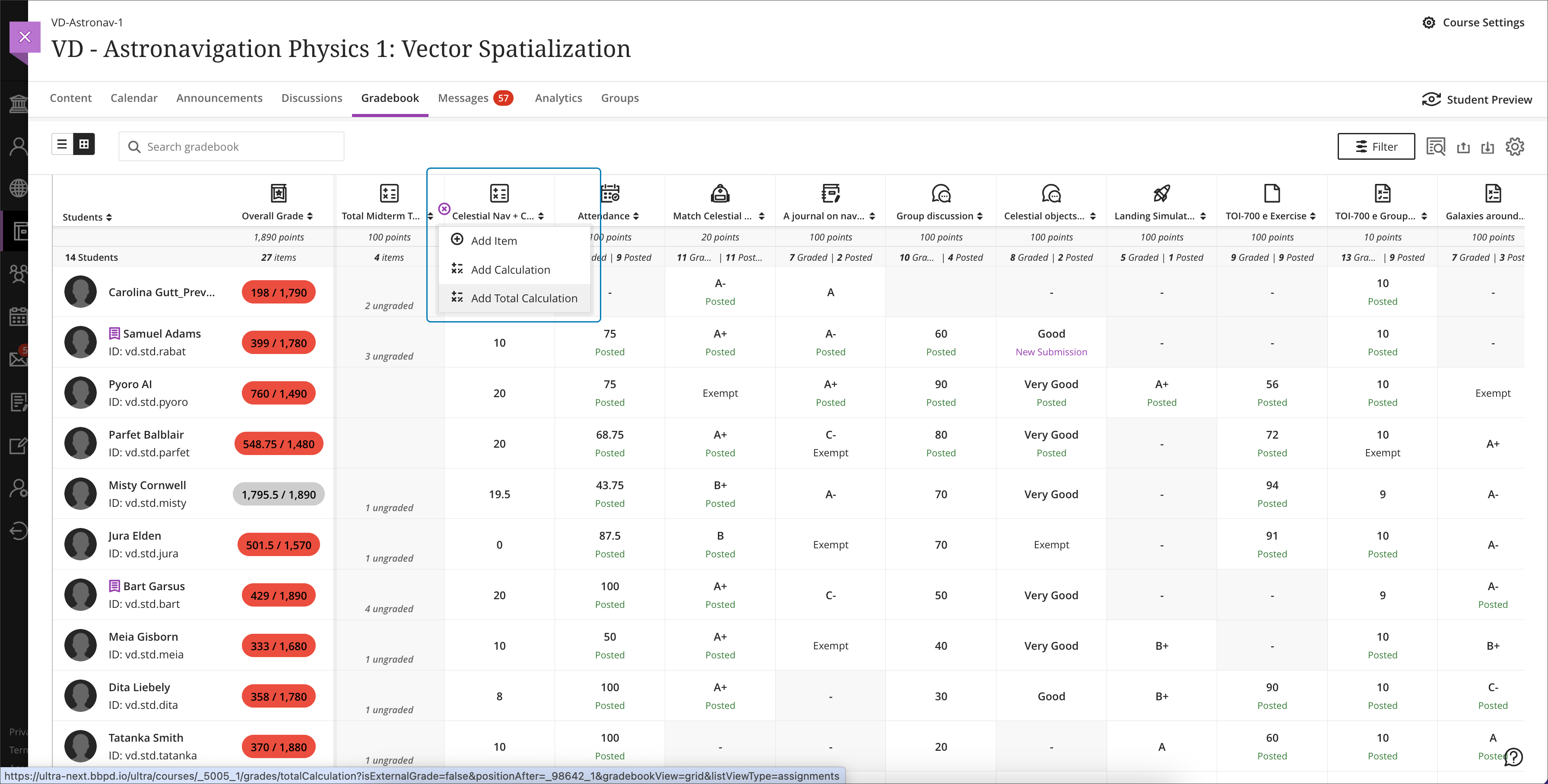
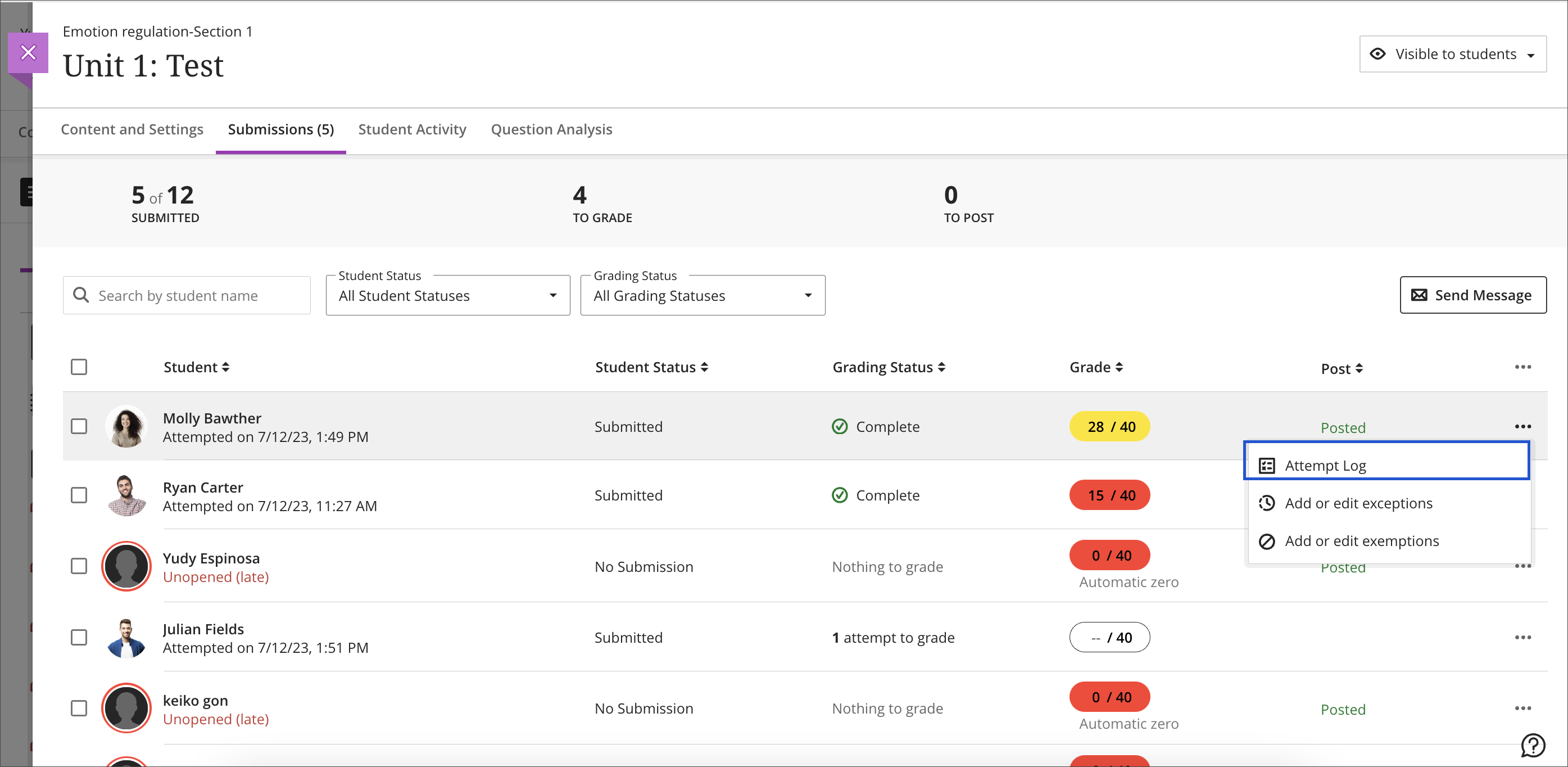
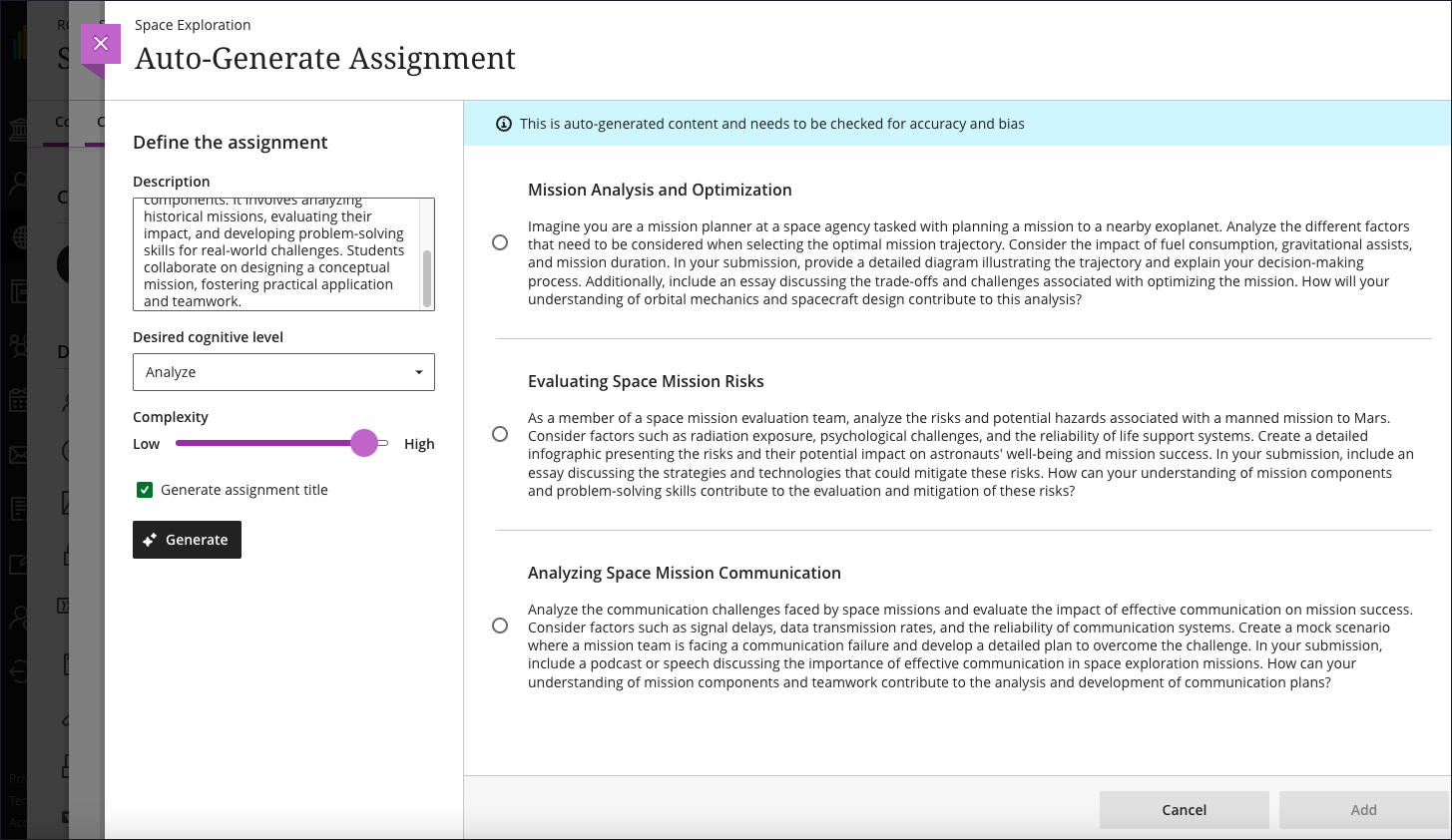
    <div class="html-content"><div><div><div><div><div><div><div>Expanding the functionality for the gradebook and assessments has been a central theme for the past year of Ultra development. When the winter term starts in 2024, Ultra courses will feature additional enhancements for the gradebook, grading interface, and test logs for learner attempts as developers continue to refine features based on institutional and instructor feedback.</div><div><br></div><div>The gradebook is a key tool for instructors in an Ultra course. With this update, instructors will be able to create total and weighted calculated columns that are point or percentage based with options to include or exclude categories and dropping scores. Moreover, these new total calculated columns can be used toward the overall grade calculation, allowing greater flexibility.</div></div><div><span><br></span></div><div><img src="https://help.blackboard.com/sites/default/files/images/2023-12/learn_ultra_instructor_Grading_TotalAndWeightedCalculatons_TotalCalculationColumn_AddingColumnFromGridView.png" width="500" alt="Image 1: Example of the improved gradebook with option to add a new Total Calculation" style="max-width: 100%; height: auto;"></div><div><div><em>Image 1: Example of the improved gradebook with option to add a new Total Calculation</em></div></div><div><div><br></div><div><strong>Grading &amp; Gradebook Improvements</strong></div><div><ul><li><span>The grid view of the Ultra gradebook features usability improvements that reduces spacing around icons and improves row visibility. </span></li><li><span>The gradebook will now provide the student ID next to each learner's name to improve identification. </span><span>When hovering over a truncated name in the gradebook, a tooltip will reveal the full name.</span></li><li><span>A sortable category column is added to the gradebook list view to provide clarity for those items to be graded.</span></li><li>Students will be able to see their grades for an assessment even if it is hidden. In a future update, feedback will be also visible.</li><li><span>Instructors can use delegated grading for anonymous assessments. Sorting controls are available for submission date.</span></li></ul><div>The test assessment log has been a frequent request for Ultra courses. Unlike Original courses, the Ultra version of this functionality provides information for tests and assignments. The test log will provide detailed information including date and time for starting the test, answers to each question, a preview of the question itself, and the estimated time spent on each question. The assignment log provides the start and submission date and time as well as the submission receipt number.</div></div><div><br></div><div><img src="https://help.blackboard.com/sites/default/files/images/2023-12/learn_ultra_instructor_AssessmentIntegrity_SubmissionListViewEntryPoint.png" width="500" alt="Image 2: Instructors can access the Assessment Submission Log from the individual assessment log" style="max-width: 100%; height: auto;"></div><div><span>Image 2: </span><em>Instructors can access the Assessment Submission Log from the individual assessment</em></div><div><br></div><div><strong>Content Creation &amp; Management</strong></div></div><div><div><br></div><div><div>The latest update to the AI Course Design Assistant Tools in Ultra courses allows instructors to generate assignment prompts aligned to a selected Bloom's cognitive process. As with all AI functionality, instructors are in complete control and can choose when and how to they want to use the tools.</div><div><br></div><div><img src="https://help.blackboard.com/sites/default/files/images/2023-12/Learn_Ultra_Instructors_AI%20Design%20Assistant%20Authentic%20Assignment%20Prompt%20Generation_Prompts%20with%20Content.png" width="500" alt="Image 3: Instructors can add additional context through a description, select the desired cognitive level and complexity, and then generate prompts" style="max-width: 100%; height: auto;"></div><div><span>Image 3: </span><em>Instructors can add additional context through a description, select the desired cognitive level and complexity, and then generate prompts</em></div><div><br></div><div>Additional updates to Content Management include:</div><div><ul><li><span>The Batch Edit tool now allows instructors to manage the date and/or time for selected items that have a pre-existing date/time -- for example, assessment due dates or visibility.</span></li><li><span>Instructors can use the unused files tool to find and remove course files that are not in use in a course. Instructors can download a file before deleting it.</span></li></ul></div></div></div></div></div></div></div><div><div><div><div><div><span><div><span>Faculty should see the latest updates in Ultra courses around January 4-5, 2024. </span><span>The next update to our Ultra test environment will take place on January 9, 2024; release notes are posted to the <a href="https://wiki.umbc.edu/x/LohnB" rel="nofollow external" class="bo">What's New in Ultra</a> that same week. Faculty who are interested in test driving new features before they are released to production should </span><a href="http://my.umbc.edu/go/request-help" rel="nofollow external" class="bo">open an RT ticket</a> to request early access. Please <a href="http://umbc.edu/go/ultra" rel="nofollow external" class="bo">watch the FAQs</a>, including <a href="https://wiki.umbc.edu/x/LohnB" rel="nofollow external" class="bo">the What's New with Ultra page</a>, <span>and myUMBC for additional information about Ultra. </span></div></span></div></div></div></div><div><span><br></span></div></div><div><span><strong>Connect with Instructional Technology</strong></span></div><div><span>As always, if you have any questions about teaching, learning, and technology at UMBC, please consider the following options:</span></div><ul><li><a href="http://www.umbc.edu/faq" rel="nofollow external" class="bo">Check our extensive FAQ collection</a><span> </span></li><ul><li><span><a href="https://wiki.umbc.edu/x/LohnB" rel="nofollow external" class="bo"><span>What's new in Ultra?</span></a><span> </span><span>|</span><span> </span><a href="https://wiki.umbc.edu/x/bwrSAQ" rel="nofollow external" class="bo"><span>Known Issues</span></a><span> </span></span></li></ul><li><span><a href="http://my.umbc.edu/go/request-help" rel="nofollow external" class="bo">Open a ticket via RT</a></span></li><li><span>Follow the </span><a href="http://my.umbc.edu/groups/instructional-technology" rel="nofollow external" class="bo">Instructional Technology</a><span> &amp; </span><a href="http://my.umbc.edu/groups/doit" rel="nofollow external" class="bo">DoIT</a><span> myUMBC groups</span></li><li><a href="http://doit.umbc.edu/itnm/staff/" rel="nofollow external" class="bo">Request a consult</a><span> with <a href="http://doit.umbc.edu/itnm/staff" rel="nofollow external" class="bo">instructional technology staff</a></span></li><li><span><a href="http://pivot.umbc.edu" rel="nofollow external" class="bo">PIVOT</a> | <a href="https://doit.umbc.edu/itnm/academic-continuity/" rel="nofollow external" class="bo">Academic Continuity</a></span><span> </span><span>|</span><span> </span><span><a href="https://fdc.umbc.edu/teaching/keep-on-teaching/" rel="nofollow external" class="bo">Keep On Teaching</a></span><span> </span><span>|</span><span> </span><span><a href="https://doit.umbc.edu/students" rel="nofollow external" class="bo">Student Technology Resources</a></span></li></ul></div><div><div></div></div></div>
]]>
</Body>
<Summary>Expanding the functionality for the gradebook and assessments has been a central theme for the past year of Ultra development. When the winter term starts in 2024, Ultra courses will feature...</Summary>
<Website>https://my3.my.umbc.edu/groups/instructional-technology/posts/137839</Website>
<TrackingUrl>https://beta.my.umbc.edu/api/v0/pixel/news/137839/guest@my.umbc.edu/325b5785e5d87ae1f21f6d288a9d1d92/api/pixel</TrackingUrl>
<Tag>ai</Tag>
<Tag>assessments</Tag>
<Tag>blackboard</Tag>
<Tag>gradebook</Tag>
<Tag>grading</Tag>
<Tag>ultra-experience</Tag>
<Tag>ultra-update</Tag>
<Group token="instructional-technology">Instructional Technology</Group>
<GroupUrl>https://beta.my.umbc.edu/groups/instructional-technology</GroupUrl>
<AvatarUrl>https://assets2-beta.my.umbc.edu/system/shared/avatars/groups/000/001/164/dec3b026b81ee6d890a8f82f75c94a2e/xsmall.png?1446126703</AvatarUrl>
<AvatarUrl size="original">https://assets1-beta.my.umbc.edu/system/shared/avatars/groups/000/001/164/dec3b026b81ee6d890a8f82f75c94a2e/original.png?1446126703</AvatarUrl>
<AvatarUrl size="xxlarge">https://assets2-beta.my.umbc.edu/system/shared/avatars/groups/000/001/164/dec3b026b81ee6d890a8f82f75c94a2e/xxlarge.png?1446126703</AvatarUrl>
<AvatarUrl size="xlarge">https://assets1-beta.my.umbc.edu/system/shared/avatars/groups/000/001/164/dec3b026b81ee6d890a8f82f75c94a2e/xlarge.png?1446126703</AvatarUrl>
<AvatarUrl size="large">https://assets1-beta.my.umbc.edu/system/shared/avatars/groups/000/001/164/dec3b026b81ee6d890a8f82f75c94a2e/large.png?1446126703</AvatarUrl>
<AvatarUrl size="medium">https://assets4-beta.my.umbc.edu/system/shared/avatars/groups/000/001/164/dec3b026b81ee6d890a8f82f75c94a2e/medium.png?1446126703</AvatarUrl>
<AvatarUrl size="small">https://assets3-beta.my.umbc.edu/system/shared/avatars/groups/000/001/164/dec3b026b81ee6d890a8f82f75c94a2e/small.png?1446126703</AvatarUrl>
<AvatarUrl size="xsmall">https://assets2-beta.my.umbc.edu/system/shared/avatars/groups/000/001/164/dec3b026b81ee6d890a8f82f75c94a2e/xsmall.png?1446126703</AvatarUrl>
<AvatarUrl size="xxsmall">https://assets3-beta.my.umbc.edu/system/shared/avatars/groups/000/001/164/dec3b026b81ee6d890a8f82f75c94a2e/xxsmall.png?1446126703</AvatarUrl>
<Sponsor>Instructional Technology</Sponsor>
<ThumbnailUrl size="xxlarge">https://assets4-beta.my.umbc.edu/system/shared/thumbnails/news/000/137/839/6fe5ac4ee868c2fabd33f0aebdee5885/xxlarge.jpg?1702915093</ThumbnailUrl>
<ThumbnailUrl size="xlarge">https://assets1-beta.my.umbc.edu/system/shared/thumbnails/news/000/137/839/6fe5ac4ee868c2fabd33f0aebdee5885/xlarge.jpg?1702915093</ThumbnailUrl>
<ThumbnailUrl size="large">https://assets1-beta.my.umbc.edu/system/shared/thumbnails/news/000/137/839/6fe5ac4ee868c2fabd33f0aebdee5885/large.jpg?1702915093</ThumbnailUrl>
<ThumbnailUrl size="medium">https://assets4-beta.my.umbc.edu/system/shared/thumbnails/news/000/137/839/6fe5ac4ee868c2fabd33f0aebdee5885/medium.jpg?1702915093</ThumbnailUrl>
<ThumbnailUrl size="small">https://assets2-beta.my.umbc.edu/system/shared/thumbnails/news/000/137/839/6fe5ac4ee868c2fabd33f0aebdee5885/small.jpg?1702915093</ThumbnailUrl>
<ThumbnailUrl size="xsmall">https://assets4-beta.my.umbc.edu/system/shared/thumbnails/news/000/137/839/6fe5ac4ee868c2fabd33f0aebdee5885/xsmall.jpg?1702915093</ThumbnailUrl>
<ThumbnailUrl size="xxsmall">https://assets4-beta.my.umbc.edu/system/shared/thumbnails/news/000/137/839/6fe5ac4ee868c2fabd33f0aebdee5885/xxsmall.jpg?1702915093</ThumbnailUrl>
<PawCount>2</PawCount>
<CommentCount>0</CommentCount>
<CommentsAllowed>true</CommentsAllowed>
<PostedAt>Thu, 21 Dec 2023 08:01:31 -0500</PostedAt>
</NewsItem>

<NewsItem contentIssues="false" id="137662" important="false" status="posted" url="https://beta.my.umbc.edu/groups/training/posts/137662">
<Title>Accessible Course Design Supports Diverse Learning Styles</Title>
<Tagline>Save the dates! Accessibility Workshop and Bb Ally Webinar</Tagline>
<Body>
<![CDATA[
    <div class="html-content"><span><p><span>Creating accessible courses requires thoughtful consideration of diverse learning styles and strategies that result in fostering engaging learning experiences for all students. These strategies include leveraging Universal Design for Learning principles to guide course design that offers variety to all learners. </span></p><p><span>Faculty can utilize Blackboard Ally to provide multiple content formats and empower students to use Ally's alternative formats to meet their learning styles. Additional resources about course usability and accessibility, including the chance to connect with peers, can be accessed by using your QM login to enroll in the Accessibility and Usability Resource Site (AURS). </span></p><p><span>Highlights of these approaches include the following:  </span></p><div><span><span><p><span><strong>Universal Design for Learning Guidelines</strong></span></p><ul><li><span><span><span>Review </span><a href="https://udlguidelines.cast.org/" rel="nofollow external" class="bo"><span>UDL guidelines</span></a><span> that support offering multiple means of representation to learners by employing various formats such as text, audio, and visual materials to accommodate diverse learning preferences. </span></span></span></li><li><span><span><span>Foster engagement by incorporating interactive elements, discussions, or hands-on activities that cater to visual, auditory, and kinesthetic learners. </span></span></span></li><li><span><span><span>Ask yourself these </span><a href="https://udlguidelines.cast.org/binaries/content/assets/common/publications/articles/cast-udl-planningq-a11y.pdf" rel="nofollow external" class="bo"><span>key questions</span></a><span> about learner engagement, representation, action and expression when designing a module or unit in your course. </span></span></span></li><li><span><span><span>Implement UDL incrementally and intentionally. Refer to scholarly works like Behling &amp; Tobin (2018) for guidance. They encourage faculty to think of UDL as "plus-one thinking about the interactions in your course" (p. 134). For example, is there just one more way you can help students stay on task, give them information, or demonstrate skills? The answers can help unlock a UDL strategy for your course. </span></span></span></li></ul><div><span><p><span><strong>Bb Ally for Remediation, Alt Text</strong></span></p><ul><li><span><span>Explore accessibility tools and built-in features that allow you to cater to students with different  abilities. For example, </span><a href="https://wiki.umbc.edu/display/faq/Ally" rel="nofollow external" class="bo"><span>Ally</span></a><span> is a tool available in Blackboard Ultra that improves the accessibility of courses by scanning course content, generating an </span><a href="https://wiki.umbc.edu/pages/viewpage.action?pageId=87884573" rel="nofollow external" class="bo"><span>Accessibility Report</span></a><span>, and providing tools to fix accessibility issues.</span></span></li><li><span><span>Use Ally's </span><a href="https://wiki.umbc.edu/display/faq/Ally+for+Instructors" rel="nofollow external" class="bo"><span>Instructor Feedback Panel</span></a><span> to preview content and prioritize remediation.</span></span></li><li><span><span>Consider </span><a href="https://wiki.umbc.edu/pages/viewpage.action?pageId=77431280" rel="nofollow external" class="bo"><span>Ally's powerful alternative format</span></a><span> options and let students know they can download content in multiple formats that give them choices in how they watch, read, or listen. </span></span></li></ul><div><span><p><span><strong>QM's Accessibility and Usability Resource Site </strong></span></p><ul><li><span><span>Register for free access to Quality Matters </span><a href="https://www.qualitymatters.org/node/1532" rel="nofollow external" class="bo"><span>Accessibility and Usability Resource Site</span></a><span> (AURS), the go-to resource for educators to address key accessibility and usability concerns. Log into </span><a href="https://www.qmprogram.org/myqm/" rel="nofollow external" class="bo"><span>MyQM</span></a><span>, or </span><a href="https://wiki.umbc.edu/x/a4-LBg" rel="nofollow external" class="bo"><span>create your QM account</span></a><span>. After successfully logging in, use the side navigation menu to select "Workshop-Register" and self-enroll in AURS (last item on the workshop list).</span></span></li><li><span><span>Explore resources, videos, and best practices on topics like UDL, alternative text, captions, hyperlinks, accessible MS Office products, readability, accessible PDFs, accessible course design, and inclusive teaching practices.</span></span></li><li><span><span>Connect with colleagues through AURS discussion forums to seek and incorporate feedback to refine course design that supports an inclusive learning experience. </span></span></li></ul><div><span><p><span><strong>Save the dates!</strong></span></p><p><span>Instructional Technology will offer an accessibility workshop in January and a Bb Ally webinar in February to share best practices in course accessibility and usability. To learn more and register for an event, follow us on </span><a href="https://my3.my.umbc.edu/groups/instructional-technology" rel="nofollow external" class="bo"><span>myUMBC</span></a><span>.  </span></p><ul><li><span><span><strong>January 23:</strong> <a href="https://my3.my.umbc.edu/groups/instructional-technology/events/124608/" rel="nofollow external" class="bo">Accessibility workshop,</a> </span><span>from 1 - 2:15 p.m. (hands-on workshop)</span></span></li><li><span><span><strong>February 15:</strong> <a href="https://my3.my.umbc.edu/groups/instructional-technology/events/124592/" rel="nofollow external" class="bo">30 Minutes or Less - 3 Things You can Do With Bb Ally,</a> </span><span>from 12 - 12:30 p.m.</span></span></li></ul><div><span><p><span><strong>References</strong></span></p><ul><li><span>Behling, K. &amp; Tobin, T. J. (2018). </span><span>Reach everyone, teach everyone: Universal Design for Learning in higher education</span><span>. Morgantown: West Virginia University Press. </span><a href="https://wvupressonline.com/node/757" rel="nofollow external" class="bo"><span>https://wvupressonline.com/node/757</span></a><span>. </span></li><li><span>CAST (2018). </span><a href="https://udlguidelines.cast.org/" rel="nofollow external" class="bo"><span>Universal Design for Learning Guidelines</span></a><span> version 2.2. Retrieved from <a href="http://udlguidelines.cast.org">http://udlguidelines.cast.org</a></span></li><li><span>UDL on campus: Universal Design for Learning in higher education</span><span>. </span><span>UDL On Campus by </span><a href="http://www.cast.org/" rel="nofollow external" class="bo"><span>CAST</span></a><span> is licensed under a Creative Commons Attribution-ShareAlike 4.0 International License. Retrieved from </span><a href="http://udloncampus.cast.org/home" rel="nofollow external" class="bo"><span>http://udloncampus.cast.org/home</span></a></li></ul><p><span>UMBC is committed to providing a consistent learning experience for everyone. The </span><a href="https://doit.umbc.edu/news/post/130227/" rel="nofollow external" class="bo"><span>last day we will support Blackboard Original</span></a><span> is December 31, 2024. Please check out our training and support:</span><a href="http://umbc.edu/go/ultra" rel="nofollow external" class="bo"><span>umbc.edu/go/ultra</span></a></p><div><br></div></span></div></span></div></span></div></span></div></span></span></div></span></div>
]]>
</Body>
<Summary>Creating accessible courses requires thoughtful consideration of diverse learning styles and strategies that result in fostering engaging learning experiences for all students. These strategies...</Summary>
<Website>https://my3.my.umbc.edu/groups/instructional-technology/posts/137662</Website>
<AttachmentKind>Image</AttachmentKind>
<AttachmentUrl>https://assets2-beta.my.umbc.edu/system/shared/attachments/63619a8029c8c6356ad42c52085fb80f/69e8258e/news/000/137/662/798014564d89b66bdea039ebf5c56664/enroll.png?1702302484</AttachmentUrl>
<Attachments>
<Attachment kind="Image" url="https://beta.my.umbc.edu/groups/training/posts/137662/attachments/49873"></Attachment>
</Attachments>
<TrackingUrl>https://beta.my.umbc.edu/api/v0/pixel/news/137662/guest@my.umbc.edu/be9b39ee1c1c1f88f2562e3882de51de/api/pixel</TrackingUrl>
<Tag>accessibility</Tag>
<Tag>ally</Tag>
<Tag>aurs</Tag>
<Tag>fa23</Tag>
<Tag>qm</Tag>
<Tag>quality-matters</Tag>
<Tag>udl</Tag>
<Tag>usability</Tag>
<Group token="instructional-technology">Instructional Technology</Group>
<GroupUrl>https://beta.my.umbc.edu/groups/instructional-technology</GroupUrl>
<AvatarUrl>https://assets2-beta.my.umbc.edu/system/shared/avatars/groups/000/001/164/dec3b026b81ee6d890a8f82f75c94a2e/xsmall.png?1446126703</AvatarUrl>
<AvatarUrl size="original">https://assets1-beta.my.umbc.edu/system/shared/avatars/groups/000/001/164/dec3b026b81ee6d890a8f82f75c94a2e/original.png?1446126703</AvatarUrl>
<AvatarUrl size="xxlarge">https://assets2-beta.my.umbc.edu/system/shared/avatars/groups/000/001/164/dec3b026b81ee6d890a8f82f75c94a2e/xxlarge.png?1446126703</AvatarUrl>
<AvatarUrl size="xlarge">https://assets1-beta.my.umbc.edu/system/shared/avatars/groups/000/001/164/dec3b026b81ee6d890a8f82f75c94a2e/xlarge.png?1446126703</AvatarUrl>
<AvatarUrl size="large">https://assets1-beta.my.umbc.edu/system/shared/avatars/groups/000/001/164/dec3b026b81ee6d890a8f82f75c94a2e/large.png?1446126703</AvatarUrl>
<AvatarUrl size="medium">https://assets4-beta.my.umbc.edu/system/shared/avatars/groups/000/001/164/dec3b026b81ee6d890a8f82f75c94a2e/medium.png?1446126703</AvatarUrl>
<AvatarUrl size="small">https://assets3-beta.my.umbc.edu/system/shared/avatars/groups/000/001/164/dec3b026b81ee6d890a8f82f75c94a2e/small.png?1446126703</AvatarUrl>
<AvatarUrl size="xsmall">https://assets2-beta.my.umbc.edu/system/shared/avatars/groups/000/001/164/dec3b026b81ee6d890a8f82f75c94a2e/xsmall.png?1446126703</AvatarUrl>
<AvatarUrl size="xxsmall">https://assets3-beta.my.umbc.edu/system/shared/avatars/groups/000/001/164/dec3b026b81ee6d890a8f82f75c94a2e/xxsmall.png?1446126703</AvatarUrl>
<Sponsor>Instructional Technology</Sponsor>
<ThumbnailUrl size="xxlarge">https://assets2-beta.my.umbc.edu/system/shared/thumbnails/news/000/137/662/48682790ddaa917b811b72b6bbecd8e5/xxlarge.jpg?1702302484</ThumbnailUrl>
<ThumbnailUrl size="xlarge">https://assets4-beta.my.umbc.edu/system/shared/thumbnails/news/000/137/662/48682790ddaa917b811b72b6bbecd8e5/xlarge.jpg?1702302484</ThumbnailUrl>
<ThumbnailUrl size="large">https://assets2-beta.my.umbc.edu/system/shared/thumbnails/news/000/137/662/48682790ddaa917b811b72b6bbecd8e5/large.jpg?1702302484</ThumbnailUrl>
<ThumbnailUrl size="medium">https://assets2-beta.my.umbc.edu/system/shared/thumbnails/news/000/137/662/48682790ddaa917b811b72b6bbecd8e5/medium.jpg?1702302484</ThumbnailUrl>
<ThumbnailUrl size="small">https://assets4-beta.my.umbc.edu/system/shared/thumbnails/news/000/137/662/48682790ddaa917b811b72b6bbecd8e5/small.jpg?1702302484</ThumbnailUrl>
<ThumbnailUrl size="xsmall">https://assets3-beta.my.umbc.edu/system/shared/thumbnails/news/000/137/662/48682790ddaa917b811b72b6bbecd8e5/xsmall.jpg?1702302484</ThumbnailUrl>
<ThumbnailUrl size="xxsmall">https://assets3-beta.my.umbc.edu/system/shared/thumbnails/news/000/137/662/48682790ddaa917b811b72b6bbecd8e5/xxsmall.jpg?1702302484</ThumbnailUrl>
<ThumbnailAltText>Image is decorative.</ThumbnailAltText>
<PawCount>7</PawCount>
<CommentCount>0</CommentCount>
<CommentsAllowed>false</CommentsAllowed>
<PostedAt>Tue, 12 Dec 2023 10:04:02 -0500</PostedAt>
<EditAt>Fri, 17 Oct 2025 11:48:13 -0400</EditAt>
</NewsItem>

<NewsItem contentIssues="true" id="137637" important="false" status="posted" url="https://beta.my.umbc.edu/groups/training/posts/137637">
<Title>Catch an Ultra Sprint on January 22</Title>
<Tagline>Join one of two open sessions to learn about Ultra</Tagline>
<Body>
<![CDATA[
    <div class="html-content"><span><p><span>Are you stepping into the world of Blackboard Ultra? Instructional Technology is offering two identical sessions on January 22, 2024, providing flexible opportunities to fit into an instructors busy schedule.</span></p><p><span>In these fast-paced and focused sessions, you'll dive into the essentials of Blackboard Ultra, exploring efficient navigation, content creation, assessment tools, grading techniques, and effective communication strategies with students. Our streamlined approach is designed to deliver key information swiftly, ensuring you get the most out of every minute.</span></p><p><span><strong>Session Objectives</strong></span></p><ul><li><p><span>Swift Navigation: Learn to maneuver through Ultra with ease.</span></p></li><li><p><span>Content Building: Discover quick tips for effective course material creation.</span></p></li><li><p><span>Assessment Tools: Set up and manage student assessments.</span></p></li><li><p><span>Grading Simplified: Review efficient grading practices.</span></p></li><li><p><span>Student Communication: Explore strategies to maintain clear and effective communication.</span></p></li></ul><p><span>These sessions are an ideal jumpstart for instructors preparing to adopt Blackboard Ultra, providing comprehensive coverage of fundamental features.</span></p><p><span><strong>Post-Session Support:</strong></span><span> Although the main session is a quick 50 minutes, we invite you to stay for an additional 10-minute Q&amp;A segment. Here, you can ask specific questions and see live demonstrations tailored to your needs.</span></p><p><span>Join us to streamline your transition to Blackboard Ultra and enhance your digital teaching toolkit. Choose </span><span>either of the two</span><span> available sessions and get ready to elevate for Blackboard Ultra!</span></p><p><span><strong>Join a Session:</strong></span></p><p><span>Sessions will be facilitated by Instructional Technology Staff:</span></p><ul><li><span><strong><a href="https://my3.my.umbc.edu/groups/instructional-technology/events/124590" rel="nofollow external" class="bo">Session #1</a></strong></span><span><strong>:</strong> 9 AM - 9:50 AM</span></li><ul><li><span>Staff: Mariann Hawken / Susan Biro</span></li></ul><li><span><strong><a href="https://my3.my.umbc.edu/groups/instructional-technology/events/124604" rel="nofollow external" class="bo">Session #2</a>:</strong></span><span> 10:30 AM - 11:20 AM</span></li><ul><li><span>Staff: Josh Abrams / Peter Ariev</span></li></ul></ul><p><span>These sessions will take place in a Microsoft Teams virtual conference room. Please see the individual event to RSVP and learn about login information.</span></p><p><em><span>Please note: </span><span>UMBC is committed to creating an accessible and inclusive environment for all faculty, staff, students, and visitors.  If you would like to request accommodations (e.g., ASL interpreters, captioning, wheelchair access, etc.) for this event, please notify us at least two weeks prior to the event. Requests received after that time cannot be guaranteed, but we will do our best to make arrangements for program access. Please contact the event host (<a href="mailto:instructionaltechnology@umbc.edu">instructionaltechnology@umbc.edu</a>) with your specific request and be sure to include the event title, date, and time.</span></em></p><em><a href="https://support.microsoft.com/en-us/office/use-live-captions-in-microsoft-teams-meetings-4be2d304-f675-4b57-8347-cbd000a21260" rel="nofollow external" class="bo"><span>Automated closed captioning</span></a><span> for virtual events is available via the Microsoft Teams desktop and mobile applications. All recordings are uploaded to Panopto with captioning enabled.</span></em></span></div>
]]>
</Body>
<Summary>Are you stepping into the world of Blackboard Ultra? Instructional Technology is offering two identical sessions on January 22, 2024, providing flexible opportunities to fit into an instructors...</Summary>
<Website>https://my3.my.umbc.edu/groups/instructional-technology/posts/137637</Website>
<TrackingUrl>https://beta.my.umbc.edu/api/v0/pixel/news/137637/guest@my.umbc.edu/e823fd1315e7bc581bd88b92b33b7bbe/api/pixel</TrackingUrl>
<Tag>sp2024</Tag>
<Tag>sprint</Tag>
<Tag>ultra</Tag>
<Tag>ultra-experience</Tag>
<Tag>webinar</Tag>
<Group token="instructional-technology">Instructional Technology</Group>
<GroupUrl>https://beta.my.umbc.edu/groups/instructional-technology</GroupUrl>
<AvatarUrl>https://assets2-beta.my.umbc.edu/system/shared/avatars/groups/000/001/164/dec3b026b81ee6d890a8f82f75c94a2e/xsmall.png?1446126703</AvatarUrl>
<AvatarUrl size="original">https://assets1-beta.my.umbc.edu/system/shared/avatars/groups/000/001/164/dec3b026b81ee6d890a8f82f75c94a2e/original.png?1446126703</AvatarUrl>
<AvatarUrl size="xxlarge">https://assets2-beta.my.umbc.edu/system/shared/avatars/groups/000/001/164/dec3b026b81ee6d890a8f82f75c94a2e/xxlarge.png?1446126703</AvatarUrl>
<AvatarUrl size="xlarge">https://assets1-beta.my.umbc.edu/system/shared/avatars/groups/000/001/164/dec3b026b81ee6d890a8f82f75c94a2e/xlarge.png?1446126703</AvatarUrl>
<AvatarUrl size="large">https://assets1-beta.my.umbc.edu/system/shared/avatars/groups/000/001/164/dec3b026b81ee6d890a8f82f75c94a2e/large.png?1446126703</AvatarUrl>
<AvatarUrl size="medium">https://assets4-beta.my.umbc.edu/system/shared/avatars/groups/000/001/164/dec3b026b81ee6d890a8f82f75c94a2e/medium.png?1446126703</AvatarUrl>
<AvatarUrl size="small">https://assets3-beta.my.umbc.edu/system/shared/avatars/groups/000/001/164/dec3b026b81ee6d890a8f82f75c94a2e/small.png?1446126703</AvatarUrl>
<AvatarUrl size="xsmall">https://assets2-beta.my.umbc.edu/system/shared/avatars/groups/000/001/164/dec3b026b81ee6d890a8f82f75c94a2e/xsmall.png?1446126703</AvatarUrl>
<AvatarUrl size="xxsmall">https://assets3-beta.my.umbc.edu/system/shared/avatars/groups/000/001/164/dec3b026b81ee6d890a8f82f75c94a2e/xxsmall.png?1446126703</AvatarUrl>
<Sponsor>Instructional Technology</Sponsor>
<ThumbnailUrl size="xxlarge">https://assets4-beta.my.umbc.edu/system/shared/thumbnails/news/000/137/637/2007d0325a087a0ee801fc5a8996b360/xxlarge.jpg?1702324769</ThumbnailUrl>
<ThumbnailUrl size="xlarge">https://assets3-beta.my.umbc.edu/system/shared/thumbnails/news/000/137/637/2007d0325a087a0ee801fc5a8996b360/xlarge.jpg?1702324769</ThumbnailUrl>
<ThumbnailUrl size="large">https://assets2-beta.my.umbc.edu/system/shared/thumbnails/news/000/137/637/2007d0325a087a0ee801fc5a8996b360/large.jpg?1702324769</ThumbnailUrl>
<ThumbnailUrl size="medium">https://assets3-beta.my.umbc.edu/system/shared/thumbnails/news/000/137/637/2007d0325a087a0ee801fc5a8996b360/medium.jpg?1702324769</ThumbnailUrl>
<ThumbnailUrl size="small">https://assets3-beta.my.umbc.edu/system/shared/thumbnails/news/000/137/637/2007d0325a087a0ee801fc5a8996b360/small.jpg?1702324769</ThumbnailUrl>
<ThumbnailUrl size="xsmall">https://assets2-beta.my.umbc.edu/system/shared/thumbnails/news/000/137/637/2007d0325a087a0ee801fc5a8996b360/xsmall.jpg?1702324769</ThumbnailUrl>
<ThumbnailUrl size="xxsmall">https://assets2-beta.my.umbc.edu/system/shared/thumbnails/news/000/137/637/2007d0325a087a0ee801fc5a8996b360/xxsmall.jpg?1702324769</ThumbnailUrl>
<PawCount>3</PawCount>
<CommentCount>0</CommentCount>
<CommentsAllowed>true</CommentsAllowed>
<PostedAt>Mon, 11 Dec 2023 15:03:50 -0500</PostedAt>
<EditAt>Wed, 17 Jan 2024 12:07:54 -0500</EditAt>
</NewsItem>

<NewsItem contentIssues="true" id="137470" important="false" status="posted" url="https://beta.my.umbc.edu/groups/training/posts/137470">
<Title>TIAA webinar</Title>
<Tagline>Your midcareer retirement check-in</Tagline>
<Body>
<![CDATA[
    <div class="html-content"><p><strong>TIAA webinar</strong></p><p>December 8, 2023</p><p>Noon - 1:00 p.m. (ET)</p><p></p><p><a href="https://event.on24.com/wcc/r/4403470/EF2845E9A0DE147E2392A9C52584E257" rel="nofollow external" class="bo">REGISTER NOW</a></p><p><strong><br></strong></p><p><strong>Make the move toward long-term financial security: Your
    midcareer retirement check-in</strong></p>
    
    <p>For anyone halfway down the road to retirement, this webinar
    is a critical checkpoint. It takes you through the keys to successful money
    management, how to juggle competing financial demands and retirement saving
    strategies that can help put you on the path to lifelong financial security.</p>
    
    <p> The webinar will cover information on how to:</p><p></p>
    
    <ul><li>Understand what you’re aiming for</li><li>Consider your priorities</li><li>Put your spending plan together</li><li>Know the ways to save</li></ul>
    
    <p></p>
    
    <p></p>
    
    <p></p>
    
    <p> </p><p>Can't attend this webinar but interested in upcoming TIAA webinars? <strong>Please c</strong><strong>lick <a href="https://event.on24.com/eventRegistration/EventLobbyServlet?target=reg20.jsp&amp;eventid=4403470&amp;sessionid=1&amp;key=EF2845E9A0DE147E2392A9C52584E257&amp;groupId=5088464&amp;sourcepage=register" rel="nofollow external" class="bo">here</a> to view and register for upcoming webinars hosted by TIAA through 2024.</strong></p></div>
]]>
</Body>
<Summary>TIAA webinar  December 8, 2023  Noon - 1:00 p.m. (ET)   REGISTER NOW     Make the move toward long-term financial security: Your midcareer retirement check-in    For anyone halfway down the road...</Summary>
<Website>https://event.on24.com/wcc/r/4403470/EF2845E9A0DE147E2392A9C52584E257</Website>
<TrackingUrl>https://beta.my.umbc.edu/api/v0/pixel/news/137470/guest@my.umbc.edu/7fe19a8a96542a6e0ed6b8963ec700bd/api/pixel</TrackingUrl>
<Tag>retirement</Tag>
<Group token="training">Training</Group>
<GroupUrl>https://beta.my.umbc.edu/groups/training</GroupUrl>
<AvatarUrl>https://assets2-beta.my.umbc.edu/system/shared/avatars/groups/000/000/019/bdb106a0560c4e46ccc488ef010af787/xsmall.png?1281010946</AvatarUrl>
<AvatarUrl size="original">https://assets4-beta.my.umbc.edu/system/shared/avatars/groups/000/000/019/bdb106a0560c4e46ccc488ef010af787/original.png?1281010946</AvatarUrl>
<AvatarUrl size="xxlarge">https://assets3-beta.my.umbc.edu/system/shared/avatars/groups/000/000/019/bdb106a0560c4e46ccc488ef010af787/xxlarge.png?1281010946</AvatarUrl>
<AvatarUrl size="xlarge">https://assets2-beta.my.umbc.edu/system/shared/avatars/groups/000/000/019/bdb106a0560c4e46ccc488ef010af787/xlarge.png?1281010946</AvatarUrl>
<AvatarUrl size="large">https://assets3-beta.my.umbc.edu/system/shared/avatars/groups/000/000/019/bdb106a0560c4e46ccc488ef010af787/large.png?1281010946</AvatarUrl>
<AvatarUrl size="medium">https://assets3-beta.my.umbc.edu/system/shared/avatars/groups/000/000/019/bdb106a0560c4e46ccc488ef010af787/medium.png?1281010946</AvatarUrl>
<AvatarUrl size="small">https://assets4-beta.my.umbc.edu/system/shared/avatars/groups/000/000/019/bdb106a0560c4e46ccc488ef010af787/small.png?1281010946</AvatarUrl>
<AvatarUrl size="xsmall">https://assets2-beta.my.umbc.edu/system/shared/avatars/groups/000/000/019/bdb106a0560c4e46ccc488ef010af787/xsmall.png?1281010946</AvatarUrl>
<AvatarUrl size="xxsmall">https://assets3-beta.my.umbc.edu/system/shared/avatars/groups/000/000/019/bdb106a0560c4e46ccc488ef010af787/xxsmall.png?1281010946</AvatarUrl>
<Sponsor>Training</Sponsor>
<ThumbnailUrl size="xxlarge">https://assets3-beta.my.umbc.edu/system/shared/thumbnails/news/000/137/470/6ee934260c80f2e2f9098dcd3e44c032/xxlarge.jpg?1701641627</ThumbnailUrl>
<ThumbnailUrl size="xlarge">https://assets1-beta.my.umbc.edu/system/shared/thumbnails/news/000/137/470/6ee934260c80f2e2f9098dcd3e44c032/xlarge.jpg?1701641627</ThumbnailUrl>
<ThumbnailUrl size="large">https://assets4-beta.my.umbc.edu/system/shared/thumbnails/news/000/137/470/6ee934260c80f2e2f9098dcd3e44c032/large.jpg?1701641627</ThumbnailUrl>
<ThumbnailUrl size="medium">https://assets4-beta.my.umbc.edu/system/shared/thumbnails/news/000/137/470/6ee934260c80f2e2f9098dcd3e44c032/medium.jpg?1701641627</ThumbnailUrl>
<ThumbnailUrl size="small">https://assets4-beta.my.umbc.edu/system/shared/thumbnails/news/000/137/470/6ee934260c80f2e2f9098dcd3e44c032/small.jpg?1701641627</ThumbnailUrl>
<ThumbnailUrl size="xsmall">https://assets4-beta.my.umbc.edu/system/shared/thumbnails/news/000/137/470/6ee934260c80f2e2f9098dcd3e44c032/xsmall.jpg?1701641627</ThumbnailUrl>
<ThumbnailUrl size="xxsmall">https://assets2-beta.my.umbc.edu/system/shared/thumbnails/news/000/137/470/6ee934260c80f2e2f9098dcd3e44c032/xxsmall.jpg?1701641627</ThumbnailUrl>
<PawCount>1</PawCount>
<CommentCount>0</CommentCount>
<CommentsAllowed>false</CommentsAllowed>
<PostedAt>Sun, 03 Dec 2023 17:14:36 -0500</PostedAt>
</NewsItem>

<NewsItem contentIssues="true" id="137337" important="false" status="posted" url="https://beta.my.umbc.edu/groups/training/posts/137337">
<Title>Dec adds unique group due dates, more sort controls in Ultra</Title>
<Tagline>Features authentic discussion opportunities using AI tools</Tagline>
<Body>
<![CDATA[
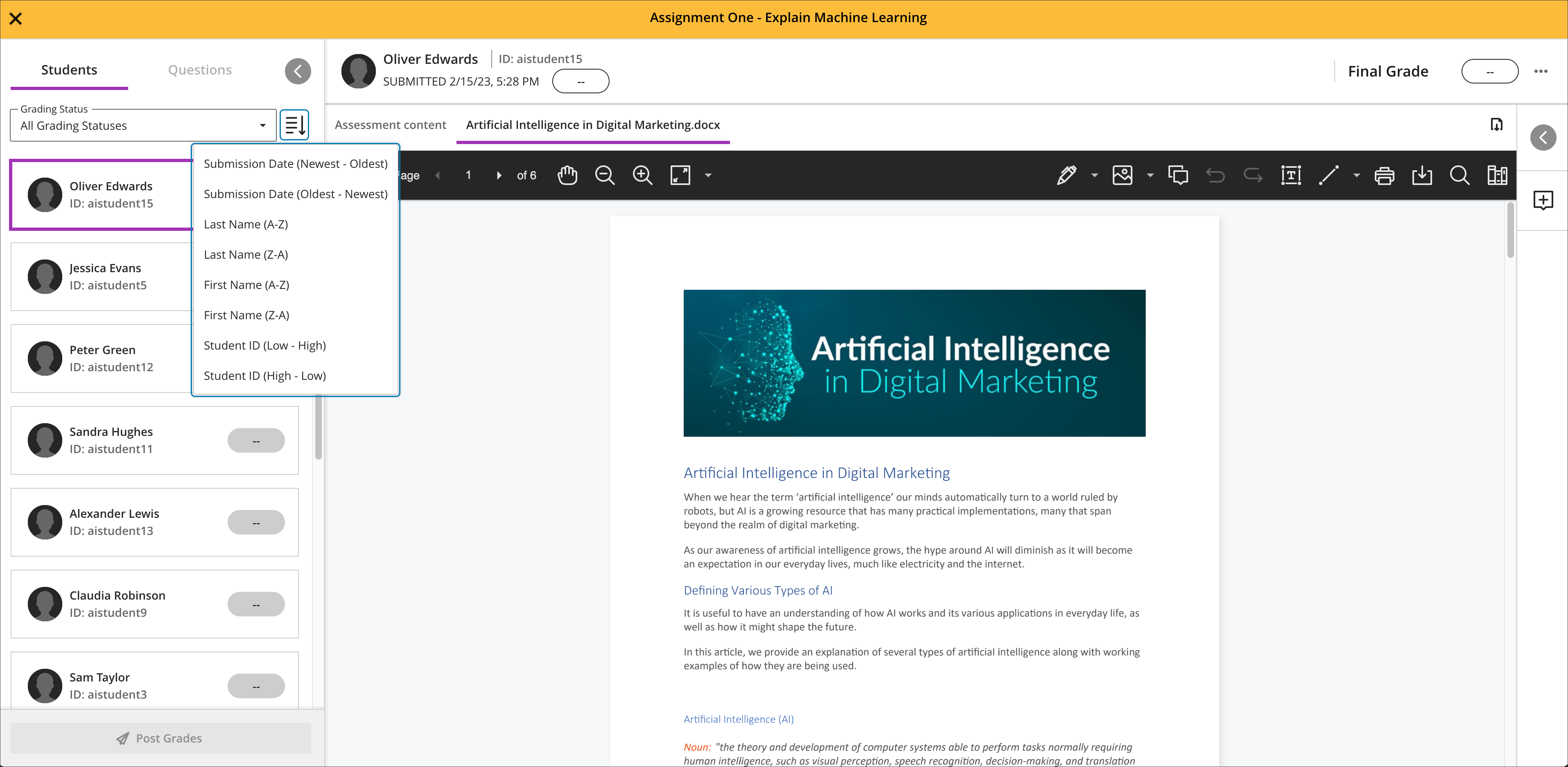
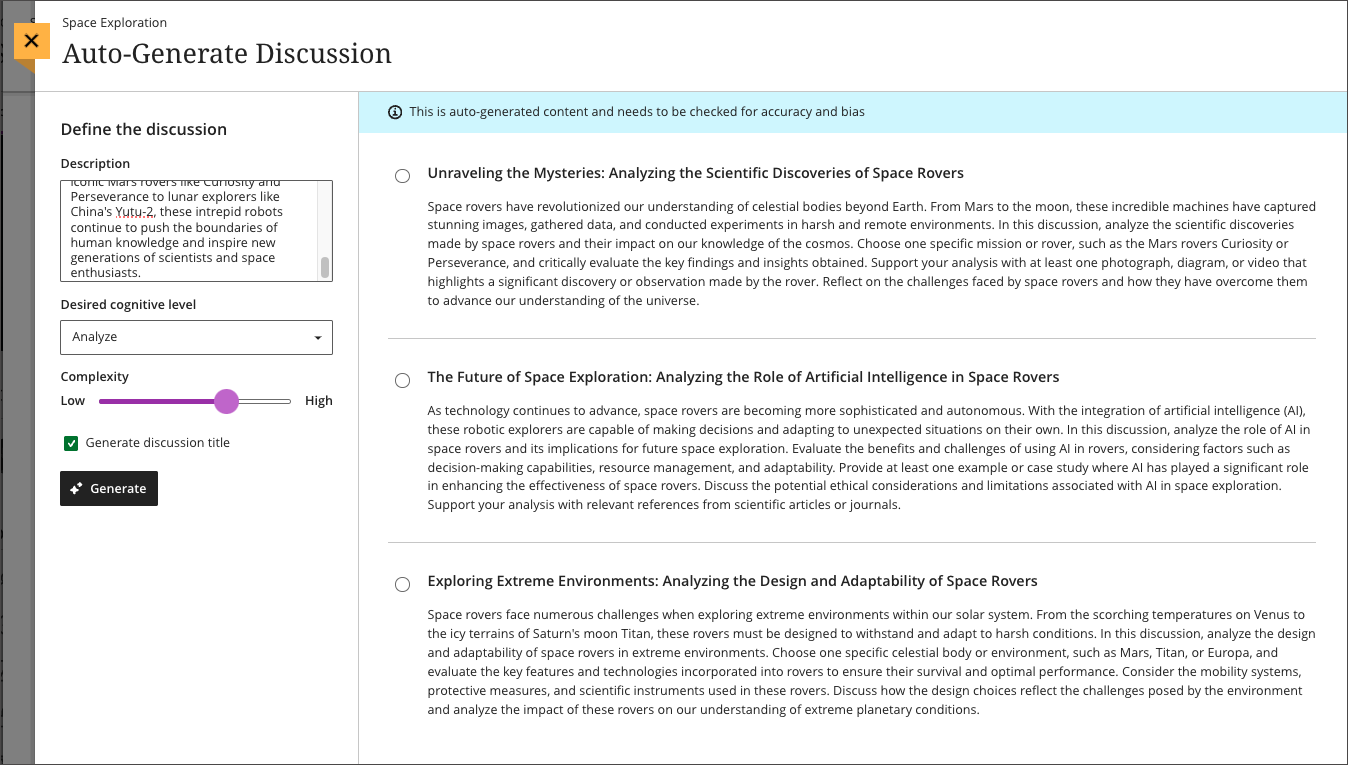
    <div class="html-content"><div><div><div><div><div><div>As 2023 comes to a close, the December Ultra update brings several features to enhance group functionality and gradebook management. With this update, instructors can <span>assign a unique due date to each group using the exceptions workflow.</span><span> If necessary, instructors can reset the group due date to the default.</span></div><div><span><br></span></div><div><span>Gradebook sorting controls provide easier ways to interact with grade information in an Ultra course. T</span><span>he <a href="https://my3.my.umbc.edu/groups/instructional-technology/posts/134272" rel="nofollow external" class="bo">new Flexible Grading interface</a> also features updated sorting controls for column types, allowing instructors and graders to sort data in ascending and descending order.</span></div><div><span><br></span></div><div><img src="https://help.blackboard.com/sites/default/files/images/2023-11/learn_ultra_instructor_SortingControlsInStudentsAndQuestionsTab_SortingOptionsInFlexibleGrading.png" width="500" alt="Image 1: Sorting assessments in Flexible Grading using the Students tab" style="max-width: 100%; height: auto;"></div><div><div><em>Image 1: Sorting assessments in Flexible Grading using the Students tab</em></div><div><em><br></em></div></div><div><span>Further updates to assessments and grading allow instructors to align goals to questions within a question bank and create expanded rubrics without any limit to the row or column sizes. Question-level goal alignment ensures that assessment items measure the desired learning outcomes. Moreover, larger rubrics allow for </span><span>greater criteria to support assessment and accreditation.</span></div><div><div><span><br></span></div><div><span>Additionally, <a href="https://my3.my.umbc.edu/groups/instructional-technology/posts/134605" rel="nofollow external" class="bo">Ultra's exclusive AI course design assistant tools</a> can generate discussion prompts to incorporate authentic assessment and increase learner engagement. </span>The generation process allows instructors to enter a discussion or journal description, select a desired cognitive process based on Bloom's Taxonomy, set the complexity, and generate a discussion or journal title. <span>The instructor can review the generated prompts and select one to add to the discussion or journal. After adding the prompt, the instructor can edit or further refine the prompt as appropriate. </span><span>The goal of this tool is to encourage students to engage in higher-order thinking, apply their knowledge, justify or challenge their beliefs and ideas, and emulate real-world situations.</span></div><div><br></div><div><img src="https://help.blackboard.com/sites/default/files/images/2023-11/learn_ultra_instructor_AuthenticDiscussionAndJournal%20prompts_InstructorOptions.png" width="500" alt="Image 2: Instructors can describe the discussion, select the desired cognitive process and complexity, and then generate prompts" style="max-width: 100%; height: auto;"></div><div><span>Image 2: </span><em>Instructors can describe the discussion, select the desired cognitive process and complexity, and then generate prompts</em></div><div><br></div></div></div></div></div></div><div><div><div><div><div><span><div><span>Faculty should see the latest updates in Ultra courses around December 7-8 2023. </span><span>The next update to our Ultra test environment will take place on December 12, 2023; release notes are posted to the <a href="https://wiki.umbc.edu/x/LohnB" rel="nofollow external" class="bo">What's New in Ultra</a> that same week. Faculty who are interested in test driving new features before they are released to production should </span><a href="http://my.umbc.edu/go/request-help" rel="nofollow external" class="bo">open an RT ticket</a> to request early access. Please <a href="http://umbc.edu/go/ultra" rel="nofollow external" class="bo">watch the FAQs</a>, including <a href="https://wiki.umbc.edu/x/LohnB" rel="nofollow external" class="bo">the What's New with Ultra page</a>, <span>and myUMBC for additional information about Ultra. </span></div></span></div></div></div></div><div><span><br></span></div></div><div><span><strong>Connect with Instructional Technology</strong></span></div><div><span>As always, if you have any questions about teaching, learning, and technology at UMBC, please consider the following options:</span></div><ul><li><a href="http://www.umbc.edu/faq" rel="nofollow external" class="bo">Check our extensive FAQ collection</a><span> </span></li><ul><li><span><a href="https://wiki.umbc.edu/x/LohnB" rel="nofollow external" class="bo"><span>What's new in Ultra?</span></a><span> </span><span>|</span><span> </span><a href="https://wiki.umbc.edu/x/bwrSAQ" rel="nofollow external" class="bo"><span>Known Issues</span></a><span> </span></span></li></ul><li><span><a href="http://my.umbc.edu/go/request-help" rel="nofollow external" class="bo">Open a ticket via RT</a></span></li><li><span>Follow the </span><a href="http://my.umbc.edu/groups/instructional-technology" rel="nofollow external" class="bo">Instructional Technology</a><span> &amp; </span><a href="http://my.umbc.edu/groups/doit" rel="nofollow external" class="bo">DoIT</a><span> myUMBC groups</span></li><li><a href="http://doit.umbc.edu/itnm/staff/" rel="nofollow external" class="bo">Request a consult</a><span> with <a href="http://doit.umbc.edu/itnm/staff" rel="nofollow external" class="bo">instructional technology staff</a></span></li><li><span><a href="http://pivot.umbc.edu" rel="nofollow external" class="bo">PIVOT</a> | <a href="https://doit.umbc.edu/itnm/academic-continuity/" rel="nofollow external" class="bo">Academic Continuity</a></span><span> </span><span>|</span><span> </span><span><a href="https://fdc.umbc.edu/teaching/keep-on-teaching/" rel="nofollow external" class="bo">Keep On Teaching</a></span><span> </span><span>|</span><span> </span><span><a href="https://doit.umbc.edu/students" rel="nofollow external" class="bo">Student Technology Resources</a></span></li></ul></div><div><div></div></div></div>
]]>
</Body>
<Summary>As 2023 comes to a close, the December Ultra update brings several features to enhance group functionality and gradebook management. With this update, instructors can assign a unique due date to...</Summary>
<Website>https://my3.my.umbc.edu/groups/instructional-technology/posts/137337</Website>
<TrackingUrl>https://beta.my.umbc.edu/api/v0/pixel/news/137337/guest@my.umbc.edu/399185d8da49d9564e0ff4f946e356e2/api/pixel</TrackingUrl>
<Tag>ai</Tag>
<Tag>blackboard</Tag>
<Tag>gradebook</Tag>
<Tag>grading</Tag>
<Tag>ultra-experience</Tag>
<Tag>ultra-update</Tag>
<Tag>unsplash</Tag>
<Group token="instructional-technology">Instructional Technology</Group>
<GroupUrl>https://beta.my.umbc.edu/groups/instructional-technology</GroupUrl>
<AvatarUrl>https://assets2-beta.my.umbc.edu/system/shared/avatars/groups/000/001/164/dec3b026b81ee6d890a8f82f75c94a2e/xsmall.png?1446126703</AvatarUrl>
<AvatarUrl size="original">https://assets1-beta.my.umbc.edu/system/shared/avatars/groups/000/001/164/dec3b026b81ee6d890a8f82f75c94a2e/original.png?1446126703</AvatarUrl>
<AvatarUrl size="xxlarge">https://assets2-beta.my.umbc.edu/system/shared/avatars/groups/000/001/164/dec3b026b81ee6d890a8f82f75c94a2e/xxlarge.png?1446126703</AvatarUrl>
<AvatarUrl size="xlarge">https://assets1-beta.my.umbc.edu/system/shared/avatars/groups/000/001/164/dec3b026b81ee6d890a8f82f75c94a2e/xlarge.png?1446126703</AvatarUrl>
<AvatarUrl size="large">https://assets1-beta.my.umbc.edu/system/shared/avatars/groups/000/001/164/dec3b026b81ee6d890a8f82f75c94a2e/large.png?1446126703</AvatarUrl>
<AvatarUrl size="medium">https://assets4-beta.my.umbc.edu/system/shared/avatars/groups/000/001/164/dec3b026b81ee6d890a8f82f75c94a2e/medium.png?1446126703</AvatarUrl>
<AvatarUrl size="small">https://assets3-beta.my.umbc.edu/system/shared/avatars/groups/000/001/164/dec3b026b81ee6d890a8f82f75c94a2e/small.png?1446126703</AvatarUrl>
<AvatarUrl size="xsmall">https://assets2-beta.my.umbc.edu/system/shared/avatars/groups/000/001/164/dec3b026b81ee6d890a8f82f75c94a2e/xsmall.png?1446126703</AvatarUrl>
<AvatarUrl size="xxsmall">https://assets3-beta.my.umbc.edu/system/shared/avatars/groups/000/001/164/dec3b026b81ee6d890a8f82f75c94a2e/xxsmall.png?1446126703</AvatarUrl>
<Sponsor>Instructional Technology</Sponsor>
<ThumbnailUrl size="xxlarge">https://assets3-beta.my.umbc.edu/system/shared/thumbnails/news/000/137/337/ac70c80d8dfe1625932cf54cba55766e/xxlarge.jpg?1701192788</ThumbnailUrl>
<ThumbnailUrl size="xlarge">https://assets2-beta.my.umbc.edu/system/shared/thumbnails/news/000/137/337/ac70c80d8dfe1625932cf54cba55766e/xlarge.jpg?1701192788</ThumbnailUrl>
<ThumbnailUrl size="large">https://assets2-beta.my.umbc.edu/system/shared/thumbnails/news/000/137/337/ac70c80d8dfe1625932cf54cba55766e/large.jpg?1701192788</ThumbnailUrl>
<ThumbnailUrl size="medium">https://assets4-beta.my.umbc.edu/system/shared/thumbnails/news/000/137/337/ac70c80d8dfe1625932cf54cba55766e/medium.jpg?1701192788</ThumbnailUrl>
<ThumbnailUrl size="small">https://assets1-beta.my.umbc.edu/system/shared/thumbnails/news/000/137/337/ac70c80d8dfe1625932cf54cba55766e/small.jpg?1701192788</ThumbnailUrl>
<ThumbnailUrl size="xsmall">https://assets2-beta.my.umbc.edu/system/shared/thumbnails/news/000/137/337/ac70c80d8dfe1625932cf54cba55766e/xsmall.jpg?1701192788</ThumbnailUrl>
<ThumbnailUrl size="xxsmall">https://assets4-beta.my.umbc.edu/system/shared/thumbnails/news/000/137/337/ac70c80d8dfe1625932cf54cba55766e/xxsmall.jpg?1701192788</ThumbnailUrl>
<PawCount>2</PawCount>
<CommentCount>0</CommentCount>
<CommentsAllowed>true</CommentsAllowed>
<PostedAt>Thu, 30 Nov 2023 14:58:57 -0500</PostedAt>
<EditAt>Thu, 30 Nov 2023 15:00:04 -0500</EditAt>
</NewsItem>

<NewsItem contentIssues="true" id="137364" important="false" status="posted" url="https://beta.my.umbc.edu/groups/training/posts/137364">
<Title>WT/SP2024 Courses Created in Blackboard on November 29, 2023</Title>
<Body>
<![CDATA[
    <div class="html-content"><p>Blackboard course shells for WT2024 and SP2024 <a href="https://wiki.umbc.edu/x/eYHGAw" rel="nofollow external" class="bo">were created</a> on November 29, 2023.</p><p><span>The </span><a href="https://wiki.umbc.edu/x/VIdnB" rel="nofollow external" class="bo"><span>Ultra Course Preview</span></a><span> setting is enabled in WT/SP2024 courses, which allows faculty</span><span> to <a href="https://wiki.umbc.edu/x/VIdnB" rel="nofollow external" class="bo">preview</a> OR <a href="https://wiki.umbc.edu/x/3AKGBQ" rel="nofollow external" class="bo">convert</a> a new Original course to Ultra</span><span>. The recommendation, however, is to create a new course to optimize the design. </span></p><ul><li><span>Please review the </span><a href="https://wiki.umbc.edu/x/LohnB" rel="nofollow external" class="bo">release notes</a><span> for the latest updates as well as</span><span> <a href="https://docs.google.com/spreadsheets/d/1kkG0toIfhmykbbwCeSDd8NopHp19CH7D5rPd95mxji8/edit?usp=sharing" rel="nofollow external" class="bo">feature parity charts</a> --</span><span> <a href="https://doit.umbc.edu/news/?tag=ultra-experience" rel="nofollow external" class="bo">more than 200 new updates</a> were added over the last year!</span><span> </span></li><li><span>Discover <a href="https://my3.my.umbc.edu/groups/instructional-technology/events?mode=upcoming&amp;tag=whats-new" rel="nofollow external" class="bo">What's New in Ultra for </a></span><span><a href="https://my3.my.umbc.edu/groups/instructional-technology/events?mode=upcoming&amp;tag=whats-new" rel="nofollow external" class="bo">Teaching &amp; Learning</a> on December 11 or January 12.</span></li><li><span>Have a question about Ultra? Ask </span><a href="https://wiki.umbc.edu/x/kAU9BQ" rel="nofollow external" class="bo">an Ultra Ambassador</a><span>!</span></li></ul><p><span>Many departments have <a href="https://doit.umbc.edu/news/post/133604/" rel="nofollow external" class="bo">opted into Ultra</a> into Ultra to ensure a consistent approach for their students, which means <a href="https://wiki.umbc.edu/x/_AQ9BQ" rel="nofollow external" class="bo">those courses will start with Ultra</a> by default rather than Original -- please check with your department as this list has grown.</span></p><p><span><span><strong>Note: </strong></span></span></p><ul><li><span>For consistency of instructional technology support, WT/SP2024 c</span><span>ourses created in Blackboard on/after January 1, 2024 will be created in Ultra by default.</span></li><li><span><strong>The <a href="https://doit.umbc.edu/news/post/130227/" rel="nofollow external" class="bo">last day we will support Blackboard Original</a> is December 31, 2024.</strong> </span></li></ul><p><span><strong>Tool Updates</strong></span></p><p><span>Several third-party integrations have planned updates for the end of FA2023. Instructional Technology recommends holding off on adding these tools to your courses until after December 22, 2023. Improvements to the integrations often provide deeper synchronization and support for content, assessment, and grading. These tool updates include:</span></p><ul><li><span>December 21: </span><a href="https://doit.umbc.edu/news/post/137292/" rel="nofollow external" class="bo">Panopto</a><span>, Macmillan, McGraw-Hill, Vista Higher Learning</span></li><li><p><span>January 2: Aktiv, Lumen Learning, WileyPLUS</span></p></li></ul><p><span><strong>Accessibility &amp; AI</strong></span></p><p><span>Plan your accessibility and Universal Design for Learning strategy before students begin working with course materials. Ally, an </span><a href="https://doit.umbc.edu/news/?id=82487" rel="nofollow external" class="bo"><span>accessibility tool</span></a><span>, is enabled in all course shells. Ally automatically scans uploaded and created course content, then performs a series of steps to make that content more accessible. Please review the </span><a href="https://wiki.umbc.edu/x/2IGdB" rel="nofollow external" class="bo"><span>Ally FAQs</span></a><span> for more information about the </span><a href="https://wiki.umbc.edu/x/_YGdB" rel="nofollow external" class="bo"><span>accessibility indicators</span></a><span> on course content and </span><a href="https://wiki.umbc.edu/x/3IGdB" rel="nofollow external" class="bo"><span>alternative formats</span></a><span>, or attend a training session.</span></p><p><span>The </span><a href="https://my3.my.umbc.edu/groups/instructional-technology/posts/134605" rel="nofollow external" class="bo"><span>AI Course Design Assistant Tools</span></a><span> will be available in Ultra courses for WT/SP2024 as of December 13, 2023. These tools are limited to the instructor role in an Ultra course. All capabilities are opt-in and the instructor is always in control of the content generated. Learn more at </span><a href="https://my3.my.umbc.edu/groups/instructional-technology/events?mode=upcoming&amp;tag=ai-course-design-assistant" rel="nofollow external" class="bo"><span>an upcoming preview session, join the Ultra AI Tools workshop</span></a><span> or </span><a href="https://wiki.umbc.edu/x/SICFCw" rel="nofollow external" class="bo"><span>review the documentation</span></a><span>.</span></p><p><span><strong>Online Teaching &amp; Learning</strong></span></p><p><span>For faculty who will be teaching hybrid or online, the instructional technology team would like to share several resources to support online course development and instruction.</span></p><ol><li><span>Choose from our </span><a href="https://pivot.umbc.edu/pivot-solo/" rel="nofollow external" class="bo">PIVOT Solo</a><span> lessons to refresh or enhance your online teaching preparation. Five key topics cover course organization, active learning, community building, assessment, and supporting students. </span></li><li><span>Explore </span><a href="https://umbc.hosted.panopto.com/Panopto/Pages/Sessions/List.aspx#folderID=%2274ac9d58-1779-44c1-92b7-ab6900dfe6e9%22" rel="nofollow external" class="bo">our Panopto folder</a><span> for a wide variety of recorded webinars on various instructional technologies available at UMBC.</span></li><li><span>Learn about </span><a href="https://pivot.umbc.edu/course-design/quality-matters/quality-matters-impact/" rel="nofollow external" class="bo">the Quality Matters Impact program</a><span>, a new initiative to formally recognize courses that meet </span><a href="https://www.qualitymatters.org/" rel="nofollow external" class="bo">Quality Matters standards</a><span> and demonstrate exemplary online/hybrid course design.</span></li></ol><div><strong>About Course Creation</strong></div><div><span><br></span></div><div><span>Bb shells for WT/SP2024 are available for all courses (designated as lecture, lab, field or discussion) listed in the </span><a href="http://my.umbc.edu/go/schedule" rel="nofollow external" class="bo">UMBC Schedule of Classes (SOC)</a><span>, provided that there is an </span><a href="http://www.umbc.edu/blogs/oit-news/archives/2010/08/how_new_employe_1.html" rel="nofollow external" class="bo">instructor of record</a><span> listed. As new course sections and/or instructors are added to the SOC by </span><a href="https://docs.google.com/a/umbc.edu/document/d/1rwm_adJUvAP3cxL-QCrb56n9ql4xrR8FHd9_1Cw0vJI/edit?usp%3Dsharing" rel="nofollow external" class="bo">Department Scheduling Coordinators</a><span>, corresponding Bb shells are automatically generated overnight. </span></div><ul><li>If you are an instructor, and your name is not associated with the course you are teaching in the <a href="http://my.umbc.edu/go/schedule" rel="nofollow external" class="bo">SOC</a>, please see your <a href="https://docs.google.com/a/umbc.edu/document/d/1rwm_adJUvAP3cxL-QCrb56n9ql4xrR8FHd9_1Cw0vJI/edit?usp%3Dsharing" rel="nofollow external" class="bo">Departmental Scheduling Coordinator</a> to resolve the issue. Once you are listed in the <a href="https://my.umbc.edu/go/schedule" rel="nofollow external" class="bo">SOC</a>, your Bb course shell will be created automatically. </li><li>If you and your <a href="https://docs.google.com/a/umbc.edu/document/d/1rwm_adJUvAP3cxL-QCrb56n9ql4xrR8FHd9_1Cw0vJI/edit?usp%3Dsharing" rel="nofollow external" class="bo">Department Scheduling Coordinator</a> believe you are correctly assigned as the instructor of record in the SOC and you do not see your course shell in Blackboard, please submit a Request Tracker (RT) ticket via <a href="https://my.umbc.edu/help" rel="nofollow external" class="bo">my.umbc.edu/help</a>.</li><li>If you need a Bb shell for a research or independent study course, please submit a <a href="http://www.umbc.edu/doit/blackboard/requestbbshell.html" rel="nofollow external" class="bo">new course request</a>.</li></ul><p><strong>Split/Merge Requests:</strong> Instructors who teach multiple sections of the same course will find those enrollments merged into one Bb course shell. These sections may be split upon <a href="https://my.umbc.edu/go/request-help" rel="nofollow external" class="bo">request by an RT ticket</a>, which we recommend <a href="https://wiki.umbc.edu/x/d4HGAw" rel="nofollow external" class="bo">submitting at least one week</a> before the semester starts, if not as soon as courses are created in Blackboard.</p><p>Student enrollment in Bb mirrors the official registration in SA and updates hourly. However, courses are not accessible to students by default until the instructor of record <a href="https://wiki.umbc.edu/pages/viewpage.action?pageId%3D1867862" rel="nofollow external" class="bo">makes them available</a>.</p><p><strong>Connect with Instructional Technology</strong></p><div><span>As always, if you have any questions about teaching, learning, and technology at UMBC, please consider the following options:</span></div><div><ul><li><span><a href="http://pivot.umbc.edu" rel="nofollow external" class="bo">PIVOT</a> | <a href="https://doit.umbc.edu/itnm/academic-continuity/" rel="nofollow external" class="bo">Academic Continuity</a></span><span> </span><span>|</span><span> </span><span><a href="https://fdc.umbc.edu/teaching/keep-on-teaching/" rel="nofollow external" class="bo">Keep On Teaching</a></span><span> </span><span>|</span><span> </span><span><a href="https://doit.umbc.edu/students" rel="nofollow external" class="bo">Student Technology Resources</a></span></li><li><a href="http://www.umbc.edu/faq" rel="nofollow external" class="bo">Check our extensive FAQ collection</a><span> </span></li><ul><li><span><a href="https://wiki.umbc.edu/x/LohnB" rel="nofollow external" class="bo"><span>What's new in Ultra?</span></a><span> </span><span>|</span><span> </span><a href="https://wiki.umbc.edu/x/bwrSAQ" rel="nofollow external" class="bo"><span>Known Issues</span></a><span> </span></span></li></ul><li><span><a href="http://my.umbc.edu/go/request-help" rel="nofollow external" class="bo">Open a ticket via RT</a></span></li><li><span>Follow the </span><a href="http://my.umbc.edu/groups/instructional-technology" rel="nofollow external" class="bo">Instructional Technology</a><span> &amp; </span><a href="http://my.umbc.edu/groups/doit" rel="nofollow external" class="bo">DoIT</a><span> myUMBC groups</span></li><li><a href="http://doit.umbc.edu/itnm/staff/" rel="nofollow external" class="bo">Request a consult</a><span> with <a href="http://doit.umbc.edu/itnm/staff" rel="nofollow external" class="bo">instructional technology staff</a></span></li></ul></div></div>
]]>
</Body>
<Summary>Blackboard course shells for WT2024 and SP2024 were created on November 29, 2023.  The Ultra Course Preview setting is enabled in WT/SP2024 courses, which allows faculty to preview OR convert a...</Summary>
<Website>https://my3.my.umbc.edu/groups/instructional-technology/posts/137364</Website>
<TrackingUrl>https://beta.my.umbc.edu/api/v0/pixel/news/137364/guest@my.umbc.edu/04153a29b8601c7ad6d0012ecbbd7dec/api/pixel</TrackingUrl>
<Tag>blackboard</Tag>
<Tag>course-creation</Tag>
<Tag>fa2023</Tag>
<Tag>fall</Tag>
<Tag>ultra-course-preview</Tag>
<Group token="instructional-technology">Instructional Technology</Group>
<GroupUrl>https://beta.my.umbc.edu/groups/instructional-technology</GroupUrl>
<AvatarUrl>https://assets2-beta.my.umbc.edu/system/shared/avatars/groups/000/001/164/dec3b026b81ee6d890a8f82f75c94a2e/xsmall.png?1446126703</AvatarUrl>
<AvatarUrl size="original">https://assets1-beta.my.umbc.edu/system/shared/avatars/groups/000/001/164/dec3b026b81ee6d890a8f82f75c94a2e/original.png?1446126703</AvatarUrl>
<AvatarUrl size="xxlarge">https://assets2-beta.my.umbc.edu/system/shared/avatars/groups/000/001/164/dec3b026b81ee6d890a8f82f75c94a2e/xxlarge.png?1446126703</AvatarUrl>
<AvatarUrl size="xlarge">https://assets1-beta.my.umbc.edu/system/shared/avatars/groups/000/001/164/dec3b026b81ee6d890a8f82f75c94a2e/xlarge.png?1446126703</AvatarUrl>
<AvatarUrl size="large">https://assets1-beta.my.umbc.edu/system/shared/avatars/groups/000/001/164/dec3b026b81ee6d890a8f82f75c94a2e/large.png?1446126703</AvatarUrl>
<AvatarUrl size="medium">https://assets4-beta.my.umbc.edu/system/shared/avatars/groups/000/001/164/dec3b026b81ee6d890a8f82f75c94a2e/medium.png?1446126703</AvatarUrl>
<AvatarUrl size="small">https://assets3-beta.my.umbc.edu/system/shared/avatars/groups/000/001/164/dec3b026b81ee6d890a8f82f75c94a2e/small.png?1446126703</AvatarUrl>
<AvatarUrl size="xsmall">https://assets2-beta.my.umbc.edu/system/shared/avatars/groups/000/001/164/dec3b026b81ee6d890a8f82f75c94a2e/xsmall.png?1446126703</AvatarUrl>
<AvatarUrl size="xxsmall">https://assets3-beta.my.umbc.edu/system/shared/avatars/groups/000/001/164/dec3b026b81ee6d890a8f82f75c94a2e/xxsmall.png?1446126703</AvatarUrl>
<Sponsor>Instructional Technology</Sponsor>
<ThumbnailUrl size="xxlarge">https://assets1-beta.my.umbc.edu/system/shared/thumbnails/news/000/137/364/e1c2c517c50cbacc6f0520207ae9cbe8/xxlarge.jpg?1701280052</ThumbnailUrl>
<ThumbnailUrl size="xlarge">https://assets4-beta.my.umbc.edu/system/shared/thumbnails/news/000/137/364/e1c2c517c50cbacc6f0520207ae9cbe8/xlarge.jpg?1701280052</ThumbnailUrl>
<ThumbnailUrl size="large">https://assets3-beta.my.umbc.edu/system/shared/thumbnails/news/000/137/364/e1c2c517c50cbacc6f0520207ae9cbe8/large.jpg?1701280052</ThumbnailUrl>
<ThumbnailUrl size="medium">https://assets1-beta.my.umbc.edu/system/shared/thumbnails/news/000/137/364/e1c2c517c50cbacc6f0520207ae9cbe8/medium.jpg?1701280052</ThumbnailUrl>
<ThumbnailUrl size="small">https://assets3-beta.my.umbc.edu/system/shared/thumbnails/news/000/137/364/e1c2c517c50cbacc6f0520207ae9cbe8/small.jpg?1701280052</ThumbnailUrl>
<ThumbnailUrl size="xsmall">https://assets4-beta.my.umbc.edu/system/shared/thumbnails/news/000/137/364/e1c2c517c50cbacc6f0520207ae9cbe8/xsmall.jpg?1701280052</ThumbnailUrl>
<ThumbnailUrl size="xxsmall">https://assets4-beta.my.umbc.edu/system/shared/thumbnails/news/000/137/364/e1c2c517c50cbacc6f0520207ae9cbe8/xxsmall.jpg?1701280052</ThumbnailUrl>
<PawCount>3</PawCount>
<CommentCount>0</CommentCount>
<CommentsAllowed>true</CommentsAllowed>
<PostedAt>Thu, 30 Nov 2023 09:08:34 -0500</PostedAt>
</NewsItem>

<NewsItem contentIssues="true" id="136980" important="false" status="posted" url="https://beta.my.umbc.edu/groups/training/posts/136980">
<Title>Unlock collaborative learning with cloud tools in Blackboard</Title>
<Tagline>Discover Google Workspace and Microsoft OneDrive</Tagline>
<Body>
<![CDATA[
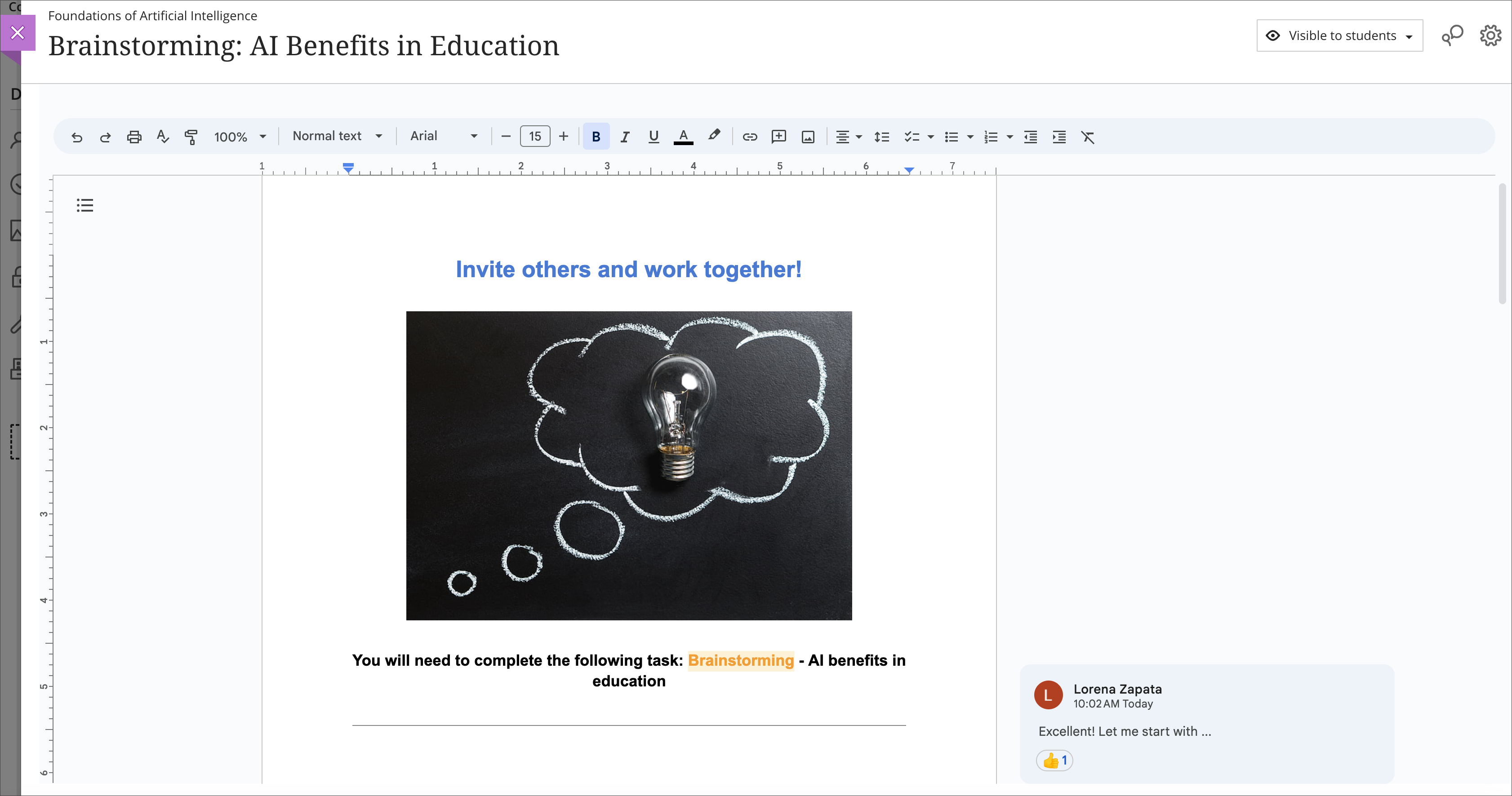
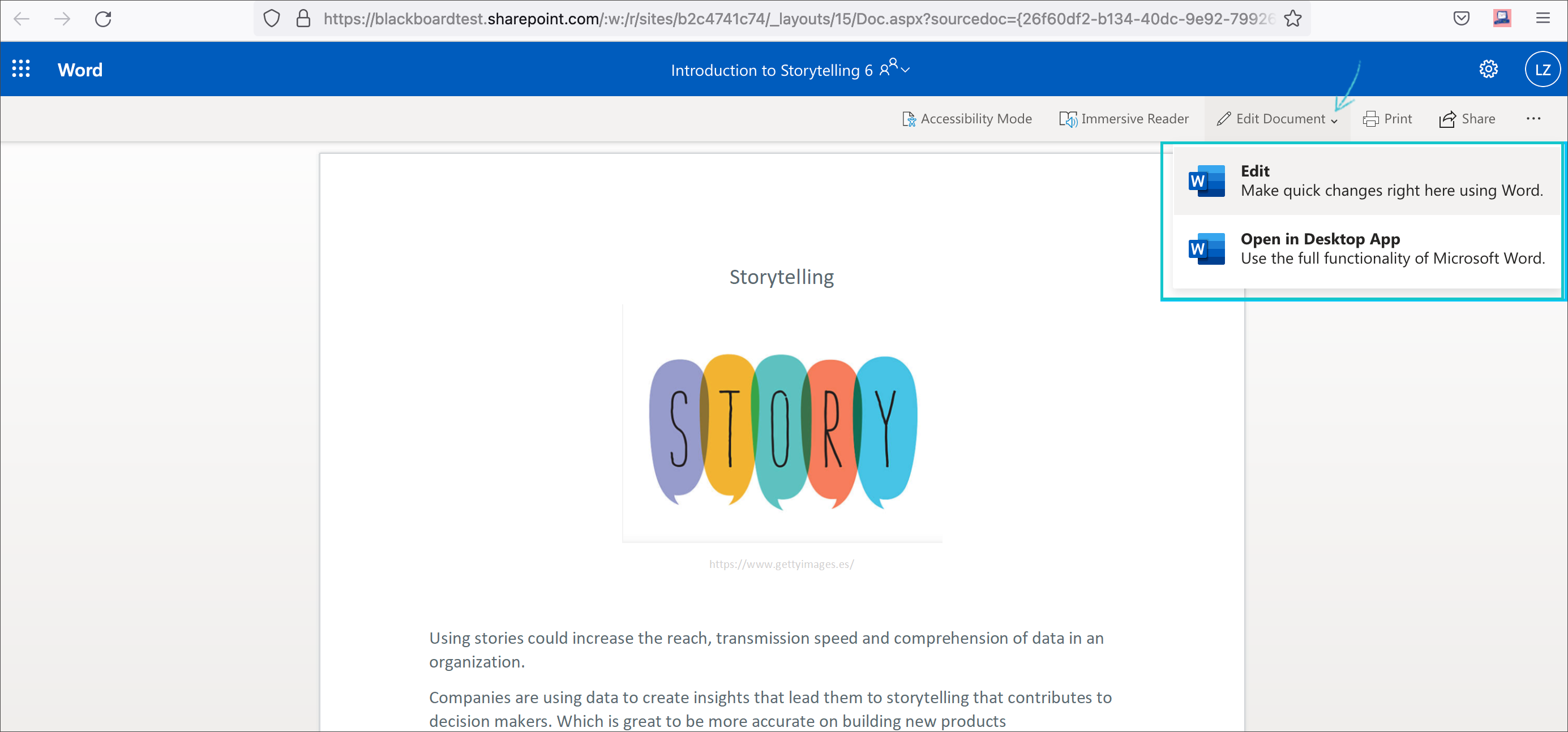
    <div class="html-content"><span><p><span>Cloud resources can transform a course design with streamlined document display and reduce storage footprint. Two new integrations from Google Workspace and Microsoft OneDrive offer cloud-based file management for Ultra courses. These tools allow faculty to select existing files, such as a syllabus or course schedule, and embed them seamlessly into a course for students to view. Customized privileges ensure only the document owner can modify the file within the framework of the course or the cloud drive while keeping the learner's access restricted to read-only.</span></p><p><span>Additionally, these tools support student collaboration, allowing for dynamic exchange of ideas, peer learning, co-authorship, and presentation planning. Creating a collaborative document in Google or Microsoft provides an exciting opportunity for faculty to support student teamwork in a shared environment directly embedded in the Ultra course space. Leverage these tools with students for real-time writing and editing, brainstorming, project planning, and other collaborative experiences.</span></p><p><span><strong>Learn more about using Google Workspace</strong> (Docs, Slides, Sheets)</span></p><ul><li><p><a href="https://help.blackboard.com/Learn/Instructor/Ultra/Course_Content/Create_Content/Cloud_Document/Google_Workspace#link_Google_document" rel="nofollow external" class="bo"><span>Embed a read-only Google document</span></a></p></li><li><p><a href="https://help.blackboard.com/Learn/Instructor/Ultra/Course_Content/Create_Content/Cloud_Document/Google_Workspace#create_Google_collaborative_document" rel="nofollow external" class="bo"><span>Create a Google collaborative document</span></a></p></li></ul><p><span><img src="https://help.blackboard.com/sites/default/files/images/2023-08/learn_ultra_instructor_GoogleWorkspace_EmbeddedCollabDoc.png" width="500" alt="Image 1: Example of an embedded Google collaborative document for students" style="max-width: 100%; height: auto;"></span></p><p><span><em>Image 1: Example of an embedded Google collaborative document for students</em></span></p><p><span><strong>Learn more about using Microsoft OneDrive</strong> (Word, PowerPoint, Excel)</span></p><ul><li><p><a href="https://help.blackboard.com/Learn/Instructor/Ultra/Course_Content/Create_Content/Create_Course_Materials/Open_Files_From_OneDrive#open_file" rel="nofollow external" class="bo"><span>Create embedded Microsoft cloud document</span></a></p></li><li><p><span><a href="https://help.blackboard.com/Learn/Instructor/Ultra/Course_Content/Create_Content/Create_Course_Materials/Open_Files_From_OneDrive#create_file" rel="nofollow external" class="bo">Create a Microsoft cloud collaboration</a></span></p></li></ul><p><span><img src="https://help.blackboard.com/sites/default/files/images/2022-02/learn_ultra_instructor_AddFile_OpenFromOneDrive_5.png" width="500" alt="Image 2: Example of an embedded Microsoft Word document for students to read only" style="max-width: 100%; height: auto;"></span></p><p><span><em>Image 2: Example of an embedded Microsoft Word document for students to read only</em></span></p><p><span>Both Google Workspace and Microsoft OneDrive are available now. Faculty can learn more about these tools at <a href="https://my3.my.umbc.edu/groups/instructional-technology/events/123991" rel="nofollow external" class="bo">an upcoming webinar on January 9, 2024</a>.</span></p><h5><strong>Connect with Instructional Technology</strong></h5><div>As always, if you have any questions about teaching, learning, and technology at UMBC, please consider the following options:</div><ul><li><a href="http://www.umbc.edu/faq" rel="nofollow external" class="bo">Check our extensive FAQ collection</a> </li><ul><li><a href="https://wiki.umbc.edu/x/LohnB" rel="nofollow external" class="bo">What's new in Ultra?</a> | <a href="https://wiki.umbc.edu/x/bwrSAQ" rel="nofollow external" class="bo">Known Issues</a> </li></ul><li><a href="http://umbc.edu/go/bbsupport" rel="nofollow external" class="bo">Open a ticket via RT</a></li><li>Follow the <a href="http://my.umbc.edu/groups/instructional-technology" rel="nofollow external" class="bo">Instructional Technology</a> &amp; <a href="http://my.umbc.edu/groups/doit" rel="nofollow external" class="bo">DoIT</a> myUMBC groups</li><li><a href="http://umbc.edu/go/bbsupport" rel="nofollow external" class="bo">Request a consult</a> with <a href="http://doit.umbc.edu/itnm/staff" rel="nofollow external" class="bo">instructional technology staff</a></li><li><a href="http://pivot.umbc.edu/" rel="nofollow external" class="bo">PIVOT</a> | <a href="https://doit.umbc.edu/itnm/academic-continuity/" rel="nofollow external" class="bo">Academic Continuity</a> | <a href="https://fdc.umbc.edu/teaching/keep-on-teaching/" rel="nofollow external" class="bo">Keep On Teaching</a> | <a href="https://doit.umbc.edu/students" rel="nofollow external" class="bo">Student Technology Resources</a></li></ul><p></p><p><span><em>UMBC is committed to providing a consistent learning experience for everyone. The last day we will support Blackboard Original is December 31, 2024. Please check out our training and support: <a href="https://umbc.edu/go/ultra" rel="nofollow external" class="bo">https://umbc.edu/go/ultra</a>.</em></span></p></span></div>
]]>
</Body>
<Summary>Cloud resources can transform a course design with streamlined document display and reduce storage footprint. Two new integrations from Google Workspace and Microsoft OneDrive offer cloud-based...</Summary>
<Website>https://my3.my.umbc.edu/groups/instructional-technology/posts/136980</Website>
<TrackingUrl>https://beta.my.umbc.edu/api/v0/pixel/news/136980/guest@my.umbc.edu/974acebe5a361d0883d8400183637bac/api/pixel</TrackingUrl>
<Tag>blackboard</Tag>
<Tag>cloud-collaboration</Tag>
<Tag>cloud-storage</Tag>
<Tag>engagement</Tag>
<Tag>google</Tag>
<Tag>groups</Tag>
<Tag>microsoft</Tag>
<Tag>one-drive</Tag>
<Tag>online-learning</Tag>
<Tag>ultra</Tag>
<Group token="instructional-technology">Instructional Technology</Group>
<GroupUrl>https://beta.my.umbc.edu/groups/instructional-technology</GroupUrl>
<AvatarUrl>https://assets2-beta.my.umbc.edu/system/shared/avatars/groups/000/001/164/dec3b026b81ee6d890a8f82f75c94a2e/xsmall.png?1446126703</AvatarUrl>
<AvatarUrl size="original">https://assets1-beta.my.umbc.edu/system/shared/avatars/groups/000/001/164/dec3b026b81ee6d890a8f82f75c94a2e/original.png?1446126703</AvatarUrl>
<AvatarUrl size="xxlarge">https://assets2-beta.my.umbc.edu/system/shared/avatars/groups/000/001/164/dec3b026b81ee6d890a8f82f75c94a2e/xxlarge.png?1446126703</AvatarUrl>
<AvatarUrl size="xlarge">https://assets1-beta.my.umbc.edu/system/shared/avatars/groups/000/001/164/dec3b026b81ee6d890a8f82f75c94a2e/xlarge.png?1446126703</AvatarUrl>
<AvatarUrl size="large">https://assets1-beta.my.umbc.edu/system/shared/avatars/groups/000/001/164/dec3b026b81ee6d890a8f82f75c94a2e/large.png?1446126703</AvatarUrl>
<AvatarUrl size="medium">https://assets4-beta.my.umbc.edu/system/shared/avatars/groups/000/001/164/dec3b026b81ee6d890a8f82f75c94a2e/medium.png?1446126703</AvatarUrl>
<AvatarUrl size="small">https://assets3-beta.my.umbc.edu/system/shared/avatars/groups/000/001/164/dec3b026b81ee6d890a8f82f75c94a2e/small.png?1446126703</AvatarUrl>
<AvatarUrl size="xsmall">https://assets2-beta.my.umbc.edu/system/shared/avatars/groups/000/001/164/dec3b026b81ee6d890a8f82f75c94a2e/xsmall.png?1446126703</AvatarUrl>
<AvatarUrl size="xxsmall">https://assets3-beta.my.umbc.edu/system/shared/avatars/groups/000/001/164/dec3b026b81ee6d890a8f82f75c94a2e/xxsmall.png?1446126703</AvatarUrl>
<Sponsor>Instructional Technology</Sponsor>
<ThumbnailUrl size="xxlarge">https://assets2-beta.my.umbc.edu/system/shared/thumbnails/news/000/136/980/61c10de9e6bdc7965c908b02b14ada96/xxlarge.jpg?1699624920</ThumbnailUrl>
<ThumbnailUrl size="xlarge">https://assets3-beta.my.umbc.edu/system/shared/thumbnails/news/000/136/980/61c10de9e6bdc7965c908b02b14ada96/xlarge.jpg?1699624920</ThumbnailUrl>
<ThumbnailUrl size="large">https://assets2-beta.my.umbc.edu/system/shared/thumbnails/news/000/136/980/61c10de9e6bdc7965c908b02b14ada96/large.jpg?1699624920</ThumbnailUrl>
<ThumbnailUrl size="medium">https://assets3-beta.my.umbc.edu/system/shared/thumbnails/news/000/136/980/61c10de9e6bdc7965c908b02b14ada96/medium.jpg?1699624920</ThumbnailUrl>
<ThumbnailUrl size="small">https://assets1-beta.my.umbc.edu/system/shared/thumbnails/news/000/136/980/61c10de9e6bdc7965c908b02b14ada96/small.jpg?1699624920</ThumbnailUrl>
<ThumbnailUrl size="xsmall">https://assets4-beta.my.umbc.edu/system/shared/thumbnails/news/000/136/980/61c10de9e6bdc7965c908b02b14ada96/xsmall.jpg?1699624920</ThumbnailUrl>
<ThumbnailUrl size="xxsmall">https://assets2-beta.my.umbc.edu/system/shared/thumbnails/news/000/136/980/61c10de9e6bdc7965c908b02b14ada96/xxsmall.jpg?1699624920</ThumbnailUrl>
<PawCount>6</PawCount>
<CommentCount>0</CommentCount>
<CommentsAllowed>true</CommentsAllowed>
<PostedAt>Tue, 28 Nov 2023 12:10:44 -0500</PostedAt>
</NewsItem>

<NewsItem contentIssues="true" id="137292" important="false" status="posted" url="https://beta.my.umbc.edu/groups/training/posts/137292">
<Title>Panopto Blackboard Integration Updates in December</Title>
<Tagline>Instructors are encouraged to copy courses after update</Tagline>
<Body>
<![CDATA[
    <div class="html-content"><span><p><span>Panopto tool integrations in Blackboard will be updated in late December, as Blackboard support is ending for the current tool integrations.</span></p><p><span>On December 21st, existing Panopto links in Original and Ultra courses will be migrated to the new Panopto LTI 1.3 integration. We do not expect any system downtime or loss of access to Panopto content with this update.</span></p><br><h4><span>Spring Courses</span></h4><p><span>***For instructors and students to benefit from the updated tool integration, we recommend that instructors wait to copy Panopto content to their spring courses until this update is completed by 5pm on 12/22.***</span></p><p><span>Upgraded functionality with LTI 1.3 includes the following features:</span></p><h5><span>Panopto Quiz </span><span>Grading</span><span> </span></h5><p><span>With LTI 1.3, instructors will now be able to select between two grading methods for Panopto quizzes, grading on % viewed or grading on quiz results.</span></p><p><span><span><img src="https://lh7-us.googleusercontent.com/viDU0UC6Lg9SwJht1D3xjiSCmqqcCOZtFr0k_MP8y5LWcAIkKU-90BuMYrjX6HE1nyrvB5l1AUJW_7A3fxQBrdoDbDaBoqQ7fr5IDK7voB26U-LKIR3VWsjzhTjmDNj5m1NUgxgHwDwyEC2TNFLuEmE" width="399" height="205" style="max-width: 100%; height: auto;"></span></span></p><p><em><span>Image 1: After selecting the Panopto Quiz tool and the desired Panopto video in Blackboard, instructors will be prompted to </span><span>select the grading method for the quiz. </span></em></p><h5><span>Course Copy Enhancements</span></h5><p><span>Instructors will now have more flexibility in copying videos between courses. </span><span>The new Panopto copy process allows instructors to customize video settings and maintain separate data for videos in each course. </span></p><h4><span><br></span></h4><h4><span>Connect with Instructional Technology</span></h4><p><span>As always, if you have any questions about teaching, learning, and technology at UMBC, please consider the following options:</span></p><ul><li><p><a href="http://www.umbc.edu/faq" rel="nofollow external" class="bo"><span>Check our extensive FAQ collection</span></a><span> </span></p></li><ul><li><p><a href="https://wiki.umbc.edu/x/LohnB" rel="nofollow external" class="bo"><span>What's new in Ultra?</span></a><span> | </span><a href="https://wiki.umbc.edu/x/bwrSAQ" rel="nofollow external" class="bo"><span>Known Issues</span></a><span> </span></p></li></ul><li><p><a href="http://umbc.edu/go/bbsupport" rel="nofollow external" class="bo"><span>Open a ticket via RT</span></a></p></li><li><p><span>Follow the </span><a href="http://my.umbc.edu/groups/instructional-technology" rel="nofollow external" class="bo"><span>Instructional Technology</span></a><span> &amp; </span><a href="http://my.umbc.edu/groups/doit" rel="nofollow external" class="bo"><span>DoIT</span></a><span> myUMBC groups</span></p></li><li><p><a href="http://umbc.edu/go/bbsupport" rel="nofollow external" class="bo"><span>Request a consult</span></a><span> with </span><a href="http://doit.umbc.edu/itnm/staff" rel="nofollow external" class="bo"><span>instructional technology staff</span></a></p></li><li><p><a href="http://pivot.umbc.edu/" rel="nofollow external" class="bo"><span>PIVOT</span></a><span> | </span><a href="https://doit.umbc.edu/itnm/academic-continuity/" rel="nofollow external" class="bo"><span>Academic Continuity</span></a><span> | </span><a href="https://fdc.umbc.edu/teaching/keep-on-teaching/" rel="nofollow external" class="bo"><span>Keep On Teaching</span></a><span> | </span><a href="https://doit.umbc.edu/students" rel="nofollow external" class="bo"><span>Student Technology Resources</span></a></p></li></ul><p><span>UMBC is committed to providing a consistent learning experience for everyone. The last day we will support Blackboard Original is December 31, 2024. Please check out our training and support: </span><a href="https://umbc.edu/go/ultra" rel="nofollow external" class="bo"><span>https://umbc.edu/go/ultra</span></a><span>.</span></p><div><span><br></span></div></span></div>
]]>
</Body>
<Summary>Panopto tool integrations in Blackboard will be updated in late December, as Blackboard support is ending for the current tool integrations.  On December 21st, existing Panopto links in Original...</Summary>
<Website>https://doit.umbc.edu/post/137292</Website>
<TrackingUrl>https://beta.my.umbc.edu/api/v0/pixel/news/137292/guest@my.umbc.edu/87fb25ff5f9cb2d57b388821edc6bdd2/api/pixel</TrackingUrl>
<Tag>lti</Tag>
<Tag>panopto</Tag>
<Tag>screencasting</Tag>
<Tag>storage</Tag>
<Tag>video</Tag>
<Group token="instructional-technology">Instructional Technology</Group>
<GroupUrl>https://beta.my.umbc.edu/groups/instructional-technology</GroupUrl>
<AvatarUrl>https://assets2-beta.my.umbc.edu/system/shared/avatars/groups/000/001/164/dec3b026b81ee6d890a8f82f75c94a2e/xsmall.png?1446126703</AvatarUrl>
<AvatarUrl size="original">https://assets1-beta.my.umbc.edu/system/shared/avatars/groups/000/001/164/dec3b026b81ee6d890a8f82f75c94a2e/original.png?1446126703</AvatarUrl>
<AvatarUrl size="xxlarge">https://assets2-beta.my.umbc.edu/system/shared/avatars/groups/000/001/164/dec3b026b81ee6d890a8f82f75c94a2e/xxlarge.png?1446126703</AvatarUrl>
<AvatarUrl size="xlarge">https://assets1-beta.my.umbc.edu/system/shared/avatars/groups/000/001/164/dec3b026b81ee6d890a8f82f75c94a2e/xlarge.png?1446126703</AvatarUrl>
<AvatarUrl size="large">https://assets1-beta.my.umbc.edu/system/shared/avatars/groups/000/001/164/dec3b026b81ee6d890a8f82f75c94a2e/large.png?1446126703</AvatarUrl>
<AvatarUrl size="medium">https://assets4-beta.my.umbc.edu/system/shared/avatars/groups/000/001/164/dec3b026b81ee6d890a8f82f75c94a2e/medium.png?1446126703</AvatarUrl>
<AvatarUrl size="small">https://assets3-beta.my.umbc.edu/system/shared/avatars/groups/000/001/164/dec3b026b81ee6d890a8f82f75c94a2e/small.png?1446126703</AvatarUrl>
<AvatarUrl size="xsmall">https://assets2-beta.my.umbc.edu/system/shared/avatars/groups/000/001/164/dec3b026b81ee6d890a8f82f75c94a2e/xsmall.png?1446126703</AvatarUrl>
<AvatarUrl size="xxsmall">https://assets3-beta.my.umbc.edu/system/shared/avatars/groups/000/001/164/dec3b026b81ee6d890a8f82f75c94a2e/xxsmall.png?1446126703</AvatarUrl>
<Sponsor>Instructional Technology</Sponsor>
<ThumbnailUrl size="xxlarge">https://assets4-beta.my.umbc.edu/system/shared/thumbnails/news/000/137/292/17eb3579a3e9ae366750117d495662c1/xxlarge.jpg?1701093598</ThumbnailUrl>
<ThumbnailUrl size="xlarge">https://assets1-beta.my.umbc.edu/system/shared/thumbnails/news/000/137/292/17eb3579a3e9ae366750117d495662c1/xlarge.jpg?1701093598</ThumbnailUrl>
<ThumbnailUrl size="large">https://assets3-beta.my.umbc.edu/system/shared/thumbnails/news/000/137/292/17eb3579a3e9ae366750117d495662c1/large.jpg?1701093598</ThumbnailUrl>
<ThumbnailUrl size="medium">https://assets4-beta.my.umbc.edu/system/shared/thumbnails/news/000/137/292/17eb3579a3e9ae366750117d495662c1/medium.jpg?1701093598</ThumbnailUrl>
<ThumbnailUrl size="small">https://assets3-beta.my.umbc.edu/system/shared/thumbnails/news/000/137/292/17eb3579a3e9ae366750117d495662c1/small.jpg?1701093598</ThumbnailUrl>
<ThumbnailUrl size="xsmall">https://assets2-beta.my.umbc.edu/system/shared/thumbnails/news/000/137/292/17eb3579a3e9ae366750117d495662c1/xsmall.jpg?1701093598</ThumbnailUrl>
<ThumbnailUrl size="xxsmall">https://assets1-beta.my.umbc.edu/system/shared/thumbnails/news/000/137/292/17eb3579a3e9ae366750117d495662c1/xxsmall.jpg?1701093598</ThumbnailUrl>
<PawCount>4</PawCount>
<CommentCount>0</CommentCount>
<CommentsAllowed>true</CommentsAllowed>
<PostedAt>Mon, 27 Nov 2023 09:05:00 -0500</PostedAt>
<EditAt>Thu, 21 Dec 2023 09:29:39 -0500</EditAt>
</NewsItem>

</News>