<?xml version="1.0"?>
<News hasArchived="false" page="24" pageCount="91" pageSize="10" timestamp="Mon, 20 Apr 2026 15:27:45 -0400" url="https://beta.my.umbc.edu/groups/training/posts.xml?page=24">
<NewsItem contentIssues="true" id="134842" important="false" status="posted" url="https://beta.my.umbc.edu/groups/training/posts/134842">
<Title>Mastering Blackboard Ultra Gradebook &amp; New Flexible Grading</Title>
<Tagline>Best Practices to Prep Your Ultra Gradebook for the Semester</Tagline>
<Body>
<![CDATA[
    <div class="html-content"><span><p><span>Allocating time to configure the Ultra gradebook before the semester starts can support efficient grading throughout the semester. In the recent </span><a href="https://my3.my.umbc.edu/groups/instructional-technology/events/118715" rel="nofollow external" class="bo"><span>Gradebook Hacks: 5 Tips to Prep for the Semester session</span></a><span>, we explored best practices for instructors to optimize their online gradebook setup. A recap of the best practices and related Blackboard Ultra features to support your assessment and grading practices is shared below. </span></p></span><span><h5><span><strong>Define Overall Grade Calculation</strong></span></h5><p><span>Select an <a href="https://wiki.umbc.edu/x/rokMBQ" rel="nofollow external" class="bo">overall grade calculation</a> that aligns with the course objectives and stated grading policy. Instructors may select from points-based, weighted, or advanced overall grade calculations.</span></p></span><ul><li><span>Points-based calculations display students' grades based on points earned out of points possible. This calculation can be represented as a running total throughout the semester.</span></li><li><span>Weighted grading assigns different percentages to various categories such as assignments and tests, to individual items, or a combination of the two. </span></li><li><span>Advanced calculations allow instructors to create custom formulas and calculations.</span></li></ul><span><p><span>Overall grade calculations also support rules such as dropping the lowest or highest grades from a particular category.</span></p></span><span><h5><span><strong>Customize Grading Schemas</strong></span></h5><p><span>Grading schemas provide transparency and help students understand how their performance will be evaluated. The gradebook supports up to 100 unique schemas, which can be customized in the <a href="https://wiki.umbc.edu/x/k4IMBQ" rel="nofollow external" class="bo">Gradebook settings</a>. Instructors may select from existing schemas such as Letter, Percent, Complete/Incomplete,  or use custom schemas as they configure the settings for each assessment.</span></p></span><span><h5><span><strong>Organize the Gradebook with Categories</strong></span></h5><p><span>Organizing the gradebook into categories streamlines the assessment process. Utilize default or <a href="https://wiki.umbc.edu/x/MJyEC" rel="nofollow external" class="bo">custom assessment categories</a> to classify assignments, quizzes, projects, and other assessments. This categorization makes it easier to manage and track student progress while offering a comprehensive overview of their performance in different areas. Additionally, consider distinguishing between formative (ongoing) and summative (final) assessments with the new "formative" assessment label to give students a better understanding of their progress.</span></p></span><span><h5><span><strong>Apply Exceptions and Exemptions</strong></span></h5><p><span><a href="https://wiki.umbc.edu/x/fIAMBQ" rel="nofollow external" class="bo">Assignment exceptions</a> offer the flexibility to make changes that are specific to one assignment, such as extending a due date or allowing additional attempts. <a href="https://wiki.umbc.edu/x/vgBYCg" rel="nofollow external" class="bo">Exemptions</a> exclude an assessment from the student's overall grade calculation, which prevents the assessment from appearing late or applying automatic zero.</span></p></span><span><h5><span><strong>Use Filters and Search Options</strong></span></h5><p><span><a href="https://wiki.umbc.edu/x/xQFyBw" rel="nofollow external" class="bo">Filters</a> can help instructors locate specific assignments, students, or assessment categories quickly. This feature enhances efficiency when managing a large number of assessments.</span></p></span><ul><li><span><a href="https://wiki.umbc.edu/x/vwNyBw" rel="nofollow external" class="bo">Course Groups</a>: Create course groups to support filtering in the gradebook, as well as for releasing content to specific users or groups. This can be especially useful when multiple course sections are merged in a single Blackboard course shell.</span></li><li><span>Formative Labels: Use the "formative" label on assessments to differentiate between formative and summative assessments. Use gradebook filters to identify formative assessments quickly.</span></li></ul><span><h5><span><strong>Download Critical Information</strong></span></h5><p><span>Instructors may download assignment submissions, assessment results, analytics, the full gradebook, as well as a complete gradebook history. Downloading submissions can support offline grading throughout the semester. Need to track a change in the gradebook? The gradebook history provides a comprehensive record of all gradebook changes.</span></p><h5><span><strong>New Flexible Grading</strong></span></h5><div><span><span><span>Blackboard Ultra now includes a new Flexible Grading interface to support grading by question, student, or a mix and match approach. </span></span></span><span>Join our <a href="https://my3.my.umbc.edu/groups/instructional-technology/events/120029" rel="nofollow external" class="bo">introductory training session on Monday, September 18</a>, to learn more about Flexible Grading.</span></div><div><img src="https://my3.my.umbc.edu/groups/instructional-technology/posts/134842/attachments/48116" style="max-width: 100%; height: auto;"></div></span><span><p><span>Image 1: Example of flexible grading in an assignment.</span></p><div><span><br></span></div><h5><span><strong>Connect with Instructional Technology</strong></span></h5><p><span>As always, if you have any questions about teaching, learning, and technology at UMBC, please consider the following options:</span></p></span><ul><li><a href="http://www.umbc.edu/faq" rel="nofollow external" class="bo"><span>Check our extensive FAQ collection</span></a><span> </span>| <a href="https://wiki.umbc.edu/x/LohnB" rel="nofollow external" class="bo"><span>What's new in Ultra?</span></a><span> | </span><a href="https://wiki.umbc.edu/x/bwrSAQ" rel="nofollow external" class="bo"><span>Known Issues</span></a><span> </span></li><li><a href="http://my.umbc.edu/go/request-help" rel="nofollow external" class="bo"><span>Open a ticket via RT</span></a></li><li><span>Follow the </span><a href="http://my.umbc.edu/groups/instructional-technology" rel="nofollow external" class="bo"><span>Instructional Technology</span></a><span> &amp; </span><a href="http://my.umbc.edu/groups/doit" rel="nofollow external" class="bo"><span>DoIT</span></a><span> myUMBC groups</span></li><li><a href="http://doit.umbc.edu/itnm/staff/" rel="nofollow external" class="bo"><span>Request a consult</span></a><span> with </span><a href="http://doit.umbc.edu/itnm/staff" rel="nofollow external" class="bo"><span>instructional technology staff</span></a></li><li><a href="http://pivot.umbc.edu/" rel="nofollow external" class="bo"><span>PIVOT</span></a><span> | </span><a href="https://doit.umbc.edu/itnm/academic-continuity/" rel="nofollow external" class="bo"><span>Academic Continuity</span></a><span> | </span><a href="https://fdc.umbc.edu/teaching/keep-on-teaching/" rel="nofollow external" class="bo"><span>Keep On Teaching</span></a><span> | </span><a href="https://doit.umbc.edu/students" rel="nofollow external" class="bo"><span>Student Technology Resources</span></a></li></ul></div>
]]>
</Body>
<Summary>Allocating time to configure the Ultra gradebook before the semester starts can support efficient grading throughout the semester. In the recent Gradebook Hacks: 5 Tips to Prep for the Semester...</Summary>
<Website>https://my3.my.umbc.edu/groups/instructional-technology/posts/134842/</Website>
<AttachmentKind>Image</AttachmentKind>
<AttachmentUrl>https://assets1-beta.my.umbc.edu/system/shared/attachments/12bfa544dac6ca9de10751d2209c5dbb/69e67e31/news/000/134/842/86a2ebc1d9ebc0d693437b61502e03ce/Image 1.png?1693311294</AttachmentUrl>
<Attachments>
<Attachment kind="Image" url="https://beta.my.umbc.edu/groups/training/posts/134842/attachments/48116"></Attachment>
</Attachments>
<TrackingUrl>https://beta.my.umbc.edu/api/v0/pixel/news/134842/guest@my.umbc.edu/ea2bad8d7d753e0988302b5f8a38be59/api/pixel</TrackingUrl>
<Group token="instructional-technology">Instructional Technology</Group>
<GroupUrl>https://beta.my.umbc.edu/groups/instructional-technology</GroupUrl>
<AvatarUrl>https://assets2-beta.my.umbc.edu/system/shared/avatars/groups/000/001/164/dec3b026b81ee6d890a8f82f75c94a2e/xsmall.png?1446126703</AvatarUrl>
<AvatarUrl size="original">https://assets1-beta.my.umbc.edu/system/shared/avatars/groups/000/001/164/dec3b026b81ee6d890a8f82f75c94a2e/original.png?1446126703</AvatarUrl>
<AvatarUrl size="xxlarge">https://assets2-beta.my.umbc.edu/system/shared/avatars/groups/000/001/164/dec3b026b81ee6d890a8f82f75c94a2e/xxlarge.png?1446126703</AvatarUrl>
<AvatarUrl size="xlarge">https://assets1-beta.my.umbc.edu/system/shared/avatars/groups/000/001/164/dec3b026b81ee6d890a8f82f75c94a2e/xlarge.png?1446126703</AvatarUrl>
<AvatarUrl size="large">https://assets1-beta.my.umbc.edu/system/shared/avatars/groups/000/001/164/dec3b026b81ee6d890a8f82f75c94a2e/large.png?1446126703</AvatarUrl>
<AvatarUrl size="medium">https://assets4-beta.my.umbc.edu/system/shared/avatars/groups/000/001/164/dec3b026b81ee6d890a8f82f75c94a2e/medium.png?1446126703</AvatarUrl>
<AvatarUrl size="small">https://assets3-beta.my.umbc.edu/system/shared/avatars/groups/000/001/164/dec3b026b81ee6d890a8f82f75c94a2e/small.png?1446126703</AvatarUrl>
<AvatarUrl size="xsmall">https://assets2-beta.my.umbc.edu/system/shared/avatars/groups/000/001/164/dec3b026b81ee6d890a8f82f75c94a2e/xsmall.png?1446126703</AvatarUrl>
<AvatarUrl size="xxsmall">https://assets3-beta.my.umbc.edu/system/shared/avatars/groups/000/001/164/dec3b026b81ee6d890a8f82f75c94a2e/xxsmall.png?1446126703</AvatarUrl>
<Sponsor>Instructional Technology</Sponsor>
<ThumbnailUrl size="xxlarge">https://assets4-beta.my.umbc.edu/system/shared/thumbnails/news/000/134/842/a20f3971f5fffe31e2f5fa7c6d13b6b2/xxlarge.jpg?1693312686</ThumbnailUrl>
<ThumbnailUrl size="xlarge">https://assets2-beta.my.umbc.edu/system/shared/thumbnails/news/000/134/842/a20f3971f5fffe31e2f5fa7c6d13b6b2/xlarge.jpg?1693312686</ThumbnailUrl>
<ThumbnailUrl size="large">https://assets3-beta.my.umbc.edu/system/shared/thumbnails/news/000/134/842/a20f3971f5fffe31e2f5fa7c6d13b6b2/large.jpg?1693312686</ThumbnailUrl>
<ThumbnailUrl size="medium">https://assets2-beta.my.umbc.edu/system/shared/thumbnails/news/000/134/842/a20f3971f5fffe31e2f5fa7c6d13b6b2/medium.jpg?1693312686</ThumbnailUrl>
<ThumbnailUrl size="small">https://assets3-beta.my.umbc.edu/system/shared/thumbnails/news/000/134/842/a20f3971f5fffe31e2f5fa7c6d13b6b2/small.jpg?1693312686</ThumbnailUrl>
<ThumbnailUrl size="xsmall">https://assets4-beta.my.umbc.edu/system/shared/thumbnails/news/000/134/842/a20f3971f5fffe31e2f5fa7c6d13b6b2/xsmall.jpg?1693312686</ThumbnailUrl>
<ThumbnailUrl size="xxsmall">https://assets1-beta.my.umbc.edu/system/shared/thumbnails/news/000/134/842/a20f3971f5fffe31e2f5fa7c6d13b6b2/xxsmall.jpg?1693312686</ThumbnailUrl>
<PawCount>3</PawCount>
<CommentCount>0</CommentCount>
<CommentsAllowed>true</CommentsAllowed>
<PostedAt>Tue, 29 Aug 2023 08:47:42 -0400</PostedAt>
</NewsItem>

<NewsItem contentIssues="true" id="134643" important="true" status="posted" url="https://beta.my.umbc.edu/groups/training/posts/134643">
<Title>USM Professional Development Week 2023</Title>
<Tagline>Fall into Success: Inspire, Innovate, Lead!</Tagline>
<Body>
<![CDATA[
    <div class="html-content"><div>The USM Learning and Talent Development Committee is pleased to announce the third annual USM-wide <strong>Professional Development Week</strong> will run from September 18th - 22nd. Professional development week is virtual and free for all USM employees. Learning tracks include Workplace Productivity, Personal Leadership Mastery, Inclusion and Belonging, and Wellness for the Workplace. Scroll down for a registration link, the list of keynote panelists, and view workshop titles. In addition to the keynote and workshops, we will have Morning Mindfulness, with our own <strong>Jill Wardell</strong>, Director of Talent Learning &amp; OD, and networking sessions to meet your USM colleagues. </div><div><br></div><div><strong>Keynote Panel</strong></div><div>The USM Learning &amp; Talent Development Committee’s third annual completely virtual professional development week, Fall into Success: Innovate, Inspire, Lead, kicks off with a keynote panel featuring distinguished leaders in higher education. Moderated by <strong>Melody Wright</strong>, Coordinator, Talent Learning &amp; Organizational Development at UMBC, this compelling panel promises to provide valuable insights as these exceptional leaders share their experiences and visions for the future of higher education. It is a not-to-be-missed event, setting the tone for an exciting week of growth, learning, and professional development.</div><div><br></div><div><strong>Anthony Jenkins</strong>, Ph.D., President, CSU</div><div><strong>Ellen Herbst</strong>, Senior Vice Chancellor Admin &amp; Finance, USMO</div><div><strong>Chris Steele</strong>, Vice Provost, Division of Professional Studies, UMBC</div><div><strong>Patricia A. Perillo</strong>, Ph.D., Vice President for Student Affairs, UMCP</div><div><strong>Lawanda Dockins-Mills</strong>, Ph.D., Interim AVP for Student Affairs, SU</div><div><strong>Diane Forbes-Berthoud</strong>, Ph.D., M.A., Chief Equity, Diversity, and Inclusion Officer and Vice President, UMB</div><div><br></div><div><br></div><div><strong>Workshops</strong></div><div>Boosting Workplace Efficiency: Harnessing A.I. Assistance</div><div>From Stress to Resilience: Navigating Workplace Challenges</div><div>Fostering Retention through Inclusion and Belonging</div><div>Leading from Within: Strengthening Leadership Qualities</div><div>Mastering Virtual Presentations: Rocking Zoom</div><div>Embracing Diversity: Developing Intercultural Awareness</div><div>Mastering Business Writing in Higher Education</div><div>Recharge and Thrive: Managing Burnout and Stress</div><div>Micro Affirmations: Building an Inclusive Culture</div><div>Inspiring Innovation with Psychological Safety</div><div>Navigating Stress in the Workplace: Strategies for Success</div><div>Cultivating Workplace Relationships with Restorative Practice</div><div><br></div><div><div><strong><br></strong></div><div><strong>Please register for this free<a href="https://www.usmd.edu/learning-and-talent/PDWeek2023" rel="nofollow external" class="bo"> event here</a> and add to your calendar!</strong></div></div><div><br></div></div>
]]>
</Body>
<Summary>The USM Learning and Talent Development Committee is pleased to announce the third annual USM-wide Professional Development Week will run from September 18th - 22nd. Professional development week...</Summary>
<Website>https://www.usmd.edu/learning-and-talent/PDWeek2023</Website>
<AttachmentKind>Flyer</AttachmentKind>
<AttachmentUrl>https://assets2-beta.my.umbc.edu/system/shared/attachments/757921871a02671aaec34e997ede8e51/69e67e31/news/000/134/643/f47f3c61cbc520a9617c6377ce8ea77b/PD Week.pdf?1691779168</AttachmentUrl>
<Attachments>
<Attachment kind="Flyer" url="https://beta.my.umbc.edu/groups/training/posts/134643/attachments/47965"></Attachment>
<Attachment kind="Flyer" url="https://beta.my.umbc.edu/groups/training/posts/134643/attachments/47977"></Attachment>
<Attachment kind="Image" url="https://beta.my.umbc.edu/groups/training/posts/134643/attachments/48403"></Attachment>
</Attachments>
<TrackingUrl>https://beta.my.umbc.edu/api/v0/pixel/news/134643/guest@my.umbc.edu/c3ab77e0593686ec868063e788b86515/api/pixel</TrackingUrl>
<Group token="training">Training</Group>
<GroupUrl>https://beta.my.umbc.edu/groups/training</GroupUrl>
<AvatarUrl>https://assets2-beta.my.umbc.edu/system/shared/avatars/groups/000/000/019/bdb106a0560c4e46ccc488ef010af787/xsmall.png?1281010946</AvatarUrl>
<AvatarUrl size="original">https://assets4-beta.my.umbc.edu/system/shared/avatars/groups/000/000/019/bdb106a0560c4e46ccc488ef010af787/original.png?1281010946</AvatarUrl>
<AvatarUrl size="xxlarge">https://assets3-beta.my.umbc.edu/system/shared/avatars/groups/000/000/019/bdb106a0560c4e46ccc488ef010af787/xxlarge.png?1281010946</AvatarUrl>
<AvatarUrl size="xlarge">https://assets2-beta.my.umbc.edu/system/shared/avatars/groups/000/000/019/bdb106a0560c4e46ccc488ef010af787/xlarge.png?1281010946</AvatarUrl>
<AvatarUrl size="large">https://assets3-beta.my.umbc.edu/system/shared/avatars/groups/000/000/019/bdb106a0560c4e46ccc488ef010af787/large.png?1281010946</AvatarUrl>
<AvatarUrl size="medium">https://assets3-beta.my.umbc.edu/system/shared/avatars/groups/000/000/019/bdb106a0560c4e46ccc488ef010af787/medium.png?1281010946</AvatarUrl>
<AvatarUrl size="small">https://assets4-beta.my.umbc.edu/system/shared/avatars/groups/000/000/019/bdb106a0560c4e46ccc488ef010af787/small.png?1281010946</AvatarUrl>
<AvatarUrl size="xsmall">https://assets2-beta.my.umbc.edu/system/shared/avatars/groups/000/000/019/bdb106a0560c4e46ccc488ef010af787/xsmall.png?1281010946</AvatarUrl>
<AvatarUrl size="xxsmall">https://assets3-beta.my.umbc.edu/system/shared/avatars/groups/000/000/019/bdb106a0560c4e46ccc488ef010af787/xxsmall.png?1281010946</AvatarUrl>
<Sponsor>Training</Sponsor>
<ThumbnailUrl size="xxlarge">https://assets1-beta.my.umbc.edu/system/shared/thumbnails/news/000/134/643/55a04f9a1a855d65932bee53909ecc67/xxlarge.jpg?1691763045</ThumbnailUrl>
<ThumbnailUrl size="xlarge">https://assets3-beta.my.umbc.edu/system/shared/thumbnails/news/000/134/643/55a04f9a1a855d65932bee53909ecc67/xlarge.jpg?1691763045</ThumbnailUrl>
<ThumbnailUrl size="large">https://assets4-beta.my.umbc.edu/system/shared/thumbnails/news/000/134/643/55a04f9a1a855d65932bee53909ecc67/large.jpg?1691763045</ThumbnailUrl>
<ThumbnailUrl size="medium">https://assets3-beta.my.umbc.edu/system/shared/thumbnails/news/000/134/643/55a04f9a1a855d65932bee53909ecc67/medium.jpg?1691763045</ThumbnailUrl>
<ThumbnailUrl size="small">https://assets2-beta.my.umbc.edu/system/shared/thumbnails/news/000/134/643/55a04f9a1a855d65932bee53909ecc67/small.jpg?1691763045</ThumbnailUrl>
<ThumbnailUrl size="xsmall">https://assets4-beta.my.umbc.edu/system/shared/thumbnails/news/000/134/643/55a04f9a1a855d65932bee53909ecc67/xsmall.jpg?1691763045</ThumbnailUrl>
<ThumbnailUrl size="xxsmall">https://assets4-beta.my.umbc.edu/system/shared/thumbnails/news/000/134/643/55a04f9a1a855d65932bee53909ecc67/xxsmall.jpg?1691763045</ThumbnailUrl>
<PawCount>1</PawCount>
<CommentCount>0</CommentCount>
<CommentsAllowed>true</CommentsAllowed>
<PostedAt>Fri, 11 Aug 2023 14:39:54 -0400</PostedAt>
<EditAt>Mon, 11 Sep 2023 16:47:44 -0400</EditAt>
</NewsItem>

<NewsItem contentIssues="true" id="134605" important="false" status="posted" url="https://beta.my.umbc.edu/groups/training/posts/134605">
<Title>Ultra Courses to Offer New AI Course Design Assistant Tools</Title>
<Tagline>Generate images, structure, test questions, and rubrics</Tagline>
<Body>
<![CDATA[
    <div class="html-content"><p>As the landscape of education continues to evolve, the integration of cutting-edge technology into the classroom has become more vital than ever. The advent of generative AI tools is poised to revolutionize the field of higher education, transforming the virtual classroom into a dynamic and responsive environment. The potential for positive impact on productivity and efficiency for faculty is significant, opening new doors for innovation in teaching and learning as well as course development. </p>
    <p>Instructional Technology invites faculty to preview the suite of new AI Course Design Assistant features <a href="https://my3.my.umbc.edu/groups/instructional-technology/events?mode=upcoming&amp;tag=ai-course-design-assistant" rel="nofollow external" class="bo">during two webinars on Wednesday, August 23</a>. Developed to assist faculty in streamlining course preparation, the AI Course Design Assistant tools include:</p>
    <ul>
    <li><strong>A course-builder assistant</strong>. Create sample learning modules, titles, and descriptions. </li>
    <li><strong>Image suggestion and creation.</strong> The assistant can draw from the Unsplash stock image library and suggest thumbnails for illustration in learning modules or identify an image for the course banner. Functionality also includes AI-generated image creation based on course name and keywords.</li>
    <li><strong>Content-based test generation</strong>. AI-powered algorithms analyze an Ultra document's content or inputted learning objectives and quickly generate a diverse set of questions for a test or question bank. </li>
    <li><strong>Rubric creation.</strong> Drawing on an assessment or discussion prompt’s content, the AI can analyze and streamline the rubric creation process according to specific learning objectives and assessment criteria.</li>
    </ul>
    <p>Informed by <a href="https://www.anthology.com/trust-center/trustworthy-ai-approach" rel="nofollow external" class="bo">Anthology’s Trustworthy AI Approach</a> and seamlessly embedded into Ultra’s workflows, the AI Course Design Assistant tools are opt-in and the instructor is always in control of the content generated. Faculty can choose when, where, and how to leverage the tools in their Ultra courses.</p>
    <p>Instructional Technology expects to launch the tools to the campus during <a href="https://usdla.org/2023-ndlw/" rel="nofollow external" class="bo">National Distance Learning Week</a> (Nov. 6-10) with a lunchtime series. Limited early access will be available to interested faculty upon request. Please <a href="https://my3.my.umbc.edu/groups/instructional-technology/events?mode=upcoming&amp;tag=ai-course-design-assistant" rel="nofollow external" class="bo">attend a preview session</a> for more information.</p>
    <div><strong>Connect with Instructional Technology</strong></div>
    <div>As always, if you have any questions about teaching, learning, and technology at UMBC, please consider the following options:</div>
    <ul>
    <li><a href="http://www.umbc.edu/faq" rel="nofollow external" class="bo">Check our extensive FAQ collection</a> </li>
    <ul>
    <li><a href="https://wiki.umbc.edu/x/LohnB" rel="nofollow external" class="bo">What's new in Ultra?</a> | <a href="https://wiki.umbc.edu/x/bwrSAQ" rel="nofollow external" class="bo">Known Issues</a> </li>
    </ul>
    <li><a href="http://my.umbc.edu/go/request-help" rel="nofollow external" class="bo">Open a ticket via RT</a></li>
    <li>Follow the <a href="http://my.umbc.edu/groups/instructional-technology" rel="nofollow external" class="bo">Instructional Technology</a> &amp; <a href="http://my.umbc.edu/groups/doit" rel="nofollow external" class="bo">DoIT</a> myUMBC groups</li>
    <li><a href="http://doit.umbc.edu/itnm/staff/" rel="nofollow external" class="bo">Request a consult</a> with <a href="http://doit.umbc.edu/itnm/staff" rel="nofollow external" class="bo">instructional technology staff</a></li>
    <li><a href="http://pivot.umbc.edu/" rel="nofollow external" class="bo">PIVOT</a> | <a href="https://doit.umbc.edu/itnm/academic-continuity/" rel="nofollow external" class="bo">Academic Continuity</a> | <a href="https://fdc.umbc.edu/teaching/keep-on-teaching/" rel="nofollow external" class="bo">Keep On Teaching</a> | <a href="https://doit.umbc.edu/students" rel="nofollow external" class="bo">Student Technology Resources</a></li>
    </ul>
    <p><em>UMBC is committed to providing a consistent learning experience for everyone. The last day we will support Blackboard Original is December 31, 2024. Please check out our training and support: <a href="https://umbc.edu/go/ultra" rel="nofollow external" class="bo">https://umbc.edu/go/ultra</a>.</em></p></div>
]]>
</Body>
<Summary>As the landscape of education continues to evolve, the integration of cutting-edge technology into the classroom has become more vital than ever. The advent of generative AI tools is poised to...</Summary>
<Website>https://my3.my.umbc.edu/groups/instructional-technology/posts/134605</Website>
<TrackingUrl>https://beta.my.umbc.edu/api/v0/pixel/news/134605/guest@my.umbc.edu/d5bafa793745ce800919e038c8e7d5de/api/pixel</TrackingUrl>
<Tag>ai</Tag>
<Tag>ai-course-design-assistant</Tag>
<Tag>blackboard</Tag>
<Tag>online-learning</Tag>
<Tag>ultra</Tag>
<Group token="instructional-technology">Instructional Technology</Group>
<GroupUrl>https://beta.my.umbc.edu/groups/instructional-technology</GroupUrl>
<AvatarUrl>https://assets2-beta.my.umbc.edu/system/shared/avatars/groups/000/001/164/dec3b026b81ee6d890a8f82f75c94a2e/xsmall.png?1446126703</AvatarUrl>
<AvatarUrl size="original">https://assets1-beta.my.umbc.edu/system/shared/avatars/groups/000/001/164/dec3b026b81ee6d890a8f82f75c94a2e/original.png?1446126703</AvatarUrl>
<AvatarUrl size="xxlarge">https://assets2-beta.my.umbc.edu/system/shared/avatars/groups/000/001/164/dec3b026b81ee6d890a8f82f75c94a2e/xxlarge.png?1446126703</AvatarUrl>
<AvatarUrl size="xlarge">https://assets1-beta.my.umbc.edu/system/shared/avatars/groups/000/001/164/dec3b026b81ee6d890a8f82f75c94a2e/xlarge.png?1446126703</AvatarUrl>
<AvatarUrl size="large">https://assets1-beta.my.umbc.edu/system/shared/avatars/groups/000/001/164/dec3b026b81ee6d890a8f82f75c94a2e/large.png?1446126703</AvatarUrl>
<AvatarUrl size="medium">https://assets4-beta.my.umbc.edu/system/shared/avatars/groups/000/001/164/dec3b026b81ee6d890a8f82f75c94a2e/medium.png?1446126703</AvatarUrl>
<AvatarUrl size="small">https://assets3-beta.my.umbc.edu/system/shared/avatars/groups/000/001/164/dec3b026b81ee6d890a8f82f75c94a2e/small.png?1446126703</AvatarUrl>
<AvatarUrl size="xsmall">https://assets2-beta.my.umbc.edu/system/shared/avatars/groups/000/001/164/dec3b026b81ee6d890a8f82f75c94a2e/xsmall.png?1446126703</AvatarUrl>
<AvatarUrl size="xxsmall">https://assets3-beta.my.umbc.edu/system/shared/avatars/groups/000/001/164/dec3b026b81ee6d890a8f82f75c94a2e/xxsmall.png?1446126703</AvatarUrl>
<Sponsor>Instructional Technology</Sponsor>
<ThumbnailUrl size="xxlarge">https://assets4-beta.my.umbc.edu/system/shared/thumbnails/news/000/134/605/45504cc5faf27fb98ed81919fdb263a8/xxlarge.jpg?1691674335</ThumbnailUrl>
<ThumbnailUrl size="xlarge">https://assets1-beta.my.umbc.edu/system/shared/thumbnails/news/000/134/605/45504cc5faf27fb98ed81919fdb263a8/xlarge.jpg?1691674335</ThumbnailUrl>
<ThumbnailUrl size="large">https://assets4-beta.my.umbc.edu/system/shared/thumbnails/news/000/134/605/45504cc5faf27fb98ed81919fdb263a8/large.jpg?1691674335</ThumbnailUrl>
<ThumbnailUrl size="medium">https://assets2-beta.my.umbc.edu/system/shared/thumbnails/news/000/134/605/45504cc5faf27fb98ed81919fdb263a8/medium.jpg?1691674335</ThumbnailUrl>
<ThumbnailUrl size="small">https://assets3-beta.my.umbc.edu/system/shared/thumbnails/news/000/134/605/45504cc5faf27fb98ed81919fdb263a8/small.jpg?1691674335</ThumbnailUrl>
<ThumbnailUrl size="xsmall">https://assets4-beta.my.umbc.edu/system/shared/thumbnails/news/000/134/605/45504cc5faf27fb98ed81919fdb263a8/xsmall.jpg?1691674335</ThumbnailUrl>
<ThumbnailUrl size="xxsmall">https://assets4-beta.my.umbc.edu/system/shared/thumbnails/news/000/134/605/45504cc5faf27fb98ed81919fdb263a8/xxsmall.jpg?1691674335</ThumbnailUrl>
<PawCount>5</PawCount>
<CommentCount>2</CommentCount>
<CommentsAllowed>true</CommentsAllowed>
<PostedAt>Thu, 10 Aug 2023 09:35:19 -0400</PostedAt>
</NewsItem>

<NewsItem contentIssues="true" id="134515" important="false" status="posted" url="https://beta.my.umbc.edu/groups/training/posts/134515">
<Title>QM offers free Accessibility &amp; Usability Resource Site</Title>
<Tagline>Built by the peer community for the peer community</Tagline>
<Body>
<![CDATA[
    <div class="html-content"><span><p>In response to institutional and educator priorities for making education accessible for all learners, the Quality Matters peer community created the Accessibility and Usability Resource Site (AURS). </p><p><span>Free and open to everyone, AURS provides the online community with important information on addressing key accessibility and usability concerns, including:</span></p><div><ul><li><strong>Universal Design for Learning</strong> - Discover what you need to know about UDL and how it can assist you in creating accessible and usable content to meet the needs of diverse learners.</li><li><strong>Alternative Text</strong> - Find out why alternative text is an important principle in accessible web design and how you can use it to help all learners understand the meaning of the image used in your content.</li><li><strong>Video Captions and Audio Descriptions</strong> - Uncover the specific steps that must be taken to make video content accessible.</li><li><strong>Hyperlinks</strong> - Gain an understanding of how to set up links in the most accessible way possible in order to create accessible content.</li><li><strong>Accessible MS Office products</strong> - Explore the basics of Microsoft product accessibility, including alternative text, document best practices and utilizing built-in accessibility checkers.</li><li><strong>Readability: Color Choice and Contrast</strong> - Dive into the topics of readability and discover why color choice and contrast play a major role in creating accessible digital resources.</li><li><strong>Accessible PDFs</strong> - Take your readability skills to the next level and learn more about how you can make PDFs accessible for your learners.</li><li><strong>Cognitive Accessibility</strong> - Increase your understanding of cognitive accessibility and uncover strategies to combat this common barrier to student success.</li><li><strong>Inclusive Teaching Practices</strong> - Discover design and pedagogical practices to help you foster an inclusive and diverse online learning community.</li></ul><p>Each topic features different resources to assist you with your accessibility challenges. Videos show you step-by-step changes you can make to increase the accessibility of your course. Examples highlight best practices. Articles provide you with additional information and resources. And forums allow you to connect directly with accessibility experts --peers who have expertise in designing accessible courses. There is also a General Accessibility and Usability Questions' Forum where you can ask any question that is unrelated to the listed topics.</p><p><strong>Accessing AURS</strong></p><p>Anyone can register for the site for free by logging into <a href="https://www.qmprogram.org/myqm/" rel="nofollow external" class="bo">MyQM</a> and selecting "Workshop - Register" in the side navigation and choosing "Register for Accessibility &amp; Usability Resource Site." <a href="https://wiki.umbc.edu/x/a4-LBg" rel="nofollow external" class="bo">Need a QM account?</a><span> </span></p><p>If you've already registered, the AURS link can be found on your Dashboard in the <a href="https://qualitymatters.instructure.com/" rel="nofollow external" class="bo">QM Classroom</a> after you log in.</p></div></span></div>
]]>
</Body>
<Summary>In response to institutional and educator priorities for making education accessible for all learners, the Quality Matters peer community created the Accessibility and Usability Resource Site...</Summary>
<Website>https://my3.my.umbc.edu/groups/instructional-technology/posts/134515</Website>
<TrackingUrl>https://beta.my.umbc.edu/api/v0/pixel/news/134515/guest@my.umbc.edu/fef53ba5b45bdd26f9be0d8413858c5c/api/pixel</TrackingUrl>
<Tag>accessibility</Tag>
<Tag>aurs</Tag>
<Tag>online-learning</Tag>
<Tag>quality-matters</Tag>
<Tag>udl</Tag>
<Tag>universal-design-for-learning</Tag>
<Group token="instructional-technology">Instructional Technology</Group>
<GroupUrl>https://beta.my.umbc.edu/groups/instructional-technology</GroupUrl>
<AvatarUrl>https://assets2-beta.my.umbc.edu/system/shared/avatars/groups/000/001/164/dec3b026b81ee6d890a8f82f75c94a2e/xsmall.png?1446126703</AvatarUrl>
<AvatarUrl size="original">https://assets1-beta.my.umbc.edu/system/shared/avatars/groups/000/001/164/dec3b026b81ee6d890a8f82f75c94a2e/original.png?1446126703</AvatarUrl>
<AvatarUrl size="xxlarge">https://assets2-beta.my.umbc.edu/system/shared/avatars/groups/000/001/164/dec3b026b81ee6d890a8f82f75c94a2e/xxlarge.png?1446126703</AvatarUrl>
<AvatarUrl size="xlarge">https://assets1-beta.my.umbc.edu/system/shared/avatars/groups/000/001/164/dec3b026b81ee6d890a8f82f75c94a2e/xlarge.png?1446126703</AvatarUrl>
<AvatarUrl size="large">https://assets1-beta.my.umbc.edu/system/shared/avatars/groups/000/001/164/dec3b026b81ee6d890a8f82f75c94a2e/large.png?1446126703</AvatarUrl>
<AvatarUrl size="medium">https://assets4-beta.my.umbc.edu/system/shared/avatars/groups/000/001/164/dec3b026b81ee6d890a8f82f75c94a2e/medium.png?1446126703</AvatarUrl>
<AvatarUrl size="small">https://assets3-beta.my.umbc.edu/system/shared/avatars/groups/000/001/164/dec3b026b81ee6d890a8f82f75c94a2e/small.png?1446126703</AvatarUrl>
<AvatarUrl size="xsmall">https://assets2-beta.my.umbc.edu/system/shared/avatars/groups/000/001/164/dec3b026b81ee6d890a8f82f75c94a2e/xsmall.png?1446126703</AvatarUrl>
<AvatarUrl size="xxsmall">https://assets3-beta.my.umbc.edu/system/shared/avatars/groups/000/001/164/dec3b026b81ee6d890a8f82f75c94a2e/xxsmall.png?1446126703</AvatarUrl>
<Sponsor>Instructional Technology</Sponsor>
<ThumbnailUrl size="xxlarge">https://assets3-beta.my.umbc.edu/system/shared/thumbnails/news/000/134/515/36d0180fd04cd7fa6bbdc620e5d6138c/xxlarge.jpg?1691072074</ThumbnailUrl>
<ThumbnailUrl size="xlarge">https://assets1-beta.my.umbc.edu/system/shared/thumbnails/news/000/134/515/36d0180fd04cd7fa6bbdc620e5d6138c/xlarge.jpg?1691072074</ThumbnailUrl>
<ThumbnailUrl size="large">https://assets4-beta.my.umbc.edu/system/shared/thumbnails/news/000/134/515/36d0180fd04cd7fa6bbdc620e5d6138c/large.jpg?1691072074</ThumbnailUrl>
<ThumbnailUrl size="medium">https://assets1-beta.my.umbc.edu/system/shared/thumbnails/news/000/134/515/36d0180fd04cd7fa6bbdc620e5d6138c/medium.jpg?1691072074</ThumbnailUrl>
<ThumbnailUrl size="small">https://assets2-beta.my.umbc.edu/system/shared/thumbnails/news/000/134/515/36d0180fd04cd7fa6bbdc620e5d6138c/small.jpg?1691072074</ThumbnailUrl>
<ThumbnailUrl size="xsmall">https://assets2-beta.my.umbc.edu/system/shared/thumbnails/news/000/134/515/36d0180fd04cd7fa6bbdc620e5d6138c/xsmall.jpg?1691072074</ThumbnailUrl>
<ThumbnailUrl size="xxsmall">https://assets4-beta.my.umbc.edu/system/shared/thumbnails/news/000/134/515/36d0180fd04cd7fa6bbdc620e5d6138c/xxsmall.jpg?1691072074</ThumbnailUrl>
<PawCount>3</PawCount>
<CommentCount>0</CommentCount>
<CommentsAllowed>true</CommentsAllowed>
<PostedAt>Thu, 03 Aug 2023 10:18:22 -0400</PostedAt>
<EditAt>Thu, 03 Aug 2023 10:18:42 -0400</EditAt>
</NewsItem>

<NewsItem contentIssues="true" id="134412" important="false" status="posted" url="https://beta.my.umbc.edu/groups/training/posts/134412">
<Title>FA2023 Courses Created in Blackboard on July 25, 2023</Title>
<Body>
<![CDATA[
    <div class="html-content"><p>Blackboard course shells for FA2023 <a href="https://wiki.umbc.edu/x/eYHGAw" rel="nofollow external" class="bo">were created</a> on July 25, 2023. </p><p><span>The </span><a href="https://wiki.umbc.edu/x/VIdnB" rel="nofollow external" class="bo"><span>Ultra Course Preview</span></a><span> setting is enabled in FA2023 courses, which allows faculty</span><span> to <a href="https://wiki.umbc.edu/x/VIdnB" rel="nofollow external" class="bo">preview</a> OR <a href="https://wiki.umbc.edu/x/3AKGBQ" rel="nofollow external" class="bo">convert</a> a new Original course to Ultra</span><span>. The recommendation, however, is to create a new course to optimize the design. </span><span><strong>Note: </strong></span><span><strong>The <a href="https://doit.umbc.edu/news/post/130227/" rel="nofollow external" class="bo">last day we will support Blackboard Original</a> is December 31, 2024.</strong></span></p><ul><li><span>Please review the </span><a href="https://wiki.umbc.edu/x/LohnB" rel="nofollow external" class="bo">release notes</a><span> for the latest updates as well as</span><span> <a href="https://docs.google.com/spreadsheets/d/1kkG0toIfhmykbbwCeSDd8NopHp19CH7D5rPd95mxji8/edit?usp=sharing" rel="nofollow external" class="bo">feature parity charts</a> --</span><span> <a href="https://doit.umbc.edu/news/?tag=ultra-experience" rel="nofollow external" class="bo">more than 200 new updates</a> were added over the last year!</span><span> </span></li><li><span>Discover <a href="https://my3.my.umbc.edu/groups/instructional-technology/events?mode=upcoming&amp;tag=whats-new" rel="nofollow external" class="bo">What's New in Ultra for </a></span><span><a href="https://my3.my.umbc.edu/groups/instructional-technology/events?mode=upcoming&amp;tag=whats-new" rel="nofollow external" class="bo">Teaching &amp; Learning</a> on August 10 or 18.</span></li><li><span>Attend <a href="https://my3.my.umbc.edu/groups/instructional-technology/events?mode=upcoming&amp;tag=orientation" rel="nofollow external" class="bo">an Intro to Blackboard Ultra in 45 Minutes or Less training</a> on August 9 or 15. </span></li><li><span>Recent hires may be interested </span><span>in <a href="https://my3.my.umbc.edu/groups/instructional-technology/events?mode=upcoming&amp;tag=new-faculty" rel="nofollow external" class="bo">the New Faculty Evening Orientation</a> on August 9 or 17.</span></li><li><span>Review 5 best practices to <a href="https://my3.my.umbc.edu/groups/instructional-technology/events/118715" rel="nofollow external" class="bo">prepare your Ultra gradebook</a> on August 22.</span></li><li><span>Enroll in <a href="https://doit.umbc.edu/news/post/131063/" rel="nofollow external" class="bo">our self-paced workshop, Ultra for Instructors</a>, designed to provide a starting point to help you prepare your courses in Ultra.</span></li><li><span>Have a question about Ultra? Ask </span><a href="https://wiki.umbc.edu/x/kAU9BQ" rel="nofollow external" class="bo">an Ultra Ambassador</a><span>!</span></li></ul><p><span><a href="https://doit.umbc.edu/news/post/133604/" rel="nofollow external" class="bo">As previously announced</a>, seven departments, many foreign languages, English 100, IHU, FYE, and TRS courses have opted into Ultra to ensure a consistent approach for their students. This means courses will start with Ultra by default rather than Original. For consistency of instructional technology support, FA2023 c</span><span>ourses created in Blackboard on/after August 1, 2023 will be created in Ultra by default.</span></p><p><span>Plan your accessibility and Universal Design for Learning strategy before students begin working with course materials. Ally, an </span><a href="https://doit.umbc.edu/news/?id=82487" rel="nofollow external" class="bo"><span>accessibility tool</span></a><span>, is enabled in all course shells. Ally automatically scans uploaded and created course content, then performs a series of steps to make that content more accessible. Please review the </span><a href="https://wiki.umbc.edu/x/2IGdB" rel="nofollow external" class="bo"><span>Ally FAQs</span></a><span> for more information about the </span><a href="https://wiki.umbc.edu/x/_YGdB" rel="nofollow external" class="bo"><span>accessibility indicators</span></a><span> on course content and </span><span><a href="https://wiki.umbc.edu/x/3IGdB" rel="nofollow external" class="bo">alternative formats</a>, or attend a training session.</span></p><p><span>For faculty who will be teaching hybrid or online, the instructional technology team would like to share several resources to support online course development and instruction.</span></p><ol><li><span>Choose from our </span><a href="https://pivot.umbc.edu/pivot-solo/" rel="nofollow external" class="bo">PIVOT Solo</a><span> lessons to refresh or enhance your online teaching preparation. Five key topics cover course organization, active learning, community building, assessment, and supporting students. </span></li><li><span>Explore </span><a href="https://umbc.hosted.panopto.com/Panopto/Pages/Sessions/List.aspx#folderID=%2274ac9d58-1779-44c1-92b7-ab6900dfe6e9%22" rel="nofollow external" class="bo">our Panopto folder</a><span> for a wide variety of recorded webinars on various instructional technologies available at UMBC.</span></li><li><span>Learn about </span><a href="https://pivot.umbc.edu/course-design/quality-matters/quality-matters-impact/" rel="nofollow external" class="bo">the Quality Matters Impact program</a><span>, a new initiative to formally recognize courses that meet </span><a href="https://www.qualitymatters.org/" rel="nofollow external" class="bo">Quality Matters standards</a><span> and demonstrate exemplary online/hybrid course design.</span></li></ol><div><strong>About Course Creation</strong></div><div><span><br></span></div><div><span>Bb shells for FA2023 </span><span>are available for all courses (designated as lecture, lab, field or discussion) listed in the </span><a href="http://my.umbc.edu/go/schedule" rel="nofollow external" class="bo">UMBC Schedule of Classes (SOC)</a><span>, provided that there is an </span><a href="http://www.umbc.edu/blogs/oit-news/archives/2010/08/how_new_employe_1.html" rel="nofollow external" class="bo">instructor of record</a><span> listed. As new course sections and/or instructors are added to the SOC by </span><a href="https://registrar.umbc.edu/services/classroom-scheduling/" rel="nofollow external" class="bo">Department Scheduling Coordinators</a><span>, corresponding Bb shells are automatically generated overnight. </span></div><ul><li>If you are an instructor, and your name is not associated with the course you are teaching in the <a href="http://my.umbc.edu/go/schedule" rel="nofollow external" class="bo">SOC</a>, please see your <a href="https://swsupport.umbc.edu/scheduling-coordinators/" rel="nofollow external" class="bo">Departmental Scheduling Coordinator</a> to resolve the issue. Once you are listed in the <a href="https://my.umbc.edu/go/schedule" rel="nofollow external" class="bo">SOC</a>, your Bb course shell will be created automatically. </li><li>If you and your <a href="https://swsupport.umbc.edu/scheduling-coordinators/" rel="nofollow external" class="bo">Department Scheduling Coordinator</a> believe you are correctly assigned as the instructor of record in the SOC and you do not see your course shell in Blackboard, please submit a Request Tracker (RT) ticket via <a href="https://my.umbc.edu/help" rel="nofollow external" class="bo">my.umbc.edu/help</a>.</li><li>If you need a Bb shell for a research or independent study course, please submit a <a href="http://www.umbc.edu/doit/blackboard/requestbbshell.html" rel="nofollow external" class="bo">new course request</a>.</li></ul><p>Instructors who teach multiple sections of the same course will find those enrollments merged into one Bb course shell. These sections may be split upon <a href="https://my.umbc.edu/go/request-help" rel="nofollow external" class="bo">request by an RT ticket</a>, which we recommend <a href="https://wiki.umbc.edu/x/d4HGAw" rel="nofollow external" class="bo">submitting at least one week</a> before the semester starts, if not as soon as courses are created in Blackboard. <strong>NOTE:</strong> Courses should not be split after student grade data and engagement activity is recorded since it will be purged as part of the separation process.</p><p>Student enrollment in Bb mirrors the official registration in SA and updates hourly. However, courses are not accessible to students by default until the instructor of record <a href="https://wiki.umbc.edu/x/VoAc" rel="nofollow external" class="bo">makes them available</a>.</p><p><strong>Connect with Instructional Technology</strong></p><div><span>As always, if you have any questions about teaching, learning, and technology at UMBC, please consider the following options:</span></div><div><ul><li><a href="http://www.umbc.edu/faq" rel="nofollow external" class="bo">Check our extensive FAQ collection</a><span> </span></li><ul><li><span><a href="https://wiki.umbc.edu/x/LohnB" rel="nofollow external" class="bo"><span>What's new in Ultra?</span></a><span> </span><span>|</span><span> </span><a href="https://wiki.umbc.edu/x/bwrSAQ" rel="nofollow external" class="bo"><span>Known Issues</span></a><span> </span></span></li></ul><li><span><a href="http://my.umbc.edu/go/request-help" rel="nofollow external" class="bo">Open a ticket via RT</a></span></li><li><span>Follow the </span><a href="http://my.umbc.edu/groups/instructional-technology" rel="nofollow external" class="bo">Instructional Technology</a><span> &amp; </span><a href="http://my.umbc.edu/groups/doit" rel="nofollow external" class="bo">DoIT</a><span> myUMBC groups</span></li><li><a href="http://doit.umbc.edu/itnm/staff/" rel="nofollow external" class="bo">Request a consult</a><span> with <a href="http://doit.umbc.edu/itnm/staff" rel="nofollow external" class="bo">instructional technology staff</a></span></li><li><span><a href="http://pivot.umbc.edu" rel="nofollow external" class="bo">PIVOT</a> | <a href="https://doit.umbc.edu/itnm/academic-continuity/" rel="nofollow external" class="bo">Academic Continuity</a></span><span> </span><span>|</span><span> </span><span><a href="https://fdc.umbc.edu/teaching/keep-on-teaching/" rel="nofollow external" class="bo">Keep On Teaching</a></span><span> </span><span>|</span><span> </span><span><a href="https://doit.umbc.edu/students" rel="nofollow external" class="bo">Student Technology Resources</a></span></li></ul></div></div>
]]>
</Body>
<Summary>Blackboard course shells for FA2023 were created on July 25, 2023.   The Ultra Course Preview setting is enabled in FA2023 courses, which allows faculty to preview OR convert a new Original course...</Summary>
<Website>https://my3.my.umbc.edu/groups/instructional-technology/posts/134412</Website>
<TrackingUrl>https://beta.my.umbc.edu/api/v0/pixel/news/134412/guest@my.umbc.edu/4a0aab662277b891910ff9c832f337e5/api/pixel</TrackingUrl>
<Tag>blackboard</Tag>
<Tag>course-creation</Tag>
<Tag>fa2023</Tag>
<Tag>fall</Tag>
<Tag>ultra-course-preview</Tag>
<Group token="instructional-technology">Instructional Technology</Group>
<GroupUrl>https://beta.my.umbc.edu/groups/instructional-technology</GroupUrl>
<AvatarUrl>https://assets2-beta.my.umbc.edu/system/shared/avatars/groups/000/001/164/dec3b026b81ee6d890a8f82f75c94a2e/xsmall.png?1446126703</AvatarUrl>
<AvatarUrl size="original">https://assets1-beta.my.umbc.edu/system/shared/avatars/groups/000/001/164/dec3b026b81ee6d890a8f82f75c94a2e/original.png?1446126703</AvatarUrl>
<AvatarUrl size="xxlarge">https://assets2-beta.my.umbc.edu/system/shared/avatars/groups/000/001/164/dec3b026b81ee6d890a8f82f75c94a2e/xxlarge.png?1446126703</AvatarUrl>
<AvatarUrl size="xlarge">https://assets1-beta.my.umbc.edu/system/shared/avatars/groups/000/001/164/dec3b026b81ee6d890a8f82f75c94a2e/xlarge.png?1446126703</AvatarUrl>
<AvatarUrl size="large">https://assets1-beta.my.umbc.edu/system/shared/avatars/groups/000/001/164/dec3b026b81ee6d890a8f82f75c94a2e/large.png?1446126703</AvatarUrl>
<AvatarUrl size="medium">https://assets4-beta.my.umbc.edu/system/shared/avatars/groups/000/001/164/dec3b026b81ee6d890a8f82f75c94a2e/medium.png?1446126703</AvatarUrl>
<AvatarUrl size="small">https://assets3-beta.my.umbc.edu/system/shared/avatars/groups/000/001/164/dec3b026b81ee6d890a8f82f75c94a2e/small.png?1446126703</AvatarUrl>
<AvatarUrl size="xsmall">https://assets2-beta.my.umbc.edu/system/shared/avatars/groups/000/001/164/dec3b026b81ee6d890a8f82f75c94a2e/xsmall.png?1446126703</AvatarUrl>
<AvatarUrl size="xxsmall">https://assets3-beta.my.umbc.edu/system/shared/avatars/groups/000/001/164/dec3b026b81ee6d890a8f82f75c94a2e/xxsmall.png?1446126703</AvatarUrl>
<Sponsor>Instructional Technology</Sponsor>
<ThumbnailUrl size="xxlarge">https://assets2-beta.my.umbc.edu/system/shared/thumbnails/news/000/134/412/417be55c785897bbec9802a7eaba579c/xxlarge.jpg?1690375787</ThumbnailUrl>
<ThumbnailUrl size="xlarge">https://assets2-beta.my.umbc.edu/system/shared/thumbnails/news/000/134/412/417be55c785897bbec9802a7eaba579c/xlarge.jpg?1690375787</ThumbnailUrl>
<ThumbnailUrl size="large">https://assets4-beta.my.umbc.edu/system/shared/thumbnails/news/000/134/412/417be55c785897bbec9802a7eaba579c/large.jpg?1690375787</ThumbnailUrl>
<ThumbnailUrl size="medium">https://assets2-beta.my.umbc.edu/system/shared/thumbnails/news/000/134/412/417be55c785897bbec9802a7eaba579c/medium.jpg?1690375787</ThumbnailUrl>
<ThumbnailUrl size="small">https://assets4-beta.my.umbc.edu/system/shared/thumbnails/news/000/134/412/417be55c785897bbec9802a7eaba579c/small.jpg?1690375787</ThumbnailUrl>
<ThumbnailUrl size="xsmall">https://assets2-beta.my.umbc.edu/system/shared/thumbnails/news/000/134/412/417be55c785897bbec9802a7eaba579c/xsmall.jpg?1690375787</ThumbnailUrl>
<ThumbnailUrl size="xxsmall">https://assets4-beta.my.umbc.edu/system/shared/thumbnails/news/000/134/412/417be55c785897bbec9802a7eaba579c/xxsmall.jpg?1690375787</ThumbnailUrl>
<PawCount>4</PawCount>
<CommentCount>0</CommentCount>
<CommentsAllowed>true</CommentsAllowed>
<PostedAt>Wed, 26 Jul 2023 09:50:56 -0400</PostedAt>
<EditAt>Thu, 31 Aug 2023 13:44:24 -0400</EditAt>
</NewsItem>

<NewsItem contentIssues="true" id="134272" important="false" status="posted" url="https://beta.my.umbc.edu/groups/training/posts/134272">
<Title>Grade by student or question in Ultra courses for Aug update</Title>
<Tagline>New Google integration, customize image for learning modules</Tagline>
<Body>
<![CDATA[
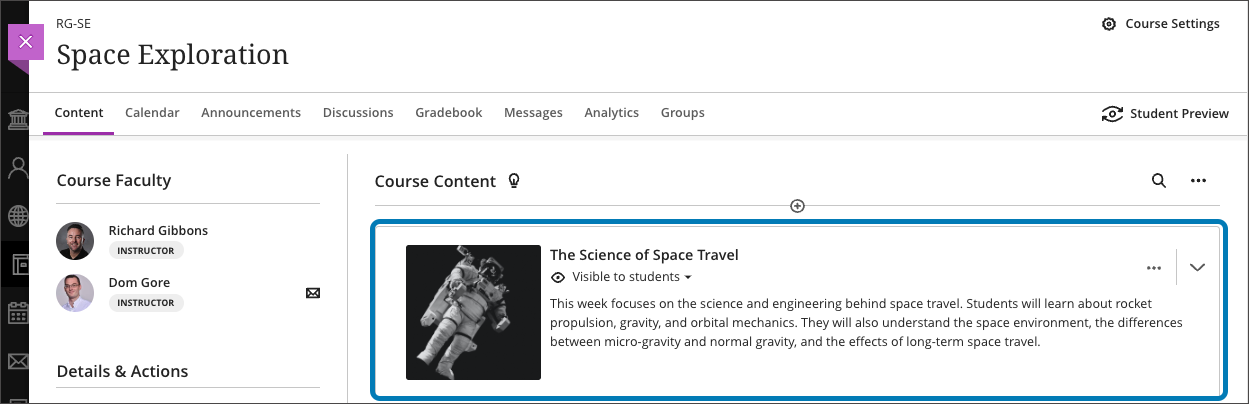
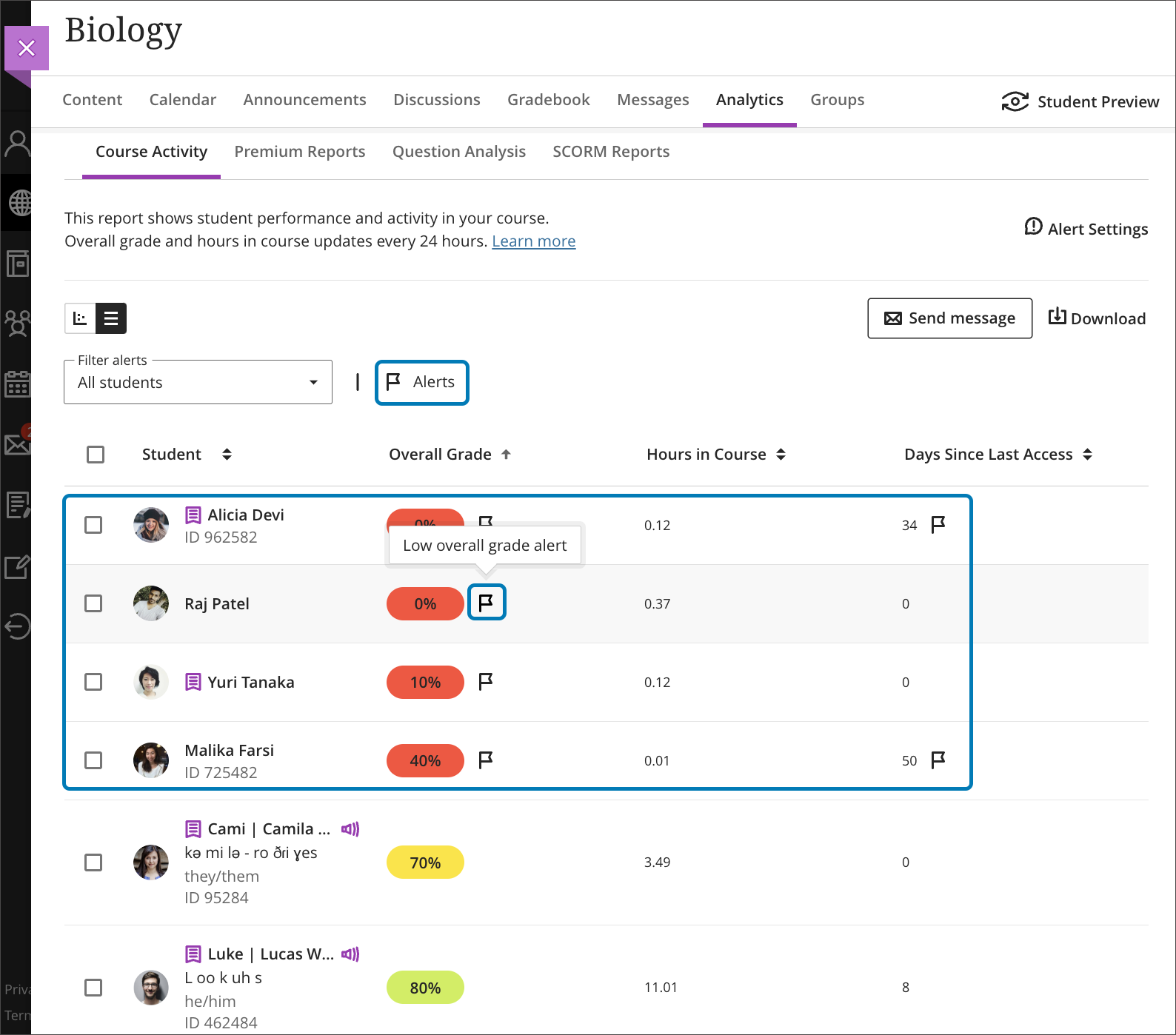
    <div class="html-content"><div><div><div><div><div><div>The August release reveals a new update for the Ultra grading system, enabling faculty to grade by question or student, or mix and match the approach. Additional updates to Ultra for August include enhancements to grading, content creation and content management, learner engagement, and reporting. </div><div><span><br></span></div><div><span>Flexible Grading features grade by student or question. Instructors can e</span><span>asily move between student attempts and keep track of their grading process. Grading options include simple scoring, rubrics and inline commenting. Instructors can collapse panels to increase visible space, view SafeAssign originality reports, and post all grades when ready. </span><span>Subsequent releases will include group submissions, anonymous grading, multiple grades per student, and peer review.</span></div><div><img src="https://my3.my.umbc.edu/groups/instructional-technology/posts/134272/attachments/47826" alt="Image 1: Example of flexible grading when grading by student" style="max-width: 100%; height: auto;"></div><div><em>Image 1: Example of flexible grading when grading by student</em></div><div><br></div><div><img src="https://my3.my.umbc.edu/groups/instructional-technology/posts/134272/attachments/47827" alt="Image 2: Example of flexible grading when grading by question" style="max-width: 100%; height: auto;"></div><div><em>Image 2: Example of flexible grading when grading by question</em></div><div><br></div><div>Although Flexible Grading will be available in early August, the functionality will not be enabled in Ultra courses until approximately one week before the FA2023 term starts. This is primarily to ensure SU2023 courses maintain continuity of their grading interface until the end of the term. </div><div><br></div><div><strong>Assessment &amp; Grading</strong></div></div></div></div></div><div><ul><li><span>Anonymous submissions can be downloaded in bulk from the gradebook column. </span></li><li><span>The default state of the gradebook cell is now a dash. "Grade Now" will only appear if there is something to actually grade.</span></li><li><span>Student submission receipts will include additional information including submission size for file uploads and auto-submit indicators for timed assessments.</span></li></ul></div><div><span><strong>Content Creation &amp; Delivery</strong></span></div><div><ul><li><span>Add a thumbnail image to a learning module to enhance the visual aesthetics of a course or aid in content identification.</span></li></ul><div><img src="https://help.blackboard.com/sites/default/files/images/2023-07/learn_ultra_instructor_LearningModules_LM%20Images_SelectedImageOnCourseContentPage.png" alt="Image 3: Example of thumbnail image for learning module" style="max-width: 100%; height: auto;"></div><div><em>Image 3: Example of thumbnail image for learning module</em></div><ul><li><span>A new Google file integration allows faculty to link to files in their Google Drive and edit those files once added to a course. Students have view-only access. <em>This update will be released later in the fall semester.</em></span></li></ul><div><img src="https://help.blackboard.com/sites/default/files/images/2023-07/learn_ultra_student_Integrations_Google_WorkspaceFiles_ReviewVisibilitySettings.png" alt="Image 4: Example of new Google file workflow" style="max-width: 100%; height: auto;"></div><div><em>Image 4: Example of new Google file workflow</em></div><ul><li><span>When an instructor replaces a file in an Ultra course, the system will no longer create a new version. This should help with managing course quotas.</span></li></ul><div><span><strong>Communication &amp; Engagement</strong></span></div><div><ul><li><span>The Groups tool link is relocated to the top course menu navigation to improve visibility. </span><span>Instructors can easily send messages to Groups or Group Sets.</span></li><li><span>A new dedicated Groups space is available for displaying all assessments assigned to each group. Future milestones will include project management tools for students.</span></li><li>The Message tab on the Base Navigation now displays courses with unread messages first. An unread message indicator also appears within the course. Newest messages appear first and unread messages are clearly marked.</li></ul></div></div><div><span><strong>Reporting &amp; Analytics</strong></span></div><div><ul><li><span>A flag will appear for students in the Course Activity Report based on the number of days a student is inactive in a course or when the overall grade falls below a specific percentage. These settings are determined by the instructor in the Alert Settings on the Course Activity Report. Alerts can be added, edited, or deleted at any time. Send messages based on flags.</span></li></ul></div><div><img src="https://help.blackboard.com/sites/default/files/images/2023-07/learn_ultra_instructor_CourseActivityReport_StudentsWithAlertsFlags_CourseActivityReport_StudentsWithAlertsFilter.png" alt="Image 5: Example of flag indicators in Course Activity Report" style="max-width: 100%; height: auto;"></div><div><em>Image 5: Example of flag indicators in Course Activity Report</em></div><div><span><br></span></div><div><div><div><div><div><span>Faculty should see the latest updates in Ultra courses around August 4-5, 2023. </span>Please sign up for our latest <a href="https://my3.my.umbc.edu/groups/instructional-technology/events?mode=upcoming&amp;tag=whats-new" rel="nofollow external" class="bo">What's New in Ultra for Teaching &amp; Learning webinar</a><span> on August 10 or August 18, 2023 to learn more about these and other exciting new features coming to Ultra.</span></div></div></div></div><div><span><br></span></div><div><span>The next update to our Ultra test environment will take place on August 15, 2023; release notes are posted to the <a href="https://wiki.umbc.edu/x/LohnB" rel="nofollow external" class="bo">What's New in Ultra</a> that same week. Faculty who are interested in test driving new features before they are released to production should </span><a href="http://my.umbc.edu/go/request-help" rel="nofollow external" class="bo">open an RT ticket</a> to request early access. Please <a href="http://umbc.edu/go/ultra" rel="nofollow external" class="bo">watch the FAQs</a>, including <a href="https://wiki.umbc.edu/x/LohnB" rel="nofollow external" class="bo">the What's New with Ultra page</a>, <span>and myUMBC for additional information about Ultra. </span></div><div><span><br></span></div></div><div><span><strong>Connect with Instructional Technology</strong></span></div><div><span>As always, if you have any questions about teaching, learning, and technology at UMBC, please consider the following options:</span></div><ul><li><a href="http://www.umbc.edu/faq" rel="nofollow external" class="bo">Check our extensive FAQ collection</a><span> </span></li><ul><li><span><a href="https://wiki.umbc.edu/x/LohnB" rel="nofollow external" class="bo"><span>What's new in Ultra?</span></a><span> </span><span>|</span><span> </span><a href="https://wiki.umbc.edu/x/bwrSAQ" rel="nofollow external" class="bo"><span>Known Issues</span></a><span> </span></span></li></ul><li><span><a href="http://my.umbc.edu/go/request-help" rel="nofollow external" class="bo">Open a ticket via RT</a></span></li><li><span>Follow the </span><a href="http://my.umbc.edu/groups/instructional-technology" rel="nofollow external" class="bo">Instructional Technology</a><span> &amp; </span><a href="http://my.umbc.edu/groups/doit" rel="nofollow external" class="bo">DoIT</a><span> myUMBC groups</span></li><li><a href="http://doit.umbc.edu/itnm/staff/" rel="nofollow external" class="bo">Request a consult</a><span> with <a href="http://doit.umbc.edu/itnm/staff" rel="nofollow external" class="bo">instructional technology staff</a></span></li><li><span><a href="http://pivot.umbc.edu" rel="nofollow external" class="bo">PIVOT</a> | <a href="https://doit.umbc.edu/itnm/academic-continuity/" rel="nofollow external" class="bo">Academic Continuity</a></span><span> </span><span>|</span><span> </span><span><a href="https://fdc.umbc.edu/teaching/keep-on-teaching/" rel="nofollow external" class="bo">Keep On Teaching</a></span><span> </span><span>|</span><span> </span><span><a href="https://doit.umbc.edu/students" rel="nofollow external" class="bo">Student Technology Resources</a></span></li></ul></div><div><div></div></div></div>
]]>
</Body>
<Summary>The August release reveals a new update for the Ultra grading system, enabling faculty to grade by question or student, or mix and match the approach. Additional updates to Ultra for August...</Summary>
<Website>https://my3.my.umbc.edu/groups/instructional-technology/posts/134272</Website>
<AttachmentKind>Image</AttachmentKind>
<AttachmentUrl>https://assets3-beta.my.umbc.edu/system/shared/attachments/4f01d23039d4a788e7bf36651c74bc98/69e67e31/news/000/134/272/7cc363172b333199364a4e07bae60688/blackboard-learn-adoption---new-flexible-grading-4.png?1689167733</AttachmentUrl>
<Attachments>
<Attachment kind="Image" url="https://beta.my.umbc.edu/groups/training/posts/134272/attachments/47826"></Attachment>
<Attachment kind="Image" url="https://beta.my.umbc.edu/groups/training/posts/134272/attachments/47827"></Attachment>
</Attachments>
<TrackingUrl>https://beta.my.umbc.edu/api/v0/pixel/news/134272/guest@my.umbc.edu/e6973324ae5bedf9665be02127452ec2/api/pixel</TrackingUrl>
<Tag>blackboard</Tag>
<Tag>flexible-grading</Tag>
<Tag>ultra-experience</Tag>
<Tag>ultra-update</Tag>
<Group token="instructional-technology">Instructional Technology</Group>
<GroupUrl>https://beta.my.umbc.edu/groups/instructional-technology</GroupUrl>
<AvatarUrl>https://assets2-beta.my.umbc.edu/system/shared/avatars/groups/000/001/164/dec3b026b81ee6d890a8f82f75c94a2e/xsmall.png?1446126703</AvatarUrl>
<AvatarUrl size="original">https://assets1-beta.my.umbc.edu/system/shared/avatars/groups/000/001/164/dec3b026b81ee6d890a8f82f75c94a2e/original.png?1446126703</AvatarUrl>
<AvatarUrl size="xxlarge">https://assets2-beta.my.umbc.edu/system/shared/avatars/groups/000/001/164/dec3b026b81ee6d890a8f82f75c94a2e/xxlarge.png?1446126703</AvatarUrl>
<AvatarUrl size="xlarge">https://assets1-beta.my.umbc.edu/system/shared/avatars/groups/000/001/164/dec3b026b81ee6d890a8f82f75c94a2e/xlarge.png?1446126703</AvatarUrl>
<AvatarUrl size="large">https://assets1-beta.my.umbc.edu/system/shared/avatars/groups/000/001/164/dec3b026b81ee6d890a8f82f75c94a2e/large.png?1446126703</AvatarUrl>
<AvatarUrl size="medium">https://assets4-beta.my.umbc.edu/system/shared/avatars/groups/000/001/164/dec3b026b81ee6d890a8f82f75c94a2e/medium.png?1446126703</AvatarUrl>
<AvatarUrl size="small">https://assets3-beta.my.umbc.edu/system/shared/avatars/groups/000/001/164/dec3b026b81ee6d890a8f82f75c94a2e/small.png?1446126703</AvatarUrl>
<AvatarUrl size="xsmall">https://assets2-beta.my.umbc.edu/system/shared/avatars/groups/000/001/164/dec3b026b81ee6d890a8f82f75c94a2e/xsmall.png?1446126703</AvatarUrl>
<AvatarUrl size="xxsmall">https://assets3-beta.my.umbc.edu/system/shared/avatars/groups/000/001/164/dec3b026b81ee6d890a8f82f75c94a2e/xxsmall.png?1446126703</AvatarUrl>
<Sponsor>Instructional Technology</Sponsor>
<ThumbnailUrl size="xxlarge">https://assets1-beta.my.umbc.edu/system/shared/thumbnails/news/000/134/272/fa172243a7a9cbea44a5bd68e817c726/xxlarge.jpg?1689167479</ThumbnailUrl>
<ThumbnailUrl size="xlarge">https://assets2-beta.my.umbc.edu/system/shared/thumbnails/news/000/134/272/fa172243a7a9cbea44a5bd68e817c726/xlarge.jpg?1689167479</ThumbnailUrl>
<ThumbnailUrl size="large">https://assets4-beta.my.umbc.edu/system/shared/thumbnails/news/000/134/272/fa172243a7a9cbea44a5bd68e817c726/large.jpg?1689167479</ThumbnailUrl>
<ThumbnailUrl size="medium">https://assets3-beta.my.umbc.edu/system/shared/thumbnails/news/000/134/272/fa172243a7a9cbea44a5bd68e817c726/medium.jpg?1689167479</ThumbnailUrl>
<ThumbnailUrl size="small">https://assets3-beta.my.umbc.edu/system/shared/thumbnails/news/000/134/272/fa172243a7a9cbea44a5bd68e817c726/small.jpg?1689167479</ThumbnailUrl>
<ThumbnailUrl size="xsmall">https://assets4-beta.my.umbc.edu/system/shared/thumbnails/news/000/134/272/fa172243a7a9cbea44a5bd68e817c726/xsmall.jpg?1689167479</ThumbnailUrl>
<ThumbnailUrl size="xxsmall">https://assets2-beta.my.umbc.edu/system/shared/thumbnails/news/000/134/272/fa172243a7a9cbea44a5bd68e817c726/xxsmall.jpg?1689167479</ThumbnailUrl>
<PawCount>4</PawCount>
<CommentCount>0</CommentCount>
<CommentsAllowed>true</CommentsAllowed>
<PostedAt>Mon, 24 Jul 2023 12:47:56 -0400</PostedAt>
<EditAt>Mon, 21 Aug 2023 10:06:42 -0400</EditAt>
</NewsItem>

<NewsItem contentIssues="false" id="134233" important="false" status="posted" url="https://beta.my.umbc.edu/groups/training/posts/134233">
<Title>ATTN: Members of the MD State Retirement &amp; Pension system</Title>
<Tagline>Fall 2023 Pre-Retirement Seminars/Webinars schedule</Tagline>
<Body>
<![CDATA[
    <div class="html-content"><p><span>For employees enrolled in the MD State Retirement &amp; Pension system, the schedule of Pre-Retirement seminars and webinars is now available for August – December 2023.</span></p><p><span><span>These pension seminars are a valuable planning tool for all eligible members and their spouses, provided by the MD State Pension Agency via the Community College of Baltimore County (CCBC). Employees who attend should be within 8 years of retiring.</span></span><span></span></p><p><span><span>Please register for an in-person seminar or webinar using this link: <a href="http://www.ccbcmd.edu/ceed-preretirement-state" rel="nofollow external" class="bo">http://www.ccbcmd.edu/ceed-preretirement-state</a> or by calling <strong>443-840-5059</strong></span></span><span>. Please provide the <strong>course number</strong> when registering. </span></p><p><span><span>*NOTE: all in-person seminars and webinars run from 9:00am - 4:00pm.</span></span></p><p><strong><br></strong></p><p><strong>Webinar Dates:</strong></p><ul><li>August 4 (CRN 73273)</li><li>August 29 (CRN 73274)</li><li>September 22 (CRN 73355)</li><li>October 25 (CRN 73287)</li><li>November 21 (CRN 73302)</li><li>December 8 (CRN 73284)</li></ul><p><span><strong><br></strong></span></p><p><span><strong>IN-PERSON</strong> seminar dates: </span></p><ul><li>September 8 – Frostburg State University (CRN 73333)</li><li>September 15 – Harford Community College (CRN 73335)</li><li>September 19 – Preston Street State Office Building (CRN 73336)</li><li>September 21 – CCBC Catonsville Campus (CRN 73067)</li><li>September 28 – Anne Arundel Health Department (CRN 73353)</li><li>October 12 – Salisbury University (CRN 73280)</li><li>October 13 – CCBC Owings Mills (CRN 73292)</li><li>October 26 – Hagerstown Community College (CRN 73289)</li><li>October 27 – CCBC Essex (CRN 73290)</li><li>November 16 - State Highway Association – Hunt Valley (CRN 73298)</li><li>December 5 – Harford Community College (CRN 73278)</li><li>December 14 – Maryland Department of Transportation (CRN 73281)</li><li>December 15 – CCBC Essex (CRN 73282) *<em>LEOPS Only</em></li></ul><p></p><p></p><p></p><p></p><p></p><p></p><p></p><p></p><p></p><p></p><p><br></p><p>To register for a seminar or webinar, please go to: <a href="http://www.ccbcmd.edu/ceed-preretirement-state" rel="nofollow external" class="bo">http://www.ccbcmd.edu/ceed-preretirement-state</a> or call <strong>443-840-5059</strong></p><p>If you have any questions or need assistance, please contact Sarah Moore at <a href="mailto:scullip@ccbcmd.edu" rel="nofollow external" class="bo">scullip@ccbcmd.edu</a>. </p></div>
]]>
</Body>
<Summary>For employees enrolled in the MD State Retirement &amp; Pension system, the schedule of Pre-Retirement seminars and webinars is now available for August – December 2023.  These pension seminars...</Summary>
<Website>http://www.ccbcmd.edu/ceed-preretirement-state</Website>
<TrackingUrl>https://beta.my.umbc.edu/api/v0/pixel/news/134233/guest@my.umbc.edu/367af0f356a3cee61934a3c3eb351eee/api/pixel</TrackingUrl>
<Tag>benefits</Tag>
<Tag>pension</Tag>
<Tag>retirement</Tag>
<Group token="training">Training</Group>
<GroupUrl>https://beta.my.umbc.edu/groups/training</GroupUrl>
<AvatarUrl>https://assets2-beta.my.umbc.edu/system/shared/avatars/groups/000/000/019/bdb106a0560c4e46ccc488ef010af787/xsmall.png?1281010946</AvatarUrl>
<AvatarUrl size="original">https://assets4-beta.my.umbc.edu/system/shared/avatars/groups/000/000/019/bdb106a0560c4e46ccc488ef010af787/original.png?1281010946</AvatarUrl>
<AvatarUrl size="xxlarge">https://assets3-beta.my.umbc.edu/system/shared/avatars/groups/000/000/019/bdb106a0560c4e46ccc488ef010af787/xxlarge.png?1281010946</AvatarUrl>
<AvatarUrl size="xlarge">https://assets2-beta.my.umbc.edu/system/shared/avatars/groups/000/000/019/bdb106a0560c4e46ccc488ef010af787/xlarge.png?1281010946</AvatarUrl>
<AvatarUrl size="large">https://assets3-beta.my.umbc.edu/system/shared/avatars/groups/000/000/019/bdb106a0560c4e46ccc488ef010af787/large.png?1281010946</AvatarUrl>
<AvatarUrl size="medium">https://assets3-beta.my.umbc.edu/system/shared/avatars/groups/000/000/019/bdb106a0560c4e46ccc488ef010af787/medium.png?1281010946</AvatarUrl>
<AvatarUrl size="small">https://assets4-beta.my.umbc.edu/system/shared/avatars/groups/000/000/019/bdb106a0560c4e46ccc488ef010af787/small.png?1281010946</AvatarUrl>
<AvatarUrl size="xsmall">https://assets2-beta.my.umbc.edu/system/shared/avatars/groups/000/000/019/bdb106a0560c4e46ccc488ef010af787/xsmall.png?1281010946</AvatarUrl>
<AvatarUrl size="xxsmall">https://assets3-beta.my.umbc.edu/system/shared/avatars/groups/000/000/019/bdb106a0560c4e46ccc488ef010af787/xxsmall.png?1281010946</AvatarUrl>
<Sponsor>Training</Sponsor>
<PawCount>1</PawCount>
<CommentCount>0</CommentCount>
<CommentsAllowed>false</CommentsAllowed>
<PostedAt>Fri, 07 Jul 2023 09:24:16 -0400</PostedAt>
</NewsItem>

<NewsItem contentIssues="true" id="134160" important="false" status="posted" url="https://beta.my.umbc.edu/groups/training/posts/134160">
<Title>TIAA Live Webinars</Title>
<Tagline>Quarter 3 Webinar Schedule</Tagline>
<Body>
<![CDATA[
    <div class="html-content"><div>Attend live webinars presented by TIAA. Webinar times and registration information can me found at <a href="https://my.tiaa.org/public/publictools/campaign/login/webinar?resume=/idp/PHutu/resumeSAML20/idp/SSO.ping" rel="nofollow external" class="bo">TIAA.org/webinars</a> and on the attached flyer. Some of the webinar topics include:</div><div><br></div><div><ul><li>Take control of your financial life: 5 steps to managing money and debt</li><li>Basic Social Security Strategies</li><li>The Starting line: Beginning to save for Retirement</li></ul><div>Want to make an appointment with a TIAA representative?  <a href="https://hr.umbc.edu/benefits/retirement-information/retirement-vendors/" rel="nofollow external" class="bo">Click here</a> for their contact information.</div><div><br></div></div></div>
]]>
</Body>
<Summary>Attend live webinars presented by TIAA. Webinar times and registration information can me found at TIAA.org/webinars and on the attached flyer. Some of the webinar topics include:       Take...</Summary>
<AttachmentKind>Flyer</AttachmentKind>
<AttachmentUrl>https://assets1-beta.my.umbc.edu/system/shared/attachments/2267a609058af857e05181c664991e02/69e67e31/news/000/134/160/35dbe71b7ff5e11c7d2bdd79c02ee1de/Q3 Webinars.pdf?1687973477</AttachmentUrl>
<Attachments>
<Attachment kind="Flyer" url="https://beta.my.umbc.edu/groups/training/posts/134160/attachments/47674"></Attachment>
</Attachments>
<TrackingUrl>https://beta.my.umbc.edu/api/v0/pixel/news/134160/guest@my.umbc.edu/06ad896c87ba766d29d37904809baf77/api/pixel</TrackingUrl>
<Tag>retirement</Tag>
<Tag>savings</Tag>
<Group token="training">Training</Group>
<GroupUrl>https://beta.my.umbc.edu/groups/training</GroupUrl>
<AvatarUrl>https://assets2-beta.my.umbc.edu/system/shared/avatars/groups/000/000/019/bdb106a0560c4e46ccc488ef010af787/xsmall.png?1281010946</AvatarUrl>
<AvatarUrl size="original">https://assets4-beta.my.umbc.edu/system/shared/avatars/groups/000/000/019/bdb106a0560c4e46ccc488ef010af787/original.png?1281010946</AvatarUrl>
<AvatarUrl size="xxlarge">https://assets3-beta.my.umbc.edu/system/shared/avatars/groups/000/000/019/bdb106a0560c4e46ccc488ef010af787/xxlarge.png?1281010946</AvatarUrl>
<AvatarUrl size="xlarge">https://assets2-beta.my.umbc.edu/system/shared/avatars/groups/000/000/019/bdb106a0560c4e46ccc488ef010af787/xlarge.png?1281010946</AvatarUrl>
<AvatarUrl size="large">https://assets3-beta.my.umbc.edu/system/shared/avatars/groups/000/000/019/bdb106a0560c4e46ccc488ef010af787/large.png?1281010946</AvatarUrl>
<AvatarUrl size="medium">https://assets3-beta.my.umbc.edu/system/shared/avatars/groups/000/000/019/bdb106a0560c4e46ccc488ef010af787/medium.png?1281010946</AvatarUrl>
<AvatarUrl size="small">https://assets4-beta.my.umbc.edu/system/shared/avatars/groups/000/000/019/bdb106a0560c4e46ccc488ef010af787/small.png?1281010946</AvatarUrl>
<AvatarUrl size="xsmall">https://assets2-beta.my.umbc.edu/system/shared/avatars/groups/000/000/019/bdb106a0560c4e46ccc488ef010af787/xsmall.png?1281010946</AvatarUrl>
<AvatarUrl size="xxsmall">https://assets3-beta.my.umbc.edu/system/shared/avatars/groups/000/000/019/bdb106a0560c4e46ccc488ef010af787/xxsmall.png?1281010946</AvatarUrl>
<Sponsor>Training</Sponsor>
<ThumbnailUrl size="xxlarge">https://assets4-beta.my.umbc.edu/system/shared/thumbnails/news/000/134/160/b8d554537e1380ddcf1a2dbbe7dee431/xxlarge.jpg?1687973406</ThumbnailUrl>
<ThumbnailUrl size="xlarge">https://assets2-beta.my.umbc.edu/system/shared/thumbnails/news/000/134/160/b8d554537e1380ddcf1a2dbbe7dee431/xlarge.jpg?1687973406</ThumbnailUrl>
<ThumbnailUrl size="large">https://assets4-beta.my.umbc.edu/system/shared/thumbnails/news/000/134/160/b8d554537e1380ddcf1a2dbbe7dee431/large.jpg?1687973406</ThumbnailUrl>
<ThumbnailUrl size="medium">https://assets4-beta.my.umbc.edu/system/shared/thumbnails/news/000/134/160/b8d554537e1380ddcf1a2dbbe7dee431/medium.jpg?1687973406</ThumbnailUrl>
<ThumbnailUrl size="small">https://assets3-beta.my.umbc.edu/system/shared/thumbnails/news/000/134/160/b8d554537e1380ddcf1a2dbbe7dee431/small.jpg?1687973406</ThumbnailUrl>
<ThumbnailUrl size="xsmall">https://assets2-beta.my.umbc.edu/system/shared/thumbnails/news/000/134/160/b8d554537e1380ddcf1a2dbbe7dee431/xsmall.jpg?1687973406</ThumbnailUrl>
<ThumbnailUrl size="xxsmall">https://assets1-beta.my.umbc.edu/system/shared/thumbnails/news/000/134/160/b8d554537e1380ddcf1a2dbbe7dee431/xxsmall.jpg?1687973406</ThumbnailUrl>
<PawCount>0</PawCount>
<CommentCount>0</CommentCount>
<CommentsAllowed>false</CommentsAllowed>
<PostedAt>Wed, 28 Jun 2023 13:34:54 -0400</PostedAt>
</NewsItem>

<NewsItem contentIssues="true" id="134027" important="false" status="posted" url="https://beta.my.umbc.edu/groups/training/posts/134027">
<Title>Ultra update features tracking meter, resize images in July</Title>
<Tagline>Improved file deletion, complete/incomplete schema, and more</Tagline>
<Body>
<![CDATA[
    <div class="html-content"><div><div><div><div><div>The July update for Ultra provides updates to assessment and grading, content delivery, and course management, offering new functionality and quality of life improvements for faculty and students. </div><div><br></div><div><strong>Assessment &amp; Grading</strong></div><div><ul><li><span>Instructors can select a new complete/incomplete schema when creating a test or assignment. An incomplete is displayed as a gray dash. When a grade is assigned, a checkmark is displayed to the student. </span></li><li><span><span>Instructors</span></span> can apply a "Formative" label to assessments and display this label to students on the course outline, within the assessment itself, and in the gradebook. Formative labels can be used for practice quizzes, spaced practice, and similar types of assessments, and the gradebook will filter the formative label.</li></ul></div><div><div><img src="https://help.blackboard.com/sites/default/files/images/2023-06/learn_student_FormativeAssessments_AssessmentLabeledAsFormativeOnCourseContentPage.png" alt="Student view of course outline with assessments showing the Formative label." style="max-width: 100%; height: auto;"></div><div><em>Image 1: Student view of course outline with assessments showing the Formative label.</em></div><div><ul><li><span><span>A new s</span><span>implified navigation for tests and assignments provides convenient access to different sections using tabs, similar to the redesigned discussions page. Designed for instructor efficiency, the navigation includes content and settings, submissions, student activity and question analysis.</span></span></li><li><span><span>For assessments with questions, i</span></span><span>nstructors can turn on partial and negative credit, or allow an overall negative score.</span></li><li><span>Anonymous assessments feature new Send Reminder options with a simplified nudge to students who haven't turned in the graded activity. Instructors can also add exceptions for anonymously graded assessments.</span></li><li>Grading schemas can now be deleted.</li><li>To increase clarity for students before they begin an assessment, the assessment start button displays different states based on the student's progress (<em>Start </em>to begin, <em>Continue</em> after saving, or <em>View</em> for submitted work). Additionally, students will have a clear drag &amp; drop zone to upload files.</li></ul></div><div><strong><br></strong></div><div><strong>Content Creation &amp; Delivery</strong></div><div><ul><li><span>A progress summary for Learning Modules will be displayed to students, showing the total number of items in the Learning Module. </span><span>Hovering over the progress bar informs the student of how much content they have completed, started or yet to start. A button shows students whether they need to start, continue, or if they have completed the module.</span></li></ul><div><div><img src="https://help.blackboard.com/sites/default/files/images/2023-06/learn_ultra_student_ProgressTracking_ProgressTrackingIndicator.png" alt="Image 2: Student view of progress tracking bar." style="max-width: 100%; height: auto;"></div><div><em>Image 2: Student view of progress tracking bar.</em></div></div><div><ul><li><span>All users can now resize images, video, and media by dragging a corner handle. Changing the alignment so text wraps around images is not yet </span>supported, but it is coming soon.</li><li>When a file is deleted from the course, it will now be deleted from the Content Collection when it is not used in other courses or another place in the same course. This will resolve many course quota issues experienced by faculty.</li></ul></div><div><strong><br></strong></div><div><strong>Course Management</strong></div><div><ul><li>Ultra courses and organizations can now support self-enrollment. Please <a href="https://doit.umbc.edu/request-tracker-rt/doit-myumbc-blackboard/" rel="nofollow external" class="bo">open a RT ticket</a> for self-enrollment as only a system admin can edit these settings.</li><li><span>If instructor use Canvas at another institution and wishes to reuse that content, they can import Canvas packages directly in Ultra courses. </span><span>Note: Course structure and tools differ between Canvas and Blackboard. Canvas content is imported as individual HTML pages which must be edited externally. Assignments and tests should be reviewed to validate questions and instructions. </span><span>Please </span><a href="https://doit.umbc.edu/request-tracker-rt/doit-myumbc-blackboard/" rel="nofollow external" class="bo">open a RT ticket</a><span> for support.</span></li></ul></div></div></div><div><span><span>Additionally, the favorite icon that </span><span>appears</span><span> in the browser when accessing Blackboard will change from the orange pencil icon to the Anthology logo, a colorful bar graph on a black background. Anthology is the parent company that <a href="https://www.anthology.com/news/anthology-completes-merger-with-blackboard-launches-next-chapter-in-edtech" rel="nofollow external" class="bo">acquired Blackboard in 2021.</a> </span></span></div><div><span><span><br></span></span></div><div><span><span>Faculty should see the latest updates in Ultra courses around July 6-7, 2023. </span></span><span>Please sign up for our latest </span><a href="https://my3.my.umbc.edu/groups/instructional-technology/events?mode=upcoming&amp;tag=whats-new" rel="nofollow external" class="bo">What's New in Ultra for Teaching &amp; Learning webinar</a><span> on August 10 or August 18, 2023 to learn more about these and other exciting new features coming to Ultra.</span></div></div></div></div><div><span><br></span></div><div><span>The next update to our Ultra test environment will take place on July 11, 2023; release notes are posted to the <a href="https://wiki.umbc.edu/x/LohnB" rel="nofollow external" class="bo">What's New in Ultra</a> that same week. Faculty who are interested in test driving new features before they are released to production should </span><a href="http://my.umbc.edu/go/request-help" rel="nofollow external" class="bo">open an RT ticket</a><span> to request early access. </span><span>Please </span><a href="http://umbc.edu/go/ultra" rel="nofollow external" class="bo">watch the FAQs</a><span>, including </span><a href="https://wiki.umbc.edu/x/LohnB" rel="nofollow external" class="bo">the What's New with Ultra page</a><span>, </span><span>and myUMBC for additional information about Ultra. </span></div><div><span><br></span></div><div><span><strong>Connect with Instructional Technology</strong></span></div><div><span>As always, if you have any questions about teaching, learning, and technology at UMBC, please consider the following options:</span></div><ul><li><a href="http://www.umbc.edu/faq" rel="nofollow external" class="bo">Check our extensive FAQ collection</a><span> </span></li><ul><li><span><a href="https://wiki.umbc.edu/x/LohnB" rel="nofollow external" class="bo"><span>What's new in Ultra?</span></a><span> </span><span>|</span><span> </span><a href="https://wiki.umbc.edu/x/bwrSAQ" rel="nofollow external" class="bo"><span>Known Issues</span></a><span> </span></span></li></ul><li><span><a href="http://my.umbc.edu/go/request-help" rel="nofollow external" class="bo">Open a ticket via RT</a></span></li><li><span>Follow the </span><a href="http://my.umbc.edu/groups/instructional-technology" rel="nofollow external" class="bo">Instructional Technology</a><span> &amp; </span><a href="http://my.umbc.edu/groups/doit" rel="nofollow external" class="bo">DoIT</a><span> myUMBC groups</span></li><li><a href="http://doit.umbc.edu/itnm/staff/" rel="nofollow external" class="bo">Request a consult</a><span> with <a href="http://doit.umbc.edu/itnm/staff" rel="nofollow external" class="bo">instructional technology staff</a></span></li><li><span><a href="http://pivot.umbc.edu" rel="nofollow external" class="bo">PIVOT</a> | <a href="https://doit.umbc.edu/itnm/academic-continuity/" rel="nofollow external" class="bo">Academic Continuity</a></span><span> </span><span>|</span><span> </span><span><a href="https://fdc.umbc.edu/teaching/keep-on-teaching/" rel="nofollow external" class="bo">Keep On Teaching</a></span><span> </span><span>|</span><span> </span><span><a href="https://doit.umbc.edu/students" rel="nofollow external" class="bo">Student Technology Resources</a></span></li></ul></div><div><div></div></div></div>
]]>
</Body>
<Summary>The July update for Ultra provides updates to assessment and grading, content delivery, and course management, offering new functionality and quality of life improvements for faculty and...</Summary>
<Website>https://my3.my.umbc.edu/groups/instructional-technology/posts/134027</Website>
<TrackingUrl>https://beta.my.umbc.edu/api/v0/pixel/news/134027/guest@my.umbc.edu/72e3d641f2e383beb1c5493443375a2c/api/pixel</TrackingUrl>
<Tag>blackboard</Tag>
<Tag>ultra-experience</Tag>
<Tag>ultra-update</Tag>
<Group token="instructional-technology">Instructional Technology</Group>
<GroupUrl>https://beta.my.umbc.edu/groups/instructional-technology</GroupUrl>
<AvatarUrl>https://assets2-beta.my.umbc.edu/system/shared/avatars/groups/000/001/164/dec3b026b81ee6d890a8f82f75c94a2e/xsmall.png?1446126703</AvatarUrl>
<AvatarUrl size="original">https://assets1-beta.my.umbc.edu/system/shared/avatars/groups/000/001/164/dec3b026b81ee6d890a8f82f75c94a2e/original.png?1446126703</AvatarUrl>
<AvatarUrl size="xxlarge">https://assets2-beta.my.umbc.edu/system/shared/avatars/groups/000/001/164/dec3b026b81ee6d890a8f82f75c94a2e/xxlarge.png?1446126703</AvatarUrl>
<AvatarUrl size="xlarge">https://assets1-beta.my.umbc.edu/system/shared/avatars/groups/000/001/164/dec3b026b81ee6d890a8f82f75c94a2e/xlarge.png?1446126703</AvatarUrl>
<AvatarUrl size="large">https://assets1-beta.my.umbc.edu/system/shared/avatars/groups/000/001/164/dec3b026b81ee6d890a8f82f75c94a2e/large.png?1446126703</AvatarUrl>
<AvatarUrl size="medium">https://assets4-beta.my.umbc.edu/system/shared/avatars/groups/000/001/164/dec3b026b81ee6d890a8f82f75c94a2e/medium.png?1446126703</AvatarUrl>
<AvatarUrl size="small">https://assets3-beta.my.umbc.edu/system/shared/avatars/groups/000/001/164/dec3b026b81ee6d890a8f82f75c94a2e/small.png?1446126703</AvatarUrl>
<AvatarUrl size="xsmall">https://assets2-beta.my.umbc.edu/system/shared/avatars/groups/000/001/164/dec3b026b81ee6d890a8f82f75c94a2e/xsmall.png?1446126703</AvatarUrl>
<AvatarUrl size="xxsmall">https://assets3-beta.my.umbc.edu/system/shared/avatars/groups/000/001/164/dec3b026b81ee6d890a8f82f75c94a2e/xxsmall.png?1446126703</AvatarUrl>
<Sponsor>Instructional Technology</Sponsor>
<ThumbnailUrl size="xxlarge">https://assets3-beta.my.umbc.edu/system/shared/thumbnails/news/000/134/027/b615c820ecfbdf9e330c10c08b392c49/xxlarge.jpg?1686852686</ThumbnailUrl>
<ThumbnailUrl size="xlarge">https://assets4-beta.my.umbc.edu/system/shared/thumbnails/news/000/134/027/b615c820ecfbdf9e330c10c08b392c49/xlarge.jpg?1686852686</ThumbnailUrl>
<ThumbnailUrl size="large">https://assets3-beta.my.umbc.edu/system/shared/thumbnails/news/000/134/027/b615c820ecfbdf9e330c10c08b392c49/large.jpg?1686852686</ThumbnailUrl>
<ThumbnailUrl size="medium">https://assets2-beta.my.umbc.edu/system/shared/thumbnails/news/000/134/027/b615c820ecfbdf9e330c10c08b392c49/medium.jpg?1686852686</ThumbnailUrl>
<ThumbnailUrl size="small">https://assets1-beta.my.umbc.edu/system/shared/thumbnails/news/000/134/027/b615c820ecfbdf9e330c10c08b392c49/small.jpg?1686852686</ThumbnailUrl>
<ThumbnailUrl size="xsmall">https://assets1-beta.my.umbc.edu/system/shared/thumbnails/news/000/134/027/b615c820ecfbdf9e330c10c08b392c49/xsmall.jpg?1686852686</ThumbnailUrl>
<ThumbnailUrl size="xxsmall">https://assets3-beta.my.umbc.edu/system/shared/thumbnails/news/000/134/027/b615c820ecfbdf9e330c10c08b392c49/xxsmall.jpg?1686852686</ThumbnailUrl>
<PawCount>2</PawCount>
<CommentCount>0</CommentCount>
<CommentsAllowed>true</CommentsAllowed>
<PostedAt>Wed, 28 Jun 2023 08:35:05 -0400</PostedAt>
<EditAt>Wed, 28 Jun 2023 08:36:01 -0400</EditAt>
</NewsItem>

<NewsItem contentIssues="true" id="134078" important="false" status="posted" url="https://beta.my.umbc.edu/groups/training/posts/134078">
<Title>Free Training for Respondus Lockdown Browser &amp; Monitor</Title>
<Tagline>Join an upcoming webinar to see the latest features</Tagline>
<Body>
<![CDATA[
    <div class="html-content"><div><span>Join an upcoming training webinar from Respondus to see the latest features and integrations for LockDown Browser and Monitor. Learn how these applications are used with a range of online testing environments, virtual proctoring and Blackboard. Discover </span>enhancements that make Respondus Monitor even more effective and easy to use.</div><div><br></div><div><div><strong>Instructor Training: LockDown Browser &amp; Respondus Monitor</strong></div><div>This comprehensive 45-minute training is intended for instructors who plan to use LockDown Browser and/or Respondus Monitor to protect academic integrity and ensure student identity during online testing. <span>The training will cover:</span></div><div><div><ul><li><span>How to use LockDown Browser to prevent digital cheating in proctored testing environments</span></li><li><span>How to use Respondus Monitor in non-proctored environments, to protect exam integrity and confirm student identity</span></li><li><span>The student perspective using each application</span></li><li><span>Efficient review of the assessment data collected, including the Review Priority system, timeline, and milestone features</span></li><li><span>Best practices and tips for success with both applications</span></li><li><span>Review the new Screen Recording option to capture actions in the lockdown browser, available for Windows and Mac</span></li></ul></div><div><span>Pick your date/time and register directly with Respondus:</span></div></div><div><ul><li><a href="https://attendee.gotowebinar.com/register/8721433315142394201" rel="nofollow external" class="bo">Thursday, June 29 at 3 pm ET / 12 pm PT</a></li><li><a href="https://attendee.gotowebinar.com/register/7450183469301530972" rel="nofollow external" class="bo">Thursday, July 6 at 1 pm ET / 10 am PT</a></li><li><a href="https://attendee.gotowebinar.com/register/8819484464208560992" rel="nofollow external" class="bo">Tuesday, July 11 at 2 pm ET / 11 am PT</a></li><li><a href="https://attendee.gotowebinar.com/register/4416852989616743510" rel="nofollow external" class="bo">Thursday, July 20 at 3 pm ET / 12 pm PT</a></li><li><a href="https://attendee.gotowebinar.com/register/5250740200330357334" rel="nofollow external" class="bo">Wednesday, August 2 at 2 pm ET / 11 am PT</a></li><li><a href="https://attendee.gotowebinar.com/register/6347836201060142423" rel="nofollow external" class="bo">Tuesday, August 8 at 1 pm ET / 10 am PT</a></li><li><a href="https://attendee.gotowebinar.com/register/6174402535429651285" rel="nofollow external" class="bo">Tuesday, August 15 at 3 pm ET / 12 pm PT</a></li><li><a href="https://attendee.gotowebinar.com/register/1047427094110165600" rel="nofollow external" class="bo">Thursday, August 17 at 2 pm ET / 11 am PT</a></li><li><a href="https://attendee.gotowebinar.com/register/6432366655137459288" rel="nofollow external" class="bo">Wednesday, August 23 at 12 pm ET / 9 am PT</a></li><li><a href="https://attendee.gotowebinar.com/register/1460087002287919196" rel="nofollow external" class="bo">Tuesday, August 29 at 2 pm ET / 11 am PT</a></li></ul></div><div></div><div>All attendees will receive a link to a recording after the session.</div></div><div><br></div><div><div>NOTE: Students should not register for any instructor training session but instead, contact use the Respondus support tools embedded in RLDB, or <a href="https://wiki.umbc.edu/x/BQb9Aw" rel="nofollow external" class="bo">review this FAQ</a> for further help.</div></div><div><br></div><div><strong>About Respondus Lockdown Browser</strong></div><div><span><br></span></div><div><span>RLDB is a custom browser that locks down the testing environment within Blackboard. Students are unable to copy, print, access other applications, or visit other websites during an online exam. </span>For additional information, please review <a href="https://wiki.umbc.edu/x/0AI9BQ" rel="nofollow external" class="bo">our FAQ collection</a>.</div></div>
]]>
</Body>
<Summary>Join an upcoming training webinar from Respondus to see the latest features and integrations for LockDown Browser and Monitor. Learn how these applications are used with a range of online testing...</Summary>
<Website>https://my3.my.umbc.edu/groups/instructional-technology/posts/134078</Website>
<TrackingUrl>https://beta.my.umbc.edu/api/v0/pixel/news/134078/guest@my.umbc.edu/98c2abc84ba4e81fe7ca5175a7b23818/api/pixel</TrackingUrl>
<Tag>respondus-lockdown-browser</Tag>
<Tag>respondus-monitor</Tag>
<Tag>rldb</Tag>
<Tag>training</Tag>
<Tag>webinar</Tag>
<Group token="instructional-technology">Instructional Technology</Group>
<GroupUrl>https://beta.my.umbc.edu/groups/instructional-technology</GroupUrl>
<AvatarUrl>https://assets2-beta.my.umbc.edu/system/shared/avatars/groups/000/001/164/dec3b026b81ee6d890a8f82f75c94a2e/xsmall.png?1446126703</AvatarUrl>
<AvatarUrl size="original">https://assets1-beta.my.umbc.edu/system/shared/avatars/groups/000/001/164/dec3b026b81ee6d890a8f82f75c94a2e/original.png?1446126703</AvatarUrl>
<AvatarUrl size="xxlarge">https://assets2-beta.my.umbc.edu/system/shared/avatars/groups/000/001/164/dec3b026b81ee6d890a8f82f75c94a2e/xxlarge.png?1446126703</AvatarUrl>
<AvatarUrl size="xlarge">https://assets1-beta.my.umbc.edu/system/shared/avatars/groups/000/001/164/dec3b026b81ee6d890a8f82f75c94a2e/xlarge.png?1446126703</AvatarUrl>
<AvatarUrl size="large">https://assets1-beta.my.umbc.edu/system/shared/avatars/groups/000/001/164/dec3b026b81ee6d890a8f82f75c94a2e/large.png?1446126703</AvatarUrl>
<AvatarUrl size="medium">https://assets4-beta.my.umbc.edu/system/shared/avatars/groups/000/001/164/dec3b026b81ee6d890a8f82f75c94a2e/medium.png?1446126703</AvatarUrl>
<AvatarUrl size="small">https://assets3-beta.my.umbc.edu/system/shared/avatars/groups/000/001/164/dec3b026b81ee6d890a8f82f75c94a2e/small.png?1446126703</AvatarUrl>
<AvatarUrl size="xsmall">https://assets2-beta.my.umbc.edu/system/shared/avatars/groups/000/001/164/dec3b026b81ee6d890a8f82f75c94a2e/xsmall.png?1446126703</AvatarUrl>
<AvatarUrl size="xxsmall">https://assets3-beta.my.umbc.edu/system/shared/avatars/groups/000/001/164/dec3b026b81ee6d890a8f82f75c94a2e/xxsmall.png?1446126703</AvatarUrl>
<Sponsor>Instructional Technology</Sponsor>
<ThumbnailUrl size="xxlarge">https://assets4-beta.my.umbc.edu/system/shared/thumbnails/news/000/134/078/cebc133e925b2c60962cce85ee8f4e35/xxlarge.jpg?1687291003</ThumbnailUrl>
<ThumbnailUrl size="xlarge">https://assets2-beta.my.umbc.edu/system/shared/thumbnails/news/000/134/078/cebc133e925b2c60962cce85ee8f4e35/xlarge.jpg?1687291003</ThumbnailUrl>
<ThumbnailUrl size="large">https://assets3-beta.my.umbc.edu/system/shared/thumbnails/news/000/134/078/cebc133e925b2c60962cce85ee8f4e35/large.jpg?1687291003</ThumbnailUrl>
<ThumbnailUrl size="medium">https://assets3-beta.my.umbc.edu/system/shared/thumbnails/news/000/134/078/cebc133e925b2c60962cce85ee8f4e35/medium.jpg?1687291003</ThumbnailUrl>
<ThumbnailUrl size="small">https://assets4-beta.my.umbc.edu/system/shared/thumbnails/news/000/134/078/cebc133e925b2c60962cce85ee8f4e35/small.jpg?1687291003</ThumbnailUrl>
<ThumbnailUrl size="xsmall">https://assets2-beta.my.umbc.edu/system/shared/thumbnails/news/000/134/078/cebc133e925b2c60962cce85ee8f4e35/xsmall.jpg?1687291003</ThumbnailUrl>
<ThumbnailUrl size="xxsmall">https://assets4-beta.my.umbc.edu/system/shared/thumbnails/news/000/134/078/cebc133e925b2c60962cce85ee8f4e35/xxsmall.jpg?1687291003</ThumbnailUrl>
<PawCount>0</PawCount>
<CommentCount>0</CommentCount>
<CommentsAllowed>true</CommentsAllowed>
<PostedAt>Tue, 20 Jun 2023 16:01:25 -0400</PostedAt>
</NewsItem>

</News>