<?xml version="1.0"?>
<News hasArchived="false" page="6" pageCount="56" pageSize="10" timestamp="Mon, 20 Apr 2026 12:12:13 -0400" url="https://beta.my.umbc.edu/groups/oer/posts.xml?page=6">
<NewsItem contentIssues="true" id="143990" important="false" status="posted" url="https://beta.my.umbc.edu/groups/oer/posts/143990">
<Title>Ultra's Progress Tracking Tools Help Instructors Identify, Connect, and Support Learners</Title>
<Tagline>Create Your Strategy to Monitor and Reach Out to Students</Tagline>
<Body>
<![CDATA[
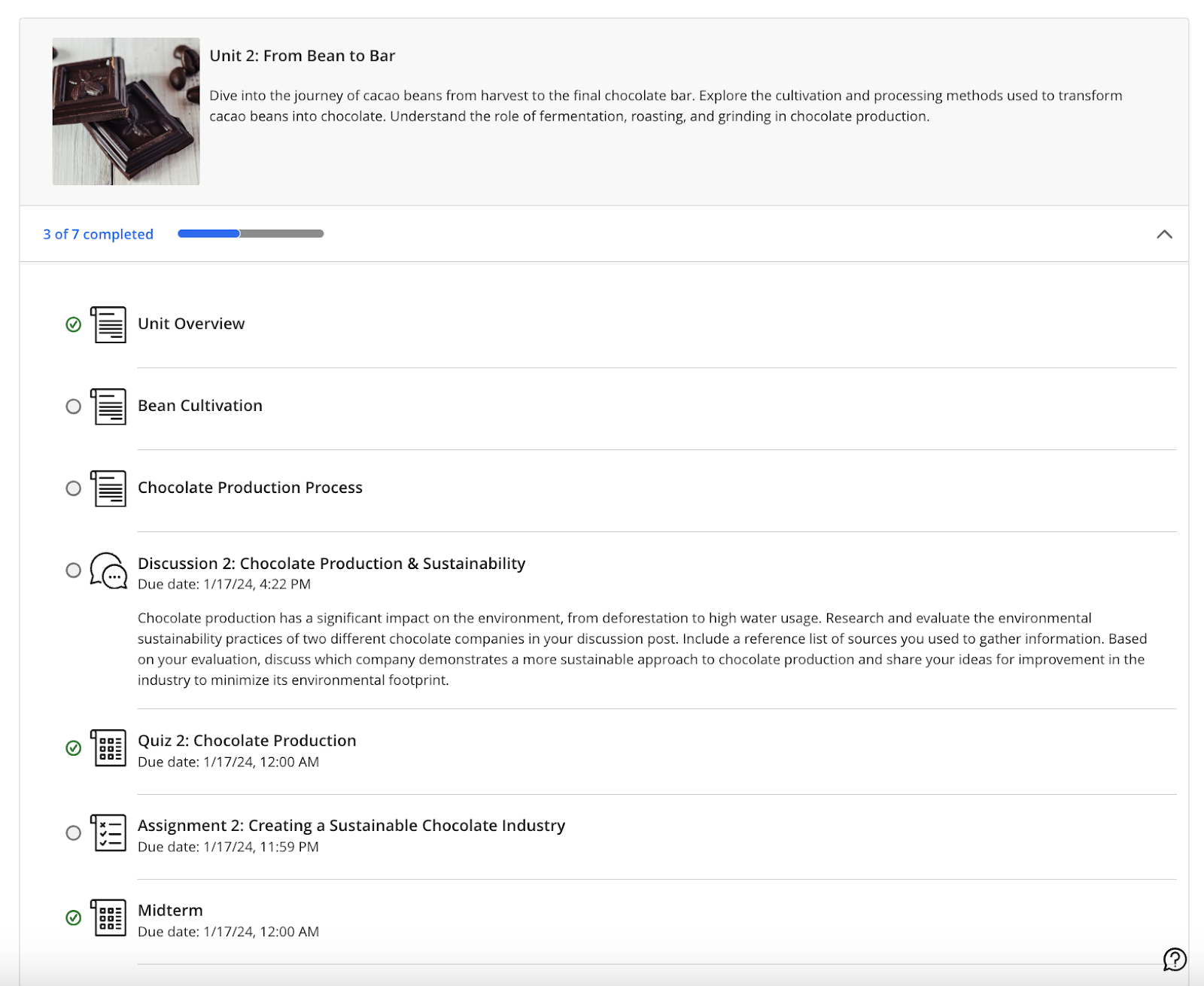
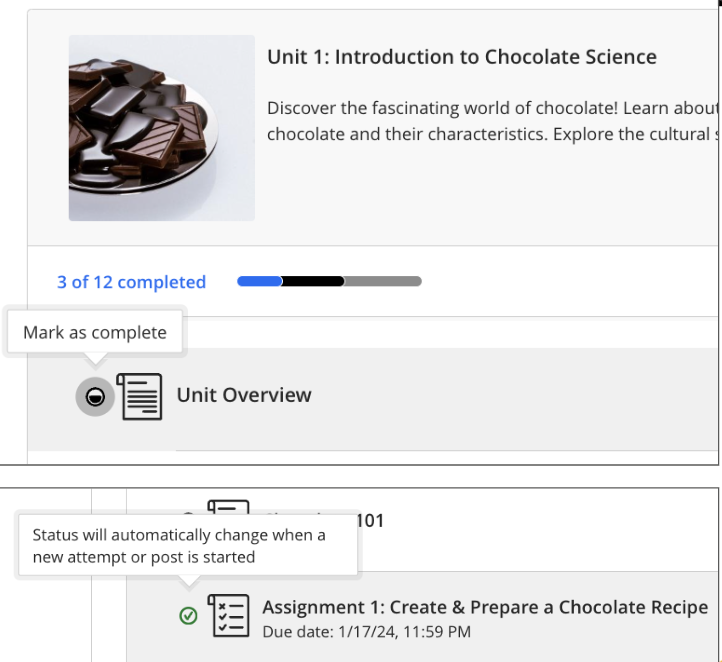
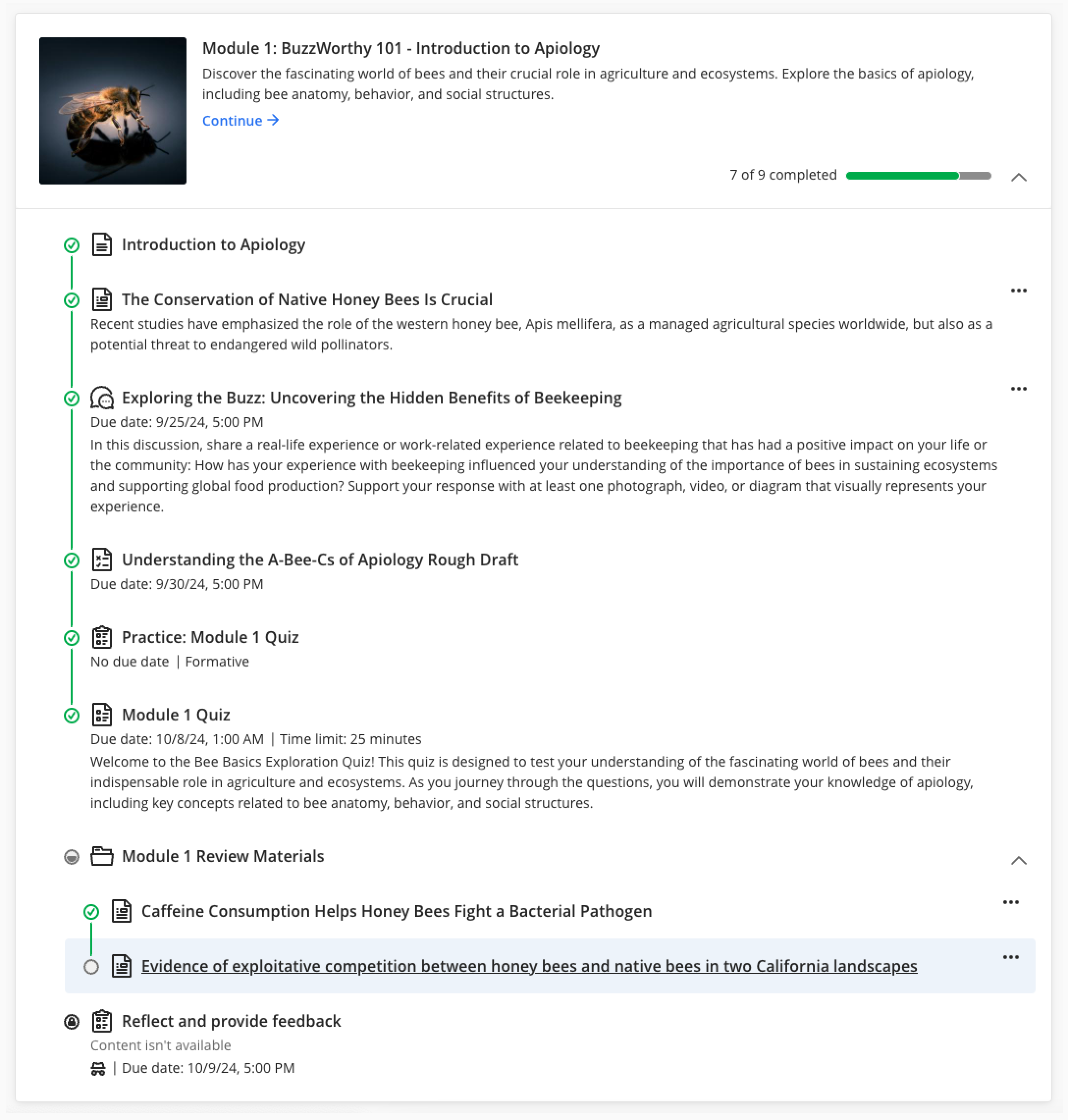
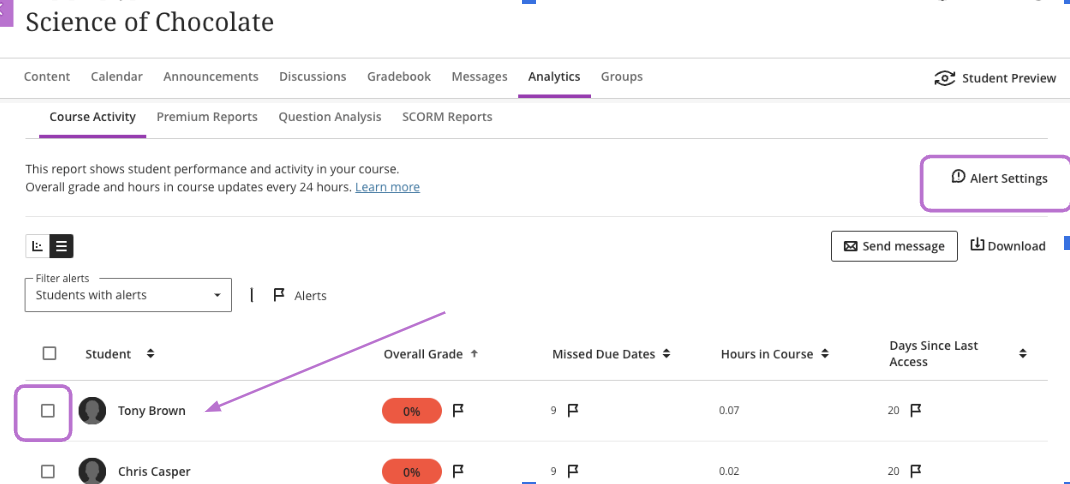
    <div class="html-content"><span><p><em><span>T</span></em><em><span>his article focuses on Ultra's progress tracking tools and strategies for student identification, outreach, and support. It follows <a href="https://my3.my.umbc.edu/groups/instructional-technology/posts/143778" rel="nofollow external" class="bo">Part 1 - </a></span></em><span><em><a href="https://my3.my.umbc.edu/groups/instructional-technology/posts/143778" rel="nofollow external" class="bo">Course Design Best Practices in Ultra</a></em></span><em><span>, which showcased features in Ultra to ensure your course is designed to optimize student learning and ensure they feel welcome and prepared. </span></em></p><p><span>As the semester enters week four, there is an opportunity to assess how students are doing in your course when it comes to participating, meeting deadlines, and completing discussions or knowledge checks. Did you know that Ultra offers a variety of </span><a href="https://umbc.atlassian.net/wiki/x/QgTVAQ" rel="nofollow external" class="bo"><span>reports and analytics</span></a><span> that benefit both instructors and students in tracking individual progress? </span></p><p><span><strong>Progress Tracking</strong></span><span> </span></p><p></p><p><span>Instructors can monitor student progress through a variety of tools including options that support tracking by content item, submission activity, and test attempt. When tracking student progress in a particular set of content, instructors can filter by student and progress status, or select students and send an individualized message or reminder. In conjunction with early academic alerts, instructors can decide when and how to reach out to students by using details and insights from Ultra’s progress reports. </span></p><p><span><strong>Student View of Progress Tracking</strong></span></p><p><span>Students can also leverage Ultra’s progress tracking capabilities to </span><a href="https://umbc.atlassian.net/wiki/x/QGHVAQ" rel="nofollow external" class="bo"><span>monitor their engagement</span></a><span> with content, assignments, and tests. This feature provides visual indicators of student progress, motivating them to stay on track. Students can also see a summary of their progress within learning modules, making it easier to manage their workload and prioritize tasks.</span></p><p></p><p><span>Instructors who have not seen what the Student View of progress tracking looks like may want to go into “Student Preview” mode once the course is open and see how this appears. Each item has a status circle to the left of the item title. An empty circle means the student has not yet accessed content; a partially filled circle indicates the item has been opened or accessed through Ally; and a green check mark appears when the item has been completed. (See image below)</span></p><p><span><span><span><img src="https://lh7-rt.googleusercontent.com/docsz/AD_4nXd_nftIktL2xT7fcxnycidqsG7ULAbx3aU6TXLBZHeUkiYHsWvkC2ImU7AmNys5S5JFQrSybbkpOh2piyrUpE2DRJOdlnV4lXQd3QhrqNQ3dv-FQkx68Gs8nO3_FFdfi0SWNVqSbWdoHB7jWhTBmyaF-aI?key=f-r3fBqFtw-haR4VqnzPwg" width="570" height="494" style="max-width: 100%; height: auto;"></span></span></span></p><p></p><p><span>While in “Student View,” instructors can see that students may mark content items “complete” after opening them. This gives students a tangible way to keep track of their progress within the course. Assigned submissions will change automatically to denote completion. (See image below)</span></p><p><span><span><span><img src="https://lh7-rt.googleusercontent.com/docsz/AD_4nXcCThxfVEnhnVj8D7ajqi2s_L1ZyFMR-g9rIRUxVqffQsbEpzcoenNC4NIvV5Q3WiafC6rs5PQKtqRilB2Df32XtDPkCFL2r_vCk9JHxeiWSyetTbN2t0BEGY7CXGgz4Xx-_WLYhc1zsc5Yks5fBvJlCA4f?key=f-r3fBqFtw-haR4VqnzPwg" width="624" height="572" style="max-width: 100%; height: auto;"></span></span></span></p><div><span><span><span><span><span><span><span><span><span><span><span><span><p><span><strong>Student Overview (Instructor View)</strong></span></p><p><span>Ultra’s </span><a href="https://help.blackboard.com/Learn/Instructor/Ultra/Interact/StudentOverview" rel="nofollow external" class="bo"><span>Student Overview</span></a><span> offers instructors a single place to access relevant information on a student and personalize outreach. Details such as when a student last accessed the course, overall grade, or any accommodations can be found in the Student Overview. </span></p><p><span>Student Overview can be accessed in multiple ways including Gradebook on the Students tab, within the course roster, via messages or discussions, or within the table view of the Course Activity Report. Instructors can also contact students through Student Overview by sending a message about grades or progress. </span></p><div><span><span><p><span><strong>Gradebook Progress &amp; Instructor Notes</strong></span></p><p><span>Progress tracking features in the Ultra gradebook offer instructors several views including a list of all assignments, a view of students and assignments, or an individual list of students. By selecting the “Progress” tab, instructors can see a list of all content items in the course and status for each item. For students who may be behind or have not opened all content in a module, instructors can select “Send Message” and reach out to a student directly. </span></p><p><span>In the student view of the Gradebook, instructors have access to a “Notes” tab. This newer feature in Ultra is a dedicated space in the course where you can take notes about students for quick reference as the semester progresses. Instructor notes are private only to you and limited only to the course. Instructor notes do NOT travel to other courses and students do not see them. </span></p><p><span><strong>Course Activity Report</strong></span></p><p><span>The </span><a href="https://help.blackboard.com/Learn/Instructor/Ultra/Performance/Course_Reports/Course_Activity_Related_to_Grades" rel="nofollow external" class="bo"><span>Course Activity Report</span></a><span> provides an overview of how a student interacts with the course over time. Instructors can observe how a student’s engagement or performance have changed on a weekly basis or over a longer period of time. In the image below, this is the list view of the report and supports instructors who want to filter students based on overall grade, missed due dates, hours spent in the course, or number of days since they last accessed. After filtering the list, instructors can send messages to students from this window and also configure alerts. </span></p><p><span><span><span><span><img src="https://lh7-rt.googleusercontent.com/docsz/AD_4nXfrnRe6jAuj9uvYcHRFaVU3wnx84ERlXsl46nKrBmTQ4Pxfq12N8NfAjulYlf0K82BH3x5QSpJ_0sxM3QAKYuKcRE_2p_P2fJNc9foEn61MWSW002FOs0NQLVbdN7KVI-6uZCH0zL95S1dUvKX9s-CzkSwE?key=f-r3fBqFtw-haR4VqnzPwg" width="624" height="283" style="max-width: 100%; height: auto;"></span></span></span></span></p><div><span>Within the Report, you can enable and customize </span><a href="https://help.blackboard.com/Learn/Instructor/Ultra/Performance/Course_Reports/Course_Activity_Related_to_Grades#AlertFlags" rel="nofollow external" class="bo"><span>student alert flags</span></a><span> to fit your teaching style. These alerts will be visible in the Course Activity Report and are related to factors such as overall grade, missed due dates, or days since a student last accessed the course. Comprehensive reports let instructors see which students have opened, started, or completed content, helping them tailor teaching strategies. </span></div><div><span>Exploring and leveraging Ultra's progress tracking tools can make identifying and intervening on behalf of students who may be struggling in the course easier and efficient for instructors. </span></div></span></span></div></span><div><span><p><span><strong>Upcoming events about progress tracking and student support: </strong></span></p><ul><li><span>October 4: </span><a href="https://my3.my.umbc.edu/groups/instructional-technology/events/132974" rel="nofollow external" class="bo"><span>Track Student Progress &amp; Elevate Learner Outreach</span></a></li><li><span>November 14: </span><a href="https://my3.my.umbc.edu/groups/doit/events/133897" rel="nofollow external" class="bo"><span>Lessons Learned Nudging Students with Personalized myUMBC Posts</span></a><span> </span></li></ul></span><span><p><span><strong>For more information</strong> on how to use Ultra’s reports and analytics for student tracking and support, check out these resources:</span></p><ul><li><a href="https://umbc.atlassian.net/wiki/x/QgTVAQ" rel="nofollow external" class="bo"><span>Reports &amp; Analytics</span></a></li><li><a href="https://help.blackboard.com/Learn/Instructor/Ultra/Performance/Course_Reports/Course_Activity_Related_to_Grades" rel="nofollow external" class="bo"><span>Course Activity Report</span></a></li><li><a href="https://help.blackboard.com/Learn/Instructor/Ultra/Performance/Course_Reports/Course_Activity_Related_to_Grades#AlertFlags" rel="nofollow external" class="bo"><span>Alert Flags</span></a><span> (within Course Activity Report)</span></li></ul><div><span><br></span></div></span></div></span></span></span></span></span></span></span></span></span></span></span></div></span></div>
]]>
</Body>
<Summary>This article focuses on Ultra's progress tracking tools and strategies for student identification, outreach, and support. It follows Part 1 - Course Design Best Practices in Ultra, which showcased...</Summary>
<Website>https://my3.my.umbc.edu/groups/instructional-technology/posts/143990</Website>
<TrackingUrl>https://beta.my.umbc.edu/api/v0/pixel/news/143990/guest@my.umbc.edu/9aef029bf3b0cd4b8fb3bcc269940df2/api/pixel</TrackingUrl>
<Tag>biro</Tag>
<Tag>fa24</Tag>
<Tag>progress-tracking</Tag>
<Group token="instructional-technology">Instructional Technology</Group>
<GroupUrl>https://beta.my.umbc.edu/groups/instructional-technology</GroupUrl>
<AvatarUrl>https://assets2-beta.my.umbc.edu/system/shared/avatars/groups/000/001/164/dec3b026b81ee6d890a8f82f75c94a2e/xsmall.png?1446126703</AvatarUrl>
<AvatarUrl size="original">https://assets1-beta.my.umbc.edu/system/shared/avatars/groups/000/001/164/dec3b026b81ee6d890a8f82f75c94a2e/original.png?1446126703</AvatarUrl>
<AvatarUrl size="xxlarge">https://assets2-beta.my.umbc.edu/system/shared/avatars/groups/000/001/164/dec3b026b81ee6d890a8f82f75c94a2e/xxlarge.png?1446126703</AvatarUrl>
<AvatarUrl size="xlarge">https://assets1-beta.my.umbc.edu/system/shared/avatars/groups/000/001/164/dec3b026b81ee6d890a8f82f75c94a2e/xlarge.png?1446126703</AvatarUrl>
<AvatarUrl size="large">https://assets1-beta.my.umbc.edu/system/shared/avatars/groups/000/001/164/dec3b026b81ee6d890a8f82f75c94a2e/large.png?1446126703</AvatarUrl>
<AvatarUrl size="medium">https://assets4-beta.my.umbc.edu/system/shared/avatars/groups/000/001/164/dec3b026b81ee6d890a8f82f75c94a2e/medium.png?1446126703</AvatarUrl>
<AvatarUrl size="small">https://assets3-beta.my.umbc.edu/system/shared/avatars/groups/000/001/164/dec3b026b81ee6d890a8f82f75c94a2e/small.png?1446126703</AvatarUrl>
<AvatarUrl size="xsmall">https://assets2-beta.my.umbc.edu/system/shared/avatars/groups/000/001/164/dec3b026b81ee6d890a8f82f75c94a2e/xsmall.png?1446126703</AvatarUrl>
<AvatarUrl size="xxsmall">https://assets3-beta.my.umbc.edu/system/shared/avatars/groups/000/001/164/dec3b026b81ee6d890a8f82f75c94a2e/xxsmall.png?1446126703</AvatarUrl>
<Sponsor>Instructional Technology</Sponsor>
<ThumbnailUrl size="xxlarge">https://assets2-beta.my.umbc.edu/system/shared/thumbnails/news/000/143/990/83999871bad97988b751868bfa22007b/xxlarge.jpg?1726599325</ThumbnailUrl>
<ThumbnailUrl size="xlarge">https://assets3-beta.my.umbc.edu/system/shared/thumbnails/news/000/143/990/83999871bad97988b751868bfa22007b/xlarge.jpg?1726599325</ThumbnailUrl>
<ThumbnailUrl size="large">https://assets2-beta.my.umbc.edu/system/shared/thumbnails/news/000/143/990/83999871bad97988b751868bfa22007b/large.jpg?1726599325</ThumbnailUrl>
<ThumbnailUrl size="medium">https://assets4-beta.my.umbc.edu/system/shared/thumbnails/news/000/143/990/83999871bad97988b751868bfa22007b/medium.jpg?1726599325</ThumbnailUrl>
<ThumbnailUrl size="small">https://assets3-beta.my.umbc.edu/system/shared/thumbnails/news/000/143/990/83999871bad97988b751868bfa22007b/small.jpg?1726599325</ThumbnailUrl>
<ThumbnailUrl size="xsmall">https://assets1-beta.my.umbc.edu/system/shared/thumbnails/news/000/143/990/83999871bad97988b751868bfa22007b/xsmall.jpg?1726599325</ThumbnailUrl>
<ThumbnailUrl size="xxsmall">https://assets3-beta.my.umbc.edu/system/shared/thumbnails/news/000/143/990/83999871bad97988b751868bfa22007b/xxsmall.jpg?1726599325</ThumbnailUrl>
<PawCount>4</PawCount>
<CommentCount>0</CommentCount>
<CommentsAllowed>true</CommentsAllowed>
<PostedAt>Mon, 23 Sep 2024 14:48:04 -0400</PostedAt>
</NewsItem>

<NewsItem contentIssues="true" id="144132" important="false" status="posted" url="https://beta.my.umbc.edu/groups/oer/posts/144132">
<Title>Resolved - Blackboard Service Disruption - System Performance</Title>
<Tagline>Access to Blackboard &amp; course content may be impacted</Tagline>
<Body>
<![CDATA[
    <div class="html-content"><p>At 6:40 PM on September 22nd, <a href="https://status.blackboard.com/incidents/4380xv4nfhg9" rel="nofollow external" class="bo">Blackboard reported a system performance issue</a> affecting clients in the US East region. This disruption may prevent users from accessing the Blackboard platform. Users who are able to log in may experience degraded performance and difficulty accessing course content and assessments. </p><p>As of 11:00 PM, system performance issues remain unresolved.</p><p>Blackboard engineers are working to address the issue as quickly as possible. Instructional Technology staff opened a ticket with Blackboard Support and are continuing to monitor the service disruption.</p><p><strong>Update: </strong></p><p>As of 3:15 am on September 23, Blackboard reports that this incident has been resolved. Please open an RT request for any continuing concerns related to system performance.</p><p><em>This post will be updated with additional information as we receive it.</em></p><div><span><strong><br></strong></span></div><div><span><strong><br></strong></span></div><div><span><strong>Connect with Instructional Technology</strong></span></div><div><span>As always, if you have any questions about teaching, learning, and technology at UMBC, please consider the following options:</span></div><ul><li><a href="http://www.umbc.edu/faq" rel="nofollow external" class="bo">Check our extensive FAQ collection</a><span> </span></li><li><span><a href="http://my.umbc.edu/go/request-help" rel="nofollow external" class="bo">Open a ticket via RT</a></span></li><li><span>Follow the </span><a href="http://my.umbc.edu/groups/instructional-technology" rel="nofollow external" class="bo">Instructional Technology</a> &amp; <a href="http://my.umbc.edu/groups/doit" rel="nofollow external" class="bo">DoIT</a><span> myUMBC groups</span></li><li><a href="http://doit.umbc.edu/itnm/staff/" rel="nofollow external" class="bo">Request a consult</a><span> with <a href="http://doit.umbc.edu/itnm/staff" rel="nofollow external" class="bo">instructional technology staff</a></span></li><li><span><a href="http://pivot.umbc.edu/" rel="nofollow external" class="bo">PIVOT</a> | <a href="https://doit.umbc.edu/itnm/academic-continuity/" rel="nofollow external" class="bo">Academic Continuity</a></span> | <span><a href="https://fdc.umbc.edu/teaching/keep-on-teaching/" rel="nofollow external" class="bo">Keep On Teaching</a></span> | <span><a href="https://doit.umbc.edu/students" rel="nofollow external" class="bo">Student Technology Resources</a></span></li></ul><div><em>Thumbnail-image: Blackboard logo [decorative]</em></div><p><br></p></div>
]]>
</Body>
<Summary>At 6:40 PM on September 22nd, Blackboard reported a system performance issue affecting clients in the US East region. This disruption may prevent users from accessing the Blackboard platform....</Summary>
<Website>https://my3.my.umbc.edu/groups/instructional-technology/posts/144132</Website>
<TrackingUrl>https://beta.my.umbc.edu/api/v0/pixel/news/144132/guest@my.umbc.edu/61bae9c56fe299d24494666cc9a1250c/api/pixel</TrackingUrl>
<Tag>blackboard</Tag>
<Tag>outage</Tag>
<Group token="instructional-technology">Instructional Technology</Group>
<GroupUrl>https://beta.my.umbc.edu/groups/instructional-technology</GroupUrl>
<AvatarUrl>https://assets2-beta.my.umbc.edu/system/shared/avatars/groups/000/001/164/dec3b026b81ee6d890a8f82f75c94a2e/xsmall.png?1446126703</AvatarUrl>
<AvatarUrl size="original">https://assets1-beta.my.umbc.edu/system/shared/avatars/groups/000/001/164/dec3b026b81ee6d890a8f82f75c94a2e/original.png?1446126703</AvatarUrl>
<AvatarUrl size="xxlarge">https://assets2-beta.my.umbc.edu/system/shared/avatars/groups/000/001/164/dec3b026b81ee6d890a8f82f75c94a2e/xxlarge.png?1446126703</AvatarUrl>
<AvatarUrl size="xlarge">https://assets1-beta.my.umbc.edu/system/shared/avatars/groups/000/001/164/dec3b026b81ee6d890a8f82f75c94a2e/xlarge.png?1446126703</AvatarUrl>
<AvatarUrl size="large">https://assets1-beta.my.umbc.edu/system/shared/avatars/groups/000/001/164/dec3b026b81ee6d890a8f82f75c94a2e/large.png?1446126703</AvatarUrl>
<AvatarUrl size="medium">https://assets4-beta.my.umbc.edu/system/shared/avatars/groups/000/001/164/dec3b026b81ee6d890a8f82f75c94a2e/medium.png?1446126703</AvatarUrl>
<AvatarUrl size="small">https://assets3-beta.my.umbc.edu/system/shared/avatars/groups/000/001/164/dec3b026b81ee6d890a8f82f75c94a2e/small.png?1446126703</AvatarUrl>
<AvatarUrl size="xsmall">https://assets2-beta.my.umbc.edu/system/shared/avatars/groups/000/001/164/dec3b026b81ee6d890a8f82f75c94a2e/xsmall.png?1446126703</AvatarUrl>
<AvatarUrl size="xxsmall">https://assets3-beta.my.umbc.edu/system/shared/avatars/groups/000/001/164/dec3b026b81ee6d890a8f82f75c94a2e/xxsmall.png?1446126703</AvatarUrl>
<Sponsor>Instructional Technology</Sponsor>
<ThumbnailUrl size="xxlarge">https://assets2-beta.my.umbc.edu/system/shared/thumbnails/news/000/144/132/171974d2b4c87c275a9f91ae12938a88/xxlarge.jpg?1727059322</ThumbnailUrl>
<ThumbnailUrl size="xlarge">https://assets4-beta.my.umbc.edu/system/shared/thumbnails/news/000/144/132/171974d2b4c87c275a9f91ae12938a88/xlarge.jpg?1727059322</ThumbnailUrl>
<ThumbnailUrl size="large">https://assets3-beta.my.umbc.edu/system/shared/thumbnails/news/000/144/132/171974d2b4c87c275a9f91ae12938a88/large.jpg?1727059322</ThumbnailUrl>
<ThumbnailUrl size="medium">https://assets4-beta.my.umbc.edu/system/shared/thumbnails/news/000/144/132/171974d2b4c87c275a9f91ae12938a88/medium.jpg?1727059322</ThumbnailUrl>
<ThumbnailUrl size="small">https://assets2-beta.my.umbc.edu/system/shared/thumbnails/news/000/144/132/171974d2b4c87c275a9f91ae12938a88/small.jpg?1727059322</ThumbnailUrl>
<ThumbnailUrl size="xsmall">https://assets1-beta.my.umbc.edu/system/shared/thumbnails/news/000/144/132/171974d2b4c87c275a9f91ae12938a88/xsmall.jpg?1727059322</ThumbnailUrl>
<ThumbnailUrl size="xxsmall">https://assets4-beta.my.umbc.edu/system/shared/thumbnails/news/000/144/132/171974d2b4c87c275a9f91ae12938a88/xxsmall.jpg?1727059322</ThumbnailUrl>
<PawCount>2</PawCount>
<CommentCount>0</CommentCount>
<CommentsAllowed>false</CommentsAllowed>
<PostedAt>Sun, 22 Sep 2024 23:19:41 -0400</PostedAt>
<EditAt>Mon, 23 Sep 2024 06:27:21 -0400</EditAt>
</NewsItem>

<NewsItem contentIssues="true" id="143778" important="false" status="posted" url="https://beta.my.umbc.edu/groups/oer/posts/143778">
<Title>Effective course design helps welcome and orient students</Title>
<Tagline>Course Design Best Practices in Ultra - Part 1 of 2</Tagline>
<Body>
<![CDATA[
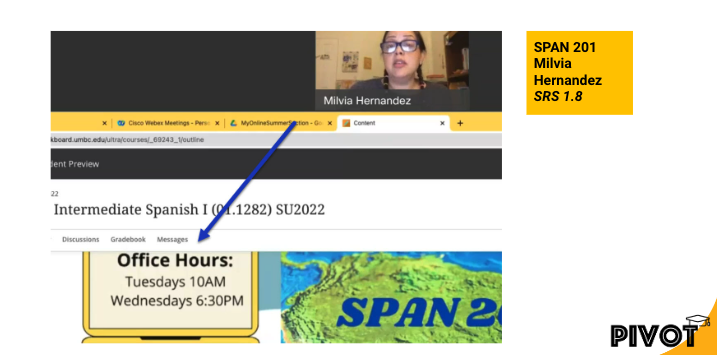
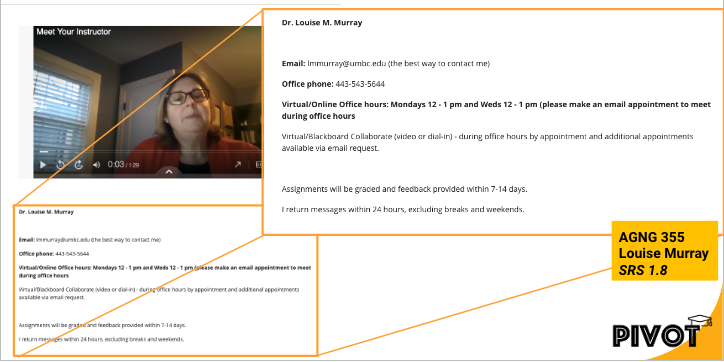
    <div class="html-content"><span><p><span><em><span>This article focuses on ways to leverage features in Ultra to ensure your course is designed to optimize student learning and ensure students feel welcome and prepared, especially at the start of the term. </span><span>Part 2 will feature Ultra’s progress tracking tools and effective strategies for student identification, outreach, and support</span><span>.</span></em></span></p><p><span><span>A student’s first impression of your course, and their learning opportunities throughout the course, are influenced initially by course design. A clutter-free environment helps students focus on the course and avoid confusion. In addition, students’ learning opportunities can be enhanced by using Blackboard Ultra design features to welcome and orient them within the first critical weeks of the semester and ensure they are on track and able to locate content, engage with one another, get help, and submit assignments.</span></span></p><p></p><p><span>During emergency-remote instruction in 2020, a survey of more than 500 UMBC courses taught by instructors </span><span>who completed </span><a href="https://pivot.umbc.edu/" rel="nofollow external" class="bo"><span>the PIVOT+ professional development program</span></a> <span>found</span><span> </span><a href="https://my3.my.umbc.edu/groups/instructional-technology/posts/97557" rel="nofollow external" class="bo"><span>students reported enjoying</span></a><span> taking classes that were well organized and planned. More than 85% of students agreed or strongly agreed that PIVOT+ courses flowed in a logical format. About 90% of students agreed or strongly agreed that course requirements were clear, while 83% agreed or strongly agreed that assignment instructions were clear. </span></p><p><span><strong>Using the ‘Start Here’ Module </strong></span></p><p></p><p><span>Every Blackboard course shell at UMBC is created with a “Start Here” module already in place. Within this module are placeholders for the syllabus, instructor information, and eLearning and academic resources. This module can also contain critical orientation information to let students know what to expect in your course, how to navigate, help set the tone for the course, and provide opportunities to establish teaching and social presence (Quality Matters, 2024; Wengier, 2022). </span></p><p><span><strong>Welcoming and Orienting Students</strong></span></p><p><span></span></p><p><span>When it comes to designing the welcome experience for learners, Quality Matters </span><a href="https://docs.google.com/document/d/1NFZKsC7c7t49d2TrCu7W_idIwv-TiXpy-RHWCmDz4Pk/edit?usp=sharing" rel="nofollow external" class="bo"><span>General Standard 1: Course Overview &amp; Introduction</span></a><span> (HE Rubric, 7th ed.), offers researched-backed effective practices for orienting students to the course and instructor expectations for communication, feedback, grading, and use of Blackboard. </span></p><div><span><span><span><span><span><span><div><img src="https://my3.my.umbc.edu/groups/instructional-technology/posts/143778/attachments/53236" style="max-width: 100%; height: auto;"></div><div><span><p><span>In the </span><a href="https://my3.my.umbc.edu/groups/instructional-technology/posts/139499" rel="nofollow external" class="bo"><span>QM-certified course</span></a><span> AGNG 355, instructor Louise Murray (pictured above) includes a pre-recorded, narrated, and captioned PowerPoint to provide students with a visual tour of the course and communication expectations. This allows students to see and hear the instructor and complements the text Murray provides about email, phone, office hours, and response times. </span></p><div><span><span><p><span>There are many ways to welcome and introduce students to your course, including steps you can take before the semester even starts, such as sending a welcome email or announcement. These messages can stay available for students through the duration of the course. </span></p><p></p><p><span>Some instructors send a pre-survey to students before the semester starts to determine prior knowledge or experience. In addition, you may want to prepare a Frequently Asked Questions (FAQs) resource to address the most common student questions, share tips on time management, and remind students how to access technology and resources.</span></p><p><span>Consider that there are effective options to consider for welcoming and orienting students that create learning opportunities at the beginning of the course including:</span></p><ul><li><span>Accessing a welcome video or course tour (pre-recorded)</span></li><li><span>Reading an instructor’s introduction</span></li><li><span>Introducing themselves in a Discussion forum or VoiceThread </span></li><li><span>Using the “Ask the Professor” discussion forum to ask clarifying questions</span></li><li><span>Completing a syllabus quiz</span></li></ul><div><span><img src="https://my3.my.umbc.edu/groups/instructional-technology/posts/143778/attachments/53237" style="max-width: 100%; height: auto;"></span></div><div><span><span><p><span>In the Quality Matters certified course SPAN 201 (pictured above) instructor Milvia Hernandez pre-records a brief video that complements text in Blackboard. More importantly, students can also see and hear Hernandez as she welcomes them in both Spanish and English and explains the course structure and cadence. </span></p><p><span><strong>About Quality Matters</strong></span></p><p><span>Grounded in evidence-based practice research, peer review, and collegiality, </span><a href="https://www.qualitymatters.org/why-quality-matters/process" rel="nofollow external" class="bo"><span>Quality Matters (QM)</span></a><span> is used by more than 40,000 educators and instructional designers worldwide to strengthen online and blended course design. </span></p><p><span>At UMBC, <a href="https://my3.my.umbc.edu/groups/instructional-technology/posts/139499" rel="nofollow external" class="bo">19 courses</a> have earned QM certification for online course design and represent more than half of the QM-certified courses in the <a href="https://www.qmprogram.org/qmresources/coursesearch/?program=2&amp;CourseNo=&amp;courseName=&amp;courseSubject=&amp;recognizedDateFrom=&amp;recognizedDateTo=&amp;Institutions=250,597,916,2285,2704,2776,2838,2842,2839,2840&amp;searchcourse=yes" rel="nofollow external" class="bo">University System of Maryland</a>. </span></p><p><span><strong>References:</strong></span></p><ul><li><span>Quality Matters. (2024, September 9). </span><a href="https://www.qualitymatters.org/qa-resources/rubric-standards" rel="nofollow external" class="bo"><span>QM Rubrics &amp; Standards</span></a><span>. </span></li><li><span>Wengier, S. (2022). </span><span>The start here module: Creating a first day impression in an online language class</span><span> (</span><a href="https://eric.ed.gov/?q=EJ1346021&amp;id=EJ1346021" rel="nofollow external" class="bo"><span>EJ1346021</span></a><span>). <br></span></li></ul><div>By <a href="https://doit.umbc.edu/itnm/staff/biro/" rel="nofollow external" class="bo">Susan Biro</a> and <a href="https://doit.umbc.edu/itnm/staff/ariev/" rel="nofollow external" class="bo">Peter Ariev</a></div></span></span></div></span></span></div></span></div></span></span></span></span></span></span></div></span></div>
]]>
</Body>
<Summary>This article focuses on ways to leverage features in Ultra to ensure your course is designed to optimize student learning and ensure students feel welcome and prepared, especially at the start of...</Summary>
<Website>https://my3.my.umbc.edu/groups/instructional-technology/posts/143778</Website>
<AttachmentKind>Image</AttachmentKind>
<AttachmentUrl>https://assets1-beta.my.umbc.edu/system/shared/attachments/4b2e786a338122fb9a9f53ff9e7d0d02/69e6505d/news/000/143/778/742beee20e6d828dada4a2523e75df59/Louise_Murray video-welcome.png?1725993019</AttachmentUrl>
<Attachments>
<Attachment kind="Image" url="https://beta.my.umbc.edu/groups/oer/posts/143778/attachments/53236"></Attachment>
<Attachment kind="Image" url="https://beta.my.umbc.edu/groups/oer/posts/143778/attachments/53237"></Attachment>
</Attachments>
<TrackingUrl>https://beta.my.umbc.edu/api/v0/pixel/news/143778/guest@my.umbc.edu/6913629cbca88b010824478e8c314542/api/pixel</TrackingUrl>
<Tag>ariev</Tag>
<Tag>biro</Tag>
<Tag>course-design</Tag>
<Tag>fa24</Tag>
<Tag>online-learners</Tag>
<Tag>pivot</Tag>
<Tag>qm</Tag>
<Tag>qm-standard-1</Tag>
<Tag>quality-matters</Tag>
<Tag>ultra</Tag>
<Group token="instructional-technology">Instructional Technology</Group>
<GroupUrl>https://beta.my.umbc.edu/groups/instructional-technology</GroupUrl>
<AvatarUrl>https://assets2-beta.my.umbc.edu/system/shared/avatars/groups/000/001/164/dec3b026b81ee6d890a8f82f75c94a2e/xsmall.png?1446126703</AvatarUrl>
<AvatarUrl size="original">https://assets1-beta.my.umbc.edu/system/shared/avatars/groups/000/001/164/dec3b026b81ee6d890a8f82f75c94a2e/original.png?1446126703</AvatarUrl>
<AvatarUrl size="xxlarge">https://assets2-beta.my.umbc.edu/system/shared/avatars/groups/000/001/164/dec3b026b81ee6d890a8f82f75c94a2e/xxlarge.png?1446126703</AvatarUrl>
<AvatarUrl size="xlarge">https://assets1-beta.my.umbc.edu/system/shared/avatars/groups/000/001/164/dec3b026b81ee6d890a8f82f75c94a2e/xlarge.png?1446126703</AvatarUrl>
<AvatarUrl size="large">https://assets1-beta.my.umbc.edu/system/shared/avatars/groups/000/001/164/dec3b026b81ee6d890a8f82f75c94a2e/large.png?1446126703</AvatarUrl>
<AvatarUrl size="medium">https://assets4-beta.my.umbc.edu/system/shared/avatars/groups/000/001/164/dec3b026b81ee6d890a8f82f75c94a2e/medium.png?1446126703</AvatarUrl>
<AvatarUrl size="small">https://assets3-beta.my.umbc.edu/system/shared/avatars/groups/000/001/164/dec3b026b81ee6d890a8f82f75c94a2e/small.png?1446126703</AvatarUrl>
<AvatarUrl size="xsmall">https://assets2-beta.my.umbc.edu/system/shared/avatars/groups/000/001/164/dec3b026b81ee6d890a8f82f75c94a2e/xsmall.png?1446126703</AvatarUrl>
<AvatarUrl size="xxsmall">https://assets3-beta.my.umbc.edu/system/shared/avatars/groups/000/001/164/dec3b026b81ee6d890a8f82f75c94a2e/xxsmall.png?1446126703</AvatarUrl>
<Sponsor>Instructional Technology</Sponsor>
<ThumbnailUrl size="xxlarge">https://assets4-beta.my.umbc.edu/system/shared/thumbnails/news/000/143/778/0b56ac3144145da43c7c77fbf3b5d6b1/xxlarge.jpg?1725992788</ThumbnailUrl>
<ThumbnailUrl size="xlarge">https://assets4-beta.my.umbc.edu/system/shared/thumbnails/news/000/143/778/0b56ac3144145da43c7c77fbf3b5d6b1/xlarge.jpg?1725992788</ThumbnailUrl>
<ThumbnailUrl size="large">https://assets3-beta.my.umbc.edu/system/shared/thumbnails/news/000/143/778/0b56ac3144145da43c7c77fbf3b5d6b1/large.jpg?1725992788</ThumbnailUrl>
<ThumbnailUrl size="medium">https://assets2-beta.my.umbc.edu/system/shared/thumbnails/news/000/143/778/0b56ac3144145da43c7c77fbf3b5d6b1/medium.jpg?1725992788</ThumbnailUrl>
<ThumbnailUrl size="small">https://assets2-beta.my.umbc.edu/system/shared/thumbnails/news/000/143/778/0b56ac3144145da43c7c77fbf3b5d6b1/small.jpg?1725992788</ThumbnailUrl>
<ThumbnailUrl size="xsmall">https://assets1-beta.my.umbc.edu/system/shared/thumbnails/news/000/143/778/0b56ac3144145da43c7c77fbf3b5d6b1/xsmall.jpg?1725992788</ThumbnailUrl>
<ThumbnailUrl size="xxsmall">https://assets2-beta.my.umbc.edu/system/shared/thumbnails/news/000/143/778/0b56ac3144145da43c7c77fbf3b5d6b1/xxsmall.jpg?1725992788</ThumbnailUrl>
<PawCount>3</PawCount>
<CommentCount>0</CommentCount>
<CommentsAllowed>true</CommentsAllowed>
<PostedAt>Wed, 11 Sep 2024 16:37:33 -0400</PostedAt>
<EditAt>Thu, 12 Sep 2024 07:51:17 -0400</EditAt>
</NewsItem>

<NewsItem contentIssues="true" id="142272" important="false" status="posted" url="https://beta.my.umbc.edu/groups/oer/posts/142272">
<Title>Vasbinder Creates OER Course from 2023 M.O.S.T. Faculty Grant</Title>
<Tagline>Dance History course offers inclusive, equitable curriculum</Tagline>
<Body>
<![CDATA[
    <div class="html-content"><div><span><p><span>Jill Vasbinder, adjunct faculty, Department of Dance (Dance Appreciation, Dance History) has created an Open Educational Resource (OER) dance history course as a recipient of the 2023 Maryland Open Source Textbook </span><a href="https://my3.my.umbc.edu/groups/oer/posts/130130" rel="nofollow external" class="bo"><span>(M.O.S.T.) Faculty OER Grant Program</span></a><span>. </span></p><p><span>The course, </span><span><em>Dance History I: Cultural and Classical Forms</em></span><span>, offers a more diverse, inclusive, and equitable curriculum that examines the history of dance. Vasbinder began exploring the use of open licensed materials in dance and dance education as a way to practice inclusion in the classroom. </span></p><p><span><span>Vasbinder received a $2,000 grant plus participation in the </span><a href="https://rebus.community/textbook-success-program/" rel="nofollow external" class="bo"><span>Rebus Textbook Success Program</span></a><span> to create the OER course this past year. </span></span></p><p><span>She has published and presented on the use of open licensing in dance and viewed the M.O.S.T. Faculty OER Grant Program as an opportunity to “transform Dance History I into an OER course that can be shared with dancers and dance educators … to help bring a more inclusive understanding of a greater variety of dances.”</span></p><div><span><span><h5><span>Creating a more inclusive course</span></h5><p><a href="https://dance.umbc.edu/faculty/" rel="nofollow external" class="bo"><span>Carol Hess</span></a><span>, professor and Chair, Department of Dance, shared, “Over the past several years, Ms. Vasbinder has been transforming her Dance History I course to contain more inclusive, de-colonized content, a wider array of assessment modalities, and embodied experiences for the students. Her OER course shares an approach to the teaching of Dance History that will be a valuable resource for both instructors and students.”</span></p><p><span>Hess was a project team member on the M.O.S.T. Faculty Grant supporting Vasbinder’s work. Other team members were </span><a href="https://lib.guides.umbc.edu/prf.php?id=5c44d2fe-7cdb-11ed-9922-0ad758b798c3" rel="nofollow external" class="bo"><span>Erin Durham Wright</span></a><span>, Reference &amp; Instruction Librarian; </span><a href="https://doit.umbc.edu/itnm/staff/abrams/" rel="nofollow external" class="bo"><span>Josh Abrams</span></a><span>, Instructional Design Specialist, Instructional Technology; and </span><a href="https://doit.umbc.edu/itnm/staff/biro/" rel="nofollow external" class="bo"><span>Susan Biro</span></a><span>, Manager, Online Learning, Instructional Technology. </span></p><p><span>“The process of creating this resource has been an amazing collaboration renewing my joy of teaching and exploring the ever expanding ways to share and learn,” says Vasbinder. “My hope is that this OER course will continue to be updated and expanded and grow to include modules from other dance history scholars as we continue to receive feedback from student and scholar adopters of this work.” She is excited to learn how the course is adopted and adapted by others in the field.</span></p><p><span><em>Dance History: Cultural and Classical Forms</em></span><span> is now available. Potential adopters and adapters will be able to find the course in the </span><a href="https://most.oercommons.org/" rel="nofollow external" class="bo"><span>M.O.S.T. Commons</span></a><span>, </span><a href="https://oercommons.org/" rel="nofollow external" class="bo"><span>OER Commons</span></a><span>, and the </span><a href="https://www.ndeo.org/Learn/Dance-Education-Research/DELRdi" rel="nofollow external" class="bo"><span>DELRdi </span></a><span>(Dance Education Literature and Research descriptive index). </span></p><h5><span>M.O.S.T. Initiative expands OER access</span></h5><p><span>The Maryland Open Source Textbook (M.O.S.T.) initiative supports efforts to increase faculty access, affordability, and achievement for students at Maryland’s postsecondary institutions through the incorporation of open educational resources (OER) into teaching practice. </span></p><p><span></span></p><p><span>From spring 2014 to fall 2023, 210 courses at 29 institutions across Maryland have switched to OER, saving students more than $22 million in cumulative textbook costs. Since spring 2014, </span><a href="https://www.oer-maryland.org/" rel="nofollow external" class="bo"><span>M.O.S.T. has impacted</span></a><span> more than 160,000 students, who saved an average of $137 per course.</span></p><div><span><br></span></div></span></span></div></span></div><div><br></div><div><br></div><div><br></div><div><div><br></div><div><br></div></div></div>
]]>
</Body>
<Summary>Jill Vasbinder, adjunct faculty, Department of Dance (Dance Appreciation, Dance History) has created an Open Educational Resource (OER) dance history course as a recipient of the 2023 Maryland...</Summary>
<Website>https://my3.my.umbc.edu/groups/instructional-technology/posts/142272</Website>
<AttachmentKind>Image</AttachmentKind>
<AttachmentUrl>https://assets1-beta.my.umbc.edu/system/shared/attachments/69f90ff38431b561d4ea58aa4cf952f5/69e6505d/news/000/142/272/b533868508ec8c95aeabdc36ecc28e79/jill portrait.jpg?1725893832</AttachmentUrl>
<Attachments>
<Attachment kind="Image" url="https://beta.my.umbc.edu/groups/oer/posts/142272/attachments/53155"></Attachment>
</Attachments>
<TrackingUrl>https://beta.my.umbc.edu/api/v0/pixel/news/142272/guest@my.umbc.edu/9e580d17c29da984c62fd0238270cfab/api/pixel</TrackingUrl>
<Tag>biro</Tag>
<Tag>dance-history</Tag>
<Tag>most</Tag>
<Tag>oer</Tag>
<Tag>open-educational-resources</Tag>
<Tag>vasbinder</Tag>
<Group token="instructional-technology">Instructional Technology</Group>
<GroupUrl>https://beta.my.umbc.edu/groups/instructional-technology</GroupUrl>
<AvatarUrl>https://assets2-beta.my.umbc.edu/system/shared/avatars/groups/000/001/164/dec3b026b81ee6d890a8f82f75c94a2e/xsmall.png?1446126703</AvatarUrl>
<AvatarUrl size="original">https://assets1-beta.my.umbc.edu/system/shared/avatars/groups/000/001/164/dec3b026b81ee6d890a8f82f75c94a2e/original.png?1446126703</AvatarUrl>
<AvatarUrl size="xxlarge">https://assets2-beta.my.umbc.edu/system/shared/avatars/groups/000/001/164/dec3b026b81ee6d890a8f82f75c94a2e/xxlarge.png?1446126703</AvatarUrl>
<AvatarUrl size="xlarge">https://assets1-beta.my.umbc.edu/system/shared/avatars/groups/000/001/164/dec3b026b81ee6d890a8f82f75c94a2e/xlarge.png?1446126703</AvatarUrl>
<AvatarUrl size="large">https://assets1-beta.my.umbc.edu/system/shared/avatars/groups/000/001/164/dec3b026b81ee6d890a8f82f75c94a2e/large.png?1446126703</AvatarUrl>
<AvatarUrl size="medium">https://assets4-beta.my.umbc.edu/system/shared/avatars/groups/000/001/164/dec3b026b81ee6d890a8f82f75c94a2e/medium.png?1446126703</AvatarUrl>
<AvatarUrl size="small">https://assets3-beta.my.umbc.edu/system/shared/avatars/groups/000/001/164/dec3b026b81ee6d890a8f82f75c94a2e/small.png?1446126703</AvatarUrl>
<AvatarUrl size="xsmall">https://assets2-beta.my.umbc.edu/system/shared/avatars/groups/000/001/164/dec3b026b81ee6d890a8f82f75c94a2e/xsmall.png?1446126703</AvatarUrl>
<AvatarUrl size="xxsmall">https://assets3-beta.my.umbc.edu/system/shared/avatars/groups/000/001/164/dec3b026b81ee6d890a8f82f75c94a2e/xxsmall.png?1446126703</AvatarUrl>
<Sponsor>Instructional Technology</Sponsor>
<ThumbnailUrl size="xxlarge">https://assets3-beta.my.umbc.edu/system/shared/thumbnails/news/000/142/272/7a5c5550f8d27d34d79a5af3bed59ef9/xxlarge.jpg?1725893882</ThumbnailUrl>
<ThumbnailUrl size="xlarge">https://assets2-beta.my.umbc.edu/system/shared/thumbnails/news/000/142/272/7a5c5550f8d27d34d79a5af3bed59ef9/xlarge.jpg?1725893882</ThumbnailUrl>
<ThumbnailUrl size="large">https://assets3-beta.my.umbc.edu/system/shared/thumbnails/news/000/142/272/7a5c5550f8d27d34d79a5af3bed59ef9/large.jpg?1725893882</ThumbnailUrl>
<ThumbnailUrl size="medium">https://assets4-beta.my.umbc.edu/system/shared/thumbnails/news/000/142/272/7a5c5550f8d27d34d79a5af3bed59ef9/medium.jpg?1725893882</ThumbnailUrl>
<ThumbnailUrl size="small">https://assets1-beta.my.umbc.edu/system/shared/thumbnails/news/000/142/272/7a5c5550f8d27d34d79a5af3bed59ef9/small.jpg?1725893882</ThumbnailUrl>
<ThumbnailUrl size="xsmall">https://assets2-beta.my.umbc.edu/system/shared/thumbnails/news/000/142/272/7a5c5550f8d27d34d79a5af3bed59ef9/xsmall.jpg?1725893882</ThumbnailUrl>
<ThumbnailUrl size="xxsmall">https://assets2-beta.my.umbc.edu/system/shared/thumbnails/news/000/142/272/7a5c5550f8d27d34d79a5af3bed59ef9/xxsmall.jpg?1725893882</ThumbnailUrl>
<PawCount>5</PawCount>
<CommentCount>1</CommentCount>
<CommentsAllowed>true</CommentsAllowed>
<PostedAt>Mon, 09 Sep 2024 10:58:55 -0400</PostedAt>
<EditAt>Fri, 08 Nov 2024 13:06:28 -0500</EditAt>
</NewsItem>

<NewsItem contentIssues="false" id="143384" important="false" status="posted" url="https://beta.my.umbc.edu/groups/oer/posts/143384">
<Title>September brings knowledge checks, updated course landing page, AI conversations to Ultra</Title>
<Tagline>Grading overview, activity log, new feedback for students</Tagline>
<Body>
<![CDATA[
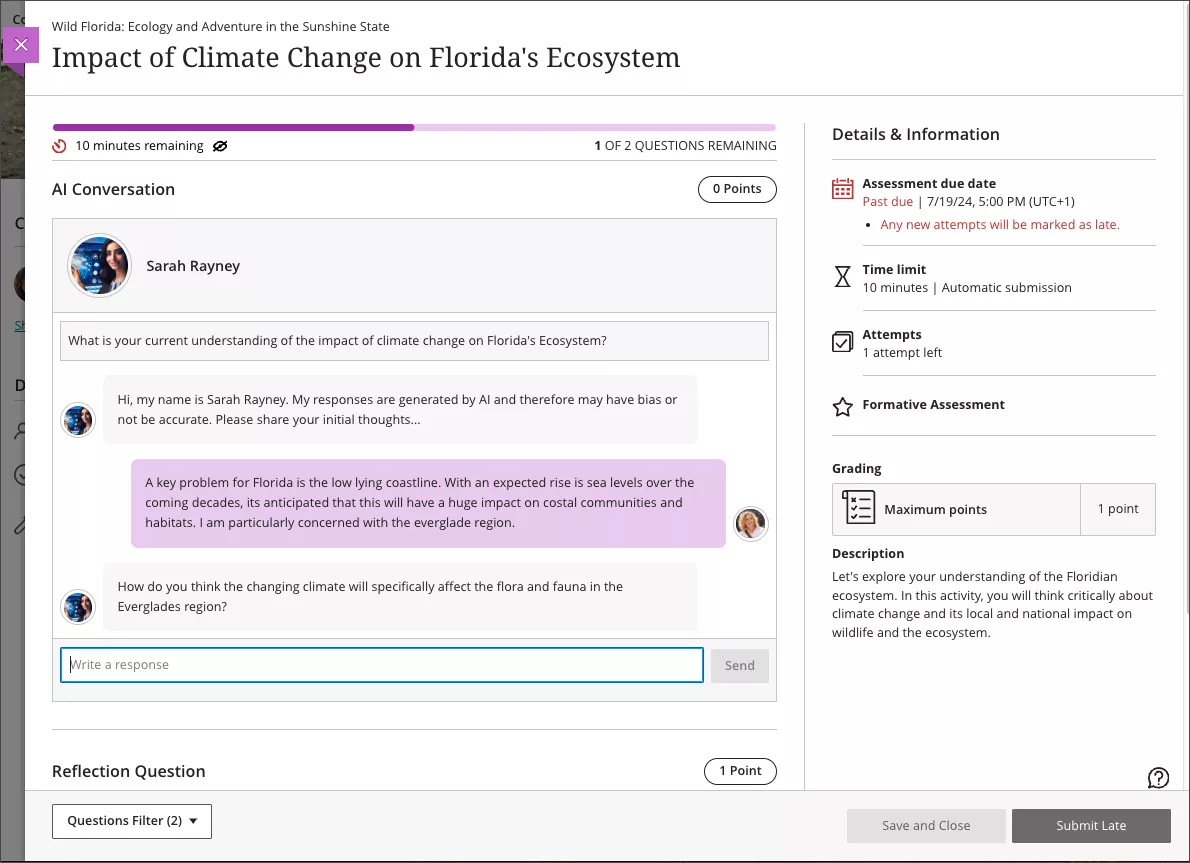
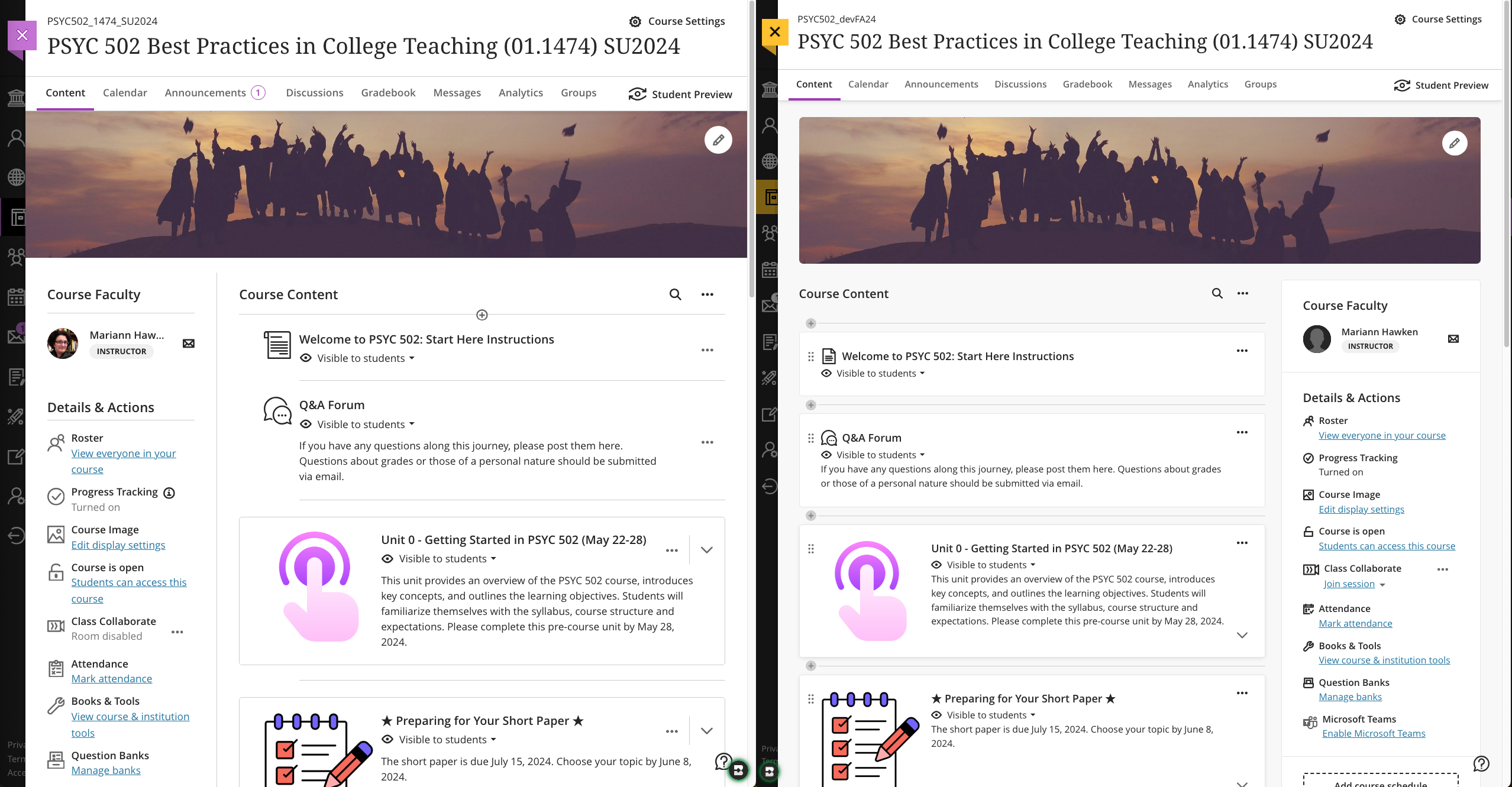
    <div class="html-content"><p>The latest release of Ultra enhancements comes two weeks into the fall 24 semester, bringing formative knowledge checks to Ultra Documents, a redesigned course landing page, and a new learner engagement tool called AI Conversations. </p><p>In <a href="https://my3.my.umbc.edu/groups/instructional-technology/posts/143022" rel="nofollow external" class="bo">the August release</a>, the Ultra Document saw significant improvements to <a href="https://help.blackboard.com/Learn/Instructor/Ultra/Course_Content/Create_Content/Create_Course_Materials/Create_Content_Items_or_Documents" rel="nofollow external" class="bo">support robust flexible layouts</a> that are mobile friendly and responsible. With this update, instructors can now <a href="https://help.blackboard.com/node/48706" rel="nofollow external" class="bo">create formative knowledge checks</a> to enhance the learning experience, allowing students to engage with content and receive immediate feedback. Instructors can provide correct/incorrect feedback and access simple metrics about attempts. Knowledge checks are formative and do not pass to the gradebook at this time.</p><p><img src="https://help.blackboard.com/sites/default/files/inline-images/learn_ultra_instructor_Documents_KCAnimation_0.gif" alt="Image 1: Example of knowledge check question animated" style="max-width: 100%; height: auto;"></p><p><span><em>Image 1: Example of knowledge check question (animated)</em></span></p><p><span>As <a href="https://my3.my.umbc.edu/groups/instructional-technology/posts/143242" rel="nofollow external" class="bo">previously announced</a>, </span>Anthology will <a href="https://help.blackboard.com/node/48721" rel="nofollow external" class="bo">update the Ultra course landing page</a> to focus content on the left and course actions on the right. Additionally, it will be easier to distinguish between content containers (e.g., folders, learning modules, other content types) to help improve course navigation for all users. Moreover, functional improvements with this redesign provide clearer options to create content throughout the course. </p><p><img src="https://my3.my.umbc.edu/groups/instructional-technology/posts/143242/attachments/52853" alt="Image 2: Comparison of old Ultra course page (left) and new Ultra course page (right)" style="max-width: 100%; height: auto;"></p><p><em><span>Image 2: </span><span>Comparison of old Ultra course page (left) and new Ultra course page (right)</span></em></p><p>The <a href="https://help.blackboard.com/Learn/Instructor/Ultra/Interact/AI_Conversation" rel="nofollow external" class="bo">AI Conversation</a> is a new engagement tool guided by AI, encouraging students explore their thoughts on an assigned topic. Currently available as a <span>Socratic questioning exercise, t</span><span>he AI Conversation's persona is configured by the instructor (name, avatar, and personality trait) with options to test and preview for reliability. Additionally, a customizable reflection question allows students to share their thoughts on the activity and, if prompted by the reflection and instructor, lets them flag any bias or errors from the AI as part of </span><a href="https://www.anthology.com/trust-center/trustworthy-ai-approach" rel="nofollow external" class="bo">Anthology’s Trustworthy AI Approach</a><span>. </span>On submission, the instructor can review the AI conversation transcript and the student's reflection. Future <span>updates</span> to this engagement activity in late FA2024 will include roleplaying and debate options.</p><p><img src="https://my3.my.umbc.edu/groups/instructional-technology/posts/143384/attachments/52964" alt="Image 3: Example of student participating in an AI Conversation" style="max-width: 100%; height: auto;"></p><p><em>Image 3: Example of student participating in an AI Conversation</em></p><p>Finally, <a href="https://help.blackboard.com/Learn/Instructor/Ultra/Performance/Student_Activity_Log" rel="nofollow external" class="bo">a new activity log</a> is available to instructors in the Ultra course, helping with decisions in academic disputes and aiding in troubleshooting. <span>Events include course access, assessment start/save/submitted, discussion access/save/edit/reply, document access, LTI (tool) access, and journal access. </span><span>The Activity log can be filtered by event type and can look to the past 140 days.</span></p><p>Additional updates for September include:<span>  </span></p><ul><li><span>Instructors will find <a href="https://help.blackboard.com/node/48746" rel="nofollow external" class="bo">a new gradebook Overview tab</a> to improve task orientation and grading efficiency.  This tab contains two sections: Needs Grading and Needs Posting.</span></li><li><span>To help instructors stay on top of their grading workload, there will be <a href="https://help.blackboard.com/node/48751" rel="nofollow external" class="bo">a number in the Gradebook tab</a> to indicate when there are new submissions to grade. </span></li><li><span>Ultra introduces <a href="https://help.blackboard.com/node/48726" rel="nofollow external" class="bo">a new student-facing submission review page</a> for assignments that makes all instructor feedback on a submission more visible</span><span>, even if the assignment is <a href="https://help.blackboard.com/node/48731" rel="nofollow external" class="bo">hidden by a release condition</a>.</span></li><li>The <a href="https://help.blackboard.com/node/48761" rel="nofollow external" class="bo">Wiris engine and equation editor</a> is updated to improve the rendering of subscript and superscript formulas, providing a better experience for STEM courses.</li><li>Ultra added a new option to help instructors remove submissions from the grading workflow without having to delete them. When grading a student, you can now <a href="https://help.blackboard.com/node/48741" rel="nofollow external" class="bo">select Exclude Attempt to remove it</a> from the Needs Grading workflow.</li><li>When enabled, the Automatic Zeros gradebook setting gives a zero score to students who haven’t made a submission by the due date. To help instructors <a href="https://help.blackboard.com/node/48751" rel="nofollow external" class="bo">find and grade late assessment submissions</a>, they are now indicated as Needs Grading on the Grades and Gradable Items gradebook pages.  </li></ul><p>Faculty should see the latest updates in their Ultra courses around September 5-6, 2024. The next update to our Ultra test environment will take place on September 10, 2024; release notes are posted to the <a href="https://wiki.umbc.edu/x/LohnB" rel="nofollow external" class="bo">What's New in Ultra</a> that same week. Faculty who are interested in test driving new features before they are released to production should <a href="http://my.umbc.edu/go/request-help" rel="nofollow external" class="bo">open an RT ticket</a> to request early access. Please <a href="http://umbc.edu/go/ultra" rel="nofollow external" class="bo">watch the FAQs</a>, including <a href="https://wiki.umbc.edu/x/LohnB" rel="nofollow external" class="bo">the What's New with Ultra page</a>, and myUMBC for additional information about Ultra.</p><div><div><span><strong>Connect with Instructional Technology</strong></span></div><div><span>As always, if you have any questions about teaching, learning, and technology at UMBC, please consider the following options:</span></div><ul><li><a href="http://www.umbc.edu/faq" rel="nofollow external" class="bo">Check our extensive FAQ collection</a><span> </span></li><ul><li><span><a href="https://wiki.umbc.edu/x/LohnB" rel="nofollow external" class="bo"><span>What's new in Ultra?</span></a><span> </span><span>|</span><span> </span><a href="https://wiki.umbc.edu/x/bwrSAQ" rel="nofollow external" class="bo"><span>Known Issues</span></a><span> </span></span></li></ul><li><span><a href="http://my.umbc.edu/go/request-help" rel="nofollow external" class="bo">Open a ticket via RT</a></span></li><li><span>Follow the </span><a href="http://my.umbc.edu/groups/instructional-technology" rel="nofollow external" class="bo">Instructional Technology</a><span> &amp; </span><a href="http://my.umbc.edu/groups/doit" rel="nofollow external" class="bo">DoIT</a><span> myUMBC groups</span></li><li><a href="http://doit.umbc.edu/itnm/staff/" rel="nofollow external" class="bo">Request a consult</a><span> with <a href="http://doit.umbc.edu/itnm/staff" rel="nofollow external" class="bo">instructional technology staff</a></span></li><li><span><a href="http://pivot.umbc.edu" rel="nofollow external" class="bo">PIVOT</a> | <a href="https://doit.umbc.edu/itnm/academic-continuity/" rel="nofollow external" class="bo">Academic Continuity</a></span><span> </span><span>|</span><span> </span><span><a href="https://fdc.umbc.edu/teaching/keep-on-teaching/" rel="nofollow external" class="bo">Keep On Teaching</a></span><span> </span><span>|</span><span> </span><span><a href="https://doit.umbc.edu/students" rel="nofollow external" class="bo">Student Technology Resources</a></span></li></ul><div><em>Thumbnail-image: New to Ultra [decorative]</em></div><div><div></div></div></div></div>
]]>
</Body>
<Summary>The latest release of Ultra enhancements comes two weeks into the fall 24 semester, bringing formative knowledge checks to Ultra Documents, a redesigned course landing page, and a new learner...</Summary>
<Website>https://my3.my.umbc.edu/groups/instructional-technology/posts/143384</Website>
<AttachmentKind>Image</AttachmentKind>
<AttachmentUrl>https://assets1-beta.my.umbc.edu/system/shared/attachments/6263e9dd8405654d93f57e699259c4b3/69e6505d/news/000/143/384/d6da9193daf6eecb2259258ec79b43fb/learn_ultra_instructor_AIConversation_StudentView.png?1724782774</AttachmentUrl>
<Attachments>
<Attachment kind="Image" url="https://beta.my.umbc.edu/groups/oer/posts/143384/attachments/52964"></Attachment>
</Attachments>
<TrackingUrl>https://beta.my.umbc.edu/api/v0/pixel/news/143384/guest@my.umbc.edu/18c96a6a11e7380b126a951cd5cbc731/api/pixel</TrackingUrl>
<Tag>blackboard</Tag>
<Tag>course-ai-conversations</Tag>
<Tag>design</Tag>
<Tag>ultra-experience</Tag>
<Tag>ultra-update</Tag>
<Group token="instructional-technology">Instructional Technology</Group>
<GroupUrl>https://beta.my.umbc.edu/groups/instructional-technology</GroupUrl>
<AvatarUrl>https://assets2-beta.my.umbc.edu/system/shared/avatars/groups/000/001/164/dec3b026b81ee6d890a8f82f75c94a2e/xsmall.png?1446126703</AvatarUrl>
<AvatarUrl size="original">https://assets1-beta.my.umbc.edu/system/shared/avatars/groups/000/001/164/dec3b026b81ee6d890a8f82f75c94a2e/original.png?1446126703</AvatarUrl>
<AvatarUrl size="xxlarge">https://assets2-beta.my.umbc.edu/system/shared/avatars/groups/000/001/164/dec3b026b81ee6d890a8f82f75c94a2e/xxlarge.png?1446126703</AvatarUrl>
<AvatarUrl size="xlarge">https://assets1-beta.my.umbc.edu/system/shared/avatars/groups/000/001/164/dec3b026b81ee6d890a8f82f75c94a2e/xlarge.png?1446126703</AvatarUrl>
<AvatarUrl size="large">https://assets1-beta.my.umbc.edu/system/shared/avatars/groups/000/001/164/dec3b026b81ee6d890a8f82f75c94a2e/large.png?1446126703</AvatarUrl>
<AvatarUrl size="medium">https://assets4-beta.my.umbc.edu/system/shared/avatars/groups/000/001/164/dec3b026b81ee6d890a8f82f75c94a2e/medium.png?1446126703</AvatarUrl>
<AvatarUrl size="small">https://assets3-beta.my.umbc.edu/system/shared/avatars/groups/000/001/164/dec3b026b81ee6d890a8f82f75c94a2e/small.png?1446126703</AvatarUrl>
<AvatarUrl size="xsmall">https://assets2-beta.my.umbc.edu/system/shared/avatars/groups/000/001/164/dec3b026b81ee6d890a8f82f75c94a2e/xsmall.png?1446126703</AvatarUrl>
<AvatarUrl size="xxsmall">https://assets3-beta.my.umbc.edu/system/shared/avatars/groups/000/001/164/dec3b026b81ee6d890a8f82f75c94a2e/xxsmall.png?1446126703</AvatarUrl>
<Sponsor>Instructional Technology</Sponsor>
<ThumbnailUrl size="xxlarge">https://assets3-beta.my.umbc.edu/system/shared/thumbnails/news/000/143/384/c8d41db1f13878006f4a327708831488/xxlarge.jpg?1724780465</ThumbnailUrl>
<ThumbnailUrl size="xlarge">https://assets3-beta.my.umbc.edu/system/shared/thumbnails/news/000/143/384/c8d41db1f13878006f4a327708831488/xlarge.jpg?1724780465</ThumbnailUrl>
<ThumbnailUrl size="large">https://assets3-beta.my.umbc.edu/system/shared/thumbnails/news/000/143/384/c8d41db1f13878006f4a327708831488/large.jpg?1724780465</ThumbnailUrl>
<ThumbnailUrl size="medium">https://assets2-beta.my.umbc.edu/system/shared/thumbnails/news/000/143/384/c8d41db1f13878006f4a327708831488/medium.jpg?1724780465</ThumbnailUrl>
<ThumbnailUrl size="small">https://assets2-beta.my.umbc.edu/system/shared/thumbnails/news/000/143/384/c8d41db1f13878006f4a327708831488/small.jpg?1724780465</ThumbnailUrl>
<ThumbnailUrl size="xsmall">https://assets1-beta.my.umbc.edu/system/shared/thumbnails/news/000/143/384/c8d41db1f13878006f4a327708831488/xsmall.jpg?1724780465</ThumbnailUrl>
<ThumbnailUrl size="xxsmall">https://assets2-beta.my.umbc.edu/system/shared/thumbnails/news/000/143/384/c8d41db1f13878006f4a327708831488/xxsmall.jpg?1724780465</ThumbnailUrl>
<ThumbnailAltText>Black and white robot dog running with the words "New to Ultra" written on  light turquoise background</ThumbnailAltText>
<PawCount>7</PawCount>
<CommentCount>0</CommentCount>
<CommentsAllowed>true</CommentsAllowed>
<PostedAt>Thu, 29 Aug 2024 09:33:28 -0400</PostedAt>
<EditAt>Tue, 29 Apr 2025 11:48:58 -0400</EditAt>
</NewsItem>

<NewsItem contentIssues="false" id="143242" important="false" status="posted" url="https://beta.my.umbc.edu/groups/oer/posts/143242">
<Title>Anthology to Change Layout of Ultra Courses on September 6</Title>
<Tagline>Design change aims to increase support for creating content</Tagline>
<Body>
<![CDATA[
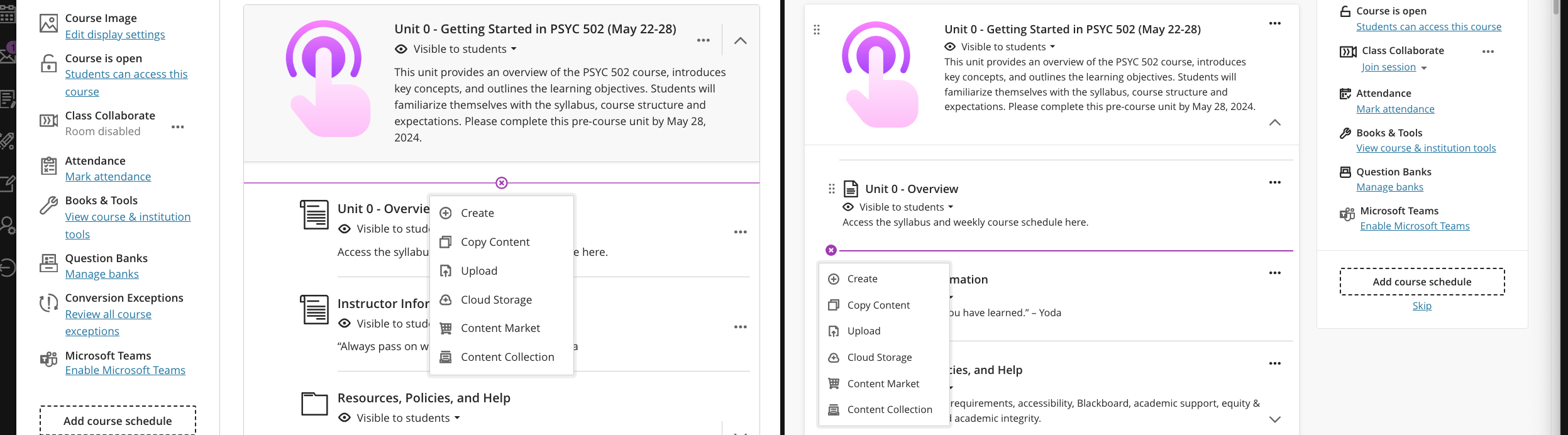
    <div class="html-content"><p>Anthology has <a href="https://help.blackboard.com/node/48721" rel="nofollow external" class="bo">announced</a> that in early September, the Ultra course landing page will be redesigned to focus content on the left and course actions on the right. This change emphasizes Anthology’s continued investment in a learner-centered design for Ultra courses, ensuring that students easily find and engage with course content while deemphasizing the menu associated with instructor-specific activities. Further enhancements to the page include clearer differentiation between content containers -- folders, learning modules, etc. -- to help improve course navigation for all users.</p><p><strong>What does this mean for faculty and students?</strong> Per the examples below, when classes start on August 28, the Course Content page will display the menu on the left with your course materials, folders, etc. on the right. However, on September 6, the update to Ultra will flip the layout so the course materials, folders, etc. appear on the left while the menu shifts to the right. </p><p>Here is a side-by-side view of old (left) and new (right) course layouts.</p><p><img src="https://my3.my.umbc.edu/groups/instructional-technology/posts/143242/attachments/52853" alt="Image 1: Comparison of old Ultra course page (left) and new Ultra course page (right)" style="max-width: 100%; height: auto;"></p><p><em>Image 1: Comparison of old Ultra course page (left) and new Ultra course page (right)</em></p><p>We realize this redesign may be a bit of a shift in the second week of the semester, but we believe the updated layout will not be too disruptive as the content itself does not change, only the focus of its placement (right instead of left). In preparation for this update, Instructional Technology will display this post as part of an internal outreach in Blackboard to remind faculty and students. </p><p>For faculty, functional improvements with this redesign are the clear indications that distinguish between containers (folders or learning modules) and more contextual creation indicators so it's easier to place new content throughout your course. In the second screenshot, you can see the contextual Create (+) and its placement in each version of the course. In the updated course, the (+) will appear on the left) wherever you want to place content while in the current Ultra course, you have to hover to find the (+) and its placement is not as easy to identify within the container.</p><p><img src="https://my3.my.umbc.edu/groups/instructional-technology/posts/143242/attachments/52854" alt="Image 2: Comparison of creating new content on old Ultra course page (left) and new Ultra course page (right)" style="max-width: 100%; height: auto;"></p><p><em>Image 2: Comparison of creating new content on old Ultra course page (left) and new Ultra course page (right)</em></p><p>From the student perspective, functionality changes are minimal with new visual indicators (e.g., lines) to connect content in learning modules. Additionally, for all users, when you hover over content, Ultra will highlight that content a light blue so you know exactly what you are accessing.</p><p><img src="https://my3.my.umbc.edu/groups/instructional-technology/posts/143242/attachments/52852" alt="Image 3: Example of student view of forced learning module sequence with highlighted content selected" style="max-width: 100%; height: auto;"></p><p><em>Image 3: Example of student view of forced learning module sequence with highlighted content selected</em></p><p>Throughout the spring and summer, Ultra courses were <a href="https://my3.my.umbc.edu/groups/instructional-technology/posts?tag=ultra-update" rel="nofollow external" class="bo">updated with new features and enhancements</a> to improve assessment, grading, content creation, and learner engagement. Many of these features are welcome changes that strengthen the platform, providing opportunities for faculty to customize courses and leverage Ultra in new ways. Although the redesigned course landing page comes at an unexpected time, the additional improvements provide increased focus for student learning and improve faculty course preparation with easier navigation.</p><div><div><span><strong>Connect with Instructional Technology</strong></span></div><div><span>As always, if you have any questions about teaching, learning, and technology at UMBC, please consider the following options:</span></div><ul><li><a href="http://www.umbc.edu/faq" rel="nofollow external" class="bo">Check our extensive FAQ collection</a><span> </span></li><ul><li><span><a href="https://wiki.umbc.edu/x/LohnB" rel="nofollow external" class="bo"><span>What's new in Ultra?</span></a><span> </span><span>|</span><span> </span><a href="https://wiki.umbc.edu/x/bwrSAQ" rel="nofollow external" class="bo"><span>Known Issues</span></a><span> </span></span></li></ul><li><span><a href="http://my.umbc.edu/go/request-help" rel="nofollow external" class="bo">Open a ticket via RT</a></span></li><li><span>Follow the </span><a href="http://my.umbc.edu/groups/instructional-technology" rel="nofollow external" class="bo">Instructional Technology</a><span> &amp; </span><a href="http://my.umbc.edu/groups/doit" rel="nofollow external" class="bo">DoIT</a><span> myUMBC groups</span></li><li><a href="http://doit.umbc.edu/itnm/staff/" rel="nofollow external" class="bo">Request a consult</a><span> with <a href="http://doit.umbc.edu/itnm/staff" rel="nofollow external" class="bo">instructional technology staff</a></span></li><li><span><a href="http://pivot.umbc.edu" rel="nofollow external" class="bo">PIVOT</a> | <a href="https://doit.umbc.edu/itnm/academic-continuity/" rel="nofollow external" class="bo">Academic Continuity</a></span><span> </span><span>|</span><span> </span><span><a href="https://fdc.umbc.edu/teaching/keep-on-teaching/" rel="nofollow external" class="bo">Keep On Teaching</a></span><span> </span><span>|</span><span> </span><span><a href="https://doit.umbc.edu/students" rel="nofollow external" class="bo">Student Technology Resources</a></span></li></ul><div><em>Thumbnail-image: New to Ultra [decorative]</em></div><div><div></div></div></div></div>
]]>
</Body>
<Summary>Anthology has announced that in early September, the Ultra course landing page will be redesigned to focus content on the left and course actions on the right. This change emphasizes Anthology’s...</Summary>
<Website>https://my3.my.umbc.edu/groups/instructional-technology/posts/143242</Website>
<AttachmentKind>Image</AttachmentKind>
<AttachmentUrl>https://assets3-beta.my.umbc.edu/system/shared/attachments/c601784f6979f3aafcaa52f843213125/69e6505d/news/000/143/242/49ecdefc6bc4a0afbe59cbf51212146c/Student - Learning Module - forced sequence - continue.png?1724172885</AttachmentUrl>
<Attachments>
<Attachment kind="Image" url="https://beta.my.umbc.edu/groups/oer/posts/143242/attachments/52852"></Attachment>
<Attachment kind="Image" url="https://beta.my.umbc.edu/groups/oer/posts/143242/attachments/52853"></Attachment>
<Attachment kind="Image" url="https://beta.my.umbc.edu/groups/oer/posts/143242/attachments/52854"></Attachment>
</Attachments>
<TrackingUrl>https://beta.my.umbc.edu/api/v0/pixel/news/143242/guest@my.umbc.edu/aeeedf493e6e6feaaedd2d41f9cdea6c/api/pixel</TrackingUrl>
<Tag>blackboard</Tag>
<Tag>course-layout</Tag>
<Tag>course-organization</Tag>
<Tag>ultra-experience</Tag>
<Tag>ultra-update</Tag>
<Group token="instructional-technology">Instructional Technology</Group>
<GroupUrl>https://beta.my.umbc.edu/groups/instructional-technology</GroupUrl>
<AvatarUrl>https://assets2-beta.my.umbc.edu/system/shared/avatars/groups/000/001/164/dec3b026b81ee6d890a8f82f75c94a2e/xsmall.png?1446126703</AvatarUrl>
<AvatarUrl size="original">https://assets1-beta.my.umbc.edu/system/shared/avatars/groups/000/001/164/dec3b026b81ee6d890a8f82f75c94a2e/original.png?1446126703</AvatarUrl>
<AvatarUrl size="xxlarge">https://assets2-beta.my.umbc.edu/system/shared/avatars/groups/000/001/164/dec3b026b81ee6d890a8f82f75c94a2e/xxlarge.png?1446126703</AvatarUrl>
<AvatarUrl size="xlarge">https://assets1-beta.my.umbc.edu/system/shared/avatars/groups/000/001/164/dec3b026b81ee6d890a8f82f75c94a2e/xlarge.png?1446126703</AvatarUrl>
<AvatarUrl size="large">https://assets1-beta.my.umbc.edu/system/shared/avatars/groups/000/001/164/dec3b026b81ee6d890a8f82f75c94a2e/large.png?1446126703</AvatarUrl>
<AvatarUrl size="medium">https://assets4-beta.my.umbc.edu/system/shared/avatars/groups/000/001/164/dec3b026b81ee6d890a8f82f75c94a2e/medium.png?1446126703</AvatarUrl>
<AvatarUrl size="small">https://assets3-beta.my.umbc.edu/system/shared/avatars/groups/000/001/164/dec3b026b81ee6d890a8f82f75c94a2e/small.png?1446126703</AvatarUrl>
<AvatarUrl size="xsmall">https://assets2-beta.my.umbc.edu/system/shared/avatars/groups/000/001/164/dec3b026b81ee6d890a8f82f75c94a2e/xsmall.png?1446126703</AvatarUrl>
<AvatarUrl size="xxsmall">https://assets3-beta.my.umbc.edu/system/shared/avatars/groups/000/001/164/dec3b026b81ee6d890a8f82f75c94a2e/xxsmall.png?1446126703</AvatarUrl>
<Sponsor>Instructional Technology</Sponsor>
<ThumbnailUrl size="xxlarge">https://assets1-beta.my.umbc.edu/system/shared/thumbnails/news/000/143/242/fddb872d10232900a3448c8fbfea5efb/xxlarge.jpg?1724089495</ThumbnailUrl>
<ThumbnailUrl size="xlarge">https://assets2-beta.my.umbc.edu/system/shared/thumbnails/news/000/143/242/fddb872d10232900a3448c8fbfea5efb/xlarge.jpg?1724089495</ThumbnailUrl>
<ThumbnailUrl size="large">https://assets3-beta.my.umbc.edu/system/shared/thumbnails/news/000/143/242/fddb872d10232900a3448c8fbfea5efb/large.jpg?1724089495</ThumbnailUrl>
<ThumbnailUrl size="medium">https://assets2-beta.my.umbc.edu/system/shared/thumbnails/news/000/143/242/fddb872d10232900a3448c8fbfea5efb/medium.jpg?1724089495</ThumbnailUrl>
<ThumbnailUrl size="small">https://assets3-beta.my.umbc.edu/system/shared/thumbnails/news/000/143/242/fddb872d10232900a3448c8fbfea5efb/small.jpg?1724089495</ThumbnailUrl>
<ThumbnailUrl size="xsmall">https://assets4-beta.my.umbc.edu/system/shared/thumbnails/news/000/143/242/fddb872d10232900a3448c8fbfea5efb/xsmall.jpg?1724089495</ThumbnailUrl>
<ThumbnailUrl size="xxsmall">https://assets2-beta.my.umbc.edu/system/shared/thumbnails/news/000/143/242/fddb872d10232900a3448c8fbfea5efb/xxsmall.jpg?1724089495</ThumbnailUrl>
<ThumbnailAltText>Black and white robot dog running with the words "New to Ultra" written on  light turquoise background</ThumbnailAltText>
<PawCount>7</PawCount>
<CommentCount>0</CommentCount>
<CommentsAllowed>true</CommentsAllowed>
<PostedAt>Tue, 20 Aug 2024 13:05:22 -0400</PostedAt>
<EditAt>Tue, 29 Apr 2025 11:48:48 -0400</EditAt>
</NewsItem>

<NewsItem contentIssues="false" id="143150" important="false" status="posted" url="https://beta.my.umbc.edu/groups/oer/posts/143150">
<Title>DoIT Support for Collaborate Will End Next Summer, 2025</Title>
<Tagline>Alternate synchronous tools include Google, Microsoft, Webex</Tagline>
<Body>
<![CDATA[
    <div class="html-content"><p>After many years of use, UMBC’s license for Class Collaborate (formerly Blackboard Collaborate) will end on July 31, 2025.</p><p>As one of our longest licensed tools, Collaborate provided synchronous support for Blackboard courses, serving more than 300,000 sessions over the last ten years. However, since it was <a href="https://www.prnewswire.com/news-releases/class-technologies-closes-acquisition-of-blackboard-collaborate-301578414.html" rel="nofollow external" class="bo">acquired</a> by Class Technologies in 2022, it is unclear if and how Collaborate will be supported and developed over the long term, given the company’s priority of its own synchronous platform based on Zoom. </p><p>In Spring 24, <a href="https://doit.umbc.edu/post/141745/" rel="nofollow external" class="bo">we announced</a> that we would standardize one version of Blackboard (Ultra) starting this fall. Ideally, we would also simplify the synchronous video conference platform used by courses; however, we recognize that students will likely use a variety of tools in their working lives after graduation. Therefore it is essential to expand access to licensed synchronous tools while we also still have Collaborate for another academic year. </p><p>DoIT offers three synchronous meeting tools with robust functionality:</p><ul><li><a href="https://umbc.atlassian.net/wiki/x/AoArHw" rel="nofollow external" class="bo">Google Meet</a> </li><li><a href="https://umbc.atlassian.net/wiki/x/hnbVAQ" rel="nofollow external" class="bo">Microsoft Teams</a></li><li><a href="https://umbc.edu/go/webex-faq" rel="nofollow external" class="bo">Webex</a></li></ul><p>To learn more about these synchronous platforms, please explore pedagogical and technical use cases in this <a href="https://docs.google.com/spreadsheets/d/1yc5y7bNpKDm8DbubuK04TAHo2YzqjApR3LbTmy7ZBIw/preview?usp=sharing#gid=1743178172" rel="nofollow external" class="bo">comparison chart</a>. If you have a specific use case not listed, please <a href="https://doit.umbc.edu/request-tracker-rt/doit-myumbc-blackboard/" rel="nofollow external" class="bo">open an RT ticket</a> for a consult.</p><p><strong>Attendance Tracking</strong> </p><p>While these synchronous platforms offer Blackboard integrations at varying levels, none support 1) attendance synchronization to the Blackboard gradebook and 2) groups synchronization between breakouts and Blackboard. All platforms, however, do provide attendance reports, which will be important for faculty who need to track student attendance as well as <a href="https://upcea.edu/new-distance-education-regulations-proposed-by-ed-includes-required-attendance-taking-additional-reporting-public-comment-open-until-august-23-policy-matters-july-2024/" rel="nofollow external" class="bo">proposed regulatory changes</a> for attendance in 100% online courses.</p><p>We welcome faculty feedback via this <a href="https://umbc.co1.qualtrics.com/jfe/form/SV_1LDRzM6irm3w2xM" rel="nofollow external" class="bo">brief survey</a> about synchronous platforms and attendance. </p><p><strong>Preparing for the Transition</strong></p><p>Starting this fall, Instructional Technology will <a href="https://my3.my.umbc.edu/groups/instructional-technology/events?mode=upcoming&amp;tag=synchronous-tools" rel="nofollow external" class="bo">offer training sessions</a> to familiarize faculty and staff with Google Meet and Microsoft Teams. <span>Webex training is available </span><a href="https://help.umbc.edu/" rel="nofollow external" class="bo"><span>upon request</span></a><span>. </span><span>These sessions will focus on both the technical aspects of using the tools and pedagogical strategies to enhance student engagement.</span></p><p>Users who wish to save Collaborate recordings will need to migrate them to Panopto by May 25, 2025. </p><ol><li><a href="https://umbc.atlassian.net/wiki/x/XSXVAQ" rel="nofollow external" class="bo">Download Collaborate recordings</a> to your computer. </li><li><a href="https://support.panopto.com/s/article/create-new-folder-0" rel="nofollow external" class="bo">Create a new folder in Panopto</a> for Collaborate recordings in My Folder.</li><li><a href="https://support.panopto.com/s/article/Batch-Upload-Video-Files" rel="nofollow external" class="bo">Upload Collaborate recordings</a> to your new Panopto folder.</li></ol><p>Collaborate recordings made before July 1, 2024 will be retired by October 1, 2024.</p><p>NOTE: Due to FERPA restrictions, the reuse of any recordings (Collaborate, Webex, etc.) is not permitted if those recordings feature audio or video of students without their express permission.</p><p><strong>Key Dates to Remember</strong></p><p>May 25, 2025 - Faculty and student access to Collaborate via Blackboard ends</p><p>June 15, 2025 - Access to Collaborate sessions outside Blackboard ends</p><p>July 31, 2025 - End of support for Collaborate, including DoIT access to the Collaborate system</p><div><strong>Connect with Instructional Technology</strong></div><div><div><span>As always, if you have any questions about teaching, learning, and technology at UMBC, please consider the following options:</span></div><ul><li><a href="http://www.umbc.edu/faq" rel="nofollow external" class="bo">Check our extensive FAQ collection</a><span> </span></li><ul><li><span><a href="https://wiki.umbc.edu/x/LohnB" rel="nofollow external" class="bo"><span>What's new in Ultra?</span></a><span> </span><span>|</span><span> </span><a href="https://wiki.umbc.edu/x/bwrSAQ" rel="nofollow external" class="bo"><span>Known Issues</span></a><span> </span></span></li></ul><li><span><a href="http://my.umbc.edu/go/request-help" rel="nofollow external" class="bo">Open a ticket via RT</a></span></li><li><span>Follow the </span><a href="http://my.umbc.edu/groups/instructional-technology" rel="nofollow external" class="bo">Instructional Technology</a><span> &amp; </span><a href="http://my.umbc.edu/groups/doit" rel="nofollow external" class="bo">DoIT</a><span> myUMBC groups</span></li><li><a href="http://doit.umbc.edu/itnm/staff/" rel="nofollow external" class="bo">Request a consult</a><span> with <a href="http://doit.umbc.edu/itnm/staff" rel="nofollow external" class="bo">instructional technology staff</a></span></li><li><span><a href="http://pivot.umbc.edu" rel="nofollow external" class="bo">PIVOT</a> | <a href="https://doit.umbc.edu/itnm/academic-continuity/" rel="nofollow external" class="bo">Academic Continuity</a></span><span> </span><span>|</span><span> </span><span><a href="https://fdc.umbc.edu/teaching/keep-on-teaching/" rel="nofollow external" class="bo">Keep On Teaching</a></span><span> </span><span>|</span><span> </span><span><a href="https://doit.umbc.edu/students" rel="nofollow external" class="bo">Student Technology Resources</a></span></li></ul><div><em>Thumbnail-image: Collaborate logo (decorative)</em></div></div></div>
]]>
</Body>
<Summary>After many years of use, UMBC’s license for Class Collaborate (formerly Blackboard Collaborate) will end on July 31, 2025.  As one of our longest licensed tools, Collaborate provided synchronous...</Summary>
<Website>https://my3.my.umbc.edu/groups/instructional-technology/posts/143150</Website>
<TrackingUrl>https://beta.my.umbc.edu/api/v0/pixel/news/143150/guest@my.umbc.edu/76a4aed06d9ae5fea9365e2e6d98e0cb/api/pixel</TrackingUrl>
<Tag>announcement</Tag>
<Tag>collaborate</Tag>
<Tag>end-of-support</Tag>
<Tag>hawken</Tag>
<Tag>learner-engagement</Tag>
<Tag>microsoft-teams</Tag>
<Tag>synchronous</Tag>
<Tag>webex</Tag>
<Group token="instructional-technology">Instructional Technology</Group>
<GroupUrl>https://beta.my.umbc.edu/groups/instructional-technology</GroupUrl>
<AvatarUrl>https://assets2-beta.my.umbc.edu/system/shared/avatars/groups/000/001/164/dec3b026b81ee6d890a8f82f75c94a2e/xsmall.png?1446126703</AvatarUrl>
<AvatarUrl size="original">https://assets1-beta.my.umbc.edu/system/shared/avatars/groups/000/001/164/dec3b026b81ee6d890a8f82f75c94a2e/original.png?1446126703</AvatarUrl>
<AvatarUrl size="xxlarge">https://assets2-beta.my.umbc.edu/system/shared/avatars/groups/000/001/164/dec3b026b81ee6d890a8f82f75c94a2e/xxlarge.png?1446126703</AvatarUrl>
<AvatarUrl size="xlarge">https://assets1-beta.my.umbc.edu/system/shared/avatars/groups/000/001/164/dec3b026b81ee6d890a8f82f75c94a2e/xlarge.png?1446126703</AvatarUrl>
<AvatarUrl size="large">https://assets1-beta.my.umbc.edu/system/shared/avatars/groups/000/001/164/dec3b026b81ee6d890a8f82f75c94a2e/large.png?1446126703</AvatarUrl>
<AvatarUrl size="medium">https://assets4-beta.my.umbc.edu/system/shared/avatars/groups/000/001/164/dec3b026b81ee6d890a8f82f75c94a2e/medium.png?1446126703</AvatarUrl>
<AvatarUrl size="small">https://assets3-beta.my.umbc.edu/system/shared/avatars/groups/000/001/164/dec3b026b81ee6d890a8f82f75c94a2e/small.png?1446126703</AvatarUrl>
<AvatarUrl size="xsmall">https://assets2-beta.my.umbc.edu/system/shared/avatars/groups/000/001/164/dec3b026b81ee6d890a8f82f75c94a2e/xsmall.png?1446126703</AvatarUrl>
<AvatarUrl size="xxsmall">https://assets3-beta.my.umbc.edu/system/shared/avatars/groups/000/001/164/dec3b026b81ee6d890a8f82f75c94a2e/xxsmall.png?1446126703</AvatarUrl>
<Sponsor>Instructional Technology</Sponsor>
<ThumbnailUrl size="xxlarge">https://assets2-beta.my.umbc.edu/system/shared/thumbnails/news/000/143/150/336bbe9742aecf7c2a8a3f3afaeece80/xxlarge.jpg?1723552911</ThumbnailUrl>
<ThumbnailUrl size="xlarge">https://assets4-beta.my.umbc.edu/system/shared/thumbnails/news/000/143/150/336bbe9742aecf7c2a8a3f3afaeece80/xlarge.jpg?1723552911</ThumbnailUrl>
<ThumbnailUrl size="large">https://assets4-beta.my.umbc.edu/system/shared/thumbnails/news/000/143/150/336bbe9742aecf7c2a8a3f3afaeece80/large.jpg?1723552911</ThumbnailUrl>
<ThumbnailUrl size="medium">https://assets3-beta.my.umbc.edu/system/shared/thumbnails/news/000/143/150/336bbe9742aecf7c2a8a3f3afaeece80/medium.jpg?1723552911</ThumbnailUrl>
<ThumbnailUrl size="small">https://assets3-beta.my.umbc.edu/system/shared/thumbnails/news/000/143/150/336bbe9742aecf7c2a8a3f3afaeece80/small.jpg?1723552911</ThumbnailUrl>
<ThumbnailUrl size="xsmall">https://assets1-beta.my.umbc.edu/system/shared/thumbnails/news/000/143/150/336bbe9742aecf7c2a8a3f3afaeece80/xsmall.jpg?1723552911</ThumbnailUrl>
<ThumbnailUrl size="xxsmall">https://assets3-beta.my.umbc.edu/system/shared/thumbnails/news/000/143/150/336bbe9742aecf7c2a8a3f3afaeece80/xxsmall.jpg?1723552911</ThumbnailUrl>
<ThumbnailAltText>Two parallel arrowheads pointing right</ThumbnailAltText>
<PawCount>5</PawCount>
<CommentCount>0</CommentCount>
<CommentsAllowed>true</CommentsAllowed>
<PostedAt>Thu, 15 Aug 2024 11:32:38 -0400</PostedAt>
<EditAt>Fri, 20 Jun 2025 07:50:30 -0400</EditAt>
</NewsItem>

<NewsItem contentIssues="true" id="143083" important="false" status="posted" url="https://beta.my.umbc.edu/groups/oer/posts/143083">
<Title>New Course Management Features in Poll Everywhere</Title>
<Tagline>Streamlined access to courses and activities</Tagline>
<Body>
<![CDATA[
    <div class="html-content"><span><p><span><em><strong>Update</strong><span>: This feature is postponed by the vendor to </span><span>allow UMBC to review and verify functionality</span><span>. Additional information about availability will be provided to the campus as soon as possible.</span></em></span></p><p><span>In late August 2024, Poll Everywhere will launch a new course management feature to simplify how instructors use polling and to improve the process to synchronize grade data back to the Blackboard gradebook.</span></p><p></p><p><span>Using a dedicated icon within the Poll Everywhere interface, this feature allows faculty to create and manage polling activities for their courses. Specific Course Management functions include:</span></p><ul><li><a href="https://support.polleverywhere.com/hc/en-us/articles/27578588765339-Getting-Started-with-Course-Management#h_01J3B98B04QXMNDYCAP2ZN0NAE" rel="nofollow external" class="bo">Accessing Courses</a></li><li><a href="https://support.polleverywhere.com/hc/en-us/articles/27578588765339-Getting-Started-with-Course-Management#h_01J3A52AHTZHAPV0J1VR7VSKZ9" rel="nofollow external" class="bo">Creating Assignments</a></li><li><a href="https://support.polleverywhere.com/hc/en-us/articles/27578588765339-Getting-Started-with-Course-Management#h_01J3R0Q984Z3WB3GJ7NW1807HY" rel="nofollow external" class="bo">Grade Synchronization</a></li><li><a href="https://support.polleverywhere.com/hc/en-us/articles/27578588765339-Getting-Started-with-Course-Management#h_01J3B9J0GW968VWAPFQ9HHE1B4" rel="nofollow external" class="bo">Managing Multiple Assignments and Activities</a></li><li><a href="https://support.polleverywhere.com/hc/en-us/articles/27578588765339-Getting-Started-with-Course-Management#01J3BA4YQPK0Z3D2N7KRZM6BJV" rel="nofollow external" class="bo">Viewing Grades</a></li></ul><p></p><p><span><span><span><span><img src="https://lh7-rt.googleusercontent.com/docsz/AD_4nXeN08woFm60F8F6khJsxpSORZULVT0HVp0sGgl-cjTHjA0EhIGuenuuPCb2eW7xlxzVCwPPf92BJ0NbqUgxjSp9IYYqgWdD8cL_HL-8MWZeE1s5yroCr_PfzZmhL0-Cs2b7OIt3GI4S97Uvf5uiyUGmL2Nb?key=2_Nq-5A1_uFiKi8qIeBozw" width="720" height="199" style="max-width: 100%; height: auto;"></span></span></span></span></p><p><span>Image 1: Example of new Poll Everywhere Course Management page</span></p><p></p><p><span>The feature will be turned off initially and will require each instructor to activate it to turn it on for their accounts. You must set up your Blackboard course with Poll Everywhere before you can use this feature. Once the Blackboard course is synchronized with Poll Everywhere, the Course Management icon will appear.</span></p><h4><span>Poll Everywhere Resources</span></h4><p><span>For Attendance Management resources, please see our FAQ articles:</span></p><ul><li><a href="https://umbc.atlassian.net/wiki/x/KgAsBg" rel="nofollow external" class="bo"></a><a href="https://umbc.atlassian.net/wiki/x/KgAsBg" rel="nofollow external" class="bo"><span>How do I manage Attendance with Poll Everywhere?</span></a><span> (instructors)</span></li><li><span><a href="https://umbc.atlassian.net/wiki/x/CgAzBg" rel="nofollow external" class="bo"><span>How do I check in for Attendance with Poll Everywhere?</span></a><span> (students)</span></span></li></ul><p><span>For additional Poll Everywhere information, please see our Poll Everywhere FAQ collections:</span></p><ul><li><a href="https://umbc.atlassian.net/wiki/x/HwAuBg" rel="nofollow external" class="bo"></a><a href="https://umbc.atlassian.net/wiki/x/HwAuBg" rel="nofollow external" class="bo"><span>Poll Everywhere for Students and Participants</span></a></li><li><span><a href="https://umbc.atlassian.net/l/cp/G1jgf6Qj" rel="nofollow external" class="bo"><span>Poll Everywhere for Instructors and Presenters</span></a></span></li></ul><h4><span>Connect with Instructional Technology</span></h4><p><span>As always, if you have any questions about teaching, learning, and technology at UMBC, please consider the following options:</span></p><ul><li><a href="http://www.umbc.edu/faq" rel="nofollow external" class="bo"><span>Check our extensive FAQ collection</span></a><span> </span></li><li><a href="https://wiki.umbc.edu/x/LohnB" rel="nofollow external" class="bo"><span>What's new in Ultra?</span></a><span> | </span><a href="https://wiki.umbc.edu/x/bwrSAQ" rel="nofollow external" class="bo"><span>Known Issues</span></a><span> </span></li><li><a href="https://umbc.edu/go/bbsupport" rel="nofollow external" class="bo"><span>Open a ticket via RT</span></a></li><li><span>Follow the </span><a href="http://my.umbc.edu/groups/instructional-technology" rel="nofollow external" class="bo"><span>Instructional Technology</span></a><span> &amp; </span><a href="http://my.umbc.edu/groups/doit" rel="nofollow external" class="bo"><span>DoIT</span></a><span> myUMBC groups</span></li><li><a href="https://umbc.edu/go/bbsupport" rel="nofollow external" class="bo"><span>Request a consult</span></a><span> with </span><a href="https://edtech.umbc.edu/about/staff/" rel="nofollow external" class="bo"><span>instructional technology staff</span></a></li><li><a href="http://pivot.umbc.edu/" rel="nofollow external" class="bo"><span>PIVOT</span></a><span> | </span><a href="https://doit.umbc.edu/itnm/academic-continuity/" rel="nofollow external" class="bo"><span>Academic Continuity</span></a><span> | </span><a href="https://fdc.umbc.edu/teaching/keep-on-teaching/" rel="nofollow external" class="bo"><span>Keep On Teaching</span></a><span> | </span><a href="https://doit.umbc.edu/students" rel="nofollow external" class="bo"><span>Student Technology Resources</span></a></li></ul></span><br><em>Thumbnail: </em>Poll Everywhere Logo</div>
]]>
</Body>
<Summary>Update: This feature is postponed by the vendor to allow UMBC to review and verify functionality. Additional information about availability will be provided to the campus as soon as possible.  In...</Summary>
<Website>https://my3.my.umbc.edu/groups/instructional-technology/posts/143083/</Website>
<TrackingUrl>https://beta.my.umbc.edu/api/v0/pixel/news/143083/guest@my.umbc.edu/8d5bfbc8e8ba6cf1e5777ccbc5e8ce44/api/pixel</TrackingUrl>
<Tag>ariev</Tag>
<Tag>course-management</Tag>
<Tag>fa2024</Tag>
<Tag>poll-everywhere</Tag>
<Tag>polling</Tag>
<Group token="instructional-technology">Instructional Technology</Group>
<GroupUrl>https://beta.my.umbc.edu/groups/instructional-technology</GroupUrl>
<AvatarUrl>https://assets2-beta.my.umbc.edu/system/shared/avatars/groups/000/001/164/dec3b026b81ee6d890a8f82f75c94a2e/xsmall.png?1446126703</AvatarUrl>
<AvatarUrl size="original">https://assets1-beta.my.umbc.edu/system/shared/avatars/groups/000/001/164/dec3b026b81ee6d890a8f82f75c94a2e/original.png?1446126703</AvatarUrl>
<AvatarUrl size="xxlarge">https://assets2-beta.my.umbc.edu/system/shared/avatars/groups/000/001/164/dec3b026b81ee6d890a8f82f75c94a2e/xxlarge.png?1446126703</AvatarUrl>
<AvatarUrl size="xlarge">https://assets1-beta.my.umbc.edu/system/shared/avatars/groups/000/001/164/dec3b026b81ee6d890a8f82f75c94a2e/xlarge.png?1446126703</AvatarUrl>
<AvatarUrl size="large">https://assets1-beta.my.umbc.edu/system/shared/avatars/groups/000/001/164/dec3b026b81ee6d890a8f82f75c94a2e/large.png?1446126703</AvatarUrl>
<AvatarUrl size="medium">https://assets4-beta.my.umbc.edu/system/shared/avatars/groups/000/001/164/dec3b026b81ee6d890a8f82f75c94a2e/medium.png?1446126703</AvatarUrl>
<AvatarUrl size="small">https://assets3-beta.my.umbc.edu/system/shared/avatars/groups/000/001/164/dec3b026b81ee6d890a8f82f75c94a2e/small.png?1446126703</AvatarUrl>
<AvatarUrl size="xsmall">https://assets2-beta.my.umbc.edu/system/shared/avatars/groups/000/001/164/dec3b026b81ee6d890a8f82f75c94a2e/xsmall.png?1446126703</AvatarUrl>
<AvatarUrl size="xxsmall">https://assets3-beta.my.umbc.edu/system/shared/avatars/groups/000/001/164/dec3b026b81ee6d890a8f82f75c94a2e/xxsmall.png?1446126703</AvatarUrl>
<Sponsor>Instructional Technology</Sponsor>
<ThumbnailUrl size="xxlarge">https://assets2-beta.my.umbc.edu/system/shared/thumbnails/news/000/143/083/5174b3b426509ae508352856762e2c3a/xxlarge.jpg?1723044857</ThumbnailUrl>
<ThumbnailUrl size="xlarge">https://assets1-beta.my.umbc.edu/system/shared/thumbnails/news/000/143/083/5174b3b426509ae508352856762e2c3a/xlarge.jpg?1723044857</ThumbnailUrl>
<ThumbnailUrl size="large">https://assets3-beta.my.umbc.edu/system/shared/thumbnails/news/000/143/083/5174b3b426509ae508352856762e2c3a/large.jpg?1723044857</ThumbnailUrl>
<ThumbnailUrl size="medium">https://assets1-beta.my.umbc.edu/system/shared/thumbnails/news/000/143/083/5174b3b426509ae508352856762e2c3a/medium.jpg?1723044857</ThumbnailUrl>
<ThumbnailUrl size="small">https://assets1-beta.my.umbc.edu/system/shared/thumbnails/news/000/143/083/5174b3b426509ae508352856762e2c3a/small.jpg?1723044857</ThumbnailUrl>
<ThumbnailUrl size="xsmall">https://assets4-beta.my.umbc.edu/system/shared/thumbnails/news/000/143/083/5174b3b426509ae508352856762e2c3a/xsmall.jpg?1723044857</ThumbnailUrl>
<ThumbnailUrl size="xxsmall">https://assets3-beta.my.umbc.edu/system/shared/thumbnails/news/000/143/083/5174b3b426509ae508352856762e2c3a/xxsmall.jpg?1723044857</ThumbnailUrl>
<PawCount>5</PawCount>
<CommentCount>0</CommentCount>
<CommentsAllowed>false</CommentsAllowed>
<PostedAt>Tue, 13 Aug 2024 12:45:20 -0400</PostedAt>
<EditAt>Tue, 20 Aug 2024 13:25:52 -0400</EditAt>
</NewsItem>

<NewsItem contentIssues="true" id="143089" important="false" status="posted" url="https://beta.my.umbc.edu/groups/oer/posts/143089">
<Title>Ally Now Supports AI-Generated Descriptions for Images</Title>
<Tagline>Leverage AI to provide inclusive resources for students</Tagline>
<Body>
<![CDATA[
    <div class="html-content"><span><p><span>Recent updates to </span><a href="https://www.ada.gov/resources/2024-03-08-web-rule/#:~:text=Title%20II%20of%20the%20ADA,adoption%20services%20to%20zoning%20regulation." rel="nofollow external" class="bo"><span>federal guidelines for digital accessibility</span></a><span> underscore the critical need for educators to ensure that all course materials are accessible to every student. </span></p><p><span>One of the most prevalent accessibility issues in digital course materials is the lack of proper descriptions for images. </span><a href="https://community.anthology.com/blogs/167/1453" rel="nofollow external" class="bo"><span>According to Anthology</span></a><span>, nearly one-third of all images flagged by Ally are simply marked as decorative without any descriptive text, which creates a barrier for students who rely on descriptions for their studies.</span></p><p><span>Properly tagging images not only meets federal guidelines, but also plays a crucial role in creating an inclusive learning environment. Alternative descriptions serve as vital information for students who use screen readers, providing them with textual explanations for images that otherwise visually conveyed. This practice not only supports students with visual impairments, but also benefits those with cognitive disabilities who might struggle to understand the context of images with additional context. </span></p><p><span>Ally will </span><a href="https://help.blackboard.com/Ally/Ally_for_LMS/Instructor/Improve_Accessibility/Add_Image_Descriptions" rel="nofollow external" class="bo"><span>flag images that lack a description</span></a><span> in a Blackboard course. Instructors can enter a description themselves, mark the image as decorative, or leverage AI tools, powered by Microsoft Azure AI Vision, to scan the image and generate a suggested description. Instructors retain full control over the image and can edit the content to make corrections or clarify the information before saving it.</span></p><p><span><span><span><span><img src="https://lh7-rt.googleusercontent.com/docsz/AD_4nXc2d7E654Or-UrlpB-5Zk-KVMfF8QlilHoOwT5guRbGpX_I_PRPLRzhDgM-mEjkRbMjLsBdAAJ-qTW4mw8NsfdBnzL-j8rFH3M2pm0KqH6M6hi_gFuWnBRXCo1Nll5zMWzLFf7LWNpa4M3uUS8yA0H_Tg2n?key=mLUgjMdWFHAnJhaqvezuSw" width="720" height="380" alt="Image 1: Example of Ally's AI generated image description." style="max-width: 100%; height: auto;"></span></span></span></span></p><p><span><em>Image 1: Example of Ally's AI generated image description. </em></span></p><p><span><strong>Note</strong></span><span>: Alternative descriptions are not applied automatically. Each suggestion requires the instructor’s review and approval to ensure that the final output aligns with the instructor’s original purpose for that image.</span></p><p><span>If the alt text does not meet the instructor’s needs, such as a complex image or diagram, ChatGPT and Microsoft Copilot provide excellent tools to create detailed alternative text and long descriptions. </span></p><p><span>For example, this prompt was shared by the International Ally Users Group. It can be customized for the uploaded image according to context, function and prospective audience (e.g., students). </span></p></span><blockquote><span>“You are a university-level instructor working to ensure images in your online course materials conform to Web Content Accessibility Guidelines at Level Double A. You need to accommodate for disabilities and impairments such as blindness, low vision and color vision deficiency to ensure equitable access to module content for all students. </span></blockquote><blockquote><span><br></span><span>"You will be provided with an image. Please return a succinct title, alternative text (alt text), and a long description. You will also separately list verbatim all words that appear in the image.</span></blockquote><blockquote><span><br></span><span>"The alt text should be no more than two sentences and should briefly describe the meaning conveyed by the image.</span></blockquote><blockquote><span><br></span></blockquote><blockquote><span>"The detailed description may be one or more paragraphs and must describe the image in great detail so that anyone who does not see it can gain a full understanding of everything in the image. Please format the detailed description such that it will be easily scannable. Use headings, paragraph breaks, and lists as appropriate. Use active voice.”</span></blockquote><blockquote><span><br></span></blockquote><blockquote><a href="https://www.purdue.edu/innovativelearning/tools-resources/accessibility/ai-prompt-example/" rel="nofollow external" class="bo"><span>Prompt created by Purdue University</span></a><span> and adapted by Matthew Deeprose (Southampton University)</span></blockquote><span><p><span><br></span></p><p><span>When we integrate comprehensive and accurate alt text for all images, we adhere to accessibility standards and legal requirements. We also foster an inclusive and supporting learning environment where every student has the opportunity to succeed.</span></p><p><span><br></span></p></span></div>
]]>
</Body>
<Summary>Recent updates to federal guidelines for digital accessibility underscore the critical need for educators to ensure that all course materials are accessible to every student.   One of the most...</Summary>
<Website>https://my3.my.umbc.edu/groups/instructional-technology/posts/143089</Website>
<TrackingUrl>https://beta.my.umbc.edu/api/v0/pixel/news/143089/guest@my.umbc.edu/be605c4b901cd19b9c708dfa4d75c784/api/pixel</TrackingUrl>
<Tag>accessibility</Tag>
<Tag>ai</Tag>
<Tag>ally</Tag>
<Tag>biro</Tag>
<Tag>blackboard</Tag>
<Group token="instructional-technology">Instructional Technology</Group>
<GroupUrl>https://beta.my.umbc.edu/groups/instructional-technology</GroupUrl>
<AvatarUrl>https://assets2-beta.my.umbc.edu/system/shared/avatars/groups/000/001/164/dec3b026b81ee6d890a8f82f75c94a2e/xsmall.png?1446126703</AvatarUrl>
<AvatarUrl size="original">https://assets1-beta.my.umbc.edu/system/shared/avatars/groups/000/001/164/dec3b026b81ee6d890a8f82f75c94a2e/original.png?1446126703</AvatarUrl>
<AvatarUrl size="xxlarge">https://assets2-beta.my.umbc.edu/system/shared/avatars/groups/000/001/164/dec3b026b81ee6d890a8f82f75c94a2e/xxlarge.png?1446126703</AvatarUrl>
<AvatarUrl size="xlarge">https://assets1-beta.my.umbc.edu/system/shared/avatars/groups/000/001/164/dec3b026b81ee6d890a8f82f75c94a2e/xlarge.png?1446126703</AvatarUrl>
<AvatarUrl size="large">https://assets1-beta.my.umbc.edu/system/shared/avatars/groups/000/001/164/dec3b026b81ee6d890a8f82f75c94a2e/large.png?1446126703</AvatarUrl>
<AvatarUrl size="medium">https://assets4-beta.my.umbc.edu/system/shared/avatars/groups/000/001/164/dec3b026b81ee6d890a8f82f75c94a2e/medium.png?1446126703</AvatarUrl>
<AvatarUrl size="small">https://assets3-beta.my.umbc.edu/system/shared/avatars/groups/000/001/164/dec3b026b81ee6d890a8f82f75c94a2e/small.png?1446126703</AvatarUrl>
<AvatarUrl size="xsmall">https://assets2-beta.my.umbc.edu/system/shared/avatars/groups/000/001/164/dec3b026b81ee6d890a8f82f75c94a2e/xsmall.png?1446126703</AvatarUrl>
<AvatarUrl size="xxsmall">https://assets3-beta.my.umbc.edu/system/shared/avatars/groups/000/001/164/dec3b026b81ee6d890a8f82f75c94a2e/xxsmall.png?1446126703</AvatarUrl>
<Sponsor>Instructional Technology</Sponsor>
<ThumbnailUrl size="xxlarge">https://assets2-beta.my.umbc.edu/system/shared/thumbnails/news/000/143/089/b229f46db2d2982555055c67d21eb954/xxlarge.jpg?1723053847</ThumbnailUrl>
<ThumbnailUrl size="xlarge">https://assets3-beta.my.umbc.edu/system/shared/thumbnails/news/000/143/089/b229f46db2d2982555055c67d21eb954/xlarge.jpg?1723053847</ThumbnailUrl>
<ThumbnailUrl size="large">https://assets3-beta.my.umbc.edu/system/shared/thumbnails/news/000/143/089/b229f46db2d2982555055c67d21eb954/large.jpg?1723053847</ThumbnailUrl>
<ThumbnailUrl size="medium">https://assets3-beta.my.umbc.edu/system/shared/thumbnails/news/000/143/089/b229f46db2d2982555055c67d21eb954/medium.jpg?1723053847</ThumbnailUrl>
<ThumbnailUrl size="small">https://assets4-beta.my.umbc.edu/system/shared/thumbnails/news/000/143/089/b229f46db2d2982555055c67d21eb954/small.jpg?1723053847</ThumbnailUrl>
<ThumbnailUrl size="xsmall">https://assets2-beta.my.umbc.edu/system/shared/thumbnails/news/000/143/089/b229f46db2d2982555055c67d21eb954/xsmall.jpg?1723053847</ThumbnailUrl>
<ThumbnailUrl size="xxsmall">https://assets1-beta.my.umbc.edu/system/shared/thumbnails/news/000/143/089/b229f46db2d2982555055c67d21eb954/xxsmall.jpg?1723053847</ThumbnailUrl>
<PawCount>6</PawCount>
<CommentCount>0</CommentCount>
<CommentsAllowed>true</CommentsAllowed>
<PostedAt>Tue, 13 Aug 2024 09:26:13 -0400</PostedAt>
<EditAt>Tue, 13 Aug 2024 09:34:12 -0400</EditAt>
</NewsItem>

<NewsItem contentIssues="true" id="143072" important="false" status="posted" url="https://beta.my.umbc.edu/groups/oer/posts/143072">
<Title>Blackboard Course Copy: Easy Prep for a New Term</Title>
<Tagline>Join a virtual or drop-in session</Tagline>
<Body>
<![CDATA[
    <div class="html-content"><div><p>It’s a new academic year and time to prepare your Blackboard course. The Ultra course copy tool <a href="https://doit.umbc.edu/news/post/141397/" rel="nofollow external" class="bo">simplifies the transfer of course materials</a>, whether from Original or Ultra, into a new course site. Instructional Technology is offering several support sessions to help faculty seamlessly <a href="https://umbc.atlassian.net/wiki/x/IRzVAQ" rel="nofollow external" class="bo">copy content into your Blackboard Ultra courses</a>. These sessions are designed to cater to all levels of experience with Blackboard Ultra, ensuring that everyone can start the semester smoothly. Choose the session that best fits your schedule!</p><p><strong>Virtual Sessions:</strong> Join us online for a focused session where you can learn how to efficiently transfer your course materials from previous semesters into your new Ultra course shells. These virtual workshops are perfect for those who prefer to prepare from the comfort of their office or home.</p><p><strong>Ultra Quick Start: Copy Content into Blackboard Ultra</strong></p><ul><li><a href="https://my3.my.umbc.edu/groups/instructional-technology/events/130688" rel="nofollow external" class="bo">Monday, August 12 - 1 PM - 2 PM</a></li><li><a href="https://my3.my.umbc.edu/groups/instructional-technology/events/130759" rel="nofollow external" class="bo">Tuesday, August 20 - 10 AM - 11 AM</a></li></ul><p><strong>Drop-In Sessions:</strong> For hands-on assistance, drop by one of our in-person sessions. Bring your laptop, and our Instructional Technology team will be there to provide step-by-step guidance as you copy your course content. These sessions are ideal for those who appreciate direct support and immediate answers.</p><p><strong>Blackboard Ultra Course Copy Drop-In</strong></p><ul><li><a href="https://my3.my.umbc.edu/groups/instructional-technology/events/130763" rel="nofollow external" class="bo">Wednesday, August 14 - 10 AM to 12 PM</a></li><li><a href="https://my3.my.umbc.edu/groups/instructional-technology/events/130799" rel="nofollow external" class="bo">Thursday, August 22 - 1 PM - 3 PM</a></li><li><span>Location: Engineering 102</span></li></ul><p>Whether you prefer a guided virtual session or a hands-on drop-in, we have options to fit your schedule and preferences.</p></div><div><strong>Connect with Instructional Technology</strong></div><div><div><span>As always, if you have any questions about teaching, learning, and technology at UMBC, please consider the following options:</span></div><ul><li><a href="http://www.umbc.edu/faq" rel="nofollow external" class="bo">Check our extensive FAQ collection</a><span> </span></li><ul><li><span><a href="https://wiki.umbc.edu/x/LohnB" rel="nofollow external" class="bo"><span>What's new in Ultra?</span></a><span> </span><span>|</span><span> </span><a href="https://wiki.umbc.edu/x/bwrSAQ" rel="nofollow external" class="bo"><span>Known Issues</span></a><span> </span></span></li></ul><li><span><a href="http://my.umbc.edu/go/request-help" rel="nofollow external" class="bo">Open a ticket via RT</a></span></li><li><span>Follow the </span><a href="http://my.umbc.edu/groups/instructional-technology" rel="nofollow external" class="bo">Instructional Technology</a><span> &amp; </span><a href="http://my.umbc.edu/groups/doit" rel="nofollow external" class="bo">DoIT</a><span> myUMBC groups</span></li><li><a href="http://doit.umbc.edu/itnm/staff/" rel="nofollow external" class="bo">Request a consult</a><span> with <a href="http://doit.umbc.edu/itnm/staff" rel="nofollow external" class="bo">instructional technology staff</a></span></li><li><span><a href="http://pivot.umbc.edu" rel="nofollow external" class="bo">PIVOT</a> | <a href="https://doit.umbc.edu/itnm/academic-continuity/" rel="nofollow external" class="bo">Academic Continuity</a></span><span> </span><span>|</span><span> </span><span><a href="https://fdc.umbc.edu/teaching/keep-on-teaching/" rel="nofollow external" class="bo">Keep On Teaching</a></span><span> </span><span>|</span><span> </span><span><a href="https://doit.umbc.edu/students" rel="nofollow external" class="bo">Student Technology Resources</a></span></li></ul><div><em>Thumbnail-image: Ultra Quick Tips</em></div></div></div>
]]>
</Body>
<Summary>It’s a new academic year and time to prepare your Blackboard course. The Ultra course copy tool simplifies the transfer of course materials, whether from Original or Ultra, into a new course site....</Summary>
<Website>https://my3.my.umbc.edu/groups/instructional-technology/posts/143072</Website>
<TrackingUrl>https://beta.my.umbc.edu/api/v0/pixel/news/143072/guest@my.umbc.edu/95f7e055d8232611bd999163f51c4db8/api/pixel</TrackingUrl>
<Tag>blackboard</Tag>
<Tag>course-copy</Tag>
<Tag>course-migration</Tag>
<Tag>quick-tips</Tag>
<Tag>ultra-experience</Tag>
<Group token="instructional-technology">Instructional Technology</Group>
<GroupUrl>https://beta.my.umbc.edu/groups/instructional-technology</GroupUrl>
<AvatarUrl>https://assets2-beta.my.umbc.edu/system/shared/avatars/groups/000/001/164/dec3b026b81ee6d890a8f82f75c94a2e/xsmall.png?1446126703</AvatarUrl>
<AvatarUrl size="original">https://assets1-beta.my.umbc.edu/system/shared/avatars/groups/000/001/164/dec3b026b81ee6d890a8f82f75c94a2e/original.png?1446126703</AvatarUrl>
<AvatarUrl size="xxlarge">https://assets2-beta.my.umbc.edu/system/shared/avatars/groups/000/001/164/dec3b026b81ee6d890a8f82f75c94a2e/xxlarge.png?1446126703</AvatarUrl>
<AvatarUrl size="xlarge">https://assets1-beta.my.umbc.edu/system/shared/avatars/groups/000/001/164/dec3b026b81ee6d890a8f82f75c94a2e/xlarge.png?1446126703</AvatarUrl>
<AvatarUrl size="large">https://assets1-beta.my.umbc.edu/system/shared/avatars/groups/000/001/164/dec3b026b81ee6d890a8f82f75c94a2e/large.png?1446126703</AvatarUrl>
<AvatarUrl size="medium">https://assets4-beta.my.umbc.edu/system/shared/avatars/groups/000/001/164/dec3b026b81ee6d890a8f82f75c94a2e/medium.png?1446126703</AvatarUrl>
<AvatarUrl size="small">https://assets3-beta.my.umbc.edu/system/shared/avatars/groups/000/001/164/dec3b026b81ee6d890a8f82f75c94a2e/small.png?1446126703</AvatarUrl>
<AvatarUrl size="xsmall">https://assets2-beta.my.umbc.edu/system/shared/avatars/groups/000/001/164/dec3b026b81ee6d890a8f82f75c94a2e/xsmall.png?1446126703</AvatarUrl>
<AvatarUrl size="xxsmall">https://assets3-beta.my.umbc.edu/system/shared/avatars/groups/000/001/164/dec3b026b81ee6d890a8f82f75c94a2e/xxsmall.png?1446126703</AvatarUrl>
<Sponsor>Instructional Technology</Sponsor>
<ThumbnailUrl size="xxlarge">https://assets4-beta.my.umbc.edu/system/shared/thumbnails/news/000/143/072/28697b9d338e758abadda5817240dfca/xxlarge.jpg?1723036357</ThumbnailUrl>
<ThumbnailUrl size="xlarge">https://assets1-beta.my.umbc.edu/system/shared/thumbnails/news/000/143/072/28697b9d338e758abadda5817240dfca/xlarge.jpg?1723036357</ThumbnailUrl>
<ThumbnailUrl size="large">https://assets4-beta.my.umbc.edu/system/shared/thumbnails/news/000/143/072/28697b9d338e758abadda5817240dfca/large.jpg?1723036357</ThumbnailUrl>
<ThumbnailUrl size="medium">https://assets4-beta.my.umbc.edu/system/shared/thumbnails/news/000/143/072/28697b9d338e758abadda5817240dfca/medium.jpg?1723036357</ThumbnailUrl>
<ThumbnailUrl size="small">https://assets1-beta.my.umbc.edu/system/shared/thumbnails/news/000/143/072/28697b9d338e758abadda5817240dfca/small.jpg?1723036357</ThumbnailUrl>
<ThumbnailUrl size="xsmall">https://assets4-beta.my.umbc.edu/system/shared/thumbnails/news/000/143/072/28697b9d338e758abadda5817240dfca/xsmall.jpg?1723036357</ThumbnailUrl>
<ThumbnailUrl size="xxsmall">https://assets2-beta.my.umbc.edu/system/shared/thumbnails/news/000/143/072/28697b9d338e758abadda5817240dfca/xxsmall.jpg?1723036357</ThumbnailUrl>
<PawCount>4</PawCount>
<CommentCount>0</CommentCount>
<CommentsAllowed>true</CommentsAllowed>
<PostedAt>Wed, 07 Aug 2024 09:14:39 -0400</PostedAt>
</NewsItem>

</News>