<?xml version="1.0"?>
<News hasArchived="false" page="27" pageCount="56" pageSize="10" timestamp="Tue, 21 Apr 2026 10:28:08 -0400" url="https://beta.my.umbc.edu/groups/oer/posts.xml?page=27">
<NewsItem contentIssues="true" id="112374" important="false" status="posted" url="https://beta.my.umbc.edu/groups/oer/posts/112374">
<Title>Bb Instructor Webinar Series: From Basics to Advanced</Title>
<Tagline>Free training opportunities for faculty, TAs, and staff</Tagline>
<Body>
<![CDATA[
    <div class="html-content">The Bb Instructor Webinar Series offers a set of free 45-minute webinars designed for instructors who are getting started with teaching using Blackboard, Ultra, and Collaborate. <span>Click on a topic below to learn more and supplement your existing toolkit:</span><div><div><ul><li><a href="https://go.blackboard.com/Instructor-webinar-series#topic8" rel="nofollow external" class="bo">Creating Tests in Blackboard Learn (Original)</a> - 9/20 @ <span>4:00–4:45 pm ET</span></li><li><a href="https://go.blackboard.com/Instructor-webinar-series#topic9" rel="nofollow external" class="bo">Grading in Blackboard Learn (Original)</a> - 9/21 @ <span>4:00–4:45 pm ET</span></li><li><a href="https://go.blackboard.com/Instructor-webinar-series#topic10" rel="nofollow external" class="bo">Improving Student Engagement (Original)</a> - 9/22 @ <span>4:00–4:45 pm ET</span></li><li><a href="https://go.blackboard.com/Instructor-webinar-series#topic11" rel="nofollow external" class="bo">Improving Student Engagement (Ultra)</a> - 9/23 @ <span>4:00–4:45 pm ET</span></li><li><a href="https://go.blackboard.com/Instructor-webinar-series#topic12" rel="nofollow external" class="bo">Guide to Building Mobile Content (Original &amp; Ultra)</a> - 9/27 @ <span>4:00–4:45 pm ET</span></li><li><a href="https://go.blackboard.com/Instructor-webinar-series#topic13" rel="nofollow external" class="bo">Using Groups in Blackboard Learn Original</a> - 9/28 @ <span>4:00–4:45 pm ET</span></li><li><a href="https://go.blackboard.com/Instructor-webinar-series#topic14" rel="nofollow external" class="bo">Using Groups in Blackboard Learn Ultra</a> - 9/29 @ <span>4:00–4:45 pm ET</span></li><li><a href="https://go.blackboard.com/Instructor-webinar-series#topic17" rel="nofollow external" class="bo">Ask the Experts: Blackboard Collaborate</a> - 9/30 @ <span>4–5 pm ET</span></li></ul></div><div><span>All webinars will be recorded and emailed to you after the session. Even if you can't attend live, please register so you can receive the recording. </span></div></div></div>
]]>
</Body>
<Summary>The Bb Instructor Webinar Series offers a set of free 45-minute webinars designed for instructors who are getting started with teaching using Blackboard, Ultra, and Collaborate. Click on a topic...</Summary>
<Website>https://my3.my.umbc.edu/groups/instructional-technology/posts/112374</Website>
<TrackingUrl>https://beta.my.umbc.edu/api/v0/pixel/news/112374/guest@my.umbc.edu/96d2943159c695c1ad273b6175b49db8/api/pixel</TrackingUrl>
<Tag>blackboard</Tag>
<Tag>original</Tag>
<Tag>recordings</Tag>
<Tag>training</Tag>
<Tag>ultra</Tag>
<Tag>webinar</Tag>
<Group token="instructional-technology">Instructional Technology</Group>
<GroupUrl>https://beta.my.umbc.edu/groups/instructional-technology</GroupUrl>
<AvatarUrl>https://assets2-beta.my.umbc.edu/system/shared/avatars/groups/000/001/164/dec3b026b81ee6d890a8f82f75c94a2e/xsmall.png?1446126703</AvatarUrl>
<AvatarUrl size="original">https://assets1-beta.my.umbc.edu/system/shared/avatars/groups/000/001/164/dec3b026b81ee6d890a8f82f75c94a2e/original.png?1446126703</AvatarUrl>
<AvatarUrl size="xxlarge">https://assets2-beta.my.umbc.edu/system/shared/avatars/groups/000/001/164/dec3b026b81ee6d890a8f82f75c94a2e/xxlarge.png?1446126703</AvatarUrl>
<AvatarUrl size="xlarge">https://assets1-beta.my.umbc.edu/system/shared/avatars/groups/000/001/164/dec3b026b81ee6d890a8f82f75c94a2e/xlarge.png?1446126703</AvatarUrl>
<AvatarUrl size="large">https://assets1-beta.my.umbc.edu/system/shared/avatars/groups/000/001/164/dec3b026b81ee6d890a8f82f75c94a2e/large.png?1446126703</AvatarUrl>
<AvatarUrl size="medium">https://assets4-beta.my.umbc.edu/system/shared/avatars/groups/000/001/164/dec3b026b81ee6d890a8f82f75c94a2e/medium.png?1446126703</AvatarUrl>
<AvatarUrl size="small">https://assets3-beta.my.umbc.edu/system/shared/avatars/groups/000/001/164/dec3b026b81ee6d890a8f82f75c94a2e/small.png?1446126703</AvatarUrl>
<AvatarUrl size="xsmall">https://assets2-beta.my.umbc.edu/system/shared/avatars/groups/000/001/164/dec3b026b81ee6d890a8f82f75c94a2e/xsmall.png?1446126703</AvatarUrl>
<AvatarUrl size="xxsmall">https://assets3-beta.my.umbc.edu/system/shared/avatars/groups/000/001/164/dec3b026b81ee6d890a8f82f75c94a2e/xxsmall.png?1446126703</AvatarUrl>
<Sponsor>Instructional Technology</Sponsor>
<ThumbnailUrl size="xxlarge">https://assets1-beta.my.umbc.edu/system/shared/thumbnails/news/000/112/374/3fb2455ae7bd4b027d1a63dfda3d6c6f/xxlarge.jpg?1631806756</ThumbnailUrl>
<ThumbnailUrl size="xlarge">https://assets1-beta.my.umbc.edu/system/shared/thumbnails/news/000/112/374/3fb2455ae7bd4b027d1a63dfda3d6c6f/xlarge.jpg?1631806756</ThumbnailUrl>
<ThumbnailUrl size="large">https://assets2-beta.my.umbc.edu/system/shared/thumbnails/news/000/112/374/3fb2455ae7bd4b027d1a63dfda3d6c6f/large.jpg?1631806756</ThumbnailUrl>
<ThumbnailUrl size="medium">https://assets1-beta.my.umbc.edu/system/shared/thumbnails/news/000/112/374/3fb2455ae7bd4b027d1a63dfda3d6c6f/medium.jpg?1631806756</ThumbnailUrl>
<ThumbnailUrl size="small">https://assets1-beta.my.umbc.edu/system/shared/thumbnails/news/000/112/374/3fb2455ae7bd4b027d1a63dfda3d6c6f/small.jpg?1631806756</ThumbnailUrl>
<ThumbnailUrl size="xsmall">https://assets1-beta.my.umbc.edu/system/shared/thumbnails/news/000/112/374/3fb2455ae7bd4b027d1a63dfda3d6c6f/xsmall.jpg?1631806756</ThumbnailUrl>
<ThumbnailUrl size="xxsmall">https://assets1-beta.my.umbc.edu/system/shared/thumbnails/news/000/112/374/3fb2455ae7bd4b027d1a63dfda3d6c6f/xxsmall.jpg?1631806756</ThumbnailUrl>
<PawCount>0</PawCount>
<CommentCount>0</CommentCount>
<CommentsAllowed>true</CommentsAllowed>
<PostedAt>Thu, 16 Sep 2021 11:45:00 -0400</PostedAt>
</NewsItem>

<NewsItem contentIssues="true" id="111913" important="false" status="posted" url="https://beta.my.umbc.edu/groups/oer/posts/111913">
<Title>Synchronize Bb groups in Collab breakout groups coming soon!</Title>
<Tagline>Maintain student learning between course &amp; live sessions</Tagline>
<Body>
<![CDATA[
    <div class="html-content"><div><div>Breakout groups are a powerful engagement tool for active learning in a synchronous session, providing private audio, video, whiteboard, application sharing, and chat for small group collaboration. Instructors can <a href="https://wiki.umbc.edu/x/OIoMBQ" rel="nofollow external" class="bo">distribute files</a> with breakout groups, and <a href="https://wiki.umbc.edu/x/PooMBQ" rel="nofollow external" class="bo">pull those files</a> back into the main room for sharing with the entire class. </div><div><br></div><div>In Collaborate, breakout groups were <a href="https://wiki.umbc.edu/x/VwUPAg" rel="nofollow external" class="bo">typically created</a> with random student placements to the groups or manual placements by the instructor with an optional setting to allow students to switch groups. <span>With this new integration, however, in</span><span>structors will be able to use their existing groups in their Blackboard courses to quickly create and launch breakout groups in Collaborate. As needed, instructors can </span><span>adjust groups while maintaining the original placements.</span></div></div><div><span><br></span></div><div><span><img src="https://blackboard.umbc.edu/bbcswebdav/institution/doitnews/ultra-updates/collab-learn-groups-02.png" alt="Synchronize your Bb groups with Collaborate breakout groups" width="500" style="max-width: 100%; height: auto;"></span></div><div><span><br></span></div><div><div><span>The Collaborate and Blackboard Learn groups integration applies to <em>both</em> Original and Ultra courses, but will require the use of group sets rather than individually created groups in the course.</span></div><div><ul><li><span><a href="https://wiki.umbc.edu/x/roFcAg" rel="nofollow external" class="bo">Original course experience group sets</a> </span></li><li><span><a href="https://wiki.umbc.edu/display/faq/Managing+Groups+in+Ultra" rel="nofollow external" class="bo">Ultra course experience course level groups</a></span></li></ul></div><div><span>The Collaborate and Blackboard Learn groups integration<a href="https://help.blackboard.com/Collaborate/Ultra/Administrator/Release_Notes" rel="nofollow external" class="bo"> is scheduled</a> for gradual release in mid-September. As soon we have additional information, we will update the FAQs with how-to documentation and related resources. UPDATE: <a href="https://wiki.umbc.edu/x/T4SxBw" rel="nofollow external" class="bo">New FAQ is available</a>.</span></div></div><div><span><br></span></div><div><span>Additionally, with this release, Collaborate will proactively inform users about outdated browser use and encourage them to upgrade to a supported browser. Users will still be allowed to join a session, but the experience may not be the same. </span></div><div><span><br></span></div><div><span>As always, if you have any questions about teaching, learning, and technology at UMBC, please consider the following options:</span></div><div><ul><li><span><a href="http://pivot.umbc.edu" rel="nofollow external" class="bo">PIVOT</a> | <a href="https://doit.umbc.edu/itnm/academic-continuity/" rel="nofollow external" class="bo">Academic Continuity</a></span><span> </span><span>|</span><span> </span><span><a href="https://fdc.umbc.edu/teaching/keep-on-teaching/" rel="nofollow external" class="bo">Keep On Teaching</a></span><span> </span><span>|</span><span> </span><span><a href="https://doit.umbc.edu/students" rel="nofollow external" class="bo">Student Technology Resources</a></span></li><li><a href="http://www.umbc.edu/faq" rel="nofollow external" class="bo">Check our extensive FAQ collection</a><span> </span></li><ul><li><span><a href="https://wiki.umbc.edu/x/LohnB" rel="nofollow external" class="bo"><span>What’s new in Ultra?</span></a><span> </span><span>|</span><span> </span><a href="https://wiki.umbc.edu/x/bwrSAQ" rel="nofollow external" class="bo"><span>Known Issues</span></a><span> </span></span></li></ul><li><span><a href="http://my.umbc.edu/go/request-help" rel="nofollow external" class="bo">Open a ticket via RT</a></span></li><li><span>Follow the </span><a href="http://my.umbc.edu/groups/instructional-technology" rel="nofollow external" class="bo">Instructional Technology</a><span> &amp; </span><a href="http://my.umbc.edu/groups/doit" rel="nofollow external" class="bo">DoIT</a><span> myUMBC groups</span></li><li><a href="http://doit.umbc.edu/itnm/staff/" rel="nofollow external" class="bo">Request a consult</a><span> with instructional technology staff</span></li></ul></div></div>
]]>
</Body>
<Summary>Breakout groups are a powerful engagement tool for active learning in a synchronous session, providing private audio, video, whiteboard, application sharing, and chat for small group...</Summary>
<Website>https://my3.my.umbc.edu/groups/instructional-technology/posts/111913</Website>
<TrackingUrl>https://beta.my.umbc.edu/api/v0/pixel/news/111913/guest@my.umbc.edu/b2f1689c1c04219624acc0f3a3bb8064/api/pixel</TrackingUrl>
<Tag>active-learning</Tag>
<Tag>breakout-groups</Tag>
<Tag>collaborate</Tag>
<Tag>fa2021</Tag>
<Tag>online-learning</Tag>
<Tag>ultra-update</Tag>
<Group token="instructional-technology">Instructional Technology</Group>
<GroupUrl>https://beta.my.umbc.edu/groups/instructional-technology</GroupUrl>
<AvatarUrl>https://assets2-beta.my.umbc.edu/system/shared/avatars/groups/000/001/164/dec3b026b81ee6d890a8f82f75c94a2e/xsmall.png?1446126703</AvatarUrl>
<AvatarUrl size="original">https://assets1-beta.my.umbc.edu/system/shared/avatars/groups/000/001/164/dec3b026b81ee6d890a8f82f75c94a2e/original.png?1446126703</AvatarUrl>
<AvatarUrl size="xxlarge">https://assets2-beta.my.umbc.edu/system/shared/avatars/groups/000/001/164/dec3b026b81ee6d890a8f82f75c94a2e/xxlarge.png?1446126703</AvatarUrl>
<AvatarUrl size="xlarge">https://assets1-beta.my.umbc.edu/system/shared/avatars/groups/000/001/164/dec3b026b81ee6d890a8f82f75c94a2e/xlarge.png?1446126703</AvatarUrl>
<AvatarUrl size="large">https://assets1-beta.my.umbc.edu/system/shared/avatars/groups/000/001/164/dec3b026b81ee6d890a8f82f75c94a2e/large.png?1446126703</AvatarUrl>
<AvatarUrl size="medium">https://assets4-beta.my.umbc.edu/system/shared/avatars/groups/000/001/164/dec3b026b81ee6d890a8f82f75c94a2e/medium.png?1446126703</AvatarUrl>
<AvatarUrl size="small">https://assets3-beta.my.umbc.edu/system/shared/avatars/groups/000/001/164/dec3b026b81ee6d890a8f82f75c94a2e/small.png?1446126703</AvatarUrl>
<AvatarUrl size="xsmall">https://assets2-beta.my.umbc.edu/system/shared/avatars/groups/000/001/164/dec3b026b81ee6d890a8f82f75c94a2e/xsmall.png?1446126703</AvatarUrl>
<AvatarUrl size="xxsmall">https://assets3-beta.my.umbc.edu/system/shared/avatars/groups/000/001/164/dec3b026b81ee6d890a8f82f75c94a2e/xxsmall.png?1446126703</AvatarUrl>
<Sponsor>Instructional Technology</Sponsor>
<ThumbnailUrl size="xxlarge">https://assets4-beta.my.umbc.edu/system/shared/thumbnails/news/000/111/913/13771dc0bfbc18b7486895087f95d15f/xxlarge.jpg?1630501227</ThumbnailUrl>
<ThumbnailUrl size="xlarge">https://assets1-beta.my.umbc.edu/system/shared/thumbnails/news/000/111/913/13771dc0bfbc18b7486895087f95d15f/xlarge.jpg?1630501227</ThumbnailUrl>
<ThumbnailUrl size="large">https://assets2-beta.my.umbc.edu/system/shared/thumbnails/news/000/111/913/13771dc0bfbc18b7486895087f95d15f/large.jpg?1630501227</ThumbnailUrl>
<ThumbnailUrl size="medium">https://assets3-beta.my.umbc.edu/system/shared/thumbnails/news/000/111/913/13771dc0bfbc18b7486895087f95d15f/medium.jpg?1630501227</ThumbnailUrl>
<ThumbnailUrl size="small">https://assets3-beta.my.umbc.edu/system/shared/thumbnails/news/000/111/913/13771dc0bfbc18b7486895087f95d15f/small.jpg?1630501227</ThumbnailUrl>
<ThumbnailUrl size="xsmall">https://assets1-beta.my.umbc.edu/system/shared/thumbnails/news/000/111/913/13771dc0bfbc18b7486895087f95d15f/xsmall.jpg?1630501227</ThumbnailUrl>
<ThumbnailUrl size="xxsmall">https://assets3-beta.my.umbc.edu/system/shared/thumbnails/news/000/111/913/13771dc0bfbc18b7486895087f95d15f/xxsmall.jpg?1630501227</ThumbnailUrl>
<PawCount>1</PawCount>
<CommentCount>0</CommentCount>
<CommentsAllowed>true</CommentsAllowed>
<PostedAt>Tue, 07 Sep 2021 11:59:08 -0400</PostedAt>
<EditAt>Mon, 13 Sep 2021 10:54:43 -0400</EditAt>
</NewsItem>

<NewsItem contentIssues="true" id="111939" important="false" status="posted" url="https://beta.my.umbc.edu/groups/oer/posts/111939">
<Title>Free Training for Respondus Lockdown Browser &amp; Monitor</Title>
<Tagline>Join an upcoming webinar to see the latest features</Tagline>
<Body>
<![CDATA[
    <div class="html-content"><div><span>Join an upcoming training webinar from Respondus to see the latest features and integrations for LockDown Browser and Monitor. Learn how these applications are used with a range of online testing environments, virtual proctoring and Blackboard. </span></div><div><br></div><div><div><strong>Instructor Training: LockDown Browser &amp; Respondus Monitor</strong></div><div>This comprehensive 45-minute training is intended for instructors who plan to use LockDown Browser and/or Respondus Monitor to protect academic integrity and ensure student identity during online testing. <span>The training will cover:</span></div><div><div><ul><li><span>How to use LockDown Browser to prevent digital cheating in proctored testing environments</span></li><li><span>How to use Respondus Monitor in non-proctored environments, to protect exam integrity and confirm student identity</span></li><li><span>The student perspective using each application</span></li><li><span>Efficient review of the assessment data collected, including the Review Priority system, timeline, and milestone features</span></li><li><span>Best practices and tips for success with both applications</span></li></ul></div><div><span>Pick your date/time and register directly with Respondus:</span></div></div><div><ul><li><a href="https://attendee.gotowebinar.com/register/5857805844266046988" rel="nofollow external" class="bo">Tuesday, September 7 at 12 pm ET / 9 am PT</a></li><li><a href="https://attendee.gotowebinar.com/register/3468666033173772557" rel="nofollow external" class="bo">Wednesday, September 8 at 2 pm ET / 11 am PT</a></li><li><a href="https://attendee.gotowebinar.com/register/3816231554236914956" rel="nofollow external" class="bo">Thursday, September 9 at 1 pm ET / 10 am PT</a></li><li><a href="https://attendee.gotowebinar.com/register/7974814328563486475" rel="nofollow external" class="bo">Tuesday, September 14 at 2 pm ET / 11 am PT</a></li><li><a href="https://attendee.gotowebinar.com/register/3294920106307040267" rel="nofollow external" class="bo">Wednesday, September 15 at 10 pm ET / 7 pm PT</a></li><li><a href="https://attendee.gotowebinar.com/register/5643306518934560011" rel="nofollow external" class="bo">Wednesday, September 22 at 3 pm ET / 12 pm PT</a></li><li><a href="https://attendee.gotowebinar.com/register/6973113056171564299" rel="nofollow external" class="bo">Thursday, September 23 at 1 pm ET / 10 am PT</a></li><li><a href="https://attendee.gotowebinar.com/register/3253879735289106187" rel="nofollow external" class="bo">Tuesday, September 28 at 12 pm ET / 9 am PT</a></li><li><a href="https://attendee.gotowebinar.com/register/4476070472473782028" rel="nofollow external" class="bo">Wednesday, September 29 at 3 pm ET / 12 pm PT</a></li></ul></div><div>All attendees will receive a link to a recording after the session.</div></div><div><span><br></span></div><div><span><strong>About Respondus Lockdown Browser</strong></span></div><div><span><br></span></div><div><span>RLDB is a custom browser that locks down the testing environment within Blackboard. Students are unable to copy, print, access other applications, or visit other websites during an online exam. </span>For additional information, please review <a href="https://wiki.umbc.edu/x/0AI9BQ" rel="nofollow external" class="bo">our FAQ collection</a>.</div><div><br></div><div>NOTE: Students should not register for any instructor training session but instead, contact use the Respondus support tools embedded in RLDB, or <a href="https://wiki.umbc.edu/x/BQb9Aw" rel="nofollow external" class="bo">review this FAQ</a> for further help.</div><div><br></div></div>
]]>
</Body>
<Summary>Join an upcoming training webinar from Respondus to see the latest features and integrations for LockDown Browser and Monitor. Learn how these applications are used with a range of online testing...</Summary>
<Website>https://my3.my.umbc.edu/groups/instructional-technology/posts/111939</Website>
<TrackingUrl>https://beta.my.umbc.edu/api/v0/pixel/news/111939/guest@my.umbc.edu/c1e119d883cebce043b350ec39ac600e/api/pixel</TrackingUrl>
<Tag>respondus-lockdown-browser</Tag>
<Tag>respondus-monitor</Tag>
<Tag>rldb</Tag>
<Tag>training</Tag>
<Tag>webinar</Tag>
<Group token="instructional-technology">Instructional Technology</Group>
<GroupUrl>https://beta.my.umbc.edu/groups/instructional-technology</GroupUrl>
<AvatarUrl>https://assets2-beta.my.umbc.edu/system/shared/avatars/groups/000/001/164/dec3b026b81ee6d890a8f82f75c94a2e/xsmall.png?1446126703</AvatarUrl>
<AvatarUrl size="original">https://assets1-beta.my.umbc.edu/system/shared/avatars/groups/000/001/164/dec3b026b81ee6d890a8f82f75c94a2e/original.png?1446126703</AvatarUrl>
<AvatarUrl size="xxlarge">https://assets2-beta.my.umbc.edu/system/shared/avatars/groups/000/001/164/dec3b026b81ee6d890a8f82f75c94a2e/xxlarge.png?1446126703</AvatarUrl>
<AvatarUrl size="xlarge">https://assets1-beta.my.umbc.edu/system/shared/avatars/groups/000/001/164/dec3b026b81ee6d890a8f82f75c94a2e/xlarge.png?1446126703</AvatarUrl>
<AvatarUrl size="large">https://assets1-beta.my.umbc.edu/system/shared/avatars/groups/000/001/164/dec3b026b81ee6d890a8f82f75c94a2e/large.png?1446126703</AvatarUrl>
<AvatarUrl size="medium">https://assets4-beta.my.umbc.edu/system/shared/avatars/groups/000/001/164/dec3b026b81ee6d890a8f82f75c94a2e/medium.png?1446126703</AvatarUrl>
<AvatarUrl size="small">https://assets3-beta.my.umbc.edu/system/shared/avatars/groups/000/001/164/dec3b026b81ee6d890a8f82f75c94a2e/small.png?1446126703</AvatarUrl>
<AvatarUrl size="xsmall">https://assets2-beta.my.umbc.edu/system/shared/avatars/groups/000/001/164/dec3b026b81ee6d890a8f82f75c94a2e/xsmall.png?1446126703</AvatarUrl>
<AvatarUrl size="xxsmall">https://assets3-beta.my.umbc.edu/system/shared/avatars/groups/000/001/164/dec3b026b81ee6d890a8f82f75c94a2e/xxsmall.png?1446126703</AvatarUrl>
<Sponsor>Instructional Technology</Sponsor>
<ThumbnailUrl size="xxlarge">https://assets3-beta.my.umbc.edu/system/shared/thumbnails/news/000/111/939/3eaec6d8dd6be57d0d27fa0ef7b2a483/xxlarge.jpg?1630519917</ThumbnailUrl>
<ThumbnailUrl size="xlarge">https://assets2-beta.my.umbc.edu/system/shared/thumbnails/news/000/111/939/3eaec6d8dd6be57d0d27fa0ef7b2a483/xlarge.jpg?1630519917</ThumbnailUrl>
<ThumbnailUrl size="large">https://assets4-beta.my.umbc.edu/system/shared/thumbnails/news/000/111/939/3eaec6d8dd6be57d0d27fa0ef7b2a483/large.jpg?1630519917</ThumbnailUrl>
<ThumbnailUrl size="medium">https://assets4-beta.my.umbc.edu/system/shared/thumbnails/news/000/111/939/3eaec6d8dd6be57d0d27fa0ef7b2a483/medium.jpg?1630519917</ThumbnailUrl>
<ThumbnailUrl size="small">https://assets1-beta.my.umbc.edu/system/shared/thumbnails/news/000/111/939/3eaec6d8dd6be57d0d27fa0ef7b2a483/small.jpg?1630519917</ThumbnailUrl>
<ThumbnailUrl size="xsmall">https://assets3-beta.my.umbc.edu/system/shared/thumbnails/news/000/111/939/3eaec6d8dd6be57d0d27fa0ef7b2a483/xsmall.jpg?1630519917</ThumbnailUrl>
<ThumbnailUrl size="xxsmall">https://assets4-beta.my.umbc.edu/system/shared/thumbnails/news/000/111/939/3eaec6d8dd6be57d0d27fa0ef7b2a483/xxsmall.jpg?1630519917</ThumbnailUrl>
<PawCount>0</PawCount>
<CommentCount>0</CommentCount>
<CommentsAllowed>true</CommentsAllowed>
<PostedAt>Wed, 01 Sep 2021 14:19:47 -0400</PostedAt>
</NewsItem>

<NewsItem contentIssues="true" id="111756" important="false" status="posted" url="https://beta.my.umbc.edu/groups/oer/posts/111756">
<Title>PIVOT Selected to Receive OLC Effective Practice Award</Title>
<Tagline>70% of faculty engaged in largest online learning initiative</Tagline>
<Body>
<![CDATA[
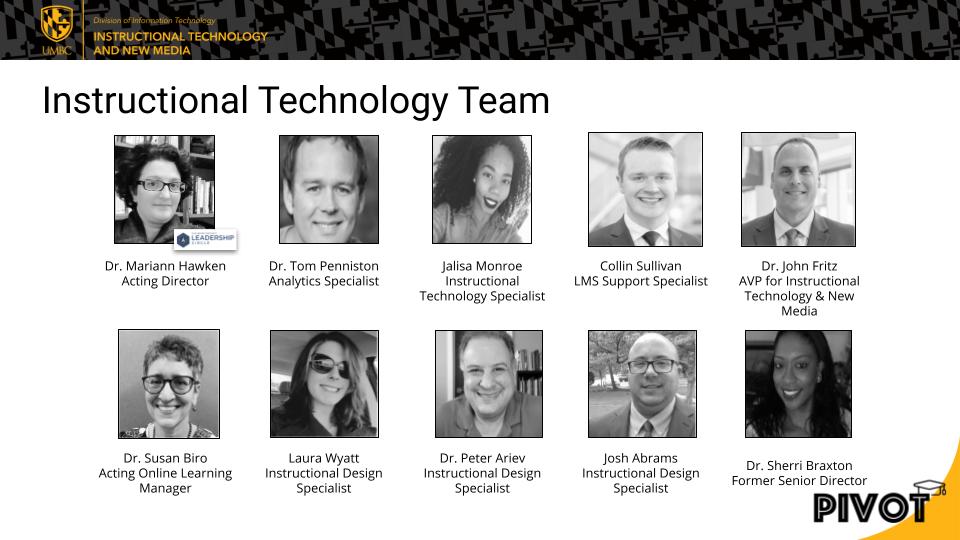
    <div class="html-content"><span><p><span>The </span><a href="https://onlinelearningconsortium.org/news_item/2021-olc-accelerate-award-winners/" rel="nofollow external" class="bo"><span>Online Learning Consortium announced</span></a><span> that UMBC's Instructional Technology <a href="https://doit.umbc.edu/itnm/staff/" rel="nofollow external" class="bo">team</a> has earned an Effective Practice Award for its </span><a href="https://pivot.umbc.edu" rel="nofollow external" class="bo"><span>Planning Instructional Variety for Online Teaching (PIVOT)</span></a><span> program. Led by Dr. <a href="https://doit.umbc.edu/itnm/staff/hawken/" rel="nofollow external" class="bo"><strong>Mariann Hawken</strong></a>, representatives from the Instructional Technology team will receive the award at </span><a href="https://onlinelearningconsortium.org/attend-2021/accelerate/" rel="nofollow external" class="bo"><span>the OLC Accelerate conference</span></a><span> in Washington, D.C. </span></p><p><span>“As we return to campus life, it is undeniable that the pandemic shift to online learning and PIVOT’s support has made an impact on our faculty and students,” said <strong>Jack Suess</strong>, Vice President of IT and CIO.</span></p><p><span><a href="https://doit.umbc.edu/itnm/staff" rel="nofollow external" class="bo"><img alt="DoIT's Instructional Technology team" src="https://my3.my.umbc.edu/groups/instructional-technology/posts/111756/attachments/40290" style="max-width: 100%; height: auto;"></a></span></p><p><span>The </span><a href="https://onlinelearningconsortium.org/about/olc-awards/effective-practices/" rel="nofollow external" class="bo"><span>Effective Practice Awards</span></a><span> are peer-reviewed and evaluated against </span><a href="https://onlinelearningconsortium.org/5-pillars/" rel="nofollow external" class="bo"><span>OLC’s five pillars of quality</span></a><span> in digital education:</span></p><ul><li><p><span>Learning Effectiveness</span><span>: The practice demonstrates effectiveness in producing learning outcomes, which are consistent with learner needs and representative of the distinctive quality of the institution.</span></p></li><li><p><span>Scale</span><span>: The practice offers the best possible educational value to learners and supports achieving capacity enrollment. </span></p></li><li><p><span>Access</span><span>: The practice has improved access to education by expanding opportunities and/or reducing barriers.</span></p></li><li><p><span>Faculty Satisfaction</span><span>: The practice has maintained a high level of faculty satisfaction.</span></p></li><li><p><span>Student Satisfaction</span><span>: Learners who are impacted by the practice express satisfaction with their learning experience.</span></p></li></ul><p><span>“The OLC Awards program is an opportunity to showcase leadership and innovation in the field of online, blended, and digital learning,” said Dr. <strong>Jennifer Mathes</strong>, Chief Executive Officer of the Online Learning Consortium. “The awards program allows us not only to celebrate the incredible work that has been done by our community in the past year, but to look forward to what is possible in the year to come.”</span></p><p><span>Given the rapid shift to online learning due to the COVID-19 pandemic in 2020, the Instructional Technology team created </span><a href="https://pivot.umbc.edu" rel="nofollow external" class="bo"><span>the PIVOT program</span></a><span> to help faculty better prepare for a long-term commitment to virtual instruction. Leveraging an approach that targeted an individual instructor’s reflection on technology use, online pedagogies, and course content, PIVOT took faculty through a course design and online teaching journey. Since faculty engagement in planning and delivering this important training is critical to establishing peer relationships, the program included peer mentors for pedagogical and technical facilitation. “For many of our faculty members,” said Dr. <strong>John Stolle-McAllister</strong>, Associate Dean, College of Arts, Humanities, and Social Sciences, “this collaboration was a highlight of the program because they learned from each other and engaged with instructors from their own and other departments, sharing ideas and exploring tasks and projects that they would not have otherwise considered.”</span></p><p><span>PIVOT reached about 70% of UMBC’s faculty, and the majority of participants said the program was helpful for their pedagogical shift to online teaching. Faculty found their role as students in the training course and access to peer mentors to be among the most valuable aspects of the program. Students </span><a href="https://doit.umbc.edu/post/97557/" rel="nofollow external" class="bo"><span>reported PIVOT-designed courses</span></a><span> were well organized and planned. Moreover, there is </span><a href="https://doit.umbc.edu/post/98871/" rel="nofollow external" class="bo"><span>a statistically significant, positive relationship</span></a><span> between instructors completing PIVOT training and elevated course-level average values on end of semester evaluations (p&lt;.001). Courses taught by PIVOT-trained instructors also have increased LMS interactions, which indicate improved learner engagement. “While the pandemic has been a huge challenge,” said Dr. <strong>Sarah Shinn</strong>, Associate Provost, “our PIVOT program has played a critical role in helping our faculty and students be successful.” Earlier this year, PIVOT also received the 2021 <a href="https://hr.umbc.edu/job-well-done-award-program/job-well-done-award-recipients-spring-2021/" rel="nofollow external" class="bo">"Job Well Done" award</a> from UMBC's Human Resources department.</span></p><p><span>Through the OLC Effective Practices program, the OLC community shares techniques, strategies and practices that have worked effectively in their institution or program. Two rounds of Effective Practices Awards are awarded annually.</span></p><p><span>A free panel discussion and celebration is scheduled for </span><a href="https://bit.ly/2021OLCAccelerateAwardsGala" rel="nofollow external" class="bo"><span>the OLC Accelerate Virtual Awards Gala</span></a><span> on Monday September 20, 2021 at 7:45 PM as a part of the OLC Accelerate virtual program. Further opportunities to engage directly with these winners are currently being scheduled for after the conclusion of the OLC Accelerate conference when a selection of these award-winning individuals will be hosting free public webinars for the OLC community. The final schedule for these webinars will be announced in a future release.</span></p><p>More information about the OLC Effective Practice Awards can be found online at <a href="https://onlinelearningconsortium.org/about/olc-awards/effective-practices/" rel="nofollow external" class="bo"><span>https://onlinelearningconsortium.org/about/olc-awards/effective-practices/</span></a></p></span></div>
]]>
</Body>
<Summary>The Online Learning Consortium announced that UMBC's Instructional Technology team has earned an Effective Practice Award for its Planning Instructional Variety for Online Teaching (PIVOT)...</Summary>
<Website>https://my3.my.umbc.edu/groups/instructional-technology/posts/111756</Website>
<AttachmentKind>Photo</AttachmentKind>
<AttachmentUrl>https://assets1-beta.my.umbc.edu/system/shared/attachments/dd7e7e2cfc9523a53f1b85ad489824eb/69e78978/news/000/111/756/fafcb194af3cdf5ea3355224c6224d6f/Instructional-Technology-Team.jpeg?1629835340</AttachmentUrl>
<Attachments>
<Attachment kind="Photo" url="https://beta.my.umbc.edu/groups/oer/posts/111756/attachments/40290"></Attachment>
</Attachments>
<TrackingUrl>https://beta.my.umbc.edu/api/v0/pixel/news/111756/guest@my.umbc.edu/89f36d4f4b53ab8a43b91c8c8655e663/api/pixel</TrackingUrl>
<Tag>award</Tag>
<Tag>biro</Tag>
<Tag>effective-practice</Tag>
<Tag>fritz</Tag>
<Tag>hawken</Tag>
<Tag>online-learning</Tag>
<Tag>pivot</Tag>
<Group token="instructional-technology">Instructional Technology</Group>
<GroupUrl>https://beta.my.umbc.edu/groups/instructional-technology</GroupUrl>
<AvatarUrl>https://assets2-beta.my.umbc.edu/system/shared/avatars/groups/000/001/164/dec3b026b81ee6d890a8f82f75c94a2e/xsmall.png?1446126703</AvatarUrl>
<AvatarUrl size="original">https://assets1-beta.my.umbc.edu/system/shared/avatars/groups/000/001/164/dec3b026b81ee6d890a8f82f75c94a2e/original.png?1446126703</AvatarUrl>
<AvatarUrl size="xxlarge">https://assets2-beta.my.umbc.edu/system/shared/avatars/groups/000/001/164/dec3b026b81ee6d890a8f82f75c94a2e/xxlarge.png?1446126703</AvatarUrl>
<AvatarUrl size="xlarge">https://assets1-beta.my.umbc.edu/system/shared/avatars/groups/000/001/164/dec3b026b81ee6d890a8f82f75c94a2e/xlarge.png?1446126703</AvatarUrl>
<AvatarUrl size="large">https://assets1-beta.my.umbc.edu/system/shared/avatars/groups/000/001/164/dec3b026b81ee6d890a8f82f75c94a2e/large.png?1446126703</AvatarUrl>
<AvatarUrl size="medium">https://assets4-beta.my.umbc.edu/system/shared/avatars/groups/000/001/164/dec3b026b81ee6d890a8f82f75c94a2e/medium.png?1446126703</AvatarUrl>
<AvatarUrl size="small">https://assets3-beta.my.umbc.edu/system/shared/avatars/groups/000/001/164/dec3b026b81ee6d890a8f82f75c94a2e/small.png?1446126703</AvatarUrl>
<AvatarUrl size="xsmall">https://assets2-beta.my.umbc.edu/system/shared/avatars/groups/000/001/164/dec3b026b81ee6d890a8f82f75c94a2e/xsmall.png?1446126703</AvatarUrl>
<AvatarUrl size="xxsmall">https://assets3-beta.my.umbc.edu/system/shared/avatars/groups/000/001/164/dec3b026b81ee6d890a8f82f75c94a2e/xxsmall.png?1446126703</AvatarUrl>
<Sponsor>Instructional Technology</Sponsor>
<ThumbnailUrl size="xxlarge">https://assets4-beta.my.umbc.edu/system/shared/thumbnails/news/000/111/756/221fe9ca10ca74a177a551e7e794d35e/xxlarge.jpg?1629835237</ThumbnailUrl>
<ThumbnailUrl size="xlarge">https://assets2-beta.my.umbc.edu/system/shared/thumbnails/news/000/111/756/221fe9ca10ca74a177a551e7e794d35e/xlarge.jpg?1629835237</ThumbnailUrl>
<ThumbnailUrl size="large">https://assets1-beta.my.umbc.edu/system/shared/thumbnails/news/000/111/756/221fe9ca10ca74a177a551e7e794d35e/large.jpg?1629835237</ThumbnailUrl>
<ThumbnailUrl size="medium">https://assets2-beta.my.umbc.edu/system/shared/thumbnails/news/000/111/756/221fe9ca10ca74a177a551e7e794d35e/medium.jpg?1629835237</ThumbnailUrl>
<ThumbnailUrl size="small">https://assets4-beta.my.umbc.edu/system/shared/thumbnails/news/000/111/756/221fe9ca10ca74a177a551e7e794d35e/small.jpg?1629835237</ThumbnailUrl>
<ThumbnailUrl size="xsmall">https://assets4-beta.my.umbc.edu/system/shared/thumbnails/news/000/111/756/221fe9ca10ca74a177a551e7e794d35e/xsmall.jpg?1629835237</ThumbnailUrl>
<ThumbnailUrl size="xxsmall">https://assets3-beta.my.umbc.edu/system/shared/thumbnails/news/000/111/756/221fe9ca10ca74a177a551e7e794d35e/xxsmall.jpg?1629835237</ThumbnailUrl>
<PawCount>22</PawCount>
<CommentCount>8</CommentCount>
<CommentsAllowed>true</CommentsAllowed>
<PostedAt>Tue, 24 Aug 2021 16:22:51 -0400</PostedAt>
<EditAt>Mon, 03 Oct 2022 14:23:02 -0400</EditAt>
</NewsItem>

<NewsItem contentIssues="true" id="111257" important="false" status="posted" url="https://beta.my.umbc.edu/groups/oer/posts/111257">
<Title>PIVOT Courses Associated with Improved SEEQs and Tool Use</Title>
<Body>
<![CDATA[
    <div class="html-content">Faculty training to support <a href="https://www.qualitymatters.org/research/curated-research-resources" rel="nofollow external" class="bo">empirically driven course design</a> potentially represents one of the most scalable options available for improving student outcomes at an institution. One strategy to assess effectiveness related to institutionally supported training has been to consider <a href="https://analytics.umbc.edu/?id=98871" rel="nofollow external" class="bo">Student Evaluation of Educational Quality (SEEQ</a>) surveys in courses taught by faculty who participated in the training program. For this reason, the UMBC <a href="http://rex.umbc.edu" rel="nofollow external" class="bo">Report Exchange</a> (REX) team has recently released the <a href="https://rexprd-ssrs1.rex.aws.umbc.edu/Reports/report/Analytics%20for%20Learn%20Reports/SEEQs%20and%20Other%20Course%20Metrics%20By%20Training" rel="nofollow external" class="bo">SEEQs and Other Course Metrics By Training</a> report for the campus community to look further into these data on their own. For those who are unfamiliar with the data warehouse and would like to learn more, <a href="https://wiki.umbc.edu/pages/viewpage.action?pageId=45646063" rel="nofollow external" class="bo">please consult this FAQ article to learn how to gain access</a>.<br><br>There are two simultaneous advantages of effective training: 1) the better courses are designed, the greater the likelihood unit-level objectives align back to course-level goals and ultimately to institutional functional competencies, and therefore we would expect improved outcomes of various measures, and  2) the better enterprise tools are leveraged through intentional design, the more meaningful the signal – metadata – from activity within a course, and in turn, the more precise predictive modeling might be to inform <a href="https://doit.umbc.edu/whats-new/?id=99760" rel="nofollow external" class="bo">behavioral nudging</a>. <br><br>Similar to <a href="https://doit.umbc.edu/news/?id=98871" rel="nofollow external" class="bo">prior explorations</a>, this current analysis shows <a href="http://pivot.umbc.edu" rel="nofollow external" class="bo">PIVOT</a> courses in terms of average SEEQs and student behaviors in courses as “signal” (i.e., tool interactions). Notably, this trend held when looking at individual instructors’ pre/post training. Overall, there is a statistically-significant SEEQ gain for courses instructed by a PIVOT participant (.09; p&lt;.001), as illustrated above in <em>Figure 1</em>. <br><br><strong>Figure 1: Mean Distribution of Bb Course SEEQs, by Term and PIVOT Participation</strong><br><div><img src="https://blackboard.umbc.edu/bbcswebdav/institution/doitnews/pivot_seeqs.png" alt="Fall 2020 non-PIVOT = 4.35; Fall 2020 PIVOT = 4.41; Fall 2020 difference-in-difference = 0.06; Spring 2021 non-PIVOT = 4.37; Spring 2021 PIVOT = 4.47; Spring 2021 difference-in-difference = 0.11; Overall non-PIVOT = 4.35; Overall PIVOT = 4.44; Overall difference-in-difference = 0.09" style="max-width: 100%; height: auto;"></div><br>The difference in averages is even more pronounced when looking at the Fall 2020 and Spring 2021 terms separately, where we see an initial gain of approximately .06 in the Fall, followed by an even greater increase to .11 by the Spring. One way to interpret this increase is the faculty who participated in training began applying new techniques learned through PIVOT in the Fall and then were able to more fully apply these approaches as they honed their pedagogy in the Spring term.<br><br>Other <em>treatments</em>, including the <a href="https://doit.umbc.edu/itnm/adp/" rel="nofollow external" class="bo">Alternate Delivery Program (ADP)</a>, which informed PIVOT, as well as ongoing programming in the form of one-time training and webinars, do not appear to have the same positive, measurable impact on SEEQs. Including SEEQs in a model with PIVOT, ADP, and myUMBC training event data shows no significant relationship with SEEQs and either ADP or myUMBC-documented training. In other words, for non-PIVOT trainings, there’s not a similar discernable lift.<br><br>PIVOT and ADP courses, on the other hand, tend to also have higher DFW rates (an uncontrolled mean difference of 2% and 2.2%, respectively). However, analysis to address the role of course design using propensity score matching indicates the relationship between training and DFWs is not statistically significant and therefore the increased prevalence of this negative outcome appears to be a function of course design rather than training (i.e., how tools are used, rather than the actual treatment).<br><br>Although the methodologies do not control for instructor-level effects, like how one teaches or interacts with students, since both PIVOT and non-PIVOT trained faculty were exposed equally to the pandemic discontinuity – i.e., as a natural experiment there was simultaneous disruption – subsequent mean SEEQ differences are accurate measurements of treatment effects. In other words, maybe the training helped, or maybe PIVOT instructors, on average, contemporaneously and inexplicably earned higher mean SEEQ values due to another yet-to-be-determined variable. However, in the notable absence of such a separate, identifiable catalyst, the mean differences are attributable to the training and the relationship appears causal. Moving forward, DoIT plans to continue investigating PIVOT’s potential impacts on students' learning and engagement as well as faculty satisfaction and course design.<br><br>~ by <a href="https://my3.my.umbc.edu/groups/instructional-technology/posts?tag=penniston" rel="nofollow external" class="bo">Tom Penniston</a><br></div>
]]>
</Body>
<Summary>Faculty training to support empirically driven course design potentially represents one of the most scalable options available for improving student outcomes at an institution. One strategy to...</Summary>
<Website>https://doit.umbc.edu/post/111257/</Website>
<TrackingUrl>https://beta.my.umbc.edu/api/v0/pixel/news/111257/guest@my.umbc.edu/f231dcdb04a97568b0cb18cb5a25bde0/api/pixel</TrackingUrl>
<Tag>analytics</Tag>
<Tag>online-learning</Tag>
<Tag>penniston</Tag>
<Tag>pivot</Tag>
<Tag>seeq</Tag>
<Tag>su2021</Tag>
<Tag>training</Tag>
<Group token="instructional-technology">Instructional Technology</Group>
<GroupUrl>https://beta.my.umbc.edu/groups/instructional-technology</GroupUrl>
<AvatarUrl>https://assets2-beta.my.umbc.edu/system/shared/avatars/groups/000/001/164/dec3b026b81ee6d890a8f82f75c94a2e/xsmall.png?1446126703</AvatarUrl>
<AvatarUrl size="original">https://assets1-beta.my.umbc.edu/system/shared/avatars/groups/000/001/164/dec3b026b81ee6d890a8f82f75c94a2e/original.png?1446126703</AvatarUrl>
<AvatarUrl size="xxlarge">https://assets2-beta.my.umbc.edu/system/shared/avatars/groups/000/001/164/dec3b026b81ee6d890a8f82f75c94a2e/xxlarge.png?1446126703</AvatarUrl>
<AvatarUrl size="xlarge">https://assets1-beta.my.umbc.edu/system/shared/avatars/groups/000/001/164/dec3b026b81ee6d890a8f82f75c94a2e/xlarge.png?1446126703</AvatarUrl>
<AvatarUrl size="large">https://assets1-beta.my.umbc.edu/system/shared/avatars/groups/000/001/164/dec3b026b81ee6d890a8f82f75c94a2e/large.png?1446126703</AvatarUrl>
<AvatarUrl size="medium">https://assets4-beta.my.umbc.edu/system/shared/avatars/groups/000/001/164/dec3b026b81ee6d890a8f82f75c94a2e/medium.png?1446126703</AvatarUrl>
<AvatarUrl size="small">https://assets3-beta.my.umbc.edu/system/shared/avatars/groups/000/001/164/dec3b026b81ee6d890a8f82f75c94a2e/small.png?1446126703</AvatarUrl>
<AvatarUrl size="xsmall">https://assets2-beta.my.umbc.edu/system/shared/avatars/groups/000/001/164/dec3b026b81ee6d890a8f82f75c94a2e/xsmall.png?1446126703</AvatarUrl>
<AvatarUrl size="xxsmall">https://assets3-beta.my.umbc.edu/system/shared/avatars/groups/000/001/164/dec3b026b81ee6d890a8f82f75c94a2e/xxsmall.png?1446126703</AvatarUrl>
<Sponsor>Instructional Technology</Sponsor>
<ThumbnailUrl size="xxlarge">https://assets3-beta.my.umbc.edu/system/shared/thumbnails/news/000/111/257/1975e98dceaf38deee4cda7b0e2de977/xxlarge.jpg?1627309785</ThumbnailUrl>
<ThumbnailUrl size="xlarge">https://assets1-beta.my.umbc.edu/system/shared/thumbnails/news/000/111/257/1975e98dceaf38deee4cda7b0e2de977/xlarge.jpg?1627309785</ThumbnailUrl>
<ThumbnailUrl size="large">https://assets4-beta.my.umbc.edu/system/shared/thumbnails/news/000/111/257/1975e98dceaf38deee4cda7b0e2de977/large.jpg?1627309785</ThumbnailUrl>
<ThumbnailUrl size="medium">https://assets3-beta.my.umbc.edu/system/shared/thumbnails/news/000/111/257/1975e98dceaf38deee4cda7b0e2de977/medium.jpg?1627309785</ThumbnailUrl>
<ThumbnailUrl size="small">https://assets3-beta.my.umbc.edu/system/shared/thumbnails/news/000/111/257/1975e98dceaf38deee4cda7b0e2de977/small.jpg?1627309785</ThumbnailUrl>
<ThumbnailUrl size="xsmall">https://assets4-beta.my.umbc.edu/system/shared/thumbnails/news/000/111/257/1975e98dceaf38deee4cda7b0e2de977/xsmall.jpg?1627309785</ThumbnailUrl>
<ThumbnailUrl size="xxsmall">https://assets3-beta.my.umbc.edu/system/shared/thumbnails/news/000/111/257/1975e98dceaf38deee4cda7b0e2de977/xxsmall.jpg?1627309785</ThumbnailUrl>
<PawCount>6</PawCount>
<CommentCount>0</CommentCount>
<CommentsAllowed>true</CommentsAllowed>
<PostedAt>Thu, 19 Aug 2021 15:58:34 -0400</PostedAt>
<EditAt>Thu, 19 Aug 2021 16:47:27 -0400</EditAt>
</NewsItem>

<NewsItem contentIssues="true" id="111641" important="false" status="posted" url="https://beta.my.umbc.edu/groups/oer/posts/111641">
<Title>More UMBC students like Ultra and want Ultra courses</Title>
<Tagline>86% of UMBC students express satisfaction with Ultra</Tagline>
<Body>
<![CDATA[
    <div class="html-content">In a survey of 608 students taking Ultra courses during the SP2021 semester, 86% indicated satisfaction with Ultra, marking a 14% increase <a href="https://doit.umbc.edu/news/post/89258/" rel="nofollow external" class="bo">compared to the last survey</a> in FA2019. Students again praised Ultra for its clean interface, modern feel, and easy access. When asked to compare Ultra to the Original Blackboard interface, 74% of students said they liked it, which is a 17% increase from FA2019. “Ultra makes everything really easy to find and use,” said one student. “It’s a major step up from the old Blackboard system.”<div><br></div><div><img src="https://blackboard.umbc.edu/bbcswebdav/institution/branding/Fig1_StudentSatisfactionUltra_SP2021.png" width="500" alt="86 percent of students said they were satisfied with Ultra courses" style="max-width: 100%; height: auto;"></div><div><span><p><span><em>Figure 1: 86% of students said they were satisfied with Ultra courses.</em></span></p><br><p><span>Nearly 88% of SP2021 students agreed they could find Ultra tools on their own, a 14% increase compared to FA2019. These tools included assignments, tests, discussions, and group work. One student said, “The technology did not hinder [my] education.” </span></p><p><span>SP2021 students did observe more course organization in Ultra courses, recognizing many faculty efforts following training over the last year. “The way a course is organized is super important,” said one student. These observations are consistent with </span><a href="https://doit.umbc.edu/news/post/97557/" rel="nofollow external" class="bo"><span>feedback from students taking PIVOT courses</span></a><span>, which are praised for organization and clear information. </span><a href="https://doit.umbc.edu/news/post/98871/" rel="nofollow external" class="bo"><span>Course evaluations and LMS interactions are also higher</span></a><span> in courses where instructors have training and consistent structure.</span></p><p><span>However, as <a href="https://doit.umbc.edu/news/post/89258/" rel="nofollow external" class="bo">with our previous survey</a>, students did observe challenges with Ultra courses. Some student satisfaction with finding actual course content and files remained relatively the same between FA2019 and SP2019 at less than one percent. “If there are a lot of files and content in each folder,” reported one student, “it takes longer to access and navigate.” </span></p><p><span>Over the last academic year, usage increased to more than </span><a href="https://doit.umbc.edu/news/post/96522/" rel="nofollow external" class="bo"><span>forty percent of active Blackboard courses</span></a><span>. More than 89% of faculty who responded to the SP2021 Ultra survey indicated they would use Ultra again, which was an increase of 21% from faculty who responded two years earlier. DoIT continues to </span><a href="https://wiki.umbc.edu/x/_AQ9BQ?_gl=1*yjrh53*_ga*MTU4ODY5NTE4OS4xNTU0Mzg0Mzgx*_ga_E5KS21M3WV*MTYyOTEyMzAyMC45LjEuMTYyOTEyMzM0NS4w" rel="nofollow external" class="bo"><span>monitor Ultra adoption through the 10th day</span></a><span> of each new semester as well as </span><a href="https://doit.umbc.edu/news/post/101457/" rel="nofollow external" class="bo"><span>Ultra feature development</span></a><span>. </span></p><p><span>As always, if you have any questions about teaching, learning, and technology, please consider the following options:</span></p><ul><li><a href="https://pivot.umbc.edu/" rel="nofollow external" class="bo"><span>PIVOT</span></a><span> | </span><a href="https://doit.umbc.edu/itnm/academic-continuity/" rel="nofollow external" class="bo"><span>Academic Continuity</span></a><span> | </span><a href="https://fdc.umbc.edu/resources/keep-on-teaching/" rel="nofollow external" class="bo"><span>Keep On Teaching</span></a><span> | </span><a href="https://doit.umbc.edu/students" rel="nofollow external" class="bo"><span>Student Technology Resources</span></a><span> </span></li><li><a href="http://www.umbc.edu/faq" rel="nofollow external" class="bo"><span>Check our extensive FAQ collection</span></a><span> </span></li><ul><li><a href="https://wiki.umbc.edu/x/LohnB" rel="nofollow external" class="bo"><span>What’s new in Ultra?</span></a><span> | </span><a href="https://wiki.umbc.edu/x/bwrSAQ" rel="nofollow external" class="bo"><span>Known Issues</span></a><span> </span></li></ul><li><span><a href="http://my.umbc.edu/go/request-help" rel="nofollow external" class="bo">Open a ticket via RT</a></span></li><li><span>Follow the </span><a href="http://my.umbc.edu/groups/instructional-technology" rel="nofollow external" class="bo"><span>Instructional Technology</span></a><span> &amp; </span><a href="http://my.umbc.edu/groups/doit" rel="nofollow external" class="bo"><span>DoIT</span></a><span> myUMBC groups</span></li><li><a href="http://doit.umbc.edu/itnm/staff/" rel="nofollow external" class="bo"><span>Request a consult</span></a><span> with instructional technology staff</span></li></ul><p><span><br></span></p><p><span><em>~ by <a href="https://doit.umbc.edu/itnm/staff/hawken/" rel="nofollow external" class="bo">Mariann Hawken</a></em></span></p></span></div></div>
]]>
</Body>
<Summary>In a survey of 608 students taking Ultra courses during the SP2021 semester, 86% indicated satisfaction with Ultra, marking a 14% increase compared to the last survey in FA2019. Students again...</Summary>
<Website>https://my3.my.umbc.edu/groups/instructional-technology/posts/111641</Website>
<TrackingUrl>https://beta.my.umbc.edu/api/v0/pixel/news/111641/guest@my.umbc.edu/ec36fce980de4a661c3eb88cf4212163/api/pixel</TrackingUrl>
<Tag>blackboard</Tag>
<Tag>hawken</Tag>
<Tag>sp2021</Tag>
<Tag>survey</Tag>
<Tag>ultra-experience</Tag>
<Tag>ultra-update</Tag>
<Group token="instructional-technology">Instructional Technology</Group>
<GroupUrl>https://beta.my.umbc.edu/groups/instructional-technology</GroupUrl>
<AvatarUrl>https://assets2-beta.my.umbc.edu/system/shared/avatars/groups/000/001/164/dec3b026b81ee6d890a8f82f75c94a2e/xsmall.png?1446126703</AvatarUrl>
<AvatarUrl size="original">https://assets1-beta.my.umbc.edu/system/shared/avatars/groups/000/001/164/dec3b026b81ee6d890a8f82f75c94a2e/original.png?1446126703</AvatarUrl>
<AvatarUrl size="xxlarge">https://assets2-beta.my.umbc.edu/system/shared/avatars/groups/000/001/164/dec3b026b81ee6d890a8f82f75c94a2e/xxlarge.png?1446126703</AvatarUrl>
<AvatarUrl size="xlarge">https://assets1-beta.my.umbc.edu/system/shared/avatars/groups/000/001/164/dec3b026b81ee6d890a8f82f75c94a2e/xlarge.png?1446126703</AvatarUrl>
<AvatarUrl size="large">https://assets1-beta.my.umbc.edu/system/shared/avatars/groups/000/001/164/dec3b026b81ee6d890a8f82f75c94a2e/large.png?1446126703</AvatarUrl>
<AvatarUrl size="medium">https://assets4-beta.my.umbc.edu/system/shared/avatars/groups/000/001/164/dec3b026b81ee6d890a8f82f75c94a2e/medium.png?1446126703</AvatarUrl>
<AvatarUrl size="small">https://assets3-beta.my.umbc.edu/system/shared/avatars/groups/000/001/164/dec3b026b81ee6d890a8f82f75c94a2e/small.png?1446126703</AvatarUrl>
<AvatarUrl size="xsmall">https://assets2-beta.my.umbc.edu/system/shared/avatars/groups/000/001/164/dec3b026b81ee6d890a8f82f75c94a2e/xsmall.png?1446126703</AvatarUrl>
<AvatarUrl size="xxsmall">https://assets3-beta.my.umbc.edu/system/shared/avatars/groups/000/001/164/dec3b026b81ee6d890a8f82f75c94a2e/xxsmall.png?1446126703</AvatarUrl>
<Sponsor>Instructional Technology</Sponsor>
<ThumbnailUrl size="xxlarge">https://assets3-beta.my.umbc.edu/system/shared/thumbnails/news/000/111/641/bbf95a8d36134ea7f1264a06065ac480/xxlarge.jpg?1629317407</ThumbnailUrl>
<ThumbnailUrl size="xlarge">https://assets1-beta.my.umbc.edu/system/shared/thumbnails/news/000/111/641/bbf95a8d36134ea7f1264a06065ac480/xlarge.jpg?1629317407</ThumbnailUrl>
<ThumbnailUrl size="large">https://assets3-beta.my.umbc.edu/system/shared/thumbnails/news/000/111/641/bbf95a8d36134ea7f1264a06065ac480/large.jpg?1629317407</ThumbnailUrl>
<ThumbnailUrl size="medium">https://assets2-beta.my.umbc.edu/system/shared/thumbnails/news/000/111/641/bbf95a8d36134ea7f1264a06065ac480/medium.jpg?1629317407</ThumbnailUrl>
<ThumbnailUrl size="small">https://assets1-beta.my.umbc.edu/system/shared/thumbnails/news/000/111/641/bbf95a8d36134ea7f1264a06065ac480/small.jpg?1629317407</ThumbnailUrl>
<ThumbnailUrl size="xsmall">https://assets4-beta.my.umbc.edu/system/shared/thumbnails/news/000/111/641/bbf95a8d36134ea7f1264a06065ac480/xsmall.jpg?1629317407</ThumbnailUrl>
<ThumbnailUrl size="xxsmall">https://assets4-beta.my.umbc.edu/system/shared/thumbnails/news/000/111/641/bbf95a8d36134ea7f1264a06065ac480/xxsmall.jpg?1629317407</ThumbnailUrl>
<PawCount>2</PawCount>
<CommentCount>0</CommentCount>
<CommentsAllowed>true</CommentsAllowed>
<PostedAt>Thu, 19 Aug 2021 09:04:39 -0400</PostedAt>
<EditAt>Thu, 19 Aug 2021 09:05:15 -0400</EditAt>
</NewsItem>

<NewsItem contentIssues="true" id="111633" important="false" status="posted" url="https://beta.my.umbc.edu/groups/oer/posts/111633">
<Title>DoIT Upgrades &amp; Adds Classroom AV for Return to Campus</Title>
<Tagline>UC to support large courses, training begins next week</Tagline>
<Body>
<![CDATA[
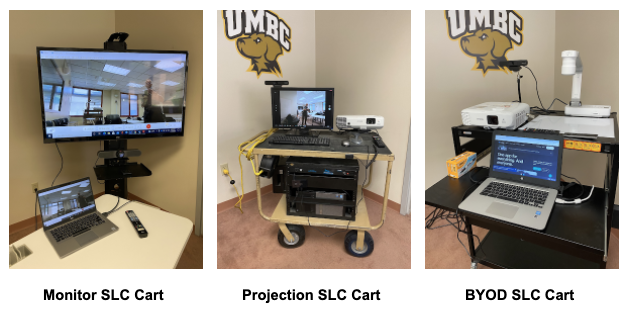
    <div class="html-content"><span><p><span>As the University prepares for a return to campus this Fall, DoIT’s </span><a href="https://doit.umbc.edu/eis/dsav/" rel="nofollow external" class="bo"><span>Audio-Visual and Desktop Support units</span></a><span> have been busy upgrading classrooms and equipping instructors with new technologies to support hybrid and in-person instruction. </span></p><p><span>For example, the University Center (UC) Ballroom has now been turned </span><span>into a hub for 25 large-enrollment lecture courses that can meet in person, as well as in the adjacent Ballroom Lounge (302) and nearby 310 and 312 rooms. In addition to cameras, mics and monitors peppered throughout these spaces to provide a synchronous, socially-distanced learning environment for students and faculty, DoIT and Commons staff will be available on-site to provide support. DoIT is also reaching out this week to faculty teaching in these spaces to provide </span><a href="https://my3.my.umbc.edu/groups/instructional-technology/events?mode=upcoming&amp;tag=instruction" rel="nofollow external" class="bo"><span>on-site training</span></a><span> next week.</span></p><p><span><img alt="UMBC synchronous lecture capture (SLC) cart options" src="https://my3.my.umbc.edu/groups/instructional-technology/posts/111633/attachments/40241" style="max-width: 100%; height: auto;"></span></p><p><span>In addition, AV has added a variety of mobile carts specifically design to support synchronous </span><a href="https://doit.umbc.edu/itnm/lecturing-online/" rel="nofollow external" class="bo"><span>lecture capture</span></a><span> (SLC). The intent of these carts is to provide a higher level of video and audio quality to an instructor's streaming application (Webex, Bb Collaborate, Zoom, etc.) than is possible with a laptop alone. A secondary purpose is to provide a backup for any built-in system that is experiencing technical difficulties. DoIT AV Student Specialists designed and assembled these carts, which include the following:</span></p><p><span><strong>Monitor SLC Cart</strong></span><span>(4 units available)</span></p><ul><li><span>55” monitor with HDMI cable for user’s laptop</span></li><li><a href="https://www.logitech.com/en-us/products/video-conferencing/conference-cameras/meetup-conferencecam.html" rel="nofollow external" class="bo"><span>Logitech Meetup</span></a><span> with remote</span></li><ul><li><span><span>Single USB connection to user laptop</span></span></li><li>Camera with pan/tilt/zoom control</li><li>Array microphone</li><li>Sound bar</li><li>Built in echo cancellation</li><li>No software download required</li></ul></ul><p><span><strong>Projection SLC Cart</strong></span><span>(5 units available)</span></p><ul><li><span>Epson projector</span></li><li>Dell PC built in</li><li>User may opt to use own laptop with HDMI cable</li><li><a href="https://huddlecamhd.com/pro/" rel="nofollow external" class="bo"><span>Huddlecam ePTZ camera</span></a><span> with remote</span></li><ul><li>Use for marker board capture</li><li>Reposition for instructor or classroom view</li><li>Built in microphone array</li><li>Yamaha speakers</li></ul></ul><p><span><strong>BYOD - SLC Cart</strong></span><span>(1 unit available)</span></p><ul><li><span>Epson projector</span></li><li>Attach user’s device with supplied HDMI cable</li><li><a href="https://huddlecamhd.com/pro/" rel="nofollow external" class="bo"><span>Huddlecam ePTZ camera</span></a><span> with remote</span></li><ul><li><span><span>Use for marker board capture</span></span></li><li>Reposition for instructor or classroom view</li><li>Built in microphone array</li><li>Attach to user’s laptop with supplied USB cable</li></ul><li><span>Epson Document Camera</span></li><ul><li>Dry erase surface attached to cart surface</li><li>Attach to user’s laptop with supplied USB cable</li></ul></ul><p><span>AV Services is also equipped with </span><span>approximately 200 bluetooth headsets faculty can use in class -- even when masked -- to support </span><a href="https://doit.umbc.edu/itnm/lecturing-online/" rel="nofollow external" class="bo"><span>lecture capture</span></a><span> with Blackboard Collaborate or Webex.</span><span> </span></p><p><span>Finally, as </span><a href="https://doit.umbc.edu/news/?id=98090" rel="nofollow external" class="bo"><span>announced</span></a><span> late last fall, </span><span>a handful of classrooms were converted to be </span><a href="http://doit.umbc.edu/classroom/hyflex" rel="nofollow external" class="bo"><span>HyFlex</span></a><span> capable rooms in which students can choose (during course registration) to meet in person or remotely. These include </span><span>ADMIN 101, SOND 105, ITE 227 and ITE 233.</span></p><p><span>For more information about classroom upgrades or additions, please visit DoIT’s </span><a href="https://doit.umbc.edu/eis/dsav/" rel="nofollow external" class="bo"><span>Desktop Support and AV Services site</span></a><span>. To request help, please submit a myUMBC request via </span><a href="https://my.umbc.edu/help" rel="nofollow external" class="bo"><span>my.umbc.edu/help</span></a><span>. </span></p><p><span><em>By Steve Anderson &amp; John Fritz</em></span></p><br></span></div>
]]>
</Body>
<Summary>As the University prepares for a return to campus this Fall, DoIT’s Audio-Visual and Desktop Support units have been busy upgrading classrooms and equipping instructors with new technologies to...</Summary>
<Website>https://doit.umbc.edu/eis/dsav/</Website>
<AttachmentKind>Image</AttachmentKind>
<AttachmentUrl>https://assets2-beta.my.umbc.edu/system/shared/attachments/16b7dab31dcede5817aea1e82e10eb4f/69e78978/news/000/111/633/38931085302fed7608c6c0a28566b7b3/UMBC DoIT SLC Cart Options.png?1629307579</AttachmentUrl>
<Attachments>
<Attachment kind="Image" url="https://beta.my.umbc.edu/groups/oer/posts/111633/attachments/40241"></Attachment>
</Attachments>
<TrackingUrl>https://beta.my.umbc.edu/api/v0/pixel/news/111633/guest@my.umbc.edu/5aae25fdb351aec2f12f8d2350bed360/api/pixel</TrackingUrl>
<Tag>instruction</Tag>
<Group token="instructional-technology">Instructional Technology</Group>
<GroupUrl>https://beta.my.umbc.edu/groups/instructional-technology</GroupUrl>
<AvatarUrl>https://assets2-beta.my.umbc.edu/system/shared/avatars/groups/000/001/164/dec3b026b81ee6d890a8f82f75c94a2e/xsmall.png?1446126703</AvatarUrl>
<AvatarUrl size="original">https://assets1-beta.my.umbc.edu/system/shared/avatars/groups/000/001/164/dec3b026b81ee6d890a8f82f75c94a2e/original.png?1446126703</AvatarUrl>
<AvatarUrl size="xxlarge">https://assets2-beta.my.umbc.edu/system/shared/avatars/groups/000/001/164/dec3b026b81ee6d890a8f82f75c94a2e/xxlarge.png?1446126703</AvatarUrl>
<AvatarUrl size="xlarge">https://assets1-beta.my.umbc.edu/system/shared/avatars/groups/000/001/164/dec3b026b81ee6d890a8f82f75c94a2e/xlarge.png?1446126703</AvatarUrl>
<AvatarUrl size="large">https://assets1-beta.my.umbc.edu/system/shared/avatars/groups/000/001/164/dec3b026b81ee6d890a8f82f75c94a2e/large.png?1446126703</AvatarUrl>
<AvatarUrl size="medium">https://assets4-beta.my.umbc.edu/system/shared/avatars/groups/000/001/164/dec3b026b81ee6d890a8f82f75c94a2e/medium.png?1446126703</AvatarUrl>
<AvatarUrl size="small">https://assets3-beta.my.umbc.edu/system/shared/avatars/groups/000/001/164/dec3b026b81ee6d890a8f82f75c94a2e/small.png?1446126703</AvatarUrl>
<AvatarUrl size="xsmall">https://assets2-beta.my.umbc.edu/system/shared/avatars/groups/000/001/164/dec3b026b81ee6d890a8f82f75c94a2e/xsmall.png?1446126703</AvatarUrl>
<AvatarUrl size="xxsmall">https://assets3-beta.my.umbc.edu/system/shared/avatars/groups/000/001/164/dec3b026b81ee6d890a8f82f75c94a2e/xxsmall.png?1446126703</AvatarUrl>
<Sponsor>Instructional Technology</Sponsor>
<ThumbnailUrl size="xxlarge">https://assets1-beta.my.umbc.edu/system/shared/thumbnails/news/000/111/633/3c58f1f3eecedb3650cf3a3d37cc5aad/xxlarge.jpg?1629306808</ThumbnailUrl>
<ThumbnailUrl size="xlarge">https://assets3-beta.my.umbc.edu/system/shared/thumbnails/news/000/111/633/3c58f1f3eecedb3650cf3a3d37cc5aad/xlarge.jpg?1629306808</ThumbnailUrl>
<ThumbnailUrl size="large">https://assets1-beta.my.umbc.edu/system/shared/thumbnails/news/000/111/633/3c58f1f3eecedb3650cf3a3d37cc5aad/large.jpg?1629306808</ThumbnailUrl>
<ThumbnailUrl size="medium">https://assets1-beta.my.umbc.edu/system/shared/thumbnails/news/000/111/633/3c58f1f3eecedb3650cf3a3d37cc5aad/medium.jpg?1629306808</ThumbnailUrl>
<ThumbnailUrl size="small">https://assets3-beta.my.umbc.edu/system/shared/thumbnails/news/000/111/633/3c58f1f3eecedb3650cf3a3d37cc5aad/small.jpg?1629306808</ThumbnailUrl>
<ThumbnailUrl size="xsmall">https://assets3-beta.my.umbc.edu/system/shared/thumbnails/news/000/111/633/3c58f1f3eecedb3650cf3a3d37cc5aad/xsmall.jpg?1629306808</ThumbnailUrl>
<ThumbnailUrl size="xxsmall">https://assets4-beta.my.umbc.edu/system/shared/thumbnails/news/000/111/633/3c58f1f3eecedb3650cf3a3d37cc5aad/xxsmall.jpg?1629306808</ThumbnailUrl>
<PawCount>6</PawCount>
<CommentCount>0</CommentCount>
<CommentsAllowed>true</CommentsAllowed>
<PostedAt>Wed, 18 Aug 2021 13:11:49 -0400</PostedAt>
<EditAt>Wed, 18 Aug 2021 18:23:06 -0400</EditAt>
</NewsItem>

<NewsItem contentIssues="true" id="111595" important="false" status="posted" url="https://beta.my.umbc.edu/groups/oer/posts/111595">
<Title>13 Tips to Get Your Blackboard Course Ready</Title>
<Tagline>Checklist to optimize your course before the semester starts</Tagline>
<Body>
<![CDATA[
    <div class="html-content"><p><span>Prepare your Blackboard course shell for the new semester with our updated baker’s dozen checklist.</span></p><p><span><strong>1. Review new tools &amp; features in Blackboard.</strong></span></p><p><span>Our Blackboard site receives </span><a href="https://my3.my.umbc.edu/groups/instructional-technology/posts?tag=ultra-update" rel="nofollow external" class="bo"><span>updates and enhancements every month</span></a><span> -- check out the latest news to learn what’s new for Ultra courses.</span></p><p><span><strong>2. Copy your course content from a previous semester.</strong></span></p><p><span>Bypass the long wait and digital file transfers required for export and import. </span><a href="https://wiki.umbc.edu/x/sABxAw" rel="nofollow external" class="bo"><span>Use course copy</span></a><span> -- it’s faster and more convenient. TIP: Prep your courses ahead of the new semester for a stress-free start. Request </span><a href="https://wiki.umbc.edu/x/9QYgB" rel="nofollow external" class="bo"><span>a development course shell</span></a><span> for ongoing content development and maintenance. </span></p><p><span><strong>3. Create a central Start Here area for your students so they know how to get started.</strong></span></p><p><span>Include a welcome video. </span><a href="https://wiki.umbc.edu/x/kQd4B" rel="nofollow external" class="bo"><span>Use Panopto</span></a><span> to invite students to explore the course with a course tour and orientation. Let students know what to do first before classes start and where to find important content. Be sure to </span><a href="https://wiki.umbc.edu/x/pQjBBQ" rel="nofollow external" class="bo"><span>caption your videos</span></a><span> for accessibility.</span></p><p><span><strong>4. Check course links for broken or missing content.</strong></span></p><p><span>If you use a lot of external links and third-party tools, check the validity of those resources. You’ll want to verify permissions for </span><a href="https://wiki.umbc.edu/x/RwOGBQ" rel="nofollow external" class="bo"><span>Google</span></a><span>, </span><a href="https://wiki.umbc.edu/x/6wLnAQ" rel="nofollow external" class="bo"><span>Box</span></a><span>, and </span><a href="https://wiki.umbc.edu/x/6IdVBQ" rel="nofollow external" class="bo"><span>Panopto</span></a><span> to make sure your students can view these essential media and files.</span></p><p><span><strong>5. Update library reserves.</strong></span></p><p><span>Digital reserves are available through the AOK Library, making it easy for you to request from your desktop and for students to access, read, view, or listen from the convenience of their own devices. Course reserves are </span><a href="https://wiki.umbc.edu/x/CYYMBQ" rel="nofollow external" class="bo"><span>synchronized through your Blackboard courses</span></a><span>. </span></p><p><span><strong>6. Upload multimedia to Panopto and large files to UMBC Box or Google Drive.</strong></span></p><p><span>Please remember that Blackboard is not a streaming service. When you update your course content with new resources, be sure to place </span><a href="https://wiki.umbc.edu/x/sIOEB" rel="nofollow external" class="bo"><span>multimedia (video, audio) in Panopto</span></a><span> and </span><a href="https://wiki.umbc.edu/x/fIopB" rel="nofollow external" class="bo"><span>other large files to cloud storage</span></a><span>. Your students and Blackboard course will thank you for a streamlined delivery. View </span><a href="https://umbc.hosted.panopto.com/Panopto/Pages/Viewer.aspx?id=2bbebddb-bdb3-42f6-951f-ad0200ec23fa" rel="nofollow external" class="bo"><span>our 30-minute webinar</span></a><span> for additional tips to optimize your course quota.</span></p><p><span><strong>7. Check your course content for accessibility.</strong></span></p><p><span>Use </span><a href="http://wiki.umbc.edu/pages/viewpage.action?pageId=87884573" rel="nofollow external" class="bo"><span>your course’s Ally accessibility report</span></a><span> to gauge the accessibility of course content and prioritize improvements. Ally automatically creates alternative versions of your files for students including Electronic Braille and mobile-friendly HTML.</span></p><p><span><strong>8. Update due dates, adaptive release dates, availability, etc.</strong></span></p><p><span>Use the </span><a href="https://help.blackboard.com/Learn/Instructor/Original/Course_Content/Reuse_Content/Date_Management" rel="nofollow external" class="bo"><span>Date Management tool</span></a><span> in Original or </span><a href="http://wiki.umbc.edu/pages/viewpage.action?pageId=84707427" rel="nofollow external" class="bo"><span>Batch Edit in Ultra</span></a><span> to modify nearly everything with a date in your course whether availability or <a href="https://wiki.umbc.edu/x/tYFaAQ" rel="nofollow external" class="bo">conditional release</a>. </span></p><p><strong><span>9. </span><span>Set up your virtual gradebook.</span></strong></p><p><span>Students </span><a href="https://my.umbc.edu/groups/instructional-technology/posts/65634" rel="nofollow external" class="bo"><span>benefit from knowing how they’re doing</span></a><span> in your course throughout the semester. If your course uses a weighted grading system to calculate the final grade, set up your </span><a href="https://wiki.umbc.edu/x/pQQ9BQ" rel="nofollow external" class="bo"><span>Ultra gradebook</span></a><span> or </span><a href="https://wiki.umbc.edu/x/kotnB" rel="nofollow external" class="bo"><span>Original grade center</span></a><span> as soon as possible.</span></p><p><span><strong>10. Prepare virtual meeting places.</strong></span></p><p><span>Create spaces to meet with students virtually. Use </span><a href="https://wiki.umbc.edu/x/CxPSAQ" rel="nofollow external" class="bo"><span>Collaborate</span></a><span> or </span><a href="https://wiki.umbc.edu/display/faq/Webex" rel="nofollow external" class="bo"><span>Webex</span></a><span> for lectures, office hours, drop-in support, student study groups, and more.</span></p><p><span><strong>11. Welcome students to your course.</strong></span></p><p><span>No matter what format you teach, create an online introduction to create a sense of connection and build community in your course. Send an opening email or </span><a href="https://wiki.umbc.edu/x/HoJaAQ" rel="nofollow external" class="bo"><span>post an announcement</span></a><span> to your course to greet your students.</span></p><p><span><strong>12. Configure your personal notifications.</strong></span></p><p><span>Choose </span><a href="http://wiki.umbc.edu/pages/viewpage.action?pageId=31918829" rel="nofollow external" class="bo"><span>which notifications you receive</span></a><span> about activity in your courses. Notifications can appear in the Activity Stream or via email digest for new messages, gradable items, discussion posts, or student performance alerts.</span></p><p><span><strong>13. Set your course availability.</strong></span></p><p><span>Students cannot access your course until you make it available. Use </span><a href="https://wiki.umbc.edu/x/VoAc" rel="nofollow external" class="bo"><span>one of three methods</span></a><span> to turn your course on for students. TIP: If you use Ultra and you'd like to open your course earlier than 2 weeks before the semester starts, you might need to request support to make sure students see your course when you want them to have early access.</span></p><p><span><em>Do you have a tip to share with other faculty? Please comment in this post and let us know!</em></span></p><div><span>As always, if you have any questions about teaching, learning, and technology at UMBC, please consider the following options:</span></div><div><ul><li><span><a href="http://pivot.umbc.edu" rel="nofollow external" class="bo">PIVOT</a> | <a href="https://doit.umbc.edu/itnm/academic-continuity/" rel="nofollow external" class="bo">Academic Continuity</a></span><span> </span><span>|</span><span> </span><span><a href="https://fdc.umbc.edu/teaching/keep-on-teaching/" rel="nofollow external" class="bo">Keep On Teaching</a></span><span> </span><span>|</span><span> </span><span><a href="https://doit.umbc.edu/students" rel="nofollow external" class="bo">Student Technology Resources</a></span></li><li><a href="http://www.umbc.edu/faq" rel="nofollow external" class="bo">Check our extensive FAQ collection</a><span> </span></li><ul><li><span><a href="https://wiki.umbc.edu/x/LohnB" rel="nofollow external" class="bo"><span>What’s new in Ultra?</span></a><span> </span><span>|</span><span> </span><a href="https://wiki.umbc.edu/x/bwrSAQ" rel="nofollow external" class="bo"><span>Known Issues</span></a><span> </span></span></li></ul><li><span><a href="http://my.umbc.edu/go/request-help" rel="nofollow external" class="bo">Open a ticket via RT</a></span></li><li><span>Follow the </span><a href="http://my.umbc.edu/groups/instructional-technology" rel="nofollow external" class="bo">Instructional Technology</a><span> &amp; </span><a href="http://my.umbc.edu/groups/doit" rel="nofollow external" class="bo">DoIT</a><span> myUMBC groups</span></li><li><a href="http://doit.umbc.edu/itnm/staff/" rel="nofollow external" class="bo">Request a consult</a><span> with instructional technology staff</span></li></ul><div><br></div></div><div><em>~ by <a href="https://doit.umbc.edu/itnm/staff/hawken/" rel="nofollow external" class="bo">Mariann Hawken</a></em></div></div>
]]>
</Body>
<Summary>Prepare your Blackboard course shell for the new semester with our updated baker’s dozen checklist.  1. Review new tools &amp; features in Blackboard.  Our Blackboard site receives updates and...</Summary>
<Website>https://my3.my.umbc.edu/groups/instructional-technology/posts/111595</Website>
<TrackingUrl>https://beta.my.umbc.edu/api/v0/pixel/news/111595/guest@my.umbc.edu/2289842b9c9290344d7b95331aef474c/api/pixel</TrackingUrl>
<Tag>blackboard</Tag>
<Tag>checklist</Tag>
<Tag>effective-practices</Tag>
<Tag>getting-started</Tag>
<Tag>hawken</Tag>
<Tag>online-learning</Tag>
<Group token="instructional-technology">Instructional Technology</Group>
<GroupUrl>https://beta.my.umbc.edu/groups/instructional-technology</GroupUrl>
<AvatarUrl>https://assets2-beta.my.umbc.edu/system/shared/avatars/groups/000/001/164/dec3b026b81ee6d890a8f82f75c94a2e/xsmall.png?1446126703</AvatarUrl>
<AvatarUrl size="original">https://assets1-beta.my.umbc.edu/system/shared/avatars/groups/000/001/164/dec3b026b81ee6d890a8f82f75c94a2e/original.png?1446126703</AvatarUrl>
<AvatarUrl size="xxlarge">https://assets2-beta.my.umbc.edu/system/shared/avatars/groups/000/001/164/dec3b026b81ee6d890a8f82f75c94a2e/xxlarge.png?1446126703</AvatarUrl>
<AvatarUrl size="xlarge">https://assets1-beta.my.umbc.edu/system/shared/avatars/groups/000/001/164/dec3b026b81ee6d890a8f82f75c94a2e/xlarge.png?1446126703</AvatarUrl>
<AvatarUrl size="large">https://assets1-beta.my.umbc.edu/system/shared/avatars/groups/000/001/164/dec3b026b81ee6d890a8f82f75c94a2e/large.png?1446126703</AvatarUrl>
<AvatarUrl size="medium">https://assets4-beta.my.umbc.edu/system/shared/avatars/groups/000/001/164/dec3b026b81ee6d890a8f82f75c94a2e/medium.png?1446126703</AvatarUrl>
<AvatarUrl size="small">https://assets3-beta.my.umbc.edu/system/shared/avatars/groups/000/001/164/dec3b026b81ee6d890a8f82f75c94a2e/small.png?1446126703</AvatarUrl>
<AvatarUrl size="xsmall">https://assets2-beta.my.umbc.edu/system/shared/avatars/groups/000/001/164/dec3b026b81ee6d890a8f82f75c94a2e/xsmall.png?1446126703</AvatarUrl>
<AvatarUrl size="xxsmall">https://assets3-beta.my.umbc.edu/system/shared/avatars/groups/000/001/164/dec3b026b81ee6d890a8f82f75c94a2e/xxsmall.png?1446126703</AvatarUrl>
<Sponsor>Instructional Technology</Sponsor>
<ThumbnailUrl size="xxlarge">https://assets2-beta.my.umbc.edu/system/shared/thumbnails/news/000/111/595/eaba129337280be02034b81c3cef9c3a/xxlarge.jpg?1629215400</ThumbnailUrl>
<ThumbnailUrl size="xlarge">https://assets3-beta.my.umbc.edu/system/shared/thumbnails/news/000/111/595/eaba129337280be02034b81c3cef9c3a/xlarge.jpg?1629215400</ThumbnailUrl>
<ThumbnailUrl size="large">https://assets1-beta.my.umbc.edu/system/shared/thumbnails/news/000/111/595/eaba129337280be02034b81c3cef9c3a/large.jpg?1629215400</ThumbnailUrl>
<ThumbnailUrl size="medium">https://assets2-beta.my.umbc.edu/system/shared/thumbnails/news/000/111/595/eaba129337280be02034b81c3cef9c3a/medium.jpg?1629215400</ThumbnailUrl>
<ThumbnailUrl size="small">https://assets4-beta.my.umbc.edu/system/shared/thumbnails/news/000/111/595/eaba129337280be02034b81c3cef9c3a/small.jpg?1629215400</ThumbnailUrl>
<ThumbnailUrl size="xsmall">https://assets2-beta.my.umbc.edu/system/shared/thumbnails/news/000/111/595/eaba129337280be02034b81c3cef9c3a/xsmall.jpg?1629215400</ThumbnailUrl>
<ThumbnailUrl size="xxsmall">https://assets1-beta.my.umbc.edu/system/shared/thumbnails/news/000/111/595/eaba129337280be02034b81c3cef9c3a/xxsmall.jpg?1629215400</ThumbnailUrl>
<PawCount>4</PawCount>
<CommentCount>0</CommentCount>
<CommentsAllowed>true</CommentsAllowed>
<PostedAt>Tue, 17 Aug 2021 12:02:16 -0400</PostedAt>
<EditAt>Mon, 07 Nov 2022 09:34:54 -0500</EditAt>
</NewsItem>

<NewsItem contentIssues="true" id="111371" important="false" status="posted" url="https://beta.my.umbc.edu/groups/oer/posts/111371">
<Title>VoiceThread / Blackboard Tool Connection Updated</Title>
<Tagline>VoiceThread update changes how VoiceThread is added to Bb</Tagline>
<Body>
<![CDATA[
    <div class="html-content"><div>Do you use VoiceThread assignments or links in Blackboard? At the end of July, VoiceThread went through an LTI upgrade to improve functionality between VoiceThread and Blackboard. The new integration supports automatic copying of VoiceThread assignments and content from a template course, improved roster synchronization, and greater security. As a result of the upgrade, the steps to add VoiceThread to Blackboard courses have changed slightly.</div><div><br></div><div>Visit this <a href="https://wiki.umbc.edu/x/kQzBBQ" rel="nofollow external" class="bo">updated VoiceThread FAQ</a> for details on the new process or attend <a href="https://my3.my.umbc.edu/groups/instructional-technology/events/94701" rel="nofollow external" class="bo">VoiceThread Essentials</a> on August 24th.</div><div><br></div><div><p><span>As always, if you have any questions about teaching, learning, and technology at UMBC, please consider the following options:</span></p><ul><li><span><a href="http://pivot.umbc.edu" rel="nofollow external" class="bo">PIVOT</a> | <a href="https://doit.umbc.edu/itnm/academic-continuity/" rel="nofollow external" class="bo">Academic Continuity</a></span><span> </span><span>|</span><span> </span><span><a href="https://fdc.umbc.edu/teaching/keep-on-teaching/" rel="nofollow external" class="bo">Keep On Teaching</a></span><span> </span><span>|</span><span> </span><span><a href="https://doit.umbc.edu/students" rel="nofollow external" class="bo">Student Technology Resources</a></span></li><li><a href="http://www.umbc.edu/faq" rel="nofollow external" class="bo"><span>Check our extensive FAQ collection</span></a><span> </span></li><ul><li><span><a href="https://wiki.umbc.edu/x/LohnB" rel="nofollow external" class="bo"><span>What’s new in Ultra?</span></a><span> </span><span>|</span><span> </span><a href="https://wiki.umbc.edu/x/bwrSAQ" rel="nofollow external" class="bo"><span>Known Issues</span></a><span> </span></span></li></ul><li><span><a href="http://my.umbc.edu/go/request-help" rel="nofollow external" class="bo">Open a ticket via RT</a></span></li><li><span>Follow the </span><a href="http://my.umbc.edu/groups/instructional-technology" rel="nofollow external" class="bo"><span>Instructional Technology</span></a><span> &amp; </span><a href="http://my.umbc.edu/groups/doit" rel="nofollow external" class="bo"><span>DoIT</span></a><span> myUMBC groups</span></li><li><a href="http://doit.umbc.edu/itnm/staff/" rel="nofollow external" class="bo"><span>Request a consult</span></a><span> with <a href="http://doit.umbc.edu/itnm/staff" rel="nofollow external" class="bo">instructional technology staff</a></span></li></ul></div><div><br></div><div><br></div></div>
]]>
</Body>
<Summary>Do you use VoiceThread assignments or links in Blackboard? At the end of July, VoiceThread went through an LTI upgrade to improve functionality between VoiceThread and Blackboard. The new...</Summary>
<Website>https://my3.my.umbc.edu/groups/instructional-technology/posts/111371/</Website>
<TrackingUrl>https://beta.my.umbc.edu/api/v0/pixel/news/111371/guest@my.umbc.edu/87cc3bacc2b90ad20d5cca8096b08a92/api/pixel</TrackingUrl>
<Tag>lti</Tag>
<Tag>voicethread</Tag>
<Tag>vt</Tag>
<Group token="instructional-technology">Instructional Technology</Group>
<GroupUrl>https://beta.my.umbc.edu/groups/instructional-technology</GroupUrl>
<AvatarUrl>https://assets2-beta.my.umbc.edu/system/shared/avatars/groups/000/001/164/dec3b026b81ee6d890a8f82f75c94a2e/xsmall.png?1446126703</AvatarUrl>
<AvatarUrl size="original">https://assets1-beta.my.umbc.edu/system/shared/avatars/groups/000/001/164/dec3b026b81ee6d890a8f82f75c94a2e/original.png?1446126703</AvatarUrl>
<AvatarUrl size="xxlarge">https://assets2-beta.my.umbc.edu/system/shared/avatars/groups/000/001/164/dec3b026b81ee6d890a8f82f75c94a2e/xxlarge.png?1446126703</AvatarUrl>
<AvatarUrl size="xlarge">https://assets1-beta.my.umbc.edu/system/shared/avatars/groups/000/001/164/dec3b026b81ee6d890a8f82f75c94a2e/xlarge.png?1446126703</AvatarUrl>
<AvatarUrl size="large">https://assets1-beta.my.umbc.edu/system/shared/avatars/groups/000/001/164/dec3b026b81ee6d890a8f82f75c94a2e/large.png?1446126703</AvatarUrl>
<AvatarUrl size="medium">https://assets4-beta.my.umbc.edu/system/shared/avatars/groups/000/001/164/dec3b026b81ee6d890a8f82f75c94a2e/medium.png?1446126703</AvatarUrl>
<AvatarUrl size="small">https://assets3-beta.my.umbc.edu/system/shared/avatars/groups/000/001/164/dec3b026b81ee6d890a8f82f75c94a2e/small.png?1446126703</AvatarUrl>
<AvatarUrl size="xsmall">https://assets2-beta.my.umbc.edu/system/shared/avatars/groups/000/001/164/dec3b026b81ee6d890a8f82f75c94a2e/xsmall.png?1446126703</AvatarUrl>
<AvatarUrl size="xxsmall">https://assets3-beta.my.umbc.edu/system/shared/avatars/groups/000/001/164/dec3b026b81ee6d890a8f82f75c94a2e/xxsmall.png?1446126703</AvatarUrl>
<Sponsor>Instructional Technology</Sponsor>
<ThumbnailUrl size="xxlarge">https://assets2-beta.my.umbc.edu/system/shared/thumbnails/news/000/111/371/b8a9abbed1ad74f53418b4e298faf0b5/xxlarge.jpg?1627930739</ThumbnailUrl>
<ThumbnailUrl size="xlarge">https://assets3-beta.my.umbc.edu/system/shared/thumbnails/news/000/111/371/b8a9abbed1ad74f53418b4e298faf0b5/xlarge.jpg?1627930739</ThumbnailUrl>
<ThumbnailUrl size="large">https://assets2-beta.my.umbc.edu/system/shared/thumbnails/news/000/111/371/b8a9abbed1ad74f53418b4e298faf0b5/large.jpg?1627930739</ThumbnailUrl>
<ThumbnailUrl size="medium">https://assets2-beta.my.umbc.edu/system/shared/thumbnails/news/000/111/371/b8a9abbed1ad74f53418b4e298faf0b5/medium.jpg?1627930739</ThumbnailUrl>
<ThumbnailUrl size="small">https://assets2-beta.my.umbc.edu/system/shared/thumbnails/news/000/111/371/b8a9abbed1ad74f53418b4e298faf0b5/small.jpg?1627930739</ThumbnailUrl>
<ThumbnailUrl size="xsmall">https://assets2-beta.my.umbc.edu/system/shared/thumbnails/news/000/111/371/b8a9abbed1ad74f53418b4e298faf0b5/xsmall.jpg?1627930739</ThumbnailUrl>
<ThumbnailUrl size="xxsmall">https://assets3-beta.my.umbc.edu/system/shared/thumbnails/news/000/111/371/b8a9abbed1ad74f53418b4e298faf0b5/xxsmall.jpg?1627930739</ThumbnailUrl>
<PawCount>5</PawCount>
<CommentCount>2</CommentCount>
<CommentsAllowed>true</CommentsAllowed>
<PostedAt>Mon, 02 Aug 2021 15:08:37 -0400</PostedAt>
</NewsItem>

<NewsItem contentIssues="true" id="111114" important="false" status="posted" url="https://beta.my.umbc.edu/groups/oer/posts/111114">
<Title>Enhanced whiteboard tools coming to Collaborate in August</Title>
<Tagline>Draw freehand customize text &amp; retain session annotations</Tagline>
<Body>
<![CDATA[
    <div class="html-content"><div>A whiteboard is an important pedagogical tool to support handwritten expression and annotation, especially in a virtual classroom. Over the last year, Blackboard has been redesigning the whiteboard tool for Collaborate to provide more comprehensive tools and functionality. These <a href="https://wiki.umbc.edu/x/DQFyBw" rel="nofollow external" class="bo">new whiteboard tools</a> are expected in time for FA2021 courses.</div><div><span><br></span></div><div><span><img src="https://blackboard.umbc.edu/bbcswebdav/institution/doitnews/ultra-updates/collab_participant_annotation_bar-2.png" alt="New Collab whiteboard tools" width="500" style="max-width: 100%; height: auto;"></span></div><div><span><br></span></div><div><div>When files or a blank whiteboard are shared in Collaborate, instructors can use annotation tools to edit and mark up the document during the live session. The enhanced functionality includes:</div><div><ul><li><span>Draw freehand on the page with various colors, thickness, and opacity. Select the eraser to remove annotations. You can erase parts of a freehand drawing with the eraser or select the Delete icon to delete the whole drawing.</span></li><li><span>Add text directly on the page. You can move, edit, and change the text and select the font, size, alignment, and color of the text.</span></li><li><span>Draw shapes including Line, Arrow, Rectangle, Ellipse, Polygon, and Polyline. Each shape has its own settings to change the color, width, opacity, and more.</span></li><li><span>Highlight text on a shared file. You can also strikethrough, underline, squiggle, or comment on the highlighted section. Note: The highlighter is not available on the whiteboard.</span></li></ul></div><div>In addition to annotation persistence, which allows you to retain markups on a whiteboard even after closing the whiteboard, the new tool will support moving the whiteboard or shared file on the page as well as zooming and adjusting the view to automatically fit the width. Group annotations on a whiteboard will also be saved. Even a multi-page whiteboard is possible!</div></div><div><br></div><div>Please <a href="https://wiki.umbc.edu/x/DQFyBw" rel="nofollow external" class="bo">review the updated FAQ</a> for more information about the new whiteboard tools or RSVP for the <a href="https://my3.my.umbc.edu/groups/instructional-technology/events/94682" rel="nofollow external" class="bo">What's New in Collab for Teaching &amp; Learning webinar</a> on August 16.</div><div><br></div><div><div class="embed-container"><iframe src="https://www.youtube.com/embed/UzgFKdiAEWs" frameborder="0" webkitAllowFullScreen="webkitAllowFullScreen" mozallowfullscreen="mozallowfullscreen" allowFullScreen="allowFullScreen">[Video]</iframe></div></div><div><a href="https://youtu.be/UzgFKdiAEWs" rel="nofollow external" class="bo">View this 6:42 minute overview</a> of the new whiteboard tools.</div><div><span><br></span></div><div><span>As always, if you have any questions about teaching, learning, and technology at UMBC, please consider the following options:</span></div><div><ul><li><span><a href="http://pivot.umbc.edu" rel="nofollow external" class="bo">PIVOT</a> | <a href="https://doit.umbc.edu/itnm/academic-continuity/" rel="nofollow external" class="bo">Academic Continuity</a></span><span> </span><span>|</span><span> </span><span><a href="https://fdc.umbc.edu/teaching/keep-on-teaching/" rel="nofollow external" class="bo">Keep On Teaching</a></span><span> </span><span>|</span><span> </span><span><a href="https://doit.umbc.edu/students" rel="nofollow external" class="bo">Student Technology Resources</a></span></li><li><a href="http://www.umbc.edu/faq" rel="nofollow external" class="bo">Check our extensive FAQ collection</a><span> </span></li><ul><li><span><a href="https://wiki.umbc.edu/x/LohnB" rel="nofollow external" class="bo"><span>What’s new in Ultra?</span></a><span> </span><span>|</span><span> </span><a href="https://wiki.umbc.edu/x/bwrSAQ" rel="nofollow external" class="bo"><span>Known Issues</span></a><span> </span></span></li></ul><li><span><a href="http://my.umbc.edu/go/request-help" rel="nofollow external" class="bo">Open a ticket via RT</a></span></li><li><span>Follow the </span><a href="http://my.umbc.edu/groups/instructional-technology" rel="nofollow external" class="bo">Instructional Technology</a><span> &amp; </span><a href="http://my.umbc.edu/groups/doit" rel="nofollow external" class="bo">DoIT</a><span> myUMBC groups</span></li><li><a href="http://doit.umbc.edu/itnm/staff/" rel="nofollow external" class="bo">Request a consult</a><span> with instructional technology staff</span></li></ul></div></div>
]]>
</Body>
<Summary>A whiteboard is an important pedagogical tool to support handwritten expression and annotation, especially in a virtual classroom. Over the last year, Blackboard has been redesigning the...</Summary>
<Website>https://my3.my.umbc.edu/groups/instructional-technology/posts/111114</Website>
<TrackingUrl>https://beta.my.umbc.edu/api/v0/pixel/news/111114/guest@my.umbc.edu/d315da6b6e9fabcaf56276bbef08f9f5/api/pixel</TrackingUrl>
<Tag>active-learning</Tag>
<Tag>collaborate</Tag>
<Tag>fa2021</Tag>
<Tag>online-learning</Tag>
<Tag>ultra-update</Tag>
<Tag>whiteboard</Tag>
<Group token="instructional-technology">Instructional Technology</Group>
<GroupUrl>https://beta.my.umbc.edu/groups/instructional-technology</GroupUrl>
<AvatarUrl>https://assets2-beta.my.umbc.edu/system/shared/avatars/groups/000/001/164/dec3b026b81ee6d890a8f82f75c94a2e/xsmall.png?1446126703</AvatarUrl>
<AvatarUrl size="original">https://assets1-beta.my.umbc.edu/system/shared/avatars/groups/000/001/164/dec3b026b81ee6d890a8f82f75c94a2e/original.png?1446126703</AvatarUrl>
<AvatarUrl size="xxlarge">https://assets2-beta.my.umbc.edu/system/shared/avatars/groups/000/001/164/dec3b026b81ee6d890a8f82f75c94a2e/xxlarge.png?1446126703</AvatarUrl>
<AvatarUrl size="xlarge">https://assets1-beta.my.umbc.edu/system/shared/avatars/groups/000/001/164/dec3b026b81ee6d890a8f82f75c94a2e/xlarge.png?1446126703</AvatarUrl>
<AvatarUrl size="large">https://assets1-beta.my.umbc.edu/system/shared/avatars/groups/000/001/164/dec3b026b81ee6d890a8f82f75c94a2e/large.png?1446126703</AvatarUrl>
<AvatarUrl size="medium">https://assets4-beta.my.umbc.edu/system/shared/avatars/groups/000/001/164/dec3b026b81ee6d890a8f82f75c94a2e/medium.png?1446126703</AvatarUrl>
<AvatarUrl size="small">https://assets3-beta.my.umbc.edu/system/shared/avatars/groups/000/001/164/dec3b026b81ee6d890a8f82f75c94a2e/small.png?1446126703</AvatarUrl>
<AvatarUrl size="xsmall">https://assets2-beta.my.umbc.edu/system/shared/avatars/groups/000/001/164/dec3b026b81ee6d890a8f82f75c94a2e/xsmall.png?1446126703</AvatarUrl>
<AvatarUrl size="xxsmall">https://assets3-beta.my.umbc.edu/system/shared/avatars/groups/000/001/164/dec3b026b81ee6d890a8f82f75c94a2e/xxsmall.png?1446126703</AvatarUrl>
<Sponsor>Instructional Technology</Sponsor>
<ThumbnailUrl size="xxlarge">https://assets3-beta.my.umbc.edu/system/shared/thumbnails/news/000/111/114/03ed6c135c5912cf3bd6060f43ededf1/xxlarge.jpg?1626786832</ThumbnailUrl>
<ThumbnailUrl size="xlarge">https://assets3-beta.my.umbc.edu/system/shared/thumbnails/news/000/111/114/03ed6c135c5912cf3bd6060f43ededf1/xlarge.jpg?1626786832</ThumbnailUrl>
<ThumbnailUrl size="large">https://assets1-beta.my.umbc.edu/system/shared/thumbnails/news/000/111/114/03ed6c135c5912cf3bd6060f43ededf1/large.jpg?1626786832</ThumbnailUrl>
<ThumbnailUrl size="medium">https://assets2-beta.my.umbc.edu/system/shared/thumbnails/news/000/111/114/03ed6c135c5912cf3bd6060f43ededf1/medium.jpg?1626786832</ThumbnailUrl>
<ThumbnailUrl size="small">https://assets2-beta.my.umbc.edu/system/shared/thumbnails/news/000/111/114/03ed6c135c5912cf3bd6060f43ededf1/small.jpg?1626786832</ThumbnailUrl>
<ThumbnailUrl size="xsmall">https://assets1-beta.my.umbc.edu/system/shared/thumbnails/news/000/111/114/03ed6c135c5912cf3bd6060f43ededf1/xsmall.jpg?1626786832</ThumbnailUrl>
<ThumbnailUrl size="xxsmall">https://assets4-beta.my.umbc.edu/system/shared/thumbnails/news/000/111/114/03ed6c135c5912cf3bd6060f43ededf1/xxsmall.jpg?1626786832</ThumbnailUrl>
<PawCount>1</PawCount>
<CommentCount>0</CommentCount>
<CommentsAllowed>true</CommentsAllowed>
<PostedAt>Mon, 02 Aug 2021 10:30:40 -0400</PostedAt>
<EditAt>Mon, 02 Aug 2021 10:32:23 -0400</EditAt>
</NewsItem>

</News>