<?xml version="1.0"?>
<News hasArchived="false" page="16" pageCount="56" pageSize="10" timestamp="Tue, 21 Apr 2026 00:33:21 -0400" url="https://beta.my.umbc.edu/groups/oer/posts.xml?page=16">
<NewsItem contentIssues="true" id="132978" important="false" status="posted" url="https://beta.my.umbc.edu/groups/oer/posts/132978">
<Title>Get Ultra-Ready: Access comprehensive training &amp; support</Title>
<Tagline>Optimize your success with multiple Ultra resources</Tagline>
<Body>
<![CDATA[
    <div class="html-content"><p><span>As UMBC gears up to </span><a href="https://doit.umbc.edu/news/post/130227/" rel="nofollow external" class="bo"><span>fully adopt Blackboard Ultra by the Spring 2025 term</span></a><span>, multiple training and support resources are available to help instructors become familiar with Ultra and successfully navigate the migration process. Ultra is designed with ease of use in mind, offering an intuitive interface and user-friendly features. Whether you are new to Ultra or need a refresher, many of these resources are designed to help leverage Ultra's innovative functionality. </span></p><p><span><strong>Training</strong></span></p><p><span>Our training allows participants to learn directly from experts, ask questions, and gain insights in real-time. Instructional Technology offers </span><a href="https://ultra.umbc.edu/training/" rel="nofollow external" class="bo"><span>Ultra Essentials</span></a><span>, a series of five specific workshops tailored to various aspects of Ultra such as course design, assessment tools, grading, communication, and planning your migration roadmap. Other topics available include </span><a href="https://wiki.umbc.edu/display/faq/Ally" rel="nofollow external" class="bo"><span>Ally and accessibility</span></a><span> and deeper dives into tests and question banks, rubrics, managing groups, and supporting large courses.</span></p><p><span>Additionally, we offer: </span></p><ul><li><p><a href="https://ultra.umbc.edu/training/ultra-training-archives/" rel="nofollow external" class="bo"><span>Extensive recording archives</span></a><span> for faculty to access training materials to revisit - </span><span>Available Now</span></p></li><li><p><span>Our </span><a href="https://my3.my.umbc.edu/groups/instructional-technology/events?mode=upcoming&amp;tag=whats-new" rel="nofollow external" class="bo"><span>What's New in Ultra for Teaching and Learning webinars</span></a><span> provides the latest information about new features in Ultra - </span><span>Offered in January, May, and August every year.</span></p></li><li><p><span>A course migration and design guide to help instructors migrate their courses from Original to Ultra - </span><span>Available in </span><span><strong>December 2023</strong></span></p></li></ul><p><span>Our training formats support the unique needs and preferences of the UMBC community including live webinars, faculty show and tell, and multi-model (e.g., hyflex). Typically scheduled during the lunch break, training </span><a href="https://doit.umbc.edu/request-tracker-rt/doit-myumbc-blackboard/" rel="nofollow external" class="bo"><span>can also be customized</span></a><span> to meet department needs or schedules.</span></p><p><span><strong>Support &amp; Outreach</strong></span></p><p><span>UMBC offers multiple options for getting help and staying informed. </span></p><ul><li><p><span>Users can </span><a href="https://doit.umbc.edu/request-tracker-rt/doit-myumbc-blackboard/" rel="nofollow external" class="bo"><span>submit an RT ticket</span></a><span> to address specific concerns or issues or </span><a href="https://wiki.umbc.edu/display/faq/Blackboard" rel="nofollow external" class="bo"><span>browse the comprehensive FAQs</span></a><span> for quick answers to common questions.</span></p></li><li><p><span>Take advantage of virtual drop-in hours to receive real-time support. The </span><a href="https://doit.umbc.edu/news/post/82265/" rel="nofollow external" class="bo"><span>Ultra Ambassadors program</span></a><span> and Instructional Technology's consulting services also offer personalized guidance. </span></p></li><li><p><span>Monthly Ultra updates are </span><a href="https://wiki.umbc.edu/x/LohnB" rel="nofollow external" class="bo"><span>posted to the FAQs</span></a><span> and </span><a href="https://doit.umbc.edu/news/?tag=ultra-update" rel="nofollow external" class="bo"><span>myUMBC</span></a><span> to provide the latest information about enhancements and features. We also </span><a href="https://doit.umbc.edu/news/?tag=effective-practices" rel="nofollow external" class="bo"><span>share effective practices for using Ultra and other instructional technologies</span></a><span>.</span></p></li><li><p><span>The </span><a href="https://doit.umbc.edu/news/?tag=doit-news" rel="nofollow external" class="bo"><span>DoIT News Bulletin</span></a><span>, distributed via email, keeps the UMBC community updated on the latest news and development. You may observe contextual messages within Blackboard when you log in or mouseover certain areas or tools.</span></p></li></ul><p><span>By leveraging these varied training, support, and outreach formats, the UMBC community remains informed, connected, and equipped to adapt to the evolving landscape of Blackboard Ultra as we progress towards full adoption in Spring 2025.</span></p><p><br></p><div><br>
    
    <p><small>---</small></p><p><small><em>UMBC is committed to providing a consistent learning experience for everyone. The <a href="https://doit.umbc.edu/news/post/130227/" rel="nofollow external" class="bo">last day we will support Blackboard Original</a> is December 31, 2024. Please check out our training and support: <a href="http://umbc.edu/go/ultra" rel="nofollow external" class="bo">umbc.edu/go/ultra</a></em></small></p></div></div>
]]>
</Body>
<Summary>As UMBC gears up to fully adopt Blackboard Ultra by the Spring 2025 term, multiple training and support resources are available to help instructors become familiar with Ultra and successfully...</Summary>
<Website>https://my3.my.umbc.edu/groups/instructional-technology/posts/132978</Website>
<TrackingUrl>https://beta.my.umbc.edu/api/v0/pixel/news/132978/guest@my.umbc.edu/58894deee7b4493361d319f10b157021/api/pixel</TrackingUrl>
<Tag>blackboard</Tag>
<Tag>hawken</Tag>
<Tag>training</Tag>
<Tag>ultra-experience</Tag>
<Tag>ultra-migration</Tag>
<Tag>ultra-update</Tag>
<Group token="instructional-technology">Instructional Technology</Group>
<GroupUrl>https://beta.my.umbc.edu/groups/instructional-technology</GroupUrl>
<AvatarUrl>https://assets2-beta.my.umbc.edu/system/shared/avatars/groups/000/001/164/dec3b026b81ee6d890a8f82f75c94a2e/xsmall.png?1446126703</AvatarUrl>
<AvatarUrl size="original">https://assets1-beta.my.umbc.edu/system/shared/avatars/groups/000/001/164/dec3b026b81ee6d890a8f82f75c94a2e/original.png?1446126703</AvatarUrl>
<AvatarUrl size="xxlarge">https://assets2-beta.my.umbc.edu/system/shared/avatars/groups/000/001/164/dec3b026b81ee6d890a8f82f75c94a2e/xxlarge.png?1446126703</AvatarUrl>
<AvatarUrl size="xlarge">https://assets1-beta.my.umbc.edu/system/shared/avatars/groups/000/001/164/dec3b026b81ee6d890a8f82f75c94a2e/xlarge.png?1446126703</AvatarUrl>
<AvatarUrl size="large">https://assets1-beta.my.umbc.edu/system/shared/avatars/groups/000/001/164/dec3b026b81ee6d890a8f82f75c94a2e/large.png?1446126703</AvatarUrl>
<AvatarUrl size="medium">https://assets4-beta.my.umbc.edu/system/shared/avatars/groups/000/001/164/dec3b026b81ee6d890a8f82f75c94a2e/medium.png?1446126703</AvatarUrl>
<AvatarUrl size="small">https://assets3-beta.my.umbc.edu/system/shared/avatars/groups/000/001/164/dec3b026b81ee6d890a8f82f75c94a2e/small.png?1446126703</AvatarUrl>
<AvatarUrl size="xsmall">https://assets2-beta.my.umbc.edu/system/shared/avatars/groups/000/001/164/dec3b026b81ee6d890a8f82f75c94a2e/xsmall.png?1446126703</AvatarUrl>
<AvatarUrl size="xxsmall">https://assets3-beta.my.umbc.edu/system/shared/avatars/groups/000/001/164/dec3b026b81ee6d890a8f82f75c94a2e/xxsmall.png?1446126703</AvatarUrl>
<Sponsor>Instructional Technology</Sponsor>
<ThumbnailUrl size="xxlarge">https://assets2-beta.my.umbc.edu/system/shared/thumbnails/news/000/132/978/2a77fe6be6485f10898f3e88c5e49e03/xxlarge.jpg?1682516377</ThumbnailUrl>
<ThumbnailUrl size="xlarge">https://assets1-beta.my.umbc.edu/system/shared/thumbnails/news/000/132/978/2a77fe6be6485f10898f3e88c5e49e03/xlarge.jpg?1682516377</ThumbnailUrl>
<ThumbnailUrl size="large">https://assets4-beta.my.umbc.edu/system/shared/thumbnails/news/000/132/978/2a77fe6be6485f10898f3e88c5e49e03/large.jpg?1682516377</ThumbnailUrl>
<ThumbnailUrl size="medium">https://assets4-beta.my.umbc.edu/system/shared/thumbnails/news/000/132/978/2a77fe6be6485f10898f3e88c5e49e03/medium.jpg?1682516377</ThumbnailUrl>
<ThumbnailUrl size="small">https://assets4-beta.my.umbc.edu/system/shared/thumbnails/news/000/132/978/2a77fe6be6485f10898f3e88c5e49e03/small.jpg?1682516377</ThumbnailUrl>
<ThumbnailUrl size="xsmall">https://assets4-beta.my.umbc.edu/system/shared/thumbnails/news/000/132/978/2a77fe6be6485f10898f3e88c5e49e03/xsmall.jpg?1682516377</ThumbnailUrl>
<ThumbnailUrl size="xxsmall">https://assets3-beta.my.umbc.edu/system/shared/thumbnails/news/000/132/978/2a77fe6be6485f10898f3e88c5e49e03/xxsmall.jpg?1682516377</ThumbnailUrl>
<PawCount>2</PawCount>
<CommentCount>0</CommentCount>
<CommentsAllowed>true</CommentsAllowed>
<PostedAt>Mon, 01 May 2023 15:53:46 -0400</PostedAt>
<EditAt>Fri, 01 Dec 2023 12:46:57 -0500</EditAt>
</NewsItem>

<NewsItem contentIssues="true" id="133029" important="false" status="posted" url="https://beta.my.umbc.edu/groups/oer/posts/133029">
<Title>SU2023 Courses Created in Blackboard on April 27, 2023</Title>
<Body>
<![CDATA[
    <div class="html-content"><p>Blackboard course shells for SU2023 <a href="https://wiki.umbc.edu/x/eYHGAw" rel="nofollow external" class="bo">were created</a> on April 27, 2023.</p><p><span><span>UMBC is committed to providing a consistent learning experience for everyone.</span><span> </span>The </span><a href="https://wiki.umbc.edu/x/VIdnB" rel="nofollow external" class="bo"><span>Ultra Course Preview</span></a><span> setting is again enabled in SU2023 courses, which allows faculty</span><span> to convert a new Original course to see what it </span><span><a href="https://wiki.umbc.edu/x/VIdnB" rel="nofollow external" class="bo">looks like in Ultra</a></span><span> and <a href="https://wiki.umbc.edu/x/_AQ9BQ" rel="nofollow external" class="bo">adopt Ultra</a>. </span><span>The </span><a href="https://doit.umbc.edu/news/post/130227/" rel="nofollow external" class="bo">last day we will support Blackboard Original</a><span> </span><span>is December 31, 2024. </span></p><ul><li><span>Please review the </span><a href="https://wiki.umbc.edu/x/LohnB" rel="nofollow external" class="bo">release notes</a><span> for the latest Ultra updates as well as</span><span> <a href="https://docs.google.com/spreadsheets/d/1kkG0toIfhmykbbwCeSDd8NopHp19CH7D5rPd95mxji8/edit?usp=sharing" rel="nofollow external" class="bo">feature parity charts</a> --</span><span> <a href="https://doit.umbc.edu/news/?tag=ultra-experience" rel="nofollow external" class="bo">more than 150 new updates and enhancements</a> were added over the year including multiple grading schema, assessment exemptions, drag &amp; drop improvements, course content search, hot spot and extra credit questions, student progress tracking, points-based gradebook and rubrics, question banks, and more!</span><span> </span></li><li><span>Learn more about <a href="https://my3.my.umbc.edu/groups/instructional-technology/events/112110" rel="nofollow external" class="bo">What's New in Ultra for </a></span><span><a href="https://my3.my.umbc.edu/groups/instructional-technology/events/112110" rel="nofollow external" class="bo">Teaching &amp; Learning</a> on May 17, 2023.</span></li><li><span>Enroll in <a href="https://doit.umbc.edu/news/post/131063/" rel="nofollow external" class="bo">our self-paced workshop, Ultra for Instructors</a>, designed to provide a starting point to help you prepare your courses in Ultra.</span></li><li><span>Have a question about Ultra? Ask </span><a href="https://wiki.umbc.edu/x/kAU9BQ" rel="nofollow external" class="bo">an Ultra Ambassador</a><span>!</span></li><li><span>For all other resources about Ultra, p</span><span>lease visit:</span><span> </span><a href="http://umbc.edu/go/ultra" rel="nofollow external" class="bo">umbc.edu/go/ultra</a><span> </span></li></ul><p><span>Ally, an </span><a href="https://doit.umbc.edu/news/?id=82487" rel="nofollow external" class="bo"><span>accessibility tool</span></a><span>, is always enabled in all course shells. Ally automatically scans uploaded and created course content, then performs a series of steps to make that content more accessible. Please review the </span><a href="https://wiki.umbc.edu/x/2IGdB" rel="nofollow external" class="bo"><span>Ally FAQs</span></a><span> for more information about the </span><a href="https://wiki.umbc.edu/x/_YGdB" rel="nofollow external" class="bo"><span>accessibility indicators</span></a><span> on course content and </span><a href="https://wiki.umbc.edu/x/3IGdB" rel="nofollow external" class="bo"><span>alternative formats</span></a><span>.</span></p><p><span>For faculty who will be teaching hybrid or online, the instructional technology team would like to share several resources to support online course development and instruction.</span></p><ol><li><span>Choose from our </span><a href="https://pivot.umbc.edu/pivot-solo/" rel="nofollow external" class="bo">PIVOT Solo</a><span> lessons to refresh or enhance your online teaching preparation. Five key topics cover course organization, active learning, community building, assessment, and supporting students. </span></li><li><span>Explore </span><a href="https://umbc.hosted.panopto.com/Panopto/Pages/Sessions/List.aspx#folderID=%2274ac9d58-1779-44c1-92b7-ab6900dfe6e9%22" rel="nofollow external" class="bo">our Panopto folder</a><span> for a wide variety of recorded webinars on various instructional technologies available at UMBC.</span></li></ol><div><strong>About Course Creation</strong></div><div><span><br></span></div><div><span>Bb shells for </span><span>SU2023</span><span> are available for all courses (designated as lecture, lab, field or discussion) listed in the </span><a href="http://my.umbc.edu/go/schedule" rel="nofollow external" class="bo">UMBC Schedule of Classes (SOC)</a><span>, provided that there is an </span><a href="http://www.umbc.edu/blogs/oit-news/archives/2010/08/how_new_employe_1.html" rel="nofollow external" class="bo">instructor of record</a><span> listed. As new course sections and/or instructors are added to the SOC by </span><a href="https://registrar.umbc.edu/services/classroom-scheduling/" rel="nofollow external" class="bo">Department Scheduling Coordinators</a><span>, corresponding Bb shells are automatically generated overnight. </span></div><ul><li>If you are an instructor, and your name is not associated with the course you are teaching in the <a href="http://my.umbc.edu/go/schedule" rel="nofollow external" class="bo">SOC</a>, please see your <a href="https://swsupport.umbc.edu/scheduling-coordinators/" rel="nofollow external" class="bo">Departmental Scheduling Coordinator</a> to resolve the issue. Once you are listed in the <a href="https://my.umbc.edu/go/schedule" rel="nofollow external" class="bo">SOC</a>, your Bb course shell will be created automatically. </li><li>If you and your <a href="https://swsupport.umbc.edu/scheduling-coordinators/" rel="nofollow external" class="bo">Department Scheduling Coordinator</a> believe you are correctly assigned as the instructor of record in the SOC and you do not see your course shell in Blackboard, please submit a Request Tracker (RT) ticket via <a href="https://my.umbc.edu/help" rel="nofollow external" class="bo">my.umbc.edu/help</a>.</li><li>If you need a Bb shell for a research or independent study course, please submit a <a href="http://www.umbc.edu/doit/blackboard/requestbbshell.html" rel="nofollow external" class="bo">new course request</a>.</li></ul><p>Instructors who teach multiple sections of the same course will find those enrollments merged into one Bb course shell. These sections may be split upon <a href="https://my.umbc.edu/go/request-help" rel="nofollow external" class="bo">request by an RT ticket</a>, which we recommend <a href="https://wiki.umbc.edu/x/d4HGAw" rel="nofollow external" class="bo">submitting at least one week</a> before the semester starts, if not as soon as courses are created in Blackboard. <strong>NOTE:</strong> Courses should not be split after student grade data and engagement activity is recorded since it will be purged as part of the separation process.</p><p>Student enrollment in Bb mirrors the official registration in SA and updates hourly. However, courses are not accessible to students by default until the instructor of record <a href="https://wiki.umbc.edu/pages/viewpage.action?pageId%3D1867862" rel="nofollow external" class="bo">makes them available</a>.</p><p><strong>Connect with Instructional Technology</strong></p><p><span>As always, if you have any questions about teaching, learning, and technology at UMBC, consider the following options:</span></p><ul><li><p><a href="http://pivot.umbc.edu/" rel="nofollow external" class="bo">PIVOT</a> | <a href="https://doit.umbc.edu/itnm/academic-continuity/" rel="nofollow external" class="bo">Academic Continuity</a> | <a href="https://doit.umbc.edu/students" rel="nofollow external" class="bo">Student Technology Resources</a></p></li><li><p><a href="https://wiki.umbc.edu/x/LohnB" rel="nofollow external" class="bo">What's new in Ultra?</a> | <a href="https://wiki.umbc.edu/x/bwrSAQ" rel="nofollow external" class="bo">Known Issues</a><span> </span></p></li><li><p><a href="http://my.umbc.edu/go/request-help" rel="nofollow external" class="bo">Open a ticket via RT</a></p></li><li><p><span>Follow the </span><a href="http://my.umbc.edu/groups/instructional-technology" rel="nofollow external" class="bo">Instructional Technology</a> &amp; <a href="http://my.umbc.edu/groups/doit" rel="nofollow external" class="bo">DoIT</a><span> myUMBC groups</span></p></li><li><p><a href="http://doit.umbc.edu/itnm/staff/" rel="nofollow external" class="bo">Request a consult</a> with <a href="http://doit.umbc.edu/itnm/staff" rel="nofollow external" class="bo">instructional technology staff</a></p></li></ul></div>
]]>
</Body>
<Summary>Blackboard course shells for SU2023 were created on April 27, 2023.  UMBC is committed to providing a consistent learning experience for everyone. The Ultra Course Preview setting is again enabled...</Summary>
<Website>https://my3.my.umbc.edu/groups/instructional-technology/posts/133029</Website>
<TrackingUrl>https://beta.my.umbc.edu/api/v0/pixel/news/133029/guest@my.umbc.edu/ca5933090dc9fb61e79652f4858a9192/api/pixel</TrackingUrl>
<Tag>blackboard</Tag>
<Tag>course-creation</Tag>
<Tag>su2023</Tag>
<Tag>summer</Tag>
<Tag>ultra-course-preview</Tag>
<Group token="instructional-technology">Instructional Technology</Group>
<GroupUrl>https://beta.my.umbc.edu/groups/instructional-technology</GroupUrl>
<AvatarUrl>https://assets2-beta.my.umbc.edu/system/shared/avatars/groups/000/001/164/dec3b026b81ee6d890a8f82f75c94a2e/xsmall.png?1446126703</AvatarUrl>
<AvatarUrl size="original">https://assets1-beta.my.umbc.edu/system/shared/avatars/groups/000/001/164/dec3b026b81ee6d890a8f82f75c94a2e/original.png?1446126703</AvatarUrl>
<AvatarUrl size="xxlarge">https://assets2-beta.my.umbc.edu/system/shared/avatars/groups/000/001/164/dec3b026b81ee6d890a8f82f75c94a2e/xxlarge.png?1446126703</AvatarUrl>
<AvatarUrl size="xlarge">https://assets1-beta.my.umbc.edu/system/shared/avatars/groups/000/001/164/dec3b026b81ee6d890a8f82f75c94a2e/xlarge.png?1446126703</AvatarUrl>
<AvatarUrl size="large">https://assets1-beta.my.umbc.edu/system/shared/avatars/groups/000/001/164/dec3b026b81ee6d890a8f82f75c94a2e/large.png?1446126703</AvatarUrl>
<AvatarUrl size="medium">https://assets4-beta.my.umbc.edu/system/shared/avatars/groups/000/001/164/dec3b026b81ee6d890a8f82f75c94a2e/medium.png?1446126703</AvatarUrl>
<AvatarUrl size="small">https://assets3-beta.my.umbc.edu/system/shared/avatars/groups/000/001/164/dec3b026b81ee6d890a8f82f75c94a2e/small.png?1446126703</AvatarUrl>
<AvatarUrl size="xsmall">https://assets2-beta.my.umbc.edu/system/shared/avatars/groups/000/001/164/dec3b026b81ee6d890a8f82f75c94a2e/xsmall.png?1446126703</AvatarUrl>
<AvatarUrl size="xxsmall">https://assets3-beta.my.umbc.edu/system/shared/avatars/groups/000/001/164/dec3b026b81ee6d890a8f82f75c94a2e/xxsmall.png?1446126703</AvatarUrl>
<Sponsor>Instructional Technology</Sponsor>
<ThumbnailUrl size="xxlarge">https://assets4-beta.my.umbc.edu/system/shared/thumbnails/news/000/133/029/0b14eccefe7719259c7246564f5da9b8/xxlarge.jpg?1682607090</ThumbnailUrl>
<ThumbnailUrl size="xlarge">https://assets3-beta.my.umbc.edu/system/shared/thumbnails/news/000/133/029/0b14eccefe7719259c7246564f5da9b8/xlarge.jpg?1682607090</ThumbnailUrl>
<ThumbnailUrl size="large">https://assets1-beta.my.umbc.edu/system/shared/thumbnails/news/000/133/029/0b14eccefe7719259c7246564f5da9b8/large.jpg?1682607090</ThumbnailUrl>
<ThumbnailUrl size="medium">https://assets4-beta.my.umbc.edu/system/shared/thumbnails/news/000/133/029/0b14eccefe7719259c7246564f5da9b8/medium.jpg?1682607090</ThumbnailUrl>
<ThumbnailUrl size="small">https://assets1-beta.my.umbc.edu/system/shared/thumbnails/news/000/133/029/0b14eccefe7719259c7246564f5da9b8/small.jpg?1682607090</ThumbnailUrl>
<ThumbnailUrl size="xsmall">https://assets2-beta.my.umbc.edu/system/shared/thumbnails/news/000/133/029/0b14eccefe7719259c7246564f5da9b8/xsmall.jpg?1682607090</ThumbnailUrl>
<ThumbnailUrl size="xxsmall">https://assets1-beta.my.umbc.edu/system/shared/thumbnails/news/000/133/029/0b14eccefe7719259c7246564f5da9b8/xxsmall.jpg?1682607090</ThumbnailUrl>
<PawCount>3</PawCount>
<CommentCount>0</CommentCount>
<CommentsAllowed>true</CommentsAllowed>
<PostedAt>Thu, 27 Apr 2023 11:18:41 -0400</PostedAt>
</NewsItem>

<NewsItem contentIssues="true" id="133002" important="false" status="posted" url="https://beta.my.umbc.edu/groups/oer/posts/133002">
<Title>Copy test questions to Ultra question banks in May update</Title>
<Tagline>Additional improvements for grading, outreach, assessments</Tagline>
<Body>
<![CDATA[
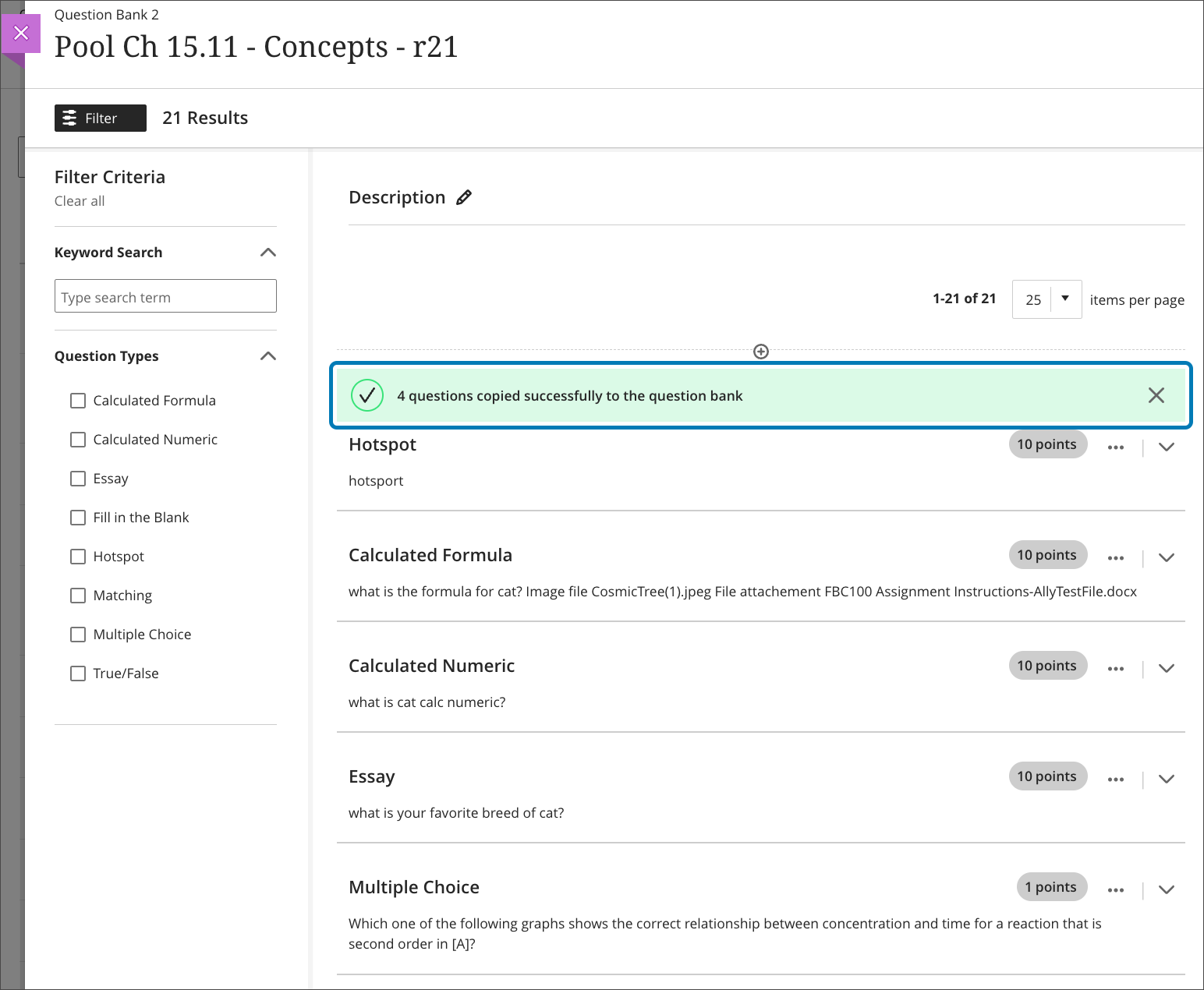
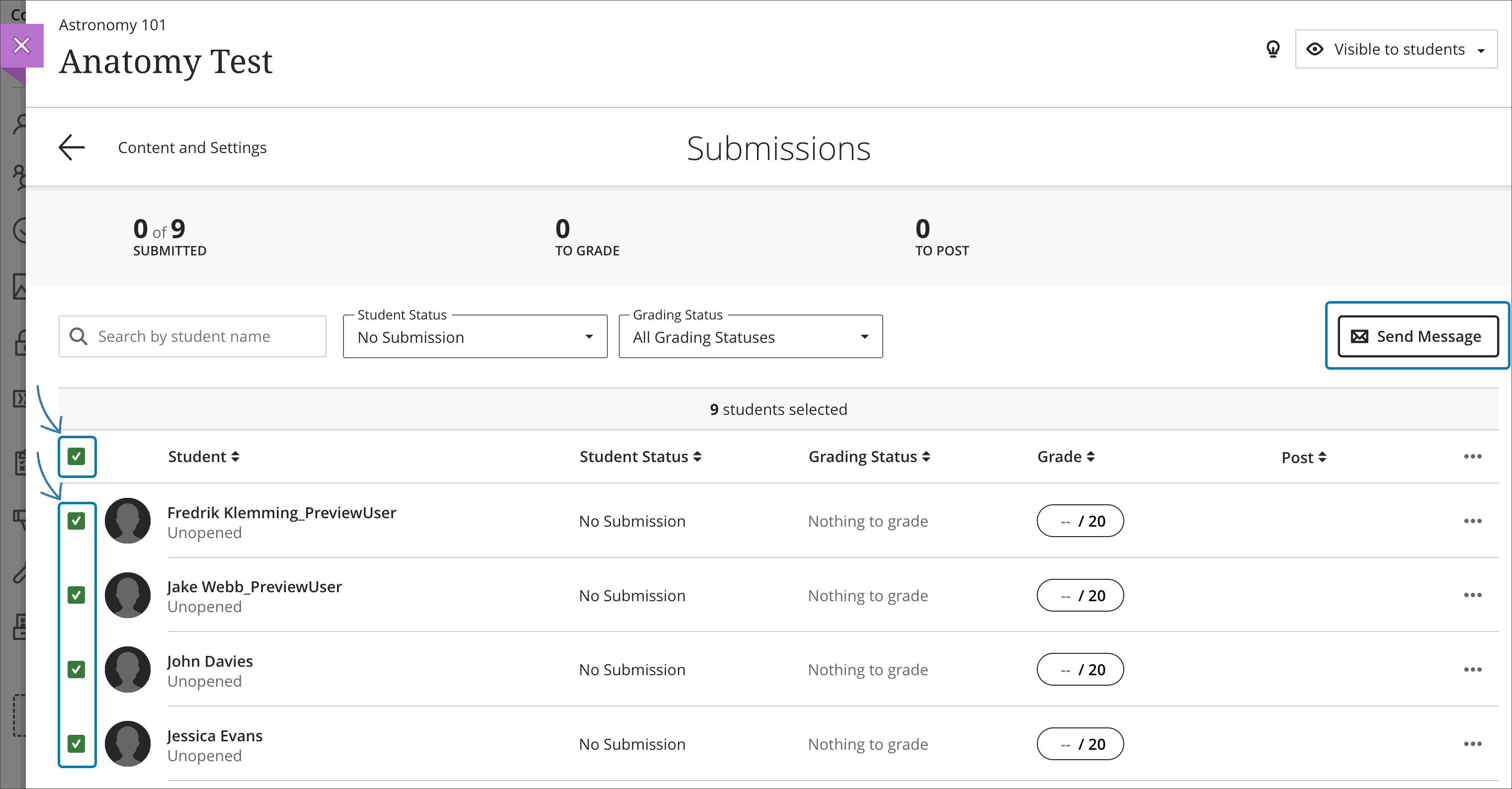
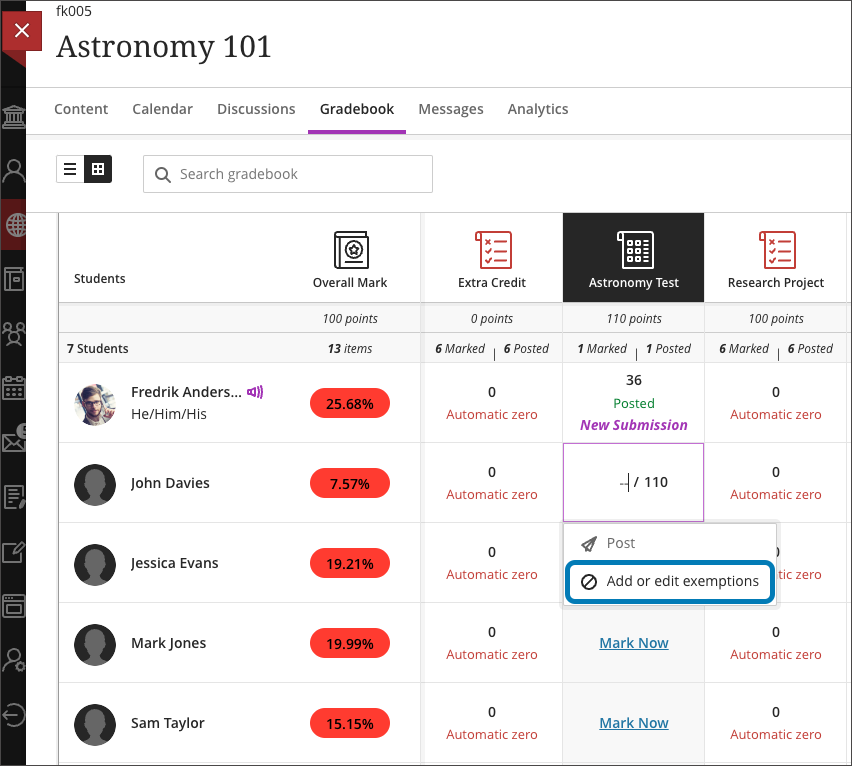
    <div class="html-content"><div><div><div><div><div>As the spring semester concludes, the May update to Ultra brings several enhancements to assessments, grading, engagement, and content creation. </div><div><br></div><div>Test questions are some of the most valuable resources in a course. Instructors invest significant time and effort creating and refining banks of test questions. These banks help instructors create dynamic, robust assessments or easily reuse questions across various assessments. In the May update, instructors can copy questions from existing assessments into questions banks with the Reuse Question option in the Question Bank. Questions can also be copied from question bank to question bank using this method.</div><div><br></div><div><img src="https://help.blackboard.com/sites/default/files/images/2023-04/learn_ultra_instructor_Tests_QuestionBanks_ReuseQuestions_ReuseSuccessNotification.png" alt="Image 1: Example of notification when questions are copied into a question bank" width="450" style="max-width: 100%; height: auto;"></div><div><em>Image 1: Example of notification when questions are copied into a question bank</em></div><div><br></div><div>When tracking student submissions on an assessment, instructors may need to send timely and contextual outreach. In this update, instructors can sort submissions by type and select students <a href="https://help.blackboard.com/Learn/Instructor/Ultra/Interact/Messages/Send_Messages" rel="nofollow external" class="bo">to send a message</a>. For example, an instructor may wish to send a message to students who haven't submitted the assignment yet. Selecting these students will craft a message interface for instructors to create a custom outreach. Selecting "send as email" ensures the message is sent external to Blackboard. Messages are confidential so students don't know who receives the communication.</div><div><br></div><div><img src="https://help.blackboard.com/sites/default/files/images/2023-04/learn_ultra_instructor_Message_SendMessagesFromSubmissionsPage.png" alt="Image 2: Example of filtering student list by No Submission and selecting those students to send a message" width="450" style="max-width: 100%; height: auto;"></div><div><em>Image 2: Example of filtering student list by No Submission and selecting those students to send a message.</em></div><div><span><br></span></div><div>Grading improvements include updates to rubrics and exemptions. To streamline grading, performance levels and criterion feedback are now hidden by default. However, a quick toggle can easily reveal these longer descriptions when grading. Additionally, when using the rubric, instructors can now quickly navigate using the tab key or up/down arrows. Finally, instructors can access the exemption feature within an by clicking on an individual cell in the gradebook grid view. <a href="https://wiki.umbc.edu/x/vgBYCg" rel="nofollow external" class="bo">Exemptions can also be applied</a> from the submissions page and student detail view. </div><div><br></div><div><img src="https://help.blackboard.com/sites/default/files/images/2023-04/learn_ultra_instructor_Grading_Excemptions_AddExcemptionFromGradebookGridView.png" alt="Image 3: Example of how to add or edit an exemption from the gradebook grid view" width="450" style="max-width: 100%; height: auto;"></div><div><em>Image 3: Example of how to add or edit an exemption from the gradebook grid view.</em></div><div><em><br></em></div><div>Content improvements include faster file uploads and specifying how links open. Instructors and course builders who need to upload many resources into a course may find the new drag and drop folder to upload files to be an efficient way to quickly bring content into a course. Instructors should be mindful of <a href="https://wiki.umbc.edu/x/FwSRAQ" rel="nofollow external" class="bo">quota and file format limitations</a>. <span>Opening links in a new window is generally considered best practice, especially for external websites to avoid browser security features blocking content from loading. However, there may be situations when an instructor or course author prefers linked content to open in a panel in the Ultra course. Instructors can now specify how a web link opens.</span></div><div><span><br></span></div><div><span>Additional updates to Ultra for May include:</span></div><div><ul><li>Managing multiple submissions introduces some complexity for instructors. Blackboard added an attempt selector on the grading page that displays the most appropriate attempt based on the "grade attempts" setting.</li><li>Instructors may prevent backtracking in paged tests to ensure that students progress through the pages of an assessment in a predetermined sequence. </li><li>A new dedicated space on <a href="https://help.blackboard.com/Learn/Instructor/Ultra/Interact/StudentOverview" rel="nofollow external" class="bo">the Student Overview</a> for instructors to take private notes about students in each course. The notes do not travel with the student from course to course and only the instructors or higher roles can access them. </li><li>Two new features were added to the hotspot question (Zoom In/Out and Full-Screen view) to define areas more precisely. </li><li>Instructors can edit gradebook columns for third-party graded activities without assigning them to a category. </li></ul></div></div></div></div><div><span>Faculty should see the latest updates in Ultra courses around May 4-5, 2023. Please sign up for our latest <a href="https://my3.my.umbc.edu/groups/instructional-technology/events?mode=upcoming&amp;tag=whats-new" rel="nofollow external" class="bo">What's New in Ultra for Teaching &amp; Learning webinar</a> on May 17, 2023 to learn more about these and other exciting new features coming to Ultra.</span></div><div><span><br></span></div><div><span>The <a href="https://wiki.umbc.edu/x/LohnB" rel="nofollow external" class="bo">next update</a> to our Ultra test environment will take place on May 9, 2023. Faculty who are interested in test driving <a href="https://wiki.umbc.edu/x/LohnB" rel="nofollow external" class="bo">new features</a> before they are released to production should </span><a href="http://my.umbc.edu/go/request-help" rel="nofollow external" class="bo">open an RT ticket</a><span> to request early access. </span><span>Please </span><a href="http://umbc.edu/go/ultra" rel="nofollow external" class="bo">watch the FAQs</a><span>, including </span><a href="https://wiki.umbc.edu/x/LohnB" rel="nofollow external" class="bo">the What's New with Ultra page</a><span>, </span><span>and myUMBC for additional information about Ultra. </span></div><div><span><br></span></div><div><span>As always, if you have any questions about teaching, learning, and technology at UMBC, please consider the following options:</span></div><div><ul><li><span><a href="http://pivot.umbc.edu" rel="nofollow external" class="bo">PIVOT</a> | <a href="https://doit.umbc.edu/itnm/academic-continuity/" rel="nofollow external" class="bo">Academic Continuity</a></span><span> </span><span>|</span><span> </span><span><a href="https://fdc.umbc.edu/teaching/keep-on-teaching/" rel="nofollow external" class="bo">Keep On Teaching</a></span><span> </span><span>|</span><span> </span><span><a href="https://doit.umbc.edu/students" rel="nofollow external" class="bo">Student Technology Resources</a></span></li><li><a href="http://www.umbc.edu/faq" rel="nofollow external" class="bo">Check our extensive FAQ collection</a><span> </span></li><ul><li><span><a href="https://wiki.umbc.edu/x/LohnB" rel="nofollow external" class="bo"><span>What's new in Ultra?</span></a><span> </span><span>|</span><span> </span><a href="https://wiki.umbc.edu/x/bwrSAQ" rel="nofollow external" class="bo"><span>Known Issues</span></a><span> </span></span></li></ul><li><span><a href="http://my.umbc.edu/go/request-help" rel="nofollow external" class="bo">Open a ticket via RT</a></span></li><li><span>Follow the </span><a href="http://my.umbc.edu/groups/instructional-technology" rel="nofollow external" class="bo">Instructional Technology</a><span> &amp; </span><a href="http://my.umbc.edu/groups/doit" rel="nofollow external" class="bo">DoIT</a><span> myUMBC groups</span></li><li><a href="http://doit.umbc.edu/itnm/staff/" rel="nofollow external" class="bo">Request a consult</a><span> with <a href="http://doit.umbc.edu/itnm/staff" rel="nofollow external" class="bo">instructional technology staff</a></span></li></ul></div></div><div><div></div></div></div>
]]>
</Body>
<Summary>As the spring semester concludes, the May update to Ultra brings several enhancements to assessments, grading, engagement, and content creation.      Test questions are some of the most valuable...</Summary>
<Website>https://my3.my.umbc.edu/groups/instructional-technology/posts/133002</Website>
<TrackingUrl>https://beta.my.umbc.edu/api/v0/pixel/news/133002/guest@my.umbc.edu/aa860255b4c59a6d20ba3524b92a58b8/api/pixel</TrackingUrl>
<Tag>blackboard</Tag>
<Tag>ultra-experience</Tag>
<Tag>ultra-update</Tag>
<Group token="instructional-technology">Instructional Technology</Group>
<GroupUrl>https://beta.my.umbc.edu/groups/instructional-technology</GroupUrl>
<AvatarUrl>https://assets2-beta.my.umbc.edu/system/shared/avatars/groups/000/001/164/dec3b026b81ee6d890a8f82f75c94a2e/xsmall.png?1446126703</AvatarUrl>
<AvatarUrl size="original">https://assets1-beta.my.umbc.edu/system/shared/avatars/groups/000/001/164/dec3b026b81ee6d890a8f82f75c94a2e/original.png?1446126703</AvatarUrl>
<AvatarUrl size="xxlarge">https://assets2-beta.my.umbc.edu/system/shared/avatars/groups/000/001/164/dec3b026b81ee6d890a8f82f75c94a2e/xxlarge.png?1446126703</AvatarUrl>
<AvatarUrl size="xlarge">https://assets1-beta.my.umbc.edu/system/shared/avatars/groups/000/001/164/dec3b026b81ee6d890a8f82f75c94a2e/xlarge.png?1446126703</AvatarUrl>
<AvatarUrl size="large">https://assets1-beta.my.umbc.edu/system/shared/avatars/groups/000/001/164/dec3b026b81ee6d890a8f82f75c94a2e/large.png?1446126703</AvatarUrl>
<AvatarUrl size="medium">https://assets4-beta.my.umbc.edu/system/shared/avatars/groups/000/001/164/dec3b026b81ee6d890a8f82f75c94a2e/medium.png?1446126703</AvatarUrl>
<AvatarUrl size="small">https://assets3-beta.my.umbc.edu/system/shared/avatars/groups/000/001/164/dec3b026b81ee6d890a8f82f75c94a2e/small.png?1446126703</AvatarUrl>
<AvatarUrl size="xsmall">https://assets2-beta.my.umbc.edu/system/shared/avatars/groups/000/001/164/dec3b026b81ee6d890a8f82f75c94a2e/xsmall.png?1446126703</AvatarUrl>
<AvatarUrl size="xxsmall">https://assets3-beta.my.umbc.edu/system/shared/avatars/groups/000/001/164/dec3b026b81ee6d890a8f82f75c94a2e/xxsmall.png?1446126703</AvatarUrl>
<Sponsor>Instructional Technology</Sponsor>
<ThumbnailUrl size="xxlarge">https://assets4-beta.my.umbc.edu/system/shared/thumbnails/news/000/133/002/0442aeff8a57f9bfcc5f43f4c4484b38/xxlarge.jpg?1682538886</ThumbnailUrl>
<ThumbnailUrl size="xlarge">https://assets2-beta.my.umbc.edu/system/shared/thumbnails/news/000/133/002/0442aeff8a57f9bfcc5f43f4c4484b38/xlarge.jpg?1682538886</ThumbnailUrl>
<ThumbnailUrl size="large">https://assets2-beta.my.umbc.edu/system/shared/thumbnails/news/000/133/002/0442aeff8a57f9bfcc5f43f4c4484b38/large.jpg?1682538886</ThumbnailUrl>
<ThumbnailUrl size="medium">https://assets1-beta.my.umbc.edu/system/shared/thumbnails/news/000/133/002/0442aeff8a57f9bfcc5f43f4c4484b38/medium.jpg?1682538886</ThumbnailUrl>
<ThumbnailUrl size="small">https://assets1-beta.my.umbc.edu/system/shared/thumbnails/news/000/133/002/0442aeff8a57f9bfcc5f43f4c4484b38/small.jpg?1682538886</ThumbnailUrl>
<ThumbnailUrl size="xsmall">https://assets1-beta.my.umbc.edu/system/shared/thumbnails/news/000/133/002/0442aeff8a57f9bfcc5f43f4c4484b38/xsmall.jpg?1682538886</ThumbnailUrl>
<ThumbnailUrl size="xxsmall">https://assets4-beta.my.umbc.edu/system/shared/thumbnails/news/000/133/002/0442aeff8a57f9bfcc5f43f4c4484b38/xxsmall.jpg?1682538886</ThumbnailUrl>
<PawCount>2</PawCount>
<CommentCount>0</CommentCount>
<CommentsAllowed>true</CommentsAllowed>
<PostedAt>Thu, 27 Apr 2023 10:26:11 -0400</PostedAt>
</NewsItem>

<NewsItem contentIssues="false" id="132957" important="false" status="posted" url="https://beta.my.umbc.edu/groups/oer/posts/132957">
<Title>From Syllabi to Textbooks - Accessibility in OER</Title>
<Tagline>Apply as a team by May 1st to participate</Tagline>
<Body>
<![CDATA[
    <div class="html-content"><p><span><strong><span>From Syllabi to Textbooks - Accessibility in Open Educational Resources for Institutions of Higher Education</span></strong></span></p><p><em><span>A series of 3 no-cost intensives designed to build capacity in IHE teams</span></em></p><p><span><a href="https://oer-maryland.us8.list-manage.com/track/click?u=4ce992e3f6db63c7af9c28afd&amp;id=15fbbc3738&amp;e=b54e6989f4" rel="nofollow external" class="bo">ISKME </a>and <a href="https://oer-maryland.us8.list-manage.com/track/click?u=4ce992e3f6db63c7af9c28afd&amp;id=326d691711&amp;e=b54e6989f4" rel="nofollow external" class="bo">CAST’s National AEM Center</a> invite teams of faculty to learn how to use accessible Open Educational Resources (OER) to make learning more equitable and bust the barriers to learning that millions of learners experience every day. </span></p><p><span>The Accessible OER Academy series is provided at no-cost to faculty at Institutions of Higher Education (IHE) and will introduce cohorts to how openly licensed resources are key levers for both adapting existing resources to increase digital accessibility and designing resources that are accessible for learners with disabilities from the start. Participants will also gain an understanding of how accessibility relates to Universal Design for Learning (UDL). </span></p><p>We invite educators from the same Institution to form a cohort. Throughout the six-week series, cohorts will receive access to a curated set of high quality resources to review and adapt for use in their own settings. Institution cohorts that complete all six sessions will be invited to present at a national summit alongside CAST and ISKME. Each individual participant of the Academy will receive a certificate of completion. Each team will submit one <u>application</u>.</p><p><span>We encourage cohorts of 3-5 faculty to represent a diversity of lived experiences, classroom expertise, and current educational roles. Consider building your team with representatives from full-time faculty, part-time faculty, disability services, ed tech, assistive technology, library media, and administration. Your team will produce resources that can be used with and to benefit all learners, so consider building a team that can collaborate for instructional purposes. The cohort will explore modifying a variety of resources - with a focus on syllabi and entire textbooks.</span></p><p><span>The series will consist of three 90-minute webinars with three 90-minute implementation sessions between each. All sessions will be at 1:00pm ET/10:00am PT.</span></p><ul><li><p><span>101 - Collaborative Questioning and UDL - on May 4th and Implementation Session May 11th</span></p></li><li><p><span>201 - Adapting and Creating Accessible OER on May 18th and Implementation Session May 25th</span></p></li><li><p><span>301 - Curating and Evaluating OER for Accessibility on June 1st and Implementation Session on June 8th</span></p></li></ul><p><span><a href="https://oer-maryland.us8.list-manage.com/track/click?u=4ce992e3f6db63c7af9c28afd&amp;id=ddaa67b728&amp;e=b54e6989f4" rel="nofollow external" class="bo">Apply as a team</a> by May 1st. If you have any questions, please contact Joanna Schimizzi (<a href="mailto:joanna@iskme.org" rel="nofollow external" class="bo">joanna@iskme.org</a>) or Alison Driscoll (<a href="mailto:adriscoll@cast.org" rel="nofollow external" class="bo">adriscoll@cast.org</a>).</span></p></div>
]]>
</Body>
<Summary>From Syllabi to Textbooks - Accessibility in Open Educational Resources for Institutions of Higher Education  A series of 3 no-cost intensives designed to build capacity in IHE teams...</Summary>
<TrackingUrl>https://beta.my.umbc.edu/api/v0/pixel/news/132957/guest@my.umbc.edu/c967418ffb09c0fa2d9fcb0a6172ad19/api/pixel</TrackingUrl>
<Tag>educational</Tag>
<Tag>oer</Tag>
<Tag>open</Tag>
<Tag>resources</Tag>
<Group token="oer">Open Educational Resources at UMBC</Group>
<GroupUrl>https://beta.my.umbc.edu/groups/oer</GroupUrl>
<AvatarUrl>https://assets1-beta.my.umbc.edu/system/shared/avatars/groups/000/001/664/0e7fb0a3d658c358b4e5e9561f35099e/xsmall.png?1562590436</AvatarUrl>
<AvatarUrl size="original">https://assets2-beta.my.umbc.edu/system/shared/avatars/groups/000/001/664/0e7fb0a3d658c358b4e5e9561f35099e/original.png?1562590436</AvatarUrl>
<AvatarUrl size="xxlarge">https://assets1-beta.my.umbc.edu/system/shared/avatars/groups/000/001/664/0e7fb0a3d658c358b4e5e9561f35099e/xxlarge.png?1562590436</AvatarUrl>
<AvatarUrl size="xlarge">https://assets1-beta.my.umbc.edu/system/shared/avatars/groups/000/001/664/0e7fb0a3d658c358b4e5e9561f35099e/xlarge.png?1562590436</AvatarUrl>
<AvatarUrl size="large">https://assets4-beta.my.umbc.edu/system/shared/avatars/groups/000/001/664/0e7fb0a3d658c358b4e5e9561f35099e/large.png?1562590436</AvatarUrl>
<AvatarUrl size="medium">https://assets1-beta.my.umbc.edu/system/shared/avatars/groups/000/001/664/0e7fb0a3d658c358b4e5e9561f35099e/medium.png?1562590436</AvatarUrl>
<AvatarUrl size="small">https://assets2-beta.my.umbc.edu/system/shared/avatars/groups/000/001/664/0e7fb0a3d658c358b4e5e9561f35099e/small.png?1562590436</AvatarUrl>
<AvatarUrl size="xsmall">https://assets1-beta.my.umbc.edu/system/shared/avatars/groups/000/001/664/0e7fb0a3d658c358b4e5e9561f35099e/xsmall.png?1562590436</AvatarUrl>
<AvatarUrl size="xxsmall">https://assets1-beta.my.umbc.edu/system/shared/avatars/groups/000/001/664/0e7fb0a3d658c358b4e5e9561f35099e/xxsmall.png?1562590436</AvatarUrl>
<Sponsor>Open Educational Resources at UMBC</Sponsor>
<PawCount>3</PawCount>
<CommentCount>0</CommentCount>
<CommentsAllowed>true</CommentsAllowed>
<PostedAt>Tue, 25 Apr 2023 16:38:12 -0400</PostedAt>
</NewsItem>

<NewsItem contentIssues="true" id="131950" important="false" status="posted" url="https://beta.my.umbc.edu/groups/oer/posts/131950">
<Title>DoIT to retain Collaborate recordings for 12 months</Title>
<Tagline>Recordings made before July 1, 2023 to be retired</Tagline>
<Body>
<![CDATA[
    <div class="html-content"><span><p><span>Synchronous engagement tools provide platforms for instructors and students to meet during online, hybrid, and hyflex class sessions. Many courses record these live sessions to provide a lecture reference, support test preparation, engage student or group presentations, provide virtual office hours, and more. During the COVID-19 pandemic, however, Collaborate usage exceeded available storage, requiring additional expenses to maintain an unlimited retention practice during uncertain times. As UMBC moves into a post-pandemic period, however, continued storage will incur additional fees each year. </span></p><p><span>Following the </span><a href="https://my3.my.umbc.edu/groups/doit/posts/131264" rel="nofollow external" class="bo"><span>announced Webex recording retention practices</span></a><span>, reasonable limitations on Collaborate recording storage will also be implemented. Beginning July 1, 2023, Instructional Technology will retain Collaborate recordings for 12 months. Thereafter, every July, the previous twelve months of recordings will be retired and removed. A three year cycle is defined in the table below.</span></p><div><table><colgroup></colgroup><tbody><tr><td><p><span><strong>Retirement Month</strong></span></p></td><td><p><span><strong>Removal Year</strong></span></p></td><td><p><span><strong>Retention Year</strong></span></p></td></tr><tr><td><p><span>July 2023</span></p></td><td><p><span>July 1, 2021 - June 30, 2022</span></p></td><td><p><span>July 1, 2022 - June 30, 2023</span></p></td></tr><tr><td><p><span>July 2024</span></p></td><td><p><span>July 1, 2022 - June 30, 2023</span></p></td><td><p><span>July 1, 2023 - June 30, 2024</span></p></td></tr><tr><td><p><span>July 2025</span></p></td><td><p><span>July 1, 2023 - June 30, 2024</span></p></td><td><p><span>July 1, 2024 - June 30, 2025</span></p></td></tr></tbody></table></div><br><p><span>Recordings made prior to July 1, 2021 will be removed on May 30, 2023.</span></p><p><span>If recordings are needed for reuse or longer periods of retention, instructors and session moderators must </span><a href="https://www.class.com/support/collaborate/moderator/recordings#download_recordings_and_transcriptions" rel="nofollow external" class="bo"><span>download important recordings from Collaborate</span></a><span> and upload the MP4 files to Panopto for frequent viewing or cloud storage for long term archive. </span><a href="https://support.panopto.com/s/article/Batch-Upload-Video-Files" rel="nofollow external" class="bo"><span>Uploading a recording to Panopto</span></a><span> provides captions, basic editing tools, </span><a href="https://wiki.umbc.edu/x/qoOEB" rel="nofollow external" class="bo"><span>quizzing within a video</span></a><span>, </span><a href="https://support.panopto.com/s/article/How-to-Embed-a-Video-Into-a-Blackboard-Ultra-Course" rel="nofollow external" class="bo"><span>embedding options for a Blackboard course</span></a><span>, and viewing analytics.</span></p><span>Collaborate recordings include a list of students who attended the live session and chat transcripts, as well as audio/video. As such, Collaborate recordings represent part of a student's educational record and are protected under FERPA for the purposes of privacy. These types of recordings should only be used in the originating course in which the synchronous session occurred, not in other courses. Students who may need access to a recording to fulfill an incomplete will have 12-months of access under this retention policy depending on the terms of the </span><a href="https://wiki.umbc.edu/x/pAZ4B" rel="nofollow external" class="bo"><span>course availability override</span></a><span> requested by the instructor.</span></span><div><span><span><br></span></span></div><div><div><span>As always, if you have any questions about teaching, learning, and technology at UMBC, please consider the following options:</span></div><div><ul><li><span><a href="http://pivot.umbc.edu/" rel="nofollow external" class="bo">PIVOT</a> | <a href="https://doit.umbc.edu/itnm/academic-continuity/" rel="nofollow external" class="bo">Academic Continuity</a></span> | <a href="https://fdc.umbc.edu/teaching/keep-on-teaching/" rel="nofollow external" class="bo">Keep On Teaching</a> | <span><a href="https://doit.umbc.edu/students" rel="nofollow external" class="bo">Student Technology Resources</a></span></li><li><a href="http://www.umbc.edu/faq" rel="nofollow external" class="bo">Check our extensive FAQ collection</a><span> </span></li><ul><li><span><a href="https://wiki.umbc.edu/x/LohnB" rel="nofollow external" class="bo"><span>What's new in Ultra?</span></a> | <a href="https://wiki.umbc.edu/x/bwrSAQ" rel="nofollow external" class="bo"><span>Known Issues</span></a><span> </span></span></li></ul><li><span><a href="http://my.umbc.edu/go/request-help" rel="nofollow external" class="bo">Open a ticket via RT</a></span></li><li><span>Follow the </span><a href="http://my.umbc.edu/groups/instructional-technology" rel="nofollow external" class="bo">Instructional Technology</a> &amp; <a href="http://my.umbc.edu/groups/doit" rel="nofollow external" class="bo">DoIT</a><span> myUMBC groups</span></li><li><a href="http://doit.umbc.edu/itnm/staff/" rel="nofollow external" class="bo">Request a consult</a><span> with <a href="http://doit.umbc.edu/itnm/staff" rel="nofollow external" class="bo">instructional technology staff</a></span></li></ul></div></div></div>
]]>
</Body>
<Summary>Synchronous engagement tools provide platforms for instructors and students to meet during online, hybrid, and hyflex class sessions. Many courses record these live sessions to provide a lecture...</Summary>
<Website>https://my3.my.umbc.edu/groups/instructional-technology/posts/131950</Website>
<TrackingUrl>https://beta.my.umbc.edu/api/v0/pixel/news/131950/guest@my.umbc.edu/31c4ca11d652747a61a7971b2a7bfdcd/api/pixel</TrackingUrl>
<Tag>announcement</Tag>
<Tag>class</Tag>
<Tag>collaborate</Tag>
<Tag>policy</Tag>
<Tag>recordings</Tag>
<Tag>retention</Tag>
<Group token="instructional-technology">Instructional Technology</Group>
<GroupUrl>https://beta.my.umbc.edu/groups/instructional-technology</GroupUrl>
<AvatarUrl>https://assets2-beta.my.umbc.edu/system/shared/avatars/groups/000/001/164/dec3b026b81ee6d890a8f82f75c94a2e/xsmall.png?1446126703</AvatarUrl>
<AvatarUrl size="original">https://assets1-beta.my.umbc.edu/system/shared/avatars/groups/000/001/164/dec3b026b81ee6d890a8f82f75c94a2e/original.png?1446126703</AvatarUrl>
<AvatarUrl size="xxlarge">https://assets2-beta.my.umbc.edu/system/shared/avatars/groups/000/001/164/dec3b026b81ee6d890a8f82f75c94a2e/xxlarge.png?1446126703</AvatarUrl>
<AvatarUrl size="xlarge">https://assets1-beta.my.umbc.edu/system/shared/avatars/groups/000/001/164/dec3b026b81ee6d890a8f82f75c94a2e/xlarge.png?1446126703</AvatarUrl>
<AvatarUrl size="large">https://assets1-beta.my.umbc.edu/system/shared/avatars/groups/000/001/164/dec3b026b81ee6d890a8f82f75c94a2e/large.png?1446126703</AvatarUrl>
<AvatarUrl size="medium">https://assets4-beta.my.umbc.edu/system/shared/avatars/groups/000/001/164/dec3b026b81ee6d890a8f82f75c94a2e/medium.png?1446126703</AvatarUrl>
<AvatarUrl size="small">https://assets3-beta.my.umbc.edu/system/shared/avatars/groups/000/001/164/dec3b026b81ee6d890a8f82f75c94a2e/small.png?1446126703</AvatarUrl>
<AvatarUrl size="xsmall">https://assets2-beta.my.umbc.edu/system/shared/avatars/groups/000/001/164/dec3b026b81ee6d890a8f82f75c94a2e/xsmall.png?1446126703</AvatarUrl>
<AvatarUrl size="xxsmall">https://assets3-beta.my.umbc.edu/system/shared/avatars/groups/000/001/164/dec3b026b81ee6d890a8f82f75c94a2e/xxsmall.png?1446126703</AvatarUrl>
<Sponsor>Instructional Technology</Sponsor>
<ThumbnailUrl size="xxlarge">https://assets3-beta.my.umbc.edu/system/shared/thumbnails/news/000/131/950/9bd26f5865fd9110ee55327da6c9b3af/xxlarge.jpg?1679668932</ThumbnailUrl>
<ThumbnailUrl size="xlarge">https://assets3-beta.my.umbc.edu/system/shared/thumbnails/news/000/131/950/9bd26f5865fd9110ee55327da6c9b3af/xlarge.jpg?1679668932</ThumbnailUrl>
<ThumbnailUrl size="large">https://assets3-beta.my.umbc.edu/system/shared/thumbnails/news/000/131/950/9bd26f5865fd9110ee55327da6c9b3af/large.jpg?1679668932</ThumbnailUrl>
<ThumbnailUrl size="medium">https://assets4-beta.my.umbc.edu/system/shared/thumbnails/news/000/131/950/9bd26f5865fd9110ee55327da6c9b3af/medium.jpg?1679668932</ThumbnailUrl>
<ThumbnailUrl size="small">https://assets4-beta.my.umbc.edu/system/shared/thumbnails/news/000/131/950/9bd26f5865fd9110ee55327da6c9b3af/small.jpg?1679668932</ThumbnailUrl>
<ThumbnailUrl size="xsmall">https://assets2-beta.my.umbc.edu/system/shared/thumbnails/news/000/131/950/9bd26f5865fd9110ee55327da6c9b3af/xsmall.jpg?1679668932</ThumbnailUrl>
<ThumbnailUrl size="xxsmall">https://assets1-beta.my.umbc.edu/system/shared/thumbnails/news/000/131/950/9bd26f5865fd9110ee55327da6c9b3af/xxsmall.jpg?1679668932</ThumbnailUrl>
<PawCount>3</PawCount>
<CommentCount>0</CommentCount>
<CommentsAllowed>true</CommentsAllowed>
<PostedAt>Tue, 11 Apr 2023 11:13:29 -0400</PostedAt>
</NewsItem>

<NewsItem contentIssues="false" id="132495" important="false" status="posted" url="https://beta.my.umbc.edu/groups/oer/posts/132495">
<Title>Call for Participation: M.O.S.T. OER Virtual Showcase</Title>
<Tagline>Submit a proposal by Friday, April 14th at 11:59pm</Tagline>
<Body>
<![CDATA[
    <div class="html-content"><table border="0" width="100%"><tbody><tr><td><span>Faculty, staff, and students who have created openly licensed instructional and learning materials are invited to propose sessions for the <strong>M.O.S.T. OER Creation Virtual Showcase,</strong> taking place via Zoom on <strong>Friday, May 5, 2023, 11:00 a.m. - 2:00 p.m. ET</strong>. We’d like to hear from individuals and teams that have OER works in progress or projects completed within the last 5 years. <br><br></span><a title="Review Call for Proposals" href="https://oer-maryland.us8.list-manage.com/track/click?u=4ce992e3f6db63c7af9c28afd&amp;id=fc4fa8e794&amp;e=b54e6989f4" rel="nofollow external" class="bo">Review Call for Proposals</a><span><br><br></span><span><strong>Submission Deadline: Friday, April 14, 2023, 11:59 p.m. ET</strong></span><br><br><span>Presenters will have 10-15 minutes of presentation time followed by moderated Q&amp;A, for a total of 20 minutes. We ask you to limit the number of presenters to no more than 3 people though additional collaborators are welcome to be in the session and be available for the Q&amp;A portion of the presentation. <br><br>We ask that the OER featured in the showcase be: </span><ul><li><span>openly licensed with a Creative Commons 4.0 International License,</span></li><li><span>accessible according to WCAG 2.0 and WCAG 2.1 Standards, and</span></li><li><span>openly and freely available outside their delivery platforms.</span></li></ul><span>We strongly encourage creation projects that have/had as an aim increasing diversity, equity, inclusion, and accessibility for all learners as well as projects that include(d) the meaningful engagement of students as co-creators or contributors (development and/or feedback/review stages). Works in progress should be sufficiently far along to be able to address the proposal session outline (see <a href="https://oer-maryland.us8.list-manage.com/track/click?u=4ce992e3f6db63c7af9c28afd&amp;id=adfdaab872&amp;e=b54e6989f4" rel="nofollow external" class="bo">Call for Proposals</a>). <br><br>Final selection of proposals for the showcase will be based on ensuring a diversity of presentations from different institution types across Maryland (2-year, 4-year, public, independent)  and from a variety of disciplines. <br><br>Questions? Please contact <a href="mailto:most@usmd.edu" rel="nofollow external" class="bo">most@usmd.edu</a> </span><span><br></span></td></tr></tbody></table><br></div>
]]>
</Body>
<Summary>Faculty, staff, and students who have created openly licensed instructional and learning materials are invited to propose sessions for the M.O.S.T. OER Creation Virtual Showcase, taking place via...</Summary>
<TrackingUrl>https://beta.my.umbc.edu/api/v0/pixel/news/132495/guest@my.umbc.edu/0c03e421a25ffaa5aaad707b10086e9e/api/pixel</TrackingUrl>
<Tag>educational</Tag>
<Tag>most</Tag>
<Tag>oer</Tag>
<Tag>open</Tag>
<Tag>resources</Tag>
<Group token="oer">Open Educational Resources at UMBC</Group>
<GroupUrl>https://beta.my.umbc.edu/groups/oer</GroupUrl>
<AvatarUrl>https://assets1-beta.my.umbc.edu/system/shared/avatars/groups/000/001/664/0e7fb0a3d658c358b4e5e9561f35099e/xsmall.png?1562590436</AvatarUrl>
<AvatarUrl size="original">https://assets2-beta.my.umbc.edu/system/shared/avatars/groups/000/001/664/0e7fb0a3d658c358b4e5e9561f35099e/original.png?1562590436</AvatarUrl>
<AvatarUrl size="xxlarge">https://assets1-beta.my.umbc.edu/system/shared/avatars/groups/000/001/664/0e7fb0a3d658c358b4e5e9561f35099e/xxlarge.png?1562590436</AvatarUrl>
<AvatarUrl size="xlarge">https://assets1-beta.my.umbc.edu/system/shared/avatars/groups/000/001/664/0e7fb0a3d658c358b4e5e9561f35099e/xlarge.png?1562590436</AvatarUrl>
<AvatarUrl size="large">https://assets4-beta.my.umbc.edu/system/shared/avatars/groups/000/001/664/0e7fb0a3d658c358b4e5e9561f35099e/large.png?1562590436</AvatarUrl>
<AvatarUrl size="medium">https://assets1-beta.my.umbc.edu/system/shared/avatars/groups/000/001/664/0e7fb0a3d658c358b4e5e9561f35099e/medium.png?1562590436</AvatarUrl>
<AvatarUrl size="small">https://assets2-beta.my.umbc.edu/system/shared/avatars/groups/000/001/664/0e7fb0a3d658c358b4e5e9561f35099e/small.png?1562590436</AvatarUrl>
<AvatarUrl size="xsmall">https://assets1-beta.my.umbc.edu/system/shared/avatars/groups/000/001/664/0e7fb0a3d658c358b4e5e9561f35099e/xsmall.png?1562590436</AvatarUrl>
<AvatarUrl size="xxsmall">https://assets1-beta.my.umbc.edu/system/shared/avatars/groups/000/001/664/0e7fb0a3d658c358b4e5e9561f35099e/xxsmall.png?1562590436</AvatarUrl>
<Sponsor>Open Educational Resources at UMBC</Sponsor>
<PawCount>4</PawCount>
<CommentCount>0</CommentCount>
<CommentsAllowed>true</CommentsAllowed>
<PostedAt>Mon, 10 Apr 2023 16:57:03 -0400</PostedAt>
<EditAt>Tue, 11 Apr 2023 11:15:17 -0400</EditAt>
</NewsItem>

<NewsItem contentIssues="true" id="132445" important="false" status="posted" url="https://beta.my.umbc.edu/groups/oer/posts/132445">
<Title>Respondus Helps Curtail Cheating while Protecting Privacy</Title>
<Tagline>Supported tools to address your high stakes assessment needs</Tagline>
<Body>
<![CDATA[
    <div class="html-content">As technology continues to advance, traditional classroom practices are enhanced with technologies. In-class assessments that used to take up valuable time are often administered through Blackboard, allowing for more efficient use of class time. However, while at-home activities have their benefits, they can be compromised by various internet resources like Chegg, CourseHero, and ChatGPT, which may help students misrepresent their academic abilities.<br><br><a href="https://wiki.umbc.edu/pages/viewpage.action?pageId=87884496" rel="nofollow external" class="bo">Respondus Lockdown Browser (RLDB</a>) is a tool designed to reduce students' opportunities for academic misconduct during assessments, including high-stakes testing offered through Blackboard. The application disables a test taker's computer from performing certain actions, including taking screenshots, opening additional web pages or search engines, accessing particular network traffic, and generally restricting the opportunities for students to receive outside help. <br><br>RLDB can also operate in conjunction with <a href="https://wiki.umbc.edu/label/faq/respondus-monitor" rel="nofollow external" class="bo">Respondus Monitor</a>, which leverages an end user's computer camera and AI for real-time proctoring. Monitor can be viewed live by the instructor through a web conferencing platform, or the system records the student taking the test so the instructor can view later.<br><br>There are four simple steps to take to turn on the Lockdown Browser: <br><ol><li>Create the assessment, whether <a href="https://help.blackboard.com/Learn/Instructor/Ultra/Tests_Pools_Surveys/Create_Tests_and_Surveys" rel="nofollow external" class="bo">test</a> or <a href="https://help.blackboard.com/Learn/Instructor/Ultra/Assignments/Create_and_Edit_Assignments" rel="nofollow external" class="bo">assignment </a></li><li><a href="https://wiki.umbc.edu/x/3QKVB" rel="nofollow external" class="bo">Enable the settings</a> via the Respondus Lockdown Browser dashboard for the specific assessment</li><li>Select Respondus Lockdown Browser for the assessment</li><li>Save the settings</li></ol><br>Once enabled, the Blackboard assessment will require students to use LockDown Browser. They will need to <a href="https://wiki.umbc.edu/x/roWxBw" rel="nofollow external" class="bo">download a specific installation</a> of the Lockdown Browser that is unique to UMBC. NOTE: Despite rumors to the contrary, RLDB is not <a href="https://wiki.umbc.edu/pages/viewpage.action?pageId=176521697" rel="nofollow external" class="bo">malware</a> and Monitor is designed to safeguard <a href="https://wiki.umbc.edu/pages/viewpage.action?pageId=176521703" rel="nofollow external" class="bo">users' privacy</a>.<br><br>Depending on your course, students will <a href="https://wiki.umbc.edu/x/BQb9Aw" rel="nofollow external" class="bo">access the quiz directly</a> from Blackboard (Ultra) or the Lockdown Browser (Original). TIP: If your assessment requires students to write a lengthy response, the <a href="https://wiki.umbc.edu/x/8BXBBQ" rel="nofollow external" class="bo">answer window can be enlarged</a>.<br><br>Although they're not for everyone, the Respondus Tools can be <a href="https://doit.umbc.edu/news/?id=91035" rel="nofollow external" class="bo">a game-changer</a> for instructors. Both of these tools help reduce the opportunity for cheating, in much the same way one walking around their classroom keeps students' eyes on their own tests. They are not, however, panacea, as students set on circumventing measures to support academic honesty will surely always find ways around one's best laid plans even and perhaps particularly in face-to-face settings. It is important to note, though, that both of these tools are supported by the UMBC's Division of Information Technology (DoIT). <br><br>In the lead-up to mid-term season, but also throughout the year, please remember that consulting and design support from DoIT staff are only an <a href="https://rt.umbc.edu/" rel="nofollow external" class="bo">RT ticket</a> away.<br><br><br><div>~By <a href="https://doit.umbc.edu/itnm/staff/penniston/" rel="nofollow external" class="bo">Tom Penniston</a> &amp; <a href="https://doit.umbc.edu/itnm/staff/hawken/" rel="nofollow external" class="bo">Mariann Hawken</a></div><div><br></div><div><br></div><div>* <a href="https://www.freepik.com/free-vector/online-test-concept-illustration_13246756.htm#query=test&amp;position=34&amp;from_view=search&amp;track=robertav1_2_sidr" rel="nofollow external" class="bo">Image by storyset</a> on Freepik</div></div>
]]>
</Body>
<Summary>As technology continues to advance, traditional classroom practices are enhanced with technologies. In-class assessments that used to take up valuable time are often administered through...</Summary>
<Website>https://doit.umbc.edu/post/132445/</Website>
<TrackingUrl>https://beta.my.umbc.edu/api/v0/pixel/news/132445/guest@my.umbc.edu/941ff5b63fcd3150c0129330278e2e5b/api/pixel</TrackingUrl>
<Tag>assessment</Tag>
<Tag>hawken</Tag>
<Tag>lockdown-browser</Tag>
<Tag>online-learning</Tag>
<Tag>penniston</Tag>
<Tag>respondus</Tag>
<Tag>respondus-monitor</Tag>
<Tag>security</Tag>
<Tag>testing</Tag>
<Group token="instructional-technology">Instructional Technology</Group>
<GroupUrl>https://beta.my.umbc.edu/groups/instructional-technology</GroupUrl>
<AvatarUrl>https://assets2-beta.my.umbc.edu/system/shared/avatars/groups/000/001/164/dec3b026b81ee6d890a8f82f75c94a2e/xsmall.png?1446126703</AvatarUrl>
<AvatarUrl size="original">https://assets1-beta.my.umbc.edu/system/shared/avatars/groups/000/001/164/dec3b026b81ee6d890a8f82f75c94a2e/original.png?1446126703</AvatarUrl>
<AvatarUrl size="xxlarge">https://assets2-beta.my.umbc.edu/system/shared/avatars/groups/000/001/164/dec3b026b81ee6d890a8f82f75c94a2e/xxlarge.png?1446126703</AvatarUrl>
<AvatarUrl size="xlarge">https://assets1-beta.my.umbc.edu/system/shared/avatars/groups/000/001/164/dec3b026b81ee6d890a8f82f75c94a2e/xlarge.png?1446126703</AvatarUrl>
<AvatarUrl size="large">https://assets1-beta.my.umbc.edu/system/shared/avatars/groups/000/001/164/dec3b026b81ee6d890a8f82f75c94a2e/large.png?1446126703</AvatarUrl>
<AvatarUrl size="medium">https://assets4-beta.my.umbc.edu/system/shared/avatars/groups/000/001/164/dec3b026b81ee6d890a8f82f75c94a2e/medium.png?1446126703</AvatarUrl>
<AvatarUrl size="small">https://assets3-beta.my.umbc.edu/system/shared/avatars/groups/000/001/164/dec3b026b81ee6d890a8f82f75c94a2e/small.png?1446126703</AvatarUrl>
<AvatarUrl size="xsmall">https://assets2-beta.my.umbc.edu/system/shared/avatars/groups/000/001/164/dec3b026b81ee6d890a8f82f75c94a2e/xsmall.png?1446126703</AvatarUrl>
<AvatarUrl size="xxsmall">https://assets3-beta.my.umbc.edu/system/shared/avatars/groups/000/001/164/dec3b026b81ee6d890a8f82f75c94a2e/xxsmall.png?1446126703</AvatarUrl>
<Sponsor>Instructional Technology</Sponsor>
<ThumbnailUrl size="xxlarge">https://assets2-beta.my.umbc.edu/system/shared/thumbnails/news/000/132/445/efb7edc144b2683a51095303e734afc3/xxlarge.jpg?1680904692</ThumbnailUrl>
<ThumbnailUrl size="xlarge">https://assets2-beta.my.umbc.edu/system/shared/thumbnails/news/000/132/445/efb7edc144b2683a51095303e734afc3/xlarge.jpg?1680904692</ThumbnailUrl>
<ThumbnailUrl size="large">https://assets3-beta.my.umbc.edu/system/shared/thumbnails/news/000/132/445/efb7edc144b2683a51095303e734afc3/large.jpg?1680904692</ThumbnailUrl>
<ThumbnailUrl size="medium">https://assets2-beta.my.umbc.edu/system/shared/thumbnails/news/000/132/445/efb7edc144b2683a51095303e734afc3/medium.jpg?1680904692</ThumbnailUrl>
<ThumbnailUrl size="small">https://assets3-beta.my.umbc.edu/system/shared/thumbnails/news/000/132/445/efb7edc144b2683a51095303e734afc3/small.jpg?1680904692</ThumbnailUrl>
<ThumbnailUrl size="xsmall">https://assets1-beta.my.umbc.edu/system/shared/thumbnails/news/000/132/445/efb7edc144b2683a51095303e734afc3/xsmall.jpg?1680904692</ThumbnailUrl>
<ThumbnailUrl size="xxsmall">https://assets3-beta.my.umbc.edu/system/shared/thumbnails/news/000/132/445/efb7edc144b2683a51095303e734afc3/xxsmall.jpg?1680904692</ThumbnailUrl>
<PawCount>4</PawCount>
<CommentCount>0</CommentCount>
<CommentsAllowed>true</CommentsAllowed>
<PostedAt>Mon, 10 Apr 2023 08:57:38 -0400</PostedAt>
<EditAt>Mon, 10 Apr 2023 08:59:08 -0400</EditAt>
</NewsItem>

<NewsItem contentIssues="true" id="132108" important="false" status="posted" url="https://beta.my.umbc.edu/groups/oer/posts/132108">
<Title>Search Ultra content &amp; set up multiple grade schema in April</Title>
<Tagline>Updated functionality supports improved grading workflows</Tagline>
<Body>
<![CDATA[
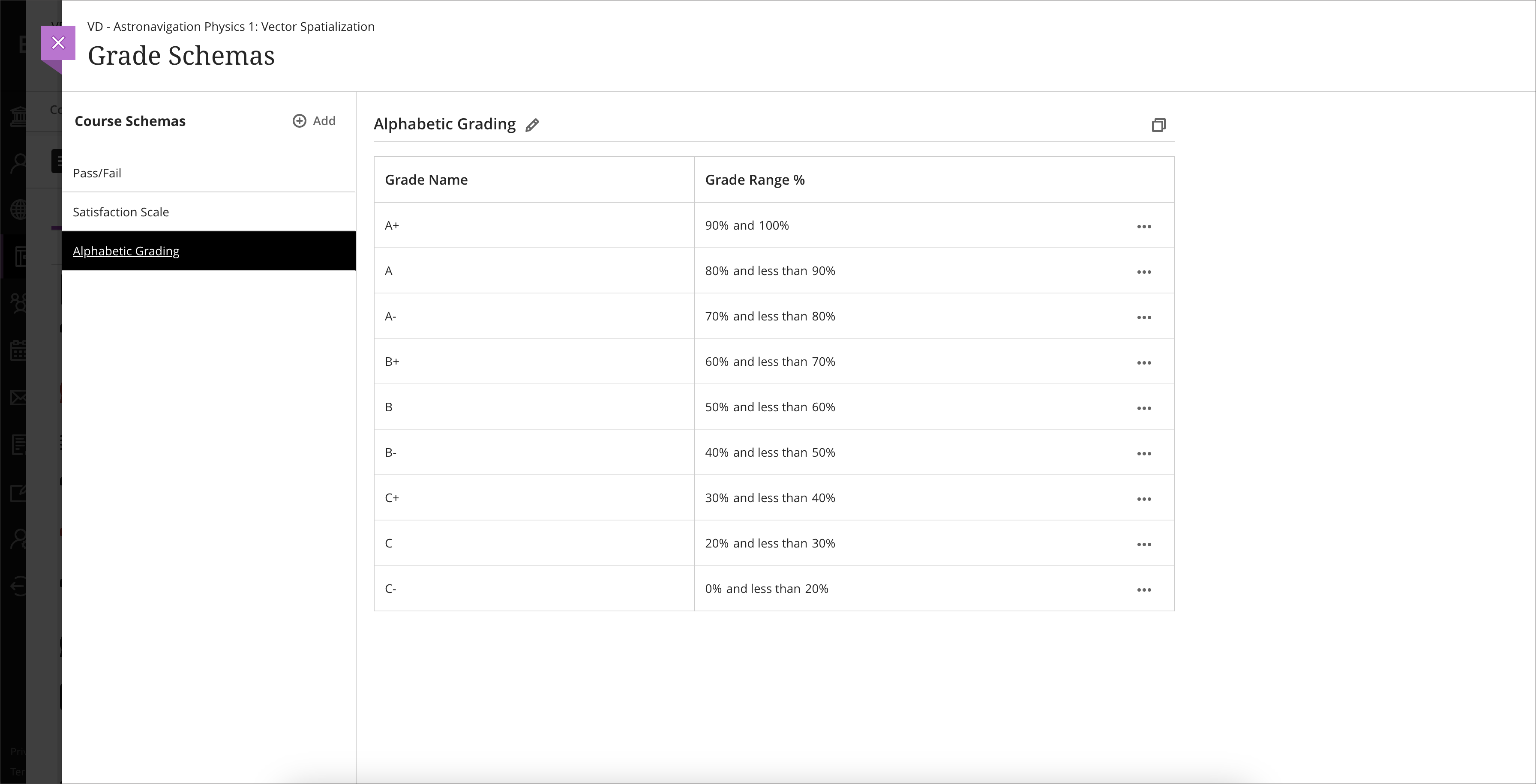
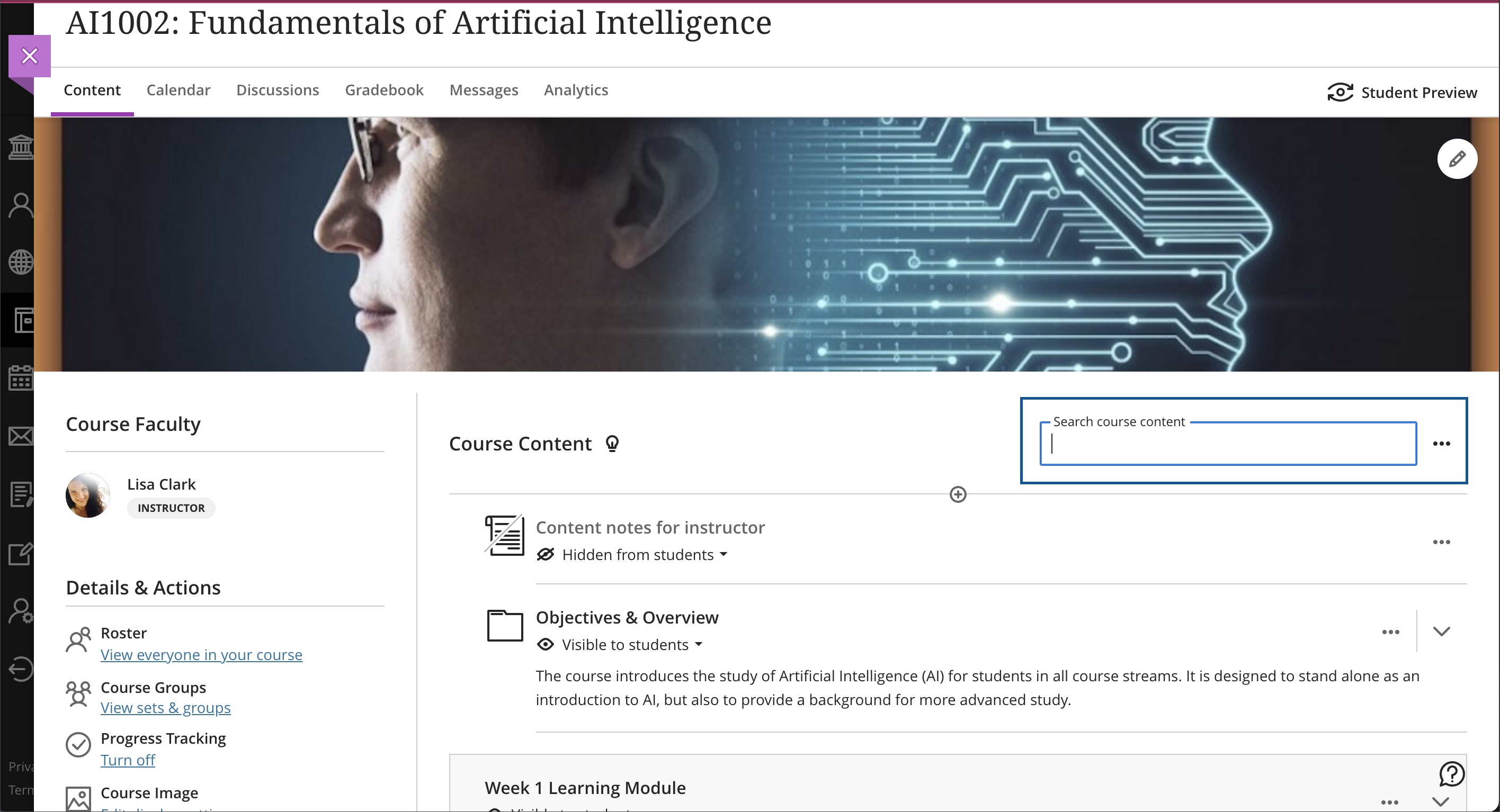
    <div class="html-content"><div><div><div><div><div>A grading schema provides a way for an instructor to establish how a grade is calculated and appears to learners. A schema takes points scored on an assessment and compares it to the chart, which is mapped according to specifications defined by the instructor. The default schema in Ultra courses is based on a points or percentage scale to a letter grade.</div><div><br></div><div>In early April, Ultra courses will support multiple grading schema, allowing faculty to add, copy and edit up to 100 different options in a course for how grades are calculated and appear to students. For example, if an assessment is a pass/fail or complete/incomplete, a grading schema can be created to support this scoring method. Items copied from other courses will keep their grading schema and when copying content and assessments, any configured schemas will also copy, even if not aligned to gradable items.</div><div><br></div><div><img src="https://help.blackboard.com/sites/default/files/images/2023-03/learn_ultra_instructor_Gradebook_GradingSchemas_GradingSchemaCreation.png" alt="Image 1: Example of multiple grading schema" width="500" style="max-width: 100%; height: auto;"></div><div><em>Image 1: Example of multiple grading schema</em></div><div><br></div><div>Another exciting update for Ultra courses is a new search function. Instructors and students can now search course content titles to find items in the course -- this includes folders, learning modules, Ultra Documents, file names, assessments, and discussions. When a user types a few letters, the course search function displays a list of matching items by title. Expanding the search results will provide more information related to the course item(s). Search will also check descriptions of items when this field is used in an Ultra course, but not the content of file attachments.</div><div><br></div><div><img src="https://help.blackboard.com/sites/default/files/images/2023-03/learn_ultra_instructor_CourseContent_TitleSearch_SearchTextbox_2.png" width="500" alt="Image 2: Example of course content search" style="max-width: 100%; height: auto;"></div><div><em>Image 2: Example of course content search</em></div><div><span><br></span></div><div><span>Additional updates to Ultra for April include:</span></div><div><ul><li>Hotspot question enhancements include a circle-shape selector to mark the hotspot.</li><li>Clicking on a student's name will take the instructor to the Student Overview page to view the student's progress in a course from the Gradebook, Roster, Messages, and Discussions.</li><li>Several improvements for the grading process include sorting records by first or last name or grade., accessing items that need grading quickly on the submission page, and posting status.</li><li>Discussion enhancements include a new tab navigation for the student discussions, student activity, and grading.</li><li>Bb Annotate features improved formatting and editing such as font colors, bold, underline, and hyperlinks. Instructors can also edit existing comments.</li></ul></div></div></div><div><span>The <a href="https://wiki.umbc.edu/x/LohnB" rel="nofollow external" class="bo">next update</a> to our Ultra test environment will take place on April 11, 2023. Faculty who are interested in test driving <a href="https://wiki.umbc.edu/x/LohnB" rel="nofollow external" class="bo">new features</a> before they are released to production should </span><a href="http://my.umbc.edu/go/request-help" rel="nofollow external" class="bo">open an RT ticket</a><span> to request early access. </span><span>Additionally, </span><span>our <a href="https://docs.google.com/spreadsheets/d/1kkG0toIfhmykbbwCeSDd8NopHp19CH7D5rPd95mxji8/edit?usp=sharing" rel="nofollow external" class="bo">Ultra feature tracker is updated</a> and now includes a filter for functional category (e.g., assessment, course management, grading) so you can sort only those items you might be interested in tracking the status. </span><span>Please </span><a href="http://umbc.edu/go/ultra" rel="nofollow external" class="bo">watch the FAQs</a><span>, including </span><a href="https://wiki.umbc.edu/x/LohnB" rel="nofollow external" class="bo">the What's New with Ultra page</a><span>, </span><span>and myUMBC for additional information about Ultra. </span></div><div><span><br></span></div><div><span>As always, if you have any questions about teaching, learning, and technology at UMBC, please consider the following options:</span></div><div><ul><li><span><a href="http://pivot.umbc.edu" rel="nofollow external" class="bo">PIVOT</a> | <a href="https://doit.umbc.edu/itnm/academic-continuity/" rel="nofollow external" class="bo">Academic Continuity</a></span><span> </span><span>|</span><span> </span><span><a href="https://fdc.umbc.edu/teaching/keep-on-teaching/" rel="nofollow external" class="bo">Keep On Teaching</a></span><span> </span><span>|</span><span> </span><span><a href="https://doit.umbc.edu/students" rel="nofollow external" class="bo">Student Technology Resources</a></span></li><li><a href="http://www.umbc.edu/faq" rel="nofollow external" class="bo">Check our extensive FAQ collection</a><span> </span></li><ul><li><span><a href="https://wiki.umbc.edu/x/LohnB" rel="nofollow external" class="bo"><span>What's new in Ultra?</span></a><span> </span><span>|</span><span> </span><a href="https://wiki.umbc.edu/x/bwrSAQ" rel="nofollow external" class="bo"><span>Known Issues</span></a><span> </span></span></li></ul><li><span><a href="http://my.umbc.edu/go/request-help" rel="nofollow external" class="bo">Open a ticket via RT</a></span></li><li><span>Follow the </span><a href="http://my.umbc.edu/groups/instructional-technology" rel="nofollow external" class="bo">Instructional Technology</a><span> &amp; </span><a href="http://my.umbc.edu/groups/doit" rel="nofollow external" class="bo">DoIT</a><span> myUMBC groups</span></li><li><a href="http://doit.umbc.edu/itnm/staff/" rel="nofollow external" class="bo">Request a consult</a><span> with <a href="http://doit.umbc.edu/itnm/staff" rel="nofollow external" class="bo">instructional technology staff</a></span></li></ul></div></div></div><div><div></div></div></div>
]]>
</Body>
<Summary>A grading schema provides a way for an instructor to establish how a grade is calculated and appears to learners. A schema takes points scored on an assessment and compares it to the chart, which...</Summary>
<Website>https://my3.my.umbc.edu/groups/instructional-technology/posts/132108</Website>
<TrackingUrl>https://beta.my.umbc.edu/api/v0/pixel/news/132108/guest@my.umbc.edu/020ccb157018bf1a60c5dd05f5b55af2/api/pixel</TrackingUrl>
<Tag>blackboard</Tag>
<Tag>ultra-experience</Tag>
<Tag>ultra-update</Tag>
<Group token="instructional-technology">Instructional Technology</Group>
<GroupUrl>https://beta.my.umbc.edu/groups/instructional-technology</GroupUrl>
<AvatarUrl>https://assets2-beta.my.umbc.edu/system/shared/avatars/groups/000/001/164/dec3b026b81ee6d890a8f82f75c94a2e/xsmall.png?1446126703</AvatarUrl>
<AvatarUrl size="original">https://assets1-beta.my.umbc.edu/system/shared/avatars/groups/000/001/164/dec3b026b81ee6d890a8f82f75c94a2e/original.png?1446126703</AvatarUrl>
<AvatarUrl size="xxlarge">https://assets2-beta.my.umbc.edu/system/shared/avatars/groups/000/001/164/dec3b026b81ee6d890a8f82f75c94a2e/xxlarge.png?1446126703</AvatarUrl>
<AvatarUrl size="xlarge">https://assets1-beta.my.umbc.edu/system/shared/avatars/groups/000/001/164/dec3b026b81ee6d890a8f82f75c94a2e/xlarge.png?1446126703</AvatarUrl>
<AvatarUrl size="large">https://assets1-beta.my.umbc.edu/system/shared/avatars/groups/000/001/164/dec3b026b81ee6d890a8f82f75c94a2e/large.png?1446126703</AvatarUrl>
<AvatarUrl size="medium">https://assets4-beta.my.umbc.edu/system/shared/avatars/groups/000/001/164/dec3b026b81ee6d890a8f82f75c94a2e/medium.png?1446126703</AvatarUrl>
<AvatarUrl size="small">https://assets3-beta.my.umbc.edu/system/shared/avatars/groups/000/001/164/dec3b026b81ee6d890a8f82f75c94a2e/small.png?1446126703</AvatarUrl>
<AvatarUrl size="xsmall">https://assets2-beta.my.umbc.edu/system/shared/avatars/groups/000/001/164/dec3b026b81ee6d890a8f82f75c94a2e/xsmall.png?1446126703</AvatarUrl>
<AvatarUrl size="xxsmall">https://assets3-beta.my.umbc.edu/system/shared/avatars/groups/000/001/164/dec3b026b81ee6d890a8f82f75c94a2e/xxsmall.png?1446126703</AvatarUrl>
<Sponsor>Instructional Technology</Sponsor>
<ThumbnailUrl size="xxlarge">https://assets1-beta.my.umbc.edu/system/shared/thumbnails/news/000/132/108/b4e83d298b0668c3cf20eff8043dc6fa/xxlarge.jpg?1680195108</ThumbnailUrl>
<ThumbnailUrl size="xlarge">https://assets3-beta.my.umbc.edu/system/shared/thumbnails/news/000/132/108/b4e83d298b0668c3cf20eff8043dc6fa/xlarge.jpg?1680195108</ThumbnailUrl>
<ThumbnailUrl size="large">https://assets3-beta.my.umbc.edu/system/shared/thumbnails/news/000/132/108/b4e83d298b0668c3cf20eff8043dc6fa/large.jpg?1680195108</ThumbnailUrl>
<ThumbnailUrl size="medium">https://assets4-beta.my.umbc.edu/system/shared/thumbnails/news/000/132/108/b4e83d298b0668c3cf20eff8043dc6fa/medium.jpg?1680195108</ThumbnailUrl>
<ThumbnailUrl size="small">https://assets3-beta.my.umbc.edu/system/shared/thumbnails/news/000/132/108/b4e83d298b0668c3cf20eff8043dc6fa/small.jpg?1680195108</ThumbnailUrl>
<ThumbnailUrl size="xsmall">https://assets3-beta.my.umbc.edu/system/shared/thumbnails/news/000/132/108/b4e83d298b0668c3cf20eff8043dc6fa/xsmall.jpg?1680195108</ThumbnailUrl>
<ThumbnailUrl size="xxsmall">https://assets3-beta.my.umbc.edu/system/shared/thumbnails/news/000/132/108/b4e83d298b0668c3cf20eff8043dc6fa/xxsmall.jpg?1680195108</ThumbnailUrl>
<PawCount>2</PawCount>
<CommentCount>0</CommentCount>
<CommentsAllowed>true</CommentsAllowed>
<PostedAt>Thu, 30 Mar 2023 15:17:15 -0400</PostedAt>
<EditAt>Wed, 26 Apr 2023 16:38:38 -0400</EditAt>
</NewsItem>

<NewsItem contentIssues="true" id="131929" important="false" status="posted" url="https://beta.my.umbc.edu/groups/oer/posts/131929">
<Title>Course Accessibility to Support All Learners</Title>
<Tagline>Technologies to support equitable access to course content</Tagline>
<Body>
<![CDATA[
    <div class="html-content"><p><span>DoIT and Student Disability Services hosted a "</span><a href="https://my3.my.umbc.edu/groups/instructional-technology/events/115783" rel="nofollow external" class="bo"><span>Candid Conversation on Enhancing Accessibility</span></a><span>" on March 15th. The session highlighted ways that course accessibility benefits all students and results in inclusive learning and working environments. Student Disability Services and DoIT's Instructional Technology team collaborate to provide resources and support to enhance course accessibility. Proactively designing and teaching a course with accessibility in mind not only supports students with documented accommodations, but also supports </span><a href="https://udlguidelines.cast.org/" rel="nofollow external" class="bo"><span>Universal Design for Learning (UDL)</span></a><span> principles and best practices in course design. In the session panelists shared several key recommendations and resources that are available:</span></p><p><strong><span>Key recommendations for course design and delivery</span></strong></p><ul><li><span>Use </span><a href="https://wiki.umbc.edu/display/faq/Ally" rel="nofollow external" class="bo"><span>Blackboard Ally</span></a><span> to check the accessibility of course content, get guidance on remediating content, and to access alternative formats of course materials.</span></li></ul><ul><li><p><a href="https://help.blackboard.com/Ally/Ally_for_LMS/Instructor/Watch_Videos" rel="nofollow external" class="bo"><span>Videos about Ally</span></a></p></li><li><p><a href="https://wiki.umbc.edu/pages/viewpage.action?pageId=77431280" rel="nofollow external" class="bo"><span>Alternative Formats in Bb Ally</span></a><span> </span></p></li><li><p><a href="https://wiki.umbc.edu/pages/viewpage.action?pageId=77431345" rel="nofollow external" class="bo"><span>Which Alternative Format is Best to Use?</span></a><span> </span></p></li><li><p><span>Student FAQ - </span><a href="https://wiki.umbc.edu/pages/viewpage.action?pageId=77431260" rel="nofollow external" class="bo"><span>How do I download an alt format file generated by Ally? </span></a></p></li></ul><ul><li><span>Use live captioning in online course meetings, either with </span><a href="https://help.webex.com/en-us/article/lzi8h2/Show-or-hide-automated-closed-captions-during-a-Webex-meeting-or-webinar" rel="nofollow external" class="bo"><span>Webex</span></a><span> or </span><a href="https://support.google.com/chrome/answer/10538231?hl=en" rel="nofollow external" class="bo"><span>Google Chrome</span></a><span> browser live captioning enabled.</span></li><li><span>Caption video recordings with automatic captions in </span><a href="https://wiki.umbc.edu/x/pQjBBQ" rel="nofollow external" class="bo"><span>Panopto</span></a><span> or </span><a href="https://wiki.umbc.edu/x/yQ3BBQ" rel="nofollow external" class="bo"><span>VoiceThread</span></a><span>.</span></li><li><a href="https://support.panopto.com/s/article/Batch-Upload-Video-Files" rel="nofollow external" class="bo"><span>Upload a Video</span></a><span> to Panopto</span></li><li><span>Add time limit and due date </span><a href="https://wiki.umbc.edu/x/a4dnB" rel="nofollow external" class="bo"><span>accommodations in Blackboard</span></a><span>.</span></li></ul><p><strong><span><br></span></strong></p><p><strong><span>Accessibility Resources</span></strong></p><p><span>In addition to the tools noted above, the following resources also support accessibility:</span></p><ul><li><span>Create </span><a href="https://wiki.umbc.edu/x/VQjBBQ" rel="nofollow external" class="bo"><span>accessible documents</span></a><span> with Office 365.</span></li><li><span>Review the </span><a href="https://support.google.com/a/answer/1631886?hl=en" rel="nofollow external" class="bo"><span>Google Workspace guide to accessibility</span></a><span>.</span></li><li><span>Explore SDS </span><a href="https://sds.umbc.edu/assistive-technology/" rel="nofollow external" class="bo"><span>assistive technology resources</span></a><span>.</span></li><li><span>Review assistive technology resources available at the</span><a href="http://library.umbc.edu/computers.php#asst" rel="nofollow external" class="bo"><span> AOK Library</span></a><span>.</span></li><li><span>Review </span><a href="https://sds.umbc.edu/resources/information-for-faculty/" rel="nofollow external" class="bo"><span>SDS Information for Faculty</span></a><span>.</span></li></ul><p><strong><span><br></span></strong></p><p><strong><span>Technology Highlight: Class</span></strong></p><p><span>UMBC will be piloting </span><a href="https://www.class.com/higher-ed" rel="nofollow external" class="bo"><span>Class</span></a><span>, a synchronous web conferencing platform built on Zoom's infrastructure. Class provides support for the following:</span></p><ul><li><a href="https://www.class.com/instructor-guide/live-transcription/" rel="nofollow external" class="bo"><span>Live transcription</span></a><span>. All students in a Class session can view captions.</span></li><li><span>Multiple video displays while sharing content, including support for </span><a href="https://www.class.com/support/class/instructor-guide/inviting-a-sign-language-interpreter" rel="nofollow external" class="bo"><span>sign language interpreters</span></a><span> with a dedicated Sign Language Camera.</span></li><li><span>Notes, an upcoming Class feature, will allow students to highlight text from the meeting transcript and add notes.</span></li><li><span>Screen reader compatibility and keyboard navigation.</span></li></ul><div><p><span><br></span></p><p><strong><span>Office of Student Disability Services (SDS)</span><span> </span></strong></p><ul><li><a href="https://sds.umbc.edu/resources/information-for-faculty/" rel="nofollow external" class="bo"><span>Faculty Resources</span></a><span>  </span></li><li><span>Enroll in the SDS Accommodations Support for Faculty Blackboard organization. </span></li></ul><em><span>SDS's </span><span>Accommodations Support for Faculty </span><span>Blackboard organization provides faculty guidance on accessibility in Blackboard, captioning, testing accommodations, and remediating course content.</span></em><blockquote><blockquote><strong><span><br>How to Enroll </span></strong><blockquote><blockquote><blockquote><ol><li><span>Open Blackboard:</span><a href="https://blackboard.umbc.edu" rel="nofollow external" class="bo"><span>https://blackboard.umbc.edu</span></a><span>.</span></li><li><span>Next,</span><a href="https://blackboard.umbc.edu/webapps/blackboard/execute/enrollCourse?context=INMENU&amp;course_id=_68848_1" rel="nofollow external" class="bo"><span> use this link</span></a><span> to self-enroll in the course. </span><span>Note: You must have Blackboard open FIRST before using this self-enroll link or you will encounter an error.</span></li><li><span>Once the self-enroll page loads, click submit to proceed. <img src="https://my3.my.umbc.edu/groups/instructional-technology/posts/131929/attachments/46588" style="max-width: 100%; height: auto;"></span><span>Image 1: Click submit to self-enroll in this training course.</span></li><li><span>On the next page, click OK to confirm enrollment. </span></li><li><span>The course will be immediately available.</span></li></ol></blockquote></blockquote></blockquote></blockquote></blockquote><p><strong><span><br></span></strong></p><p><strong><span>Connect with Student Disability Services</span></strong></p><p><span>Michael Canale</span></p><p><span>Assistant Director, Office of Student Disability Services (SDS)</span></p><p><span><a href="mailto:canale@umbc.edu">canale@umbc.edu</a></span></p><p><a href="https://sds.umbc.edu/" rel="nofollow external" class="bo"><span>Student Disability Services</span></a></p><p><span>Email: </span><a href="mailto:disability@umbc.edu" rel="nofollow external" class="bo"><span>disability@umbc.edu</span></a></p><p><br></p><p><strong><span>Connect with Instructional Technology</span></strong></p><p><span>As always, if you have any questions about teaching, learning, and technology at UMBC, please consider the following options:</span></p><blockquote><ul><li><a href="http://pivot.umbc.edu" rel="nofollow external" class="bo"><span>PIVOT</span></a><span> | </span><a href="https://doit.umbc.edu/itnm/academic-continuity/" rel="nofollow external" class="bo"><span>Academic Continuity</span></a><span> | </span><a href="https://fdc.umbc.edu/teaching/keep-on-teaching/" rel="nofollow external" class="bo"><span>Keep On Teaching</span></a><span> | </span><a href="https://doit.umbc.edu/students" rel="nofollow external" class="bo"><span>Student Technology Resources</span></a></li><li><a href="http://www.umbc.edu/faq" rel="nofollow external" class="bo"><span>Check our extensive FAQ collection</span></a><span> </span></li><li><a href="https://wiki.umbc.edu/x/LohnB" rel="nofollow external" class="bo"><span>What's new in Ultra?</span></a><span> | </span><a href="https://wiki.umbc.edu/x/bwrSAQ" rel="nofollow external" class="bo"><span>Known Issues</span></a><span> </span></li><li><a href="http://my.umbc.edu/go/request-help" rel="nofollow external" class="bo"><span>Open a ticket via RT</span></a></li><li><span>Follow the </span><a href="http://my.umbc.edu/groups/instructional-technology" rel="nofollow external" class="bo"><span>Instructional Technology</span></a><span> &amp; </span><a href="http://my.umbc.edu/groups/doit" rel="nofollow external" class="bo"><span>DoIT</span></a><span> myUMBC groups</span></li><li><a href="http://doit.umbc.edu/itnm/staff/" rel="nofollow external" class="bo"><span>Request a consult</span></a><span> with </span><a href="http://doit.umbc.edu/itnm/staff" rel="nofollow external" class="bo"><span>instructional technology staff</span></a></li></ul></blockquote><p>Image description: virtual meeting showing participants, chat bubble, closed captions icon, and text with a transcript.<br></p><p><span>~ by </span><a href="https://doit.umbc.edu/itnm/staff/abrams/" rel="nofollow external" class="bo"><span>Josh Abrams</span></a><span>, </span><a href="https://doit.umbc.edu/itnm/staff/ariev/" rel="nofollow external" class="bo"><span>Peter Ariev</span></a><span>, and </span><a href="https://sds.umbc.edu/about-us/meet-our-staff/" rel="nofollow external" class="bo"><span>Michael Canale</span></a></p></div></div>
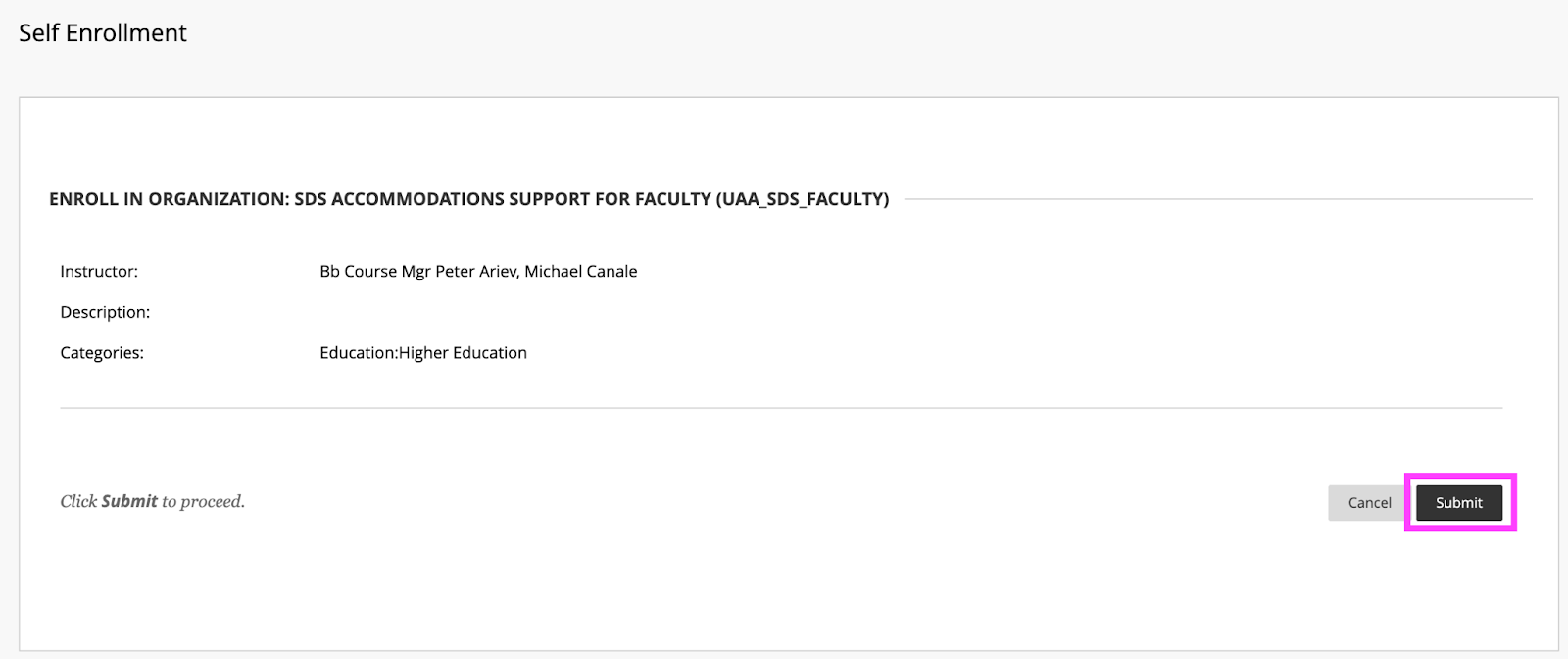
]]>
</Body>
<Summary>DoIT and Student Disability Services hosted a "Candid Conversation on Enhancing Accessibility" on March 15th. The session highlighted ways that course accessibility benefits all students and...</Summary>
<AttachmentKind>Image</AttachmentKind>
<AttachmentUrl>https://assets4-beta.my.umbc.edu/system/shared/attachments/a8a85581faf1b604601288e14c55e9df/69e6fe11/news/000/131/929/ba6be4a2b398df63f57ae0f7e5f330d8/enroll.png?1679575434</AttachmentUrl>
<Attachments>
<Attachment kind="Image" url="https://beta.my.umbc.edu/groups/oer/posts/131929/attachments/46588"></Attachment>
</Attachments>
<TrackingUrl>https://beta.my.umbc.edu/api/v0/pixel/news/131929/guest@my.umbc.edu/51341d42c2334666a32062d123bdbfa8/api/pixel</TrackingUrl>
<Tag>abrams</Tag>
<Tag>accessibility</Tag>
<Tag>ally</Tag>
<Tag>alternative-formats</Tag>
<Tag>ariev</Tag>
<Tag>canale</Tag>
<Tag>captions</Tag>
<Tag>class</Tag>
<Tag>live-captioning</Tag>
<Tag>live-captions</Tag>
<Tag>sds</Tag>
<Tag>sp23</Tag>
<Tag>udl</Tag>
<Group token="instructional-technology">Instructional Technology</Group>
<GroupUrl>https://beta.my.umbc.edu/groups/instructional-technology</GroupUrl>
<AvatarUrl>https://assets2-beta.my.umbc.edu/system/shared/avatars/groups/000/001/164/dec3b026b81ee6d890a8f82f75c94a2e/xsmall.png?1446126703</AvatarUrl>
<AvatarUrl size="original">https://assets1-beta.my.umbc.edu/system/shared/avatars/groups/000/001/164/dec3b026b81ee6d890a8f82f75c94a2e/original.png?1446126703</AvatarUrl>
<AvatarUrl size="xxlarge">https://assets2-beta.my.umbc.edu/system/shared/avatars/groups/000/001/164/dec3b026b81ee6d890a8f82f75c94a2e/xxlarge.png?1446126703</AvatarUrl>
<AvatarUrl size="xlarge">https://assets1-beta.my.umbc.edu/system/shared/avatars/groups/000/001/164/dec3b026b81ee6d890a8f82f75c94a2e/xlarge.png?1446126703</AvatarUrl>
<AvatarUrl size="large">https://assets1-beta.my.umbc.edu/system/shared/avatars/groups/000/001/164/dec3b026b81ee6d890a8f82f75c94a2e/large.png?1446126703</AvatarUrl>
<AvatarUrl size="medium">https://assets4-beta.my.umbc.edu/system/shared/avatars/groups/000/001/164/dec3b026b81ee6d890a8f82f75c94a2e/medium.png?1446126703</AvatarUrl>
<AvatarUrl size="small">https://assets3-beta.my.umbc.edu/system/shared/avatars/groups/000/001/164/dec3b026b81ee6d890a8f82f75c94a2e/small.png?1446126703</AvatarUrl>
<AvatarUrl size="xsmall">https://assets2-beta.my.umbc.edu/system/shared/avatars/groups/000/001/164/dec3b026b81ee6d890a8f82f75c94a2e/xsmall.png?1446126703</AvatarUrl>
<AvatarUrl size="xxsmall">https://assets3-beta.my.umbc.edu/system/shared/avatars/groups/000/001/164/dec3b026b81ee6d890a8f82f75c94a2e/xxsmall.png?1446126703</AvatarUrl>
<Sponsor>Instructional Technology</Sponsor>
<ThumbnailUrl size="xxlarge">https://assets1-beta.my.umbc.edu/system/shared/thumbnails/news/000/131/929/192b4d0b5d09e74e886db795fadd5b81/xxlarge.jpg?1679577443</ThumbnailUrl>
<ThumbnailUrl size="xlarge">https://assets3-beta.my.umbc.edu/system/shared/thumbnails/news/000/131/929/192b4d0b5d09e74e886db795fadd5b81/xlarge.jpg?1679577443</ThumbnailUrl>
<ThumbnailUrl size="large">https://assets4-beta.my.umbc.edu/system/shared/thumbnails/news/000/131/929/192b4d0b5d09e74e886db795fadd5b81/large.jpg?1679577443</ThumbnailUrl>
<ThumbnailUrl size="medium">https://assets3-beta.my.umbc.edu/system/shared/thumbnails/news/000/131/929/192b4d0b5d09e74e886db795fadd5b81/medium.jpg?1679577443</ThumbnailUrl>
<ThumbnailUrl size="small">https://assets4-beta.my.umbc.edu/system/shared/thumbnails/news/000/131/929/192b4d0b5d09e74e886db795fadd5b81/small.jpg?1679577443</ThumbnailUrl>
<ThumbnailUrl size="xsmall">https://assets1-beta.my.umbc.edu/system/shared/thumbnails/news/000/131/929/192b4d0b5d09e74e886db795fadd5b81/xsmall.jpg?1679577443</ThumbnailUrl>
<ThumbnailUrl size="xxsmall">https://assets3-beta.my.umbc.edu/system/shared/thumbnails/news/000/131/929/192b4d0b5d09e74e886db795fadd5b81/xxsmall.jpg?1679577443</ThumbnailUrl>
<PawCount>9</PawCount>
<CommentCount>1</CommentCount>
<CommentsAllowed>true</CommentsAllowed>
<PostedAt>Mon, 27 Mar 2023 09:17:49 -0400</PostedAt>
</NewsItem>

<NewsItem contentIssues="true" id="131476" important="false" status="posted" url="https://beta.my.umbc.edu/groups/oer/posts/131476">
<Title>March streamlines multiple-attempts for ease of grading</Title>
<Tagline>New functionality enhances Ultra courses in time for SP2023</Tagline>
<Body>
<![CDATA[
    <div class="html-content"><div><div><div><div><div>The March update to Ultra streamlines the grading interface for multiple attempts in a student's submission. This update reduces the number of clicks and pages, allowing instructors to quickly navigate between submissions. When switching, Ultra will display important information such as the attempt number, time and date of submission, file size, grade (if available) and a late indicator (if applicable). This update applies <span>to both</span> tests and assignments. </div><div><span><br></span></div><div><img src="https://blackboard.umbc.edu/bbcswebdav/institution/doitnews/ultra-updates/ImprovedAttemptSwitching_InstructorViewOfAttemptDropDownMenu.png" alt="Example of multiple attempts on submission page" width="500" style="max-width: 100%; height: auto;"></div><div><em>Image 1: Example of multiple attempts on submission page</em></div><div><br></div><div>In addition <a href="https://my3.my.umbc.edu/groups/instructional-technology/posts/130066" rel="nofollow external" class="bo">to the January update</a> where discussion posts may be deactivated based on due date, this month's update provides faculty with an option to modify a discussion and manually turn off student editing and commenting. Increased control over discussion activity provides faculty with more options to choose when and how discussions start and end in a course.</div><div><br></div><div>Another feature released in March is the ability to reschedule announcements with a new notification alert for students within the course. <span>Some instructors were recreating announcements from scratch to generate the pop-up to help students see an announcement. W</span><span>ith this update, instructors can now reschedule announcements by changing the show on and hide after fields to a future date.</span></div><div><br></div><div>Additional updates to Ultra for March include:</div><div><ul><li><span>A PDF version of the SafeAssign originality report, including clickable sources. Additionally, infrastructure improvements were made to support peak usage.</span></li><li><span>Sorting controls in the Student List view, allowing instructors to sort by grade (low to high / high to low) in the Overall Grade column.</span></li><li><span>Sorting controls on the Anonymous Submissions page for an </span>assessment to sort by grade (low to high / high to low) in the grade column for that assessment.</li><li>Improvements to the Course Activity page, accessed from the Analytics tab, helps helps instructors easily identify students who might be falling behind, select and message students.</li></ul></div></div></div><div><span>The <a href="https://wiki.umbc.edu/x/LohnB" rel="nofollow external" class="bo">next update</a> to our Ultra test environment will take place on March 7, 2023. Faculty who are interested in test driving new features before they are released to production should </span><a href="http://my.umbc.edu/go/request-help" rel="nofollow external" class="bo">open an RT ticket</a><span> to request early access. </span><span>Additionally, </span><span>our <a href="https://docs.google.com/spreadsheets/d/1kkG0toIfhmykbbwCeSDd8NopHp19CH7D5rPd95mxji8/edit?usp=sharing" rel="nofollow external" class="bo">Ultra feature tracker is updated</a> and now includes a filter for functional category (e.g., assessment, course management, grading) so you can sort only those items you might be interested in tracking the status. </span><span>Please </span><a href="http://umbc.edu/go/ultra" rel="nofollow external" class="bo">watch the FAQs</a><span>, including </span><a href="https://wiki.umbc.edu/x/LohnB" rel="nofollow external" class="bo">the What's New with Ultra page</a><span>, </span><span>and myUMBC for additional information about Ultra. </span></div><div><span><br></span></div><div><span>As always, if you have any questions about teaching, learning, and technology at UMBC, please consider the following options:</span></div><div><ul><li><span><a href="http://pivot.umbc.edu" rel="nofollow external" class="bo">PIVOT</a> | <a href="https://doit.umbc.edu/itnm/academic-continuity/" rel="nofollow external" class="bo">Academic Continuity</a></span><span> </span><span>|</span><span> </span><span><a href="https://fdc.umbc.edu/teaching/keep-on-teaching/" rel="nofollow external" class="bo">Keep On Teaching</a></span><span> </span><span>|</span><span> </span><span><a href="https://doit.umbc.edu/students" rel="nofollow external" class="bo">Student Technology Resources</a></span></li><li><a href="http://www.umbc.edu/faq" rel="nofollow external" class="bo">Check our extensive FAQ collection</a><span> </span></li><ul><li><span><a href="https://wiki.umbc.edu/x/LohnB" rel="nofollow external" class="bo"><span>What's new in Ultra?</span></a><span> </span><span>|</span><span> </span><a href="https://wiki.umbc.edu/x/bwrSAQ" rel="nofollow external" class="bo"><span>Known Issues</span></a><span> </span></span></li></ul><li><span><a href="http://my.umbc.edu/go/request-help" rel="nofollow external" class="bo">Open a ticket via RT</a></span></li><li><span>Follow the </span><a href="http://my.umbc.edu/groups/instructional-technology" rel="nofollow external" class="bo">Instructional Technology</a><span> &amp; </span><a href="http://my.umbc.edu/groups/doit" rel="nofollow external" class="bo">DoIT</a><span> myUMBC groups</span></li><li><a href="http://doit.umbc.edu/itnm/staff/" rel="nofollow external" class="bo">Request a consult</a><span> with <a href="http://doit.umbc.edu/itnm/staff" rel="nofollow external" class="bo">instructional technology staff</a></span></li></ul></div></div></div><div><div></div></div></div>
]]>
</Body>
<Summary>The March update to Ultra streamlines the grading interface for multiple attempts in a student's submission. This update reduces the number of clicks and pages, allowing instructors to quickly...</Summary>
<Website>https://my3.my.umbc.edu/groups/instructional-technology/posts/130442</Website>
<TrackingUrl>https://beta.my.umbc.edu/api/v0/pixel/news/131476/guest@my.umbc.edu/a0d39c777158d12ab4f27474fcafba25/api/pixel</TrackingUrl>
<Tag>blackboard</Tag>
<Tag>ultra-experience</Tag>
<Tag>ultra-update</Tag>
<Group token="instructional-technology">Instructional Technology</Group>
<GroupUrl>https://beta.my.umbc.edu/groups/instructional-technology</GroupUrl>
<AvatarUrl>https://assets2-beta.my.umbc.edu/system/shared/avatars/groups/000/001/164/dec3b026b81ee6d890a8f82f75c94a2e/xsmall.png?1446126703</AvatarUrl>
<AvatarUrl size="original">https://assets1-beta.my.umbc.edu/system/shared/avatars/groups/000/001/164/dec3b026b81ee6d890a8f82f75c94a2e/original.png?1446126703</AvatarUrl>
<AvatarUrl size="xxlarge">https://assets2-beta.my.umbc.edu/system/shared/avatars/groups/000/001/164/dec3b026b81ee6d890a8f82f75c94a2e/xxlarge.png?1446126703</AvatarUrl>
<AvatarUrl size="xlarge">https://assets1-beta.my.umbc.edu/system/shared/avatars/groups/000/001/164/dec3b026b81ee6d890a8f82f75c94a2e/xlarge.png?1446126703</AvatarUrl>
<AvatarUrl size="large">https://assets1-beta.my.umbc.edu/system/shared/avatars/groups/000/001/164/dec3b026b81ee6d890a8f82f75c94a2e/large.png?1446126703</AvatarUrl>
<AvatarUrl size="medium">https://assets4-beta.my.umbc.edu/system/shared/avatars/groups/000/001/164/dec3b026b81ee6d890a8f82f75c94a2e/medium.png?1446126703</AvatarUrl>
<AvatarUrl size="small">https://assets3-beta.my.umbc.edu/system/shared/avatars/groups/000/001/164/dec3b026b81ee6d890a8f82f75c94a2e/small.png?1446126703</AvatarUrl>
<AvatarUrl size="xsmall">https://assets2-beta.my.umbc.edu/system/shared/avatars/groups/000/001/164/dec3b026b81ee6d890a8f82f75c94a2e/xsmall.png?1446126703</AvatarUrl>
<AvatarUrl size="xxsmall">https://assets3-beta.my.umbc.edu/system/shared/avatars/groups/000/001/164/dec3b026b81ee6d890a8f82f75c94a2e/xxsmall.png?1446126703</AvatarUrl>
<Sponsor>Instructional Technology</Sponsor>
<ThumbnailUrl size="xxlarge">https://assets3-beta.my.umbc.edu/system/shared/thumbnails/news/000/131/476/6a6dc6e53c8a4895f4c3b5b2ff2a20b2/xxlarge.jpg?1678115491</ThumbnailUrl>
<ThumbnailUrl size="xlarge">https://assets1-beta.my.umbc.edu/system/shared/thumbnails/news/000/131/476/6a6dc6e53c8a4895f4c3b5b2ff2a20b2/xlarge.jpg?1678115491</ThumbnailUrl>
<ThumbnailUrl size="large">https://assets1-beta.my.umbc.edu/system/shared/thumbnails/news/000/131/476/6a6dc6e53c8a4895f4c3b5b2ff2a20b2/large.jpg?1678115491</ThumbnailUrl>
<ThumbnailUrl size="medium">https://assets4-beta.my.umbc.edu/system/shared/thumbnails/news/000/131/476/6a6dc6e53c8a4895f4c3b5b2ff2a20b2/medium.jpg?1678115491</ThumbnailUrl>
<ThumbnailUrl size="small">https://assets4-beta.my.umbc.edu/system/shared/thumbnails/news/000/131/476/6a6dc6e53c8a4895f4c3b5b2ff2a20b2/small.jpg?1678115491</ThumbnailUrl>
<ThumbnailUrl size="xsmall">https://assets4-beta.my.umbc.edu/system/shared/thumbnails/news/000/131/476/6a6dc6e53c8a4895f4c3b5b2ff2a20b2/xsmall.jpg?1678115491</ThumbnailUrl>
<ThumbnailUrl size="xxsmall">https://assets3-beta.my.umbc.edu/system/shared/thumbnails/news/000/131/476/6a6dc6e53c8a4895f4c3b5b2ff2a20b2/xxsmall.jpg?1678115491</ThumbnailUrl>
<PawCount>1</PawCount>
<CommentCount>0</CommentCount>
<CommentsAllowed>true</CommentsAllowed>
<PostedAt>Mon, 06 Mar 2023 11:40:29 -0500</PostedAt>
<EditAt>Mon, 06 Mar 2023 11:40:44 -0500</EditAt>
</NewsItem>

</News>