<?xml version="1.0"?>
<News hasArchived="false" page="14" pageCount="56" pageSize="10" timestamp="Tue, 21 Apr 2026 11:25:34 -0400" url="https://beta.my.umbc.edu/groups/oer/posts.xml?page=14">
<NewsItem contentIssues="true" id="134412" important="false" status="posted" url="https://beta.my.umbc.edu/groups/oer/posts/134412">
<Title>FA2023 Courses Created in Blackboard on July 25, 2023</Title>
<Body>
<![CDATA[
    <div class="html-content"><p>Blackboard course shells for FA2023 <a href="https://wiki.umbc.edu/x/eYHGAw" rel="nofollow external" class="bo">were created</a> on July 25, 2023. </p><p><span>The </span><a href="https://wiki.umbc.edu/x/VIdnB" rel="nofollow external" class="bo"><span>Ultra Course Preview</span></a><span> setting is enabled in FA2023 courses, which allows faculty</span><span> to <a href="https://wiki.umbc.edu/x/VIdnB" rel="nofollow external" class="bo">preview</a> OR <a href="https://wiki.umbc.edu/x/3AKGBQ" rel="nofollow external" class="bo">convert</a> a new Original course to Ultra</span><span>. The recommendation, however, is to create a new course to optimize the design. </span><span><strong>Note: </strong></span><span><strong>The <a href="https://doit.umbc.edu/news/post/130227/" rel="nofollow external" class="bo">last day we will support Blackboard Original</a> is December 31, 2024.</strong></span></p><ul><li><span>Please review the </span><a href="https://wiki.umbc.edu/x/LohnB" rel="nofollow external" class="bo">release notes</a><span> for the latest updates as well as</span><span> <a href="https://docs.google.com/spreadsheets/d/1kkG0toIfhmykbbwCeSDd8NopHp19CH7D5rPd95mxji8/edit?usp=sharing" rel="nofollow external" class="bo">feature parity charts</a> --</span><span> <a href="https://doit.umbc.edu/news/?tag=ultra-experience" rel="nofollow external" class="bo">more than 200 new updates</a> were added over the last year!</span><span> </span></li><li><span>Discover <a href="https://my3.my.umbc.edu/groups/instructional-technology/events?mode=upcoming&amp;tag=whats-new" rel="nofollow external" class="bo">What's New in Ultra for </a></span><span><a href="https://my3.my.umbc.edu/groups/instructional-technology/events?mode=upcoming&amp;tag=whats-new" rel="nofollow external" class="bo">Teaching &amp; Learning</a> on August 10 or 18.</span></li><li><span>Attend <a href="https://my3.my.umbc.edu/groups/instructional-technology/events?mode=upcoming&amp;tag=orientation" rel="nofollow external" class="bo">an Intro to Blackboard Ultra in 45 Minutes or Less training</a> on August 9 or 15. </span></li><li><span>Recent hires may be interested </span><span>in <a href="https://my3.my.umbc.edu/groups/instructional-technology/events?mode=upcoming&amp;tag=new-faculty" rel="nofollow external" class="bo">the New Faculty Evening Orientation</a> on August 9 or 17.</span></li><li><span>Review 5 best practices to <a href="https://my3.my.umbc.edu/groups/instructional-technology/events/118715" rel="nofollow external" class="bo">prepare your Ultra gradebook</a> on August 22.</span></li><li><span>Enroll in <a href="https://doit.umbc.edu/news/post/131063/" rel="nofollow external" class="bo">our self-paced workshop, Ultra for Instructors</a>, designed to provide a starting point to help you prepare your courses in Ultra.</span></li><li><span>Have a question about Ultra? Ask </span><a href="https://wiki.umbc.edu/x/kAU9BQ" rel="nofollow external" class="bo">an Ultra Ambassador</a><span>!</span></li></ul><p><span><a href="https://doit.umbc.edu/news/post/133604/" rel="nofollow external" class="bo">As previously announced</a>, seven departments, many foreign languages, English 100, IHU, FYE, and TRS courses have opted into Ultra to ensure a consistent approach for their students. This means courses will start with Ultra by default rather than Original. For consistency of instructional technology support, FA2023 c</span><span>ourses created in Blackboard on/after August 1, 2023 will be created in Ultra by default.</span></p><p><span>Plan your accessibility and Universal Design for Learning strategy before students begin working with course materials. Ally, an </span><a href="https://doit.umbc.edu/news/?id=82487" rel="nofollow external" class="bo"><span>accessibility tool</span></a><span>, is enabled in all course shells. Ally automatically scans uploaded and created course content, then performs a series of steps to make that content more accessible. Please review the </span><a href="https://wiki.umbc.edu/x/2IGdB" rel="nofollow external" class="bo"><span>Ally FAQs</span></a><span> for more information about the </span><a href="https://wiki.umbc.edu/x/_YGdB" rel="nofollow external" class="bo"><span>accessibility indicators</span></a><span> on course content and </span><span><a href="https://wiki.umbc.edu/x/3IGdB" rel="nofollow external" class="bo">alternative formats</a>, or attend a training session.</span></p><p><span>For faculty who will be teaching hybrid or online, the instructional technology team would like to share several resources to support online course development and instruction.</span></p><ol><li><span>Choose from our </span><a href="https://pivot.umbc.edu/pivot-solo/" rel="nofollow external" class="bo">PIVOT Solo</a><span> lessons to refresh or enhance your online teaching preparation. Five key topics cover course organization, active learning, community building, assessment, and supporting students. </span></li><li><span>Explore </span><a href="https://umbc.hosted.panopto.com/Panopto/Pages/Sessions/List.aspx#folderID=%2274ac9d58-1779-44c1-92b7-ab6900dfe6e9%22" rel="nofollow external" class="bo">our Panopto folder</a><span> for a wide variety of recorded webinars on various instructional technologies available at UMBC.</span></li><li><span>Learn about </span><a href="https://pivot.umbc.edu/course-design/quality-matters/quality-matters-impact/" rel="nofollow external" class="bo">the Quality Matters Impact program</a><span>, a new initiative to formally recognize courses that meet </span><a href="https://www.qualitymatters.org/" rel="nofollow external" class="bo">Quality Matters standards</a><span> and demonstrate exemplary online/hybrid course design.</span></li></ol><div><strong>About Course Creation</strong></div><div><span><br></span></div><div><span>Bb shells for FA2023 </span><span>are available for all courses (designated as lecture, lab, field or discussion) listed in the </span><a href="http://my.umbc.edu/go/schedule" rel="nofollow external" class="bo">UMBC Schedule of Classes (SOC)</a><span>, provided that there is an </span><a href="http://www.umbc.edu/blogs/oit-news/archives/2010/08/how_new_employe_1.html" rel="nofollow external" class="bo">instructor of record</a><span> listed. As new course sections and/or instructors are added to the SOC by </span><a href="https://registrar.umbc.edu/services/classroom-scheduling/" rel="nofollow external" class="bo">Department Scheduling Coordinators</a><span>, corresponding Bb shells are automatically generated overnight. </span></div><ul><li>If you are an instructor, and your name is not associated with the course you are teaching in the <a href="http://my.umbc.edu/go/schedule" rel="nofollow external" class="bo">SOC</a>, please see your <a href="https://swsupport.umbc.edu/scheduling-coordinators/" rel="nofollow external" class="bo">Departmental Scheduling Coordinator</a> to resolve the issue. Once you are listed in the <a href="https://my.umbc.edu/go/schedule" rel="nofollow external" class="bo">SOC</a>, your Bb course shell will be created automatically. </li><li>If you and your <a href="https://swsupport.umbc.edu/scheduling-coordinators/" rel="nofollow external" class="bo">Department Scheduling Coordinator</a> believe you are correctly assigned as the instructor of record in the SOC and you do not see your course shell in Blackboard, please submit a Request Tracker (RT) ticket via <a href="https://my.umbc.edu/help" rel="nofollow external" class="bo">my.umbc.edu/help</a>.</li><li>If you need a Bb shell for a research or independent study course, please submit a <a href="http://www.umbc.edu/doit/blackboard/requestbbshell.html" rel="nofollow external" class="bo">new course request</a>.</li></ul><p>Instructors who teach multiple sections of the same course will find those enrollments merged into one Bb course shell. These sections may be split upon <a href="https://my.umbc.edu/go/request-help" rel="nofollow external" class="bo">request by an RT ticket</a>, which we recommend <a href="https://wiki.umbc.edu/x/d4HGAw" rel="nofollow external" class="bo">submitting at least one week</a> before the semester starts, if not as soon as courses are created in Blackboard. <strong>NOTE:</strong> Courses should not be split after student grade data and engagement activity is recorded since it will be purged as part of the separation process.</p><p>Student enrollment in Bb mirrors the official registration in SA and updates hourly. However, courses are not accessible to students by default until the instructor of record <a href="https://wiki.umbc.edu/x/VoAc" rel="nofollow external" class="bo">makes them available</a>.</p><p><strong>Connect with Instructional Technology</strong></p><div><span>As always, if you have any questions about teaching, learning, and technology at UMBC, please consider the following options:</span></div><div><ul><li><a href="http://www.umbc.edu/faq" rel="nofollow external" class="bo">Check our extensive FAQ collection</a><span> </span></li><ul><li><span><a href="https://wiki.umbc.edu/x/LohnB" rel="nofollow external" class="bo"><span>What's new in Ultra?</span></a><span> </span><span>|</span><span> </span><a href="https://wiki.umbc.edu/x/bwrSAQ" rel="nofollow external" class="bo"><span>Known Issues</span></a><span> </span></span></li></ul><li><span><a href="http://my.umbc.edu/go/request-help" rel="nofollow external" class="bo">Open a ticket via RT</a></span></li><li><span>Follow the </span><a href="http://my.umbc.edu/groups/instructional-technology" rel="nofollow external" class="bo">Instructional Technology</a><span> &amp; </span><a href="http://my.umbc.edu/groups/doit" rel="nofollow external" class="bo">DoIT</a><span> myUMBC groups</span></li><li><a href="http://doit.umbc.edu/itnm/staff/" rel="nofollow external" class="bo">Request a consult</a><span> with <a href="http://doit.umbc.edu/itnm/staff" rel="nofollow external" class="bo">instructional technology staff</a></span></li><li><span><a href="http://pivot.umbc.edu" rel="nofollow external" class="bo">PIVOT</a> | <a href="https://doit.umbc.edu/itnm/academic-continuity/" rel="nofollow external" class="bo">Academic Continuity</a></span><span> </span><span>|</span><span> </span><span><a href="https://fdc.umbc.edu/teaching/keep-on-teaching/" rel="nofollow external" class="bo">Keep On Teaching</a></span><span> </span><span>|</span><span> </span><span><a href="https://doit.umbc.edu/students" rel="nofollow external" class="bo">Student Technology Resources</a></span></li></ul></div></div>
]]>
</Body>
<Summary>Blackboard course shells for FA2023 were created on July 25, 2023.   The Ultra Course Preview setting is enabled in FA2023 courses, which allows faculty to preview OR convert a new Original course...</Summary>
<Website>https://my3.my.umbc.edu/groups/instructional-technology/posts/134412</Website>
<TrackingUrl>https://beta.my.umbc.edu/api/v0/pixel/news/134412/guest@my.umbc.edu/4a0aab662277b891910ff9c832f337e5/api/pixel</TrackingUrl>
<Tag>blackboard</Tag>
<Tag>course-creation</Tag>
<Tag>fa2023</Tag>
<Tag>fall</Tag>
<Tag>ultra-course-preview</Tag>
<Group token="instructional-technology">Instructional Technology</Group>
<GroupUrl>https://beta.my.umbc.edu/groups/instructional-technology</GroupUrl>
<AvatarUrl>https://assets2-beta.my.umbc.edu/system/shared/avatars/groups/000/001/164/dec3b026b81ee6d890a8f82f75c94a2e/xsmall.png?1446126703</AvatarUrl>
<AvatarUrl size="original">https://assets1-beta.my.umbc.edu/system/shared/avatars/groups/000/001/164/dec3b026b81ee6d890a8f82f75c94a2e/original.png?1446126703</AvatarUrl>
<AvatarUrl size="xxlarge">https://assets2-beta.my.umbc.edu/system/shared/avatars/groups/000/001/164/dec3b026b81ee6d890a8f82f75c94a2e/xxlarge.png?1446126703</AvatarUrl>
<AvatarUrl size="xlarge">https://assets1-beta.my.umbc.edu/system/shared/avatars/groups/000/001/164/dec3b026b81ee6d890a8f82f75c94a2e/xlarge.png?1446126703</AvatarUrl>
<AvatarUrl size="large">https://assets1-beta.my.umbc.edu/system/shared/avatars/groups/000/001/164/dec3b026b81ee6d890a8f82f75c94a2e/large.png?1446126703</AvatarUrl>
<AvatarUrl size="medium">https://assets4-beta.my.umbc.edu/system/shared/avatars/groups/000/001/164/dec3b026b81ee6d890a8f82f75c94a2e/medium.png?1446126703</AvatarUrl>
<AvatarUrl size="small">https://assets3-beta.my.umbc.edu/system/shared/avatars/groups/000/001/164/dec3b026b81ee6d890a8f82f75c94a2e/small.png?1446126703</AvatarUrl>
<AvatarUrl size="xsmall">https://assets2-beta.my.umbc.edu/system/shared/avatars/groups/000/001/164/dec3b026b81ee6d890a8f82f75c94a2e/xsmall.png?1446126703</AvatarUrl>
<AvatarUrl size="xxsmall">https://assets3-beta.my.umbc.edu/system/shared/avatars/groups/000/001/164/dec3b026b81ee6d890a8f82f75c94a2e/xxsmall.png?1446126703</AvatarUrl>
<Sponsor>Instructional Technology</Sponsor>
<ThumbnailUrl size="xxlarge">https://assets2-beta.my.umbc.edu/system/shared/thumbnails/news/000/134/412/417be55c785897bbec9802a7eaba579c/xxlarge.jpg?1690375787</ThumbnailUrl>
<ThumbnailUrl size="xlarge">https://assets2-beta.my.umbc.edu/system/shared/thumbnails/news/000/134/412/417be55c785897bbec9802a7eaba579c/xlarge.jpg?1690375787</ThumbnailUrl>
<ThumbnailUrl size="large">https://assets4-beta.my.umbc.edu/system/shared/thumbnails/news/000/134/412/417be55c785897bbec9802a7eaba579c/large.jpg?1690375787</ThumbnailUrl>
<ThumbnailUrl size="medium">https://assets2-beta.my.umbc.edu/system/shared/thumbnails/news/000/134/412/417be55c785897bbec9802a7eaba579c/medium.jpg?1690375787</ThumbnailUrl>
<ThumbnailUrl size="small">https://assets4-beta.my.umbc.edu/system/shared/thumbnails/news/000/134/412/417be55c785897bbec9802a7eaba579c/small.jpg?1690375787</ThumbnailUrl>
<ThumbnailUrl size="xsmall">https://assets2-beta.my.umbc.edu/system/shared/thumbnails/news/000/134/412/417be55c785897bbec9802a7eaba579c/xsmall.jpg?1690375787</ThumbnailUrl>
<ThumbnailUrl size="xxsmall">https://assets4-beta.my.umbc.edu/system/shared/thumbnails/news/000/134/412/417be55c785897bbec9802a7eaba579c/xxsmall.jpg?1690375787</ThumbnailUrl>
<PawCount>4</PawCount>
<CommentCount>0</CommentCount>
<CommentsAllowed>true</CommentsAllowed>
<PostedAt>Wed, 26 Jul 2023 09:50:56 -0400</PostedAt>
<EditAt>Thu, 31 Aug 2023 13:44:24 -0400</EditAt>
</NewsItem>

<NewsItem contentIssues="true" id="134272" important="false" status="posted" url="https://beta.my.umbc.edu/groups/oer/posts/134272">
<Title>Grade by student or question in Ultra courses for Aug update</Title>
<Tagline>New Google integration, customize image for learning modules</Tagline>
<Body>
<![CDATA[
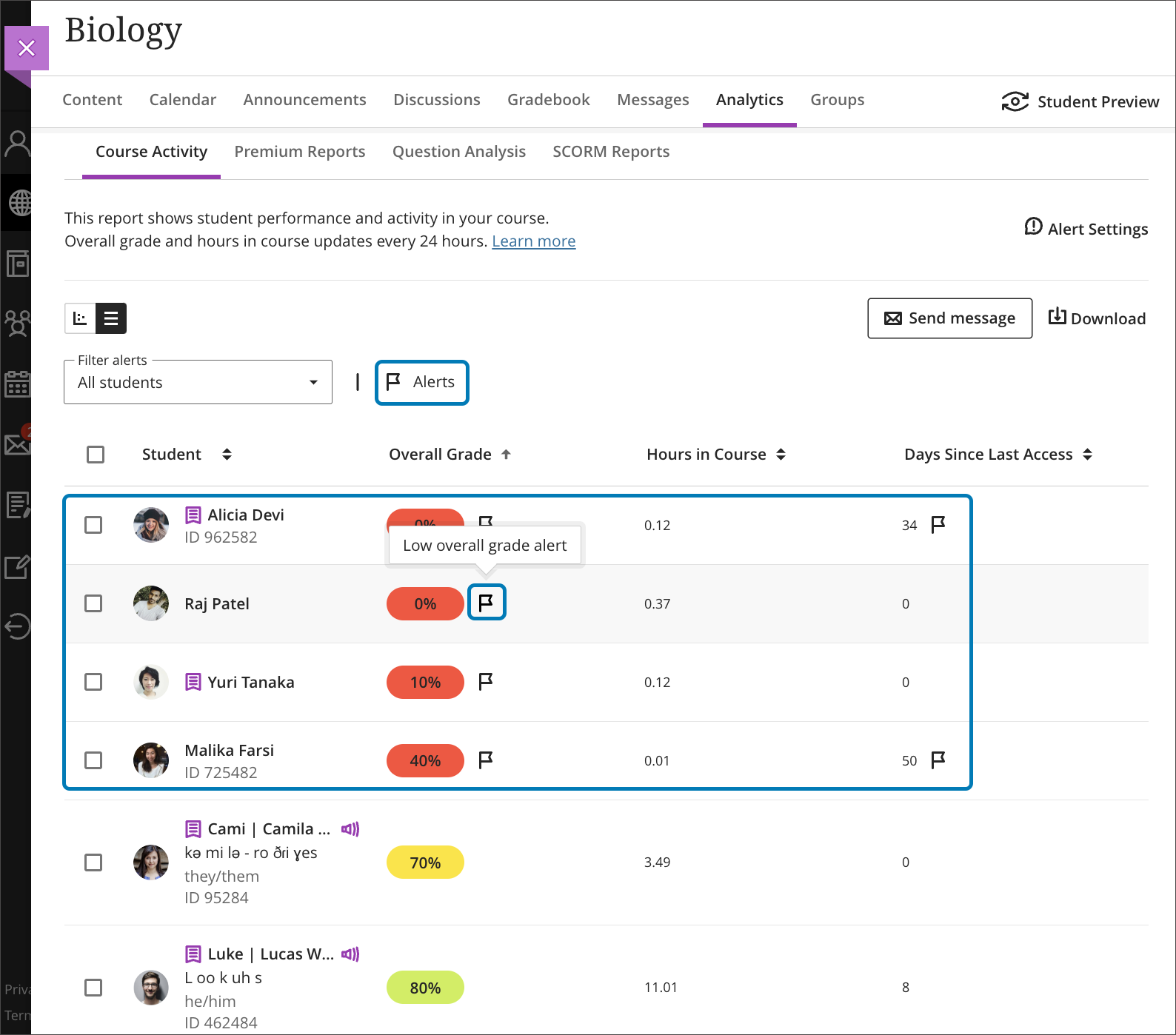
    <div class="html-content"><div><div><div><div><div><div>The August release reveals a new update for the Ultra grading system, enabling faculty to grade by question or student, or mix and match the approach. Additional updates to Ultra for August include enhancements to grading, content creation and content management, learner engagement, and reporting. </div><div><span><br></span></div><div><span>Flexible Grading features grade by student or question. Instructors can e</span><span>asily move between student attempts and keep track of their grading process. Grading options include simple scoring, rubrics and inline commenting. Instructors can collapse panels to increase visible space, view SafeAssign originality reports, and post all grades when ready. </span><span>Subsequent releases will include group submissions, anonymous grading, multiple grades per student, and peer review.</span></div><div><img src="https://my3.my.umbc.edu/groups/instructional-technology/posts/134272/attachments/47826" alt="Image 1: Example of flexible grading when grading by student" style="max-width: 100%; height: auto;"></div><div><em>Image 1: Example of flexible grading when grading by student</em></div><div><br></div><div><img src="https://my3.my.umbc.edu/groups/instructional-technology/posts/134272/attachments/47827" alt="Image 2: Example of flexible grading when grading by question" style="max-width: 100%; height: auto;"></div><div><em>Image 2: Example of flexible grading when grading by question</em></div><div><br></div><div>Although Flexible Grading will be available in early August, the functionality will not be enabled in Ultra courses until approximately one week before the FA2023 term starts. This is primarily to ensure SU2023 courses maintain continuity of their grading interface until the end of the term. </div><div><br></div><div><strong>Assessment &amp; Grading</strong></div></div></div></div></div><div><ul><li><span>Anonymous submissions can be downloaded in bulk from the gradebook column. </span></li><li><span>The default state of the gradebook cell is now a dash. "Grade Now" will only appear if there is something to actually grade.</span></li><li><span>Student submission receipts will include additional information including submission size for file uploads and auto-submit indicators for timed assessments.</span></li></ul></div><div><span><strong>Content Creation &amp; Delivery</strong></span></div><div><ul><li><span>Add a thumbnail image to a learning module to enhance the visual aesthetics of a course or aid in content identification.</span></li></ul><div><img src="https://help.blackboard.com/sites/default/files/images/2023-07/learn_ultra_instructor_LearningModules_LM%20Images_SelectedImageOnCourseContentPage.png" alt="Image 3: Example of thumbnail image for learning module" style="max-width: 100%; height: auto;"></div><div><em>Image 3: Example of thumbnail image for learning module</em></div><ul><li><span>A new Google file integration allows faculty to link to files in their Google Drive and edit those files once added to a course. Students have view-only access. <em>This update will be released later in the fall semester.</em></span></li></ul><div><img src="https://help.blackboard.com/sites/default/files/images/2023-07/learn_ultra_student_Integrations_Google_WorkspaceFiles_ReviewVisibilitySettings.png" alt="Image 4: Example of new Google file workflow" style="max-width: 100%; height: auto;"></div><div><em>Image 4: Example of new Google file workflow</em></div><ul><li><span>When an instructor replaces a file in an Ultra course, the system will no longer create a new version. This should help with managing course quotas.</span></li></ul><div><span><strong>Communication &amp; Engagement</strong></span></div><div><ul><li><span>The Groups tool link is relocated to the top course menu navigation to improve visibility. </span><span>Instructors can easily send messages to Groups or Group Sets.</span></li><li><span>A new dedicated Groups space is available for displaying all assessments assigned to each group. Future milestones will include project management tools for students.</span></li><li>The Message tab on the Base Navigation now displays courses with unread messages first. An unread message indicator also appears within the course. Newest messages appear first and unread messages are clearly marked.</li></ul></div></div><div><span><strong>Reporting &amp; Analytics</strong></span></div><div><ul><li><span>A flag will appear for students in the Course Activity Report based on the number of days a student is inactive in a course or when the overall grade falls below a specific percentage. These settings are determined by the instructor in the Alert Settings on the Course Activity Report. Alerts can be added, edited, or deleted at any time. Send messages based on flags.</span></li></ul></div><div><img src="https://help.blackboard.com/sites/default/files/images/2023-07/learn_ultra_instructor_CourseActivityReport_StudentsWithAlertsFlags_CourseActivityReport_StudentsWithAlertsFilter.png" alt="Image 5: Example of flag indicators in Course Activity Report" style="max-width: 100%; height: auto;"></div><div><em>Image 5: Example of flag indicators in Course Activity Report</em></div><div><span><br></span></div><div><div><div><div><div><span>Faculty should see the latest updates in Ultra courses around August 4-5, 2023. </span>Please sign up for our latest <a href="https://my3.my.umbc.edu/groups/instructional-technology/events?mode=upcoming&amp;tag=whats-new" rel="nofollow external" class="bo">What's New in Ultra for Teaching &amp; Learning webinar</a><span> on August 10 or August 18, 2023 to learn more about these and other exciting new features coming to Ultra.</span></div></div></div></div><div><span><br></span></div><div><span>The next update to our Ultra test environment will take place on August 15, 2023; release notes are posted to the <a href="https://wiki.umbc.edu/x/LohnB" rel="nofollow external" class="bo">What's New in Ultra</a> that same week. Faculty who are interested in test driving new features before they are released to production should </span><a href="http://my.umbc.edu/go/request-help" rel="nofollow external" class="bo">open an RT ticket</a> to request early access. Please <a href="http://umbc.edu/go/ultra" rel="nofollow external" class="bo">watch the FAQs</a>, including <a href="https://wiki.umbc.edu/x/LohnB" rel="nofollow external" class="bo">the What's New with Ultra page</a>, <span>and myUMBC for additional information about Ultra. </span></div><div><span><br></span></div></div><div><span><strong>Connect with Instructional Technology</strong></span></div><div><span>As always, if you have any questions about teaching, learning, and technology at UMBC, please consider the following options:</span></div><ul><li><a href="http://www.umbc.edu/faq" rel="nofollow external" class="bo">Check our extensive FAQ collection</a><span> </span></li><ul><li><span><a href="https://wiki.umbc.edu/x/LohnB" rel="nofollow external" class="bo"><span>What's new in Ultra?</span></a><span> </span><span>|</span><span> </span><a href="https://wiki.umbc.edu/x/bwrSAQ" rel="nofollow external" class="bo"><span>Known Issues</span></a><span> </span></span></li></ul><li><span><a href="http://my.umbc.edu/go/request-help" rel="nofollow external" class="bo">Open a ticket via RT</a></span></li><li><span>Follow the </span><a href="http://my.umbc.edu/groups/instructional-technology" rel="nofollow external" class="bo">Instructional Technology</a><span> &amp; </span><a href="http://my.umbc.edu/groups/doit" rel="nofollow external" class="bo">DoIT</a><span> myUMBC groups</span></li><li><a href="http://doit.umbc.edu/itnm/staff/" rel="nofollow external" class="bo">Request a consult</a><span> with <a href="http://doit.umbc.edu/itnm/staff" rel="nofollow external" class="bo">instructional technology staff</a></span></li><li><span><a href="http://pivot.umbc.edu" rel="nofollow external" class="bo">PIVOT</a> | <a href="https://doit.umbc.edu/itnm/academic-continuity/" rel="nofollow external" class="bo">Academic Continuity</a></span><span> </span><span>|</span><span> </span><span><a href="https://fdc.umbc.edu/teaching/keep-on-teaching/" rel="nofollow external" class="bo">Keep On Teaching</a></span><span> </span><span>|</span><span> </span><span><a href="https://doit.umbc.edu/students" rel="nofollow external" class="bo">Student Technology Resources</a></span></li></ul></div><div><div></div></div></div>
]]>
</Body>
<Summary>The August release reveals a new update for the Ultra grading system, enabling faculty to grade by question or student, or mix and match the approach. Additional updates to Ultra for August...</Summary>
<Website>https://my3.my.umbc.edu/groups/instructional-technology/posts/134272</Website>
<AttachmentKind>Image</AttachmentKind>
<AttachmentUrl>https://assets3-beta.my.umbc.edu/system/shared/attachments/2ed79edf24546b65b2efa16d0020ace2/69e796ee/news/000/134/272/7cc363172b333199364a4e07bae60688/blackboard-learn-adoption---new-flexible-grading-4.png?1689167733</AttachmentUrl>
<Attachments>
<Attachment kind="Image" url="https://beta.my.umbc.edu/groups/oer/posts/134272/attachments/47826"></Attachment>
<Attachment kind="Image" url="https://beta.my.umbc.edu/groups/oer/posts/134272/attachments/47827"></Attachment>
</Attachments>
<TrackingUrl>https://beta.my.umbc.edu/api/v0/pixel/news/134272/guest@my.umbc.edu/e6973324ae5bedf9665be02127452ec2/api/pixel</TrackingUrl>
<Tag>blackboard</Tag>
<Tag>flexible-grading</Tag>
<Tag>ultra-experience</Tag>
<Tag>ultra-update</Tag>
<Group token="instructional-technology">Instructional Technology</Group>
<GroupUrl>https://beta.my.umbc.edu/groups/instructional-technology</GroupUrl>
<AvatarUrl>https://assets2-beta.my.umbc.edu/system/shared/avatars/groups/000/001/164/dec3b026b81ee6d890a8f82f75c94a2e/xsmall.png?1446126703</AvatarUrl>
<AvatarUrl size="original">https://assets1-beta.my.umbc.edu/system/shared/avatars/groups/000/001/164/dec3b026b81ee6d890a8f82f75c94a2e/original.png?1446126703</AvatarUrl>
<AvatarUrl size="xxlarge">https://assets2-beta.my.umbc.edu/system/shared/avatars/groups/000/001/164/dec3b026b81ee6d890a8f82f75c94a2e/xxlarge.png?1446126703</AvatarUrl>
<AvatarUrl size="xlarge">https://assets1-beta.my.umbc.edu/system/shared/avatars/groups/000/001/164/dec3b026b81ee6d890a8f82f75c94a2e/xlarge.png?1446126703</AvatarUrl>
<AvatarUrl size="large">https://assets1-beta.my.umbc.edu/system/shared/avatars/groups/000/001/164/dec3b026b81ee6d890a8f82f75c94a2e/large.png?1446126703</AvatarUrl>
<AvatarUrl size="medium">https://assets4-beta.my.umbc.edu/system/shared/avatars/groups/000/001/164/dec3b026b81ee6d890a8f82f75c94a2e/medium.png?1446126703</AvatarUrl>
<AvatarUrl size="small">https://assets3-beta.my.umbc.edu/system/shared/avatars/groups/000/001/164/dec3b026b81ee6d890a8f82f75c94a2e/small.png?1446126703</AvatarUrl>
<AvatarUrl size="xsmall">https://assets2-beta.my.umbc.edu/system/shared/avatars/groups/000/001/164/dec3b026b81ee6d890a8f82f75c94a2e/xsmall.png?1446126703</AvatarUrl>
<AvatarUrl size="xxsmall">https://assets3-beta.my.umbc.edu/system/shared/avatars/groups/000/001/164/dec3b026b81ee6d890a8f82f75c94a2e/xxsmall.png?1446126703</AvatarUrl>
<Sponsor>Instructional Technology</Sponsor>
<ThumbnailUrl size="xxlarge">https://assets1-beta.my.umbc.edu/system/shared/thumbnails/news/000/134/272/fa172243a7a9cbea44a5bd68e817c726/xxlarge.jpg?1689167479</ThumbnailUrl>
<ThumbnailUrl size="xlarge">https://assets2-beta.my.umbc.edu/system/shared/thumbnails/news/000/134/272/fa172243a7a9cbea44a5bd68e817c726/xlarge.jpg?1689167479</ThumbnailUrl>
<ThumbnailUrl size="large">https://assets4-beta.my.umbc.edu/system/shared/thumbnails/news/000/134/272/fa172243a7a9cbea44a5bd68e817c726/large.jpg?1689167479</ThumbnailUrl>
<ThumbnailUrl size="medium">https://assets3-beta.my.umbc.edu/system/shared/thumbnails/news/000/134/272/fa172243a7a9cbea44a5bd68e817c726/medium.jpg?1689167479</ThumbnailUrl>
<ThumbnailUrl size="small">https://assets3-beta.my.umbc.edu/system/shared/thumbnails/news/000/134/272/fa172243a7a9cbea44a5bd68e817c726/small.jpg?1689167479</ThumbnailUrl>
<ThumbnailUrl size="xsmall">https://assets4-beta.my.umbc.edu/system/shared/thumbnails/news/000/134/272/fa172243a7a9cbea44a5bd68e817c726/xsmall.jpg?1689167479</ThumbnailUrl>
<ThumbnailUrl size="xxsmall">https://assets2-beta.my.umbc.edu/system/shared/thumbnails/news/000/134/272/fa172243a7a9cbea44a5bd68e817c726/xxsmall.jpg?1689167479</ThumbnailUrl>
<PawCount>4</PawCount>
<CommentCount>0</CommentCount>
<CommentsAllowed>true</CommentsAllowed>
<PostedAt>Mon, 24 Jul 2023 12:47:56 -0400</PostedAt>
<EditAt>Mon, 21 Aug 2023 10:06:42 -0400</EditAt>
</NewsItem>

<NewsItem contentIssues="true" id="134027" important="false" status="posted" url="https://beta.my.umbc.edu/groups/oer/posts/134027">
<Title>Ultra update features tracking meter, resize images in July</Title>
<Tagline>Improved file deletion, complete/incomplete schema, and more</Tagline>
<Body>
<![CDATA[
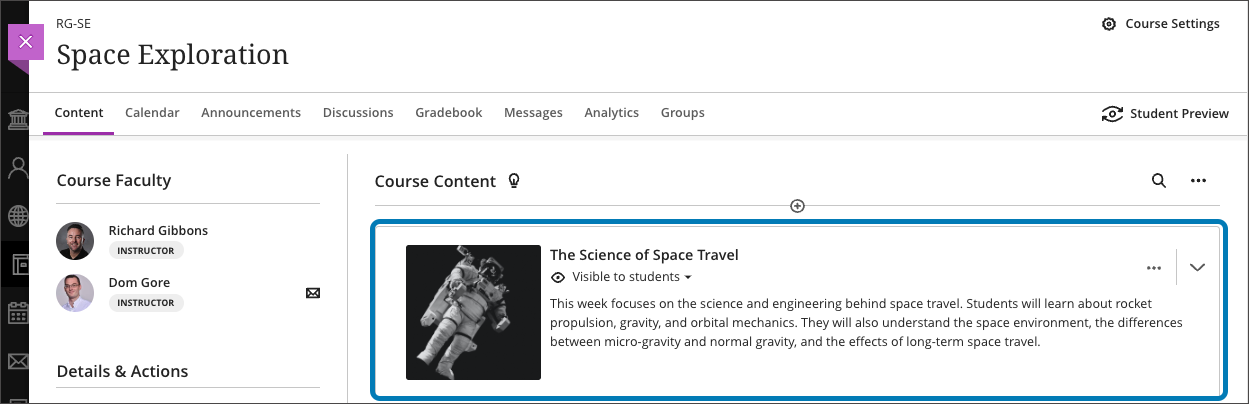
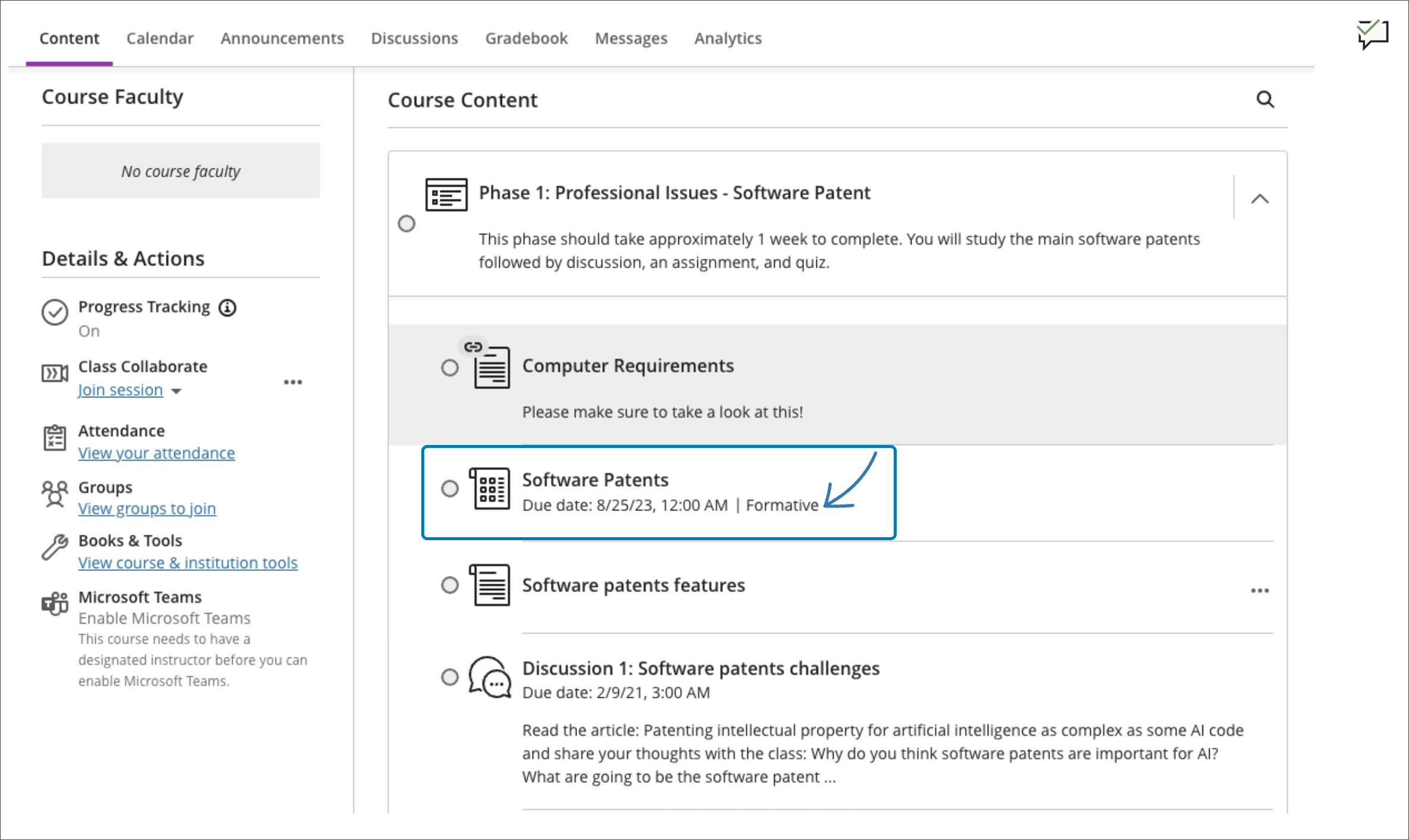
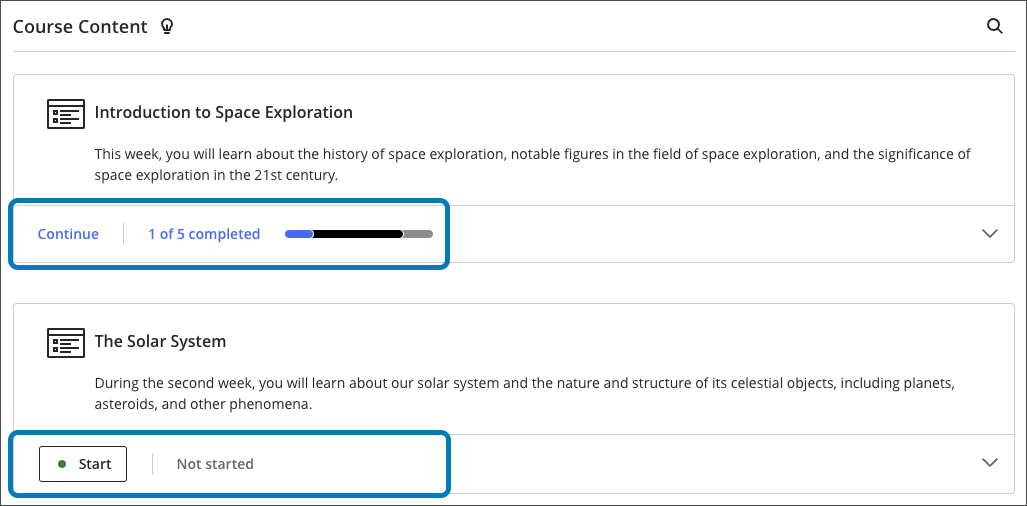
    <div class="html-content"><div><div><div><div><div>The July update for Ultra provides updates to assessment and grading, content delivery, and course management, offering new functionality and quality of life improvements for faculty and students. </div><div><br></div><div><strong>Assessment &amp; Grading</strong></div><div><ul><li><span>Instructors can select a new complete/incomplete schema when creating a test or assignment. An incomplete is displayed as a gray dash. When a grade is assigned, a checkmark is displayed to the student. </span></li><li><span><span>Instructors</span></span> can apply a "Formative" label to assessments and display this label to students on the course outline, within the assessment itself, and in the gradebook. Formative labels can be used for practice quizzes, spaced practice, and similar types of assessments, and the gradebook will filter the formative label.</li></ul></div><div><div><img src="https://help.blackboard.com/sites/default/files/images/2023-06/learn_student_FormativeAssessments_AssessmentLabeledAsFormativeOnCourseContentPage.png" alt="Student view of course outline with assessments showing the Formative label." style="max-width: 100%; height: auto;"></div><div><em>Image 1: Student view of course outline with assessments showing the Formative label.</em></div><div><ul><li><span><span>A new s</span><span>implified navigation for tests and assignments provides convenient access to different sections using tabs, similar to the redesigned discussions page. Designed for instructor efficiency, the navigation includes content and settings, submissions, student activity and question analysis.</span></span></li><li><span><span>For assessments with questions, i</span></span><span>nstructors can turn on partial and negative credit, or allow an overall negative score.</span></li><li><span>Anonymous assessments feature new Send Reminder options with a simplified nudge to students who haven't turned in the graded activity. Instructors can also add exceptions for anonymously graded assessments.</span></li><li>Grading schemas can now be deleted.</li><li>To increase clarity for students before they begin an assessment, the assessment start button displays different states based on the student's progress (<em>Start </em>to begin, <em>Continue</em> after saving, or <em>View</em> for submitted work). Additionally, students will have a clear drag &amp; drop zone to upload files.</li></ul></div><div><strong><br></strong></div><div><strong>Content Creation &amp; Delivery</strong></div><div><ul><li><span>A progress summary for Learning Modules will be displayed to students, showing the total number of items in the Learning Module. </span><span>Hovering over the progress bar informs the student of how much content they have completed, started or yet to start. A button shows students whether they need to start, continue, or if they have completed the module.</span></li></ul><div><div><img src="https://help.blackboard.com/sites/default/files/images/2023-06/learn_ultra_student_ProgressTracking_ProgressTrackingIndicator.png" alt="Image 2: Student view of progress tracking bar." style="max-width: 100%; height: auto;"></div><div><em>Image 2: Student view of progress tracking bar.</em></div></div><div><ul><li><span>All users can now resize images, video, and media by dragging a corner handle. Changing the alignment so text wraps around images is not yet </span>supported, but it is coming soon.</li><li>When a file is deleted from the course, it will now be deleted from the Content Collection when it is not used in other courses or another place in the same course. This will resolve many course quota issues experienced by faculty.</li></ul></div><div><strong><br></strong></div><div><strong>Course Management</strong></div><div><ul><li>Ultra courses and organizations can now support self-enrollment. Please <a href="https://doit.umbc.edu/request-tracker-rt/doit-myumbc-blackboard/" rel="nofollow external" class="bo">open a RT ticket</a> for self-enrollment as only a system admin can edit these settings.</li><li><span>If instructor use Canvas at another institution and wishes to reuse that content, they can import Canvas packages directly in Ultra courses. </span><span>Note: Course structure and tools differ between Canvas and Blackboard. Canvas content is imported as individual HTML pages which must be edited externally. Assignments and tests should be reviewed to validate questions and instructions. </span><span>Please </span><a href="https://doit.umbc.edu/request-tracker-rt/doit-myumbc-blackboard/" rel="nofollow external" class="bo">open a RT ticket</a><span> for support.</span></li></ul></div></div></div><div><span><span>Additionally, the favorite icon that </span><span>appears</span><span> in the browser when accessing Blackboard will change from the orange pencil icon to the Anthology logo, a colorful bar graph on a black background. Anthology is the parent company that <a href="https://www.anthology.com/news/anthology-completes-merger-with-blackboard-launches-next-chapter-in-edtech" rel="nofollow external" class="bo">acquired Blackboard in 2021.</a> </span></span></div><div><span><span><br></span></span></div><div><span><span>Faculty should see the latest updates in Ultra courses around July 6-7, 2023. </span></span><span>Please sign up for our latest </span><a href="https://my3.my.umbc.edu/groups/instructional-technology/events?mode=upcoming&amp;tag=whats-new" rel="nofollow external" class="bo">What's New in Ultra for Teaching &amp; Learning webinar</a><span> on August 10 or August 18, 2023 to learn more about these and other exciting new features coming to Ultra.</span></div></div></div></div><div><span><br></span></div><div><span>The next update to our Ultra test environment will take place on July 11, 2023; release notes are posted to the <a href="https://wiki.umbc.edu/x/LohnB" rel="nofollow external" class="bo">What's New in Ultra</a> that same week. Faculty who are interested in test driving new features before they are released to production should </span><a href="http://my.umbc.edu/go/request-help" rel="nofollow external" class="bo">open an RT ticket</a><span> to request early access. </span><span>Please </span><a href="http://umbc.edu/go/ultra" rel="nofollow external" class="bo">watch the FAQs</a><span>, including </span><a href="https://wiki.umbc.edu/x/LohnB" rel="nofollow external" class="bo">the What's New with Ultra page</a><span>, </span><span>and myUMBC for additional information about Ultra. </span></div><div><span><br></span></div><div><span><strong>Connect with Instructional Technology</strong></span></div><div><span>As always, if you have any questions about teaching, learning, and technology at UMBC, please consider the following options:</span></div><ul><li><a href="http://www.umbc.edu/faq" rel="nofollow external" class="bo">Check our extensive FAQ collection</a><span> </span></li><ul><li><span><a href="https://wiki.umbc.edu/x/LohnB" rel="nofollow external" class="bo"><span>What's new in Ultra?</span></a><span> </span><span>|</span><span> </span><a href="https://wiki.umbc.edu/x/bwrSAQ" rel="nofollow external" class="bo"><span>Known Issues</span></a><span> </span></span></li></ul><li><span><a href="http://my.umbc.edu/go/request-help" rel="nofollow external" class="bo">Open a ticket via RT</a></span></li><li><span>Follow the </span><a href="http://my.umbc.edu/groups/instructional-technology" rel="nofollow external" class="bo">Instructional Technology</a><span> &amp; </span><a href="http://my.umbc.edu/groups/doit" rel="nofollow external" class="bo">DoIT</a><span> myUMBC groups</span></li><li><a href="http://doit.umbc.edu/itnm/staff/" rel="nofollow external" class="bo">Request a consult</a><span> with <a href="http://doit.umbc.edu/itnm/staff" rel="nofollow external" class="bo">instructional technology staff</a></span></li><li><span><a href="http://pivot.umbc.edu" rel="nofollow external" class="bo">PIVOT</a> | <a href="https://doit.umbc.edu/itnm/academic-continuity/" rel="nofollow external" class="bo">Academic Continuity</a></span><span> </span><span>|</span><span> </span><span><a href="https://fdc.umbc.edu/teaching/keep-on-teaching/" rel="nofollow external" class="bo">Keep On Teaching</a></span><span> </span><span>|</span><span> </span><span><a href="https://doit.umbc.edu/students" rel="nofollow external" class="bo">Student Technology Resources</a></span></li></ul></div><div><div></div></div></div>
]]>
</Body>
<Summary>The July update for Ultra provides updates to assessment and grading, content delivery, and course management, offering new functionality and quality of life improvements for faculty and...</Summary>
<Website>https://my3.my.umbc.edu/groups/instructional-technology/posts/134027</Website>
<TrackingUrl>https://beta.my.umbc.edu/api/v0/pixel/news/134027/guest@my.umbc.edu/72e3d641f2e383beb1c5493443375a2c/api/pixel</TrackingUrl>
<Tag>blackboard</Tag>
<Tag>ultra-experience</Tag>
<Tag>ultra-update</Tag>
<Group token="instructional-technology">Instructional Technology</Group>
<GroupUrl>https://beta.my.umbc.edu/groups/instructional-technology</GroupUrl>
<AvatarUrl>https://assets2-beta.my.umbc.edu/system/shared/avatars/groups/000/001/164/dec3b026b81ee6d890a8f82f75c94a2e/xsmall.png?1446126703</AvatarUrl>
<AvatarUrl size="original">https://assets1-beta.my.umbc.edu/system/shared/avatars/groups/000/001/164/dec3b026b81ee6d890a8f82f75c94a2e/original.png?1446126703</AvatarUrl>
<AvatarUrl size="xxlarge">https://assets2-beta.my.umbc.edu/system/shared/avatars/groups/000/001/164/dec3b026b81ee6d890a8f82f75c94a2e/xxlarge.png?1446126703</AvatarUrl>
<AvatarUrl size="xlarge">https://assets1-beta.my.umbc.edu/system/shared/avatars/groups/000/001/164/dec3b026b81ee6d890a8f82f75c94a2e/xlarge.png?1446126703</AvatarUrl>
<AvatarUrl size="large">https://assets1-beta.my.umbc.edu/system/shared/avatars/groups/000/001/164/dec3b026b81ee6d890a8f82f75c94a2e/large.png?1446126703</AvatarUrl>
<AvatarUrl size="medium">https://assets4-beta.my.umbc.edu/system/shared/avatars/groups/000/001/164/dec3b026b81ee6d890a8f82f75c94a2e/medium.png?1446126703</AvatarUrl>
<AvatarUrl size="small">https://assets3-beta.my.umbc.edu/system/shared/avatars/groups/000/001/164/dec3b026b81ee6d890a8f82f75c94a2e/small.png?1446126703</AvatarUrl>
<AvatarUrl size="xsmall">https://assets2-beta.my.umbc.edu/system/shared/avatars/groups/000/001/164/dec3b026b81ee6d890a8f82f75c94a2e/xsmall.png?1446126703</AvatarUrl>
<AvatarUrl size="xxsmall">https://assets3-beta.my.umbc.edu/system/shared/avatars/groups/000/001/164/dec3b026b81ee6d890a8f82f75c94a2e/xxsmall.png?1446126703</AvatarUrl>
<Sponsor>Instructional Technology</Sponsor>
<ThumbnailUrl size="xxlarge">https://assets3-beta.my.umbc.edu/system/shared/thumbnails/news/000/134/027/b615c820ecfbdf9e330c10c08b392c49/xxlarge.jpg?1686852686</ThumbnailUrl>
<ThumbnailUrl size="xlarge">https://assets4-beta.my.umbc.edu/system/shared/thumbnails/news/000/134/027/b615c820ecfbdf9e330c10c08b392c49/xlarge.jpg?1686852686</ThumbnailUrl>
<ThumbnailUrl size="large">https://assets3-beta.my.umbc.edu/system/shared/thumbnails/news/000/134/027/b615c820ecfbdf9e330c10c08b392c49/large.jpg?1686852686</ThumbnailUrl>
<ThumbnailUrl size="medium">https://assets2-beta.my.umbc.edu/system/shared/thumbnails/news/000/134/027/b615c820ecfbdf9e330c10c08b392c49/medium.jpg?1686852686</ThumbnailUrl>
<ThumbnailUrl size="small">https://assets1-beta.my.umbc.edu/system/shared/thumbnails/news/000/134/027/b615c820ecfbdf9e330c10c08b392c49/small.jpg?1686852686</ThumbnailUrl>
<ThumbnailUrl size="xsmall">https://assets1-beta.my.umbc.edu/system/shared/thumbnails/news/000/134/027/b615c820ecfbdf9e330c10c08b392c49/xsmall.jpg?1686852686</ThumbnailUrl>
<ThumbnailUrl size="xxsmall">https://assets3-beta.my.umbc.edu/system/shared/thumbnails/news/000/134/027/b615c820ecfbdf9e330c10c08b392c49/xxsmall.jpg?1686852686</ThumbnailUrl>
<PawCount>2</PawCount>
<CommentCount>0</CommentCount>
<CommentsAllowed>true</CommentsAllowed>
<PostedAt>Wed, 28 Jun 2023 08:35:05 -0400</PostedAt>
<EditAt>Wed, 28 Jun 2023 08:36:01 -0400</EditAt>
</NewsItem>

<NewsItem contentIssues="true" id="134078" important="false" status="posted" url="https://beta.my.umbc.edu/groups/oer/posts/134078">
<Title>Free Training for Respondus Lockdown Browser &amp; Monitor</Title>
<Tagline>Join an upcoming webinar to see the latest features</Tagline>
<Body>
<![CDATA[
    <div class="html-content"><div><span>Join an upcoming training webinar from Respondus to see the latest features and integrations for LockDown Browser and Monitor. Learn how these applications are used with a range of online testing environments, virtual proctoring and Blackboard. Discover </span>enhancements that make Respondus Monitor even more effective and easy to use.</div><div><br></div><div><div><strong>Instructor Training: LockDown Browser &amp; Respondus Monitor</strong></div><div>This comprehensive 45-minute training is intended for instructors who plan to use LockDown Browser and/or Respondus Monitor to protect academic integrity and ensure student identity during online testing. <span>The training will cover:</span></div><div><div><ul><li><span>How to use LockDown Browser to prevent digital cheating in proctored testing environments</span></li><li><span>How to use Respondus Monitor in non-proctored environments, to protect exam integrity and confirm student identity</span></li><li><span>The student perspective using each application</span></li><li><span>Efficient review of the assessment data collected, including the Review Priority system, timeline, and milestone features</span></li><li><span>Best practices and tips for success with both applications</span></li><li><span>Review the new Screen Recording option to capture actions in the lockdown browser, available for Windows and Mac</span></li></ul></div><div><span>Pick your date/time and register directly with Respondus:</span></div></div><div><ul><li><a href="https://attendee.gotowebinar.com/register/8721433315142394201" rel="nofollow external" class="bo">Thursday, June 29 at 3 pm ET / 12 pm PT</a></li><li><a href="https://attendee.gotowebinar.com/register/7450183469301530972" rel="nofollow external" class="bo">Thursday, July 6 at 1 pm ET / 10 am PT</a></li><li><a href="https://attendee.gotowebinar.com/register/8819484464208560992" rel="nofollow external" class="bo">Tuesday, July 11 at 2 pm ET / 11 am PT</a></li><li><a href="https://attendee.gotowebinar.com/register/4416852989616743510" rel="nofollow external" class="bo">Thursday, July 20 at 3 pm ET / 12 pm PT</a></li><li><a href="https://attendee.gotowebinar.com/register/5250740200330357334" rel="nofollow external" class="bo">Wednesday, August 2 at 2 pm ET / 11 am PT</a></li><li><a href="https://attendee.gotowebinar.com/register/6347836201060142423" rel="nofollow external" class="bo">Tuesday, August 8 at 1 pm ET / 10 am PT</a></li><li><a href="https://attendee.gotowebinar.com/register/6174402535429651285" rel="nofollow external" class="bo">Tuesday, August 15 at 3 pm ET / 12 pm PT</a></li><li><a href="https://attendee.gotowebinar.com/register/1047427094110165600" rel="nofollow external" class="bo">Thursday, August 17 at 2 pm ET / 11 am PT</a></li><li><a href="https://attendee.gotowebinar.com/register/6432366655137459288" rel="nofollow external" class="bo">Wednesday, August 23 at 12 pm ET / 9 am PT</a></li><li><a href="https://attendee.gotowebinar.com/register/1460087002287919196" rel="nofollow external" class="bo">Tuesday, August 29 at 2 pm ET / 11 am PT</a></li></ul></div><div></div><div>All attendees will receive a link to a recording after the session.</div></div><div><br></div><div><div>NOTE: Students should not register for any instructor training session but instead, contact use the Respondus support tools embedded in RLDB, or <a href="https://wiki.umbc.edu/x/BQb9Aw" rel="nofollow external" class="bo">review this FAQ</a> for further help.</div></div><div><br></div><div><strong>About Respondus Lockdown Browser</strong></div><div><span><br></span></div><div><span>RLDB is a custom browser that locks down the testing environment within Blackboard. Students are unable to copy, print, access other applications, or visit other websites during an online exam. </span>For additional information, please review <a href="https://wiki.umbc.edu/x/0AI9BQ" rel="nofollow external" class="bo">our FAQ collection</a>.</div></div>
]]>
</Body>
<Summary>Join an upcoming training webinar from Respondus to see the latest features and integrations for LockDown Browser and Monitor. Learn how these applications are used with a range of online testing...</Summary>
<Website>https://my3.my.umbc.edu/groups/instructional-technology/posts/134078</Website>
<TrackingUrl>https://beta.my.umbc.edu/api/v0/pixel/news/134078/guest@my.umbc.edu/98c2abc84ba4e81fe7ca5175a7b23818/api/pixel</TrackingUrl>
<Tag>respondus-lockdown-browser</Tag>
<Tag>respondus-monitor</Tag>
<Tag>rldb</Tag>
<Tag>training</Tag>
<Tag>webinar</Tag>
<Group token="instructional-technology">Instructional Technology</Group>
<GroupUrl>https://beta.my.umbc.edu/groups/instructional-technology</GroupUrl>
<AvatarUrl>https://assets2-beta.my.umbc.edu/system/shared/avatars/groups/000/001/164/dec3b026b81ee6d890a8f82f75c94a2e/xsmall.png?1446126703</AvatarUrl>
<AvatarUrl size="original">https://assets1-beta.my.umbc.edu/system/shared/avatars/groups/000/001/164/dec3b026b81ee6d890a8f82f75c94a2e/original.png?1446126703</AvatarUrl>
<AvatarUrl size="xxlarge">https://assets2-beta.my.umbc.edu/system/shared/avatars/groups/000/001/164/dec3b026b81ee6d890a8f82f75c94a2e/xxlarge.png?1446126703</AvatarUrl>
<AvatarUrl size="xlarge">https://assets1-beta.my.umbc.edu/system/shared/avatars/groups/000/001/164/dec3b026b81ee6d890a8f82f75c94a2e/xlarge.png?1446126703</AvatarUrl>
<AvatarUrl size="large">https://assets1-beta.my.umbc.edu/system/shared/avatars/groups/000/001/164/dec3b026b81ee6d890a8f82f75c94a2e/large.png?1446126703</AvatarUrl>
<AvatarUrl size="medium">https://assets4-beta.my.umbc.edu/system/shared/avatars/groups/000/001/164/dec3b026b81ee6d890a8f82f75c94a2e/medium.png?1446126703</AvatarUrl>
<AvatarUrl size="small">https://assets3-beta.my.umbc.edu/system/shared/avatars/groups/000/001/164/dec3b026b81ee6d890a8f82f75c94a2e/small.png?1446126703</AvatarUrl>
<AvatarUrl size="xsmall">https://assets2-beta.my.umbc.edu/system/shared/avatars/groups/000/001/164/dec3b026b81ee6d890a8f82f75c94a2e/xsmall.png?1446126703</AvatarUrl>
<AvatarUrl size="xxsmall">https://assets3-beta.my.umbc.edu/system/shared/avatars/groups/000/001/164/dec3b026b81ee6d890a8f82f75c94a2e/xxsmall.png?1446126703</AvatarUrl>
<Sponsor>Instructional Technology</Sponsor>
<ThumbnailUrl size="xxlarge">https://assets4-beta.my.umbc.edu/system/shared/thumbnails/news/000/134/078/cebc133e925b2c60962cce85ee8f4e35/xxlarge.jpg?1687291003</ThumbnailUrl>
<ThumbnailUrl size="xlarge">https://assets2-beta.my.umbc.edu/system/shared/thumbnails/news/000/134/078/cebc133e925b2c60962cce85ee8f4e35/xlarge.jpg?1687291003</ThumbnailUrl>
<ThumbnailUrl size="large">https://assets3-beta.my.umbc.edu/system/shared/thumbnails/news/000/134/078/cebc133e925b2c60962cce85ee8f4e35/large.jpg?1687291003</ThumbnailUrl>
<ThumbnailUrl size="medium">https://assets3-beta.my.umbc.edu/system/shared/thumbnails/news/000/134/078/cebc133e925b2c60962cce85ee8f4e35/medium.jpg?1687291003</ThumbnailUrl>
<ThumbnailUrl size="small">https://assets4-beta.my.umbc.edu/system/shared/thumbnails/news/000/134/078/cebc133e925b2c60962cce85ee8f4e35/small.jpg?1687291003</ThumbnailUrl>
<ThumbnailUrl size="xsmall">https://assets2-beta.my.umbc.edu/system/shared/thumbnails/news/000/134/078/cebc133e925b2c60962cce85ee8f4e35/xsmall.jpg?1687291003</ThumbnailUrl>
<ThumbnailUrl size="xxsmall">https://assets4-beta.my.umbc.edu/system/shared/thumbnails/news/000/134/078/cebc133e925b2c60962cce85ee8f4e35/xxsmall.jpg?1687291003</ThumbnailUrl>
<PawCount>0</PawCount>
<CommentCount>0</CommentCount>
<CommentsAllowed>true</CommentsAllowed>
<PostedAt>Tue, 20 Jun 2023 16:01:25 -0400</PostedAt>
</NewsItem>

<NewsItem contentIssues="true" id="134069" important="false" status="posted" url="https://beta.my.umbc.edu/groups/oer/posts/134069">
<Title>Accessing a Blackboard course to fulfill an incomplete</Title>
<Tagline>Steps to reopening a course for one or few students</Tagline>
<Body>
<![CDATA[
    <div class="html-content"><div>When instructors have determined that a student needs extended time to access a Blackboard course for reasons related to illness, to submit work for an Incomplete, prepare for exams, or gather evidence for a portfolio or interview, they may <a href="https://wiki.umbc.edu/pages/viewpage.action?pageId=74974884" rel="nofollow external" class="bo">request a course availability override</a> for that student.</div><div><br></div><div>For example, here's a possible scenario. Emily was recently in a car accident, causing her to miss the last three weeks of class. She received an incomplete and needs to record a presentation and take the final exam. Unfortunately, her Blackboard course is closed and she can't get in to do the work. What can her instructor do?</div><div><br></div><div>If the course has not been <a href="https://doit.umbc.edu/post/133812/" rel="nofollow external" class="bo">retired from the Blackboard site</a>, this exclusive access can be provided through a special override setting in the Blackboard admin panel. Instructors can request a course to be re-opened only for the student who needs access (e.g., John Smith) and specify when that access should expire (e.g., end of May). If an instructor has multiple students requiring extended access, they only need to submit one RT and must specify expiration dates for each individual student.</div><div><br></div><h6>How to request a course availability override:</h6><div><br></div><div><ol><li>Go to <a href="https://wiki.umbc.edu/pages/viewpage.action?pageId=74974884" rel="nofollow external" class="bo">this FAQ</a> and review the steps</li><li>Open <a href="https://umbc.edu/go/1068" rel="nofollow external" class="bo">the RT form</a> and choose option #9</li><li>Specify CourseID, term, student(s), and expiration date(s)</li><li>Modify the due dates, release conditions, etc. in the Blackboard shell</li></ol></div><div><br></div><div>Once the override is set, the course will appear in the course list for the semester in which the student was officially registered (e.g., Fall 2022). NOTE: A course availability override does not automatically change due dates or release conditions in a course.</div><div><br></div><div>Since many students rely on Blackboard's course list to confirm their course registration, when courses are left open or have end dates modified, they are often confused to see older courses left as current. <span>A course availability override is a valuable option for faculty and students, allowing singular access to a course without compromising overall enrollment. For consistency and to prevent confusion, changing start and end dates is no longer available. This ensures all courses accurately reflect the correct term and improve the overall navigation experience for students.</span></div><div><span><br></span></div><div><span>--</span></div><div><span><br></span></div><p><em>UMBC is committed to providing a consistent learning experience for everyone. The last day we will support Blackboard Original is December 31, 2024. Please check out our training and support: <a href="https://umbc.edu/go/ultra" rel="nofollow external" class="bo">https://umbc.edu/go/ultra</a>.</em></p><div><br></div></div>
]]>
</Body>
<Summary>When instructors have determined that a student needs extended time to access a Blackboard course for reasons related to illness, to submit work for an Incomplete, prepare for exams, or gather...</Summary>
<Website>https://my3.my.umbc.edu/groups/instructional-technology/posts/134069</Website>
<TrackingUrl>https://beta.my.umbc.edu/api/v0/pixel/news/134069/guest@my.umbc.edu/85f8cef5f6ba0919cc63ca7b27144071/api/pixel</TrackingUrl>
<Tag>blackboard-tips</Tag>
<Tag>course-availability-override</Tag>
<Tag>hawken</Tag>
<Tag>instructional-technology</Tag>
<Tag>shell-access</Tag>
<Tag>wyatt</Tag>
<Group token="instructional-technology">Instructional Technology</Group>
<GroupUrl>https://beta.my.umbc.edu/groups/instructional-technology</GroupUrl>
<AvatarUrl>https://assets2-beta.my.umbc.edu/system/shared/avatars/groups/000/001/164/dec3b026b81ee6d890a8f82f75c94a2e/xsmall.png?1446126703</AvatarUrl>
<AvatarUrl size="original">https://assets1-beta.my.umbc.edu/system/shared/avatars/groups/000/001/164/dec3b026b81ee6d890a8f82f75c94a2e/original.png?1446126703</AvatarUrl>
<AvatarUrl size="xxlarge">https://assets2-beta.my.umbc.edu/system/shared/avatars/groups/000/001/164/dec3b026b81ee6d890a8f82f75c94a2e/xxlarge.png?1446126703</AvatarUrl>
<AvatarUrl size="xlarge">https://assets1-beta.my.umbc.edu/system/shared/avatars/groups/000/001/164/dec3b026b81ee6d890a8f82f75c94a2e/xlarge.png?1446126703</AvatarUrl>
<AvatarUrl size="large">https://assets1-beta.my.umbc.edu/system/shared/avatars/groups/000/001/164/dec3b026b81ee6d890a8f82f75c94a2e/large.png?1446126703</AvatarUrl>
<AvatarUrl size="medium">https://assets4-beta.my.umbc.edu/system/shared/avatars/groups/000/001/164/dec3b026b81ee6d890a8f82f75c94a2e/medium.png?1446126703</AvatarUrl>
<AvatarUrl size="small">https://assets3-beta.my.umbc.edu/system/shared/avatars/groups/000/001/164/dec3b026b81ee6d890a8f82f75c94a2e/small.png?1446126703</AvatarUrl>
<AvatarUrl size="xsmall">https://assets2-beta.my.umbc.edu/system/shared/avatars/groups/000/001/164/dec3b026b81ee6d890a8f82f75c94a2e/xsmall.png?1446126703</AvatarUrl>
<AvatarUrl size="xxsmall">https://assets3-beta.my.umbc.edu/system/shared/avatars/groups/000/001/164/dec3b026b81ee6d890a8f82f75c94a2e/xxsmall.png?1446126703</AvatarUrl>
<Sponsor>Instructional Technology</Sponsor>
<ThumbnailUrl size="xxlarge">https://assets3-beta.my.umbc.edu/system/shared/thumbnails/news/000/134/069/dab04c32bdfaebb711d16df59a241c6f/xxlarge.jpg?1687273295</ThumbnailUrl>
<ThumbnailUrl size="xlarge">https://assets3-beta.my.umbc.edu/system/shared/thumbnails/news/000/134/069/dab04c32bdfaebb711d16df59a241c6f/xlarge.jpg?1687273295</ThumbnailUrl>
<ThumbnailUrl size="large">https://assets1-beta.my.umbc.edu/system/shared/thumbnails/news/000/134/069/dab04c32bdfaebb711d16df59a241c6f/large.jpg?1687273295</ThumbnailUrl>
<ThumbnailUrl size="medium">https://assets1-beta.my.umbc.edu/system/shared/thumbnails/news/000/134/069/dab04c32bdfaebb711d16df59a241c6f/medium.jpg?1687273295</ThumbnailUrl>
<ThumbnailUrl size="small">https://assets3-beta.my.umbc.edu/system/shared/thumbnails/news/000/134/069/dab04c32bdfaebb711d16df59a241c6f/small.jpg?1687273295</ThumbnailUrl>
<ThumbnailUrl size="xsmall">https://assets4-beta.my.umbc.edu/system/shared/thumbnails/news/000/134/069/dab04c32bdfaebb711d16df59a241c6f/xsmall.jpg?1687273295</ThumbnailUrl>
<ThumbnailUrl size="xxsmall">https://assets4-beta.my.umbc.edu/system/shared/thumbnails/news/000/134/069/dab04c32bdfaebb711d16df59a241c6f/xxsmall.jpg?1687273295</ThumbnailUrl>
<PawCount>5</PawCount>
<CommentCount>0</CommentCount>
<CommentsAllowed>true</CommentsAllowed>
<PostedAt>Tue, 20 Jun 2023 11:12:08 -0400</PostedAt>
<EditAt>Wed, 21 Jun 2023 08:34:46 -0400</EditAt>
</NewsItem>

<NewsItem contentIssues="true" id="132857" important="false" status="posted" url="https://beta.my.umbc.edu/groups/oer/posts/132857">
<Title>7 ChatGPT Strategies to Enhance Course Designs This Summer</Title>
<Tagline>Leverage AI to create new experiences for your students</Tagline>
<Body>
<![CDATA[
    <div class="html-content"><p>During the summer break, educators might use this time to refine their course designs and explore innovative technologies. One such technology is <a href="https://chat.openai.com/chat" rel="nofollow external" class="bo">ChatGPT</a>, a powerful language model developed by <a href="http://openai.com/" rel="nofollow external" class="bo">OpenAI</a> that can assist in creating engaging and effective learning experiences. As early as the 1960s, researchers have recognized the potential of AI to transform education (Carbonell, 1960; Suppes, 1966), and with the advancements in machine learning and natural language processing, AI's impact on the educational landscape has only grown more profound.</p>
    <p>Let's explore seven strategies for using ChatGPT to enhance your course design over the summer break.</p>
    <p><strong>1. Align course and unit-level learning objectives:</strong></p>
    <p>Ensuring alignment between course and unit-level objectives is an essential part of effective course design. Use ChatGPT to perform consistency checks, identifying areas where unit-level objectives might be better aligned with broader course objectives (Abd-alrazaq et al., 2023; Alqahtani et al., 2023). ChatGPT can also suggest refinements or revisions to make objectives more specific, measurable, achievable, relevant, and time-bound (SMART). However, instructors should review learning objectives for clarity and alignment to ensure these foundational components of course design are effective and provide clear direction for students.</p>
    <p><strong>2. Develop engaging course materials with ChatGPT's content generation capabilities:</strong></p>
    <p>ChatGPT can help you generate course materials tailored to your learning objectives (Atlas, 2023). By providing the AI with elements from your course syllabus, desired learning outcomes, and course topics, ChatGPT might suggest outlines for your lectures or assist in creating discussion prompts that are aligned to your educational goals and help save time (Kasneci, et al., 2023; Jeon &amp; Lee, 2023). Always crosscheck references provided by the AI since its language model can be limited to a particular scope and timeframe.</p>
    <p><strong>3. Create personalized feedback using ChatGPT:</strong></p>
    <p>Providing students with timely, personalized feedback is essential. ChatGPT can help you generate two types of feedback: templated feedback applicable to common errors and customized feedback based on submitted work, performance metrics, and learning preferences. By integrating ChatGPT into your assessment process, you can offer students detailed and tailored feedback on their assignments, promoting reflection and improvement (Atlas, 2023; Gimpel, et al., 2023). You should always review, edit, and customize the feedback to each student and assignment.</p>
    <p><strong>4. Generate test questions aligned to learning objectives:</strong></p>
    <p>By using ChatGPT, faculty can generate a large pool of relevant test questions quickly, freeing up time to focus on other aspects of course design and instruction (Atlas, 2023; Sok &amp; Heng, 2023; Trust, Whalen, &amp; Mouza, 2023). The AI can formulate a variety of question types (multiple-choice, true/false, short answer, and essay questions) all designed to assess the objectives and reflective of Bloom's taxonomy. While AI can be a valuable tool for generating test questions, it's essential for educators to review and refine these questions to ensure they are appropriately challenging, fair, and properly aligned with the course's learning objectives. </p>
    <p><strong>5. Foster collaboration and communication with ChatGPT-powered chatbots:</strong></p>
    <p>Effective communication and collaboration are critical components of a successful learning experience. Chatbots can answer students' questions, provide style guidance on assignments, and offer support outside of regular class hours (Atlas, 2023; Kasneci, et al., 2023). Some AI chatbots are packaged with platforms from licensed tools such as writing practice and language learning (Jeon &amp; Lee, 2023).</p>
    <p><strong>6. Utilize ChatGPT for brainstorming and idea generation:</strong></p>
    <p>Encouraging students to think creatively and critically is a key aspect of the learning process. ChatGPT can help students generate ideas for projects, essays, and other assignments by providing them with relevant suggestions, perspectives, and examples (Atlas, 2023; Sok &amp; Heng, 2023). By integrating ChatGPT into your course design and teaching practice, you can support students in their brainstorming efforts and spark their creativity. Students can share the link to the ChatGPT conversation to show their work as part of their assignment submission workflow.</p>
    <p><strong>7. Design inclusive course materials with ChatGPT's language capabilities:</strong></p>
    <p>Creating inclusive and accessible course materials is essential for ensuring that all students have an equal opportunity to succeed. ChatGPT can help you develop course materials that cater to diverse learning needs and preferences (Kasneci, et al., 2023). By providing the model with specific guidelines, such as using simple language or incorporating visual aids, ChatGPT can help generate content that is more accessible and inclusive to a wide range of learners. </p><p><strong>What's Next?</strong></p>
    <p>Incorporating <a href="https://chat.openai.com/chat" rel="nofollow external" class="bo">ChatGPT</a> into your course design over the summer break can transform the way you teach and create more engaging, personalized, and effective learning experiences for your students. These tools and resources can help students actively reflect on their learning processes and strategies, fostering metacognition and promoting deeper understanding of the course material (Gimpel, et al., 2023). By leveraging ChatGPT's content generation capabilities, personalized feedback, chatbot communication, brainstorming assistance, and inclusive language features, you can harness the power of this AI technology to enhance your educational practice and optimize student success.</p>
    <p><a href="https://my3.my.umbc.edu/groups/instructional-technology" rel="nofollow external" class="bo">Follow the Instructional Technology group</a> to get updates about our exclusive webinar series, <strong>Empowering Educators: AI Tools for Teaching and Productivity</strong>, designed to help faculty harness the power of artificial intelligence to enhance their course preparation and teaching productivity. Coming in Fall 2023, this comprehensive five-part series will explore cutting-edge AI tools and technologies that can revolutionize the way you approach course development, student success and engagement, assessment and grading, course management, and personal productivity.</p>
    <p><strong>References</strong></p>
    <p>Abd-alrazaq, A., AlSaad, R., Alhuwail, D., Ahmed, A., Healy, P.M., Latifi, S., Aziz, S., Damseh, R., Alabed Alrazak, S., &amp; Sheikh, J. (2023). Large language models in medical education: Opportunities, challenges, and future directions. JMIR Medical Education, 9(1). <a href="https://doi.org/10.2196/48291" rel="nofollow external" class="bo">https://doi.org/10.2196/48291</a></p><p>Alqahtani, T., Badreldin, H. A., Alrashed, M., Alshaya, A. I., Alghamdi, S. S., bin Saleh, K., Alowais, S. A., Alshaya, O. A., Rahman, I., Al Yami, M. S., Albekairy, A. M. (2023). The emergent role of artificial intelligence, natural language processing, and large language models in higher education and research. Research in Social and Administrative Pharmacy [pre-print]. <a href="https://doi.org/10.1016/j.sapharm.2023.05.016" rel="nofollow external" class="bo">https://doi.org/10.1016/j.sapharm.2023.05.016</a></p><p>Atlas, Stephen. "ChatGPT for higher education and professional development: A guide to conversational AI." (2023). <a href="https://digitalcommons.uri.edu/cba_facpubs/548" rel="nofollow external" class="bo">https://digitalcommons.uri.edu/cba_facpubs/548</a></p>
    <p>Carbonell, J. R. (1960). <a href="https://stacks.stanford.edu/file/druid:xr633ts6369/xr633ts6369.pdf" rel="nofollow external" class="bo">AI in CAI: An artificial intelligence approach to computer-assisted instruction</a>. IEEE Transactions on Man-Machine Systems, 11(4), 190-202.</p>
    <p>Gimpel, H., Hall, K., Decker, S., Eymann, T., Lammermann, L., Madche, A., Roglinger, M., Ruiner, C., Schoch, M., Schoop, M., Urback, N., &amp; Vandirk, S. (2023). Unlocking the power of generative AI models and systems such as GPT-4 and ChatGPT for higher education: A guide for students and lecturers. Hohenheim Discussion Papers in Business, Economics and Social Sciences, No. 02-2023, Universitat Hohenheim, Fakultat Wirtschafts- und Sozialwissenschaften, Stuttgart. Retrieved from <a href="http://hdl.handle.net/10419/270970" rel="nofollow external" class="bo">http://hdl.handle.net/10419/270970</a></p><p>Jeon, J., &amp; Lee, S. (2023). Large language models in education: A focus on the complementary relationship between human teachers and ChatGPT. Education and Information Technologies. <a href="https://doi.org/10.1007/s10639-023-11834-1" rel="nofollow external" class="bo">https://doi.org/10.1007/s10639-023-11834-1</a></p><p>Kasneci, E., Sessler, K., Kuchemann, S., Bannert, M., Dementieva, D., Fischer, F., ... Kasneci, G. (2023). ChatGPT for good? On opportunities and challenges of large language models for education. <a href="https://doi.org/10.35542/osf.io/5er8f" rel="nofollow external" class="bo">https://doi.org/10.35542/osf.io/5er8f</a></p>
    <p>OpenAI. (2023). ChatGPT-4 (Apr 18 version) [Large language model]. <a href="https://chat.openai.com/chat" rel="nofollow external" class="bo">https://chat.openai.com/chat</a></p>
    <p>Sok, S., &amp; Heng, K. (2023). ChatGPT for education and research: A review of benefits and risks. Social Science Research Network. <a href="https://doi.org/10.2139/ssrn.4378735" rel="nofollow external" class="bo">https://doi.org/10.2139/ssrn.4378735</a></p>
    <p>Suppes, P. (1966). <a href="https://www.jstor.org/stable/24931056" rel="nofollow external" class="bo">The uses of computers in education</a>. Scientific American, 215(3), 207-220.</p>
    <p>Trust, T., Whalen, J., &amp; Mouza, C. (2023). <a href="https://citejournal.org/volume-23/issue-1-23/editorial/editorial-chatgpt-challenges-opportunities-and-implications-for-teacher-education/" rel="nofollow external" class="bo">ChatGPT: Challenges, opportunities, and implications for teacher education</a> [editorial]. Contemporary Issues in Technology and Teacher Education, 23(1).</p>
    <p>---</p>
    <p><em>The text of this article was outlined and seeded by ChatGPT 4.0 and extensively revised by the Instructional Technology staff. Research cited in this article was identified and vetted by humans.</em></p></div>
]]>
</Body>
<Summary>During the summer break, educators might use this time to refine their course designs and explore innovative technologies. One such technology is ChatGPT, a powerful language model developed by...</Summary>
<Website>https://my3.my.umbc.edu/groups/instructional-technology/posts/132857</Website>
<TrackingUrl>https://beta.my.umbc.edu/api/v0/pixel/news/132857/guest@my.umbc.edu/b08c96e970235208e3cc7f767506a4ca/api/pixel</TrackingUrl>
<Tag>abrams</Tag>
<Tag>chatgpt</Tag>
<Tag>course-design</Tag>
<Tag>hawken</Tag>
<Tag>online-learning</Tag>
<Tag>penniston</Tag>
<Group token="instructional-technology">Instructional Technology</Group>
<GroupUrl>https://beta.my.umbc.edu/groups/instructional-technology</GroupUrl>
<AvatarUrl>https://assets2-beta.my.umbc.edu/system/shared/avatars/groups/000/001/164/dec3b026b81ee6d890a8f82f75c94a2e/xsmall.png?1446126703</AvatarUrl>
<AvatarUrl size="original">https://assets1-beta.my.umbc.edu/system/shared/avatars/groups/000/001/164/dec3b026b81ee6d890a8f82f75c94a2e/original.png?1446126703</AvatarUrl>
<AvatarUrl size="xxlarge">https://assets2-beta.my.umbc.edu/system/shared/avatars/groups/000/001/164/dec3b026b81ee6d890a8f82f75c94a2e/xxlarge.png?1446126703</AvatarUrl>
<AvatarUrl size="xlarge">https://assets1-beta.my.umbc.edu/system/shared/avatars/groups/000/001/164/dec3b026b81ee6d890a8f82f75c94a2e/xlarge.png?1446126703</AvatarUrl>
<AvatarUrl size="large">https://assets1-beta.my.umbc.edu/system/shared/avatars/groups/000/001/164/dec3b026b81ee6d890a8f82f75c94a2e/large.png?1446126703</AvatarUrl>
<AvatarUrl size="medium">https://assets4-beta.my.umbc.edu/system/shared/avatars/groups/000/001/164/dec3b026b81ee6d890a8f82f75c94a2e/medium.png?1446126703</AvatarUrl>
<AvatarUrl size="small">https://assets3-beta.my.umbc.edu/system/shared/avatars/groups/000/001/164/dec3b026b81ee6d890a8f82f75c94a2e/small.png?1446126703</AvatarUrl>
<AvatarUrl size="xsmall">https://assets2-beta.my.umbc.edu/system/shared/avatars/groups/000/001/164/dec3b026b81ee6d890a8f82f75c94a2e/xsmall.png?1446126703</AvatarUrl>
<AvatarUrl size="xxsmall">https://assets3-beta.my.umbc.edu/system/shared/avatars/groups/000/001/164/dec3b026b81ee6d890a8f82f75c94a2e/xxsmall.png?1446126703</AvatarUrl>
<Sponsor>Instructional Technology</Sponsor>
<ThumbnailUrl size="xxlarge">https://assets3-beta.my.umbc.edu/system/shared/thumbnails/news/000/132/857/3e0b752bcfefa1b78e80d63918ff1834/xxlarge.jpg?1686233684</ThumbnailUrl>
<ThumbnailUrl size="xlarge">https://assets2-beta.my.umbc.edu/system/shared/thumbnails/news/000/132/857/3e0b752bcfefa1b78e80d63918ff1834/xlarge.jpg?1686233684</ThumbnailUrl>
<ThumbnailUrl size="large">https://assets4-beta.my.umbc.edu/system/shared/thumbnails/news/000/132/857/3e0b752bcfefa1b78e80d63918ff1834/large.jpg?1686233684</ThumbnailUrl>
<ThumbnailUrl size="medium">https://assets2-beta.my.umbc.edu/system/shared/thumbnails/news/000/132/857/3e0b752bcfefa1b78e80d63918ff1834/medium.jpg?1686233684</ThumbnailUrl>
<ThumbnailUrl size="small">https://assets4-beta.my.umbc.edu/system/shared/thumbnails/news/000/132/857/3e0b752bcfefa1b78e80d63918ff1834/small.jpg?1686233684</ThumbnailUrl>
<ThumbnailUrl size="xsmall">https://assets2-beta.my.umbc.edu/system/shared/thumbnails/news/000/132/857/3e0b752bcfefa1b78e80d63918ff1834/xsmall.jpg?1686233684</ThumbnailUrl>
<ThumbnailUrl size="xxsmall">https://assets3-beta.my.umbc.edu/system/shared/thumbnails/news/000/132/857/3e0b752bcfefa1b78e80d63918ff1834/xxsmall.jpg?1686233684</ThumbnailUrl>
<PawCount>7</PawCount>
<CommentCount>0</CommentCount>
<CommentsAllowed>true</CommentsAllowed>
<PostedAt>Thu, 15 Jun 2023 09:34:19 -0400</PostedAt>
<EditAt>Thu, 15 Jun 2023 10:08:05 -0400</EditAt>
</NewsItem>

<NewsItem contentIssues="true" id="133987" important="false" status="posted" url="https://beta.my.umbc.edu/groups/oer/posts/133987">
<Title>RESOLVED: AWS Outage Impacting 3rd-Party Tools in Blackboard</Title>
<Body>
<![CDATA[
    <div class="html-content"><p><span>At approximately 3:42pm, DoIT staff became aware of a potential outage with third-party tools on our instance Blackboard Learn. System admins confirmed reports that an</span><span> </span><a href="https://health.aws.amazon.com/health/status" rel="nofollow external" class="bo">AWS outage</a><span> in US-East is </span><a href="https://status.blackboard.com/incidents/k3c7lb82h7qk" rel="nofollow external" class="bo">impacting Blackboard</a><span> and many third-party tools in Blackboard including, but not limited to:</span></p><ul><li>Class Collaborate</li><li>VoiceThread</li><li>Cengage</li><li>Pearson</li><li>CourseArc</li><li>WileyPLUS</li></ul><p><span>The service disruption prevents users from authenticating into an application, whether through Blackboard or directly via the vendor's website. Active sessions may also be disrupted. <span>Inline grading and viewing student submissions is also affected by this outage.</span></span></p><p><span>AWS is responding to the incident and will provide further updates to vendors about the service disruption. Instructional Technology staff opened a ticket with Blackboard support and continue to monitoring the outage.</span></p><p></p><p><span><em>This post will be updated with additional information as we receive it.</em></span></p><p><span><strong>Update 5:15 PM</strong> - Many AWS cloud services have been restored. Amazon continues to work on the issue. Blackboard appears to be functioning normally, but Instructional Technology staff will continue to monitor server performance for the next 24 hours.</span></p></div>
]]>
</Body>
<Summary>At approximately 3:42pm, DoIT staff became aware of a potential outage with third-party tools on our instance Blackboard Learn. System admins confirmed reports that an AWS outage in US-East is...</Summary>
<Website>https://my3.my.umbc.edu/groups/instructional-technology/posts/133987</Website>
<TrackingUrl>https://beta.my.umbc.edu/api/v0/pixel/news/133987/guest@my.umbc.edu/fc7bcb5fc0a87741196c7b0454da22eb/api/pixel</TrackingUrl>
<Tag>aws</Tag>
<Tag>blackboard</Tag>
<Tag>outage</Tag>
<Tag>third-party-tools</Tag>
<Group token="instructional-technology">Instructional Technology</Group>
<GroupUrl>https://beta.my.umbc.edu/groups/instructional-technology</GroupUrl>
<AvatarUrl>https://assets2-beta.my.umbc.edu/system/shared/avatars/groups/000/001/164/dec3b026b81ee6d890a8f82f75c94a2e/xsmall.png?1446126703</AvatarUrl>
<AvatarUrl size="original">https://assets1-beta.my.umbc.edu/system/shared/avatars/groups/000/001/164/dec3b026b81ee6d890a8f82f75c94a2e/original.png?1446126703</AvatarUrl>
<AvatarUrl size="xxlarge">https://assets2-beta.my.umbc.edu/system/shared/avatars/groups/000/001/164/dec3b026b81ee6d890a8f82f75c94a2e/xxlarge.png?1446126703</AvatarUrl>
<AvatarUrl size="xlarge">https://assets1-beta.my.umbc.edu/system/shared/avatars/groups/000/001/164/dec3b026b81ee6d890a8f82f75c94a2e/xlarge.png?1446126703</AvatarUrl>
<AvatarUrl size="large">https://assets1-beta.my.umbc.edu/system/shared/avatars/groups/000/001/164/dec3b026b81ee6d890a8f82f75c94a2e/large.png?1446126703</AvatarUrl>
<AvatarUrl size="medium">https://assets4-beta.my.umbc.edu/system/shared/avatars/groups/000/001/164/dec3b026b81ee6d890a8f82f75c94a2e/medium.png?1446126703</AvatarUrl>
<AvatarUrl size="small">https://assets3-beta.my.umbc.edu/system/shared/avatars/groups/000/001/164/dec3b026b81ee6d890a8f82f75c94a2e/small.png?1446126703</AvatarUrl>
<AvatarUrl size="xsmall">https://assets2-beta.my.umbc.edu/system/shared/avatars/groups/000/001/164/dec3b026b81ee6d890a8f82f75c94a2e/xsmall.png?1446126703</AvatarUrl>
<AvatarUrl size="xxsmall">https://assets3-beta.my.umbc.edu/system/shared/avatars/groups/000/001/164/dec3b026b81ee6d890a8f82f75c94a2e/xxsmall.png?1446126703</AvatarUrl>
<Sponsor>Instructional Technology</Sponsor>
<ThumbnailUrl size="xxlarge">https://assets2-beta.my.umbc.edu/system/shared/thumbnails/news/000/133/987/417ff9fb2829051aad4f66197f3f4b76/xxlarge.jpg?1686687966</ThumbnailUrl>
<ThumbnailUrl size="xlarge">https://assets1-beta.my.umbc.edu/system/shared/thumbnails/news/000/133/987/417ff9fb2829051aad4f66197f3f4b76/xlarge.jpg?1686687966</ThumbnailUrl>
<ThumbnailUrl size="large">https://assets3-beta.my.umbc.edu/system/shared/thumbnails/news/000/133/987/417ff9fb2829051aad4f66197f3f4b76/large.jpg?1686687966</ThumbnailUrl>
<ThumbnailUrl size="medium">https://assets4-beta.my.umbc.edu/system/shared/thumbnails/news/000/133/987/417ff9fb2829051aad4f66197f3f4b76/medium.jpg?1686687966</ThumbnailUrl>
<ThumbnailUrl size="small">https://assets3-beta.my.umbc.edu/system/shared/thumbnails/news/000/133/987/417ff9fb2829051aad4f66197f3f4b76/small.jpg?1686687966</ThumbnailUrl>
<ThumbnailUrl size="xsmall">https://assets1-beta.my.umbc.edu/system/shared/thumbnails/news/000/133/987/417ff9fb2829051aad4f66197f3f4b76/xsmall.jpg?1686687966</ThumbnailUrl>
<ThumbnailUrl size="xxsmall">https://assets2-beta.my.umbc.edu/system/shared/thumbnails/news/000/133/987/417ff9fb2829051aad4f66197f3f4b76/xxsmall.jpg?1686687966</ThumbnailUrl>
<PawCount>1</PawCount>
<CommentCount>0</CommentCount>
<CommentsAllowed>false</CommentsAllowed>
<PostedAt>Tue, 13 Jun 2023 16:26:28 -0400</PostedAt>
<EditAt>Wed, 14 Jun 2023 09:20:18 -0400</EditAt>
</NewsItem>

<NewsItem contentIssues="false" id="133873" important="false" status="posted" url="https://beta.my.umbc.edu/groups/oer/posts/133873">
<Title>Recordings Posted: M.O.S.T. OER Creation Showcase</Title>
<Tagline>Watch the keynote and presentations from the OER Showcase</Tagline>
<Body>
<![CDATA[
    <div class="html-content"><table border="0" width="100%"><tbody><tr><td><table border="0" width="100%"><tbody><tr><td><table border="0" width="100%"><tbody><tr><td><table border="0" width="100%"><tbody><tr><td>On Friday, May 5 from 11:00 a.m. - 1:30 p.m. we held our M.O.S.T. OER Creation Showcase and heard from faculty across the state who have created openly licensed instructional and learning materials. <br><br>Recordings from the Showcase are now available on the <a href="https://oer-maryland.us8.list-manage.com/track/click?u=4ce992e3f6db63c7af9c28afd&amp;id=f4fa448c2e&amp;e=b54e6989f4" rel="nofollow external" class="bo">event webpage</a>, along with links to the presenters’ OER.<br><br>The Showcase began with a keynote presentation,<em> Using Open to Create More Diverse, Equitable, and Inclusive Resources</em>, presented by Apurva Ashok, Executive Director of the Rebus Foundation.<br><br>Following the keynote presentation, there were three concurrent Showcase blocks featuring Maryland faculty and the open educational resources they have created, including resources for courses such as data analytics, ESL, grant writing, Spanish, quantitative literacy, and engineering. <br><br>We encourage you to check out their resources and listen to the recordings of their presentations!<br> </td></tr></tbody></table></td></tr></tbody></table></td></tr></tbody></table></td></tr></tbody></table></div>
]]>
</Body>
<Summary>On Friday, May 5 from 11:00 a.m. - 1:30 p.m. we held our M.O.S.T. OER Creation Showcase and heard from faculty across the state who have created openly licensed instructional and learning...</Summary>
<TrackingUrl>https://beta.my.umbc.edu/api/v0/pixel/news/133873/guest@my.umbc.edu/7f43e29d3613af5efb024bdb73f20151/api/pixel</TrackingUrl>
<Tag>educational</Tag>
<Tag>oer</Tag>
<Tag>open</Tag>
<Tag>resources</Tag>
<Group token="oer">Open Educational Resources at UMBC</Group>
<GroupUrl>https://beta.my.umbc.edu/groups/oer</GroupUrl>
<AvatarUrl>https://assets1-beta.my.umbc.edu/system/shared/avatars/groups/000/001/664/0e7fb0a3d658c358b4e5e9561f35099e/xsmall.png?1562590436</AvatarUrl>
<AvatarUrl size="original">https://assets2-beta.my.umbc.edu/system/shared/avatars/groups/000/001/664/0e7fb0a3d658c358b4e5e9561f35099e/original.png?1562590436</AvatarUrl>
<AvatarUrl size="xxlarge">https://assets1-beta.my.umbc.edu/system/shared/avatars/groups/000/001/664/0e7fb0a3d658c358b4e5e9561f35099e/xxlarge.png?1562590436</AvatarUrl>
<AvatarUrl size="xlarge">https://assets1-beta.my.umbc.edu/system/shared/avatars/groups/000/001/664/0e7fb0a3d658c358b4e5e9561f35099e/xlarge.png?1562590436</AvatarUrl>
<AvatarUrl size="large">https://assets4-beta.my.umbc.edu/system/shared/avatars/groups/000/001/664/0e7fb0a3d658c358b4e5e9561f35099e/large.png?1562590436</AvatarUrl>
<AvatarUrl size="medium">https://assets1-beta.my.umbc.edu/system/shared/avatars/groups/000/001/664/0e7fb0a3d658c358b4e5e9561f35099e/medium.png?1562590436</AvatarUrl>
<AvatarUrl size="small">https://assets2-beta.my.umbc.edu/system/shared/avatars/groups/000/001/664/0e7fb0a3d658c358b4e5e9561f35099e/small.png?1562590436</AvatarUrl>
<AvatarUrl size="xsmall">https://assets1-beta.my.umbc.edu/system/shared/avatars/groups/000/001/664/0e7fb0a3d658c358b4e5e9561f35099e/xsmall.png?1562590436</AvatarUrl>
<AvatarUrl size="xxsmall">https://assets1-beta.my.umbc.edu/system/shared/avatars/groups/000/001/664/0e7fb0a3d658c358b4e5e9561f35099e/xxsmall.png?1562590436</AvatarUrl>
<Sponsor>Open Educational Resources at UMBC</Sponsor>
<PawCount>3</PawCount>
<CommentCount>0</CommentCount>
<CommentsAllowed>true</CommentsAllowed>
<PostedAt>Mon, 05 Jun 2023 18:09:46 -0400</PostedAt>
</NewsItem>

<NewsItem contentIssues="true" id="133816" important="false" status="posted" url="https://beta.my.umbc.edu/groups/oer/posts/133816">
<Title>June brings support for CSV upload of Ultra test questions</Title>
<Tagline>New location for Announcements, plus anonymous test grading</Tagline>
<Body>
<![CDATA[
    <div class="html-content"><div><div><div><div><div>Creating many questions on a test can be a time-consuming process. Instructors might import questions using third-party tools or publisher test banks, if compatible or available. Beginning with the June update to Ultra, instructors can <a href="https://help.blackboard.com/Learn/Instructor/Ultra/Tests_Pools_Surveys/Reuse_Questions/Upload_Questions" rel="nofollow external" class="bo">create up to 250 questions offline</a> in a tab-delimited TXT file and upload into an Ultra test or assignment.</div><div><br></div><div><img src="https://help.blackboard.com/sites/default/files/images/2023-05/learn_ultra_instructor_TestsAndAssignments_Upload%20questionsFromA%20File_TestCreation_UploadOption.png" width="500" alt="Image 1: Instructor view – ‘Upload questions from file’ option in tests. This same option exists for assignments" style="max-width: 100%; height: auto;"></div><div><div><em>Image 1: Instructor view featuring the Upload questions from file option in tests. This same option exists for assignments</em></div></div><div><span><br></span></div><div>A future update to this tool will support uploading questions via TXT file directly to question banks. Until then, instructors can migrate uploaded test questions using Manage Question Banks -&gt; Reuse Questions. Please <a href="https://doit.umbc.edu/request-tracker-rt/doit-myumbc-blackboard/" rel="nofollow external" class="bo">open a RT ticket</a> for additional support.</div><div><span><br></span></div><div><span>This month, the Announcements tool increases its visibility when it moves to the top navigation bar. This ensures users can easily access Announcements anywhere in the course. All functionality remains the same.</span><span> </span></div><div><span><br></span></div><div><img src="https://blackboard.umbc.edu/bbcswebdav/institution/doitnews/ultra-updates/announcements_june23.png" width="500" alt="Image 2: Announcements at the top of the Ultra course" style="max-width: 100%; height: auto;"></div><div><em>Image 2: Announcements at the top of the Ultra course</em></div><div><br></div><div><span>Additional updates to Ultra for June include:</span></div><div><ul><li>Instructors can enable anonymous grading on tests, which may add an additional layer of fairness and impartiality to the grading process. </li><li>Users can expand a shortcut course link to a folder or learning module as they would a folder or learning module. The contents displayed are read only. </li><li>Instructors can add exemptions for anonymous grading activity.</li><li>Instructors can opt to use the "Base calculation on points earned out of total graded points" option for any gradebook calculation, regardless of whether it contains operators with functions and variables. </li><li>The Original course's assignment submission page is redesigned to be less confusing and easier for students to use.<span> </span></li></ul></div></div></div></div><div><span>Faculty should see the latest updates in Ultra courses around June 1-2, 2023. </span></div><div><span><br></span></div><div><span>The <a href="https://wiki.umbc.edu/x/LohnB" rel="nofollow external" class="bo">next update</a> to our Ultra test environment will take place on June 6, 2023. Faculty who are interested in test driving <a href="https://wiki.umbc.edu/x/LohnB" rel="nofollow external" class="bo">new features</a> before they are released to production should </span><a href="http://my.umbc.edu/go/request-help" rel="nofollow external" class="bo">open an RT ticket</a><span> to request early access. </span><span>Please </span><a href="http://umbc.edu/go/ultra" rel="nofollow external" class="bo">watch the FAQs</a><span>, including </span><a href="https://wiki.umbc.edu/x/LohnB" rel="nofollow external" class="bo">the What's New with Ultra page</a><span>, </span><span>and myUMBC for additional information about Ultra. </span></div><div><span><br></span></div><div><span><strong>Connect with Instructional Technology</strong></span></div><div><span>As always, if you have any questions about teaching, learning, and technology at UMBC, please consider the following options:</span></div><div><ul><li><span><a href="http://pivot.umbc.edu" rel="nofollow external" class="bo">PIVOT</a> | <a href="https://doit.umbc.edu/itnm/academic-continuity/" rel="nofollow external" class="bo">Academic Continuity</a></span><span> </span><span>|</span><span> </span><span><a href="https://fdc.umbc.edu/teaching/keep-on-teaching/" rel="nofollow external" class="bo">Keep On Teaching</a></span><span> </span><span>|</span><span> </span><span><a href="https://doit.umbc.edu/students" rel="nofollow external" class="bo">Student Technology Resources</a></span></li><li><a href="http://www.umbc.edu/faq" rel="nofollow external" class="bo">Check our extensive FAQ collection</a><span> </span></li><ul><li><span><a href="https://wiki.umbc.edu/x/LohnB" rel="nofollow external" class="bo"><span>What's new in Ultra?</span></a><span> </span><span>|</span><span> </span><a href="https://wiki.umbc.edu/x/bwrSAQ" rel="nofollow external" class="bo"><span>Known Issues</span></a><span> </span></span></li></ul><li><span><a href="http://my.umbc.edu/go/request-help" rel="nofollow external" class="bo">Open a ticket via RT</a></span></li><li><span>Follow the </span><a href="http://my.umbc.edu/groups/instructional-technology" rel="nofollow external" class="bo">Instructional Technology</a><span> &amp; </span><a href="http://my.umbc.edu/groups/doit" rel="nofollow external" class="bo">DoIT</a><span> myUMBC groups</span></li><li><a href="http://doit.umbc.edu/itnm/staff/" rel="nofollow external" class="bo">Request a consult</a><span> with <a href="http://doit.umbc.edu/itnm/staff" rel="nofollow external" class="bo">instructional technology staff</a></span></li></ul></div></div><div><div></div></div></div>
]]>
</Body>
<Summary>Creating many questions on a test can be a time-consuming process. Instructors might import questions using third-party tools or publisher test banks, if compatible or available. Beginning with...</Summary>
<Website>https://my3.my.umbc.edu/groups/instructional-technology/posts/133816</Website>
<TrackingUrl>https://beta.my.umbc.edu/api/v0/pixel/news/133816/guest@my.umbc.edu/fc6c24206ae4963316ffcd8489e3e763/api/pixel</TrackingUrl>
<Tag>blackboard</Tag>
<Tag>ultra-experience</Tag>
<Tag>ultra-update</Tag>
<Group token="instructional-technology">Instructional Technology</Group>
<GroupUrl>https://beta.my.umbc.edu/groups/instructional-technology</GroupUrl>
<AvatarUrl>https://assets2-beta.my.umbc.edu/system/shared/avatars/groups/000/001/164/dec3b026b81ee6d890a8f82f75c94a2e/xsmall.png?1446126703</AvatarUrl>
<AvatarUrl size="original">https://assets1-beta.my.umbc.edu/system/shared/avatars/groups/000/001/164/dec3b026b81ee6d890a8f82f75c94a2e/original.png?1446126703</AvatarUrl>
<AvatarUrl size="xxlarge">https://assets2-beta.my.umbc.edu/system/shared/avatars/groups/000/001/164/dec3b026b81ee6d890a8f82f75c94a2e/xxlarge.png?1446126703</AvatarUrl>
<AvatarUrl size="xlarge">https://assets1-beta.my.umbc.edu/system/shared/avatars/groups/000/001/164/dec3b026b81ee6d890a8f82f75c94a2e/xlarge.png?1446126703</AvatarUrl>
<AvatarUrl size="large">https://assets1-beta.my.umbc.edu/system/shared/avatars/groups/000/001/164/dec3b026b81ee6d890a8f82f75c94a2e/large.png?1446126703</AvatarUrl>
<AvatarUrl size="medium">https://assets4-beta.my.umbc.edu/system/shared/avatars/groups/000/001/164/dec3b026b81ee6d890a8f82f75c94a2e/medium.png?1446126703</AvatarUrl>
<AvatarUrl size="small">https://assets3-beta.my.umbc.edu/system/shared/avatars/groups/000/001/164/dec3b026b81ee6d890a8f82f75c94a2e/small.png?1446126703</AvatarUrl>
<AvatarUrl size="xsmall">https://assets2-beta.my.umbc.edu/system/shared/avatars/groups/000/001/164/dec3b026b81ee6d890a8f82f75c94a2e/xsmall.png?1446126703</AvatarUrl>
<AvatarUrl size="xxsmall">https://assets3-beta.my.umbc.edu/system/shared/avatars/groups/000/001/164/dec3b026b81ee6d890a8f82f75c94a2e/xxsmall.png?1446126703</AvatarUrl>
<Sponsor>Instructional Technology</Sponsor>
<ThumbnailUrl size="xxlarge">https://assets2-beta.my.umbc.edu/system/shared/thumbnails/news/000/133/816/50faea8ef4c62e6c3980d837e32f6063/xxlarge.jpg?1685626530</ThumbnailUrl>
<ThumbnailUrl size="xlarge">https://assets3-beta.my.umbc.edu/system/shared/thumbnails/news/000/133/816/50faea8ef4c62e6c3980d837e32f6063/xlarge.jpg?1685626530</ThumbnailUrl>
<ThumbnailUrl size="large">https://assets4-beta.my.umbc.edu/system/shared/thumbnails/news/000/133/816/50faea8ef4c62e6c3980d837e32f6063/large.jpg?1685626530</ThumbnailUrl>
<ThumbnailUrl size="medium">https://assets4-beta.my.umbc.edu/system/shared/thumbnails/news/000/133/816/50faea8ef4c62e6c3980d837e32f6063/medium.jpg?1685626530</ThumbnailUrl>
<ThumbnailUrl size="small">https://assets3-beta.my.umbc.edu/system/shared/thumbnails/news/000/133/816/50faea8ef4c62e6c3980d837e32f6063/small.jpg?1685626530</ThumbnailUrl>
<ThumbnailUrl size="xsmall">https://assets1-beta.my.umbc.edu/system/shared/thumbnails/news/000/133/816/50faea8ef4c62e6c3980d837e32f6063/xsmall.jpg?1685626530</ThumbnailUrl>
<ThumbnailUrl size="xxsmall">https://assets4-beta.my.umbc.edu/system/shared/thumbnails/news/000/133/816/50faea8ef4c62e6c3980d837e32f6063/xxsmall.jpg?1685626530</ThumbnailUrl>
<PawCount>3</PawCount>
<CommentCount>0</CommentCount>
<CommentsAllowed>true</CommentsAllowed>
<PostedAt>Thu, 01 Jun 2023 11:47:12 -0400</PostedAt>
<EditAt>Thu, 01 Jun 2023 11:51:34 -0400</EditAt>
</NewsItem>

<NewsItem contentIssues="true" id="133812" important="false" status="posted" url="https://beta.my.umbc.edu/groups/oer/posts/133812">
<Title>Reminder: Blackboard Courses Scheduled for Server Retirement</Title>
<Tagline>Courses before Fall 2020 to be retired beginning 7/1</Tagline>
<Body>
<![CDATA[
    <div class="html-content"><div><span>During Summer 2023, DoIT staff and Blackboard will archive our entire instance of Blackboard, which will save individually backed-up copies of every course and organization through SP2023. Courses offered before and including AY19-20 will be retired by the end of FA2023. </span></div><div><br></div><div><strong>Beginning July 1</strong>, courses offered from the following terms will be scheduled for retirement:</div><div><br></div><div><ul><li>Any courses older than five years</li><li>Fall 2019</li><li>Winter 2020</li><li>Spring 2020</li><li>Summer 2020</li></ul></div><div><br></div><div>The Blackboard system's overall performance and efficiency will improve by removing files and database transactions from the content server and database. AY20-21, AY21-22, and AY22-23 will remain on the server. Fall 2023 will begin a new academic year of data retention (AY23-24).</div><div><br></div><div><strong><u>FAQs about Course Retirement</u></strong></div><div><br></div><div><strong>Is my content gone forever?</strong></div><div><br></div><div>No, Blackboard archived courses captured all course data, files, student submissions, discussions, grades, etc. through SP2023. These archives will reside on a secure cloud storage location.</div><div><br></div><div><strong>When will I lose access to courses that are being retired?</strong></div><div><br></div><div>The archiving process will begin on <strong>July 1st</strong>. <a href="http://my.umbc.edu/go/request-help" rel="nofollow external" class="bo">Faculty can place an RT ticket</a> to have their course content restored through November 2023. </div><div><br></div><div><strong>Can I save a copy of my own courses?</strong></div><div><br></div><div>Yes -- and it is strongly encouraged! Instructors can <a href="https://wiki.umbc.edu/x/FIBaAQ" rel="nofollow external" class="bo">export</a> (course content) and/or archive (course content &amp; student data) their courses. You should also <a href="https://wiki.umbc.edu/x/b4B1AQ" rel="nofollow external" class="bo">download a copy of your gradebook</a>. We recommend saving these files to UMBC's cloud storage to ensure long-term access in the event you change computer systems.</div><div><br></div><div><strong>Can I restore (regain access to) only course content?</strong></div><div><br></div><div>Yes. Course content consists of files and course structure (menu, folders, etc.). Faculty can only <a href="https://wiki.umbc.edu/x/HYBaAQ" rel="nofollow external" class="bo">import</a> course content to an existing Blackboard course shell.</div><div><br></div><div><strong>Can I restore course data?</strong></div><div><br></div><div>Course data consists of student submissions, discussions, and grades. We generally prefer not to restore full courses to avoid reinstating user accounts and confusing students with old content. If you must restore archived course data, please open an RT ticket with justification included.</div><div><br></div><div><strong>How long will you keep the retired courses?</strong></div><div><br></div><div>We will keep the retired courses for approximately 2 years after Blackboard archives the courses. Faculty who may need content beyond 2 years should plan to save copies of their exported courses to UMBC Box or other cloud storage.</div><div><br></div><div><p><span>As always, if you have any questions about teaching, learning, and technology, please consider the following options:</span></p><ul><li><p><a href="https://pivot.umbc.edu/" rel="nofollow external" class="bo"><span>PIVOT</span></a><span> | </span><a href="https://doit.umbc.edu/itnm/academic-continuity/" rel="nofollow external" class="bo"><span>Academic Continuity</span></a><span> | </span><a href="https://fdc.umbc.edu/resources/keep-on-teaching/" rel="nofollow external" class="bo"><span>Keep On Teaching</span></a><span> | </span><a href="https://doit.umbc.edu/students" rel="nofollow external" class="bo"><span>Student Technology Resources</span></a><span> </span></p></li><li><p><a href="http://www.umbc.edu/faq" rel="nofollow external" class="bo"><span>Check our extensive FAQ collection</span></a><span> </span></p></li><ul><li><p><a href="https://wiki.umbc.edu/x/MpWEC" rel="nofollow external" class="bo"><u>Course Retirement Information</u></a></p></li><li><p><a href="https://wiki.umbc.edu/x/LohnB" rel="nofollow external" class="bo"><span>What's new in Ultra?</span></a><span> | </span><a href="https://wiki.umbc.edu/x/bwrSAQ" rel="nofollow external" class="bo"><span>Known Issues</span></a><span> </span></p></li></ul><li><p><a href="http://my.umbc.edu/go/request-help" rel="nofollow external" class="bo"><span>Open a ticket via RT</span></a></p></li><li><p><span>Follow the </span><a href="http://my.umbc.edu/groups/instructional-technology" rel="nofollow external" class="bo"><span>Instructional Technology</span></a><span> &amp; </span><a href="http://my.umbc.edu/groups/doit" rel="nofollow external" class="bo"><span>DoIT</span></a><span> myUMBC groups</span></p></li><li><p><a href="http://doit.umbc.edu/itnm/staff/" rel="nofollow external" class="bo"><span>Request a consult</span></a><span> with instructional technology staff</span></p></li></ul></div></div>
]]>
</Body>
<Summary>During Summer 2023, DoIT staff and Blackboard will archive our entire instance of Blackboard, which will save individually backed-up copies of every course and organization through SP2023. Courses...</Summary>
<TrackingUrl>https://beta.my.umbc.edu/api/v0/pixel/news/133812/guest@my.umbc.edu/d18e59f9b6a806938043b5aae952598b/api/pixel</TrackingUrl>
<Tag>archive</Tag>
<Tag>blackboard</Tag>
<Tag>course-retirement</Tag>
<Group token="instructional-technology">Instructional Technology</Group>
<GroupUrl>https://beta.my.umbc.edu/groups/instructional-technology</GroupUrl>
<AvatarUrl>https://assets2-beta.my.umbc.edu/system/shared/avatars/groups/000/001/164/dec3b026b81ee6d890a8f82f75c94a2e/xsmall.png?1446126703</AvatarUrl>
<AvatarUrl size="original">https://assets1-beta.my.umbc.edu/system/shared/avatars/groups/000/001/164/dec3b026b81ee6d890a8f82f75c94a2e/original.png?1446126703</AvatarUrl>
<AvatarUrl size="xxlarge">https://assets2-beta.my.umbc.edu/system/shared/avatars/groups/000/001/164/dec3b026b81ee6d890a8f82f75c94a2e/xxlarge.png?1446126703</AvatarUrl>
<AvatarUrl size="xlarge">https://assets1-beta.my.umbc.edu/system/shared/avatars/groups/000/001/164/dec3b026b81ee6d890a8f82f75c94a2e/xlarge.png?1446126703</AvatarUrl>
<AvatarUrl size="large">https://assets1-beta.my.umbc.edu/system/shared/avatars/groups/000/001/164/dec3b026b81ee6d890a8f82f75c94a2e/large.png?1446126703</AvatarUrl>
<AvatarUrl size="medium">https://assets4-beta.my.umbc.edu/system/shared/avatars/groups/000/001/164/dec3b026b81ee6d890a8f82f75c94a2e/medium.png?1446126703</AvatarUrl>
<AvatarUrl size="small">https://assets3-beta.my.umbc.edu/system/shared/avatars/groups/000/001/164/dec3b026b81ee6d890a8f82f75c94a2e/small.png?1446126703</AvatarUrl>
<AvatarUrl size="xsmall">https://assets2-beta.my.umbc.edu/system/shared/avatars/groups/000/001/164/dec3b026b81ee6d890a8f82f75c94a2e/xsmall.png?1446126703</AvatarUrl>
<AvatarUrl size="xxsmall">https://assets3-beta.my.umbc.edu/system/shared/avatars/groups/000/001/164/dec3b026b81ee6d890a8f82f75c94a2e/xxsmall.png?1446126703</AvatarUrl>
<Sponsor>Instructional Technology</Sponsor>
<ThumbnailUrl size="xxlarge">https://assets3-beta.my.umbc.edu/system/shared/thumbnails/news/000/133/812/0e1aa66e23e929a997387d7dc4847c6e/xxlarge.jpg?1685621485</ThumbnailUrl>
<ThumbnailUrl size="xlarge">https://assets4-beta.my.umbc.edu/system/shared/thumbnails/news/000/133/812/0e1aa66e23e929a997387d7dc4847c6e/xlarge.jpg?1685621485</ThumbnailUrl>
<ThumbnailUrl size="large">https://assets2-beta.my.umbc.edu/system/shared/thumbnails/news/000/133/812/0e1aa66e23e929a997387d7dc4847c6e/large.jpg?1685621485</ThumbnailUrl>
<ThumbnailUrl size="medium">https://assets2-beta.my.umbc.edu/system/shared/thumbnails/news/000/133/812/0e1aa66e23e929a997387d7dc4847c6e/medium.jpg?1685621485</ThumbnailUrl>
<ThumbnailUrl size="small">https://assets3-beta.my.umbc.edu/system/shared/thumbnails/news/000/133/812/0e1aa66e23e929a997387d7dc4847c6e/small.jpg?1685621485</ThumbnailUrl>
<ThumbnailUrl size="xsmall">https://assets3-beta.my.umbc.edu/system/shared/thumbnails/news/000/133/812/0e1aa66e23e929a997387d7dc4847c6e/xsmall.jpg?1685621485</ThumbnailUrl>
<ThumbnailUrl size="xxsmall">https://assets2-beta.my.umbc.edu/system/shared/thumbnails/news/000/133/812/0e1aa66e23e929a997387d7dc4847c6e/xxsmall.jpg?1685621485</ThumbnailUrl>
<PawCount>3</PawCount>
<CommentCount>0</CommentCount>
<CommentsAllowed>true</CommentsAllowed>
<PostedAt>Thu, 01 Jun 2023 09:15:02 -0400</PostedAt>
</NewsItem>

</News>