Tips to Combat Financial Scams
Hello UMBC Community!
The Cybersecurity Assurance and Digital Trust Department in the Division of Information Technology has some tips for you to stay safe from financial scams that have recently taken place.
Attackers send phishing emails to trick unsuspecting victims into providing their user ID, password, and multifactor codes. Often, these phishing lures contain a link that redirects the user to a login page.
DoIT has observed cases where the attackers are mirroring legitimate login screens to capture credentials and multifactor authentication (MFA) codes in real time. The only indicator that something is amiss is the URL in the address bar.
Follow these general tips to safeguard your financial data and funds:
- Use Strong & Unique Passwords: Never reuse your UMBC password on other platforms — including financial services such as BankMobile. Create unique passwords for each separate account.
- Periodically Verify Your Personal Information: Log into your accounts and make sure all your information, such as linked financial accounts, billing address, phone number, and email addresses are correct.
- Check the Link: Look over URLs and ensure you are accessing a trusted service. If you see a login page but the URL does not look legitimate, do not provide your password or MFA codes. It is best practice to bookmark trusted services to navigate to them directly.
- Don't Give Away Your Secrets: UMBC and your financial institutions will never call, email, or text you to ask for your password or MFA codes.
If you give someone your password and MFA codes, you are handing them the keys to your account. This could result in financial loss or unauthorized activity for which you may be held responsible.
If you see something, say something! Report all phishing emails to security@umbc.edu.
Stay smart, stay safe!
]]>
Hello UMBC Community! The Cybersecurity Assurance and Digital Trust Department in the Division of Information Technology has some tips for you to stay safe from financial scams that have recently...
https://beta.my.umbc.edu/api/v0/pixel/news/153810/guest@my.umbc.edu/72d523b7d7a1090b5c376def4e6d019d/api/pixel
cyber
cybersecurity
itsecurity
news
scam
IT Security - DoIT Cybersecurity Assurance and Digital Trust
https://beta.my.umbc.edu/groups/itsecurity
https://assets3-beta.my.umbc.edu/images/avatars/group/7/xsmall.png?1776895340
https://assets3-beta.my.umbc.edu/images/avatars/group/7/original.png?1776895340
https://assets2-beta.my.umbc.edu/images/avatars/group/7/xxlarge.png?1776895340
https://assets1-beta.my.umbc.edu/images/avatars/group/7/xlarge.png?1776895340
https://assets3-beta.my.umbc.edu/images/avatars/group/7/large.png?1776895340
https://assets1-beta.my.umbc.edu/images/avatars/group/7/medium.png?1776895340
https://assets4-beta.my.umbc.edu/images/avatars/group/7/small.png?1776895340
https://assets3-beta.my.umbc.edu/images/avatars/group/7/xsmall.png?1776895340
https://assets4-beta.my.umbc.edu/images/avatars/group/7/xxsmall.png?1776895340
IT Security - DoIT Cybersecurity Assurance and Digital Trust
https://assets3-beta.my.umbc.edu/system/shared/thumbnails/news/000/153/810/60ff9bc17f132ae94f82b3eae7fab1b5/xxlarge.jpg?1761157135
https://assets4-beta.my.umbc.edu/system/shared/thumbnails/news/000/153/810/60ff9bc17f132ae94f82b3eae7fab1b5/xlarge.jpg?1761157135
https://assets3-beta.my.umbc.edu/system/shared/thumbnails/news/000/153/810/60ff9bc17f132ae94f82b3eae7fab1b5/large.jpg?1761157135
https://assets2-beta.my.umbc.edu/system/shared/thumbnails/news/000/153/810/60ff9bc17f132ae94f82b3eae7fab1b5/medium.jpg?1761157135
https://assets1-beta.my.umbc.edu/system/shared/thumbnails/news/000/153/810/60ff9bc17f132ae94f82b3eae7fab1b5/small.jpg?1761157135
https://assets4-beta.my.umbc.edu/system/shared/thumbnails/news/000/153/810/60ff9bc17f132ae94f82b3eae7fab1b5/xsmall.jpg?1761157135
https://assets2-beta.my.umbc.edu/system/shared/thumbnails/news/000/153/810/60ff9bc17f132ae94f82b3eae7fab1b5/xxsmall.jpg?1761157135
UMBC Cybersecurity text and below it is a shield outline with a check mark in the center
3
0
true
Wed, 22 Oct 2025 14:20:01 -0400
Don't Take the Bait! How to Spot a Phishing Scam
Cybersecurity Awareness Month
Hello UMBC Community,
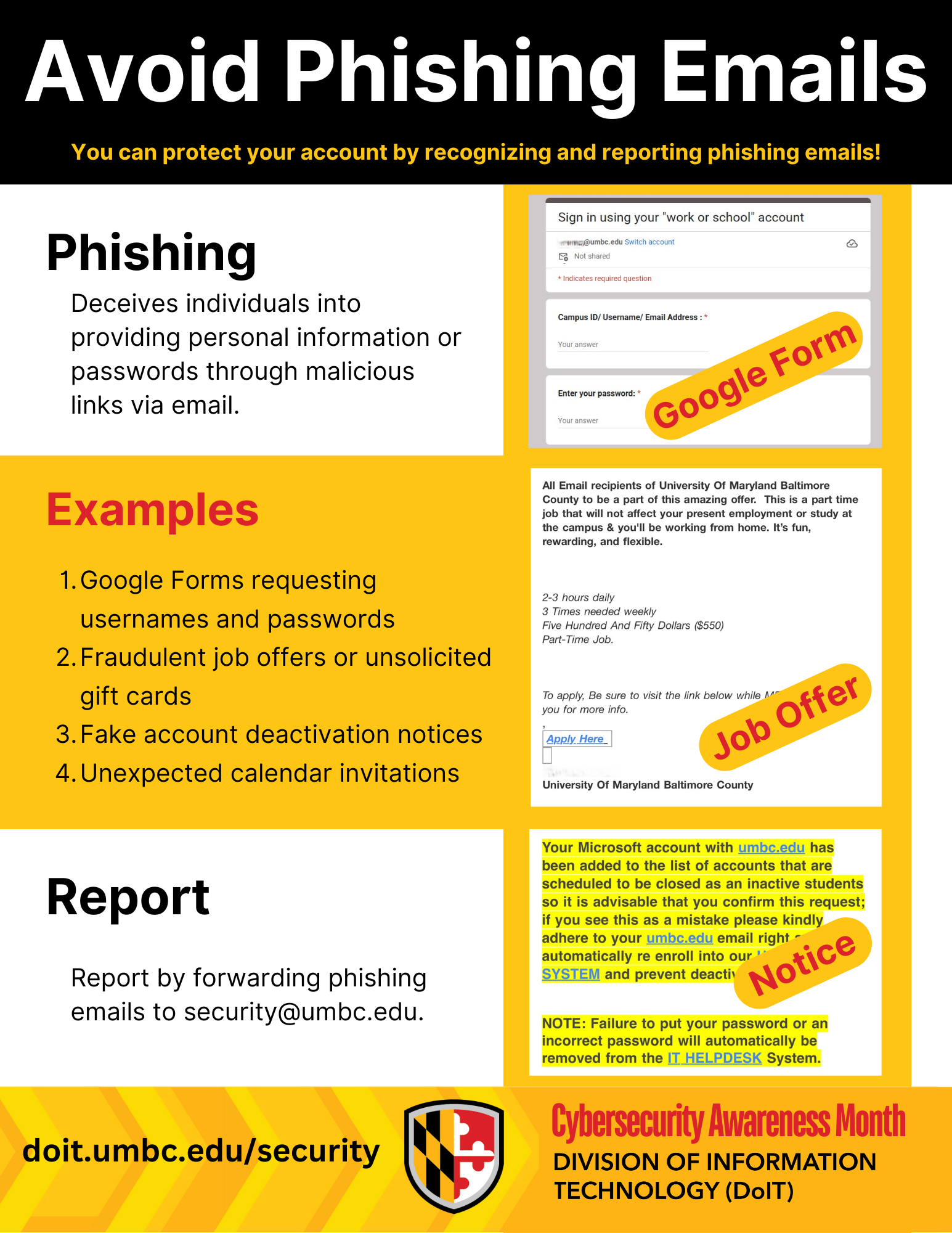
In the digital world, Phishing is one of the most used forms of cyber trickery where attackers impersonate trusted sources to deceive you into handing over credentials or personal information. These attacks come in various forms. Learning about them will help you not fall victim to those emails.
Phishing attacks are emails that may look like important messages but are actually crafted by cyber criminals. The good news? With the right knowledge, you can foil their tricks and keep yourself and UMBC safe. These are some tips on how you can recognize phishing emails:
Requests for Your Password: UMBC will never ask for your password. Never submit your password on Google forms or Monday.com forms. Your password is for your eyes only!
Unexpected Calendar Invitations: Watch out for calendar invites from unknown senders. Delete them and never click suspicious links inside.
Fraudulent Offers: Be wary of unsolicited offers for gift cards or jobs that are too promising. Do not send your personal or financial information to anyone who requests it over email or text. Real job postings are on Handshake only!
Unexpected Attachments or Links: Did someone send you a weird file or link you weren't expecting? Is a link in an email suspiciously short or strange-looking? If it feels off, don't click or download it.
A Sense of Urgency: Phishing emails often try to rush you into action, like claiming your account will be "deactivated" if you don't click a link immediately. Always be suspicious of urgent, high-pressure requests.
Poor Grammar and Spelling: While not always a giveaway, many phishing emails contain noticeable spelling errors or awkward phrasing.
What to do if you get a suspicious email:
If you suspect an email is a phishing attempt, do not reply, click any links, or open any attachments. Instead, forward the email immediately to the security team at security@umbc.edu. Your report helps protect everyone!
Stay vigilant, and together we can keep our digital environment safe.
]]>
Hello UMBC Community, In the digital world, Phishing is one of the most used forms of cyber trickery where attackers impersonate trusted sources to deceive you into handing over credentials or...
Newsletter
https://assets4-beta.my.umbc.edu/system/shared/attachments/a49662f7e2f62126be8f509fee187f46/69e9c656/news/000/153/400/ea057c6ee9f50f9a65bfa85c550f3fad/2025 Cybersecurity Awareness Month Flyers.pdf?1759945995
https://beta.my.umbc.edu/api/v0/pixel/news/153400/guest@my.umbc.edu/1905f817666a334e3785b5ea9b64232d/api/pixel
cybersecurity
itsecurity
phishing
scam
security
IT Security - DoIT Cybersecurity Assurance and Digital Trust
https://beta.my.umbc.edu/groups/itsecurity
https://assets3-beta.my.umbc.edu/images/avatars/group/7/xsmall.png?1776895340
https://assets3-beta.my.umbc.edu/images/avatars/group/7/original.png?1776895340
https://assets2-beta.my.umbc.edu/images/avatars/group/7/xxlarge.png?1776895340
https://assets1-beta.my.umbc.edu/images/avatars/group/7/xlarge.png?1776895340
https://assets3-beta.my.umbc.edu/images/avatars/group/7/large.png?1776895340
https://assets1-beta.my.umbc.edu/images/avatars/group/7/medium.png?1776895340
https://assets4-beta.my.umbc.edu/images/avatars/group/7/small.png?1776895340
https://assets3-beta.my.umbc.edu/images/avatars/group/7/xsmall.png?1776895340
https://assets4-beta.my.umbc.edu/images/avatars/group/7/xxsmall.png?1776895340
IT Security - DoIT Cybersecurity Assurance and Digital Trust
https://assets4-beta.my.umbc.edu/system/shared/thumbnails/news/000/153/400/eda3d05996f7407d552a9d7fc12787c6/xxlarge.jpg?1759945914
https://assets1-beta.my.umbc.edu/system/shared/thumbnails/news/000/153/400/eda3d05996f7407d552a9d7fc12787c6/xlarge.jpg?1759945914
https://assets2-beta.my.umbc.edu/system/shared/thumbnails/news/000/153/400/eda3d05996f7407d552a9d7fc12787c6/large.jpg?1759945914
https://assets3-beta.my.umbc.edu/system/shared/thumbnails/news/000/153/400/eda3d05996f7407d552a9d7fc12787c6/medium.jpg?1759945914
https://assets3-beta.my.umbc.edu/system/shared/thumbnails/news/000/153/400/eda3d05996f7407d552a9d7fc12787c6/small.jpg?1759945914
https://assets2-beta.my.umbc.edu/system/shared/thumbnails/news/000/153/400/eda3d05996f7407d552a9d7fc12787c6/xsmall.jpg?1759945914
https://assets1-beta.my.umbc.edu/system/shared/thumbnails/news/000/153/400/eda3d05996f7407d552a9d7fc12787c6/xxsmall.jpg?1759945914
Cybersecurity Awareness Month
1
0
true
Wed, 08 Oct 2025 13:55:57 -0400