Protecting Your Device from Proxy Hijacking
Learn how to spot, avoid, and report
Dear UMBC Community,
Imagine a stranger secretly using your home internet or your
laptop to hide their tracks. Recently, security experts have found that certain
apps are doing exactly that! They are secretly turning personal devices into
"digital masks" for cybercriminals.
When you download a seemingly harmless app, it may contain
hidden code that shares your internet connection with a global network of
hackers. This makes their activity look like it is coming from your device and
our campus.
How to spot strange activity on your device:
Your device might be working for someone else if you
notice:
- Performance
Issues: Your phone or laptop suddenly runs slowly, gets hot for no reason,
or has a battery that dies much faster than usual.
- High
Data Usage: You see a massive spike in your internet data usage that you
can't explain.
Tips to keep your tech private:
- Look
Before You Click: Even in official app stores, check the reviews. If a
simple app (like a flashlight or a calculator) asks for permission to
access your files, contacts, or location, it's a red flag.
- Beware
of the "Too Good to Be True": Be skeptical of
"cracked" software or free versions of paid apps. They often
come with a hidden "tax" on your security.
- Cheap
Smart Tech: Very inexpensive "Smart Home" or Internet of Things
(IoT) devices often have weak security, making them easy targets for
hackers.
What to do if you suspect trouble:
If your device is acting strangely or you receive a
suspicious email, do not click any links. Please forward any suspicious emails
to the security team at security@umbc.edu.
If you suspect a phishing or cybersecurity attempt, do not
reply, click any links, or open any attachments. Instead, forward the email
immediately to the security team at security@umbc.edu.
Your report helps protect everyone!
Thank you all for your continued awareness and assistance in
keeping our community secure.
Cybersecurity Assurance and Digital Trust
UMBC Division of Information Technology (DoIT)
]]>
Dear UMBC Community, Imagine a stranger secretly using your home internet or your laptop to hide their tracks. Recently, security experts have found that certain apps are doing exactly that!...
https://beta.my.umbc.edu/api/v0/pixel/news/157619/guest@my.umbc.edu/7fee7b3174b2799dafbee2444900d991/api/pixel
cybersecurity
proxy
security
IT Security - DoIT Cybersecurity Assurance and Digital Trust
https://beta.my.umbc.edu/groups/itsecurity
https://assets3-beta.my.umbc.edu/images/avatars/group/7/xsmall.png?1776895340
https://assets3-beta.my.umbc.edu/images/avatars/group/7/original.png?1776895340
https://assets2-beta.my.umbc.edu/images/avatars/group/7/xxlarge.png?1776895340
https://assets1-beta.my.umbc.edu/images/avatars/group/7/xlarge.png?1776895340
https://assets3-beta.my.umbc.edu/images/avatars/group/7/large.png?1776895340
https://assets1-beta.my.umbc.edu/images/avatars/group/7/medium.png?1776895340
https://assets4-beta.my.umbc.edu/images/avatars/group/7/small.png?1776895340
https://assets3-beta.my.umbc.edu/images/avatars/group/7/xsmall.png?1776895340
https://assets4-beta.my.umbc.edu/images/avatars/group/7/xxsmall.png?1776895340
IT Security - DoIT Cybersecurity Assurance and Digital Trust
https://assets3-beta.my.umbc.edu/system/shared/thumbnails/news/000/157/619/dfed3fc4107b50b28438cb0684124f93/xxlarge.jpg?1774277006
https://assets3-beta.my.umbc.edu/system/shared/thumbnails/news/000/157/619/dfed3fc4107b50b28438cb0684124f93/xlarge.jpg?1774277006
https://assets2-beta.my.umbc.edu/system/shared/thumbnails/news/000/157/619/dfed3fc4107b50b28438cb0684124f93/large.jpg?1774277006
https://assets1-beta.my.umbc.edu/system/shared/thumbnails/news/000/157/619/dfed3fc4107b50b28438cb0684124f93/medium.jpg?1774277006
https://assets1-beta.my.umbc.edu/system/shared/thumbnails/news/000/157/619/dfed3fc4107b50b28438cb0684124f93/small.jpg?1774277006
https://assets2-beta.my.umbc.edu/system/shared/thumbnails/news/000/157/619/dfed3fc4107b50b28438cb0684124f93/xsmall.jpg?1774277006
https://assets2-beta.my.umbc.edu/system/shared/thumbnails/news/000/157/619/dfed3fc4107b50b28438cb0684124f93/xxsmall.jpg?1774277006
Gold shield outline with a checkmark in the center and the text "UMBC cybersecurity" above the shield
1
0
true
Mon, 23 Mar 2026 10:44:22 -0400
Launching DoIT's Cybersecurity Newsletter
Stay smart, stay safe, and secure your digital life.
Hello UMBC,
Cybersecurity isn't just a task for IT, it's a 24/7 commitment for our entire community. To help you navigate the ever-changing digital landscape, we are excited to launch the first edition of our cybersecurity newsletter.
In this inaugural issue, we dive into:
- Phishing Defense: How to spot "too good to be true" offers and urgent scams.
- Travel Safety: Keeping your data secure while researching or vacationing abroad.
- Latest Threats: Why you should be wary of TikTok scams and "Quishing" (QR code phishing).
- Policy Updates: Key changes to UMBC's Acceptable Use and Data Protection policies.
Read the newsletter attached!
Remember: If an email feels "off," it probably is. Forward suspicious messages to security@umbc.edu and help keep our campus secure.
Stay smart and stay safe!
- Stacy Cahill
Chief Information Security Officer
University of Maryland, Baltimore County
]]>
Hello UMBC, Cybersecurity isn't just a task for IT, it's a 24/7 commitment for our entire community. To help you navigate the ever-changing digital landscape, we are excited to launch the first...
Document
https://assets3-beta.my.umbc.edu/system/shared/attachments/3f62e62f513729a61eddbb3d52347419/69e97316/news/000/155/942/fb5383c3facfd8a6d2448a64854c0c75/2026 DoIT Cybersecurity Newsletter.pdf?1769545894
https://beta.my.umbc.edu/api/v0/pixel/news/155942/guest@my.umbc.edu/865b9072c741b48a5e21d56b3bccba51/api/pixel
cybersecurity
news
safety
security
IT Security - DoIT Cybersecurity Assurance and Digital Trust
https://beta.my.umbc.edu/groups/itsecurity
https://assets3-beta.my.umbc.edu/images/avatars/group/7/xsmall.png?1776895340
https://assets3-beta.my.umbc.edu/images/avatars/group/7/original.png?1776895340
https://assets2-beta.my.umbc.edu/images/avatars/group/7/xxlarge.png?1776895340
https://assets1-beta.my.umbc.edu/images/avatars/group/7/xlarge.png?1776895340
https://assets3-beta.my.umbc.edu/images/avatars/group/7/large.png?1776895340
https://assets1-beta.my.umbc.edu/images/avatars/group/7/medium.png?1776895340
https://assets4-beta.my.umbc.edu/images/avatars/group/7/small.png?1776895340
https://assets3-beta.my.umbc.edu/images/avatars/group/7/xsmall.png?1776895340
https://assets4-beta.my.umbc.edu/images/avatars/group/7/xxsmall.png?1776895340
IT Security - DoIT Cybersecurity Assurance and Digital Trust
https://assets2-beta.my.umbc.edu/system/shared/thumbnails/news/000/155/942/2dca47b45c349b40dcc47ac3ffd3634c/xxlarge.jpg?1769545816
https://assets4-beta.my.umbc.edu/system/shared/thumbnails/news/000/155/942/2dca47b45c349b40dcc47ac3ffd3634c/xlarge.jpg?1769545816
https://assets3-beta.my.umbc.edu/system/shared/thumbnails/news/000/155/942/2dca47b45c349b40dcc47ac3ffd3634c/large.jpg?1769545816
https://assets4-beta.my.umbc.edu/system/shared/thumbnails/news/000/155/942/2dca47b45c349b40dcc47ac3ffd3634c/medium.jpg?1769545816
https://assets4-beta.my.umbc.edu/system/shared/thumbnails/news/000/155/942/2dca47b45c349b40dcc47ac3ffd3634c/small.jpg?1769545816
https://assets2-beta.my.umbc.edu/system/shared/thumbnails/news/000/155/942/2dca47b45c349b40dcc47ac3ffd3634c/xsmall.jpg?1769545816
https://assets1-beta.my.umbc.edu/system/shared/thumbnails/news/000/155/942/2dca47b45c349b40dcc47ac3ffd3634c/xxsmall.jpg?1769545816
UMBC Shield with text "DoIT News"
3
0
true
Tue, 27 Jan 2026 15:31:53 -0500
Active Phishing Alert
There are no issues with your student ID!
Hello UMBC Community!
The Cybersecurity Assurance and Digital Trust Department (CADT) in the Division of Information Technology is tracking an active phishing campaign that has impacted our campus community. This particular phishing campaign is targeting users with a phishing link that leads to a webpage resembling myUMBC. Examples of the phishing emails can be found at the end of this post.
Compromised users have been notified and their account passwords scrambled to safeguard their accounts. They have also received personalized myUMBC posts informing them of the events.
If you have received notices from CADT, make sure you change your password to a long, unique value that you have not used on myUMBC or other services in the past. It is important that you do not provide attackers with your DUO two-factor authentication codes or accept push notifications you have not initiated.
Users who believe they have already clicked on the phishing links should contact security@umbc.edu to report the phishing email.
Thank you for assisting us in keeping the campus community safe!
Phishing Examples
]]>
Hello UMBC Community! The Cybersecurity Assurance and Digital Trust Department (CADT) in the Division of Information Technology is tracking an active phishing campaign that has impacted our...
Image
https://assets1-beta.my.umbc.edu/system/shared/attachments/d23bf58d90e1c23b0dc50723fec8a9c2/69e97316/news/000/153/854/cb1aabef279f18e45f3c405c782c8d09/image1.png?1761242964
https://beta.my.umbc.edu/api/v0/pixel/news/153854/guest@my.umbc.edu/d195f92c498a3af18d684562d0945190/api/pixel
cybersecurity
phishing
IT Security - DoIT Cybersecurity Assurance and Digital Trust
https://beta.my.umbc.edu/groups/itsecurity
https://assets3-beta.my.umbc.edu/images/avatars/group/7/xsmall.png?1776895340
https://assets3-beta.my.umbc.edu/images/avatars/group/7/original.png?1776895340
https://assets2-beta.my.umbc.edu/images/avatars/group/7/xxlarge.png?1776895340
https://assets1-beta.my.umbc.edu/images/avatars/group/7/xlarge.png?1776895340
https://assets3-beta.my.umbc.edu/images/avatars/group/7/large.png?1776895340
https://assets1-beta.my.umbc.edu/images/avatars/group/7/medium.png?1776895340
https://assets4-beta.my.umbc.edu/images/avatars/group/7/small.png?1776895340
https://assets3-beta.my.umbc.edu/images/avatars/group/7/xsmall.png?1776895340
https://assets4-beta.my.umbc.edu/images/avatars/group/7/xxsmall.png?1776895340
IT Security - DoIT Cybersecurity Assurance and Digital Trust
https://assets4-beta.my.umbc.edu/system/shared/thumbnails/news/000/153/854/b3b8174c030b9584943476ccec2ccfbf/xxlarge.jpg?1761243266
https://assets2-beta.my.umbc.edu/system/shared/thumbnails/news/000/153/854/b3b8174c030b9584943476ccec2ccfbf/xlarge.jpg?1761243266
https://assets4-beta.my.umbc.edu/system/shared/thumbnails/news/000/153/854/b3b8174c030b9584943476ccec2ccfbf/large.jpg?1761243266
https://assets1-beta.my.umbc.edu/system/shared/thumbnails/news/000/153/854/b3b8174c030b9584943476ccec2ccfbf/medium.jpg?1761243266
https://assets1-beta.my.umbc.edu/system/shared/thumbnails/news/000/153/854/b3b8174c030b9584943476ccec2ccfbf/small.jpg?1761243266
https://assets1-beta.my.umbc.edu/system/shared/thumbnails/news/000/153/854/b3b8174c030b9584943476ccec2ccfbf/xsmall.jpg?1761243266
https://assets4-beta.my.umbc.edu/system/shared/thumbnails/news/000/153/854/b3b8174c030b9584943476ccec2ccfbf/xxsmall.jpg?1761243266
Cybersecurity alert image
30
0
false
Thu, 23 Oct 2025 14:15:21 -0400
Thu, 23 Oct 2025 15:21:35 -0400
Tips to Combat Financial Scams
Hello UMBC Community!
The Cybersecurity Assurance and Digital Trust Department in the Division of Information Technology has some tips for you to stay safe from financial scams that have recently taken place.
Attackers send phishing emails to trick unsuspecting victims into providing their user ID, password, and multifactor codes. Often, these phishing lures contain a link that redirects the user to a login page.
DoIT has observed cases where the attackers are mirroring legitimate login screens to capture credentials and multifactor authentication (MFA) codes in real time. The only indicator that something is amiss is the URL in the address bar.
Follow these general tips to safeguard your financial data and funds:
- Use Strong & Unique Passwords: Never reuse your UMBC password on other platforms — including financial services such as BankMobile. Create unique passwords for each separate account.
- Periodically Verify Your Personal Information: Log into your accounts and make sure all your information, such as linked financial accounts, billing address, phone number, and email addresses are correct.
- Check the Link: Look over URLs and ensure you are accessing a trusted service. If you see a login page but the URL does not look legitimate, do not provide your password or MFA codes. It is best practice to bookmark trusted services to navigate to them directly.
- Don't Give Away Your Secrets: UMBC and your financial institutions will never call, email, or text you to ask for your password or MFA codes.
If you give someone your password and MFA codes, you are handing them the keys to your account. This could result in financial loss or unauthorized activity for which you may be held responsible.
If you see something, say something! Report all phishing emails to security@umbc.edu.
Stay smart, stay safe!
]]>
Hello UMBC Community! The Cybersecurity Assurance and Digital Trust Department in the Division of Information Technology has some tips for you to stay safe from financial scams that have recently...
https://beta.my.umbc.edu/api/v0/pixel/news/153810/guest@my.umbc.edu/72d523b7d7a1090b5c376def4e6d019d/api/pixel
cyber
cybersecurity
itsecurity
news
scam
IT Security - DoIT Cybersecurity Assurance and Digital Trust
https://beta.my.umbc.edu/groups/itsecurity
https://assets3-beta.my.umbc.edu/images/avatars/group/7/xsmall.png?1776895340
https://assets3-beta.my.umbc.edu/images/avatars/group/7/original.png?1776895340
https://assets2-beta.my.umbc.edu/images/avatars/group/7/xxlarge.png?1776895340
https://assets1-beta.my.umbc.edu/images/avatars/group/7/xlarge.png?1776895340
https://assets3-beta.my.umbc.edu/images/avatars/group/7/large.png?1776895340
https://assets1-beta.my.umbc.edu/images/avatars/group/7/medium.png?1776895340
https://assets4-beta.my.umbc.edu/images/avatars/group/7/small.png?1776895340
https://assets3-beta.my.umbc.edu/images/avatars/group/7/xsmall.png?1776895340
https://assets4-beta.my.umbc.edu/images/avatars/group/7/xxsmall.png?1776895340
IT Security - DoIT Cybersecurity Assurance and Digital Trust
https://assets3-beta.my.umbc.edu/system/shared/thumbnails/news/000/153/810/60ff9bc17f132ae94f82b3eae7fab1b5/xxlarge.jpg?1761157135
https://assets4-beta.my.umbc.edu/system/shared/thumbnails/news/000/153/810/60ff9bc17f132ae94f82b3eae7fab1b5/xlarge.jpg?1761157135
https://assets3-beta.my.umbc.edu/system/shared/thumbnails/news/000/153/810/60ff9bc17f132ae94f82b3eae7fab1b5/large.jpg?1761157135
https://assets2-beta.my.umbc.edu/system/shared/thumbnails/news/000/153/810/60ff9bc17f132ae94f82b3eae7fab1b5/medium.jpg?1761157135
https://assets1-beta.my.umbc.edu/system/shared/thumbnails/news/000/153/810/60ff9bc17f132ae94f82b3eae7fab1b5/small.jpg?1761157135
https://assets4-beta.my.umbc.edu/system/shared/thumbnails/news/000/153/810/60ff9bc17f132ae94f82b3eae7fab1b5/xsmall.jpg?1761157135
https://assets2-beta.my.umbc.edu/system/shared/thumbnails/news/000/153/810/60ff9bc17f132ae94f82b3eae7fab1b5/xxsmall.jpg?1761157135
UMBC Cybersecurity text and below it is a shield outline with a check mark in the center
3
0
true
Wed, 22 Oct 2025 14:20:01 -0400
Stop! A DUO Push You Didn't Initiate
Cybersecurity Awareness Month
Hello UMBC Community,
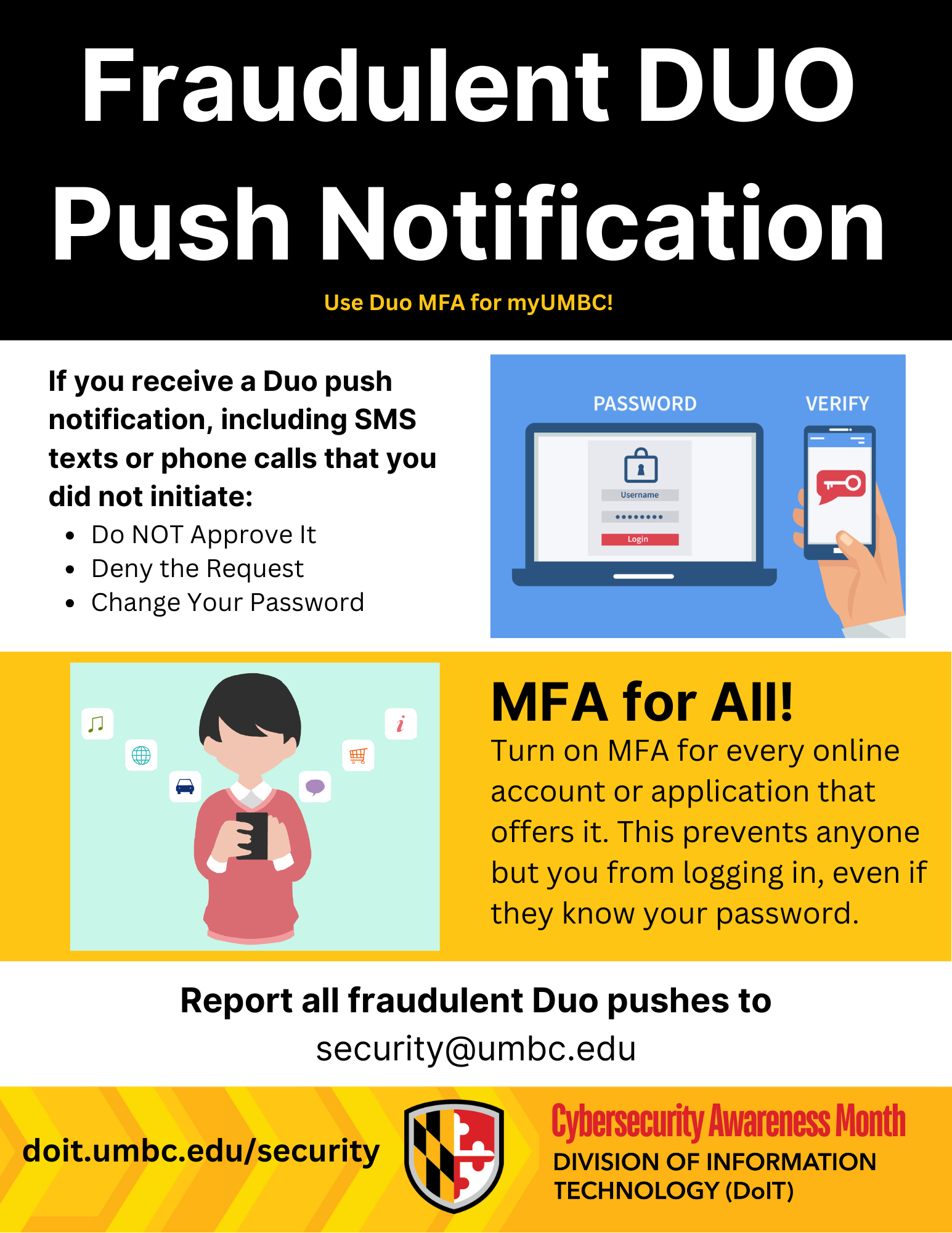
We rely on Duo two-factor authentication to protect our accounts, and it's an excellent defense. However, cybercriminals are always looking for new ways to get past our security. This week's topic is all about what to do if you receive a Duo push notification you didn't initiate.
You're working on your computer, not logging into anything new, and suddenly your phone buzzes with Duo push notifications, including SMS texts or phone calls from Duo. What's happening? This is likely an attacker who has obtained your password and is attempting to bypass Duo to access your account.
Your immediate action is critical.
Do NOT Approve It: The most important thing is to never approve a Duo push notification you did not initiate. Approving it will give the attacker access to your account.
Deny the Request: Decline the request on your phone.
Report as Fraudulent: If you can, mark the notification as fraudulent.
Change Your Password: Immediately change your password on a trusted device or computer. This will invalidate the password the attacker is using.
Remember, a Duo push notification is like a digital handshake. You must be the one to initiate it. If someone else is trying to shake your hand, don't approve the connection!
If you received a Duo push notification you did not initiate, deny the request, change your password, and immediately report the event to the security team at security@umbc.edu. Your report helps protect everyone!
Stay safe out there.
]]>
Hello UMBC Community, We rely on Duo two-factor authentication to protect our accounts, and it's an excellent defense. However, cybercriminals are always looking for new ways to get past our...
Image
https://assets1-beta.my.umbc.edu/system/shared/attachments/775164caef1fc75c350815ae3cd5273a/69e97316/news/000/153/511/85fc0797fcbf06cda270bc538f2692f6/2025 Cybersecurity Awareness Month General Thumbnail.JPG?1760375649
https://beta.my.umbc.edu/api/v0/pixel/news/153511/guest@my.umbc.edu/e6b38f0e8ed88e40c1fca608330a1eff/api/pixel
cybersecurity
mfa
security
IT Security - DoIT Cybersecurity Assurance and Digital Trust
https://beta.my.umbc.edu/groups/itsecurity
https://assets3-beta.my.umbc.edu/images/avatars/group/7/xsmall.png?1776895340
https://assets3-beta.my.umbc.edu/images/avatars/group/7/original.png?1776895340
https://assets2-beta.my.umbc.edu/images/avatars/group/7/xxlarge.png?1776895340
https://assets1-beta.my.umbc.edu/images/avatars/group/7/xlarge.png?1776895340
https://assets3-beta.my.umbc.edu/images/avatars/group/7/large.png?1776895340
https://assets1-beta.my.umbc.edu/images/avatars/group/7/medium.png?1776895340
https://assets4-beta.my.umbc.edu/images/avatars/group/7/small.png?1776895340
https://assets3-beta.my.umbc.edu/images/avatars/group/7/xsmall.png?1776895340
https://assets4-beta.my.umbc.edu/images/avatars/group/7/xxsmall.png?1776895340
IT Security - DoIT Cybersecurity Assurance and Digital Trust
https://assets1-beta.my.umbc.edu/system/shared/thumbnails/news/000/153/511/55d9057dcb2bed6c5984ce33d52dc925/xxlarge.jpg?1760375660
https://assets1-beta.my.umbc.edu/system/shared/thumbnails/news/000/153/511/55d9057dcb2bed6c5984ce33d52dc925/xlarge.jpg?1760375660
https://assets3-beta.my.umbc.edu/system/shared/thumbnails/news/000/153/511/55d9057dcb2bed6c5984ce33d52dc925/large.jpg?1760375660
https://assets4-beta.my.umbc.edu/system/shared/thumbnails/news/000/153/511/55d9057dcb2bed6c5984ce33d52dc925/medium.jpg?1760375660
https://assets2-beta.my.umbc.edu/system/shared/thumbnails/news/000/153/511/55d9057dcb2bed6c5984ce33d52dc925/small.jpg?1760375660
https://assets3-beta.my.umbc.edu/system/shared/thumbnails/news/000/153/511/55d9057dcb2bed6c5984ce33d52dc925/xsmall.jpg?1760375660
https://assets4-beta.my.umbc.edu/system/shared/thumbnails/news/000/153/511/55d9057dcb2bed6c5984ce33d52dc925/xxsmall.jpg?1760375660
Cybersecurity Awareness Month text on black and gold background
2
0
true
Mon, 13 Oct 2025 13:17:29 -0400
Don't Take the Bait! How to Spot a Phishing Scam
Cybersecurity Awareness Month
Hello UMBC Community,
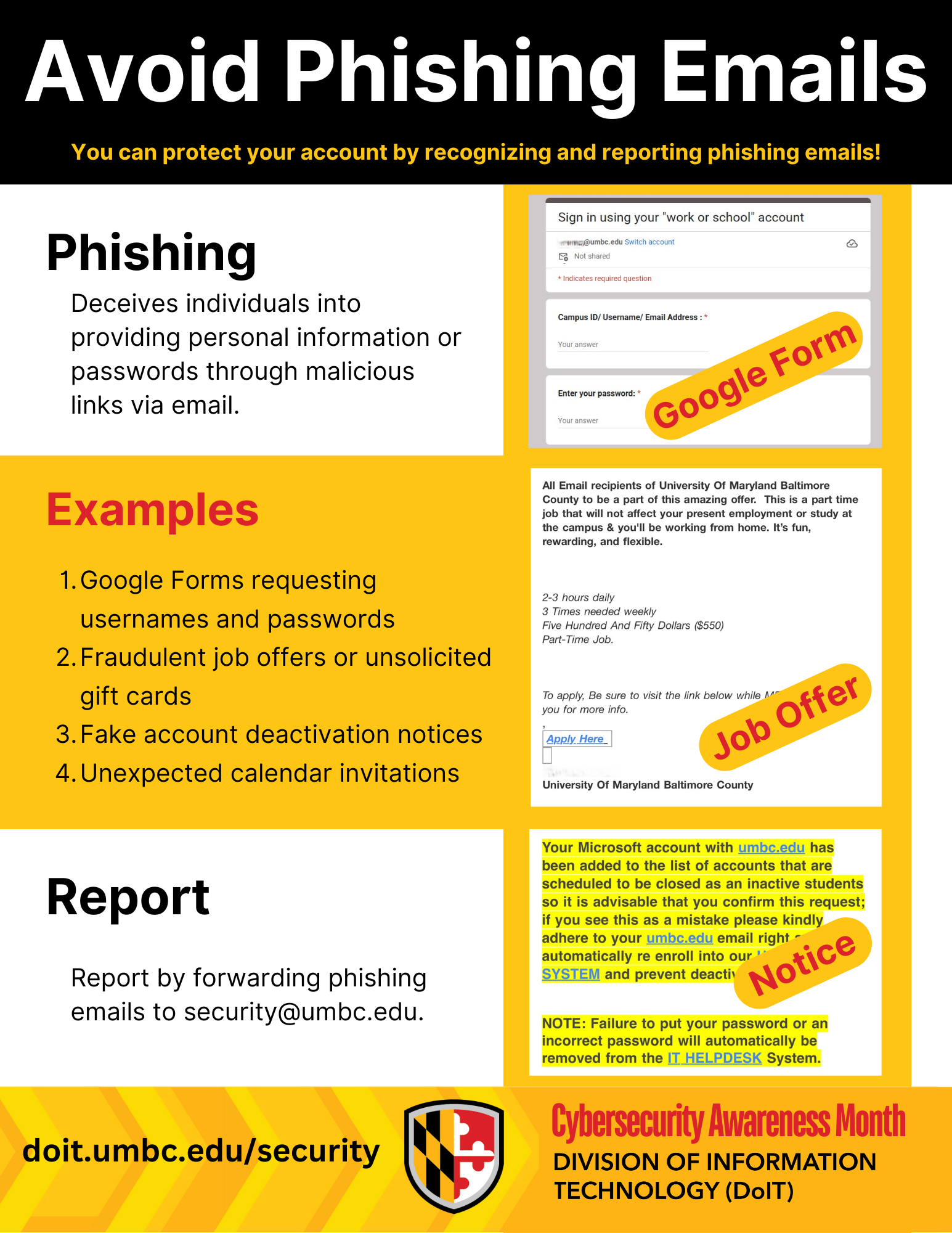
In the digital world, Phishing is one of the most used forms of cyber trickery where attackers impersonate trusted sources to deceive you into handing over credentials or personal information. These attacks come in various forms. Learning about them will help you not fall victim to those emails.
Phishing attacks are emails that may look like important messages but are actually crafted by cyber criminals. The good news? With the right knowledge, you can foil their tricks and keep yourself and UMBC safe. These are some tips on how you can recognize phishing emails:
Requests for Your Password: UMBC will never ask for your password. Never submit your password on Google forms or Monday.com forms. Your password is for your eyes only!
Unexpected Calendar Invitations: Watch out for calendar invites from unknown senders. Delete them and never click suspicious links inside.
Fraudulent Offers: Be wary of unsolicited offers for gift cards or jobs that are too promising. Do not send your personal or financial information to anyone who requests it over email or text. Real job postings are on Handshake only!
Unexpected Attachments or Links: Did someone send you a weird file or link you weren't expecting? Is a link in an email suspiciously short or strange-looking? If it feels off, don't click or download it.
A Sense of Urgency: Phishing emails often try to rush you into action, like claiming your account will be "deactivated" if you don't click a link immediately. Always be suspicious of urgent, high-pressure requests.
Poor Grammar and Spelling: While not always a giveaway, many phishing emails contain noticeable spelling errors or awkward phrasing.
What to do if you get a suspicious email:
If you suspect an email is a phishing attempt, do not reply, click any links, or open any attachments. Instead, forward the email immediately to the security team at security@umbc.edu. Your report helps protect everyone!
Stay vigilant, and together we can keep our digital environment safe.
]]>
Hello UMBC Community, In the digital world, Phishing is one of the most used forms of cyber trickery where attackers impersonate trusted sources to deceive you into handing over credentials or...
Newsletter
https://assets1-beta.my.umbc.edu/system/shared/attachments/9839a062e2d610e6dc29b8baff0d09c9/69e97316/news/000/153/400/ea057c6ee9f50f9a65bfa85c550f3fad/2025 Cybersecurity Awareness Month Flyers.pdf?1759945995
https://beta.my.umbc.edu/api/v0/pixel/news/153400/guest@my.umbc.edu/1905f817666a334e3785b5ea9b64232d/api/pixel
cybersecurity
itsecurity
phishing
scam
security
IT Security - DoIT Cybersecurity Assurance and Digital Trust
https://beta.my.umbc.edu/groups/itsecurity
https://assets3-beta.my.umbc.edu/images/avatars/group/7/xsmall.png?1776895340
https://assets3-beta.my.umbc.edu/images/avatars/group/7/original.png?1776895340
https://assets2-beta.my.umbc.edu/images/avatars/group/7/xxlarge.png?1776895340
https://assets1-beta.my.umbc.edu/images/avatars/group/7/xlarge.png?1776895340
https://assets3-beta.my.umbc.edu/images/avatars/group/7/large.png?1776895340
https://assets1-beta.my.umbc.edu/images/avatars/group/7/medium.png?1776895340
https://assets4-beta.my.umbc.edu/images/avatars/group/7/small.png?1776895340
https://assets3-beta.my.umbc.edu/images/avatars/group/7/xsmall.png?1776895340
https://assets4-beta.my.umbc.edu/images/avatars/group/7/xxsmall.png?1776895340
IT Security - DoIT Cybersecurity Assurance and Digital Trust
https://assets4-beta.my.umbc.edu/system/shared/thumbnails/news/000/153/400/eda3d05996f7407d552a9d7fc12787c6/xxlarge.jpg?1759945914
https://assets1-beta.my.umbc.edu/system/shared/thumbnails/news/000/153/400/eda3d05996f7407d552a9d7fc12787c6/xlarge.jpg?1759945914
https://assets2-beta.my.umbc.edu/system/shared/thumbnails/news/000/153/400/eda3d05996f7407d552a9d7fc12787c6/large.jpg?1759945914
https://assets3-beta.my.umbc.edu/system/shared/thumbnails/news/000/153/400/eda3d05996f7407d552a9d7fc12787c6/medium.jpg?1759945914
https://assets3-beta.my.umbc.edu/system/shared/thumbnails/news/000/153/400/eda3d05996f7407d552a9d7fc12787c6/small.jpg?1759945914
https://assets2-beta.my.umbc.edu/system/shared/thumbnails/news/000/153/400/eda3d05996f7407d552a9d7fc12787c6/xsmall.jpg?1759945914
https://assets1-beta.my.umbc.edu/system/shared/thumbnails/news/000/153/400/eda3d05996f7407d552a9d7fc12787c6/xxsmall.jpg?1759945914
Cybersecurity Awareness Month
1
0
true
Wed, 08 Oct 2025 13:55:57 -0400
Welcome to Cybersecurity Awareness Month!
Stay connected, stay safe, stay smart!
Hello UMBC Community,Cyber threats are always lurking in the digital realm, but don't worry! The security team at
Cybersecurity Assurance and Digital Trust (CADT) is here to guide you so you can protect yourself against phishing, malware, and other cyber threats.
What can you expect this month?
Tips to stay safe
October is Cybersecurity Awareness Month and this year, we will be posting cybersecurity tips for the UMBC community each week.
Catch a "Fish"!
You can also connect with us in person! Come check out our table on your way to lunch on October 6th and 20th from 12:00 to 1:00 PM at Breezeway near the Commons! Catch a fish or spot a phish and get a Swedish fish!
Reminder
Cybersecurity is everyone's responsibility. Together, we will build a strong and resilient security culture. Only by increasing your understanding of cybersecurity can you defend against cyber attacks!
Stay tuned for an amazing month filled with cybersecurity tips, treats, merch, and posters to make learning about cybersecurity fun and memorable!
Thank you, and may your digital defenses be strong this October!
]]>
Hello UMBC Community, Cyber threats are always lurking in the digital realm, but don't worry! The security team at Cybersecurity Assurance and Digital Trust (CADT) is here to guide you so you can...
Flyer
https://assets1-beta.my.umbc.edu/system/shared/attachments/33ada3d5dafa99ea0111d184fefb8fc0/69e97316/news/000/153/399/9437e3994929bc613a9f2b7fe5fb4f9f/2025 Cybersecurity Awareness Month Flyers.pdf?1759945719
https://beta.my.umbc.edu/api/v0/pixel/news/153399/guest@my.umbc.edu/ab2ac6ab53c36e40c6ffcc8d571d1e23/api/pixel
cybersecurity
itsecurity
security
IT Security - DoIT Cybersecurity Assurance and Digital Trust
https://beta.my.umbc.edu/groups/itsecurity
https://assets3-beta.my.umbc.edu/images/avatars/group/7/xsmall.png?1776895340
https://assets3-beta.my.umbc.edu/images/avatars/group/7/original.png?1776895340
https://assets2-beta.my.umbc.edu/images/avatars/group/7/xxlarge.png?1776895340
https://assets1-beta.my.umbc.edu/images/avatars/group/7/xlarge.png?1776895340
https://assets3-beta.my.umbc.edu/images/avatars/group/7/large.png?1776895340
https://assets1-beta.my.umbc.edu/images/avatars/group/7/medium.png?1776895340
https://assets4-beta.my.umbc.edu/images/avatars/group/7/small.png?1776895340
https://assets3-beta.my.umbc.edu/images/avatars/group/7/xsmall.png?1776895340
https://assets4-beta.my.umbc.edu/images/avatars/group/7/xxsmall.png?1776895340
IT Security - DoIT Cybersecurity Assurance and Digital Trust
https://assets2-beta.my.umbc.edu/system/shared/thumbnails/news/000/153/399/db4c3bf00068ad845398df26d8dcc4a4/xxlarge.jpg?1759945680
https://assets2-beta.my.umbc.edu/system/shared/thumbnails/news/000/153/399/db4c3bf00068ad845398df26d8dcc4a4/xlarge.jpg?1759945680
https://assets2-beta.my.umbc.edu/system/shared/thumbnails/news/000/153/399/db4c3bf00068ad845398df26d8dcc4a4/large.jpg?1759945680
https://assets1-beta.my.umbc.edu/system/shared/thumbnails/news/000/153/399/db4c3bf00068ad845398df26d8dcc4a4/medium.jpg?1759945680
https://assets1-beta.my.umbc.edu/system/shared/thumbnails/news/000/153/399/db4c3bf00068ad845398df26d8dcc4a4/small.jpg?1759945680
https://assets3-beta.my.umbc.edu/system/shared/thumbnails/news/000/153/399/db4c3bf00068ad845398df26d8dcc4a4/xsmall.jpg?1759945680
https://assets1-beta.my.umbc.edu/system/shared/thumbnails/news/000/153/399/db4c3bf00068ad845398df26d8dcc4a4/xxsmall.jpg?1759945680
Cybersecurity Awareness Month. Stay Connected, stay safe, and stay smart
1
0
true
Wed, 08 Oct 2025 13:51:02 -0400