Stop! A DUO Push You Didn't Initiate
Cybersecurity Awareness Month
Hello UMBC Community,
We rely on Duo two-factor authentication to protect our accounts, and it's an excellent defense. However, cybercriminals are always looking for new ways to get past our security. This week's topic is all about what to do if you receive a Duo push notification you didn't initiate.
You're working on your computer, not logging into anything new, and suddenly your phone buzzes with Duo push notifications, including SMS texts or phone calls from Duo. What's happening? This is likely an attacker who has obtained your password and is attempting to bypass Duo to access your account.
Your immediate action is critical.
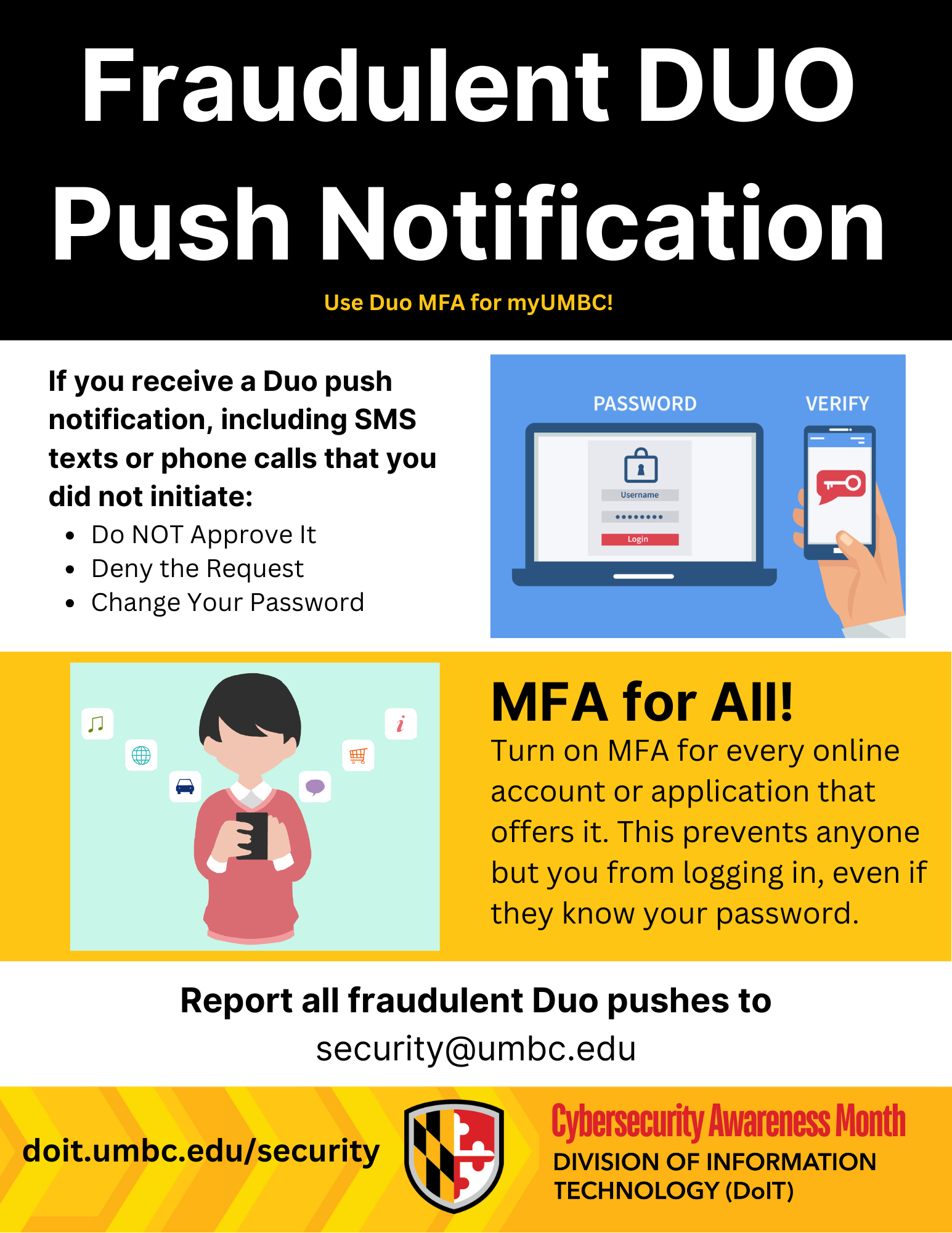
Do NOT Approve It: The most important thing is to never approve a Duo push notification you did not initiate. Approving it will give the attacker access to your account.
Deny the Request: Decline the request on your phone.
Report as Fraudulent: If you can, mark the notification as fraudulent.
Change Your Password: Immediately change your password on a trusted device or computer. This will invalidate the password the attacker is using.
Remember, a Duo push notification is like a digital handshake. You must be the one to initiate it. If someone else is trying to shake your hand, don't approve the connection!
If you received a Duo push notification you did not initiate, deny the request, change your password, and immediately report the event to the security team at security@umbc.edu. Your report helps protect everyone!
Stay safe out there.
]]>
Hello UMBC Community, We rely on Duo two-factor authentication to protect our accounts, and it's an excellent defense. However, cybercriminals are always looking for new ways to get past our...
Image
https://assets3-beta.my.umbc.edu/system/shared/attachments/1a7332fddfad10a0f50df0392140f03d/69ee742c/news/000/153/511/85fc0797fcbf06cda270bc538f2692f6/2025 Cybersecurity Awareness Month General Thumbnail.JPG?1760375649
https://beta.my.umbc.edu/api/v0/pixel/news/153511/guest@my.umbc.edu/e6b38f0e8ed88e40c1fca608330a1eff/api/pixel
cybersecurity
mfa
security
IT Security - DoIT Cybersecurity Assurance and Digital Trust
https://beta.my.umbc.edu/groups/itsecurity
https://assets1-beta.my.umbc.edu/images/avatars/group/7/xsmall.png?1777162216
https://assets4-beta.my.umbc.edu/images/avatars/group/7/original.png?1777162216
https://assets1-beta.my.umbc.edu/images/avatars/group/7/xxlarge.png?1777162216
https://assets1-beta.my.umbc.edu/images/avatars/group/7/xlarge.png?1777162216
https://assets4-beta.my.umbc.edu/images/avatars/group/7/large.png?1777162216
https://assets4-beta.my.umbc.edu/images/avatars/group/7/medium.png?1777162216
https://assets1-beta.my.umbc.edu/images/avatars/group/7/small.png?1777162216
https://assets1-beta.my.umbc.edu/images/avatars/group/7/xsmall.png?1777162216
https://assets1-beta.my.umbc.edu/images/avatars/group/7/xxsmall.png?1777162216
IT Security - DoIT Cybersecurity Assurance and Digital Trust
https://assets1-beta.my.umbc.edu/system/shared/thumbnails/news/000/153/511/55d9057dcb2bed6c5984ce33d52dc925/xxlarge.jpg?1760375660
https://assets1-beta.my.umbc.edu/system/shared/thumbnails/news/000/153/511/55d9057dcb2bed6c5984ce33d52dc925/xlarge.jpg?1760375660
https://assets3-beta.my.umbc.edu/system/shared/thumbnails/news/000/153/511/55d9057dcb2bed6c5984ce33d52dc925/large.jpg?1760375660
https://assets4-beta.my.umbc.edu/system/shared/thumbnails/news/000/153/511/55d9057dcb2bed6c5984ce33d52dc925/medium.jpg?1760375660
https://assets2-beta.my.umbc.edu/system/shared/thumbnails/news/000/153/511/55d9057dcb2bed6c5984ce33d52dc925/small.jpg?1760375660
https://assets3-beta.my.umbc.edu/system/shared/thumbnails/news/000/153/511/55d9057dcb2bed6c5984ce33d52dc925/xsmall.jpg?1760375660
https://assets4-beta.my.umbc.edu/system/shared/thumbnails/news/000/153/511/55d9057dcb2bed6c5984ce33d52dc925/xxsmall.jpg?1760375660
Cybersecurity Awareness Month text on black and gold background
2
0
true
Mon, 13 Oct 2025 13:17:29 -0400
Don't Take the Bait! How to Spot a Phishing Scam
Cybersecurity Awareness Month
Hello UMBC Community,
In the digital world, Phishing is one of the most used forms of cyber trickery where attackers impersonate trusted sources to deceive you into handing over credentials or personal information. These attacks come in various forms. Learning about them will help you not fall victim to those emails.
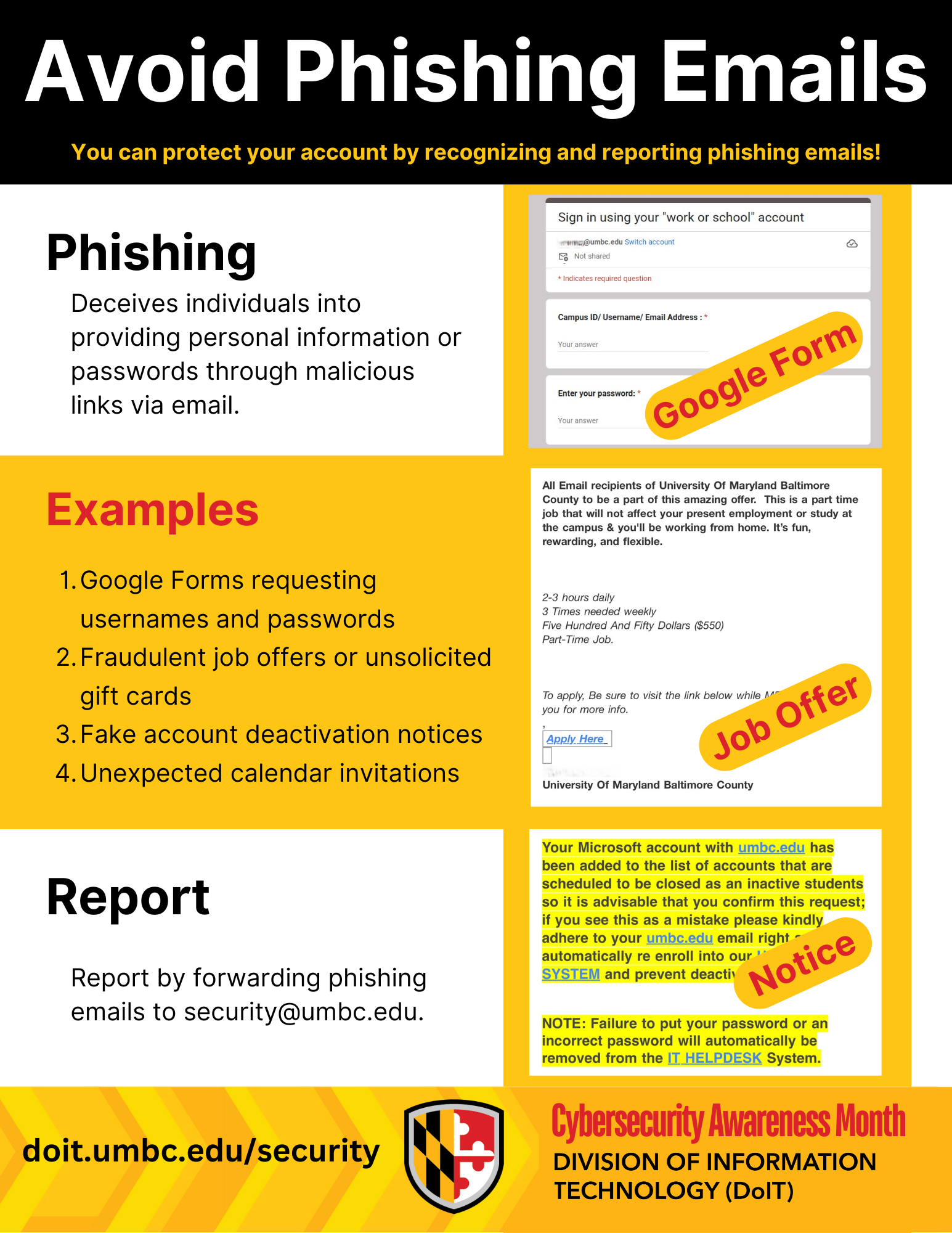
Phishing attacks are emails that may look like important messages but are actually crafted by cyber criminals. The good news? With the right knowledge, you can foil their tricks and keep yourself and UMBC safe. These are some tips on how you can recognize phishing emails:
Requests for Your Password: UMBC will never ask for your password. Never submit your password on Google forms or Monday.com forms. Your password is for your eyes only!
Unexpected Calendar Invitations: Watch out for calendar invites from unknown senders. Delete them and never click suspicious links inside.
Fraudulent Offers: Be wary of unsolicited offers for gift cards or jobs that are too promising. Do not send your personal or financial information to anyone who requests it over email or text. Real job postings are on Handshake only!
Unexpected Attachments or Links: Did someone send you a weird file or link you weren't expecting? Is a link in an email suspiciously short or strange-looking? If it feels off, don't click or download it.
A Sense of Urgency: Phishing emails often try to rush you into action, like claiming your account will be "deactivated" if you don't click a link immediately. Always be suspicious of urgent, high-pressure requests.
Poor Grammar and Spelling: While not always a giveaway, many phishing emails contain noticeable spelling errors or awkward phrasing.
What to do if you get a suspicious email:
If you suspect an email is a phishing attempt, do not reply, click any links, or open any attachments. Instead, forward the email immediately to the security team at security@umbc.edu. Your report helps protect everyone!
Stay vigilant, and together we can keep our digital environment safe.
]]>
Hello UMBC Community, In the digital world, Phishing is one of the most used forms of cyber trickery where attackers impersonate trusted sources to deceive you into handing over credentials or...
Newsletter
https://assets4-beta.my.umbc.edu/system/shared/attachments/c2c4a658921b5bed67ab4474edb1def8/69ee742c/news/000/153/400/ea057c6ee9f50f9a65bfa85c550f3fad/2025 Cybersecurity Awareness Month Flyers.pdf?1759945995
https://beta.my.umbc.edu/api/v0/pixel/news/153400/guest@my.umbc.edu/1905f817666a334e3785b5ea9b64232d/api/pixel
cybersecurity
itsecurity
phishing
scam
security
IT Security - DoIT Cybersecurity Assurance and Digital Trust
https://beta.my.umbc.edu/groups/itsecurity
https://assets1-beta.my.umbc.edu/images/avatars/group/7/xsmall.png?1777162216
https://assets4-beta.my.umbc.edu/images/avatars/group/7/original.png?1777162216
https://assets1-beta.my.umbc.edu/images/avatars/group/7/xxlarge.png?1777162216
https://assets1-beta.my.umbc.edu/images/avatars/group/7/xlarge.png?1777162216
https://assets4-beta.my.umbc.edu/images/avatars/group/7/large.png?1777162216
https://assets4-beta.my.umbc.edu/images/avatars/group/7/medium.png?1777162216
https://assets1-beta.my.umbc.edu/images/avatars/group/7/small.png?1777162216
https://assets1-beta.my.umbc.edu/images/avatars/group/7/xsmall.png?1777162216
https://assets1-beta.my.umbc.edu/images/avatars/group/7/xxsmall.png?1777162216
IT Security - DoIT Cybersecurity Assurance and Digital Trust
https://assets4-beta.my.umbc.edu/system/shared/thumbnails/news/000/153/400/eda3d05996f7407d552a9d7fc12787c6/xxlarge.jpg?1759945914
https://assets1-beta.my.umbc.edu/system/shared/thumbnails/news/000/153/400/eda3d05996f7407d552a9d7fc12787c6/xlarge.jpg?1759945914
https://assets2-beta.my.umbc.edu/system/shared/thumbnails/news/000/153/400/eda3d05996f7407d552a9d7fc12787c6/large.jpg?1759945914
https://assets3-beta.my.umbc.edu/system/shared/thumbnails/news/000/153/400/eda3d05996f7407d552a9d7fc12787c6/medium.jpg?1759945914
https://assets3-beta.my.umbc.edu/system/shared/thumbnails/news/000/153/400/eda3d05996f7407d552a9d7fc12787c6/small.jpg?1759945914
https://assets2-beta.my.umbc.edu/system/shared/thumbnails/news/000/153/400/eda3d05996f7407d552a9d7fc12787c6/xsmall.jpg?1759945914
https://assets1-beta.my.umbc.edu/system/shared/thumbnails/news/000/153/400/eda3d05996f7407d552a9d7fc12787c6/xxsmall.jpg?1759945914
Cybersecurity Awareness Month
1
0
true
Wed, 08 Oct 2025 13:55:57 -0400
Welcome to Cybersecurity Awareness Month!
Stay connected, stay safe, stay smart!
Hello UMBC Community,Cyber threats are always lurking in the digital realm, but don't worry! The security team at
Cybersecurity Assurance and Digital Trust (CADT) is here to guide you so you can protect yourself against phishing, malware, and other cyber threats.
What can you expect this month?
Tips to stay safe
October is Cybersecurity Awareness Month and this year, we will be posting cybersecurity tips for the UMBC community each week.
Catch a "Fish"!
You can also connect with us in person! Come check out our table on your way to lunch on October 6th and 20th from 12:00 to 1:00 PM at Breezeway near the Commons! Catch a fish or spot a phish and get a Swedish fish!
Reminder
Cybersecurity is everyone's responsibility. Together, we will build a strong and resilient security culture. Only by increasing your understanding of cybersecurity can you defend against cyber attacks!
Stay tuned for an amazing month filled with cybersecurity tips, treats, merch, and posters to make learning about cybersecurity fun and memorable!
Thank you, and may your digital defenses be strong this October!
]]>
Hello UMBC Community, Cyber threats are always lurking in the digital realm, but don't worry! The security team at Cybersecurity Assurance and Digital Trust (CADT) is here to guide you so you can...
Flyer
https://assets1-beta.my.umbc.edu/system/shared/attachments/ce5aef090f55bf4c9f6715a8b81629bc/69ee742c/news/000/153/399/9437e3994929bc613a9f2b7fe5fb4f9f/2025 Cybersecurity Awareness Month Flyers.pdf?1759945719
https://beta.my.umbc.edu/api/v0/pixel/news/153399/guest@my.umbc.edu/ab2ac6ab53c36e40c6ffcc8d571d1e23/api/pixel
cybersecurity
itsecurity
security
IT Security - DoIT Cybersecurity Assurance and Digital Trust
https://beta.my.umbc.edu/groups/itsecurity
https://assets1-beta.my.umbc.edu/images/avatars/group/7/xsmall.png?1777162216
https://assets4-beta.my.umbc.edu/images/avatars/group/7/original.png?1777162216
https://assets1-beta.my.umbc.edu/images/avatars/group/7/xxlarge.png?1777162216
https://assets1-beta.my.umbc.edu/images/avatars/group/7/xlarge.png?1777162216
https://assets4-beta.my.umbc.edu/images/avatars/group/7/large.png?1777162216
https://assets4-beta.my.umbc.edu/images/avatars/group/7/medium.png?1777162216
https://assets1-beta.my.umbc.edu/images/avatars/group/7/small.png?1777162216
https://assets1-beta.my.umbc.edu/images/avatars/group/7/xsmall.png?1777162216
https://assets1-beta.my.umbc.edu/images/avatars/group/7/xxsmall.png?1777162216
IT Security - DoIT Cybersecurity Assurance and Digital Trust
https://assets2-beta.my.umbc.edu/system/shared/thumbnails/news/000/153/399/db4c3bf00068ad845398df26d8dcc4a4/xxlarge.jpg?1759945680
https://assets2-beta.my.umbc.edu/system/shared/thumbnails/news/000/153/399/db4c3bf00068ad845398df26d8dcc4a4/xlarge.jpg?1759945680
https://assets2-beta.my.umbc.edu/system/shared/thumbnails/news/000/153/399/db4c3bf00068ad845398df26d8dcc4a4/large.jpg?1759945680
https://assets1-beta.my.umbc.edu/system/shared/thumbnails/news/000/153/399/db4c3bf00068ad845398df26d8dcc4a4/medium.jpg?1759945680
https://assets1-beta.my.umbc.edu/system/shared/thumbnails/news/000/153/399/db4c3bf00068ad845398df26d8dcc4a4/small.jpg?1759945680
https://assets3-beta.my.umbc.edu/system/shared/thumbnails/news/000/153/399/db4c3bf00068ad845398df26d8dcc4a4/xsmall.jpg?1759945680
https://assets1-beta.my.umbc.edu/system/shared/thumbnails/news/000/153/399/db4c3bf00068ad845398df26d8dcc4a4/xxsmall.jpg?1759945680
Cybersecurity Awareness Month. Stay Connected, stay safe, and stay smart
1
0
true
Wed, 08 Oct 2025 13:51:02 -0400
Important Notice: Phishing Campaign via Google Calendar Invites
Dear UMBC Community,
DoIT has recently been made aware of a new phishing campaign through Google Calendar. In this scheme, attackers send fraudulent calendar invites that automatically appear on your calendar. These invites often contain messages about fake cryptocurrency invoices and attempt to trick you into clicking links or calling a phone number.
Examples of these malicious invites are included below for your reference.
If you see a suspicious item on your calendar:
Do not click on any links, open any attachments or call any phone numbers
Immediately report the invite to security@umbc.edu
Remove the invite from your calendar using the Trash Can button
It’s important to note that simply receiving one of these invites does NOT mean your account has been compromised. By default, Google Calendar automatically adds invitations from anyone.
To reduce the chance of receiving unwanted invites in the future, you can also update your individual Google Calendar Event Settings to restrict which invitations are added by adjusting the "Add invitations to my calendar" setting. (See Below)
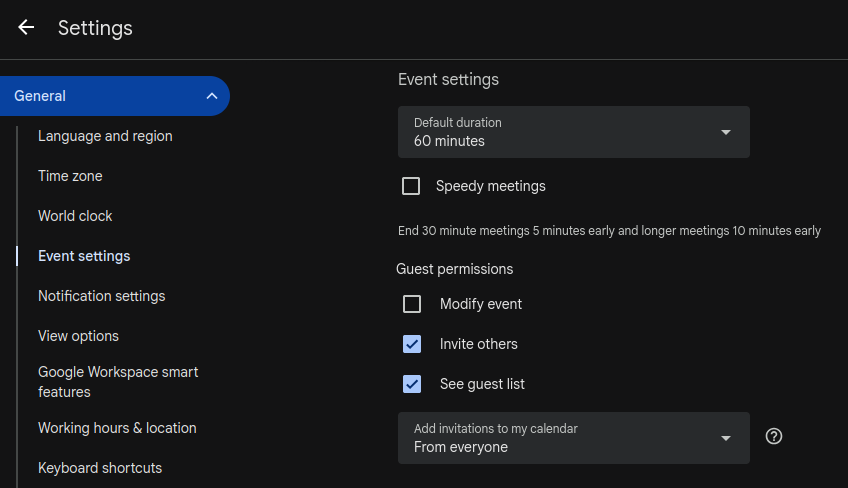
For more information about this setting, please refer to https://support.google.com/calendar/answer/13159188?sjid=9213646357382027005-NA.
Thank you all for your continued awareness and assistance in keeping our community secure.
UMBC Division of Information Technology (DoIT)
Cybersecurity Assurance and Digital Trust
Example One: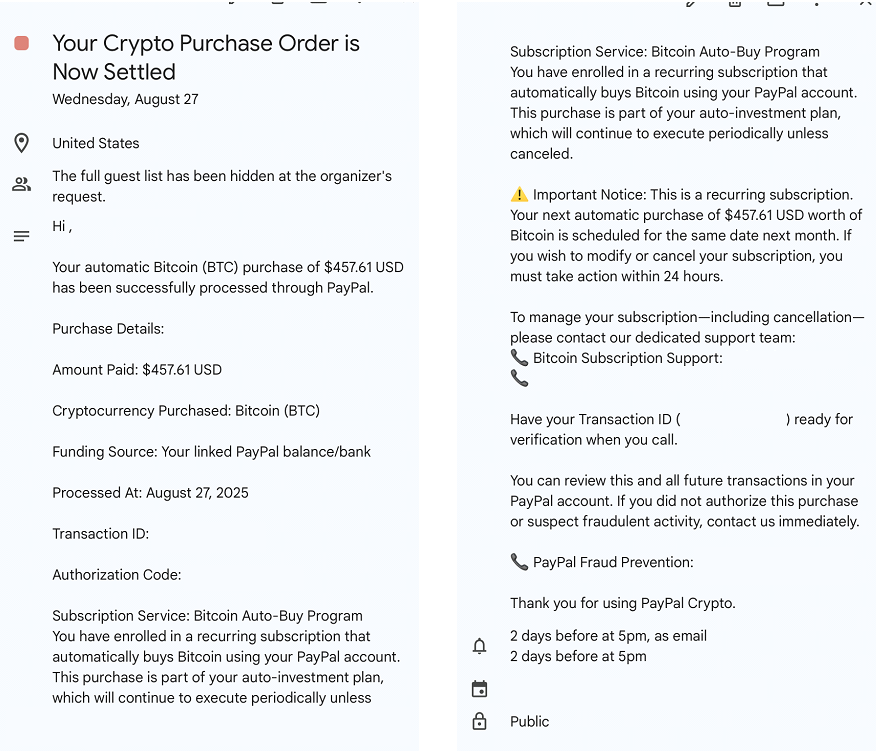 Example Two:
Retrievers, listen up — Six cyber scams you do not want to fall for.
Number one: Random Duo Push notifications.
If you didn’t log in, don’t hit accept. That’s literally letting an attacker walk into your account.
Number two: Free gift cards, pianos, and tools in your inbox.
Yeah, no. If they ask you to ‘send cash first,’ it’s a total scam. Also, your professors and the administration are not going to ask you to buy gift cards for them.
Number three: Job offers that sound like, ‘Work two hours a week, get $500.’
If it’s that easy, it’s fake. Real jobs are on Handshake.
Number four: Phishing forms.
UMBC will never ask for your password, Duo code, social security number, or birthday through Monday.com or Google Forms. If you see that, report it faster than you sprint to class after hitting snooze.
Number five: Copy this command.
If you get an error on a website that asks you to copy a command to the Run menu, PowerShell, or Terminal, don’t do it! This is an attacker trying to compromise and take control of your machine.
And number six: ‘Your UMBC account is about to be deactivated.’
Your account isn’t going anywhere. Don’t click the link.
Stay alert online, don’t get scammed.
Report anything suspicious to security@umbc.edu!
]]>
Retrievers, listen up — Six cyber scams you do not want to fall for. Number one: Random Duo Push notifications. If you didn’t log in, don’t hit accept. That’s literally letting an attacker...
https://doit.umbc.edu/security/
https://beta.my.umbc.edu/api/v0/pixel/news/151776/guest@my.umbc.edu/f84fc8349dd54a3ce653711e54951292/api/pixel
cybersecurity-awareness
IT Security - DoIT Cybersecurity Assurance and Digital Trust
https://beta.my.umbc.edu/groups/itsecurity
https://assets1-beta.my.umbc.edu/images/avatars/group/7/xsmall.png?1777162216
https://assets4-beta.my.umbc.edu/images/avatars/group/7/original.png?1777162216
https://assets1-beta.my.umbc.edu/images/avatars/group/7/xxlarge.png?1777162216
https://assets1-beta.my.umbc.edu/images/avatars/group/7/xlarge.png?1777162216
https://assets4-beta.my.umbc.edu/images/avatars/group/7/large.png?1777162216
https://assets4-beta.my.umbc.edu/images/avatars/group/7/medium.png?1777162216
https://assets1-beta.my.umbc.edu/images/avatars/group/7/small.png?1777162216
https://assets1-beta.my.umbc.edu/images/avatars/group/7/xsmall.png?1777162216
https://assets1-beta.my.umbc.edu/images/avatars/group/7/xxsmall.png?1777162216
IT Security - DoIT Cybersecurity Assurance and Digital Trust
10
0
false
Tue, 26 Aug 2025 17:00:31 -0400
Account Verification Emails
They are phishing!
Hello UMBC Community,
As we approach the Fall Semester, the Division of Information Technology (DoIT) has observed an increase in phishing attempts targeting the UMBC community. While we are doing our best to stay on top of these emails, we need your support.
Please do not enter your myUMBC password or your DUO code into Google or Monday Forms. DoIT does not need your password to validate your account, nor are we deactivating accounts. If you encounter either of these campaigns in your mailbox, please forward the email to
security@umbc.edu or click the menu with the three dots to “Report Phishing.” This will allow the team to quickly quarantine the message and protect other community members.
Thank you for your support!
]]>
Hello UMBC Community, As we approach the Fall Semester, the Division of Information Technology (DoIT) has observed an increase in phishing attempts targeting the UMBC community. While we are...
https://beta.my.umbc.edu/api/v0/pixel/news/151677/guest@my.umbc.edu/16e2ada2cdc4de936d60adeccbb6b100/api/pixel
phishing
IT Security - DoIT Cybersecurity Assurance and Digital Trust
https://beta.my.umbc.edu/groups/itsecurity
https://assets1-beta.my.umbc.edu/images/avatars/group/7/xsmall.png?1777162216
https://assets4-beta.my.umbc.edu/images/avatars/group/7/original.png?1777162216
https://assets1-beta.my.umbc.edu/images/avatars/group/7/xxlarge.png?1777162216
https://assets1-beta.my.umbc.edu/images/avatars/group/7/xlarge.png?1777162216
https://assets4-beta.my.umbc.edu/images/avatars/group/7/large.png?1777162216
https://assets4-beta.my.umbc.edu/images/avatars/group/7/medium.png?1777162216
https://assets1-beta.my.umbc.edu/images/avatars/group/7/small.png?1777162216
https://assets1-beta.my.umbc.edu/images/avatars/group/7/xsmall.png?1777162216
https://assets1-beta.my.umbc.edu/images/avatars/group/7/xxsmall.png?1777162216
IT Security - DoIT Cybersecurity Assurance and Digital Trust
7
0
false
Fri, 22 Aug 2025 17:11:16 -0400
Thank you for being part of UMBC (Phishing Edition)
We are glad you are here, but we don't want your password
DoIT is aware of an ongoing phishing campaign targeting faculty and staff. The message arrives in users' inboxes appearing to be a document shared from Google. Within the document there is a link that masquerades as personalized compensation statement, but is actually a form attempting to collect your myUMBC credentials and DUO codes.
This email is phishing. Please do not enter your myUMBC password or DUO codes on web forms.
We are working to quarantine the messages and scramble passwords for any account that may have been compromised as a result of the phish. We are asking for your continued diligence as the holiday may affect our ability to get the form taken down. Please do not provide your password or DUO codes on web forms, and forward suspicious messages to
security@umbc.edu.
Thanks again and hope everyone has a Happy 4th of July!!
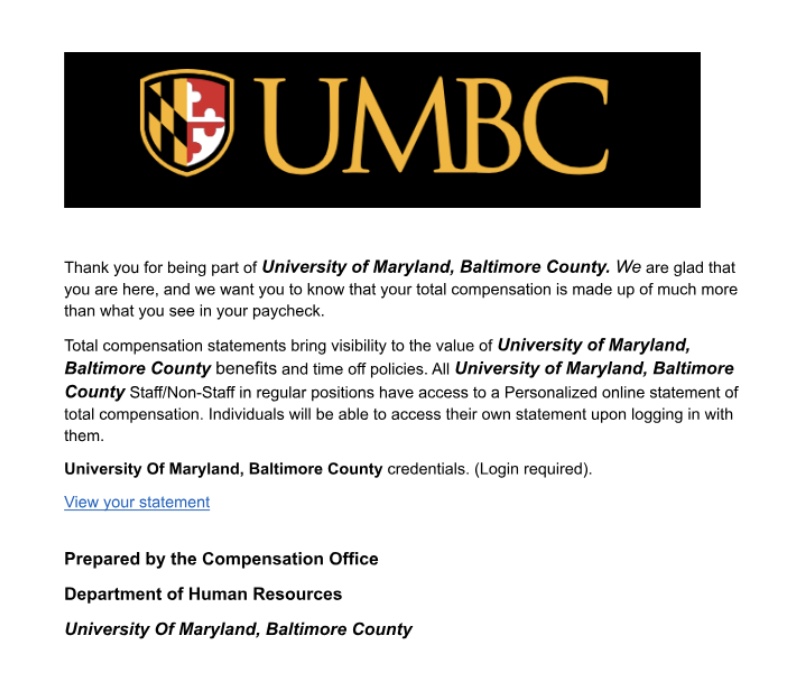
]]>
DoIT is aware of an ongoing phishing campaign targeting faculty and staff. The message arrives in users' inboxes appearing to be a document shared from Google. Within the document there is a link...
Image
https://assets3-beta.my.umbc.edu/system/shared/attachments/7391d19e2e0ab446bde570cf451a9c07/69ee742c/news/000/150/919/329995168de8869ce0d6c4083026d5b0/Image 7-4-25 at 2.15 PM.jpeg?1751654219
https://beta.my.umbc.edu/api/v0/pixel/news/150919/guest@my.umbc.edu/16abf47e19323bf92f08a8d5fb327af4/api/pixel
phishing
IT Security - DoIT Cybersecurity Assurance and Digital Trust
https://beta.my.umbc.edu/groups/itsecurity
https://assets1-beta.my.umbc.edu/images/avatars/group/7/xsmall.png?1777162216
https://assets4-beta.my.umbc.edu/images/avatars/group/7/original.png?1777162216
https://assets1-beta.my.umbc.edu/images/avatars/group/7/xxlarge.png?1777162216
https://assets1-beta.my.umbc.edu/images/avatars/group/7/xlarge.png?1777162216
https://assets4-beta.my.umbc.edu/images/avatars/group/7/large.png?1777162216
https://assets4-beta.my.umbc.edu/images/avatars/group/7/medium.png?1777162216
https://assets1-beta.my.umbc.edu/images/avatars/group/7/small.png?1777162216
https://assets1-beta.my.umbc.edu/images/avatars/group/7/xsmall.png?1777162216
https://assets1-beta.my.umbc.edu/images/avatars/group/7/xxsmall.png?1777162216
IT Security - DoIT Cybersecurity Assurance and Digital Trust
15
0
false
Fri, 04 Jul 2025 14:43:01 -0400
Fri, 04 Jul 2025 14:48:10 -0400
Cybersecurity Alert: Phishing Emails Continue
Watch fireworks and your inbox
Recently, DoIT has seen an increase in phishing emails claiming that the receiver's UMBC account is being deactivated or offering a part time job. Some of the emails are specifically mentioning deactivating the user’s Microsoft account.
The emails are using links to web forms from Google Forms and Monday Forms to collect sensitive information from recipients, including login credentials. The actors are then leveraging SMS messaging to contact the users and gain access to UMBC accounts.
Please keep in mind that
UMBC administrators will never ask you for your login credentials such as username, password, or Duo passcode on a web form. If you follow a link to a form that does ask for your password, please close it and
report the email and form to security@umbc.edu.
If you have seen and filled out any of the aforementioned forms, we highly recommend changing your password immediately to protect your account and slow the spread of these phishing emails.
Throughout this July 4th holiday weekend, remember to practice cyber safety and report any suspicious emails you may receive by forwarding them to
security@umbc.edu.
For more helpful information and ways to spot phishing emails, please visit the following links:
Have a wonderful and safe holiday weekend!
- DoIT Cybersecurity Assurance and Digital Trust
]]>
Recently, DoIT has seen an increase in phishing emails claiming that the receiver's UMBC account is being deactivated or offering a part time job. Some of the emails are specifically mentioning...
https://beta.my.umbc.edu/api/v0/pixel/news/150916/guest@my.umbc.edu/b6c64fb91e7d0226b2daa37cb6fc38f4/api/pixel
IT Security - DoIT Cybersecurity Assurance and Digital Trust
https://beta.my.umbc.edu/groups/itsecurity
https://assets1-beta.my.umbc.edu/images/avatars/group/7/xsmall.png?1777162216
https://assets4-beta.my.umbc.edu/images/avatars/group/7/original.png?1777162216
https://assets1-beta.my.umbc.edu/images/avatars/group/7/xxlarge.png?1777162216
https://assets1-beta.my.umbc.edu/images/avatars/group/7/xlarge.png?1777162216
https://assets4-beta.my.umbc.edu/images/avatars/group/7/large.png?1777162216
https://assets4-beta.my.umbc.edu/images/avatars/group/7/medium.png?1777162216
https://assets1-beta.my.umbc.edu/images/avatars/group/7/small.png?1777162216
https://assets1-beta.my.umbc.edu/images/avatars/group/7/xsmall.png?1777162216
https://assets1-beta.my.umbc.edu/images/avatars/group/7/xxsmall.png?1777162216
IT Security - DoIT Cybersecurity Assurance and Digital Trust
https://assets3-beta.my.umbc.edu/system/shared/thumbnails/news/000/150/916/84cfa0ac8c2b13b73c37517e9c47ce7b/xxlarge.jpg?1751577985
https://assets1-beta.my.umbc.edu/system/shared/thumbnails/news/000/150/916/84cfa0ac8c2b13b73c37517e9c47ce7b/xlarge.jpg?1751577985
https://assets1-beta.my.umbc.edu/system/shared/thumbnails/news/000/150/916/84cfa0ac8c2b13b73c37517e9c47ce7b/large.jpg?1751577985
https://assets4-beta.my.umbc.edu/system/shared/thumbnails/news/000/150/916/84cfa0ac8c2b13b73c37517e9c47ce7b/medium.jpg?1751577985
https://assets3-beta.my.umbc.edu/system/shared/thumbnails/news/000/150/916/84cfa0ac8c2b13b73c37517e9c47ce7b/small.jpg?1751577985
https://assets2-beta.my.umbc.edu/system/shared/thumbnails/news/000/150/916/84cfa0ac8c2b13b73c37517e9c47ce7b/xsmall.jpg?1751577985
https://assets2-beta.my.umbc.edu/system/shared/thumbnails/news/000/150/916/84cfa0ac8c2b13b73c37517e9c47ce7b/xxsmall.jpg?1751577985
Fireworks
11
0
true
Thu, 03 Jul 2025 17:37:58 -0400
Cybersecurity Alert: Increase in Phishing Scams
Account stealers and fake job scams use multiple methods
DoIT has detected several sophisticated email phishing scams attempting to steal user account credentials across campus. These scams have directed users to enter their username and password into online forms hosted by Google or monday.com to supposedly prevent account deactivation, or have solicited new (fake) job opportunities.
How these Scams Work
Malicious emails disguise themselves as official UMBC communications, potentially using compromised accounts to appear legitimate
Goal: Trick users into revealing login information or provide personal/financial details
Compromised accounts are being used to send massive spam campaigns
Job scam victims may have financial losses
Protect Yourself
NEVER enter login credentials into any suspicious emails or forms
NEVER reply to unexpected emails requesting personal information
NEVER send personal or financial information in an SMS or WhatsApp message to someone you don’t know
ALWAYS verify the sender's email address carefully
ALWAYS check for any unusual formatting, strange wording, or suspicious links
Read more about how you can identify phishing here.
If You Receive a Suspicious Email
Do not click on any links
Do not download any attachments
Forward the email to: security@umbc.edu
Delete the email immediately
Read more about what you can do if you receive a suspicious email here.
If You Believe Your Account Is Compromised
Stay vigilant. Protect your account. Protect our community.
]]>
DoIT has detected several sophisticated email phishing scams attempting to steal user account credentials across campus. These scams have directed users to enter their username and password into...
https://doit.umbc.edu/security
https://beta.my.umbc.edu/api/v0/pixel/news/150802/guest@my.umbc.edu/8b982e622af9d35cd62fb837618145fe/api/pixel
IT Security - DoIT Cybersecurity Assurance and Digital Trust
https://beta.my.umbc.edu/groups/itsecurity
https://assets1-beta.my.umbc.edu/images/avatars/group/7/xsmall.png?1777162216
https://assets4-beta.my.umbc.edu/images/avatars/group/7/original.png?1777162216
https://assets1-beta.my.umbc.edu/images/avatars/group/7/xxlarge.png?1777162216
https://assets1-beta.my.umbc.edu/images/avatars/group/7/xlarge.png?1777162216
https://assets4-beta.my.umbc.edu/images/avatars/group/7/large.png?1777162216
https://assets4-beta.my.umbc.edu/images/avatars/group/7/medium.png?1777162216
https://assets1-beta.my.umbc.edu/images/avatars/group/7/small.png?1777162216
https://assets1-beta.my.umbc.edu/images/avatars/group/7/xsmall.png?1777162216
https://assets1-beta.my.umbc.edu/images/avatars/group/7/xxsmall.png?1777162216
IT Security - DoIT Cybersecurity Assurance and Digital Trust
https://assets1-beta.my.umbc.edu/system/shared/thumbnails/news/000/150/802/793d0cd2eb360c604c70effe1a3253d9/xxlarge.jpg?1750804724
https://assets4-beta.my.umbc.edu/system/shared/thumbnails/news/000/150/802/793d0cd2eb360c604c70effe1a3253d9/xlarge.jpg?1750804724
https://assets4-beta.my.umbc.edu/system/shared/thumbnails/news/000/150/802/793d0cd2eb360c604c70effe1a3253d9/large.jpg?1750804724
https://assets2-beta.my.umbc.edu/system/shared/thumbnails/news/000/150/802/793d0cd2eb360c604c70effe1a3253d9/medium.jpg?1750804724
https://assets4-beta.my.umbc.edu/system/shared/thumbnails/news/000/150/802/793d0cd2eb360c604c70effe1a3253d9/small.jpg?1750804724
https://assets2-beta.my.umbc.edu/system/shared/thumbnails/news/000/150/802/793d0cd2eb360c604c70effe1a3253d9/xsmall.jpg?1750804724
https://assets4-beta.my.umbc.edu/system/shared/thumbnails/news/000/150/802/793d0cd2eb360c604c70effe1a3253d9/xxsmall.jpg?1750804724
Scam Alert
11
0
true
Tue, 24 Jun 2025 18:45:57 -0400
Tue, 24 Jun 2025 18:55:07 -0400
UMBC Alert Renewal Messages Are Legitimate
Over the weekend, some members of the UMBC community may have received messages (via text or email) like the ones shown below, prompting users to renew their UMBC Alert account.


These messages are legitimate and come from Omnilert, UMBC’s official emergency notification system. They are part of a scheduled renewal process to ensure that stale or inactive contact methods are removed and that users still wish to receive urgent campus notifications.
To continue receiving alerts, users must visit the Setup Omnilert Alerts page and re-confirm their preferred contact methods (SMS or email).
✅ Action Required
Go tomy.umbc.edu/go/alerts,
Click on “Setup Omnilert Alerts”, and
Follow the instructions to update or confirm your alert preferences.

We strongly encourage all current students, faculty, and staff to remain subscribed. These alerts are a key part of UMBC’s campus safety infrastructure.
Learn more:
How do I sign up to receive emergency alerts?
—
UMBC Division of Information Technology
doit.umbc.edu
]]>
Over the weekend, some members of the UMBC community may have received messages (via text or email) like the ones shown below, prompting users to renew their UMBC Alert account. These messages...
https://beta.my.umbc.edu/api/v0/pixel/news/150507/guest@my.umbc.edu/1ada65b7286a184aed339667c68584a0/api/pixel
IT Security - DoIT Cybersecurity Assurance and Digital Trust
https://beta.my.umbc.edu/groups/itsecurity
https://assets1-beta.my.umbc.edu/images/avatars/group/7/xsmall.png?1777162216
https://assets4-beta.my.umbc.edu/images/avatars/group/7/original.png?1777162216
https://assets1-beta.my.umbc.edu/images/avatars/group/7/xxlarge.png?1777162216
https://assets1-beta.my.umbc.edu/images/avatars/group/7/xlarge.png?1777162216
https://assets4-beta.my.umbc.edu/images/avatars/group/7/large.png?1777162216
https://assets4-beta.my.umbc.edu/images/avatars/group/7/medium.png?1777162216
https://assets1-beta.my.umbc.edu/images/avatars/group/7/small.png?1777162216
https://assets1-beta.my.umbc.edu/images/avatars/group/7/xsmall.png?1777162216
https://assets1-beta.my.umbc.edu/images/avatars/group/7/xxsmall.png?1777162216
IT Security - DoIT Cybersecurity Assurance and Digital Trust
4
0
false
Mon, 02 Jun 2025 12:32:28 -0400
Mon, 02 Jun 2025 12:34:02 -0400