<?xml version="1.0"?>
<News hasArchived="false" page="1" pageCount="1" pageSize="10" timestamp="Sun, 26 Apr 2026 22:20:19 -0400" url="https://beta.my.umbc.edu/groups/instructional-technology/posts.xml?tag=unsplash">
<NewsItem contentIssues="true" id="137337" important="false" status="posted" url="https://beta.my.umbc.edu/groups/instructional-technology/posts/137337">
<Title>Dec adds unique group due dates, more sort controls in Ultra</Title>
<Tagline>Features authentic discussion opportunities using AI tools</Tagline>
<Body>
<![CDATA[
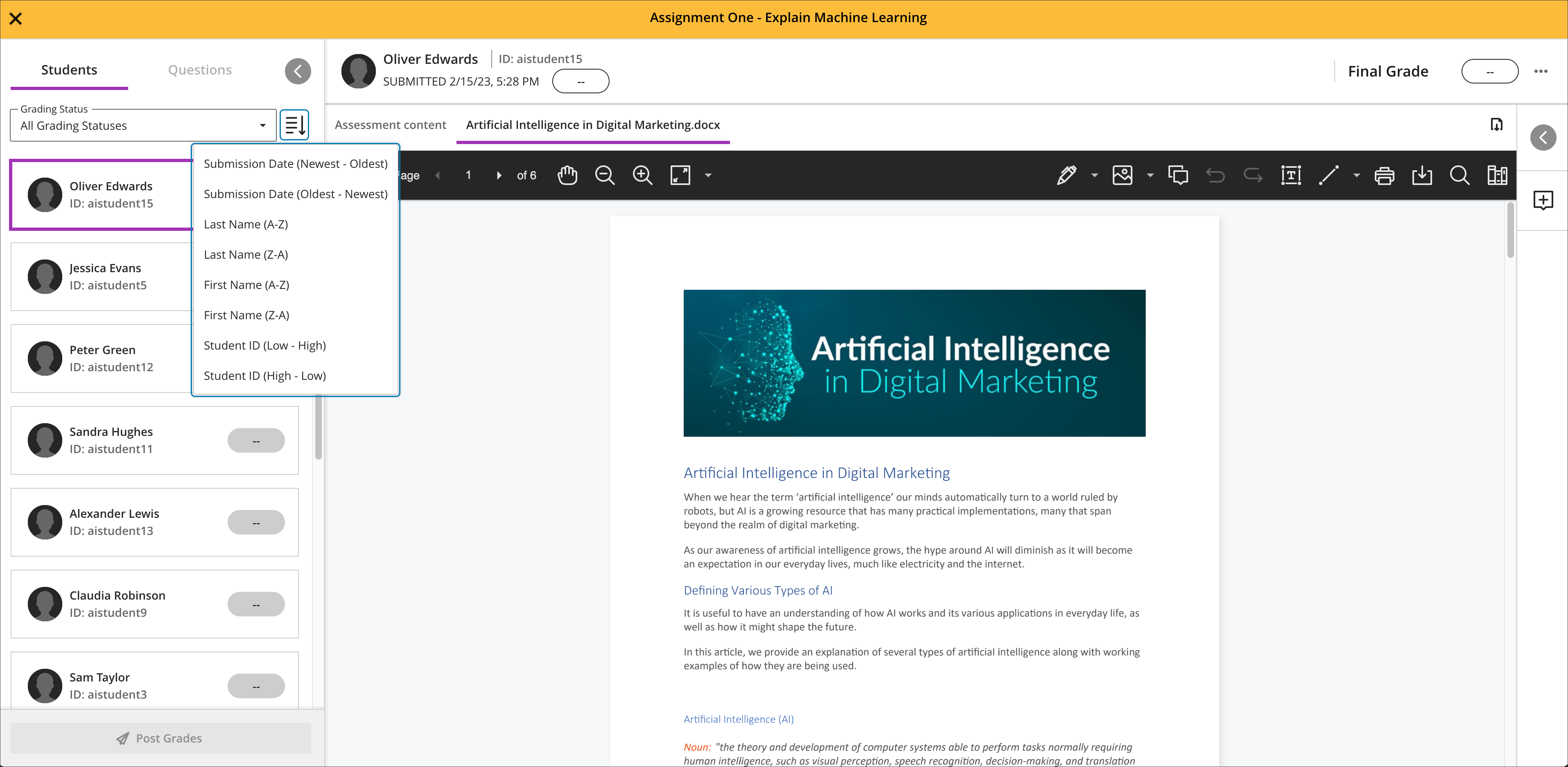
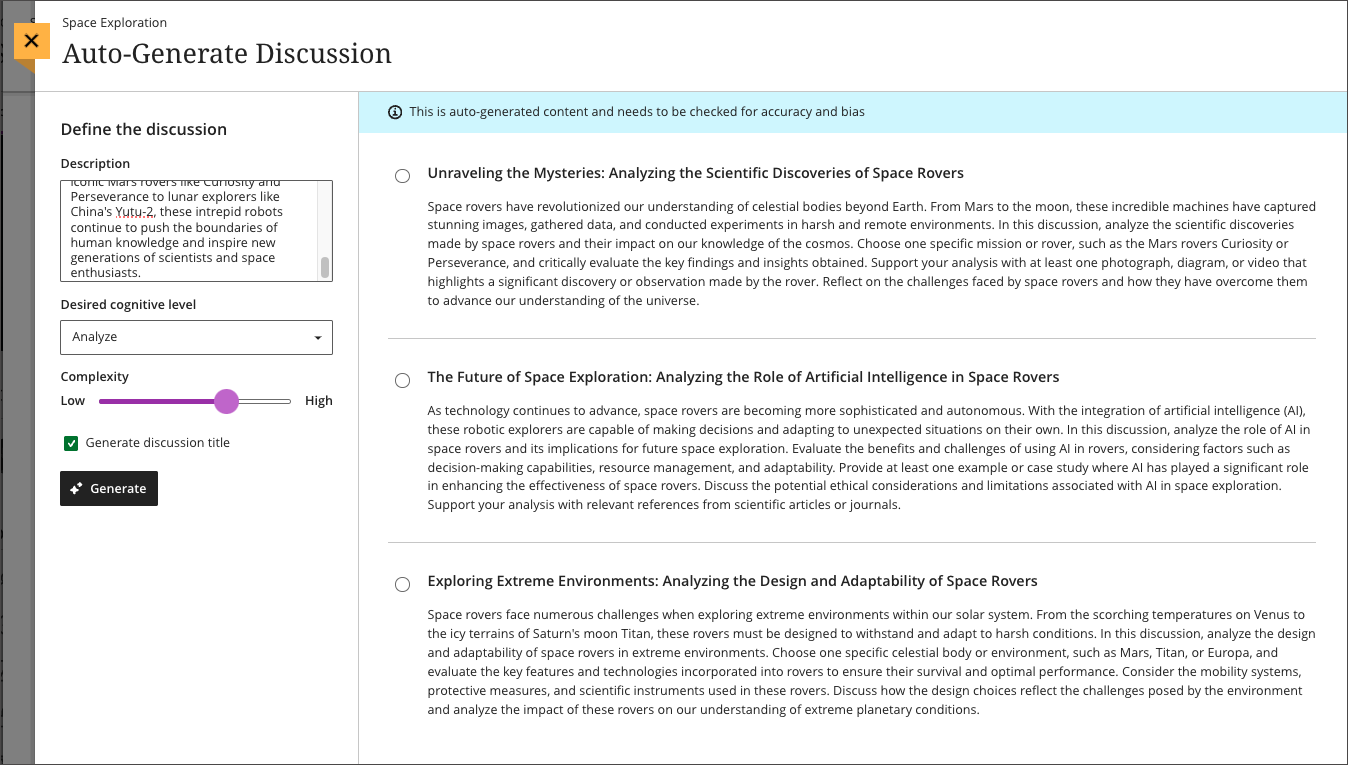
    <div class="html-content"><div><div><div><div><div><div>As 2023 comes to a close, the December Ultra update brings several features to enhance group functionality and gradebook management. With this update, instructors can <span>assign a unique due date to each group using the exceptions workflow.</span><span> If necessary, instructors can reset the group due date to the default.</span></div><div><span><br></span></div><div><span>Gradebook sorting controls provide easier ways to interact with grade information in an Ultra course. T</span><span>he <a href="https://my3.my.umbc.edu/groups/instructional-technology/posts/134272" rel="nofollow external" class="bo">new Flexible Grading interface</a> also features updated sorting controls for column types, allowing instructors and graders to sort data in ascending and descending order.</span></div><div><span><br></span></div><div><img src="https://help.blackboard.com/sites/default/files/images/2023-11/learn_ultra_instructor_SortingControlsInStudentsAndQuestionsTab_SortingOptionsInFlexibleGrading.png" width="500" alt="Image 1: Sorting assessments in Flexible Grading using the Students tab" style="max-width: 100%; height: auto;"></div><div><div><em>Image 1: Sorting assessments in Flexible Grading using the Students tab</em></div><div><em><br></em></div></div><div><span>Further updates to assessments and grading allow instructors to align goals to questions within a question bank and create expanded rubrics without any limit to the row or column sizes. Question-level goal alignment ensures that assessment items measure the desired learning outcomes. Moreover, larger rubrics allow for </span><span>greater criteria to support assessment and accreditation.</span></div><div><div><span><br></span></div><div><span>Additionally, <a href="https://my3.my.umbc.edu/groups/instructional-technology/posts/134605" rel="nofollow external" class="bo">Ultra's exclusive AI course design assistant tools</a> can generate discussion prompts to incorporate authentic assessment and increase learner engagement. </span>The generation process allows instructors to enter a discussion or journal description, select a desired cognitive process based on Bloom's Taxonomy, set the complexity, and generate a discussion or journal title. <span>The instructor can review the generated prompts and select one to add to the discussion or journal. After adding the prompt, the instructor can edit or further refine the prompt as appropriate. </span><span>The goal of this tool is to encourage students to engage in higher-order thinking, apply their knowledge, justify or challenge their beliefs and ideas, and emulate real-world situations.</span></div><div><br></div><div><img src="https://help.blackboard.com/sites/default/files/images/2023-11/learn_ultra_instructor_AuthenticDiscussionAndJournal%20prompts_InstructorOptions.png" width="500" alt="Image 2: Instructors can describe the discussion, select the desired cognitive process and complexity, and then generate prompts" style="max-width: 100%; height: auto;"></div><div><span>Image 2: </span><em>Instructors can describe the discussion, select the desired cognitive process and complexity, and then generate prompts</em></div><div><br></div></div></div></div></div></div><div><div><div><div><div><span><div><span>Faculty should see the latest updates in Ultra courses around December 7-8 2023. </span><span>The next update to our Ultra test environment will take place on December 12, 2023; release notes are posted to the <a href="https://wiki.umbc.edu/x/LohnB" rel="nofollow external" class="bo">What's New in Ultra</a> that same week. Faculty who are interested in test driving new features before they are released to production should </span><a href="http://my.umbc.edu/go/request-help" rel="nofollow external" class="bo">open an RT ticket</a> to request early access. Please <a href="http://umbc.edu/go/ultra" rel="nofollow external" class="bo">watch the FAQs</a>, including <a href="https://wiki.umbc.edu/x/LohnB" rel="nofollow external" class="bo">the What's New with Ultra page</a>, <span>and myUMBC for additional information about Ultra. </span></div></span></div></div></div></div><div><span><br></span></div></div><div><span><strong>Connect with Instructional Technology</strong></span></div><div><span>As always, if you have any questions about teaching, learning, and technology at UMBC, please consider the following options:</span></div><ul><li><a href="http://www.umbc.edu/faq" rel="nofollow external" class="bo">Check our extensive FAQ collection</a><span> </span></li><ul><li><span><a href="https://wiki.umbc.edu/x/LohnB" rel="nofollow external" class="bo"><span>What's new in Ultra?</span></a><span> </span><span>|</span><span> </span><a href="https://wiki.umbc.edu/x/bwrSAQ" rel="nofollow external" class="bo"><span>Known Issues</span></a><span> </span></span></li></ul><li><span><a href="http://my.umbc.edu/go/request-help" rel="nofollow external" class="bo">Open a ticket via RT</a></span></li><li><span>Follow the </span><a href="http://my.umbc.edu/groups/instructional-technology" rel="nofollow external" class="bo">Instructional Technology</a><span> &amp; </span><a href="http://my.umbc.edu/groups/doit" rel="nofollow external" class="bo">DoIT</a><span> myUMBC groups</span></li><li><a href="http://doit.umbc.edu/itnm/staff/" rel="nofollow external" class="bo">Request a consult</a><span> with <a href="http://doit.umbc.edu/itnm/staff" rel="nofollow external" class="bo">instructional technology staff</a></span></li><li><span><a href="http://pivot.umbc.edu" rel="nofollow external" class="bo">PIVOT</a> | <a href="https://doit.umbc.edu/itnm/academic-continuity/" rel="nofollow external" class="bo">Academic Continuity</a></span><span> </span><span>|</span><span> </span><span><a href="https://fdc.umbc.edu/teaching/keep-on-teaching/" rel="nofollow external" class="bo">Keep On Teaching</a></span><span> </span><span>|</span><span> </span><span><a href="https://doit.umbc.edu/students" rel="nofollow external" class="bo">Student Technology Resources</a></span></li></ul></div><div><div></div></div></div>
]]>
</Body>
<Summary>As 2023 comes to a close, the December Ultra update brings several features to enhance group functionality and gradebook management. With this update, instructors can assign a unique due date to...</Summary>
<Website>https://my3.my.umbc.edu/groups/instructional-technology/posts/137337</Website>
<TrackingUrl>https://beta.my.umbc.edu/api/v0/pixel/news/137337/guest@my.umbc.edu/399185d8da49d9564e0ff4f946e356e2/api/pixel</TrackingUrl>
<Tag>ai</Tag>
<Tag>blackboard</Tag>
<Tag>gradebook</Tag>
<Tag>grading</Tag>
<Tag>ultra-experience</Tag>
<Tag>ultra-update</Tag>
<Tag>unsplash</Tag>
<Group token="instructional-technology">Instructional Technology</Group>
<GroupUrl>https://beta.my.umbc.edu/groups/instructional-technology</GroupUrl>
<AvatarUrl>https://assets2-beta.my.umbc.edu/system/shared/avatars/groups/000/001/164/dec3b026b81ee6d890a8f82f75c94a2e/xsmall.png?1446126703</AvatarUrl>
<AvatarUrl size="original">https://assets1-beta.my.umbc.edu/system/shared/avatars/groups/000/001/164/dec3b026b81ee6d890a8f82f75c94a2e/original.png?1446126703</AvatarUrl>
<AvatarUrl size="xxlarge">https://assets2-beta.my.umbc.edu/system/shared/avatars/groups/000/001/164/dec3b026b81ee6d890a8f82f75c94a2e/xxlarge.png?1446126703</AvatarUrl>
<AvatarUrl size="xlarge">https://assets1-beta.my.umbc.edu/system/shared/avatars/groups/000/001/164/dec3b026b81ee6d890a8f82f75c94a2e/xlarge.png?1446126703</AvatarUrl>
<AvatarUrl size="large">https://assets1-beta.my.umbc.edu/system/shared/avatars/groups/000/001/164/dec3b026b81ee6d890a8f82f75c94a2e/large.png?1446126703</AvatarUrl>
<AvatarUrl size="medium">https://assets4-beta.my.umbc.edu/system/shared/avatars/groups/000/001/164/dec3b026b81ee6d890a8f82f75c94a2e/medium.png?1446126703</AvatarUrl>
<AvatarUrl size="small">https://assets3-beta.my.umbc.edu/system/shared/avatars/groups/000/001/164/dec3b026b81ee6d890a8f82f75c94a2e/small.png?1446126703</AvatarUrl>
<AvatarUrl size="xsmall">https://assets2-beta.my.umbc.edu/system/shared/avatars/groups/000/001/164/dec3b026b81ee6d890a8f82f75c94a2e/xsmall.png?1446126703</AvatarUrl>
<AvatarUrl size="xxsmall">https://assets3-beta.my.umbc.edu/system/shared/avatars/groups/000/001/164/dec3b026b81ee6d890a8f82f75c94a2e/xxsmall.png?1446126703</AvatarUrl>
<Sponsor>Instructional Technology</Sponsor>
<ThumbnailUrl size="xxlarge">https://assets3-beta.my.umbc.edu/system/shared/thumbnails/news/000/137/337/ac70c80d8dfe1625932cf54cba55766e/xxlarge.jpg?1701192788</ThumbnailUrl>
<ThumbnailUrl size="xlarge">https://assets2-beta.my.umbc.edu/system/shared/thumbnails/news/000/137/337/ac70c80d8dfe1625932cf54cba55766e/xlarge.jpg?1701192788</ThumbnailUrl>
<ThumbnailUrl size="large">https://assets2-beta.my.umbc.edu/system/shared/thumbnails/news/000/137/337/ac70c80d8dfe1625932cf54cba55766e/large.jpg?1701192788</ThumbnailUrl>
<ThumbnailUrl size="medium">https://assets4-beta.my.umbc.edu/system/shared/thumbnails/news/000/137/337/ac70c80d8dfe1625932cf54cba55766e/medium.jpg?1701192788</ThumbnailUrl>
<ThumbnailUrl size="small">https://assets1-beta.my.umbc.edu/system/shared/thumbnails/news/000/137/337/ac70c80d8dfe1625932cf54cba55766e/small.jpg?1701192788</ThumbnailUrl>
<ThumbnailUrl size="xsmall">https://assets2-beta.my.umbc.edu/system/shared/thumbnails/news/000/137/337/ac70c80d8dfe1625932cf54cba55766e/xsmall.jpg?1701192788</ThumbnailUrl>
<ThumbnailUrl size="xxsmall">https://assets4-beta.my.umbc.edu/system/shared/thumbnails/news/000/137/337/ac70c80d8dfe1625932cf54cba55766e/xxsmall.jpg?1701192788</ThumbnailUrl>
<PawCount>2</PawCount>
<CommentCount>0</CommentCount>
<CommentsAllowed>true</CommentsAllowed>
<PostedAt>Thu, 30 Nov 2023 14:58:57 -0500</PostedAt>
<EditAt>Thu, 30 Nov 2023 15:00:04 -0500</EditAt>
</NewsItem>

<NewsItem contentIssues="true" id="136475" important="false" status="posted" url="https://beta.my.umbc.edu/groups/instructional-technology/posts/136475">
<Title>Sorting &amp; submission enhancements for Ultra gradebook in Nov</Title>
<Tagline>Search &amp; use stock images in Ultra docs, discussions, etc.</Tagline>
<Body>
<![CDATA[
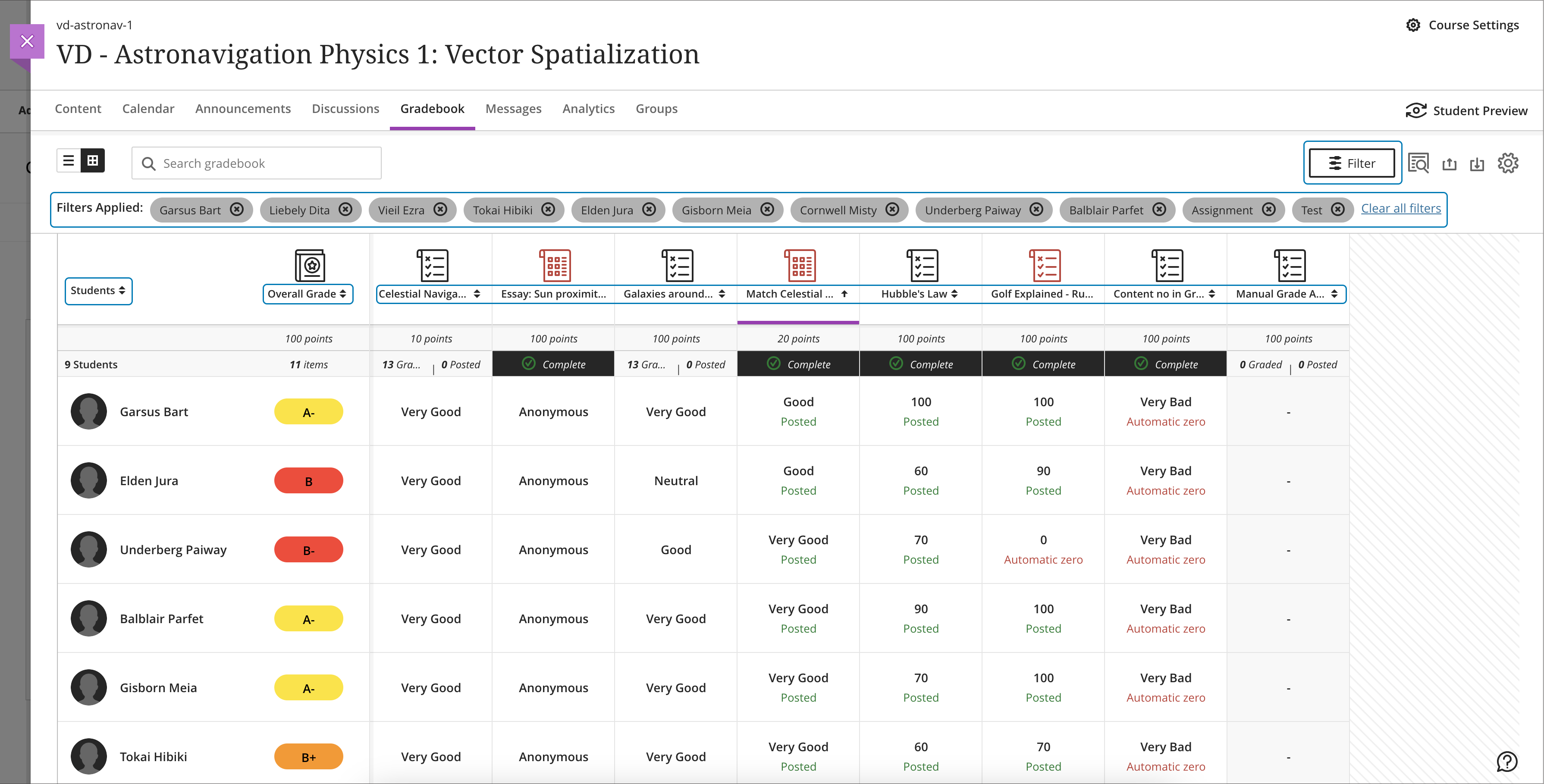
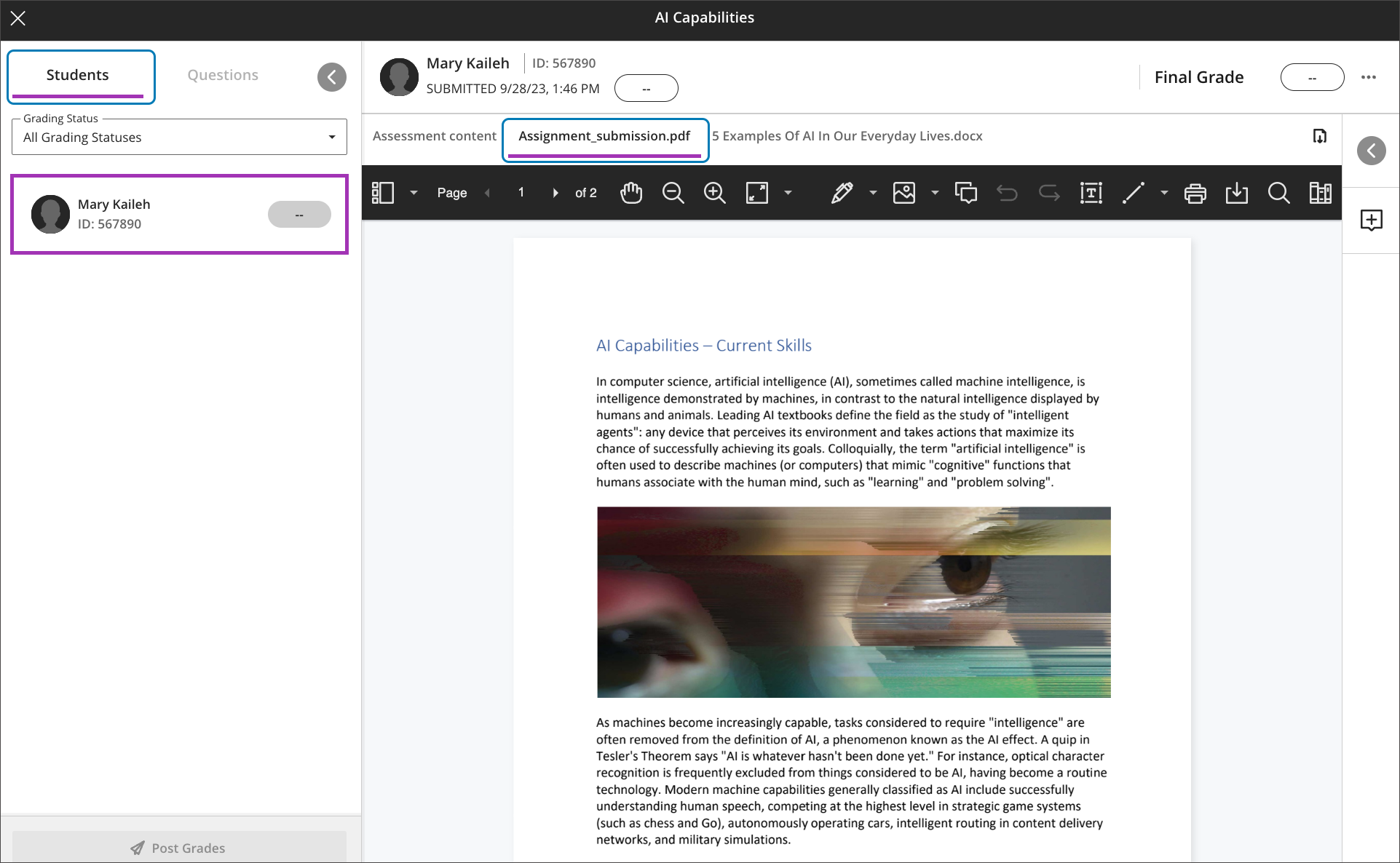
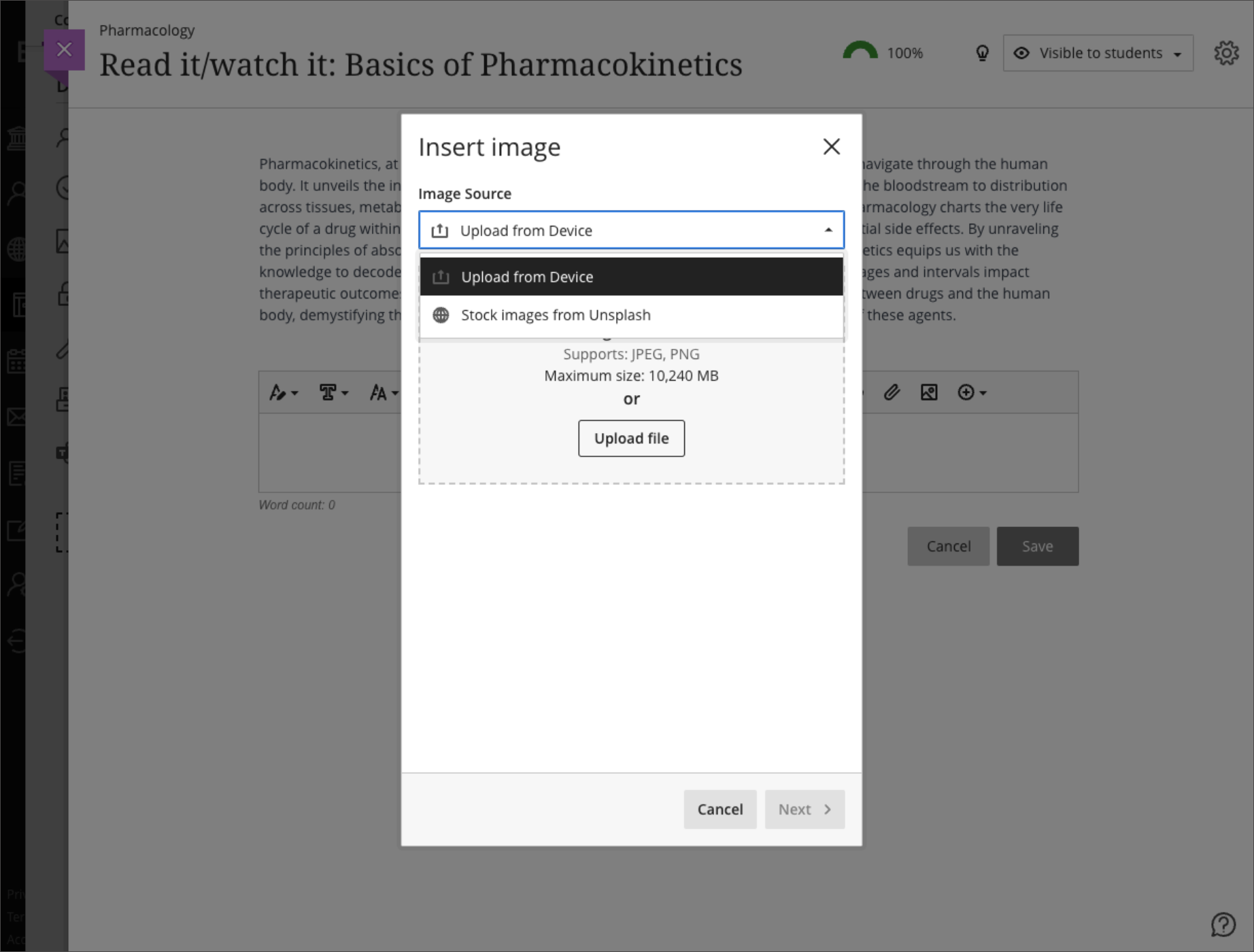
    <div class="html-content"><div><div><div><div><div><div>Continued enhancements to the Ultra gradebook provide greater flexibility and usability. In the November update to Ultra courses, additional sorting controls allow instructors to sort grade records in ascending or descending order including student name, overall grade, tests and assignment grade columns, and manually created grade columns. Future updates will provide sorting controls to other grading categories including discussions and journals.</div><div><br></div><div><img src="https://help.blackboard.com/sites/default/files/images/2023-10/learn_ultra_instruction_Gradebook_GridViewAssessmentSortingWithFilter.png" width="500" alt="Sorting assessments in gradebook grid view with filters applied" style="max-width: 100%; height: auto;"></div><div><em>Image 1: Sorting assessments in gradebook grid view with filters applied. A purple line in the header shows which column is sorted.</em></div><div><br></div><div>Instructors will also find it easier to navigate through student file attachments. A new tabbed interface displays when multiple files are uploaded. This updated display allows instructors to quickly navigate between file uploads when grading attachments.</div><div><br></div><div><img src="https://help.blackboard.com/sites/default/files/images/2023-10/learn_ultra_instructor_FlexibleGrading_GradingOptimizationFile-basedAssignmentSubmissions_TabsPerFile_DefaultView.png" width="500" alt="Example of a student submission open for grading with two files attached. The first file attachment is open in Bb Annotate. A new tab appears for the second file attachment." style="max-width: 100%; height: auto;"></div><div><em>Image 2: Example of a student </em><span><em>submission open for grading with two files attached. The first file attachment is open in Bb Annotate. A new tab appears for the second file attachment.</em></span></div><div><br></div><div>Additional updates to grading include:</div><div><ul><li>A new late indicator added to the submission receipt if a student submits after the due date.</li><li>Instructors can access the Edit/Regrade workflow when grading by question or by student.</li><li>Anonymous grading is now supported in <a href="https://my3.my.umbc.edu/groups/instructional-technology/posts/134272" rel="nofollow external" class="bo">the new flexible grading interface</a>.</li><li>Partial and negative credit is available for matching questions and auto-distributed across pairs. </li><li>Tabbed navigation for reading and grading journals was added to be consistent with discussions and assessments.</li></ul></div><div>Load times for the Ultra gradebook for large courses were also improved for the November update. For example, the gradebook for a course with 2000 students and 400 graded items will load in 8 seconds while a course, representing a 57% improvement.</div><div><br></div><div>Finally, the content editor will feature a new image button, making it easier and clearer when and how to upload an image to an Ultra course. When leveraging the <a href="https://my3.my.umbc.edu/groups/instructional-technology/posts/134605" rel="nofollow external" class="bo">AI Course Design Assistant tools</a>, the image function also allows instructors to search Unsplash collection to add<span> </span><span>images to Ultra Documents, discussions, course messages, and journal prompts. All users can use the image button to upload an image, but only faculty with access to the AI tools can search the royalty free image database.</span></div><div><br></div><div><img src="https://help.blackboard.com/sites/default/files/images/2023-10/learn_ultra_instructor_UltraDocs_ImageInsertion_ImageSourceOptions_0.png" width="500" alt="Example of instructor view to select an image upload or image search" style="max-width: 100%; height: auto;"></div><div><em>Image 3: Example of instructor view to select an image upload or image search</em></div><div><br></div></div></div></div></div><div><div><div><div><div><span><div><span>Faculty should see the latest updates in Ultra courses around November 2-3 2023. </span><span>The next update to our Ultra test environment will take place on November 7, 2023; release notes are posted to the <a href="https://wiki.umbc.edu/x/LohnB" rel="nofollow external" class="bo">What's New in Ultra</a> that same week. Faculty who are interested in test driving new features before they are released to production should </span><a href="http://my.umbc.edu/go/request-help" rel="nofollow external" class="bo">open an RT ticket</a> to request early access. Please <a href="http://umbc.edu/go/ultra" rel="nofollow external" class="bo">watch the FAQs</a>, including <a href="https://wiki.umbc.edu/x/LohnB" rel="nofollow external" class="bo">the What's New with Ultra page</a>, <span>and myUMBC for additional information about Ultra. </span></div></span></div></div></div></div><div><span><br></span></div></div><div><span><strong>Connect with Instructional Technology</strong></span></div><div><span>As always, if you have any questions about teaching, learning, and technology at UMBC, please consider the following options:</span></div><ul><li><a href="http://www.umbc.edu/faq" rel="nofollow external" class="bo">Check our extensive FAQ collection</a><span> </span></li><ul><li><span><a href="https://wiki.umbc.edu/x/LohnB" rel="nofollow external" class="bo"><span>What's new in Ultra?</span></a><span> </span><span>|</span><span> </span><a href="https://wiki.umbc.edu/x/bwrSAQ" rel="nofollow external" class="bo"><span>Known Issues</span></a><span> </span></span></li></ul><li><span><a href="http://my.umbc.edu/go/request-help" rel="nofollow external" class="bo">Open a ticket via RT</a></span></li><li><span>Follow the </span><a href="http://my.umbc.edu/groups/instructional-technology" rel="nofollow external" class="bo">Instructional Technology</a><span> &amp; </span><a href="http://my.umbc.edu/groups/doit" rel="nofollow external" class="bo">DoIT</a><span> myUMBC groups</span></li><li><a href="http://doit.umbc.edu/itnm/staff/" rel="nofollow external" class="bo">Request a consult</a><span> with <a href="http://doit.umbc.edu/itnm/staff" rel="nofollow external" class="bo">instructional technology staff</a></span></li><li><span><a href="http://pivot.umbc.edu" rel="nofollow external" class="bo">PIVOT</a> | <a href="https://doit.umbc.edu/itnm/academic-continuity/" rel="nofollow external" class="bo">Academic Continuity</a></span><span> </span><span>|</span><span> </span><span><a href="https://fdc.umbc.edu/teaching/keep-on-teaching/" rel="nofollow external" class="bo">Keep On Teaching</a></span><span> </span><span>|</span><span> </span><span><a href="https://doit.umbc.edu/students" rel="nofollow external" class="bo">Student Technology Resources</a></span></li></ul></div><div><div></div></div></div>
]]>
</Body>
<Summary>Continued enhancements to the Ultra gradebook provide greater flexibility and usability. In the November update to Ultra courses, additional sorting controls allow instructors to sort grade...</Summary>
<Website>https://my3.my.umbc.edu/groups/instructional-technology/posts/136475</Website>
<TrackingUrl>https://beta.my.umbc.edu/api/v0/pixel/news/136475/guest@my.umbc.edu/21ea7db3e03c2605d06bb7489049a8cf/api/pixel</TrackingUrl>
<Tag>ai</Tag>
<Tag>blackboard</Tag>
<Tag>gradebook</Tag>
<Tag>grading</Tag>
<Tag>ultra-experience</Tag>
<Tag>ultra-update</Tag>
<Tag>unsplash</Tag>
<Group token="instructional-technology">Instructional Technology</Group>
<GroupUrl>https://beta.my.umbc.edu/groups/instructional-technology</GroupUrl>
<AvatarUrl>https://assets2-beta.my.umbc.edu/system/shared/avatars/groups/000/001/164/dec3b026b81ee6d890a8f82f75c94a2e/xsmall.png?1446126703</AvatarUrl>
<AvatarUrl size="original">https://assets1-beta.my.umbc.edu/system/shared/avatars/groups/000/001/164/dec3b026b81ee6d890a8f82f75c94a2e/original.png?1446126703</AvatarUrl>
<AvatarUrl size="xxlarge">https://assets2-beta.my.umbc.edu/system/shared/avatars/groups/000/001/164/dec3b026b81ee6d890a8f82f75c94a2e/xxlarge.png?1446126703</AvatarUrl>
<AvatarUrl size="xlarge">https://assets1-beta.my.umbc.edu/system/shared/avatars/groups/000/001/164/dec3b026b81ee6d890a8f82f75c94a2e/xlarge.png?1446126703</AvatarUrl>
<AvatarUrl size="large">https://assets1-beta.my.umbc.edu/system/shared/avatars/groups/000/001/164/dec3b026b81ee6d890a8f82f75c94a2e/large.png?1446126703</AvatarUrl>
<AvatarUrl size="medium">https://assets4-beta.my.umbc.edu/system/shared/avatars/groups/000/001/164/dec3b026b81ee6d890a8f82f75c94a2e/medium.png?1446126703</AvatarUrl>
<AvatarUrl size="small">https://assets3-beta.my.umbc.edu/system/shared/avatars/groups/000/001/164/dec3b026b81ee6d890a8f82f75c94a2e/small.png?1446126703</AvatarUrl>
<AvatarUrl size="xsmall">https://assets2-beta.my.umbc.edu/system/shared/avatars/groups/000/001/164/dec3b026b81ee6d890a8f82f75c94a2e/xsmall.png?1446126703</AvatarUrl>
<AvatarUrl size="xxsmall">https://assets3-beta.my.umbc.edu/system/shared/avatars/groups/000/001/164/dec3b026b81ee6d890a8f82f75c94a2e/xxsmall.png?1446126703</AvatarUrl>
<Sponsor>Instructional Technology</Sponsor>
<ThumbnailUrl size="xxlarge">https://assets1-beta.my.umbc.edu/system/shared/thumbnails/news/000/136/475/7508f0861586250acfa2fae832e76a19/xxlarge.jpg?1698074839</ThumbnailUrl>
<ThumbnailUrl size="xlarge">https://assets3-beta.my.umbc.edu/system/shared/thumbnails/news/000/136/475/7508f0861586250acfa2fae832e76a19/xlarge.jpg?1698074839</ThumbnailUrl>
<ThumbnailUrl size="large">https://assets3-beta.my.umbc.edu/system/shared/thumbnails/news/000/136/475/7508f0861586250acfa2fae832e76a19/large.jpg?1698074839</ThumbnailUrl>
<ThumbnailUrl size="medium">https://assets4-beta.my.umbc.edu/system/shared/thumbnails/news/000/136/475/7508f0861586250acfa2fae832e76a19/medium.jpg?1698074839</ThumbnailUrl>
<ThumbnailUrl size="small">https://assets2-beta.my.umbc.edu/system/shared/thumbnails/news/000/136/475/7508f0861586250acfa2fae832e76a19/small.jpg?1698074839</ThumbnailUrl>
<ThumbnailUrl size="xsmall">https://assets1-beta.my.umbc.edu/system/shared/thumbnails/news/000/136/475/7508f0861586250acfa2fae832e76a19/xsmall.jpg?1698074839</ThumbnailUrl>
<ThumbnailUrl size="xxsmall">https://assets1-beta.my.umbc.edu/system/shared/thumbnails/news/000/136/475/7508f0861586250acfa2fae832e76a19/xxsmall.jpg?1698074839</ThumbnailUrl>
<PawCount>3</PawCount>
<CommentCount>0</CommentCount>
<CommentsAllowed>true</CommentsAllowed>
<PostedAt>Mon, 23 Oct 2023 12:56:13 -0400</PostedAt>
<EditAt>Mon, 23 Oct 2023 13:01:37 -0400</EditAt>
</NewsItem>

</News>