Blackboard Seeks Faculty Feedback on New Gradebook
Gain early access, provide feedback from 4/20 to 5/1
Blackboard is preparing to launch a completely redesigned gradebook this summer, including a faster, cleaner, and significantly easier-to-use experience for faculty. To ensure the update meets the needs of instructors and their courses, Blackboard developers are inviting faculty members to participate in an upcoming technical preview program from April 20 - May 1, 2026.
During a technical preview, faculty typically get access to a sandbox course with new features enabled. In the upcoming preview window, participants will get exclusive access to the new gradebook for Ultra courses. Key usability improvements include streamlined direct grade entry for quicker updates and flexible name display options, allowing instructors to customize how student names appear. Additional context panels provide quick insights into grading and essential action items.
Ongoing development of the new gradebook has been shaped by faculty feedback from a variety of clients throughout higher education over the past eight to twelve months. Earlier this semester, UMBC's participation in the new gradebook development process began when Blackboard staff visited campus to meet with faculty in small group sessions. The goal was twofold: To gather specific feedback on faculty gradebook priorities and to showcase early previews of the new interface.
UMBC faculty who are interested in trying out the new gradebook features and providing feedback are encouraged to sign up for the technical preview.
Connect with Instructional Technology
As always, if you have any questions about teaching, learning, and technology at UMBC, please consider the following options:
Thumbnail-image: Ultra news update
]]>
Blackboard is preparing to launch a completely redesigned gradebook this summer, including a faster, cleaner, and significantly easier-to-use experience for faculty. To ensure the update meets the...
https://my3.my.umbc.edu/groups/instructional-technology/posts/157663
https://beta.my.umbc.edu/api/v0/pixel/news/157663/guest@my.umbc.edu/ac335983621abef010f8a6548c7d48ea/api/pixel
blackboard
gradebook
hawken
technical-preview
ultra
ultra-experience
Instructional Technology
https://beta.my.umbc.edu/groups/instructional-technology
https://assets2-beta.my.umbc.edu/system/shared/avatars/groups/000/001/164/dec3b026b81ee6d890a8f82f75c94a2e/xsmall.png?1446126703
https://assets1-beta.my.umbc.edu/system/shared/avatars/groups/000/001/164/dec3b026b81ee6d890a8f82f75c94a2e/original.png?1446126703
https://assets2-beta.my.umbc.edu/system/shared/avatars/groups/000/001/164/dec3b026b81ee6d890a8f82f75c94a2e/xxlarge.png?1446126703
https://assets1-beta.my.umbc.edu/system/shared/avatars/groups/000/001/164/dec3b026b81ee6d890a8f82f75c94a2e/xlarge.png?1446126703
https://assets1-beta.my.umbc.edu/system/shared/avatars/groups/000/001/164/dec3b026b81ee6d890a8f82f75c94a2e/large.png?1446126703
https://assets4-beta.my.umbc.edu/system/shared/avatars/groups/000/001/164/dec3b026b81ee6d890a8f82f75c94a2e/medium.png?1446126703
https://assets3-beta.my.umbc.edu/system/shared/avatars/groups/000/001/164/dec3b026b81ee6d890a8f82f75c94a2e/small.png?1446126703
https://assets2-beta.my.umbc.edu/system/shared/avatars/groups/000/001/164/dec3b026b81ee6d890a8f82f75c94a2e/xsmall.png?1446126703
https://assets3-beta.my.umbc.edu/system/shared/avatars/groups/000/001/164/dec3b026b81ee6d890a8f82f75c94a2e/xxsmall.png?1446126703
Instructional Technology
https://assets1-beta.my.umbc.edu/system/shared/thumbnails/news/000/157/663/129743709823eda4bcd35f2ad71a3fd0/xxlarge.jpg?1774354564
https://assets1-beta.my.umbc.edu/system/shared/thumbnails/news/000/157/663/129743709823eda4bcd35f2ad71a3fd0/xlarge.jpg?1774354564
https://assets1-beta.my.umbc.edu/system/shared/thumbnails/news/000/157/663/129743709823eda4bcd35f2ad71a3fd0/large.jpg?1774354564
https://assets2-beta.my.umbc.edu/system/shared/thumbnails/news/000/157/663/129743709823eda4bcd35f2ad71a3fd0/medium.jpg?1774354564
https://assets3-beta.my.umbc.edu/system/shared/thumbnails/news/000/157/663/129743709823eda4bcd35f2ad71a3fd0/small.jpg?1774354564
https://assets1-beta.my.umbc.edu/system/shared/thumbnails/news/000/157/663/129743709823eda4bcd35f2ad71a3fd0/xsmall.jpg?1774354564
https://assets2-beta.my.umbc.edu/system/shared/thumbnails/news/000/157/663/129743709823eda4bcd35f2ad71a3fd0/xxsmall.jpg?1774354564
A black and white robot dog looks up at text reading Ultra News Update
5
0
true
Wed, 25 Mar 2026 08:53:42 -0400
WT/SP2026 Courses Created on November 21, 2025
Prepare your Ultra courses for the upcoming term
Blackboard course shells for Winter and Spring 2026 were created on November 21, 2025.
All Winter and Spring 2026 courses listed in the UMBC Schedule of Classes (SOC), regardless of designation as lecture, lab, etc, or instructor assignment, now have a Blackboard presence. RT requests are no longer needed for research, independent study, or practicum courses. As new course sections are added to the SOC by Department Scheduling Coordinators, corresponding Bb shells are automatically generated overnight.
If you are an instructor and your name is not associated with the course you are teaching in the SOC, please contact your Departmental Scheduling Coordinator to resolve the issue. Once you are listed in the SOC, your access to the Bb course shell will be updated automatically.
If you and your Department Scheduling Coordinator believe you are correctly assigned as the instructor of record in the SOC and you do not have access to your course shell in Blackboard, please submit a Request Tracker (RT) ticket via my.umbc.edu/help.
Course Merge Request Process
As announced by DoIT in April 2025, instructors teaching multiple sections of the same course will find a separate Blackboard course shell for each section or course component. Courses will not be merged by default. Instructors planning to use separate shells will no longer need to submit an RT request. New for WT/SP2026: Cross-listed and combined courses will be merged automatically. Courses with multiple components will not be merged by default.
Course shells may be merged or removed upon request using the new Blackboard Course Merge or Removal form (UMBC login required), which we recommend submitting at least one week before the semester starts, if not as soon as courses are created in Blackboard. NOTE: Courses should not be merged or split after student grade data and engagement activity is recorded, since it will be purged as part of the separation process.
Create an Inclusive & Accessible Course Environment
Plan your accessibility and Universal Design for Learning strategy before students begin working with course materials. Ally, an accessibility tool, is enabled in all course shells. Ally automatically scans uploaded and created course content, then performs a series of steps to make that content more accessible. Please review the Ally FAQs for more information about the accessibility indicators on course content andalternative formats, or attend an upcoming training session.
Connect with Instructional Technology
As always, if you have any questions about teaching, learning, and technology at UMBC, please consider the following options:
Thumbnail-image: decorative
]]>
Blackboard course shells for Winter and Spring 2026 were created on November 21, 2025. All Winter and Spring 2026 courses listed in the UMBC Schedule of Classes (SOC), regardless of designation...
https://my3.my.umbc.edu/groups/instructional-technology/posts/154814
https://beta.my.umbc.edu/api/v0/pixel/news/154814/guest@my.umbc.edu/be06d72db97624dfd81907a9e83c2d26/api/pixel
blackboard
course-creation
sp2026
spring
ultra
winter
wt2026
Instructional Technology
https://beta.my.umbc.edu/groups/instructional-technology
https://assets2-beta.my.umbc.edu/system/shared/avatars/groups/000/001/164/dec3b026b81ee6d890a8f82f75c94a2e/xsmall.png?1446126703
https://assets1-beta.my.umbc.edu/system/shared/avatars/groups/000/001/164/dec3b026b81ee6d890a8f82f75c94a2e/original.png?1446126703
https://assets2-beta.my.umbc.edu/system/shared/avatars/groups/000/001/164/dec3b026b81ee6d890a8f82f75c94a2e/xxlarge.png?1446126703
https://assets1-beta.my.umbc.edu/system/shared/avatars/groups/000/001/164/dec3b026b81ee6d890a8f82f75c94a2e/xlarge.png?1446126703
https://assets1-beta.my.umbc.edu/system/shared/avatars/groups/000/001/164/dec3b026b81ee6d890a8f82f75c94a2e/large.png?1446126703
https://assets4-beta.my.umbc.edu/system/shared/avatars/groups/000/001/164/dec3b026b81ee6d890a8f82f75c94a2e/medium.png?1446126703
https://assets3-beta.my.umbc.edu/system/shared/avatars/groups/000/001/164/dec3b026b81ee6d890a8f82f75c94a2e/small.png?1446126703
https://assets2-beta.my.umbc.edu/system/shared/avatars/groups/000/001/164/dec3b026b81ee6d890a8f82f75c94a2e/xsmall.png?1446126703
https://assets3-beta.my.umbc.edu/system/shared/avatars/groups/000/001/164/dec3b026b81ee6d890a8f82f75c94a2e/xxsmall.png?1446126703
Instructional Technology
https://assets2-beta.my.umbc.edu/system/shared/thumbnails/news/000/154/814/ceb08337cd773dccc222da912f05c11a/xxlarge.jpg?1763990883
https://assets1-beta.my.umbc.edu/system/shared/thumbnails/news/000/154/814/ceb08337cd773dccc222da912f05c11a/xlarge.jpg?1763990883
https://assets4-beta.my.umbc.edu/system/shared/thumbnails/news/000/154/814/ceb08337cd773dccc222da912f05c11a/large.jpg?1763990883
https://assets2-beta.my.umbc.edu/system/shared/thumbnails/news/000/154/814/ceb08337cd773dccc222da912f05c11a/medium.jpg?1763990883
https://assets3-beta.my.umbc.edu/system/shared/thumbnails/news/000/154/814/ceb08337cd773dccc222da912f05c11a/small.jpg?1763990883
https://assets2-beta.my.umbc.edu/system/shared/thumbnails/news/000/154/814/ceb08337cd773dccc222da912f05c11a/xsmall.jpg?1763990883
https://assets2-beta.my.umbc.edu/system/shared/thumbnails/news/000/154/814/ceb08337cd773dccc222da912f05c11a/xxsmall.jpg?1763990883
Blackboard "Bb" letters over a light blue snowflake
3
0
true
Mon, 24 Nov 2025 08:36:11 -0500
WT/SP2025 Courses Created in Blackboard on November 22, 2024
Prepare your Ultra courses for the upcoming term
Blackboard course shells for WT/SP2025 were created on November 22, 2024. All courses now use Ultra per our earlier announcement.
Course Materials Publisher Integration Updates in December
Blackboard integrations for VitalSource, Cengage, Pearson, and Macmillan publisher tools will be updated on December 19, 2024. Please do not link any VitalSource, Cengage, Pearson, or Macmillan resources in your Winter 2025 or Spring 2025 courses until December 20th.
Training & Support for Ultra
Create an Inclusive & Accessible Course Environment
Plan your accessibility and Universal Design for Learning strategy before students begin working with course materials. Ally, an accessibility tool, is enabled in all course shells. Ally automatically scans uploaded and created course content, then performs a series of steps to make that content more accessible. Please review the Ally FAQs for more information about the accessibility indicators on course content and alternative formats. Use Ally’s new AI alt-text generator to add alt text to course images. Training will be offered on January 24, 2025.
Instructional Technology also offers resources for creating accessible content including three webinar recordings:
About Course Creation
Bb shells for WT/SP2025 are available for all courses (designated as lecture, lab, field or discussion) listed in the UMBC Schedule of Classes (SOC), provided that there is an instructor of record listed. As new course sections and/or instructors are added to the SOC by Department Scheduling Coordinators, corresponding Bb shells are automatically generated overnight.
- If you are an instructor, and your name is not associated with the course you are teaching in the SOC, please see your Departmental Scheduling Coordinator to resolve the issue. Once you are listed in the SOC, your Bb course shell will be created automatically.
- If you and your Department Scheduling Coordinator believe you are correctly assigned as the instructor of record in the SOC and you do not see your course shell in Blackboard, please submit a Request Tracker (RT) ticket via my.umbc.edu/help.
- If you need a Bb shell for a research or independent study course, please submit a new course request.
Instructors who teach multiple sections of the same course will find those enrollments merged into one Bb course shell. These sections may be split upon request by an RT ticket, which we recommend submitting at least one week before the semester starts, if not as soon as courses are created in Blackboard. NOTE:Courses should not be split after student grade data and engagement activity is recorded since it will be purged as part of the separation process.
Student enrollment in Bb mirrors the official registration in SA and updates hourly. However, courses are not accessible to students by default until the instructor of record makes them available.
Connect with Instructional Technology
As always, if you have any questions about teaching, learning, and technology at UMBC, please consider the following options:
Thumbnail-image: decorative
]]>
Blackboard course shells for WT/SP2025 were created on November 22, 2024. All courses now use Ultra per our earlier announcement. Course Materials Publisher Integration Updates in December...
https://my3.my.umbc.edu/groups/instructional-technology/posts/145780
https://beta.my.umbc.edu/api/v0/pixel/news/145780/guest@my.umbc.edu/9524cb0ef1fc593502803da624e1785c/api/pixel
blackboard
course-creation
sp2025
spring
ultra
winter
wt2025
Instructional Technology
https://beta.my.umbc.edu/groups/instructional-technology
https://assets2-beta.my.umbc.edu/system/shared/avatars/groups/000/001/164/dec3b026b81ee6d890a8f82f75c94a2e/xsmall.png?1446126703
https://assets1-beta.my.umbc.edu/system/shared/avatars/groups/000/001/164/dec3b026b81ee6d890a8f82f75c94a2e/original.png?1446126703
https://assets2-beta.my.umbc.edu/system/shared/avatars/groups/000/001/164/dec3b026b81ee6d890a8f82f75c94a2e/xxlarge.png?1446126703
https://assets1-beta.my.umbc.edu/system/shared/avatars/groups/000/001/164/dec3b026b81ee6d890a8f82f75c94a2e/xlarge.png?1446126703
https://assets1-beta.my.umbc.edu/system/shared/avatars/groups/000/001/164/dec3b026b81ee6d890a8f82f75c94a2e/large.png?1446126703
https://assets4-beta.my.umbc.edu/system/shared/avatars/groups/000/001/164/dec3b026b81ee6d890a8f82f75c94a2e/medium.png?1446126703
https://assets3-beta.my.umbc.edu/system/shared/avatars/groups/000/001/164/dec3b026b81ee6d890a8f82f75c94a2e/small.png?1446126703
https://assets2-beta.my.umbc.edu/system/shared/avatars/groups/000/001/164/dec3b026b81ee6d890a8f82f75c94a2e/xsmall.png?1446126703
https://assets3-beta.my.umbc.edu/system/shared/avatars/groups/000/001/164/dec3b026b81ee6d890a8f82f75c94a2e/xxsmall.png?1446126703
Instructional Technology
https://assets4-beta.my.umbc.edu/system/shared/thumbnails/news/000/145/780/c050e4694a21c903823dc48315decf0d/xxlarge.jpg?1732129240
https://assets1-beta.my.umbc.edu/system/shared/thumbnails/news/000/145/780/c050e4694a21c903823dc48315decf0d/xlarge.jpg?1732129240
https://assets4-beta.my.umbc.edu/system/shared/thumbnails/news/000/145/780/c050e4694a21c903823dc48315decf0d/large.jpg?1732129240
https://assets4-beta.my.umbc.edu/system/shared/thumbnails/news/000/145/780/c050e4694a21c903823dc48315decf0d/medium.jpg?1732129240
https://assets2-beta.my.umbc.edu/system/shared/thumbnails/news/000/145/780/c050e4694a21c903823dc48315decf0d/small.jpg?1732129240
https://assets1-beta.my.umbc.edu/system/shared/thumbnails/news/000/145/780/c050e4694a21c903823dc48315decf0d/xsmall.jpg?1732129240
https://assets3-beta.my.umbc.edu/system/shared/thumbnails/news/000/145/780/c050e4694a21c903823dc48315decf0d/xxsmall.jpg?1732129240
4
0
true
Fri, 22 Nov 2024 12:36:57 -0500
Effective course design helps welcome and orient students
Course Design Best Practices in Ultra - Part 1 of 2
This article focuses on ways to leverage features in Ultra to ensure your course is designed to optimize student learning and ensure students feel welcome and prepared, especially at the start of the term. Part 2 will feature Ultra’s progress tracking tools and effective strategies for student identification, outreach, and support.
A student’s first impression of your course, and their learning opportunities throughout the course, are influenced initially by course design. A clutter-free environment helps students focus on the course and avoid confusion. In addition, students’ learning opportunities can be enhanced by using Blackboard Ultra design features to welcome and orient them within the first critical weeks of the semester and ensure they are on track and able to locate content, engage with one another, get help, and submit assignments.
During emergency-remote instruction in 2020, a survey of more than 500 UMBC courses taught by instructors who completed the PIVOT+ professional development program found students reported enjoying taking classes that were well organized and planned. More than 85% of students agreed or strongly agreed that PIVOT+ courses flowed in a logical format. About 90% of students agreed or strongly agreed that course requirements were clear, while 83% agreed or strongly agreed that assignment instructions were clear.
Using the ‘Start Here’ Module
Every Blackboard course shell at UMBC is created with a “Start Here” module already in place. Within this module are placeholders for the syllabus, instructor information, and eLearning and academic resources. This module can also contain critical orientation information to let students know what to expect in your course, how to navigate, help set the tone for the course, and provide opportunities to establish teaching and social presence (Quality Matters, 2024; Wengier, 2022).
Welcoming and Orienting Students
When it comes to designing the welcome experience for learners, Quality Matters General Standard 1: Course Overview & Introduction (HE Rubric, 7th ed.), offers researched-backed effective practices for orienting students to the course and instructor expectations for communication, feedback, grading, and use of Blackboard.
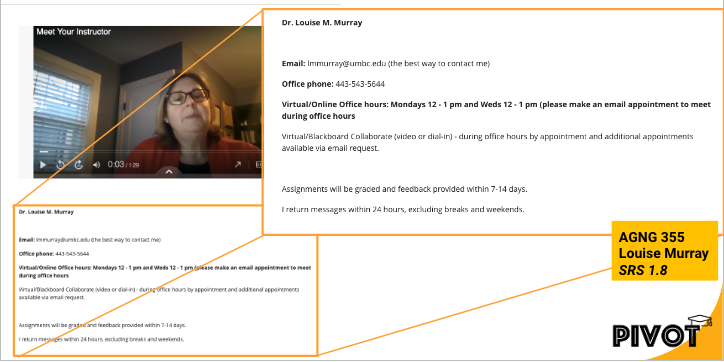
In the QM-certified course AGNG 355, instructor Louise Murray (pictured above) includes a pre-recorded, narrated, and captioned PowerPoint to provide students with a visual tour of the course and communication expectations. This allows students to see and hear the instructor and complements the text Murray provides about email, phone, office hours, and response times.
There are many ways to welcome and introduce students to your course, including steps you can take before the semester even starts, such as sending a welcome email or announcement. These messages can stay available for students through the duration of the course.
Some instructors send a pre-survey to students before the semester starts to determine prior knowledge or experience. In addition, you may want to prepare a Frequently Asked Questions (FAQs) resource to address the most common student questions, share tips on time management, and remind students how to access technology and resources.
Consider that there are effective options to consider for welcoming and orienting students that create learning opportunities at the beginning of the course including:
- Accessing a welcome video or course tour (pre-recorded)
- Reading an instructor’s introduction
- Introducing themselves in a Discussion forum or VoiceThread
- Using the “Ask the Professor” discussion forum to ask clarifying questions
- Completing a syllabus quiz
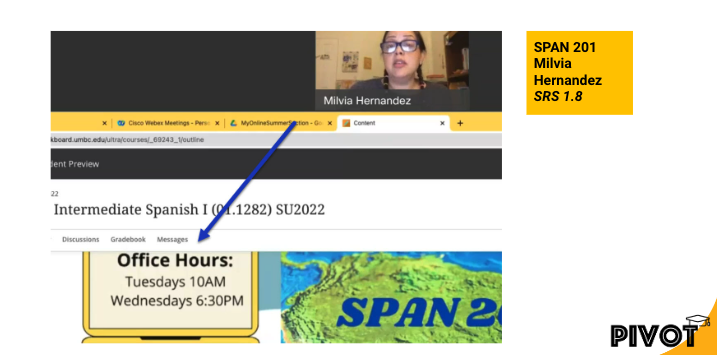
In the Quality Matters certified course SPAN 201 (pictured above) instructor Milvia Hernandez pre-records a brief video that complements text in Blackboard. More importantly, students can also see and hear Hernandez as she welcomes them in both Spanish and English and explains the course structure and cadence.
About Quality Matters
Grounded in evidence-based practice research, peer review, and collegiality, Quality Matters (QM) is used by more than 40,000 educators and instructional designers worldwide to strengthen online and blended course design.
At UMBC, 19 courses have earned QM certification for online course design and represent more than half of the QM-certified courses in the University System of Maryland.
References:
- Quality Matters. (2024, September 9). QM Rubrics & Standards.
- Wengier, S. (2022). The start here module: Creating a first day impression in an online language class (EJ1346021).
Why Attend?
This roadmap presentation offers a deep dive into new development in Ultra over the next 3-6 months, impacting the way we teach, learn, and interact with our students using Blackboard. In addition to Instructional Technology staff support, the Blackboard team, representing client experience, product management, and Ultra migration, will be available to answer your questions. Continued feedback has helped shape Ultra's evolution since UMBC began its journey and contributes to our final milestone to migrate all courses to Ultra by the end of 2024.
We're offering exclusive perks for those who can join us in-person:
- Complimentary Lunch: Enjoy a simple lunch as you network with Blackboard, Instructional Technology, and UMBC colleagues.
- Free T-shirts, Notebooks, and Pens: Grab a small token of appreciation for your engagement and feedback.
Space for in-person attendance is limited. However, understanding the demands of academic schedules, we're also offering a virtual attendance option. This ensures that everyone interested can benefit from the valuable insights shared, regardless of physical location.
How to RSVP
Visit our event page to reserve your spot, whether you plan to attend in-person or virtually. Please take a few minutes to complete this pre-event survey by February 14, 2024 to help us tailor the upcoming Lunch & Learn Roadmap session to your needs and interests. Your responses will guide the focus of the roadmap presentation and discussion.
Connect with Instructional Technology
As always, if you have any questions about teaching, learning, and technology at UMBC, please consider the following options:
UMBC is committed to providing a consistent learning experience for everyone. The last day we will support Blackboard Original is December 31, 2024. Please check out our training and support: umbc.edu/go/ultra
Thumbnail Image: word cloud spelling "ULTRA"
Are you stepping into the world of Blackboard Ultra? Instructional Technology is offering two identical sessions on January 22, 2024, providing flexible opportunities to fit into an instructors busy schedule.
In these fast-paced and focused sessions, you'll dive into the essentials of Blackboard Ultra, exploring efficient navigation, content creation, assessment tools, grading techniques, and effective communication strategies with students. Our streamlined approach is designed to deliver key information swiftly, ensuring you get the most out of every minute.
Session Objectives
Swift Navigation: Learn to maneuver through Ultra with ease.
Content Building: Discover quick tips for effective course material creation.
Assessment Tools: Set up and manage student assessments.
Grading Simplified: Review efficient grading practices.
Student Communication: Explore strategies to maintain clear and effective communication.
These sessions are an ideal jumpstart for instructors preparing to adopt Blackboard Ultra, providing comprehensive coverage of fundamental features.
Post-Session Support: Although the main session is a quick 50 minutes, we invite you to stay for an additional 10-minute Q&A segment. Here, you can ask specific questions and see live demonstrations tailored to your needs.
Join us to streamline your transition to Blackboard Ultra and enhance your digital teaching toolkit. Choose either of the two available sessions and get ready to elevate for Blackboard Ultra!
Join a Session:
Sessions will be facilitated by Instructional Technology Staff:
- Session #1: 9 AM - 9:50 AM
- Staff: Mariann Hawken / Susan Biro
- Session #2: 10:30 AM - 11:20 AM
- Staff: Josh Abrams / Peter Ariev
These sessions will take place in a Microsoft Teams virtual conference room. Please see the individual event to RSVP and learn about login information.
Please note: UMBC is committed to creating an accessible and inclusive environment for all faculty, staff, students, and visitors. If you would like to request accommodations (e.g., ASL interpreters, captioning, wheelchair access, etc.) for this event, please notify us at least two weeks prior to the event. Requests received after that time cannot be guaranteed, but we will do our best to make arrangements for program access. Please contact the event host (instructionaltechnology@umbc.edu) with your specific request and be sure to include the event title, date, and time.
Automated closed captioning for virtual events is available via the Microsoft Teams desktop and mobile applications. All recordings are uploaded to Panopto with captioning enabled.
]]>
Are you stepping into the world of Blackboard Ultra? Instructional Technology is offering two identical sessions on January 22, 2024, providing flexible opportunities to fit into an instructors...
https://my3.my.umbc.edu/groups/instructional-technology/posts/137637
https://beta.my.umbc.edu/api/v0/pixel/news/137637/guest@my.umbc.edu/e823fd1315e7bc581bd88b92b33b7bbe/api/pixel
sp2024
sprint
ultra
ultra-experience
webinar
Instructional Technology
https://beta.my.umbc.edu/groups/instructional-technology
https://assets2-beta.my.umbc.edu/system/shared/avatars/groups/000/001/164/dec3b026b81ee6d890a8f82f75c94a2e/xsmall.png?1446126703
https://assets1-beta.my.umbc.edu/system/shared/avatars/groups/000/001/164/dec3b026b81ee6d890a8f82f75c94a2e/original.png?1446126703
https://assets2-beta.my.umbc.edu/system/shared/avatars/groups/000/001/164/dec3b026b81ee6d890a8f82f75c94a2e/xxlarge.png?1446126703
https://assets1-beta.my.umbc.edu/system/shared/avatars/groups/000/001/164/dec3b026b81ee6d890a8f82f75c94a2e/xlarge.png?1446126703
https://assets1-beta.my.umbc.edu/system/shared/avatars/groups/000/001/164/dec3b026b81ee6d890a8f82f75c94a2e/large.png?1446126703
https://assets4-beta.my.umbc.edu/system/shared/avatars/groups/000/001/164/dec3b026b81ee6d890a8f82f75c94a2e/medium.png?1446126703
https://assets3-beta.my.umbc.edu/system/shared/avatars/groups/000/001/164/dec3b026b81ee6d890a8f82f75c94a2e/small.png?1446126703
https://assets2-beta.my.umbc.edu/system/shared/avatars/groups/000/001/164/dec3b026b81ee6d890a8f82f75c94a2e/xsmall.png?1446126703
https://assets3-beta.my.umbc.edu/system/shared/avatars/groups/000/001/164/dec3b026b81ee6d890a8f82f75c94a2e/xxsmall.png?1446126703
Instructional Technology
https://assets4-beta.my.umbc.edu/system/shared/thumbnails/news/000/137/637/2007d0325a087a0ee801fc5a8996b360/xxlarge.jpg?1702324769
https://assets3-beta.my.umbc.edu/system/shared/thumbnails/news/000/137/637/2007d0325a087a0ee801fc5a8996b360/xlarge.jpg?1702324769
https://assets2-beta.my.umbc.edu/system/shared/thumbnails/news/000/137/637/2007d0325a087a0ee801fc5a8996b360/large.jpg?1702324769
https://assets3-beta.my.umbc.edu/system/shared/thumbnails/news/000/137/637/2007d0325a087a0ee801fc5a8996b360/medium.jpg?1702324769
https://assets3-beta.my.umbc.edu/system/shared/thumbnails/news/000/137/637/2007d0325a087a0ee801fc5a8996b360/small.jpg?1702324769
https://assets2-beta.my.umbc.edu/system/shared/thumbnails/news/000/137/637/2007d0325a087a0ee801fc5a8996b360/xsmall.jpg?1702324769
https://assets2-beta.my.umbc.edu/system/shared/thumbnails/news/000/137/637/2007d0325a087a0ee801fc5a8996b360/xxsmall.jpg?1702324769
3
0
true
Mon, 11 Dec 2023 15:03:50 -0500
Wed, 17 Jan 2024 12:07:54 -0500
Unlock collaborative learning with cloud tools in Blackboard
Discover Google Workspace and Microsoft OneDrive
Cloud resources can transform a course design with streamlined document display and reduce storage footprint. Two new integrations from Google Workspace and Microsoft OneDrive offer cloud-based file management for Ultra courses. These tools allow faculty to select existing files, such as a syllabus or course schedule, and embed them seamlessly into a course for students to view. Customized privileges ensure only the document owner can modify the file within the framework of the course or the cloud drive while keeping the learner's access restricted to read-only.
Additionally, these tools support student collaboration, allowing for dynamic exchange of ideas, peer learning, co-authorship, and presentation planning. Creating a collaborative document in Google or Microsoft provides an exciting opportunity for faculty to support student teamwork in a shared environment directly embedded in the Ultra course space. Leverage these tools with students for real-time writing and editing, brainstorming, project planning, and other collaborative experiences.
Learn more about using Google Workspace (Docs, Slides, Sheets)
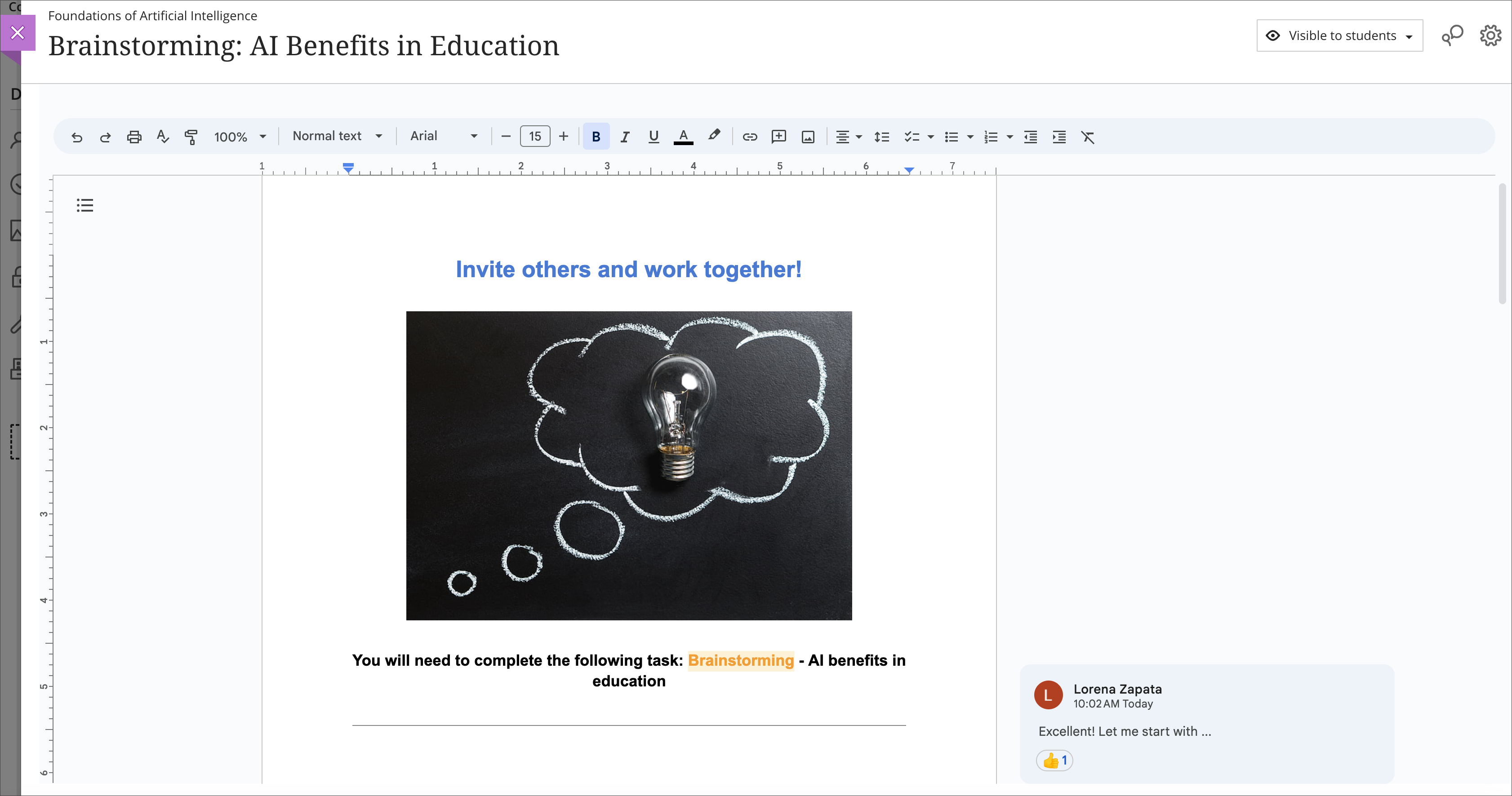
Image 1: Example of an embedded Google collaborative document for students
Learn more about using Microsoft OneDrive (Word, PowerPoint, Excel)
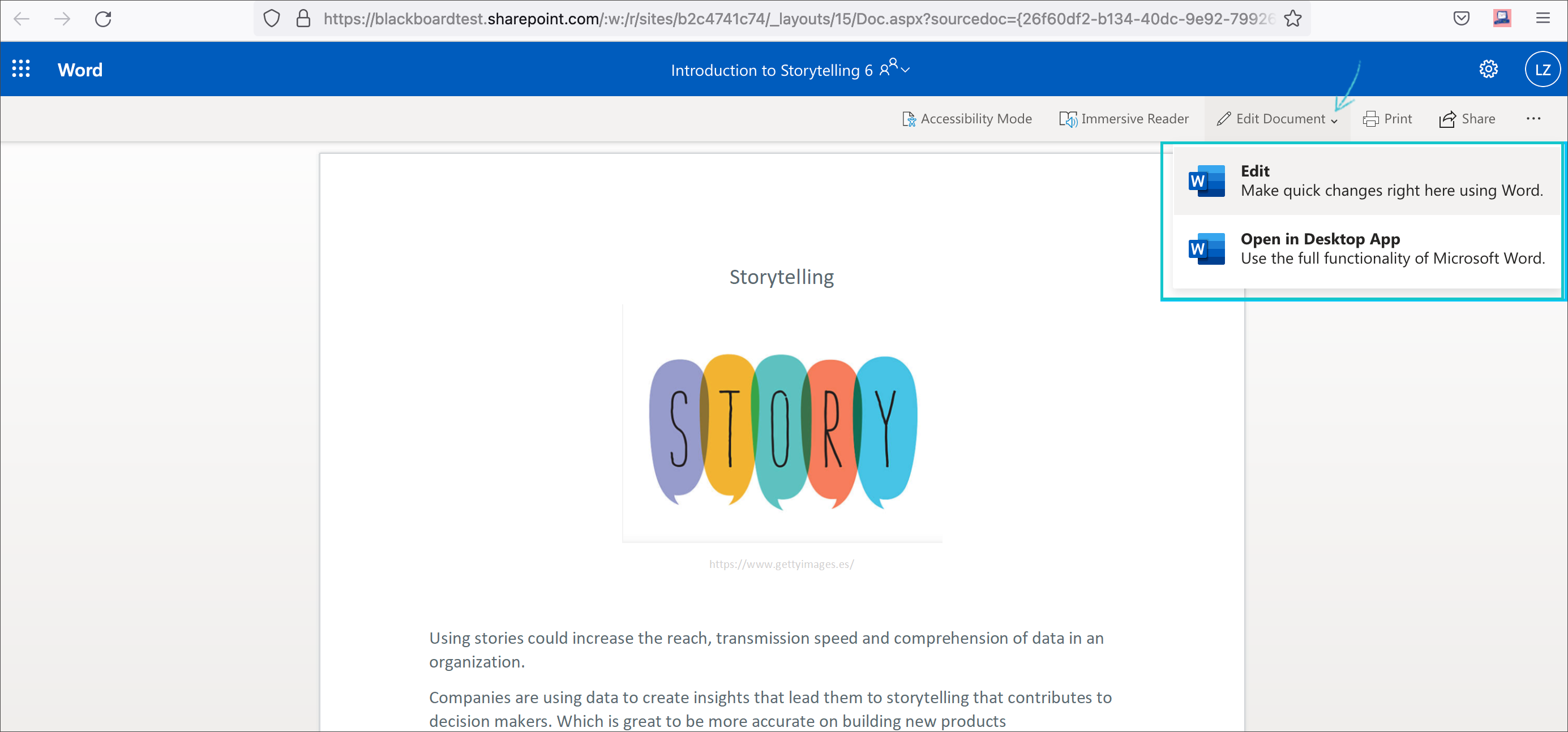
Image 2: Example of an embedded Microsoft Word document for students to read only
Both Google Workspace and Microsoft OneDrive are available now. Faculty can learn more about these tools at an upcoming webinar on January 9, 2024.
Connect with Instructional Technology
As always, if you have any questions about teaching, learning, and technology at UMBC, please consider the following options:
UMBC is committed to providing a consistent learning experience for everyone. The last day we will support Blackboard Original is December 31, 2024. Please check out our training and support: https://umbc.edu/go/ultra.
]]>
Cloud resources can transform a course design with streamlined document display and reduce storage footprint. Two new integrations from Google Workspace and Microsoft OneDrive offer cloud-based...
https://my3.my.umbc.edu/groups/instructional-technology/posts/136980
https://beta.my.umbc.edu/api/v0/pixel/news/136980/guest@my.umbc.edu/974acebe5a361d0883d8400183637bac/api/pixel
blackboard
cloud-collaboration
cloud-storage
engagement
google
groups
microsoft
one-drive
online-learning
ultra
Instructional Technology
https://beta.my.umbc.edu/groups/instructional-technology
https://assets2-beta.my.umbc.edu/system/shared/avatars/groups/000/001/164/dec3b026b81ee6d890a8f82f75c94a2e/xsmall.png?1446126703
https://assets1-beta.my.umbc.edu/system/shared/avatars/groups/000/001/164/dec3b026b81ee6d890a8f82f75c94a2e/original.png?1446126703
https://assets2-beta.my.umbc.edu/system/shared/avatars/groups/000/001/164/dec3b026b81ee6d890a8f82f75c94a2e/xxlarge.png?1446126703
https://assets1-beta.my.umbc.edu/system/shared/avatars/groups/000/001/164/dec3b026b81ee6d890a8f82f75c94a2e/xlarge.png?1446126703
https://assets1-beta.my.umbc.edu/system/shared/avatars/groups/000/001/164/dec3b026b81ee6d890a8f82f75c94a2e/large.png?1446126703
https://assets4-beta.my.umbc.edu/system/shared/avatars/groups/000/001/164/dec3b026b81ee6d890a8f82f75c94a2e/medium.png?1446126703
https://assets3-beta.my.umbc.edu/system/shared/avatars/groups/000/001/164/dec3b026b81ee6d890a8f82f75c94a2e/small.png?1446126703
https://assets2-beta.my.umbc.edu/system/shared/avatars/groups/000/001/164/dec3b026b81ee6d890a8f82f75c94a2e/xsmall.png?1446126703
https://assets3-beta.my.umbc.edu/system/shared/avatars/groups/000/001/164/dec3b026b81ee6d890a8f82f75c94a2e/xxsmall.png?1446126703
Instructional Technology
https://assets2-beta.my.umbc.edu/system/shared/thumbnails/news/000/136/980/61c10de9e6bdc7965c908b02b14ada96/xxlarge.jpg?1699624920
https://assets3-beta.my.umbc.edu/system/shared/thumbnails/news/000/136/980/61c10de9e6bdc7965c908b02b14ada96/xlarge.jpg?1699624920
https://assets2-beta.my.umbc.edu/system/shared/thumbnails/news/000/136/980/61c10de9e6bdc7965c908b02b14ada96/large.jpg?1699624920
https://assets3-beta.my.umbc.edu/system/shared/thumbnails/news/000/136/980/61c10de9e6bdc7965c908b02b14ada96/medium.jpg?1699624920
https://assets1-beta.my.umbc.edu/system/shared/thumbnails/news/000/136/980/61c10de9e6bdc7965c908b02b14ada96/small.jpg?1699624920
https://assets4-beta.my.umbc.edu/system/shared/thumbnails/news/000/136/980/61c10de9e6bdc7965c908b02b14ada96/xsmall.jpg?1699624920
https://assets2-beta.my.umbc.edu/system/shared/thumbnails/news/000/136/980/61c10de9e6bdc7965c908b02b14ada96/xxsmall.jpg?1699624920
6
0
true
Tue, 28 Nov 2023 12:10:44 -0500
Test Drive New Blackboard Faculty AI Course Design Tools
Discover how AI can support your course design process
The U.S. Distance Learning Association (USDLA)'s National Distance Learning Week focuses on how artificial intelligence (AI) impacts education and training.
Instructional Technology invites faculty to test drive the suite of new Blackboard AI Course Design Assistant tools, which are now available for instructors who would like early access to preview the tool. Informed by Anthology's Trustworthy AI Approach and seamlessly embedded into Ultra's workflows, the AI Course Design Assistant tools are opt-in and the instructor is always in control of the content generated. Faculty can choose when, where, and how to leverage the tools in their Ultra courses. Anthology has not created any AI tools for students.
Faculty interested in early access to the tool may submit an RT ticket to request access.
Developed to assist faculty in streamlining course preparation, the AI Course Design Assistant tools include the features detailed below.
Course-Builder Assistant
Create sample learning modules, titles, and descriptions. The generated modules include the module title, description, and images. Content within the module is not generated by the design tool.
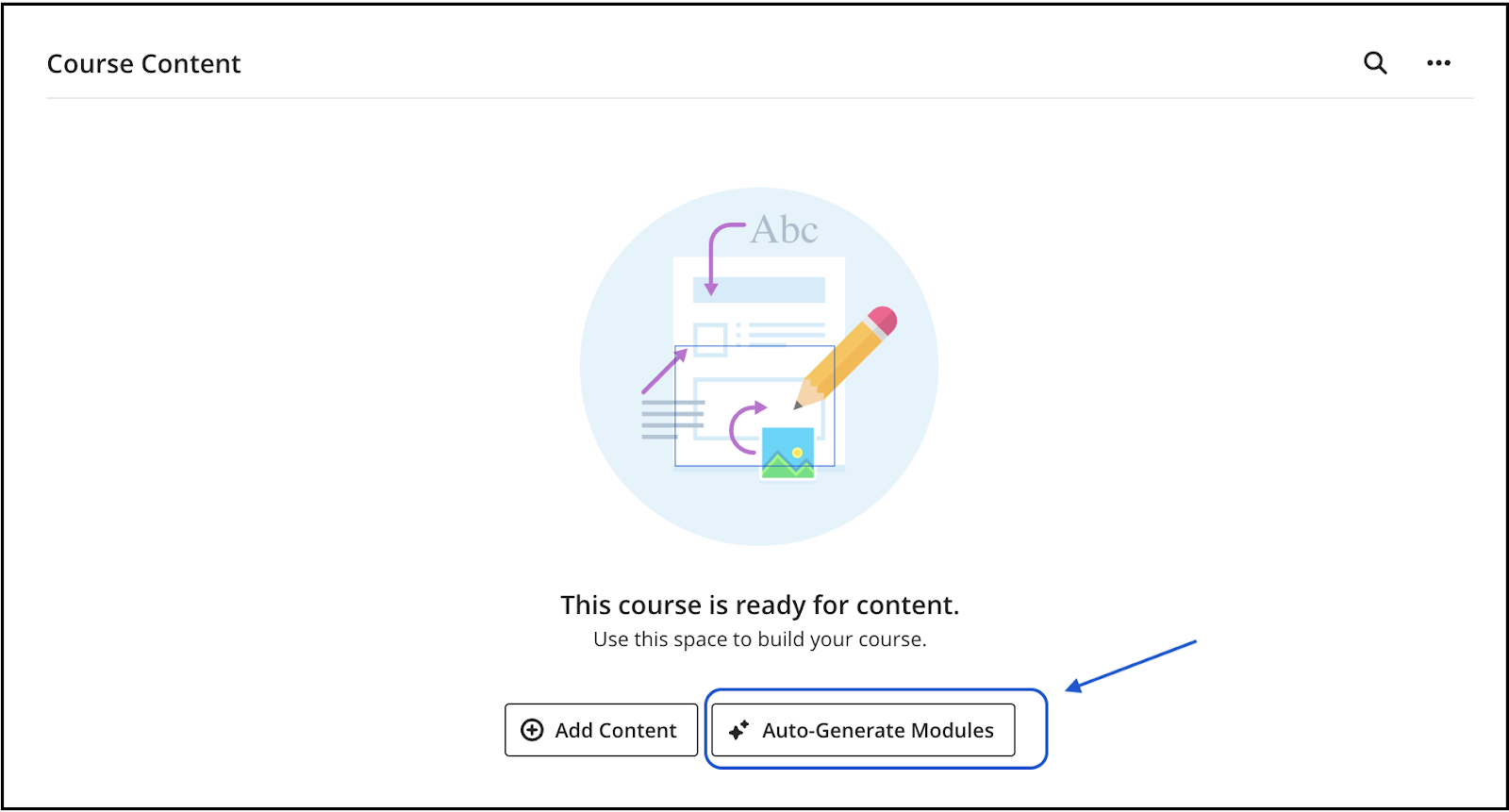
Image 1: Option to auto-generate modules in an empty course.
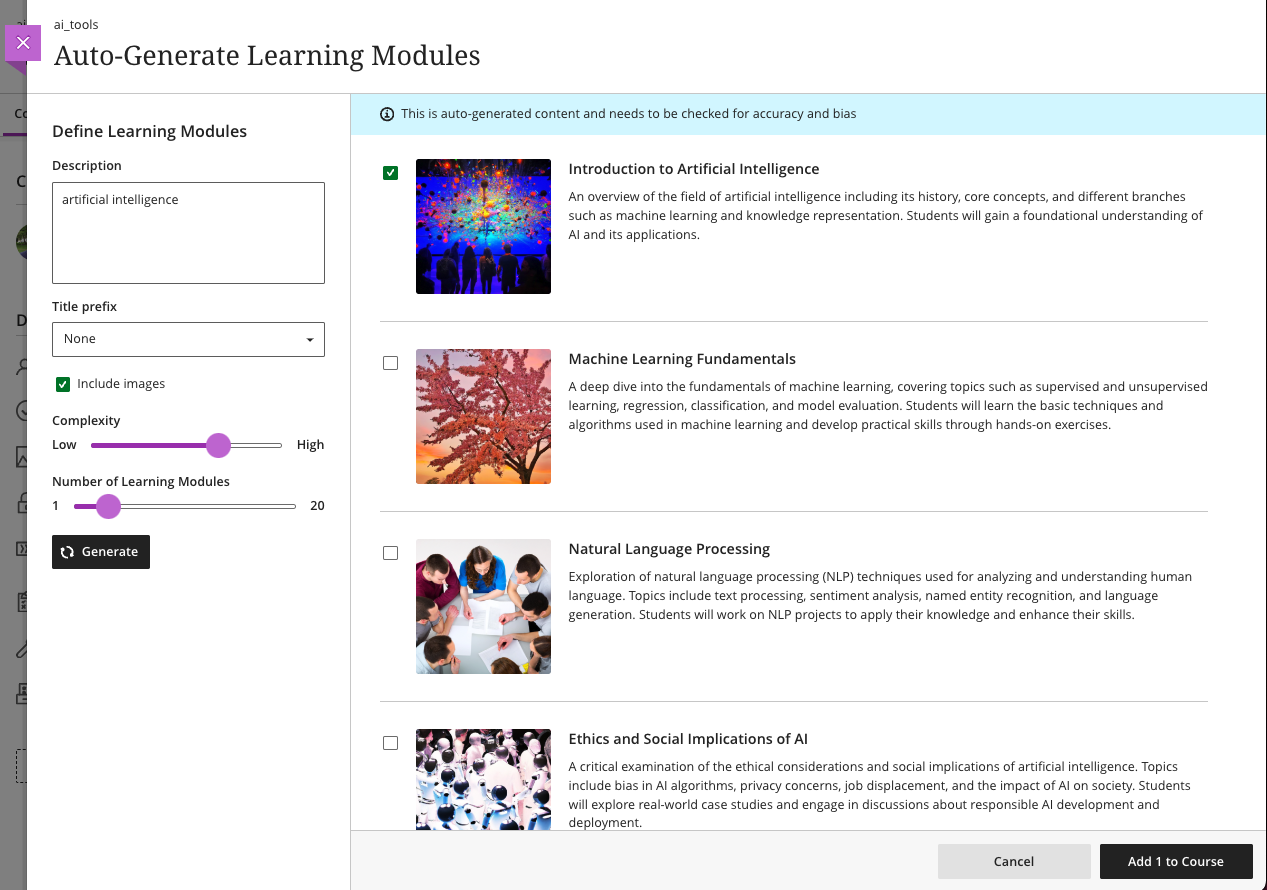
Image 2: Auto-generated modules with an option to select and add to the course.
Image Suggestion and Creation
The assistant can draw from the Unsplash stock image library and suggest thumbnails for illustration in learning modules or identify an image for the course banner. Functionality also includes AI-generated image creation based on course name and keywords. As of early November, the AI Design Assistant also includes the option to generate images and access Unsplash stock images in Ultra Documents, Discussions, Tests, Assignments, Journal prompts, and Course Messages.
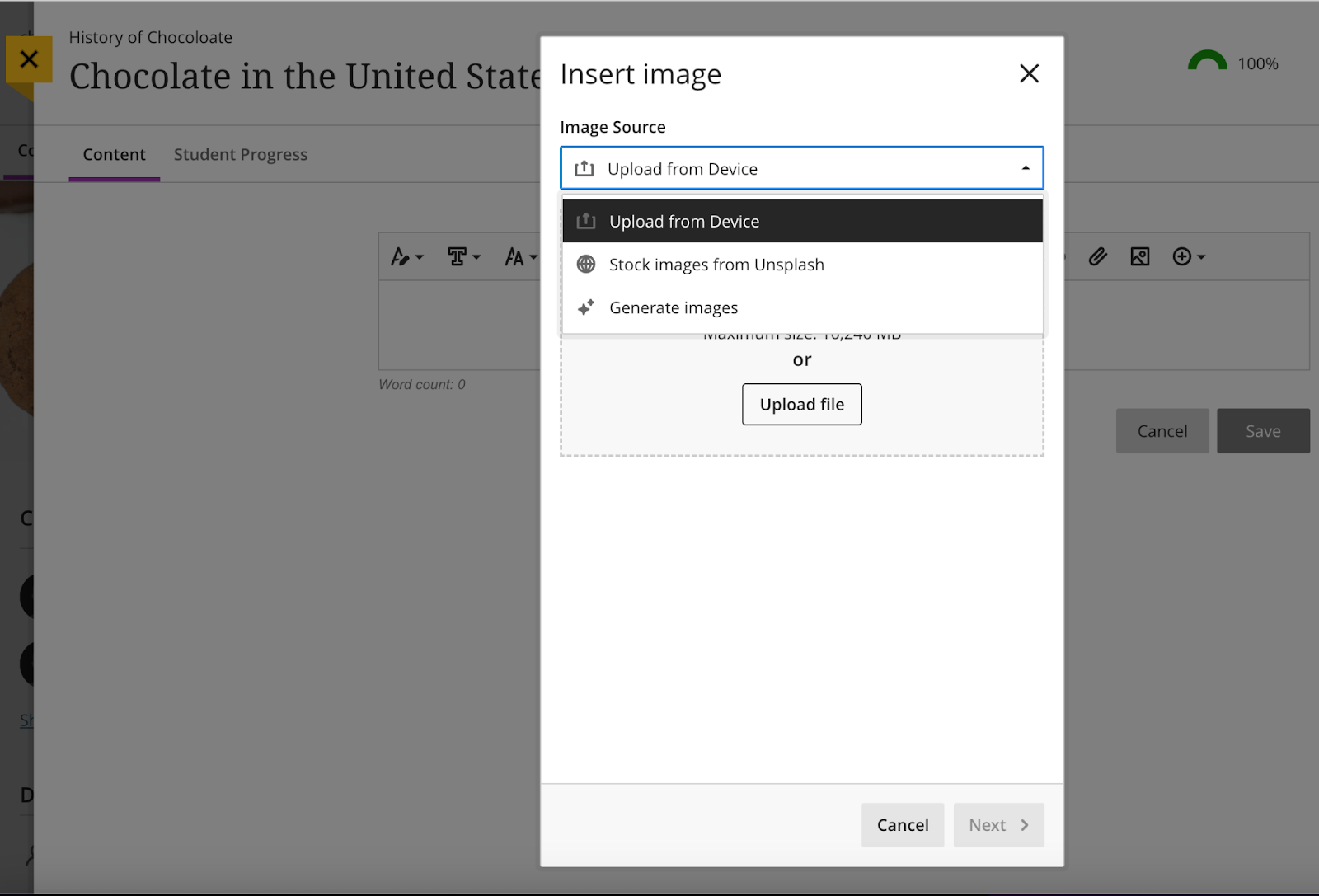
Image 3: Select "Generate images" or "Stock images from Unsplash" to add images to Ultra Documents, Discussions, Assessments, Journal prompts, and Course Messages.
Content-Based Test Generation
Using the content included in an Ultra Document, Assignment Description, or additional information provided directly in the AI tool panel, the Design Assistant can generate a diverse set of questions for a test or question bank.
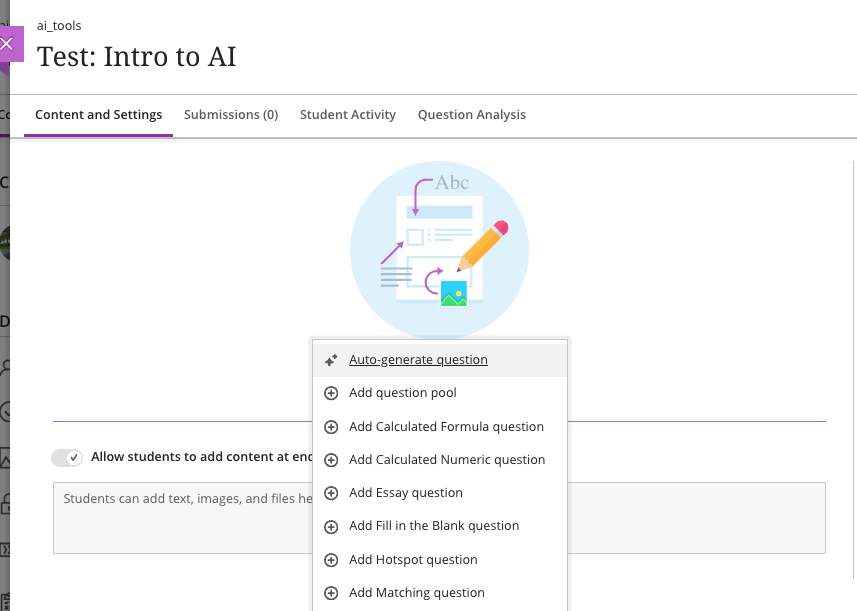
Image 4: Select "auto-generate question" in a test or assignment to see AI-tool generated questions. Test questions can be generated from a test or assignment or at the bottom of an Ultra document.
Rubric Creation
Drawing on content in an assessment or discussion prompt, the AI tool can analyze and streamline the rubric creation process according to specific learning objectives and assessment criteria.
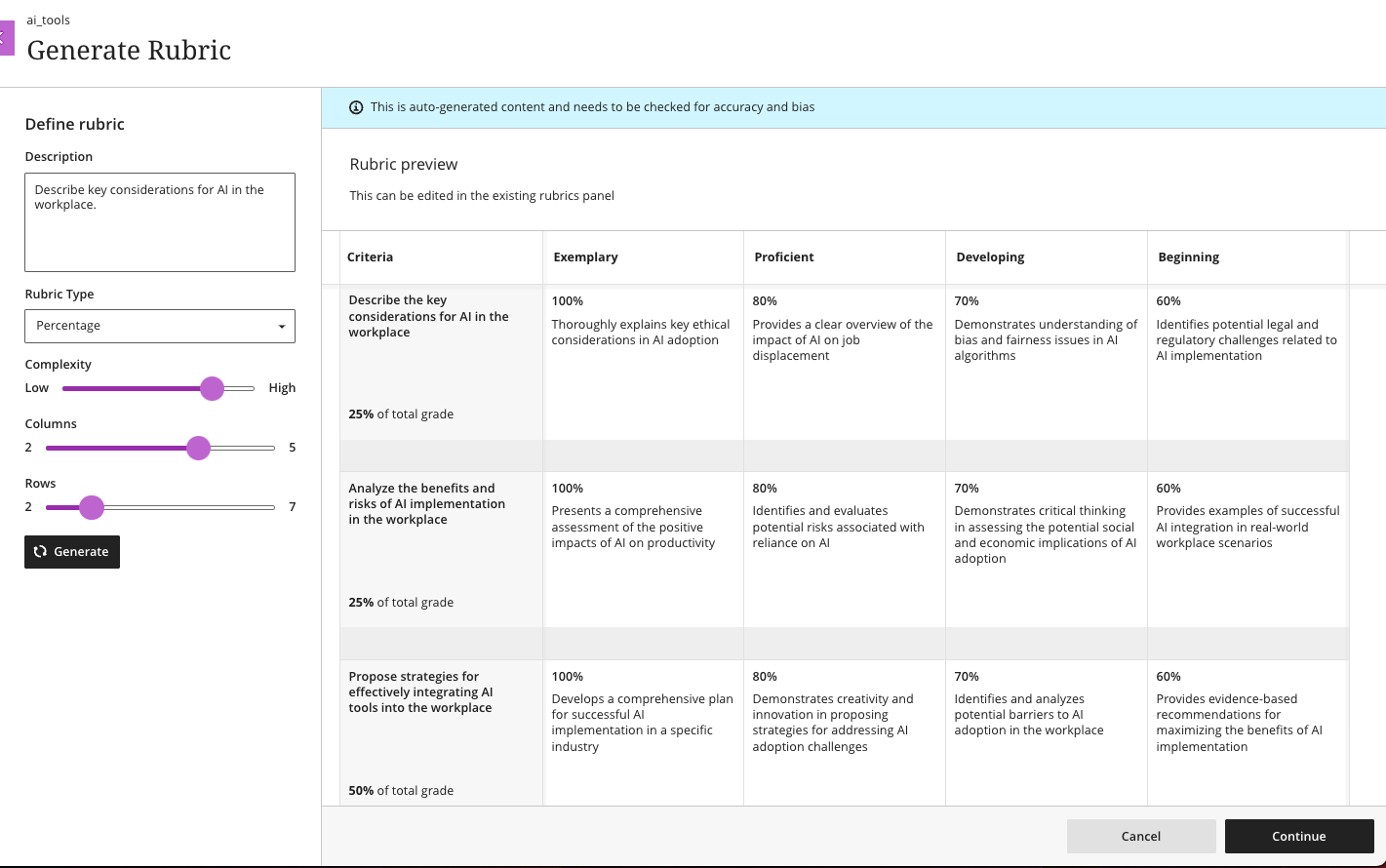
Image 5: Generated rubric, with options to customize rubric type, complexity, and number of rows and columns.
To discover more about the impact of AI on distance education and training, the U.S. Distance Learning Association (USDLA) is hosting virtual webinars during the sixteenth annual National Distance Learning Week (Nov 6-10, 2023). All sessions are free to attend, but require registration via USDLA.
Connect with Instructional Technology
As always, if you have any questions about teaching, learning, and technology at UMBC, please consider the following options:
UMBC is committed to providing a consistent learning experience for everyone. The last day we will support Blackboard Original is December 31, 2024. Please check out our training and support: https://umbc.edu/go/ultra.
]]>
The U.S. Distance Learning Association (USDLA)'s National Distance Learning Week focuses on how artificial intelligence (AI) impacts education and training. Instructional Technology invites...
https://my3.my.umbc.edu/groups/instructional-technology/posts/136797
https://beta.my.umbc.edu/api/v0/pixel/news/136797/guest@my.umbc.edu/cce9fa7d60e0f9d649e04b3e3cfb703f/api/pixel
ai
ai-course-design-assistant
artificial-intelligence
blackboard
blackboard-ultra
ndlw
online-learning
ultra
Instructional Technology
https://beta.my.umbc.edu/groups/instructional-technology
https://assets2-beta.my.umbc.edu/system/shared/avatars/groups/000/001/164/dec3b026b81ee6d890a8f82f75c94a2e/xsmall.png?1446126703
https://assets1-beta.my.umbc.edu/system/shared/avatars/groups/000/001/164/dec3b026b81ee6d890a8f82f75c94a2e/original.png?1446126703
https://assets2-beta.my.umbc.edu/system/shared/avatars/groups/000/001/164/dec3b026b81ee6d890a8f82f75c94a2e/xxlarge.png?1446126703
https://assets1-beta.my.umbc.edu/system/shared/avatars/groups/000/001/164/dec3b026b81ee6d890a8f82f75c94a2e/xlarge.png?1446126703
https://assets1-beta.my.umbc.edu/system/shared/avatars/groups/000/001/164/dec3b026b81ee6d890a8f82f75c94a2e/large.png?1446126703
https://assets4-beta.my.umbc.edu/system/shared/avatars/groups/000/001/164/dec3b026b81ee6d890a8f82f75c94a2e/medium.png?1446126703
https://assets3-beta.my.umbc.edu/system/shared/avatars/groups/000/001/164/dec3b026b81ee6d890a8f82f75c94a2e/small.png?1446126703
https://assets2-beta.my.umbc.edu/system/shared/avatars/groups/000/001/164/dec3b026b81ee6d890a8f82f75c94a2e/xsmall.png?1446126703
https://assets3-beta.my.umbc.edu/system/shared/avatars/groups/000/001/164/dec3b026b81ee6d890a8f82f75c94a2e/xxsmall.png?1446126703
Instructional Technology
https://assets1-beta.my.umbc.edu/system/shared/thumbnails/news/000/136/797/bf1e6376eb09a574b84cb0b0050da68a/xxlarge.jpg?1699622583
https://assets3-beta.my.umbc.edu/system/shared/thumbnails/news/000/136/797/bf1e6376eb09a574b84cb0b0050da68a/xlarge.jpg?1699622583
https://assets2-beta.my.umbc.edu/system/shared/thumbnails/news/000/136/797/bf1e6376eb09a574b84cb0b0050da68a/large.jpg?1699622583
https://assets1-beta.my.umbc.edu/system/shared/thumbnails/news/000/136/797/bf1e6376eb09a574b84cb0b0050da68a/medium.jpg?1699622583
https://assets4-beta.my.umbc.edu/system/shared/thumbnails/news/000/136/797/bf1e6376eb09a574b84cb0b0050da68a/small.jpg?1699622583
https://assets2-beta.my.umbc.edu/system/shared/thumbnails/news/000/136/797/bf1e6376eb09a574b84cb0b0050da68a/xsmall.jpg?1699622583
https://assets2-beta.my.umbc.edu/system/shared/thumbnails/news/000/136/797/bf1e6376eb09a574b84cb0b0050da68a/xxsmall.jpg?1699622583
3
0
true
Fri, 10 Nov 2023 08:24:58 -0500
Mon, 18 Dec 2023 13:51:25 -0500
Ultra Courses to Offer New AI Course Design Assistant Tools
Generate images, structure, test questions, and rubrics
As the landscape of education continues to evolve, the integration of cutting-edge technology into the classroom has become more vital than ever. The advent of generative AI tools is poised to revolutionize the field of higher education, transforming the virtual classroom into a dynamic and responsive environment. The potential for positive impact on productivity and efficiency for faculty is significant, opening new doors for innovation in teaching and learning as well as course development.
Instructional Technology invites faculty to preview the suite of new AI Course Design Assistant features during two webinars on Wednesday, August 23. Developed to assist faculty in streamlining course preparation, the AI Course Design Assistant tools include:
- A course-builder assistant. Create sample learning modules, titles, and descriptions.
- Image suggestion and creation. The assistant can draw from the Unsplash stock image library and suggest thumbnails for illustration in learning modules or identify an image for the course banner. Functionality also includes AI-generated image creation based on course name and keywords.
- Content-based test generation. AI-powered algorithms analyze an Ultra document's content or inputted learning objectives and quickly generate a diverse set of questions for a test or question bank.
- Rubric creation. Drawing on an assessment or discussion prompt’s content, the AI can analyze and streamline the rubric creation process according to specific learning objectives and assessment criteria.
Informed by Anthology’s Trustworthy AI Approach and seamlessly embedded into Ultra’s workflows, the AI Course Design Assistant tools are opt-in and the instructor is always in control of the content generated. Faculty can choose when, where, and how to leverage the tools in their Ultra courses.
Instructional Technology expects to launch the tools to the campus during National Distance Learning Week (Nov. 6-10) with a lunchtime series. Limited early access will be available to interested faculty upon request. Please attend a preview session for more information.
Connect with Instructional Technology
As always, if you have any questions about teaching, learning, and technology at UMBC, please consider the following options:
UMBC is committed to providing a consistent learning experience for everyone. The last day we will support Blackboard Original is December 31, 2024. Please check out our training and support: https://umbc.edu/go/ultra.
]]>
As the landscape of education continues to evolve, the integration of cutting-edge technology into the classroom has become more vital than ever. The advent of generative AI tools is poised to...
https://my3.my.umbc.edu/groups/instructional-technology/posts/134605
https://beta.my.umbc.edu/api/v0/pixel/news/134605/guest@my.umbc.edu/d5bafa793745ce800919e038c8e7d5de/api/pixel
ai
ai-course-design-assistant
blackboard
online-learning
ultra
Instructional Technology
https://beta.my.umbc.edu/groups/instructional-technology
https://assets2-beta.my.umbc.edu/system/shared/avatars/groups/000/001/164/dec3b026b81ee6d890a8f82f75c94a2e/xsmall.png?1446126703
https://assets1-beta.my.umbc.edu/system/shared/avatars/groups/000/001/164/dec3b026b81ee6d890a8f82f75c94a2e/original.png?1446126703
https://assets2-beta.my.umbc.edu/system/shared/avatars/groups/000/001/164/dec3b026b81ee6d890a8f82f75c94a2e/xxlarge.png?1446126703
https://assets1-beta.my.umbc.edu/system/shared/avatars/groups/000/001/164/dec3b026b81ee6d890a8f82f75c94a2e/xlarge.png?1446126703
https://assets1-beta.my.umbc.edu/system/shared/avatars/groups/000/001/164/dec3b026b81ee6d890a8f82f75c94a2e/large.png?1446126703
https://assets4-beta.my.umbc.edu/system/shared/avatars/groups/000/001/164/dec3b026b81ee6d890a8f82f75c94a2e/medium.png?1446126703
https://assets3-beta.my.umbc.edu/system/shared/avatars/groups/000/001/164/dec3b026b81ee6d890a8f82f75c94a2e/small.png?1446126703
https://assets2-beta.my.umbc.edu/system/shared/avatars/groups/000/001/164/dec3b026b81ee6d890a8f82f75c94a2e/xsmall.png?1446126703
https://assets3-beta.my.umbc.edu/system/shared/avatars/groups/000/001/164/dec3b026b81ee6d890a8f82f75c94a2e/xxsmall.png?1446126703
Instructional Technology
https://assets4-beta.my.umbc.edu/system/shared/thumbnails/news/000/134/605/45504cc5faf27fb98ed81919fdb263a8/xxlarge.jpg?1691674335
https://assets1-beta.my.umbc.edu/system/shared/thumbnails/news/000/134/605/45504cc5faf27fb98ed81919fdb263a8/xlarge.jpg?1691674335
https://assets4-beta.my.umbc.edu/system/shared/thumbnails/news/000/134/605/45504cc5faf27fb98ed81919fdb263a8/large.jpg?1691674335
https://assets2-beta.my.umbc.edu/system/shared/thumbnails/news/000/134/605/45504cc5faf27fb98ed81919fdb263a8/medium.jpg?1691674335
https://assets3-beta.my.umbc.edu/system/shared/thumbnails/news/000/134/605/45504cc5faf27fb98ed81919fdb263a8/small.jpg?1691674335
https://assets4-beta.my.umbc.edu/system/shared/thumbnails/news/000/134/605/45504cc5faf27fb98ed81919fdb263a8/xsmall.jpg?1691674335
https://assets4-beta.my.umbc.edu/system/shared/thumbnails/news/000/134/605/45504cc5faf27fb98ed81919fdb263a8/xxsmall.jpg?1691674335
5
2
true
Thu, 10 Aug 2023 09:35:19 -0400
Free Webinar Series: Teaching with Blackboard Ultra
Monthly training for faculty, TAs, and staff in SP/SU2023
The Bb Instructor Webinar Series offers free 45-minute webinars designed for instructors who are getting started with teaching using Blackboard Ultra. Topics include getting started, creating assessments, improving engagement, using groups, converting to Ultra, best practices, and using data in Ultra. Get step-by-step instructor and ask questions in these monthly sessions from Blackboard experts.
Multiple dates are offered throughout spring and into mid-summer. Register for one or more sessions.
Blackboard Learn Basics Ultra
This webinar is designed to provide you easy step-by-step instructions on how to upload course content, create discussion boards for students to engage, and provide an overview on the types of online assessments available in Blackboard Learn Ultra Course View.
- February 8 @ 11 AM
- March 22 @ 11 AM
- May 10 @ 11 AM
- June 20 @ 11 AM
Grading and Managing the Gradebook in an Ultra Course
This intermediate session will provide a deeper dive into setting up grading criteria for assessments, utilizing different types of assessments, and creating gradable assignments in Blackboard Learn Ultra Courses.
- February 14 @ 11 AM
- March 28 @ 11 AM
- May 16 @ 11 AM
- June 21 @ 11 AM
Creating Assessments in an Ultra Course
In this session, we will focus on creating different assessments and assignments in Blackboard Learn Ultra courses. We will outline the steps to create an assessment or an assignment, including selecting different options in grade settings.
- February 16 @ 11 AM
- March 30 @ 11 AM
- May 18 @ 11 AM
- June 22 @ 11 AM
Improving Student Engagement Ultra
Discover how utilizing tools within Learn Ultra can encourage meaningful engagement among students. between your students and you, and with the content itself! In this session, we'll examine how to effectively use discussion boards, class conversations, interactive lectures, and other Learn Ultra tools to foster student engagement in your course. We will also explore different ways to promote communication and collaboration among your students to get them involved and to keep them engaged in online classes.
- February 22 @ 11 AM
- April 12 @ 11 AM
- May 24 @ 11 AM
- June 27 @ 11 AM
Using Groups in Blackboard Learn Ultra
Collaborative learning offers many benefits over traditional instruction. Studies show that when students work as a team, they develop positive attitudes, solve problems more effectively, and experience a greater sense of accomplishment. This intermediate session will show you how to use the Groups tool in Blackboard Learn Ultra to facilitate student collaboration and enhance student engagement in your course.
- February 28 @ 11 AM
- April 18 @ 11 AM
- May 30 @ 11 AM
- June 28 @ 11 AM
Ultra Advantage -- Converting Original to Ultra
It's time for a little Spring clean-up! Let's look at suggestions on how to effectively clean-up, reorganize, and sort through the content in your Learn Original course before bringing all the content over to the Learn Ultra course. This webinar is designed to provide tips and tricks on streamlining the conversion over to the Learn Ultra courses.
- March 2 @ 11 AM
- April 20 @ 11 AM
- June 1 @ 11 AM
- June 29 @ 11 AM
Blackboard Learn Ultra Best Practices
Now that we know the buttons to click to create and setup many of the online learning tools, let's take a step back and determine what are the features of each of the tools and what are some of the best practices to use them in facilitating our online courses. These sessions will take on more of a pedagogical nature to assist in readying your course and yourself to enhancing the teaching and learning of your students. The sessions will coalesce around the lifecycle of each tool including instructor creation and considerations, student completion, instructor grading, and finally the student accessing their grade. Think broadly in terms of groups, assignments, assessments, journals, and discussion boards -- how can I make these more effective for me and for my students.
- March 8 @ 11 AM
- April 26 @ 11 AM
- June 7 @ 11 AM
- July 5 @ 11 AM
Using Data in Ultra
This webinar will focus on data and analytics available throughout the Ultra Course. We will guide instructors through the assignment analytics, student progress analytics, and course data accessible throughout Ultra.
- March 16 @ 11 AM
- May 4 @ 11 AM
- June 15 @ 11 AM
All webinars will be recorded and emailed to you after the session. Even if you can't attend live, please register for a Live Webinar so you can receive the recording.
]]>
The Bb Instructor Webinar Series offers free 45-minute webinars designed for instructors who are getting started with teaching using Blackboard Ultra. Topics include getting started, creating...
https://my3.my.umbc.edu/groups/instructional-technology/posts/130620
https://beta.my.umbc.edu/api/v0/pixel/news/130620/guest@my.umbc.edu/b145e64626f0397196e2a077a38d6485/api/pixel
blackboard
sp2023
su2023
training
ultra
webinar
Instructional Technology
https://beta.my.umbc.edu/groups/instructional-technology
https://assets2-beta.my.umbc.edu/system/shared/avatars/groups/000/001/164/dec3b026b81ee6d890a8f82f75c94a2e/xsmall.png?1446126703
https://assets1-beta.my.umbc.edu/system/shared/avatars/groups/000/001/164/dec3b026b81ee6d890a8f82f75c94a2e/original.png?1446126703
https://assets2-beta.my.umbc.edu/system/shared/avatars/groups/000/001/164/dec3b026b81ee6d890a8f82f75c94a2e/xxlarge.png?1446126703
https://assets1-beta.my.umbc.edu/system/shared/avatars/groups/000/001/164/dec3b026b81ee6d890a8f82f75c94a2e/xlarge.png?1446126703
https://assets1-beta.my.umbc.edu/system/shared/avatars/groups/000/001/164/dec3b026b81ee6d890a8f82f75c94a2e/large.png?1446126703
https://assets4-beta.my.umbc.edu/system/shared/avatars/groups/000/001/164/dec3b026b81ee6d890a8f82f75c94a2e/medium.png?1446126703
https://assets3-beta.my.umbc.edu/system/shared/avatars/groups/000/001/164/dec3b026b81ee6d890a8f82f75c94a2e/small.png?1446126703
https://assets2-beta.my.umbc.edu/system/shared/avatars/groups/000/001/164/dec3b026b81ee6d890a8f82f75c94a2e/xsmall.png?1446126703
https://assets3-beta.my.umbc.edu/system/shared/avatars/groups/000/001/164/dec3b026b81ee6d890a8f82f75c94a2e/xxsmall.png?1446126703
Instructional Technology
https://assets4-beta.my.umbc.edu/system/shared/thumbnails/news/000/130/620/8f32799a3ad36124c52d8420887c117d/xxlarge.jpg?1675438466
https://assets3-beta.my.umbc.edu/system/shared/thumbnails/news/000/130/620/8f32799a3ad36124c52d8420887c117d/xlarge.jpg?1675438466
https://assets1-beta.my.umbc.edu/system/shared/thumbnails/news/000/130/620/8f32799a3ad36124c52d8420887c117d/large.jpg?1675438466
https://assets3-beta.my.umbc.edu/system/shared/thumbnails/news/000/130/620/8f32799a3ad36124c52d8420887c117d/medium.jpg?1675438466
https://assets2-beta.my.umbc.edu/system/shared/thumbnails/news/000/130/620/8f32799a3ad36124c52d8420887c117d/small.jpg?1675438466
https://assets3-beta.my.umbc.edu/system/shared/thumbnails/news/000/130/620/8f32799a3ad36124c52d8420887c117d/xsmall.jpg?1675438466
https://assets2-beta.my.umbc.edu/system/shared/thumbnails/news/000/130/620/8f32799a3ad36124c52d8420887c117d/xxsmall.jpg?1675438466
2
0
true
Fri, 03 Feb 2023 10:47:21 -0500
Fri, 03 Feb 2023 10:51:18 -0500