<?xml version="1.0"?>
<News hasArchived="false" page="1" pageCount="1" pageSize="10" timestamp="Sat, 25 Apr 2026 20:50:06 -0400" url="https://beta.my.umbc.edu/groups/instructional-technology/posts.xml?tag=sds">
<NewsItem contentIssues="true" id="131929" important="false" status="posted" url="https://beta.my.umbc.edu/groups/instructional-technology/posts/131929">
<Title>Course Accessibility to Support All Learners</Title>
<Tagline>Technologies to support equitable access to course content</Tagline>
<Body>
<![CDATA[
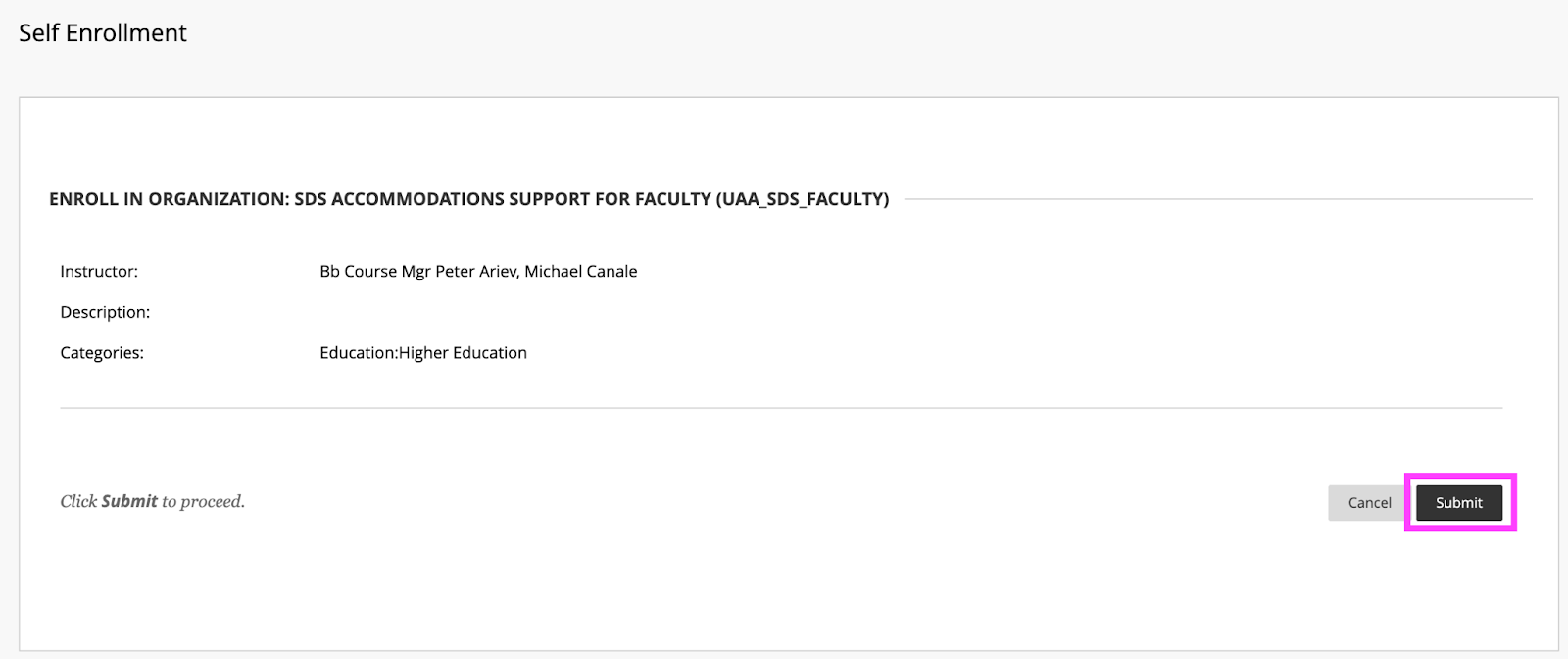
    <div class="html-content"><p><span>DoIT and Student Disability Services hosted a "</span><a href="https://my3.my.umbc.edu/groups/instructional-technology/events/115783" rel="nofollow external" class="bo"><span>Candid Conversation on Enhancing Accessibility</span></a><span>" on March 15th. The session highlighted ways that course accessibility benefits all students and results in inclusive learning and working environments. Student Disability Services and DoIT's Instructional Technology team collaborate to provide resources and support to enhance course accessibility. Proactively designing and teaching a course with accessibility in mind not only supports students with documented accommodations, but also supports </span><a href="https://udlguidelines.cast.org/" rel="nofollow external" class="bo"><span>Universal Design for Learning (UDL)</span></a><span> principles and best practices in course design. In the session panelists shared several key recommendations and resources that are available:</span></p><p><strong><span>Key recommendations for course design and delivery</span></strong></p><ul><li><span>Use </span><a href="https://wiki.umbc.edu/display/faq/Ally" rel="nofollow external" class="bo"><span>Blackboard Ally</span></a><span> to check the accessibility of course content, get guidance on remediating content, and to access alternative formats of course materials.</span></li></ul><ul><li><p><a href="https://help.blackboard.com/Ally/Ally_for_LMS/Instructor/Watch_Videos" rel="nofollow external" class="bo"><span>Videos about Ally</span></a></p></li><li><p><a href="https://wiki.umbc.edu/pages/viewpage.action?pageId=77431280" rel="nofollow external" class="bo"><span>Alternative Formats in Bb Ally</span></a><span> </span></p></li><li><p><a href="https://wiki.umbc.edu/pages/viewpage.action?pageId=77431345" rel="nofollow external" class="bo"><span>Which Alternative Format is Best to Use?</span></a><span> </span></p></li><li><p><span>Student FAQ - </span><a href="https://wiki.umbc.edu/pages/viewpage.action?pageId=77431260" rel="nofollow external" class="bo"><span>How do I download an alt format file generated by Ally? </span></a></p></li></ul><ul><li><span>Use live captioning in online course meetings, either with </span><a href="https://help.webex.com/en-us/article/lzi8h2/Show-or-hide-automated-closed-captions-during-a-Webex-meeting-or-webinar" rel="nofollow external" class="bo"><span>Webex</span></a><span> or </span><a href="https://support.google.com/chrome/answer/10538231?hl=en" rel="nofollow external" class="bo"><span>Google Chrome</span></a><span> browser live captioning enabled.</span></li><li><span>Caption video recordings with automatic captions in </span><a href="https://wiki.umbc.edu/x/pQjBBQ" rel="nofollow external" class="bo"><span>Panopto</span></a><span> or </span><a href="https://wiki.umbc.edu/x/yQ3BBQ" rel="nofollow external" class="bo"><span>VoiceThread</span></a><span>.</span></li><li><a href="https://support.panopto.com/s/article/Batch-Upload-Video-Files" rel="nofollow external" class="bo"><span>Upload a Video</span></a><span> to Panopto</span></li><li><span>Add time limit and due date </span><a href="https://wiki.umbc.edu/x/a4dnB" rel="nofollow external" class="bo"><span>accommodations in Blackboard</span></a><span>.</span></li></ul><p><strong><span><br></span></strong></p><p><strong><span>Accessibility Resources</span></strong></p><p><span>In addition to the tools noted above, the following resources also support accessibility:</span></p><ul><li><span>Create </span><a href="https://wiki.umbc.edu/x/VQjBBQ" rel="nofollow external" class="bo"><span>accessible documents</span></a><span> with Office 365.</span></li><li><span>Review the </span><a href="https://support.google.com/a/answer/1631886?hl=en" rel="nofollow external" class="bo"><span>Google Workspace guide to accessibility</span></a><span>.</span></li><li><span>Explore SDS </span><a href="https://sds.umbc.edu/assistive-technology/" rel="nofollow external" class="bo"><span>assistive technology resources</span></a><span>.</span></li><li><span>Review assistive technology resources available at the</span><a href="http://library.umbc.edu/computers.php#asst" rel="nofollow external" class="bo"><span> AOK Library</span></a><span>.</span></li><li><span>Review </span><a href="https://sds.umbc.edu/resources/information-for-faculty/" rel="nofollow external" class="bo"><span>SDS Information for Faculty</span></a><span>.</span></li></ul><p><strong><span><br></span></strong></p><p><strong><span>Technology Highlight: Class</span></strong></p><p><span>UMBC will be piloting </span><a href="https://www.class.com/higher-ed" rel="nofollow external" class="bo"><span>Class</span></a><span>, a synchronous web conferencing platform built on Zoom's infrastructure. Class provides support for the following:</span></p><ul><li><a href="https://www.class.com/instructor-guide/live-transcription/" rel="nofollow external" class="bo"><span>Live transcription</span></a><span>. All students in a Class session can view captions.</span></li><li><span>Multiple video displays while sharing content, including support for </span><a href="https://www.class.com/support/class/instructor-guide/inviting-a-sign-language-interpreter" rel="nofollow external" class="bo"><span>sign language interpreters</span></a><span> with a dedicated Sign Language Camera.</span></li><li><span>Notes, an upcoming Class feature, will allow students to highlight text from the meeting transcript and add notes.</span></li><li><span>Screen reader compatibility and keyboard navigation.</span></li></ul><div><p><span><br></span></p><p><strong><span>Office of Student Disability Services (SDS)</span><span> </span></strong></p><ul><li><a href="https://sds.umbc.edu/resources/information-for-faculty/" rel="nofollow external" class="bo"><span>Faculty Resources</span></a><span>  </span></li><li><span>Enroll in the SDS Accommodations Support for Faculty Blackboard organization. </span></li></ul><em><span>SDS's </span><span>Accommodations Support for Faculty </span><span>Blackboard organization provides faculty guidance on accessibility in Blackboard, captioning, testing accommodations, and remediating course content.</span></em><blockquote><blockquote><strong><span><br>How to Enroll </span></strong><blockquote><blockquote><blockquote><ol><li><span>Open Blackboard:</span><a href="https://blackboard.umbc.edu" rel="nofollow external" class="bo"><span>https://blackboard.umbc.edu</span></a><span>.</span></li><li><span>Next,</span><a href="https://blackboard.umbc.edu/webapps/blackboard/execute/enrollCourse?context=INMENU&amp;course_id=_68848_1" rel="nofollow external" class="bo"><span> use this link</span></a><span> to self-enroll in the course. </span><span>Note: You must have Blackboard open FIRST before using this self-enroll link or you will encounter an error.</span></li><li><span>Once the self-enroll page loads, click submit to proceed. <img src="https://my3.my.umbc.edu/groups/instructional-technology/posts/131929/attachments/46588" style="max-width: 100%; height: auto;"></span><span>Image 1: Click submit to self-enroll in this training course.</span></li><li><span>On the next page, click OK to confirm enrollment. </span></li><li><span>The course will be immediately available.</span></li></ol></blockquote></blockquote></blockquote></blockquote></blockquote><p><strong><span><br></span></strong></p><p><strong><span>Connect with Student Disability Services</span></strong></p><p><span>Michael Canale</span></p><p><span>Assistant Director, Office of Student Disability Services (SDS)</span></p><p><span><a href="mailto:canale@umbc.edu">canale@umbc.edu</a></span></p><p><a href="https://sds.umbc.edu/" rel="nofollow external" class="bo"><span>Student Disability Services</span></a></p><p><span>Email: </span><a href="mailto:disability@umbc.edu" rel="nofollow external" class="bo"><span>disability@umbc.edu</span></a></p><p><br></p><p><strong><span>Connect with Instructional Technology</span></strong></p><p><span>As always, if you have any questions about teaching, learning, and technology at UMBC, please consider the following options:</span></p><blockquote><ul><li><a href="http://pivot.umbc.edu" rel="nofollow external" class="bo"><span>PIVOT</span></a><span> | </span><a href="https://doit.umbc.edu/itnm/academic-continuity/" rel="nofollow external" class="bo"><span>Academic Continuity</span></a><span> | </span><a href="https://fdc.umbc.edu/teaching/keep-on-teaching/" rel="nofollow external" class="bo"><span>Keep On Teaching</span></a><span> | </span><a href="https://doit.umbc.edu/students" rel="nofollow external" class="bo"><span>Student Technology Resources</span></a></li><li><a href="http://www.umbc.edu/faq" rel="nofollow external" class="bo"><span>Check our extensive FAQ collection</span></a><span> </span></li><li><a href="https://wiki.umbc.edu/x/LohnB" rel="nofollow external" class="bo"><span>What's new in Ultra?</span></a><span> | </span><a href="https://wiki.umbc.edu/x/bwrSAQ" rel="nofollow external" class="bo"><span>Known Issues</span></a><span> </span></li><li><a href="http://my.umbc.edu/go/request-help" rel="nofollow external" class="bo"><span>Open a ticket via RT</span></a></li><li><span>Follow the </span><a href="http://my.umbc.edu/groups/instructional-technology" rel="nofollow external" class="bo"><span>Instructional Technology</span></a><span> &amp; </span><a href="http://my.umbc.edu/groups/doit" rel="nofollow external" class="bo"><span>DoIT</span></a><span> myUMBC groups</span></li><li><a href="http://doit.umbc.edu/itnm/staff/" rel="nofollow external" class="bo"><span>Request a consult</span></a><span> with </span><a href="http://doit.umbc.edu/itnm/staff" rel="nofollow external" class="bo"><span>instructional technology staff</span></a></li></ul></blockquote><p>Image description: virtual meeting showing participants, chat bubble, closed captions icon, and text with a transcript.<br></p><p><span>~ by </span><a href="https://doit.umbc.edu/itnm/staff/abrams/" rel="nofollow external" class="bo"><span>Josh Abrams</span></a><span>, </span><a href="https://doit.umbc.edu/itnm/staff/ariev/" rel="nofollow external" class="bo"><span>Peter Ariev</span></a><span>, and </span><a href="https://sds.umbc.edu/about-us/meet-our-staff/" rel="nofollow external" class="bo"><span>Michael Canale</span></a></p></div></div>
]]>
</Body>
<Summary>DoIT and Student Disability Services hosted a "Candid Conversation on Enhancing Accessibility" on March 15th. The session highlighted ways that course accessibility benefits all students and...</Summary>
<AttachmentKind>Image</AttachmentKind>
<AttachmentUrl>https://assets1-beta.my.umbc.edu/system/shared/attachments/967128ae9cd27d066d13d0147921c778/69ed613e/news/000/131/929/ba6be4a2b398df63f57ae0f7e5f330d8/enroll.png?1679575434</AttachmentUrl>
<Attachments>
<Attachment kind="Image" url="https://beta.my.umbc.edu/groups/instructional-technology/posts/131929/attachments/46588"></Attachment>
</Attachments>
<TrackingUrl>https://beta.my.umbc.edu/api/v0/pixel/news/131929/guest@my.umbc.edu/51341d42c2334666a32062d123bdbfa8/api/pixel</TrackingUrl>
<Tag>abrams</Tag>
<Tag>accessibility</Tag>
<Tag>ally</Tag>
<Tag>alternative-formats</Tag>
<Tag>ariev</Tag>
<Tag>canale</Tag>
<Tag>captions</Tag>
<Tag>class</Tag>
<Tag>live-captioning</Tag>
<Tag>live-captions</Tag>
<Tag>sds</Tag>
<Tag>sp23</Tag>
<Tag>udl</Tag>
<Group token="instructional-technology">Instructional Technology</Group>
<GroupUrl>https://beta.my.umbc.edu/groups/instructional-technology</GroupUrl>
<AvatarUrl>https://assets2-beta.my.umbc.edu/system/shared/avatars/groups/000/001/164/dec3b026b81ee6d890a8f82f75c94a2e/xsmall.png?1446126703</AvatarUrl>
<AvatarUrl size="original">https://assets1-beta.my.umbc.edu/system/shared/avatars/groups/000/001/164/dec3b026b81ee6d890a8f82f75c94a2e/original.png?1446126703</AvatarUrl>
<AvatarUrl size="xxlarge">https://assets2-beta.my.umbc.edu/system/shared/avatars/groups/000/001/164/dec3b026b81ee6d890a8f82f75c94a2e/xxlarge.png?1446126703</AvatarUrl>
<AvatarUrl size="xlarge">https://assets1-beta.my.umbc.edu/system/shared/avatars/groups/000/001/164/dec3b026b81ee6d890a8f82f75c94a2e/xlarge.png?1446126703</AvatarUrl>
<AvatarUrl size="large">https://assets1-beta.my.umbc.edu/system/shared/avatars/groups/000/001/164/dec3b026b81ee6d890a8f82f75c94a2e/large.png?1446126703</AvatarUrl>
<AvatarUrl size="medium">https://assets4-beta.my.umbc.edu/system/shared/avatars/groups/000/001/164/dec3b026b81ee6d890a8f82f75c94a2e/medium.png?1446126703</AvatarUrl>
<AvatarUrl size="small">https://assets3-beta.my.umbc.edu/system/shared/avatars/groups/000/001/164/dec3b026b81ee6d890a8f82f75c94a2e/small.png?1446126703</AvatarUrl>
<AvatarUrl size="xsmall">https://assets2-beta.my.umbc.edu/system/shared/avatars/groups/000/001/164/dec3b026b81ee6d890a8f82f75c94a2e/xsmall.png?1446126703</AvatarUrl>
<AvatarUrl size="xxsmall">https://assets3-beta.my.umbc.edu/system/shared/avatars/groups/000/001/164/dec3b026b81ee6d890a8f82f75c94a2e/xxsmall.png?1446126703</AvatarUrl>
<Sponsor>Instructional Technology</Sponsor>
<ThumbnailUrl size="xxlarge">https://assets1-beta.my.umbc.edu/system/shared/thumbnails/news/000/131/929/192b4d0b5d09e74e886db795fadd5b81/xxlarge.jpg?1679577443</ThumbnailUrl>
<ThumbnailUrl size="xlarge">https://assets3-beta.my.umbc.edu/system/shared/thumbnails/news/000/131/929/192b4d0b5d09e74e886db795fadd5b81/xlarge.jpg?1679577443</ThumbnailUrl>
<ThumbnailUrl size="large">https://assets4-beta.my.umbc.edu/system/shared/thumbnails/news/000/131/929/192b4d0b5d09e74e886db795fadd5b81/large.jpg?1679577443</ThumbnailUrl>
<ThumbnailUrl size="medium">https://assets3-beta.my.umbc.edu/system/shared/thumbnails/news/000/131/929/192b4d0b5d09e74e886db795fadd5b81/medium.jpg?1679577443</ThumbnailUrl>
<ThumbnailUrl size="small">https://assets4-beta.my.umbc.edu/system/shared/thumbnails/news/000/131/929/192b4d0b5d09e74e886db795fadd5b81/small.jpg?1679577443</ThumbnailUrl>
<ThumbnailUrl size="xsmall">https://assets1-beta.my.umbc.edu/system/shared/thumbnails/news/000/131/929/192b4d0b5d09e74e886db795fadd5b81/xsmall.jpg?1679577443</ThumbnailUrl>
<ThumbnailUrl size="xxsmall">https://assets3-beta.my.umbc.edu/system/shared/thumbnails/news/000/131/929/192b4d0b5d09e74e886db795fadd5b81/xxsmall.jpg?1679577443</ThumbnailUrl>
<PawCount>9</PawCount>
<CommentCount>1</CommentCount>
<CommentsAllowed>true</CommentsAllowed>
<PostedAt>Mon, 27 Mar 2023 09:17:49 -0400</PostedAt>
</NewsItem>

<NewsItem contentIssues="true" id="119088" important="false" status="posted" url="https://beta.my.umbc.edu/groups/instructional-technology/posts/119088">
<Title>SP22 Survey Shines Light on Faculty Testing</Title>
<Tagline>Key themes: academic integrity, accommodations, testing ctr.</Tagline>
<Body>
<![CDATA[
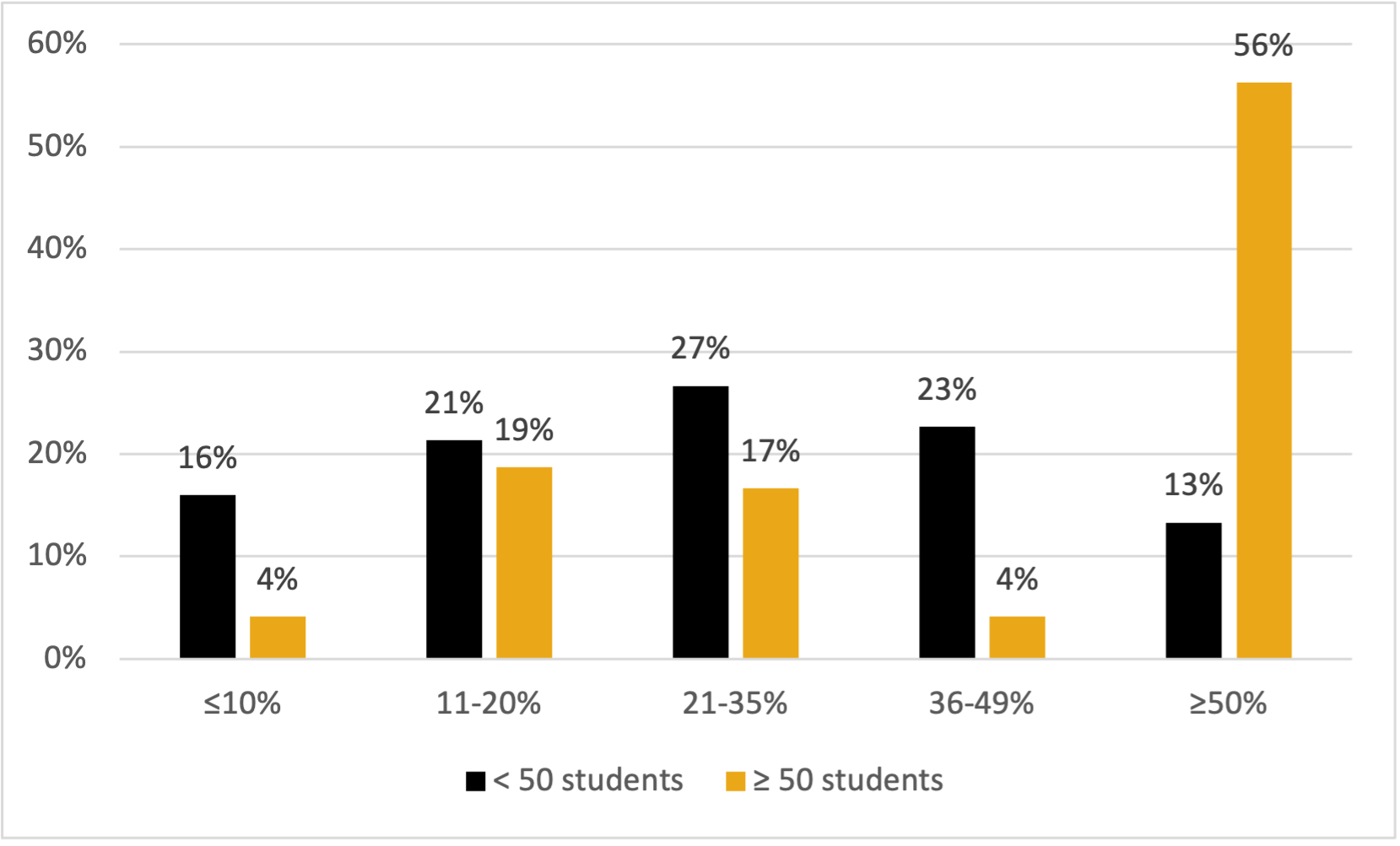
    <div class="html-content">In an effort to gather information on how faculty design and administer tests, DoIT collaborated with the Faculty Development Center (FDC) and Student Disability Services (SDS) to create and distribute a short survey to all 941 instructional faculty teaching in Spring 22. There were 157 complete submissions, representing a 17% response rate. Of these survey participants, 78% were full-time faculty, and about half (54%) were Associate, Assistant, or Full Professor. Almost all were from CAHSS (48%), CNMS (24%), or COEIT (22%), and 86% primarily teach undergraduate students.<br><br><div>The quantitative data, as illustrated below in <em>Figure 1</em>, indicate that faculty teaching larger courses and those teaching courses with high percentages of the overall grade contingent on a small number of tests (i.e., high-stakes testing) are considerably more concerned about academic integrity. Also, the survey's open responses suggest instructors believe assessments are important, but were not of a single voice in regards to balancing formative and summative approaches in face-to-face and virtual environments. <br></div><div><br></div><div><strong>Figure 1: Percent of Final Grade from High-stakes Testing, by Course Enrollment</strong></div><img src="https://my3.my.umbc.edu/groups/instructional-technology/posts/119088/attachments/43292" style="max-width: 100%; height: auto;"><br><div><br></div><div>The majority of respondents (59%) taught classes of 50 or fewer students, and about one in five (19%) taught classes with more than 100 students. Additionally, of those instructors teaching courses with at least half of their students' final grades determined by high-stakes tests, 72% agreed or strongly agreed that "Academic integrity on high-stake assessments is a major concern in my course(s)." That same level of sentiment is shared with less than half (49%) of instructors with grading schemas that are not as dependent on high-stakes testing.</div><br>Academic integrity is approached in several ways, including the use of psychology (lecturing students and/or acknowledgment of an "honor" statement or pledge) and overall design of the assessments, such as question banks, randomization, synchronous testing, and, in direct conflict with student accomodation concerns, time constraints.<sup>1</sup> These approaches are carried out in two different environments: in-person and online. In the case of the former, respondents indicated traditional means of face-to-face proctoring. With the latter, instructors may use Blackboard, along with the Respondus Lockdown Browser, and potentially the Monitor option. Other respondents described having their students turn their computer cameras on during the assessments. Plagiarism checkers such as SafeAssign and Turnitin are also leveraged.<br><br>There is an acknowledgement by some, however, that there may not be anything that can be done to fully redress issues concerning academic integrity "other than theatrics." As one respondent noted, "it is impossible to keep students from posting the questions (from memory) on the Internet as soon as they are done with their own test." Some stated, however, that they believe their tests are relatively impervious to cheating due to the tailoring and formatting of the questions. Others stated they didn't think they have a big problem with cheating, or did little to curtail it beyond making sure students aren't using their phones or looking at other students' papers, which can be of particular concern when rooms are at full seating capacity.<br><br>The student disability-based testing accommodations described universally involve faculty providing more time on assessments for individual students, or through the course of the pandemic, expanding the testing window for all students. Few faculty indicated a pervasiveness of need, with some emphasizing how few occurrences of student accommodations they've received in their teaching careers. Additionally, multiple respondents seemed to be under the false impression that SDS has a testing center to support this need, rather than just ad hoc space allocation that is only available for SDS registered students with disabilities. Meaning it is not for general make up test proctoring for all students, can only seat 15 students at a time, and has computer stations only intended for specialized assistive technology needs..<br><br>Interestingly, when asked about the possibility of a dedicated UMBC testing center, only 14% of respondents teaching 50 or more students don't believe a testing center would help them; none of the respondents teaching more than 100 students are of that opinion. In fact, several respondents voiced support for this kind of facility, with one saying "I would be THRILLED for a testing center at UMBC!"<br><br>Some faculty, however, never use high-stakes testing. They may choose not to due to a lack of familiarity or experience with it (e.g., having begun teaching during the pandemic), while other instructors stated they did not believe in using high-stakes assessments on pedagogical grounds, or employ qualitatively graded assessments, such as case studies or written assessments, rather than discrete answer assessments. These types of assessments, of course, can still be high stakes, although much more difficult to scale for larger classes than multiple choice bubble sheets. Other faculty described offering more "smaller" assignments or quizzes. One respondent specifically cited their PIVOT training for adoption of this "best practice."<sup>2</sup> Of those who did make use of high-stakes assessments, some stated they were important to encourage students' motivation to learn. "You have to have some high-stakes testing to get students to study," responded one instructor.<br><br><div>In short, faculty vary in their approach to testing, but there are similarities based on course enrollment size and discipline/college. Also, adoption of a testing center could potentially benefit faculty conducting testing, particularly in high-stakes/enrollment environments to support academic integrity and accessibility needs.</div><div><br></div><div>[1] As one respondent points out, "Many institutions also offer disability accommodations within a broader testing center, which helps to reduce stigma for students with disabilities."<br></div><div>[2] About one in five respondents are now offering fewer high stakes tests since the pandemic shift to online learning.<br></div><div><br></div><div>~By <a href="https://doit.umbc.edu/itnm/staff/penniston/" rel="nofollow external" class="bo">Tom Penniston</a><br></div></div>
]]>
</Body>
<Summary>In an effort to gather information on how faculty design and administer tests, DoIT collaborated with the Faculty Development Center (FDC) and Student Disability Services (SDS) to create and...</Summary>
<Website>https://doit.umbc.edu/post/119088/</Website>
<AttachmentKind>Image</AttachmentKind>
<AttachmentUrl>https://assets3-beta.my.umbc.edu/system/shared/attachments/20f65b9ef7108c58af21695df57d449e/69ed613e/news/000/119/088/91ae48805e8e96055d454f043054059b/graph.png?1651516050</AttachmentUrl>
<Attachments>
<Attachment kind="Image" url="https://beta.my.umbc.edu/groups/instructional-technology/posts/119088/attachments/43292"></Attachment>
</Attachments>
<TrackingUrl>https://beta.my.umbc.edu/api/v0/pixel/news/119088/guest@my.umbc.edu/ae416d0c70ca650c993873d57b444f0b/api/pixel</TrackingUrl>
<Tag>doit</Tag>
<Tag>fdc</Tag>
<Tag>high-stakes</Tag>
<Tag>itnm</Tag>
<Tag>penniston</Tag>
<Tag>sds</Tag>
<Tag>testing</Tag>
<Group token="instructional-technology">Instructional Technology</Group>
<GroupUrl>https://beta.my.umbc.edu/groups/instructional-technology</GroupUrl>
<AvatarUrl>https://assets2-beta.my.umbc.edu/system/shared/avatars/groups/000/001/164/dec3b026b81ee6d890a8f82f75c94a2e/xsmall.png?1446126703</AvatarUrl>
<AvatarUrl size="original">https://assets1-beta.my.umbc.edu/system/shared/avatars/groups/000/001/164/dec3b026b81ee6d890a8f82f75c94a2e/original.png?1446126703</AvatarUrl>
<AvatarUrl size="xxlarge">https://assets2-beta.my.umbc.edu/system/shared/avatars/groups/000/001/164/dec3b026b81ee6d890a8f82f75c94a2e/xxlarge.png?1446126703</AvatarUrl>
<AvatarUrl size="xlarge">https://assets1-beta.my.umbc.edu/system/shared/avatars/groups/000/001/164/dec3b026b81ee6d890a8f82f75c94a2e/xlarge.png?1446126703</AvatarUrl>
<AvatarUrl size="large">https://assets1-beta.my.umbc.edu/system/shared/avatars/groups/000/001/164/dec3b026b81ee6d890a8f82f75c94a2e/large.png?1446126703</AvatarUrl>
<AvatarUrl size="medium">https://assets4-beta.my.umbc.edu/system/shared/avatars/groups/000/001/164/dec3b026b81ee6d890a8f82f75c94a2e/medium.png?1446126703</AvatarUrl>
<AvatarUrl size="small">https://assets3-beta.my.umbc.edu/system/shared/avatars/groups/000/001/164/dec3b026b81ee6d890a8f82f75c94a2e/small.png?1446126703</AvatarUrl>
<AvatarUrl size="xsmall">https://assets2-beta.my.umbc.edu/system/shared/avatars/groups/000/001/164/dec3b026b81ee6d890a8f82f75c94a2e/xsmall.png?1446126703</AvatarUrl>
<AvatarUrl size="xxsmall">https://assets3-beta.my.umbc.edu/system/shared/avatars/groups/000/001/164/dec3b026b81ee6d890a8f82f75c94a2e/xxsmall.png?1446126703</AvatarUrl>
<Sponsor>Instructional Technology</Sponsor>
<ThumbnailUrl size="xxlarge">https://assets3-beta.my.umbc.edu/system/shared/thumbnails/news/000/119/088/b77b1b6769516e44273d6690970ff019/xxlarge.jpg?1651504119</ThumbnailUrl>
<ThumbnailUrl size="xlarge">https://assets4-beta.my.umbc.edu/system/shared/thumbnails/news/000/119/088/b77b1b6769516e44273d6690970ff019/xlarge.jpg?1651504119</ThumbnailUrl>
<ThumbnailUrl size="large">https://assets4-beta.my.umbc.edu/system/shared/thumbnails/news/000/119/088/b77b1b6769516e44273d6690970ff019/large.jpg?1651504119</ThumbnailUrl>
<ThumbnailUrl size="medium">https://assets1-beta.my.umbc.edu/system/shared/thumbnails/news/000/119/088/b77b1b6769516e44273d6690970ff019/medium.jpg?1651504119</ThumbnailUrl>
<ThumbnailUrl size="small">https://assets2-beta.my.umbc.edu/system/shared/thumbnails/news/000/119/088/b77b1b6769516e44273d6690970ff019/small.jpg?1651504119</ThumbnailUrl>
<ThumbnailUrl size="xsmall">https://assets4-beta.my.umbc.edu/system/shared/thumbnails/news/000/119/088/b77b1b6769516e44273d6690970ff019/xsmall.jpg?1651504119</ThumbnailUrl>
<ThumbnailUrl size="xxsmall">https://assets1-beta.my.umbc.edu/system/shared/thumbnails/news/000/119/088/b77b1b6769516e44273d6690970ff019/xxsmall.jpg?1651504119</ThumbnailUrl>
<PawCount>6</PawCount>
<CommentCount>0</CommentCount>
<CommentsAllowed>true</CommentsAllowed>
<PostedAt>Mon, 02 May 2022 13:30:19 -0400</PostedAt>
<EditAt>Mon, 02 May 2022 14:56:49 -0400</EditAt>
</NewsItem>

</News>