<?xml version="1.0"?>
<News hasArchived="false" page="1" pageCount="1" pageSize="10" timestamp="Wed, 22 Apr 2026 20:18:46 -0400" url="https://beta.my.umbc.edu/groups/instructional-technology/posts.xml?tag=polling">
<NewsItem contentIssues="true" id="145871" important="false" status="posted" url="https://beta.my.umbc.edu/groups/instructional-technology/posts/145871">
<Title>New Course Management Features in Poll Everywhere</Title>
<Tagline>Available for all presenters on Jan. 6th</Tagline>
<Body>
<![CDATA[
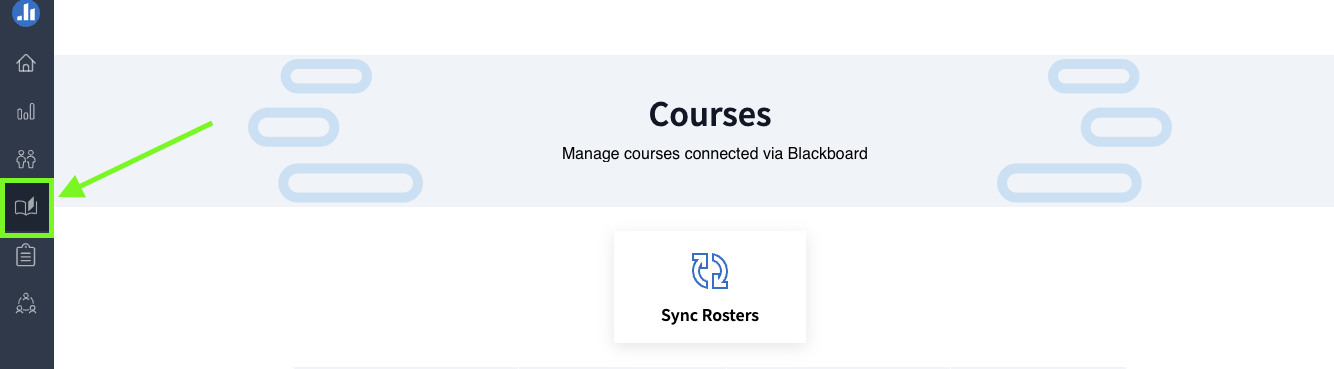
    <div class="html-content"><span><p><span>On Jan. 6th, Poll Everywhere will launch a new course management feature to simplify how instructors use polling and to improve the process of synchronizing grade data with  Blackboard's gradebook.</span></p><p></p><p><span>Using a dedicated icon within the Poll Everywhere interface, this feature allows faculty to create and manage polling activities for their courses. Specific Course Management functions include:</span></p><ul><li><a href="https://support.polleverywhere.com/hc/en-us/articles/27578588765339-Getting-Started-with-Course-Management#h_01J3B98B04QXMNDYCAP2ZN0NAE" rel="nofollow external" class="bo">Accessing Courses</a></li><li><a href="https://support.polleverywhere.com/hc/en-us/articles/27578588765339-Getting-Started-with-Course-Management#h_01J3A52AHTZHAPV0J1VR7VSKZ9" rel="nofollow external" class="bo">Creating Assignments</a></li><li><a href="https://support.polleverywhere.com/hc/en-us/articles/27578588765339-Getting-Started-with-Course-Management#h_01J3R0Q984Z3WB3GJ7NW1807HY" rel="nofollow external" class="bo">Grade Synchronization</a></li><li><a href="https://support.polleverywhere.com/hc/en-us/articles/27578588765339-Getting-Started-with-Course-Management#h_01J3B9J0GW968VWAPFQ9HHE1B4" rel="nofollow external" class="bo">Managing Multiple Assignments and Activities</a></li><li><a href="https://support.polleverywhere.com/hc/en-us/articles/27578588765339-Getting-Started-with-Course-Management#01J3BA4YQPK0Z3D2N7KRZM6BJV" rel="nofollow external" class="bo">Viewing Grades</a></li></ul><p></p><p><span><span><span><span><img src="https://lh7-rt.googleusercontent.com/docsz/AD_4nXeN08woFm60F8F6khJsxpSORZULVT0HVp0sGgl-cjTHjA0EhIGuenuuPCb2eW7xlxzVCwPPf92BJ0NbqUgxjSp9IYYqgWdD8cL_HL-8MWZeE1s5yroCr_PfzZmhL0-Cs2b7OIt3GI4S97Uvf5uiyUGmL2Nb?key=2_Nq-5A1_uFiKi8qIeBozw" width="720" height="199" style="max-width: 100%; height: auto;"></span></span></span></span></p><p><span>Image 1: Example of new Poll Everywhere Course Management page showing the dedicated course management icon</span></p><p></p><p><span>Starting Jan. 6th, presenters will see a course management "opt in" banner.</span><span> This banner will allow presenters to try out the Course Management experience throughout the spring semester, with the option to return to the existing experience if needed.</span></p><div><span>
    <h4><span><br></span></h4><h4><span>Poll Everywhere Training</span></h4><p>Please register for this <a href="https://my3.my.umbc.edu/groups/instructional-technology/events/136477" rel="nofollow external" class="bo">Poll Everywhere training webinar</a> on
    Jan. 22nd at 12:00 PM to preview the new course management features. The session will also cover topics useful for new Poll Everywhere users including how to:</p><ul><li>Create, organize, customize and present activities step by
    step.</li><li>Effectively integrate Poll Everywhere seamlessly into your
    presentations.</li><li>Craft engaging questions and track responses in real time.</li><li>Embed polls directly in your PowerPoint or Google Slides
    presentations.</li><li>Run reports on audience responses, provide grades for
    performance/participation, and export the results to Blackboard</li></ul><p></p><p></p><p><br></p></span></div><h4><span>Poll Everywhere Resources</span></h4><p><span>For Poll Everywhere resources, please see our FAQ articles:</span></p><ul><li><span><a href="https://umbc.atlassian.net/l/cp/G1jgf6Qj" rel="nofollow external" class="bo"><span>Poll Everywhere for Instructors and Presenters</span></a></span></li><li><a href="https://umbc.atlassian.net/wiki/x/HwAuBg" rel="nofollow external" class="bo"><span>Poll Everywhere for Students and Participants</span></a></li><li><a href="https://umbc.atlassian.net/wiki/x/KgAsBg" rel="nofollow external" class="bo"><span>How do I manage Attendance with Poll Everywhere?</span></a><span> (instructors)</span></li><li><a href="https://umbc.atlassian.net/wiki/x/CgAzBg" rel="nofollow external" class="bo"><span>How do I check in for Attendance with Poll Everywhere?</span></a><span>    (students)</span></li></ul><p><br></p><h4><span>Connect with Instructional Technology</span></h4><p><span>As always, if you have any questions about teaching, learning, and technology at UMBC, please consider the following options:</span></p><ul><li><a href="http://www.umbc.edu/faq" rel="nofollow external" class="bo"><span>Check our extensive FAQ collection</span></a><span> </span></li><li><a href="https://wiki.umbc.edu/x/LohnB" rel="nofollow external" class="bo"><span>What's new in Ultra?</span></a><span> | </span><a href="https://wiki.umbc.edu/x/bwrSAQ" rel="nofollow external" class="bo"><span>Known Issues</span></a><span> </span></li><li><a href="https://umbc.edu/go/bbsupport" rel="nofollow external" class="bo"><span>Open a ticket via RT</span></a></li><li><span>Follow the </span><a href="http://my.umbc.edu/groups/instructional-technology" rel="nofollow external" class="bo"><span>Instructional Technology</span></a><span> &amp; </span><a href="http://my.umbc.edu/groups/doit" rel="nofollow external" class="bo"><span>DoIT</span></a><span> myUMBC groups</span></li><li><a href="https://umbc.edu/go/bbsupport" rel="nofollow external" class="bo"><span>Request a consult</span></a><span> with </span><a href="https://edtech.umbc.edu/about/staff/" rel="nofollow external" class="bo"><span>instructional technology staff</span></a></li><li><a href="http://pivot.umbc.edu/" rel="nofollow external" class="bo"><span>PIVOT</span></a><span> | </span><a href="https://doit.umbc.edu/itnm/academic-continuity/" rel="nofollow external" class="bo"><span>Academic Continuity</span></a><span> | </span><a href="https://fdc.umbc.edu/teaching/keep-on-teaching/" rel="nofollow external" class="bo"><span>Keep On Teaching</span></a><span> | </span><a href="https://doit.umbc.edu/students" rel="nofollow external" class="bo"><span>Student Technology Resources</span></a></li></ul></span><br><em>Thumbnail: </em>Poll Everywhere Logo</div>
]]>
</Body>
<Summary>On Jan. 6th, Poll Everywhere will launch a new course management feature to simplify how instructors use polling and to improve the process of synchronizing grade data with  Blackboard's...</Summary>
<Website>https://my3.my.umbc.edu/groups/instructional-technology/posts/145871/</Website>
<TrackingUrl>https://beta.my.umbc.edu/api/v0/pixel/news/145871/guest@my.umbc.edu/e27e6e8cefe351aaf1f4dbebd782b4a0/api/pixel</TrackingUrl>
<Tag>course-management</Tag>
<Tag>poll-everywhere</Tag>
<Tag>polling</Tag>
<Tag>sp2025</Tag>
<Group token="instructional-technology">Instructional Technology</Group>
<GroupUrl>https://beta.my.umbc.edu/groups/instructional-technology</GroupUrl>
<AvatarUrl>https://assets2-beta.my.umbc.edu/system/shared/avatars/groups/000/001/164/dec3b026b81ee6d890a8f82f75c94a2e/xsmall.png?1446126703</AvatarUrl>
<AvatarUrl size="original">https://assets1-beta.my.umbc.edu/system/shared/avatars/groups/000/001/164/dec3b026b81ee6d890a8f82f75c94a2e/original.png?1446126703</AvatarUrl>
<AvatarUrl size="xxlarge">https://assets2-beta.my.umbc.edu/system/shared/avatars/groups/000/001/164/dec3b026b81ee6d890a8f82f75c94a2e/xxlarge.png?1446126703</AvatarUrl>
<AvatarUrl size="xlarge">https://assets1-beta.my.umbc.edu/system/shared/avatars/groups/000/001/164/dec3b026b81ee6d890a8f82f75c94a2e/xlarge.png?1446126703</AvatarUrl>
<AvatarUrl size="large">https://assets1-beta.my.umbc.edu/system/shared/avatars/groups/000/001/164/dec3b026b81ee6d890a8f82f75c94a2e/large.png?1446126703</AvatarUrl>
<AvatarUrl size="medium">https://assets4-beta.my.umbc.edu/system/shared/avatars/groups/000/001/164/dec3b026b81ee6d890a8f82f75c94a2e/medium.png?1446126703</AvatarUrl>
<AvatarUrl size="small">https://assets3-beta.my.umbc.edu/system/shared/avatars/groups/000/001/164/dec3b026b81ee6d890a8f82f75c94a2e/small.png?1446126703</AvatarUrl>
<AvatarUrl size="xsmall">https://assets2-beta.my.umbc.edu/system/shared/avatars/groups/000/001/164/dec3b026b81ee6d890a8f82f75c94a2e/xsmall.png?1446126703</AvatarUrl>
<AvatarUrl size="xxsmall">https://assets3-beta.my.umbc.edu/system/shared/avatars/groups/000/001/164/dec3b026b81ee6d890a8f82f75c94a2e/xxsmall.png?1446126703</AvatarUrl>
<Sponsor>Instructional Technology</Sponsor>
<ThumbnailUrl size="xxlarge">https://assets3-beta.my.umbc.edu/system/shared/thumbnails/news/000/145/871/a3c81a83e806ab8e4e5f85cb4d572b6c/xxlarge.jpg?1732474557</ThumbnailUrl>
<ThumbnailUrl size="xlarge">https://assets1-beta.my.umbc.edu/system/shared/thumbnails/news/000/145/871/a3c81a83e806ab8e4e5f85cb4d572b6c/xlarge.jpg?1732474557</ThumbnailUrl>
<ThumbnailUrl size="large">https://assets3-beta.my.umbc.edu/system/shared/thumbnails/news/000/145/871/a3c81a83e806ab8e4e5f85cb4d572b6c/large.jpg?1732474557</ThumbnailUrl>
<ThumbnailUrl size="medium">https://assets2-beta.my.umbc.edu/system/shared/thumbnails/news/000/145/871/a3c81a83e806ab8e4e5f85cb4d572b6c/medium.jpg?1732474557</ThumbnailUrl>
<ThumbnailUrl size="small">https://assets3-beta.my.umbc.edu/system/shared/thumbnails/news/000/145/871/a3c81a83e806ab8e4e5f85cb4d572b6c/small.jpg?1732474557</ThumbnailUrl>
<ThumbnailUrl size="xsmall">https://assets3-beta.my.umbc.edu/system/shared/thumbnails/news/000/145/871/a3c81a83e806ab8e4e5f85cb4d572b6c/xsmall.jpg?1732474557</ThumbnailUrl>
<ThumbnailUrl size="xxsmall">https://assets3-beta.my.umbc.edu/system/shared/thumbnails/news/000/145/871/a3c81a83e806ab8e4e5f85cb4d572b6c/xxsmall.jpg?1732474557</ThumbnailUrl>
<PawCount>3</PawCount>
<CommentCount>0</CommentCount>
<CommentsAllowed>false</CommentsAllowed>
<PostedAt>Mon, 25 Nov 2024 08:01:10 -0500</PostedAt>
</NewsItem>

<NewsItem contentIssues="true" id="143083" important="false" status="posted" url="https://beta.my.umbc.edu/groups/instructional-technology/posts/143083">
<Title>New Course Management Features in Poll Everywhere</Title>
<Tagline>Streamlined access to courses and activities</Tagline>
<Body>
<![CDATA[
    <div class="html-content"><span><p><span><em><strong>Update</strong><span>: This feature is postponed by the vendor to </span><span>allow UMBC to review and verify functionality</span><span>. Additional information about availability will be provided to the campus as soon as possible.</span></em></span></p><p><span>In late August 2024, Poll Everywhere will launch a new course management feature to simplify how instructors use polling and to improve the process to synchronize grade data back to the Blackboard gradebook.</span></p><p></p><p><span>Using a dedicated icon within the Poll Everywhere interface, this feature allows faculty to create and manage polling activities for their courses. Specific Course Management functions include:</span></p><ul><li><a href="https://support.polleverywhere.com/hc/en-us/articles/27578588765339-Getting-Started-with-Course-Management#h_01J3B98B04QXMNDYCAP2ZN0NAE" rel="nofollow external" class="bo">Accessing Courses</a></li><li><a href="https://support.polleverywhere.com/hc/en-us/articles/27578588765339-Getting-Started-with-Course-Management#h_01J3A52AHTZHAPV0J1VR7VSKZ9" rel="nofollow external" class="bo">Creating Assignments</a></li><li><a href="https://support.polleverywhere.com/hc/en-us/articles/27578588765339-Getting-Started-with-Course-Management#h_01J3R0Q984Z3WB3GJ7NW1807HY" rel="nofollow external" class="bo">Grade Synchronization</a></li><li><a href="https://support.polleverywhere.com/hc/en-us/articles/27578588765339-Getting-Started-with-Course-Management#h_01J3B9J0GW968VWAPFQ9HHE1B4" rel="nofollow external" class="bo">Managing Multiple Assignments and Activities</a></li><li><a href="https://support.polleverywhere.com/hc/en-us/articles/27578588765339-Getting-Started-with-Course-Management#01J3BA4YQPK0Z3D2N7KRZM6BJV" rel="nofollow external" class="bo">Viewing Grades</a></li></ul><p></p><p><span><span><span><span><img src="https://lh7-rt.googleusercontent.com/docsz/AD_4nXeN08woFm60F8F6khJsxpSORZULVT0HVp0sGgl-cjTHjA0EhIGuenuuPCb2eW7xlxzVCwPPf92BJ0NbqUgxjSp9IYYqgWdD8cL_HL-8MWZeE1s5yroCr_PfzZmhL0-Cs2b7OIt3GI4S97Uvf5uiyUGmL2Nb?key=2_Nq-5A1_uFiKi8qIeBozw" width="720" height="199" style="max-width: 100%; height: auto;"></span></span></span></span></p><p><span>Image 1: Example of new Poll Everywhere Course Management page</span></p><p></p><p><span>The feature will be turned off initially and will require each instructor to activate it to turn it on for their accounts. You must set up your Blackboard course with Poll Everywhere before you can use this feature. Once the Blackboard course is synchronized with Poll Everywhere, the Course Management icon will appear.</span></p><h4><span>Poll Everywhere Resources</span></h4><p><span>For Attendance Management resources, please see our FAQ articles:</span></p><ul><li><a href="https://umbc.atlassian.net/wiki/x/KgAsBg" rel="nofollow external" class="bo"></a><a href="https://umbc.atlassian.net/wiki/x/KgAsBg" rel="nofollow external" class="bo"><span>How do I manage Attendance with Poll Everywhere?</span></a><span> (instructors)</span></li><li><span><a href="https://umbc.atlassian.net/wiki/x/CgAzBg" rel="nofollow external" class="bo"><span>How do I check in for Attendance with Poll Everywhere?</span></a><span> (students)</span></span></li></ul><p><span>For additional Poll Everywhere information, please see our Poll Everywhere FAQ collections:</span></p><ul><li><a href="https://umbc.atlassian.net/wiki/x/HwAuBg" rel="nofollow external" class="bo"></a><a href="https://umbc.atlassian.net/wiki/x/HwAuBg" rel="nofollow external" class="bo"><span>Poll Everywhere for Students and Participants</span></a></li><li><span><a href="https://umbc.atlassian.net/l/cp/G1jgf6Qj" rel="nofollow external" class="bo"><span>Poll Everywhere for Instructors and Presenters</span></a></span></li></ul><h4><span>Connect with Instructional Technology</span></h4><p><span>As always, if you have any questions about teaching, learning, and technology at UMBC, please consider the following options:</span></p><ul><li><a href="http://www.umbc.edu/faq" rel="nofollow external" class="bo"><span>Check our extensive FAQ collection</span></a><span> </span></li><li><a href="https://wiki.umbc.edu/x/LohnB" rel="nofollow external" class="bo"><span>What's new in Ultra?</span></a><span> | </span><a href="https://wiki.umbc.edu/x/bwrSAQ" rel="nofollow external" class="bo"><span>Known Issues</span></a><span> </span></li><li><a href="https://umbc.edu/go/bbsupport" rel="nofollow external" class="bo"><span>Open a ticket via RT</span></a></li><li><span>Follow the </span><a href="http://my.umbc.edu/groups/instructional-technology" rel="nofollow external" class="bo"><span>Instructional Technology</span></a><span> &amp; </span><a href="http://my.umbc.edu/groups/doit" rel="nofollow external" class="bo"><span>DoIT</span></a><span> myUMBC groups</span></li><li><a href="https://umbc.edu/go/bbsupport" rel="nofollow external" class="bo"><span>Request a consult</span></a><span> with </span><a href="https://edtech.umbc.edu/about/staff/" rel="nofollow external" class="bo"><span>instructional technology staff</span></a></li><li><a href="http://pivot.umbc.edu/" rel="nofollow external" class="bo"><span>PIVOT</span></a><span> | </span><a href="https://doit.umbc.edu/itnm/academic-continuity/" rel="nofollow external" class="bo"><span>Academic Continuity</span></a><span> | </span><a href="https://fdc.umbc.edu/teaching/keep-on-teaching/" rel="nofollow external" class="bo"><span>Keep On Teaching</span></a><span> | </span><a href="https://doit.umbc.edu/students" rel="nofollow external" class="bo"><span>Student Technology Resources</span></a></li></ul></span><br><em>Thumbnail: </em>Poll Everywhere Logo</div>
]]>
</Body>
<Summary>Update: This feature is postponed by the vendor to allow UMBC to review and verify functionality. Additional information about availability will be provided to the campus as soon as possible.  In...</Summary>
<Website>https://my3.my.umbc.edu/groups/instructional-technology/posts/143083/</Website>
<TrackingUrl>https://beta.my.umbc.edu/api/v0/pixel/news/143083/guest@my.umbc.edu/8d5bfbc8e8ba6cf1e5777ccbc5e8ce44/api/pixel</TrackingUrl>
<Tag>ariev</Tag>
<Tag>course-management</Tag>
<Tag>fa2024</Tag>
<Tag>poll-everywhere</Tag>
<Tag>polling</Tag>
<Group token="instructional-technology">Instructional Technology</Group>
<GroupUrl>https://beta.my.umbc.edu/groups/instructional-technology</GroupUrl>
<AvatarUrl>https://assets2-beta.my.umbc.edu/system/shared/avatars/groups/000/001/164/dec3b026b81ee6d890a8f82f75c94a2e/xsmall.png?1446126703</AvatarUrl>
<AvatarUrl size="original">https://assets1-beta.my.umbc.edu/system/shared/avatars/groups/000/001/164/dec3b026b81ee6d890a8f82f75c94a2e/original.png?1446126703</AvatarUrl>
<AvatarUrl size="xxlarge">https://assets2-beta.my.umbc.edu/system/shared/avatars/groups/000/001/164/dec3b026b81ee6d890a8f82f75c94a2e/xxlarge.png?1446126703</AvatarUrl>
<AvatarUrl size="xlarge">https://assets1-beta.my.umbc.edu/system/shared/avatars/groups/000/001/164/dec3b026b81ee6d890a8f82f75c94a2e/xlarge.png?1446126703</AvatarUrl>
<AvatarUrl size="large">https://assets1-beta.my.umbc.edu/system/shared/avatars/groups/000/001/164/dec3b026b81ee6d890a8f82f75c94a2e/large.png?1446126703</AvatarUrl>
<AvatarUrl size="medium">https://assets4-beta.my.umbc.edu/system/shared/avatars/groups/000/001/164/dec3b026b81ee6d890a8f82f75c94a2e/medium.png?1446126703</AvatarUrl>
<AvatarUrl size="small">https://assets3-beta.my.umbc.edu/system/shared/avatars/groups/000/001/164/dec3b026b81ee6d890a8f82f75c94a2e/small.png?1446126703</AvatarUrl>
<AvatarUrl size="xsmall">https://assets2-beta.my.umbc.edu/system/shared/avatars/groups/000/001/164/dec3b026b81ee6d890a8f82f75c94a2e/xsmall.png?1446126703</AvatarUrl>
<AvatarUrl size="xxsmall">https://assets3-beta.my.umbc.edu/system/shared/avatars/groups/000/001/164/dec3b026b81ee6d890a8f82f75c94a2e/xxsmall.png?1446126703</AvatarUrl>
<Sponsor>Instructional Technology</Sponsor>
<ThumbnailUrl size="xxlarge">https://assets2-beta.my.umbc.edu/system/shared/thumbnails/news/000/143/083/5174b3b426509ae508352856762e2c3a/xxlarge.jpg?1723044857</ThumbnailUrl>
<ThumbnailUrl size="xlarge">https://assets1-beta.my.umbc.edu/system/shared/thumbnails/news/000/143/083/5174b3b426509ae508352856762e2c3a/xlarge.jpg?1723044857</ThumbnailUrl>
<ThumbnailUrl size="large">https://assets3-beta.my.umbc.edu/system/shared/thumbnails/news/000/143/083/5174b3b426509ae508352856762e2c3a/large.jpg?1723044857</ThumbnailUrl>
<ThumbnailUrl size="medium">https://assets1-beta.my.umbc.edu/system/shared/thumbnails/news/000/143/083/5174b3b426509ae508352856762e2c3a/medium.jpg?1723044857</ThumbnailUrl>
<ThumbnailUrl size="small">https://assets1-beta.my.umbc.edu/system/shared/thumbnails/news/000/143/083/5174b3b426509ae508352856762e2c3a/small.jpg?1723044857</ThumbnailUrl>
<ThumbnailUrl size="xsmall">https://assets4-beta.my.umbc.edu/system/shared/thumbnails/news/000/143/083/5174b3b426509ae508352856762e2c3a/xsmall.jpg?1723044857</ThumbnailUrl>
<ThumbnailUrl size="xxsmall">https://assets3-beta.my.umbc.edu/system/shared/thumbnails/news/000/143/083/5174b3b426509ae508352856762e2c3a/xxsmall.jpg?1723044857</ThumbnailUrl>
<PawCount>5</PawCount>
<CommentCount>0</CommentCount>
<CommentsAllowed>false</CommentsAllowed>
<PostedAt>Tue, 13 Aug 2024 12:45:20 -0400</PostedAt>
<EditAt>Tue, 20 Aug 2024 13:25:52 -0400</EditAt>
</NewsItem>

<NewsItem contentIssues="true" id="138683" important="false" status="posted" url="https://beta.my.umbc.edu/groups/instructional-technology/posts/138683">
<Title>Track Attendance in Poll Everywhere (Beta Release)</Title>
<Tagline>New Check-In Feature Does Not Store Student Location Data</Tagline>
<Body>
<![CDATA[
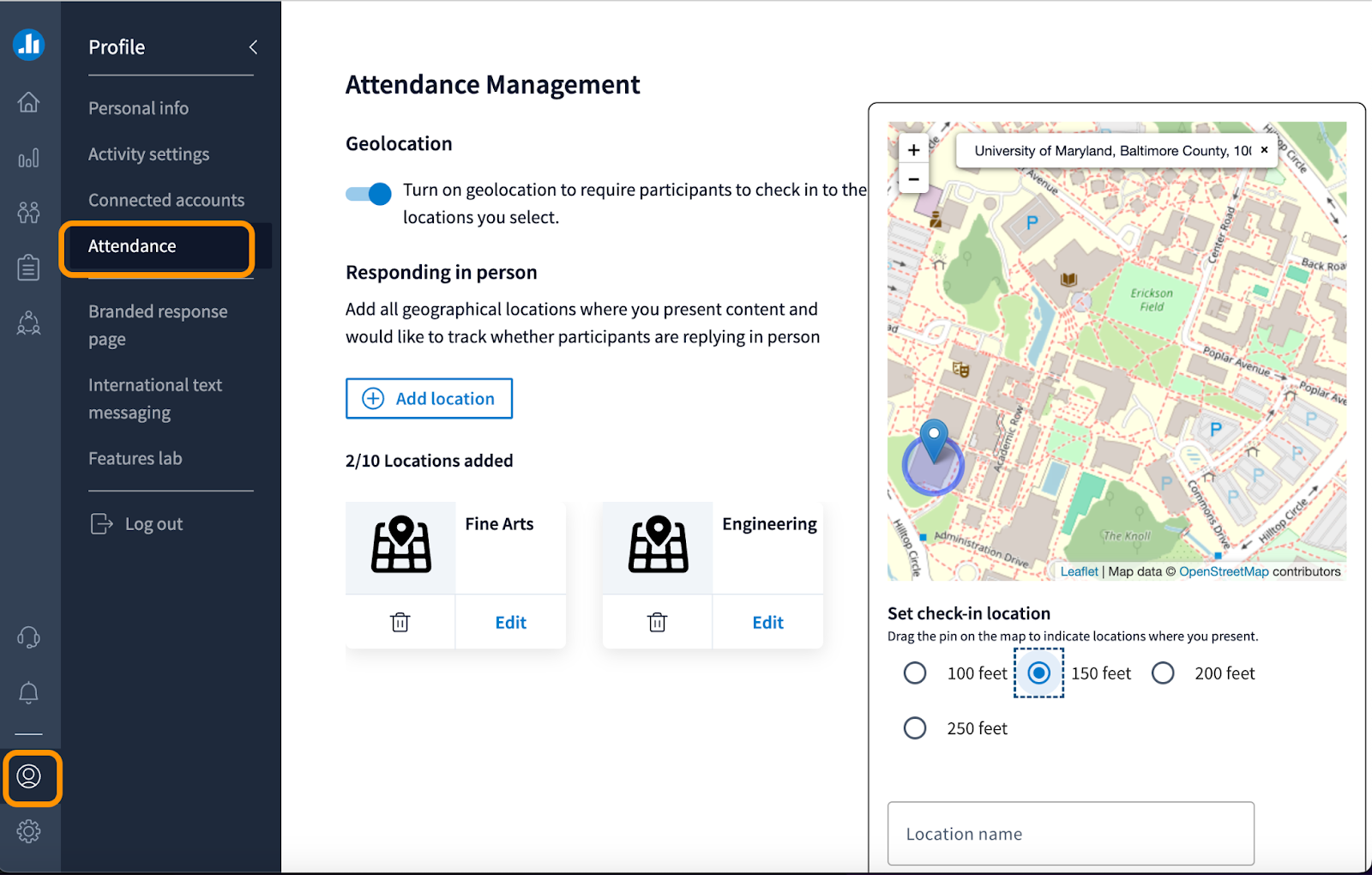
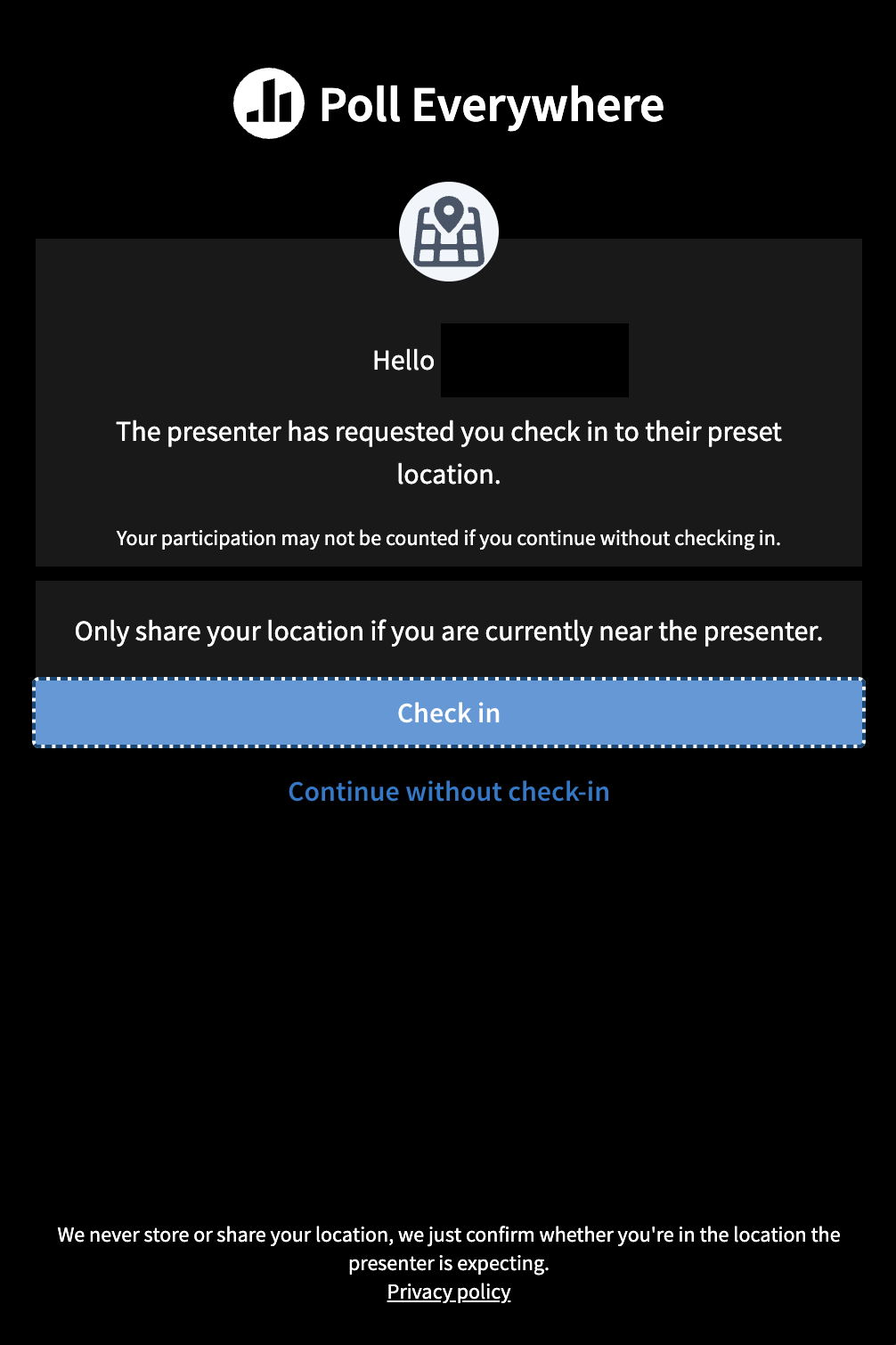
    <div class="html-content"><span><p><span>Poll Everywhere recently launched a new Attendance Management tool, which is available to users with a presenter role in Poll Everywhere. Using geolocation, Attendance Management allows instructors to track in-person attendance when students check-in and respond to polling activities. This feature is part of a beta release for the Spring 2024 term; Instructional Technology will gather feedback from instructors and students using Attendance Management during this period.</span></p><p><span>Join Instructional Technology on February 26th for our upcoming <a href="https://my3.my.umbc.edu/groups/instructional-technology/events/127974" rel="nofollow external" class="bo">Explore Poll Everywhere Attendance Management Tool webinar</a>. We will demo the Attendance Management tool and other Poll Everywhere settings to support academic integrity.</span></p><h4><span>Enable Attendance Management</span></h4><p><span>Instructors may access and enable Attendance Management from the My Activities panel or their Poll Everywhere profile settings.</span><span> U</span><span>p to 10 geofence locations may be added to an instructor's profile to match their teaching locations.</span></p><p><span><span><img src="https://lh7-us.googleusercontent.com/cs23_buFygmP-qmgjdJd64bYpS-KZSjA8THzg9yRDb7EBc29nIIaubM9bd3qW2c8zcKHCtYrxFoCNNIqL6_YxdjCDBfnG8VaLwWaDxWH1oDQueE1jLgY6aghtljkfelb1h_vOc5AGGzTkZJA7RpHiPY" width="603" height="384" style="max-width: 100%; height: auto;"></span></span></p><p><em><span>Image 1</span><span>. Access Attendance Management from the profile and add check-in locations.</span></em></p><h4><span>Student Check-In &amp; Location Data</span></h4><p><span>When geolocation is enabled, Poll Everywhere will prompt students to check-in before they may respond to polling activities. If geolocation is enabled and a student does not check in to the physical location check-in point, their responses will still be recorded for participation, but they will not receive credit for attendance. Students who check-in successfully and respond to polling activities will receive credit for both attendance and participation.</span></p><p><span><span><img src="https://lh7-us.googleusercontent.com/TF_m6INySkL37jY4dONSpmpMaVwY35co2d-gc2EyvnadsN0b-BjyF7ApLELHS7zodaeaZcpEHV3d9BizbghHY5W7b7IY8YkrrUgnwCZ54F8FwZM1dVDIgRrIUwjX6Qkq63b2kDI4wNk9HrWBSeoxnoI" width="396" height="594" style="max-width: 100%; height: auto;"></span></span></p><p><span><em>Image 2: Student view of check-in prompt.</em></span></p><h4>Important</h4><p><span>Student location data is not stored by Poll Everywhere and instructors are not able to see student location data, other than to view a "checked-in" or "not checked-in" status. Additional information about student and instructor privacy is available in the Poll Everywhere Attendance Management </span><a href="https://support.polleverywhere.com/hc/en-us/articles/21948674572443-Privacy-Information" rel="nofollow external" class="bo"><span>privacy statement</span></a><span> and </span><a href="https://www.polleverywhere.com/privacy-policy" rel="nofollow external" class="bo"><span>privacy policy</span></a><span>.</span></p><h4><span>Poll Everywhere Resources</span></h4><p><span>For Attendance Management resources, please see our FAQ articles:</span></p><ul><li><a href="https://umbc.atlassian.net/wiki/x/KgAsBg" rel="nofollow external" class="bo"></a><a href="https://umbc.atlassian.net/wiki/x/KgAsBg" rel="nofollow external" class="bo"><span>How do I manage Attendance with Poll Everywhere?</span></a><span> (instructors)</span></li><li><span><a href="https://umbc.atlassian.net/wiki/x/CgAzBg" rel="nofollow external" class="bo"><span>How do I check in for Attendance with Poll Everywhere?</span></a><span> (students)</span></span></li></ul><p><span>For additional Poll Everywhere information, please see our Poll Everywhere FAQ collections:</span></p><ul><li><a href="https://umbc.atlassian.net/wiki/x/HwAuBg" rel="nofollow external" class="bo"></a><a href="https://umbc.atlassian.net/wiki/x/HwAuBg" rel="nofollow external" class="bo"><span>Poll Everywhere for Students and Participants</span></a></li><li><span><a href="https://umbc.atlassian.net/l/cp/G1jgf6Qj" rel="nofollow external" class="bo"><span>Poll Everywhere for Instructors and Presenters</span></a></span></li></ul><h4><span>Connect with Instructional Technology</span></h4><p><span>As always, if you have any questions about teaching, learning, and technology at UMBC, please consider the following options:</span></p><ul><li><a href="http://www.umbc.edu/faq" rel="nofollow external" class="bo"><span>Check our extensive FAQ collection</span></a><span> </span></li><li><a href="https://wiki.umbc.edu/x/LohnB" rel="nofollow external" class="bo"><span>What's new in Ultra?</span></a><span> | </span><a href="https://wiki.umbc.edu/x/bwrSAQ" rel="nofollow external" class="bo"><span>Known Issues</span></a><span> </span></li><li><a href="https://umbc.edu/go/bbsupport" rel="nofollow external" class="bo"><span>Open a ticket via RT</span></a></li><li><span>Follow the </span><a href="http://my.umbc.edu/groups/instructional-technology" rel="nofollow external" class="bo"><span>Instructional Technology</span></a><span> &amp; </span><a href="http://my.umbc.edu/groups/doit" rel="nofollow external" class="bo"><span>DoIT</span></a><span> myUMBC groups</span></li><li><a href="https://umbc.edu/go/bbsupport" rel="nofollow external" class="bo"><span>Request a consult</span></a><span> with </span><a href="https://edtech.umbc.edu/about/staff/" rel="nofollow external" class="bo"><span>instructional technology staff</span></a></li><li><a href="http://pivot.umbc.edu/" rel="nofollow external" class="bo"><span>PIVOT</span></a><span> | </span><a href="https://doit.umbc.edu/itnm/academic-continuity/" rel="nofollow external" class="bo"><span>Academic Continuity</span></a><span> | </span><a href="https://fdc.umbc.edu/teaching/keep-on-teaching/" rel="nofollow external" class="bo"><span>Keep On Teaching</span></a><span> | </span><a href="https://doit.umbc.edu/students" rel="nofollow external" class="bo"><span>Student Technology Resources</span></a></li></ul></span><br><em>Thumbnail: </em>Poll Everywhere Logo</div>
]]>
</Body>
<Summary>Poll Everywhere recently launched a new Attendance Management tool, which is available to users with a presenter role in Poll Everywhere. Using geolocation, Attendance Management allows...</Summary>
<Website>https://my3.my.umbc.edu/groups/instructional-technology/posts/138683/</Website>
<TrackingUrl>https://beta.my.umbc.edu/api/v0/pixel/news/138683/guest@my.umbc.edu/2aa654590515330638b79b6aca71ee22/api/pixel</TrackingUrl>
<Tag>attendance</Tag>
<Tag>poll-everywhere</Tag>
<Tag>polling</Tag>
<Group token="instructional-technology">Instructional Technology</Group>
<GroupUrl>https://beta.my.umbc.edu/groups/instructional-technology</GroupUrl>
<AvatarUrl>https://assets2-beta.my.umbc.edu/system/shared/avatars/groups/000/001/164/dec3b026b81ee6d890a8f82f75c94a2e/xsmall.png?1446126703</AvatarUrl>
<AvatarUrl size="original">https://assets1-beta.my.umbc.edu/system/shared/avatars/groups/000/001/164/dec3b026b81ee6d890a8f82f75c94a2e/original.png?1446126703</AvatarUrl>
<AvatarUrl size="xxlarge">https://assets2-beta.my.umbc.edu/system/shared/avatars/groups/000/001/164/dec3b026b81ee6d890a8f82f75c94a2e/xxlarge.png?1446126703</AvatarUrl>
<AvatarUrl size="xlarge">https://assets1-beta.my.umbc.edu/system/shared/avatars/groups/000/001/164/dec3b026b81ee6d890a8f82f75c94a2e/xlarge.png?1446126703</AvatarUrl>
<AvatarUrl size="large">https://assets1-beta.my.umbc.edu/system/shared/avatars/groups/000/001/164/dec3b026b81ee6d890a8f82f75c94a2e/large.png?1446126703</AvatarUrl>
<AvatarUrl size="medium">https://assets4-beta.my.umbc.edu/system/shared/avatars/groups/000/001/164/dec3b026b81ee6d890a8f82f75c94a2e/medium.png?1446126703</AvatarUrl>
<AvatarUrl size="small">https://assets3-beta.my.umbc.edu/system/shared/avatars/groups/000/001/164/dec3b026b81ee6d890a8f82f75c94a2e/small.png?1446126703</AvatarUrl>
<AvatarUrl size="xsmall">https://assets2-beta.my.umbc.edu/system/shared/avatars/groups/000/001/164/dec3b026b81ee6d890a8f82f75c94a2e/xsmall.png?1446126703</AvatarUrl>
<AvatarUrl size="xxsmall">https://assets3-beta.my.umbc.edu/system/shared/avatars/groups/000/001/164/dec3b026b81ee6d890a8f82f75c94a2e/xxsmall.png?1446126703</AvatarUrl>
<Sponsor>Instructional Technology</Sponsor>
<ThumbnailUrl size="xxlarge">https://assets2-beta.my.umbc.edu/system/shared/thumbnails/news/000/138/683/a556a127b68b84f902a150bed22bc7d1/xxlarge.jpg?1707153944</ThumbnailUrl>
<ThumbnailUrl size="xlarge">https://assets3-beta.my.umbc.edu/system/shared/thumbnails/news/000/138/683/a556a127b68b84f902a150bed22bc7d1/xlarge.jpg?1707153944</ThumbnailUrl>
<ThumbnailUrl size="large">https://assets2-beta.my.umbc.edu/system/shared/thumbnails/news/000/138/683/a556a127b68b84f902a150bed22bc7d1/large.jpg?1707153944</ThumbnailUrl>
<ThumbnailUrl size="medium">https://assets1-beta.my.umbc.edu/system/shared/thumbnails/news/000/138/683/a556a127b68b84f902a150bed22bc7d1/medium.jpg?1707153944</ThumbnailUrl>
<ThumbnailUrl size="small">https://assets2-beta.my.umbc.edu/system/shared/thumbnails/news/000/138/683/a556a127b68b84f902a150bed22bc7d1/small.jpg?1707153944</ThumbnailUrl>
<ThumbnailUrl size="xsmall">https://assets3-beta.my.umbc.edu/system/shared/thumbnails/news/000/138/683/a556a127b68b84f902a150bed22bc7d1/xsmall.jpg?1707153944</ThumbnailUrl>
<ThumbnailUrl size="xxsmall">https://assets2-beta.my.umbc.edu/system/shared/thumbnails/news/000/138/683/a556a127b68b84f902a150bed22bc7d1/xxsmall.jpg?1707153944</ThumbnailUrl>
<PawCount>6</PawCount>
<CommentCount>0</CommentCount>
<CommentsAllowed>true</CommentsAllowed>
<PostedAt>Mon, 05 Feb 2024 12:53:44 -0500</PostedAt>
<EditAt>Fri, 23 Feb 2024 08:30:01 -0500</EditAt>
</NewsItem>

<NewsItem contentIssues="true" id="129771" important="false" status="posted" url="https://beta.my.umbc.edu/groups/instructional-technology/posts/129771">
<Title>Poll Everywhere Pilot Continues for SP2023</Title>
<Tagline>Supporting Engagement with New Audience Response System</Tagline>
<Body>
<![CDATA[
    <div class="html-content"><span><p><span>DoIT is pleased to announce the availability of Poll Everywhere, which now includes the ability of students, faculty and staff to login with their UMBC credentials. Many UMBC faculty are already leveraging Poll everywhere in their teaching. </span><a href="https://my3.my.umbc.edu/groups/instructional-technology/posts/125428" rel="nofollow external" class="bo"><span>Through the Fall 2022 term</span></a><span>, nearly 2,000 students have participated in at least one Poll Everywhere activity.</span></p><p><span>Poll Everywhere is an audience response system that presenters can utilize in both face-to-face and online courses instead of traditional, physical clickers. There will be no cost to members of the UMBC community to use this platform. </span></p><p><span>Poll Everywhere is web-based and can be managed both through a web browser or through the Poll Everywhere application. Poll Everywhere allows you to ask questions of your students, collect their responses by inviting them to respond through a website or phone text link, and share their collective responses in a variety of formats that update in real-time for everyone to see. It encourages all students to engage with learning content in an interactive way, using a tablet, laptop or mobile phone. Poll Everywhere questions can be launched from a browser or integrated in slide presentations such as Google Slides or Microsoft PowerPoint. Questions and results can be shared with other colleagues as well. Additionally, Poll Everywhere can be used during synchronous, online class meetings since no other hardware is needed, and the response system integrates with Blackboard allowing instructors to assign points and grade responses. </span></p><p><span>Please note that on Jan. 15, 2023 all existing Poll Everywhere accounts with a UMBC email account will be updated to require UMBC SSO access and that instructors and students will need to access Poll Everywhere </span><a href="https://my3.my.umbc.edu/groups/instructional-technology/posts/127833" rel="nofollow external" class="bo"><span>via UMBC Single Sign On (SSO)</span></a><span>. Instructors will need to </span><a href="https://umbc.edu/go/help" rel="nofollow external" class="bo"><span>submit an RT ticket</span></a><span> to request UMBC presenter access.</span></p><p><span>DoIT will host a 1-hour </span><a href="https://my3.my.umbc.edu/groups/instructional-technology/events/112157" rel="nofollow external" class="bo"><span>Clicker Faculty Coffee Break and Town Hall</span></a><span>  on Wed. Dec. 14th from 10-11 to discuss:</span></p><ul><li><p>the <a href="https://doit.umbc.edu/post/125428/" rel="nofollow external" class="bo"><span>PollEverywhere Pilot</span></a><span> including </span><a href="https://doit.umbc.edu/post/127833/" rel="nofollow external" class="bo"><span>my</span><span>UMBC login</span></a><span> &amp; converting free accounts.</span></p></li><li><p><a href="https://doit.umbc.edu/post/127359/" rel="nofollow external" class="bo"><span>Turning Point (now Point Solutions) pricing</span></a><span> &amp; proposal</span></p></li><li><p><span>Next steps</span></p></li></ul><p><span>Please also join a 1-hour </span><a href="https://polleverywhere.zoom.us/j/8344440903" rel="nofollow external" class="bo"><span>Poll Everywhere training and demonstration</span></a><span> on Thursday Jan. 12th  from 12-1 for an introductory training session to learn how to:</span></p><ul><li><p><span>Navigate the presenter dashboard</span></p></li><li><p><span>Create and present activities</span></p></li><li><p><span>Collaborate with teams</span></p></li><li><p><span>Generate reports </span></p></li><li><p><span>Integrate Poll Everywhere in slide presentations</span></p></li></ul><p><strong><br></strong></p><p><span>DoIT has prepared a </span><a href="https://wiki.umbc.edu/x/yIFYCQ" rel="nofollow external" class="bo"><span>FAQ collection on Poll Everywhere</span></a><span> including </span><a href="https://wiki.umbc.edu/x/OoN2CQ" rel="nofollow external" class="bo"><span>a getting started checklist</span></a><span> for instructors. In addition, please follow our myUMBC group for upcoming training on Poll Everywhere. </span></p><p><strong><br></strong></p><p><span>As always, if you have any questions about teaching, learning, and technology at UMBC, please consider the following options:</span></p><ul><li><p><a href="http://pivot.umbc.edu/" rel="nofollow external" class="bo"><span>PIVOT</span></a><span> | </span><a href="https://doit.umbc.edu/itnm/academic-continuity/" rel="nofollow external" class="bo"><span>Academic Continuity</span></a><span> | </span><a href="https://fdc.umbc.edu/teaching/keep-on-teaching/" rel="nofollow external" class="bo"><span>Keep On Teaching</span></a><span> | </span><a href="https://doit.umbc.edu/students" rel="nofollow external" class="bo"><span>Student Technology Resources</span></a></p></li><li><p><a href="http://www.umbc.edu/faq" rel="nofollow external" class="bo"><span>Check our extensive FAQ collection</span></a><span> </span></p></li><ul><li><p><a href="https://wiki.umbc.edu/x/LohnB" rel="nofollow external" class="bo"><span>What's new in Ultra?</span></a><span> | </span><a href="https://wiki.umbc.edu/x/bwrSAQ" rel="nofollow external" class="bo"><span>Known Issues</span></a><span> </span></p></li></ul><li><p><a href="http://my.umbc.edu/go/request-help" rel="nofollow external" class="bo"><span>Open a ticket via RT</span></a></p></li><li><p><span>Follow the </span><a href="http://my.umbc.edu/groups/instructional-technology" rel="nofollow external" class="bo"><span>Instructional Technology</span></a><span> &amp; </span><a href="http://my.umbc.edu/groups/doit" rel="nofollow external" class="bo"><span>DoIT</span></a><span> myUMBC groups</span></p></li><li><p><a href="http://doit.umbc.edu/itnm/staff/" rel="nofollow external" class="bo"><span>Request a consult</span></a><span> with </span><a href="http://doit.umbc.edu/itnm/staff" rel="nofollow external" class="bo"><span>instructional technology staff</span></a></p></li></ul></span></div>
]]>
</Body>
<Summary>DoIT is pleased to announce the availability of Poll Everywhere, which now includes the ability of students, faculty and staff to login with their UMBC credentials. Many UMBC faculty are already...</Summary>
<Website>https://my3.my.umbc.edu/groups/instructional-technology/posts/129771/</Website>
<TrackingUrl>https://beta.my.umbc.edu/api/v0/pixel/news/129771/guest@my.umbc.edu/0687852fda20e6925c0dcbe75be0f896/api/pixel</TrackingUrl>
<Tag>active-learning</Tag>
<Tag>pilot</Tag>
<Tag>poll-everywhere</Tag>
<Tag>polling</Tag>
<Tag>sp2023</Tag>
<Group token="instructional-technology">Instructional Technology</Group>
<GroupUrl>https://beta.my.umbc.edu/groups/instructional-technology</GroupUrl>
<AvatarUrl>https://assets2-beta.my.umbc.edu/system/shared/avatars/groups/000/001/164/dec3b026b81ee6d890a8f82f75c94a2e/xsmall.png?1446126703</AvatarUrl>
<AvatarUrl size="original">https://assets1-beta.my.umbc.edu/system/shared/avatars/groups/000/001/164/dec3b026b81ee6d890a8f82f75c94a2e/original.png?1446126703</AvatarUrl>
<AvatarUrl size="xxlarge">https://assets2-beta.my.umbc.edu/system/shared/avatars/groups/000/001/164/dec3b026b81ee6d890a8f82f75c94a2e/xxlarge.png?1446126703</AvatarUrl>
<AvatarUrl size="xlarge">https://assets1-beta.my.umbc.edu/system/shared/avatars/groups/000/001/164/dec3b026b81ee6d890a8f82f75c94a2e/xlarge.png?1446126703</AvatarUrl>
<AvatarUrl size="large">https://assets1-beta.my.umbc.edu/system/shared/avatars/groups/000/001/164/dec3b026b81ee6d890a8f82f75c94a2e/large.png?1446126703</AvatarUrl>
<AvatarUrl size="medium">https://assets4-beta.my.umbc.edu/system/shared/avatars/groups/000/001/164/dec3b026b81ee6d890a8f82f75c94a2e/medium.png?1446126703</AvatarUrl>
<AvatarUrl size="small">https://assets3-beta.my.umbc.edu/system/shared/avatars/groups/000/001/164/dec3b026b81ee6d890a8f82f75c94a2e/small.png?1446126703</AvatarUrl>
<AvatarUrl size="xsmall">https://assets2-beta.my.umbc.edu/system/shared/avatars/groups/000/001/164/dec3b026b81ee6d890a8f82f75c94a2e/xsmall.png?1446126703</AvatarUrl>
<AvatarUrl size="xxsmall">https://assets3-beta.my.umbc.edu/system/shared/avatars/groups/000/001/164/dec3b026b81ee6d890a8f82f75c94a2e/xxsmall.png?1446126703</AvatarUrl>
<Sponsor>Instructional Technology</Sponsor>
<ThumbnailUrl size="xxlarge">https://assets3-beta.my.umbc.edu/system/shared/thumbnails/news/000/129/771/b1d17c2017df43664de9ccd74290ffaf/xxlarge.jpg?1670963227</ThumbnailUrl>
<ThumbnailUrl size="xlarge">https://assets1-beta.my.umbc.edu/system/shared/thumbnails/news/000/129/771/b1d17c2017df43664de9ccd74290ffaf/xlarge.jpg?1670963227</ThumbnailUrl>
<ThumbnailUrl size="large">https://assets1-beta.my.umbc.edu/system/shared/thumbnails/news/000/129/771/b1d17c2017df43664de9ccd74290ffaf/large.jpg?1670963227</ThumbnailUrl>
<ThumbnailUrl size="medium">https://assets2-beta.my.umbc.edu/system/shared/thumbnails/news/000/129/771/b1d17c2017df43664de9ccd74290ffaf/medium.jpg?1670963227</ThumbnailUrl>
<ThumbnailUrl size="small">https://assets2-beta.my.umbc.edu/system/shared/thumbnails/news/000/129/771/b1d17c2017df43664de9ccd74290ffaf/small.jpg?1670963227</ThumbnailUrl>
<ThumbnailUrl size="xsmall">https://assets2-beta.my.umbc.edu/system/shared/thumbnails/news/000/129/771/b1d17c2017df43664de9ccd74290ffaf/xsmall.jpg?1670963227</ThumbnailUrl>
<ThumbnailUrl size="xxsmall">https://assets2-beta.my.umbc.edu/system/shared/thumbnails/news/000/129/771/b1d17c2017df43664de9ccd74290ffaf/xxsmall.jpg?1670963227</ThumbnailUrl>
<PawCount>3</PawCount>
<CommentCount>0</CommentCount>
<CommentsAllowed>false</CommentsAllowed>
<PostedAt>Tue, 13 Dec 2022 15:33:30 -0500</PostedAt>
<EditAt>Tue, 13 Dec 2022 15:35:42 -0500</EditAt>
</NewsItem>

<NewsItem contentIssues="true" id="127833" important="false" status="posted" url="https://beta.my.umbc.edu/groups/instructional-technology/posts/127833">
<Title>Poll Everywhere Pilot Adds myUMBC login</Title>
<Tagline>Use mobile devices to participate in live polls</Tagline>
<Body>
<![CDATA[
    <div class="html-content"><span><p><span>At the end of Spring 2022, </span><a href="https://my3.my.umbc.edu/groups/instructional-technology/posts/125428" rel="nofollow external" class="bo"><span>DoIT announced an intention to pilot Poll Everywhere</span></a><span> as an alternative to clickers. After much anticipation, DoIT is pleased to announce the launch of our Poll Everywhere pilot, which now includes the ability for students, faculty and staff to login with their UMBC userid and password.</span></p><p><span>Poll Everywhere is an audience response system that can be utilized in face-to-face and online courses instead of traditional, physical clickers. There is no cost to faculty or students to use Poll Everywhere during the pilot. </span></p><p><span>Without the barrier of purchasing a clicker or a supplemental software license, DoIT hopes to grow and better support active learning strategies through the implementation of classroom response systems. Students participate in polls by using any device including smartphones, tablets, or laptops.</span></p><p><span>Faculty can utilize a number of question types including open-ended questions, clickable image questions, ranking, Q&amp;A, surveys, and competitions in addition to standard multiple choice or true/false questions. Poll Everywhere questions can be launched from a browser or integrated in slide presentations such as Google Slides or Microsoft PowerPoint. Questions and results can be shared with other colleagues as well. Lastly, Poll Everywhere can be used during synchronous, online class meetings since no other hardware is needed. </span></p><p><span>Poll Everywhere also offers a Blackboard integration. Instructors can assign participants points or grade questions for accuracy. </span><span>Please note that instructors and students will need to access Poll Everywhere via UMBC Single Sign On (SSO).</span><span> Instructors will need to </span><a href="https://umbc.edu/go/help" rel="nofollow external" class="bo"><span>submit an RT ticket</span></a><span> to request UMBC presenter access.</span></p><p><span>Please join us for a 1-hour </span><a href="https://my3.my.umbc.edu/groups/instructional-technology/events/109692" rel="nofollow external" class="bo"><span>Poll Everywhere training and demonstration</span></a><span> on Monday 10/3 from 12-1 for an introductory training session to learn how to:</span></p><ul><li><p><span>Navigate the presenter dashboard</span></p></li><li><p><span>Create and present activities</span></p></li><li><p><span>Collaborate with teams</span></p></li><li><p><span>Generate reports </span></p></li><li><p><span>Integrate Poll Everywhere in slide presentations</span></p></li></ul><p><span>DoIT has prepared a robust </span><a href="https://wiki.umbc.edu/x/yIFYCQ" rel="nofollow external" class="bo"><span>FAQ collection on Poll Everywhere</span></a><span> including </span><a href="https://wiki.umbc.edu/x/OoN2CQ" rel="nofollow external" class="bo"><span>a getting started checklist</span></a><span> for instructors. In addition, please follow our myUMBC group for upcoming training on Poll Everywhere. </span></p><p><span>As always, if you have any questions about teaching, learning, and technology at UMBC, please consider the following options:</span></p><ul><li><p><a href="http://pivot.umbc.edu/" rel="nofollow external" class="bo"><span>PIVOT</span></a><span> | </span><a href="https://doit.umbc.edu/itnm/academic-continuity/" rel="nofollow external" class="bo"><span>Academic Continuity</span></a><span> | </span><a href="https://fdc.umbc.edu/teaching/keep-on-teaching/" rel="nofollow external" class="bo"><span>Keep On Teaching</span></a><span> | </span><a href="https://doit.umbc.edu/students" rel="nofollow external" class="bo"><span>Student Technology Resources</span></a></p></li><li><p><a href="http://www.umbc.edu/faq" rel="nofollow external" class="bo"><span>Check our extensive FAQ collection</span></a><span> </span></p></li><ul><li><p><a href="https://wiki.umbc.edu/x/LohnB" rel="nofollow external" class="bo"><span>What's new in Ultra?</span></a><span> | </span><a href="https://wiki.umbc.edu/x/bwrSAQ" rel="nofollow external" class="bo"><span>Known Issues</span></a><span> </span></p></li></ul><li><p><a href="http://my.umbc.edu/go/request-help" rel="nofollow external" class="bo"><span>Open a ticket via RT</span></a></p></li><li><p><span>Follow the </span><a href="http://my.umbc.edu/groups/instructional-technology" rel="nofollow external" class="bo"><span>Instructional Technology</span></a><span> &amp; </span><a href="http://my.umbc.edu/groups/doit" rel="nofollow external" class="bo"><span>DoIT</span></a><span> myUMBC groups</span></p></li><li><p><a href="http://doit.umbc.edu/itnm/staff/" rel="nofollow external" class="bo"><span>Request a consult</span></a><span> with </span><a href="http://doit.umbc.edu/itnm/staff" rel="nofollow external" class="bo"><span>instructional technology staff</span></a></p></li></ul><br><br></span></div>
]]>
</Body>
<Summary>At the end of Spring 2022, DoIT announced an intention to pilot Poll Everywhere as an alternative to clickers. After much anticipation, DoIT is pleased to announce the launch of our Poll...</Summary>
<Website>https://my3.my.umbc.edu/groups/instructional-technology/posts/127833</Website>
<TrackingUrl>https://beta.my.umbc.edu/api/v0/pixel/news/127833/guest@my.umbc.edu/7cf2d9f3fc85f581be1ce28581bfb3ea/api/pixel</TrackingUrl>
<Tag>active-learning</Tag>
<Tag>fa2022</Tag>
<Tag>pilot</Tag>
<Tag>poll-everywhere</Tag>
<Tag>polling</Tag>
<Group token="instructional-technology">Instructional Technology</Group>
<GroupUrl>https://beta.my.umbc.edu/groups/instructional-technology</GroupUrl>
<AvatarUrl>https://assets2-beta.my.umbc.edu/system/shared/avatars/groups/000/001/164/dec3b026b81ee6d890a8f82f75c94a2e/xsmall.png?1446126703</AvatarUrl>
<AvatarUrl size="original">https://assets1-beta.my.umbc.edu/system/shared/avatars/groups/000/001/164/dec3b026b81ee6d890a8f82f75c94a2e/original.png?1446126703</AvatarUrl>
<AvatarUrl size="xxlarge">https://assets2-beta.my.umbc.edu/system/shared/avatars/groups/000/001/164/dec3b026b81ee6d890a8f82f75c94a2e/xxlarge.png?1446126703</AvatarUrl>
<AvatarUrl size="xlarge">https://assets1-beta.my.umbc.edu/system/shared/avatars/groups/000/001/164/dec3b026b81ee6d890a8f82f75c94a2e/xlarge.png?1446126703</AvatarUrl>
<AvatarUrl size="large">https://assets1-beta.my.umbc.edu/system/shared/avatars/groups/000/001/164/dec3b026b81ee6d890a8f82f75c94a2e/large.png?1446126703</AvatarUrl>
<AvatarUrl size="medium">https://assets4-beta.my.umbc.edu/system/shared/avatars/groups/000/001/164/dec3b026b81ee6d890a8f82f75c94a2e/medium.png?1446126703</AvatarUrl>
<AvatarUrl size="small">https://assets3-beta.my.umbc.edu/system/shared/avatars/groups/000/001/164/dec3b026b81ee6d890a8f82f75c94a2e/small.png?1446126703</AvatarUrl>
<AvatarUrl size="xsmall">https://assets2-beta.my.umbc.edu/system/shared/avatars/groups/000/001/164/dec3b026b81ee6d890a8f82f75c94a2e/xsmall.png?1446126703</AvatarUrl>
<AvatarUrl size="xxsmall">https://assets3-beta.my.umbc.edu/system/shared/avatars/groups/000/001/164/dec3b026b81ee6d890a8f82f75c94a2e/xxsmall.png?1446126703</AvatarUrl>
<Sponsor>Instructional Technology</Sponsor>
<ThumbnailUrl size="xxlarge">https://assets4-beta.my.umbc.edu/system/shared/thumbnails/news/000/127/833/fb50ca0b9070d89dec37223c0c8e8c6d/xxlarge.jpg?1663785555</ThumbnailUrl>
<ThumbnailUrl size="xlarge">https://assets3-beta.my.umbc.edu/system/shared/thumbnails/news/000/127/833/fb50ca0b9070d89dec37223c0c8e8c6d/xlarge.jpg?1663785555</ThumbnailUrl>
<ThumbnailUrl size="large">https://assets1-beta.my.umbc.edu/system/shared/thumbnails/news/000/127/833/fb50ca0b9070d89dec37223c0c8e8c6d/large.jpg?1663785555</ThumbnailUrl>
<ThumbnailUrl size="medium">https://assets3-beta.my.umbc.edu/system/shared/thumbnails/news/000/127/833/fb50ca0b9070d89dec37223c0c8e8c6d/medium.jpg?1663785555</ThumbnailUrl>
<ThumbnailUrl size="small">https://assets2-beta.my.umbc.edu/system/shared/thumbnails/news/000/127/833/fb50ca0b9070d89dec37223c0c8e8c6d/small.jpg?1663785555</ThumbnailUrl>
<ThumbnailUrl size="xsmall">https://assets4-beta.my.umbc.edu/system/shared/thumbnails/news/000/127/833/fb50ca0b9070d89dec37223c0c8e8c6d/xsmall.jpg?1663785555</ThumbnailUrl>
<ThumbnailUrl size="xxsmall">https://assets1-beta.my.umbc.edu/system/shared/thumbnails/news/000/127/833/fb50ca0b9070d89dec37223c0c8e8c6d/xxsmall.jpg?1663785555</ThumbnailUrl>
<PawCount>3</PawCount>
<CommentCount>0</CommentCount>
<CommentsAllowed>true</CommentsAllowed>
<PostedAt>Wed, 21 Sep 2022 14:17:27 -0400</PostedAt>
<EditAt>Tue, 06 Dec 2022 08:12:44 -0500</EditAt>
</NewsItem>

</News>