New Bb Annotate refreshes inline grading tool for SU2020Expanded functionality includes shapes, drawing, highlight
UPDATE:Bb Annotate has been staged back for deployment — US East Cost is slated for June 3rd.
Available for summer courses, Blackboard’s new inline grading tool, allows instructors, teaching assistants, and graders to embed feedback, such as comments, highlights, and even drawings, directly on a converted view of student assignments in Word, PowerPoint, Excel, and PDF file formats. Bb Annotate’s enhanced commenting tools offer faculty a robust feature set to provide valuable feedback to students about their progress in a course.
The current interface for the inline grading tool is powered by a third-party conversion tool from Box. This version of the feedback tool was rolled out about two years ago. Recognizing the limited functionality of the Box-based tool, Blackboard initiated the development of a new tool last summer. Bb Annotate is the product of extensive research into faculty grading needs.
Available for both Original and Ultra courses, Bb Annotate offers expanded toos to provide customizable feedback to students. Features include a sidebar summary view, highlighting, freehand drawing and shapes, various color selections, a reusable comment bank across courses, and much more. This overview video shares some of the exciting changes:
Please check the FAQ collection after May 20 to learn more about specific functionality. Instructional Technology staff are updating documentation and linking to Bb resources.
No planned downtime is expected on May 25, 2020 when Bb Annotate is enabled for UMBC. The file migration will begin in the background and could take some time to complete depending on the number of annotated files that need to be migrated. However, the current inline grading tools will remain available and all pre-existing grading comments will be migrated and visible in Bb Annotate. Please review additional information about the transition to Bb Annotate on this FAQ.
As always, if you have any questions, please consider the following options:
Keep up with Ultra: umbc.edu/go/ultra
]]>
UPDATE: Bb Annotate has been staged back for deployment — US East Cost is slated for June 3rd. Available for summer courses, Blackboard’s new inline grading tool, allows instructors, teaching...https://my3.my.umbc.edu/groups/instructional-technology/posts/93025https://beta.my.umbc.edu/api/v0/pixel/news/93025/guest@my.umbc.edu/872c0640630f74c36cab4ab7717fc008/api/pixelassessmentbb-annotateblackboardcoming-sooninline-gradingnew-featuresu2020Instructional Technologyhttps://beta.my.umbc.edu/groups/instructional-technologyhttps://assets2-beta.my.umbc.edu/system/shared/avatars/groups/000/001/164/dec3b026b81ee6d890a8f82f75c94a2e/xsmall.png?1446126703https://assets1-beta.my.umbc.edu/system/shared/avatars/groups/000/001/164/dec3b026b81ee6d890a8f82f75c94a2e/original.png?1446126703https://assets2-beta.my.umbc.edu/system/shared/avatars/groups/000/001/164/dec3b026b81ee6d890a8f82f75c94a2e/xxlarge.png?1446126703https://assets1-beta.my.umbc.edu/system/shared/avatars/groups/000/001/164/dec3b026b81ee6d890a8f82f75c94a2e/xlarge.png?1446126703https://assets1-beta.my.umbc.edu/system/shared/avatars/groups/000/001/164/dec3b026b81ee6d890a8f82f75c94a2e/large.png?1446126703https://assets4-beta.my.umbc.edu/system/shared/avatars/groups/000/001/164/dec3b026b81ee6d890a8f82f75c94a2e/medium.png?1446126703https://assets3-beta.my.umbc.edu/system/shared/avatars/groups/000/001/164/dec3b026b81ee6d890a8f82f75c94a2e/small.png?1446126703https://assets2-beta.my.umbc.edu/system/shared/avatars/groups/000/001/164/dec3b026b81ee6d890a8f82f75c94a2e/xsmall.png?1446126703https://assets3-beta.my.umbc.edu/system/shared/avatars/groups/000/001/164/dec3b026b81ee6d890a8f82f75c94a2e/xxsmall.png?1446126703Instructional Technologyhttps://assets1-beta.my.umbc.edu/system/shared/thumbnails/news/000/093/025/168d9490a9df256b7a42939d2907d3a2/xxlarge.jpg?1589213755https://assets3-beta.my.umbc.edu/system/shared/thumbnails/news/000/093/025/168d9490a9df256b7a42939d2907d3a2/xlarge.jpg?1589213755https://assets1-beta.my.umbc.edu/system/shared/thumbnails/news/000/093/025/168d9490a9df256b7a42939d2907d3a2/large.jpg?1589213755https://assets1-beta.my.umbc.edu/system/shared/thumbnails/news/000/093/025/168d9490a9df256b7a42939d2907d3a2/medium.jpg?1589213755https://assets1-beta.my.umbc.edu/system/shared/thumbnails/news/000/093/025/168d9490a9df256b7a42939d2907d3a2/small.jpg?1589213755https://assets3-beta.my.umbc.edu/system/shared/thumbnails/news/000/093/025/168d9490a9df256b7a42939d2907d3a2/xsmall.jpg?1589213755https://assets1-beta.my.umbc.edu/system/shared/thumbnails/news/000/093/025/168d9490a9df256b7a42939d2907d3a2/xxsmall.jpg?158921375520trueMon, 11 May 2020 12:33:06 -0400Tue, 26 May 2020 12:09:27 -0400Bb Inline Grading Tool Upgrade Planned During Winter TermDocument & annotations to be migrated to New Box View
During the grading and evaluation process, Blackboard’s inline grading tool allows instructors, teaching assistants, and graders to embed feedback, such as comments, highlights, and even drawings, directly on a converted view of student assignments in Word, PowerPoint, Excel, and PDF file formats.
The current interface for the inline grading tool is powered by a third-party conversion tool called Crocodoc, which will be discontinued by Box on January 15, 2018. DoIT staff and Blackboard engineers will need to migrate existing documents and grading annotations to a new service, now powered by New Box View, on the weekend of January 6, 2018. No downtime is expected for Blackboard itself, but the inline grading tools will not be available for up to six (6) hours at a time to migrate all assignment and feedback artifacts. DoIT will make every effort to run the migration process during low peak periods to minimize impact on grading for faculty and teaching assistants.
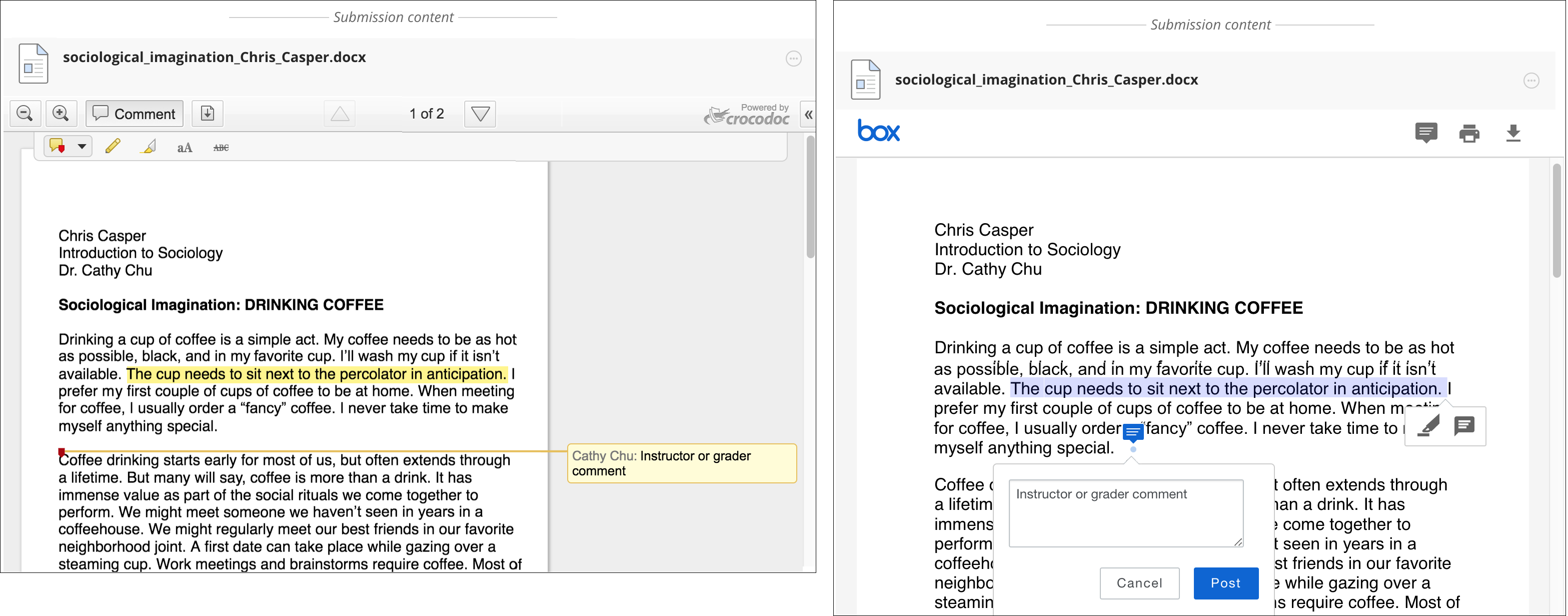
If you use UMBC Box for cloud storage, you are likely familiar with how documents render in that web interface. Here is a comparison of the current inline grading tools (left) and the new inline grading tools (right):
What to expect with the change
Blackboard has worked closely with Box to integrate the New Box View into the grading process and to migrate the databases containing submitted student data and documents. The New Box View service will completely replace the existing back-end tools in exactly the same locations within Bb Learn. The overall interface is simplified and contextualized. More file types are supported.
After the transition, faculty, teaching assistants, and graders will not be able change or remove previously created annotations as that feedback becomes “read only.” All assignment feedback saved before the migration will be uneditable and saved as a PDF. As such, we strongly encourage faculty and graders to complete grading BEFORE the document process begins since grading procedures may be affected if a submission is not fully annotated in the middle of the transition. Rubrics are not affected at all by this change. New grading may begin using the updated feedback tools.
Please review these FAQs on the changes to inline grading
SaveSaveSaveSaveSaveSaveSaveSave
]]>
During the grading and evaluation process, Blackboard’s inline grading tool allows instructors, teaching assistants, and graders to embed feedback, such as comments, highlights, and even drawings,...https://my.umbc.edu/groups/bbannouncements/posts/71945https://beta.my.umbc.edu/api/v0/pixel/news/71945/guest@my.umbc.edu/e877ddd869bb49c300c517b79029e87f/api/pixelblackboardcrocodocinline-gradingnew-box-viewupgradeBlackboard Announcementshttps://beta.my.umbc.edu/groups/bbannouncementshttps://assets1-beta.my.umbc.edu/system/shared/avatars/groups/000/000/319/f6b35e5217428f5021e113525a55e6f4/xsmall.png?1437137819https://assets1-beta.my.umbc.edu/system/shared/avatars/groups/000/000/319/f6b35e5217428f5021e113525a55e6f4/original.png?1437137819https://assets4-beta.my.umbc.edu/system/shared/avatars/groups/000/000/319/f6b35e5217428f5021e113525a55e6f4/xxlarge.png?1437137819https://assets4-beta.my.umbc.edu/system/shared/avatars/groups/000/000/319/f6b35e5217428f5021e113525a55e6f4/xlarge.png?1437137819https://assets1-beta.my.umbc.edu/system/shared/avatars/groups/000/000/319/f6b35e5217428f5021e113525a55e6f4/large.png?1437137819https://assets4-beta.my.umbc.edu/system/shared/avatars/groups/000/000/319/f6b35e5217428f5021e113525a55e6f4/medium.png?1437137819https://assets1-beta.my.umbc.edu/system/shared/avatars/groups/000/000/319/f6b35e5217428f5021e113525a55e6f4/small.png?1437137819https://assets1-beta.my.umbc.edu/system/shared/avatars/groups/000/000/319/f6b35e5217428f5021e113525a55e6f4/xsmall.png?1437137819https://assets4-beta.my.umbc.edu/system/shared/avatars/groups/000/000/319/f6b35e5217428f5021e113525a55e6f4/xxsmall.png?1437137819Blackboard Announcementshttps://assets4-beta.my.umbc.edu/system/shared/thumbnails/news/000/071/945/53a4084e6af32d067b142ac53414f44e/xxlarge.jpg?1510346131https://assets2-beta.my.umbc.edu/system/shared/thumbnails/news/000/071/945/53a4084e6af32d067b142ac53414f44e/xlarge.jpg?1510346131https://assets2-beta.my.umbc.edu/system/shared/thumbnails/news/000/071/945/53a4084e6af32d067b142ac53414f44e/large.jpg?1510346131https://assets1-beta.my.umbc.edu/system/shared/thumbnails/news/000/071/945/53a4084e6af32d067b142ac53414f44e/medium.jpg?1510346131https://assets3-beta.my.umbc.edu/system/shared/thumbnails/news/000/071/945/53a4084e6af32d067b142ac53414f44e/small.jpg?1510346131https://assets2-beta.my.umbc.edu/system/shared/thumbnails/news/000/071/945/53a4084e6af32d067b142ac53414f44e/xsmall.jpg?1510346131https://assets3-beta.my.umbc.edu/system/shared/thumbnails/news/000/071/945/53a4084e6af32d067b142ac53414f44e/xxsmall.jpg?151034613130trueFri, 10 Nov 2017 15:58:15 -0500