<?xml version="1.0"?>
<News hasArchived="false" page="1" pageCount="1" pageSize="10" timestamp="Sat, 18 Apr 2026 20:56:14 -0400" url="https://beta.my.umbc.edu/groups/instructional-technology/posts.xml?tag=groups">
<NewsItem contentIssues="false" id="148527" important="false" status="posted" url="https://beta.my.umbc.edu/groups/instructional-technology/posts/148527">
<Title>April update to Ultra features flexible grading in groups, printing support for Ultra documents &amp; accessibility support for Office Math</Title>
<Tagline>New learning object repository designed for flexible content</Tagline>
<Body>
<![CDATA[
    <div class="html-content"><p>The April release introduce several new features aimed at improving content management, grading flexibility, and student feedback tracking. </p><p>Instructors and students can now <a href="https://help.blackboard.com/node/49881" rel="nofollow external" class="bo">print Ultra Documents</a> or save them as PDFs. This feature facilitates offline content review, sharing with peers, or creating physical copies. Note that if knowledge checks are included and already completed, they will display selected answers and instructor feedback when printed.</p><p><img src="https://help.blackboard.com/sites/default/files/styles/rich_text_large/public/images/2025-03/Documents_PrintStudent.png.webp?itok=TbW20Q9-" width="500" alt="Example of new print Ultra Document feature" style="max-width: 100%; height: auto;"></p><p><em>Image 1: Example of new print Ultra Document feature</em></p><p>A major addition this month is <a href="https://help.blackboard.com/node/49871" rel="nofollow external" class="bo">the Learning Object Repository (LOR)</a>, designed to centralize resources across courses and organizations. Instructors can copy objects from the LOR while maintaining control over settings such as availability. Updates made to objects in the LOR are automatically reflected across associated courses, making it easier to manage institutional content like policy documents.</p><p><strong>Content Creation &amp; Management</strong></p><ul><li>When performing a whole course copy, achievements are now automatically included, allowing instructors to maintain consistent recognition across course iterations. However, achievements are not included in granular content copies.</li><li>Instructors can now <a href="https://help.blackboard.com/node/49896" rel="nofollow external" class="bo">access Achievements through the Student Preview</a>.</li></ul><div><strong>Accessibility</strong></div><div><ul><li>Ally's document conversion process is upgraded to include <a href="https://help.blackboard.com/node/49976" rel="nofollow external" class="bo">the first version of support for Office Math</a> found in Microsoft Word documents. Students downloading the HTML and BeeLine Reader Alternative Formats will now see the math equations rendered as MathML via MathJax in their browser.</li></ul></div><div><strong>Communication &amp; Engagement</strong></div><div><ul><li>To improve communication within large courses, the Course Activity Report now <a href="https://help.blackboard.com/node/49901" rel="nofollow external" class="bo">includes clear labels when sending messages</a>: <span>All students, s</span><span>elected students, s</span><span>elected students with alerts, or s</span><span>elected students without alerts. </span><span>This improvement helps instructors better manage communication, especially when addressing students with specific needs.</span></li><li>The <a href="https://help.blackboard.com/node/49906" rel="nofollow external" class="bo">color of the activity indicator</a> for discussions, journals, and conversations is changed from blue to purple to better unify the color scheme in Ultra.</li></ul></div><p><strong>Assessments &amp; Grading</strong></p><ul><li>Flexible Grading is introduced for group assignments and tests. Though some features (like per-question feedback on group tests) are not yet available, this update is part of ongoing improvements to group grading.</li><li>A new feedback indicator on the student Overview page now shows <a href="https://help.blackboard.com/fi-fi/node/49911" rel="nofollow external" class="bo">whether students have reviewed their feedback</a>. The indicator updates from “Not reviewed” to “Reviewed” with a timestamp, giving instructors greater insight into student engagement with their feedback.</li><li>A <a href="https://help.blackboard.com/node/49916" rel="nofollow external" class="bo">new “Results” column</a> in the Gradebook replaces the “Feedback” column, making it more intuitive for students to view their grades and feedback.</li></ul><p>Faculty should see the latest updates in their Ultra courses around April 4-5 2025. The next update to our Ultra test environment will take place on <span>April 8, 2025</span>; release notes are posted to the <a href="https://wiki.umbc.edu/x/LohnB" rel="nofollow external" class="bo">What's New in Ultra</a><span> that same week. Faculty who are interested in test driving new features before they are released to production should </span><a href="http://my.umbc.edu/go/request-help" rel="nofollow external" class="bo">open an RT ticket</a><span> to request early access. Please </span><a href="http://umbc.edu/go/ultra" rel="nofollow external" class="bo">watch the FAQs</a><span>, including </span><a href="https://wiki.umbc.edu/x/LohnB" rel="nofollow external" class="bo">the What's New with Ultra page</a><span>, and myUMBC for additional information about Ultra.</span></p><p><span>Curious about the all latest features in Ultra? Join our </span><a href="https://my3.my.umbc.edu/groups/instructional-technology/events/141687" rel="nofollow external" class="bo">What's New in Ultra Courses for Teaching &amp; Learning SU2025</a><span> webinar on May 12, 2025.</span></p><div><div><span><strong>Connect with Instructional Technology</strong></span></div><div><span>As always, if you have any questions about teaching, learning, and technology at UMBC, please consider the following options:</span></div><ul><li><a href="http://www.umbc.edu/faq" rel="nofollow external" class="bo">Check our extensive FAQ collection</a><span> </span></li><ul><li><span><a href="https://wiki.umbc.edu/x/LohnB" rel="nofollow external" class="bo"><span>What's new in Ultra?</span></a><span> </span><span>|</span><span> </span><a href="https://wiki.umbc.edu/x/bwrSAQ" rel="nofollow external" class="bo"><span>Known Issues</span></a><span> </span></span></li></ul><li><span><a href="http://my.umbc.edu/go/request-help" rel="nofollow external" class="bo">Open a ticket via RT</a></span></li><li><span>Follow the </span><a href="http://my.umbc.edu/groups/instructional-technology" rel="nofollow external" class="bo">Instructional Technology</a><span> &amp; </span><a href="http://my.umbc.edu/groups/doit" rel="nofollow external" class="bo">DoIT</a><span> myUMBC groups</span></li><li><a href="http://doit.umbc.edu/itnm/staff/" rel="nofollow external" class="bo">Request a consult</a><span> with <a href="http://doit.umbc.edu/itnm/staff" rel="nofollow external" class="bo">instructional technology staff</a></span></li></ul><div><em>Thumbnail-image: New to Ultra [decorative]</em></div><div><div></div></div></div></div>
]]>
</Body>
<Summary>The April release introduce several new features aimed at improving content management, grading flexibility, and student feedback tracking.   Instructors and students can now print Ultra Documents...</Summary>
<Website>https://my3.my.umbc.edu/groups/instructional-technology/posts/148527</Website>
<TrackingUrl>https://beta.my.umbc.edu/api/v0/pixel/news/148527/guest@my.umbc.edu/98441a11c3906d0a32a59050674887a5/api/pixel</TrackingUrl>
<Tag>blackboard</Tag>
<Tag>gradebook</Tag>
<Tag>grading</Tag>
<Tag>groups</Tag>
<Tag>learning-object-repository</Tag>
<Tag>rubrics</Tag>
<Tag>ultra-experience</Tag>
<Tag>ultra-update</Tag>
<Group token="instructional-technology">Instructional Technology</Group>
<GroupUrl>https://beta.my.umbc.edu/groups/instructional-technology</GroupUrl>
<AvatarUrl>https://assets2-beta.my.umbc.edu/system/shared/avatars/groups/000/001/164/dec3b026b81ee6d890a8f82f75c94a2e/xsmall.png?1446126703</AvatarUrl>
<AvatarUrl size="original">https://assets1-beta.my.umbc.edu/system/shared/avatars/groups/000/001/164/dec3b026b81ee6d890a8f82f75c94a2e/original.png?1446126703</AvatarUrl>
<AvatarUrl size="xxlarge">https://assets2-beta.my.umbc.edu/system/shared/avatars/groups/000/001/164/dec3b026b81ee6d890a8f82f75c94a2e/xxlarge.png?1446126703</AvatarUrl>
<AvatarUrl size="xlarge">https://assets1-beta.my.umbc.edu/system/shared/avatars/groups/000/001/164/dec3b026b81ee6d890a8f82f75c94a2e/xlarge.png?1446126703</AvatarUrl>
<AvatarUrl size="large">https://assets1-beta.my.umbc.edu/system/shared/avatars/groups/000/001/164/dec3b026b81ee6d890a8f82f75c94a2e/large.png?1446126703</AvatarUrl>
<AvatarUrl size="medium">https://assets4-beta.my.umbc.edu/system/shared/avatars/groups/000/001/164/dec3b026b81ee6d890a8f82f75c94a2e/medium.png?1446126703</AvatarUrl>
<AvatarUrl size="small">https://assets3-beta.my.umbc.edu/system/shared/avatars/groups/000/001/164/dec3b026b81ee6d890a8f82f75c94a2e/small.png?1446126703</AvatarUrl>
<AvatarUrl size="xsmall">https://assets2-beta.my.umbc.edu/system/shared/avatars/groups/000/001/164/dec3b026b81ee6d890a8f82f75c94a2e/xsmall.png?1446126703</AvatarUrl>
<AvatarUrl size="xxsmall">https://assets3-beta.my.umbc.edu/system/shared/avatars/groups/000/001/164/dec3b026b81ee6d890a8f82f75c94a2e/xxsmall.png?1446126703</AvatarUrl>
<Sponsor>Instructional Technology</Sponsor>
<ThumbnailUrl size="xxlarge">https://assets4-beta.my.umbc.edu/system/shared/thumbnails/news/000/148/527/2bcf512b1e78e7541b0a4d36471ecf1b/xxlarge.jpg?1743523823</ThumbnailUrl>
<ThumbnailUrl size="xlarge">https://assets3-beta.my.umbc.edu/system/shared/thumbnails/news/000/148/527/2bcf512b1e78e7541b0a4d36471ecf1b/xlarge.jpg?1743523823</ThumbnailUrl>
<ThumbnailUrl size="large">https://assets4-beta.my.umbc.edu/system/shared/thumbnails/news/000/148/527/2bcf512b1e78e7541b0a4d36471ecf1b/large.jpg?1743523823</ThumbnailUrl>
<ThumbnailUrl size="medium">https://assets4-beta.my.umbc.edu/system/shared/thumbnails/news/000/148/527/2bcf512b1e78e7541b0a4d36471ecf1b/medium.jpg?1743523823</ThumbnailUrl>
<ThumbnailUrl size="small">https://assets1-beta.my.umbc.edu/system/shared/thumbnails/news/000/148/527/2bcf512b1e78e7541b0a4d36471ecf1b/small.jpg?1743523823</ThumbnailUrl>
<ThumbnailUrl size="xsmall">https://assets4-beta.my.umbc.edu/system/shared/thumbnails/news/000/148/527/2bcf512b1e78e7541b0a4d36471ecf1b/xsmall.jpg?1743523823</ThumbnailUrl>
<ThumbnailUrl size="xxsmall">https://assets2-beta.my.umbc.edu/system/shared/thumbnails/news/000/148/527/2bcf512b1e78e7541b0a4d36471ecf1b/xxsmall.jpg?1743523823</ThumbnailUrl>
<ThumbnailAltText>White and blue robot dog running against a light turquoise background with the "New to Ultra"</ThumbnailAltText>
<PawCount>2</PawCount>
<CommentCount>0</CommentCount>
<CommentsAllowed>true</CommentsAllowed>
<PostedAt>Tue, 01 Apr 2025 12:46:50 -0400</PostedAt>
<EditAt>Tue, 29 Apr 2025 08:02:34 -0400</EditAt>
</NewsItem>

<NewsItem contentIssues="true" id="136980" important="false" status="posted" url="https://beta.my.umbc.edu/groups/instructional-technology/posts/136980">
<Title>Unlock collaborative learning with cloud tools in Blackboard</Title>
<Tagline>Discover Google Workspace and Microsoft OneDrive</Tagline>
<Body>
<![CDATA[
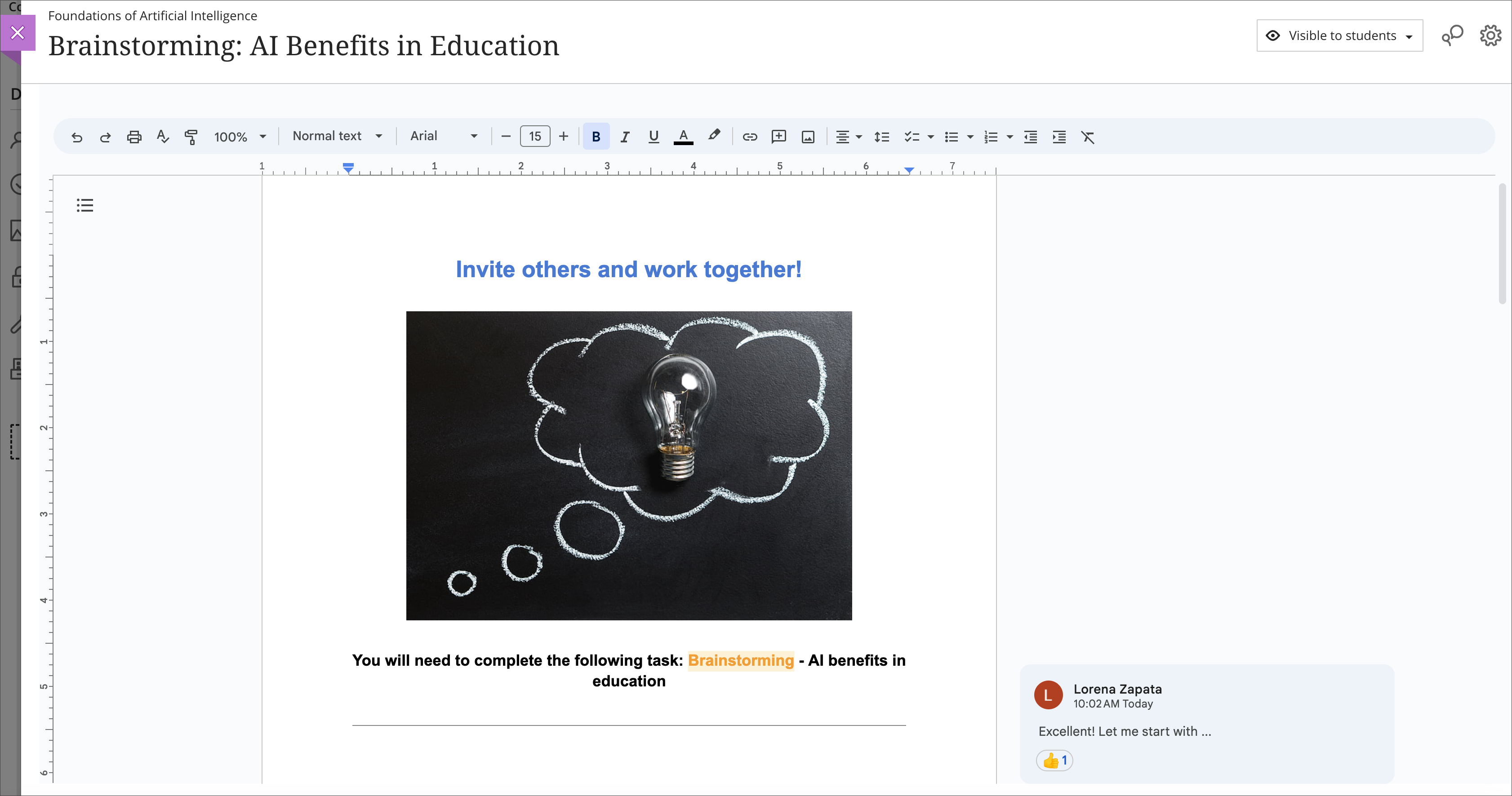
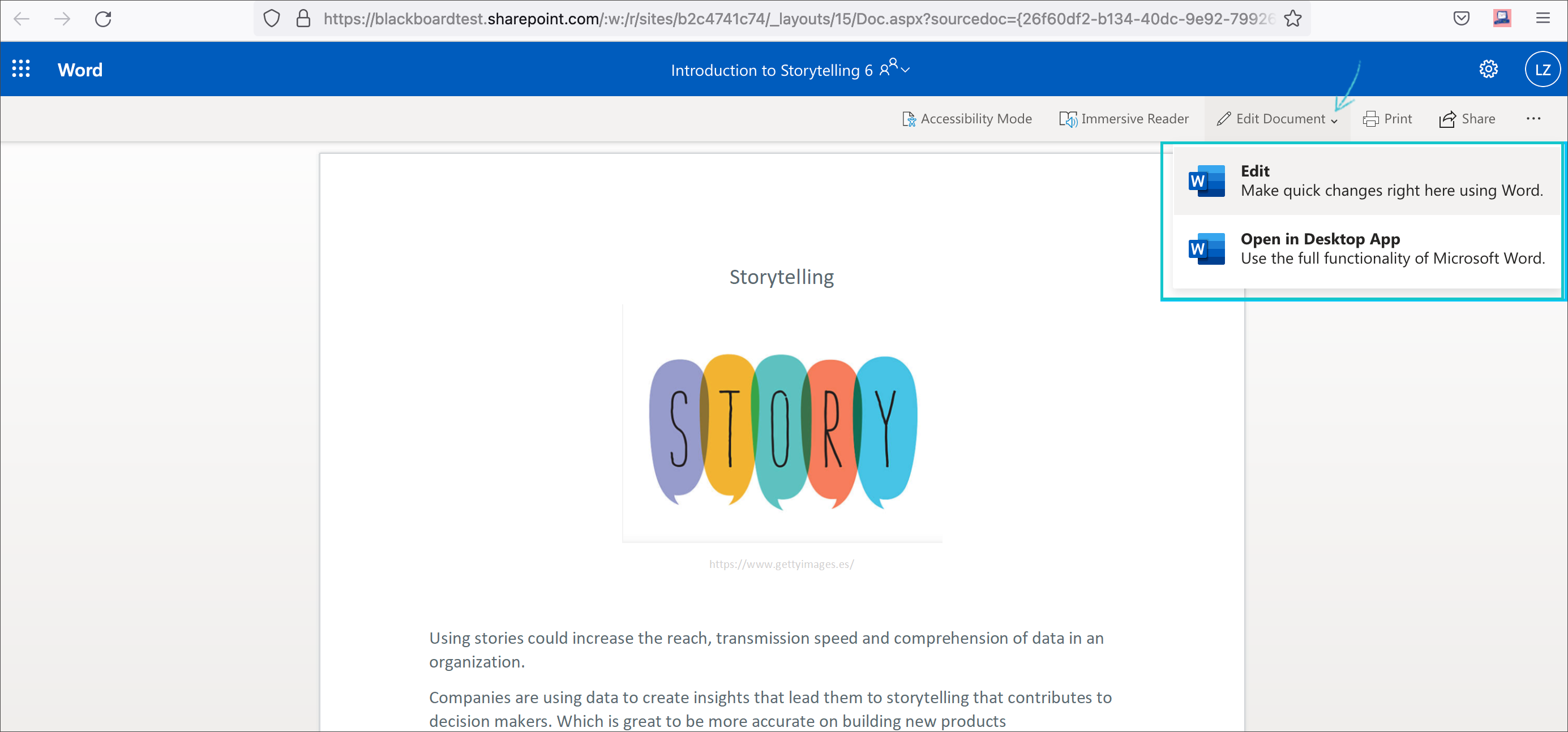
    <div class="html-content"><span><p><span>Cloud resources can transform a course design with streamlined document display and reduce storage footprint. Two new integrations from Google Workspace and Microsoft OneDrive offer cloud-based file management for Ultra courses. These tools allow faculty to select existing files, such as a syllabus or course schedule, and embed them seamlessly into a course for students to view. Customized privileges ensure only the document owner can modify the file within the framework of the course or the cloud drive while keeping the learner's access restricted to read-only.</span></p><p><span>Additionally, these tools support student collaboration, allowing for dynamic exchange of ideas, peer learning, co-authorship, and presentation planning. Creating a collaborative document in Google or Microsoft provides an exciting opportunity for faculty to support student teamwork in a shared environment directly embedded in the Ultra course space. Leverage these tools with students for real-time writing and editing, brainstorming, project planning, and other collaborative experiences.</span></p><p><span><strong>Learn more about using Google Workspace</strong> (Docs, Slides, Sheets)</span></p><ul><li><p><a href="https://help.blackboard.com/Learn/Instructor/Ultra/Course_Content/Create_Content/Cloud_Document/Google_Workspace#link_Google_document" rel="nofollow external" class="bo"><span>Embed a read-only Google document</span></a></p></li><li><p><a href="https://help.blackboard.com/Learn/Instructor/Ultra/Course_Content/Create_Content/Cloud_Document/Google_Workspace#create_Google_collaborative_document" rel="nofollow external" class="bo"><span>Create a Google collaborative document</span></a></p></li></ul><p><span><img src="https://help.blackboard.com/sites/default/files/images/2023-08/learn_ultra_instructor_GoogleWorkspace_EmbeddedCollabDoc.png" width="500" alt="Image 1: Example of an embedded Google collaborative document for students" style="max-width: 100%; height: auto;"></span></p><p><span><em>Image 1: Example of an embedded Google collaborative document for students</em></span></p><p><span><strong>Learn more about using Microsoft OneDrive</strong> (Word, PowerPoint, Excel)</span></p><ul><li><p><a href="https://help.blackboard.com/Learn/Instructor/Ultra/Course_Content/Create_Content/Create_Course_Materials/Open_Files_From_OneDrive#open_file" rel="nofollow external" class="bo"><span>Create embedded Microsoft cloud document</span></a></p></li><li><p><span><a href="https://help.blackboard.com/Learn/Instructor/Ultra/Course_Content/Create_Content/Create_Course_Materials/Open_Files_From_OneDrive#create_file" rel="nofollow external" class="bo">Create a Microsoft cloud collaboration</a></span></p></li></ul><p><span><img src="https://help.blackboard.com/sites/default/files/images/2022-02/learn_ultra_instructor_AddFile_OpenFromOneDrive_5.png" width="500" alt="Image 2: Example of an embedded Microsoft Word document for students to read only" style="max-width: 100%; height: auto;"></span></p><p><span><em>Image 2: Example of an embedded Microsoft Word document for students to read only</em></span></p><p><span>Both Google Workspace and Microsoft OneDrive are available now. Faculty can learn more about these tools at <a href="https://my3.my.umbc.edu/groups/instructional-technology/events/123991" rel="nofollow external" class="bo">an upcoming webinar on January 9, 2024</a>.</span></p><h5><strong>Connect with Instructional Technology</strong></h5><div>As always, if you have any questions about teaching, learning, and technology at UMBC, please consider the following options:</div><ul><li><a href="http://www.umbc.edu/faq" rel="nofollow external" class="bo">Check our extensive FAQ collection</a> </li><ul><li><a href="https://wiki.umbc.edu/x/LohnB" rel="nofollow external" class="bo">What's new in Ultra?</a> | <a href="https://wiki.umbc.edu/x/bwrSAQ" rel="nofollow external" class="bo">Known Issues</a> </li></ul><li><a href="http://umbc.edu/go/bbsupport" rel="nofollow external" class="bo">Open a ticket via RT</a></li><li>Follow the <a href="http://my.umbc.edu/groups/instructional-technology" rel="nofollow external" class="bo">Instructional Technology</a> &amp; <a href="http://my.umbc.edu/groups/doit" rel="nofollow external" class="bo">DoIT</a> myUMBC groups</li><li><a href="http://umbc.edu/go/bbsupport" rel="nofollow external" class="bo">Request a consult</a> with <a href="http://doit.umbc.edu/itnm/staff" rel="nofollow external" class="bo">instructional technology staff</a></li><li><a href="http://pivot.umbc.edu/" rel="nofollow external" class="bo">PIVOT</a> | <a href="https://doit.umbc.edu/itnm/academic-continuity/" rel="nofollow external" class="bo">Academic Continuity</a> | <a href="https://fdc.umbc.edu/teaching/keep-on-teaching/" rel="nofollow external" class="bo">Keep On Teaching</a> | <a href="https://doit.umbc.edu/students" rel="nofollow external" class="bo">Student Technology Resources</a></li></ul><p></p><p><span><em>UMBC is committed to providing a consistent learning experience for everyone. The last day we will support Blackboard Original is December 31, 2024. Please check out our training and support: <a href="https://umbc.edu/go/ultra" rel="nofollow external" class="bo">https://umbc.edu/go/ultra</a>.</em></span></p></span></div>
]]>
</Body>
<Summary>Cloud resources can transform a course design with streamlined document display and reduce storage footprint. Two new integrations from Google Workspace and Microsoft OneDrive offer cloud-based...</Summary>
<Website>https://my3.my.umbc.edu/groups/instructional-technology/posts/136980</Website>
<TrackingUrl>https://beta.my.umbc.edu/api/v0/pixel/news/136980/guest@my.umbc.edu/974acebe5a361d0883d8400183637bac/api/pixel</TrackingUrl>
<Tag>blackboard</Tag>
<Tag>cloud-collaboration</Tag>
<Tag>cloud-storage</Tag>
<Tag>engagement</Tag>
<Tag>google</Tag>
<Tag>groups</Tag>
<Tag>microsoft</Tag>
<Tag>one-drive</Tag>
<Tag>online-learning</Tag>
<Tag>ultra</Tag>
<Group token="instructional-technology">Instructional Technology</Group>
<GroupUrl>https://beta.my.umbc.edu/groups/instructional-technology</GroupUrl>
<AvatarUrl>https://assets2-beta.my.umbc.edu/system/shared/avatars/groups/000/001/164/dec3b026b81ee6d890a8f82f75c94a2e/xsmall.png?1446126703</AvatarUrl>
<AvatarUrl size="original">https://assets1-beta.my.umbc.edu/system/shared/avatars/groups/000/001/164/dec3b026b81ee6d890a8f82f75c94a2e/original.png?1446126703</AvatarUrl>
<AvatarUrl size="xxlarge">https://assets2-beta.my.umbc.edu/system/shared/avatars/groups/000/001/164/dec3b026b81ee6d890a8f82f75c94a2e/xxlarge.png?1446126703</AvatarUrl>
<AvatarUrl size="xlarge">https://assets1-beta.my.umbc.edu/system/shared/avatars/groups/000/001/164/dec3b026b81ee6d890a8f82f75c94a2e/xlarge.png?1446126703</AvatarUrl>
<AvatarUrl size="large">https://assets1-beta.my.umbc.edu/system/shared/avatars/groups/000/001/164/dec3b026b81ee6d890a8f82f75c94a2e/large.png?1446126703</AvatarUrl>
<AvatarUrl size="medium">https://assets4-beta.my.umbc.edu/system/shared/avatars/groups/000/001/164/dec3b026b81ee6d890a8f82f75c94a2e/medium.png?1446126703</AvatarUrl>
<AvatarUrl size="small">https://assets3-beta.my.umbc.edu/system/shared/avatars/groups/000/001/164/dec3b026b81ee6d890a8f82f75c94a2e/small.png?1446126703</AvatarUrl>
<AvatarUrl size="xsmall">https://assets2-beta.my.umbc.edu/system/shared/avatars/groups/000/001/164/dec3b026b81ee6d890a8f82f75c94a2e/xsmall.png?1446126703</AvatarUrl>
<AvatarUrl size="xxsmall">https://assets3-beta.my.umbc.edu/system/shared/avatars/groups/000/001/164/dec3b026b81ee6d890a8f82f75c94a2e/xxsmall.png?1446126703</AvatarUrl>
<Sponsor>Instructional Technology</Sponsor>
<ThumbnailUrl size="xxlarge">https://assets2-beta.my.umbc.edu/system/shared/thumbnails/news/000/136/980/61c10de9e6bdc7965c908b02b14ada96/xxlarge.jpg?1699624920</ThumbnailUrl>
<ThumbnailUrl size="xlarge">https://assets3-beta.my.umbc.edu/system/shared/thumbnails/news/000/136/980/61c10de9e6bdc7965c908b02b14ada96/xlarge.jpg?1699624920</ThumbnailUrl>
<ThumbnailUrl size="large">https://assets2-beta.my.umbc.edu/system/shared/thumbnails/news/000/136/980/61c10de9e6bdc7965c908b02b14ada96/large.jpg?1699624920</ThumbnailUrl>
<ThumbnailUrl size="medium">https://assets3-beta.my.umbc.edu/system/shared/thumbnails/news/000/136/980/61c10de9e6bdc7965c908b02b14ada96/medium.jpg?1699624920</ThumbnailUrl>
<ThumbnailUrl size="small">https://assets1-beta.my.umbc.edu/system/shared/thumbnails/news/000/136/980/61c10de9e6bdc7965c908b02b14ada96/small.jpg?1699624920</ThumbnailUrl>
<ThumbnailUrl size="xsmall">https://assets4-beta.my.umbc.edu/system/shared/thumbnails/news/000/136/980/61c10de9e6bdc7965c908b02b14ada96/xsmall.jpg?1699624920</ThumbnailUrl>
<ThumbnailUrl size="xxsmall">https://assets2-beta.my.umbc.edu/system/shared/thumbnails/news/000/136/980/61c10de9e6bdc7965c908b02b14ada96/xxsmall.jpg?1699624920</ThumbnailUrl>
<PawCount>6</PawCount>
<CommentCount>0</CommentCount>
<CommentsAllowed>true</CommentsAllowed>
<PostedAt>Tue, 28 Nov 2023 12:10:44 -0500</PostedAt>
</NewsItem>

</News>