<?xml version="1.0"?>
<News hasArchived="false" page="1" pageCount="2" pageSize="10" timestamp="Sun, 19 Apr 2026 17:20:25 -0400" url="https://beta.my.umbc.edu/groups/instructional-technology/posts.xml?tag=grading">
<NewsItem contentIssues="false" id="150790" important="false" status="posted" url="https://beta.my.umbc.edu/groups/instructional-technology/posts/150790">
<Title>Improve Course Accessibility with Image Captions &amp; MathJax Formulas in July's Ultra Update</Title>
<Tagline>Track who's reading your announcements and more</Tagline>
<Body>
<![CDATA[
    <div class="html-content">How do you know if students actually read that important course announcement? What if you could make your content more accessible by adding image captions or rendering complex math more clearly for your STEM students? <div><br></div><div>The July 2025 release brings features designed to improve visibility into student engagement, better accessibility for images and equations, and tools that streamline how you monitor activity and manage grading. Whether you’re preparing for fall or refining your summer courses, these enhancements make it easier to connect with students and deliver content that works for everyone.<div><br></div><div><div><strong>Add Captions to Images for Context and Accessibility</strong></div><div>Instructors can now add captions above or below image blocks in Ultra Documents, providing valuable context to visual content embedded in course materials. This simple but impactful change helps students interpret images more effectively, improves comprehension for visual learners, and enhances digital accessibility by supporting screen reader users and reinforcing meaning beyond alternative text.</div></div><div><img src="https://help.blackboard.com/sites/default/files/styles/rich_text_medium/public/images/2025-06/Documents_imagecaption.png.webp?itok=HbOfnq4z" alt="Image 1. Instructors can go to Edit File Options to add image captions and set positions." style="max-width: 100%; height: auto;"></div><div><em>Image 1. Instructors can go to Edit File Options to add image captions and set positions.</em></div><div><br></div><div><div><strong>Render Math with Clarity Using MathJax</strong></div><div>MathJax will automatically render LaTeX equations when used in the Content Editor, offering a more precise and visually clean presentation of mathematical expressions across supported areas of Ultra. Especially helpful for STEM faculty, this update gives instructors more control over how complex formulas appear and improves the accessibility and readability of math-based content for students.</div></div><div><img src="https://help.blackboard.com/sites/default/files/styles/rich_text_medium/public/images/2023-06/learn_ultra_instructor_MathFormulas_AdjustedFormulaLaTeX_2.png.webp?itok=Adt8a_M-" alt="Image 2: Example of a formula formatted in LaTeX" style="max-width: 100%; height: auto;"></div><div><em>Image 2: Example of a formula formatted in LaTeX</em></div><div><br></div><div><strong>Track Student Engagement with Announcements</strong></div><div>The Announcements page now includes a viewer count, allowing instructors to quickly see which students have opened an announcement and which have not. Clicking the count reveals a list of viewers and non-viewers, with the ability to message students who haven’t read the post. This feature supports more effective communication by helping faculty ensure that important updates, reminders, and instructions are actually reaching students.</div><div><img src="https://help.blackboard.com/sites/default/files/styles/rich_text_medium/public/images/2025-06/announcements_read.png.webp?itok=MSc4-3Dk" alt="Image 3. The list of viewers for an announcement shows that two students have read the announcement and one hasn’t." style="max-width: 100%; height: auto;"></div><div><em>Image 3. The list of viewers for an announcement shows that two students have read the announcement and one hasn’t.</em></div><div><br></div><div>Additional updates include:</div><div><ul><li>Instructors can now import QTI v2.1 formatted questions directly into question banks.</li><li>A new “No Category” option is now available in the Gradebook, allowing instructors to remove items from a grading category without needing to assign them to another one.</li><li>The instructor Activity Page has been redesigned to show new course activity at a glance, including recent updates, grading needs, new messages, and alerts tied to student performance.</li><li>Improvements to the pop-out rubric in the Gradebook include a save warning prompt when closing unsaved work and enhanced keyboard navigation using arrow keys and tab controls. </li><li>Instructors grading group assignments can navigate through submissions with new Previous and Next buttons in the group header bar.</li></ul></div><div><p><strong>When you can expect the update</strong></p><p>Faculty should see the latest updates in their Ultra courses around July 3-4 2025. The next update to our Ultra test environment will take place on <span>July 8, 2025</span>; release notes are posted to the <a href="https://my3.my.umbc.edu/groups/instructional-technology/posts/149574/15848/782c435b983b9add1c5ec4e5d955e60f/web/link?link=https%3A%2F%2Fwiki.umbc.edu%2Fx%2FLohnB" rel="nofollow external" class="bo">What's New in Ultra</a><span> that same week. Faculty who are interested in test driving new features before they are released to production should </span><a href="https://my3.my.umbc.edu/groups/instructional-technology/posts/149574/15848/727292cce6c6665b1fcf69032b12e0d6/web/link?link=http%3A%2F%2Fmy.umbc.edu%2Fgo%2Frequest-help" rel="nofollow external" class="bo">open an RT ticket</a><span> to request early access. Please </span><a href="https://my3.my.umbc.edu/groups/instructional-technology/posts/149574/15848/1a55d761c534b5d9d77045fac42ec979/web/link?link=http%3A%2F%2Fumbc.edu%2Fgo%2Fultra" rel="nofollow external" class="bo">watch the FAQs</a><span>, including </span><a href="https://my3.my.umbc.edu/groups/instructional-technology/posts/149574/15848/782c435b983b9add1c5ec4e5d955e60f/web/link?link=https%3A%2F%2Fwiki.umbc.edu%2Fx%2FLohnB" rel="nofollow external" class="bo">the What's New with Ultra page</a><span>, and myUMBC for additional information about Ultra.</span></p><div><div><span><strong>Connect with Instructional Technology</strong></span></div><div><span>As always, if you have any questions about teaching, learning, and technology at UMBC, please consider the following options:</span></div><ul><li><a href="https://my3.my.umbc.edu/groups/instructional-technology/posts/149574/15848/f59d29e5c17e589f885b2536a667a41a/web/link?link=http%3A%2F%2Fwww.umbc.edu%2Ffaq" rel="nofollow external" class="bo">Check our extensive FAQ collection</a><span> </span></li><ul><li><span><a href="https://my3.my.umbc.edu/groups/instructional-technology/posts/149574/15848/782c435b983b9add1c5ec4e5d955e60f/web/link?link=https%3A%2F%2Fwiki.umbc.edu%2Fx%2FLohnB" rel="nofollow external" class="bo"><span>What's new in Ultra?</span></a><span> </span><span>|</span><span> </span><a href="https://my3.my.umbc.edu/groups/instructional-technology/posts/149574/15848/63a0e48a64b548180394031ac6f89272/web/link?link=https%3A%2F%2Fwiki.umbc.edu%2Fx%2FbwrSAQ" rel="nofollow external" class="bo"><span>Known Issues</span></a><span> </span></span></li></ul><li><span><a href="https://my3.my.umbc.edu/groups/instructional-technology/posts/149574/15848/727292cce6c6665b1fcf69032b12e0d6/web/link?link=http%3A%2F%2Fmy.umbc.edu%2Fgo%2Frequest-help" rel="nofollow external" class="bo">Open a ticket via RT</a></span></li><li><span>Follow the </span><a href="https://my3.my.umbc.edu/groups/instructional-technology/posts/149574/15848/208c31480fd10e3805fdafe318269623/web/link?link=http%3A%2F%2Fmy.umbc.edu%2Fgroups%2Finstructional-technology" rel="nofollow external" class="bo">Instructional Technology</a><span> &amp; </span><a href="https://my3.my.umbc.edu/groups/instructional-technology/posts/149574/15848/dccb8bbf9409460e32d26e4518464b78/web/link?link=http%3A%2F%2Fmy.umbc.edu%2Fgroups%2Fdoit" rel="nofollow external" class="bo">DoIT</a><span> myUMBC groups</span></li><li><a href="https://my3.my.umbc.edu/groups/instructional-technology/posts/149574/15848/7e9d8e8701228d0f57bcfcd17db50e50/web/link?link=http%3A%2F%2Fdoit.umbc.edu%2Fitnm%2Fstaff%2F" rel="nofollow external" class="bo">Request a consult</a><span> with <a href="https://my3.my.umbc.edu/groups/instructional-technology/posts/149574/15848/1935cd506ec09b50c61f334661d75174/web/link?link=http%3A%2F%2Fdoit.umbc.edu%2Fitnm%2Fstaff" rel="nofollow external" class="bo">instructional technology staff</a></span></li></ul><div><em>Thumbnail-image: New to Ultra [decorative]</em></div></div></div></div></div>
]]>
</Body>
<Summary>How do you know if students actually read that important course announcement? What if you could make your content more accessible by adding image captions or rendering complex math more clearly...</Summary>
<Website>https://my3.my.umbc.edu/groups/instructional-technology/posts/150790</Website>
<TrackingUrl>https://beta.my.umbc.edu/api/v0/pixel/news/150790/guest@my.umbc.edu/ca4bebf5fc27c7bf4afdb872f5a7a1cf/api/pixel</TrackingUrl>
<Tag>accessibility</Tag>
<Tag>announcements</Tag>
<Tag>blackboard</Tag>
<Tag>gradebook</Tag>
<Tag>grading</Tag>
<Tag>learner-engagement</Tag>
<Tag>question-banks</Tag>
<Tag>ultra-experience</Tag>
<Tag>ultra-update</Tag>
<Group token="instructional-technology">Instructional Technology</Group>
<GroupUrl>https://beta.my.umbc.edu/groups/instructional-technology</GroupUrl>
<AvatarUrl>https://assets2-beta.my.umbc.edu/system/shared/avatars/groups/000/001/164/dec3b026b81ee6d890a8f82f75c94a2e/xsmall.png?1446126703</AvatarUrl>
<AvatarUrl size="original">https://assets1-beta.my.umbc.edu/system/shared/avatars/groups/000/001/164/dec3b026b81ee6d890a8f82f75c94a2e/original.png?1446126703</AvatarUrl>
<AvatarUrl size="xxlarge">https://assets2-beta.my.umbc.edu/system/shared/avatars/groups/000/001/164/dec3b026b81ee6d890a8f82f75c94a2e/xxlarge.png?1446126703</AvatarUrl>
<AvatarUrl size="xlarge">https://assets1-beta.my.umbc.edu/system/shared/avatars/groups/000/001/164/dec3b026b81ee6d890a8f82f75c94a2e/xlarge.png?1446126703</AvatarUrl>
<AvatarUrl size="large">https://assets1-beta.my.umbc.edu/system/shared/avatars/groups/000/001/164/dec3b026b81ee6d890a8f82f75c94a2e/large.png?1446126703</AvatarUrl>
<AvatarUrl size="medium">https://assets4-beta.my.umbc.edu/system/shared/avatars/groups/000/001/164/dec3b026b81ee6d890a8f82f75c94a2e/medium.png?1446126703</AvatarUrl>
<AvatarUrl size="small">https://assets3-beta.my.umbc.edu/system/shared/avatars/groups/000/001/164/dec3b026b81ee6d890a8f82f75c94a2e/small.png?1446126703</AvatarUrl>
<AvatarUrl size="xsmall">https://assets2-beta.my.umbc.edu/system/shared/avatars/groups/000/001/164/dec3b026b81ee6d890a8f82f75c94a2e/xsmall.png?1446126703</AvatarUrl>
<AvatarUrl size="xxsmall">https://assets3-beta.my.umbc.edu/system/shared/avatars/groups/000/001/164/dec3b026b81ee6d890a8f82f75c94a2e/xxsmall.png?1446126703</AvatarUrl>
<Sponsor>Instructional Technology</Sponsor>
<ThumbnailUrl size="xxlarge">https://assets3-beta.my.umbc.edu/system/shared/thumbnails/news/000/150/790/c97090ec18bff34640ff391d8115c281/xxlarge.jpg?1750780929</ThumbnailUrl>
<ThumbnailUrl size="xlarge">https://assets1-beta.my.umbc.edu/system/shared/thumbnails/news/000/150/790/c97090ec18bff34640ff391d8115c281/xlarge.jpg?1750780929</ThumbnailUrl>
<ThumbnailUrl size="large">https://assets4-beta.my.umbc.edu/system/shared/thumbnails/news/000/150/790/c97090ec18bff34640ff391d8115c281/large.jpg?1750780929</ThumbnailUrl>
<ThumbnailUrl size="medium">https://assets3-beta.my.umbc.edu/system/shared/thumbnails/news/000/150/790/c97090ec18bff34640ff391d8115c281/medium.jpg?1750780929</ThumbnailUrl>
<ThumbnailUrl size="small">https://assets3-beta.my.umbc.edu/system/shared/thumbnails/news/000/150/790/c97090ec18bff34640ff391d8115c281/small.jpg?1750780929</ThumbnailUrl>
<ThumbnailUrl size="xsmall">https://assets3-beta.my.umbc.edu/system/shared/thumbnails/news/000/150/790/c97090ec18bff34640ff391d8115c281/xsmall.jpg?1750780929</ThumbnailUrl>
<ThumbnailUrl size="xxsmall">https://assets4-beta.my.umbc.edu/system/shared/thumbnails/news/000/150/790/c97090ec18bff34640ff391d8115c281/xxsmall.jpg?1750780929</ThumbnailUrl>
<ThumbnailAltText>Black and white robot dog running with the words "New to Ultra" written on  light turquoise background</ThumbnailAltText>
<PawCount>2</PawCount>
<CommentCount>0</CommentCount>
<CommentsAllowed>true</CommentsAllowed>
<PostedAt>Tue, 24 Jun 2025 13:11:30 -0400</PostedAt>
</NewsItem>

<NewsItem contentIssues="false" id="150396" important="false" status="posted" url="https://beta.my.umbc.edu/groups/instructional-technology/posts/150396">
<Title>Explore Jumbled Sentences and Gradebook Tools in Ultra&#8217;s June Release</Title>
<Tagline>Track unread discussions &amp; student activity</Tagline>
<Body>
<![CDATA[
    <div class="html-content">The June 2025 update to Blackboard Ultra brings a fresh set of enhancements designed to support instructional efficiency, student engagement, and accessible course design. From new question types and grading tools to better visibility into student activity, these updates reflect Ultra’s continued commitment to teaching and learning. <div><br></div><div><div><strong>Jumbled Sentence Question Type</strong></div><div>Ultra now supports jumbled sentence questions for tests and quizzes, allowing instructors to assess syntax, sequencing, and conceptual structure in a dynamic, interactive way. Distractors can be added to increase challenge, and variables can include letters, numbers, and special characters. Answer options are randomized to ensure fairness, and instructors can optionally use AI assistance to generate question formats.</div></div><div><img src="https://help.blackboard.com/sites/default/files/styles/rich_text_large/public/images/2025-05/ultra_instructor_jumbledsentencequestiontype.png.webp?itok=n8EErY1X" alt="Image 1: Instructor creates a jumbled sentence question type." style="max-width: 100%; height: auto;"></div><div><em>Image 1: Instructor creates a jumbled sentence question type.</em></div><div><br></div><div><div><strong>Bulk Category Changes in the Gradebook</strong></div><div>Instructors can now bulk update the category associations for gradebook columns via the Item Management page. This streamlines gradebook setup and maintenance, especially in large courses.</div></div><div><img src="https://help.blackboard.com/sites/default/files/styles/rich_text_large/public/images/2025-05/ultra_instructor_bulkcategorychange.png.webp?itok=P2ZUYDg5" alt="Image 2: Instructor is bulk changing the category for multiple selected gradebook items." style="max-width: 100%; height: auto;"></div><div><em>Image 2: Instructor is bulk changing the category for multiple selected gradebook items. </em></div><div><br></div><div>Additional updates include:</div><div><ul><li><span>A new unread post indicator appears at the top of the Ultra course on the Discussions tab to show how many posts are unread.</span></li><li><span>The Student Activity Log now features a Content Access Filter, making it easier to identify whether and when students accessed specific materials, third-party tools, and LTIs that were previously difficult to track.</span></li><li>Ultra Documents now support resizable divider blocks, which can span up to four columns. These visual elements improve the structure of course content and help chunk information into digestible sections.</li><li>Blackboard improved the appearance and responsiveness of Knowledge Checks, making them more visually engaging and easier to interact with across different screen sizes.</li><li>The Gradebook supports smoother navigation using arrow keys and enhanced compatibility with screen readers.</li></ul></div><div><p><strong>When you can expect the update</strong></p><p>Faculty should see the latest updates in their Ultra courses around June 5-6 2025. The next update to our Ultra test environment will take place on <span>June 10, 2025</span>; release notes are posted to the <a href="https://my3.my.umbc.edu/groups/instructional-technology/posts/149574/15848/782c435b983b9add1c5ec4e5d955e60f/web/link?link=https%3A%2F%2Fwiki.umbc.edu%2Fx%2FLohnB" rel="nofollow external" class="bo">What's New in Ultra</a><span> that same week. Faculty who are interested in test driving new features before they are released to production should </span><a href="https://my3.my.umbc.edu/groups/instructional-technology/posts/149574/15848/727292cce6c6665b1fcf69032b12e0d6/web/link?link=http%3A%2F%2Fmy.umbc.edu%2Fgo%2Frequest-help" rel="nofollow external" class="bo">open an RT ticket</a><span> to request early access. Please </span><a href="https://my3.my.umbc.edu/groups/instructional-technology/posts/149574/15848/1a55d761c534b5d9d77045fac42ec979/web/link?link=http%3A%2F%2Fumbc.edu%2Fgo%2Fultra" rel="nofollow external" class="bo">watch the FAQs</a><span>, including </span><a href="https://my3.my.umbc.edu/groups/instructional-technology/posts/149574/15848/782c435b983b9add1c5ec4e5d955e60f/web/link?link=https%3A%2F%2Fwiki.umbc.edu%2Fx%2FLohnB" rel="nofollow external" class="bo">the What's New with Ultra page</a><span>, and myUMBC for additional information about Ultra.</span></p><div><div><span><strong>Connect with Instructional Technology</strong></span></div><div><span>As always, if you have any questions about teaching, learning, and technology at UMBC, please consider the following options:</span></div><ul><li><a href="https://my3.my.umbc.edu/groups/instructional-technology/posts/149574/15848/f59d29e5c17e589f885b2536a667a41a/web/link?link=http%3A%2F%2Fwww.umbc.edu%2Ffaq" rel="nofollow external" class="bo">Check our extensive FAQ collection</a><span> </span></li><ul><li><span><a href="https://my3.my.umbc.edu/groups/instructional-technology/posts/149574/15848/782c435b983b9add1c5ec4e5d955e60f/web/link?link=https%3A%2F%2Fwiki.umbc.edu%2Fx%2FLohnB" rel="nofollow external" class="bo"><span>What's new in Ultra?</span></a><span> </span><span>|</span><span> </span><a href="https://my3.my.umbc.edu/groups/instructional-technology/posts/149574/15848/63a0e48a64b548180394031ac6f89272/web/link?link=https%3A%2F%2Fwiki.umbc.edu%2Fx%2FbwrSAQ" rel="nofollow external" class="bo"><span>Known Issues</span></a><span> </span></span></li></ul><li><span><a href="https://my3.my.umbc.edu/groups/instructional-technology/posts/149574/15848/727292cce6c6665b1fcf69032b12e0d6/web/link?link=http%3A%2F%2Fmy.umbc.edu%2Fgo%2Frequest-help" rel="nofollow external" class="bo">Open a ticket via RT</a></span></li><li><span>Follow the </span><a href="https://my3.my.umbc.edu/groups/instructional-technology/posts/149574/15848/208c31480fd10e3805fdafe318269623/web/link?link=http%3A%2F%2Fmy.umbc.edu%2Fgroups%2Finstructional-technology" rel="nofollow external" class="bo">Instructional Technology</a><span> &amp; </span><a href="https://my3.my.umbc.edu/groups/instructional-technology/posts/149574/15848/dccb8bbf9409460e32d26e4518464b78/web/link?link=http%3A%2F%2Fmy.umbc.edu%2Fgroups%2Fdoit" rel="nofollow external" class="bo">DoIT</a><span> myUMBC groups</span></li><li><a href="https://my3.my.umbc.edu/groups/instructional-technology/posts/149574/15848/7e9d8e8701228d0f57bcfcd17db50e50/web/link?link=http%3A%2F%2Fdoit.umbc.edu%2Fitnm%2Fstaff%2F" rel="nofollow external" class="bo">Request a consult</a><span> with <a href="https://my3.my.umbc.edu/groups/instructional-technology/posts/149574/15848/1935cd506ec09b50c61f334661d75174/web/link?link=http%3A%2F%2Fdoit.umbc.edu%2Fitnm%2Fstaff" rel="nofollow external" class="bo">instructional technology staff</a></span></li></ul><div><em>Thumbnail-image: New to Ultra [decorative]</em></div></div></div></div>
]]>
</Body>
<Summary>The June 2025 update to Blackboard Ultra brings a fresh set of enhancements designed to support instructional efficiency, student engagement, and accessible course design. From new question types...</Summary>
<Website>https://my3.my.umbc.edu/groups/instructional-technology/posts/150396</Website>
<TrackingUrl>https://beta.my.umbc.edu/api/v0/pixel/news/150396/guest@my.umbc.edu/a63ab494d609337f7cc45fdb2291ed98/api/pixel</TrackingUrl>
<Tag>activity-log</Tag>
<Tag>assessments</Tag>
<Tag>blackboard</Tag>
<Tag>gradebook</Tag>
<Tag>grading</Tag>
<Tag>knowledge-check</Tag>
<Tag>ultra-experience</Tag>
<Tag>ultra-update</Tag>
<Group token="instructional-technology">Instructional Technology</Group>
<GroupUrl>https://beta.my.umbc.edu/groups/instructional-technology</GroupUrl>
<AvatarUrl>https://assets2-beta.my.umbc.edu/system/shared/avatars/groups/000/001/164/dec3b026b81ee6d890a8f82f75c94a2e/xsmall.png?1446126703</AvatarUrl>
<AvatarUrl size="original">https://assets1-beta.my.umbc.edu/system/shared/avatars/groups/000/001/164/dec3b026b81ee6d890a8f82f75c94a2e/original.png?1446126703</AvatarUrl>
<AvatarUrl size="xxlarge">https://assets2-beta.my.umbc.edu/system/shared/avatars/groups/000/001/164/dec3b026b81ee6d890a8f82f75c94a2e/xxlarge.png?1446126703</AvatarUrl>
<AvatarUrl size="xlarge">https://assets1-beta.my.umbc.edu/system/shared/avatars/groups/000/001/164/dec3b026b81ee6d890a8f82f75c94a2e/xlarge.png?1446126703</AvatarUrl>
<AvatarUrl size="large">https://assets1-beta.my.umbc.edu/system/shared/avatars/groups/000/001/164/dec3b026b81ee6d890a8f82f75c94a2e/large.png?1446126703</AvatarUrl>
<AvatarUrl size="medium">https://assets4-beta.my.umbc.edu/system/shared/avatars/groups/000/001/164/dec3b026b81ee6d890a8f82f75c94a2e/medium.png?1446126703</AvatarUrl>
<AvatarUrl size="small">https://assets3-beta.my.umbc.edu/system/shared/avatars/groups/000/001/164/dec3b026b81ee6d890a8f82f75c94a2e/small.png?1446126703</AvatarUrl>
<AvatarUrl size="xsmall">https://assets2-beta.my.umbc.edu/system/shared/avatars/groups/000/001/164/dec3b026b81ee6d890a8f82f75c94a2e/xsmall.png?1446126703</AvatarUrl>
<AvatarUrl size="xxsmall">https://assets3-beta.my.umbc.edu/system/shared/avatars/groups/000/001/164/dec3b026b81ee6d890a8f82f75c94a2e/xxsmall.png?1446126703</AvatarUrl>
<Sponsor>Instructional Technology</Sponsor>
<ThumbnailUrl size="xxlarge">https://assets4-beta.my.umbc.edu/system/shared/thumbnails/news/000/150/396/0807bd8409c370176c25800db34c9234/xxlarge.jpg?1748016657</ThumbnailUrl>
<ThumbnailUrl size="xlarge">https://assets1-beta.my.umbc.edu/system/shared/thumbnails/news/000/150/396/0807bd8409c370176c25800db34c9234/xlarge.jpg?1748016657</ThumbnailUrl>
<ThumbnailUrl size="large">https://assets4-beta.my.umbc.edu/system/shared/thumbnails/news/000/150/396/0807bd8409c370176c25800db34c9234/large.jpg?1748016657</ThumbnailUrl>
<ThumbnailUrl size="medium">https://assets3-beta.my.umbc.edu/system/shared/thumbnails/news/000/150/396/0807bd8409c370176c25800db34c9234/medium.jpg?1748016657</ThumbnailUrl>
<ThumbnailUrl size="small">https://assets1-beta.my.umbc.edu/system/shared/thumbnails/news/000/150/396/0807bd8409c370176c25800db34c9234/small.jpg?1748016657</ThumbnailUrl>
<ThumbnailUrl size="xsmall">https://assets3-beta.my.umbc.edu/system/shared/thumbnails/news/000/150/396/0807bd8409c370176c25800db34c9234/xsmall.jpg?1748016657</ThumbnailUrl>
<ThumbnailUrl size="xxsmall">https://assets4-beta.my.umbc.edu/system/shared/thumbnails/news/000/150/396/0807bd8409c370176c25800db34c9234/xxsmall.jpg?1748016657</ThumbnailUrl>
<ThumbnailAltText>Black and white robot dog running with the words "New to Ultra" written on  light turquoise background</ThumbnailAltText>
<PawCount>0</PawCount>
<CommentCount>0</CommentCount>
<CommentsAllowed>true</CommentsAllowed>
<PostedAt>Tue, 03 Jun 2025 12:56:40 -0400</PostedAt>
</NewsItem>

<NewsItem contentIssues="false" id="149574" important="false" status="posted" url="https://beta.my.umbc.edu/groups/instructional-technology/posts/149574">
<Title>New grading features include no points rubric &amp; text-based column for Ultra courses in May update</Title>
<Tagline>Updated assessment setting &amp; discussion enhancements</Tagline>
<Body>
<![CDATA[
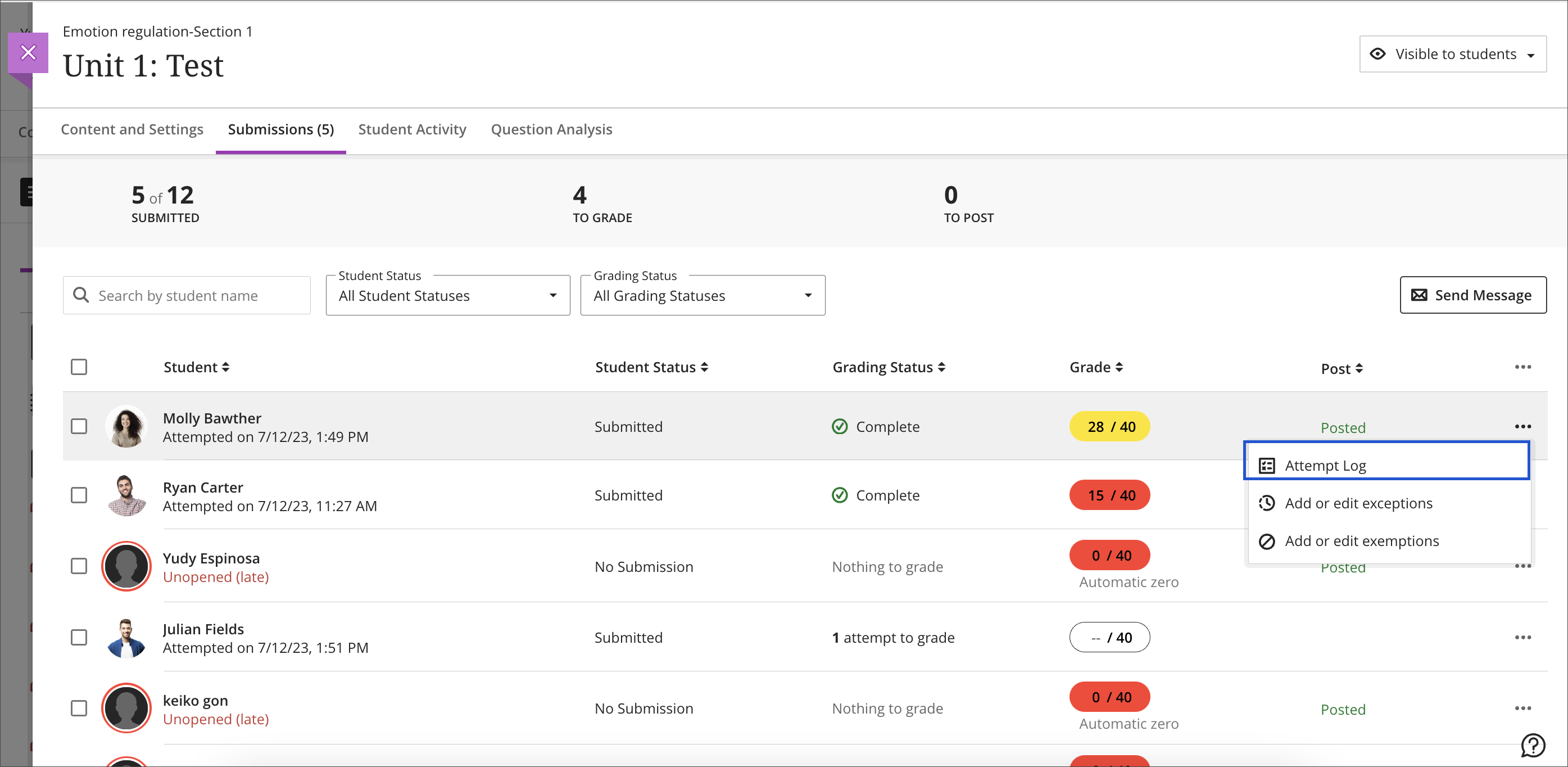
    <div class="html-content"><p>The May 2025 Ultra release delivers several meaningful updates that improve how faculty assess student work, support engagement, and manage course tools. From expanded rubric options to accessible grading workflows, these changes are designed to align with effective teaching practices and support a more inclusive, student-centered experience.</p><p><strong>Qualitative, No-Points Rubrics</strong></p><p>Instructors can now create and use no-points rubrics in Ultra, a powerful option for qualitative evaluation. These rubrics allow instructors to provide rich, criterion-based feedback without assigning numerical values -- perfect for assignments focused on reflection, creativity, process, or formative assessment. In addition, faculty can leverage the AI assistant to generate descriptive evaluation criteria for no-points rubrics.</p><p><img src="https://help.blackboard.com/sites/default/files/styles/rich_text_large/public/images/2025-04/ultra_instructor_nopointsrubric.png.webp?itok=qInIvXkm" alt="Image 1: Example of no-points rubric creation screen" style="max-width: 100%; height: auto;"></p><p><em>Image 1: Example of no-points rubric creation screen</em></p><p><strong>Text-Based Columns in the Gradebook</strong></p><p>A new Gradebook feature allows instructors to create text-based columns (up to 32 characters). These flexible columns are not restricted to text-only input and can include a description for context. Instructors can control student visibility, sort values in Grid view, and download the data. This update is especially useful for organizing students, tracking informal feedback, or adding flexibility to the Gradebook without tying everything to a numeric score.</p><p><img src="https://help.blackboard.com/sites/default/files/styles/rich_text_large/public/images/2025-04/ultra_instructor_gradebooktextcolumn.png.webp?itok=JBjQJ659" alt="Image 2: Inserting a text-based column in the gradable items tab" style="max-width: 100%; height: auto;"></p><p><em>Image 2: Inserting a text-based column in the gradable items tab</em></p><p><strong>Test Submission Review – View Once</strong></p><p>A new test setting, “View submission one time,” allows students to review their test responses and feedback just once after submission. Instructors must first enable the “Allow students to view their submission” setting, after which this option becomes available. This strikes a balance between transparency and academic integrity, offering students a chance to learn from their errors while reducing the risk of content sharing.</p><p><img src="https://help.blackboard.com/sites/default/files/styles/rich_text_large/public/images/2025-04/ultra_instructor_viewsubmissiononetime.png.webp?itok=4TViMnU-" width="400" alt="Image 3: Selecting the one-time view submission assessment setting" style="max-width: 100%; height: auto;"></p><p><em>Image 3: Selecting the one-time view submission assessment setting</em></p><p><strong>Enhanced AI Conversation Tool</strong></p><p>The AI Conversation tool has been upgraded to optionally generate three key elements: a conversation title, a persona, and a reflection question. Instructors can further refine the suggestions by adjusting complexity, providing additional context, or pulling from course materials. This makes it easier to create rich dialogue prompts that encourage critical thinking and metacognition.</p><p><strong>Gradebook Accessibility Enhancements</strong></p><p>The Gradable Items view in the Gradebook has been redesigned to improve accessibility and navigation for users relying on screen readers or keyboard-only navigation. The new table-based layout provides more intuitive movement across cells using arrow keys and includes proper header and row announcements. These enhancements help ensure all instructors and teaching assistants, regardless of ability, can manage course grading with greater ease.</p><p><strong>Discussion Board Improvements</strong></p><p>Several updates make Ultra Discussions more intuitive and user-friendly. Terminology has been streamlined, replacing “responses” with “posts” for clarity, and the input field now prompts users to “Post a response to the discussion.” Instructor posts are clearly labeled, reply boxes are directly below the topic for better flow, and unnecessary interface elements, such as avatars and large banners, have been removed or simplified. These changes reduce cognitive load, improve mobile usability, and create a smoother, more accessible discussion experience for both students and faculty.</p><p><strong>When you can expect the update</strong></p><p>Faculty should see the latest updates in their Ultra courses around May 1-2 2025. The next update to our Ultra test environment will take place on <span>May 6, 2025</span>; release notes are posted to the <a href="https://wiki.umbc.edu/x/LohnB" rel="nofollow external" class="bo">What's New in Ultra</a><span> that same week. Faculty who are interested in test driving new features before they are released to production should </span><a href="http://my.umbc.edu/go/request-help" rel="nofollow external" class="bo">open an RT ticket</a><span> to request early access. Please </span><a href="http://umbc.edu/go/ultra" rel="nofollow external" class="bo">watch the FAQs</a><span>, including </span><a href="https://wiki.umbc.edu/x/LohnB" rel="nofollow external" class="bo">the What's New with Ultra page</a><span>, and myUMBC for additional information about Ultra.</span></p><p><span>Curious about the all latest features in Ultra? Join our </span><a href="https://my3.my.umbc.edu/groups/instructional-technology/events/141687" rel="nofollow external" class="bo">What's New in Ultra Courses for Teaching &amp; Learning SU2025</a><span> webinar on May 12, 2025.</span></p><div><div><span><strong>Connect with Instructional Technology</strong></span></div><div><span>As always, if you have any questions about teaching, learning, and technology at UMBC, please consider the following options:</span></div><ul><li><a href="http://www.umbc.edu/faq" rel="nofollow external" class="bo">Check our extensive FAQ collection</a><span> </span></li><ul><li><span><a href="https://wiki.umbc.edu/x/LohnB" rel="nofollow external" class="bo"><span>What's new in Ultra?</span></a><span> </span><span>|</span><span> </span><a href="https://wiki.umbc.edu/x/bwrSAQ" rel="nofollow external" class="bo"><span>Known Issues</span></a><span> </span></span></li></ul><li><span><a href="http://my.umbc.edu/go/request-help" rel="nofollow external" class="bo">Open a ticket via RT</a></span></li><li><span>Follow the </span><a href="http://my.umbc.edu/groups/instructional-technology" rel="nofollow external" class="bo">Instructional Technology</a><span> &amp; </span><a href="http://my.umbc.edu/groups/doit" rel="nofollow external" class="bo">DoIT</a><span> myUMBC groups</span></li><li><a href="http://doit.umbc.edu/itnm/staff/" rel="nofollow external" class="bo">Request a consult</a><span> with <a href="http://doit.umbc.edu/itnm/staff" rel="nofollow external" class="bo">instructional technology staff</a></span></li></ul><div><em>Thumbnail-image: New to Ultra [decorative]</em></div><div><div></div></div></div></div>
]]>
</Body>
<Summary>The May 2025 Ultra release delivers several meaningful updates that improve how faculty assess student work, support engagement, and manage course tools. From expanded rubric options to accessible...</Summary>
<Website>https://my3.my.umbc.edu/groups/instructional-technology/posts/149574</Website>
<TrackingUrl>https://beta.my.umbc.edu/api/v0/pixel/news/149574/guest@my.umbc.edu/30f337fd201edf6ac6af17a5ecdb5df1/api/pixel</TrackingUrl>
<Tag>ai-conversations</Tag>
<Tag>blackboard</Tag>
<Tag>gradebook</Tag>
<Tag>grading</Tag>
<Tag>rubrics</Tag>
<Tag>ultra-experience</Tag>
<Tag>ultra-update</Tag>
<Group token="instructional-technology">Instructional Technology</Group>
<GroupUrl>https://beta.my.umbc.edu/groups/instructional-technology</GroupUrl>
<AvatarUrl>https://assets2-beta.my.umbc.edu/system/shared/avatars/groups/000/001/164/dec3b026b81ee6d890a8f82f75c94a2e/xsmall.png?1446126703</AvatarUrl>
<AvatarUrl size="original">https://assets1-beta.my.umbc.edu/system/shared/avatars/groups/000/001/164/dec3b026b81ee6d890a8f82f75c94a2e/original.png?1446126703</AvatarUrl>
<AvatarUrl size="xxlarge">https://assets2-beta.my.umbc.edu/system/shared/avatars/groups/000/001/164/dec3b026b81ee6d890a8f82f75c94a2e/xxlarge.png?1446126703</AvatarUrl>
<AvatarUrl size="xlarge">https://assets1-beta.my.umbc.edu/system/shared/avatars/groups/000/001/164/dec3b026b81ee6d890a8f82f75c94a2e/xlarge.png?1446126703</AvatarUrl>
<AvatarUrl size="large">https://assets1-beta.my.umbc.edu/system/shared/avatars/groups/000/001/164/dec3b026b81ee6d890a8f82f75c94a2e/large.png?1446126703</AvatarUrl>
<AvatarUrl size="medium">https://assets4-beta.my.umbc.edu/system/shared/avatars/groups/000/001/164/dec3b026b81ee6d890a8f82f75c94a2e/medium.png?1446126703</AvatarUrl>
<AvatarUrl size="small">https://assets3-beta.my.umbc.edu/system/shared/avatars/groups/000/001/164/dec3b026b81ee6d890a8f82f75c94a2e/small.png?1446126703</AvatarUrl>
<AvatarUrl size="xsmall">https://assets2-beta.my.umbc.edu/system/shared/avatars/groups/000/001/164/dec3b026b81ee6d890a8f82f75c94a2e/xsmall.png?1446126703</AvatarUrl>
<AvatarUrl size="xxsmall">https://assets3-beta.my.umbc.edu/system/shared/avatars/groups/000/001/164/dec3b026b81ee6d890a8f82f75c94a2e/xxsmall.png?1446126703</AvatarUrl>
<Sponsor>Instructional Technology</Sponsor>
<ThumbnailUrl size="xxlarge">https://assets3-beta.my.umbc.edu/system/shared/thumbnails/news/000/149/574/62a5ed14ccc0dc07a93d275cc71ae511/xxlarge.jpg?1745928158</ThumbnailUrl>
<ThumbnailUrl size="xlarge">https://assets3-beta.my.umbc.edu/system/shared/thumbnails/news/000/149/574/62a5ed14ccc0dc07a93d275cc71ae511/xlarge.jpg?1745928158</ThumbnailUrl>
<ThumbnailUrl size="large">https://assets2-beta.my.umbc.edu/system/shared/thumbnails/news/000/149/574/62a5ed14ccc0dc07a93d275cc71ae511/large.jpg?1745928158</ThumbnailUrl>
<ThumbnailUrl size="medium">https://assets2-beta.my.umbc.edu/system/shared/thumbnails/news/000/149/574/62a5ed14ccc0dc07a93d275cc71ae511/medium.jpg?1745928158</ThumbnailUrl>
<ThumbnailUrl size="small">https://assets3-beta.my.umbc.edu/system/shared/thumbnails/news/000/149/574/62a5ed14ccc0dc07a93d275cc71ae511/small.jpg?1745928158</ThumbnailUrl>
<ThumbnailUrl size="xsmall">https://assets1-beta.my.umbc.edu/system/shared/thumbnails/news/000/149/574/62a5ed14ccc0dc07a93d275cc71ae511/xsmall.jpg?1745928158</ThumbnailUrl>
<ThumbnailUrl size="xxsmall">https://assets3-beta.my.umbc.edu/system/shared/thumbnails/news/000/149/574/62a5ed14ccc0dc07a93d275cc71ae511/xxsmall.jpg?1745928158</ThumbnailUrl>
<ThumbnailAltText>Black and white robot dog running with the words "New to Ultra" written on  light turquoise background</ThumbnailAltText>
<PawCount>2</PawCount>
<CommentCount>0</CommentCount>
<CommentsAllowed>true</CommentsAllowed>
<PostedAt>Tue, 29 Apr 2025 08:44:48 -0400</PostedAt>
<EditAt>Fri, 23 May 2025 12:10:53 -0400</EditAt>
</NewsItem>

<NewsItem contentIssues="false" id="148527" important="false" status="posted" url="https://beta.my.umbc.edu/groups/instructional-technology/posts/148527">
<Title>April update to Ultra features flexible grading in groups, printing support for Ultra documents &amp; accessibility support for Office Math</Title>
<Tagline>New learning object repository designed for flexible content</Tagline>
<Body>
<![CDATA[
    <div class="html-content"><p>The April release introduce several new features aimed at improving content management, grading flexibility, and student feedback tracking. </p><p>Instructors and students can now <a href="https://help.blackboard.com/node/49881" rel="nofollow external" class="bo">print Ultra Documents</a> or save them as PDFs. This feature facilitates offline content review, sharing with peers, or creating physical copies. Note that if knowledge checks are included and already completed, they will display selected answers and instructor feedback when printed.</p><p><img src="https://help.blackboard.com/sites/default/files/styles/rich_text_large/public/images/2025-03/Documents_PrintStudent.png.webp?itok=TbW20Q9-" width="500" alt="Example of new print Ultra Document feature" style="max-width: 100%; height: auto;"></p><p><em>Image 1: Example of new print Ultra Document feature</em></p><p>A major addition this month is <a href="https://help.blackboard.com/node/49871" rel="nofollow external" class="bo">the Learning Object Repository (LOR)</a>, designed to centralize resources across courses and organizations. Instructors can copy objects from the LOR while maintaining control over settings such as availability. Updates made to objects in the LOR are automatically reflected across associated courses, making it easier to manage institutional content like policy documents.</p><p><strong>Content Creation &amp; Management</strong></p><ul><li>When performing a whole course copy, achievements are now automatically included, allowing instructors to maintain consistent recognition across course iterations. However, achievements are not included in granular content copies.</li><li>Instructors can now <a href="https://help.blackboard.com/node/49896" rel="nofollow external" class="bo">access Achievements through the Student Preview</a>.</li></ul><div><strong>Accessibility</strong></div><div><ul><li>Ally's document conversion process is upgraded to include <a href="https://help.blackboard.com/node/49976" rel="nofollow external" class="bo">the first version of support for Office Math</a> found in Microsoft Word documents. Students downloading the HTML and BeeLine Reader Alternative Formats will now see the math equations rendered as MathML via MathJax in their browser.</li></ul></div><div><strong>Communication &amp; Engagement</strong></div><div><ul><li>To improve communication within large courses, the Course Activity Report now <a href="https://help.blackboard.com/node/49901" rel="nofollow external" class="bo">includes clear labels when sending messages</a>: <span>All students, s</span><span>elected students, s</span><span>elected students with alerts, or s</span><span>elected students without alerts. </span><span>This improvement helps instructors better manage communication, especially when addressing students with specific needs.</span></li><li>The <a href="https://help.blackboard.com/node/49906" rel="nofollow external" class="bo">color of the activity indicator</a> for discussions, journals, and conversations is changed from blue to purple to better unify the color scheme in Ultra.</li></ul></div><p><strong>Assessments &amp; Grading</strong></p><ul><li>Flexible Grading is introduced for group assignments and tests. Though some features (like per-question feedback on group tests) are not yet available, this update is part of ongoing improvements to group grading.</li><li>A new feedback indicator on the student Overview page now shows <a href="https://help.blackboard.com/fi-fi/node/49911" rel="nofollow external" class="bo">whether students have reviewed their feedback</a>. The indicator updates from “Not reviewed” to “Reviewed” with a timestamp, giving instructors greater insight into student engagement with their feedback.</li><li>A <a href="https://help.blackboard.com/node/49916" rel="nofollow external" class="bo">new “Results” column</a> in the Gradebook replaces the “Feedback” column, making it more intuitive for students to view their grades and feedback.</li></ul><p>Faculty should see the latest updates in their Ultra courses around April 4-5 2025. The next update to our Ultra test environment will take place on <span>April 8, 2025</span>; release notes are posted to the <a href="https://wiki.umbc.edu/x/LohnB" rel="nofollow external" class="bo">What's New in Ultra</a><span> that same week. Faculty who are interested in test driving new features before they are released to production should </span><a href="http://my.umbc.edu/go/request-help" rel="nofollow external" class="bo">open an RT ticket</a><span> to request early access. Please </span><a href="http://umbc.edu/go/ultra" rel="nofollow external" class="bo">watch the FAQs</a><span>, including </span><a href="https://wiki.umbc.edu/x/LohnB" rel="nofollow external" class="bo">the What's New with Ultra page</a><span>, and myUMBC for additional information about Ultra.</span></p><p><span>Curious about the all latest features in Ultra? Join our </span><a href="https://my3.my.umbc.edu/groups/instructional-technology/events/141687" rel="nofollow external" class="bo">What's New in Ultra Courses for Teaching &amp; Learning SU2025</a><span> webinar on May 12, 2025.</span></p><div><div><span><strong>Connect with Instructional Technology</strong></span></div><div><span>As always, if you have any questions about teaching, learning, and technology at UMBC, please consider the following options:</span></div><ul><li><a href="http://www.umbc.edu/faq" rel="nofollow external" class="bo">Check our extensive FAQ collection</a><span> </span></li><ul><li><span><a href="https://wiki.umbc.edu/x/LohnB" rel="nofollow external" class="bo"><span>What's new in Ultra?</span></a><span> </span><span>|</span><span> </span><a href="https://wiki.umbc.edu/x/bwrSAQ" rel="nofollow external" class="bo"><span>Known Issues</span></a><span> </span></span></li></ul><li><span><a href="http://my.umbc.edu/go/request-help" rel="nofollow external" class="bo">Open a ticket via RT</a></span></li><li><span>Follow the </span><a href="http://my.umbc.edu/groups/instructional-technology" rel="nofollow external" class="bo">Instructional Technology</a><span> &amp; </span><a href="http://my.umbc.edu/groups/doit" rel="nofollow external" class="bo">DoIT</a><span> myUMBC groups</span></li><li><a href="http://doit.umbc.edu/itnm/staff/" rel="nofollow external" class="bo">Request a consult</a><span> with <a href="http://doit.umbc.edu/itnm/staff" rel="nofollow external" class="bo">instructional technology staff</a></span></li></ul><div><em>Thumbnail-image: New to Ultra [decorative]</em></div><div><div></div></div></div></div>
]]>
</Body>
<Summary>The April release introduce several new features aimed at improving content management, grading flexibility, and student feedback tracking.   Instructors and students can now print Ultra Documents...</Summary>
<Website>https://my3.my.umbc.edu/groups/instructional-technology/posts/148527</Website>
<TrackingUrl>https://beta.my.umbc.edu/api/v0/pixel/news/148527/guest@my.umbc.edu/98441a11c3906d0a32a59050674887a5/api/pixel</TrackingUrl>
<Tag>blackboard</Tag>
<Tag>gradebook</Tag>
<Tag>grading</Tag>
<Tag>groups</Tag>
<Tag>learning-object-repository</Tag>
<Tag>rubrics</Tag>
<Tag>ultra-experience</Tag>
<Tag>ultra-update</Tag>
<Group token="instructional-technology">Instructional Technology</Group>
<GroupUrl>https://beta.my.umbc.edu/groups/instructional-technology</GroupUrl>
<AvatarUrl>https://assets2-beta.my.umbc.edu/system/shared/avatars/groups/000/001/164/dec3b026b81ee6d890a8f82f75c94a2e/xsmall.png?1446126703</AvatarUrl>
<AvatarUrl size="original">https://assets1-beta.my.umbc.edu/system/shared/avatars/groups/000/001/164/dec3b026b81ee6d890a8f82f75c94a2e/original.png?1446126703</AvatarUrl>
<AvatarUrl size="xxlarge">https://assets2-beta.my.umbc.edu/system/shared/avatars/groups/000/001/164/dec3b026b81ee6d890a8f82f75c94a2e/xxlarge.png?1446126703</AvatarUrl>
<AvatarUrl size="xlarge">https://assets1-beta.my.umbc.edu/system/shared/avatars/groups/000/001/164/dec3b026b81ee6d890a8f82f75c94a2e/xlarge.png?1446126703</AvatarUrl>
<AvatarUrl size="large">https://assets1-beta.my.umbc.edu/system/shared/avatars/groups/000/001/164/dec3b026b81ee6d890a8f82f75c94a2e/large.png?1446126703</AvatarUrl>
<AvatarUrl size="medium">https://assets4-beta.my.umbc.edu/system/shared/avatars/groups/000/001/164/dec3b026b81ee6d890a8f82f75c94a2e/medium.png?1446126703</AvatarUrl>
<AvatarUrl size="small">https://assets3-beta.my.umbc.edu/system/shared/avatars/groups/000/001/164/dec3b026b81ee6d890a8f82f75c94a2e/small.png?1446126703</AvatarUrl>
<AvatarUrl size="xsmall">https://assets2-beta.my.umbc.edu/system/shared/avatars/groups/000/001/164/dec3b026b81ee6d890a8f82f75c94a2e/xsmall.png?1446126703</AvatarUrl>
<AvatarUrl size="xxsmall">https://assets3-beta.my.umbc.edu/system/shared/avatars/groups/000/001/164/dec3b026b81ee6d890a8f82f75c94a2e/xxsmall.png?1446126703</AvatarUrl>
<Sponsor>Instructional Technology</Sponsor>
<ThumbnailUrl size="xxlarge">https://assets4-beta.my.umbc.edu/system/shared/thumbnails/news/000/148/527/2bcf512b1e78e7541b0a4d36471ecf1b/xxlarge.jpg?1743523823</ThumbnailUrl>
<ThumbnailUrl size="xlarge">https://assets3-beta.my.umbc.edu/system/shared/thumbnails/news/000/148/527/2bcf512b1e78e7541b0a4d36471ecf1b/xlarge.jpg?1743523823</ThumbnailUrl>
<ThumbnailUrl size="large">https://assets4-beta.my.umbc.edu/system/shared/thumbnails/news/000/148/527/2bcf512b1e78e7541b0a4d36471ecf1b/large.jpg?1743523823</ThumbnailUrl>
<ThumbnailUrl size="medium">https://assets4-beta.my.umbc.edu/system/shared/thumbnails/news/000/148/527/2bcf512b1e78e7541b0a4d36471ecf1b/medium.jpg?1743523823</ThumbnailUrl>
<ThumbnailUrl size="small">https://assets1-beta.my.umbc.edu/system/shared/thumbnails/news/000/148/527/2bcf512b1e78e7541b0a4d36471ecf1b/small.jpg?1743523823</ThumbnailUrl>
<ThumbnailUrl size="xsmall">https://assets4-beta.my.umbc.edu/system/shared/thumbnails/news/000/148/527/2bcf512b1e78e7541b0a4d36471ecf1b/xsmall.jpg?1743523823</ThumbnailUrl>
<ThumbnailUrl size="xxsmall">https://assets2-beta.my.umbc.edu/system/shared/thumbnails/news/000/148/527/2bcf512b1e78e7541b0a4d36471ecf1b/xxsmall.jpg?1743523823</ThumbnailUrl>
<ThumbnailAltText>White and blue robot dog running against a light turquoise background with the "New to Ultra"</ThumbnailAltText>
<PawCount>2</PawCount>
<CommentCount>0</CommentCount>
<CommentsAllowed>true</CommentsAllowed>
<PostedAt>Tue, 01 Apr 2025 12:46:50 -0400</PostedAt>
<EditAt>Tue, 29 Apr 2025 08:02:34 -0400</EditAt>
</NewsItem>

<NewsItem contentIssues="false" id="147894" important="false" status="posted" url="https://beta.my.umbc.edu/groups/instructional-technology/posts/147894">
<Title>Printable, pop-out rubrics &amp; new course reports for goal tracking available in March's Ultra update</Title>
<Tagline>Improvements to discussion formatting &amp; AI image rendering</Tagline>
<Body>
<![CDATA[
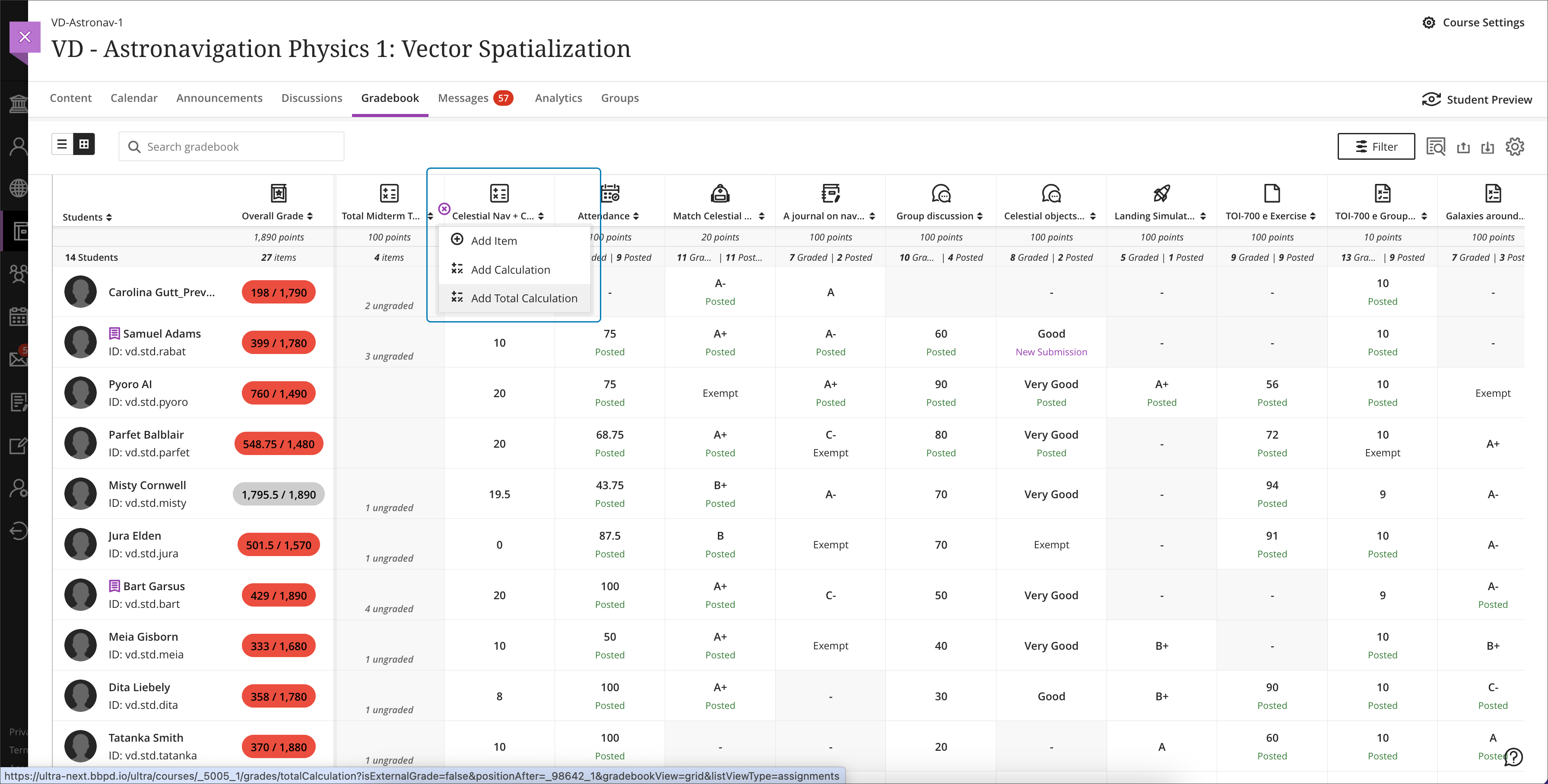
    <div class="html-content"><p>In March, Ultra's update includes two new course reports, an exciting rubric enhancement requested by faculty, and <span>improvements to the AI Course Design Assistant</span><span>.</span></p><p>Located on the Analytics page, the two new <a href="https://help.blackboard.com/Learn/Instructor/Ultra/Performance/Course_Reports" rel="nofollow external" class="bo">course reports</a> focus on goals. The Course Goal Coverage Report provides a comprehensive view of goal coverage in the course, including a detailed breakdown of course items aligned with goals. The Course Goal Performance Report evaluates how a course meets selected goals, including a detailed breakdown for individual students and goals. These reports do not include third-party tools and uses snapshot data that is up to 24 hours old.</p><p>Instructors will be able to <a href="https://help.blackboard.com/node/49666" rel="nofollow external" class="bo">pop out the grading rubric</a> into a separate window when grading an assignment. Formatted in a grid view, the pop-out rubric is a separate, movable window. Popping out a rubric allows an instructor to view a student's submission and the rubric side-by-side for a more efficient grading experience. However, the expand icon for popping out a rubric will only appear if the primary browser window is sufficiently large enough to display enough of the course page. Instructors will be able to print a blank or completed rubric using their browser's print function.</p><p><img src="https://help.blackboard.com/sites/default/files/styles/rich_text_large/public/images/2025-02/ultra_instructor_popoutgradingrubric.png.webp?itok=6RUWVy_e" width="500" alt="Image 1: Example of new pop-out rubric" style="max-width: 100%; height: auto;"></p><p><em>Image 1: Example of new pop-out rubric</em></p><p><strong>Content Creation &amp; Management</strong></p><ul><li><span>When setting or updating release conditions, due dates for content items are <a href="https://help.blackboard.com/node/49636" rel="nofollow external" class="bo">now included with the release condition settings</a>, reducing the need to navigate back to the item to check deadlines.</span></li><li>Instructors can now <a href="https://help.blackboard.com/node/49716" rel="nofollow external" class="bo">copy banners</a> between courses.</li></ul><p><strong>AI Course Design Assistant</strong></p><ul><li><span>When using the AI Course Design Assistant, if no image is generated, a <a href="https://help.blackboard.com/node/49626" rel="nofollow external" class="bo">placeholder will maintain a consistent layout</a>. A refresh button allows instructors to generate a new image easily.</span></li><li>The AI Course Design Assistant now <a href="https://help.blackboard.com/node/49621" rel="nofollow external" class="bo">generates one image at a time instead of four</a>, reducing energy and processing power. If an instructor regenerates an image, previous images are saved for comparison.</li></ul><div><strong>Communication &amp; Engagement</strong></div><div><ul><li><a href="https://help.blackboard.com/node/49661" rel="nofollow external" class="bo">Long discussion posts</a> are now fully visible without scrolling.</li><li><span>Posts have a gray background for better contrast.</span></li><li>The number of posts and replies now appears on the discussion home page, replacing the total response counter.</li><li>The Edit button is now directly accessible from each post.</li></ul></div><p><strong>Assessments &amp; Grading</strong></p><ul><li>If an instructor hides an assessment while students are actively taking it, those with the test open can continue without disruption.</li><li><span>Instructors can configure the visibility of calculated columns from Items Management, streamlining the gradebook view. (Note: The Overall Grade column remains visible at all times.)</span></li><li>The <a href="https://help.blackboard.com/node/49671" rel="nofollow external" class="bo">layout for the Test Submission Page</a> for students now mirrors the assignment submission page update from September 2024, ensuring feedback is clearly presented.</li></ul><p>Faculty should see the latest updates in their Ultra courses around March 6-7, 2025. The next update to our Ultra test environment will take place on <span>March 11, 2025</span>; release notes are posted to the <a href="https://wiki.umbc.edu/x/LohnB" rel="nofollow external" class="bo">What's New in Ultra</a><span> that same week. Faculty who are interested in test driving new features before they are released to production should </span><a href="http://my.umbc.edu/go/request-help" rel="nofollow external" class="bo">open an RT ticket</a><span> to request early access. Please </span><a href="http://umbc.edu/go/ultra" rel="nofollow external" class="bo">watch the FAQs</a><span>, including </span><a href="https://wiki.umbc.edu/x/LohnB" rel="nofollow external" class="bo">the What's New with Ultra page</a><span>, and myUMBC for additional information about Ultra.</span></p><div><div><span><strong>Connect with Instructional Technology</strong></span></div><div><span>As always, if you have any questions about teaching, learning, and technology at UMBC, please consider the following options:</span></div><ul><li><a href="http://www.umbc.edu/faq" rel="nofollow external" class="bo">Check our extensive FAQ collection</a><span> </span></li><ul><li><span><a href="https://wiki.umbc.edu/x/LohnB" rel="nofollow external" class="bo"><span>What's new in Ultra?</span></a><span> </span><span>|</span><span> </span><a href="https://wiki.umbc.edu/x/bwrSAQ" rel="nofollow external" class="bo"><span>Known Issues</span></a><span> </span></span></li></ul><li><span><a href="http://my.umbc.edu/go/request-help" rel="nofollow external" class="bo">Open a ticket via RT</a></span></li><li><span>Follow the </span><a href="http://my.umbc.edu/groups/instructional-technology" rel="nofollow external" class="bo">Instructional Technology</a><span> &amp; </span><a href="http://my.umbc.edu/groups/doit" rel="nofollow external" class="bo">DoIT</a><span> myUMBC groups</span></li><li><a href="http://doit.umbc.edu/itnm/staff/" rel="nofollow external" class="bo">Request a consult</a><span> with <a href="http://doit.umbc.edu/itnm/staff" rel="nofollow external" class="bo">instructional technology staff</a></span></li></ul><div><em>Thumbnail-image: New to Ultra [decorative]</em></div><div><div></div></div></div></div>
]]>
</Body>
<Summary>In March, Ultra's update includes two new course reports, an exciting rubric enhancement requested by faculty, and improvements to the AI Course Design Assistant.  Located on the Analytics page,...</Summary>
<Website>https://my3.my.umbc.edu/groups/instructional-technology/posts/147894</Website>
<TrackingUrl>https://beta.my.umbc.edu/api/v0/pixel/news/147894/guest@my.umbc.edu/e6e8edee0b3c9f78f532dec53a99b68c/api/pixel</TrackingUrl>
<Tag>ai-design-assistant</Tag>
<Tag>blackboard</Tag>
<Tag>discussions</Tag>
<Tag>goals-report</Tag>
<Tag>gradebook</Tag>
<Tag>grading</Tag>
<Tag>rubrics</Tag>
<Tag>ultra-experience</Tag>
<Tag>ultra-update</Tag>
<Group token="instructional-technology">Instructional Technology</Group>
<GroupUrl>https://beta.my.umbc.edu/groups/instructional-technology</GroupUrl>
<AvatarUrl>https://assets2-beta.my.umbc.edu/system/shared/avatars/groups/000/001/164/dec3b026b81ee6d890a8f82f75c94a2e/xsmall.png?1446126703</AvatarUrl>
<AvatarUrl size="original">https://assets1-beta.my.umbc.edu/system/shared/avatars/groups/000/001/164/dec3b026b81ee6d890a8f82f75c94a2e/original.png?1446126703</AvatarUrl>
<AvatarUrl size="xxlarge">https://assets2-beta.my.umbc.edu/system/shared/avatars/groups/000/001/164/dec3b026b81ee6d890a8f82f75c94a2e/xxlarge.png?1446126703</AvatarUrl>
<AvatarUrl size="xlarge">https://assets1-beta.my.umbc.edu/system/shared/avatars/groups/000/001/164/dec3b026b81ee6d890a8f82f75c94a2e/xlarge.png?1446126703</AvatarUrl>
<AvatarUrl size="large">https://assets1-beta.my.umbc.edu/system/shared/avatars/groups/000/001/164/dec3b026b81ee6d890a8f82f75c94a2e/large.png?1446126703</AvatarUrl>
<AvatarUrl size="medium">https://assets4-beta.my.umbc.edu/system/shared/avatars/groups/000/001/164/dec3b026b81ee6d890a8f82f75c94a2e/medium.png?1446126703</AvatarUrl>
<AvatarUrl size="small">https://assets3-beta.my.umbc.edu/system/shared/avatars/groups/000/001/164/dec3b026b81ee6d890a8f82f75c94a2e/small.png?1446126703</AvatarUrl>
<AvatarUrl size="xsmall">https://assets2-beta.my.umbc.edu/system/shared/avatars/groups/000/001/164/dec3b026b81ee6d890a8f82f75c94a2e/xsmall.png?1446126703</AvatarUrl>
<AvatarUrl size="xxsmall">https://assets3-beta.my.umbc.edu/system/shared/avatars/groups/000/001/164/dec3b026b81ee6d890a8f82f75c94a2e/xxsmall.png?1446126703</AvatarUrl>
<Sponsor>Instructional Technology</Sponsor>
<ThumbnailUrl size="xxlarge">https://assets4-beta.my.umbc.edu/system/shared/thumbnails/news/000/147/894/ec6e8c09f9cef4bb5fbd2ad4eca4e52b/xxlarge.jpg?1741273369</ThumbnailUrl>
<ThumbnailUrl size="xlarge">https://assets4-beta.my.umbc.edu/system/shared/thumbnails/news/000/147/894/ec6e8c09f9cef4bb5fbd2ad4eca4e52b/xlarge.jpg?1741273369</ThumbnailUrl>
<ThumbnailUrl size="large">https://assets4-beta.my.umbc.edu/system/shared/thumbnails/news/000/147/894/ec6e8c09f9cef4bb5fbd2ad4eca4e52b/large.jpg?1741273369</ThumbnailUrl>
<ThumbnailUrl size="medium">https://assets4-beta.my.umbc.edu/system/shared/thumbnails/news/000/147/894/ec6e8c09f9cef4bb5fbd2ad4eca4e52b/medium.jpg?1741273369</ThumbnailUrl>
<ThumbnailUrl size="small">https://assets4-beta.my.umbc.edu/system/shared/thumbnails/news/000/147/894/ec6e8c09f9cef4bb5fbd2ad4eca4e52b/small.jpg?1741273369</ThumbnailUrl>
<ThumbnailUrl size="xsmall">https://assets2-beta.my.umbc.edu/system/shared/thumbnails/news/000/147/894/ec6e8c09f9cef4bb5fbd2ad4eca4e52b/xsmall.jpg?1741273369</ThumbnailUrl>
<ThumbnailUrl size="xxsmall">https://assets4-beta.my.umbc.edu/system/shared/thumbnails/news/000/147/894/ec6e8c09f9cef4bb5fbd2ad4eca4e52b/xxsmall.jpg?1741273369</ThumbnailUrl>
<ThumbnailAltText>Black and white robot dog running with the words "New to Ultra" written on  light turquoise background</ThumbnailAltText>
<PawCount>1</PawCount>
<CommentCount>0</CommentCount>
<CommentsAllowed>true</CommentsAllowed>
<PostedAt>Thu, 06 Mar 2025 10:52:18 -0500</PostedAt>
<EditAt>Tue, 29 Apr 2025 11:50:17 -0400</EditAt>
</NewsItem>

<NewsItem contentIssues="false" id="147015" important="false" status="posted" url="https://beta.my.umbc.edu/groups/instructional-technology/posts/147015">
<Title>February's Ultra release enhances content creation, assessment management, and instructor grading</Title>
<Tagline>Updates for AI Tools, file rendering, assessment security</Tagline>
<Body>
<![CDATA[
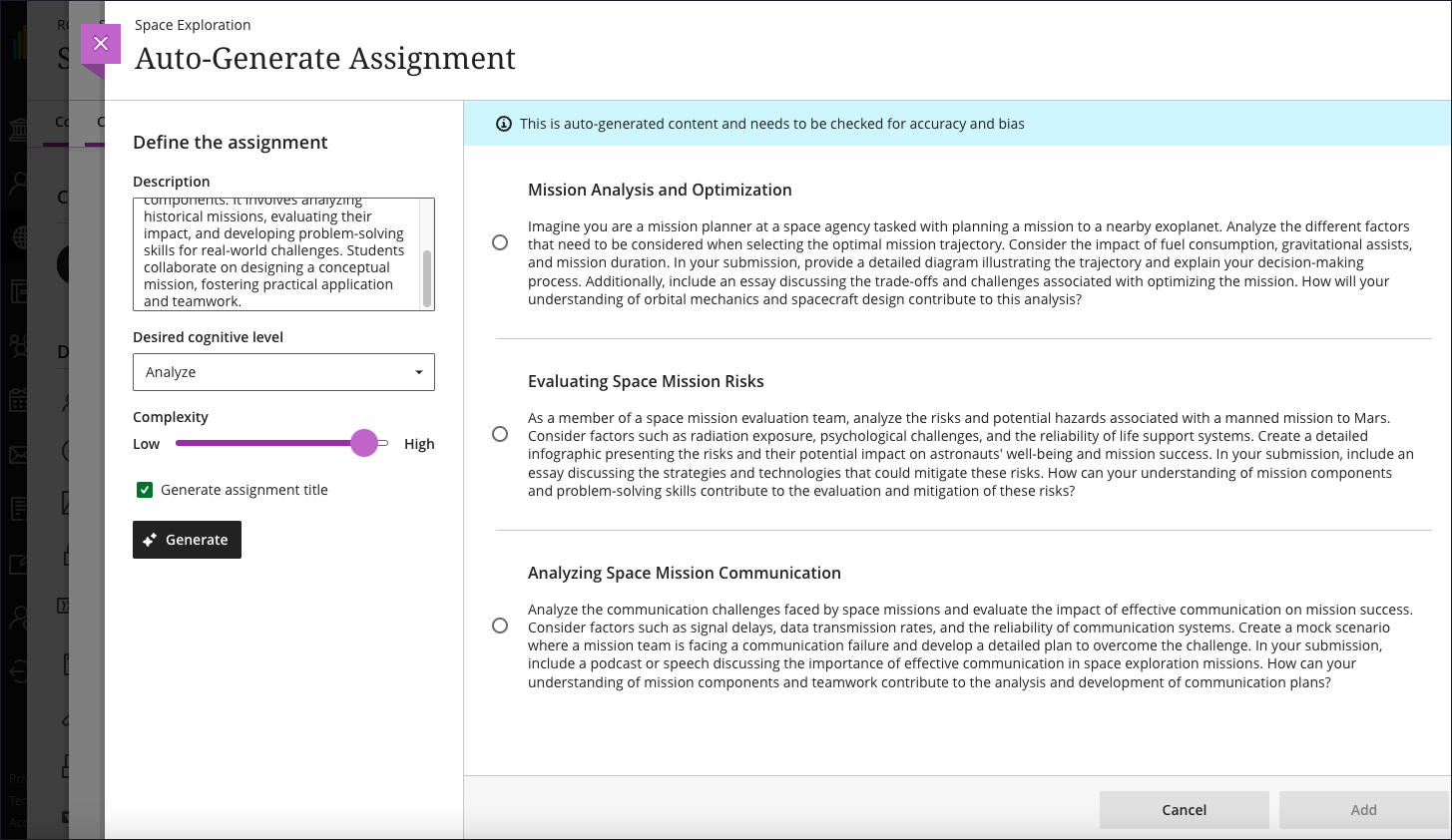
    <div class="html-content"><p>The February update for Ultra features enhancements to support content creation, improved file rendering, assessment security, and grading workflows. Additionally, updates to the AI Course Design Assistant provides increases flexibility for test question and learning module generation. Let's explore this month's update!</p><p><strong>Content Creation &amp; Management</strong></p><ul><li><span>With a simple click, instructors can now change a top level folder to a learning module, and quickly enjoy all the benefits of <a href="https://help.blackboard.com/Learn/Instructor/Ultra/Course_Content/Create_Content/Create_Containers_for_Content/Create_Learning_Modules#ultra_modules" rel="nofollow external" class="bo">using learning modules</a>. This includes thumbnail images, navigation, sequencing, and progress bars -- a very popular feature reported by UMBC students!</span></li><li>Instructors can use the new image block <a href="https://help.blackboard.com/Learn/Instructor/Ultra/Course_Content/Create_Content/Create_Course_Materials/Create_Content_Items_or_Documents" rel="nofollow external" class="bo">in Ultra Documents</a> to upload their own images, use the AI Design Assistant to generate images, or select images from Unsplash.</li><li><span>Files uploaded by instructors to Blackboard now retain their original formatting and characteristics wherever instructors can upload files. </span>Student files will also display with the exact same formatting as when they were submitted. </li></ul><p><img src="https://help.blackboard.com/sites/default/files/styles/rich_text_large/public/images/2025-01/ultra_Containers_foldertolearningmodule.png.webp" alt="Example of the new option to change a folder to a learning module in the dropdown menu." width="500" style="max-width: 100%; height: auto;"></p><p><em>Image 1: Example of the new option to change a folder to a learning module in the dropdown menu.</em></p><p><strong>AI Course Design Assistant</strong></p><ul><li>Instructors can now set the number of questions <a href="https://help.blackboard.com/Learn/Instructor/Ultra/Course_Content/Create_Content/AI_Design_Assistant#testquestion" rel="nofollow external" class="bo">generated for tests and question banks</a> to a maximum of 20, which reduces the chance that similar questions will be generated. </li><li>Instructors can exclude descriptions <a href="https://help.blackboard.com/Learn/Instructor/Ultra/Course_Content/Create_Content/AI_Design_Assistant#coursestructure" rel="nofollow external" class="bo">from learning modules</a> when generating these elements.</li></ul><div><strong>Communication &amp; Engagement</strong></div><div><ul><li>Groups can only be <a href="https://help.blackboard.com/Learn/Instructor/Ultra/Interact/Course_Groups/Create_Groups" rel="nofollow external" class="bo">created at the Groups tab</a> -- however, groups can still be assigned to activities and assessments once created.</li><li>Instructors will also receive warnings if groups are empty to help make informed decisions and avoid disruptions in group management. </li></ul></div><p><strong>Reporting</strong></p><ul><li>IP addresses are now in <a href="https://help.blackboard.com/Learn/Instructor/Ultra/Performance/Student_Activity_Log" rel="nofollow external" class="bo">the student activity log</a> for assessment submissions and drafts.</li></ul><p><img src="https://help.blackboard.com/sites/default/files/styles/rich_text_large/public/images/2025-01/ultra_instructor_ActivityLog_IPAddressRN.png.webp" alt="Image 2: Example of the new IP address column that’s included in the student activity log." width="500" style="max-width: 100%; height: auto;"></p><p><em>Image 2: Example of the new IP address column that’s included in the student activity log.</em></p><p><strong>Assessments</strong></p><ul><li>Assignments will be converted <a href="https://help.blackboard.com/Learn/Instructor/Ultra/Assignments/Create_and_Edit_Assignments#NewAssignmentPage" rel="nofollow external" class="bo">to the new interface</a>, which was launched in August 2024. An assignment is an assessment without individual questions (e.g., multiple choice, essay, etc.). Tests will NOT be converted.</li><li><span>The Tests Settings panel was updated to remove assignment specific options (e.g., collect submissions offline, peer review, grading rubric). </span></li><li>Instructors must add at least one question to a test to make it visible to students or to add release conditions.</li><li>When an instructor or exam proctor enters <a href="https://help.blackboard.com/Learn/Instructor/Ultra/Tests_Pools_Surveys/Test_and_Survey_Options#AccessCodes" rel="nofollow external" class="bo">an access code for an assessment</a> on a student's computer, the code is masked (*******) to ensure enhanced security. </li><li><span>Students can now be confident that their files are successfully attached, received, and stored for assessments. They will be notified immediately if there are any issues with their file submissions including timed assessments.</span></li></ul><p><strong>Grading &amp; the Gradebook</strong></p><ul><li><span>The Grading interface is updated to provide more space to instructors.</span></li><li>Instructors can enter discussion and journal grades directly in the Grid view or Grades &amp; Participation page with improved accuracy and consistency.</li><li>Grades and feedback for assignments, journals, and discussions are mapped to the corresponding attempt or submission whenever possible.</li><li>Instructors can choose to exclude attempts that they do not intend to grade. Excluded attempts are removed from the Needs Grading workflow and any gradebook calculations.</li></ul><p><img src="https://help.blackboard.com/sites/default/files/styles/rich_text_large/public/images/2025-01/ultra_instructor_gradinginterfaceAFTER_0.png.webp" alt="Image 3: Example of the newly designed grading interface" width="500" style="max-width: 100%; height: auto;"></p><p><em>Image 3: Example of the newly designed grading interface</em></p><p>Faculty should see the latest updates in their Ultra courses around February 6-7, 2025. The next update to our Ultra test environment will take place on <span>February 11, 2025</span>; release notes are posted to the <a href="https://wiki.umbc.edu/x/LohnB" rel="nofollow external" class="bo">What's New in Ultra</a><span> that same week. Faculty who are interested in test driving new features before they are released to production should </span><a href="http://my.umbc.edu/go/request-help" rel="nofollow external" class="bo">open an RT ticket</a><span> to request early access. Please </span><a href="http://umbc.edu/go/ultra" rel="nofollow external" class="bo">watch the FAQs</a><span>, including </span><a href="https://wiki.umbc.edu/x/LohnB" rel="nofollow external" class="bo">the What's New with Ultra page</a><span>, and myUMBC for additional information about Ultra.</span></p><div><div><span><strong>Connect with Instructional Technology</strong></span></div><div><span>As always, if you have any questions about teaching, learning, and technology at UMBC, please consider the following options:</span></div><ul><li><a href="http://www.umbc.edu/faq" rel="nofollow external" class="bo">Check our extensive FAQ collection</a><span> </span></li><ul><li><span><a href="https://wiki.umbc.edu/x/LohnB" rel="nofollow external" class="bo"><span>What's new in Ultra?</span></a><span> </span><span>|</span><span> </span><a href="https://wiki.umbc.edu/x/bwrSAQ" rel="nofollow external" class="bo"><span>Known Issues</span></a><span> </span></span></li></ul><li><span><a href="http://my.umbc.edu/go/request-help" rel="nofollow external" class="bo">Open a ticket via RT</a></span></li><li><span>Follow the </span><a href="http://my.umbc.edu/groups/instructional-technology" rel="nofollow external" class="bo">Instructional Technology</a><span> &amp; </span><a href="http://my.umbc.edu/groups/doit" rel="nofollow external" class="bo">DoIT</a><span> myUMBC groups</span></li><li><a href="http://doit.umbc.edu/itnm/staff/" rel="nofollow external" class="bo">Request a consult</a><span> with <a href="http://doit.umbc.edu/itnm/staff" rel="nofollow external" class="bo">instructional technology staff</a></span></li><li><span><a href="http://pivot.umbc.edu" rel="nofollow external" class="bo">PIVOT</a> | <a href="https://doit.umbc.edu/itnm/academic-continuity/" rel="nofollow external" class="bo">Academic Continuity</a></span><span> </span><span>|</span><span> </span><span><a href="https://fdc.umbc.edu/teaching/keep-on-teaching/" rel="nofollow external" class="bo">Keep On Teaching</a></span><span> </span><span>|</span><span> </span><span><a href="https://doit.umbc.edu/students" rel="nofollow external" class="bo">Student Technology Resources</a></span></li></ul><div><em>Thumbnail-image: New to Ultra [decorative]</em></div><div><div></div></div></div></div>
]]>
</Body>
<Summary>The February update for Ultra features enhancements to support content creation, improved file rendering, assessment security, and grading workflows. Additionally, updates to the AI Course Design...</Summary>
<Website>https://my3.my.umbc.edu/groups/instructional-technology/posts/147015</Website>
<TrackingUrl>https://beta.my.umbc.edu/api/v0/pixel/news/147015/guest@my.umbc.edu/779e1153654283834c9e55a2f6959c3a/api/pixel</TrackingUrl>
<Tag>ai-design-assistant</Tag>
<Tag>blackboard</Tag>
<Tag>content-management</Tag>
<Tag>course-management</Tag>
<Tag>gradebook</Tag>
<Tag>grading</Tag>
<Tag>ultra-experience</Tag>
<Tag>ultra-update</Tag>
<Group token="instructional-technology">Instructional Technology</Group>
<GroupUrl>https://beta.my.umbc.edu/groups/instructional-technology</GroupUrl>
<AvatarUrl>https://assets2-beta.my.umbc.edu/system/shared/avatars/groups/000/001/164/dec3b026b81ee6d890a8f82f75c94a2e/xsmall.png?1446126703</AvatarUrl>
<AvatarUrl size="original">https://assets1-beta.my.umbc.edu/system/shared/avatars/groups/000/001/164/dec3b026b81ee6d890a8f82f75c94a2e/original.png?1446126703</AvatarUrl>
<AvatarUrl size="xxlarge">https://assets2-beta.my.umbc.edu/system/shared/avatars/groups/000/001/164/dec3b026b81ee6d890a8f82f75c94a2e/xxlarge.png?1446126703</AvatarUrl>
<AvatarUrl size="xlarge">https://assets1-beta.my.umbc.edu/system/shared/avatars/groups/000/001/164/dec3b026b81ee6d890a8f82f75c94a2e/xlarge.png?1446126703</AvatarUrl>
<AvatarUrl size="large">https://assets1-beta.my.umbc.edu/system/shared/avatars/groups/000/001/164/dec3b026b81ee6d890a8f82f75c94a2e/large.png?1446126703</AvatarUrl>
<AvatarUrl size="medium">https://assets4-beta.my.umbc.edu/system/shared/avatars/groups/000/001/164/dec3b026b81ee6d890a8f82f75c94a2e/medium.png?1446126703</AvatarUrl>
<AvatarUrl size="small">https://assets3-beta.my.umbc.edu/system/shared/avatars/groups/000/001/164/dec3b026b81ee6d890a8f82f75c94a2e/small.png?1446126703</AvatarUrl>
<AvatarUrl size="xsmall">https://assets2-beta.my.umbc.edu/system/shared/avatars/groups/000/001/164/dec3b026b81ee6d890a8f82f75c94a2e/xsmall.png?1446126703</AvatarUrl>
<AvatarUrl size="xxsmall">https://assets3-beta.my.umbc.edu/system/shared/avatars/groups/000/001/164/dec3b026b81ee6d890a8f82f75c94a2e/xxsmall.png?1446126703</AvatarUrl>
<Sponsor>Instructional Technology</Sponsor>
<ThumbnailUrl size="xxlarge">https://assets2-beta.my.umbc.edu/system/shared/thumbnails/news/000/147/015/4d74ce3b53234369b21c1d9addca073c/xxlarge.jpg?1738678850</ThumbnailUrl>
<ThumbnailUrl size="xlarge">https://assets2-beta.my.umbc.edu/system/shared/thumbnails/news/000/147/015/4d74ce3b53234369b21c1d9addca073c/xlarge.jpg?1738678850</ThumbnailUrl>
<ThumbnailUrl size="large">https://assets3-beta.my.umbc.edu/system/shared/thumbnails/news/000/147/015/4d74ce3b53234369b21c1d9addca073c/large.jpg?1738678850</ThumbnailUrl>
<ThumbnailUrl size="medium">https://assets2-beta.my.umbc.edu/system/shared/thumbnails/news/000/147/015/4d74ce3b53234369b21c1d9addca073c/medium.jpg?1738678850</ThumbnailUrl>
<ThumbnailUrl size="small">https://assets2-beta.my.umbc.edu/system/shared/thumbnails/news/000/147/015/4d74ce3b53234369b21c1d9addca073c/small.jpg?1738678850</ThumbnailUrl>
<ThumbnailUrl size="xsmall">https://assets3-beta.my.umbc.edu/system/shared/thumbnails/news/000/147/015/4d74ce3b53234369b21c1d9addca073c/xsmall.jpg?1738678850</ThumbnailUrl>
<ThumbnailUrl size="xxsmall">https://assets1-beta.my.umbc.edu/system/shared/thumbnails/news/000/147/015/4d74ce3b53234369b21c1d9addca073c/xxsmall.jpg?1738678850</ThumbnailUrl>
<ThumbnailAltText>Black and white robot dog running with the words "New to Ultra" written on  light turquoise background</ThumbnailAltText>
<PawCount>1</PawCount>
<CommentCount>0</CommentCount>
<CommentsAllowed>true</CommentsAllowed>
<PostedAt>Thu, 06 Feb 2025 10:11:18 -0500</PostedAt>
<EditAt>Tue, 29 Apr 2025 11:50:08 -0400</EditAt>
</NewsItem>

<NewsItem contentIssues="false" id="146450" important="false" status="posted" url="https://beta.my.umbc.edu/groups/instructional-technology/posts/146450">
<Title>Ultra releases content based on new submission attempt, improves gradebook data entry, and updates course availability settings in January</Title>
<Tagline>Improvements to AI, access to Mastery Gradebook available</Tagline>
<Body>
<![CDATA[
    <div class="html-content"><p>In early January, the Ultra updates features improvements to course settings, content management, grading, and the AI Course Design Assistant, providing increased flexibility for faculty in managing their courses.</p><p>Course availability moves away from the Details and Actions side menu <a href="https://help.blackboard.com/node/49376" rel="nofollow external" class="bo">to the Course Settings</a>, in the top right corner. Available course statuses include </p><ul><li><span><strong>Open</strong>: Content is available to students.</span></li><li><span><strong>Closed</strong>: Content is not available. Students can see the course listed, but they cannot access it. (previously called Private)</span></li><li><span><strong>Complete</strong>: Read-only content. No changes can be made by students OR instructors. Use with caution.</span></li></ul><p>At the top of a course, there is now an indicator that displays whether a course is Open, Closed, or Complete. Instructors can access Course Settings from the Courses page. </p><p><img src="https://help.blackboard.com/sites/default/files/styles/rich_text_large/public/images/2024-12/learn_instructor_course-access-indicator.png.webp?itok=DTSZfy0-" alt="Example of course availability indicator at the top right of an Ultra course" style="max-width: 100%; height: auto;"></p><p><em>Image 1: Example of course availability indicator at the top right of an Ultra course.</em></p><p>Learning pathways are structured, personalized sequences of activities or content that guide students through a course based on their progress, performance, or choices. For example, an instructor might release resources only after a student completes specific assignments, or offer different content tracks based on quiz results to address varying levels of mastery. Ultra can now <a href="https://help.blackboard.com/node/49346" rel="nofollow external" class="bo">support releasing content based on submission attempt</a> in addition to date/time, grade, and user/group membership.</p><p><img src="https://help.blackboard.com/sites/default/files/styles/rich_text_large/public/images/2024-12/ultra_instructor_ReleaseConditions_AttemptSubmitted_0.png.webp?itok=HhMaOmuS" alt="The new Attempt submitted option is in the dropdown menu for a gradable item in the Release condition panel" style="max-width: 100%; height: auto;"></p><p><em>Image 2: The new Attempt submitted option is in the dropdown menu for a gradable item in the Release condition panel.</em></p><div><p>Three updates to the Ultra gradebook enhance instructor efficiency when entering and managing grades.</p></div><ul><li><strong>Direct Grade Entry</strong><span>: When grades are <a href="https://help.blackboard.com/node/49371" rel="nofollow external" class="bo">entered directly</a> from the Grid view or Submissions page, Ultra will no longer display "Needs Grading" to instructors when grades were already completed.</span></li><li><strong>Show/Hide Gradebook Columns</strong><span>: Instructors now have the ability to show or hide columns in the gradebook. While hidden columns offer a more organized workspace, these do not apply to the student view since that visibility is controlled by the assessment settings.</span></li><li><strong>Automatic Zero Defaults</strong><span>: The default setting for automatic zeros is now set to off, giving instructors the flexibility to decide whether or not to enable this feature based on their grading policies. (This applies to newly created courses in the system after Jan 10.)</span></li></ul><p>Additional improvements in January include:</p><ul><li>The AI Course Design Assistant will work faster and generate more complex outputs for assignments, discussions, test questions, learning modules, and AI Conversation avatars.</li><li><span>Instructors can <a href="https://help.blackboard.com/node/49326" rel="nofollow external" class="bo">generate more realistic images</a> faster with the AI Course Design Assistant and the resulting image files require less storage space.</span> </li><li>The output languages available for AI workflows now include Greek, Catalan, Croatian, Irish, and Slovenian. For a list of all languages available for AI outputs, refer to <a href="https://help.blackboard.com/Learn/Instructor/Ultra/Course_Content/Create_Content/AI_Design_Assistant#languages" rel="nofollow external" class="bo">AI Design Assistant for Instructors</a>. </li><li>The Achievements tab is now hidden from students until the instructor creates and posts Achievements for students to earn. </li><li>With the new Mastery Gradebook, instructors can align goals to assessments and view how learners are performing in the course. Moreover, they can also control whether they want students to see their own performance.</li></ul><p>Faculty should see the latest updates in their Ultra courses around January 9-10, 2025. The next update to our Ultra test environment will take place on January 14, 2025; release notes are posted to the <a href="https://wiki.umbc.edu/x/LohnB" rel="nofollow external" class="bo">What's New in Ultra</a><span> that same week. Faculty who are interested in test driving new features before they are released to production should </span><a href="http://my.umbc.edu/go/request-help" rel="nofollow external" class="bo">open an RT ticket</a><span> to request early access. Please </span><a href="http://umbc.edu/go/ultra" rel="nofollow external" class="bo">watch the FAQs</a><span>, including </span><a href="https://wiki.umbc.edu/x/LohnB" rel="nofollow external" class="bo">the What's New with Ultra page</a><span>, and myUMBC for additional information about Ultra.</span></p><p><span>Curious about the all latest features in Ultra? Join our </span><a href="https://my3.my.umbc.edu/groups/instructional-technology/events/135772" rel="nofollow external" class="bo">What's New in Ultra Courses for Teaching &amp; Learning SP2025</a> webinar on January 17, 2025.</p><div><div><span><strong>Connect with Instructional Technology</strong></span></div><div><span>As always, if you have any questions about teaching, learning, and technology at UMBC, please consider the following options:</span></div><ul><li><a href="http://www.umbc.edu/faq" rel="nofollow external" class="bo">Check our extensive FAQ collection</a><span> </span></li><ul><li><span><a href="https://wiki.umbc.edu/x/LohnB" rel="nofollow external" class="bo"><span>What's new in Ultra?</span></a><span> </span><span>|</span><span> </span><a href="https://wiki.umbc.edu/x/bwrSAQ" rel="nofollow external" class="bo"><span>Known Issues</span></a><span> </span></span></li></ul><li><span><a href="http://my.umbc.edu/go/request-help" rel="nofollow external" class="bo">Open a ticket via RT</a></span></li><li><span>Follow the </span><a href="http://my.umbc.edu/groups/instructional-technology" rel="nofollow external" class="bo">Instructional Technology</a><span> &amp; </span><a href="http://my.umbc.edu/groups/doit" rel="nofollow external" class="bo">DoIT</a><span> myUMBC groups</span></li><li><a href="http://doit.umbc.edu/itnm/staff/" rel="nofollow external" class="bo">Request a consult</a><span> with <a href="http://doit.umbc.edu/itnm/staff" rel="nofollow external" class="bo">instructional technology staff</a></span></li><li><span><a href="http://pivot.umbc.edu" rel="nofollow external" class="bo">PIVOT</a> | <a href="https://doit.umbc.edu/itnm/academic-continuity/" rel="nofollow external" class="bo">Academic Continuity</a></span><span> </span><span>|</span><span> </span><span><a href="https://fdc.umbc.edu/teaching/keep-on-teaching/" rel="nofollow external" class="bo">Keep On Teaching</a></span><span> </span><span>|</span><span> </span><span><a href="https://doit.umbc.edu/students" rel="nofollow external" class="bo">Student Technology Resources</a></span></li></ul><div><em>Thumbnail-image: New to Ultra [decorative]</em></div><div><div></div></div></div></div>
]]>
</Body>
<Summary>In early January, the Ultra updates features improvements to course settings, content management, grading, and the AI Course Design Assistant, providing increased flexibility for faculty in...</Summary>
<Website>https://my3.my.umbc.edu/groups/instructional-technology/posts/146450</Website>
<TrackingUrl>https://beta.my.umbc.edu/api/v0/pixel/news/146450/guest@my.umbc.edu/d5af1db9efb50dde1cdcfa86441cdc75/api/pixel</TrackingUrl>
<Tag>ai-design-assistant</Tag>
<Tag>blackboard</Tag>
<Tag>content-management</Tag>
<Tag>course-management</Tag>
<Tag>gradebook</Tag>
<Tag>grading</Tag>
<Tag>learning-pathways</Tag>
<Tag>ultra-experience</Tag>
<Tag>ultra-update</Tag>
<Group token="instructional-technology">Instructional Technology</Group>
<GroupUrl>https://beta.my.umbc.edu/groups/instructional-technology</GroupUrl>
<AvatarUrl>https://assets2-beta.my.umbc.edu/system/shared/avatars/groups/000/001/164/dec3b026b81ee6d890a8f82f75c94a2e/xsmall.png?1446126703</AvatarUrl>
<AvatarUrl size="original">https://assets1-beta.my.umbc.edu/system/shared/avatars/groups/000/001/164/dec3b026b81ee6d890a8f82f75c94a2e/original.png?1446126703</AvatarUrl>
<AvatarUrl size="xxlarge">https://assets2-beta.my.umbc.edu/system/shared/avatars/groups/000/001/164/dec3b026b81ee6d890a8f82f75c94a2e/xxlarge.png?1446126703</AvatarUrl>
<AvatarUrl size="xlarge">https://assets1-beta.my.umbc.edu/system/shared/avatars/groups/000/001/164/dec3b026b81ee6d890a8f82f75c94a2e/xlarge.png?1446126703</AvatarUrl>
<AvatarUrl size="large">https://assets1-beta.my.umbc.edu/system/shared/avatars/groups/000/001/164/dec3b026b81ee6d890a8f82f75c94a2e/large.png?1446126703</AvatarUrl>
<AvatarUrl size="medium">https://assets4-beta.my.umbc.edu/system/shared/avatars/groups/000/001/164/dec3b026b81ee6d890a8f82f75c94a2e/medium.png?1446126703</AvatarUrl>
<AvatarUrl size="small">https://assets3-beta.my.umbc.edu/system/shared/avatars/groups/000/001/164/dec3b026b81ee6d890a8f82f75c94a2e/small.png?1446126703</AvatarUrl>
<AvatarUrl size="xsmall">https://assets2-beta.my.umbc.edu/system/shared/avatars/groups/000/001/164/dec3b026b81ee6d890a8f82f75c94a2e/xsmall.png?1446126703</AvatarUrl>
<AvatarUrl size="xxsmall">https://assets3-beta.my.umbc.edu/system/shared/avatars/groups/000/001/164/dec3b026b81ee6d890a8f82f75c94a2e/xxsmall.png?1446126703</AvatarUrl>
<Sponsor>Instructional Technology</Sponsor>
<ThumbnailUrl size="xxlarge">https://assets3-beta.my.umbc.edu/system/shared/thumbnails/news/000/146/450/0d7dc1e945de6eefd270f4f9834c83f1/xxlarge.jpg?1736181263</ThumbnailUrl>
<ThumbnailUrl size="xlarge">https://assets3-beta.my.umbc.edu/system/shared/thumbnails/news/000/146/450/0d7dc1e945de6eefd270f4f9834c83f1/xlarge.jpg?1736181263</ThumbnailUrl>
<ThumbnailUrl size="large">https://assets3-beta.my.umbc.edu/system/shared/thumbnails/news/000/146/450/0d7dc1e945de6eefd270f4f9834c83f1/large.jpg?1736181263</ThumbnailUrl>
<ThumbnailUrl size="medium">https://assets1-beta.my.umbc.edu/system/shared/thumbnails/news/000/146/450/0d7dc1e945de6eefd270f4f9834c83f1/medium.jpg?1736181263</ThumbnailUrl>
<ThumbnailUrl size="small">https://assets2-beta.my.umbc.edu/system/shared/thumbnails/news/000/146/450/0d7dc1e945de6eefd270f4f9834c83f1/small.jpg?1736181263</ThumbnailUrl>
<ThumbnailUrl size="xsmall">https://assets1-beta.my.umbc.edu/system/shared/thumbnails/news/000/146/450/0d7dc1e945de6eefd270f4f9834c83f1/xsmall.jpg?1736181263</ThumbnailUrl>
<ThumbnailUrl size="xxsmall">https://assets4-beta.my.umbc.edu/system/shared/thumbnails/news/000/146/450/0d7dc1e945de6eefd270f4f9834c83f1/xxsmall.jpg?1736181263</ThumbnailUrl>
<ThumbnailAltText>Black and white robot dog running with the words "New to Ultra" written on  light turquoise background</ThumbnailAltText>
<PawCount>1</PawCount>
<CommentCount>0</CommentCount>
<CommentsAllowed>true</CommentsAllowed>
<PostedAt>Mon, 06 Jan 2025 13:12:48 -0500</PostedAt>
<EditAt>Tue, 29 Apr 2025 11:49:47 -0400</EditAt>
</NewsItem>

<NewsItem contentIssues="false" id="145992" important="false" status="posted" url="https://beta.my.umbc.edu/groups/instructional-technology/posts/145992">
<Title>December's Ultra update brings overall enhancements to core functionality</Title>
<Tagline>New indicators for discussions, grading, reports</Tagline>
<Body>
<![CDATA[
    <div class="html-content"><p>This month's update to Ultra provides new and updates indicators for core functionality in Ultra courses including discussions, grading, and reports. </p><p>Two improvements to Ultra focus on the AI Course Design Assistant and the Blackboard mobile app:</p><ul><li><span>The AI Course Design Assistant is optimized for complex rubric outputs. Instructors can expect better rubrics, even for complicated assessments. The AI Course Design Assistant should also work faster.</span></li><li><span>UMBC can define the maximum length of time a user can access the Blackboard mobile app before they are required to login again, which will be about 2 weeks if the session hasn't expired.<span> This should address a student concern that the mobile app was frequently logging students out.</span></span></li></ul><p>Additional improvements in December include:</p><ul><li><span>A "new" indicator will display next to discussion posts and replies that a user has not accessed yet, making it easier to find.</span></li><li><span>Late submissions will have a "late" indicator within the Flexible Grading interface.</span></li><li>Instructors will see "Override" for discussion grades that meet this criteria with a new Undo Override workflow.</li><li><span>Instructors can go directly to an attempt log for any test or assignment from the activity log for any student in an Ultra course.</span></li><li><span>Blackboard improved performance so saving groups is now 80%-90% quicker.</span></li><li><span>For easier navigation, students can now select arrows to the left and right of LTI or SCORM items to move through learning modules. </span></li></ul><p>Faculty should see the latest updates in their Ultra courses around December 5-6, 2024. The next update to our Ultra test environment will take place on December 10, 2024; release notes are posted to the <a href="https://wiki.umbc.edu/x/LohnB" rel="nofollow external" class="bo">What's New in Ultra</a><span> that same week. Faculty who are interested in test driving new features before they are released to production should </span><a href="http://my.umbc.edu/go/request-help" rel="nofollow external" class="bo">open an RT ticket</a><span> to request early access. Please </span><a href="http://umbc.edu/go/ultra" rel="nofollow external" class="bo">watch the FAQs</a><span>, including </span><a href="https://wiki.umbc.edu/x/LohnB" rel="nofollow external" class="bo">the What's New with Ultra page</a><span>, and myUMBC for additional information about Ultra.</span></p><div><div><span><strong>Connect with Instructional Technology</strong></span></div><div><span>As always, if you have any questions about teaching, learning, and technology at UMBC, please consider the following options:</span></div><ul><li><a href="http://www.umbc.edu/faq" rel="nofollow external" class="bo">Check our extensive FAQ collection</a><span> </span></li><ul><li><span><a href="https://wiki.umbc.edu/x/LohnB" rel="nofollow external" class="bo"><span>What's new in Ultra?</span></a><span> </span><span>|</span><span> </span><a href="https://wiki.umbc.edu/x/bwrSAQ" rel="nofollow external" class="bo"><span>Known Issues</span></a><span> </span></span></li></ul><li><span><a href="http://my.umbc.edu/go/request-help" rel="nofollow external" class="bo">Open a ticket via RT</a></span></li><li><span>Follow the </span><a href="http://my.umbc.edu/groups/instructional-technology" rel="nofollow external" class="bo">Instructional Technology</a><span> &amp; </span><a href="http://my.umbc.edu/groups/doit" rel="nofollow external" class="bo">DoIT</a><span> myUMBC groups</span></li><li><a href="http://doit.umbc.edu/itnm/staff/" rel="nofollow external" class="bo">Request a consult</a><span> with <a href="http://doit.umbc.edu/itnm/staff" rel="nofollow external" class="bo">instructional technology staff</a></span></li><li><span><a href="http://pivot.umbc.edu" rel="nofollow external" class="bo">PIVOT</a> | <a href="https://doit.umbc.edu/itnm/academic-continuity/" rel="nofollow external" class="bo">Academic Continuity</a></span><span> </span><span>|</span><span> </span><span><a href="https://fdc.umbc.edu/teaching/keep-on-teaching/" rel="nofollow external" class="bo">Keep On Teaching</a></span><span> </span><span>|</span><span> </span><span><a href="https://doit.umbc.edu/students" rel="nofollow external" class="bo">Student Technology Resources</a></span></li></ul><div><em>Thumbnail-image: New to Ultra [decorative]</em></div><div><div></div></div></div></div>
]]>
</Body>
<Summary>This month's update to Ultra provides new and updates indicators for core functionality in Ultra courses including discussions, grading, and reports.   Two improvements to Ultra focus on the AI...</Summary>
<Website>https://my3.my.umbc.edu/groups/instructional-technology/posts/145992</Website>
<TrackingUrl>https://beta.my.umbc.edu/api/v0/pixel/news/145992/guest@my.umbc.edu/610a7011d1dce5a8800665e440dc4433/api/pixel</TrackingUrl>
<Tag>ai-rubrics</Tag>
<Tag>blackboard</Tag>
<Tag>discussions</Tag>
<Tag>grading</Tag>
<Tag>indicators</Tag>
<Tag>mobile-app</Tag>
<Tag>ultra-experience</Tag>
<Tag>ultra-update</Tag>
<Group token="instructional-technology">Instructional Technology</Group>
<GroupUrl>https://beta.my.umbc.edu/groups/instructional-technology</GroupUrl>
<AvatarUrl>https://assets2-beta.my.umbc.edu/system/shared/avatars/groups/000/001/164/dec3b026b81ee6d890a8f82f75c94a2e/xsmall.png?1446126703</AvatarUrl>
<AvatarUrl size="original">https://assets1-beta.my.umbc.edu/system/shared/avatars/groups/000/001/164/dec3b026b81ee6d890a8f82f75c94a2e/original.png?1446126703</AvatarUrl>
<AvatarUrl size="xxlarge">https://assets2-beta.my.umbc.edu/system/shared/avatars/groups/000/001/164/dec3b026b81ee6d890a8f82f75c94a2e/xxlarge.png?1446126703</AvatarUrl>
<AvatarUrl size="xlarge">https://assets1-beta.my.umbc.edu/system/shared/avatars/groups/000/001/164/dec3b026b81ee6d890a8f82f75c94a2e/xlarge.png?1446126703</AvatarUrl>
<AvatarUrl size="large">https://assets1-beta.my.umbc.edu/system/shared/avatars/groups/000/001/164/dec3b026b81ee6d890a8f82f75c94a2e/large.png?1446126703</AvatarUrl>
<AvatarUrl size="medium">https://assets4-beta.my.umbc.edu/system/shared/avatars/groups/000/001/164/dec3b026b81ee6d890a8f82f75c94a2e/medium.png?1446126703</AvatarUrl>
<AvatarUrl size="small">https://assets3-beta.my.umbc.edu/system/shared/avatars/groups/000/001/164/dec3b026b81ee6d890a8f82f75c94a2e/small.png?1446126703</AvatarUrl>
<AvatarUrl size="xsmall">https://assets2-beta.my.umbc.edu/system/shared/avatars/groups/000/001/164/dec3b026b81ee6d890a8f82f75c94a2e/xsmall.png?1446126703</AvatarUrl>
<AvatarUrl size="xxsmall">https://assets3-beta.my.umbc.edu/system/shared/avatars/groups/000/001/164/dec3b026b81ee6d890a8f82f75c94a2e/xxsmall.png?1446126703</AvatarUrl>
<Sponsor>Instructional Technology</Sponsor>
<ThumbnailUrl size="xxlarge">https://assets4-beta.my.umbc.edu/system/shared/thumbnails/news/000/145/992/79e09b788706ab5b9c7ffa6fc5258642/xxlarge.jpg?1733156477</ThumbnailUrl>
<ThumbnailUrl size="xlarge">https://assets3-beta.my.umbc.edu/system/shared/thumbnails/news/000/145/992/79e09b788706ab5b9c7ffa6fc5258642/xlarge.jpg?1733156477</ThumbnailUrl>
<ThumbnailUrl size="large">https://assets2-beta.my.umbc.edu/system/shared/thumbnails/news/000/145/992/79e09b788706ab5b9c7ffa6fc5258642/large.jpg?1733156477</ThumbnailUrl>
<ThumbnailUrl size="medium">https://assets4-beta.my.umbc.edu/system/shared/thumbnails/news/000/145/992/79e09b788706ab5b9c7ffa6fc5258642/medium.jpg?1733156477</ThumbnailUrl>
<ThumbnailUrl size="small">https://assets2-beta.my.umbc.edu/system/shared/thumbnails/news/000/145/992/79e09b788706ab5b9c7ffa6fc5258642/small.jpg?1733156477</ThumbnailUrl>
<ThumbnailUrl size="xsmall">https://assets2-beta.my.umbc.edu/system/shared/thumbnails/news/000/145/992/79e09b788706ab5b9c7ffa6fc5258642/xsmall.jpg?1733156477</ThumbnailUrl>
<ThumbnailUrl size="xxsmall">https://assets3-beta.my.umbc.edu/system/shared/thumbnails/news/000/145/992/79e09b788706ab5b9c7ffa6fc5258642/xxsmall.jpg?1733156477</ThumbnailUrl>
<ThumbnailAltText>Black and white robot dog running with the words "New to Ultra" written on  light turquoise background</ThumbnailAltText>
<PawCount>2</PawCount>
<CommentCount>0</CommentCount>
<CommentsAllowed>true</CommentsAllowed>
<PostedAt>Mon, 02 Dec 2024 11:37:49 -0500</PostedAt>
<EditAt>Tue, 29 Apr 2025 11:49:24 -0400</EditAt>
</NewsItem>

<NewsItem contentIssues="true" id="138348" important="false" status="posted" url="https://beta.my.umbc.edu/groups/instructional-technology/posts/138348">
<Title>Collect surveys using new Forms tool in Ultra courses</Title>
<Tagline>Updates to grading workflows &amp; settings for February update</Tagline>
<Body>
<![CDATA[
    <div class="html-content"><div><div><div><div><div><div><div>In February, a new tool will be available in Ultra courses, designed to make information gathering simple and efficient for instructors: <a href="https://help.blackboard.com/node/47511" rel="nofollow external" class="bo">Forms</a>. Whether assigning students to clinical experiences or seeking to understand their interests and opinions through surveys, Forms will streamline these processes. The <span>Forms tool supports several question types including essay, multiple choice, true/false, and Likert. Instructors can view student responses or question responses. Instructors can mark a Form as complete/incomplete or optionally award points.</span></div><div><span><br></span></div><div><img src="https://help.blackboard.com/sites/default/files/images/2024-01/learn-ultra-84-instructors-forms1_0.png" style="max-width: 100%; height: auto;"></div><div><em>Image 1:</em><em><span> Example of the Form creation page. </span><span>The first phase of Forms will not be anonymous. Export Form data to CSV or Excel.</span></em></div><div><br></div><div>Sending reminders about missed work can encourage students to stay on track. Faculty can <a href="https://help.blackboard.com/node/46696" rel="nofollow external" class="bo">send reminders</a> to students through the assessment submission page or the Ultra gradebook, including third-party tools. Updates to the workflow ensures all students will be included as long as they have not received an automatic zero or a manual override grade.</div><div><br></div><div>Grading workflows are improved in the February release including <a href="https://help.blackboard.com/node/47536" rel="nofollow external" class="bo">the ability to provide feedback</a> for automatic zeroes and override grades. Additionally, instructors can upload feedback for manually created grade columns using a CSV file.</div></div><div><div><span><br></span></div><div><span>Additional Updates</span></div><div><ul><li><span>Feedback for all attempts on a test or assignment is visible to learners in a peek panel. Students can view override feedback after grades are posted. </span></li><li><span>Rubrics grading interface will store the most recently used display option. This means that instructors who rely on performance level descriptions when grading don't have to turn them on each time they navigate to grade another submission. </span></li><li><span>To <a href="https://help.blackboard.com/node/47531" rel="nofollow external" class="bo">ensure easy and clear access</a> to the Audio/Video Recording Feedback tool, the recording window appears on the right side of the screen so that the instructor can view the student submission. </span></li><li><span>Instructors can <a href="https://help.blackboard.com/node/47541" rel="nofollow external" class="bo">view the number of missed due dates</a> for students in the Course Activity Report. Instructors can customize the missed due date alert in the Alert Settings via the Gradebook. </span></li><li><span><span>Instructors can now <a href="https://help.blackboard.com/Learn/Administrator/SaaS/Courses/Import_Courses_from_Moodle" rel="nofollow external" class="bo">import Moodle packages</a> into Ultra and Original view courses. </span><span>Blackboard has a guide to explain the differences in </span><a href="https://help.blackboard.com/Learn/Instructor/Ultra/Moodle_to_Ultra_Terminology" title="https://help.blackboard.com/Learn/Instructor/Ultra/Moodle_to_Ultra_Terminology" rel="nofollow external" class="bo">terminology</a><span>.</span></span></li></ul></div></div></div></div></div></div><div><div><div><div><div><span><div><span>Faculty should see the latest updates in Ultra courses around February 1-2, 2024. </span><span>The next update to our Ultra test environment will take place on February 6, 2024; release notes are posted to the <a href="https://wiki.umbc.edu/x/LohnB" rel="nofollow external" class="bo">What's New in Ultra</a> that same week. Faculty who are interested in test driving new features before they are released to production should </span><a href="http://my.umbc.edu/go/request-help" rel="nofollow external" class="bo">open an RT ticket</a> to request early access. Please <a href="http://umbc.edu/go/ultra" rel="nofollow external" class="bo">watch the FAQs</a>, including <a href="https://wiki.umbc.edu/x/LohnB" rel="nofollow external" class="bo">the What's New with Ultra page</a>, <span>and myUMBC for additional information about Ultra. </span></div></span></div></div></div></div><div><span><br></span></div></div><div><span><strong>Connect with Instructional Technology</strong></span></div><div><span>As always, if you have any questions about teaching, learning, and technology at UMBC, please consider the following options:</span></div><ul><li><a href="http://www.umbc.edu/faq" rel="nofollow external" class="bo">Check our extensive FAQ collection</a><span> </span></li><ul><li><span><a href="https://wiki.umbc.edu/x/LohnB" rel="nofollow external" class="bo"><span>What's new in Ultra?</span></a><span> </span><span>|</span><span> </span><a href="https://wiki.umbc.edu/x/bwrSAQ" rel="nofollow external" class="bo"><span>Known Issues</span></a><span> </span></span></li></ul><li><span><a href="http://my.umbc.edu/go/request-help" rel="nofollow external" class="bo">Open a ticket via RT</a></span></li><li><span>Follow the </span><a href="http://my.umbc.edu/groups/instructional-technology" rel="nofollow external" class="bo">Instructional Technology</a><span> &amp; </span><a href="http://my.umbc.edu/groups/doit" rel="nofollow external" class="bo">DoIT</a><span> myUMBC groups</span></li><li><a href="http://doit.umbc.edu/itnm/staff/" rel="nofollow external" class="bo">Request a consult</a><span> with <a href="http://doit.umbc.edu/itnm/staff" rel="nofollow external" class="bo">instructional technology staff</a></span></li><li><span><a href="http://pivot.umbc.edu" rel="nofollow external" class="bo">PIVOT</a> | <a href="https://doit.umbc.edu/itnm/academic-continuity/" rel="nofollow external" class="bo">Academic Continuity</a></span><span> </span><span>|</span><span> </span><span><a href="https://fdc.umbc.edu/teaching/keep-on-teaching/" rel="nofollow external" class="bo">Keep On Teaching</a></span><span> </span><span>|</span><span> </span><span><a href="https://doit.umbc.edu/students" rel="nofollow external" class="bo">Student Technology Resources</a></span></li></ul></div><div><div></div></div></div>
]]>
</Body>
<Summary>In February, a new tool will be available in Ultra courses, designed to make information gathering simple and efficient for instructors: Forms. Whether assigning students to clinical experiences...</Summary>
<Website>https://my3.my.umbc.edu/groups/instructional-technology/posts/138348</Website>
<TrackingUrl>https://beta.my.umbc.edu/api/v0/pixel/news/138348/guest@my.umbc.edu/634e5713e136d422c9676d901833a992/api/pixel</TrackingUrl>
<Tag>blackboard</Tag>
<Tag>forms</Tag>
<Tag>grading</Tag>
<Tag>ultra-experience</Tag>
<Tag>ultra-update</Tag>
<Group token="instructional-technology">Instructional Technology</Group>
<GroupUrl>https://beta.my.umbc.edu/groups/instructional-technology</GroupUrl>
<AvatarUrl>https://assets2-beta.my.umbc.edu/system/shared/avatars/groups/000/001/164/dec3b026b81ee6d890a8f82f75c94a2e/xsmall.png?1446126703</AvatarUrl>
<AvatarUrl size="original">https://assets1-beta.my.umbc.edu/system/shared/avatars/groups/000/001/164/dec3b026b81ee6d890a8f82f75c94a2e/original.png?1446126703</AvatarUrl>
<AvatarUrl size="xxlarge">https://assets2-beta.my.umbc.edu/system/shared/avatars/groups/000/001/164/dec3b026b81ee6d890a8f82f75c94a2e/xxlarge.png?1446126703</AvatarUrl>
<AvatarUrl size="xlarge">https://assets1-beta.my.umbc.edu/system/shared/avatars/groups/000/001/164/dec3b026b81ee6d890a8f82f75c94a2e/xlarge.png?1446126703</AvatarUrl>
<AvatarUrl size="large">https://assets1-beta.my.umbc.edu/system/shared/avatars/groups/000/001/164/dec3b026b81ee6d890a8f82f75c94a2e/large.png?1446126703</AvatarUrl>
<AvatarUrl size="medium">https://assets4-beta.my.umbc.edu/system/shared/avatars/groups/000/001/164/dec3b026b81ee6d890a8f82f75c94a2e/medium.png?1446126703</AvatarUrl>
<AvatarUrl size="small">https://assets3-beta.my.umbc.edu/system/shared/avatars/groups/000/001/164/dec3b026b81ee6d890a8f82f75c94a2e/small.png?1446126703</AvatarUrl>
<AvatarUrl size="xsmall">https://assets2-beta.my.umbc.edu/system/shared/avatars/groups/000/001/164/dec3b026b81ee6d890a8f82f75c94a2e/xsmall.png?1446126703</AvatarUrl>
<AvatarUrl size="xxsmall">https://assets3-beta.my.umbc.edu/system/shared/avatars/groups/000/001/164/dec3b026b81ee6d890a8f82f75c94a2e/xxsmall.png?1446126703</AvatarUrl>
<Sponsor>Instructional Technology</Sponsor>
<ThumbnailUrl size="xxlarge">https://assets1-beta.my.umbc.edu/system/shared/thumbnails/news/000/138/348/362d6c0542ef5d3987b2ae0924e764a0/xxlarge.jpg?1706030039</ThumbnailUrl>
<ThumbnailUrl size="xlarge">https://assets2-beta.my.umbc.edu/system/shared/thumbnails/news/000/138/348/362d6c0542ef5d3987b2ae0924e764a0/xlarge.jpg?1706030039</ThumbnailUrl>
<ThumbnailUrl size="large">https://assets4-beta.my.umbc.edu/system/shared/thumbnails/news/000/138/348/362d6c0542ef5d3987b2ae0924e764a0/large.jpg?1706030039</ThumbnailUrl>
<ThumbnailUrl size="medium">https://assets1-beta.my.umbc.edu/system/shared/thumbnails/news/000/138/348/362d6c0542ef5d3987b2ae0924e764a0/medium.jpg?1706030039</ThumbnailUrl>
<ThumbnailUrl size="small">https://assets4-beta.my.umbc.edu/system/shared/thumbnails/news/000/138/348/362d6c0542ef5d3987b2ae0924e764a0/small.jpg?1706030039</ThumbnailUrl>
<ThumbnailUrl size="xsmall">https://assets1-beta.my.umbc.edu/system/shared/thumbnails/news/000/138/348/362d6c0542ef5d3987b2ae0924e764a0/xsmall.jpg?1706030039</ThumbnailUrl>
<ThumbnailUrl size="xxsmall">https://assets3-beta.my.umbc.edu/system/shared/thumbnails/news/000/138/348/362d6c0542ef5d3987b2ae0924e764a0/xxsmall.jpg?1706030039</ThumbnailUrl>
<PawCount>2</PawCount>
<CommentCount>0</CommentCount>
<CommentsAllowed>true</CommentsAllowed>
<PostedAt>Tue, 23 Jan 2024 13:09:57 -0500</PostedAt>
</NewsItem>

<NewsItem contentIssues="true" id="137839" important="false" status="posted" url="https://beta.my.umbc.edu/groups/instructional-technology/posts/137839">
<Title>More gradebook updates, test access logs coming in January</Title>
<Tagline>Grade visibility, batch edit, authentic assessment prompts</Tagline>
<Body>
<![CDATA[
    <div class="html-content"><div><div><div><div><div><div><div>Expanding the functionality for the gradebook and assessments has been a central theme for the past year of Ultra development. When the winter term starts in 2024, Ultra courses will feature additional enhancements for the gradebook, grading interface, and test logs for learner attempts as developers continue to refine features based on institutional and instructor feedback.</div><div><br></div><div>The gradebook is a key tool for instructors in an Ultra course. With this update, instructors will be able to create total and weighted calculated columns that are point or percentage based with options to include or exclude categories and dropping scores. Moreover, these new total calculated columns can be used toward the overall grade calculation, allowing greater flexibility.</div></div><div><span><br></span></div><div><img src="https://help.blackboard.com/sites/default/files/images/2023-12/learn_ultra_instructor_Grading_TotalAndWeightedCalculatons_TotalCalculationColumn_AddingColumnFromGridView.png" width="500" alt="Image 1: Example of the improved gradebook with option to add a new Total Calculation" style="max-width: 100%; height: auto;"></div><div><div><em>Image 1: Example of the improved gradebook with option to add a new Total Calculation</em></div></div><div><div><br></div><div><strong>Grading &amp; Gradebook Improvements</strong></div><div><ul><li><span>The grid view of the Ultra gradebook features usability improvements that reduces spacing around icons and improves row visibility. </span></li><li><span>The gradebook will now provide the student ID next to each learner's name to improve identification. </span><span>When hovering over a truncated name in the gradebook, a tooltip will reveal the full name.</span></li><li><span>A sortable category column is added to the gradebook list view to provide clarity for those items to be graded.</span></li><li>Students will be able to see their grades for an assessment even if it is hidden. In a future update, feedback will be also visible.</li><li><span>Instructors can use delegated grading for anonymous assessments. Sorting controls are available for submission date.</span></li></ul><div>The test assessment log has been a frequent request for Ultra courses. Unlike Original courses, the Ultra version of this functionality provides information for tests and assignments. The test log will provide detailed information including date and time for starting the test, answers to each question, a preview of the question itself, and the estimated time spent on each question. The assignment log provides the start and submission date and time as well as the submission receipt number.</div></div><div><br></div><div><img src="https://help.blackboard.com/sites/default/files/images/2023-12/learn_ultra_instructor_AssessmentIntegrity_SubmissionListViewEntryPoint.png" width="500" alt="Image 2: Instructors can access the Assessment Submission Log from the individual assessment log" style="max-width: 100%; height: auto;"></div><div><span>Image 2: </span><em>Instructors can access the Assessment Submission Log from the individual assessment</em></div><div><br></div><div><strong>Content Creation &amp; Management</strong></div></div><div><div><br></div><div><div>The latest update to the AI Course Design Assistant Tools in Ultra courses allows instructors to generate assignment prompts aligned to a selected Bloom's cognitive process. As with all AI functionality, instructors are in complete control and can choose when and how to they want to use the tools.</div><div><br></div><div><img src="https://help.blackboard.com/sites/default/files/images/2023-12/Learn_Ultra_Instructors_AI%20Design%20Assistant%20Authentic%20Assignment%20Prompt%20Generation_Prompts%20with%20Content.png" width="500" alt="Image 3: Instructors can add additional context through a description, select the desired cognitive level and complexity, and then generate prompts" style="max-width: 100%; height: auto;"></div><div><span>Image 3: </span><em>Instructors can add additional context through a description, select the desired cognitive level and complexity, and then generate prompts</em></div><div><br></div><div>Additional updates to Content Management include:</div><div><ul><li><span>The Batch Edit tool now allows instructors to manage the date and/or time for selected items that have a pre-existing date/time -- for example, assessment due dates or visibility.</span></li><li><span>Instructors can use the unused files tool to find and remove course files that are not in use in a course. Instructors can download a file before deleting it.</span></li></ul></div></div></div></div></div></div></div><div><div><div><div><div><span><div><span>Faculty should see the latest updates in Ultra courses around January 4-5, 2024. </span><span>The next update to our Ultra test environment will take place on January 9, 2024; release notes are posted to the <a href="https://wiki.umbc.edu/x/LohnB" rel="nofollow external" class="bo">What's New in Ultra</a> that same week. Faculty who are interested in test driving new features before they are released to production should </span><a href="http://my.umbc.edu/go/request-help" rel="nofollow external" class="bo">open an RT ticket</a> to request early access. Please <a href="http://umbc.edu/go/ultra" rel="nofollow external" class="bo">watch the FAQs</a>, including <a href="https://wiki.umbc.edu/x/LohnB" rel="nofollow external" class="bo">the What's New with Ultra page</a>, <span>and myUMBC for additional information about Ultra. </span></div></span></div></div></div></div><div><span><br></span></div></div><div><span><strong>Connect with Instructional Technology</strong></span></div><div><span>As always, if you have any questions about teaching, learning, and technology at UMBC, please consider the following options:</span></div><ul><li><a href="http://www.umbc.edu/faq" rel="nofollow external" class="bo">Check our extensive FAQ collection</a><span> </span></li><ul><li><span><a href="https://wiki.umbc.edu/x/LohnB" rel="nofollow external" class="bo"><span>What's new in Ultra?</span></a><span> </span><span>|</span><span> </span><a href="https://wiki.umbc.edu/x/bwrSAQ" rel="nofollow external" class="bo"><span>Known Issues</span></a><span> </span></span></li></ul><li><span><a href="http://my.umbc.edu/go/request-help" rel="nofollow external" class="bo">Open a ticket via RT</a></span></li><li><span>Follow the </span><a href="http://my.umbc.edu/groups/instructional-technology" rel="nofollow external" class="bo">Instructional Technology</a><span> &amp; </span><a href="http://my.umbc.edu/groups/doit" rel="nofollow external" class="bo">DoIT</a><span> myUMBC groups</span></li><li><a href="http://doit.umbc.edu/itnm/staff/" rel="nofollow external" class="bo">Request a consult</a><span> with <a href="http://doit.umbc.edu/itnm/staff" rel="nofollow external" class="bo">instructional technology staff</a></span></li><li><span><a href="http://pivot.umbc.edu" rel="nofollow external" class="bo">PIVOT</a> | <a href="https://doit.umbc.edu/itnm/academic-continuity/" rel="nofollow external" class="bo">Academic Continuity</a></span><span> </span><span>|</span><span> </span><span><a href="https://fdc.umbc.edu/teaching/keep-on-teaching/" rel="nofollow external" class="bo">Keep On Teaching</a></span><span> </span><span>|</span><span> </span><span><a href="https://doit.umbc.edu/students" rel="nofollow external" class="bo">Student Technology Resources</a></span></li></ul></div><div><div></div></div></div>
]]>
</Body>
<Summary>Expanding the functionality for the gradebook and assessments has been a central theme for the past year of Ultra development. When the winter term starts in 2024, Ultra courses will feature...</Summary>
<Website>https://my3.my.umbc.edu/groups/instructional-technology/posts/137839</Website>
<TrackingUrl>https://beta.my.umbc.edu/api/v0/pixel/news/137839/guest@my.umbc.edu/325b5785e5d87ae1f21f6d288a9d1d92/api/pixel</TrackingUrl>
<Tag>ai</Tag>
<Tag>assessments</Tag>
<Tag>blackboard</Tag>
<Tag>gradebook</Tag>
<Tag>grading</Tag>
<Tag>ultra-experience</Tag>
<Tag>ultra-update</Tag>
<Group token="instructional-technology">Instructional Technology</Group>
<GroupUrl>https://beta.my.umbc.edu/groups/instructional-technology</GroupUrl>
<AvatarUrl>https://assets2-beta.my.umbc.edu/system/shared/avatars/groups/000/001/164/dec3b026b81ee6d890a8f82f75c94a2e/xsmall.png?1446126703</AvatarUrl>
<AvatarUrl size="original">https://assets1-beta.my.umbc.edu/system/shared/avatars/groups/000/001/164/dec3b026b81ee6d890a8f82f75c94a2e/original.png?1446126703</AvatarUrl>
<AvatarUrl size="xxlarge">https://assets2-beta.my.umbc.edu/system/shared/avatars/groups/000/001/164/dec3b026b81ee6d890a8f82f75c94a2e/xxlarge.png?1446126703</AvatarUrl>
<AvatarUrl size="xlarge">https://assets1-beta.my.umbc.edu/system/shared/avatars/groups/000/001/164/dec3b026b81ee6d890a8f82f75c94a2e/xlarge.png?1446126703</AvatarUrl>
<AvatarUrl size="large">https://assets1-beta.my.umbc.edu/system/shared/avatars/groups/000/001/164/dec3b026b81ee6d890a8f82f75c94a2e/large.png?1446126703</AvatarUrl>
<AvatarUrl size="medium">https://assets4-beta.my.umbc.edu/system/shared/avatars/groups/000/001/164/dec3b026b81ee6d890a8f82f75c94a2e/medium.png?1446126703</AvatarUrl>
<AvatarUrl size="small">https://assets3-beta.my.umbc.edu/system/shared/avatars/groups/000/001/164/dec3b026b81ee6d890a8f82f75c94a2e/small.png?1446126703</AvatarUrl>
<AvatarUrl size="xsmall">https://assets2-beta.my.umbc.edu/system/shared/avatars/groups/000/001/164/dec3b026b81ee6d890a8f82f75c94a2e/xsmall.png?1446126703</AvatarUrl>
<AvatarUrl size="xxsmall">https://assets3-beta.my.umbc.edu/system/shared/avatars/groups/000/001/164/dec3b026b81ee6d890a8f82f75c94a2e/xxsmall.png?1446126703</AvatarUrl>
<Sponsor>Instructional Technology</Sponsor>
<ThumbnailUrl size="xxlarge">https://assets4-beta.my.umbc.edu/system/shared/thumbnails/news/000/137/839/6fe5ac4ee868c2fabd33f0aebdee5885/xxlarge.jpg?1702915093</ThumbnailUrl>
<ThumbnailUrl size="xlarge">https://assets1-beta.my.umbc.edu/system/shared/thumbnails/news/000/137/839/6fe5ac4ee868c2fabd33f0aebdee5885/xlarge.jpg?1702915093</ThumbnailUrl>
<ThumbnailUrl size="large">https://assets1-beta.my.umbc.edu/system/shared/thumbnails/news/000/137/839/6fe5ac4ee868c2fabd33f0aebdee5885/large.jpg?1702915093</ThumbnailUrl>
<ThumbnailUrl size="medium">https://assets4-beta.my.umbc.edu/system/shared/thumbnails/news/000/137/839/6fe5ac4ee868c2fabd33f0aebdee5885/medium.jpg?1702915093</ThumbnailUrl>
<ThumbnailUrl size="small">https://assets2-beta.my.umbc.edu/system/shared/thumbnails/news/000/137/839/6fe5ac4ee868c2fabd33f0aebdee5885/small.jpg?1702915093</ThumbnailUrl>
<ThumbnailUrl size="xsmall">https://assets4-beta.my.umbc.edu/system/shared/thumbnails/news/000/137/839/6fe5ac4ee868c2fabd33f0aebdee5885/xsmall.jpg?1702915093</ThumbnailUrl>
<ThumbnailUrl size="xxsmall">https://assets4-beta.my.umbc.edu/system/shared/thumbnails/news/000/137/839/6fe5ac4ee868c2fabd33f0aebdee5885/xxsmall.jpg?1702915093</ThumbnailUrl>
<PawCount>2</PawCount>
<CommentCount>0</CommentCount>
<CommentsAllowed>true</CommentsAllowed>
<PostedAt>Thu, 21 Dec 2023 08:01:31 -0500</PostedAt>
</NewsItem>

</News>