<?xml version="1.0"?>
<News hasArchived="false" page="1" pageCount="1" pageSize="10" timestamp="Sat, 25 Apr 2026 21:50:01 -0400" url="https://beta.my.umbc.edu/groups/instructional-technology/posts.xml?tag=flexible-grading">
<NewsItem contentIssues="true" id="135009" important="false" status="posted" url="https://beta.my.umbc.edu/groups/instructional-technology/posts/135009">
<Title>Improved course management tools for Ultra in September</Title>
<Tagline>Preview new AI course design assistant tools also coming</Tagline>
<Body>
<![CDATA[
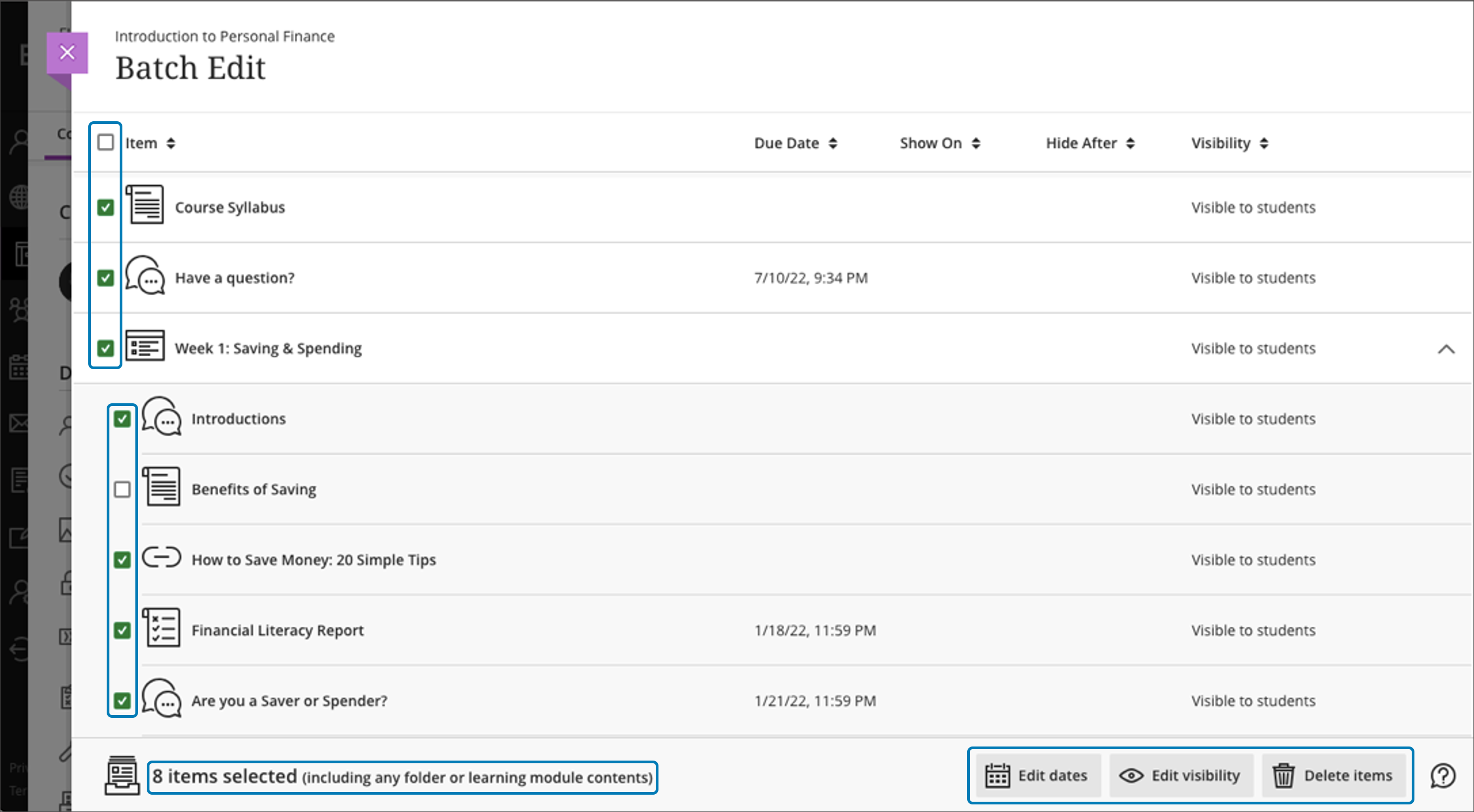
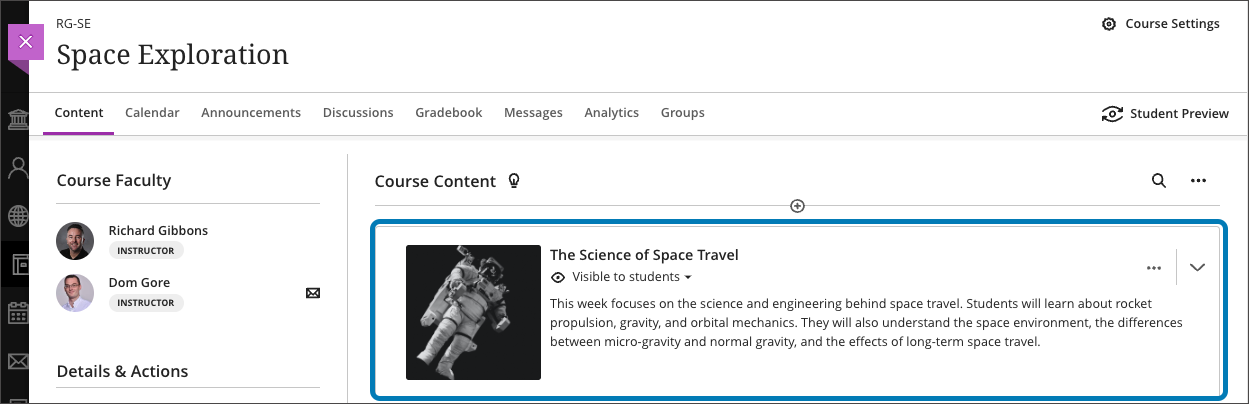
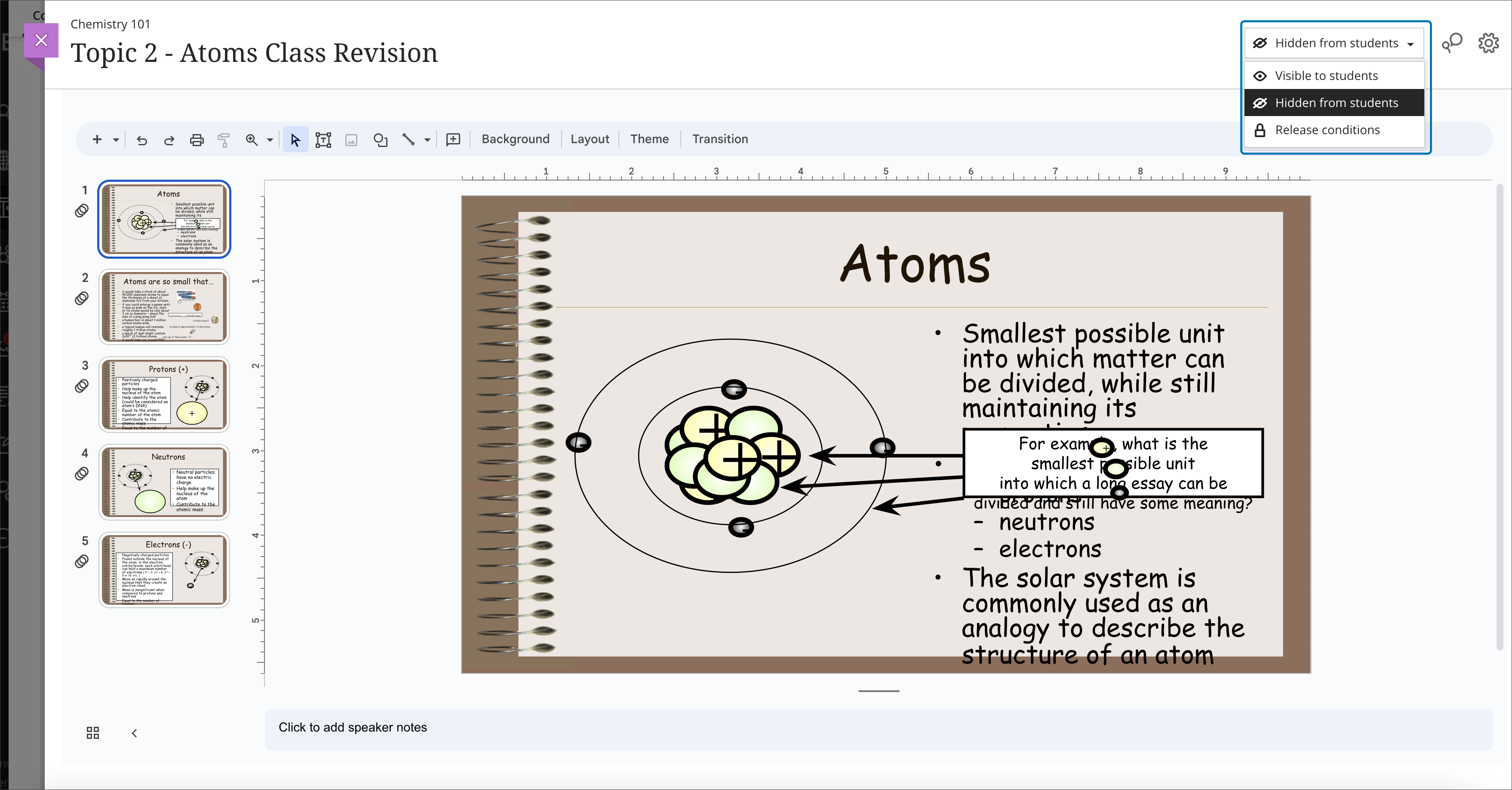
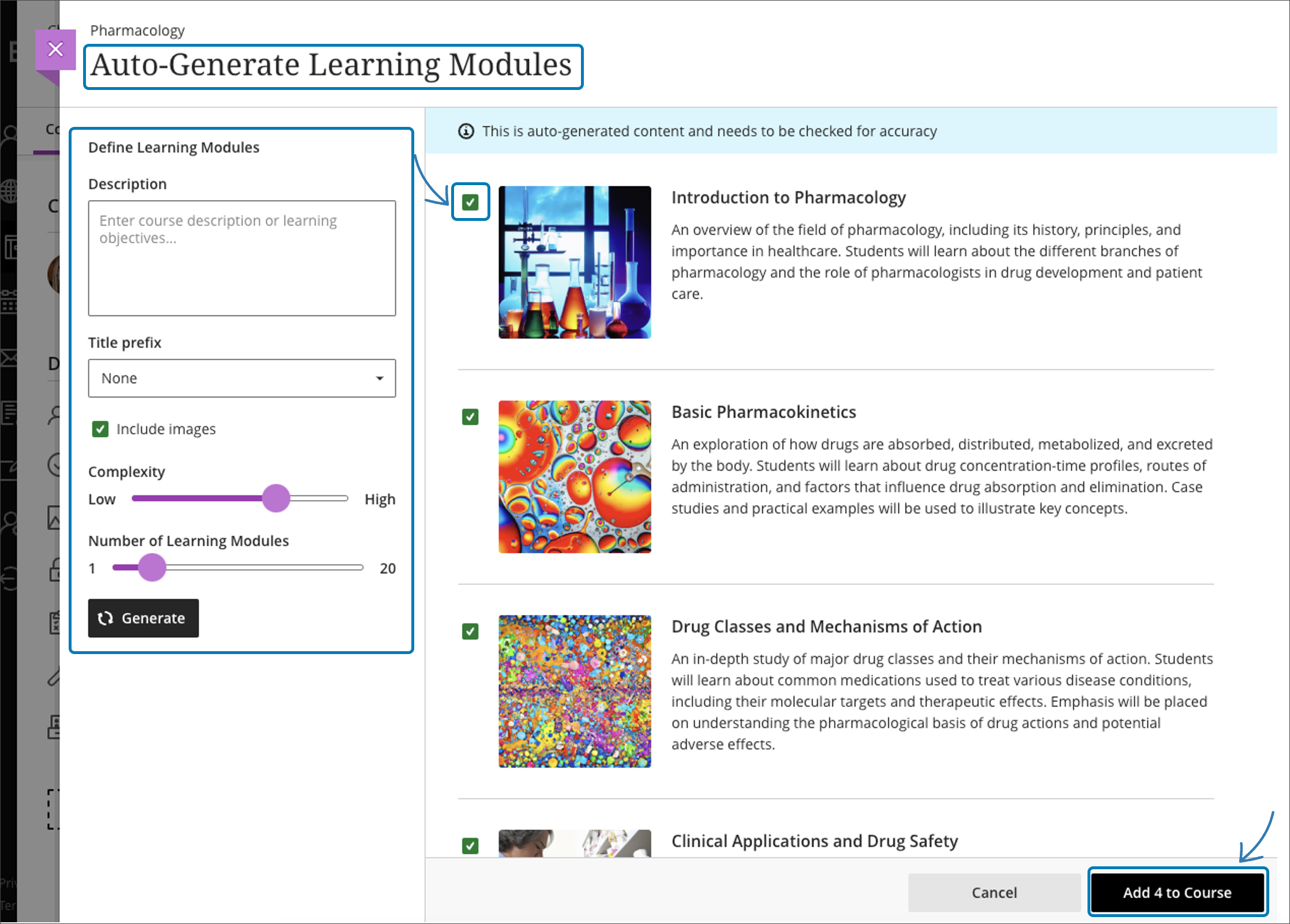
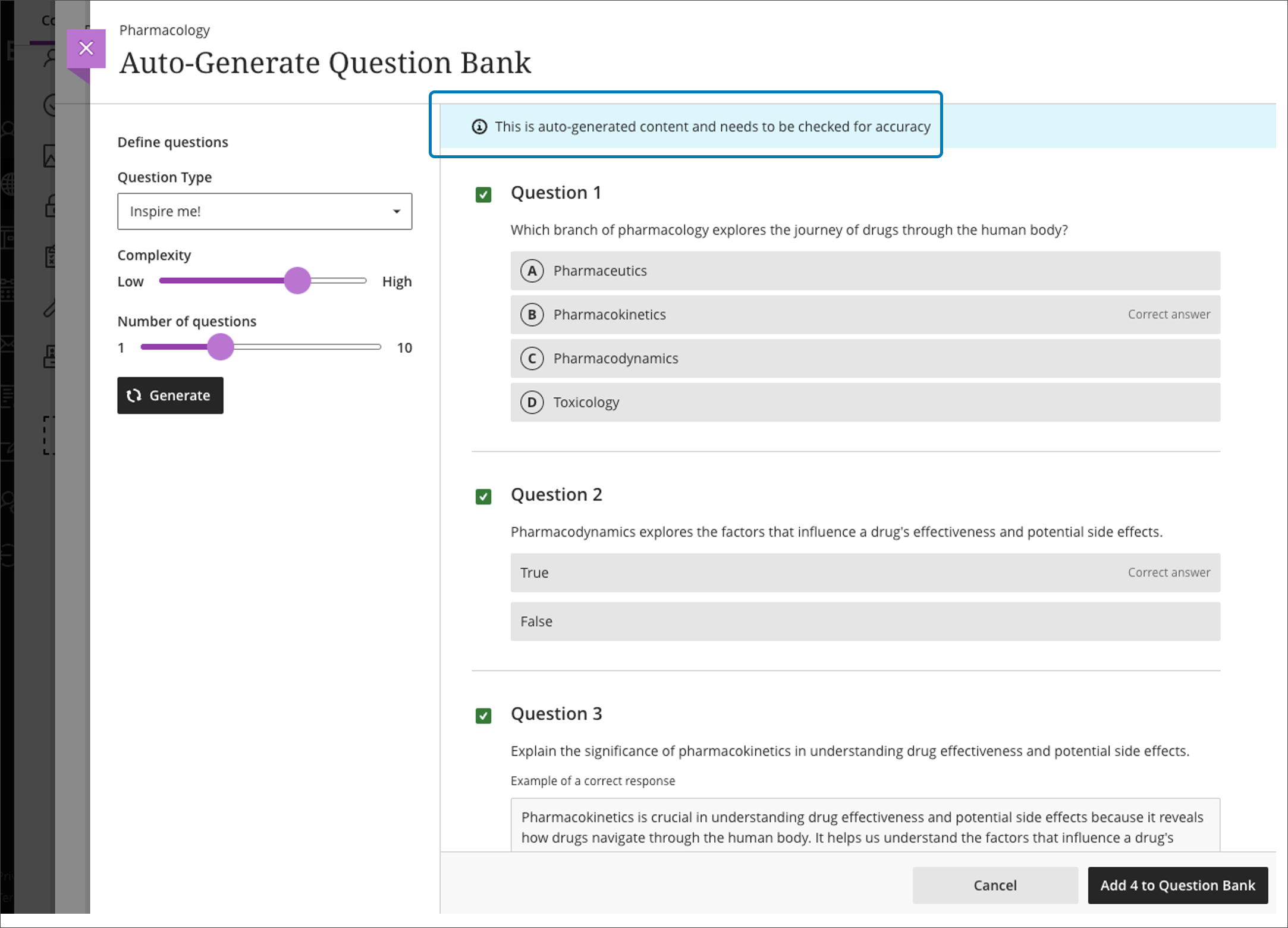
    <div class="html-content"><div><div><div><div><div><div><span>As the fall semester starts, the next update for Ultra courses brings improvements to the course management tools and a new stock image resource for course banners. Additionally, faculty will also have access to a new grading interface and w</span><span>e begin exploring an exciting suite of <a href="https://my3.my.umbc.edu/groups/instructional-technology/posts/134605" rel="nofollow external" class="bo">course design assistant tools powered by AI</a>.</span><span> </span></div><div><br></div><div><strong>Course Management</strong></div></div></div></div></div><div><ul><li><span>Search Unsplash, the largest stock image database for royalty-free images to <a href="https://help.blackboard.com/Learn/Instructor/Ultra/Courses/Course_Banner" rel="nofollow external" class="bo">use for your course banner.</a> </span></li><li><span><a href="https://help.blackboard.com/Learn/Instructor/Ultra/Course_Content/Ultra_Batch_Edit" rel="nofollow external" class="bo">Batch Edit</a> availability and due dates for content in your course by expanding folders and learning modules on a single page.</span></li></ul><div><img src="https://help.blackboard.com/sites/default/files/images/2023-08/learn_ultra_instructor_Batch%20EditSupportForRecursiveActions.png" width="450" alt="In the new Batch Edit, all items are now visible on a single page and you can expand and collapse Folders and Learning Modules" style="max-width: 100%; height: auto;"></div><div><em>Image 1: In the new Batch Edit, all items are now visible on a single page and you can expand and collapse Folders and Learning Modules.</em></div><ul><li><span>Copy one, some or all course announcements between Ultra courses, or from Original courses to Ultra.</span></li><li><span>Verify student engagement with third-party tools using Progress Tracking. When students complete content in a third-party tool, it will be marked complete.</span></li></ul></div><div><div><div><div><div><span><div><div><div><div><div><strong>AI Course Design Assistant Tools</strong></div></div></div></div></div><div><ul><li><strong>A course-builder assistant</strong>. Create sample learning modules, titles, and descriptions. </li></ul><div><img src="https://help.blackboard.com/sites/default/files/images/2023-08/learn_ultra_instructor_AIDesignAssitant_CourseContentSuggestions_AutoGenerateModules_SelectAndAdd.png" alt="Example of AI-suggested course structure" width="450" style="max-width: 100%; height: auto;"></div><div><em>Image 2: Example of AI-suggested course structure</em></div><ul><li><strong>Image suggestion and creation.</strong> The assistant can draw from the Unsplash stock image library and suggest thumbnails for illustration in learning modules or identify an image for the course banner. Functionality also includes AI-generated image creation based on course name and keywords.</li><li><strong>Content-based test generation</strong>. AI-powered algorithms analyze an Ultra document's content or inputted learning objectives and quickly generate a diverse set of questions for a test or question bank. </li></ul><div><img src="https://help.blackboard.com/sites/default/files/images/2023-08/learn_ultra_instructor_AIDesignAssitant_QuestionBankGeneration_AddAndRefineQuestionBank.png" alt="Example of AI-generated question bank" width="450" style="max-width: 100%; height: auto;"></div><div><em>Image 3: Example of AI-generated question bank</em></div><ul><li><strong>Rubric creation.</strong> Drawing on an assessment or discussion prompt's content, the AI can analyze and streamline the rubric creation process according to specific learning objectives and assessment criteria.</li></ul></div></span></div><div><span><div>Other updates in September include </div><div><ul><li><a href="https://help.blackboard.com/Learn/Instructor/Ultra/Assignments/FlexGradingAssignments" rel="nofollow external" class="bo">Flexible Grading</a>, which was activated just before the FA2023 semester started. <span>Flexible Grading features grade by student or question. Instructors can e</span><span>asily move between student attempts and keep track of their grading process. Flexible Grading is supported on desktop, laptop, and tablets. Faculty are invited to join a <a href="https://my3.my.umbc.edu/groups/instructional-technology/events/120029" rel="nofollow external" class="bo">Flexible Grading preview and training session</a> on September 18, 2023.</span></li><li><a href="https://help.blackboard.com/es-es/node/46381" rel="nofollow external" class="bo"><span>Auto-captioning of </span>audio and video content</a> used in assessment feedback and announcements. Auto-captioning also supports diverse language preferences, aligning with the user's chosen language in both Original and Ultra courses.</li></ul></div><div><span>Faculty should see the latest updates in Ultra courses around September 7-8 2023. </span><span>The next update to our Ultra test environment will take place on September 12, 2023; release notes are posted to the <a href="https://wiki.umbc.edu/x/LohnB" rel="nofollow external" class="bo">What's New in Ultra</a> that same week. Faculty who are interested in test driving new features before they are released to production should </span><a href="http://my.umbc.edu/go/request-help" rel="nofollow external" class="bo">open an RT ticket</a> to request early access. Please <a href="http://umbc.edu/go/ultra" rel="nofollow external" class="bo">watch the FAQs</a>, including <a href="https://wiki.umbc.edu/x/LohnB" rel="nofollow external" class="bo">the What's New with Ultra page</a>, <span>and myUMBC for additional information about Ultra. </span></div></span></div></div></div></div><div><span><br></span></div></div><div><span><strong>Connect with Instructional Technology</strong></span></div><div><span>As always, if you have any questions about teaching, learning, and technology at UMBC, please consider the following options:</span></div><ul><li><a href="http://www.umbc.edu/faq" rel="nofollow external" class="bo">Check our extensive FAQ collection</a><span> </span></li><ul><li><span><a href="https://wiki.umbc.edu/x/LohnB" rel="nofollow external" class="bo"><span>What's new in Ultra?</span></a><span> </span><span>|</span><span> </span><a href="https://wiki.umbc.edu/x/bwrSAQ" rel="nofollow external" class="bo"><span>Known Issues</span></a><span> </span></span></li></ul><li><span><a href="http://my.umbc.edu/go/request-help" rel="nofollow external" class="bo">Open a ticket via RT</a></span></li><li><span>Follow the </span><a href="http://my.umbc.edu/groups/instructional-technology" rel="nofollow external" class="bo">Instructional Technology</a><span> &amp; </span><a href="http://my.umbc.edu/groups/doit" rel="nofollow external" class="bo">DoIT</a><span> myUMBC groups</span></li><li><a href="http://doit.umbc.edu/itnm/staff/" rel="nofollow external" class="bo">Request a consult</a><span> with <a href="http://doit.umbc.edu/itnm/staff" rel="nofollow external" class="bo">instructional technology staff</a></span></li><li><span><a href="http://pivot.umbc.edu" rel="nofollow external" class="bo">PIVOT</a> | <a href="https://doit.umbc.edu/itnm/academic-continuity/" rel="nofollow external" class="bo">Academic Continuity</a></span><span> </span><span>|</span><span> </span><span><a href="https://fdc.umbc.edu/teaching/keep-on-teaching/" rel="nofollow external" class="bo">Keep On Teaching</a></span><span> </span><span>|</span><span> </span><span><a href="https://doit.umbc.edu/students" rel="nofollow external" class="bo">Student Technology Resources</a></span></li></ul></div><div><div></div></div></div>
]]>
</Body>
<Summary>As the fall semester starts, the next update for Ultra courses brings improvements to the course management tools and a new stock image resource for course banners. Additionally, faculty will also...</Summary>
<Website>https://my3.my.umbc.edu/groups/instructional-technology/posts/135009</Website>
<TrackingUrl>https://beta.my.umbc.edu/api/v0/pixel/news/135009/guest@my.umbc.edu/09a05b190ac396070b0eacadbe29216a/api/pixel</TrackingUrl>
<Tag>ai</Tag>
<Tag>blackboard</Tag>
<Tag>flexible-grading</Tag>
<Tag>ultra-experience</Tag>
<Tag>ultra-update</Tag>
<Group token="instructional-technology">Instructional Technology</Group>
<GroupUrl>https://beta.my.umbc.edu/groups/instructional-technology</GroupUrl>
<AvatarUrl>https://assets2-beta.my.umbc.edu/system/shared/avatars/groups/000/001/164/dec3b026b81ee6d890a8f82f75c94a2e/xsmall.png?1446126703</AvatarUrl>
<AvatarUrl size="original">https://assets1-beta.my.umbc.edu/system/shared/avatars/groups/000/001/164/dec3b026b81ee6d890a8f82f75c94a2e/original.png?1446126703</AvatarUrl>
<AvatarUrl size="xxlarge">https://assets2-beta.my.umbc.edu/system/shared/avatars/groups/000/001/164/dec3b026b81ee6d890a8f82f75c94a2e/xxlarge.png?1446126703</AvatarUrl>
<AvatarUrl size="xlarge">https://assets1-beta.my.umbc.edu/system/shared/avatars/groups/000/001/164/dec3b026b81ee6d890a8f82f75c94a2e/xlarge.png?1446126703</AvatarUrl>
<AvatarUrl size="large">https://assets1-beta.my.umbc.edu/system/shared/avatars/groups/000/001/164/dec3b026b81ee6d890a8f82f75c94a2e/large.png?1446126703</AvatarUrl>
<AvatarUrl size="medium">https://assets4-beta.my.umbc.edu/system/shared/avatars/groups/000/001/164/dec3b026b81ee6d890a8f82f75c94a2e/medium.png?1446126703</AvatarUrl>
<AvatarUrl size="small">https://assets3-beta.my.umbc.edu/system/shared/avatars/groups/000/001/164/dec3b026b81ee6d890a8f82f75c94a2e/small.png?1446126703</AvatarUrl>
<AvatarUrl size="xsmall">https://assets2-beta.my.umbc.edu/system/shared/avatars/groups/000/001/164/dec3b026b81ee6d890a8f82f75c94a2e/xsmall.png?1446126703</AvatarUrl>
<AvatarUrl size="xxsmall">https://assets3-beta.my.umbc.edu/system/shared/avatars/groups/000/001/164/dec3b026b81ee6d890a8f82f75c94a2e/xxsmall.png?1446126703</AvatarUrl>
<Sponsor>Instructional Technology</Sponsor>
<ThumbnailUrl size="xxlarge">https://assets2-beta.my.umbc.edu/system/shared/thumbnails/news/000/135/009/79ef85aca28b5da734f174b439536c44/xxlarge.jpg?1693498242</ThumbnailUrl>
<ThumbnailUrl size="xlarge">https://assets1-beta.my.umbc.edu/system/shared/thumbnails/news/000/135/009/79ef85aca28b5da734f174b439536c44/xlarge.jpg?1693498242</ThumbnailUrl>
<ThumbnailUrl size="large">https://assets2-beta.my.umbc.edu/system/shared/thumbnails/news/000/135/009/79ef85aca28b5da734f174b439536c44/large.jpg?1693498242</ThumbnailUrl>
<ThumbnailUrl size="medium">https://assets2-beta.my.umbc.edu/system/shared/thumbnails/news/000/135/009/79ef85aca28b5da734f174b439536c44/medium.jpg?1693498242</ThumbnailUrl>
<ThumbnailUrl size="small">https://assets2-beta.my.umbc.edu/system/shared/thumbnails/news/000/135/009/79ef85aca28b5da734f174b439536c44/small.jpg?1693498242</ThumbnailUrl>
<ThumbnailUrl size="xsmall">https://assets3-beta.my.umbc.edu/system/shared/thumbnails/news/000/135/009/79ef85aca28b5da734f174b439536c44/xsmall.jpg?1693498242</ThumbnailUrl>
<ThumbnailUrl size="xxsmall">https://assets2-beta.my.umbc.edu/system/shared/thumbnails/news/000/135/009/79ef85aca28b5da734f174b439536c44/xxsmall.jpg?1693498242</ThumbnailUrl>
<PawCount>2</PawCount>
<CommentCount>0</CommentCount>
<CommentsAllowed>true</CommentsAllowed>
<PostedAt>Thu, 31 Aug 2023 13:37:59 -0400</PostedAt>
</NewsItem>

<NewsItem contentIssues="true" id="134272" important="false" status="posted" url="https://beta.my.umbc.edu/groups/instructional-technology/posts/134272">
<Title>Grade by student or question in Ultra courses for Aug update</Title>
<Tagline>New Google integration, customize image for learning modules</Tagline>
<Body>
<![CDATA[
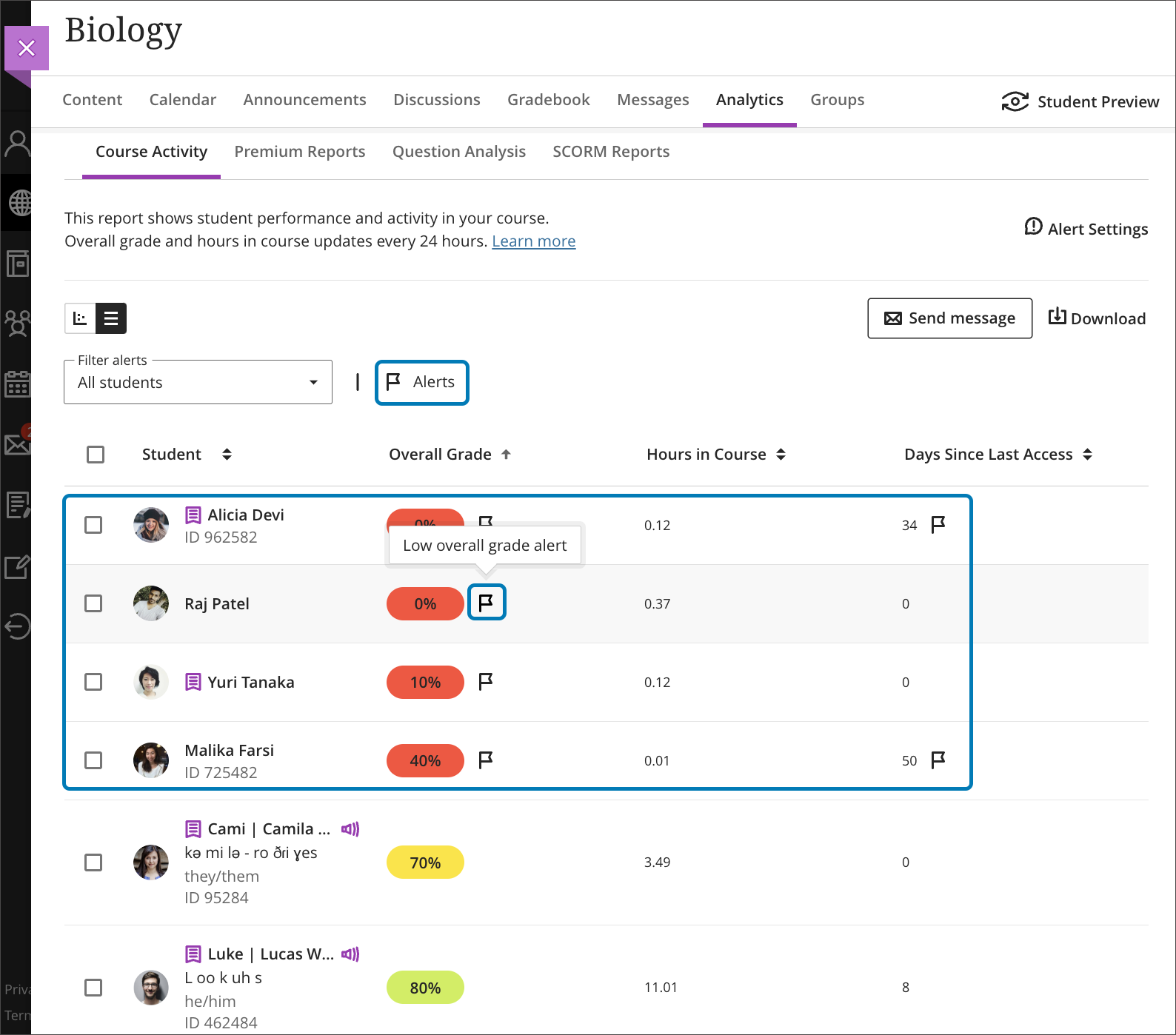
    <div class="html-content"><div><div><div><div><div><div>The August release reveals a new update for the Ultra grading system, enabling faculty to grade by question or student, or mix and match the approach. Additional updates to Ultra for August include enhancements to grading, content creation and content management, learner engagement, and reporting. </div><div><span><br></span></div><div><span>Flexible Grading features grade by student or question. Instructors can e</span><span>asily move between student attempts and keep track of their grading process. Grading options include simple scoring, rubrics and inline commenting. Instructors can collapse panels to increase visible space, view SafeAssign originality reports, and post all grades when ready. </span><span>Subsequent releases will include group submissions, anonymous grading, multiple grades per student, and peer review.</span></div><div><img src="https://my3.my.umbc.edu/groups/instructional-technology/posts/134272/attachments/47826" alt="Image 1: Example of flexible grading when grading by student" style="max-width: 100%; height: auto;"></div><div><em>Image 1: Example of flexible grading when grading by student</em></div><div><br></div><div><img src="https://my3.my.umbc.edu/groups/instructional-technology/posts/134272/attachments/47827" alt="Image 2: Example of flexible grading when grading by question" style="max-width: 100%; height: auto;"></div><div><em>Image 2: Example of flexible grading when grading by question</em></div><div><br></div><div>Although Flexible Grading will be available in early August, the functionality will not be enabled in Ultra courses until approximately one week before the FA2023 term starts. This is primarily to ensure SU2023 courses maintain continuity of their grading interface until the end of the term. </div><div><br></div><div><strong>Assessment &amp; Grading</strong></div></div></div></div></div><div><ul><li><span>Anonymous submissions can be downloaded in bulk from the gradebook column. </span></li><li><span>The default state of the gradebook cell is now a dash. "Grade Now" will only appear if there is something to actually grade.</span></li><li><span>Student submission receipts will include additional information including submission size for file uploads and auto-submit indicators for timed assessments.</span></li></ul></div><div><span><strong>Content Creation &amp; Delivery</strong></span></div><div><ul><li><span>Add a thumbnail image to a learning module to enhance the visual aesthetics of a course or aid in content identification.</span></li></ul><div><img src="https://help.blackboard.com/sites/default/files/images/2023-07/learn_ultra_instructor_LearningModules_LM%20Images_SelectedImageOnCourseContentPage.png" alt="Image 3: Example of thumbnail image for learning module" style="max-width: 100%; height: auto;"></div><div><em>Image 3: Example of thumbnail image for learning module</em></div><ul><li><span>A new Google file integration allows faculty to link to files in their Google Drive and edit those files once added to a course. Students have view-only access. <em>This update will be released later in the fall semester.</em></span></li></ul><div><img src="https://help.blackboard.com/sites/default/files/images/2023-07/learn_ultra_student_Integrations_Google_WorkspaceFiles_ReviewVisibilitySettings.png" alt="Image 4: Example of new Google file workflow" style="max-width: 100%; height: auto;"></div><div><em>Image 4: Example of new Google file workflow</em></div><ul><li><span>When an instructor replaces a file in an Ultra course, the system will no longer create a new version. This should help with managing course quotas.</span></li></ul><div><span><strong>Communication &amp; Engagement</strong></span></div><div><ul><li><span>The Groups tool link is relocated to the top course menu navigation to improve visibility. </span><span>Instructors can easily send messages to Groups or Group Sets.</span></li><li><span>A new dedicated Groups space is available for displaying all assessments assigned to each group. Future milestones will include project management tools for students.</span></li><li>The Message tab on the Base Navigation now displays courses with unread messages first. An unread message indicator also appears within the course. Newest messages appear first and unread messages are clearly marked.</li></ul></div></div><div><span><strong>Reporting &amp; Analytics</strong></span></div><div><ul><li><span>A flag will appear for students in the Course Activity Report based on the number of days a student is inactive in a course or when the overall grade falls below a specific percentage. These settings are determined by the instructor in the Alert Settings on the Course Activity Report. Alerts can be added, edited, or deleted at any time. Send messages based on flags.</span></li></ul></div><div><img src="https://help.blackboard.com/sites/default/files/images/2023-07/learn_ultra_instructor_CourseActivityReport_StudentsWithAlertsFlags_CourseActivityReport_StudentsWithAlertsFilter.png" alt="Image 5: Example of flag indicators in Course Activity Report" style="max-width: 100%; height: auto;"></div><div><em>Image 5: Example of flag indicators in Course Activity Report</em></div><div><span><br></span></div><div><div><div><div><div><span>Faculty should see the latest updates in Ultra courses around August 4-5, 2023. </span>Please sign up for our latest <a href="https://my3.my.umbc.edu/groups/instructional-technology/events?mode=upcoming&amp;tag=whats-new" rel="nofollow external" class="bo">What's New in Ultra for Teaching &amp; Learning webinar</a><span> on August 10 or August 18, 2023 to learn more about these and other exciting new features coming to Ultra.</span></div></div></div></div><div><span><br></span></div><div><span>The next update to our Ultra test environment will take place on August 15, 2023; release notes are posted to the <a href="https://wiki.umbc.edu/x/LohnB" rel="nofollow external" class="bo">What's New in Ultra</a> that same week. Faculty who are interested in test driving new features before they are released to production should </span><a href="http://my.umbc.edu/go/request-help" rel="nofollow external" class="bo">open an RT ticket</a> to request early access. Please <a href="http://umbc.edu/go/ultra" rel="nofollow external" class="bo">watch the FAQs</a>, including <a href="https://wiki.umbc.edu/x/LohnB" rel="nofollow external" class="bo">the What's New with Ultra page</a>, <span>and myUMBC for additional information about Ultra. </span></div><div><span><br></span></div></div><div><span><strong>Connect with Instructional Technology</strong></span></div><div><span>As always, if you have any questions about teaching, learning, and technology at UMBC, please consider the following options:</span></div><ul><li><a href="http://www.umbc.edu/faq" rel="nofollow external" class="bo">Check our extensive FAQ collection</a><span> </span></li><ul><li><span><a href="https://wiki.umbc.edu/x/LohnB" rel="nofollow external" class="bo"><span>What's new in Ultra?</span></a><span> </span><span>|</span><span> </span><a href="https://wiki.umbc.edu/x/bwrSAQ" rel="nofollow external" class="bo"><span>Known Issues</span></a><span> </span></span></li></ul><li><span><a href="http://my.umbc.edu/go/request-help" rel="nofollow external" class="bo">Open a ticket via RT</a></span></li><li><span>Follow the </span><a href="http://my.umbc.edu/groups/instructional-technology" rel="nofollow external" class="bo">Instructional Technology</a><span> &amp; </span><a href="http://my.umbc.edu/groups/doit" rel="nofollow external" class="bo">DoIT</a><span> myUMBC groups</span></li><li><a href="http://doit.umbc.edu/itnm/staff/" rel="nofollow external" class="bo">Request a consult</a><span> with <a href="http://doit.umbc.edu/itnm/staff" rel="nofollow external" class="bo">instructional technology staff</a></span></li><li><span><a href="http://pivot.umbc.edu" rel="nofollow external" class="bo">PIVOT</a> | <a href="https://doit.umbc.edu/itnm/academic-continuity/" rel="nofollow external" class="bo">Academic Continuity</a></span><span> </span><span>|</span><span> </span><span><a href="https://fdc.umbc.edu/teaching/keep-on-teaching/" rel="nofollow external" class="bo">Keep On Teaching</a></span><span> </span><span>|</span><span> </span><span><a href="https://doit.umbc.edu/students" rel="nofollow external" class="bo">Student Technology Resources</a></span></li></ul></div><div><div></div></div></div>
]]>
</Body>
<Summary>The August release reveals a new update for the Ultra grading system, enabling faculty to grade by question or student, or mix and match the approach. Additional updates to Ultra for August...</Summary>
<Website>https://my3.my.umbc.edu/groups/instructional-technology/posts/134272</Website>
<AttachmentKind>Image</AttachmentKind>
<AttachmentUrl>https://assets4-beta.my.umbc.edu/system/shared/attachments/fd5d15be34d7612c37147f09b7327386/69ed6f49/news/000/134/272/7cc363172b333199364a4e07bae60688/blackboard-learn-adoption---new-flexible-grading-4.png?1689167733</AttachmentUrl>
<Attachments>
<Attachment kind="Image" url="https://beta.my.umbc.edu/groups/instructional-technology/posts/134272/attachments/47826"></Attachment>
<Attachment kind="Image" url="https://beta.my.umbc.edu/groups/instructional-technology/posts/134272/attachments/47827"></Attachment>
</Attachments>
<TrackingUrl>https://beta.my.umbc.edu/api/v0/pixel/news/134272/guest@my.umbc.edu/e6973324ae5bedf9665be02127452ec2/api/pixel</TrackingUrl>
<Tag>blackboard</Tag>
<Tag>flexible-grading</Tag>
<Tag>ultra-experience</Tag>
<Tag>ultra-update</Tag>
<Group token="instructional-technology">Instructional Technology</Group>
<GroupUrl>https://beta.my.umbc.edu/groups/instructional-technology</GroupUrl>
<AvatarUrl>https://assets2-beta.my.umbc.edu/system/shared/avatars/groups/000/001/164/dec3b026b81ee6d890a8f82f75c94a2e/xsmall.png?1446126703</AvatarUrl>
<AvatarUrl size="original">https://assets1-beta.my.umbc.edu/system/shared/avatars/groups/000/001/164/dec3b026b81ee6d890a8f82f75c94a2e/original.png?1446126703</AvatarUrl>
<AvatarUrl size="xxlarge">https://assets2-beta.my.umbc.edu/system/shared/avatars/groups/000/001/164/dec3b026b81ee6d890a8f82f75c94a2e/xxlarge.png?1446126703</AvatarUrl>
<AvatarUrl size="xlarge">https://assets1-beta.my.umbc.edu/system/shared/avatars/groups/000/001/164/dec3b026b81ee6d890a8f82f75c94a2e/xlarge.png?1446126703</AvatarUrl>
<AvatarUrl size="large">https://assets1-beta.my.umbc.edu/system/shared/avatars/groups/000/001/164/dec3b026b81ee6d890a8f82f75c94a2e/large.png?1446126703</AvatarUrl>
<AvatarUrl size="medium">https://assets4-beta.my.umbc.edu/system/shared/avatars/groups/000/001/164/dec3b026b81ee6d890a8f82f75c94a2e/medium.png?1446126703</AvatarUrl>
<AvatarUrl size="small">https://assets3-beta.my.umbc.edu/system/shared/avatars/groups/000/001/164/dec3b026b81ee6d890a8f82f75c94a2e/small.png?1446126703</AvatarUrl>
<AvatarUrl size="xsmall">https://assets2-beta.my.umbc.edu/system/shared/avatars/groups/000/001/164/dec3b026b81ee6d890a8f82f75c94a2e/xsmall.png?1446126703</AvatarUrl>
<AvatarUrl size="xxsmall">https://assets3-beta.my.umbc.edu/system/shared/avatars/groups/000/001/164/dec3b026b81ee6d890a8f82f75c94a2e/xxsmall.png?1446126703</AvatarUrl>
<Sponsor>Instructional Technology</Sponsor>
<ThumbnailUrl size="xxlarge">https://assets1-beta.my.umbc.edu/system/shared/thumbnails/news/000/134/272/fa172243a7a9cbea44a5bd68e817c726/xxlarge.jpg?1689167479</ThumbnailUrl>
<ThumbnailUrl size="xlarge">https://assets2-beta.my.umbc.edu/system/shared/thumbnails/news/000/134/272/fa172243a7a9cbea44a5bd68e817c726/xlarge.jpg?1689167479</ThumbnailUrl>
<ThumbnailUrl size="large">https://assets4-beta.my.umbc.edu/system/shared/thumbnails/news/000/134/272/fa172243a7a9cbea44a5bd68e817c726/large.jpg?1689167479</ThumbnailUrl>
<ThumbnailUrl size="medium">https://assets3-beta.my.umbc.edu/system/shared/thumbnails/news/000/134/272/fa172243a7a9cbea44a5bd68e817c726/medium.jpg?1689167479</ThumbnailUrl>
<ThumbnailUrl size="small">https://assets3-beta.my.umbc.edu/system/shared/thumbnails/news/000/134/272/fa172243a7a9cbea44a5bd68e817c726/small.jpg?1689167479</ThumbnailUrl>
<ThumbnailUrl size="xsmall">https://assets4-beta.my.umbc.edu/system/shared/thumbnails/news/000/134/272/fa172243a7a9cbea44a5bd68e817c726/xsmall.jpg?1689167479</ThumbnailUrl>
<ThumbnailUrl size="xxsmall">https://assets2-beta.my.umbc.edu/system/shared/thumbnails/news/000/134/272/fa172243a7a9cbea44a5bd68e817c726/xxsmall.jpg?1689167479</ThumbnailUrl>
<PawCount>4</PawCount>
<CommentCount>0</CommentCount>
<CommentsAllowed>true</CommentsAllowed>
<PostedAt>Mon, 24 Jul 2023 12:47:56 -0400</PostedAt>
<EditAt>Mon, 21 Aug 2023 10:06:42 -0400</EditAt>
</NewsItem>

</News>