<?xml version="1.0"?>
<News hasArchived="false" page="1" pageCount="1" pageSize="10" timestamp="Fri, 24 Apr 2026 06:27:07 -0400" url="https://beta.my.umbc.edu/groups/instructional-technology/posts.xml?tag=fa24">
<NewsItem contentIssues="true" id="144396" important="false" status="posted" url="https://beta.my.umbc.edu/groups/instructional-technology/posts/144396">
<Title>October Disability Awareness Month Fosters Inclusion in Higher Education</Title>
<Tagline>Focus on digital accessibility ensures access, equity to all</Tagline>
<Body>
<![CDATA[
    <div class="html-content"><span><p><span>In 2019-20, approximately 21 percent of undergraduate students and 11 percent of post baccalaureate students reported having a disability (National Center for Education Statistics, </span><a href="https://nces.ed.gov/fastfacts/display.asp?id=60" rel="nofollow external" class="bo"><span>Fast Facts</span></a><span>, 2023). Disability Awareness Month offers an opportunity to increase awareness about the variety of disabilities students may experience and help break down misconceptions. </span></p><p><span><strong>Inclusive Experiences for All</strong></span></p><p><span>Disability awareness includes addressing physical environments and improving accessibility in buildings, classrooms, and public spaces to ensure all individuals can navigate and participate fully. This might involve installing ramps, widening doorways, adding signage, or improving lighting. The </span><a href="https://my3.my.umbc.edu/groups/accessibility/posts/143256" rel="nofollow external" class="bo"><span>Office of Accessibility &amp; Disability</span></a><span> raises awareness about the lived experiences of people with disabilities and highlights services for faculty, staff, and students at UMBC. </span></p><p><span>Instructors play an important role in recognizing the diverse needs of students with disabilities while striving to promote equity and access for all. This includes creating inclusive learning experiences for students with disabilities and might involve providing assistive technologies, flexible teaching methods, or individualized support plans. </span></p><p><span>Creating more accessible courses also requires consideration of diverse learning styles and approaches that result in engaging learning for all students. Strategies grounded in Universal Design for Learning principles can leverage technology in ways that help all students succeed. Key practices that support accessible course design include the following. </span></p><p><strong><span>Universal Design for Learning</span><span> </span></strong></p><p><span>One of the most impactful ways instructors can support students is by using Universal Design for Learning (UDL) guidelines, a framework that aims to provide multiple means of engagement, representation, and expression for learners. UDL benefits all students, not just those with disabilities, because it offers flexible ways learners can access content and demonstrate knowledge. </span></p><p><span>UDL is a key practice that supports accessible course design. Instructors can get started in any of the following ways:</span></p><p></p><ul><li><span><span>Review </span><a href="https://udlguidelines.cast.org/" rel="nofollow external" class="bo"><span>UDL guidelines</span></a><span> that support offering multiple means of representation to learners by employing various formats such as text, audio, and visual materials to accommodate diverse learning preferences. </span></span></li><li><span><span>Foster engagement by incorporating interactive elements, discussions, or hands-on activities that cater to visual, auditory, and kinesthetic learners. </span></span></li><li><span><span>Ask </span><a href="https://udlguidelines.cast.org/binaries/content/assets/common/publications/articles/cast-udl-planningq-a11y.pdf" rel="nofollow external" class="bo"><span>key questions</span></a><span> about learner engagement, representation, action and expression when designing a module or unit in your course. </span></span></li><li><span><span>Implement UDL incrementally and intentionally. Refer to scholarly works like Behling &amp; Tobin (2018) for guidance. They encourage faculty to think of UDL as “plus-one thinking about the interactions in your course” (p. 134). Is there just one more way you can help students stay on task, give them information, or demonstrate skills? </span></span></li></ul><div><span><p><span><strong>QM’s Accessibility and Usability Resource Site </strong></span></p><ul><li><span><span>Register for free access to Quality Matters’ </span><a href="https://www.qualitymatters.org/node/1532" rel="nofollow external" class="bo"><span>Accessibility and Usability Resource Site</span></a><span> (AURS), the go-to resource for educators to address key accessibility and usability concerns in course design. Log into </span><a href="https://www.qmprogram.org/myqm/" rel="nofollow external" class="bo"><span>MyQM</span></a><span>, or </span><a href="https://wiki.umbc.edu/x/a4-LBg" rel="nofollow external" class="bo"><span>create your QM account</span></a><span>. After successfully logging in, use the side navigation menu to select “Workshop-Register” and self-enroll into AURS (last item on the workshop list).</span></span></li><li><span><span>Explore AURS resources, videos, and best practices on topics like UDL, alternative text, captions, hyperlinks, accessible MS Office products, readability, accessible PDFs, accessible course design, and inclusive teaching practices.</span></span></li></ul><p><span><strong>Anthology Ally for Remediation, Alt Text</strong></span></p><ul><li><span><span>Explore accessibility tools and built-in features that allow you to cater to students with different abilities and meet </span><a href="https://www.federalregister.gov/documents/2024/04/24/2024-07758/nondiscrimination-on-the-basis-of-disability-accessibility-of-web-information-and-services-of-state" rel="nofollow external" class="bo"><span>recently updated federal requirements</span></a><span> for digital accessibility compliance. For example, </span><a href="https://wiki.umbc.edu/display/faq/Ally" rel="nofollow external" class="bo"><span>Ally</span></a><span> is a tool available in Blackboard Ultra that improves the accessibility of courses by scanning course content, generating an </span><a href="https://wiki.umbc.edu/pages/viewpage.action?pageId=87884573" rel="nofollow external" class="bo"><span>Accessibility Report</span></a><span>, and providing tools to fix accessibility issues.</span></span></li><li><span><span>Use Ally's </span><a href="https://wiki.umbc.edu/display/faq/Ally+for+Instructors" rel="nofollow external" class="bo"><span>Instructor Feedback Panel</span></a><span> to preview content and prioritize remediation.</span></span></li><li><span><span>Consider </span><a href="https://wiki.umbc.edu/pages/viewpage.action?pageId=77431280" rel="nofollow external" class="bo"><span>Ally's powerful alternative format</span></a><span> options and let students know they can download content in multiple formats that give them choices in how they watch, read, or listen. </span></span></li></ul><p><span>Attending disability awareness workshops or collaborating with the </span><a href="https://sds.umbc.edu/" rel="nofollow external" class="bo"><span>Office of Student Disability Services</span></a><span> (SDS) can provide instructors with the tools to accommodate the needs of students with disabilities in the classroom. </span></p><p><span><strong>Save the dates!</strong></span></p><p><span>Join Instructional Technology for upcoming digital accessibility events:</span></p><ul><li><span><span>October 3 - </span><a href="https://my3.my.umbc.edu/groups/instructional-technology/events/134503" rel="nofollow external" class="bo"><span>October 3rd is Fix Your Blackboard Content Day:</span></a><span> Create Inclusive Digital Materials Using Ally - </span><span><strong>Session #1</strong></span><span>, 10 a.m.</span></span></li><li><span><span>October 3 - </span><a href="https://my3.my.umbc.edu/groups/instructional-technology/events/134504" rel="nofollow external" class="bo"><span>October 3rd is Fix Your Blackboard Content Day:</span></a><span> Create Inclusive Digital Materials Using Ally - </span><span><strong>Session #2</strong></span><span>, 2 p.m.</span></span></li><li><span><span>October 15 - </span><a href="https://my3.my.umbc.edu/groups/instructional-technology/events/134914" rel="nofollow external" class="bo"><span>VoiceThread Accessibility and Universal Design for Learning</span></a><span> (Hosted by VoiceThread), 1 p.m.</span></span></li><li><span><span>October 16 - </span><a href="https://my3.my.umbc.edu/groups/instructional-technology/events/133831" rel="nofollow external" class="bo"><span>UDL Guidelines 3.0: What’s New and Why it Matters</span></a><span> (Hosted by CourseArc), 2 p.m.</span></span></li><li><span><span>October 17 - </span><a href="https://my3.my.umbc.edu/groups/instructional-technology/events/134553" rel="nofollow external" class="bo"><span>Create Accessible Documents</span></a><span>, 12 p.m.</span></span></li><li><span><span>October 25 - </span><a href="https://my3.my.umbc.edu/groups/instructional-technology/events/132541" rel="nofollow external" class="bo"><span>Inclusion by Design Virtual Conference: Building Bridges to Accessibility to All</span></a><span> (Virtual event sponsored by Montgomery College)</span></span></li><li><span><span>October 29 - </span><a href="https://my3.my.umbc.edu/groups/instructional-technology/events/134556" rel="nofollow external" class="bo"><span>Create Accessible Presentations</span></a><span>, 12 p.m.</span></span></li><li><span><span>November 12 - </span><a href="https://my3.my.umbc.edu/groups/instructional-technology/events/134557" rel="nofollow external" class="bo"><span>Create Accessible Instructional Videos</span></a><span>, 12 p.m.</span></span></li></ul><p><span>References</span></p><ul><li><span>Behling, K. &amp; Tobin, T. J. (2018). </span><span>Reach everyone, teach everyone: Universal Design for Learning in higher education</span><span>. Morgantown: West Virginia University Press. </span><a href="https://wvupressonline.com/node/757" rel="nofollow external" class="bo"><span>https://wvupressonline.com/node/757</span></a><span>. </span></li><li><span>CAST (2018). </span><a href="https://udlguidelines.cast.org/" rel="nofollow external" class="bo"><span>Universal Design for Learning Guidelines</span></a><span> version 2.2. Retrieved from </span><a href="http://udlguidelines.cast.org" rel="nofollow external" class="bo"><span>http://udlguidelines.cast.org</span></a></li><li><span>National Center for Education Statistics. (2023, TBA). Table 311.10. Number and percentage distribution of students enrolled in postsecondary institutions, by level, disability status, and selected student characteristics: Academic year 2019–20 [Data table]. In </span><span>Digest of education statistics</span><span>. U.S. Department of Education, Institute of Education Sciences. Retrieved December 5, 2023, from </span><a href="https://nces.ed.gov/programs/digest/d22/tables/dt22_311.10.asp" rel="nofollow external" class="bo"><span>https://nces.ed.gov/programs/digest/d22/tables/dt22_311.10.asp</span></a><span>.</span></li></ul><p><span>(</span><span>Image designed by </span><a href="https://www.freepik.com/author/vectorjuice" rel="nofollow external" class="bo"><span>vectorjuice on Freepik</span></a><span>)</span></p></span></div><div><span><span><span><span><span><span><span><span><span><span><span></span></span></span></span></span></span></span></span></span></span></span></div></span></div>
]]>
</Body>
<Summary>In 2019-20, approximately 21 percent of undergraduate students and 11 percent of post baccalaureate students reported having a disability (National Center for Education Statistics, Fast Facts,...</Summary>
<Website>https://my3.my.umbc.edu/groups/instructional-technology/posts/144396</Website>
<TrackingUrl>https://beta.my.umbc.edu/api/v0/pixel/news/144396/guest@my.umbc.edu/15133f302e7411f0c689267dede1867d/api/pixel</TrackingUrl>
<Tag>access</Tag>
<Tag>accessibility</Tag>
<Tag>biro</Tag>
<Tag>da</Tag>
<Tag>digital-accessibility</Tag>
<Tag>disability-awareness-month</Tag>
<Tag>equity</Tag>
<Tag>fa24</Tag>
<Group token="instructional-technology">Instructional Technology</Group>
<GroupUrl>https://beta.my.umbc.edu/groups/instructional-technology</GroupUrl>
<AvatarUrl>https://assets2-beta.my.umbc.edu/system/shared/avatars/groups/000/001/164/dec3b026b81ee6d890a8f82f75c94a2e/xsmall.png?1446126703</AvatarUrl>
<AvatarUrl size="original">https://assets1-beta.my.umbc.edu/system/shared/avatars/groups/000/001/164/dec3b026b81ee6d890a8f82f75c94a2e/original.png?1446126703</AvatarUrl>
<AvatarUrl size="xxlarge">https://assets2-beta.my.umbc.edu/system/shared/avatars/groups/000/001/164/dec3b026b81ee6d890a8f82f75c94a2e/xxlarge.png?1446126703</AvatarUrl>
<AvatarUrl size="xlarge">https://assets1-beta.my.umbc.edu/system/shared/avatars/groups/000/001/164/dec3b026b81ee6d890a8f82f75c94a2e/xlarge.png?1446126703</AvatarUrl>
<AvatarUrl size="large">https://assets1-beta.my.umbc.edu/system/shared/avatars/groups/000/001/164/dec3b026b81ee6d890a8f82f75c94a2e/large.png?1446126703</AvatarUrl>
<AvatarUrl size="medium">https://assets4-beta.my.umbc.edu/system/shared/avatars/groups/000/001/164/dec3b026b81ee6d890a8f82f75c94a2e/medium.png?1446126703</AvatarUrl>
<AvatarUrl size="small">https://assets3-beta.my.umbc.edu/system/shared/avatars/groups/000/001/164/dec3b026b81ee6d890a8f82f75c94a2e/small.png?1446126703</AvatarUrl>
<AvatarUrl size="xsmall">https://assets2-beta.my.umbc.edu/system/shared/avatars/groups/000/001/164/dec3b026b81ee6d890a8f82f75c94a2e/xsmall.png?1446126703</AvatarUrl>
<AvatarUrl size="xxsmall">https://assets3-beta.my.umbc.edu/system/shared/avatars/groups/000/001/164/dec3b026b81ee6d890a8f82f75c94a2e/xxsmall.png?1446126703</AvatarUrl>
<Sponsor>Instructional Technology</Sponsor>
<ThumbnailUrl size="xxlarge">https://assets4-beta.my.umbc.edu/system/shared/thumbnails/news/000/144/396/efda742ca564aeb03f2e829e7e9f8d91/xxlarge.jpg?1727875037</ThumbnailUrl>
<ThumbnailUrl size="xlarge">https://assets1-beta.my.umbc.edu/system/shared/thumbnails/news/000/144/396/efda742ca564aeb03f2e829e7e9f8d91/xlarge.jpg?1727875037</ThumbnailUrl>
<ThumbnailUrl size="large">https://assets1-beta.my.umbc.edu/system/shared/thumbnails/news/000/144/396/efda742ca564aeb03f2e829e7e9f8d91/large.jpg?1727875037</ThumbnailUrl>
<ThumbnailUrl size="medium">https://assets4-beta.my.umbc.edu/system/shared/thumbnails/news/000/144/396/efda742ca564aeb03f2e829e7e9f8d91/medium.jpg?1727875037</ThumbnailUrl>
<ThumbnailUrl size="small">https://assets1-beta.my.umbc.edu/system/shared/thumbnails/news/000/144/396/efda742ca564aeb03f2e829e7e9f8d91/small.jpg?1727875037</ThumbnailUrl>
<ThumbnailUrl size="xsmall">https://assets3-beta.my.umbc.edu/system/shared/thumbnails/news/000/144/396/efda742ca564aeb03f2e829e7e9f8d91/xsmall.jpg?1727875037</ThumbnailUrl>
<ThumbnailUrl size="xxsmall">https://assets3-beta.my.umbc.edu/system/shared/thumbnails/news/000/144/396/efda742ca564aeb03f2e829e7e9f8d91/xxsmall.jpg?1727875037</ThumbnailUrl>
<PawCount>5</PawCount>
<CommentCount>2</CommentCount>
<CommentsAllowed>true</CommentsAllowed>
<PostedAt>Wed, 02 Oct 2024 09:47:19 -0400</PostedAt>
</NewsItem>

<NewsItem contentIssues="true" id="143990" important="false" status="posted" url="https://beta.my.umbc.edu/groups/instructional-technology/posts/143990">
<Title>Ultra's Progress Tracking Tools Help Instructors Identify, Connect, and Support Learners</Title>
<Tagline>Create Your Strategy to Monitor and Reach Out to Students</Tagline>
<Body>
<![CDATA[
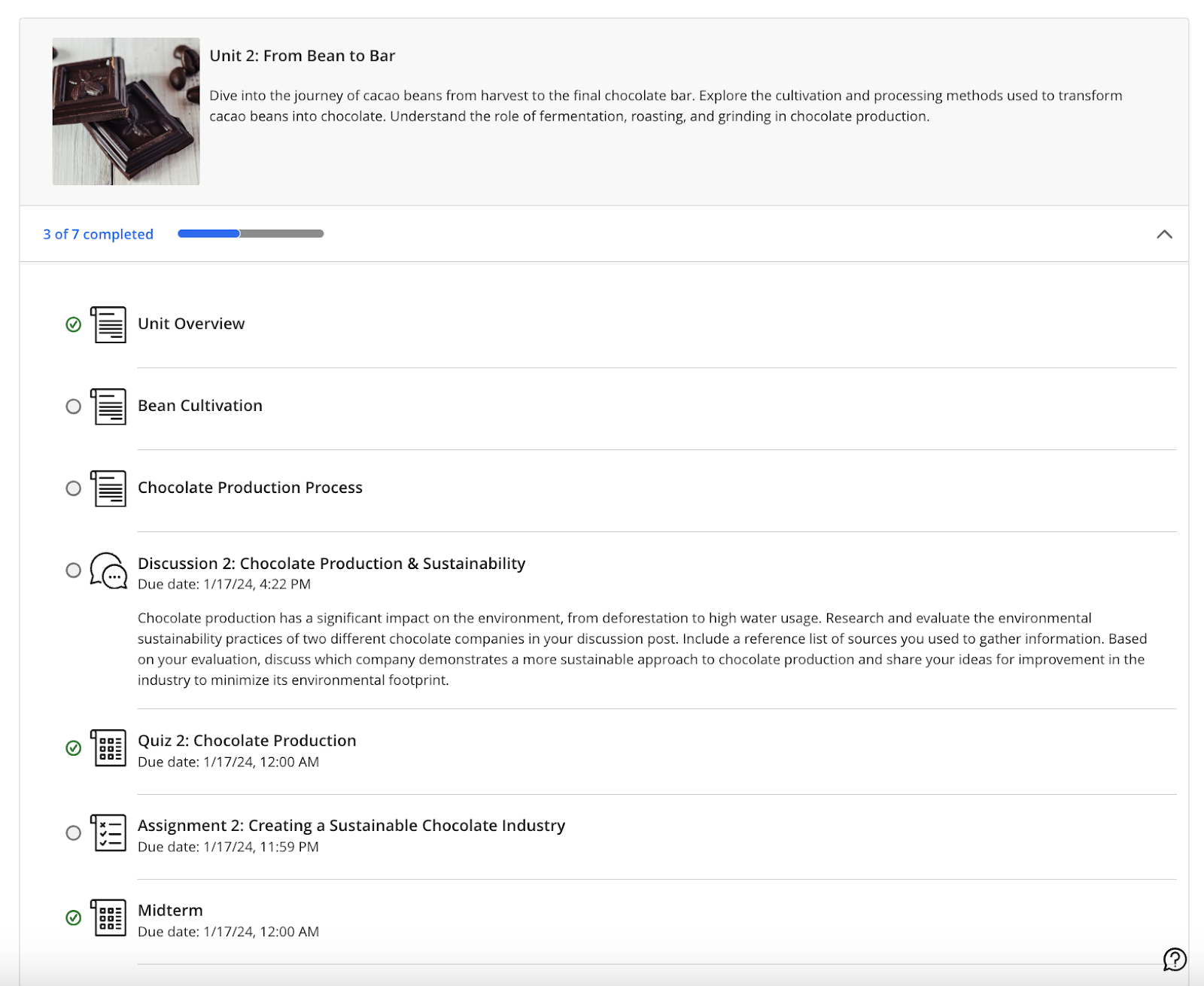
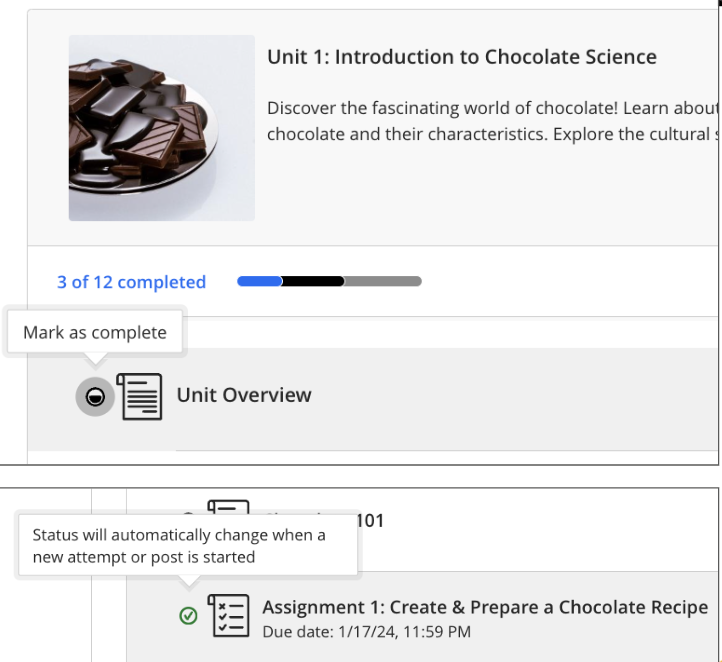
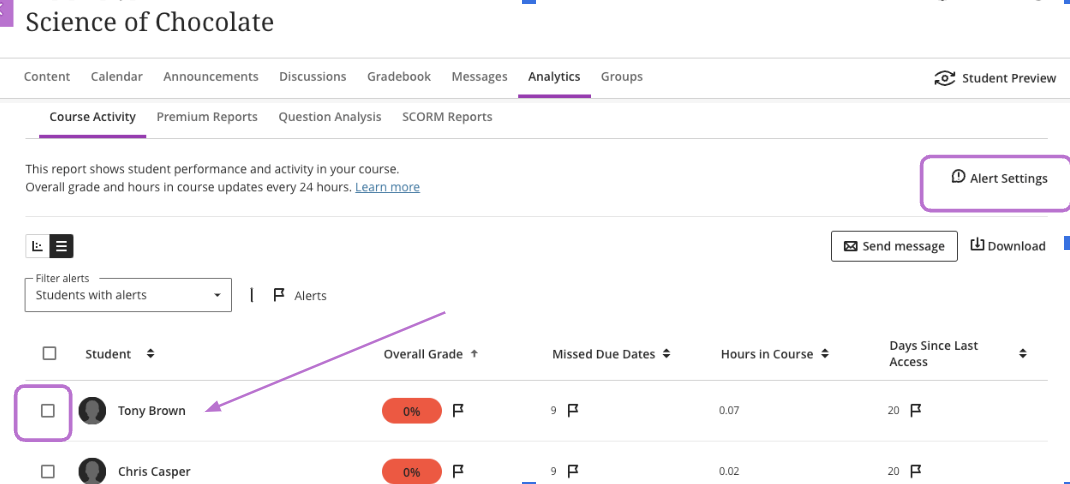
    <div class="html-content"><span><p><em><span>T</span></em><em><span>his article focuses on Ultra's progress tracking tools and strategies for student identification, outreach, and support. It follows <a href="https://my3.my.umbc.edu/groups/instructional-technology/posts/143778" rel="nofollow external" class="bo">Part 1 - </a></span></em><span><em><a href="https://my3.my.umbc.edu/groups/instructional-technology/posts/143778" rel="nofollow external" class="bo">Course Design Best Practices in Ultra</a></em></span><em><span>, which showcased features in Ultra to ensure your course is designed to optimize student learning and ensure they feel welcome and prepared. </span></em></p><p><span>As the semester enters week four, there is an opportunity to assess how students are doing in your course when it comes to participating, meeting deadlines, and completing discussions or knowledge checks. Did you know that Ultra offers a variety of </span><a href="https://umbc.atlassian.net/wiki/x/QgTVAQ" rel="nofollow external" class="bo"><span>reports and analytics</span></a><span> that benefit both instructors and students in tracking individual progress? </span></p><p><span><strong>Progress Tracking</strong></span><span> </span></p><p></p><p><span>Instructors can monitor student progress through a variety of tools including options that support tracking by content item, submission activity, and test attempt. When tracking student progress in a particular set of content, instructors can filter by student and progress status, or select students and send an individualized message or reminder. In conjunction with early academic alerts, instructors can decide when and how to reach out to students by using details and insights from Ultra’s progress reports. </span></p><p><span><strong>Student View of Progress Tracking</strong></span></p><p><span>Students can also leverage Ultra’s progress tracking capabilities to </span><a href="https://umbc.atlassian.net/wiki/x/QGHVAQ" rel="nofollow external" class="bo"><span>monitor their engagement</span></a><span> with content, assignments, and tests. This feature provides visual indicators of student progress, motivating them to stay on track. Students can also see a summary of their progress within learning modules, making it easier to manage their workload and prioritize tasks.</span></p><p></p><p><span>Instructors who have not seen what the Student View of progress tracking looks like may want to go into “Student Preview” mode once the course is open and see how this appears. Each item has a status circle to the left of the item title. An empty circle means the student has not yet accessed content; a partially filled circle indicates the item has been opened or accessed through Ally; and a green check mark appears when the item has been completed. (See image below)</span></p><p><span><span><span><img src="https://lh7-rt.googleusercontent.com/docsz/AD_4nXd_nftIktL2xT7fcxnycidqsG7ULAbx3aU6TXLBZHeUkiYHsWvkC2ImU7AmNys5S5JFQrSybbkpOh2piyrUpE2DRJOdlnV4lXQd3QhrqNQ3dv-FQkx68Gs8nO3_FFdfi0SWNVqSbWdoHB7jWhTBmyaF-aI?key=f-r3fBqFtw-haR4VqnzPwg" width="570" height="494" style="max-width: 100%; height: auto;"></span></span></span></p><p></p><p><span>While in “Student View,” instructors can see that students may mark content items “complete” after opening them. This gives students a tangible way to keep track of their progress within the course. Assigned submissions will change automatically to denote completion. (See image below)</span></p><p><span><span><span><img src="https://lh7-rt.googleusercontent.com/docsz/AD_4nXcCThxfVEnhnVj8D7ajqi2s_L1ZyFMR-g9rIRUxVqffQsbEpzcoenNC4NIvV5Q3WiafC6rs5PQKtqRilB2Df32XtDPkCFL2r_vCk9JHxeiWSyetTbN2t0BEGY7CXGgz4Xx-_WLYhc1zsc5Yks5fBvJlCA4f?key=f-r3fBqFtw-haR4VqnzPwg" width="624" height="572" style="max-width: 100%; height: auto;"></span></span></span></p><div><span><span><span><span><span><span><span><span><span><span><span><span><p><span><strong>Student Overview (Instructor View)</strong></span></p><p><span>Ultra’s </span><a href="https://help.blackboard.com/Learn/Instructor/Ultra/Interact/StudentOverview" rel="nofollow external" class="bo"><span>Student Overview</span></a><span> offers instructors a single place to access relevant information on a student and personalize outreach. Details such as when a student last accessed the course, overall grade, or any accommodations can be found in the Student Overview. </span></p><p><span>Student Overview can be accessed in multiple ways including Gradebook on the Students tab, within the course roster, via messages or discussions, or within the table view of the Course Activity Report. Instructors can also contact students through Student Overview by sending a message about grades or progress. </span></p><div><span><span><p><span><strong>Gradebook Progress &amp; Instructor Notes</strong></span></p><p><span>Progress tracking features in the Ultra gradebook offer instructors several views including a list of all assignments, a view of students and assignments, or an individual list of students. By selecting the “Progress” tab, instructors can see a list of all content items in the course and status for each item. For students who may be behind or have not opened all content in a module, instructors can select “Send Message” and reach out to a student directly. </span></p><p><span>In the student view of the Gradebook, instructors have access to a “Notes” tab. This newer feature in Ultra is a dedicated space in the course where you can take notes about students for quick reference as the semester progresses. Instructor notes are private only to you and limited only to the course. Instructor notes do NOT travel to other courses and students do not see them. </span></p><p><span><strong>Course Activity Report</strong></span></p><p><span>The </span><a href="https://help.blackboard.com/Learn/Instructor/Ultra/Performance/Course_Reports/Course_Activity_Related_to_Grades" rel="nofollow external" class="bo"><span>Course Activity Report</span></a><span> provides an overview of how a student interacts with the course over time. Instructors can observe how a student’s engagement or performance have changed on a weekly basis or over a longer period of time. In the image below, this is the list view of the report and supports instructors who want to filter students based on overall grade, missed due dates, hours spent in the course, or number of days since they last accessed. After filtering the list, instructors can send messages to students from this window and also configure alerts. </span></p><p><span><span><span><span><img src="https://lh7-rt.googleusercontent.com/docsz/AD_4nXfrnRe6jAuj9uvYcHRFaVU3wnx84ERlXsl46nKrBmTQ4Pxfq12N8NfAjulYlf0K82BH3x5QSpJ_0sxM3QAKYuKcRE_2p_P2fJNc9foEn61MWSW002FOs0NQLVbdN7KVI-6uZCH0zL95S1dUvKX9s-CzkSwE?key=f-r3fBqFtw-haR4VqnzPwg" width="624" height="283" style="max-width: 100%; height: auto;"></span></span></span></span></p><div><span>Within the Report, you can enable and customize </span><a href="https://help.blackboard.com/Learn/Instructor/Ultra/Performance/Course_Reports/Course_Activity_Related_to_Grades#AlertFlags" rel="nofollow external" class="bo"><span>student alert flags</span></a><span> to fit your teaching style. These alerts will be visible in the Course Activity Report and are related to factors such as overall grade, missed due dates, or days since a student last accessed the course. Comprehensive reports let instructors see which students have opened, started, or completed content, helping them tailor teaching strategies. </span></div><div><span>Exploring and leveraging Ultra's progress tracking tools can make identifying and intervening on behalf of students who may be struggling in the course easier and efficient for instructors. </span></div></span></span></div></span><div><span><p><span><strong>Upcoming events about progress tracking and student support: </strong></span></p><ul><li><span>October 4: </span><a href="https://my3.my.umbc.edu/groups/instructional-technology/events/132974" rel="nofollow external" class="bo"><span>Track Student Progress &amp; Elevate Learner Outreach</span></a></li><li><span>November 14: </span><a href="https://my3.my.umbc.edu/groups/doit/events/133897" rel="nofollow external" class="bo"><span>Lessons Learned Nudging Students with Personalized myUMBC Posts</span></a><span> </span></li></ul></span><span><p><span><strong>For more information</strong> on how to use Ultra’s reports and analytics for student tracking and support, check out these resources:</span></p><ul><li><a href="https://umbc.atlassian.net/wiki/x/QgTVAQ" rel="nofollow external" class="bo"><span>Reports &amp; Analytics</span></a></li><li><a href="https://help.blackboard.com/Learn/Instructor/Ultra/Performance/Course_Reports/Course_Activity_Related_to_Grades" rel="nofollow external" class="bo"><span>Course Activity Report</span></a></li><li><a href="https://help.blackboard.com/Learn/Instructor/Ultra/Performance/Course_Reports/Course_Activity_Related_to_Grades#AlertFlags" rel="nofollow external" class="bo"><span>Alert Flags</span></a><span> (within Course Activity Report)</span></li></ul><div><span><br></span></div></span></div></span></span></span></span></span></span></span></span></span></span></span></div></span></div>
]]>
</Body>
<Summary>This article focuses on Ultra's progress tracking tools and strategies for student identification, outreach, and support. It follows Part 1 - Course Design Best Practices in Ultra, which showcased...</Summary>
<Website>https://my3.my.umbc.edu/groups/instructional-technology/posts/143990</Website>
<TrackingUrl>https://beta.my.umbc.edu/api/v0/pixel/news/143990/guest@my.umbc.edu/9aef029bf3b0cd4b8fb3bcc269940df2/api/pixel</TrackingUrl>
<Tag>biro</Tag>
<Tag>fa24</Tag>
<Tag>progress-tracking</Tag>
<Group token="instructional-technology">Instructional Technology</Group>
<GroupUrl>https://beta.my.umbc.edu/groups/instructional-technology</GroupUrl>
<AvatarUrl>https://assets2-beta.my.umbc.edu/system/shared/avatars/groups/000/001/164/dec3b026b81ee6d890a8f82f75c94a2e/xsmall.png?1446126703</AvatarUrl>
<AvatarUrl size="original">https://assets1-beta.my.umbc.edu/system/shared/avatars/groups/000/001/164/dec3b026b81ee6d890a8f82f75c94a2e/original.png?1446126703</AvatarUrl>
<AvatarUrl size="xxlarge">https://assets2-beta.my.umbc.edu/system/shared/avatars/groups/000/001/164/dec3b026b81ee6d890a8f82f75c94a2e/xxlarge.png?1446126703</AvatarUrl>
<AvatarUrl size="xlarge">https://assets1-beta.my.umbc.edu/system/shared/avatars/groups/000/001/164/dec3b026b81ee6d890a8f82f75c94a2e/xlarge.png?1446126703</AvatarUrl>
<AvatarUrl size="large">https://assets1-beta.my.umbc.edu/system/shared/avatars/groups/000/001/164/dec3b026b81ee6d890a8f82f75c94a2e/large.png?1446126703</AvatarUrl>
<AvatarUrl size="medium">https://assets4-beta.my.umbc.edu/system/shared/avatars/groups/000/001/164/dec3b026b81ee6d890a8f82f75c94a2e/medium.png?1446126703</AvatarUrl>
<AvatarUrl size="small">https://assets3-beta.my.umbc.edu/system/shared/avatars/groups/000/001/164/dec3b026b81ee6d890a8f82f75c94a2e/small.png?1446126703</AvatarUrl>
<AvatarUrl size="xsmall">https://assets2-beta.my.umbc.edu/system/shared/avatars/groups/000/001/164/dec3b026b81ee6d890a8f82f75c94a2e/xsmall.png?1446126703</AvatarUrl>
<AvatarUrl size="xxsmall">https://assets3-beta.my.umbc.edu/system/shared/avatars/groups/000/001/164/dec3b026b81ee6d890a8f82f75c94a2e/xxsmall.png?1446126703</AvatarUrl>
<Sponsor>Instructional Technology</Sponsor>
<ThumbnailUrl size="xxlarge">https://assets2-beta.my.umbc.edu/system/shared/thumbnails/news/000/143/990/83999871bad97988b751868bfa22007b/xxlarge.jpg?1726599325</ThumbnailUrl>
<ThumbnailUrl size="xlarge">https://assets3-beta.my.umbc.edu/system/shared/thumbnails/news/000/143/990/83999871bad97988b751868bfa22007b/xlarge.jpg?1726599325</ThumbnailUrl>
<ThumbnailUrl size="large">https://assets2-beta.my.umbc.edu/system/shared/thumbnails/news/000/143/990/83999871bad97988b751868bfa22007b/large.jpg?1726599325</ThumbnailUrl>
<ThumbnailUrl size="medium">https://assets4-beta.my.umbc.edu/system/shared/thumbnails/news/000/143/990/83999871bad97988b751868bfa22007b/medium.jpg?1726599325</ThumbnailUrl>
<ThumbnailUrl size="small">https://assets3-beta.my.umbc.edu/system/shared/thumbnails/news/000/143/990/83999871bad97988b751868bfa22007b/small.jpg?1726599325</ThumbnailUrl>
<ThumbnailUrl size="xsmall">https://assets1-beta.my.umbc.edu/system/shared/thumbnails/news/000/143/990/83999871bad97988b751868bfa22007b/xsmall.jpg?1726599325</ThumbnailUrl>
<ThumbnailUrl size="xxsmall">https://assets3-beta.my.umbc.edu/system/shared/thumbnails/news/000/143/990/83999871bad97988b751868bfa22007b/xxsmall.jpg?1726599325</ThumbnailUrl>
<PawCount>4</PawCount>
<CommentCount>0</CommentCount>
<CommentsAllowed>true</CommentsAllowed>
<PostedAt>Mon, 23 Sep 2024 14:48:04 -0400</PostedAt>
</NewsItem>

<NewsItem contentIssues="true" id="143778" important="false" status="posted" url="https://beta.my.umbc.edu/groups/instructional-technology/posts/143778">
<Title>Effective course design helps welcome and orient students</Title>
<Tagline>Course Design Best Practices in Ultra - Part 1 of 2</Tagline>
<Body>
<![CDATA[
    <div class="html-content"><span><p><span><em><span>This article focuses on ways to leverage features in Ultra to ensure your course is designed to optimize student learning and ensure students feel welcome and prepared, especially at the start of the term. </span><span>Part 2 will feature Ultra’s progress tracking tools and effective strategies for student identification, outreach, and support</span><span>.</span></em></span></p><p><span><span>A student’s first impression of your course, and their learning opportunities throughout the course, are influenced initially by course design. A clutter-free environment helps students focus on the course and avoid confusion. In addition, students’ learning opportunities can be enhanced by using Blackboard Ultra design features to welcome and orient them within the first critical weeks of the semester and ensure they are on track and able to locate content, engage with one another, get help, and submit assignments.</span></span></p><p></p><p><span>During emergency-remote instruction in 2020, a survey of more than 500 UMBC courses taught by instructors </span><span>who completed </span><a href="https://pivot.umbc.edu/" rel="nofollow external" class="bo"><span>the PIVOT+ professional development program</span></a> <span>found</span><span> </span><a href="https://my3.my.umbc.edu/groups/instructional-technology/posts/97557" rel="nofollow external" class="bo"><span>students reported enjoying</span></a><span> taking classes that were well organized and planned. More than 85% of students agreed or strongly agreed that PIVOT+ courses flowed in a logical format. About 90% of students agreed or strongly agreed that course requirements were clear, while 83% agreed or strongly agreed that assignment instructions were clear. </span></p><p><span><strong>Using the ‘Start Here’ Module </strong></span></p><p></p><p><span>Every Blackboard course shell at UMBC is created with a “Start Here” module already in place. Within this module are placeholders for the syllabus, instructor information, and eLearning and academic resources. This module can also contain critical orientation information to let students know what to expect in your course, how to navigate, help set the tone for the course, and provide opportunities to establish teaching and social presence (Quality Matters, 2024; Wengier, 2022). </span></p><p><span><strong>Welcoming and Orienting Students</strong></span></p><p><span></span></p><p><span>When it comes to designing the welcome experience for learners, Quality Matters </span><a href="https://docs.google.com/document/d/1NFZKsC7c7t49d2TrCu7W_idIwv-TiXpy-RHWCmDz4Pk/edit?usp=sharing" rel="nofollow external" class="bo"><span>General Standard 1: Course Overview &amp; Introduction</span></a><span> (HE Rubric, 7th ed.), offers researched-backed effective practices for orienting students to the course and instructor expectations for communication, feedback, grading, and use of Blackboard. </span></p><div><span><span><span><span><span><span><div><img src="https://my3.my.umbc.edu/groups/instructional-technology/posts/143778/attachments/53236" style="max-width: 100%; height: auto;"></div><div><span><p><span>In the </span><a href="https://my3.my.umbc.edu/groups/instructional-technology/posts/139499" rel="nofollow external" class="bo"><span>QM-certified course</span></a><span> AGNG 355, instructor Louise Murray (pictured above) includes a pre-recorded, narrated, and captioned PowerPoint to provide students with a visual tour of the course and communication expectations. This allows students to see and hear the instructor and complements the text Murray provides about email, phone, office hours, and response times. </span></p><div><span><span><p><span>There are many ways to welcome and introduce students to your course, including steps you can take before the semester even starts, such as sending a welcome email or announcement. These messages can stay available for students through the duration of the course. </span></p><p></p><p><span>Some instructors send a pre-survey to students before the semester starts to determine prior knowledge or experience. In addition, you may want to prepare a Frequently Asked Questions (FAQs) resource to address the most common student questions, share tips on time management, and remind students how to access technology and resources.</span></p><p><span>Consider that there are effective options to consider for welcoming and orienting students that create learning opportunities at the beginning of the course including:</span></p><ul><li><span>Accessing a welcome video or course tour (pre-recorded)</span></li><li><span>Reading an instructor’s introduction</span></li><li><span>Introducing themselves in a Discussion forum or VoiceThread </span></li><li><span>Using the “Ask the Professor” discussion forum to ask clarifying questions</span></li><li><span>Completing a syllabus quiz</span></li></ul><div><span><img src="https://my3.my.umbc.edu/groups/instructional-technology/posts/143778/attachments/53237" style="max-width: 100%; height: auto;"></span></div><div><span><span><p><span>In the Quality Matters certified course SPAN 201 (pictured above) instructor Milvia Hernandez pre-records a brief video that complements text in Blackboard. More importantly, students can also see and hear Hernandez as she welcomes them in both Spanish and English and explains the course structure and cadence. </span></p><p><span><strong>About Quality Matters</strong></span></p><p><span>Grounded in evidence-based practice research, peer review, and collegiality, </span><a href="https://www.qualitymatters.org/why-quality-matters/process" rel="nofollow external" class="bo"><span>Quality Matters (QM)</span></a><span> is used by more than 40,000 educators and instructional designers worldwide to strengthen online and blended course design. </span></p><p><span>At UMBC, <a href="https://my3.my.umbc.edu/groups/instructional-technology/posts/139499" rel="nofollow external" class="bo">19 courses</a> have earned QM certification for online course design and represent more than half of the QM-certified courses in the <a href="https://www.qmprogram.org/qmresources/coursesearch/?program=2&amp;CourseNo=&amp;courseName=&amp;courseSubject=&amp;recognizedDateFrom=&amp;recognizedDateTo=&amp;Institutions=250,597,916,2285,2704,2776,2838,2842,2839,2840&amp;searchcourse=yes" rel="nofollow external" class="bo">University System of Maryland</a>. </span></p><p><span><strong>References:</strong></span></p><ul><li><span>Quality Matters. (2024, September 9). </span><a href="https://www.qualitymatters.org/qa-resources/rubric-standards" rel="nofollow external" class="bo"><span>QM Rubrics &amp; Standards</span></a><span>. </span></li><li><span>Wengier, S. (2022). </span><span>The start here module: Creating a first day impression in an online language class</span><span> (</span><a href="https://eric.ed.gov/?q=EJ1346021&amp;id=EJ1346021" rel="nofollow external" class="bo"><span>EJ1346021</span></a><span>). <br></span></li></ul><div>By <a href="https://doit.umbc.edu/itnm/staff/biro/" rel="nofollow external" class="bo">Susan Biro</a> and <a href="https://doit.umbc.edu/itnm/staff/ariev/" rel="nofollow external" class="bo">Peter Ariev</a></div></span></span></div></span></span></div></span></div></span></span></span></span></span></span></div></span></div>
]]>
</Body>
<Summary>This article focuses on ways to leverage features in Ultra to ensure your course is designed to optimize student learning and ensure students feel welcome and prepared, especially at the start of...</Summary>
<Website>https://my3.my.umbc.edu/groups/instructional-technology/posts/143778</Website>
<AttachmentKind>Image</AttachmentKind>
<AttachmentUrl>https://assets3-beta.my.umbc.edu/system/shared/attachments/688933573499710662b1b40bd1c431bb/69eb457b/news/000/143/778/742beee20e6d828dada4a2523e75df59/Louise_Murray video-welcome.png?1725993019</AttachmentUrl>
<Attachments>
<Attachment kind="Image" url="https://beta.my.umbc.edu/groups/instructional-technology/posts/143778/attachments/53236"></Attachment>
<Attachment kind="Image" url="https://beta.my.umbc.edu/groups/instructional-technology/posts/143778/attachments/53237"></Attachment>
</Attachments>
<TrackingUrl>https://beta.my.umbc.edu/api/v0/pixel/news/143778/guest@my.umbc.edu/6913629cbca88b010824478e8c314542/api/pixel</TrackingUrl>
<Tag>ariev</Tag>
<Tag>biro</Tag>
<Tag>course-design</Tag>
<Tag>fa24</Tag>
<Tag>online-learners</Tag>
<Tag>pivot</Tag>
<Tag>qm</Tag>
<Tag>qm-standard-1</Tag>
<Tag>quality-matters</Tag>
<Tag>ultra</Tag>
<Group token="instructional-technology">Instructional Technology</Group>
<GroupUrl>https://beta.my.umbc.edu/groups/instructional-technology</GroupUrl>
<AvatarUrl>https://assets2-beta.my.umbc.edu/system/shared/avatars/groups/000/001/164/dec3b026b81ee6d890a8f82f75c94a2e/xsmall.png?1446126703</AvatarUrl>
<AvatarUrl size="original">https://assets1-beta.my.umbc.edu/system/shared/avatars/groups/000/001/164/dec3b026b81ee6d890a8f82f75c94a2e/original.png?1446126703</AvatarUrl>
<AvatarUrl size="xxlarge">https://assets2-beta.my.umbc.edu/system/shared/avatars/groups/000/001/164/dec3b026b81ee6d890a8f82f75c94a2e/xxlarge.png?1446126703</AvatarUrl>
<AvatarUrl size="xlarge">https://assets1-beta.my.umbc.edu/system/shared/avatars/groups/000/001/164/dec3b026b81ee6d890a8f82f75c94a2e/xlarge.png?1446126703</AvatarUrl>
<AvatarUrl size="large">https://assets1-beta.my.umbc.edu/system/shared/avatars/groups/000/001/164/dec3b026b81ee6d890a8f82f75c94a2e/large.png?1446126703</AvatarUrl>
<AvatarUrl size="medium">https://assets4-beta.my.umbc.edu/system/shared/avatars/groups/000/001/164/dec3b026b81ee6d890a8f82f75c94a2e/medium.png?1446126703</AvatarUrl>
<AvatarUrl size="small">https://assets3-beta.my.umbc.edu/system/shared/avatars/groups/000/001/164/dec3b026b81ee6d890a8f82f75c94a2e/small.png?1446126703</AvatarUrl>
<AvatarUrl size="xsmall">https://assets2-beta.my.umbc.edu/system/shared/avatars/groups/000/001/164/dec3b026b81ee6d890a8f82f75c94a2e/xsmall.png?1446126703</AvatarUrl>
<AvatarUrl size="xxsmall">https://assets3-beta.my.umbc.edu/system/shared/avatars/groups/000/001/164/dec3b026b81ee6d890a8f82f75c94a2e/xxsmall.png?1446126703</AvatarUrl>
<Sponsor>Instructional Technology</Sponsor>
<ThumbnailUrl size="xxlarge">https://assets4-beta.my.umbc.edu/system/shared/thumbnails/news/000/143/778/0b56ac3144145da43c7c77fbf3b5d6b1/xxlarge.jpg?1725992788</ThumbnailUrl>
<ThumbnailUrl size="xlarge">https://assets4-beta.my.umbc.edu/system/shared/thumbnails/news/000/143/778/0b56ac3144145da43c7c77fbf3b5d6b1/xlarge.jpg?1725992788</ThumbnailUrl>
<ThumbnailUrl size="large">https://assets3-beta.my.umbc.edu/system/shared/thumbnails/news/000/143/778/0b56ac3144145da43c7c77fbf3b5d6b1/large.jpg?1725992788</ThumbnailUrl>
<ThumbnailUrl size="medium">https://assets2-beta.my.umbc.edu/system/shared/thumbnails/news/000/143/778/0b56ac3144145da43c7c77fbf3b5d6b1/medium.jpg?1725992788</ThumbnailUrl>
<ThumbnailUrl size="small">https://assets2-beta.my.umbc.edu/system/shared/thumbnails/news/000/143/778/0b56ac3144145da43c7c77fbf3b5d6b1/small.jpg?1725992788</ThumbnailUrl>
<ThumbnailUrl size="xsmall">https://assets1-beta.my.umbc.edu/system/shared/thumbnails/news/000/143/778/0b56ac3144145da43c7c77fbf3b5d6b1/xsmall.jpg?1725992788</ThumbnailUrl>
<ThumbnailUrl size="xxsmall">https://assets2-beta.my.umbc.edu/system/shared/thumbnails/news/000/143/778/0b56ac3144145da43c7c77fbf3b5d6b1/xxsmall.jpg?1725992788</ThumbnailUrl>
<PawCount>3</PawCount>
<CommentCount>0</CommentCount>
<CommentsAllowed>true</CommentsAllowed>
<PostedAt>Wed, 11 Sep 2024 16:37:33 -0400</PostedAt>
<EditAt>Thu, 12 Sep 2024 07:51:17 -0400</EditAt>
</NewsItem>

</News>