<?xml version="1.0"?>
<News hasArchived="false" page="1" pageCount="1" pageSize="10" timestamp="Thu, 23 Apr 2026 21:37:35 -0400" url="https://beta.my.umbc.edu/groups/instructional-technology/posts.xml?tag=course-navigation">
<NewsItem contentIssues="false" id="158023" important="false" status="posted" url="https://beta.my.umbc.edu/groups/instructional-technology/posts/158023">
<Title>Set Multiple Due Dates for Discussions &amp; Define Assignment Types in April Ultra Update</Title>
<Tagline>New tools for clarity, consistency, and control in your Ultr</Tagline>
<Body>
<![CDATA[
    <div class="html-content"><p>Have you ever wanted students to see exactly what's expected of them in a discussion, without having to navigate back to the assignment details to check? Or needed to recognize that one group member's contribution deserved a different grade than the rest of the team? The April Ultra update delivers a focused set of improvements across discussions, assignments, grading, and AI-supported activities, giving instructors more precision over course structure and students more transparency throughout their work.</p>
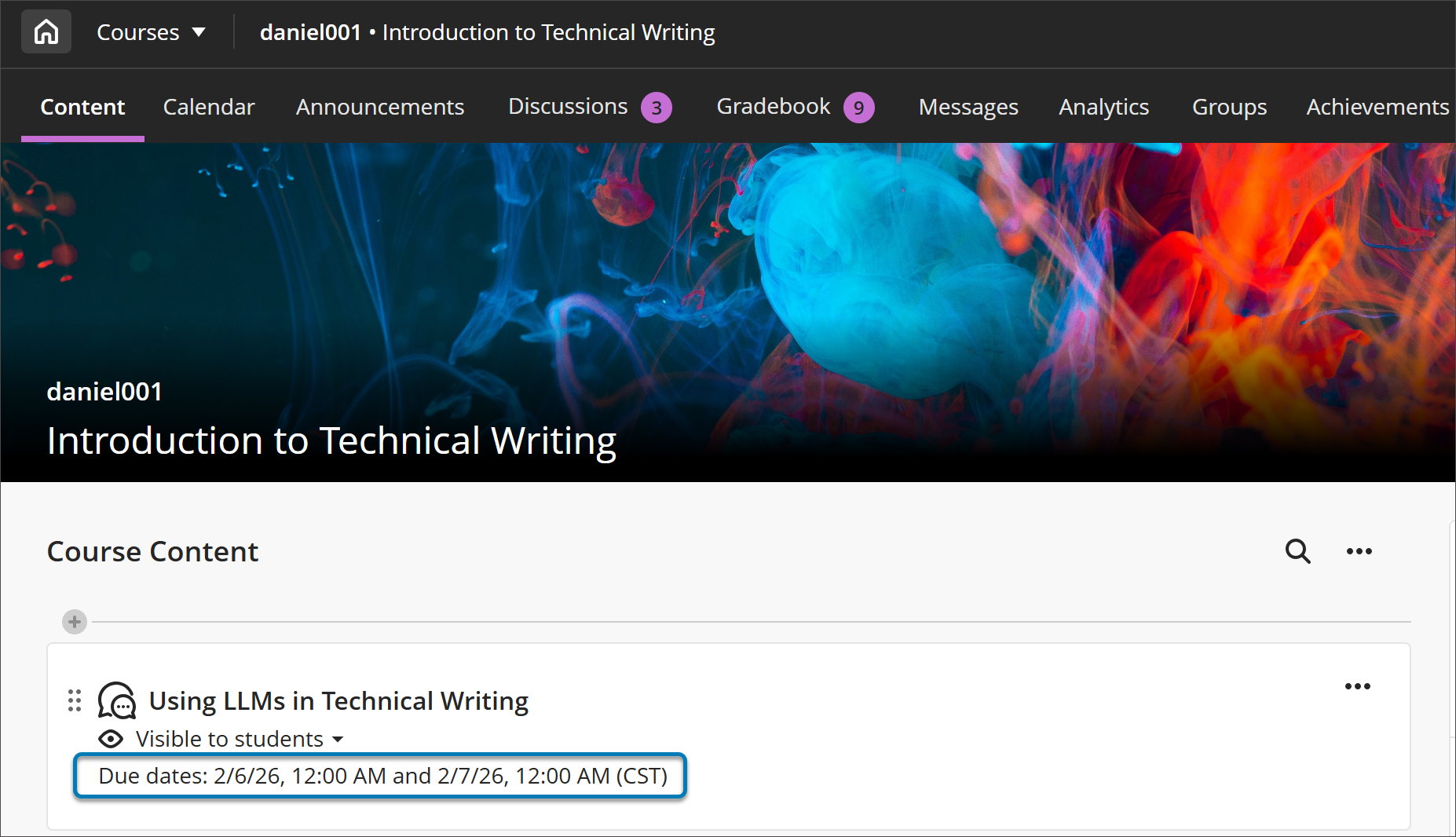
    <p>Building on <a href="https://my3.my.umbc.edu/groups/instructional-technology/posts/154971" rel="nofollow external" class="bo">December's participation requirements feature</a>, instructors who create discussions with <strong>multiple due dates </strong>will now see both sets of requirements displayed consistently across the Course Content page, Discussion pages, the Gradebook (in both student and instructor views), and the instructor's Discussion analysis panel. Students no longer need to navigate back to a discussion to recall what's expected of them -- deadlines and requirements follow them through the workflow. This is especially useful in scaffolded discussions and different stages of engagement carry distinct expectations.</p>
    <p><strong><img src="https://my3.my.umbc.edu/groups/instructional-technology/posts/158023/attachments/62631" alt="Image 1: On the Course Content page, both due dates and participation requirements are displayed. For all entry points for Discussions, both dates and requirements are displayed." style="max-width: 100%; height: auto;"></strong></p>
    <p><em>Image 1: On the Course Content page, both due dates and participation requirements are displayed. For all entry points for Discussions, both dates and requirements are displayed.</em></p>
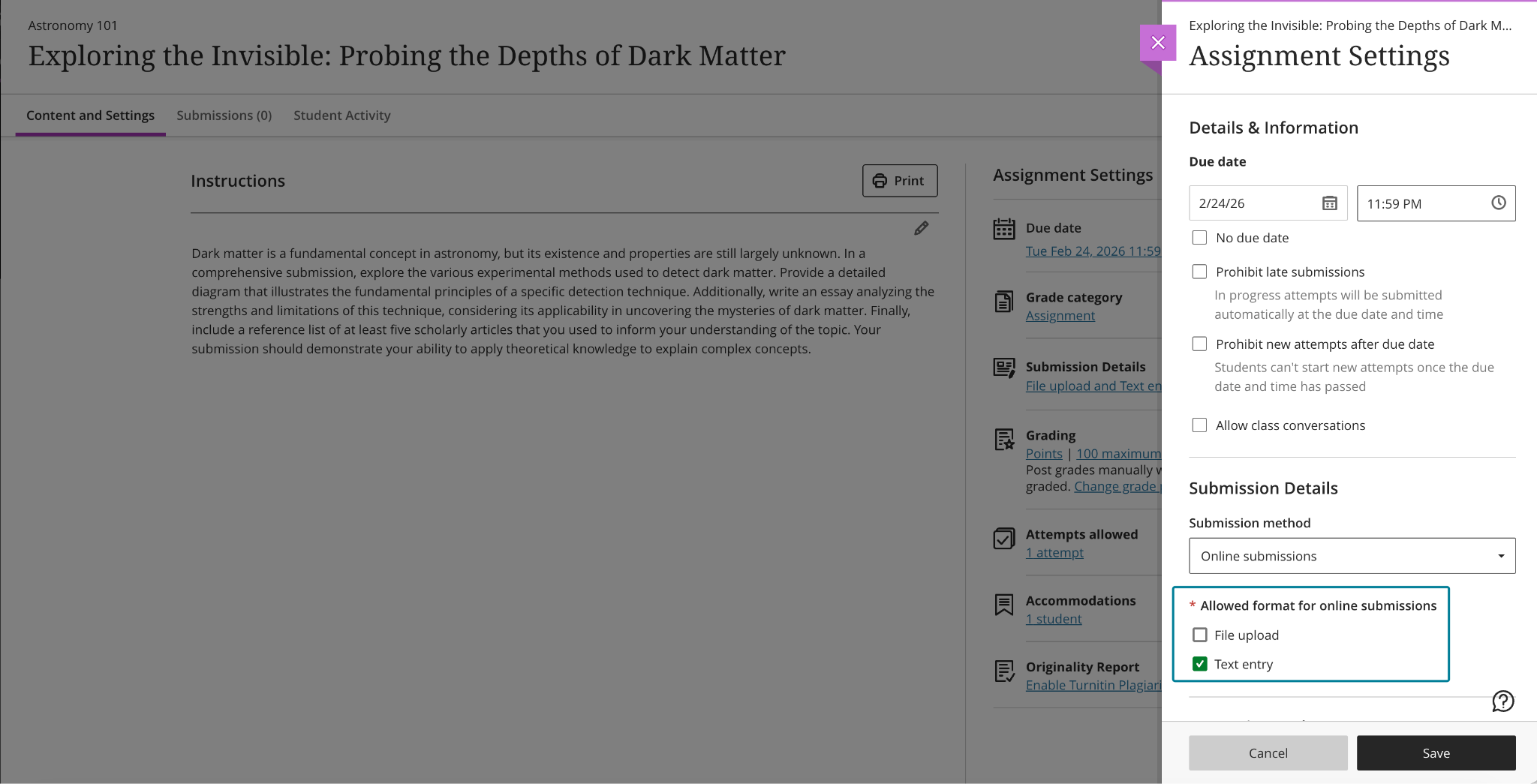
    <p>Instructors can now <strong>specify the expected submission type </strong>when creating or editing an assignment, choosing from File Upload or Text Entry (or both). When a submission type is selected, students see a streamlined workflow tailored to that format, which reduces confusion about how to submit and cuts down on the "wait, how do I turn this in?" questions at the start of an assignment. The selected type is visible in assignment settings and in student-facing details, and instructors can adjust the setting until students have begun submitting attempts, keeping flexibility intact during course setup without creating ambiguity once work is underway. In a future update to the assignment settings, instructors will be able to specify file types (e.g., Word document or PDF).</p>
    <p><strong><img src="https://my3.my.umbc.edu/groups/instructional-technology/posts/158023/attachments/62632" alt="Image 2: Instructors can choose one or more submission types when configuring an assignment." style="max-width: 100%; height: auto;"></strong></p>
    <p><em>Image 2: Instructors can choose one or more submission types when configuring an assignment.</em></p>
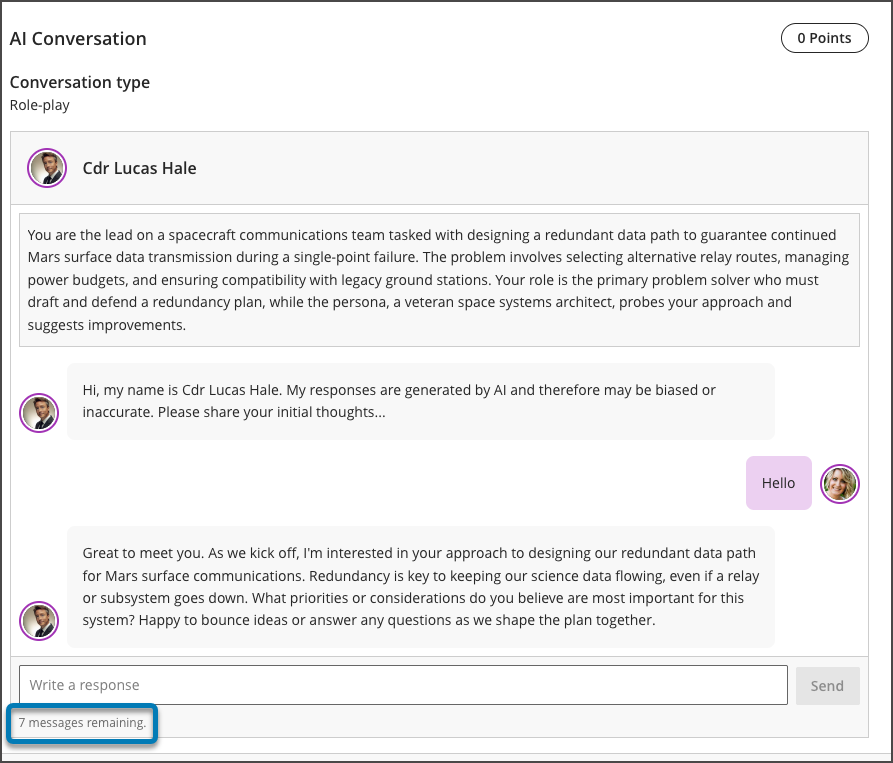
    <p>Instructors using AI-supported conversations can now <strong>set message limits </strong>(e.g., 8 messages) to guide the length of these interactions. These controls help students understand when a conversation is meant to conclude, keeping exchanges focused on the intended learning activity rather than drifting into open-ended dialogue. For instructors who rely on AI conversations to scaffold critical thinking or formative reflection, message limits offer a lightweight but meaningful way to design interactions with a clearer beginning, middle, and end.</p>
    <p><strong><img src="https://my3.my.umbc.edu/groups/instructional-technology/posts/158023/attachments/62633" alt="Image 3: Message limit settings for an AI conversation" style="max-width: 100%; height: auto;"></strong></p>
    <p><em>Image 3: Message limit settings for an AI conversation</em></p>
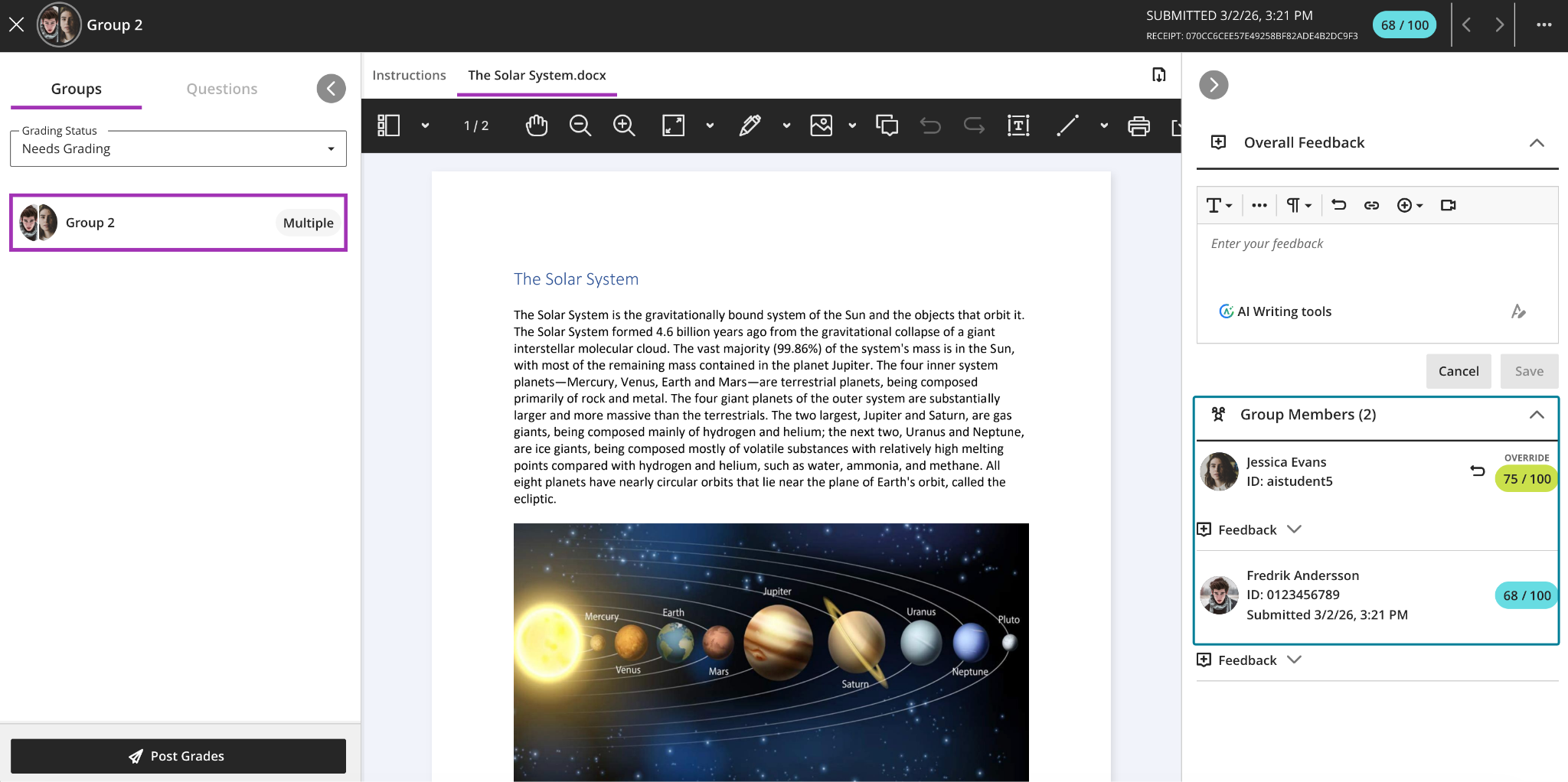
    <p>Finally, instructors grading group work can now <strong>override a group attempt score for individual group members </strong>directly from the grading interface. When grades differ across group members, the interface clearly indicates this, and adjustments can be removed at any time by restoring a student's grade to match the group score. This gives instructors the flexibility to acknowledge uneven contribution or effort within a team without having to build workarounds outside the gradebook — a long-requested quality-of-life improvement for courses that rely heavily on collaborative assessments.</p>
    <p><strong><img src="https://my3.my.umbc.edu/groups/instructional-technology/posts/158023/attachments/62634" alt="Image 4: Instructors can adjust grades for individual students within a group submission." style="max-width: 100%; height: auto;"></strong></p>
    <p><em>Image 4: Instructors can adjust grades for individual students within a group submission.</em></p>
    <p><strong>Additional updates for April include:</strong></p>
    <ul>
    <li>
    <strong>Announcement emails now display images</strong>, giving recipients a richer preview of content directly in their inbox. This improvement is particularly useful for visual-heavy announcements where the image itself is part of the message.</li>
    <li>The <a href="https://help.anthology.com/blackboard/instructor/en/interact-with-students/discussions/view-discussion-performance-and-analytics.html#types-of-discussion-analysis-metrics--substantive-posts" rel="nofollow external" class="bo">Discussion analysis page</a>will label student posts and replies as <strong>Substantive Content and Non-substantive Content</strong>, making it easier to scan discussion quality at a glance, especially in large courses or discussions with high post volumes.</li>
    <li>Student names in <strong>Flexible Grading </strong>are now formatted as Surname, First Name by default, matching the default sort order and making it easier to locate students quickly. When sorting by First Name (ascending or descending), names display as First Name Surname.</li>
    <li>Based on instructor feedback, Blackboard made several <strong>refinements to multiple-choice and multiple-answer questions</strong>: the default number of selectable answer options for multiple-choice questions is now 1 (down from 4); instructors can now change the number of answer options a student may select when creating or editing a question; and alphabetical labels (A, B, C, D) have been restored to answer choices.</li>
    <li>The file size limit for SafeAssign DirectSubmit submissions has been raised to 25 MB, supporting larger documents that include images, tables, and complex formatting.</li>
    <li>When a course is copied, restored, or imported, any automations in that course will carry over as well. Copied automations are always inactive by default and must be reviewed and activated in the destination course before they will be sent.</li>
    </ul>
    <p><strong>When you can expect the update</strong></p>
    <p>Faculty should see the latest updates in their Ultra courses around April 2-3, 2026. The next update to our Ultra test environment will take place on April 14, 2026]; release notes are posted to the <a href="https://wiki.umbc.edu/x/LohnB" rel="nofollow external" class="bo">What's New in Ultra</a> page. Faculty who are interested in test driving new features before they are released to production should <a href="https://my.umbc.edu/go/request-help" rel="nofollow external" class="bo">open an RT ticket</a> to request early access. Please <a href="https://umbc.edu/go/ultra" rel="nofollow external" class="bo">watch the FAQs</a>, including the <a href="https://wiki.umbc.edu/x/LohnB" rel="nofollow external" class="bo">What's New with Ultra page</a>, and myUMBC for additional information about Ultra.</p>
    <p><strong>Connect with Instructional Technology</strong></p>
    <p>As always, if you have any questions about teaching, learning, and technology at UMBC, please consider the following options:</p>
    <ul>
    <li>
    <a href="http://www.umbc.edu/faq" rel="nofollow external" class="bo">Check our extensive FAQ collection</a> 
    <ul>
    <li>
    <a href="https://wiki.umbc.edu/x/LohnB" rel="nofollow external" class="bo">What's new in Ultra?</a> | <a href="https://wiki.umbc.edu/x/bwrSAQ" rel="nofollow external" class="bo">Known Issues</a> </li>
    </ul>
    </li>
    <li><a href="http://my.umbc.edu/go/request-help" rel="nofollow external" class="bo">Open a ticket via RT</a></li>
    <li>Follow the <a href="http://my.umbc.edu/groups/instructional-technology" rel="nofollow external" class="bo">Instructional Technology</a> &amp; <a href="http://my.umbc.edu/groups/doit" rel="nofollow external" class="bo">DoIT</a> myUMBC groups</li>
    <li>
    <a href="http://doit.umbc.edu/itnm/staff/" rel="nofollow external" class="bo">Request a consult</a> with <a href="http://doit.umbc.edu/itnm/staff" rel="nofollow external" class="bo">instructional technology staff</a>
    </li>
    </ul>
    <p><em>Thumbnail-image: New to Ultra [decorative]</em></p></div>
]]>
</Body>
<Summary>Have you ever wanted students to see exactly what's expected of them in a discussion, without having to navigate back to the assignment details to check? Or needed to recognize that one group...</Summary>
<Website>https://my3.my.umbc.edu/groups/instructional-technology/posts/155530</Website>
<AttachmentKind>Inline Image</AttachmentKind>
<AttachmentUrl>https://assets1-beta.my.umbc.edu/system/shared/attachments/4baf590fb985b3dfa27956239b740ec2/69eac95f/news/000/158/023/0ceb7c1f67445ac41abc09af58114e5c/blobid0.png?1774964242</AttachmentUrl>
<Attachments>
<Attachment kind="Inline Image" url="https://beta.my.umbc.edu/groups/instructional-technology/posts/158023/attachments/62631"></Attachment>
<Attachment kind="Inline Image" url="https://beta.my.umbc.edu/groups/instructional-technology/posts/158023/attachments/62632"></Attachment>
<Attachment kind="Inline Image" url="https://beta.my.umbc.edu/groups/instructional-technology/posts/158023/attachments/62633"></Attachment>
<Attachment kind="Inline Image" url="https://beta.my.umbc.edu/groups/instructional-technology/posts/158023/attachments/62634"></Attachment>
</Attachments>
<TrackingUrl>https://beta.my.umbc.edu/api/v0/pixel/news/158023/guest@my.umbc.edu/f55a9ea50a145baaa7245ea4713df585/api/pixel</TrackingUrl>
<Tag>assessments</Tag>
<Tag>blackboard</Tag>
<Tag>course-navigation</Tag>
<Tag>ultra-docs</Tag>
<Tag>ultra-experience</Tag>
<Tag>ultra-update</Tag>
<Group token="instructional-technology">Instructional Technology</Group>
<GroupUrl>https://beta.my.umbc.edu/groups/instructional-technology</GroupUrl>
<AvatarUrl>https://assets2-beta.my.umbc.edu/system/shared/avatars/groups/000/001/164/dec3b026b81ee6d890a8f82f75c94a2e/xsmall.png?1446126703</AvatarUrl>
<AvatarUrl size="original">https://assets1-beta.my.umbc.edu/system/shared/avatars/groups/000/001/164/dec3b026b81ee6d890a8f82f75c94a2e/original.png?1446126703</AvatarUrl>
<AvatarUrl size="xxlarge">https://assets2-beta.my.umbc.edu/system/shared/avatars/groups/000/001/164/dec3b026b81ee6d890a8f82f75c94a2e/xxlarge.png?1446126703</AvatarUrl>
<AvatarUrl size="xlarge">https://assets1-beta.my.umbc.edu/system/shared/avatars/groups/000/001/164/dec3b026b81ee6d890a8f82f75c94a2e/xlarge.png?1446126703</AvatarUrl>
<AvatarUrl size="large">https://assets1-beta.my.umbc.edu/system/shared/avatars/groups/000/001/164/dec3b026b81ee6d890a8f82f75c94a2e/large.png?1446126703</AvatarUrl>
<AvatarUrl size="medium">https://assets4-beta.my.umbc.edu/system/shared/avatars/groups/000/001/164/dec3b026b81ee6d890a8f82f75c94a2e/medium.png?1446126703</AvatarUrl>
<AvatarUrl size="small">https://assets3-beta.my.umbc.edu/system/shared/avatars/groups/000/001/164/dec3b026b81ee6d890a8f82f75c94a2e/small.png?1446126703</AvatarUrl>
<AvatarUrl size="xsmall">https://assets2-beta.my.umbc.edu/system/shared/avatars/groups/000/001/164/dec3b026b81ee6d890a8f82f75c94a2e/xsmall.png?1446126703</AvatarUrl>
<AvatarUrl size="xxsmall">https://assets3-beta.my.umbc.edu/system/shared/avatars/groups/000/001/164/dec3b026b81ee6d890a8f82f75c94a2e/xxsmall.png?1446126703</AvatarUrl>
<Sponsor>Instructional Technology</Sponsor>
<ThumbnailUrl size="xxlarge">https://assets2-beta.my.umbc.edu/system/shared/thumbnails/news/000/158/023/1fc295ba00faa42cac2b4f387af7ff3a/xxlarge.jpg?1774964135</ThumbnailUrl>
<ThumbnailUrl size="xlarge">https://assets2-beta.my.umbc.edu/system/shared/thumbnails/news/000/158/023/1fc295ba00faa42cac2b4f387af7ff3a/xlarge.jpg?1774964135</ThumbnailUrl>
<ThumbnailUrl size="large">https://assets3-beta.my.umbc.edu/system/shared/thumbnails/news/000/158/023/1fc295ba00faa42cac2b4f387af7ff3a/large.jpg?1774964135</ThumbnailUrl>
<ThumbnailUrl size="medium">https://assets3-beta.my.umbc.edu/system/shared/thumbnails/news/000/158/023/1fc295ba00faa42cac2b4f387af7ff3a/medium.jpg?1774964135</ThumbnailUrl>
<ThumbnailUrl size="small">https://assets4-beta.my.umbc.edu/system/shared/thumbnails/news/000/158/023/1fc295ba00faa42cac2b4f387af7ff3a/small.jpg?1774964135</ThumbnailUrl>
<ThumbnailUrl size="xsmall">https://assets3-beta.my.umbc.edu/system/shared/thumbnails/news/000/158/023/1fc295ba00faa42cac2b4f387af7ff3a/xsmall.jpg?1774964135</ThumbnailUrl>
<ThumbnailUrl size="xxsmall">https://assets4-beta.my.umbc.edu/system/shared/thumbnails/news/000/158/023/1fc295ba00faa42cac2b4f387af7ff3a/xxsmall.jpg?1774964135</ThumbnailUrl>
<ThumbnailAltText>Black and white robot dog running with the words "New to Ultra" written on  light turquoise background</ThumbnailAltText>
<PawCount>1</PawCount>
<CommentCount>0</CommentCount>
<CommentsAllowed>true</CommentsAllowed>
<PostedAt>Fri, 03 Apr 2026 08:20:36 -0400</PostedAt>
</NewsItem>

<NewsItem contentIssues="false" id="155530" important="false" status="posted" url="https://beta.my.umbc.edu/groups/instructional-technology/posts/155530">
<Title>Simplified Course Navigation and Supercharged Test Setup with the January Ultra Release</Title>
<Tagline>Redesigned course layout and time-saving test tools</Tagline>
<Body>
<![CDATA[
    <div class="html-content"><div><p>In January, UMBC faculty and students will experience <a href="https://my3.my.umbc.edu/groups/instructional-technology/posts/155201" rel="nofollow external" class="bo">a redesigned course navigation in Ultra</a> that makes key areas easier to access and understand. The updated layout brings a full-width header with clearer course branding and improved use of screen space on desktop and mobile. </p><p>The <strong>new course navigation</strong> provides an update header, modernized banner layout, and Home button that returns users to the Blackboard landing page (rather than the courses page). You'll still have access to your Courses by using the snazzy Course Switcher, which provides shortcuts to the four most recently accessed courses, or you can choose View All to return to the Courses page again. Learn more about these improvements <a href="https://my3.my.umbc.edu/groups/instructional-technology/posts/155201" rel="nofollow external" class="bo">in our overview article</a>. </p><img src="https://help.blackboard.com/sites/default/files/styles/rich_text_large/public/images/2025-12/blackboard_instructor_Course-full-screen.png.webp?itok=LZj568g7" alt="Image 1: The refreshed user interface in courses includes full-screen course pages and improvements to enhance the amount of screen space for users to engage with their course" style="max-width: 100%; height: auto;"></div><div><p><em>Image 1: The refreshed user interface in courses includes full-screen course pages and improvements to enhance the amount of screen space for users to engage with their course.</em></p></div><div><div>The <strong>Ultra Document layout editor</strong> now includes a streamlined block editing menu, reorganized by type of action: Change row, Change size, and Change position. When selecting the edit icon on a block, instructors are guided through structured options rather than hunting through scattered icons. This improved layout reduces visual clutter and makes it easier to design responsive content layouts that look great on all devices. Whether you’re building an infographic-style document or organizing media and text in columns, these updates make layout control more intuitive and less time-consuming.</div><div><img src="https://help.blackboard.com/sites/default/files/styles/rich_text_large/public/images/2025-12/block-styling-image2_0.png.webp?itok=79RW9tFk" alt="Image 2: The restructured document block styling options" style="max-width: 100%; height: auto;"></div><div><em>Image 2: The restructured document block styling options</em></div><div><br></div><div><strong>True/False questions</strong> now support expanded labeling options, allowing instructors to display answer choices as True/False, Yes/No, Right/Wrong, or Agree/Disagree. These customizable labels make it easier to align assessments with your course content and instructional tone, whether you’re gauging conceptual understanding, ethical judgments, or student opinions in a low-stakes setting.</div><p><img src="https://help.blackboard.com/sites/default/files/styles/rich_text_large/public/images/2025-12/ultra_instructor_binaryquestionoptions.png.webp?itok=d9Mx_PZW" alt="Image 3: True/false questions now include additional options." style="max-width: 100%; height: auto;"></p></div><div><p><em>Image 3: True/false questions now include additional options.</em></p><p>Additional updates for January include:</p><ul><li><span>The default number of multiple choice answer options is now four (instead of three), helping speed up question creation.</span></li><li><span>Instructors can now limit how many answer choices students can select for a multiple choice question, ideal for “select all that apply” formats.</span></li><li><span>Ultra has significantly improved test loading times. For example, a 200-question test now loads in about 5 seconds (down from ~25), making large-format assessments more manageable.</span></li><li><span>Instructors now have access to an automation activity log, which tracks when each automation was triggered, which student it applied to, and which content item was involved, providing transparency and accountability for automated course messaging.</span></li></ul><p><strong>When you can expect the update</strong></p><p>Faculty should see the latest updates in their Ultra courses around January 8-9, 2026. The next update to our Ultra test environment will take place on <span>January 13, 2026</span><span>. Faculty who are interested in test driving new features before they are released to production should </span><a href="https://my3.my.umbc.edu/groups/instructional-technology/posts/149574/15848/727292cce6c6665b1fcf69032b12e0d6/web/link?link=http%3A%2F%2Fmy.umbc.edu%2Fgo%2Frequest-help" rel="nofollow external" class="bo">open an RT ticket</a><span> to request early access. Please </span><a href="https://my3.my.umbc.edu/groups/instructional-technology/posts/149574/15848/1a55d761c534b5d9d77045fac42ec979/web/link?link=http%3A%2F%2Fumbc.edu%2Fgo%2Fultra" rel="nofollow external" class="bo">watch the FAQs</a><span>, including </span><a href="https://my3.my.umbc.edu/groups/instructional-technology/posts/149574/15848/782c435b983b9add1c5ec4e5d955e60f/web/link?link=https%3A%2F%2Fwiki.umbc.edu%2Fx%2FLohnB" rel="nofollow external" class="bo">the What's New with Ultra page</a><span>, and myUMBC for additional information about Ultra. <strong>Join our <a href="https://my3.my.umbc.edu/groups/instructional-technology/events/148168" rel="nofollow external" class="bo">What's New in Ultra for Teaching &amp; Learning</a> on January 13, 2026, to catch up on the latest updates.</strong></span></p><div><div><span><strong>Connect with Instructional Technology</strong></span></div><div><span>As always, if you have any questions about teaching, learning, and technology at UMBC, please consider the following options:</span></div><ul><li><a href="https://my3.my.umbc.edu/groups/instructional-technology/posts/149574/15848/f59d29e5c17e589f885b2536a667a41a/web/link?link=http%3A%2F%2Fwww.umbc.edu%2Ffaq" rel="nofollow external" class="bo">Check our extensive FAQ collection</a><span> </span></li><ul><li><span><a href="https://my3.my.umbc.edu/groups/instructional-technology/posts/149574/15848/782c435b983b9add1c5ec4e5d955e60f/web/link?link=https%3A%2F%2Fwiki.umbc.edu%2Fx%2FLohnB" rel="nofollow external" class="bo"><span>What's new in Ultra?</span></a><span> </span><span>|</span><span> </span><a href="https://my3.my.umbc.edu/groups/instructional-technology/posts/149574/15848/63a0e48a64b548180394031ac6f89272/web/link?link=https%3A%2F%2Fwiki.umbc.edu%2Fx%2FbwrSAQ" rel="nofollow external" class="bo"><span>Known Issues</span></a><span> </span></span></li></ul><li><span><a href="https://my3.my.umbc.edu/groups/instructional-technology/posts/149574/15848/727292cce6c6665b1fcf69032b12e0d6/web/link?link=http%3A%2F%2Fmy.umbc.edu%2Fgo%2Frequest-help" rel="nofollow external" class="bo">Open a ticket via RT</a></span></li><li><span>Follow the </span><a href="https://my3.my.umbc.edu/groups/instructional-technology/posts/149574/15848/208c31480fd10e3805fdafe318269623/web/link?link=http%3A%2F%2Fmy.umbc.edu%2Fgroups%2Finstructional-technology" rel="nofollow external" class="bo">Instructional Technology</a><span> &amp; </span><a href="https://my3.my.umbc.edu/groups/instructional-technology/posts/149574/15848/dccb8bbf9409460e32d26e4518464b78/web/link?link=http%3A%2F%2Fmy.umbc.edu%2Fgroups%2Fdoit" rel="nofollow external" class="bo">DoIT</a><span> myUMBC groups</span></li><li><a href="https://my3.my.umbc.edu/groups/instructional-technology/posts/149574/15848/7e9d8e8701228d0f57bcfcd17db50e50/web/link?link=http%3A%2F%2Fdoit.umbc.edu%2Fitnm%2Fstaff%2F" rel="nofollow external" class="bo">Request a consult</a><span> with <a href="https://my3.my.umbc.edu/groups/instructional-technology/posts/149574/15848/1935cd506ec09b50c61f334661d75174/web/link?link=http%3A%2F%2Fdoit.umbc.edu%2Fitnm%2Fstaff" rel="nofollow external" class="bo">instructional technology staff</a></span></li></ul><div><em>Thumbnail-image: New to Ultra [decorative]</em></div></div></div></div>
]]>
</Body>
<Summary>In January, UMBC faculty and students will experience a redesigned course navigation in Ultra that makes key areas easier to access and understand. The updated layout brings a full-width header...</Summary>
<Website>https://my3.my.umbc.edu/groups/instructional-technology/posts/155530</Website>
<TrackingUrl>https://beta.my.umbc.edu/api/v0/pixel/news/155530/guest@my.umbc.edu/1c67c3b88a99ae3c7591b7156481cb65/api/pixel</TrackingUrl>
<Tag>assessments</Tag>
<Tag>blackboard</Tag>
<Tag>course-navigation</Tag>
<Tag>ultra-docs</Tag>
<Tag>ultra-experience</Tag>
<Tag>ultra-update</Tag>
<Group token="instructional-technology">Instructional Technology</Group>
<GroupUrl>https://beta.my.umbc.edu/groups/instructional-technology</GroupUrl>
<AvatarUrl>https://assets2-beta.my.umbc.edu/system/shared/avatars/groups/000/001/164/dec3b026b81ee6d890a8f82f75c94a2e/xsmall.png?1446126703</AvatarUrl>
<AvatarUrl size="original">https://assets1-beta.my.umbc.edu/system/shared/avatars/groups/000/001/164/dec3b026b81ee6d890a8f82f75c94a2e/original.png?1446126703</AvatarUrl>
<AvatarUrl size="xxlarge">https://assets2-beta.my.umbc.edu/system/shared/avatars/groups/000/001/164/dec3b026b81ee6d890a8f82f75c94a2e/xxlarge.png?1446126703</AvatarUrl>
<AvatarUrl size="xlarge">https://assets1-beta.my.umbc.edu/system/shared/avatars/groups/000/001/164/dec3b026b81ee6d890a8f82f75c94a2e/xlarge.png?1446126703</AvatarUrl>
<AvatarUrl size="large">https://assets1-beta.my.umbc.edu/system/shared/avatars/groups/000/001/164/dec3b026b81ee6d890a8f82f75c94a2e/large.png?1446126703</AvatarUrl>
<AvatarUrl size="medium">https://assets4-beta.my.umbc.edu/system/shared/avatars/groups/000/001/164/dec3b026b81ee6d890a8f82f75c94a2e/medium.png?1446126703</AvatarUrl>
<AvatarUrl size="small">https://assets3-beta.my.umbc.edu/system/shared/avatars/groups/000/001/164/dec3b026b81ee6d890a8f82f75c94a2e/small.png?1446126703</AvatarUrl>
<AvatarUrl size="xsmall">https://assets2-beta.my.umbc.edu/system/shared/avatars/groups/000/001/164/dec3b026b81ee6d890a8f82f75c94a2e/xsmall.png?1446126703</AvatarUrl>
<AvatarUrl size="xxsmall">https://assets3-beta.my.umbc.edu/system/shared/avatars/groups/000/001/164/dec3b026b81ee6d890a8f82f75c94a2e/xxsmall.png?1446126703</AvatarUrl>
<Sponsor>Instructional Technology</Sponsor>
<ThumbnailUrl size="xxlarge">https://assets3-beta.my.umbc.edu/system/shared/thumbnails/news/000/155/530/d32a89c107e100b1724107fab41850db/xxlarge.jpg?1767710020</ThumbnailUrl>
<ThumbnailUrl size="xlarge">https://assets3-beta.my.umbc.edu/system/shared/thumbnails/news/000/155/530/d32a89c107e100b1724107fab41850db/xlarge.jpg?1767710020</ThumbnailUrl>
<ThumbnailUrl size="large">https://assets2-beta.my.umbc.edu/system/shared/thumbnails/news/000/155/530/d32a89c107e100b1724107fab41850db/large.jpg?1767710020</ThumbnailUrl>
<ThumbnailUrl size="medium">https://assets3-beta.my.umbc.edu/system/shared/thumbnails/news/000/155/530/d32a89c107e100b1724107fab41850db/medium.jpg?1767710020</ThumbnailUrl>
<ThumbnailUrl size="small">https://assets2-beta.my.umbc.edu/system/shared/thumbnails/news/000/155/530/d32a89c107e100b1724107fab41850db/small.jpg?1767710020</ThumbnailUrl>
<ThumbnailUrl size="xsmall">https://assets1-beta.my.umbc.edu/system/shared/thumbnails/news/000/155/530/d32a89c107e100b1724107fab41850db/xsmall.jpg?1767710020</ThumbnailUrl>
<ThumbnailUrl size="xxsmall">https://assets3-beta.my.umbc.edu/system/shared/thumbnails/news/000/155/530/d32a89c107e100b1724107fab41850db/xxsmall.jpg?1767710020</ThumbnailUrl>
<ThumbnailAltText>Black and white robot dog running with the words "New to Ultra" written on  light turquoise background</ThumbnailAltText>
<PawCount>3</PawCount>
<CommentCount>0</CommentCount>
<CommentsAllowed>true</CommentsAllowed>
<PostedAt>Tue, 06 Jan 2026 09:50:33 -0500</PostedAt>
</NewsItem>

<NewsItem contentIssues="false" id="155201" important="false" status="posted" url="https://beta.my.umbc.edu/groups/instructional-technology/posts/155201">
<Title>Blackboard Revamps Course Navigation to Streamline Workflows</Title>
<Tagline>A cleaner, faster course experience arrives around Jan 8-9</Tagline>
<Body>
<![CDATA[
    <div class="html-content"><div><p>Blackboard will roll out a refreshed interface in early January, introducing a cleaner, more intuitive design that aims to make everyday teaching tasks faster and more efficient. One change is significant enough that faculty should be aware of it now: the navigation and course layout will look noticeably different in January for winter and spring courses in four ways.</p><p><img src="https://help.blackboard.com/sites/default/files/styles/rich_text_large/public/images/2025-12/blackboard_instructor_Course-full-screen.png.webp?itok=LZj568g7" alt="Image 1: The refreshed user interface in courses includes full-screen course pages to enhance the amount of screen space for users to engage with their course." style="max-width: 100%; height: auto;"></p><p><em>Image 1: The refreshed user interface in courses includes full-screen course pages to enhance the amount of screen space for users to engage with their course.</em></p><p><strong>What's Different About the Course Design</strong></p><p>1. Faculty will see several improvements within the course view itself. The header now displays both the <strong>courseID and course title</strong>, offering immediate orientation, which may be especially helpful when juggling multiple sections or cross-listed courses. In a future update, we will also see a breadcrumb navigation to further streamline movement through nested content areas. </p><p>2. If you use a course banner, it will now stretch across the full width of the screen and sit behind the course ID and title on a darker background. This change modernizes the appearance, increases readability for all users, and improves overall accessibility. Since the course name will now display in close proximity to the banner, we recommend using an image that does not include text.</p><p>3. To support more consistent wayfinding, Blackboard replaced the small "X" used to exit a course in the upper left. In its place, a new <strong>Home button</strong> appears in the course header. The Home button will return users to the Blackboard Institution page, not the course home page or the Courses page. To return to the course home page, click the Content tab. The familiar "X" will still appear for closing lower-level panels such as learning modules, but the main path out of a course is now clearer and less prone to mis-clicks.</p><p>4. A new <strong>Course Switcher</strong> in the header allows instructors to jump quickly to their four most recently accessed courses. This addition supports a smoother teaching workflow, particularly during busy periods when faculty frequently toggle between multiple sections. Selecting "View All" will allow users to access Blackboard courses not in the Recent Courses list. We anticipate that the February release will include additional options in the Course Switcher menu. </p><p><img src="https://help.blackboard.com/sites/default/files/styles/rich_text_large/public/images/2025-12/blackboard_instructor_course-switcher_crop-with-button_annotations.png.webp?itok=hSKxmyo_" alt="Image 2: The new course switcher lets users move between the four most recent courses." style="max-width: 100%; height: auto;"></p><p><em>Image 2: The new course switcher lets users move between the four most recent courses. </em></p><p>Although the core functionality within courses remains unchanged, the interface updates will alter how the environment looks and how instructors navigate through it. Most users should find the transition straightforward, but the shift away from the "X" exit button and the new placement of key course information may take a brief moment of adjustment. Blackboard focused on reducing clutter and helping users move through their materials with fewer clicks and navigation errors based on feedback from instructors, students, and system administrators across the global community. Performance improvements, such as faster load times and smoother transitions, are also part of this redesign.  </p><p><strong>These changes are expected in the winter release, which will be installed on our Blackboard site around January 8-9, 2025</strong>. This date was selected by Blackboard to minimize impact on the traditional start of term (spring or fall) when more students are using the learning management system.</p></div><div><div><div><span><strong>Connect with Instructional Technology</strong></span></div><div><span>As always, if you have any questions about teaching, learning, and technology at UMBC, please consider the following options:</span></div><ul><li><a href="https://my3.my.umbc.edu/groups/instructional-technology/posts/149574/15848/f59d29e5c17e589f885b2536a667a41a/web/link?link=http%3A%2F%2Fwww.umbc.edu%2Ffaq" rel="nofollow external" class="bo">Check our extensive FAQ collection</a><span> </span></li><ul><li><span><a href="https://my3.my.umbc.edu/groups/instructional-technology/posts/149574/15848/782c435b983b9add1c5ec4e5d955e60f/web/link?link=https%3A%2F%2Fwiki.umbc.edu%2Fx%2FLohnB" rel="nofollow external" class="bo"><span>What's new in Ultra?</span></a><span> </span><span>|</span><span> </span><a href="https://my3.my.umbc.edu/groups/instructional-technology/posts/149574/15848/63a0e48a64b548180394031ac6f89272/web/link?link=https%3A%2F%2Fwiki.umbc.edu%2Fx%2FbwrSAQ" rel="nofollow external" class="bo"><span>Known Issues</span></a><span> </span></span></li></ul><li><span><a href="https://my3.my.umbc.edu/groups/instructional-technology/posts/149574/15848/727292cce6c6665b1fcf69032b12e0d6/web/link?link=http%3A%2F%2Fmy.umbc.edu%2Fgo%2Frequest-help" rel="nofollow external" class="bo">Open a ticket via RT</a></span></li><li><span>Follow the </span><a href="https://my3.my.umbc.edu/groups/instructional-technology/posts/149574/15848/208c31480fd10e3805fdafe318269623/web/link?link=http%3A%2F%2Fmy.umbc.edu%2Fgroups%2Finstructional-technology" rel="nofollow external" class="bo">Instructional Technology</a><span> &amp; </span><a href="https://my3.my.umbc.edu/groups/instructional-technology/posts/149574/15848/dccb8bbf9409460e32d26e4518464b78/web/link?link=http%3A%2F%2Fmy.umbc.edu%2Fgroups%2Fdoit" rel="nofollow external" class="bo">DoIT</a><span> myUMBC groups</span></li><li><a href="https://my3.my.umbc.edu/groups/instructional-technology/posts/149574/15848/7e9d8e8701228d0f57bcfcd17db50e50/web/link?link=http%3A%2F%2Fdoit.umbc.edu%2Fitnm%2Fstaff%2F" rel="nofollow external" class="bo">Request a consult</a><span> with <a href="https://my3.my.umbc.edu/groups/instructional-technology/posts/149574/15848/1935cd506ec09b50c61f334661d75174/web/link?link=http%3A%2F%2Fdoit.umbc.edu%2Fitnm%2Fstaff" rel="nofollow external" class="bo">instructional technology staff</a></span></li></ul><div><em>Thumbnail-image: New to Ultra [decorative]</em></div></div></div></div>
]]>
</Body>
<Summary>Blackboard will roll out a refreshed interface in early January, introducing a cleaner, more intuitive design that aims to make everyday teaching tasks faster and more efficient. One change is...</Summary>
<Website>https://my3.my.umbc.edu/groups/instructional-technology/posts/155201</Website>
<TrackingUrl>https://beta.my.umbc.edu/api/v0/pixel/news/155201/guest@my.umbc.edu/731e9f4cdc292d80ea9d398dda4a0ffa/api/pixel</TrackingUrl>
<Tag>blackboard</Tag>
<Tag>course-navigation</Tag>
<Tag>system-update</Tag>
<Tag>ultra-experience</Tag>
<Tag>ultra-update</Tag>
<Group token="instructional-technology">Instructional Technology</Group>
<GroupUrl>https://beta.my.umbc.edu/groups/instructional-technology</GroupUrl>
<AvatarUrl>https://assets2-beta.my.umbc.edu/system/shared/avatars/groups/000/001/164/dec3b026b81ee6d890a8f82f75c94a2e/xsmall.png?1446126703</AvatarUrl>
<AvatarUrl size="original">https://assets1-beta.my.umbc.edu/system/shared/avatars/groups/000/001/164/dec3b026b81ee6d890a8f82f75c94a2e/original.png?1446126703</AvatarUrl>
<AvatarUrl size="xxlarge">https://assets2-beta.my.umbc.edu/system/shared/avatars/groups/000/001/164/dec3b026b81ee6d890a8f82f75c94a2e/xxlarge.png?1446126703</AvatarUrl>
<AvatarUrl size="xlarge">https://assets1-beta.my.umbc.edu/system/shared/avatars/groups/000/001/164/dec3b026b81ee6d890a8f82f75c94a2e/xlarge.png?1446126703</AvatarUrl>
<AvatarUrl size="large">https://assets1-beta.my.umbc.edu/system/shared/avatars/groups/000/001/164/dec3b026b81ee6d890a8f82f75c94a2e/large.png?1446126703</AvatarUrl>
<AvatarUrl size="medium">https://assets4-beta.my.umbc.edu/system/shared/avatars/groups/000/001/164/dec3b026b81ee6d890a8f82f75c94a2e/medium.png?1446126703</AvatarUrl>
<AvatarUrl size="small">https://assets3-beta.my.umbc.edu/system/shared/avatars/groups/000/001/164/dec3b026b81ee6d890a8f82f75c94a2e/small.png?1446126703</AvatarUrl>
<AvatarUrl size="xsmall">https://assets2-beta.my.umbc.edu/system/shared/avatars/groups/000/001/164/dec3b026b81ee6d890a8f82f75c94a2e/xsmall.png?1446126703</AvatarUrl>
<AvatarUrl size="xxsmall">https://assets3-beta.my.umbc.edu/system/shared/avatars/groups/000/001/164/dec3b026b81ee6d890a8f82f75c94a2e/xxsmall.png?1446126703</AvatarUrl>
<Sponsor>Instructional Technology</Sponsor>
<ThumbnailUrl size="xxlarge">https://assets1-beta.my.umbc.edu/system/shared/thumbnails/news/000/155/201/73e8ed001c4a8ed9e9a8b58484a6f695/xxlarge.jpg?1765373637</ThumbnailUrl>
<ThumbnailUrl size="xlarge">https://assets4-beta.my.umbc.edu/system/shared/thumbnails/news/000/155/201/73e8ed001c4a8ed9e9a8b58484a6f695/xlarge.jpg?1765373637</ThumbnailUrl>
<ThumbnailUrl size="large">https://assets1-beta.my.umbc.edu/system/shared/thumbnails/news/000/155/201/73e8ed001c4a8ed9e9a8b58484a6f695/large.jpg?1765373637</ThumbnailUrl>
<ThumbnailUrl size="medium">https://assets1-beta.my.umbc.edu/system/shared/thumbnails/news/000/155/201/73e8ed001c4a8ed9e9a8b58484a6f695/medium.jpg?1765373637</ThumbnailUrl>
<ThumbnailUrl size="small">https://assets1-beta.my.umbc.edu/system/shared/thumbnails/news/000/155/201/73e8ed001c4a8ed9e9a8b58484a6f695/small.jpg?1765373637</ThumbnailUrl>
<ThumbnailUrl size="xsmall">https://assets1-beta.my.umbc.edu/system/shared/thumbnails/news/000/155/201/73e8ed001c4a8ed9e9a8b58484a6f695/xsmall.jpg?1765373637</ThumbnailUrl>
<ThumbnailUrl size="xxsmall">https://assets3-beta.my.umbc.edu/system/shared/thumbnails/news/000/155/201/73e8ed001c4a8ed9e9a8b58484a6f695/xxsmall.jpg?1765373637</ThumbnailUrl>
<ThumbnailAltText>Black and white robot dog running with the words "New to Ultra" written on  light turquoise background</ThumbnailAltText>
<PawCount>2</PawCount>
<CommentCount>0</CommentCount>
<CommentsAllowed>true</CommentsAllowed>
<PostedAt>Wed, 10 Dec 2025 14:47:15 -0500</PostedAt>
</NewsItem>

</News>