<?xml version="1.0"?>
<News hasArchived="false" page="1" pageCount="1" pageSize="10" timestamp="Tue, 28 Apr 2026 03:20:21 -0400" url="https://beta.my.umbc.edu/groups/instructional-technology/posts.xml?tag=captions">
<NewsItem contentIssues="false" id="155041" important="false" status="posted" url="https://beta.my.umbc.edu/groups/instructional-technology/posts/155041">
<Title>Make Your Course Media Accessible: Video Captions and Audio Descriptions Support Every Learner</Title>
<Tagline>Captioning &amp; Audio Description Tips for Every Instructor</Tagline>
<Body>
<![CDATA[
    <div class="html-content"><p>Video can be one of the most effective teaching tools you use, especially when every student can access the content. Captions and audio descriptions boost clarity, reinforce key ideas, and creative flexible learning pathways that benefit all learners. Compliance with <a href="https://www.ada.gov/resources/2024-03-08-web-rule/" rel="nofollow external" class="bo">the revised technical standards</a> for the Americans with Disabilities Act is an added advantage, but the primary payoff is student success. And because these practices can fit naturally into your existing video recording workflows, even small improvements can make a meaningful difference in how students engage with your course.</p><p>Here are <strong>three practical ways you can make your videos more accessible</strong> using tools and workflows you already have.</p><p><strong>1. Start with captions because everyone benefits!</strong></p><p>Captions help students who are deaf or hard of hearing -- and they also help the students riding the bus, in the library, at work, or while a toddler naps across the room. Research shows:</p><ul><li>80% of adults are more likely to finish a video with captions (<a href="https://www.3playmedia.com/blog/verizon-media-and-publicis-media-find-viewers-want-captions/" rel="nofollow external" class="bo">Publicis Media, 2019</a>)</li><li>Most Gen Z students watch video in public -- 70% use captions when they are available (<a href="https://preply.com/en/blog/americas-subtitles-use/" rel="nofollow external" class="bo">Mykhalevych, 2024</a>)</li><li>75% of students use captioned videos as study aids (<a href="https://ecampus.oregonstate.edu/research/wp-content/uploads/3PM-Student-Survey-report-2018.pdf" rel="nofollow external" class="bo">Linder, 2016</a>)</li></ul><p>Captions are universal design in action. Therefore, always make sure your videos minimally have captions available in the language that is spoken.</p><p><strong>2. Always review and edit auto-captions</strong></p><p>Sometimes accessibility is the difference between dinner and disaster. Here's <a href="https://www.w3.org/WAI/media/av/captions/#automatic-captions-are-not-sufficient" rel="nofollow external" class="bo">an example from the Web Accessibility Initiative</a> that shows how auto-captions can fail students. In one clip, the presenter said, "Broil on high for four to five minutes." But the auto-caption read, "Broil on high for 45 minutes."</p><p>One quick edit can completely change meaning. Auto-captions will eventually improve and advancements in AI and audio technology will help strengthen the quality and reliability. For now, it's important to review those auto-captions!</p><p><strong>3. Add audio descriptions when visuals carry meaning</strong></p><p>Captions make sound visible. Audio descriptions make visuals audible. If students need to <em>see</em> something to understand your content, such as a graph, a diagram, or a demonstration, that information must be spoken aloud with a description. Without audio description, when you say "As you can see here…" it does not provide clear enough information for someone who cannot see the graph. With audio description, one could say, "The line graph shows three trends over 20 years. The blue line increases from 10 to 45." </p><p>In other words: if you closed your eyes and listened to your video, would you still learn something without seeing the content? If not, add the audio description. Accessible teaching is <em>explicit teaching.</em></p><p><strong>Accessible video matters.</strong> It takes about 15 minutes to fix captions for a 10-minute video and 30-45 minutes to add audio descriptions. Our new video platform, <a href="https://umbc.atlassian.net/wiki/spaces/faq/pages/1468760065/YuJa" rel="nofollow external" class="bo">YuJa</a>, allows you to <a href="https://support.yuja.com/hc/en-us/articles/360043421473-Adding-Auto-Captions-to-Media" rel="nofollow external" class="bo">generate auto-captions</a> and edit them, and you can <a href="https://support.yuja.com/hc/en-us/articles/360051865753-Adding-an-Audio-Description" rel="nofollow external" class="bo">upload an audio description</a> to publish a fully accessible video for your students. However, <strong>if you feel overwhelmed, start small</strong>. One video. One hour. That's it. The impact it has will not only meet legal requirements, but will also benefit 100 percent of all learners. </p><p><strong>Ready to take the first step?</strong> Visit <a href="https://my3.my.umbc.edu/groups/instructional-technology/posts/153520/15848/69b05e6eb46390994297d24257cf20e2/web/link?link=https%3A%2F%2Fmy3.my.umbc.edu%2Fgroups%2Finstructional-technology%2Fposts%2F151599%2F15848%2F6bfad67db4d5345e00ae70d34e496f90%2Fweb%2Flink%3Flink%3Dhttps%253A%252F%252Faccessibility.umbc.edu%252Fdigital-accessibility%252F" rel="nofollow external" class="bo">UMBC's Digital Accessibility site</a> or <a href="https://my3.my.umbc.edu/groups/instructional-technology/posts/153520/15848/5c2619887650538c098729d722043229/web/link?link=https%3A%2F%2Fmy3.my.umbc.edu%2Fgroups%2Finstructional-technology%2Fposts%2F151599%2F15848%2Fb8f0b5511267e520d5fd4a98813dc002%2Fweb%2Flink%3Flink%3Dhttps%253A%252F%252Fhelp.blackboard.com%252FAlly%252FAlly_for_LMS%252FInstructor%252FCourse_Accessibility_Report" rel="nofollow external" class="bo">run an Ally course report</a> today. Support is also available from Student Disability Services and Instructional Technology.</p></div>
]]>
</Body>
<Summary>Video can be one of the most effective teaching tools you use, especially when every student can access the content. Captions and audio descriptions boost clarity, reinforce key ideas, and...</Summary>
<Website>https://my3.my.umbc.edu/groups/instructional-technology/posts/155041</Website>
<TrackingUrl>https://beta.my.umbc.edu/api/v0/pixel/news/155041/guest@my.umbc.edu/b36e87f69b7a8918bfb4dd8be0917d94/api/pixel</TrackingUrl>
<Tag>audio-descriptions</Tag>
<Tag>captions</Tag>
<Tag>digital-accessibility</Tag>
<Tag>hawken</Tag>
<Tag>video</Tag>
<Group token="instructional-technology">Instructional Technology</Group>
<GroupUrl>https://beta.my.umbc.edu/groups/instructional-technology</GroupUrl>
<AvatarUrl>https://assets2-beta.my.umbc.edu/system/shared/avatars/groups/000/001/164/dec3b026b81ee6d890a8f82f75c94a2e/xsmall.png?1446126703</AvatarUrl>
<AvatarUrl size="original">https://assets1-beta.my.umbc.edu/system/shared/avatars/groups/000/001/164/dec3b026b81ee6d890a8f82f75c94a2e/original.png?1446126703</AvatarUrl>
<AvatarUrl size="xxlarge">https://assets2-beta.my.umbc.edu/system/shared/avatars/groups/000/001/164/dec3b026b81ee6d890a8f82f75c94a2e/xxlarge.png?1446126703</AvatarUrl>
<AvatarUrl size="xlarge">https://assets1-beta.my.umbc.edu/system/shared/avatars/groups/000/001/164/dec3b026b81ee6d890a8f82f75c94a2e/xlarge.png?1446126703</AvatarUrl>
<AvatarUrl size="large">https://assets1-beta.my.umbc.edu/system/shared/avatars/groups/000/001/164/dec3b026b81ee6d890a8f82f75c94a2e/large.png?1446126703</AvatarUrl>
<AvatarUrl size="medium">https://assets4-beta.my.umbc.edu/system/shared/avatars/groups/000/001/164/dec3b026b81ee6d890a8f82f75c94a2e/medium.png?1446126703</AvatarUrl>
<AvatarUrl size="small">https://assets3-beta.my.umbc.edu/system/shared/avatars/groups/000/001/164/dec3b026b81ee6d890a8f82f75c94a2e/small.png?1446126703</AvatarUrl>
<AvatarUrl size="xsmall">https://assets2-beta.my.umbc.edu/system/shared/avatars/groups/000/001/164/dec3b026b81ee6d890a8f82f75c94a2e/xsmall.png?1446126703</AvatarUrl>
<AvatarUrl size="xxsmall">https://assets3-beta.my.umbc.edu/system/shared/avatars/groups/000/001/164/dec3b026b81ee6d890a8f82f75c94a2e/xxsmall.png?1446126703</AvatarUrl>
<Sponsor>Instructional Technology</Sponsor>
<ThumbnailUrl size="xxlarge">https://assets1-beta.my.umbc.edu/system/shared/thumbnails/news/000/155/041/cb83cab25bcd2af4ba4a4b6b687ea6b0/xxlarge.jpg?1764859167</ThumbnailUrl>
<ThumbnailUrl size="xlarge">https://assets4-beta.my.umbc.edu/system/shared/thumbnails/news/000/155/041/cb83cab25bcd2af4ba4a4b6b687ea6b0/xlarge.jpg?1764859167</ThumbnailUrl>
<ThumbnailUrl size="large">https://assets2-beta.my.umbc.edu/system/shared/thumbnails/news/000/155/041/cb83cab25bcd2af4ba4a4b6b687ea6b0/large.jpg?1764859167</ThumbnailUrl>
<ThumbnailUrl size="medium">https://assets4-beta.my.umbc.edu/system/shared/thumbnails/news/000/155/041/cb83cab25bcd2af4ba4a4b6b687ea6b0/medium.jpg?1764859167</ThumbnailUrl>
<ThumbnailUrl size="small">https://assets1-beta.my.umbc.edu/system/shared/thumbnails/news/000/155/041/cb83cab25bcd2af4ba4a4b6b687ea6b0/small.jpg?1764859167</ThumbnailUrl>
<ThumbnailUrl size="xsmall">https://assets4-beta.my.umbc.edu/system/shared/thumbnails/news/000/155/041/cb83cab25bcd2af4ba4a4b6b687ea6b0/xsmall.jpg?1764859167</ThumbnailUrl>
<ThumbnailUrl size="xxsmall">https://assets4-beta.my.umbc.edu/system/shared/thumbnails/news/000/155/041/cb83cab25bcd2af4ba4a4b6b687ea6b0/xxsmall.jpg?1764859167</ThumbnailUrl>
<ThumbnailAltText>A human figure with outstretched arms inside a circle of two curved arrows, suggesting movement. Below the figure are two words: digital accessibility.</ThumbnailAltText>
<PawCount>6</PawCount>
<CommentCount>0</CommentCount>
<CommentsAllowed>true</CommentsAllowed>
<PostedAt>Mon, 08 Dec 2025 12:56:19 -0500</PostedAt>
</NewsItem>

<NewsItem contentIssues="true" id="131929" important="false" status="posted" url="https://beta.my.umbc.edu/groups/instructional-technology/posts/131929">
<Title>Course Accessibility to Support All Learners</Title>
<Tagline>Technologies to support equitable access to course content</Tagline>
<Body>
<![CDATA[
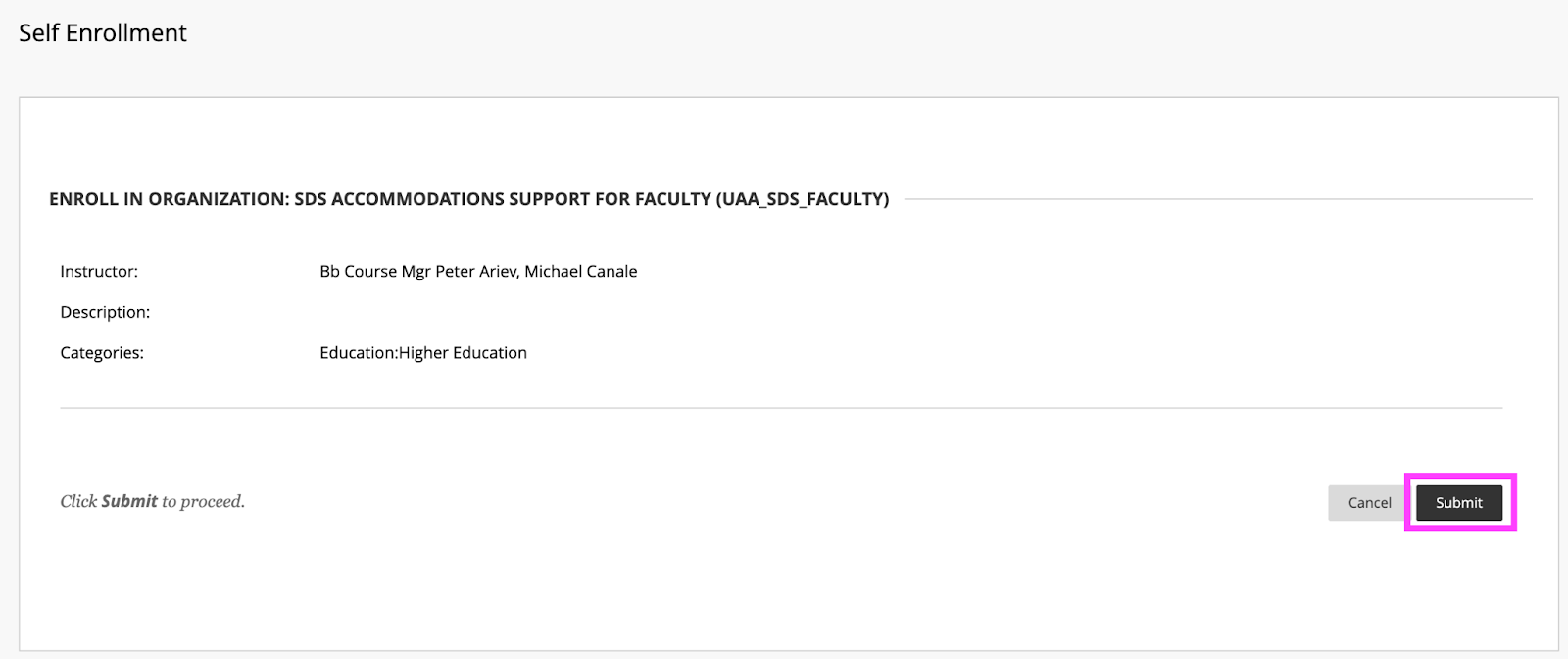
    <div class="html-content"><p><span>DoIT and Student Disability Services hosted a "</span><a href="https://my3.my.umbc.edu/groups/instructional-technology/events/115783" rel="nofollow external" class="bo"><span>Candid Conversation on Enhancing Accessibility</span></a><span>" on March 15th. The session highlighted ways that course accessibility benefits all students and results in inclusive learning and working environments. Student Disability Services and DoIT's Instructional Technology team collaborate to provide resources and support to enhance course accessibility. Proactively designing and teaching a course with accessibility in mind not only supports students with documented accommodations, but also supports </span><a href="https://udlguidelines.cast.org/" rel="nofollow external" class="bo"><span>Universal Design for Learning (UDL)</span></a><span> principles and best practices in course design. In the session panelists shared several key recommendations and resources that are available:</span></p><p><strong><span>Key recommendations for course design and delivery</span></strong></p><ul><li><span>Use </span><a href="https://wiki.umbc.edu/display/faq/Ally" rel="nofollow external" class="bo"><span>Blackboard Ally</span></a><span> to check the accessibility of course content, get guidance on remediating content, and to access alternative formats of course materials.</span></li></ul><ul><li><p><a href="https://help.blackboard.com/Ally/Ally_for_LMS/Instructor/Watch_Videos" rel="nofollow external" class="bo"><span>Videos about Ally</span></a></p></li><li><p><a href="https://wiki.umbc.edu/pages/viewpage.action?pageId=77431280" rel="nofollow external" class="bo"><span>Alternative Formats in Bb Ally</span></a><span> </span></p></li><li><p><a href="https://wiki.umbc.edu/pages/viewpage.action?pageId=77431345" rel="nofollow external" class="bo"><span>Which Alternative Format is Best to Use?</span></a><span> </span></p></li><li><p><span>Student FAQ - </span><a href="https://wiki.umbc.edu/pages/viewpage.action?pageId=77431260" rel="nofollow external" class="bo"><span>How do I download an alt format file generated by Ally? </span></a></p></li></ul><ul><li><span>Use live captioning in online course meetings, either with </span><a href="https://help.webex.com/en-us/article/lzi8h2/Show-or-hide-automated-closed-captions-during-a-Webex-meeting-or-webinar" rel="nofollow external" class="bo"><span>Webex</span></a><span> or </span><a href="https://support.google.com/chrome/answer/10538231?hl=en" rel="nofollow external" class="bo"><span>Google Chrome</span></a><span> browser live captioning enabled.</span></li><li><span>Caption video recordings with automatic captions in </span><a href="https://wiki.umbc.edu/x/pQjBBQ" rel="nofollow external" class="bo"><span>Panopto</span></a><span> or </span><a href="https://wiki.umbc.edu/x/yQ3BBQ" rel="nofollow external" class="bo"><span>VoiceThread</span></a><span>.</span></li><li><a href="https://support.panopto.com/s/article/Batch-Upload-Video-Files" rel="nofollow external" class="bo"><span>Upload a Video</span></a><span> to Panopto</span></li><li><span>Add time limit and due date </span><a href="https://wiki.umbc.edu/x/a4dnB" rel="nofollow external" class="bo"><span>accommodations in Blackboard</span></a><span>.</span></li></ul><p><strong><span><br></span></strong></p><p><strong><span>Accessibility Resources</span></strong></p><p><span>In addition to the tools noted above, the following resources also support accessibility:</span></p><ul><li><span>Create </span><a href="https://wiki.umbc.edu/x/VQjBBQ" rel="nofollow external" class="bo"><span>accessible documents</span></a><span> with Office 365.</span></li><li><span>Review the </span><a href="https://support.google.com/a/answer/1631886?hl=en" rel="nofollow external" class="bo"><span>Google Workspace guide to accessibility</span></a><span>.</span></li><li><span>Explore SDS </span><a href="https://sds.umbc.edu/assistive-technology/" rel="nofollow external" class="bo"><span>assistive technology resources</span></a><span>.</span></li><li><span>Review assistive technology resources available at the</span><a href="http://library.umbc.edu/computers.php#asst" rel="nofollow external" class="bo"><span> AOK Library</span></a><span>.</span></li><li><span>Review </span><a href="https://sds.umbc.edu/resources/information-for-faculty/" rel="nofollow external" class="bo"><span>SDS Information for Faculty</span></a><span>.</span></li></ul><p><strong><span><br></span></strong></p><p><strong><span>Technology Highlight: Class</span></strong></p><p><span>UMBC will be piloting </span><a href="https://www.class.com/higher-ed" rel="nofollow external" class="bo"><span>Class</span></a><span>, a synchronous web conferencing platform built on Zoom's infrastructure. Class provides support for the following:</span></p><ul><li><a href="https://www.class.com/instructor-guide/live-transcription/" rel="nofollow external" class="bo"><span>Live transcription</span></a><span>. All students in a Class session can view captions.</span></li><li><span>Multiple video displays while sharing content, including support for </span><a href="https://www.class.com/support/class/instructor-guide/inviting-a-sign-language-interpreter" rel="nofollow external" class="bo"><span>sign language interpreters</span></a><span> with a dedicated Sign Language Camera.</span></li><li><span>Notes, an upcoming Class feature, will allow students to highlight text from the meeting transcript and add notes.</span></li><li><span>Screen reader compatibility and keyboard navigation.</span></li></ul><div><p><span><br></span></p><p><strong><span>Office of Student Disability Services (SDS)</span><span> </span></strong></p><ul><li><a href="https://sds.umbc.edu/resources/information-for-faculty/" rel="nofollow external" class="bo"><span>Faculty Resources</span></a><span>  </span></li><li><span>Enroll in the SDS Accommodations Support for Faculty Blackboard organization. </span></li></ul><em><span>SDS's </span><span>Accommodations Support for Faculty </span><span>Blackboard organization provides faculty guidance on accessibility in Blackboard, captioning, testing accommodations, and remediating course content.</span></em><blockquote><blockquote><strong><span><br>How to Enroll </span></strong><blockquote><blockquote><blockquote><ol><li><span>Open Blackboard:</span><a href="https://blackboard.umbc.edu" rel="nofollow external" class="bo"><span>https://blackboard.umbc.edu</span></a><span>.</span></li><li><span>Next,</span><a href="https://blackboard.umbc.edu/webapps/blackboard/execute/enrollCourse?context=INMENU&amp;course_id=_68848_1" rel="nofollow external" class="bo"><span> use this link</span></a><span> to self-enroll in the course. </span><span>Note: You must have Blackboard open FIRST before using this self-enroll link or you will encounter an error.</span></li><li><span>Once the self-enroll page loads, click submit to proceed. <img src="https://my3.my.umbc.edu/groups/instructional-technology/posts/131929/attachments/46588" style="max-width: 100%; height: auto;"></span><span>Image 1: Click submit to self-enroll in this training course.</span></li><li><span>On the next page, click OK to confirm enrollment. </span></li><li><span>The course will be immediately available.</span></li></ol></blockquote></blockquote></blockquote></blockquote></blockquote><p><strong><span><br></span></strong></p><p><strong><span>Connect with Student Disability Services</span></strong></p><p><span>Michael Canale</span></p><p><span>Assistant Director, Office of Student Disability Services (SDS)</span></p><p><span><a href="mailto:canale@umbc.edu">canale@umbc.edu</a></span></p><p><a href="https://sds.umbc.edu/" rel="nofollow external" class="bo"><span>Student Disability Services</span></a></p><p><span>Email: </span><a href="mailto:disability@umbc.edu" rel="nofollow external" class="bo"><span>disability@umbc.edu</span></a></p><p><br></p><p><strong><span>Connect with Instructional Technology</span></strong></p><p><span>As always, if you have any questions about teaching, learning, and technology at UMBC, please consider the following options:</span></p><blockquote><ul><li><a href="http://pivot.umbc.edu" rel="nofollow external" class="bo"><span>PIVOT</span></a><span> | </span><a href="https://doit.umbc.edu/itnm/academic-continuity/" rel="nofollow external" class="bo"><span>Academic Continuity</span></a><span> | </span><a href="https://fdc.umbc.edu/teaching/keep-on-teaching/" rel="nofollow external" class="bo"><span>Keep On Teaching</span></a><span> | </span><a href="https://doit.umbc.edu/students" rel="nofollow external" class="bo"><span>Student Technology Resources</span></a></li><li><a href="http://www.umbc.edu/faq" rel="nofollow external" class="bo"><span>Check our extensive FAQ collection</span></a><span> </span></li><li><a href="https://wiki.umbc.edu/x/LohnB" rel="nofollow external" class="bo"><span>What's new in Ultra?</span></a><span> | </span><a href="https://wiki.umbc.edu/x/bwrSAQ" rel="nofollow external" class="bo"><span>Known Issues</span></a><span> </span></li><li><a href="http://my.umbc.edu/go/request-help" rel="nofollow external" class="bo"><span>Open a ticket via RT</span></a></li><li><span>Follow the </span><a href="http://my.umbc.edu/groups/instructional-technology" rel="nofollow external" class="bo"><span>Instructional Technology</span></a><span> &amp; </span><a href="http://my.umbc.edu/groups/doit" rel="nofollow external" class="bo"><span>DoIT</span></a><span> myUMBC groups</span></li><li><a href="http://doit.umbc.edu/itnm/staff/" rel="nofollow external" class="bo"><span>Request a consult</span></a><span> with </span><a href="http://doit.umbc.edu/itnm/staff" rel="nofollow external" class="bo"><span>instructional technology staff</span></a></li></ul></blockquote><p>Image description: virtual meeting showing participants, chat bubble, closed captions icon, and text with a transcript.<br></p><p><span>~ by </span><a href="https://doit.umbc.edu/itnm/staff/abrams/" rel="nofollow external" class="bo"><span>Josh Abrams</span></a><span>, </span><a href="https://doit.umbc.edu/itnm/staff/ariev/" rel="nofollow external" class="bo"><span>Peter Ariev</span></a><span>, and </span><a href="https://sds.umbc.edu/about-us/meet-our-staff/" rel="nofollow external" class="bo"><span>Michael Canale</span></a></p></div></div>
]]>
</Body>
<Summary>DoIT and Student Disability Services hosted a "Candid Conversation on Enhancing Accessibility" on March 15th. The session highlighted ways that course accessibility benefits all students and...</Summary>
<AttachmentKind>Image</AttachmentKind>
<AttachmentUrl>https://assets2-beta.my.umbc.edu/system/shared/attachments/c44a0067ede4a5dbd3ef81318907dab6/69f05fb5/news/000/131/929/ba6be4a2b398df63f57ae0f7e5f330d8/enroll.png?1679575434</AttachmentUrl>
<Attachments>
<Attachment kind="Image" url="https://beta.my.umbc.edu/groups/instructional-technology/posts/131929/attachments/46588"></Attachment>
</Attachments>
<TrackingUrl>https://beta.my.umbc.edu/api/v0/pixel/news/131929/guest@my.umbc.edu/51341d42c2334666a32062d123bdbfa8/api/pixel</TrackingUrl>
<Tag>abrams</Tag>
<Tag>accessibility</Tag>
<Tag>ally</Tag>
<Tag>alternative-formats</Tag>
<Tag>ariev</Tag>
<Tag>canale</Tag>
<Tag>captions</Tag>
<Tag>class</Tag>
<Tag>live-captioning</Tag>
<Tag>live-captions</Tag>
<Tag>sds</Tag>
<Tag>sp23</Tag>
<Tag>udl</Tag>
<Group token="instructional-technology">Instructional Technology</Group>
<GroupUrl>https://beta.my.umbc.edu/groups/instructional-technology</GroupUrl>
<AvatarUrl>https://assets2-beta.my.umbc.edu/system/shared/avatars/groups/000/001/164/dec3b026b81ee6d890a8f82f75c94a2e/xsmall.png?1446126703</AvatarUrl>
<AvatarUrl size="original">https://assets1-beta.my.umbc.edu/system/shared/avatars/groups/000/001/164/dec3b026b81ee6d890a8f82f75c94a2e/original.png?1446126703</AvatarUrl>
<AvatarUrl size="xxlarge">https://assets2-beta.my.umbc.edu/system/shared/avatars/groups/000/001/164/dec3b026b81ee6d890a8f82f75c94a2e/xxlarge.png?1446126703</AvatarUrl>
<AvatarUrl size="xlarge">https://assets1-beta.my.umbc.edu/system/shared/avatars/groups/000/001/164/dec3b026b81ee6d890a8f82f75c94a2e/xlarge.png?1446126703</AvatarUrl>
<AvatarUrl size="large">https://assets1-beta.my.umbc.edu/system/shared/avatars/groups/000/001/164/dec3b026b81ee6d890a8f82f75c94a2e/large.png?1446126703</AvatarUrl>
<AvatarUrl size="medium">https://assets4-beta.my.umbc.edu/system/shared/avatars/groups/000/001/164/dec3b026b81ee6d890a8f82f75c94a2e/medium.png?1446126703</AvatarUrl>
<AvatarUrl size="small">https://assets3-beta.my.umbc.edu/system/shared/avatars/groups/000/001/164/dec3b026b81ee6d890a8f82f75c94a2e/small.png?1446126703</AvatarUrl>
<AvatarUrl size="xsmall">https://assets2-beta.my.umbc.edu/system/shared/avatars/groups/000/001/164/dec3b026b81ee6d890a8f82f75c94a2e/xsmall.png?1446126703</AvatarUrl>
<AvatarUrl size="xxsmall">https://assets3-beta.my.umbc.edu/system/shared/avatars/groups/000/001/164/dec3b026b81ee6d890a8f82f75c94a2e/xxsmall.png?1446126703</AvatarUrl>
<Sponsor>Instructional Technology</Sponsor>
<ThumbnailUrl size="xxlarge">https://assets1-beta.my.umbc.edu/system/shared/thumbnails/news/000/131/929/192b4d0b5d09e74e886db795fadd5b81/xxlarge.jpg?1679577443</ThumbnailUrl>
<ThumbnailUrl size="xlarge">https://assets3-beta.my.umbc.edu/system/shared/thumbnails/news/000/131/929/192b4d0b5d09e74e886db795fadd5b81/xlarge.jpg?1679577443</ThumbnailUrl>
<ThumbnailUrl size="large">https://assets4-beta.my.umbc.edu/system/shared/thumbnails/news/000/131/929/192b4d0b5d09e74e886db795fadd5b81/large.jpg?1679577443</ThumbnailUrl>
<ThumbnailUrl size="medium">https://assets3-beta.my.umbc.edu/system/shared/thumbnails/news/000/131/929/192b4d0b5d09e74e886db795fadd5b81/medium.jpg?1679577443</ThumbnailUrl>
<ThumbnailUrl size="small">https://assets4-beta.my.umbc.edu/system/shared/thumbnails/news/000/131/929/192b4d0b5d09e74e886db795fadd5b81/small.jpg?1679577443</ThumbnailUrl>
<ThumbnailUrl size="xsmall">https://assets1-beta.my.umbc.edu/system/shared/thumbnails/news/000/131/929/192b4d0b5d09e74e886db795fadd5b81/xsmall.jpg?1679577443</ThumbnailUrl>
<ThumbnailUrl size="xxsmall">https://assets3-beta.my.umbc.edu/system/shared/thumbnails/news/000/131/929/192b4d0b5d09e74e886db795fadd5b81/xxsmall.jpg?1679577443</ThumbnailUrl>
<PawCount>9</PawCount>
<CommentCount>1</CommentCount>
<CommentsAllowed>true</CommentsAllowed>
<PostedAt>Mon, 27 Mar 2023 09:17:49 -0400</PostedAt>
</NewsItem>

</News>
