<?xml version="1.0"?>
<News hasArchived="false" page="1" pageCount="2" pageSize="10" timestamp="Tue, 28 Apr 2026 13:34:39 -0400" url="https://beta.my.umbc.edu/groups/instructional-technology/posts.xml?tag=assessments">
<NewsItem contentIssues="false" id="158023" important="false" status="posted" url="https://beta.my.umbc.edu/groups/instructional-technology/posts/158023">
<Title>Set Multiple Due Dates for Discussions &amp; Define Assignment Types in April Ultra Update</Title>
<Tagline>New tools for clarity, consistency, and control in your Ultr</Tagline>
<Body>
<![CDATA[
    <div class="html-content"><p>Have you ever wanted students to see exactly what's expected of them in a discussion, without having to navigate back to the assignment details to check? Or needed to recognize that one group member's contribution deserved a different grade than the rest of the team? The April Ultra update delivers a focused set of improvements across discussions, assignments, grading, and AI-supported activities, giving instructors more precision over course structure and students more transparency throughout their work.</p>
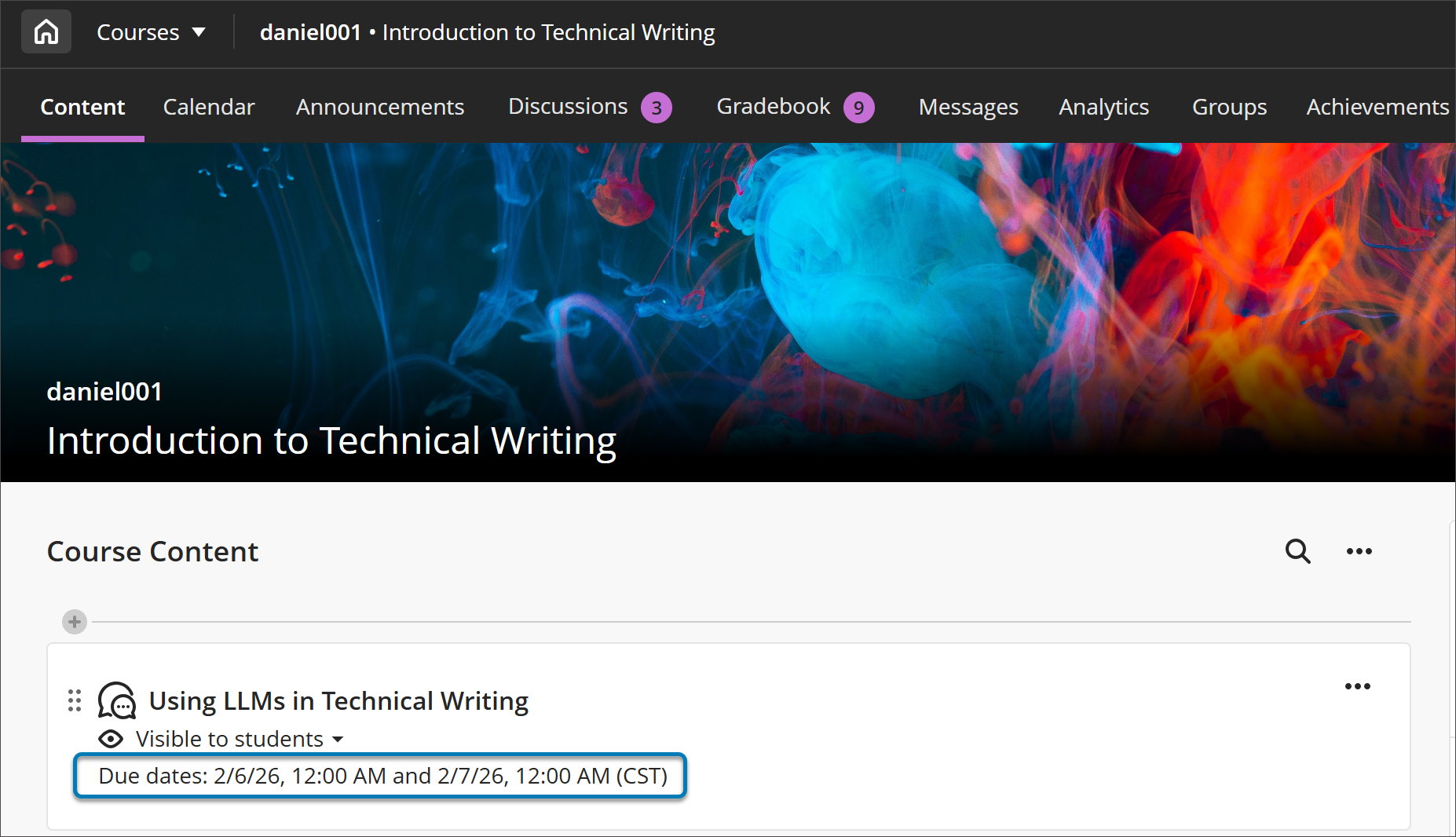
    <p>Building on <a href="https://my3.my.umbc.edu/groups/instructional-technology/posts/154971" rel="nofollow external" class="bo">December's participation requirements feature</a>, instructors who create discussions with <strong>multiple due dates </strong>will now see both sets of requirements displayed consistently across the Course Content page, Discussion pages, the Gradebook (in both student and instructor views), and the instructor's Discussion analysis panel. Students no longer need to navigate back to a discussion to recall what's expected of them -- deadlines and requirements follow them through the workflow. This is especially useful in scaffolded discussions and different stages of engagement carry distinct expectations.</p>
    <p><strong><img src="https://my3.my.umbc.edu/groups/instructional-technology/posts/158023/attachments/62631" alt="Image 1: On the Course Content page, both due dates and participation requirements are displayed. For all entry points for Discussions, both dates and requirements are displayed." style="max-width: 100%; height: auto;"></strong></p>
    <p><em>Image 1: On the Course Content page, both due dates and participation requirements are displayed. For all entry points for Discussions, both dates and requirements are displayed.</em></p>
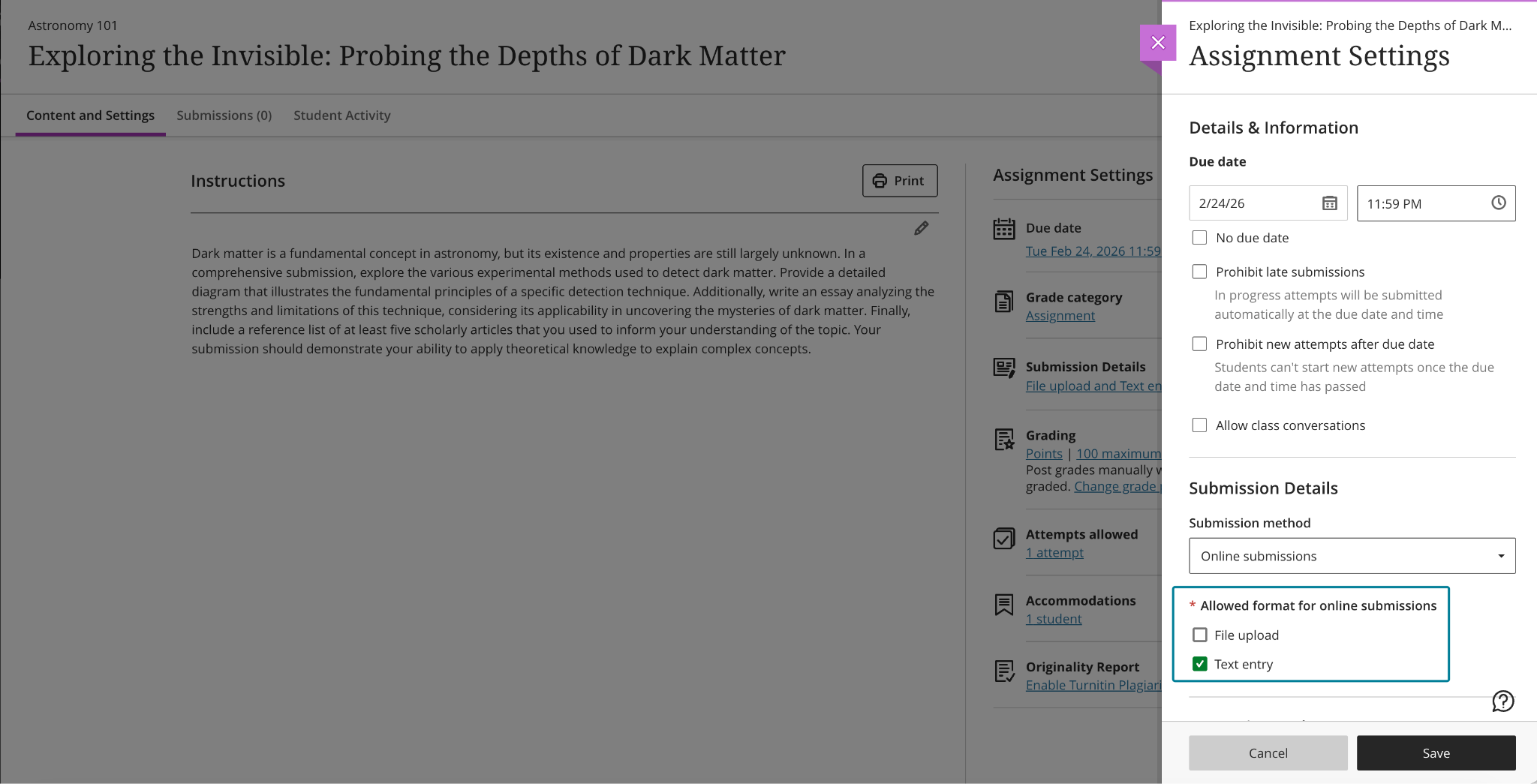
    <p>Instructors can now <strong>specify the expected submission type </strong>when creating or editing an assignment, choosing from File Upload or Text Entry (or both). When a submission type is selected, students see a streamlined workflow tailored to that format, which reduces confusion about how to submit and cuts down on the "wait, how do I turn this in?" questions at the start of an assignment. The selected type is visible in assignment settings and in student-facing details, and instructors can adjust the setting until students have begun submitting attempts, keeping flexibility intact during course setup without creating ambiguity once work is underway. In a future update to the assignment settings, instructors will be able to specify file types (e.g., Word document or PDF).</p>
    <p><strong><img src="https://my3.my.umbc.edu/groups/instructional-technology/posts/158023/attachments/62632" alt="Image 2: Instructors can choose one or more submission types when configuring an assignment." style="max-width: 100%; height: auto;"></strong></p>
    <p><em>Image 2: Instructors can choose one or more submission types when configuring an assignment.</em></p>
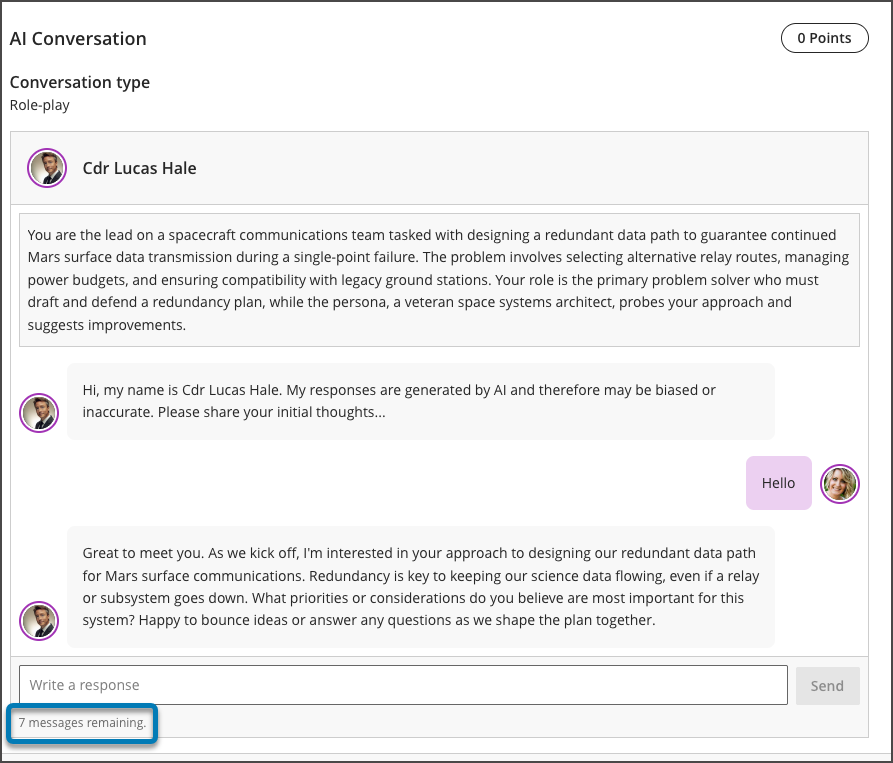
    <p>Instructors using AI-supported conversations can now <strong>set message limits </strong>(e.g., 8 messages) to guide the length of these interactions. These controls help students understand when a conversation is meant to conclude, keeping exchanges focused on the intended learning activity rather than drifting into open-ended dialogue. For instructors who rely on AI conversations to scaffold critical thinking or formative reflection, message limits offer a lightweight but meaningful way to design interactions with a clearer beginning, middle, and end.</p>
    <p><strong><img src="https://my3.my.umbc.edu/groups/instructional-technology/posts/158023/attachments/62633" alt="Image 3: Message limit settings for an AI conversation" style="max-width: 100%; height: auto;"></strong></p>
    <p><em>Image 3: Message limit settings for an AI conversation</em></p>
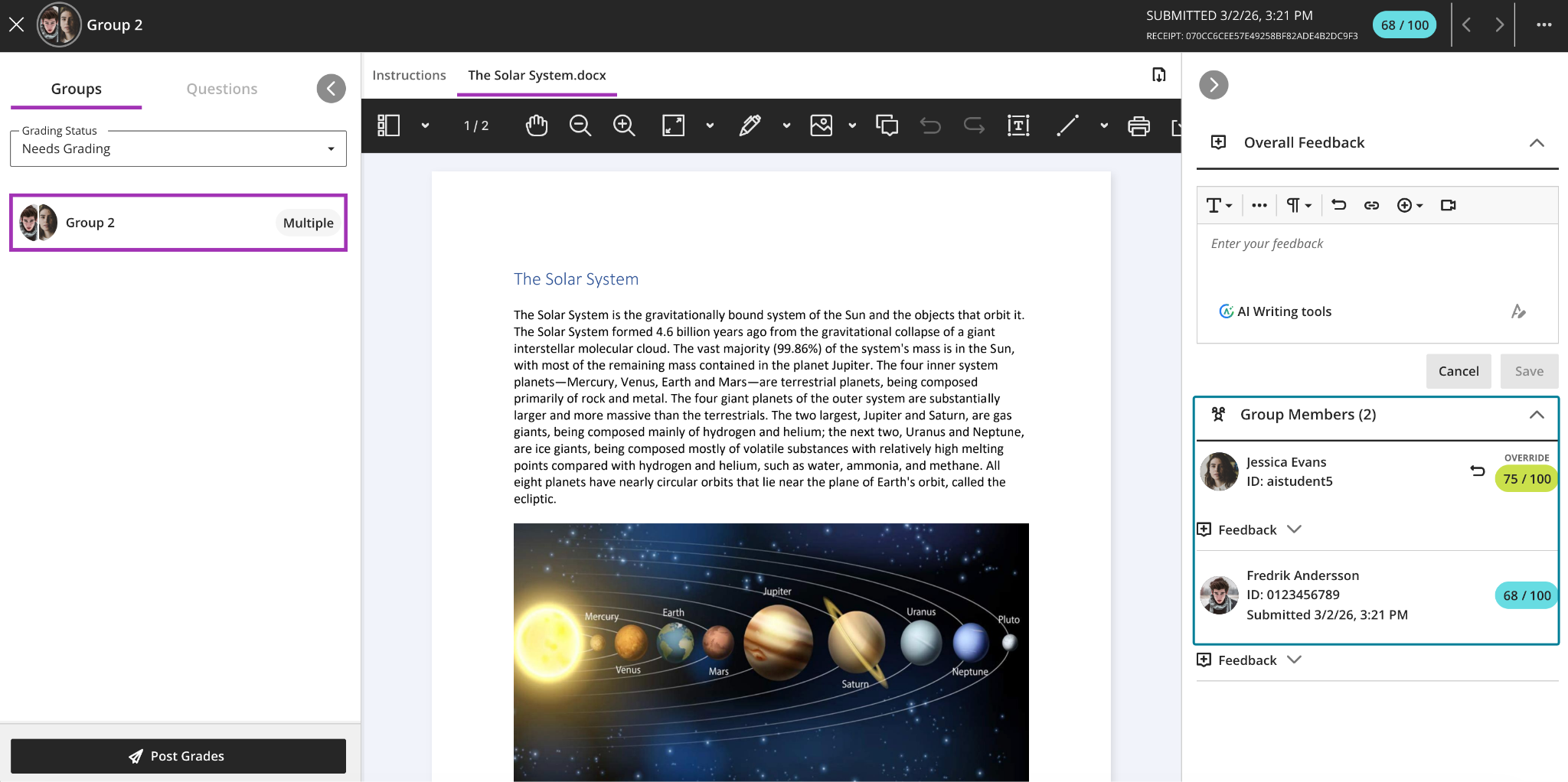
    <p>Finally, instructors grading group work can now <strong>override a group attempt score for individual group members </strong>directly from the grading interface. When grades differ across group members, the interface clearly indicates this, and adjustments can be removed at any time by restoring a student's grade to match the group score. This gives instructors the flexibility to acknowledge uneven contribution or effort within a team without having to build workarounds outside the gradebook — a long-requested quality-of-life improvement for courses that rely heavily on collaborative assessments.</p>
    <p><strong><img src="https://my3.my.umbc.edu/groups/instructional-technology/posts/158023/attachments/62634" alt="Image 4: Instructors can adjust grades for individual students within a group submission." style="max-width: 100%; height: auto;"></strong></p>
    <p><em>Image 4: Instructors can adjust grades for individual students within a group submission.</em></p>
    <p><strong>Additional updates for April include:</strong></p>
    <ul>
    <li>
    <strong>Announcement emails now display images</strong>, giving recipients a richer preview of content directly in their inbox. This improvement is particularly useful for visual-heavy announcements where the image itself is part of the message.</li>
    <li>The <a href="https://help.anthology.com/blackboard/instructor/en/interact-with-students/discussions/view-discussion-performance-and-analytics.html#types-of-discussion-analysis-metrics--substantive-posts" rel="nofollow external" class="bo">Discussion analysis page</a>will label student posts and replies as <strong>Substantive Content and Non-substantive Content</strong>, making it easier to scan discussion quality at a glance, especially in large courses or discussions with high post volumes.</li>
    <li>Student names in <strong>Flexible Grading </strong>are now formatted as Surname, First Name by default, matching the default sort order and making it easier to locate students quickly. When sorting by First Name (ascending or descending), names display as First Name Surname.</li>
    <li>Based on instructor feedback, Blackboard made several <strong>refinements to multiple-choice and multiple-answer questions</strong>: the default number of selectable answer options for multiple-choice questions is now 1 (down from 4); instructors can now change the number of answer options a student may select when creating or editing a question; and alphabetical labels (A, B, C, D) have been restored to answer choices.</li>
    <li>The file size limit for SafeAssign DirectSubmit submissions has been raised to 25 MB, supporting larger documents that include images, tables, and complex formatting.</li>
    <li>When a course is copied, restored, or imported, any automations in that course will carry over as well. Copied automations are always inactive by default and must be reviewed and activated in the destination course before they will be sent.</li>
    </ul>
    <p><strong>When you can expect the update</strong></p>
    <p>Faculty should see the latest updates in their Ultra courses around April 2-3, 2026. The next update to our Ultra test environment will take place on April 14, 2026]; release notes are posted to the <a href="https://wiki.umbc.edu/x/LohnB" rel="nofollow external" class="bo">What's New in Ultra</a> page. Faculty who are interested in test driving new features before they are released to production should <a href="https://my.umbc.edu/go/request-help" rel="nofollow external" class="bo">open an RT ticket</a> to request early access. Please <a href="https://umbc.edu/go/ultra" rel="nofollow external" class="bo">watch the FAQs</a>, including the <a href="https://wiki.umbc.edu/x/LohnB" rel="nofollow external" class="bo">What's New with Ultra page</a>, and myUMBC for additional information about Ultra.</p>
    <p><strong>Connect with Instructional Technology</strong></p>
    <p>As always, if you have any questions about teaching, learning, and technology at UMBC, please consider the following options:</p>
    <ul>
    <li>
    <a href="http://www.umbc.edu/faq" rel="nofollow external" class="bo">Check our extensive FAQ collection</a> 
    <ul>
    <li>
    <a href="https://wiki.umbc.edu/x/LohnB" rel="nofollow external" class="bo">What's new in Ultra?</a> | <a href="https://wiki.umbc.edu/x/bwrSAQ" rel="nofollow external" class="bo">Known Issues</a> </li>
    </ul>
    </li>
    <li><a href="http://my.umbc.edu/go/request-help" rel="nofollow external" class="bo">Open a ticket via RT</a></li>
    <li>Follow the <a href="http://my.umbc.edu/groups/instructional-technology" rel="nofollow external" class="bo">Instructional Technology</a> &amp; <a href="http://my.umbc.edu/groups/doit" rel="nofollow external" class="bo">DoIT</a> myUMBC groups</li>
    <li>
    <a href="http://doit.umbc.edu/itnm/staff/" rel="nofollow external" class="bo">Request a consult</a> with <a href="http://doit.umbc.edu/itnm/staff" rel="nofollow external" class="bo">instructional technology staff</a>
    </li>
    </ul>
    <p><em>Thumbnail-image: New to Ultra [decorative]</em></p></div>
]]>
</Body>
<Summary>Have you ever wanted students to see exactly what's expected of them in a discussion, without having to navigate back to the assignment details to check? Or needed to recognize that one group...</Summary>
<Website>https://my3.my.umbc.edu/groups/instructional-technology/posts/155530</Website>
<AttachmentKind>Inline Image</AttachmentKind>
<AttachmentUrl>https://assets2-beta.my.umbc.edu/system/shared/attachments/14b386c820af499b8a0c18a708262caf/69f0efaf/news/000/158/023/0ceb7c1f67445ac41abc09af58114e5c/blobid0.png?1774964242</AttachmentUrl>
<Attachments>
<Attachment kind="Inline Image" url="https://beta.my.umbc.edu/groups/instructional-technology/posts/158023/attachments/62631"></Attachment>
<Attachment kind="Inline Image" url="https://beta.my.umbc.edu/groups/instructional-technology/posts/158023/attachments/62632"></Attachment>
<Attachment kind="Inline Image" url="https://beta.my.umbc.edu/groups/instructional-technology/posts/158023/attachments/62633"></Attachment>
<Attachment kind="Inline Image" url="https://beta.my.umbc.edu/groups/instructional-technology/posts/158023/attachments/62634"></Attachment>
</Attachments>
<TrackingUrl>https://beta.my.umbc.edu/api/v0/pixel/news/158023/guest@my.umbc.edu/f55a9ea50a145baaa7245ea4713df585/api/pixel</TrackingUrl>
<Tag>assessments</Tag>
<Tag>blackboard</Tag>
<Tag>course-navigation</Tag>
<Tag>ultra-docs</Tag>
<Tag>ultra-experience</Tag>
<Tag>ultra-update</Tag>
<Group token="instructional-technology">Instructional Technology</Group>
<GroupUrl>https://beta.my.umbc.edu/groups/instructional-technology</GroupUrl>
<AvatarUrl>https://assets2-beta.my.umbc.edu/system/shared/avatars/groups/000/001/164/dec3b026b81ee6d890a8f82f75c94a2e/xsmall.png?1446126703</AvatarUrl>
<AvatarUrl size="original">https://assets1-beta.my.umbc.edu/system/shared/avatars/groups/000/001/164/dec3b026b81ee6d890a8f82f75c94a2e/original.png?1446126703</AvatarUrl>
<AvatarUrl size="xxlarge">https://assets2-beta.my.umbc.edu/system/shared/avatars/groups/000/001/164/dec3b026b81ee6d890a8f82f75c94a2e/xxlarge.png?1446126703</AvatarUrl>
<AvatarUrl size="xlarge">https://assets1-beta.my.umbc.edu/system/shared/avatars/groups/000/001/164/dec3b026b81ee6d890a8f82f75c94a2e/xlarge.png?1446126703</AvatarUrl>
<AvatarUrl size="large">https://assets1-beta.my.umbc.edu/system/shared/avatars/groups/000/001/164/dec3b026b81ee6d890a8f82f75c94a2e/large.png?1446126703</AvatarUrl>
<AvatarUrl size="medium">https://assets4-beta.my.umbc.edu/system/shared/avatars/groups/000/001/164/dec3b026b81ee6d890a8f82f75c94a2e/medium.png?1446126703</AvatarUrl>
<AvatarUrl size="small">https://assets3-beta.my.umbc.edu/system/shared/avatars/groups/000/001/164/dec3b026b81ee6d890a8f82f75c94a2e/small.png?1446126703</AvatarUrl>
<AvatarUrl size="xsmall">https://assets2-beta.my.umbc.edu/system/shared/avatars/groups/000/001/164/dec3b026b81ee6d890a8f82f75c94a2e/xsmall.png?1446126703</AvatarUrl>
<AvatarUrl size="xxsmall">https://assets3-beta.my.umbc.edu/system/shared/avatars/groups/000/001/164/dec3b026b81ee6d890a8f82f75c94a2e/xxsmall.png?1446126703</AvatarUrl>
<Sponsor>Instructional Technology</Sponsor>
<ThumbnailUrl size="xxlarge">https://assets2-beta.my.umbc.edu/system/shared/thumbnails/news/000/158/023/1fc295ba00faa42cac2b4f387af7ff3a/xxlarge.jpg?1774964135</ThumbnailUrl>
<ThumbnailUrl size="xlarge">https://assets2-beta.my.umbc.edu/system/shared/thumbnails/news/000/158/023/1fc295ba00faa42cac2b4f387af7ff3a/xlarge.jpg?1774964135</ThumbnailUrl>
<ThumbnailUrl size="large">https://assets3-beta.my.umbc.edu/system/shared/thumbnails/news/000/158/023/1fc295ba00faa42cac2b4f387af7ff3a/large.jpg?1774964135</ThumbnailUrl>
<ThumbnailUrl size="medium">https://assets3-beta.my.umbc.edu/system/shared/thumbnails/news/000/158/023/1fc295ba00faa42cac2b4f387af7ff3a/medium.jpg?1774964135</ThumbnailUrl>
<ThumbnailUrl size="small">https://assets4-beta.my.umbc.edu/system/shared/thumbnails/news/000/158/023/1fc295ba00faa42cac2b4f387af7ff3a/small.jpg?1774964135</ThumbnailUrl>
<ThumbnailUrl size="xsmall">https://assets3-beta.my.umbc.edu/system/shared/thumbnails/news/000/158/023/1fc295ba00faa42cac2b4f387af7ff3a/xsmall.jpg?1774964135</ThumbnailUrl>
<ThumbnailUrl size="xxsmall">https://assets4-beta.my.umbc.edu/system/shared/thumbnails/news/000/158/023/1fc295ba00faa42cac2b4f387af7ff3a/xxsmall.jpg?1774964135</ThumbnailUrl>
<ThumbnailAltText>Black and white robot dog running with the words "New to Ultra" written on  light turquoise background</ThumbnailAltText>
<PawCount>1</PawCount>
<CommentCount>0</CommentCount>
<CommentsAllowed>true</CommentsAllowed>
<PostedAt>Fri, 03 Apr 2026 08:20:36 -0400</PostedAt>
</NewsItem>

<NewsItem contentIssues="false" id="155530" important="false" status="posted" url="https://beta.my.umbc.edu/groups/instructional-technology/posts/155530">
<Title>Simplified Course Navigation and Supercharged Test Setup with the January Ultra Release</Title>
<Tagline>Redesigned course layout and time-saving test tools</Tagline>
<Body>
<![CDATA[
    <div class="html-content"><div><p>In January, UMBC faculty and students will experience <a href="https://my3.my.umbc.edu/groups/instructional-technology/posts/155201" rel="nofollow external" class="bo">a redesigned course navigation in Ultra</a> that makes key areas easier to access and understand. The updated layout brings a full-width header with clearer course branding and improved use of screen space on desktop and mobile. </p><p>The <strong>new course navigation</strong> provides an update header, modernized banner layout, and Home button that returns users to the Blackboard landing page (rather than the courses page). You'll still have access to your Courses by using the snazzy Course Switcher, which provides shortcuts to the four most recently accessed courses, or you can choose View All to return to the Courses page again. Learn more about these improvements <a href="https://my3.my.umbc.edu/groups/instructional-technology/posts/155201" rel="nofollow external" class="bo">in our overview article</a>. </p><img src="https://help.blackboard.com/sites/default/files/styles/rich_text_large/public/images/2025-12/blackboard_instructor_Course-full-screen.png.webp?itok=LZj568g7" alt="Image 1: The refreshed user interface in courses includes full-screen course pages and improvements to enhance the amount of screen space for users to engage with their course" style="max-width: 100%; height: auto;"></div><div><p><em>Image 1: The refreshed user interface in courses includes full-screen course pages and improvements to enhance the amount of screen space for users to engage with their course.</em></p></div><div><div>The <strong>Ultra Document layout editor</strong> now includes a streamlined block editing menu, reorganized by type of action: Change row, Change size, and Change position. When selecting the edit icon on a block, instructors are guided through structured options rather than hunting through scattered icons. This improved layout reduces visual clutter and makes it easier to design responsive content layouts that look great on all devices. Whether you’re building an infographic-style document or organizing media and text in columns, these updates make layout control more intuitive and less time-consuming.</div><div><img src="https://help.blackboard.com/sites/default/files/styles/rich_text_large/public/images/2025-12/block-styling-image2_0.png.webp?itok=79RW9tFk" alt="Image 2: The restructured document block styling options" style="max-width: 100%; height: auto;"></div><div><em>Image 2: The restructured document block styling options</em></div><div><br></div><div><strong>True/False questions</strong> now support expanded labeling options, allowing instructors to display answer choices as True/False, Yes/No, Right/Wrong, or Agree/Disagree. These customizable labels make it easier to align assessments with your course content and instructional tone, whether you’re gauging conceptual understanding, ethical judgments, or student opinions in a low-stakes setting.</div><p><img src="https://help.blackboard.com/sites/default/files/styles/rich_text_large/public/images/2025-12/ultra_instructor_binaryquestionoptions.png.webp?itok=d9Mx_PZW" alt="Image 3: True/false questions now include additional options." style="max-width: 100%; height: auto;"></p></div><div><p><em>Image 3: True/false questions now include additional options.</em></p><p>Additional updates for January include:</p><ul><li><span>The default number of multiple choice answer options is now four (instead of three), helping speed up question creation.</span></li><li><span>Instructors can now limit how many answer choices students can select for a multiple choice question, ideal for “select all that apply” formats.</span></li><li><span>Ultra has significantly improved test loading times. For example, a 200-question test now loads in about 5 seconds (down from ~25), making large-format assessments more manageable.</span></li><li><span>Instructors now have access to an automation activity log, which tracks when each automation was triggered, which student it applied to, and which content item was involved, providing transparency and accountability for automated course messaging.</span></li></ul><p><strong>When you can expect the update</strong></p><p>Faculty should see the latest updates in their Ultra courses around January 8-9, 2026. The next update to our Ultra test environment will take place on <span>January 13, 2026</span><span>. Faculty who are interested in test driving new features before they are released to production should </span><a href="https://my3.my.umbc.edu/groups/instructional-technology/posts/149574/15848/727292cce6c6665b1fcf69032b12e0d6/web/link?link=http%3A%2F%2Fmy.umbc.edu%2Fgo%2Frequest-help" rel="nofollow external" class="bo">open an RT ticket</a><span> to request early access. Please </span><a href="https://my3.my.umbc.edu/groups/instructional-technology/posts/149574/15848/1a55d761c534b5d9d77045fac42ec979/web/link?link=http%3A%2F%2Fumbc.edu%2Fgo%2Fultra" rel="nofollow external" class="bo">watch the FAQs</a><span>, including </span><a href="https://my3.my.umbc.edu/groups/instructional-technology/posts/149574/15848/782c435b983b9add1c5ec4e5d955e60f/web/link?link=https%3A%2F%2Fwiki.umbc.edu%2Fx%2FLohnB" rel="nofollow external" class="bo">the What's New with Ultra page</a><span>, and myUMBC for additional information about Ultra. <strong>Join our <a href="https://my3.my.umbc.edu/groups/instructional-technology/events/148168" rel="nofollow external" class="bo">What's New in Ultra for Teaching &amp; Learning</a> on January 13, 2026, to catch up on the latest updates.</strong></span></p><div><div><span><strong>Connect with Instructional Technology</strong></span></div><div><span>As always, if you have any questions about teaching, learning, and technology at UMBC, please consider the following options:</span></div><ul><li><a href="https://my3.my.umbc.edu/groups/instructional-technology/posts/149574/15848/f59d29e5c17e589f885b2536a667a41a/web/link?link=http%3A%2F%2Fwww.umbc.edu%2Ffaq" rel="nofollow external" class="bo">Check our extensive FAQ collection</a><span> </span></li><ul><li><span><a href="https://my3.my.umbc.edu/groups/instructional-technology/posts/149574/15848/782c435b983b9add1c5ec4e5d955e60f/web/link?link=https%3A%2F%2Fwiki.umbc.edu%2Fx%2FLohnB" rel="nofollow external" class="bo"><span>What's new in Ultra?</span></a><span> </span><span>|</span><span> </span><a href="https://my3.my.umbc.edu/groups/instructional-technology/posts/149574/15848/63a0e48a64b548180394031ac6f89272/web/link?link=https%3A%2F%2Fwiki.umbc.edu%2Fx%2FbwrSAQ" rel="nofollow external" class="bo"><span>Known Issues</span></a><span> </span></span></li></ul><li><span><a href="https://my3.my.umbc.edu/groups/instructional-technology/posts/149574/15848/727292cce6c6665b1fcf69032b12e0d6/web/link?link=http%3A%2F%2Fmy.umbc.edu%2Fgo%2Frequest-help" rel="nofollow external" class="bo">Open a ticket via RT</a></span></li><li><span>Follow the </span><a href="https://my3.my.umbc.edu/groups/instructional-technology/posts/149574/15848/208c31480fd10e3805fdafe318269623/web/link?link=http%3A%2F%2Fmy.umbc.edu%2Fgroups%2Finstructional-technology" rel="nofollow external" class="bo">Instructional Technology</a><span> &amp; </span><a href="https://my3.my.umbc.edu/groups/instructional-technology/posts/149574/15848/dccb8bbf9409460e32d26e4518464b78/web/link?link=http%3A%2F%2Fmy.umbc.edu%2Fgroups%2Fdoit" rel="nofollow external" class="bo">DoIT</a><span> myUMBC groups</span></li><li><a href="https://my3.my.umbc.edu/groups/instructional-technology/posts/149574/15848/7e9d8e8701228d0f57bcfcd17db50e50/web/link?link=http%3A%2F%2Fdoit.umbc.edu%2Fitnm%2Fstaff%2F" rel="nofollow external" class="bo">Request a consult</a><span> with <a href="https://my3.my.umbc.edu/groups/instructional-technology/posts/149574/15848/1935cd506ec09b50c61f334661d75174/web/link?link=http%3A%2F%2Fdoit.umbc.edu%2Fitnm%2Fstaff" rel="nofollow external" class="bo">instructional technology staff</a></span></li></ul><div><em>Thumbnail-image: New to Ultra [decorative]</em></div></div></div></div>
]]>
</Body>
<Summary>In January, UMBC faculty and students will experience a redesigned course navigation in Ultra that makes key areas easier to access and understand. The updated layout brings a full-width header...</Summary>
<Website>https://my3.my.umbc.edu/groups/instructional-technology/posts/155530</Website>
<TrackingUrl>https://beta.my.umbc.edu/api/v0/pixel/news/155530/guest@my.umbc.edu/1c67c3b88a99ae3c7591b7156481cb65/api/pixel</TrackingUrl>
<Tag>assessments</Tag>
<Tag>blackboard</Tag>
<Tag>course-navigation</Tag>
<Tag>ultra-docs</Tag>
<Tag>ultra-experience</Tag>
<Tag>ultra-update</Tag>
<Group token="instructional-technology">Instructional Technology</Group>
<GroupUrl>https://beta.my.umbc.edu/groups/instructional-technology</GroupUrl>
<AvatarUrl>https://assets2-beta.my.umbc.edu/system/shared/avatars/groups/000/001/164/dec3b026b81ee6d890a8f82f75c94a2e/xsmall.png?1446126703</AvatarUrl>
<AvatarUrl size="original">https://assets1-beta.my.umbc.edu/system/shared/avatars/groups/000/001/164/dec3b026b81ee6d890a8f82f75c94a2e/original.png?1446126703</AvatarUrl>
<AvatarUrl size="xxlarge">https://assets2-beta.my.umbc.edu/system/shared/avatars/groups/000/001/164/dec3b026b81ee6d890a8f82f75c94a2e/xxlarge.png?1446126703</AvatarUrl>
<AvatarUrl size="xlarge">https://assets1-beta.my.umbc.edu/system/shared/avatars/groups/000/001/164/dec3b026b81ee6d890a8f82f75c94a2e/xlarge.png?1446126703</AvatarUrl>
<AvatarUrl size="large">https://assets1-beta.my.umbc.edu/system/shared/avatars/groups/000/001/164/dec3b026b81ee6d890a8f82f75c94a2e/large.png?1446126703</AvatarUrl>
<AvatarUrl size="medium">https://assets4-beta.my.umbc.edu/system/shared/avatars/groups/000/001/164/dec3b026b81ee6d890a8f82f75c94a2e/medium.png?1446126703</AvatarUrl>
<AvatarUrl size="small">https://assets3-beta.my.umbc.edu/system/shared/avatars/groups/000/001/164/dec3b026b81ee6d890a8f82f75c94a2e/small.png?1446126703</AvatarUrl>
<AvatarUrl size="xsmall">https://assets2-beta.my.umbc.edu/system/shared/avatars/groups/000/001/164/dec3b026b81ee6d890a8f82f75c94a2e/xsmall.png?1446126703</AvatarUrl>
<AvatarUrl size="xxsmall">https://assets3-beta.my.umbc.edu/system/shared/avatars/groups/000/001/164/dec3b026b81ee6d890a8f82f75c94a2e/xxsmall.png?1446126703</AvatarUrl>
<Sponsor>Instructional Technology</Sponsor>
<ThumbnailUrl size="xxlarge">https://assets3-beta.my.umbc.edu/system/shared/thumbnails/news/000/155/530/d32a89c107e100b1724107fab41850db/xxlarge.jpg?1767710020</ThumbnailUrl>
<ThumbnailUrl size="xlarge">https://assets3-beta.my.umbc.edu/system/shared/thumbnails/news/000/155/530/d32a89c107e100b1724107fab41850db/xlarge.jpg?1767710020</ThumbnailUrl>
<ThumbnailUrl size="large">https://assets2-beta.my.umbc.edu/system/shared/thumbnails/news/000/155/530/d32a89c107e100b1724107fab41850db/large.jpg?1767710020</ThumbnailUrl>
<ThumbnailUrl size="medium">https://assets3-beta.my.umbc.edu/system/shared/thumbnails/news/000/155/530/d32a89c107e100b1724107fab41850db/medium.jpg?1767710020</ThumbnailUrl>
<ThumbnailUrl size="small">https://assets2-beta.my.umbc.edu/system/shared/thumbnails/news/000/155/530/d32a89c107e100b1724107fab41850db/small.jpg?1767710020</ThumbnailUrl>
<ThumbnailUrl size="xsmall">https://assets1-beta.my.umbc.edu/system/shared/thumbnails/news/000/155/530/d32a89c107e100b1724107fab41850db/xsmall.jpg?1767710020</ThumbnailUrl>
<ThumbnailUrl size="xxsmall">https://assets3-beta.my.umbc.edu/system/shared/thumbnails/news/000/155/530/d32a89c107e100b1724107fab41850db/xxsmall.jpg?1767710020</ThumbnailUrl>
<ThumbnailAltText>Black and white robot dog running with the words "New to Ultra" written on  light turquoise background</ThumbnailAltText>
<PawCount>3</PawCount>
<CommentCount>0</CommentCount>
<CommentsAllowed>true</CommentsAllowed>
<PostedAt>Tue, 06 Jan 2026 09:50:33 -0500</PostedAt>
</NewsItem>

<NewsItem contentIssues="false" id="154279" important="false" status="posted" url="https://beta.my.umbc.edu/groups/instructional-technology/posts/154279">
<Title>Fix Point Values on Tests, Automate Encouragement, and Customize Achievements in November Ultra Update</Title>
<Tagline>Speed up grading and celebrate student success</Tagline>
<Body>
<![CDATA[
    <div class="html-content"><div><p>Imagine if you could adjust test points in seconds without regrading everything manually? What if your course could automatically cheer students on when they succeed -- or nudge them when they need support? The November Ultra update introduces new tools to help you work smarter, not harder -- streamlining assessment edits, automating encouragement, and personalizing recognition. Whether you’re wrapping up the semester or refining your course for spring, these features are built to support both your grading workflow and your students’ motivation.</p><p>Instructors can <strong>now bulk edit question point values within tests</strong>, saving time during test setup or revisions. You can select all questions, filter by question type (e.g., all True/False), or select a combination of types and individual questions. This makes it easy to apply consistent scoring rules or adjust point values quickly across an entire assessment. Even after students have opened or submitted a test, you can still change point values, edit question text, give full credit, or revise correct answers -- and all grades will be recalculated automatically. However, certain structural edits (like adding or deleting questions, modifying matching options, or changing fill-in-the-blank structures) remain locked after student access to preserve assessment integrity. These changes offer instructors more flexibility in real-time without compromising fairness or accuracy.</p><p><img src="https://help.blackboard.com/sites/default/files/styles/rich_text_large/public/images/2025-10/ultra_instructor_bulkeditoption.png.webp?itok=XdB14chC" alt="Image 1: Instructors select Bulk edit points." style="max-width: 100%; height: auto;"></p></div><div><p><em>Image 1: Instructors select Bulk edit points.</em></p><p>A new <strong>automation feature</strong> allows instructors to <a href="https://help.blackboard.com/Learn/Instructor/Ultra/Interact/Automations" rel="nofollow external" class="bo">set up rule-based messages that send automatically</a> when students reach defined performance thresholds. Whether offering encouragement to students who meet a goal or providing gentle support to those who fall short, these messages can be written in advance and delivered at just the right moment. This personalized automation helps instructors build student motivation and maintain a presence in the course without having to manually monitor and respond to every outcome -- especially helpful in large-enrollment or asynchronous courses. Subsequent releases of this feature will offer more customizations.</p><p><img src="https://help.blackboard.com/sites/default/files/styles/rich_text_large/public/images/2025-10/blackboard_instructor_automationtrigger.png.webp?itok=CWg4Vdxf" alt="Image 2: In the Automation trigger section, instructors set the conditions that will trigger the message to be sent." style="max-width: 100%; height: auto;"></p><p><em>Image 2: In the Automation trigger, instructors set the conditions that will trigger the message to be sent.</em></p><p>Finally, <span>Instructors can now </span><strong>customize Achievement badges</strong><span> using one of three new image options: upload a custom image, choose from a library of stock visuals via Unsplash, or generate an image using AI. These options give faculty more creative control and allow for more meaningful recognition of student progress. When badges are visually aligned with course themes, goals, or student interests, they can help foster a stronger sense of accomplishment and connection, turning a basic course mechanic into a personalized experience that resonates.</span></p><p><img src="https://help.blackboard.com/sites/default/files/styles/rich_text_large/public/images/2025-10/ultra_instructors_custombadges.png.webp?itok=IInwmd1v" alt="Image 3: Instructors can select or generate an image for the custom achievement." style="max-width: 100%; height: auto;"></p><p><em>Image 3: Instructors can select or generate an image for the custom achievement.</em></p><p>Additional updates for November include:</p><ul><li>Gradebook Navigation: The column header menu in the Grid View has been streamlined, giving instructors quicker access to submission pages for each item. This improves consistency across item types and simplifies navigation during grading.</li><li>Gradebook Downloads: Instructors now have the option to include or exclude hidden columns when exporting the Gradebook, offering more flexibility when working offline or sharing data with TAs or co-instructors.</li></ul><p><strong>When you can expect the update</strong></p><p>Faculty should see the latest updates in their Ultra courses around November 6-7, 2025. The next update to our Ultra test environment will take place on <span>November 11, 2025</span>; release notes are posted to the <a href="https://my3.my.umbc.edu/groups/instructional-technology/posts/149574/15848/782c435b983b9add1c5ec4e5d955e60f/web/link?link=https%3A%2F%2Fwiki.umbc.edu%2Fx%2FLohnB" rel="nofollow external" class="bo">What's New in Ultra</a><span> that same week. Faculty who are interested in test driving new features before they are released to production should </span><a href="https://my3.my.umbc.edu/groups/instructional-technology/posts/149574/15848/727292cce6c6665b1fcf69032b12e0d6/web/link?link=http%3A%2F%2Fmy.umbc.edu%2Fgo%2Frequest-help" rel="nofollow external" class="bo">open an RT ticket</a><span> to request early access. Please </span><a href="https://my3.my.umbc.edu/groups/instructional-technology/posts/149574/15848/1a55d761c534b5d9d77045fac42ec979/web/link?link=http%3A%2F%2Fumbc.edu%2Fgo%2Fultra" rel="nofollow external" class="bo">watch the FAQs</a><span>, including </span><a href="https://my3.my.umbc.edu/groups/instructional-technology/posts/149574/15848/782c435b983b9add1c5ec4e5d955e60f/web/link?link=https%3A%2F%2Fwiki.umbc.edu%2Fx%2FLohnB" rel="nofollow external" class="bo">the What's New with Ultra page</a><span>, and myUMBC for additional information about Ultra.</span></p><div><div><span><strong>Connect with Instructional Technology</strong></span></div><div><span>As always, if you have any questions about teaching, learning, and technology at UMBC, please consider the following options:</span></div><ul><li><a href="https://my3.my.umbc.edu/groups/instructional-technology/posts/149574/15848/f59d29e5c17e589f885b2536a667a41a/web/link?link=http%3A%2F%2Fwww.umbc.edu%2Ffaq" rel="nofollow external" class="bo">Check our extensive FAQ collection</a><span> </span></li><ul><li><span><a href="https://my3.my.umbc.edu/groups/instructional-technology/posts/149574/15848/782c435b983b9add1c5ec4e5d955e60f/web/link?link=https%3A%2F%2Fwiki.umbc.edu%2Fx%2FLohnB" rel="nofollow external" class="bo"><span>What's new in Ultra?</span></a><span> </span><span>|</span><span> </span><a href="https://my3.my.umbc.edu/groups/instructional-technology/posts/149574/15848/63a0e48a64b548180394031ac6f89272/web/link?link=https%3A%2F%2Fwiki.umbc.edu%2Fx%2FbwrSAQ" rel="nofollow external" class="bo"><span>Known Issues</span></a><span> </span></span></li></ul><li><span><a href="https://my3.my.umbc.edu/groups/instructional-technology/posts/149574/15848/727292cce6c6665b1fcf69032b12e0d6/web/link?link=http%3A%2F%2Fmy.umbc.edu%2Fgo%2Frequest-help" rel="nofollow external" class="bo">Open a ticket via RT</a></span></li><li><span>Follow the </span><a href="https://my3.my.umbc.edu/groups/instructional-technology/posts/149574/15848/208c31480fd10e3805fdafe318269623/web/link?link=http%3A%2F%2Fmy.umbc.edu%2Fgroups%2Finstructional-technology" rel="nofollow external" class="bo">Instructional Technology</a><span> &amp; </span><a href="https://my3.my.umbc.edu/groups/instructional-technology/posts/149574/15848/dccb8bbf9409460e32d26e4518464b78/web/link?link=http%3A%2F%2Fmy.umbc.edu%2Fgroups%2Fdoit" rel="nofollow external" class="bo">DoIT</a><span> myUMBC groups</span></li><li><a href="https://my3.my.umbc.edu/groups/instructional-technology/posts/149574/15848/7e9d8e8701228d0f57bcfcd17db50e50/web/link?link=http%3A%2F%2Fdoit.umbc.edu%2Fitnm%2Fstaff%2F" rel="nofollow external" class="bo">Request a consult</a><span> with <a href="https://my3.my.umbc.edu/groups/instructional-technology/posts/149574/15848/1935cd506ec09b50c61f334661d75174/web/link?link=http%3A%2F%2Fdoit.umbc.edu%2Fitnm%2Fstaff" rel="nofollow external" class="bo">instructional technology staff</a></span></li></ul><div><em>Thumbnail-image: New to Ultra [decorative]</em></div></div></div></div>
]]>
</Body>
<Summary>Imagine if you could adjust test points in seconds without regrading everything manually? What if your course could automatically cheer students on when they succeed -- or nudge them when they...</Summary>
<Website>https://my3.my.umbc.edu/groups/instructional-technology/posts/154279</Website>
<TrackingUrl>https://beta.my.umbc.edu/api/v0/pixel/news/154279/guest@my.umbc.edu/85cfe8dee206920dd7dfd4ba1a93046a/api/pixel</TrackingUrl>
<Tag>achievements</Tag>
<Tag>assessments</Tag>
<Tag>automations</Tag>
<Tag>blackboard</Tag>
<Tag>ultra-experience</Tag>
<Tag>ultra-update</Tag>
<Group token="instructional-technology">Instructional Technology</Group>
<GroupUrl>https://beta.my.umbc.edu/groups/instructional-technology</GroupUrl>
<AvatarUrl>https://assets2-beta.my.umbc.edu/system/shared/avatars/groups/000/001/164/dec3b026b81ee6d890a8f82f75c94a2e/xsmall.png?1446126703</AvatarUrl>
<AvatarUrl size="original">https://assets1-beta.my.umbc.edu/system/shared/avatars/groups/000/001/164/dec3b026b81ee6d890a8f82f75c94a2e/original.png?1446126703</AvatarUrl>
<AvatarUrl size="xxlarge">https://assets2-beta.my.umbc.edu/system/shared/avatars/groups/000/001/164/dec3b026b81ee6d890a8f82f75c94a2e/xxlarge.png?1446126703</AvatarUrl>
<AvatarUrl size="xlarge">https://assets1-beta.my.umbc.edu/system/shared/avatars/groups/000/001/164/dec3b026b81ee6d890a8f82f75c94a2e/xlarge.png?1446126703</AvatarUrl>
<AvatarUrl size="large">https://assets1-beta.my.umbc.edu/system/shared/avatars/groups/000/001/164/dec3b026b81ee6d890a8f82f75c94a2e/large.png?1446126703</AvatarUrl>
<AvatarUrl size="medium">https://assets4-beta.my.umbc.edu/system/shared/avatars/groups/000/001/164/dec3b026b81ee6d890a8f82f75c94a2e/medium.png?1446126703</AvatarUrl>
<AvatarUrl size="small">https://assets3-beta.my.umbc.edu/system/shared/avatars/groups/000/001/164/dec3b026b81ee6d890a8f82f75c94a2e/small.png?1446126703</AvatarUrl>
<AvatarUrl size="xsmall">https://assets2-beta.my.umbc.edu/system/shared/avatars/groups/000/001/164/dec3b026b81ee6d890a8f82f75c94a2e/xsmall.png?1446126703</AvatarUrl>
<AvatarUrl size="xxsmall">https://assets3-beta.my.umbc.edu/system/shared/avatars/groups/000/001/164/dec3b026b81ee6d890a8f82f75c94a2e/xxsmall.png?1446126703</AvatarUrl>
<Sponsor>Instructional Technology</Sponsor>
<ThumbnailUrl size="xxlarge">https://assets2-beta.my.umbc.edu/system/shared/thumbnails/news/000/154/279/24918f6cd178d7f8ddf9c34f9be19711/xxlarge.jpg?1762439360</ThumbnailUrl>
<ThumbnailUrl size="xlarge">https://assets4-beta.my.umbc.edu/system/shared/thumbnails/news/000/154/279/24918f6cd178d7f8ddf9c34f9be19711/xlarge.jpg?1762439360</ThumbnailUrl>
<ThumbnailUrl size="large">https://assets4-beta.my.umbc.edu/system/shared/thumbnails/news/000/154/279/24918f6cd178d7f8ddf9c34f9be19711/large.jpg?1762439360</ThumbnailUrl>
<ThumbnailUrl size="medium">https://assets1-beta.my.umbc.edu/system/shared/thumbnails/news/000/154/279/24918f6cd178d7f8ddf9c34f9be19711/medium.jpg?1762439360</ThumbnailUrl>
<ThumbnailUrl size="small">https://assets3-beta.my.umbc.edu/system/shared/thumbnails/news/000/154/279/24918f6cd178d7f8ddf9c34f9be19711/small.jpg?1762439360</ThumbnailUrl>
<ThumbnailUrl size="xsmall">https://assets1-beta.my.umbc.edu/system/shared/thumbnails/news/000/154/279/24918f6cd178d7f8ddf9c34f9be19711/xsmall.jpg?1762439360</ThumbnailUrl>
<ThumbnailUrl size="xxsmall">https://assets1-beta.my.umbc.edu/system/shared/thumbnails/news/000/154/279/24918f6cd178d7f8ddf9c34f9be19711/xxsmall.jpg?1762439360</ThumbnailUrl>
<ThumbnailAltText>Black and white robot dog running with the words "New to Ultra" written on  light turquoise background</ThumbnailAltText>
<PawCount>1</PawCount>
<CommentCount>0</CommentCount>
<CommentsAllowed>true</CommentsAllowed>
<PostedAt>Thu, 06 Nov 2025 11:28:26 -0500</PostedAt>
<EditAt>Thu, 06 Nov 2025 11:29:09 -0500</EditAt>
</NewsItem>

<NewsItem contentIssues="false" id="153153" important="false" status="posted" url="https://beta.my.umbc.edu/groups/instructional-technology/posts/153153">
<Title>Add metadata to tests &amp; question banks in the October Ultra Release</Title>
<Tagline>Improved student experience for fill-in-the-blank tests</Tagline>
<Body>
<![CDATA[
    <div class="html-content"><div><p>The October Ultra release is a lightweight update featuring a valuable feature for faculty assessment management, allowing easier reuse of test questions and question banks. </p><p><span>Instructors can now </span><strong>tag test questions with metadata</strong><span> to organize and manage questions more effectively across tests, forms, and question banks. When creating or editing a question, you can enable metadata and assign one or more tags -- either by selecting from existing tags or creating your own. These tags make it easier to filter questions when reusing them or building pools, and metadata is preserved when content is copied from Original to Ultra. While tags are hidden from students, they offer a powerful way for instructors to label concepts, learning outcomes, or skills, supporting faster content alignment and more purposeful assessment building over time.</span></p><p><img src="https://help.blackboard.com/sites/default/files/styles/rich_text_large/public/images/2025-09/ultra_instructor_applytagtoquestion.png.webp?itok=ns1mauQu" alt="Image 1: Instructors can create and apply a tag to questions." style="max-width: 100%; height: auto;"></p></div><div><p><em>Image 1: Instructors can create and apply a tag to questions.</em></p><p>Students now have a <strong>more intuitive experience with fill-in-the-blank questions</strong>, which are displayed inline with surrounding text, whether presented as a sentence, paragraph, or table. This update ensures better readability and contextual clarity for students as they complete these question types, especially in assessments that test reading comprehension, vocabulary, or technical knowledge through embedded blanks.</p><p><img src="https://help.blackboard.com/sites/default/files/styles/rich_text_large/public/images/2025-09/ultra_student_inlinefillintheblank.png.webp?itok=V9_1puMg" alt="Image 2: After this update, the blanks appear in line with the question." style="max-width: 100%; height: auto;"></p><p><em>Image 2: After this update, fill-in-the-blanks appear in line with the question.</em></p><p>Additional updates for October include:</p><ul><li>Instructors must first add at least one question to a form before they can make it visible to students. Release conditions cannot be set until the form includes questions. This ensures that students only access complete and purposeful assessments.</li><li>The Save and Cancel actions are now standardized across several assessment settings pages.</li></ul><p><strong>When you can expect the update</strong></p><p>Faculty should see the latest updates in their Ultra courses around October 2-3 2025. The next update to our Ultra test environment will take place on <span>October 7, 2025</span>; release notes are posted to the <a href="https://my3.my.umbc.edu/groups/instructional-technology/posts/149574/15848/782c435b983b9add1c5ec4e5d955e60f/web/link?link=https%3A%2F%2Fwiki.umbc.edu%2Fx%2FLohnB" rel="nofollow external" class="bo">What's New in Ultra</a><span> that same week. Faculty who are interested in test driving new features before they are released to production should </span><a href="https://my3.my.umbc.edu/groups/instructional-technology/posts/149574/15848/727292cce6c6665b1fcf69032b12e0d6/web/link?link=http%3A%2F%2Fmy.umbc.edu%2Fgo%2Frequest-help" rel="nofollow external" class="bo">open an RT ticket</a><span> to request early access. Please </span><a href="https://my3.my.umbc.edu/groups/instructional-technology/posts/149574/15848/1a55d761c534b5d9d77045fac42ec979/web/link?link=http%3A%2F%2Fumbc.edu%2Fgo%2Fultra" rel="nofollow external" class="bo">watch the FAQs</a><span>, including </span><a href="https://my3.my.umbc.edu/groups/instructional-technology/posts/149574/15848/782c435b983b9add1c5ec4e5d955e60f/web/link?link=https%3A%2F%2Fwiki.umbc.edu%2Fx%2FLohnB" rel="nofollow external" class="bo">the What's New with Ultra page</a><span>, and myUMBC for additional information about Ultra.</span></p><div><div><span><strong>Connect with Instructional Technology</strong></span></div><div><span>As always, if you have any questions about teaching, learning, and technology at UMBC, please consider the following options:</span></div><ul><li><a href="https://my3.my.umbc.edu/groups/instructional-technology/posts/149574/15848/f59d29e5c17e589f885b2536a667a41a/web/link?link=http%3A%2F%2Fwww.umbc.edu%2Ffaq" rel="nofollow external" class="bo">Check our extensive FAQ collection</a><span> </span></li><ul><li><span><a href="https://my3.my.umbc.edu/groups/instructional-technology/posts/149574/15848/782c435b983b9add1c5ec4e5d955e60f/web/link?link=https%3A%2F%2Fwiki.umbc.edu%2Fx%2FLohnB" rel="nofollow external" class="bo"><span>What's new in Ultra?</span></a><span> </span><span>|</span><span> </span><a href="https://my3.my.umbc.edu/groups/instructional-technology/posts/149574/15848/63a0e48a64b548180394031ac6f89272/web/link?link=https%3A%2F%2Fwiki.umbc.edu%2Fx%2FbwrSAQ" rel="nofollow external" class="bo"><span>Known Issues</span></a><span> </span></span></li></ul><li><span><a href="https://my3.my.umbc.edu/groups/instructional-technology/posts/149574/15848/727292cce6c6665b1fcf69032b12e0d6/web/link?link=http%3A%2F%2Fmy.umbc.edu%2Fgo%2Frequest-help" rel="nofollow external" class="bo">Open a ticket via RT</a></span></li><li><span>Follow the </span><a href="https://my3.my.umbc.edu/groups/instructional-technology/posts/149574/15848/208c31480fd10e3805fdafe318269623/web/link?link=http%3A%2F%2Fmy.umbc.edu%2Fgroups%2Finstructional-technology" rel="nofollow external" class="bo">Instructional Technology</a><span> &amp; </span><a href="https://my3.my.umbc.edu/groups/instructional-technology/posts/149574/15848/dccb8bbf9409460e32d26e4518464b78/web/link?link=http%3A%2F%2Fmy.umbc.edu%2Fgroups%2Fdoit" rel="nofollow external" class="bo">DoIT</a><span> myUMBC groups</span></li><li><a href="https://my3.my.umbc.edu/groups/instructional-technology/posts/149574/15848/7e9d8e8701228d0f57bcfcd17db50e50/web/link?link=http%3A%2F%2Fdoit.umbc.edu%2Fitnm%2Fstaff%2F" rel="nofollow external" class="bo">Request a consult</a><span> with <a href="https://my3.my.umbc.edu/groups/instructional-technology/posts/149574/15848/1935cd506ec09b50c61f334661d75174/web/link?link=http%3A%2F%2Fdoit.umbc.edu%2Fitnm%2Fstaff" rel="nofollow external" class="bo">instructional technology staff</a></span></li></ul><div><em>Thumbnail-image: New to Ultra [decorative]</em></div></div></div></div>
]]>
</Body>
<Summary>The October Ultra release is a lightweight update featuring a valuable feature for faculty assessment management, allowing easier reuse of test questions and question banks.   Instructors can...</Summary>
<Website>https://my3.my.umbc.edu/groups/instructional-technology/posts/153153</Website>
<TrackingUrl>https://beta.my.umbc.edu/api/v0/pixel/news/153153/guest@my.umbc.edu/478aa37dbcdfd7458991d9d4cb932006/api/pixel</TrackingUrl>
<Tag>assessments</Tag>
<Tag>blackboard</Tag>
<Tag>question-banks</Tag>
<Tag>ultra-experience</Tag>
<Tag>ultra-update</Tag>
<Group token="instructional-technology">Instructional Technology</Group>
<GroupUrl>https://beta.my.umbc.edu/groups/instructional-technology</GroupUrl>
<AvatarUrl>https://assets2-beta.my.umbc.edu/system/shared/avatars/groups/000/001/164/dec3b026b81ee6d890a8f82f75c94a2e/xsmall.png?1446126703</AvatarUrl>
<AvatarUrl size="original">https://assets1-beta.my.umbc.edu/system/shared/avatars/groups/000/001/164/dec3b026b81ee6d890a8f82f75c94a2e/original.png?1446126703</AvatarUrl>
<AvatarUrl size="xxlarge">https://assets2-beta.my.umbc.edu/system/shared/avatars/groups/000/001/164/dec3b026b81ee6d890a8f82f75c94a2e/xxlarge.png?1446126703</AvatarUrl>
<AvatarUrl size="xlarge">https://assets1-beta.my.umbc.edu/system/shared/avatars/groups/000/001/164/dec3b026b81ee6d890a8f82f75c94a2e/xlarge.png?1446126703</AvatarUrl>
<AvatarUrl size="large">https://assets1-beta.my.umbc.edu/system/shared/avatars/groups/000/001/164/dec3b026b81ee6d890a8f82f75c94a2e/large.png?1446126703</AvatarUrl>
<AvatarUrl size="medium">https://assets4-beta.my.umbc.edu/system/shared/avatars/groups/000/001/164/dec3b026b81ee6d890a8f82f75c94a2e/medium.png?1446126703</AvatarUrl>
<AvatarUrl size="small">https://assets3-beta.my.umbc.edu/system/shared/avatars/groups/000/001/164/dec3b026b81ee6d890a8f82f75c94a2e/small.png?1446126703</AvatarUrl>
<AvatarUrl size="xsmall">https://assets2-beta.my.umbc.edu/system/shared/avatars/groups/000/001/164/dec3b026b81ee6d890a8f82f75c94a2e/xsmall.png?1446126703</AvatarUrl>
<AvatarUrl size="xxsmall">https://assets3-beta.my.umbc.edu/system/shared/avatars/groups/000/001/164/dec3b026b81ee6d890a8f82f75c94a2e/xxsmall.png?1446126703</AvatarUrl>
<Sponsor>Instructional Technology</Sponsor>
<ThumbnailUrl size="xxlarge">https://assets4-beta.my.umbc.edu/system/shared/thumbnails/news/000/153/153/6c25ab72d3501d7532e42d958a514114/xxlarge.jpg?1759416064</ThumbnailUrl>
<ThumbnailUrl size="xlarge">https://assets4-beta.my.umbc.edu/system/shared/thumbnails/news/000/153/153/6c25ab72d3501d7532e42d958a514114/xlarge.jpg?1759416064</ThumbnailUrl>
<ThumbnailUrl size="large">https://assets3-beta.my.umbc.edu/system/shared/thumbnails/news/000/153/153/6c25ab72d3501d7532e42d958a514114/large.jpg?1759416064</ThumbnailUrl>
<ThumbnailUrl size="medium">https://assets3-beta.my.umbc.edu/system/shared/thumbnails/news/000/153/153/6c25ab72d3501d7532e42d958a514114/medium.jpg?1759416064</ThumbnailUrl>
<ThumbnailUrl size="small">https://assets4-beta.my.umbc.edu/system/shared/thumbnails/news/000/153/153/6c25ab72d3501d7532e42d958a514114/small.jpg?1759416064</ThumbnailUrl>
<ThumbnailUrl size="xsmall">https://assets3-beta.my.umbc.edu/system/shared/thumbnails/news/000/153/153/6c25ab72d3501d7532e42d958a514114/xsmall.jpg?1759416064</ThumbnailUrl>
<ThumbnailUrl size="xxsmall">https://assets4-beta.my.umbc.edu/system/shared/thumbnails/news/000/153/153/6c25ab72d3501d7532e42d958a514114/xxsmall.jpg?1759416064</ThumbnailUrl>
<ThumbnailAltText>Black and white robot dog running with the words "New to Ultra" written on  light turquoise background</ThumbnailAltText>
<PawCount>1</PawCount>
<CommentCount>0</CommentCount>
<CommentsAllowed>true</CommentsAllowed>
<PostedAt>Thu, 02 Oct 2025 10:51:49 -0400</PostedAt>
<EditAt>Thu, 02 Oct 2025 10:52:52 -0400</EditAt>
</NewsItem>

<NewsItem contentIssues="false" id="150396" important="false" status="posted" url="https://beta.my.umbc.edu/groups/instructional-technology/posts/150396">
<Title>Explore Jumbled Sentences and Gradebook Tools in Ultra&#8217;s June Release</Title>
<Tagline>Track unread discussions &amp; student activity</Tagline>
<Body>
<![CDATA[
    <div class="html-content">The June 2025 update to Blackboard Ultra brings a fresh set of enhancements designed to support instructional efficiency, student engagement, and accessible course design. From new question types and grading tools to better visibility into student activity, these updates reflect Ultra’s continued commitment to teaching and learning. <div><br></div><div><div><strong>Jumbled Sentence Question Type</strong></div><div>Ultra now supports jumbled sentence questions for tests and quizzes, allowing instructors to assess syntax, sequencing, and conceptual structure in a dynamic, interactive way. Distractors can be added to increase challenge, and variables can include letters, numbers, and special characters. Answer options are randomized to ensure fairness, and instructors can optionally use AI assistance to generate question formats.</div></div><div><img src="https://help.blackboard.com/sites/default/files/styles/rich_text_large/public/images/2025-05/ultra_instructor_jumbledsentencequestiontype.png.webp?itok=n8EErY1X" alt="Image 1: Instructor creates a jumbled sentence question type." style="max-width: 100%; height: auto;"></div><div><em>Image 1: Instructor creates a jumbled sentence question type.</em></div><div><br></div><div><div><strong>Bulk Category Changes in the Gradebook</strong></div><div>Instructors can now bulk update the category associations for gradebook columns via the Item Management page. This streamlines gradebook setup and maintenance, especially in large courses.</div></div><div><img src="https://help.blackboard.com/sites/default/files/styles/rich_text_large/public/images/2025-05/ultra_instructor_bulkcategorychange.png.webp?itok=P2ZUYDg5" alt="Image 2: Instructor is bulk changing the category for multiple selected gradebook items." style="max-width: 100%; height: auto;"></div><div><em>Image 2: Instructor is bulk changing the category for multiple selected gradebook items. </em></div><div><br></div><div>Additional updates include:</div><div><ul><li><span>A new unread post indicator appears at the top of the Ultra course on the Discussions tab to show how many posts are unread.</span></li><li><span>The Student Activity Log now features a Content Access Filter, making it easier to identify whether and when students accessed specific materials, third-party tools, and LTIs that were previously difficult to track.</span></li><li>Ultra Documents now support resizable divider blocks, which can span up to four columns. These visual elements improve the structure of course content and help chunk information into digestible sections.</li><li>Blackboard improved the appearance and responsiveness of Knowledge Checks, making them more visually engaging and easier to interact with across different screen sizes.</li><li>The Gradebook supports smoother navigation using arrow keys and enhanced compatibility with screen readers.</li></ul></div><div><p><strong>When you can expect the update</strong></p><p>Faculty should see the latest updates in their Ultra courses around June 5-6 2025. The next update to our Ultra test environment will take place on <span>June 10, 2025</span>; release notes are posted to the <a href="https://my3.my.umbc.edu/groups/instructional-technology/posts/149574/15848/782c435b983b9add1c5ec4e5d955e60f/web/link?link=https%3A%2F%2Fwiki.umbc.edu%2Fx%2FLohnB" rel="nofollow external" class="bo">What's New in Ultra</a><span> that same week. Faculty who are interested in test driving new features before they are released to production should </span><a href="https://my3.my.umbc.edu/groups/instructional-technology/posts/149574/15848/727292cce6c6665b1fcf69032b12e0d6/web/link?link=http%3A%2F%2Fmy.umbc.edu%2Fgo%2Frequest-help" rel="nofollow external" class="bo">open an RT ticket</a><span> to request early access. Please </span><a href="https://my3.my.umbc.edu/groups/instructional-technology/posts/149574/15848/1a55d761c534b5d9d77045fac42ec979/web/link?link=http%3A%2F%2Fumbc.edu%2Fgo%2Fultra" rel="nofollow external" class="bo">watch the FAQs</a><span>, including </span><a href="https://my3.my.umbc.edu/groups/instructional-technology/posts/149574/15848/782c435b983b9add1c5ec4e5d955e60f/web/link?link=https%3A%2F%2Fwiki.umbc.edu%2Fx%2FLohnB" rel="nofollow external" class="bo">the What's New with Ultra page</a><span>, and myUMBC for additional information about Ultra.</span></p><div><div><span><strong>Connect with Instructional Technology</strong></span></div><div><span>As always, if you have any questions about teaching, learning, and technology at UMBC, please consider the following options:</span></div><ul><li><a href="https://my3.my.umbc.edu/groups/instructional-technology/posts/149574/15848/f59d29e5c17e589f885b2536a667a41a/web/link?link=http%3A%2F%2Fwww.umbc.edu%2Ffaq" rel="nofollow external" class="bo">Check our extensive FAQ collection</a><span> </span></li><ul><li><span><a href="https://my3.my.umbc.edu/groups/instructional-technology/posts/149574/15848/782c435b983b9add1c5ec4e5d955e60f/web/link?link=https%3A%2F%2Fwiki.umbc.edu%2Fx%2FLohnB" rel="nofollow external" class="bo"><span>What's new in Ultra?</span></a><span> </span><span>|</span><span> </span><a href="https://my3.my.umbc.edu/groups/instructional-technology/posts/149574/15848/63a0e48a64b548180394031ac6f89272/web/link?link=https%3A%2F%2Fwiki.umbc.edu%2Fx%2FbwrSAQ" rel="nofollow external" class="bo"><span>Known Issues</span></a><span> </span></span></li></ul><li><span><a href="https://my3.my.umbc.edu/groups/instructional-technology/posts/149574/15848/727292cce6c6665b1fcf69032b12e0d6/web/link?link=http%3A%2F%2Fmy.umbc.edu%2Fgo%2Frequest-help" rel="nofollow external" class="bo">Open a ticket via RT</a></span></li><li><span>Follow the </span><a href="https://my3.my.umbc.edu/groups/instructional-technology/posts/149574/15848/208c31480fd10e3805fdafe318269623/web/link?link=http%3A%2F%2Fmy.umbc.edu%2Fgroups%2Finstructional-technology" rel="nofollow external" class="bo">Instructional Technology</a><span> &amp; </span><a href="https://my3.my.umbc.edu/groups/instructional-technology/posts/149574/15848/dccb8bbf9409460e32d26e4518464b78/web/link?link=http%3A%2F%2Fmy.umbc.edu%2Fgroups%2Fdoit" rel="nofollow external" class="bo">DoIT</a><span> myUMBC groups</span></li><li><a href="https://my3.my.umbc.edu/groups/instructional-technology/posts/149574/15848/7e9d8e8701228d0f57bcfcd17db50e50/web/link?link=http%3A%2F%2Fdoit.umbc.edu%2Fitnm%2Fstaff%2F" rel="nofollow external" class="bo">Request a consult</a><span> with <a href="https://my3.my.umbc.edu/groups/instructional-technology/posts/149574/15848/1935cd506ec09b50c61f334661d75174/web/link?link=http%3A%2F%2Fdoit.umbc.edu%2Fitnm%2Fstaff" rel="nofollow external" class="bo">instructional technology staff</a></span></li></ul><div><em>Thumbnail-image: New to Ultra [decorative]</em></div></div></div></div>
]]>
</Body>
<Summary>The June 2025 update to Blackboard Ultra brings a fresh set of enhancements designed to support instructional efficiency, student engagement, and accessible course design. From new question types...</Summary>
<Website>https://my3.my.umbc.edu/groups/instructional-technology/posts/150396</Website>
<TrackingUrl>https://beta.my.umbc.edu/api/v0/pixel/news/150396/guest@my.umbc.edu/a63ab494d609337f7cc45fdb2291ed98/api/pixel</TrackingUrl>
<Tag>activity-log</Tag>
<Tag>assessments</Tag>
<Tag>blackboard</Tag>
<Tag>gradebook</Tag>
<Tag>grading</Tag>
<Tag>knowledge-check</Tag>
<Tag>ultra-experience</Tag>
<Tag>ultra-update</Tag>
<Group token="instructional-technology">Instructional Technology</Group>
<GroupUrl>https://beta.my.umbc.edu/groups/instructional-technology</GroupUrl>
<AvatarUrl>https://assets2-beta.my.umbc.edu/system/shared/avatars/groups/000/001/164/dec3b026b81ee6d890a8f82f75c94a2e/xsmall.png?1446126703</AvatarUrl>
<AvatarUrl size="original">https://assets1-beta.my.umbc.edu/system/shared/avatars/groups/000/001/164/dec3b026b81ee6d890a8f82f75c94a2e/original.png?1446126703</AvatarUrl>
<AvatarUrl size="xxlarge">https://assets2-beta.my.umbc.edu/system/shared/avatars/groups/000/001/164/dec3b026b81ee6d890a8f82f75c94a2e/xxlarge.png?1446126703</AvatarUrl>
<AvatarUrl size="xlarge">https://assets1-beta.my.umbc.edu/system/shared/avatars/groups/000/001/164/dec3b026b81ee6d890a8f82f75c94a2e/xlarge.png?1446126703</AvatarUrl>
<AvatarUrl size="large">https://assets1-beta.my.umbc.edu/system/shared/avatars/groups/000/001/164/dec3b026b81ee6d890a8f82f75c94a2e/large.png?1446126703</AvatarUrl>
<AvatarUrl size="medium">https://assets4-beta.my.umbc.edu/system/shared/avatars/groups/000/001/164/dec3b026b81ee6d890a8f82f75c94a2e/medium.png?1446126703</AvatarUrl>
<AvatarUrl size="small">https://assets3-beta.my.umbc.edu/system/shared/avatars/groups/000/001/164/dec3b026b81ee6d890a8f82f75c94a2e/small.png?1446126703</AvatarUrl>
<AvatarUrl size="xsmall">https://assets2-beta.my.umbc.edu/system/shared/avatars/groups/000/001/164/dec3b026b81ee6d890a8f82f75c94a2e/xsmall.png?1446126703</AvatarUrl>
<AvatarUrl size="xxsmall">https://assets3-beta.my.umbc.edu/system/shared/avatars/groups/000/001/164/dec3b026b81ee6d890a8f82f75c94a2e/xxsmall.png?1446126703</AvatarUrl>
<Sponsor>Instructional Technology</Sponsor>
<ThumbnailUrl size="xxlarge">https://assets4-beta.my.umbc.edu/system/shared/thumbnails/news/000/150/396/0807bd8409c370176c25800db34c9234/xxlarge.jpg?1748016657</ThumbnailUrl>
<ThumbnailUrl size="xlarge">https://assets1-beta.my.umbc.edu/system/shared/thumbnails/news/000/150/396/0807bd8409c370176c25800db34c9234/xlarge.jpg?1748016657</ThumbnailUrl>
<ThumbnailUrl size="large">https://assets4-beta.my.umbc.edu/system/shared/thumbnails/news/000/150/396/0807bd8409c370176c25800db34c9234/large.jpg?1748016657</ThumbnailUrl>
<ThumbnailUrl size="medium">https://assets3-beta.my.umbc.edu/system/shared/thumbnails/news/000/150/396/0807bd8409c370176c25800db34c9234/medium.jpg?1748016657</ThumbnailUrl>
<ThumbnailUrl size="small">https://assets1-beta.my.umbc.edu/system/shared/thumbnails/news/000/150/396/0807bd8409c370176c25800db34c9234/small.jpg?1748016657</ThumbnailUrl>
<ThumbnailUrl size="xsmall">https://assets3-beta.my.umbc.edu/system/shared/thumbnails/news/000/150/396/0807bd8409c370176c25800db34c9234/xsmall.jpg?1748016657</ThumbnailUrl>
<ThumbnailUrl size="xxsmall">https://assets4-beta.my.umbc.edu/system/shared/thumbnails/news/000/150/396/0807bd8409c370176c25800db34c9234/xxsmall.jpg?1748016657</ThumbnailUrl>
<ThumbnailAltText>Black and white robot dog running with the words "New to Ultra" written on  light turquoise background</ThumbnailAltText>
<PawCount>0</PawCount>
<CommentCount>0</CommentCount>
<CommentsAllowed>true</CommentsAllowed>
<PostedAt>Tue, 03 Jun 2025 12:56:40 -0400</PostedAt>
</NewsItem>

<NewsItem contentIssues="true" id="137839" important="false" status="posted" url="https://beta.my.umbc.edu/groups/instructional-technology/posts/137839">
<Title>More gradebook updates, test access logs coming in January</Title>
<Tagline>Grade visibility, batch edit, authentic assessment prompts</Tagline>
<Body>
<![CDATA[
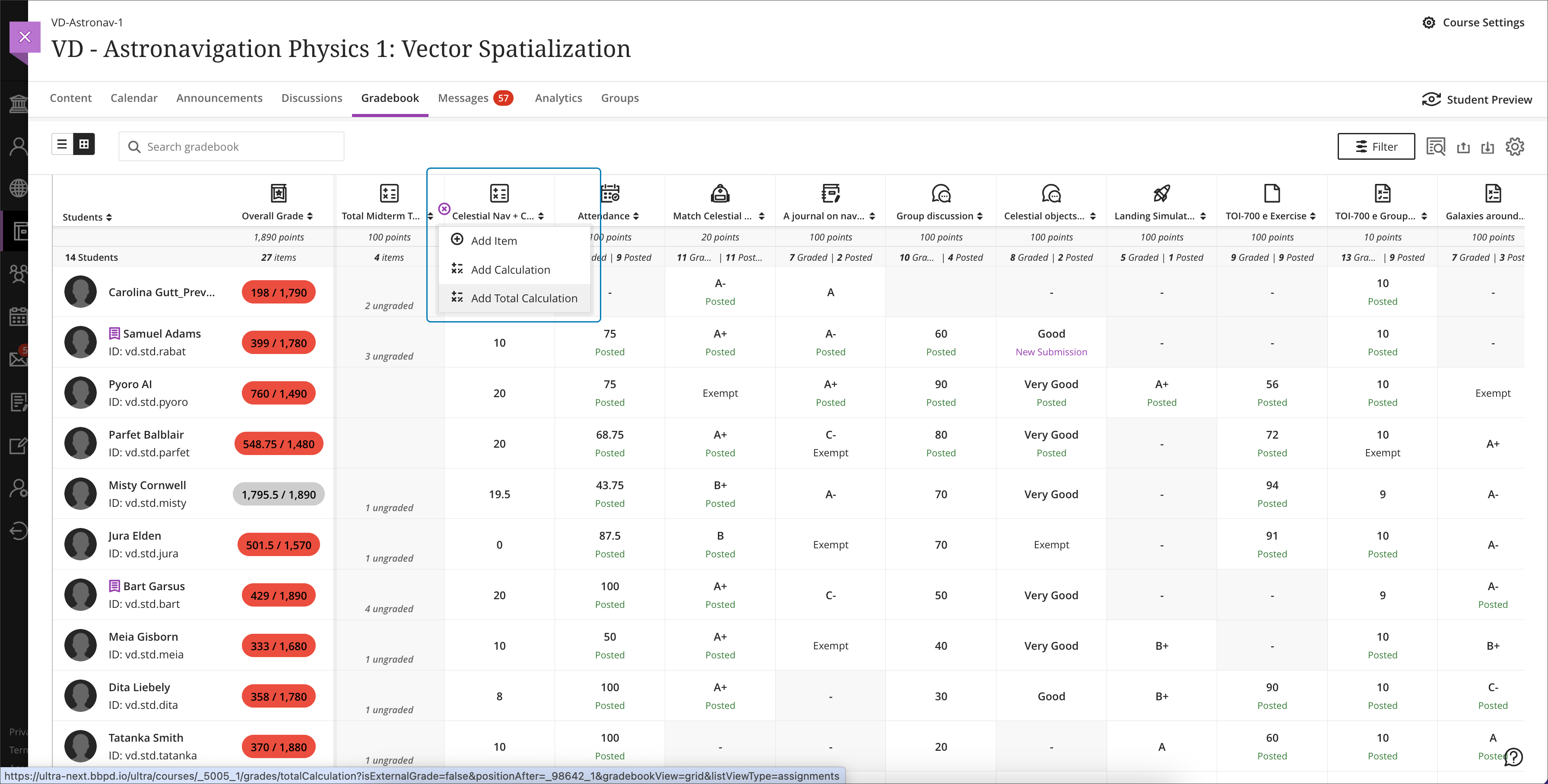
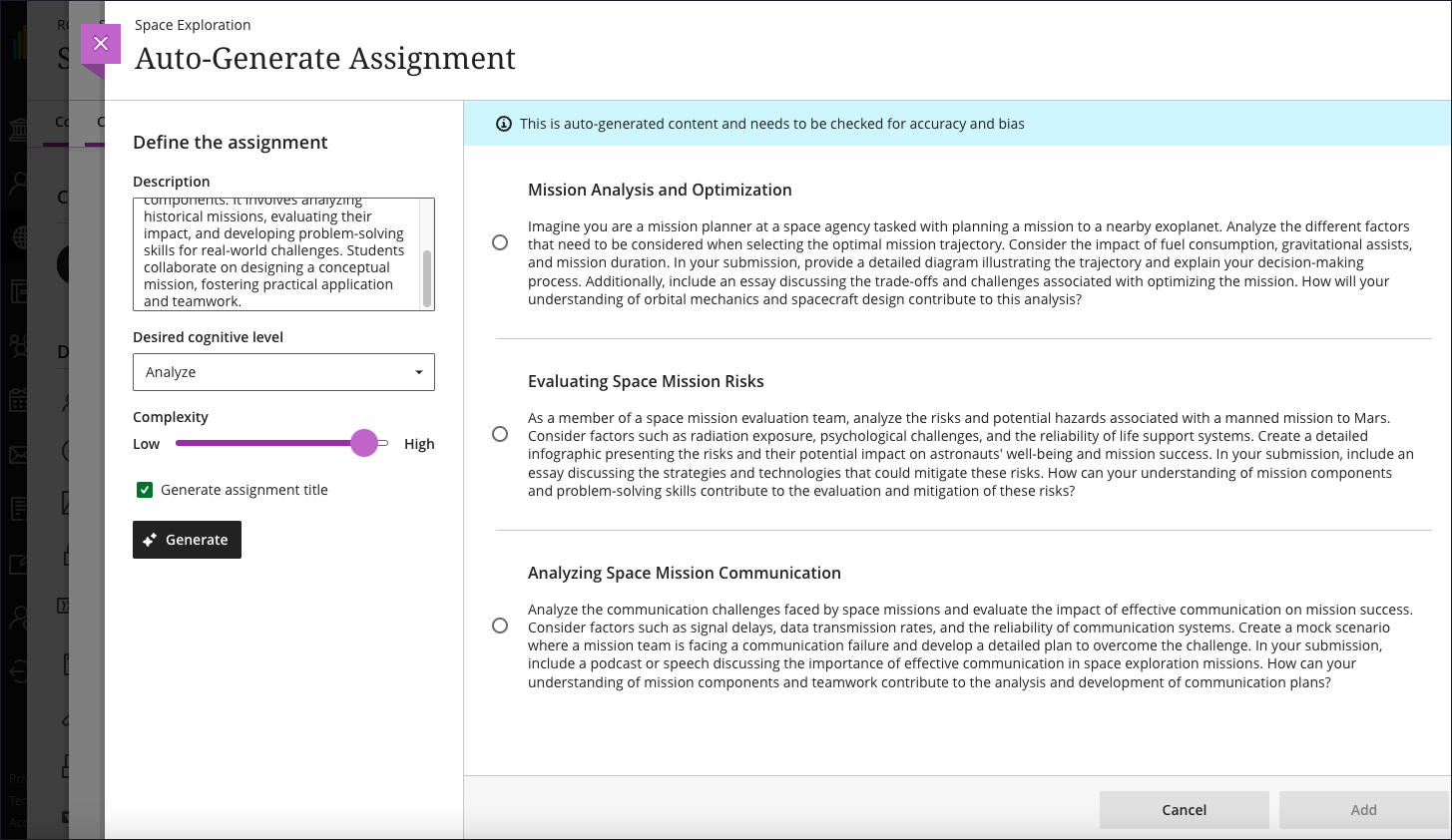
    <div class="html-content"><div><div><div><div><div><div><div>Expanding the functionality for the gradebook and assessments has been a central theme for the past year of Ultra development. When the winter term starts in 2024, Ultra courses will feature additional enhancements for the gradebook, grading interface, and test logs for learner attempts as developers continue to refine features based on institutional and instructor feedback.</div><div><br></div><div>The gradebook is a key tool for instructors in an Ultra course. With this update, instructors will be able to create total and weighted calculated columns that are point or percentage based with options to include or exclude categories and dropping scores. Moreover, these new total calculated columns can be used toward the overall grade calculation, allowing greater flexibility.</div></div><div><span><br></span></div><div><img src="https://help.blackboard.com/sites/default/files/images/2023-12/learn_ultra_instructor_Grading_TotalAndWeightedCalculatons_TotalCalculationColumn_AddingColumnFromGridView.png" width="500" alt="Image 1: Example of the improved gradebook with option to add a new Total Calculation" style="max-width: 100%; height: auto;"></div><div><div><em>Image 1: Example of the improved gradebook with option to add a new Total Calculation</em></div></div><div><div><br></div><div><strong>Grading &amp; Gradebook Improvements</strong></div><div><ul><li><span>The grid view of the Ultra gradebook features usability improvements that reduces spacing around icons and improves row visibility. </span></li><li><span>The gradebook will now provide the student ID next to each learner's name to improve identification. </span><span>When hovering over a truncated name in the gradebook, a tooltip will reveal the full name.</span></li><li><span>A sortable category column is added to the gradebook list view to provide clarity for those items to be graded.</span></li><li>Students will be able to see their grades for an assessment even if it is hidden. In a future update, feedback will be also visible.</li><li><span>Instructors can use delegated grading for anonymous assessments. Sorting controls are available for submission date.</span></li></ul><div>The test assessment log has been a frequent request for Ultra courses. Unlike Original courses, the Ultra version of this functionality provides information for tests and assignments. The test log will provide detailed information including date and time for starting the test, answers to each question, a preview of the question itself, and the estimated time spent on each question. The assignment log provides the start and submission date and time as well as the submission receipt number.</div></div><div><br></div><div><img src="https://help.blackboard.com/sites/default/files/images/2023-12/learn_ultra_instructor_AssessmentIntegrity_SubmissionListViewEntryPoint.png" width="500" alt="Image 2: Instructors can access the Assessment Submission Log from the individual assessment log" style="max-width: 100%; height: auto;"></div><div><span>Image 2: </span><em>Instructors can access the Assessment Submission Log from the individual assessment</em></div><div><br></div><div><strong>Content Creation &amp; Management</strong></div></div><div><div><br></div><div><div>The latest update to the AI Course Design Assistant Tools in Ultra courses allows instructors to generate assignment prompts aligned to a selected Bloom's cognitive process. As with all AI functionality, instructors are in complete control and can choose when and how to they want to use the tools.</div><div><br></div><div><img src="https://help.blackboard.com/sites/default/files/images/2023-12/Learn_Ultra_Instructors_AI%20Design%20Assistant%20Authentic%20Assignment%20Prompt%20Generation_Prompts%20with%20Content.png" width="500" alt="Image 3: Instructors can add additional context through a description, select the desired cognitive level and complexity, and then generate prompts" style="max-width: 100%; height: auto;"></div><div><span>Image 3: </span><em>Instructors can add additional context through a description, select the desired cognitive level and complexity, and then generate prompts</em></div><div><br></div><div>Additional updates to Content Management include:</div><div><ul><li><span>The Batch Edit tool now allows instructors to manage the date and/or time for selected items that have a pre-existing date/time -- for example, assessment due dates or visibility.</span></li><li><span>Instructors can use the unused files tool to find and remove course files that are not in use in a course. Instructors can download a file before deleting it.</span></li></ul></div></div></div></div></div></div></div><div><div><div><div><div><span><div><span>Faculty should see the latest updates in Ultra courses around January 4-5, 2024. </span><span>The next update to our Ultra test environment will take place on January 9, 2024; release notes are posted to the <a href="https://wiki.umbc.edu/x/LohnB" rel="nofollow external" class="bo">What's New in Ultra</a> that same week. Faculty who are interested in test driving new features before they are released to production should </span><a href="http://my.umbc.edu/go/request-help" rel="nofollow external" class="bo">open an RT ticket</a> to request early access. Please <a href="http://umbc.edu/go/ultra" rel="nofollow external" class="bo">watch the FAQs</a>, including <a href="https://wiki.umbc.edu/x/LohnB" rel="nofollow external" class="bo">the What's New with Ultra page</a>, <span>and myUMBC for additional information about Ultra. </span></div></span></div></div></div></div><div><span><br></span></div></div><div><span><strong>Connect with Instructional Technology</strong></span></div><div><span>As always, if you have any questions about teaching, learning, and technology at UMBC, please consider the following options:</span></div><ul><li><a href="http://www.umbc.edu/faq" rel="nofollow external" class="bo">Check our extensive FAQ collection</a><span> </span></li><ul><li><span><a href="https://wiki.umbc.edu/x/LohnB" rel="nofollow external" class="bo"><span>What's new in Ultra?</span></a><span> </span><span>|</span><span> </span><a href="https://wiki.umbc.edu/x/bwrSAQ" rel="nofollow external" class="bo"><span>Known Issues</span></a><span> </span></span></li></ul><li><span><a href="http://my.umbc.edu/go/request-help" rel="nofollow external" class="bo">Open a ticket via RT</a></span></li><li><span>Follow the </span><a href="http://my.umbc.edu/groups/instructional-technology" rel="nofollow external" class="bo">Instructional Technology</a><span> &amp; </span><a href="http://my.umbc.edu/groups/doit" rel="nofollow external" class="bo">DoIT</a><span> myUMBC groups</span></li><li><a href="http://doit.umbc.edu/itnm/staff/" rel="nofollow external" class="bo">Request a consult</a><span> with <a href="http://doit.umbc.edu/itnm/staff" rel="nofollow external" class="bo">instructional technology staff</a></span></li><li><span><a href="http://pivot.umbc.edu" rel="nofollow external" class="bo">PIVOT</a> | <a href="https://doit.umbc.edu/itnm/academic-continuity/" rel="nofollow external" class="bo">Academic Continuity</a></span><span> </span><span>|</span><span> </span><span><a href="https://fdc.umbc.edu/teaching/keep-on-teaching/" rel="nofollow external" class="bo">Keep On Teaching</a></span><span> </span><span>|</span><span> </span><span><a href="https://doit.umbc.edu/students" rel="nofollow external" class="bo">Student Technology Resources</a></span></li></ul></div><div><div></div></div></div>
]]>
</Body>
<Summary>Expanding the functionality for the gradebook and assessments has been a central theme for the past year of Ultra development. When the winter term starts in 2024, Ultra courses will feature...</Summary>
<Website>https://my3.my.umbc.edu/groups/instructional-technology/posts/137839</Website>
<TrackingUrl>https://beta.my.umbc.edu/api/v0/pixel/news/137839/guest@my.umbc.edu/325b5785e5d87ae1f21f6d288a9d1d92/api/pixel</TrackingUrl>
<Tag>ai</Tag>
<Tag>assessments</Tag>
<Tag>blackboard</Tag>
<Tag>gradebook</Tag>
<Tag>grading</Tag>
<Tag>ultra-experience</Tag>
<Tag>ultra-update</Tag>
<Group token="instructional-technology">Instructional Technology</Group>
<GroupUrl>https://beta.my.umbc.edu/groups/instructional-technology</GroupUrl>
<AvatarUrl>https://assets2-beta.my.umbc.edu/system/shared/avatars/groups/000/001/164/dec3b026b81ee6d890a8f82f75c94a2e/xsmall.png?1446126703</AvatarUrl>
<AvatarUrl size="original">https://assets1-beta.my.umbc.edu/system/shared/avatars/groups/000/001/164/dec3b026b81ee6d890a8f82f75c94a2e/original.png?1446126703</AvatarUrl>
<AvatarUrl size="xxlarge">https://assets2-beta.my.umbc.edu/system/shared/avatars/groups/000/001/164/dec3b026b81ee6d890a8f82f75c94a2e/xxlarge.png?1446126703</AvatarUrl>
<AvatarUrl size="xlarge">https://assets1-beta.my.umbc.edu/system/shared/avatars/groups/000/001/164/dec3b026b81ee6d890a8f82f75c94a2e/xlarge.png?1446126703</AvatarUrl>
<AvatarUrl size="large">https://assets1-beta.my.umbc.edu/system/shared/avatars/groups/000/001/164/dec3b026b81ee6d890a8f82f75c94a2e/large.png?1446126703</AvatarUrl>
<AvatarUrl size="medium">https://assets4-beta.my.umbc.edu/system/shared/avatars/groups/000/001/164/dec3b026b81ee6d890a8f82f75c94a2e/medium.png?1446126703</AvatarUrl>
<AvatarUrl size="small">https://assets3-beta.my.umbc.edu/system/shared/avatars/groups/000/001/164/dec3b026b81ee6d890a8f82f75c94a2e/small.png?1446126703</AvatarUrl>
<AvatarUrl size="xsmall">https://assets2-beta.my.umbc.edu/system/shared/avatars/groups/000/001/164/dec3b026b81ee6d890a8f82f75c94a2e/xsmall.png?1446126703</AvatarUrl>
<AvatarUrl size="xxsmall">https://assets3-beta.my.umbc.edu/system/shared/avatars/groups/000/001/164/dec3b026b81ee6d890a8f82f75c94a2e/xxsmall.png?1446126703</AvatarUrl>
<Sponsor>Instructional Technology</Sponsor>
<ThumbnailUrl size="xxlarge">https://assets4-beta.my.umbc.edu/system/shared/thumbnails/news/000/137/839/6fe5ac4ee868c2fabd33f0aebdee5885/xxlarge.jpg?1702915093</ThumbnailUrl>
<ThumbnailUrl size="xlarge">https://assets1-beta.my.umbc.edu/system/shared/thumbnails/news/000/137/839/6fe5ac4ee868c2fabd33f0aebdee5885/xlarge.jpg?1702915093</ThumbnailUrl>
<ThumbnailUrl size="large">https://assets1-beta.my.umbc.edu/system/shared/thumbnails/news/000/137/839/6fe5ac4ee868c2fabd33f0aebdee5885/large.jpg?1702915093</ThumbnailUrl>
<ThumbnailUrl size="medium">https://assets4-beta.my.umbc.edu/system/shared/thumbnails/news/000/137/839/6fe5ac4ee868c2fabd33f0aebdee5885/medium.jpg?1702915093</ThumbnailUrl>
<ThumbnailUrl size="small">https://assets2-beta.my.umbc.edu/system/shared/thumbnails/news/000/137/839/6fe5ac4ee868c2fabd33f0aebdee5885/small.jpg?1702915093</ThumbnailUrl>
<ThumbnailUrl size="xsmall">https://assets4-beta.my.umbc.edu/system/shared/thumbnails/news/000/137/839/6fe5ac4ee868c2fabd33f0aebdee5885/xsmall.jpg?1702915093</ThumbnailUrl>
<ThumbnailUrl size="xxsmall">https://assets4-beta.my.umbc.edu/system/shared/thumbnails/news/000/137/839/6fe5ac4ee868c2fabd33f0aebdee5885/xxsmall.jpg?1702915093</ThumbnailUrl>
<PawCount>2</PawCount>
<CommentCount>0</CommentCount>
<CommentsAllowed>true</CommentsAllowed>
<PostedAt>Thu, 21 Dec 2023 08:01:31 -0500</PostedAt>
</NewsItem>

<NewsItem contentIssues="true" id="118291" important="false" status="posted" url="https://beta.my.umbc.edu/groups/instructional-technology/posts/118291">
<Title>UMBC Scans Akindi's 9 Millionth Bubble Sheet</Title>
<Tagline>DoIT began the transition to Akindi bubble sheets in FA2021</Tagline>
<Body>
<![CDATA[
    <div class="html-content"><div>At the end of Spring 2021, <a href="https://doit.umbc.edu/post/101680/" rel="nofollow external" class="bo">DoIT announced a pilot of Akindi</a>, <a href="http://akindi.com" rel="nofollow external" class="bo">a tool</a> that serves as a Scantron alternative that allows instructors to print and score bubble sheets from any local printer/scanner. Akindi has been deployed with institutions across the country including Rutgers, Duke, USC Marshall, and the University of Tennessee. </div><div><br></div><div>Since UMBC's roll out, over 18,000 Akindi bubble sheets have been scanned by UMBC faculty and teaching assistants over 200 unique assessments. </div><div><br></div><div>On April 1, Jordan Wilson scanned in bubble sheets for Exam 1 in their CHEM 102L Introductory Chemistry Lab. That scan hit a milestone for our partners at Akindi: it included their 9 millionth scanned bubble sheet. Wilson has been awarded a complementary pair of socks from Akindi to celebrate. </div><div><br></div><div><img src="https://blackboard.umbc.edu/bbcswebdav/institution/doitnews/Akindi-9M.png" style="max-width: 100%; height: auto;"></div><div><br></div><div>As the end of the semester approaches, DoIT reminds faculty of <a href="https://wiki.umbc.edu/x/qZTLBg" rel="nofollow external" class="bo">the advantages of Akindi bubble sheets over Scantrons</a>. Resources are made <a href="https://wiki.umbc.edu/x/gpLLBg" rel="nofollow external" class="bo">available through our FAQs</a>, or faculty can request an Akindi <a href="https://umbc.edu/go/1068" rel="nofollow external" class="bo">consult by placing a ticket via RT</a>.</div></div>
]]>
</Body>
<Summary>At the end of Spring 2021, DoIT announced a pilot of Akindi, a tool that serves as a Scantron alternative that allows instructors to print and score bubble sheets from any local printer/scanner....</Summary>
<TrackingUrl>https://beta.my.umbc.edu/api/v0/pixel/news/118291/guest@my.umbc.edu/6fea6243d5cf9b5f392e69e0db9b7cf1/api/pixel</TrackingUrl>
<Tag>akindi</Tag>
<Tag>assessments</Tag>
<Tag>bubble-sheets</Tag>
<Tag>scantrons</Tag>
<Group token="instructional-technology">Instructional Technology</Group>
<GroupUrl>https://beta.my.umbc.edu/groups/instructional-technology</GroupUrl>
<AvatarUrl>https://assets2-beta.my.umbc.edu/system/shared/avatars/groups/000/001/164/dec3b026b81ee6d890a8f82f75c94a2e/xsmall.png?1446126703</AvatarUrl>
<AvatarUrl size="original">https://assets1-beta.my.umbc.edu/system/shared/avatars/groups/000/001/164/dec3b026b81ee6d890a8f82f75c94a2e/original.png?1446126703</AvatarUrl>
<AvatarUrl size="xxlarge">https://assets2-beta.my.umbc.edu/system/shared/avatars/groups/000/001/164/dec3b026b81ee6d890a8f82f75c94a2e/xxlarge.png?1446126703</AvatarUrl>
<AvatarUrl size="xlarge">https://assets1-beta.my.umbc.edu/system/shared/avatars/groups/000/001/164/dec3b026b81ee6d890a8f82f75c94a2e/xlarge.png?1446126703</AvatarUrl>
<AvatarUrl size="large">https://assets1-beta.my.umbc.edu/system/shared/avatars/groups/000/001/164/dec3b026b81ee6d890a8f82f75c94a2e/large.png?1446126703</AvatarUrl>
<AvatarUrl size="medium">https://assets4-beta.my.umbc.edu/system/shared/avatars/groups/000/001/164/dec3b026b81ee6d890a8f82f75c94a2e/medium.png?1446126703</AvatarUrl>
<AvatarUrl size="small">https://assets3-beta.my.umbc.edu/system/shared/avatars/groups/000/001/164/dec3b026b81ee6d890a8f82f75c94a2e/small.png?1446126703</AvatarUrl>
<AvatarUrl size="xsmall">https://assets2-beta.my.umbc.edu/system/shared/avatars/groups/000/001/164/dec3b026b81ee6d890a8f82f75c94a2e/xsmall.png?1446126703</AvatarUrl>
<AvatarUrl size="xxsmall">https://assets3-beta.my.umbc.edu/system/shared/avatars/groups/000/001/164/dec3b026b81ee6d890a8f82f75c94a2e/xxsmall.png?1446126703</AvatarUrl>
<Sponsor>Instructional Technology</Sponsor>
<ThumbnailUrl size="xxlarge">https://assets3-beta.my.umbc.edu/system/shared/thumbnails/news/000/118/291/75031ea1d671399a97459e083f5d2698/xxlarge.jpg?1649333779</ThumbnailUrl>
<ThumbnailUrl size="xlarge">https://assets1-beta.my.umbc.edu/system/shared/thumbnails/news/000/118/291/75031ea1d671399a97459e083f5d2698/xlarge.jpg?1649333779</ThumbnailUrl>
<ThumbnailUrl size="large">https://assets3-beta.my.umbc.edu/system/shared/thumbnails/news/000/118/291/75031ea1d671399a97459e083f5d2698/large.jpg?1649333779</ThumbnailUrl>
<ThumbnailUrl size="medium">https://assets4-beta.my.umbc.edu/system/shared/thumbnails/news/000/118/291/75031ea1d671399a97459e083f5d2698/medium.jpg?1649333779</ThumbnailUrl>
<ThumbnailUrl size="small">https://assets4-beta.my.umbc.edu/system/shared/thumbnails/news/000/118/291/75031ea1d671399a97459e083f5d2698/small.jpg?1649333779</ThumbnailUrl>
<ThumbnailUrl size="xsmall">https://assets2-beta.my.umbc.edu/system/shared/thumbnails/news/000/118/291/75031ea1d671399a97459e083f5d2698/xsmall.jpg?1649333779</ThumbnailUrl>
<ThumbnailUrl size="xxsmall">https://assets4-beta.my.umbc.edu/system/shared/thumbnails/news/000/118/291/75031ea1d671399a97459e083f5d2698/xxsmall.jpg?1649333779</ThumbnailUrl>
<PawCount>9</PawCount>
<CommentCount>0</CommentCount>
<CommentsAllowed>true</CommentsAllowed>
<PostedAt>Thu, 07 Apr 2022 08:19:22 -0400</PostedAt>
</NewsItem>

<NewsItem contentIssues="true" id="117418" important="false" status="posted" url="https://beta.my.umbc.edu/groups/instructional-technology/posts/117418">
<Title>Four Biology Faculty Give 1st Exam In-class AND Online</Title>
<Tagline>WiFi &amp; student laptops turn UC into a "testing center"</Tagline>
<Body>
<![CDATA[
    <div class="html-content"><span><p><img src="https://my3.my.umbc.edu/groups/instructional-technology/posts/117418/attachments/42500" style="max-width: 100%; height: auto;"></p><p><span><span>Before the Spring 22 semester started, four </span><a href="https://biology.umbc.edu/" rel="nofollow external" class="bo"><span>Biological Sciences</span></a><span> professors -- </span><a href="https://biology.umbc.edu/directory/faculty/person/ST65604/" rel="nofollow external" class="bo"><span><strong>David Eisenmann</strong></span></a><span>, </span><a href="https://biology.umbc.edu/directory/faculty/person/MG28525/" rel="nofollow external" class="bo"><span><strong>Hua Lu</strong></span></a><span>, </span><a href="https://biology.umbc.edu/directory/faculty/person/SF01964/" rel="nofollow external" class="bo"><span><strong>Jeffrey Leips</strong></span></a><span>, </span><span>and </span><a href="https://biology.umbc.edu/directory/faculty/person/FC61444/" rel="nofollow external" class="bo"><span><strong>Kevin Omland</strong></span></a><span> -- </span><span>reached out to DoIT to see if they could (and should) try an experiment: proctor their first semester exam in the University Center (UC) Ballroom </span><span>and</span><span> online (via Blackboard). </span></span></p><p><span>All four have been teaching in the UC as part of the pandemic-driven </span><a href="https://doit.umbc.edu/post/111633/" rel="nofollow external" class="bo"><span>retrofits</span></a><span> for teaching designed by DoIT and managed by </span><a href="https://eventservices.umbc.edu/" rel="nofollow external" class="bo"><span>Events &amp; Conference Services</span></a><span> (ECS). Also, after teaching remotely for nearly two years, they'd come to like the benefits of online exams other faculty have discovered with Blackboard </span><a href="https://doit.umbc.edu/itnm/post/97023/" rel="nofollow external" class="bo"><span>exam question pools</span></a><span>, including randomization, item analysis and quicker student feedback. So, as more classes were offered on campus, the faculty wondered if they could leverage student laptops and mobile devices that made UMBC's pandemic pivot to online learning possible. </span></p><p><span>"Initially, our biggest concern was power for student laptops to make it through a 50-minute class period and exam," says </span><span><strong>Omland</strong></span><span>, who reached out on behalf of the group, and has co-taught BIOL 142 "Foundations of Biology: Ecology and Evolution" with his colleague </span><span><strong>Leips</strong></span><span> for 20 years. "Then, we wondered if the campus WiFI would melt, so we thought maybe we should check with DoIT first." They were joined by colleagues </span><span><strong>Eisenmann</strong></span><span> and </span><span><strong>Lu</strong></span><span>, who co-teach BIOL 302 "Molecular and General Genetics."</span></p><p><span>After several emails exploring potential issues -- and two RT tickets to schedule DoIT support on their first exam dates -- the faculty briefed their students and conducted a "</span><span>dry run" test of the UC's power and WiFi 1-2 weeks before the exams. "We appreciated that step </span><span>very</span><span> much," says DoIT's </span><span><strong>David Toothe</strong></span><span>, Director of Enterprise Infrastructure Solutions, who leads the AV and Desktop Support units that collaborated with the faculty. It also helped that DoIT's Networks group had just upgraded the UC WiFi as part of a larger </span><a href="https://doit.umbc.edu/post/115927/" rel="nofollow external" class="bo"><span>campus wireless initiative</span></a><span> in January.</span></p><p><span>Interestingly, each course had similarities and differences in their approach to online exams proctored in the UC:</span></p><ul><li><span>In addition to using Bb </span><a href="https://doit.umbc.edu/itnm/post/97023/" rel="nofollow external" class="bo"><span>exam question banks</span></a><span>, both courses enroll over 200 students, and planned to use adjacent rooms (301, 310 and 312) for overflow or so students could plug into extra power outlets provided by DoIT, if needed. They also had paper back ups of the exam, in case there were issues that could not be fixed during the test.</span></li><li>BIOL 302 required the use of <a href="https://wiki.umbc.edu/x/0AI9BQ" rel="nofollow external" class="bo"><span>Respondus Lockdown Browser</span></a><span> (not Respondus Monitor) to access and take the test, and asked students to update their browsers/software before hand. It also uses Bb Original. However, BIOL 142 used an "open note" and "open web" (but not "open neighbor") approach, assigned students to specific UC rooms, and uses Bb Ultra.</span></li></ul><p><span><strong>Results</strong></span></p><p><span>During the last week of February, each course administered its first exam of the Spring 22 term. Results included the following (excerpted with permission from emails provided by Eisenmann and Omland):</span></p><p><span><img src="https://my3.my.umbc.edu/groups/instructional-technology/posts/117418/attachments/42502" style="max-width: 100%; height: auto;"></span></p><p><span>BIOL 302 "Genetics" (1st SP22 exam on 2/24/22)</span></p><ul><li><span>No students reported Wifi connectivity issues to [instructors]</span></li><li>Several students had problems with LDB but went away upon hard restart.</li><li>~6 students (out of 200) needed to use outlets, the rest were fine.</li><li>The calculator in the menu bar does not appear for students using LDB on a Chromebook [a known issue DoIT has <a href="https://doit.umbc.edu/news/post/99550" rel="nofollow external" class="bo">reported</a> and documented in a <a href="https://wiki.umbc.edu/x/OoRGBg" rel="nofollow external" class="bo">related FAQ</a>]. Otherwise no Chromebook or iPad issues.</li><li>2 students had problems that could not be fixed and took paper copies of a similar exam.</li><li>For a class of [302's] size we would have used 2500 pieces of paper to print this one exam. This way we printed 10% of that number (back up paper copies and scratch paper to give out).<br><br></li></ul><p><span><em>BIOL 142 "</em></span><em>Foundations of Biology" (1st SP22 exam on 2/25/22)</em></p><ul><li><span>4 students needed paper copies of the exam</span></li><li>One student said he always has trouble connecting in rm 301, so we moved him to 312 where he seemed to have no problem.  </li><li>5 students used outlets in rm 312.</li><li>The only fairly annoying problem was that one student was unable to submit her exam at the end. [Took photos of each exam page, No idea what happened]<br><br></li></ul><p><span>"After this experience I say we SO need a testing center," says </span><span><strong>Eisenmann</strong></span><span>, a sentiment echoed by others on the department's faculty email group after he and others shared their results. "This is the first time I have ever given an exam to 200+ people in 20+ years, online or in-person, and not really worried about cheating. And so much more pleasant for them and us than stadium seating."</span></p><p><span>Added </span><span><strong>Omland</strong></span><span>: "I spoke with about 10 students afterward - 8 said the format was fine, but 2 said they preferred paper exams so they could cross out answers, write on the side. We really appreciated the ability to have students spread out from each other . . . and walk to any part of the room to answer student questions.  Also, two students reported that they were home with covid. Since it is an online Bb exam with open book, open web etc, we just had them take the exam at home at the same time as the other students.  Can't do that with a paper exam!"</span></p><p><span><strong>Lu</strong></span><span> also spoke briefly with about 8 students after the 302 exam. "Only one expressed that she was not used to clicking on the screen for an exam but she did not seem to be bothered by it. All students seemed to appreciate the benefit of the format - reducing the use of paper, reducing grading labor (their own words). [We] were also very happy to see that the cheating problems could be largely eliminated/reduced with this format. As I walked around the room, I rarely saw that students next to each other had the same screen. Of course, this will depend on the pool size of a given exam."</span></p><p><span>DoIT briefly </span><a href="https://docs.google.com/presentation/d/1ijTA96SWGsvx0_pAGokGpqoF9E0AfXFTjZjy_k2fdu8/present?token=AC4w5VgD0I9smIABJCM7FlrRUSzefBtFRA%3A1646251759039&amp;includes_info_params=1&amp;eisi=CPOdvNqdqPYCFRdaHwodycYPug&amp;slide=id.g1177ee3a6cd_0_111#slide=id.g1177ee3a6cd_0_111" rel="nofollow external" class="bo"><span>presented</span></a><span> the Biology faculty'</span><span>s "</span><span>experiment" at the February 28 </span><a href="https://facultysenate.umbc.edu/committee-on-computer-policy/" rel="nofollow external" class="bo"><span>Faculty Senate Computer Policy Committee</span></a><span> (CPC), which had been </span><a href="https://docs.google.com/presentation/d/1ijTA96SWGsvx0_pAGokGpqoF9E0AfXFTjZjy_k2fdu8/present?token=AC4w5VgD0I9smIABJCM7FlrRUSzefBtFRA%3A1646251759039&amp;includes_info_params=1&amp;eisi=CPOdvNqdqPYCFRdaHwodycYPug&amp;slide=id.g70a8bf6566_0_81#slide=id.g70a8bf6566_0_81" rel="nofollow external" class="bo"><span>exploring</span></a><span> the idea of a UMBC testing center before the pandemic. The biology faculty have also been invited to share their experience at an upcoming Classroom Committee meeting this semester.</span></p><p><span><em>By <a href="https://doit.umbc.edu/about/directory/person/md50842/" rel="nofollow external" class="bo">John Fritz</a></em></span></p><div><span><br></span></div></span></div>
]]>
</Body>
<Summary>Before the Spring 22 semester started, four Biological Sciences professors -- David Eisenmann, Hua Lu, Jeffrey Leips, and Kevin Omland -- reached out to DoIT to see if they could (and should) try...</Summary>
<AttachmentKind>Image</AttachmentKind>
<AttachmentUrl>https://assets3-beta.my.umbc.edu/system/shared/attachments/a6e4fb1d75c4acc963a2db21c0ed20fc/69f0efb0/news/000/117/418/8b02381898b666f4e5516bfbb3d10c51/4_BIOL_Faculty_Give_1st_SP22_Exam.png?1646335756</AttachmentUrl>
<Attachments>
<Attachment kind="Image" url="https://beta.my.umbc.edu/groups/instructional-technology/posts/117418/attachments/42500"></Attachment>
<Attachment kind="Image" url="https://beta.my.umbc.edu/groups/instructional-technology/posts/117418/attachments/42502"></Attachment>
</Attachments>
<TrackingUrl>https://beta.my.umbc.edu/api/v0/pixel/news/117418/guest@my.umbc.edu/e917e2e9ef83c1211b5d78d420611525/api/pixel</TrackingUrl>
<Tag>assessments</Tag>
<Tag>effective-practices</Tag>
<Tag>fritz</Tag>
<Tag>respondus</Tag>
<Group token="instructional-technology">Instructional Technology</Group>
<GroupUrl>https://beta.my.umbc.edu/groups/instructional-technology</GroupUrl>
<AvatarUrl>https://assets2-beta.my.umbc.edu/system/shared/avatars/groups/000/001/164/dec3b026b81ee6d890a8f82f75c94a2e/xsmall.png?1446126703</AvatarUrl>
<AvatarUrl size="original">https://assets1-beta.my.umbc.edu/system/shared/avatars/groups/000/001/164/dec3b026b81ee6d890a8f82f75c94a2e/original.png?1446126703</AvatarUrl>
<AvatarUrl size="xxlarge">https://assets2-beta.my.umbc.edu/system/shared/avatars/groups/000/001/164/dec3b026b81ee6d890a8f82f75c94a2e/xxlarge.png?1446126703</AvatarUrl>
<AvatarUrl size="xlarge">https://assets1-beta.my.umbc.edu/system/shared/avatars/groups/000/001/164/dec3b026b81ee6d890a8f82f75c94a2e/xlarge.png?1446126703</AvatarUrl>
<AvatarUrl size="large">https://assets1-beta.my.umbc.edu/system/shared/avatars/groups/000/001/164/dec3b026b81ee6d890a8f82f75c94a2e/large.png?1446126703</AvatarUrl>
<AvatarUrl size="medium">https://assets4-beta.my.umbc.edu/system/shared/avatars/groups/000/001/164/dec3b026b81ee6d890a8f82f75c94a2e/medium.png?1446126703</AvatarUrl>
<AvatarUrl size="small">https://assets3-beta.my.umbc.edu/system/shared/avatars/groups/000/001/164/dec3b026b81ee6d890a8f82f75c94a2e/small.png?1446126703</AvatarUrl>
<AvatarUrl size="xsmall">https://assets2-beta.my.umbc.edu/system/shared/avatars/groups/000/001/164/dec3b026b81ee6d890a8f82f75c94a2e/xsmall.png?1446126703</AvatarUrl>
<AvatarUrl size="xxsmall">https://assets3-beta.my.umbc.edu/system/shared/avatars/groups/000/001/164/dec3b026b81ee6d890a8f82f75c94a2e/xxsmall.png?1446126703</AvatarUrl>
<Sponsor>Instructional Technology</Sponsor>
<PawCount>5</PawCount>
<CommentCount>0</CommentCount>
<CommentsAllowed>true</CommentsAllowed>
<PostedAt>Thu, 03 Mar 2022 16:16:14 -0500</PostedAt>
<EditAt>Mon, 28 Nov 2022 14:57:15 -0500</EditAt>
</NewsItem>

<NewsItem contentIssues="true" id="116205" important="false" status="posted" url="https://beta.my.umbc.edu/groups/instructional-technology/posts/116205">
<Title>Prevent late assessments after due date in Feb Ultra update</Title>
<Tagline>Copy Original content into Ultra, name pronunciation support</Tagline>
<Body>
<![CDATA[
    <div class="html-content"><div>Robust assessment settings are necessary to support a range of different scenarios. Assessment settings are also important for academic integrity and honesty in courses. <span>Ultra courses currently accept and mark submissions as "late" if received after the due date.</span> A new setting in Ultra tests and assignments will give faculty <a href="https://wiki.umbc.edu/x/zRUSC" rel="nofollow external" class="bo">more control over due dates and time limits</a>, enforcing a hard deadline to disallow late submissions, or preventing students from beginning new attempts at an assessment after a due date.</div><div><br></div><div><img src="https://blackboard.umbc.edu/bbcswebdav/institution/doitnews/ultra-updates/learn_ultra_instructor_ProhibitLateSubmissionsAndNewAttemptsAfterDueDate_SettingsDetail.png" alt="Set new restrictions for late submissions in Ultra assignments" width="450" style="max-width: 100%; height: auto;"></div><div><em>Figure 1: Set new limits on late submissions for Ultra assignments.</em></div><div><br></div><div>Migrating to Ultra will be easier with an updated course copy tool <a href="https://wiki.umbc.edu/x/LohnB" rel="nofollow external" class="bo">available in February</a>, allowing faculty to easily pull content from older Original courses directly into their Ultra course shells. This enhancement to course copy provides increased efficiency and greater flexibility for reusing content, saving  This will save time and reduce frustration when building a course. <span>Faculty may choose to copy all or select content from Original courses as they currently do from Ultra courses. </span><span>Supported content types include folders, documents, tests, assignments, website links, discussions, and journals. Group assignments are also included.</span></div><div><span><br></span></div><div>Finally, a new user-specified setting allows faculty, staff, and students to add text guidance for the pronunciation of their names and/or an audio recording of their names to their profiles. The recording tool may be up to 20 seconds long. Please <a href="https://wiki.umbc.edu/x/7xUSC" rel="nofollow external" class="bo">review the FAQ</a> to learn how to update your pronunciation and determine where the pronunciation appears in Ultra courses. This feature is not yet supported in Original courses, but is expected at a later date.</div><div><br></div><div><div><span><span>T</span>he <a href="https://wiki.umbc.edu/x/LohnB" rel="nofollow external" class="bo">next update</a> to our test environment will take place on February 8, 2021. Faculty who are interested in test driving new features before they are released to production should </span><a href="http://my.umbc.edu/go/request-help" rel="nofollow external" class="bo">open an RT ticket</a><span> to request early access. </span><span>Please </span><a href="http://umbc.edu/go/ultra" rel="nofollow external" class="bo">watch the FAQs</a><span> and myUMBC for additional information about Ultra.</span></div><div><span><br></span></div><div><span>As always, if you have any questions about teaching, learning, and technology at UMBC, please consider the following options:</span><div><ul><li><span><a href="http://pivot.umbc.edu" rel="nofollow external" class="bo">PIVOT</a> | <a href="https://doit.umbc.edu/itnm/academic-continuity/" rel="nofollow external" class="bo">Academic Continuity</a></span><span> </span><span>|</span><span> </span><span><a href="https://fdc.umbc.edu/teaching/keep-on-teaching/" rel="nofollow external" class="bo">Keep On Teaching</a></span><span> </span><span>|</span><span> </span><span><a href="https://doit.umbc.edu/students" rel="nofollow external" class="bo">Student Technology Resources</a></span></li><li><a href="http://www.umbc.edu/faq" rel="nofollow external" class="bo">Check our extensive FAQ collection</a><span> </span></li><ul><li><span><a href="https://wiki.umbc.edu/x/LohnB" rel="nofollow external" class="bo"><span>What’s new in Ultra?</span></a><span> </span><span>|</span><span> </span><a href="https://wiki.umbc.edu/x/bwrSAQ" rel="nofollow external" class="bo"><span>Known Issues</span></a><span> </span></span></li></ul><li><span><a href="http://my.umbc.edu/go/request-help" rel="nofollow external" class="bo">Open a ticket via RT</a></span></li><li><span>Follow the </span><a href="http://my.umbc.edu/groups/instructional-technology" rel="nofollow external" class="bo">Instructional Technology</a><span> &amp; </span><a href="http://my.umbc.edu/groups/doit" rel="nofollow external" class="bo">DoIT</a><span> myUMBC groups</span></li><li><a href="http://doit.umbc.edu/itnm/staff/" rel="nofollow external" class="bo">Request a consult</a><span> with <a href="http://doit.umbc.edu/itnm/staff" rel="nofollow external" class="bo">instructional technology staff</a></span></li></ul></div></div></div></div>
]]>
</Body>
<Summary>Robust assessment settings are necessary to support a range of different scenarios. Assessment settings are also important for academic integrity and honesty in courses. Ultra courses currently...</Summary>
<Website>https://my3.my.umbc.edu/groups/instructional-technology/posts/116205</Website>
<TrackingUrl>https://beta.my.umbc.edu/api/v0/pixel/news/116205/guest@my.umbc.edu/8c18863145593b31c4d375bbb9eb99c2/api/pixel</TrackingUrl>
<Tag>assessments</Tag>
<Tag>blackboard</Tag>
<Tag>ultra-experience</Tag>
<Tag>ultra-update</Tag>
<Group token="instructional-technology">Instructional Technology</Group>
<GroupUrl>https://beta.my.umbc.edu/groups/instructional-technology</GroupUrl>
<AvatarUrl>https://assets2-beta.my.umbc.edu/system/shared/avatars/groups/000/001/164/dec3b026b81ee6d890a8f82f75c94a2e/xsmall.png?1446126703</AvatarUrl>
<AvatarUrl size="original">https://assets1-beta.my.umbc.edu/system/shared/avatars/groups/000/001/164/dec3b026b81ee6d890a8f82f75c94a2e/original.png?1446126703</AvatarUrl>
<AvatarUrl size="xxlarge">https://assets2-beta.my.umbc.edu/system/shared/avatars/groups/000/001/164/dec3b026b81ee6d890a8f82f75c94a2e/xxlarge.png?1446126703</AvatarUrl>
<AvatarUrl size="xlarge">https://assets1-beta.my.umbc.edu/system/shared/avatars/groups/000/001/164/dec3b026b81ee6d890a8f82f75c94a2e/xlarge.png?1446126703</AvatarUrl>
<AvatarUrl size="large">https://assets1-beta.my.umbc.edu/system/shared/avatars/groups/000/001/164/dec3b026b81ee6d890a8f82f75c94a2e/large.png?1446126703</AvatarUrl>
<AvatarUrl size="medium">https://assets4-beta.my.umbc.edu/system/shared/avatars/groups/000/001/164/dec3b026b81ee6d890a8f82f75c94a2e/medium.png?1446126703</AvatarUrl>
<AvatarUrl size="small">https://assets3-beta.my.umbc.edu/system/shared/avatars/groups/000/001/164/dec3b026b81ee6d890a8f82f75c94a2e/small.png?1446126703</AvatarUrl>
<AvatarUrl size="xsmall">https://assets2-beta.my.umbc.edu/system/shared/avatars/groups/000/001/164/dec3b026b81ee6d890a8f82f75c94a2e/xsmall.png?1446126703</AvatarUrl>
<AvatarUrl size="xxsmall">https://assets3-beta.my.umbc.edu/system/shared/avatars/groups/000/001/164/dec3b026b81ee6d890a8f82f75c94a2e/xxsmall.png?1446126703</AvatarUrl>
<Sponsor>Instructional Technology</Sponsor>
<ThumbnailUrl size="xxlarge">https://assets3-beta.my.umbc.edu/system/shared/thumbnails/news/000/116/205/c87840dcb3c7cfb37ebf56c87de0866c/xxlarge.jpg?1642698610</ThumbnailUrl>
<ThumbnailUrl size="xlarge">https://assets2-beta.my.umbc.edu/system/shared/thumbnails/news/000/116/205/c87840dcb3c7cfb37ebf56c87de0866c/xlarge.jpg?1642698610</ThumbnailUrl>
<ThumbnailUrl size="large">https://assets2-beta.my.umbc.edu/system/shared/thumbnails/news/000/116/205/c87840dcb3c7cfb37ebf56c87de0866c/large.jpg?1642698610</ThumbnailUrl>
<ThumbnailUrl size="medium">https://assets4-beta.my.umbc.edu/system/shared/thumbnails/news/000/116/205/c87840dcb3c7cfb37ebf56c87de0866c/medium.jpg?1642698610</ThumbnailUrl>
<ThumbnailUrl size="small">https://assets1-beta.my.umbc.edu/system/shared/thumbnails/news/000/116/205/c87840dcb3c7cfb37ebf56c87de0866c/small.jpg?1642698610</ThumbnailUrl>
<ThumbnailUrl size="xsmall">https://assets1-beta.my.umbc.edu/system/shared/thumbnails/news/000/116/205/c87840dcb3c7cfb37ebf56c87de0866c/xsmall.jpg?1642698610</ThumbnailUrl>
<ThumbnailUrl size="xxsmall">https://assets4-beta.my.umbc.edu/system/shared/thumbnails/news/000/116/205/c87840dcb3c7cfb37ebf56c87de0866c/xxsmall.jpg?1642698610</ThumbnailUrl>
<PawCount>2</PawCount>
<CommentCount>0</CommentCount>
<CommentsAllowed>true</CommentsAllowed>
<PostedAt>Mon, 24 Jan 2022 09:40:08 -0500</PostedAt>
<EditAt>Tue, 06 Dec 2022 15:11:07 -0500</EditAt>
</NewsItem>

<NewsItem contentIssues="true" id="112409" important="false" status="posted" url="https://beta.my.umbc.edu/groups/instructional-technology/posts/112409">
<Title>VoiceThread Assignments for Media Projects and Peer Critique</Title>
<Tagline>One Instructor&#8217;s Use Case and Lessons Learned</Tagline>
<Body>
<![CDATA[
    <div class="html-content"><p><span>Shifting to teaching in online and hybrid formats has created opportunities to identify how students can share multimedia projects and receive feedback through peer critique. While </span><a href="https://doit.umbc.edu/itnm/lecturing-online/" rel="nofollow external" class="bo"><span>various tools support multimedia</span></a><span>, faculty often wonder what tools can enhance asynchronous peer engagement for multimedia projects and how to use these tools with Blackboard.</span></p><p><span>UMBC community members have used asynchronous tools like </span><a href="https://wiki.umbc.edu/display/faq/VoiceThread" rel="nofollow external" class="bo"><span>VoiceThread</span></a><span> for multimedia engagement. VoiceThread is a learning tool for enhancing student engagement and online presence. With VoiceThread, instructors and students can create, share, and comment on images, Microsoft PowerPoint presentations, videos, audio files, documents, and PDFs, using text, a microphone, webcam, phone, and audio-file upload. </span></p><p><span>The VoiceThread platform supported communication between presenters and visitors at conferences like </span><a href="https://urcad.umbc.edu/" rel="nofollow external" class="bo"><span>URCAD</span></a><span>, </span><a href="https://eng.umd.edu/minorities/events/research-symposium/presentations" rel="nofollow external" class="bo"><span>USM LSAMP</span></a><span>, and </span><a href="https://surf.umbc.edu/" rel="nofollow external" class="bo"><span>SURF</span></a><span>. In addition, faculty incorporate VoiceThread in Blackboard to share lectures, presentations, and student work. The most recent feature for VoiceThread in Blackboard, VoiceThread Assignments, creates a new level of integration between student work, collaboration, and Blackboard.</span></p><p><a href="https://mcs.umbc.edu/mcs-faculty-and-staff/" rel="nofollow external" class="bo"><span>Kristen Anchor,</span></a><span> Lecturer, </span><a href="https://mcs.umbc.edu/" rel="nofollow external" class="bo"><span>Media and Communication Studies</span></a><span> (MCS), uses VoiceThread Assignments in her MCS courses. She devised several innovative approaches to manage and facilitate media project assignments, peer learning, and peer critique. For Anchor, peer critique is an integral part of the learning and creative process. She explains to students, "Critique is helpful for two reasons: (1) Getting feedback on your work, and (2) practicing your visual and communication skills about media (as the critic)." How can instructors design online courses with asynchronous components to support this essential student interaction? Anchor finds VoiceThread helps students achieve course goals and meets the instructional need to support multimedia projects and peer engagement.</span></p><p><span>Anchor thoughtfully delivers VoiceThread assignments by providing students with assignment instructions and reference guides for using VoiceThread. She presents students with assignment instructions within Blackboard and again after they launch the VoiceThread Assignment. Students receive project examples as references with their assignment instructions. Anchor uses the VoiceThread Student Gallery for each project, an optional feature that faculty can select when </span><a href="https://wiki.umbc.edu/x/kQzBBQ" rel="nofollow external" class="bo"><span>creating a VoiceThread Assignment</span></a><span>, to support peer critique. </span></p><p><span><br></span></p><img src="https://my3.my.umbc.edu/groups/instructional-technology/posts/112409/attachments/40577" style="max-width: 100%; height: auto;"><p><span><br></span></p><p><span>The Student Gallery feature makes peer critique in VoiceThread possible; it allows students to see submissions from their peers and add audio, video, and text-based comments, allowing for asynchronous peer feedback sessions.</span></p><p><span>Kristen Anchor will share her excellent ideas about using VoiceThread to support student projects and engagement, along with tips, tricks, and thoughts for faculty considering adopting VoiceThread for their instruction moving forward. Please <a href="https://my3.my.umbc.edu/groups/instructional-technology/events/96570/" rel="nofollow external" class="bo">register and join us</a> </span><span>Thursday, October 21st, at Noon </span><span>to learn more.</span></p><p><span>~ By </span><a href="https://doit.umbc.edu/itnm/staff/abrams/" rel="nofollow external" class="bo"><span>Josh Abrams</span></a></p></div>
]]>
</Body>
<Summary>Shifting to teaching in online and hybrid formats has created opportunities to identify how students can share multimedia projects and receive feedback through peer critique. While various tools...</Summary>
<Website>https://my3.my.umbc.edu/groups/instructional-technology/events/96570</Website>
<AttachmentKind>Image</AttachmentKind>
<AttachmentUrl>https://assets3-beta.my.umbc.edu/system/shared/attachments/6208a8cceec17036e28d0420f511a660/69f0efb0/news/000/112/409/3958f53d13f000006c688ac027e34d2a/Project 2 Gallery.png?1631895799</AttachmentUrl>
<Attachments>
<Attachment kind="Image" url="https://beta.my.umbc.edu/groups/instructional-technology/posts/112409/attachments/40577"></Attachment>
</Attachments>
<TrackingUrl>https://beta.my.umbc.edu/api/v0/pixel/news/112409/guest@my.umbc.edu/4a9b534b9f58efd164083a0987f99ba1/api/pixel</TrackingUrl>
<Tag>abrams</Tag>
<Tag>assessments</Tag>
<Tag>effective-practices</Tag>
<Tag>voicethread</Tag>
<Group token="instructional-technology">Instructional Technology</Group>
<GroupUrl>https://beta.my.umbc.edu/groups/instructional-technology</GroupUrl>
<AvatarUrl>https://assets2-beta.my.umbc.edu/system/shared/avatars/groups/000/001/164/dec3b026b81ee6d890a8f82f75c94a2e/xsmall.png?1446126703</AvatarUrl>
<AvatarUrl size="original">https://assets1-beta.my.umbc.edu/system/shared/avatars/groups/000/001/164/dec3b026b81ee6d890a8f82f75c94a2e/original.png?1446126703</AvatarUrl>
<AvatarUrl size="xxlarge">https://assets2-beta.my.umbc.edu/system/shared/avatars/groups/000/001/164/dec3b026b81ee6d890a8f82f75c94a2e/xxlarge.png?1446126703</AvatarUrl>
<AvatarUrl size="xlarge">https://assets1-beta.my.umbc.edu/system/shared/avatars/groups/000/001/164/dec3b026b81ee6d890a8f82f75c94a2e/xlarge.png?1446126703</AvatarUrl>
<AvatarUrl size="large">https://assets1-beta.my.umbc.edu/system/shared/avatars/groups/000/001/164/dec3b026b81ee6d890a8f82f75c94a2e/large.png?1446126703</AvatarUrl>
<AvatarUrl size="medium">https://assets4-beta.my.umbc.edu/system/shared/avatars/groups/000/001/164/dec3b026b81ee6d890a8f82f75c94a2e/medium.png?1446126703</AvatarUrl>
<AvatarUrl size="small">https://assets3-beta.my.umbc.edu/system/shared/avatars/groups/000/001/164/dec3b026b81ee6d890a8f82f75c94a2e/small.png?1446126703</AvatarUrl>
<AvatarUrl size="xsmall">https://assets2-beta.my.umbc.edu/system/shared/avatars/groups/000/001/164/dec3b026b81ee6d890a8f82f75c94a2e/xsmall.png?1446126703</AvatarUrl>
<AvatarUrl size="xxsmall">https://assets3-beta.my.umbc.edu/system/shared/avatars/groups/000/001/164/dec3b026b81ee6d890a8f82f75c94a2e/xxsmall.png?1446126703</AvatarUrl>
<Sponsor>Instructional Technology</Sponsor>
<ThumbnailUrl size="xxlarge">https://assets1-beta.my.umbc.edu/system/shared/thumbnails/news/000/112/409/040a854a0b27cd1c078805a443650ed1/xxlarge.jpg?1631892207</ThumbnailUrl>
<ThumbnailUrl size="xlarge">https://assets3-beta.my.umbc.edu/system/shared/thumbnails/news/000/112/409/040a854a0b27cd1c078805a443650ed1/xlarge.jpg?1631892207</ThumbnailUrl>
<ThumbnailUrl size="large">https://assets4-beta.my.umbc.edu/system/shared/thumbnails/news/000/112/409/040a854a0b27cd1c078805a443650ed1/large.jpg?1631892207</ThumbnailUrl>
<ThumbnailUrl size="medium">https://assets2-beta.my.umbc.edu/system/shared/thumbnails/news/000/112/409/040a854a0b27cd1c078805a443650ed1/medium.jpg?1631892207</ThumbnailUrl>
<ThumbnailUrl size="small">https://assets3-beta.my.umbc.edu/system/shared/thumbnails/news/000/112/409/040a854a0b27cd1c078805a443650ed1/small.jpg?1631892207</ThumbnailUrl>
<ThumbnailUrl size="xsmall">https://assets4-beta.my.umbc.edu/system/shared/thumbnails/news/000/112/409/040a854a0b27cd1c078805a443650ed1/xsmall.jpg?1631892207</ThumbnailUrl>
<ThumbnailUrl size="xxsmall">https://assets1-beta.my.umbc.edu/system/shared/thumbnails/news/000/112/409/040a854a0b27cd1c078805a443650ed1/xxsmall.jpg?1631892207</ThumbnailUrl>
<PawCount>3</PawCount>
<CommentCount>0</CommentCount>
<CommentsAllowed>true</CommentsAllowed>
<PostedAt>Fri, 17 Sep 2021 12:18:05 -0400</PostedAt>
<EditAt>Mon, 28 Nov 2022 14:58:36 -0500</EditAt>
</NewsItem>

</News>