Achieve ‘Strive for 85’ DA Goal: Enroll in CoRE Foundations
Opt-in, self-paced Bb training can lead to a microcredential
UMBC instructors are invited to "enroll" in the self-paced, online Course Roadmap to Equity (CoRE) Foundations training, which provides practical tools to achieve the ‘Strive for 85’ digital accessibility goal -- an overall Ally course score of 85% or better by the end of 2026.
In March 2026, UMBC’s Digital Accessibility Steering Committee launched Strive for 85 -- an institutional goal to achieve an overall Ally course accessibility score of 85% or better across all Blackboard courses by the end of 2026. This initiative represents a commitment to digital accessibility and inclusive excellence in course design. CoRE Foundations gives instructors practical tools to apply accessibility improvements in their own courses to make progress toward that goal.
How it Works
CoRE Foundations is flexible and self-paced. Begin with Module 1 (Strive for 85), then choose additional modules based on the type of content you teach. You can also earn an optional microcredential, recognizing your expertise in implementing digital accessibility best practices.
Getting Started
CoRE Foundations is available now on Blackboard. Instructors may self-enroll in CoRE Foundations to get started today. Department chairs may submit an RT request to have Instructional Technology enroll their faculty.
Join UMBC's campus-wide commitment to inclusive excellence!
Connect with Instructional Technology
As always, if you have any questions about teaching, learning, and technology at UMBC, please consider the following options:
]]>
UMBC instructors are invited to "enroll" in the self-paced, online Course Roadmap to Equity (CoRE) Foundations training, which provides practical tools to achieve the ‘Strive for 85’ digital...
https://beta.my.umbc.edu/api/v0/pixel/news/158351/guest@my.umbc.edu/4f8cc2d0b89d0014eb188768d909cb0d/api/pixel
ally
blackboard
core
core-foundations
da
digital-accessibility
strive-for-85
Instructional Technology
https://beta.my.umbc.edu/groups/instructional-technology
https://assets2-beta.my.umbc.edu/system/shared/avatars/groups/000/001/164/dec3b026b81ee6d890a8f82f75c94a2e/xsmall.png?1446126703
https://assets1-beta.my.umbc.edu/system/shared/avatars/groups/000/001/164/dec3b026b81ee6d890a8f82f75c94a2e/original.png?1446126703
https://assets2-beta.my.umbc.edu/system/shared/avatars/groups/000/001/164/dec3b026b81ee6d890a8f82f75c94a2e/xxlarge.png?1446126703
https://assets1-beta.my.umbc.edu/system/shared/avatars/groups/000/001/164/dec3b026b81ee6d890a8f82f75c94a2e/xlarge.png?1446126703
https://assets1-beta.my.umbc.edu/system/shared/avatars/groups/000/001/164/dec3b026b81ee6d890a8f82f75c94a2e/large.png?1446126703
https://assets4-beta.my.umbc.edu/system/shared/avatars/groups/000/001/164/dec3b026b81ee6d890a8f82f75c94a2e/medium.png?1446126703
https://assets3-beta.my.umbc.edu/system/shared/avatars/groups/000/001/164/dec3b026b81ee6d890a8f82f75c94a2e/small.png?1446126703
https://assets2-beta.my.umbc.edu/system/shared/avatars/groups/000/001/164/dec3b026b81ee6d890a8f82f75c94a2e/xsmall.png?1446126703
https://assets3-beta.my.umbc.edu/system/shared/avatars/groups/000/001/164/dec3b026b81ee6d890a8f82f75c94a2e/xxsmall.png?1446126703
Instructional Technology
https://assets2-beta.my.umbc.edu/system/shared/thumbnails/news/000/158/351/9a65944d277fc0375ff63ba812503f3e/xxlarge.jpg?1775565322
https://assets2-beta.my.umbc.edu/system/shared/thumbnails/news/000/158/351/9a65944d277fc0375ff63ba812503f3e/xlarge.jpg?1775565322
https://assets4-beta.my.umbc.edu/system/shared/thumbnails/news/000/158/351/9a65944d277fc0375ff63ba812503f3e/large.jpg?1775565322
https://assets3-beta.my.umbc.edu/system/shared/thumbnails/news/000/158/351/9a65944d277fc0375ff63ba812503f3e/medium.jpg?1775565322
https://assets1-beta.my.umbc.edu/system/shared/thumbnails/news/000/158/351/9a65944d277fc0375ff63ba812503f3e/small.jpg?1775565322
https://assets3-beta.my.umbc.edu/system/shared/thumbnails/news/000/158/351/9a65944d277fc0375ff63ba812503f3e/xsmall.jpg?1775565322
https://assets2-beta.my.umbc.edu/system/shared/thumbnails/news/000/158/351/9a65944d277fc0375ff63ba812503f3e/xxsmall.jpg?1775565322
UMBC "Strive for 85" Ally Course Accessibility Goal
4
0
true
Tue, 07 Apr 2026 08:44:04 -0400
Blackboard Seeks Feedback on Ally Course Accessibility Report
Short survey available to improve reporting features
Blackboard is currently working on improving the Ally Course Accessibility Report. They are collecting feedback from users in a short survey to understand how you use it, what’s working well, and what could be improved.
If you are interested in sharing your thoughts on the Ally Course Accessibility Report, please Take the Survey. Your feedback will directly help Blackboard make the survey more useful and easier to navigate.

Image: Dashboard screenshot showing Algebra course accessibility score at 72% with a pie chart detailing course content items by type.
For questions about using Ally, please contact Instructional Technology via RT Ticket.
]]>
Blackboard is currently working on improving the Ally Course Accessibility Report. They are collecting feedback from users in a short survey to understand how you use it, what’s working well, and...
https://beta.my.umbc.edu/api/v0/pixel/news/158213/guest@my.umbc.edu/d2565b3d54d1d660b7a6eed408f3edba/api/pixel
accessibility
ally
blackboard
report
Digital Accessibility
https://beta.my.umbc.edu/groups/digital-accessibility
https://assets2-beta.my.umbc.edu/system/shared/avatars/groups/000/002/166/4e9c2f3f7487566a2153aa263adebb56/xsmall.png?1752093421
https://assets1-beta.my.umbc.edu/system/shared/avatars/groups/000/002/166/4e9c2f3f7487566a2153aa263adebb56/original.png?1752093421
https://assets2-beta.my.umbc.edu/system/shared/avatars/groups/000/002/166/4e9c2f3f7487566a2153aa263adebb56/xxlarge.png?1752093421
https://assets3-beta.my.umbc.edu/system/shared/avatars/groups/000/002/166/4e9c2f3f7487566a2153aa263adebb56/xlarge.png?1752093421
https://assets4-beta.my.umbc.edu/system/shared/avatars/groups/000/002/166/4e9c2f3f7487566a2153aa263adebb56/large.png?1752093421
https://assets1-beta.my.umbc.edu/system/shared/avatars/groups/000/002/166/4e9c2f3f7487566a2153aa263adebb56/medium.png?1752093421
https://assets1-beta.my.umbc.edu/system/shared/avatars/groups/000/002/166/4e9c2f3f7487566a2153aa263adebb56/small.png?1752093421
https://assets2-beta.my.umbc.edu/system/shared/avatars/groups/000/002/166/4e9c2f3f7487566a2153aa263adebb56/xsmall.png?1752093421
https://assets1-beta.my.umbc.edu/system/shared/avatars/groups/000/002/166/4e9c2f3f7487566a2153aa263adebb56/xxsmall.png?1752093421
Digital Accessibility
https://assets3-beta.my.umbc.edu/system/shared/thumbnails/news/000/158/213/4e5947143621fd31d1f59ceb173de884/xxlarge.jpg?1775236647
https://assets2-beta.my.umbc.edu/system/shared/thumbnails/news/000/158/213/4e5947143621fd31d1f59ceb173de884/xlarge.jpg?1775236647
https://assets4-beta.my.umbc.edu/system/shared/thumbnails/news/000/158/213/4e5947143621fd31d1f59ceb173de884/large.jpg?1775236647
https://assets2-beta.my.umbc.edu/system/shared/thumbnails/news/000/158/213/4e5947143621fd31d1f59ceb173de884/medium.jpg?1775236647
https://assets2-beta.my.umbc.edu/system/shared/thumbnails/news/000/158/213/4e5947143621fd31d1f59ceb173de884/small.jpg?1775236647
https://assets1-beta.my.umbc.edu/system/shared/thumbnails/news/000/158/213/4e5947143621fd31d1f59ceb173de884/xsmall.jpg?1775236647
https://assets3-beta.my.umbc.edu/system/shared/thumbnails/news/000/158/213/4e5947143621fd31d1f59ceb173de884/xxsmall.jpg?1775236647
Ally logo featuring the words Blackboard above the logo and Accessible content is better content below the logo
1
0
true
Fri, 03 Apr 2026 13:22:53 -0400
DA Steering Committee Launches 'Strive for 85' Ally Course Accessibility Goal
To help, DoIT opens self-paced Blackboard training site
Following Provost van Dulmen's November 2025 announcement regarding UMBC's commitment to digital accessibility, the Digital Accessibility Steering Committee (DASC) is launching "Strive for 85." This institutional goal calls for all Blackboard courses to achieve an Ally "Overall" accessibility score of 85% or better across all colleges and departments by the end of 2026.
As of the most recently completed Fall 25 semester, the campus's overall Ally score for Blackboard courses (which make up ~90% of all UMBC courses) is approximately 74%. To help faculty close this gap and reach the "Strive for 85" goal, the Division of Information Technology (DoIT) has prepared a voluntary, self-paced Blackboard training organization called "Course Roadmap to Equity" (CoRE) that complements and incorporates existing Ally FAQs, live workshops, and drop-in consulting.
Among other things, the CoRE Blackboard training focuses on practical faculty objectives:
- KNOW how to find a Bb course's Ally "Overall" score and what it means.
- UNDERSTAND why content may be "low scoring" and its impact on student equity.
- ACT by reducing remaking, or remediating inaccessible Blackboard content.
- REQUEST an Equally Effective Alternative Access Program (EEAAP) exception (forthcoming).
- COMPARE your new Ally "Overall" score to the "Strive for 85" UMBC goal.
In addition to the self-paced Blackboard resource, the Provost and DASC are working with Deans and Department Chairs to identify Digital Accessibility (DA) "Peer Mentors" who will provide on-the-ground help and support to their colleagues across campus.
Finally, to give everyone a bird's eye view of UMBC's "Strive for 85" progress, anyone with a UMBC account can visit umbc.edu/go/allyreport (UMBC VPN required for off-campus viewing).
"Ally is a reasonable, widely-used, and effective proxy for achieving new digital accessibility legal requirements that go into effect on April 24, 2026," says DASC Co-chair Tanyka M. Barber, Chief Diversity Officer and Vice President of the of the Division of Institutional Equity.
"By then," adds Barber's co-Chair, Jack Suess, Vice President of IT, "our Spring 26 term will be nearly completed, but we already start from a position of strength. Blackboard itself has identified UMBC's Ally overall score to be higher than other peer 4-year public university clients across North America."
For more information, see the following resources:
]]>
Following Provost van Dulmen's November 2025 announcement regarding UMBC's commitment to digital accessibility, the Digital Accessibility Steering Committee (DASC) is launching "Strive for 85."...
https://beta.my.umbc.edu/api/v0/pixel/news/157436/guest@my.umbc.edu/06b0e46a2411cc6f874c69b4a0435180/api/pixel
ally
blackboard
da
digital-accessibility
fritz
Instructional Technology
https://beta.my.umbc.edu/groups/instructional-technology
https://assets2-beta.my.umbc.edu/system/shared/avatars/groups/000/001/164/dec3b026b81ee6d890a8f82f75c94a2e/xsmall.png?1446126703
https://assets1-beta.my.umbc.edu/system/shared/avatars/groups/000/001/164/dec3b026b81ee6d890a8f82f75c94a2e/original.png?1446126703
https://assets2-beta.my.umbc.edu/system/shared/avatars/groups/000/001/164/dec3b026b81ee6d890a8f82f75c94a2e/xxlarge.png?1446126703
https://assets1-beta.my.umbc.edu/system/shared/avatars/groups/000/001/164/dec3b026b81ee6d890a8f82f75c94a2e/xlarge.png?1446126703
https://assets1-beta.my.umbc.edu/system/shared/avatars/groups/000/001/164/dec3b026b81ee6d890a8f82f75c94a2e/large.png?1446126703
https://assets4-beta.my.umbc.edu/system/shared/avatars/groups/000/001/164/dec3b026b81ee6d890a8f82f75c94a2e/medium.png?1446126703
https://assets3-beta.my.umbc.edu/system/shared/avatars/groups/000/001/164/dec3b026b81ee6d890a8f82f75c94a2e/small.png?1446126703
https://assets2-beta.my.umbc.edu/system/shared/avatars/groups/000/001/164/dec3b026b81ee6d890a8f82f75c94a2e/xsmall.png?1446126703
https://assets3-beta.my.umbc.edu/system/shared/avatars/groups/000/001/164/dec3b026b81ee6d890a8f82f75c94a2e/xxsmall.png?1446126703
Instructional Technology
https://assets2-beta.my.umbc.edu/system/shared/thumbnails/news/000/157/436/0836cb4e28d5fc60f3ed8bbd6843e50e/xxlarge.jpg?1773331945
https://assets2-beta.my.umbc.edu/system/shared/thumbnails/news/000/157/436/0836cb4e28d5fc60f3ed8bbd6843e50e/xlarge.jpg?1773331945
https://assets4-beta.my.umbc.edu/system/shared/thumbnails/news/000/157/436/0836cb4e28d5fc60f3ed8bbd6843e50e/large.jpg?1773331945
https://assets3-beta.my.umbc.edu/system/shared/thumbnails/news/000/157/436/0836cb4e28d5fc60f3ed8bbd6843e50e/medium.jpg?1773331945
https://assets1-beta.my.umbc.edu/system/shared/thumbnails/news/000/157/436/0836cb4e28d5fc60f3ed8bbd6843e50e/small.jpg?1773331945
https://assets3-beta.my.umbc.edu/system/shared/thumbnails/news/000/157/436/0836cb4e28d5fc60f3ed8bbd6843e50e/xsmall.jpg?1773331945
https://assets2-beta.my.umbc.edu/system/shared/thumbnails/news/000/157/436/0836cb4e28d5fc60f3ed8bbd6843e50e/xxsmall.jpg?1773331945
UMBC "Strive for 85" Ally Course Accessibility Goal
3
0
true
Thu, 12 Mar 2026 13:21:07 -0400
Spring 2026 Fix Your Content Days: Let’s Make Course Materials More Accessible
Three sprints. Small steps. Improve course accessibility.
UMBC will host three Fix Your Course Content Days, dedicated to improving the accessibility of digital course materials in Blackboard. During these three individual sprints, faculty, staff, and instructional designers can review Ally accessibility reports, make fixes to Blackboard course content, and strengthen our commitment to inclusive teaching.
When
Work individually or in your departments, or join one of our collaborative sessions to update the accessibility of your course content.
Do you manage a Blackboard org? You can still check your Ally report and update content for accessibility!
Why Fix Content?
- Every fix, big or small, helps. Whether it's adding alt text to an image, adding meaningful link text, correcting heading structure, or improving document formatting, each step makes content more usable for a student using a screen reader, assistive device, or alternate format.
- You already have insights. The Ally tool in Blackboard surfaces course accessibility reports and flags problematic files (scanned documents, missing image description, contrast issues, etc.). Use this as your guide.
- It's about more than one day. Fix Your Content Day is not just a one-off event. It's a focused moment for action -- and a reminder that digital accessibility is an ongoing responsibility in course design.
What to Do on a Fix Your Content Day
Here’s a simple roadmap with four easy steps you can follow:
1. Review your Ally report.
Log into your course. Go to Books & Tools from the right navigation menu to access your Ally accessibility report. Note your starting score. Prioritize files you use most (syllabus, major readings, assignment sheets, handouts, etc.) or where you have inaccessible images that impact meaningful content.
2. Make at least 3 targeted fixes.
Use the Ally "repair" workflow (built into Blackboard) to take action:
3. Strive for 85.
As you make your fixes, aim for an Ally score of 85 percent or higher in your courses. This benchmark represents solid progress toward accessible, student-ready materials. Focus on content with Severe (red) or Major (orange) issues.
Each improvement -- adding alt text, correcting headings, or replacing scanned PDFs -- moves your score closer to 85, or exceeds it, and helps ensure your course is usable for every learner.
4. Reflect and plan next steps.
Think about recurring patterns in your courses (e.g. many scanned articles, many images lacking alt text). Use that insight to inform future course redesign or content creation. Consider sharing your top three fixes with your department to help normalize accessible practices across campus.
If you'd like to be recognized with a microcredential for your portfolio or LinkedIn profile, submit your results using this Google Form.
A Few Tips to Make It Easier
- Start small. Pick a single course or module to focus on first, or focus on a single type of issue like image descriptions. You also don't need to "fix everything" in one day.
- Schedule your time. Block a 30-60 minute slot on your calendar just for accessibility fixes -- or drop by our open lab in ENGR 102 from 11 AM to 2 PM to work alongside colleagues, share progress, and get help from the Instructional technology team in a relaxed, social space to celebrate the day’s improvements.
- Work together. Coordinate a department Fix Your Content Day sprint so instructors can work at a time that fits their schedules and support each other during the hour. Or team up with a colleague who teaches a complementary discipline or course.
On an upcoming Fix Your Content Day, join us in making a measurable impact on our course content. Whether you fix three items or thirty, your work matters. Let's make UMBC's digital learning environment more inclusive together.
Ready to take the first step? Visit UMBC’s Digital Accessibility site or run an Ally course report today. Support is also available from Student Disability Services and Instructional Technology.
Instructional Technology is pleased to offer four workshops on digital accessibility and Ally, available at no cost to UMBC faculty and staff, through July 31, 2026 using a special registration link and code. Created by Blackboard, the available workshops are designed to give you practical skills and a deep understanding of creating accessible and inclusive course content.
Workshop #1: Accessibility Fundamentals
This foundational training is designed to provide participants with a broad understanding of accessibility issues in educational environments. Participants will learn how disabilities can limit access to electronic instructional materials and what they can do to make their course content as accessible as possible to the greatest number of learners.
Workshop #2: Writing Effective Alt Text
Alternative text is a key component of digital accessibility, ensuring that all learners can engage with visual content. Participants will begin with the fundamentals of alternative text, exploring its definition, significance, and how context shapes what makes it meaningful and effective. In addition to learning how to write high-quality alt text, participants will receive practical instruction on how to add alt text in commonly used tools such as Microsoft Word, PowerPoint, and Adobe Acrobat.
Workshop #3: Introducing Ally to Learners
Creating an inclusive and accessible learning environment goes beyond just providing accessible content -- it requires clear, intentional communication with students. Introducing Ally to Learners is designed to help instructors effectively engage with students about accessibility and empower them in their use of Ally's Alternative Formats.
Workshop #4: Empowering Learners with Ally's Alternative Formats
This training introduces the alternative formats available through Ally and explores how they support a more inclusive and flexible learning experience for all students. Participants will gain an understanding of each format -- including audio, electronic Braille, BeeLine Reader, HTML, ePub, etc. -- along with practical use cases that highlight when and how learners might benefit from each option.
How to Get Started
There is a special process for UMBC faculty and staff to access this subscription for free, and to enroll in these workshops. Please open an RT ticket to receive the special instructions, registration code, and workshop links.
We encourage UMBC faculty and staff to take advantage of this valuable resource to further your digital accessibility training and professional development! Faculty who complete all four workshops and submit certificates to Instructional Technology can earn the new Accessibility A11y meta microcredential. Certificates must be submitted using this Google Form by the end of SP2026.
Ready to take the first step? Visit UMBC's Digital Accessibility site or run an Ally course report today. Support is also available from Student Disability Services and Instructional Technology.
Don't forget: Tuesday, November 18 is Fix Your Course Content Day! This one-day push is a chance for faculty, staff, and instructional designers to review Ally accessibility reports, make fixes, and strengthen our commitment to inclusive teaching.
Connect with Instructional Technology
As always, if you have any questions about teaching, learning, and technology, please consider the following options:
On Tuesday, November 18, UMBC will host its own Fix Your Course Content Day, dedicated to improving the accessibility of digital course materials in Blackboard. This one-day push is a chance for faculty, staff, and instructional designers to review Ally accessibility reports, make fixes, and strengthen our commitment to inclusive teaching.
Why Fix Content?
- Every fix, big or small, helps. Whether it's adding alt text to an image, adding meaningful link text, correcting heading structure, or improving document formatting, each step makes content more usable for a student using a screen reader, assistive device, or alternate format.
- You already have insights. The Ally tool in Blackboard surfaces course-level accessibility reports and flags problematic files (scanned documents, missing image description, contrast issues, etc.). Use this as your guide.
- It's about more than one day. Fix Your Content Day is not just a one-off event. It's a focused moment for action -- and a reminder that digital accessibility is an ongoing responsibility in course design.
What to Do on November 18
Here's a simple roadmap you can follow:
1. Review your Ally report.
Log into your course and go to Books & Tools from the right navigation menu to access your Ally accessibility report. Note your starting score. Prioritize files you use most (syllabus, major readings, assignment sheets, etc.) or where you have inaccessible images that impact meaningful content.
2. Make at least 3 targeted fixes.
Use the Ally "repair" workflow (built into Blackboard) to take action:
3. Strive for 85.
As you make your fixes, aim for an Ally score of 85 percent or higher in your courses. This benchmark represents solid progress toward accessible, student-ready materials. Each improvement -- adding alt text, correcting headings, or replacing scanned PDFs -- moves your score closer to 85, or exceeds it, and helps ensure your course is usable for every learner.
4. Document or share progress.
Record which courses and files you've improved. If you'd like to be recognized with a microcredential for your portfolio or LinkedIn profile, submit your results using this Google Form. Instructional Technology will also share the top five departmental improvements.
5. Reflect and plan next steps.
Think about recurring patterns in your courses (e.g. many scanned articles, many images lacking alt text). Use that insight to inform future course redesign or content creation. Consider sharing your top three fixes with your departmental to help normalize accessible practices across campus.
A Few Tips to Make It Easier
- Start small. Pick a single course or module to focus on first, or focus on a single type of issue like image descriptions. You also don't need to "fix everything" in one day.
- Schedule your time. Block a 30-60 minute slot on November 18 in your calendar just for accessibility fixes -- or drop by our open lab in ENGR 102 from 1 to 3 PM to work alongside colleagues, share progress, and get help from the Instructional technology team in a relaxed, social space to celebrate the day’s improvements.
- Work together. Team up with a colleague -- it can be in your department or another for cross-disciplinary support. Two sets of eyes often catch more than one.
- Drop in for virtual support. Instructional Technology is standing by with quick guides or quick consultations.
On November 18, join us in making a measurable impact on our course content. Whether you fix three items or thirty, your work matters. Let's make UMBC's digital learning environment more inclusive together.
Ready to take the first step? Visit UMBC’s Digital Accessibility site or run an Ally course report today. Support is also available from Student Disability Services and Instructional Technology.
In a world of digital-content, images are often a key part of how we communicate. For students who use screen readers, a picture isn't worth a thousand words -- unless it has effective alt text. Alt text for images isn't just about checking an accessibility box; it's about making sure everyone, including people with disabilities, can access and understand your content. By writing alt text that focuses on an image's purpose, you remove unseen barriers and make your course materials more inclusive for all.
Whether you're teaching, designing, or sharing visuals online, here are five ways to level up your image accessibility.
1. Write for Purpose, Not Perfection
What's the point of the image? Start there. Are you introducing a concept, reinforcing a message, or providing a visual example? Don't describe every pixel -- alt text is most effective when it's tied to the image's purpose, not just its appearance. An instructor's headshot just needs to be "Professor Henry Jones, smiling" not "A photo of a smiling middle-aged man with brown hair wearing a tweed suit, standing in a room with floor-to-ceiling books."
2. Say What You See
Screen readers already announce it's an image. Instead of starting with "Photo of a student," get to the point: "Student smiles while presenting a final project to classmates." Only mention format if it matters -- for example, "A bar chart showing enrollment growth from 2018–2024."
3. Context Is Key: Platform, People, Purpose
Your description should reflect the audience and platform. While alternative text for an image on social media might be conversational and brief; the same image in a course module might need more detail. Think about what your audience already knows, and what they need you to describe.
- Social Media: An image on Instagram or myUMBC showing students protesting on campus may say, "A crowd of U-M-B-C students fills the Quad in March 1981, holding handmade protest signs to show support for keeping the university open."
- Course Module: The same image in a history course's syllabus could be "Black-and-white photo originally printed in The Baltimore Sun showing a crowd of U-M-B-C students gathered in protest on campus in March 1981. The students' serious expressions and visible determination reflect their opposition to a proposed plan to shut down the campus."
4. Not All Images Need Alt Text
If an image is purely decorative -- like a border, divider, or flourish -- mark it as decorative so screen readers skip it. In many content editors, including Blackboard and Sites@UMBC, you can select an option to mark an image as decorative, which tells screen readers to skip it. However, if the image adds meaning or helps a student understand the content, it deserves a description.
5. Try Ally or AI for a Head Start
Use your Ally course report or individual Ally meters in Blackboard to find images missing alt text. You can also try Ally's AI Alt Text Assistant or Google Gemini to generate a description -- but always review and revise for accuracy, tone, and clarity. AI is a great starting point as a first draft for descriptions. It gets you 80% of the way there, but as the subject matter expert, you're the one who will make it perfect.
Ready to take the first step?
Additional Resources
--
Content adapted from the images workshop at the June 2025 Digital Accessibility Summer Camp (Theresa Mabe).
]]>
In a world of digital-content, images are often a key part of how we communicate. For students who use screen readers, a picture isn't worth a thousand words -- unless it has effective alt text....
https://my3.my.umbc.edu/groups/instructional-technology/posts/152254
https://beta.my.umbc.edu/api/v0/pixel/news/153366/guest@my.umbc.edu/4b930e81accf5d274f85e418f211cc47/api/pixel
accessible-images
ally
alt-text
digital-accessibility
Instructional Technology
https://beta.my.umbc.edu/groups/instructional-technology
https://assets2-beta.my.umbc.edu/system/shared/avatars/groups/000/001/164/dec3b026b81ee6d890a8f82f75c94a2e/xsmall.png?1446126703
https://assets1-beta.my.umbc.edu/system/shared/avatars/groups/000/001/164/dec3b026b81ee6d890a8f82f75c94a2e/original.png?1446126703
https://assets2-beta.my.umbc.edu/system/shared/avatars/groups/000/001/164/dec3b026b81ee6d890a8f82f75c94a2e/xxlarge.png?1446126703
https://assets1-beta.my.umbc.edu/system/shared/avatars/groups/000/001/164/dec3b026b81ee6d890a8f82f75c94a2e/xlarge.png?1446126703
https://assets1-beta.my.umbc.edu/system/shared/avatars/groups/000/001/164/dec3b026b81ee6d890a8f82f75c94a2e/large.png?1446126703
https://assets4-beta.my.umbc.edu/system/shared/avatars/groups/000/001/164/dec3b026b81ee6d890a8f82f75c94a2e/medium.png?1446126703
https://assets3-beta.my.umbc.edu/system/shared/avatars/groups/000/001/164/dec3b026b81ee6d890a8f82f75c94a2e/small.png?1446126703
https://assets2-beta.my.umbc.edu/system/shared/avatars/groups/000/001/164/dec3b026b81ee6d890a8f82f75c94a2e/xsmall.png?1446126703
https://assets3-beta.my.umbc.edu/system/shared/avatars/groups/000/001/164/dec3b026b81ee6d890a8f82f75c94a2e/xxsmall.png?1446126703
Instructional Technology
https://assets4-beta.my.umbc.edu/system/shared/thumbnails/news/000/153/366/325fbf06fb683ed397a21285629d37f1/xxlarge.jpg?1759881435
https://assets2-beta.my.umbc.edu/system/shared/thumbnails/news/000/153/366/325fbf06fb683ed397a21285629d37f1/xlarge.jpg?1759881435
https://assets2-beta.my.umbc.edu/system/shared/thumbnails/news/000/153/366/325fbf06fb683ed397a21285629d37f1/large.jpg?1759881435
https://assets2-beta.my.umbc.edu/system/shared/thumbnails/news/000/153/366/325fbf06fb683ed397a21285629d37f1/medium.jpg?1759881435
https://assets1-beta.my.umbc.edu/system/shared/thumbnails/news/000/153/366/325fbf06fb683ed397a21285629d37f1/small.jpg?1759881435
https://assets3-beta.my.umbc.edu/system/shared/thumbnails/news/000/153/366/325fbf06fb683ed397a21285629d37f1/xsmall.jpg?1759881435
https://assets4-beta.my.umbc.edu/system/shared/thumbnails/news/000/153/366/325fbf06fb683ed397a21285629d37f1/xxsmall.jpg?1759881435
A human figure with outstretched arms inside a circle of two curved arrows, suggesting movement. Below the figure are two words: digital accessibility.
3
0
true
Thu, 09 Oct 2025 09:36:00 -0400
UMBC Faculty receive course accessibility mini-grants from Kirwan Center
Congratulations Dr. Laura Rose, PSYC, & Dr. Ming Xie, EDHS
Two UMBC faculty were selected by the William E. Kirwan Center for Academic Innovation to participate in the Boosting Course Accessibility mini grant program. This initiative aims to enhance the digital accessibility of courses across USM institutions and help ensure that all students have equitable access to course materials.
Dr. Laura Rose, Associate Teaching Professor and Psychology Program Director at UMBC Shady Grove, and Dr. Ming Xie, Assistant Professor, Department of Emergency and Disaster Health Systems, will receive funding and support to redesign their courses with accessibility in mind, including implementing universal design principles that benefit all learners.
The project will identify and address barriers in course materials, learning activities, and assessments, building long-term capacity for inclusive design across their departments. The mini grant program aligns with USM's commitment to creating inclusive learning environments where all students can succeed regardless of disability status.
Citing a strong personal interest in accessibility and a commitment to inclusive teaching practices, Dr. Rose hopes to "gain strategies for designing accessible course materials and assignments and using technology in ways that support diverse learning needs" from participating in the program. Prioritizing accessibility is "both timely and essential," she continued, particularly with upcoming requirements for all digital content to be accessible by early 2026.

Image: Dr. Laura Rose (left) and Dr. Ming Xie (right)
"I am honored to receive this mini grant," said Dr. Xie. "The funding will allow me to advance digital accessibility initiatives that enhance student learning and foster an inclusive educational environment."
EDHS Department Chair Dr. Lauren Clay described professor Xie as "student-centered and motivated to champion accessibility at UMBC" and looks forward to learning from her participation in the mini grant as the department prioritizes accessibility across newly revised undergraduate and graduate programs.
Working closely with Kirwan Center staff, Drs. Rose and Xie join fifteen other faculty in USM, representing diverse disciplines across science, technology, engineering, and mathematics; social sciences; humanities; business; education; and health professions.
Ready to take the first step toward course accessibility? Visit UMBC's Digital Accessibility site or run an Ally course report today. Support is also available from Student Disability Services and Instructional Technology.
]]>
Two UMBC faculty were selected by the William E. Kirwan Center for Academic Innovation to participate in the Boosting Course Accessibility mini grant program. This initiative aims to enhance the...
https://my3.my.umbc.edu/groups/instructional-technology/posts/153011
Image
https://assets2-beta.my.umbc.edu/system/shared/attachments/d811e764e8147bdd71decba1a1432942/69ed6526/news/000/153/011/671246705fbaebc1afba1e1c91fe51bf/rose_xie.png?1759237098
https://beta.my.umbc.edu/api/v0/pixel/news/153011/guest@my.umbc.edu/9229e0ec7274a24f9bc56b9fbac39f22/api/pixel
ally
biro
digital-accessibility
hawken
mini-grant
usm
Instructional Technology
https://beta.my.umbc.edu/groups/instructional-technology
https://assets2-beta.my.umbc.edu/system/shared/avatars/groups/000/001/164/dec3b026b81ee6d890a8f82f75c94a2e/xsmall.png?1446126703
https://assets1-beta.my.umbc.edu/system/shared/avatars/groups/000/001/164/dec3b026b81ee6d890a8f82f75c94a2e/original.png?1446126703
https://assets2-beta.my.umbc.edu/system/shared/avatars/groups/000/001/164/dec3b026b81ee6d890a8f82f75c94a2e/xxlarge.png?1446126703
https://assets1-beta.my.umbc.edu/system/shared/avatars/groups/000/001/164/dec3b026b81ee6d890a8f82f75c94a2e/xlarge.png?1446126703
https://assets1-beta.my.umbc.edu/system/shared/avatars/groups/000/001/164/dec3b026b81ee6d890a8f82f75c94a2e/large.png?1446126703
https://assets4-beta.my.umbc.edu/system/shared/avatars/groups/000/001/164/dec3b026b81ee6d890a8f82f75c94a2e/medium.png?1446126703
https://assets3-beta.my.umbc.edu/system/shared/avatars/groups/000/001/164/dec3b026b81ee6d890a8f82f75c94a2e/small.png?1446126703
https://assets2-beta.my.umbc.edu/system/shared/avatars/groups/000/001/164/dec3b026b81ee6d890a8f82f75c94a2e/xsmall.png?1446126703
https://assets3-beta.my.umbc.edu/system/shared/avatars/groups/000/001/164/dec3b026b81ee6d890a8f82f75c94a2e/xxsmall.png?1446126703
Instructional Technology
https://assets1-beta.my.umbc.edu/system/shared/thumbnails/news/000/153/011/b858d91eafc2df28efbe47843c686b75/xxlarge.jpg?1759236823
https://assets3-beta.my.umbc.edu/system/shared/thumbnails/news/000/153/011/b858d91eafc2df28efbe47843c686b75/xlarge.jpg?1759236823
https://assets4-beta.my.umbc.edu/system/shared/thumbnails/news/000/153/011/b858d91eafc2df28efbe47843c686b75/large.jpg?1759236823
https://assets2-beta.my.umbc.edu/system/shared/thumbnails/news/000/153/011/b858d91eafc2df28efbe47843c686b75/medium.jpg?1759236823
https://assets2-beta.my.umbc.edu/system/shared/thumbnails/news/000/153/011/b858d91eafc2df28efbe47843c686b75/small.jpg?1759236823
https://assets2-beta.my.umbc.edu/system/shared/thumbnails/news/000/153/011/b858d91eafc2df28efbe47843c686b75/xsmall.jpg?1759236823
https://assets2-beta.my.umbc.edu/system/shared/thumbnails/news/000/153/011/b858d91eafc2df28efbe47843c686b75/xxsmall.jpg?1759236823
A human figure with outstretched arms inside a circle of two curved arrows, suggesting movement. Below the figure are two words: digital accessibility.
3
0
true
Tue, 30 Sep 2025 10:04:53 -0400
Five Universal Design for Learning Tips to Create Accessible Google & MS Office Content
Improve clarity, engagement, and usability for all audiences
Creating digital content that works for everyone isn't just a best practice—it's a responsibility. Whether building a syllabus in Google Docs or Microsoft Word, a presentation in PowerPoint, or a budget in Excel, following Universal Design for Learning (UDL) guidelines ensures your work is clear and accessible to all users, including those with disabilities. This practice enhances the learning experience for all learners (UMBC's mission of inclusive excellence).
Apply these five guidelines consistently not only to meet accessibility standards, but to improve content clarity and perception for all users.
1. Leverage Built-In Templates, Style Guides
Templates and style tools are designed with accessibility in mind, ensuring consistent structure, proper reading order, and compliant color contrast.
- In Google Docs/Slides and MS Word/PowerPoint, use built‑in heading styles (Heading 1, Heading 2, etc.) instead of manually formatting text.
- Choose official templates that already meet accessibility standards (e.g., WCAG, Section 508).
- In Excel or Google Sheets, use "Format as Table" to define headers and structure data.
Pro tip: Do not skip heading levels—this ensures that screen readers navigate content logically.
2. Simplify and Clarify Language
Plain, well‑organized language reduces cognitive load and improves comprehension.
- Organize ideas in a logical order: introduce, explain, summarize.
- Use active voice and avoid jargon or unexplained acronyms.
- In slides, focus on one idea per slide and use bullet points instead of dense paragraphs.
- Provide clear, direct instructions when assigning tasks or giving direction.
Pro tip: White space is your friend! Don't overcrowd slides or documents.
3. Explain Visuals with Meaningful Alt Text
Alt text allows people using screen readers to understand the purpose of images, charts, and graphics.
- Describe the essential information the image conveys, not just what it looks like.
- Keep it concise—1 or 2 sentences is ideal.
- Avoid phrases such as "image of" or "graphic of" as screen readers already announce the presence and type of the image.
- Mark only images which are decorative so they will be skipped by assistive technology.
Pro tip: Focus on the purpose of the image. What would someone need to understand if they cannot see it?
4. Enhance Perception with Accessible Fonts & Colors
Readability depends on font choice, text size, and color contrast—especially for users with low vision or color blindness.
- Use sans serif fonts for clarity (e.g., Arial, Calibri, Open Sans).
- Avoid all caps, italics, and unneeded underlining (except for links).
- Ensure high color contrast (e.g., dark colors on a light background).
- Do not rely on color alone to convey meaning; use labels or patterns.
Pro tip: Use WebAIM Contrast Checker to verify your color choices.
5. Structure Information in Accessible Tables
Screen readers rely on table headers and logical structure to interpret data.
- Use simple tables—no merged, split, or nested cells.
- Always include a header row and designate it as such.
- Avoid blank cells-- these can confuse navigation for screen readers.
- Confirm that tables are responsive and readable on smaller screens.
Pro tip: In Excel or Google Sheets, name your worksheets clearly so users know what each tab contains.
Bonus: Use Built‑In Accessibility Checkers
Microsoft Office tools have accessibility checkers that flag issues such as missing alt text, poor contrast, or incorrect heading order. Make it a habit to run these before sharing your content.
Ready to take the first step? Visit UMBC's Digital Accessibility site or run an Ally course report today. Support is also available from Student Disability Services and Instructional Technology.
Resources:
]]>
Creating digital content that works for everyone isn't just a best practice—it's a responsibility. Whether building a syllabus in Google Docs or Microsoft Word, a presentation in PowerPoint, or a...
https://my3.my.umbc.edu/groups/instructional-technology/posts/152503
https://beta.my.umbc.edu/api/v0/pixel/news/152503/guest@my.umbc.edu/438646d68f6bdff8e39f0233c79d565f/api/pixel
ally
crutchfield
digital-accessibility
Instructional Technology
https://beta.my.umbc.edu/groups/instructional-technology
https://assets2-beta.my.umbc.edu/system/shared/avatars/groups/000/001/164/dec3b026b81ee6d890a8f82f75c94a2e/xsmall.png?1446126703
https://assets1-beta.my.umbc.edu/system/shared/avatars/groups/000/001/164/dec3b026b81ee6d890a8f82f75c94a2e/original.png?1446126703
https://assets2-beta.my.umbc.edu/system/shared/avatars/groups/000/001/164/dec3b026b81ee6d890a8f82f75c94a2e/xxlarge.png?1446126703
https://assets1-beta.my.umbc.edu/system/shared/avatars/groups/000/001/164/dec3b026b81ee6d890a8f82f75c94a2e/xlarge.png?1446126703
https://assets1-beta.my.umbc.edu/system/shared/avatars/groups/000/001/164/dec3b026b81ee6d890a8f82f75c94a2e/large.png?1446126703
https://assets4-beta.my.umbc.edu/system/shared/avatars/groups/000/001/164/dec3b026b81ee6d890a8f82f75c94a2e/medium.png?1446126703
https://assets3-beta.my.umbc.edu/system/shared/avatars/groups/000/001/164/dec3b026b81ee6d890a8f82f75c94a2e/small.png?1446126703
https://assets2-beta.my.umbc.edu/system/shared/avatars/groups/000/001/164/dec3b026b81ee6d890a8f82f75c94a2e/xsmall.png?1446126703
https://assets3-beta.my.umbc.edu/system/shared/avatars/groups/000/001/164/dec3b026b81ee6d890a8f82f75c94a2e/xxsmall.png?1446126703
Instructional Technology
https://assets4-beta.my.umbc.edu/system/shared/thumbnails/news/000/152/503/6d3f098a9541e3997204cb3de4b034cb/xxlarge.jpg?1757962800
https://assets4-beta.my.umbc.edu/system/shared/thumbnails/news/000/152/503/6d3f098a9541e3997204cb3de4b034cb/xlarge.jpg?1757962800
https://assets3-beta.my.umbc.edu/system/shared/thumbnails/news/000/152/503/6d3f098a9541e3997204cb3de4b034cb/large.jpg?1757962800
https://assets3-beta.my.umbc.edu/system/shared/thumbnails/news/000/152/503/6d3f098a9541e3997204cb3de4b034cb/medium.jpg?1757962800
https://assets2-beta.my.umbc.edu/system/shared/thumbnails/news/000/152/503/6d3f098a9541e3997204cb3de4b034cb/small.jpg?1757962800
https://assets2-beta.my.umbc.edu/system/shared/thumbnails/news/000/152/503/6d3f098a9541e3997204cb3de4b034cb/xsmall.jpg?1757962800
https://assets3-beta.my.umbc.edu/system/shared/thumbnails/news/000/152/503/6d3f098a9541e3997204cb3de4b034cb/xxsmall.jpg?1757962800
A human figure with outstretched arms inside a circle of two curved arrows, suggesting movement. Below the figure are two words: digital accessibility.
0
0
true
Thu, 25 Sep 2025 09:55:18 -0400
Thu, 25 Sep 2025 09:57:22 -0400
Alternative Formats: Empower Student Choice with Anthology Ally and Connect Formats to Learning Needs
Three ways to leverage Ally’s alt formats for all learners
In today's diverse college classrooms, providing students with options for how they engage with course materials is not just a convenience - it's a critical component of effective teaching. By proactively incorporating alternative formats that support diverse learning needs, we can create a more inclusive environment that fosters success for all students.
Leverage Ally's Alternative Formats
An effective tool for utilizing alternative formats is Anthology Ally, available in Blackboard, which automatically transforms course content into a variety of accessible formats. By using Ally, instructors can provide students with the power to choose the format that best suits their learning style, device, or situation.
Ally can generate alternative versions of PDFs, Microsoft Word and PowerPoint files, and even content created within the learning management system's editor. These alternative formats include:
- Audio (MP3): Great for students who learn best by listening, or those who want to review content while commuting or performing other tasks.
- Mobile-Friendly HTML and ePub: Perfect for students accessing content on a smartphone or tablet, as the text adapts to the screen size, eliminating the need to zoom in and out.
- Immersive Reader and BeeLine Reader: These formats use features like color gradients and improved spacing to enhance focus and readability, which can be a game-changer for students with dyslexia, have other reading-related challenges, or want to reduce eye fatigue.
Three Ways to Integrate Ally into Your Course
1. Let Students Know This Option Exists
Many students are unaware of the alternative formats available to them. Make it a point to highlight this feature early and often.
- Syllabus Statement: Include a brief section in your syllabus explaining what Ally is and how to access its features. Include a tutorial video or student guide.
- Course Announcement: Post an announcement at the beginning of the term and periodically remind students about the options, especially before heavy reading weeks.
- Point it Out: When uploading files, make a note in the description to draw attention to the Ally "A" icon, helping students make a visual connection to the tool.
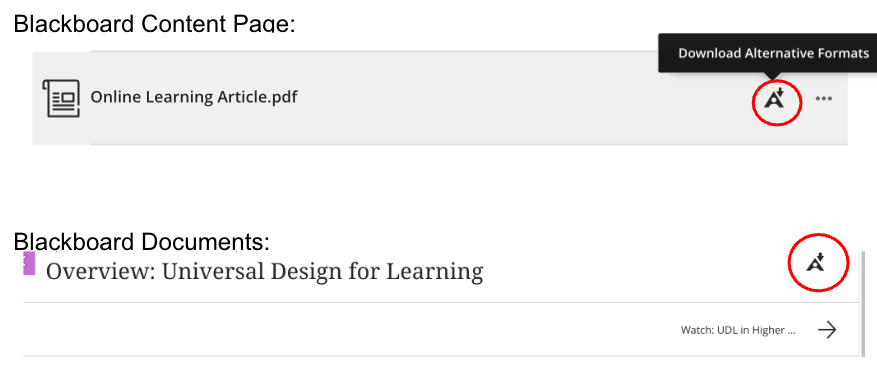
2. Connect Formats to Learning Needs
In addition to pointing out Ally to your students, explain how different formats can support different learning styles. For example, suggest the audio format for auditory learners or highlight the HTML version for students who prefer to read on their phone. This helps students recognize how these options can benefit their preferred learning styles.
3. Encourage Students to Choose for Their Situation
Frame alternative formats as a flexible tool for everyone, not just for those with official accommodations. A student might choose to listen to an audio file while preparing dinner, or they might prefer a mobile-friendly version for reading on the bus. This approach helps destigmatize the use of accessibility features and reinforces the idea that learning is not a one-size-fits-all process.
]]>
In today's diverse college classrooms, providing students with options for how they engage with course materials is not just a convenience - it's a critical component of effective teaching. By...
https://my3.my.umbc.edu/groups/instructional-technology/posts/152639
Image
https://assets1-beta.my.umbc.edu/system/shared/attachments/2b7e70b55c2c964bb7e22df502c2fb1b/69ed6526/news/000/152/639/0a1cf196f96b84bee97e93520f0db72d/Ally icon_Bb UX view.png?1758211455
https://beta.my.umbc.edu/api/v0/pixel/news/152639/guest@my.umbc.edu/8861ed99cd8096cea29246adae3446ff/api/pixel
accessibility
ally
alt-formats
alternative-formats
anthology-ally
biro
blackboard
Instructional Technology
https://beta.my.umbc.edu/groups/instructional-technology
https://assets2-beta.my.umbc.edu/system/shared/avatars/groups/000/001/164/dec3b026b81ee6d890a8f82f75c94a2e/xsmall.png?1446126703
https://assets1-beta.my.umbc.edu/system/shared/avatars/groups/000/001/164/dec3b026b81ee6d890a8f82f75c94a2e/original.png?1446126703
https://assets2-beta.my.umbc.edu/system/shared/avatars/groups/000/001/164/dec3b026b81ee6d890a8f82f75c94a2e/xxlarge.png?1446126703
https://assets1-beta.my.umbc.edu/system/shared/avatars/groups/000/001/164/dec3b026b81ee6d890a8f82f75c94a2e/xlarge.png?1446126703
https://assets1-beta.my.umbc.edu/system/shared/avatars/groups/000/001/164/dec3b026b81ee6d890a8f82f75c94a2e/large.png?1446126703
https://assets4-beta.my.umbc.edu/system/shared/avatars/groups/000/001/164/dec3b026b81ee6d890a8f82f75c94a2e/medium.png?1446126703
https://assets3-beta.my.umbc.edu/system/shared/avatars/groups/000/001/164/dec3b026b81ee6d890a8f82f75c94a2e/small.png?1446126703
https://assets2-beta.my.umbc.edu/system/shared/avatars/groups/000/001/164/dec3b026b81ee6d890a8f82f75c94a2e/xsmall.png?1446126703
https://assets3-beta.my.umbc.edu/system/shared/avatars/groups/000/001/164/dec3b026b81ee6d890a8f82f75c94a2e/xxsmall.png?1446126703
Instructional Technology
https://assets2-beta.my.umbc.edu/system/shared/thumbnails/news/000/152/639/7133721ac131b8e0e0a2de2c1e031692/xxlarge.jpg?1758210940
https://assets3-beta.my.umbc.edu/system/shared/thumbnails/news/000/152/639/7133721ac131b8e0e0a2de2c1e031692/xlarge.jpg?1758210940
https://assets4-beta.my.umbc.edu/system/shared/thumbnails/news/000/152/639/7133721ac131b8e0e0a2de2c1e031692/large.jpg?1758210940
https://assets2-beta.my.umbc.edu/system/shared/thumbnails/news/000/152/639/7133721ac131b8e0e0a2de2c1e031692/medium.jpg?1758210940
https://assets3-beta.my.umbc.edu/system/shared/thumbnails/news/000/152/639/7133721ac131b8e0e0a2de2c1e031692/small.jpg?1758210940
https://assets2-beta.my.umbc.edu/system/shared/thumbnails/news/000/152/639/7133721ac131b8e0e0a2de2c1e031692/xsmall.jpg?1758210940
https://assets4-beta.my.umbc.edu/system/shared/thumbnails/news/000/152/639/7133721ac131b8e0e0a2de2c1e031692/xxsmall.jpg?1758210940
Image: Decorative (Anthology Ally logo)
0
0
true
Thu, 18 Sep 2025 14:00:53 -0400