<?xml version="1.0"?>
<News hasArchived="false" page="1" pageCount="1" pageSize="10" timestamp="Mon, 20 Apr 2026 02:39:19 -0400" url="https://beta.my.umbc.edu/groups/instructional-technology/posts.xml?tag=abrams">
<NewsItem contentIssues="true" id="132857" important="false" status="posted" url="https://beta.my.umbc.edu/groups/instructional-technology/posts/132857">
<Title>7 ChatGPT Strategies to Enhance Course Designs This Summer</Title>
<Tagline>Leverage AI to create new experiences for your students</Tagline>
<Body>
<![CDATA[
    <div class="html-content"><p>During the summer break, educators might use this time to refine their course designs and explore innovative technologies. One such technology is <a href="https://chat.openai.com/chat" rel="nofollow external" class="bo">ChatGPT</a>, a powerful language model developed by <a href="http://openai.com/" rel="nofollow external" class="bo">OpenAI</a> that can assist in creating engaging and effective learning experiences. As early as the 1960s, researchers have recognized the potential of AI to transform education (Carbonell, 1960; Suppes, 1966), and with the advancements in machine learning and natural language processing, AI's impact on the educational landscape has only grown more profound.</p>
    <p>Let's explore seven strategies for using ChatGPT to enhance your course design over the summer break.</p>
    <p><strong>1. Align course and unit-level learning objectives:</strong></p>
    <p>Ensuring alignment between course and unit-level objectives is an essential part of effective course design. Use ChatGPT to perform consistency checks, identifying areas where unit-level objectives might be better aligned with broader course objectives (Abd-alrazaq et al., 2023; Alqahtani et al., 2023). ChatGPT can also suggest refinements or revisions to make objectives more specific, measurable, achievable, relevant, and time-bound (SMART). However, instructors should review learning objectives for clarity and alignment to ensure these foundational components of course design are effective and provide clear direction for students.</p>
    <p><strong>2. Develop engaging course materials with ChatGPT's content generation capabilities:</strong></p>
    <p>ChatGPT can help you generate course materials tailored to your learning objectives (Atlas, 2023). By providing the AI with elements from your course syllabus, desired learning outcomes, and course topics, ChatGPT might suggest outlines for your lectures or assist in creating discussion prompts that are aligned to your educational goals and help save time (Kasneci, et al., 2023; Jeon &amp; Lee, 2023). Always crosscheck references provided by the AI since its language model can be limited to a particular scope and timeframe.</p>
    <p><strong>3. Create personalized feedback using ChatGPT:</strong></p>
    <p>Providing students with timely, personalized feedback is essential. ChatGPT can help you generate two types of feedback: templated feedback applicable to common errors and customized feedback based on submitted work, performance metrics, and learning preferences. By integrating ChatGPT into your assessment process, you can offer students detailed and tailored feedback on their assignments, promoting reflection and improvement (Atlas, 2023; Gimpel, et al., 2023). You should always review, edit, and customize the feedback to each student and assignment.</p>
    <p><strong>4. Generate test questions aligned to learning objectives:</strong></p>
    <p>By using ChatGPT, faculty can generate a large pool of relevant test questions quickly, freeing up time to focus on other aspects of course design and instruction (Atlas, 2023; Sok &amp; Heng, 2023; Trust, Whalen, &amp; Mouza, 2023). The AI can formulate a variety of question types (multiple-choice, true/false, short answer, and essay questions) all designed to assess the objectives and reflective of Bloom's taxonomy. While AI can be a valuable tool for generating test questions, it's essential for educators to review and refine these questions to ensure they are appropriately challenging, fair, and properly aligned with the course's learning objectives. </p>
    <p><strong>5. Foster collaboration and communication with ChatGPT-powered chatbots:</strong></p>
    <p>Effective communication and collaboration are critical components of a successful learning experience. Chatbots can answer students' questions, provide style guidance on assignments, and offer support outside of regular class hours (Atlas, 2023; Kasneci, et al., 2023). Some AI chatbots are packaged with platforms from licensed tools such as writing practice and language learning (Jeon &amp; Lee, 2023).</p>
    <p><strong>6. Utilize ChatGPT for brainstorming and idea generation:</strong></p>
    <p>Encouraging students to think creatively and critically is a key aspect of the learning process. ChatGPT can help students generate ideas for projects, essays, and other assignments by providing them with relevant suggestions, perspectives, and examples (Atlas, 2023; Sok &amp; Heng, 2023). By integrating ChatGPT into your course design and teaching practice, you can support students in their brainstorming efforts and spark their creativity. Students can share the link to the ChatGPT conversation to show their work as part of their assignment submission workflow.</p>
    <p><strong>7. Design inclusive course materials with ChatGPT's language capabilities:</strong></p>
    <p>Creating inclusive and accessible course materials is essential for ensuring that all students have an equal opportunity to succeed. ChatGPT can help you develop course materials that cater to diverse learning needs and preferences (Kasneci, et al., 2023). By providing the model with specific guidelines, such as using simple language or incorporating visual aids, ChatGPT can help generate content that is more accessible and inclusive to a wide range of learners. </p><p><strong>What's Next?</strong></p>
    <p>Incorporating <a href="https://chat.openai.com/chat" rel="nofollow external" class="bo">ChatGPT</a> into your course design over the summer break can transform the way you teach and create more engaging, personalized, and effective learning experiences for your students. These tools and resources can help students actively reflect on their learning processes and strategies, fostering metacognition and promoting deeper understanding of the course material (Gimpel, et al., 2023). By leveraging ChatGPT's content generation capabilities, personalized feedback, chatbot communication, brainstorming assistance, and inclusive language features, you can harness the power of this AI technology to enhance your educational practice and optimize student success.</p>
    <p><a href="https://my3.my.umbc.edu/groups/instructional-technology" rel="nofollow external" class="bo">Follow the Instructional Technology group</a> to get updates about our exclusive webinar series, <strong>Empowering Educators: AI Tools for Teaching and Productivity</strong>, designed to help faculty harness the power of artificial intelligence to enhance their course preparation and teaching productivity. Coming in Fall 2023, this comprehensive five-part series will explore cutting-edge AI tools and technologies that can revolutionize the way you approach course development, student success and engagement, assessment and grading, course management, and personal productivity.</p>
    <p><strong>References</strong></p>
    <p>Abd-alrazaq, A., AlSaad, R., Alhuwail, D., Ahmed, A., Healy, P.M., Latifi, S., Aziz, S., Damseh, R., Alabed Alrazak, S., &amp; Sheikh, J. (2023). Large language models in medical education: Opportunities, challenges, and future directions. JMIR Medical Education, 9(1). <a href="https://doi.org/10.2196/48291" rel="nofollow external" class="bo">https://doi.org/10.2196/48291</a></p><p>Alqahtani, T., Badreldin, H. A., Alrashed, M., Alshaya, A. I., Alghamdi, S. S., bin Saleh, K., Alowais, S. A., Alshaya, O. A., Rahman, I., Al Yami, M. S., Albekairy, A. M. (2023). The emergent role of artificial intelligence, natural language processing, and large language models in higher education and research. Research in Social and Administrative Pharmacy [pre-print]. <a href="https://doi.org/10.1016/j.sapharm.2023.05.016" rel="nofollow external" class="bo">https://doi.org/10.1016/j.sapharm.2023.05.016</a></p><p>Atlas, Stephen. "ChatGPT for higher education and professional development: A guide to conversational AI." (2023). <a href="https://digitalcommons.uri.edu/cba_facpubs/548" rel="nofollow external" class="bo">https://digitalcommons.uri.edu/cba_facpubs/548</a></p>
    <p>Carbonell, J. R. (1960). <a href="https://stacks.stanford.edu/file/druid:xr633ts6369/xr633ts6369.pdf" rel="nofollow external" class="bo">AI in CAI: An artificial intelligence approach to computer-assisted instruction</a>. IEEE Transactions on Man-Machine Systems, 11(4), 190-202.</p>
    <p>Gimpel, H., Hall, K., Decker, S., Eymann, T., Lammermann, L., Madche, A., Roglinger, M., Ruiner, C., Schoch, M., Schoop, M., Urback, N., &amp; Vandirk, S. (2023). Unlocking the power of generative AI models and systems such as GPT-4 and ChatGPT for higher education: A guide for students and lecturers. Hohenheim Discussion Papers in Business, Economics and Social Sciences, No. 02-2023, Universitat Hohenheim, Fakultat Wirtschafts- und Sozialwissenschaften, Stuttgart. Retrieved from <a href="http://hdl.handle.net/10419/270970" rel="nofollow external" class="bo">http://hdl.handle.net/10419/270970</a></p><p>Jeon, J., &amp; Lee, S. (2023). Large language models in education: A focus on the complementary relationship between human teachers and ChatGPT. Education and Information Technologies. <a href="https://doi.org/10.1007/s10639-023-11834-1" rel="nofollow external" class="bo">https://doi.org/10.1007/s10639-023-11834-1</a></p><p>Kasneci, E., Sessler, K., Kuchemann, S., Bannert, M., Dementieva, D., Fischer, F., ... Kasneci, G. (2023). ChatGPT for good? On opportunities and challenges of large language models for education. <a href="https://doi.org/10.35542/osf.io/5er8f" rel="nofollow external" class="bo">https://doi.org/10.35542/osf.io/5er8f</a></p>
    <p>OpenAI. (2023). ChatGPT-4 (Apr 18 version) [Large language model]. <a href="https://chat.openai.com/chat" rel="nofollow external" class="bo">https://chat.openai.com/chat</a></p>
    <p>Sok, S., &amp; Heng, K. (2023). ChatGPT for education and research: A review of benefits and risks. Social Science Research Network. <a href="https://doi.org/10.2139/ssrn.4378735" rel="nofollow external" class="bo">https://doi.org/10.2139/ssrn.4378735</a></p>
    <p>Suppes, P. (1966). <a href="https://www.jstor.org/stable/24931056" rel="nofollow external" class="bo">The uses of computers in education</a>. Scientific American, 215(3), 207-220.</p>
    <p>Trust, T., Whalen, J., &amp; Mouza, C. (2023). <a href="https://citejournal.org/volume-23/issue-1-23/editorial/editorial-chatgpt-challenges-opportunities-and-implications-for-teacher-education/" rel="nofollow external" class="bo">ChatGPT: Challenges, opportunities, and implications for teacher education</a> [editorial]. Contemporary Issues in Technology and Teacher Education, 23(1).</p>
    <p>---</p>
    <p><em>The text of this article was outlined and seeded by ChatGPT 4.0 and extensively revised by the Instructional Technology staff. Research cited in this article was identified and vetted by humans.</em></p></div>
]]>
</Body>
<Summary>During the summer break, educators might use this time to refine their course designs and explore innovative technologies. One such technology is ChatGPT, a powerful language model developed by...</Summary>
<Website>https://my3.my.umbc.edu/groups/instructional-technology/posts/132857</Website>
<TrackingUrl>https://beta.my.umbc.edu/api/v0/pixel/news/132857/guest@my.umbc.edu/b08c96e970235208e3cc7f767506a4ca/api/pixel</TrackingUrl>
<Tag>abrams</Tag>
<Tag>chatgpt</Tag>
<Tag>course-design</Tag>
<Tag>hawken</Tag>
<Tag>online-learning</Tag>
<Tag>penniston</Tag>
<Group token="instructional-technology">Instructional Technology</Group>
<GroupUrl>https://beta.my.umbc.edu/groups/instructional-technology</GroupUrl>
<AvatarUrl>https://assets2-beta.my.umbc.edu/system/shared/avatars/groups/000/001/164/dec3b026b81ee6d890a8f82f75c94a2e/xsmall.png?1446126703</AvatarUrl>
<AvatarUrl size="original">https://assets1-beta.my.umbc.edu/system/shared/avatars/groups/000/001/164/dec3b026b81ee6d890a8f82f75c94a2e/original.png?1446126703</AvatarUrl>
<AvatarUrl size="xxlarge">https://assets2-beta.my.umbc.edu/system/shared/avatars/groups/000/001/164/dec3b026b81ee6d890a8f82f75c94a2e/xxlarge.png?1446126703</AvatarUrl>
<AvatarUrl size="xlarge">https://assets1-beta.my.umbc.edu/system/shared/avatars/groups/000/001/164/dec3b026b81ee6d890a8f82f75c94a2e/xlarge.png?1446126703</AvatarUrl>
<AvatarUrl size="large">https://assets1-beta.my.umbc.edu/system/shared/avatars/groups/000/001/164/dec3b026b81ee6d890a8f82f75c94a2e/large.png?1446126703</AvatarUrl>
<AvatarUrl size="medium">https://assets4-beta.my.umbc.edu/system/shared/avatars/groups/000/001/164/dec3b026b81ee6d890a8f82f75c94a2e/medium.png?1446126703</AvatarUrl>
<AvatarUrl size="small">https://assets3-beta.my.umbc.edu/system/shared/avatars/groups/000/001/164/dec3b026b81ee6d890a8f82f75c94a2e/small.png?1446126703</AvatarUrl>
<AvatarUrl size="xsmall">https://assets2-beta.my.umbc.edu/system/shared/avatars/groups/000/001/164/dec3b026b81ee6d890a8f82f75c94a2e/xsmall.png?1446126703</AvatarUrl>
<AvatarUrl size="xxsmall">https://assets3-beta.my.umbc.edu/system/shared/avatars/groups/000/001/164/dec3b026b81ee6d890a8f82f75c94a2e/xxsmall.png?1446126703</AvatarUrl>
<Sponsor>Instructional Technology</Sponsor>
<ThumbnailUrl size="xxlarge">https://assets3-beta.my.umbc.edu/system/shared/thumbnails/news/000/132/857/3e0b752bcfefa1b78e80d63918ff1834/xxlarge.jpg?1686233684</ThumbnailUrl>
<ThumbnailUrl size="xlarge">https://assets2-beta.my.umbc.edu/system/shared/thumbnails/news/000/132/857/3e0b752bcfefa1b78e80d63918ff1834/xlarge.jpg?1686233684</ThumbnailUrl>
<ThumbnailUrl size="large">https://assets4-beta.my.umbc.edu/system/shared/thumbnails/news/000/132/857/3e0b752bcfefa1b78e80d63918ff1834/large.jpg?1686233684</ThumbnailUrl>
<ThumbnailUrl size="medium">https://assets2-beta.my.umbc.edu/system/shared/thumbnails/news/000/132/857/3e0b752bcfefa1b78e80d63918ff1834/medium.jpg?1686233684</ThumbnailUrl>
<ThumbnailUrl size="small">https://assets4-beta.my.umbc.edu/system/shared/thumbnails/news/000/132/857/3e0b752bcfefa1b78e80d63918ff1834/small.jpg?1686233684</ThumbnailUrl>
<ThumbnailUrl size="xsmall">https://assets2-beta.my.umbc.edu/system/shared/thumbnails/news/000/132/857/3e0b752bcfefa1b78e80d63918ff1834/xsmall.jpg?1686233684</ThumbnailUrl>
<ThumbnailUrl size="xxsmall">https://assets3-beta.my.umbc.edu/system/shared/thumbnails/news/000/132/857/3e0b752bcfefa1b78e80d63918ff1834/xxsmall.jpg?1686233684</ThumbnailUrl>
<PawCount>7</PawCount>
<CommentCount>0</CommentCount>
<CommentsAllowed>true</CommentsAllowed>
<PostedAt>Thu, 15 Jun 2023 09:34:19 -0400</PostedAt>
<EditAt>Thu, 15 Jun 2023 10:08:05 -0400</EditAt>
</NewsItem>

<NewsItem contentIssues="true" id="131929" important="false" status="posted" url="https://beta.my.umbc.edu/groups/instructional-technology/posts/131929">
<Title>Course Accessibility to Support All Learners</Title>
<Tagline>Technologies to support equitable access to course content</Tagline>
<Body>
<![CDATA[
    <div class="html-content"><p><span>DoIT and Student Disability Services hosted a "</span><a href="https://my3.my.umbc.edu/groups/instructional-technology/events/115783" rel="nofollow external" class="bo"><span>Candid Conversation on Enhancing Accessibility</span></a><span>" on March 15th. The session highlighted ways that course accessibility benefits all students and results in inclusive learning and working environments. Student Disability Services and DoIT's Instructional Technology team collaborate to provide resources and support to enhance course accessibility. Proactively designing and teaching a course with accessibility in mind not only supports students with documented accommodations, but also supports </span><a href="https://udlguidelines.cast.org/" rel="nofollow external" class="bo"><span>Universal Design for Learning (UDL)</span></a><span> principles and best practices in course design. In the session panelists shared several key recommendations and resources that are available:</span></p><p><strong><span>Key recommendations for course design and delivery</span></strong></p><ul><li><span>Use </span><a href="https://wiki.umbc.edu/display/faq/Ally" rel="nofollow external" class="bo"><span>Blackboard Ally</span></a><span> to check the accessibility of course content, get guidance on remediating content, and to access alternative formats of course materials.</span></li></ul><ul><li><p><a href="https://help.blackboard.com/Ally/Ally_for_LMS/Instructor/Watch_Videos" rel="nofollow external" class="bo"><span>Videos about Ally</span></a></p></li><li><p><a href="https://wiki.umbc.edu/pages/viewpage.action?pageId=77431280" rel="nofollow external" class="bo"><span>Alternative Formats in Bb Ally</span></a><span> </span></p></li><li><p><a href="https://wiki.umbc.edu/pages/viewpage.action?pageId=77431345" rel="nofollow external" class="bo"><span>Which Alternative Format is Best to Use?</span></a><span> </span></p></li><li><p><span>Student FAQ - </span><a href="https://wiki.umbc.edu/pages/viewpage.action?pageId=77431260" rel="nofollow external" class="bo"><span>How do I download an alt format file generated by Ally? </span></a></p></li></ul><ul><li><span>Use live captioning in online course meetings, either with </span><a href="https://help.webex.com/en-us/article/lzi8h2/Show-or-hide-automated-closed-captions-during-a-Webex-meeting-or-webinar" rel="nofollow external" class="bo"><span>Webex</span></a><span> or </span><a href="https://support.google.com/chrome/answer/10538231?hl=en" rel="nofollow external" class="bo"><span>Google Chrome</span></a><span> browser live captioning enabled.</span></li><li><span>Caption video recordings with automatic captions in </span><a href="https://wiki.umbc.edu/x/pQjBBQ" rel="nofollow external" class="bo"><span>Panopto</span></a><span> or </span><a href="https://wiki.umbc.edu/x/yQ3BBQ" rel="nofollow external" class="bo"><span>VoiceThread</span></a><span>.</span></li><li><a href="https://support.panopto.com/s/article/Batch-Upload-Video-Files" rel="nofollow external" class="bo"><span>Upload a Video</span></a><span> to Panopto</span></li><li><span>Add time limit and due date </span><a href="https://wiki.umbc.edu/x/a4dnB" rel="nofollow external" class="bo"><span>accommodations in Blackboard</span></a><span>.</span></li></ul><p><strong><span><br></span></strong></p><p><strong><span>Accessibility Resources</span></strong></p><p><span>In addition to the tools noted above, the following resources also support accessibility:</span></p><ul><li><span>Create </span><a href="https://wiki.umbc.edu/x/VQjBBQ" rel="nofollow external" class="bo"><span>accessible documents</span></a><span> with Office 365.</span></li><li><span>Review the </span><a href="https://support.google.com/a/answer/1631886?hl=en" rel="nofollow external" class="bo"><span>Google Workspace guide to accessibility</span></a><span>.</span></li><li><span>Explore SDS </span><a href="https://sds.umbc.edu/assistive-technology/" rel="nofollow external" class="bo"><span>assistive technology resources</span></a><span>.</span></li><li><span>Review assistive technology resources available at the</span><a href="http://library.umbc.edu/computers.php#asst" rel="nofollow external" class="bo"><span> AOK Library</span></a><span>.</span></li><li><span>Review </span><a href="https://sds.umbc.edu/resources/information-for-faculty/" rel="nofollow external" class="bo"><span>SDS Information for Faculty</span></a><span>.</span></li></ul><p><strong><span><br></span></strong></p><p><strong><span>Technology Highlight: Class</span></strong></p><p><span>UMBC will be piloting </span><a href="https://www.class.com/higher-ed" rel="nofollow external" class="bo"><span>Class</span></a><span>, a synchronous web conferencing platform built on Zoom's infrastructure. Class provides support for the following:</span></p><ul><li><a href="https://www.class.com/instructor-guide/live-transcription/" rel="nofollow external" class="bo"><span>Live transcription</span></a><span>. All students in a Class session can view captions.</span></li><li><span>Multiple video displays while sharing content, including support for </span><a href="https://www.class.com/support/class/instructor-guide/inviting-a-sign-language-interpreter" rel="nofollow external" class="bo"><span>sign language interpreters</span></a><span> with a dedicated Sign Language Camera.</span></li><li><span>Notes, an upcoming Class feature, will allow students to highlight text from the meeting transcript and add notes.</span></li><li><span>Screen reader compatibility and keyboard navigation.</span></li></ul><div><p><span><br></span></p><p><strong><span>Office of Student Disability Services (SDS)</span><span> </span></strong></p><ul><li><a href="https://sds.umbc.edu/resources/information-for-faculty/" rel="nofollow external" class="bo"><span>Faculty Resources</span></a><span>  </span></li><li><span>Enroll in the SDS Accommodations Support for Faculty Blackboard organization. </span></li></ul><em><span>SDS's </span><span>Accommodations Support for Faculty </span><span>Blackboard organization provides faculty guidance on accessibility in Blackboard, captioning, testing accommodations, and remediating course content.</span></em><blockquote><blockquote><strong><span><br>How to Enroll </span></strong><blockquote><blockquote><blockquote><ol><li><span>Open Blackboard:</span><a href="https://blackboard.umbc.edu" rel="nofollow external" class="bo"><span>https://blackboard.umbc.edu</span></a><span>.</span></li><li><span>Next,</span><a href="https://blackboard.umbc.edu/webapps/blackboard/execute/enrollCourse?context=INMENU&amp;course_id=_68848_1" rel="nofollow external" class="bo"><span> use this link</span></a><span> to self-enroll in the course. </span><span>Note: You must have Blackboard open FIRST before using this self-enroll link or you will encounter an error.</span></li><li><span>Once the self-enroll page loads, click submit to proceed. <img src="https://my3.my.umbc.edu/groups/instructional-technology/posts/131929/attachments/46588" style="max-width: 100%; height: auto;"></span><span>Image 1: Click submit to self-enroll in this training course.</span></li><li><span>On the next page, click OK to confirm enrollment. </span></li><li><span>The course will be immediately available.</span></li></ol></blockquote></blockquote></blockquote></blockquote></blockquote><p><strong><span><br></span></strong></p><p><strong><span>Connect with Student Disability Services</span></strong></p><p><span>Michael Canale</span></p><p><span>Assistant Director, Office of Student Disability Services (SDS)</span></p><p><span><a href="mailto:canale@umbc.edu">canale@umbc.edu</a></span></p><p><a href="https://sds.umbc.edu/" rel="nofollow external" class="bo"><span>Student Disability Services</span></a></p><p><span>Email: </span><a href="mailto:disability@umbc.edu" rel="nofollow external" class="bo"><span>disability@umbc.edu</span></a></p><p><br></p><p><strong><span>Connect with Instructional Technology</span></strong></p><p><span>As always, if you have any questions about teaching, learning, and technology at UMBC, please consider the following options:</span></p><blockquote><ul><li><a href="http://pivot.umbc.edu" rel="nofollow external" class="bo"><span>PIVOT</span></a><span> | </span><a href="https://doit.umbc.edu/itnm/academic-continuity/" rel="nofollow external" class="bo"><span>Academic Continuity</span></a><span> | </span><a href="https://fdc.umbc.edu/teaching/keep-on-teaching/" rel="nofollow external" class="bo"><span>Keep On Teaching</span></a><span> | </span><a href="https://doit.umbc.edu/students" rel="nofollow external" class="bo"><span>Student Technology Resources</span></a></li><li><a href="http://www.umbc.edu/faq" rel="nofollow external" class="bo"><span>Check our extensive FAQ collection</span></a><span> </span></li><li><a href="https://wiki.umbc.edu/x/LohnB" rel="nofollow external" class="bo"><span>What's new in Ultra?</span></a><span> | </span><a href="https://wiki.umbc.edu/x/bwrSAQ" rel="nofollow external" class="bo"><span>Known Issues</span></a><span> </span></li><li><a href="http://my.umbc.edu/go/request-help" rel="nofollow external" class="bo"><span>Open a ticket via RT</span></a></li><li><span>Follow the </span><a href="http://my.umbc.edu/groups/instructional-technology" rel="nofollow external" class="bo"><span>Instructional Technology</span></a><span> &amp; </span><a href="http://my.umbc.edu/groups/doit" rel="nofollow external" class="bo"><span>DoIT</span></a><span> myUMBC groups</span></li><li><a href="http://doit.umbc.edu/itnm/staff/" rel="nofollow external" class="bo"><span>Request a consult</span></a><span> with </span><a href="http://doit.umbc.edu/itnm/staff" rel="nofollow external" class="bo"><span>instructional technology staff</span></a></li></ul></blockquote><p>Image description: virtual meeting showing participants, chat bubble, closed captions icon, and text with a transcript.<br></p><p><span>~ by </span><a href="https://doit.umbc.edu/itnm/staff/abrams/" rel="nofollow external" class="bo"><span>Josh Abrams</span></a><span>, </span><a href="https://doit.umbc.edu/itnm/staff/ariev/" rel="nofollow external" class="bo"><span>Peter Ariev</span></a><span>, and </span><a href="https://sds.umbc.edu/about-us/meet-our-staff/" rel="nofollow external" class="bo"><span>Michael Canale</span></a></p></div></div>
]]>
</Body>
<Summary>DoIT and Student Disability Services hosted a "Candid Conversation on Enhancing Accessibility" on March 15th. The session highlighted ways that course accessibility benefits all students and...</Summary>
<AttachmentKind>Image</AttachmentKind>
<AttachmentUrl>https://assets2-beta.my.umbc.edu/system/shared/attachments/d4ff21856dc657c5c294282167d4227a/69e5ca18/news/000/131/929/ba6be4a2b398df63f57ae0f7e5f330d8/enroll.png?1679575434</AttachmentUrl>
<Attachments>
<Attachment kind="Image" url="https://beta.my.umbc.edu/groups/instructional-technology/posts/131929/attachments/46588"></Attachment>
</Attachments>
<TrackingUrl>https://beta.my.umbc.edu/api/v0/pixel/news/131929/guest@my.umbc.edu/51341d42c2334666a32062d123bdbfa8/api/pixel</TrackingUrl>
<Tag>abrams</Tag>
<Tag>accessibility</Tag>
<Tag>ally</Tag>
<Tag>alternative-formats</Tag>
<Tag>ariev</Tag>
<Tag>canale</Tag>
<Tag>captions</Tag>
<Tag>class</Tag>
<Tag>live-captioning</Tag>
<Tag>live-captions</Tag>
<Tag>sds</Tag>
<Tag>sp23</Tag>
<Tag>udl</Tag>
<Group token="instructional-technology">Instructional Technology</Group>
<GroupUrl>https://beta.my.umbc.edu/groups/instructional-technology</GroupUrl>
<AvatarUrl>https://assets2-beta.my.umbc.edu/system/shared/avatars/groups/000/001/164/dec3b026b81ee6d890a8f82f75c94a2e/xsmall.png?1446126703</AvatarUrl>
<AvatarUrl size="original">https://assets1-beta.my.umbc.edu/system/shared/avatars/groups/000/001/164/dec3b026b81ee6d890a8f82f75c94a2e/original.png?1446126703</AvatarUrl>
<AvatarUrl size="xxlarge">https://assets2-beta.my.umbc.edu/system/shared/avatars/groups/000/001/164/dec3b026b81ee6d890a8f82f75c94a2e/xxlarge.png?1446126703</AvatarUrl>
<AvatarUrl size="xlarge">https://assets1-beta.my.umbc.edu/system/shared/avatars/groups/000/001/164/dec3b026b81ee6d890a8f82f75c94a2e/xlarge.png?1446126703</AvatarUrl>
<AvatarUrl size="large">https://assets1-beta.my.umbc.edu/system/shared/avatars/groups/000/001/164/dec3b026b81ee6d890a8f82f75c94a2e/large.png?1446126703</AvatarUrl>
<AvatarUrl size="medium">https://assets4-beta.my.umbc.edu/system/shared/avatars/groups/000/001/164/dec3b026b81ee6d890a8f82f75c94a2e/medium.png?1446126703</AvatarUrl>
<AvatarUrl size="small">https://assets3-beta.my.umbc.edu/system/shared/avatars/groups/000/001/164/dec3b026b81ee6d890a8f82f75c94a2e/small.png?1446126703</AvatarUrl>
<AvatarUrl size="xsmall">https://assets2-beta.my.umbc.edu/system/shared/avatars/groups/000/001/164/dec3b026b81ee6d890a8f82f75c94a2e/xsmall.png?1446126703</AvatarUrl>
<AvatarUrl size="xxsmall">https://assets3-beta.my.umbc.edu/system/shared/avatars/groups/000/001/164/dec3b026b81ee6d890a8f82f75c94a2e/xxsmall.png?1446126703</AvatarUrl>
<Sponsor>Instructional Technology</Sponsor>
<ThumbnailUrl size="xxlarge">https://assets1-beta.my.umbc.edu/system/shared/thumbnails/news/000/131/929/192b4d0b5d09e74e886db795fadd5b81/xxlarge.jpg?1679577443</ThumbnailUrl>
<ThumbnailUrl size="xlarge">https://assets3-beta.my.umbc.edu/system/shared/thumbnails/news/000/131/929/192b4d0b5d09e74e886db795fadd5b81/xlarge.jpg?1679577443</ThumbnailUrl>
<ThumbnailUrl size="large">https://assets4-beta.my.umbc.edu/system/shared/thumbnails/news/000/131/929/192b4d0b5d09e74e886db795fadd5b81/large.jpg?1679577443</ThumbnailUrl>
<ThumbnailUrl size="medium">https://assets3-beta.my.umbc.edu/system/shared/thumbnails/news/000/131/929/192b4d0b5d09e74e886db795fadd5b81/medium.jpg?1679577443</ThumbnailUrl>
<ThumbnailUrl size="small">https://assets4-beta.my.umbc.edu/system/shared/thumbnails/news/000/131/929/192b4d0b5d09e74e886db795fadd5b81/small.jpg?1679577443</ThumbnailUrl>
<ThumbnailUrl size="xsmall">https://assets1-beta.my.umbc.edu/system/shared/thumbnails/news/000/131/929/192b4d0b5d09e74e886db795fadd5b81/xsmall.jpg?1679577443</ThumbnailUrl>
<ThumbnailUrl size="xxsmall">https://assets3-beta.my.umbc.edu/system/shared/thumbnails/news/000/131/929/192b4d0b5d09e74e886db795fadd5b81/xxsmall.jpg?1679577443</ThumbnailUrl>
<PawCount>9</PawCount>
<CommentCount>1</CommentCount>
<CommentsAllowed>true</CommentsAllowed>
<PostedAt>Mon, 27 Mar 2023 09:17:49 -0400</PostedAt>
</NewsItem>

<NewsItem contentIssues="true" id="116627" important="false" status="posted" url="https://beta.my.umbc.edu/groups/instructional-technology/posts/116627">
<Title>Panopto: Recording, Hosting, and Engaging</Title>
<Tagline>Leveraging Screencasting to Support Instructional Strategies</Tagline>
<Body>
<![CDATA[
    <div class="html-content"><a href="https://doit.umbc.edu/itnm/?id=79481" rel="nofollow external" class="bo">UMBC adopted Panopto in fall 2018</a>. Use has increased since this time, in particular spurred on by geometrically increased adoption with the migration to fully online and then hybrid learning in response to the still ongoing pandemic. Over the past calendar year, there have been 9,764 sessions created by 578 unique users, with 424k content interactions, totalling approximately 105K hours of viewing. Of the faculty who have used Panopto during this time, 56% are from CAHSS, 21% from COEIT, and 17% from CNMS. Math/Stat has the highest department-level use with 11% of all sessions created.<br><br>For those not yet familiar with this tool, <a href="https://wiki.umbc.edu/display/faq/Panopto" rel="nofollow external" class="bo">Panopto</a> provides both a downloadable and web-based recorder for faculty, students, and staff to create video screencasts, as well as a cloud-hosted platform for sharing content. Recordings can be embedded within Blackboard (Bb), or shared independently of our Learning Management System (LMS). The benefits of Panopto for instruction are numerous: faculty use the tool to support their overall instructional strategies for engagement, communication, and assessment. Users create easy-to-make and publish, <a href="https://wiki.umbc.edu/pages/viewpage.action?pageId=96536741" rel="nofollow external" class="bo">accessible</a> content with a stable, user-centered interface and workflow that promotes academic success with <a href="https://wiki.umbc.edu/pages/viewpage.action?pageId=75792748" rel="nofollow external" class="bo">student-submitted assignments</a> and <a href="https://wiki.umbc.edu/pages/viewpage.action?pageId=75793322" rel="nofollow external" class="bo">embedded quizzing</a> for knowledge checks; they leverage detailed analytics metrics to identify potential risk behavior; and they reduce the impacts of Bb quota limitations and improve system performance by pulling video content out of the LMS. <br><br>A survey of those UMBC faculty who use Panopto most frequently highlighted several benefits of using the tool, including facilitation in creating active learning environments, development of accessible content, and enhanced student learning assessment. Respondents provided rich qualitative details about  their experience with this platform. Professor Manil Suri with the Department of Mathematics and Statistics, for example, noted the utility of the platform for facilitating learning. “I now have students watch my recorded lectures, many of which have quizzes embedded in them, to make sure they are following things….Panopto enables me to turn the classroom into an active learning environment.”<br> <br>Dr. Neha Raikar, a lecturer in the department of Chemical, Biochemical, and Environmental Engineering, echoed this sentiment that these screencasts can help bridge the synchronous/asynchronous divide by breaking down difficult lecture concepts using videos with built-in knowledge checks. “Panopto allows the students to digest the content at their own convenience.”<br><br>Anushka Aqil, an adjunct faculty member with the Department of Sociology, Anthropology, and Public Health, described the complementary benefit of the platform’s integrated media captioning, which supports <a href="https://sites.umbc.edu/about-sites/samples/events/event/99798/" rel="nofollow external" class="bo">Universal Design for Learning (UDL)</a>. “Panopto allows me to record videos that can have an automatic transcription at the end so students can easily follow along at their own pace choosing to read the transcript or listen to my voice!" <br><br><div>Panopto’s recent product updates released at the beginning of January offer a number of improvements, as detailed in their <a href="https://community.panopto.com/discussion/1440/january-2022-product-service-update-2022-01-08" rel="nofollow external" class="bo">release notes</a>. Please note that with updates to Version 11.0.0, Mac users should confirm that they have updated their operating system to the latest version, as support for legacy operating systems will become more limited in Summer 2022. More details about Panopto versions and Mac operating system functionality is available in <a href="https://wiki.umbc.edu/x/hgh4B" rel="nofollow external" class="bo">this FAQ</a>.</div><div><br></div><div>To learn more about Panopto, please register for these upcoming training sessions:<br><ul><li><a href="https://my3.my.umbc.edu/groups/instructional-technology/events/101616/" rel="nofollow external" class="bo">Panopto Essentials 3.2.22 12:00 PM</a></li><li><a href="https://my3.my.umbc.edu/groups/instructional-technology/events/101618" rel="nofollow external" class="bo">Panopto Quizzing and Captioning 3.9.22 12:00 PM </a></li></ul><div>By <a href="https://doit.umbc.edu/itnm/staff/penniston/" rel="nofollow external" class="bo">Tom Penniston</a>, <a href="https://doit.umbc.edu/itnm/staff/ariev/" rel="nofollow external" class="bo">Peter Ariev</a> &amp; <a href="https://doit.umbc.edu/itnm/staff/abrams/" rel="nofollow external" class="bo">Josh Abrams</a><br></div><div><br></div></div></div>
]]>
</Body>
<Summary>UMBC adopted Panopto in fall 2018. Use has increased since this time, in particular spurred on by geometrically increased adoption with the migration to fully online and then hybrid learning in...</Summary>
<Website>https://my3.my.umbc.edu/groups/instructional-technology/posts/116627</Website>
<TrackingUrl>https://beta.my.umbc.edu/api/v0/pixel/news/116627/guest@my.umbc.edu/8740de889c01b3955ceca259f6e9215f/api/pixel</TrackingUrl>
<Tag>abrams</Tag>
<Tag>ariev</Tag>
<Tag>effective-practices</Tag>
<Tag>itnm</Tag>
<Tag>panopto</Tag>
<Tag>penniston</Tag>
<Tag>sp2022</Tag>
<Group token="instructional-technology">Instructional Technology</Group>
<GroupUrl>https://beta.my.umbc.edu/groups/instructional-technology</GroupUrl>
<AvatarUrl>https://assets2-beta.my.umbc.edu/system/shared/avatars/groups/000/001/164/dec3b026b81ee6d890a8f82f75c94a2e/xsmall.png?1446126703</AvatarUrl>
<AvatarUrl size="original">https://assets1-beta.my.umbc.edu/system/shared/avatars/groups/000/001/164/dec3b026b81ee6d890a8f82f75c94a2e/original.png?1446126703</AvatarUrl>
<AvatarUrl size="xxlarge">https://assets2-beta.my.umbc.edu/system/shared/avatars/groups/000/001/164/dec3b026b81ee6d890a8f82f75c94a2e/xxlarge.png?1446126703</AvatarUrl>
<AvatarUrl size="xlarge">https://assets1-beta.my.umbc.edu/system/shared/avatars/groups/000/001/164/dec3b026b81ee6d890a8f82f75c94a2e/xlarge.png?1446126703</AvatarUrl>
<AvatarUrl size="large">https://assets1-beta.my.umbc.edu/system/shared/avatars/groups/000/001/164/dec3b026b81ee6d890a8f82f75c94a2e/large.png?1446126703</AvatarUrl>
<AvatarUrl size="medium">https://assets4-beta.my.umbc.edu/system/shared/avatars/groups/000/001/164/dec3b026b81ee6d890a8f82f75c94a2e/medium.png?1446126703</AvatarUrl>
<AvatarUrl size="small">https://assets3-beta.my.umbc.edu/system/shared/avatars/groups/000/001/164/dec3b026b81ee6d890a8f82f75c94a2e/small.png?1446126703</AvatarUrl>
<AvatarUrl size="xsmall">https://assets2-beta.my.umbc.edu/system/shared/avatars/groups/000/001/164/dec3b026b81ee6d890a8f82f75c94a2e/xsmall.png?1446126703</AvatarUrl>
<AvatarUrl size="xxsmall">https://assets3-beta.my.umbc.edu/system/shared/avatars/groups/000/001/164/dec3b026b81ee6d890a8f82f75c94a2e/xxsmall.png?1446126703</AvatarUrl>
<Sponsor>Instructional Technology</Sponsor>
<ThumbnailUrl size="xxlarge">https://assets4-beta.my.umbc.edu/system/shared/thumbnails/news/000/116/627/32ec5efbf03f6ba003c04394cfd34f71/xxlarge.jpg?1644246219</ThumbnailUrl>
<ThumbnailUrl size="xlarge">https://assets3-beta.my.umbc.edu/system/shared/thumbnails/news/000/116/627/32ec5efbf03f6ba003c04394cfd34f71/xlarge.jpg?1644246219</ThumbnailUrl>
<ThumbnailUrl size="large">https://assets1-beta.my.umbc.edu/system/shared/thumbnails/news/000/116/627/32ec5efbf03f6ba003c04394cfd34f71/large.jpg?1644246219</ThumbnailUrl>
<ThumbnailUrl size="medium">https://assets3-beta.my.umbc.edu/system/shared/thumbnails/news/000/116/627/32ec5efbf03f6ba003c04394cfd34f71/medium.jpg?1644246219</ThumbnailUrl>
<ThumbnailUrl size="small">https://assets2-beta.my.umbc.edu/system/shared/thumbnails/news/000/116/627/32ec5efbf03f6ba003c04394cfd34f71/small.jpg?1644246219</ThumbnailUrl>
<ThumbnailUrl size="xsmall">https://assets2-beta.my.umbc.edu/system/shared/thumbnails/news/000/116/627/32ec5efbf03f6ba003c04394cfd34f71/xsmall.jpg?1644246219</ThumbnailUrl>
<ThumbnailUrl size="xxsmall">https://assets4-beta.my.umbc.edu/system/shared/thumbnails/news/000/116/627/32ec5efbf03f6ba003c04394cfd34f71/xxsmall.jpg?1644246219</ThumbnailUrl>
<PawCount>3</PawCount>
<CommentCount>0</CommentCount>
<CommentsAllowed>true</CommentsAllowed>
<PostedAt>Tue, 08 Feb 2022 09:40:44 -0500</PostedAt>
<EditAt>Fri, 04 Nov 2022 15:51:22 -0400</EditAt>
</NewsItem>

<NewsItem contentIssues="true" id="116185" important="false" status="posted" url="https://beta.my.umbc.edu/groups/instructional-technology/posts/116185">
<Title>5 reasons you should open your Blackboard course early</Title>
<Tagline>Benefits help students and instructors</Tagline>
<Body>
<![CDATA[
    <div class="html-content"><span><p><span>At UMBC, <a href="https://wiki.umbc.edu/x/eYHGAw" rel="nofollow external" class="bo">courses are created in Blackboard</a> about four weeks before a new semester begins, providing time for faculty to transition instructional materials and assessments into a new site for students. All </span><a href="https://wiki.umbc.edu/x/VoAc" rel="nofollow external" class="bo"><span>course shells are unavailable</span></a><span>, however, requiring faculty to make sure students can see their courses and access content by the time classes start. Some instructors choose to open a course earlier, by days or weeks, to give students access to materials for preparation for a busy term.</span></p><p><span>While the semester might start on a specific date, here are five reasons why to consider opening your Blackboard course early.</span></p><p><span><strong>1. Introduce Students to Class</strong></span></p><p><span>Opening the class earlier gives you and your students time to start getting to know the course requirements, required course materials, and common questions or other logistics via a course FAQ. Orientations also allow you to find and fix unexpected issues with course content, including hidden files or broken links. </span></p><ul><li><span>Clarify expectations for how your course will be facilitated, especially if it’s fully online or hybrid, and what learners will achieve on their journey (<a href="https://pivot.umbc.edu/course-design/quality-matters/" rel="nofollow external" class="bo">Quality Matters</a>, 2018). </span></li><li><span>Provide a course tour so students can explore the structure of the course and find their way around the content and organization without the pressure of due dates. </span></li></ul><p><span><strong>2. Refresh Prior Knowledge </strong></span><span> </span></p><p><span>If your course has prerequisites or is part of a multi-part course, course materials and resources might include references to materials from prior courses or review materials. Opening your course early helps students to assess and refresh their knowledge before new content is introduced. </span></p><ul><li><span>Consider <a href="https://wiki.umbc.edu/display/faq/Panopto" rel="nofollow external" class="bo">Panopto videos</a>, reading material, interactive exercises, or self-check quizzes to refresh knowledge.</span></li><li><span>Support potential remediation with early access to materials and activities.</span></li><li><span>Include review materials for test preparation, especially for cumulative or certification exams.</span></li></ul><p><span><strong>3. Complete Early Course Content</strong></span></p><p><span>Some courses require that students complete practice problems, homework exercises, and other prerequisite activities to meet comprehensive curricular needs and learning objectives. As with refreshing prior knowledge, early content requirements may include non-assessment resources such as videos and reading materials, which can be valuable to student success (Weiss, 2019).</span></p><ul><li><span>Inform students about prerequisite requirements well ahead of due dates.</span></li><li><span>Allow ample time for students to complete any scaffolded assignments and come to classes prepared to learn new material. </span></li></ul><p><span><strong>4. Encourage Student &amp; Instructor Engagement </strong></span></p><p><span>Opening your course early welcomes students into your virtual classroom and fosters greater interaction between you and your class. Early course access allows students to review the syllabus and complete introductory assignments, like a syllabus quiz or Quiz 0. Students can engage with course messages and announcements.  </span></p><ul><li><span>Connect students with each other through an introductory discussion, FAQ discussion, or </span><a href="https://umbc.edu/go/voicethread-faq" rel="nofollow external" class="bo"><span>VoiceThread</span></a><span>. </span></li><li><span>Add your own welcome video for a personalized touch and post your instructor introduction to help build trust and community with your students (Bain, 2004)</span><span>.</span></li><li><span>Send regular messages and update course announcements to establish essential instructor presence (Garrison, Anderson, and Archer, 2000).</span><span> </span></li></ul><p><span><strong>5. Support Student Success</strong></span></p><p><span>Getting started early helps students start the semester on the right track with access to course materials, digital resources and textbooks. Early access to a course helps with student awareness of the course schedule and their own performance. Knowing when due dates occur and how they're doing, thanks to frequent and timely feedback, can help students become more successful in your courses.</span></p><ul><li><span>Create opportunities for students to practice with course tools, such as a low-stakes, zero-points quiz with </span><a href="https://wiki.umbc.edu/x/0AI9BQ" rel="nofollow external" class="bo"><span>Respondus Lockdown Browser</span></a><span>. This can reduce stress ahead of required exams.</span></li><li><span>Ensure students know they can leverage </span><a href="https://wiki.umbc.edu/x/7xQSC" rel="nofollow external" class="bo"><span>Ally’s alternative file format</span></a><span> to support their learning preferences. This step aligns with the guiding principles of Universal Design for Learning and empowers their learning process (CAST, 2018).</span></li></ul><p><span><span>By default, the starting date for all Blackboard courses are set to 2 weeks before the semester begins, allowing you to open the course any time during that period. If you’d like to open a course earlier than 2 weeks before the semester starts, you can change the date for an Original course </span><a href="https://wiki.umbc.edu/x/AwNpAQ" rel="nofollow external" class="bo"><span>using this FAQ</span></a><span>, but Ultra courses will <a href="https://doit.umbc.edu/request-tracker-rt/doit-myumbc-blackboard/" rel="nofollow external" class="bo">require a ticket</a> for support.</span></span></p><p><span>As always, if you have any questions about teaching, learning, and technology at UMBC, please consider the following options:</span></p><ul><li><a href="http://pivot.umbc.edu/" rel="nofollow external" class="bo"><span>PIVOT</span></a><span> |</span><a href="https://doit.umbc.edu/itnm/academic-continuity/" rel="nofollow external" class="bo"><span> Academic Continuity</span></a><span> |</span><a href="https://fdc.umbc.edu/teaching/keep-on-teaching/" rel="nofollow external" class="bo"><span> Keep On Teaching</span></a><span> |</span><span><a href="https://doit.umbc.edu/students" rel="nofollow external" class="bo"> Student Technology Resources</a></span></li><li><a href="http://www.umbc.edu/faq" rel="nofollow external" class="bo"><span>Check our extensive FAQ collection</span></a><span> </span></li><ul><li><a href="https://wiki.umbc.edu/x/LohnB" rel="nofollow external" class="bo"><span>What’s new in Ultra?</span></a><span> |</span><a href="https://wiki.umbc.edu/x/bwrSAQ" rel="nofollow external" class="bo"><span> Known Issues</span></a><span> </span></li></ul><li><a href="http://my.umbc.edu/go/request-help" rel="nofollow external" class="bo">Open a ticket via RT</a></li><li><span>Follow the</span><a href="http://my.umbc.edu/groups/instructional-technology" rel="nofollow external" class="bo"><span> Instructional Technology</span></a><span> &amp;</span><a href="http://my.umbc.edu/groups/doit" rel="nofollow external" class="bo"><span> DoIT</span></a><span> myUMBC groups</span></li><li><a href="http://doit.umbc.edu/itnm/staff/" rel="nofollow external" class="bo"><span>Request a consult</span></a><span> with instructional technology staff</span></li></ul><p><strong><br><br></strong></p><p><span>~ by </span><a href="http://doit.umbc.edu/itnm/staff/hawken/" rel="nofollow external" class="bo"><span>Mariann Hawken</span></a><span>, </span><a href="https://doit.umbc.edu/itnm/staff/abrams/" rel="nofollow external" class="bo"><span>Josh Abrams</span></a><span>, &amp; </span><a href="https://doit.umbc.edu/itnm/staff/wyatt/" rel="nofollow external" class="bo"><span>Laura Wyatt</span></a></p><p><strong><br><br></strong></p><p><span><em>References</em></span></p><p><span>Bain, K. (2004). </span><a href="http://proxy-bc.researchport.umd.edu/login?url=https://search.ebscohost.com/login.aspx?direct=true&amp;AuthType=ip,url,uid&amp;db=nlebk&amp;AN=395228&amp;site=eds-live&amp;scope=site&amp;ebv=EB&amp;ppid=pp_135" rel="nofollow external" class="bo"><span>Chapter 6: How do they treat their students?</span></a><span> From </span><span><em>What the best college teachers do</em></span><span>. Boston: Harvard Press.</span></p><p><span>CAST (2018). Universal Design for Learning Guidelines version 2.2. Retrieved from </span><span><a href="http://udlguidelines.cast.org/" rel="nofollow external" class="bo">http://udlguidelines.cast.org</a></span></p><p><span>Garrison, D. R., Anderson, T., &amp; Archer, W. (2000). Critical inquiry in a text-based environment: Computer conferencing in higher education. </span><span><em>The Internet and Higher Education, 2</em></span><span>(2/3), 87-105.</span></p><p><span>Quality Matters Rubric, Sixth Edition (2018).</span></p><p><span>Weiss, H. L. (2019). Work in progress: Using videos for improvement in knowledge of prerequisite material. 126th Annual Conference &amp; Exposition. American Society for Engineering Education.</span></p></span></div>
]]>
</Body>
<Summary>At UMBC, courses are created in Blackboard about four weeks before a new semester begins, providing time for faculty to transition instructional materials and assessments into a new site for...</Summary>
<Website>https://my3.my.umbc.edu/groups/instructional-technology/posts/116185</Website>
<TrackingUrl>https://beta.my.umbc.edu/api/v0/pixel/news/116185/guest@my.umbc.edu/fb00359e7eee5c7bae884465c49f3305/api/pixel</TrackingUrl>
<Tag>abrams</Tag>
<Tag>blackboard</Tag>
<Tag>course-management</Tag>
<Tag>effective-practices</Tag>
<Tag>hawken</Tag>
<Tag>online-learning</Tag>
<Tag>student-success</Tag>
<Tag>wyatt</Tag>
<Group token="instructional-technology">Instructional Technology</Group>
<GroupUrl>https://beta.my.umbc.edu/groups/instructional-technology</GroupUrl>
<AvatarUrl>https://assets2-beta.my.umbc.edu/system/shared/avatars/groups/000/001/164/dec3b026b81ee6d890a8f82f75c94a2e/xsmall.png?1446126703</AvatarUrl>
<AvatarUrl size="original">https://assets1-beta.my.umbc.edu/system/shared/avatars/groups/000/001/164/dec3b026b81ee6d890a8f82f75c94a2e/original.png?1446126703</AvatarUrl>
<AvatarUrl size="xxlarge">https://assets2-beta.my.umbc.edu/system/shared/avatars/groups/000/001/164/dec3b026b81ee6d890a8f82f75c94a2e/xxlarge.png?1446126703</AvatarUrl>
<AvatarUrl size="xlarge">https://assets1-beta.my.umbc.edu/system/shared/avatars/groups/000/001/164/dec3b026b81ee6d890a8f82f75c94a2e/xlarge.png?1446126703</AvatarUrl>
<AvatarUrl size="large">https://assets1-beta.my.umbc.edu/system/shared/avatars/groups/000/001/164/dec3b026b81ee6d890a8f82f75c94a2e/large.png?1446126703</AvatarUrl>
<AvatarUrl size="medium">https://assets4-beta.my.umbc.edu/system/shared/avatars/groups/000/001/164/dec3b026b81ee6d890a8f82f75c94a2e/medium.png?1446126703</AvatarUrl>
<AvatarUrl size="small">https://assets3-beta.my.umbc.edu/system/shared/avatars/groups/000/001/164/dec3b026b81ee6d890a8f82f75c94a2e/small.png?1446126703</AvatarUrl>
<AvatarUrl size="xsmall">https://assets2-beta.my.umbc.edu/system/shared/avatars/groups/000/001/164/dec3b026b81ee6d890a8f82f75c94a2e/xsmall.png?1446126703</AvatarUrl>
<AvatarUrl size="xxsmall">https://assets3-beta.my.umbc.edu/system/shared/avatars/groups/000/001/164/dec3b026b81ee6d890a8f82f75c94a2e/xxsmall.png?1446126703</AvatarUrl>
<Sponsor>Instructional Technology</Sponsor>
<ThumbnailUrl size="xxlarge">https://assets1-beta.my.umbc.edu/system/shared/thumbnails/news/000/116/185/eb385134af58b673bed3008a2ddadf18/xxlarge.jpg?1642692538</ThumbnailUrl>
<ThumbnailUrl size="xlarge">https://assets3-beta.my.umbc.edu/system/shared/thumbnails/news/000/116/185/eb385134af58b673bed3008a2ddadf18/xlarge.jpg?1642692538</ThumbnailUrl>
<ThumbnailUrl size="large">https://assets1-beta.my.umbc.edu/system/shared/thumbnails/news/000/116/185/eb385134af58b673bed3008a2ddadf18/large.jpg?1642692538</ThumbnailUrl>
<ThumbnailUrl size="medium">https://assets1-beta.my.umbc.edu/system/shared/thumbnails/news/000/116/185/eb385134af58b673bed3008a2ddadf18/medium.jpg?1642692538</ThumbnailUrl>
<ThumbnailUrl size="small">https://assets2-beta.my.umbc.edu/system/shared/thumbnails/news/000/116/185/eb385134af58b673bed3008a2ddadf18/small.jpg?1642692538</ThumbnailUrl>
<ThumbnailUrl size="xsmall">https://assets3-beta.my.umbc.edu/system/shared/thumbnails/news/000/116/185/eb385134af58b673bed3008a2ddadf18/xsmall.jpg?1642692538</ThumbnailUrl>
<ThumbnailUrl size="xxsmall">https://assets3-beta.my.umbc.edu/system/shared/thumbnails/news/000/116/185/eb385134af58b673bed3008a2ddadf18/xxsmall.jpg?1642692538</ThumbnailUrl>
<PawCount>18</PawCount>
<CommentCount>2</CommentCount>
<CommentsAllowed>true</CommentsAllowed>
<PostedAt>Thu, 20 Jan 2022 11:01:38 -0500</PostedAt>
<EditAt>Fri, 04 Nov 2022 15:53:39 -0400</EditAt>
</NewsItem>

<NewsItem contentIssues="true" id="112409" important="false" status="posted" url="https://beta.my.umbc.edu/groups/instructional-technology/posts/112409">
<Title>VoiceThread Assignments for Media Projects and Peer Critique</Title>
<Tagline>One Instructor&#8217;s Use Case and Lessons Learned</Tagline>
<Body>
<![CDATA[
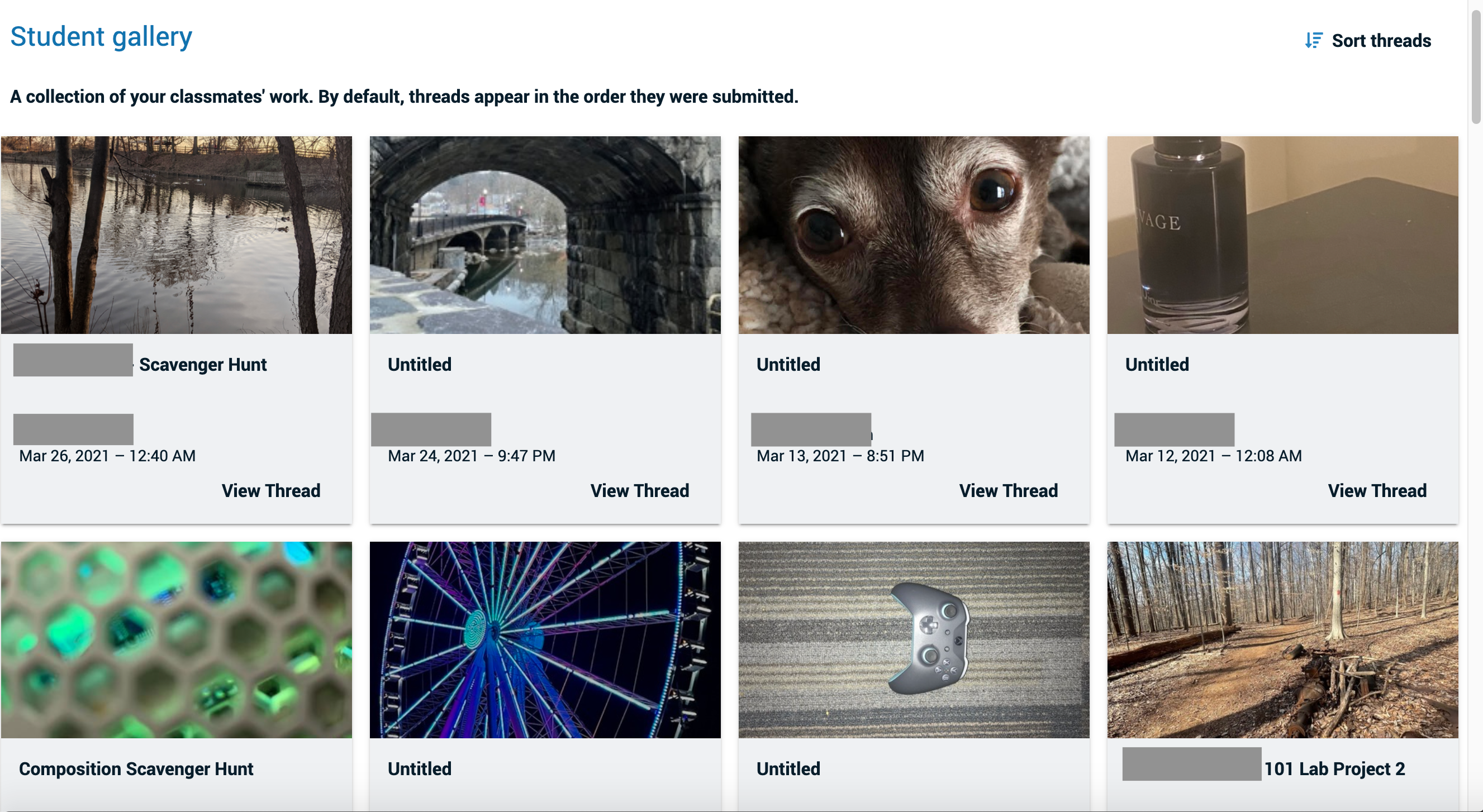
    <div class="html-content"><p><span>Shifting to teaching in online and hybrid formats has created opportunities to identify how students can share multimedia projects and receive feedback through peer critique. While </span><a href="https://doit.umbc.edu/itnm/lecturing-online/" rel="nofollow external" class="bo"><span>various tools support multimedia</span></a><span>, faculty often wonder what tools can enhance asynchronous peer engagement for multimedia projects and how to use these tools with Blackboard.</span></p><p><span>UMBC community members have used asynchronous tools like </span><a href="https://wiki.umbc.edu/display/faq/VoiceThread" rel="nofollow external" class="bo"><span>VoiceThread</span></a><span> for multimedia engagement. VoiceThread is a learning tool for enhancing student engagement and online presence. With VoiceThread, instructors and students can create, share, and comment on images, Microsoft PowerPoint presentations, videos, audio files, documents, and PDFs, using text, a microphone, webcam, phone, and audio-file upload. </span></p><p><span>The VoiceThread platform supported communication between presenters and visitors at conferences like </span><a href="https://urcad.umbc.edu/" rel="nofollow external" class="bo"><span>URCAD</span></a><span>, </span><a href="https://eng.umd.edu/minorities/events/research-symposium/presentations" rel="nofollow external" class="bo"><span>USM LSAMP</span></a><span>, and </span><a href="https://surf.umbc.edu/" rel="nofollow external" class="bo"><span>SURF</span></a><span>. In addition, faculty incorporate VoiceThread in Blackboard to share lectures, presentations, and student work. The most recent feature for VoiceThread in Blackboard, VoiceThread Assignments, creates a new level of integration between student work, collaboration, and Blackboard.</span></p><p><a href="https://mcs.umbc.edu/mcs-faculty-and-staff/" rel="nofollow external" class="bo"><span>Kristen Anchor,</span></a><span> Lecturer, </span><a href="https://mcs.umbc.edu/" rel="nofollow external" class="bo"><span>Media and Communication Studies</span></a><span> (MCS), uses VoiceThread Assignments in her MCS courses. She devised several innovative approaches to manage and facilitate media project assignments, peer learning, and peer critique. For Anchor, peer critique is an integral part of the learning and creative process. She explains to students, "Critique is helpful for two reasons: (1) Getting feedback on your work, and (2) practicing your visual and communication skills about media (as the critic)." How can instructors design online courses with asynchronous components to support this essential student interaction? Anchor finds VoiceThread helps students achieve course goals and meets the instructional need to support multimedia projects and peer engagement.</span></p><p><span>Anchor thoughtfully delivers VoiceThread assignments by providing students with assignment instructions and reference guides for using VoiceThread. She presents students with assignment instructions within Blackboard and again after they launch the VoiceThread Assignment. Students receive project examples as references with their assignment instructions. Anchor uses the VoiceThread Student Gallery for each project, an optional feature that faculty can select when </span><a href="https://wiki.umbc.edu/x/kQzBBQ" rel="nofollow external" class="bo"><span>creating a VoiceThread Assignment</span></a><span>, to support peer critique. </span></p><p><span><br></span></p><img src="https://my3.my.umbc.edu/groups/instructional-technology/posts/112409/attachments/40577" style="max-width: 100%; height: auto;"><p><span><br></span></p><p><span>The Student Gallery feature makes peer critique in VoiceThread possible; it allows students to see submissions from their peers and add audio, video, and text-based comments, allowing for asynchronous peer feedback sessions.</span></p><p><span>Kristen Anchor will share her excellent ideas about using VoiceThread to support student projects and engagement, along with tips, tricks, and thoughts for faculty considering adopting VoiceThread for their instruction moving forward. Please <a href="https://my3.my.umbc.edu/groups/instructional-technology/events/96570/" rel="nofollow external" class="bo">register and join us</a> </span><span>Thursday, October 21st, at Noon </span><span>to learn more.</span></p><p><span>~ By </span><a href="https://doit.umbc.edu/itnm/staff/abrams/" rel="nofollow external" class="bo"><span>Josh Abrams</span></a></p></div>
]]>
</Body>
<Summary>Shifting to teaching in online and hybrid formats has created opportunities to identify how students can share multimedia projects and receive feedback through peer critique. While various tools...</Summary>
<Website>https://my3.my.umbc.edu/groups/instructional-technology/events/96570</Website>
<AttachmentKind>Image</AttachmentKind>
<AttachmentUrl>https://assets2-beta.my.umbc.edu/system/shared/attachments/9734918882a3bf524d51f49dd284f6f6/69e5ca18/news/000/112/409/3958f53d13f000006c688ac027e34d2a/Project 2 Gallery.png?1631895799</AttachmentUrl>
<Attachments>
<Attachment kind="Image" url="https://beta.my.umbc.edu/groups/instructional-technology/posts/112409/attachments/40577"></Attachment>
</Attachments>
<TrackingUrl>https://beta.my.umbc.edu/api/v0/pixel/news/112409/guest@my.umbc.edu/4a9b534b9f58efd164083a0987f99ba1/api/pixel</TrackingUrl>
<Tag>abrams</Tag>
<Tag>assessments</Tag>
<Tag>effective-practices</Tag>
<Tag>voicethread</Tag>
<Group token="instructional-technology">Instructional Technology</Group>
<GroupUrl>https://beta.my.umbc.edu/groups/instructional-technology</GroupUrl>
<AvatarUrl>https://assets2-beta.my.umbc.edu/system/shared/avatars/groups/000/001/164/dec3b026b81ee6d890a8f82f75c94a2e/xsmall.png?1446126703</AvatarUrl>
<AvatarUrl size="original">https://assets1-beta.my.umbc.edu/system/shared/avatars/groups/000/001/164/dec3b026b81ee6d890a8f82f75c94a2e/original.png?1446126703</AvatarUrl>
<AvatarUrl size="xxlarge">https://assets2-beta.my.umbc.edu/system/shared/avatars/groups/000/001/164/dec3b026b81ee6d890a8f82f75c94a2e/xxlarge.png?1446126703</AvatarUrl>
<AvatarUrl size="xlarge">https://assets1-beta.my.umbc.edu/system/shared/avatars/groups/000/001/164/dec3b026b81ee6d890a8f82f75c94a2e/xlarge.png?1446126703</AvatarUrl>
<AvatarUrl size="large">https://assets1-beta.my.umbc.edu/system/shared/avatars/groups/000/001/164/dec3b026b81ee6d890a8f82f75c94a2e/large.png?1446126703</AvatarUrl>
<AvatarUrl size="medium">https://assets4-beta.my.umbc.edu/system/shared/avatars/groups/000/001/164/dec3b026b81ee6d890a8f82f75c94a2e/medium.png?1446126703</AvatarUrl>
<AvatarUrl size="small">https://assets3-beta.my.umbc.edu/system/shared/avatars/groups/000/001/164/dec3b026b81ee6d890a8f82f75c94a2e/small.png?1446126703</AvatarUrl>
<AvatarUrl size="xsmall">https://assets2-beta.my.umbc.edu/system/shared/avatars/groups/000/001/164/dec3b026b81ee6d890a8f82f75c94a2e/xsmall.png?1446126703</AvatarUrl>
<AvatarUrl size="xxsmall">https://assets3-beta.my.umbc.edu/system/shared/avatars/groups/000/001/164/dec3b026b81ee6d890a8f82f75c94a2e/xxsmall.png?1446126703</AvatarUrl>
<Sponsor>Instructional Technology</Sponsor>
<ThumbnailUrl size="xxlarge">https://assets1-beta.my.umbc.edu/system/shared/thumbnails/news/000/112/409/040a854a0b27cd1c078805a443650ed1/xxlarge.jpg?1631892207</ThumbnailUrl>
<ThumbnailUrl size="xlarge">https://assets3-beta.my.umbc.edu/system/shared/thumbnails/news/000/112/409/040a854a0b27cd1c078805a443650ed1/xlarge.jpg?1631892207</ThumbnailUrl>
<ThumbnailUrl size="large">https://assets4-beta.my.umbc.edu/system/shared/thumbnails/news/000/112/409/040a854a0b27cd1c078805a443650ed1/large.jpg?1631892207</ThumbnailUrl>
<ThumbnailUrl size="medium">https://assets2-beta.my.umbc.edu/system/shared/thumbnails/news/000/112/409/040a854a0b27cd1c078805a443650ed1/medium.jpg?1631892207</ThumbnailUrl>
<ThumbnailUrl size="small">https://assets3-beta.my.umbc.edu/system/shared/thumbnails/news/000/112/409/040a854a0b27cd1c078805a443650ed1/small.jpg?1631892207</ThumbnailUrl>
<ThumbnailUrl size="xsmall">https://assets4-beta.my.umbc.edu/system/shared/thumbnails/news/000/112/409/040a854a0b27cd1c078805a443650ed1/xsmall.jpg?1631892207</ThumbnailUrl>
<ThumbnailUrl size="xxsmall">https://assets1-beta.my.umbc.edu/system/shared/thumbnails/news/000/112/409/040a854a0b27cd1c078805a443650ed1/xxsmall.jpg?1631892207</ThumbnailUrl>
<PawCount>3</PawCount>
<CommentCount>0</CommentCount>
<CommentsAllowed>true</CommentsAllowed>
<PostedAt>Fri, 17 Sep 2021 12:18:05 -0400</PostedAt>
<EditAt>Mon, 28 Nov 2022 14:58:36 -0500</EditAt>
</NewsItem>

</News>