<?xml version="1.0"?>
<News hasArchived="false" page="33" pageCount="73" pageSize="10" timestamp="Sun, 26 Apr 2026 07:02:11 -0400" url="https://beta.my.umbc.edu/groups/instructional-technology/posts.xml?page=33">
<NewsItem contentIssues="true" id="111641" important="false" status="posted" url="https://beta.my.umbc.edu/groups/instructional-technology/posts/111641">
<Title>More UMBC students like Ultra and want Ultra courses</Title>
<Tagline>86% of UMBC students express satisfaction with Ultra</Tagline>
<Body>
<![CDATA[
    <div class="html-content">In a survey of 608 students taking Ultra courses during the SP2021 semester, 86% indicated satisfaction with Ultra, marking a 14% increase <a href="https://doit.umbc.edu/news/post/89258/" rel="nofollow external" class="bo">compared to the last survey</a> in FA2019. Students again praised Ultra for its clean interface, modern feel, and easy access. When asked to compare Ultra to the Original Blackboard interface, 74% of students said they liked it, which is a 17% increase from FA2019. “Ultra makes everything really easy to find and use,” said one student. “It’s a major step up from the old Blackboard system.”<div><br></div><div><img src="https://blackboard.umbc.edu/bbcswebdav/institution/branding/Fig1_StudentSatisfactionUltra_SP2021.png" width="500" alt="86 percent of students said they were satisfied with Ultra courses" style="max-width: 100%; height: auto;"></div><div><span><p><span><em>Figure 1: 86% of students said they were satisfied with Ultra courses.</em></span></p><br><p><span>Nearly 88% of SP2021 students agreed they could find Ultra tools on their own, a 14% increase compared to FA2019. These tools included assignments, tests, discussions, and group work. One student said, “The technology did not hinder [my] education.” </span></p><p><span>SP2021 students did observe more course organization in Ultra courses, recognizing many faculty efforts following training over the last year. “The way a course is organized is super important,” said one student. These observations are consistent with </span><a href="https://doit.umbc.edu/news/post/97557/" rel="nofollow external" class="bo"><span>feedback from students taking PIVOT courses</span></a><span>, which are praised for organization and clear information. </span><a href="https://doit.umbc.edu/news/post/98871/" rel="nofollow external" class="bo"><span>Course evaluations and LMS interactions are also higher</span></a><span> in courses where instructors have training and consistent structure.</span></p><p><span>However, as <a href="https://doit.umbc.edu/news/post/89258/" rel="nofollow external" class="bo">with our previous survey</a>, students did observe challenges with Ultra courses. Some student satisfaction with finding actual course content and files remained relatively the same between FA2019 and SP2019 at less than one percent. “If there are a lot of files and content in each folder,” reported one student, “it takes longer to access and navigate.” </span></p><p><span>Over the last academic year, usage increased to more than </span><a href="https://doit.umbc.edu/news/post/96522/" rel="nofollow external" class="bo"><span>forty percent of active Blackboard courses</span></a><span>. More than 89% of faculty who responded to the SP2021 Ultra survey indicated they would use Ultra again, which was an increase of 21% from faculty who responded two years earlier. DoIT continues to </span><a href="https://wiki.umbc.edu/x/_AQ9BQ?_gl=1*yjrh53*_ga*MTU4ODY5NTE4OS4xNTU0Mzg0Mzgx*_ga_E5KS21M3WV*MTYyOTEyMzAyMC45LjEuMTYyOTEyMzM0NS4w" rel="nofollow external" class="bo"><span>monitor Ultra adoption through the 10th day</span></a><span> of each new semester as well as </span><a href="https://doit.umbc.edu/news/post/101457/" rel="nofollow external" class="bo"><span>Ultra feature development</span></a><span>. </span></p><p><span>As always, if you have any questions about teaching, learning, and technology, please consider the following options:</span></p><ul><li><a href="https://pivot.umbc.edu/" rel="nofollow external" class="bo"><span>PIVOT</span></a><span> | </span><a href="https://doit.umbc.edu/itnm/academic-continuity/" rel="nofollow external" class="bo"><span>Academic Continuity</span></a><span> | </span><a href="https://fdc.umbc.edu/resources/keep-on-teaching/" rel="nofollow external" class="bo"><span>Keep On Teaching</span></a><span> | </span><a href="https://doit.umbc.edu/students" rel="nofollow external" class="bo"><span>Student Technology Resources</span></a><span> </span></li><li><a href="http://www.umbc.edu/faq" rel="nofollow external" class="bo"><span>Check our extensive FAQ collection</span></a><span> </span></li><ul><li><a href="https://wiki.umbc.edu/x/LohnB" rel="nofollow external" class="bo"><span>What’s new in Ultra?</span></a><span> | </span><a href="https://wiki.umbc.edu/x/bwrSAQ" rel="nofollow external" class="bo"><span>Known Issues</span></a><span> </span></li></ul><li><span><a href="http://my.umbc.edu/go/request-help" rel="nofollow external" class="bo">Open a ticket via RT</a></span></li><li><span>Follow the </span><a href="http://my.umbc.edu/groups/instructional-technology" rel="nofollow external" class="bo"><span>Instructional Technology</span></a><span> &amp; </span><a href="http://my.umbc.edu/groups/doit" rel="nofollow external" class="bo"><span>DoIT</span></a><span> myUMBC groups</span></li><li><a href="http://doit.umbc.edu/itnm/staff/" rel="nofollow external" class="bo"><span>Request a consult</span></a><span> with instructional technology staff</span></li></ul><p><span><br></span></p><p><span><em>~ by <a href="https://doit.umbc.edu/itnm/staff/hawken/" rel="nofollow external" class="bo">Mariann Hawken</a></em></span></p></span></div></div>
]]>
</Body>
<Summary>In a survey of 608 students taking Ultra courses during the SP2021 semester, 86% indicated satisfaction with Ultra, marking a 14% increase compared to the last survey in FA2019. Students again...</Summary>
<Website>https://my3.my.umbc.edu/groups/instructional-technology/posts/111641</Website>
<TrackingUrl>https://beta.my.umbc.edu/api/v0/pixel/news/111641/guest@my.umbc.edu/ec36fce980de4a661c3eb88cf4212163/api/pixel</TrackingUrl>
<Tag>blackboard</Tag>
<Tag>hawken</Tag>
<Tag>sp2021</Tag>
<Tag>survey</Tag>
<Tag>ultra-experience</Tag>
<Tag>ultra-update</Tag>
<Group token="instructional-technology">Instructional Technology</Group>
<GroupUrl>https://beta.my.umbc.edu/groups/instructional-technology</GroupUrl>
<AvatarUrl>https://assets2-beta.my.umbc.edu/system/shared/avatars/groups/000/001/164/dec3b026b81ee6d890a8f82f75c94a2e/xsmall.png?1446126703</AvatarUrl>
<AvatarUrl size="original">https://assets1-beta.my.umbc.edu/system/shared/avatars/groups/000/001/164/dec3b026b81ee6d890a8f82f75c94a2e/original.png?1446126703</AvatarUrl>
<AvatarUrl size="xxlarge">https://assets2-beta.my.umbc.edu/system/shared/avatars/groups/000/001/164/dec3b026b81ee6d890a8f82f75c94a2e/xxlarge.png?1446126703</AvatarUrl>
<AvatarUrl size="xlarge">https://assets1-beta.my.umbc.edu/system/shared/avatars/groups/000/001/164/dec3b026b81ee6d890a8f82f75c94a2e/xlarge.png?1446126703</AvatarUrl>
<AvatarUrl size="large">https://assets1-beta.my.umbc.edu/system/shared/avatars/groups/000/001/164/dec3b026b81ee6d890a8f82f75c94a2e/large.png?1446126703</AvatarUrl>
<AvatarUrl size="medium">https://assets4-beta.my.umbc.edu/system/shared/avatars/groups/000/001/164/dec3b026b81ee6d890a8f82f75c94a2e/medium.png?1446126703</AvatarUrl>
<AvatarUrl size="small">https://assets3-beta.my.umbc.edu/system/shared/avatars/groups/000/001/164/dec3b026b81ee6d890a8f82f75c94a2e/small.png?1446126703</AvatarUrl>
<AvatarUrl size="xsmall">https://assets2-beta.my.umbc.edu/system/shared/avatars/groups/000/001/164/dec3b026b81ee6d890a8f82f75c94a2e/xsmall.png?1446126703</AvatarUrl>
<AvatarUrl size="xxsmall">https://assets3-beta.my.umbc.edu/system/shared/avatars/groups/000/001/164/dec3b026b81ee6d890a8f82f75c94a2e/xxsmall.png?1446126703</AvatarUrl>
<Sponsor>Instructional Technology</Sponsor>
<ThumbnailUrl size="xxlarge">https://assets3-beta.my.umbc.edu/system/shared/thumbnails/news/000/111/641/bbf95a8d36134ea7f1264a06065ac480/xxlarge.jpg?1629317407</ThumbnailUrl>
<ThumbnailUrl size="xlarge">https://assets1-beta.my.umbc.edu/system/shared/thumbnails/news/000/111/641/bbf95a8d36134ea7f1264a06065ac480/xlarge.jpg?1629317407</ThumbnailUrl>
<ThumbnailUrl size="large">https://assets3-beta.my.umbc.edu/system/shared/thumbnails/news/000/111/641/bbf95a8d36134ea7f1264a06065ac480/large.jpg?1629317407</ThumbnailUrl>
<ThumbnailUrl size="medium">https://assets2-beta.my.umbc.edu/system/shared/thumbnails/news/000/111/641/bbf95a8d36134ea7f1264a06065ac480/medium.jpg?1629317407</ThumbnailUrl>
<ThumbnailUrl size="small">https://assets1-beta.my.umbc.edu/system/shared/thumbnails/news/000/111/641/bbf95a8d36134ea7f1264a06065ac480/small.jpg?1629317407</ThumbnailUrl>
<ThumbnailUrl size="xsmall">https://assets4-beta.my.umbc.edu/system/shared/thumbnails/news/000/111/641/bbf95a8d36134ea7f1264a06065ac480/xsmall.jpg?1629317407</ThumbnailUrl>
<ThumbnailUrl size="xxsmall">https://assets4-beta.my.umbc.edu/system/shared/thumbnails/news/000/111/641/bbf95a8d36134ea7f1264a06065ac480/xxsmall.jpg?1629317407</ThumbnailUrl>
<PawCount>2</PawCount>
<CommentCount>0</CommentCount>
<CommentsAllowed>true</CommentsAllowed>
<PostedAt>Thu, 19 Aug 2021 09:04:39 -0400</PostedAt>
<EditAt>Thu, 19 Aug 2021 09:05:15 -0400</EditAt>
</NewsItem>

<NewsItem contentIssues="true" id="111633" important="false" status="posted" url="https://beta.my.umbc.edu/groups/instructional-technology/posts/111633">
<Title>DoIT Upgrades &amp; Adds Classroom AV for Return to Campus</Title>
<Tagline>UC to support large courses, training begins next week</Tagline>
<Body>
<![CDATA[
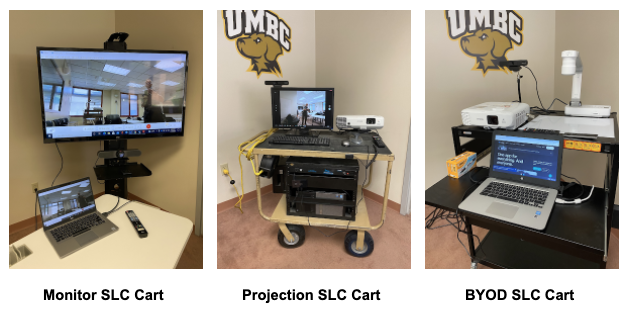
    <div class="html-content"><span><p><span>As the University prepares for a return to campus this Fall, DoIT’s </span><a href="https://doit.umbc.edu/eis/dsav/" rel="nofollow external" class="bo"><span>Audio-Visual and Desktop Support units</span></a><span> have been busy upgrading classrooms and equipping instructors with new technologies to support hybrid and in-person instruction. </span></p><p><span>For example, the University Center (UC) Ballroom has now been turned </span><span>into a hub for 25 large-enrollment lecture courses that can meet in person, as well as in the adjacent Ballroom Lounge (302) and nearby 310 and 312 rooms. In addition to cameras, mics and monitors peppered throughout these spaces to provide a synchronous, socially-distanced learning environment for students and faculty, DoIT and Commons staff will be available on-site to provide support. DoIT is also reaching out this week to faculty teaching in these spaces to provide </span><a href="https://my3.my.umbc.edu/groups/instructional-technology/events?mode=upcoming&amp;tag=instruction" rel="nofollow external" class="bo"><span>on-site training</span></a><span> next week.</span></p><p><span><img alt="UMBC synchronous lecture capture (SLC) cart options" src="https://my3.my.umbc.edu/groups/instructional-technology/posts/111633/attachments/40241" style="max-width: 100%; height: auto;"></span></p><p><span>In addition, AV has added a variety of mobile carts specifically design to support synchronous </span><a href="https://doit.umbc.edu/itnm/lecturing-online/" rel="nofollow external" class="bo"><span>lecture capture</span></a><span> (SLC). The intent of these carts is to provide a higher level of video and audio quality to an instructor's streaming application (Webex, Bb Collaborate, Zoom, etc.) than is possible with a laptop alone. A secondary purpose is to provide a backup for any built-in system that is experiencing technical difficulties. DoIT AV Student Specialists designed and assembled these carts, which include the following:</span></p><p><span><strong>Monitor SLC Cart</strong></span><span>(4 units available)</span></p><ul><li><span>55” monitor with HDMI cable for user’s laptop</span></li><li><a href="https://www.logitech.com/en-us/products/video-conferencing/conference-cameras/meetup-conferencecam.html" rel="nofollow external" class="bo"><span>Logitech Meetup</span></a><span> with remote</span></li><ul><li><span><span>Single USB connection to user laptop</span></span></li><li>Camera with pan/tilt/zoom control</li><li>Array microphone</li><li>Sound bar</li><li>Built in echo cancellation</li><li>No software download required</li></ul></ul><p><span><strong>Projection SLC Cart</strong></span><span>(5 units available)</span></p><ul><li><span>Epson projector</span></li><li>Dell PC built in</li><li>User may opt to use own laptop with HDMI cable</li><li><a href="https://huddlecamhd.com/pro/" rel="nofollow external" class="bo"><span>Huddlecam ePTZ camera</span></a><span> with remote</span></li><ul><li>Use for marker board capture</li><li>Reposition for instructor or classroom view</li><li>Built in microphone array</li><li>Yamaha speakers</li></ul></ul><p><span><strong>BYOD - SLC Cart</strong></span><span>(1 unit available)</span></p><ul><li><span>Epson projector</span></li><li>Attach user’s device with supplied HDMI cable</li><li><a href="https://huddlecamhd.com/pro/" rel="nofollow external" class="bo"><span>Huddlecam ePTZ camera</span></a><span> with remote</span></li><ul><li><span><span>Use for marker board capture</span></span></li><li>Reposition for instructor or classroom view</li><li>Built in microphone array</li><li>Attach to user’s laptop with supplied USB cable</li></ul><li><span>Epson Document Camera</span></li><ul><li>Dry erase surface attached to cart surface</li><li>Attach to user’s laptop with supplied USB cable</li></ul></ul><p><span>AV Services is also equipped with </span><span>approximately 200 bluetooth headsets faculty can use in class -- even when masked -- to support </span><a href="https://doit.umbc.edu/itnm/lecturing-online/" rel="nofollow external" class="bo"><span>lecture capture</span></a><span> with Blackboard Collaborate or Webex.</span><span> </span></p><p><span>Finally, as </span><a href="https://doit.umbc.edu/news/?id=98090" rel="nofollow external" class="bo"><span>announced</span></a><span> late last fall, </span><span>a handful of classrooms were converted to be </span><a href="http://doit.umbc.edu/classroom/hyflex" rel="nofollow external" class="bo"><span>HyFlex</span></a><span> capable rooms in which students can choose (during course registration) to meet in person or remotely. These include </span><span>ADMIN 101, SOND 105, ITE 227 and ITE 233.</span></p><p><span>For more information about classroom upgrades or additions, please visit DoIT’s </span><a href="https://doit.umbc.edu/eis/dsav/" rel="nofollow external" class="bo"><span>Desktop Support and AV Services site</span></a><span>. To request help, please submit a myUMBC request via </span><a href="https://my.umbc.edu/help" rel="nofollow external" class="bo"><span>my.umbc.edu/help</span></a><span>. </span></p><p><span><em>By Steve Anderson &amp; John Fritz</em></span></p><br></span></div>
]]>
</Body>
<Summary>As the University prepares for a return to campus this Fall, DoIT’s Audio-Visual and Desktop Support units have been busy upgrading classrooms and equipping instructors with new technologies to...</Summary>
<Website>https://doit.umbc.edu/eis/dsav/</Website>
<AttachmentKind>Image</AttachmentKind>
<AttachmentUrl>https://assets4-beta.my.umbc.edu/system/shared/attachments/359ea2bfe3ec9e038e80f6d0420e4c9c/69edf0b3/news/000/111/633/38931085302fed7608c6c0a28566b7b3/UMBC DoIT SLC Cart Options.png?1629307579</AttachmentUrl>
<Attachments>
<Attachment kind="Image" url="https://beta.my.umbc.edu/groups/instructional-technology/posts/111633/attachments/40241"></Attachment>
</Attachments>
<TrackingUrl>https://beta.my.umbc.edu/api/v0/pixel/news/111633/guest@my.umbc.edu/5aae25fdb351aec2f12f8d2350bed360/api/pixel</TrackingUrl>
<Tag>instruction</Tag>
<Group token="instructional-technology">Instructional Technology</Group>
<GroupUrl>https://beta.my.umbc.edu/groups/instructional-technology</GroupUrl>
<AvatarUrl>https://assets2-beta.my.umbc.edu/system/shared/avatars/groups/000/001/164/dec3b026b81ee6d890a8f82f75c94a2e/xsmall.png?1446126703</AvatarUrl>
<AvatarUrl size="original">https://assets1-beta.my.umbc.edu/system/shared/avatars/groups/000/001/164/dec3b026b81ee6d890a8f82f75c94a2e/original.png?1446126703</AvatarUrl>
<AvatarUrl size="xxlarge">https://assets2-beta.my.umbc.edu/system/shared/avatars/groups/000/001/164/dec3b026b81ee6d890a8f82f75c94a2e/xxlarge.png?1446126703</AvatarUrl>
<AvatarUrl size="xlarge">https://assets1-beta.my.umbc.edu/system/shared/avatars/groups/000/001/164/dec3b026b81ee6d890a8f82f75c94a2e/xlarge.png?1446126703</AvatarUrl>
<AvatarUrl size="large">https://assets1-beta.my.umbc.edu/system/shared/avatars/groups/000/001/164/dec3b026b81ee6d890a8f82f75c94a2e/large.png?1446126703</AvatarUrl>
<AvatarUrl size="medium">https://assets4-beta.my.umbc.edu/system/shared/avatars/groups/000/001/164/dec3b026b81ee6d890a8f82f75c94a2e/medium.png?1446126703</AvatarUrl>
<AvatarUrl size="small">https://assets3-beta.my.umbc.edu/system/shared/avatars/groups/000/001/164/dec3b026b81ee6d890a8f82f75c94a2e/small.png?1446126703</AvatarUrl>
<AvatarUrl size="xsmall">https://assets2-beta.my.umbc.edu/system/shared/avatars/groups/000/001/164/dec3b026b81ee6d890a8f82f75c94a2e/xsmall.png?1446126703</AvatarUrl>
<AvatarUrl size="xxsmall">https://assets3-beta.my.umbc.edu/system/shared/avatars/groups/000/001/164/dec3b026b81ee6d890a8f82f75c94a2e/xxsmall.png?1446126703</AvatarUrl>
<Sponsor>Instructional Technology</Sponsor>
<ThumbnailUrl size="xxlarge">https://assets1-beta.my.umbc.edu/system/shared/thumbnails/news/000/111/633/3c58f1f3eecedb3650cf3a3d37cc5aad/xxlarge.jpg?1629306808</ThumbnailUrl>
<ThumbnailUrl size="xlarge">https://assets3-beta.my.umbc.edu/system/shared/thumbnails/news/000/111/633/3c58f1f3eecedb3650cf3a3d37cc5aad/xlarge.jpg?1629306808</ThumbnailUrl>
<ThumbnailUrl size="large">https://assets1-beta.my.umbc.edu/system/shared/thumbnails/news/000/111/633/3c58f1f3eecedb3650cf3a3d37cc5aad/large.jpg?1629306808</ThumbnailUrl>
<ThumbnailUrl size="medium">https://assets1-beta.my.umbc.edu/system/shared/thumbnails/news/000/111/633/3c58f1f3eecedb3650cf3a3d37cc5aad/medium.jpg?1629306808</ThumbnailUrl>
<ThumbnailUrl size="small">https://assets3-beta.my.umbc.edu/system/shared/thumbnails/news/000/111/633/3c58f1f3eecedb3650cf3a3d37cc5aad/small.jpg?1629306808</ThumbnailUrl>
<ThumbnailUrl size="xsmall">https://assets3-beta.my.umbc.edu/system/shared/thumbnails/news/000/111/633/3c58f1f3eecedb3650cf3a3d37cc5aad/xsmall.jpg?1629306808</ThumbnailUrl>
<ThumbnailUrl size="xxsmall">https://assets4-beta.my.umbc.edu/system/shared/thumbnails/news/000/111/633/3c58f1f3eecedb3650cf3a3d37cc5aad/xxsmall.jpg?1629306808</ThumbnailUrl>
<PawCount>6</PawCount>
<CommentCount>0</CommentCount>
<CommentsAllowed>true</CommentsAllowed>
<PostedAt>Wed, 18 Aug 2021 13:11:49 -0400</PostedAt>
<EditAt>Wed, 18 Aug 2021 18:23:06 -0400</EditAt>
</NewsItem>

<NewsItem contentIssues="true" id="111595" important="false" status="posted" url="https://beta.my.umbc.edu/groups/instructional-technology/posts/111595">
<Title>13 Tips to Get Your Blackboard Course Ready</Title>
<Tagline>Checklist to optimize your course before the semester starts</Tagline>
<Body>
<![CDATA[
    <div class="html-content"><p><span>Prepare your Blackboard course shell for the new semester with our updated baker’s dozen checklist.</span></p><p><span><strong>1. Review new tools &amp; features in Blackboard.</strong></span></p><p><span>Our Blackboard site receives </span><a href="https://my3.my.umbc.edu/groups/instructional-technology/posts?tag=ultra-update" rel="nofollow external" class="bo"><span>updates and enhancements every month</span></a><span> -- check out the latest news to learn what’s new for Ultra courses.</span></p><p><span><strong>2. Copy your course content from a previous semester.</strong></span></p><p><span>Bypass the long wait and digital file transfers required for export and import. </span><a href="https://wiki.umbc.edu/x/sABxAw" rel="nofollow external" class="bo"><span>Use course copy</span></a><span> -- it’s faster and more convenient. TIP: Prep your courses ahead of the new semester for a stress-free start. Request </span><a href="https://wiki.umbc.edu/x/9QYgB" rel="nofollow external" class="bo"><span>a development course shell</span></a><span> for ongoing content development and maintenance. </span></p><p><span><strong>3. Create a central Start Here area for your students so they know how to get started.</strong></span></p><p><span>Include a welcome video. </span><a href="https://wiki.umbc.edu/x/kQd4B" rel="nofollow external" class="bo"><span>Use Panopto</span></a><span> to invite students to explore the course with a course tour and orientation. Let students know what to do first before classes start and where to find important content. Be sure to </span><a href="https://wiki.umbc.edu/x/pQjBBQ" rel="nofollow external" class="bo"><span>caption your videos</span></a><span> for accessibility.</span></p><p><span><strong>4. Check course links for broken or missing content.</strong></span></p><p><span>If you use a lot of external links and third-party tools, check the validity of those resources. You’ll want to verify permissions for </span><a href="https://wiki.umbc.edu/x/RwOGBQ" rel="nofollow external" class="bo"><span>Google</span></a><span>, </span><a href="https://wiki.umbc.edu/x/6wLnAQ" rel="nofollow external" class="bo"><span>Box</span></a><span>, and </span><a href="https://wiki.umbc.edu/x/6IdVBQ" rel="nofollow external" class="bo"><span>Panopto</span></a><span> to make sure your students can view these essential media and files.</span></p><p><span><strong>5. Update library reserves.</strong></span></p><p><span>Digital reserves are available through the AOK Library, making it easy for you to request from your desktop and for students to access, read, view, or listen from the convenience of their own devices. Course reserves are </span><a href="https://wiki.umbc.edu/x/CYYMBQ" rel="nofollow external" class="bo"><span>synchronized through your Blackboard courses</span></a><span>. </span></p><p><span><strong>6. Upload multimedia to Panopto and large files to UMBC Box or Google Drive.</strong></span></p><p><span>Please remember that Blackboard is not a streaming service. When you update your course content with new resources, be sure to place </span><a href="https://wiki.umbc.edu/x/sIOEB" rel="nofollow external" class="bo"><span>multimedia (video, audio) in Panopto</span></a><span> and </span><a href="https://wiki.umbc.edu/x/fIopB" rel="nofollow external" class="bo"><span>other large files to cloud storage</span></a><span>. Your students and Blackboard course will thank you for a streamlined delivery. View </span><a href="https://umbc.hosted.panopto.com/Panopto/Pages/Viewer.aspx?id=2bbebddb-bdb3-42f6-951f-ad0200ec23fa" rel="nofollow external" class="bo"><span>our 30-minute webinar</span></a><span> for additional tips to optimize your course quota.</span></p><p><span><strong>7. Check your course content for accessibility.</strong></span></p><p><span>Use </span><a href="http://wiki.umbc.edu/pages/viewpage.action?pageId=87884573" rel="nofollow external" class="bo"><span>your course’s Ally accessibility report</span></a><span> to gauge the accessibility of course content and prioritize improvements. Ally automatically creates alternative versions of your files for students including Electronic Braille and mobile-friendly HTML.</span></p><p><span><strong>8. Update due dates, adaptive release dates, availability, etc.</strong></span></p><p><span>Use the </span><a href="https://help.blackboard.com/Learn/Instructor/Original/Course_Content/Reuse_Content/Date_Management" rel="nofollow external" class="bo"><span>Date Management tool</span></a><span> in Original or </span><a href="http://wiki.umbc.edu/pages/viewpage.action?pageId=84707427" rel="nofollow external" class="bo"><span>Batch Edit in Ultra</span></a><span> to modify nearly everything with a date in your course whether availability or <a href="https://wiki.umbc.edu/x/tYFaAQ" rel="nofollow external" class="bo">conditional release</a>. </span></p><p><strong><span>9. </span><span>Set up your virtual gradebook.</span></strong></p><p><span>Students </span><a href="https://my.umbc.edu/groups/instructional-technology/posts/65634" rel="nofollow external" class="bo"><span>benefit from knowing how they’re doing</span></a><span> in your course throughout the semester. If your course uses a weighted grading system to calculate the final grade, set up your </span><a href="https://wiki.umbc.edu/x/pQQ9BQ" rel="nofollow external" class="bo"><span>Ultra gradebook</span></a><span> or </span><a href="https://wiki.umbc.edu/x/kotnB" rel="nofollow external" class="bo"><span>Original grade center</span></a><span> as soon as possible.</span></p><p><span><strong>10. Prepare virtual meeting places.</strong></span></p><p><span>Create spaces to meet with students virtually. Use </span><a href="https://wiki.umbc.edu/x/CxPSAQ" rel="nofollow external" class="bo"><span>Collaborate</span></a><span> or </span><a href="https://wiki.umbc.edu/display/faq/Webex" rel="nofollow external" class="bo"><span>Webex</span></a><span> for lectures, office hours, drop-in support, student study groups, and more.</span></p><p><span><strong>11. Welcome students to your course.</strong></span></p><p><span>No matter what format you teach, create an online introduction to create a sense of connection and build community in your course. Send an opening email or </span><a href="https://wiki.umbc.edu/x/HoJaAQ" rel="nofollow external" class="bo"><span>post an announcement</span></a><span> to your course to greet your students.</span></p><p><span><strong>12. Configure your personal notifications.</strong></span></p><p><span>Choose </span><a href="http://wiki.umbc.edu/pages/viewpage.action?pageId=31918829" rel="nofollow external" class="bo"><span>which notifications you receive</span></a><span> about activity in your courses. Notifications can appear in the Activity Stream or via email digest for new messages, gradable items, discussion posts, or student performance alerts.</span></p><p><span><strong>13. Set your course availability.</strong></span></p><p><span>Students cannot access your course until you make it available. Use </span><a href="https://wiki.umbc.edu/x/VoAc" rel="nofollow external" class="bo"><span>one of three methods</span></a><span> to turn your course on for students. TIP: If you use Ultra and you'd like to open your course earlier than 2 weeks before the semester starts, you might need to request support to make sure students see your course when you want them to have early access.</span></p><p><span><em>Do you have a tip to share with other faculty? Please comment in this post and let us know!</em></span></p><div><span>As always, if you have any questions about teaching, learning, and technology at UMBC, please consider the following options:</span></div><div><ul><li><span><a href="http://pivot.umbc.edu" rel="nofollow external" class="bo">PIVOT</a> | <a href="https://doit.umbc.edu/itnm/academic-continuity/" rel="nofollow external" class="bo">Academic Continuity</a></span><span> </span><span>|</span><span> </span><span><a href="https://fdc.umbc.edu/teaching/keep-on-teaching/" rel="nofollow external" class="bo">Keep On Teaching</a></span><span> </span><span>|</span><span> </span><span><a href="https://doit.umbc.edu/students" rel="nofollow external" class="bo">Student Technology Resources</a></span></li><li><a href="http://www.umbc.edu/faq" rel="nofollow external" class="bo">Check our extensive FAQ collection</a><span> </span></li><ul><li><span><a href="https://wiki.umbc.edu/x/LohnB" rel="nofollow external" class="bo"><span>What’s new in Ultra?</span></a><span> </span><span>|</span><span> </span><a href="https://wiki.umbc.edu/x/bwrSAQ" rel="nofollow external" class="bo"><span>Known Issues</span></a><span> </span></span></li></ul><li><span><a href="http://my.umbc.edu/go/request-help" rel="nofollow external" class="bo">Open a ticket via RT</a></span></li><li><span>Follow the </span><a href="http://my.umbc.edu/groups/instructional-technology" rel="nofollow external" class="bo">Instructional Technology</a><span> &amp; </span><a href="http://my.umbc.edu/groups/doit" rel="nofollow external" class="bo">DoIT</a><span> myUMBC groups</span></li><li><a href="http://doit.umbc.edu/itnm/staff/" rel="nofollow external" class="bo">Request a consult</a><span> with instructional technology staff</span></li></ul><div><br></div></div><div><em>~ by <a href="https://doit.umbc.edu/itnm/staff/hawken/" rel="nofollow external" class="bo">Mariann Hawken</a></em></div></div>
]]>
</Body>
<Summary>Prepare your Blackboard course shell for the new semester with our updated baker’s dozen checklist.  1. Review new tools &amp; features in Blackboard.  Our Blackboard site receives updates and...</Summary>
<Website>https://my3.my.umbc.edu/groups/instructional-technology/posts/111595</Website>
<TrackingUrl>https://beta.my.umbc.edu/api/v0/pixel/news/111595/guest@my.umbc.edu/2289842b9c9290344d7b95331aef474c/api/pixel</TrackingUrl>
<Tag>blackboard</Tag>
<Tag>checklist</Tag>
<Tag>effective-practices</Tag>
<Tag>getting-started</Tag>
<Tag>hawken</Tag>
<Tag>online-learning</Tag>
<Group token="instructional-technology">Instructional Technology</Group>
<GroupUrl>https://beta.my.umbc.edu/groups/instructional-technology</GroupUrl>
<AvatarUrl>https://assets2-beta.my.umbc.edu/system/shared/avatars/groups/000/001/164/dec3b026b81ee6d890a8f82f75c94a2e/xsmall.png?1446126703</AvatarUrl>
<AvatarUrl size="original">https://assets1-beta.my.umbc.edu/system/shared/avatars/groups/000/001/164/dec3b026b81ee6d890a8f82f75c94a2e/original.png?1446126703</AvatarUrl>
<AvatarUrl size="xxlarge">https://assets2-beta.my.umbc.edu/system/shared/avatars/groups/000/001/164/dec3b026b81ee6d890a8f82f75c94a2e/xxlarge.png?1446126703</AvatarUrl>
<AvatarUrl size="xlarge">https://assets1-beta.my.umbc.edu/system/shared/avatars/groups/000/001/164/dec3b026b81ee6d890a8f82f75c94a2e/xlarge.png?1446126703</AvatarUrl>
<AvatarUrl size="large">https://assets1-beta.my.umbc.edu/system/shared/avatars/groups/000/001/164/dec3b026b81ee6d890a8f82f75c94a2e/large.png?1446126703</AvatarUrl>
<AvatarUrl size="medium">https://assets4-beta.my.umbc.edu/system/shared/avatars/groups/000/001/164/dec3b026b81ee6d890a8f82f75c94a2e/medium.png?1446126703</AvatarUrl>
<AvatarUrl size="small">https://assets3-beta.my.umbc.edu/system/shared/avatars/groups/000/001/164/dec3b026b81ee6d890a8f82f75c94a2e/small.png?1446126703</AvatarUrl>
<AvatarUrl size="xsmall">https://assets2-beta.my.umbc.edu/system/shared/avatars/groups/000/001/164/dec3b026b81ee6d890a8f82f75c94a2e/xsmall.png?1446126703</AvatarUrl>
<AvatarUrl size="xxsmall">https://assets3-beta.my.umbc.edu/system/shared/avatars/groups/000/001/164/dec3b026b81ee6d890a8f82f75c94a2e/xxsmall.png?1446126703</AvatarUrl>
<Sponsor>Instructional Technology</Sponsor>
<ThumbnailUrl size="xxlarge">https://assets2-beta.my.umbc.edu/system/shared/thumbnails/news/000/111/595/eaba129337280be02034b81c3cef9c3a/xxlarge.jpg?1629215400</ThumbnailUrl>
<ThumbnailUrl size="xlarge">https://assets3-beta.my.umbc.edu/system/shared/thumbnails/news/000/111/595/eaba129337280be02034b81c3cef9c3a/xlarge.jpg?1629215400</ThumbnailUrl>
<ThumbnailUrl size="large">https://assets1-beta.my.umbc.edu/system/shared/thumbnails/news/000/111/595/eaba129337280be02034b81c3cef9c3a/large.jpg?1629215400</ThumbnailUrl>
<ThumbnailUrl size="medium">https://assets2-beta.my.umbc.edu/system/shared/thumbnails/news/000/111/595/eaba129337280be02034b81c3cef9c3a/medium.jpg?1629215400</ThumbnailUrl>
<ThumbnailUrl size="small">https://assets4-beta.my.umbc.edu/system/shared/thumbnails/news/000/111/595/eaba129337280be02034b81c3cef9c3a/small.jpg?1629215400</ThumbnailUrl>
<ThumbnailUrl size="xsmall">https://assets2-beta.my.umbc.edu/system/shared/thumbnails/news/000/111/595/eaba129337280be02034b81c3cef9c3a/xsmall.jpg?1629215400</ThumbnailUrl>
<ThumbnailUrl size="xxsmall">https://assets1-beta.my.umbc.edu/system/shared/thumbnails/news/000/111/595/eaba129337280be02034b81c3cef9c3a/xxsmall.jpg?1629215400</ThumbnailUrl>
<PawCount>4</PawCount>
<CommentCount>0</CommentCount>
<CommentsAllowed>true</CommentsAllowed>
<PostedAt>Tue, 17 Aug 2021 12:02:16 -0400</PostedAt>
<EditAt>Mon, 07 Nov 2022 09:34:54 -0500</EditAt>
</NewsItem>

<NewsItem contentIssues="true" id="111371" important="false" status="posted" url="https://beta.my.umbc.edu/groups/instructional-technology/posts/111371">
<Title>VoiceThread / Blackboard Tool Connection Updated</Title>
<Tagline>VoiceThread update changes how VoiceThread is added to Bb</Tagline>
<Body>
<![CDATA[
    <div class="html-content"><div>Do you use VoiceThread assignments or links in Blackboard? At the end of July, VoiceThread went through an LTI upgrade to improve functionality between VoiceThread and Blackboard. The new integration supports automatic copying of VoiceThread assignments and content from a template course, improved roster synchronization, and greater security. As a result of the upgrade, the steps to add VoiceThread to Blackboard courses have changed slightly.</div><div><br></div><div>Visit this <a href="https://wiki.umbc.edu/x/kQzBBQ" rel="nofollow external" class="bo">updated VoiceThread FAQ</a> for details on the new process or attend <a href="https://my3.my.umbc.edu/groups/instructional-technology/events/94701" rel="nofollow external" class="bo">VoiceThread Essentials</a> on August 24th.</div><div><br></div><div><p><span>As always, if you have any questions about teaching, learning, and technology at UMBC, please consider the following options:</span></p><ul><li><span><a href="http://pivot.umbc.edu" rel="nofollow external" class="bo">PIVOT</a> | <a href="https://doit.umbc.edu/itnm/academic-continuity/" rel="nofollow external" class="bo">Academic Continuity</a></span><span> </span><span>|</span><span> </span><span><a href="https://fdc.umbc.edu/teaching/keep-on-teaching/" rel="nofollow external" class="bo">Keep On Teaching</a></span><span> </span><span>|</span><span> </span><span><a href="https://doit.umbc.edu/students" rel="nofollow external" class="bo">Student Technology Resources</a></span></li><li><a href="http://www.umbc.edu/faq" rel="nofollow external" class="bo"><span>Check our extensive FAQ collection</span></a><span> </span></li><ul><li><span><a href="https://wiki.umbc.edu/x/LohnB" rel="nofollow external" class="bo"><span>What’s new in Ultra?</span></a><span> </span><span>|</span><span> </span><a href="https://wiki.umbc.edu/x/bwrSAQ" rel="nofollow external" class="bo"><span>Known Issues</span></a><span> </span></span></li></ul><li><span><a href="http://my.umbc.edu/go/request-help" rel="nofollow external" class="bo">Open a ticket via RT</a></span></li><li><span>Follow the </span><a href="http://my.umbc.edu/groups/instructional-technology" rel="nofollow external" class="bo"><span>Instructional Technology</span></a><span> &amp; </span><a href="http://my.umbc.edu/groups/doit" rel="nofollow external" class="bo"><span>DoIT</span></a><span> myUMBC groups</span></li><li><a href="http://doit.umbc.edu/itnm/staff/" rel="nofollow external" class="bo"><span>Request a consult</span></a><span> with <a href="http://doit.umbc.edu/itnm/staff" rel="nofollow external" class="bo">instructional technology staff</a></span></li></ul></div><div><br></div><div><br></div></div>
]]>
</Body>
<Summary>Do you use VoiceThread assignments or links in Blackboard? At the end of July, VoiceThread went through an LTI upgrade to improve functionality between VoiceThread and Blackboard. The new...</Summary>
<Website>https://my3.my.umbc.edu/groups/instructional-technology/posts/111371/</Website>
<TrackingUrl>https://beta.my.umbc.edu/api/v0/pixel/news/111371/guest@my.umbc.edu/87cc3bacc2b90ad20d5cca8096b08a92/api/pixel</TrackingUrl>
<Tag>lti</Tag>
<Tag>voicethread</Tag>
<Tag>vt</Tag>
<Group token="instructional-technology">Instructional Technology</Group>
<GroupUrl>https://beta.my.umbc.edu/groups/instructional-technology</GroupUrl>
<AvatarUrl>https://assets2-beta.my.umbc.edu/system/shared/avatars/groups/000/001/164/dec3b026b81ee6d890a8f82f75c94a2e/xsmall.png?1446126703</AvatarUrl>
<AvatarUrl size="original">https://assets1-beta.my.umbc.edu/system/shared/avatars/groups/000/001/164/dec3b026b81ee6d890a8f82f75c94a2e/original.png?1446126703</AvatarUrl>
<AvatarUrl size="xxlarge">https://assets2-beta.my.umbc.edu/system/shared/avatars/groups/000/001/164/dec3b026b81ee6d890a8f82f75c94a2e/xxlarge.png?1446126703</AvatarUrl>
<AvatarUrl size="xlarge">https://assets1-beta.my.umbc.edu/system/shared/avatars/groups/000/001/164/dec3b026b81ee6d890a8f82f75c94a2e/xlarge.png?1446126703</AvatarUrl>
<AvatarUrl size="large">https://assets1-beta.my.umbc.edu/system/shared/avatars/groups/000/001/164/dec3b026b81ee6d890a8f82f75c94a2e/large.png?1446126703</AvatarUrl>
<AvatarUrl size="medium">https://assets4-beta.my.umbc.edu/system/shared/avatars/groups/000/001/164/dec3b026b81ee6d890a8f82f75c94a2e/medium.png?1446126703</AvatarUrl>
<AvatarUrl size="small">https://assets3-beta.my.umbc.edu/system/shared/avatars/groups/000/001/164/dec3b026b81ee6d890a8f82f75c94a2e/small.png?1446126703</AvatarUrl>
<AvatarUrl size="xsmall">https://assets2-beta.my.umbc.edu/system/shared/avatars/groups/000/001/164/dec3b026b81ee6d890a8f82f75c94a2e/xsmall.png?1446126703</AvatarUrl>
<AvatarUrl size="xxsmall">https://assets3-beta.my.umbc.edu/system/shared/avatars/groups/000/001/164/dec3b026b81ee6d890a8f82f75c94a2e/xxsmall.png?1446126703</AvatarUrl>
<Sponsor>Instructional Technology</Sponsor>
<ThumbnailUrl size="xxlarge">https://assets2-beta.my.umbc.edu/system/shared/thumbnails/news/000/111/371/b8a9abbed1ad74f53418b4e298faf0b5/xxlarge.jpg?1627930739</ThumbnailUrl>
<ThumbnailUrl size="xlarge">https://assets3-beta.my.umbc.edu/system/shared/thumbnails/news/000/111/371/b8a9abbed1ad74f53418b4e298faf0b5/xlarge.jpg?1627930739</ThumbnailUrl>
<ThumbnailUrl size="large">https://assets2-beta.my.umbc.edu/system/shared/thumbnails/news/000/111/371/b8a9abbed1ad74f53418b4e298faf0b5/large.jpg?1627930739</ThumbnailUrl>
<ThumbnailUrl size="medium">https://assets2-beta.my.umbc.edu/system/shared/thumbnails/news/000/111/371/b8a9abbed1ad74f53418b4e298faf0b5/medium.jpg?1627930739</ThumbnailUrl>
<ThumbnailUrl size="small">https://assets2-beta.my.umbc.edu/system/shared/thumbnails/news/000/111/371/b8a9abbed1ad74f53418b4e298faf0b5/small.jpg?1627930739</ThumbnailUrl>
<ThumbnailUrl size="xsmall">https://assets2-beta.my.umbc.edu/system/shared/thumbnails/news/000/111/371/b8a9abbed1ad74f53418b4e298faf0b5/xsmall.jpg?1627930739</ThumbnailUrl>
<ThumbnailUrl size="xxsmall">https://assets3-beta.my.umbc.edu/system/shared/thumbnails/news/000/111/371/b8a9abbed1ad74f53418b4e298faf0b5/xxsmall.jpg?1627930739</ThumbnailUrl>
<PawCount>5</PawCount>
<CommentCount>2</CommentCount>
<CommentsAllowed>true</CommentsAllowed>
<PostedAt>Mon, 02 Aug 2021 15:08:37 -0400</PostedAt>
</NewsItem>

<NewsItem contentIssues="true" id="111114" important="false" status="posted" url="https://beta.my.umbc.edu/groups/instructional-technology/posts/111114">
<Title>Enhanced whiteboard tools coming to Collaborate in August</Title>
<Tagline>Draw freehand customize text &amp; retain session annotations</Tagline>
<Body>
<![CDATA[
    <div class="html-content"><div>A whiteboard is an important pedagogical tool to support handwritten expression and annotation, especially in a virtual classroom. Over the last year, Blackboard has been redesigning the whiteboard tool for Collaborate to provide more comprehensive tools and functionality. These <a href="https://wiki.umbc.edu/x/DQFyBw" rel="nofollow external" class="bo">new whiteboard tools</a> are expected in time for FA2021 courses.</div><div><span><br></span></div><div><span><img src="https://blackboard.umbc.edu/bbcswebdav/institution/doitnews/ultra-updates/collab_participant_annotation_bar-2.png" alt="New Collab whiteboard tools" width="500" style="max-width: 100%; height: auto;"></span></div><div><span><br></span></div><div><div>When files or a blank whiteboard are shared in Collaborate, instructors can use annotation tools to edit and mark up the document during the live session. The enhanced functionality includes:</div><div><ul><li><span>Draw freehand on the page with various colors, thickness, and opacity. Select the eraser to remove annotations. You can erase parts of a freehand drawing with the eraser or select the Delete icon to delete the whole drawing.</span></li><li><span>Add text directly on the page. You can move, edit, and change the text and select the font, size, alignment, and color of the text.</span></li><li><span>Draw shapes including Line, Arrow, Rectangle, Ellipse, Polygon, and Polyline. Each shape has its own settings to change the color, width, opacity, and more.</span></li><li><span>Highlight text on a shared file. You can also strikethrough, underline, squiggle, or comment on the highlighted section. Note: The highlighter is not available on the whiteboard.</span></li></ul></div><div>In addition to annotation persistence, which allows you to retain markups on a whiteboard even after closing the whiteboard, the new tool will support moving the whiteboard or shared file on the page as well as zooming and adjusting the view to automatically fit the width. Group annotations on a whiteboard will also be saved. Even a multi-page whiteboard is possible!</div></div><div><br></div><div>Please <a href="https://wiki.umbc.edu/x/DQFyBw" rel="nofollow external" class="bo">review the updated FAQ</a> for more information about the new whiteboard tools or RSVP for the <a href="https://my3.my.umbc.edu/groups/instructional-technology/events/94682" rel="nofollow external" class="bo">What's New in Collab for Teaching &amp; Learning webinar</a> on August 16.</div><div><br></div><div><div class="embed-container"><iframe src="https://www.youtube.com/embed/UzgFKdiAEWs" frameborder="0" webkitAllowFullScreen="webkitAllowFullScreen" mozallowfullscreen="mozallowfullscreen" allowFullScreen="allowFullScreen">[Video]</iframe></div></div><div><a href="https://youtu.be/UzgFKdiAEWs" rel="nofollow external" class="bo">View this 6:42 minute overview</a> of the new whiteboard tools.</div><div><span><br></span></div><div><span>As always, if you have any questions about teaching, learning, and technology at UMBC, please consider the following options:</span></div><div><ul><li><span><a href="http://pivot.umbc.edu" rel="nofollow external" class="bo">PIVOT</a> | <a href="https://doit.umbc.edu/itnm/academic-continuity/" rel="nofollow external" class="bo">Academic Continuity</a></span><span> </span><span>|</span><span> </span><span><a href="https://fdc.umbc.edu/teaching/keep-on-teaching/" rel="nofollow external" class="bo">Keep On Teaching</a></span><span> </span><span>|</span><span> </span><span><a href="https://doit.umbc.edu/students" rel="nofollow external" class="bo">Student Technology Resources</a></span></li><li><a href="http://www.umbc.edu/faq" rel="nofollow external" class="bo">Check our extensive FAQ collection</a><span> </span></li><ul><li><span><a href="https://wiki.umbc.edu/x/LohnB" rel="nofollow external" class="bo"><span>What’s new in Ultra?</span></a><span> </span><span>|</span><span> </span><a href="https://wiki.umbc.edu/x/bwrSAQ" rel="nofollow external" class="bo"><span>Known Issues</span></a><span> </span></span></li></ul><li><span><a href="http://my.umbc.edu/go/request-help" rel="nofollow external" class="bo">Open a ticket via RT</a></span></li><li><span>Follow the </span><a href="http://my.umbc.edu/groups/instructional-technology" rel="nofollow external" class="bo">Instructional Technology</a><span> &amp; </span><a href="http://my.umbc.edu/groups/doit" rel="nofollow external" class="bo">DoIT</a><span> myUMBC groups</span></li><li><a href="http://doit.umbc.edu/itnm/staff/" rel="nofollow external" class="bo">Request a consult</a><span> with instructional technology staff</span></li></ul></div></div>
]]>
</Body>
<Summary>A whiteboard is an important pedagogical tool to support handwritten expression and annotation, especially in a virtual classroom. Over the last year, Blackboard has been redesigning the...</Summary>
<Website>https://my3.my.umbc.edu/groups/instructional-technology/posts/111114</Website>
<TrackingUrl>https://beta.my.umbc.edu/api/v0/pixel/news/111114/guest@my.umbc.edu/d315da6b6e9fabcaf56276bbef08f9f5/api/pixel</TrackingUrl>
<Tag>active-learning</Tag>
<Tag>collaborate</Tag>
<Tag>fa2021</Tag>
<Tag>online-learning</Tag>
<Tag>ultra-update</Tag>
<Tag>whiteboard</Tag>
<Group token="instructional-technology">Instructional Technology</Group>
<GroupUrl>https://beta.my.umbc.edu/groups/instructional-technology</GroupUrl>
<AvatarUrl>https://assets2-beta.my.umbc.edu/system/shared/avatars/groups/000/001/164/dec3b026b81ee6d890a8f82f75c94a2e/xsmall.png?1446126703</AvatarUrl>
<AvatarUrl size="original">https://assets1-beta.my.umbc.edu/system/shared/avatars/groups/000/001/164/dec3b026b81ee6d890a8f82f75c94a2e/original.png?1446126703</AvatarUrl>
<AvatarUrl size="xxlarge">https://assets2-beta.my.umbc.edu/system/shared/avatars/groups/000/001/164/dec3b026b81ee6d890a8f82f75c94a2e/xxlarge.png?1446126703</AvatarUrl>
<AvatarUrl size="xlarge">https://assets1-beta.my.umbc.edu/system/shared/avatars/groups/000/001/164/dec3b026b81ee6d890a8f82f75c94a2e/xlarge.png?1446126703</AvatarUrl>
<AvatarUrl size="large">https://assets1-beta.my.umbc.edu/system/shared/avatars/groups/000/001/164/dec3b026b81ee6d890a8f82f75c94a2e/large.png?1446126703</AvatarUrl>
<AvatarUrl size="medium">https://assets4-beta.my.umbc.edu/system/shared/avatars/groups/000/001/164/dec3b026b81ee6d890a8f82f75c94a2e/medium.png?1446126703</AvatarUrl>
<AvatarUrl size="small">https://assets3-beta.my.umbc.edu/system/shared/avatars/groups/000/001/164/dec3b026b81ee6d890a8f82f75c94a2e/small.png?1446126703</AvatarUrl>
<AvatarUrl size="xsmall">https://assets2-beta.my.umbc.edu/system/shared/avatars/groups/000/001/164/dec3b026b81ee6d890a8f82f75c94a2e/xsmall.png?1446126703</AvatarUrl>
<AvatarUrl size="xxsmall">https://assets3-beta.my.umbc.edu/system/shared/avatars/groups/000/001/164/dec3b026b81ee6d890a8f82f75c94a2e/xxsmall.png?1446126703</AvatarUrl>
<Sponsor>Instructional Technology</Sponsor>
<ThumbnailUrl size="xxlarge">https://assets3-beta.my.umbc.edu/system/shared/thumbnails/news/000/111/114/03ed6c135c5912cf3bd6060f43ededf1/xxlarge.jpg?1626786832</ThumbnailUrl>
<ThumbnailUrl size="xlarge">https://assets3-beta.my.umbc.edu/system/shared/thumbnails/news/000/111/114/03ed6c135c5912cf3bd6060f43ededf1/xlarge.jpg?1626786832</ThumbnailUrl>
<ThumbnailUrl size="large">https://assets1-beta.my.umbc.edu/system/shared/thumbnails/news/000/111/114/03ed6c135c5912cf3bd6060f43ededf1/large.jpg?1626786832</ThumbnailUrl>
<ThumbnailUrl size="medium">https://assets2-beta.my.umbc.edu/system/shared/thumbnails/news/000/111/114/03ed6c135c5912cf3bd6060f43ededf1/medium.jpg?1626786832</ThumbnailUrl>
<ThumbnailUrl size="small">https://assets2-beta.my.umbc.edu/system/shared/thumbnails/news/000/111/114/03ed6c135c5912cf3bd6060f43ededf1/small.jpg?1626786832</ThumbnailUrl>
<ThumbnailUrl size="xsmall">https://assets1-beta.my.umbc.edu/system/shared/thumbnails/news/000/111/114/03ed6c135c5912cf3bd6060f43ededf1/xsmall.jpg?1626786832</ThumbnailUrl>
<ThumbnailUrl size="xxsmall">https://assets4-beta.my.umbc.edu/system/shared/thumbnails/news/000/111/114/03ed6c135c5912cf3bd6060f43ededf1/xxsmall.jpg?1626786832</ThumbnailUrl>
<PawCount>1</PawCount>
<CommentCount>0</CommentCount>
<CommentsAllowed>true</CommentsAllowed>
<PostedAt>Mon, 02 Aug 2021 10:30:40 -0400</PostedAt>
<EditAt>Mon, 02 Aug 2021 10:32:23 -0400</EditAt>
</NewsItem>

<NewsItem contentIssues="true" id="111283" important="false" status="posted" url="https://beta.my.umbc.edu/groups/instructional-technology/posts/111283">
<Title>FA2021 Courses Created in Blackboard on July 26, 2021</Title>
<Body>
<![CDATA[
    <div class="html-content"><p>Blackboard course shells for FA2021 <a href="https://wiki.umbc.edu/x/eYHGAw" rel="nofollow external" class="bo">were created</a> on July 26, 2021.</p><p><span>The </span><a href="https://wiki.umbc.edu/x/VIdnB" rel="nofollow external" class="bo"><span>Ultra Course Preview</span></a><span> setting is again enabled in FA2021 courses, which allows faculty</span><span> to convert a new Original course to see what it </span><span><a href="https://wiki.umbc.edu/x/VIdnB" rel="nofollow external" class="bo">looks like in Ultra</a></span><span>. Please review the </span><a href="https://wiki.umbc.edu/x/LohnB" rel="nofollow external" class="bo">release notes</a> for the latest updates as well as<span> feature parity charts to </span><a href="https://wiki.umbc.edu/x/04ZnB" rel="nofollow external" class="bo">compare Original and Ultra tools</a><span> and check </span><a href="https://wiki.umbc.edu/x/9IZnB" rel="nofollow external" class="bo">third-party tools are available</a><span>. Have a question about Ultra? Ask <a href="https://wiki.umbc.edu/x/kAU9BQ" rel="nofollow external" class="bo">an Ultra Ambassador</a>!</span></p><p><span><span>Ally, an </span><a href="https://doit.umbc.edu/news/?id=82487" rel="nofollow external" class="bo"><span>accessibility tool</span></a><span>, is also enabled in all course shells. Ally automatically scans uploaded and created course content, then performs a series of steps to make that content more accessible. Please review the </span><a href="https://wiki.umbc.edu/x/2IGdB" rel="nofollow external" class="bo"><span>Ally FAQs</span></a><span> for more information about the </span><a href="https://wiki.umbc.edu/x/_YGdB" rel="nofollow external" class="bo"><span>accessibility indicators</span></a><span> on course content and </span><a href="https://wiki.umbc.edu/x/3IGdB" rel="nofollow external" class="bo"><span>alternative formats</span></a><span>.</span></span></p><p><span>For faculty who will be teaching hybrid or online, the instructional technology team would like to share several resources to support online course development and instruction.</span></p><ol><li><span>Choose from our </span><a href="https://pivot.umbc.edu/pivot-solo/" rel="nofollow external" class="bo">PIVOT Solo</a><span> lessons to refresh or enhance your online teaching preparation. Five key topics cover course organization, active learning, community building, assessment, and supporting students. </span></li><li><span>Explore </span><a href="https://umbc.hosted.panopto.com/Panopto/Pages/Sessions/List.aspx#folderID=%2274ac9d58-1779-44c1-92b7-ab6900dfe6e9%22" rel="nofollow external" class="bo">our Panopto folder</a><span> for a wide variety of recorded webinars on various instructional technologies available at UMBC.</span></li></ol><div><strong>About Course Creation</strong></div><div><span><br></span></div><div><span>Bb shells for FA2021 are available for all courses (designated as lecture, lab, field or discussion) listed in the </span><a href="http://my.umbc.edu/go/schedule" rel="nofollow external" class="bo">UMBC Schedule of Classes (SOC)</a><span>, provided that there is an </span><a href="http://www.umbc.edu/blogs/oit-news/archives/2010/08/how_new_employe_1.html" rel="nofollow external" class="bo">instructor of record</a><span> listed. As new course sections and/or instructors are added to the SOC by </span><a href="https://docs.google.com/a/umbc.edu/document/d/1rwm_adJUvAP3cxL-QCrb56n9ql4xrR8FHd9_1Cw0vJI/edit?usp%3Dsharing" rel="nofollow external" class="bo">Department Scheduling Coordinators</a><span>, corresponding Bb shells are automatically generated overnight. </span></div><ul><li>If you are an instructor, and your name is not associated with the course you are teaching in the <a href="http://my.umbc.edu/go/schedule" rel="nofollow external" class="bo">SOC</a>, please see your <a href="https://docs.google.com/a/umbc.edu/document/d/1rwm_adJUvAP3cxL-QCrb56n9ql4xrR8FHd9_1Cw0vJI/edit?usp%3Dsharing" rel="nofollow external" class="bo">Departmental Scheduling Coordinator</a> to resolve the issue. Once you are listed in the <a href="https://my.umbc.edu/go/schedule" rel="nofollow external" class="bo">SOC</a>, your Bb course shell will be created automatically. </li><li>If you and your <a href="https://docs.google.com/a/umbc.edu/document/d/1rwm_adJUvAP3cxL-QCrb56n9ql4xrR8FHd9_1Cw0vJI/edit?usp%3Dsharing" rel="nofollow external" class="bo">Department Scheduling Coordinator</a> believe you are correctly assigned as the instructor of record in the SOC and you do not see your course shell in Blackboard, please submit a Request Tracker (RT) ticket via <a href="https://my.umbc.edu/help" rel="nofollow external" class="bo">my.umbc.edu/help</a>.</li><li>If you need a Bb shell for a research or independent study course, please submit a <a href="http://www.umbc.edu/doit/blackboard/requestbbshell.html" rel="nofollow external" class="bo">new course request</a>.</li></ul><p>Instructors who teach multiple sections of the same course will find those enrollments merged into one Bb course shell. These sections may be split upon <a href="https://my.umbc.edu/go/request-help" rel="nofollow external" class="bo">request by an RT ticket</a>, which we recommend <a href="https://wiki.umbc.edu/x/d4HGAw" rel="nofollow external" class="bo">submitting at least one week</a> before the semester starts, if not as soon as courses are created in Blackboard.</p><p>Student enrollment in Bb mirrors the official registration in SA and updates hourly. However, courses are not accessible to students by default until the instructor of record <a href="https://wiki.umbc.edu/pages/viewpage.action?pageId%3D1867862" rel="nofollow external" class="bo">makes them available</a>.</p><p>As always, if you have any questions, please consider the following options:</p><ul><li><span><a href="https://doit.umbc.edu/itnm/academic-continuity/" rel="nofollow external" class="bo"><span>Academic Continuity</span></a><span> | </span><a href="https://fdc.umbc.edu/resources/keep-on-teaching/" rel="nofollow external" class="bo"><span>Keep On Teaching</span></a><span> | </span><a href="https://doit.umbc.edu/students" rel="nofollow external" class="bo"><span>Student Technology Resources</span></a></span></li><li><a href="http://www.umbc.edu/faq" rel="nofollow external" class="bo">Check our extensive FAQ collection</a> </li><li><a href="http://my.umbc.edu/go/request-help" rel="nofollow external" class="bo">Open a ticket via RT</a></li><li>Follow the <a href="http://my.umbc.edu/groups/instructional-technology" rel="nofollow external" class="bo">Instructional Technology</a> &amp; <a href="http://my.umbc.edu/groups/doit" rel="nofollow external" class="bo">DoIT</a> myUMBC groups</li><ul><li>Sign up for <a href="https://my3.my.umbc.edu/groups/instructional-technology/events" rel="nofollow external" class="bo">a webinar &amp; other training</a> </li></ul><li><a href="http://doit.umbc.edu/itnm/staff/" rel="nofollow external" class="bo">Request a consult</a> with instructional technology staff</li></ul></div>
]]>
</Body>
<Summary>Blackboard course shells for FA2021 were created on July 26, 2021.  The Ultra Course Preview setting is again enabled in FA2021 courses, which allows faculty to convert a new Original course to...</Summary>
<Website>https://my3.my.umbc.edu/groups/bbannouncements/posts/111283</Website>
<TrackingUrl>https://beta.my.umbc.edu/api/v0/pixel/news/111283/guest@my.umbc.edu/2f11d270d2dc11b90143a6811624be06/api/pixel</TrackingUrl>
<Tag>blackboard</Tag>
<Tag>course-creation</Tag>
<Tag>fa2021</Tag>
<Tag>fall</Tag>
<Tag>ultra-course-preview</Tag>
<Tag>ultra-experience</Tag>
<Group token="bbannouncements">Blackboard Announcements</Group>
<GroupUrl>https://beta.my.umbc.edu/groups/bbannouncements</GroupUrl>
<AvatarUrl>https://assets1-beta.my.umbc.edu/system/shared/avatars/groups/000/000/319/f6b35e5217428f5021e113525a55e6f4/xsmall.png?1437137819</AvatarUrl>
<AvatarUrl size="original">https://assets1-beta.my.umbc.edu/system/shared/avatars/groups/000/000/319/f6b35e5217428f5021e113525a55e6f4/original.png?1437137819</AvatarUrl>
<AvatarUrl size="xxlarge">https://assets4-beta.my.umbc.edu/system/shared/avatars/groups/000/000/319/f6b35e5217428f5021e113525a55e6f4/xxlarge.png?1437137819</AvatarUrl>
<AvatarUrl size="xlarge">https://assets4-beta.my.umbc.edu/system/shared/avatars/groups/000/000/319/f6b35e5217428f5021e113525a55e6f4/xlarge.png?1437137819</AvatarUrl>
<AvatarUrl size="large">https://assets1-beta.my.umbc.edu/system/shared/avatars/groups/000/000/319/f6b35e5217428f5021e113525a55e6f4/large.png?1437137819</AvatarUrl>
<AvatarUrl size="medium">https://assets4-beta.my.umbc.edu/system/shared/avatars/groups/000/000/319/f6b35e5217428f5021e113525a55e6f4/medium.png?1437137819</AvatarUrl>
<AvatarUrl size="small">https://assets1-beta.my.umbc.edu/system/shared/avatars/groups/000/000/319/f6b35e5217428f5021e113525a55e6f4/small.png?1437137819</AvatarUrl>
<AvatarUrl size="xsmall">https://assets1-beta.my.umbc.edu/system/shared/avatars/groups/000/000/319/f6b35e5217428f5021e113525a55e6f4/xsmall.png?1437137819</AvatarUrl>
<AvatarUrl size="xxsmall">https://assets4-beta.my.umbc.edu/system/shared/avatars/groups/000/000/319/f6b35e5217428f5021e113525a55e6f4/xxsmall.png?1437137819</AvatarUrl>
<Sponsor>Blackboard Announcements</Sponsor>
<ThumbnailUrl size="xxlarge">https://assets2-beta.my.umbc.edu/system/shared/thumbnails/news/000/111/283/aa588d35d6e36c03c31823f66a8f3b2b/xxlarge.jpg?1627393836</ThumbnailUrl>
<ThumbnailUrl size="xlarge">https://assets3-beta.my.umbc.edu/system/shared/thumbnails/news/000/111/283/aa588d35d6e36c03c31823f66a8f3b2b/xlarge.jpg?1627393836</ThumbnailUrl>
<ThumbnailUrl size="large">https://assets3-beta.my.umbc.edu/system/shared/thumbnails/news/000/111/283/aa588d35d6e36c03c31823f66a8f3b2b/large.jpg?1627393836</ThumbnailUrl>
<ThumbnailUrl size="medium">https://assets1-beta.my.umbc.edu/system/shared/thumbnails/news/000/111/283/aa588d35d6e36c03c31823f66a8f3b2b/medium.jpg?1627393836</ThumbnailUrl>
<ThumbnailUrl size="small">https://assets4-beta.my.umbc.edu/system/shared/thumbnails/news/000/111/283/aa588d35d6e36c03c31823f66a8f3b2b/small.jpg?1627393836</ThumbnailUrl>
<ThumbnailUrl size="xsmall">https://assets2-beta.my.umbc.edu/system/shared/thumbnails/news/000/111/283/aa588d35d6e36c03c31823f66a8f3b2b/xsmall.jpg?1627393836</ThumbnailUrl>
<ThumbnailUrl size="xxsmall">https://assets2-beta.my.umbc.edu/system/shared/thumbnails/news/000/111/283/aa588d35d6e36c03c31823f66a8f3b2b/xxsmall.jpg?1627393836</ThumbnailUrl>
<PawCount>2</PawCount>
<CommentCount>0</CommentCount>
<CommentsAllowed>true</CommentsAllowed>
<PostedAt>Tue, 27 Jul 2021 10:06:43 -0400</PostedAt>
</NewsItem>

<NewsItem contentIssues="true" id="111118" important="false" status="posted" url="https://beta.my.umbc.edu/groups/instructional-technology/posts/111118">
<Title>Gradebook filters, progress tracking, badges ready for Ultra</Title>
<Tagline>New course navigation &amp; other enhancements coming in August</Tagline>
<Body>
<![CDATA[
    <div class="html-content">This upcoming FA2021 semester features new development in the Ultra gradebook, starting with <a href="https://wiki.umbc.edu/x/xQFyBw" rel="nofollow external" class="bo">gradebook filters</a>. This function allows faculty to view data and content in the gradebook by multiple variables including individual student names, groups, gradable items, and categories. Faculty can bookmark their filters to reuse. <a href="https://wiki.umbc.edu/x/xQFyBw" rel="nofollow external" class="bo">Ultra gradebook filters</a> mark an <a href="https://wiki.umbc.edu/x/04ZnB" rel="nofollow external" class="bo">important feature parity</a> with the smart view in an Original course's grade center.<div><br><div><img src="https://blackboard.umbc.edu/bbcswebdav/institution/doitnews/ultra-updates/Learn_Ultra_Instructor_Gradebook_AdvancedFiltering%20options_0.png" alt="New Ultra gradebook filters" width="500" style="max-width: 100%; height: auto;"><br><div><br></div><div>Progress tracking is a brand new enhancement to Ultra courses, allowing students to manually mark and track their progress. This feature is especially helpful when learning modules are used in Ultra courses, providing students with both visual cues<span> </span><span>to identify where they are in their consumption and manual task to mark complete for course activities. As this is the first phase of progress tracking, this feature can only be enabled if the course has no activity. Please <a href="https://wiki.umbc.edu/x/tQFyBw" rel="nofollow external" class="bo">review the FAQ</a> to enable this setting.</span></div><div><span><br></span></div><div><span>The achievements tool in Original courses allows instructors to designate criteria for issuing rewards to students in the form of both badges. The new Badgr integration for Ultra and Original courses replaces the achievements tool and provides a platform for faculty to reward and motivate students for project completion, skill proficiency, experience levels, and more. Watch for updates about an upcoming webinar later in August to learn more about this exiting new tool.</span></div><div><span><br></span></div><div><span>Other </span><a href="https://wiki.umbc.edu/x/LohnB" rel="nofollow external" class="bo">new features coming to Ultra</a><span> include a redesigned navigation menu. The top menu has featured icons since Ultra launched several years ago, and lacked any contextual information. The new menu will be completely text based and relocated to the left side of the page, where it is more responsive for mobile access. Moreover, this location is sticky -- that is, the menu remains at the top even if you scroll down the page, allowing you to easily change your tool and page view. The Student Preview tool will also change its location to the top right corner, which is more consistent with Original courses.</span></div><div><p><img src="https://blackboard.umbc.edu/bbcswebdav/institution/doitnews/ultra-updates/ultra_navbar.png" alt="Example of new Ultra navigation bar" style="max-width: 100%; height: auto;"></p><p><span><span>T</span>he <a href="https://wiki.umbc.edu/x/LohnB" rel="nofollow external" class="bo">next update</a> to our test environment will take place on August 10, 2021. Faculty who are interested in test driving new features before they are released to production should </span><a href="http://my.umbc.edu/go/request-help" rel="nofollow external" class="bo">open an RT ticket</a><span> to request early access. </span><span>Please </span><a href="http://umbc.edu/go/ultra" rel="nofollow external" class="bo">watch the FAQs</a><span> and myUMBC for additional information about Ultra or join our <a href="https://my3.my.umbc.edu/groups/instructional-technology/events/94749" rel="nofollow external" class="bo">What's New in Ultra Courses for Teaching &amp; Learning webinar</a> on August 18.</span></p><p><span>As always, if you have any questions about teaching, learning, and technology at UMBC, please consider the following options:</span></p><div><div><div><div><ul><li><span><a href="http://pivot.umbc.edu" rel="nofollow external" class="bo">PIVOT</a> | <a href="https://doit.umbc.edu/itnm/academic-continuity/" rel="nofollow external" class="bo">Academic Continuity</a></span><span> </span><span>|</span><span> </span><span><a href="https://fdc.umbc.edu/teaching/keep-on-teaching/" rel="nofollow external" class="bo">Keep On Teaching</a></span><span> </span><span>|</span><span> </span><span><a href="https://doit.umbc.edu/students" rel="nofollow external" class="bo">Student Technology Resources</a></span></li><li><a href="http://www.umbc.edu/faq" rel="nofollow external" class="bo"><span>Check our extensive FAQ collection</span></a><span> </span></li><ul><li><span><a href="https://wiki.umbc.edu/x/LohnB" rel="nofollow external" class="bo"><span>What’s new in Ultra?</span></a><span> </span><span>|</span><span> </span><a href="https://wiki.umbc.edu/x/bwrSAQ" rel="nofollow external" class="bo"><span>Known Issues</span></a><span> </span></span></li></ul><li><span><a href="http://my.umbc.edu/go/request-help" rel="nofollow external" class="bo">Open a ticket via RT</a></span></li><li><span>Follow the </span><a href="http://my.umbc.edu/groups/instructional-technology" rel="nofollow external" class="bo"><span>Instructional Technology</span></a><span> &amp; </span><a href="http://my.umbc.edu/groups/doit" rel="nofollow external" class="bo"><span>DoIT</span></a><span> myUMBC groups</span></li><li><a href="http://doit.umbc.edu/itnm/staff/" rel="nofollow external" class="bo"><span>Request a consult</span></a><span> with <a href="http://doit.umbc.edu/itnm/staff" rel="nofollow external" class="bo">instructional technology staff</a></span><p></p></li></ul></div></div></div></div></div></div></div></div>
]]>
</Body>
<Summary>This upcoming FA2021 semester features new development in the Ultra gradebook, starting with gradebook filters. This function allows faculty to view data and content in the gradebook by multiple...</Summary>
<Website>https://my3.my.umbc.edu/groups/instructional-technology/posts/111118</Website>
<TrackingUrl>https://beta.my.umbc.edu/api/v0/pixel/news/111118/guest@my.umbc.edu/6144d3b682af9ef031f1de19fc007aa8/api/pixel</TrackingUrl>
<Tag>blackboard</Tag>
<Tag>ultra-experience</Tag>
<Tag>ultra-update</Tag>
<Group token="instructional-technology">Instructional Technology</Group>
<GroupUrl>https://beta.my.umbc.edu/groups/instructional-technology</GroupUrl>
<AvatarUrl>https://assets2-beta.my.umbc.edu/system/shared/avatars/groups/000/001/164/dec3b026b81ee6d890a8f82f75c94a2e/xsmall.png?1446126703</AvatarUrl>
<AvatarUrl size="original">https://assets1-beta.my.umbc.edu/system/shared/avatars/groups/000/001/164/dec3b026b81ee6d890a8f82f75c94a2e/original.png?1446126703</AvatarUrl>
<AvatarUrl size="xxlarge">https://assets2-beta.my.umbc.edu/system/shared/avatars/groups/000/001/164/dec3b026b81ee6d890a8f82f75c94a2e/xxlarge.png?1446126703</AvatarUrl>
<AvatarUrl size="xlarge">https://assets1-beta.my.umbc.edu/system/shared/avatars/groups/000/001/164/dec3b026b81ee6d890a8f82f75c94a2e/xlarge.png?1446126703</AvatarUrl>
<AvatarUrl size="large">https://assets1-beta.my.umbc.edu/system/shared/avatars/groups/000/001/164/dec3b026b81ee6d890a8f82f75c94a2e/large.png?1446126703</AvatarUrl>
<AvatarUrl size="medium">https://assets4-beta.my.umbc.edu/system/shared/avatars/groups/000/001/164/dec3b026b81ee6d890a8f82f75c94a2e/medium.png?1446126703</AvatarUrl>
<AvatarUrl size="small">https://assets3-beta.my.umbc.edu/system/shared/avatars/groups/000/001/164/dec3b026b81ee6d890a8f82f75c94a2e/small.png?1446126703</AvatarUrl>
<AvatarUrl size="xsmall">https://assets2-beta.my.umbc.edu/system/shared/avatars/groups/000/001/164/dec3b026b81ee6d890a8f82f75c94a2e/xsmall.png?1446126703</AvatarUrl>
<AvatarUrl size="xxsmall">https://assets3-beta.my.umbc.edu/system/shared/avatars/groups/000/001/164/dec3b026b81ee6d890a8f82f75c94a2e/xxsmall.png?1446126703</AvatarUrl>
<Sponsor>Instructional Technology</Sponsor>
<ThumbnailUrl size="xxlarge">https://assets4-beta.my.umbc.edu/system/shared/thumbnails/news/000/111/118/1adb2999246c3c615423754096ae652b/xxlarge.jpg?1626791963</ThumbnailUrl>
<ThumbnailUrl size="xlarge">https://assets4-beta.my.umbc.edu/system/shared/thumbnails/news/000/111/118/1adb2999246c3c615423754096ae652b/xlarge.jpg?1626791963</ThumbnailUrl>
<ThumbnailUrl size="large">https://assets4-beta.my.umbc.edu/system/shared/thumbnails/news/000/111/118/1adb2999246c3c615423754096ae652b/large.jpg?1626791963</ThumbnailUrl>
<ThumbnailUrl size="medium">https://assets2-beta.my.umbc.edu/system/shared/thumbnails/news/000/111/118/1adb2999246c3c615423754096ae652b/medium.jpg?1626791963</ThumbnailUrl>
<ThumbnailUrl size="small">https://assets2-beta.my.umbc.edu/system/shared/thumbnails/news/000/111/118/1adb2999246c3c615423754096ae652b/small.jpg?1626791963</ThumbnailUrl>
<ThumbnailUrl size="xsmall">https://assets4-beta.my.umbc.edu/system/shared/thumbnails/news/000/111/118/1adb2999246c3c615423754096ae652b/xsmall.jpg?1626791963</ThumbnailUrl>
<ThumbnailUrl size="xxsmall">https://assets3-beta.my.umbc.edu/system/shared/thumbnails/news/000/111/118/1adb2999246c3c615423754096ae652b/xxsmall.jpg?1626791963</ThumbnailUrl>
<PawCount>3</PawCount>
<CommentCount>0</CommentCount>
<CommentsAllowed>true</CommentsAllowed>
<PostedAt>Tue, 27 Jul 2021 08:50:17 -0400</PostedAt>
<EditAt>Tue, 27 Jul 2021 08:58:06 -0400</EditAt>
</NewsItem>

<NewsItem contentIssues="true" id="111234" important="false" status="posted" url="https://beta.my.umbc.edu/groups/instructional-technology/posts/111234">
<Title>Five Faculty Receive UMBC Learning Analytics Mini Grants</Title>
<Tagline>$2k professional development awards renewable annually</Tagline>
<Body>
<![CDATA[
    <div class="html-content"><span><p><span>To encourage, identify, and exchange effective practice in the use of data to inform teaching and learning, </span><span>the Provost’s Office has awarded UMBC’s first </span><a href="https://doit.umbc.edu/analytics/community/mini-grants/" rel="nofollow external" class="bo"><span>learning analytics mini grants</span></a><span> to five faculty (their proposed topics are included below):</span></p><p><span><img src="https://my3.my.umbc.edu/groups/instructional-technology/posts/111234/attachments/40080" style="max-width: 100%; height: auto;"></span></p><div><span><p><span><strong>Raji Baradwaj and Brian Dean (MATH)</strong></span><span>: “Analysis of Student Homework Performance and Final Exam Performance – What is the nature of any correlation?”</span></p><p><span><strong>Tara Carpenter (CHEM)</strong></span><span>: “Modeling Effective Learning Strategies in Introductory Chemistry”</span><span><br></span></p><p><span><strong>Karen Chen (IS)</strong></span><span>: “</span><span>Bumpy Journey: Exploring Gateway Courses Failures and Major Switch - a Case Study with Information Systems Majors.”</span><span><br></span></p><p><span><strong>Nandita Dasgupta (ECON/MATH)</strong></span><span>: “</span><span>Statistics as a Prerequisite for Introductory Econometrics: Options and Outcomes”</span></p><p><span>The one-year professional development awards are renewable annually, pending receipt of a final report, paper submitted for publication or conference presentation. In addition to use of UMBC’s Report Exchange (REX) </span><a href="http://rex.umbc.edu" rel="nofollow external" class="bo"><span>data warehouse</span></a><span>, and a </span><a href="https://www.tableau.com/products/viewer" rel="nofollow external" class="bo"><span>Tableau “viewer” license</span></a><span>, the faculty will be able to consult with staff from </span><a href="http://analytics.umbc.edu" rel="nofollow external" class="bo"><span>Analytics and Business Intelligence</span></a><span>, </span><a href="http://doit.umbc.edu/itnm" rel="nofollow external" class="bo"><span>Instructional Technology</span></a><span> and </span><a href="https://oir.umbc.edu/" rel="nofollow external" class="bo"><span>Institutional Research and Decision support</span></a><span> (IRADS). </span></p><span>Note: After Covid interrupted plans for 2019-20 academic year, the Learning Analytics Community of Practice was </span><a href="https://analytics.umbc.edu/?id=99110" rel="nofollow external" class="bo"><span>re-launched</span></a><span> this past spring, including a </span><a href="https://doit.umbc.edu/events/?id=91852" rel="nofollow external" class="bo"><span>talk</span></a><span> about student grade surprise by Indiana University’s Jennifer Meta Robinson and the inaugural LA mini grants </span><a href="https://doit.umbc.edu/analytics/community/mini-grants/" rel="nofollow external" class="bo"><span>call for proposals</span></a><span>. More information about this year’s workshops, speakers and another learning analytics mini-grant call for proposals will be announced shortly.</span></span></div></span></div>
]]>
</Body>
<Summary>To encourage, identify, and exchange effective practice in the use of data to inform teaching and learning, the Provost’s Office has awarded UMBC’s first learning analytics mini grants to five...</Summary>
<Website>https://doit.umbc.edu/analytics/community/</Website>
<AttachmentKind>Image</AttachmentKind>
<AttachmentUrl>https://assets4-beta.my.umbc.edu/system/shared/attachments/35bd43dc03380f302058a8dc726d7124/69edf0b3/news/000/111/234/1ee5f18eb215ca737d06df22dd67f77b/SP21_LA_minigrant_faculty.png?1626980995</AttachmentUrl>
<Attachments>
<Attachment kind="Image" url="https://beta.my.umbc.edu/groups/instructional-technology/posts/111234/attachments/40080"></Attachment>
</Attachments>
<TrackingUrl>https://beta.my.umbc.edu/api/v0/pixel/news/111234/guest@my.umbc.edu/dc464cb28cf4b2ba726f5f6e3d3bcfd3/api/pixel</TrackingUrl>
<Tag>analytics</Tag>
<Tag>fritz</Tag>
<Tag>la-fellows</Tag>
<Group token="instructional-technology">Instructional Technology</Group>
<GroupUrl>https://beta.my.umbc.edu/groups/instructional-technology</GroupUrl>
<AvatarUrl>https://assets2-beta.my.umbc.edu/system/shared/avatars/groups/000/001/164/dec3b026b81ee6d890a8f82f75c94a2e/xsmall.png?1446126703</AvatarUrl>
<AvatarUrl size="original">https://assets1-beta.my.umbc.edu/system/shared/avatars/groups/000/001/164/dec3b026b81ee6d890a8f82f75c94a2e/original.png?1446126703</AvatarUrl>
<AvatarUrl size="xxlarge">https://assets2-beta.my.umbc.edu/system/shared/avatars/groups/000/001/164/dec3b026b81ee6d890a8f82f75c94a2e/xxlarge.png?1446126703</AvatarUrl>
<AvatarUrl size="xlarge">https://assets1-beta.my.umbc.edu/system/shared/avatars/groups/000/001/164/dec3b026b81ee6d890a8f82f75c94a2e/xlarge.png?1446126703</AvatarUrl>
<AvatarUrl size="large">https://assets1-beta.my.umbc.edu/system/shared/avatars/groups/000/001/164/dec3b026b81ee6d890a8f82f75c94a2e/large.png?1446126703</AvatarUrl>
<AvatarUrl size="medium">https://assets4-beta.my.umbc.edu/system/shared/avatars/groups/000/001/164/dec3b026b81ee6d890a8f82f75c94a2e/medium.png?1446126703</AvatarUrl>
<AvatarUrl size="small">https://assets3-beta.my.umbc.edu/system/shared/avatars/groups/000/001/164/dec3b026b81ee6d890a8f82f75c94a2e/small.png?1446126703</AvatarUrl>
<AvatarUrl size="xsmall">https://assets2-beta.my.umbc.edu/system/shared/avatars/groups/000/001/164/dec3b026b81ee6d890a8f82f75c94a2e/xsmall.png?1446126703</AvatarUrl>
<AvatarUrl size="xxsmall">https://assets3-beta.my.umbc.edu/system/shared/avatars/groups/000/001/164/dec3b026b81ee6d890a8f82f75c94a2e/xxsmall.png?1446126703</AvatarUrl>
<Sponsor>Instructional Technology</Sponsor>
<PawCount>4</PawCount>
<CommentCount>0</CommentCount>
<CommentsAllowed>true</CommentsAllowed>
<PostedAt>Thu, 22 Jul 2021 15:15:52 -0400</PostedAt>
<EditAt>Thu, 14 Nov 2024 10:30:19 -0500</EditAt>
</NewsItem>

<NewsItem contentIssues="true" id="102527" important="false" status="posted" url="https://beta.my.umbc.edu/groups/instructional-technology/posts/102527">
<Title>UMBC to pilot Collaborate automated transcription recording</Title>
<Tagline>Pilot will take place during summer session through 9/15</Tagline>
<Body>
<![CDATA[
    <div class="html-content"><div><strong>Update @ 10/1</strong>: The pilot has concluded.</div><div><br></div><div>In partnership with Blackboard, UMBC will pilot a recording transcription feature in the Collaborate web conferencing platform this summer. This feature will be available from July 15 - September 15, 2021. </div><div><br></div><div>Captions improve the accessibility of content for individuals who are deaf or hearing impaired. However, captions with videos offer opportunities for students to access the information in ways they need or want it. </div><div><ul><li><span>Anyone working in a noisy environment can read captions.</span></li><li><span>Non-native speakers can read captions to reinforce their understanding.</span></li><li><span>Students learning to read can follow along with the speaker.</span></li><li><span>Students can see the spelling of terms that will be on a test.</span></li></ul></div><div>In Collaborate, the recording transcription feature is triggered by the instructor through the recording settings page for the session. Please <a href="https://wiki.umbc.edu/x/ywFjBw" rel="nofollow external" class="bo">review this FAQ</a> for step by step instructions.</div><div><div><br></div><div><span>Collaborate leverages AI powered speech to text recognition to generate a transcription of what is said during the session.</span><span> </span>After the captions are created, captions are available from the recording list. The captions also immediately appear in the recording player for anybody having access to the recording. <span>As with Panopto, if you want to improve or correct anything in the captions, you can </span><a href="https://wiki.umbc.edu/pages/viewpage.action?pageId=74973427#HowdoIaddcaptionstoaCollaboraterecording?-upload" rel="nofollow external" class="bo">download the caption file</a><span> to edit and replace it.</span></div><div><br></div><div>During the pilot, Blackboard would like to gather feedback from faculty who use the feature. Surveys will be distributed to faculty who use Collaborate recordings during the pilot. Please share your thoughts as this feedback is important to improving the feature for all future users. </div></div><div><br></div><div><div><span>As always, if you have any questions about teaching, learning, and technology at UMBC, please consider the following options:</span></div></div><div><ul><li><span><a href="http://pivot.umbc.edu" rel="nofollow external" class="bo">PIVOT</a> | <a href="https://doit.umbc.edu/itnm/academic-continuity/" rel="nofollow external" class="bo">Academic Continuity</a></span><span> </span><span>|</span><span> </span><span><a href="https://fdc.umbc.edu/teaching/keep-on-teaching/" rel="nofollow external" class="bo">Keep On Teaching</a></span><span> </span><span>|</span><span> </span><span><a href="https://doit.umbc.edu/students" rel="nofollow external" class="bo">Student Technology Resources</a></span></li><li><a href="http://www.umbc.edu/faq" rel="nofollow external" class="bo">Check our extensive FAQ collection</a><span> </span></li><ul><li><span><a href="https://wiki.umbc.edu/x/LohnB" rel="nofollow external" class="bo"><span>What’s new in Ultra?</span></a><span> </span><span>|</span><span> </span><a href="https://wiki.umbc.edu/x/bwrSAQ" rel="nofollow external" class="bo"><span>Known Issues</span></a><span> </span></span></li></ul><li><span><a href="http://my.umbc.edu/go/request-help" rel="nofollow external" class="bo">Open a ticket via RT</a></span></li><li><span>Follow the </span><a href="http://my.umbc.edu/groups/instructional-technology" rel="nofollow external" class="bo">Instructional Technology</a><span> &amp; </span><a href="http://my.umbc.edu/groups/doit" rel="nofollow external" class="bo">DoIT</a><span> myUMBC groups</span></li><li><a href="http://doit.umbc.edu/itnm/staff/" rel="nofollow external" class="bo">Request a consult</a><span> with instructional technology staff</span></li></ul></div></div>
]]>
</Body>
<Summary>Update @ 10/1: The pilot has concluded.     In partnership with Blackboard, UMBC will pilot a recording transcription feature in the Collaborate web conferencing platform this summer. This feature...</Summary>
<Website>https://my3.my.umbc.edu/groups/instructional-technology/posts/102527</Website>
<TrackingUrl>https://beta.my.umbc.edu/api/v0/pixel/news/102527/guest@my.umbc.edu/8f00f1023526969e98ed82864317e0f6/api/pixel</TrackingUrl>
<Tag>accessibility</Tag>
<Tag>collaborate</Tag>
<Tag>gallery-view</Tag>
<Tag>online-learning</Tag>
<Tag>pilot</Tag>
<Group token="instructional-technology">Instructional Technology</Group>
<GroupUrl>https://beta.my.umbc.edu/groups/instructional-technology</GroupUrl>
<AvatarUrl>https://assets2-beta.my.umbc.edu/system/shared/avatars/groups/000/001/164/dec3b026b81ee6d890a8f82f75c94a2e/xsmall.png?1446126703</AvatarUrl>
<AvatarUrl size="original">https://assets1-beta.my.umbc.edu/system/shared/avatars/groups/000/001/164/dec3b026b81ee6d890a8f82f75c94a2e/original.png?1446126703</AvatarUrl>
<AvatarUrl size="xxlarge">https://assets2-beta.my.umbc.edu/system/shared/avatars/groups/000/001/164/dec3b026b81ee6d890a8f82f75c94a2e/xxlarge.png?1446126703</AvatarUrl>
<AvatarUrl size="xlarge">https://assets1-beta.my.umbc.edu/system/shared/avatars/groups/000/001/164/dec3b026b81ee6d890a8f82f75c94a2e/xlarge.png?1446126703</AvatarUrl>
<AvatarUrl size="large">https://assets1-beta.my.umbc.edu/system/shared/avatars/groups/000/001/164/dec3b026b81ee6d890a8f82f75c94a2e/large.png?1446126703</AvatarUrl>
<AvatarUrl size="medium">https://assets4-beta.my.umbc.edu/system/shared/avatars/groups/000/001/164/dec3b026b81ee6d890a8f82f75c94a2e/medium.png?1446126703</AvatarUrl>
<AvatarUrl size="small">https://assets3-beta.my.umbc.edu/system/shared/avatars/groups/000/001/164/dec3b026b81ee6d890a8f82f75c94a2e/small.png?1446126703</AvatarUrl>
<AvatarUrl size="xsmall">https://assets2-beta.my.umbc.edu/system/shared/avatars/groups/000/001/164/dec3b026b81ee6d890a8f82f75c94a2e/xsmall.png?1446126703</AvatarUrl>
<AvatarUrl size="xxsmall">https://assets3-beta.my.umbc.edu/system/shared/avatars/groups/000/001/164/dec3b026b81ee6d890a8f82f75c94a2e/xxsmall.png?1446126703</AvatarUrl>
<Sponsor>Instructional Technology</Sponsor>
<ThumbnailUrl size="xxlarge">https://assets3-beta.my.umbc.edu/system/shared/thumbnails/news/000/102/527/d335be4d76a99de9aee977ab108794ea/xxlarge.jpg?1625862626</ThumbnailUrl>
<ThumbnailUrl size="xlarge">https://assets2-beta.my.umbc.edu/system/shared/thumbnails/news/000/102/527/d335be4d76a99de9aee977ab108794ea/xlarge.jpg?1625862626</ThumbnailUrl>
<ThumbnailUrl size="large">https://assets1-beta.my.umbc.edu/system/shared/thumbnails/news/000/102/527/d335be4d76a99de9aee977ab108794ea/large.jpg?1625862626</ThumbnailUrl>
<ThumbnailUrl size="medium">https://assets1-beta.my.umbc.edu/system/shared/thumbnails/news/000/102/527/d335be4d76a99de9aee977ab108794ea/medium.jpg?1625862626</ThumbnailUrl>
<ThumbnailUrl size="small">https://assets1-beta.my.umbc.edu/system/shared/thumbnails/news/000/102/527/d335be4d76a99de9aee977ab108794ea/small.jpg?1625862626</ThumbnailUrl>
<ThumbnailUrl size="xsmall">https://assets3-beta.my.umbc.edu/system/shared/thumbnails/news/000/102/527/d335be4d76a99de9aee977ab108794ea/xsmall.jpg?1625862626</ThumbnailUrl>
<ThumbnailUrl size="xxsmall">https://assets1-beta.my.umbc.edu/system/shared/thumbnails/news/000/102/527/d335be4d76a99de9aee977ab108794ea/xxsmall.jpg?1625862626</ThumbnailUrl>
<PawCount>3</PawCount>
<CommentCount>0</CommentCount>
<CommentsAllowed>true</CommentsAllowed>
<PostedAt>Mon, 12 Jul 2021 08:09:26 -0400</PostedAt>
<EditAt>Tue, 12 Oct 2021 16:51:05 -0400</EditAt>
</NewsItem>

<NewsItem contentIssues="true" id="102458" important="false" status="posted" url="https://beta.my.umbc.edu/groups/instructional-technology/posts/102458">
<Title>Akindi Bubble Sheet Training</Title>
<Tagline>Learn more about the Scantron replacement</Tagline>
<Body>
<![CDATA[
    <div class="html-content"><div><div><span>Are you ready for the move? At the end of the Spring 2021 semester,</span><span> </span><a href="https://my3.my.umbc.edu/groups/instructional-technology/posts/101680" rel="nofollow external" class="bo">DoIT announced that test scoring services were moving to Akindi</a><span>, a Scantron alternative. During this transition, we will be offering faculty many opportunities to learn more about implementing Akindi bubble sheets when delivering face-to-face, multiple choice assessments. </span></div><div><br></div><div><em>This training is recommended for all faculty that plan on deploying paper-based assessments in their courses. </em></div><div><em><br></em></div><div>Training will be offered on:</div><div><ul><li><a href="https://us02web.zoom.us/webinar/register/WN_5rMNHibmSICgS1bBvmtIYQ" rel="nofollow external" class="bo">Wednesday, August 18, 12pm-1pm</a></li><li><a href="https://my3.my.umbc.edu/groups/instructional-technology/events/94537" rel="nofollow external" class="bo">Wednesday, August 25, 12pm-1pm</a></li><li><a href="https://my3.my.umbc.edu/groups/instructional-technology/events/94538" rel="nofollow external" class="bo">Monday, September 13, 3pm-4pm</a></li><li><a href="https://us02web.zoom.us/webinar/register/WN_C5widAT3QqatL-Js4-QyjQ" rel="nofollow external" class="bo">Thursday, September 16, 1pm-2pm</a></li><li><a href="https://my3.my.umbc.edu/groups/instructional-technology/events/94539" rel="nofollow external" class="bo">Friday, October 1, 9am-10am</a></li></ul><div><em>Note:</em> <em>Faculty only need to attend <strong>one</strong> of the above sessions; the sessions are repetitive. </em></div><div><br></div><div><div><strong>Agenda:</strong></div><div><br></div><div>By the end of this session, faculty should be able to:</div><div><ul><li>Create an Akindi assessment in their Blackboard course shell</li><li>Add an answer key to an assessment</li><li>Generate, download, and print PDF Akindi bubble sheets for distribution. </li><li>Upload completed bubble sheets into an Akindi assessment </li><li>Mitigate errors and flags from assessments that may need manual review (e.g., bubbling two responses, missing ID).</li><li>Locate the scores of Akindi assessments in Blackboard</li><li>Review bubble sheet analytics </li><li>Return the scanned, electronic bubble sheet to students</li></ul><div><strong>Attending</strong></div><div><br></div>To RSVP for the event, please click “Going” on the corresponding myUMBC event (linked above) and be sure to add the event to your calendar!</div></div></div></div><div><br></div><div><strong>Next Steps</strong></div><div><br></div><div>Instructors that wish to continue using <a href="https://wiki.umbc.edu/x/EAGRAQ" rel="nofollow external" class="bo">Scantrons for their bubble sheet assessments</a> will still be able to do so during this transition throughout Fall 2021. </div><div><br></div><div>Follow our <a href="http://my.umbc.edu/groups/instructional-technology" rel="nofollow external" class="bo">Instructional Technology myUMBC group</a> to stay up-to-date when training dates will be announced. Until then, instructors can:</div><div><br></div><div><ul><li>Review the Transition from Scantrons to Akindi Comparison Guide (uploaded below)</li><li>Follow the <a href="http://my.umbc.edu/groups/instructional-technology" rel="nofollow external" class="bo">Instructional Technology</a> &amp; <a href="http://my.umbc.edu/groups/doit" rel="nofollow external" class="bo">DoIT</a> myUMBC groups</li><li><a href="http://www.umbc.edu/faq" rel="nofollow external" class="bo">Check our extensive FAQ collection</a> </li><ul><li><a href="http://umbc.edu/go/akindifaq" rel="nofollow external" class="bo">Akindi FAQs</a></li></ul><li><a href="https://pivot.umbc.edu/" rel="nofollow external" class="bo">PIVOT</a> | <a href="https://doit.umbc.edu/itnm/academic-continuity/" rel="nofollow external" class="bo">Academic Continuity</a> | <a href="https://fdc.umbc.edu/resources/keep-on-teaching/" rel="nofollow external" class="bo">Keep On Teaching</a> | <a href="https://doit.umbc.edu/students" rel="nofollow external" class="bo">Student Technology Resources</a> </li><li><a href="http://my.umbc.edu/go/request-help" rel="nofollow external" class="bo">Open a ticket via RT</a></li><li><a href="http://my.umbc.edu/go/request-help" rel="nofollow external" class="bo">Request a consult</a> with <a href="http://doit.umbc.edu/itnm/staff/" rel="nofollow external" class="bo">instructional technology staff</a></li></ul></div><div><br></div></div>
]]>
</Body>
<Summary>Are you ready for the move? At the end of the Spring 2021 semester, DoIT announced that test scoring services were moving to Akindi, a Scantron alternative. During this transition, we will be...</Summary>
<AttachmentKind>Document</AttachmentKind>
<AttachmentUrl>https://assets2-beta.my.umbc.edu/system/shared/attachments/5cc9cb440caa55a3a6e1c82270b19707/69edf0b3/news/000/102/458/09a66d2b77b4ea8c659311f7ea5add01/Akindi Transition One-Pager.pdf?1625679377</AttachmentUrl>
<Attachments>
<Attachment kind="Document" url="https://beta.my.umbc.edu/groups/instructional-technology/posts/102458/attachments/40005"></Attachment>
</Attachments>
<TrackingUrl>https://beta.my.umbc.edu/api/v0/pixel/news/102458/guest@my.umbc.edu/a2e3e8fc4a61bd55f2c6b68ea95103be/api/pixel</TrackingUrl>
<Tag>akindi</Tag>
<Tag>assessment</Tag>
<Tag>blackboard</Tag>
<Tag>scantron</Tag>
<Tag>test-scoring</Tag>
<Group token="instructional-technology">Instructional Technology</Group>
<GroupUrl>https://beta.my.umbc.edu/groups/instructional-technology</GroupUrl>
<AvatarUrl>https://assets2-beta.my.umbc.edu/system/shared/avatars/groups/000/001/164/dec3b026b81ee6d890a8f82f75c94a2e/xsmall.png?1446126703</AvatarUrl>
<AvatarUrl size="original">https://assets1-beta.my.umbc.edu/system/shared/avatars/groups/000/001/164/dec3b026b81ee6d890a8f82f75c94a2e/original.png?1446126703</AvatarUrl>
<AvatarUrl size="xxlarge">https://assets2-beta.my.umbc.edu/system/shared/avatars/groups/000/001/164/dec3b026b81ee6d890a8f82f75c94a2e/xxlarge.png?1446126703</AvatarUrl>
<AvatarUrl size="xlarge">https://assets1-beta.my.umbc.edu/system/shared/avatars/groups/000/001/164/dec3b026b81ee6d890a8f82f75c94a2e/xlarge.png?1446126703</AvatarUrl>
<AvatarUrl size="large">https://assets1-beta.my.umbc.edu/system/shared/avatars/groups/000/001/164/dec3b026b81ee6d890a8f82f75c94a2e/large.png?1446126703</AvatarUrl>
<AvatarUrl size="medium">https://assets4-beta.my.umbc.edu/system/shared/avatars/groups/000/001/164/dec3b026b81ee6d890a8f82f75c94a2e/medium.png?1446126703</AvatarUrl>
<AvatarUrl size="small">https://assets3-beta.my.umbc.edu/system/shared/avatars/groups/000/001/164/dec3b026b81ee6d890a8f82f75c94a2e/small.png?1446126703</AvatarUrl>
<AvatarUrl size="xsmall">https://assets2-beta.my.umbc.edu/system/shared/avatars/groups/000/001/164/dec3b026b81ee6d890a8f82f75c94a2e/xsmall.png?1446126703</AvatarUrl>
<AvatarUrl size="xxsmall">https://assets3-beta.my.umbc.edu/system/shared/avatars/groups/000/001/164/dec3b026b81ee6d890a8f82f75c94a2e/xxsmall.png?1446126703</AvatarUrl>
<Sponsor>Instructional Technology</Sponsor>
<ThumbnailUrl size="xxlarge">https://assets4-beta.my.umbc.edu/system/shared/thumbnails/news/000/102/458/5096941f3f4d1cf4d5a3b3127d7a1494/xxlarge.jpg?1625679377</ThumbnailUrl>
<ThumbnailUrl size="xlarge">https://assets2-beta.my.umbc.edu/system/shared/thumbnails/news/000/102/458/5096941f3f4d1cf4d5a3b3127d7a1494/xlarge.jpg?1625679377</ThumbnailUrl>
<ThumbnailUrl size="large">https://assets4-beta.my.umbc.edu/system/shared/thumbnails/news/000/102/458/5096941f3f4d1cf4d5a3b3127d7a1494/large.jpg?1625679377</ThumbnailUrl>
<ThumbnailUrl size="medium">https://assets2-beta.my.umbc.edu/system/shared/thumbnails/news/000/102/458/5096941f3f4d1cf4d5a3b3127d7a1494/medium.jpg?1625679377</ThumbnailUrl>
<ThumbnailUrl size="small">https://assets2-beta.my.umbc.edu/system/shared/thumbnails/news/000/102/458/5096941f3f4d1cf4d5a3b3127d7a1494/small.jpg?1625679377</ThumbnailUrl>
<ThumbnailUrl size="xsmall">https://assets1-beta.my.umbc.edu/system/shared/thumbnails/news/000/102/458/5096941f3f4d1cf4d5a3b3127d7a1494/xsmall.jpg?1625679377</ThumbnailUrl>
<ThumbnailUrl size="xxsmall">https://assets3-beta.my.umbc.edu/system/shared/thumbnails/news/000/102/458/5096941f3f4d1cf4d5a3b3127d7a1494/xxsmall.jpg?1625679377</ThumbnailUrl>
<PawCount>2</PawCount>
<CommentCount>0</CommentCount>
<CommentsAllowed>true</CommentsAllowed>
<PostedAt>Wed, 07 Jul 2021 13:43:29 -0400</PostedAt>
<EditAt>Tue, 17 Aug 2021 07:56:27 -0400</EditAt>
</NewsItem>

</News>