<?xml version="1.0"?>
<News hasArchived="false" page="28" pageCount="73" pageSize="10" timestamp="Sun, 26 Apr 2026 07:02:10 -0400" url="https://beta.my.umbc.edu/groups/instructional-technology/posts.xml?page=28">
<NewsItem contentIssues="true" id="119137" important="false" status="posted" url="https://beta.my.umbc.edu/groups/instructional-technology/posts/119137">
<Title>SU2022 Courses Created in Blackboard on April 29, 2022</Title>
<Body>
<![CDATA[
    <div class="html-content"><p>Blackboard course shells for SU2022 <a href="https://wiki.umbc.edu/x/eYHGAw" rel="nofollow external" class="bo">were created</a> on April 29, 2022.</p><p><span>The </span><a href="https://wiki.umbc.edu/x/VIdnB" rel="nofollow external" class="bo"><span>Ultra Course Preview</span></a><span> setting is again enabled in SU2022 courses, which allows faculty</span><span> to convert a new Original course to see what it </span><span><a href="https://wiki.umbc.edu/x/VIdnB" rel="nofollow external" class="bo">looks like in Ultra</a></span><span> and <a href="https://wiki.umbc.edu/x/_AQ9BQ" rel="nofollow external" class="bo">adopt Ultra</a>. </span><span>Please review the </span><a href="https://wiki.umbc.edu/x/LohnB" rel="nofollow external" class="bo">release notes</a><span> for </span><a href="https://my3.my.umbc.edu/groups/instructional-technology/posts?tag=ultra-update" rel="nofollow external" class="bo">the latest updates</a><span> to </span><a href="https://wiki.umbc.edu/x/04ZnB" rel="nofollow external" class="bo">compare Original and Ultra tools</a> since m<span>any new features and tools are available to <a href="https://docs.google.com/spreadsheets/d/1kkG0toIfhmykbbwCeSDd8NopHp19CH7D5rPd95mxji8/edit?usp=sharing" rel="nofollow external" class="bo">increase Ultra's parity</a> with Original. Have a question about Ultra? Ask <a href="https://wiki.umbc.edu/x/kAU9BQ" rel="nofollow external" class="bo">an Ultra Ambassador</a>!</span></p><p><span>Ally, an </span><a href="https://doit.umbc.edu/news/?id=82487" rel="nofollow external" class="bo"><span>accessibility tool</span></a><span>, is also enabled in all course shells. Ally automatically scans uploaded and created course content, then performs a series of steps to make that content more accessible. Please review the </span><a href="https://wiki.umbc.edu/x/2IGdB" rel="nofollow external" class="bo"><span>Ally FAQs</span></a><span> for more information about the </span><a href="https://wiki.umbc.edu/x/_YGdB" rel="nofollow external" class="bo"><span>accessibility indicators</span></a><span> on course content and </span><a href="https://wiki.umbc.edu/x/3IGdB" rel="nofollow external" class="bo"><span>alternative formats</span></a><span>.</span></p><p><span>For faculty who will be teaching hybrid or online, the instructional technology team would like to share several resources to support online course development and instruction.</span></p><ol><li><span>Choose from our </span><a href="https://pivot.umbc.edu/pivot-solo/" rel="nofollow external" class="bo">PIVOT Solo</a><span> lessons to refresh or enhance your online teaching preparation. Five key topics cover course organization, active learning, community building, assessment, and supporting students. </span></li><li><span>Explore </span><a href="https://umbc.hosted.panopto.com/Panopto/Pages/Sessions/List.aspx#folderID=%2274ac9d58-1779-44c1-92b7-ab6900dfe6e9%22" rel="nofollow external" class="bo">our Panopto folder</a><span> for a wide variety of recorded webinars on various instructional technologies available at UMBC.</span></li></ol><div><strong>About Course Creation</strong></div><div><span><br></span></div><div><span>Bb shells for </span><span>SU2022</span><span> are available for all courses (designated as lecture, lab, field or discussion) listed in the </span><a href="http://my.umbc.edu/go/schedule" rel="nofollow external" class="bo">UMBC Schedule of Classes (SOC)</a><span>, provided that there is an </span><a href="http://www.umbc.edu/blogs/oit-news/archives/2010/08/how_new_employe_1.html" rel="nofollow external" class="bo">instructor of record</a><span> listed. As new course sections and/or instructors are added to the SOC by </span><a href="https://registrar.umbc.edu/services/classroom-scheduling/" rel="nofollow external" class="bo">Department Scheduling Coordinators</a><span>, corresponding Bb shells are automatically generated overnight. </span></div><ul><li>If you are an instructor, and your name is not associated with the course you are teaching in the <a href="http://my.umbc.edu/go/schedule" rel="nofollow external" class="bo">SOC</a>, please see your <a href="https://registrar.umbc.edu/services/classroom-scheduling/" rel="nofollow external" class="bo">Departmental Scheduling Coordinator</a> to resolve the issue. Once you are listed in the <a href="https://my.umbc.edu/go/schedule" rel="nofollow external" class="bo">SOC</a>, your Bb course shell will be created automatically. </li><li>If you and your <a href="https://registrar.umbc.edu/services/classroom-scheduling/" rel="nofollow external" class="bo">Department Scheduling Coordinator</a> believe you are correctly assigned as the instructor of record in the SOC and you do not see your course shell in Blackboard, please submit a Request Tracker (RT) ticket via <a href="https://my.umbc.edu/help" rel="nofollow external" class="bo">my.umbc.edu/help</a>.</li><li>If you need a Bb shell for a research or independent study course, please submit a <a href="http://www.umbc.edu/doit/blackboard/requestbbshell.html" rel="nofollow external" class="bo">new course request</a>.</li></ul><p>Instructors who teach multiple sections of the same course will find those enrollments merged into one Bb course shell. These sections may be split upon <a href="https://my.umbc.edu/go/request-help" rel="nofollow external" class="bo">request by an RT ticket</a>, which we recommend <a href="https://wiki.umbc.edu/x/d4HGAw" rel="nofollow external" class="bo">submitting at least one week</a> before the semester starts, if not as soon as courses are created in Blackboard. NOTE: Courses should not be split after student grade data and engagement activity is recorded since it will be purged as part of the separation process.</p><p>Student enrollment in Bb mirrors the official registration in SA and updates hourly. However, courses are not accessible to students by default until the instructor of record <a href="https://wiki.umbc.edu/pages/viewpage.action?pageId%3D1867862" rel="nofollow external" class="bo">makes them available</a>.</p><p>As always, if you have any questions, please consider the following options:</p><ul><li><span><a href="https://doit.umbc.edu/itnm/academic-continuity/" rel="nofollow external" class="bo"><span>Academic Continuity</span></a><span> | </span><a href="https://fdc.umbc.edu/resources/keep-on-teaching/" rel="nofollow external" class="bo"><span>Keep On Teaching</span></a><span> | </span><a href="https://doit.umbc.edu/students" rel="nofollow external" class="bo"><span>Student Technology Resources</span></a></span></li><li><a href="http://www.umbc.edu/faq" rel="nofollow external" class="bo">Check our extensive FAQ collection</a> </li><li><a href="http://my.umbc.edu/go/request-help" rel="nofollow external" class="bo">Open a ticket via RT</a></li><li>Follow the <a href="http://my.umbc.edu/groups/instructional-technology" rel="nofollow external" class="bo">Instructional Technology</a> &amp; <a href="http://my.umbc.edu/groups/doit" rel="nofollow external" class="bo">DoIT</a> myUMBC groups</li><ul><li>Sign up for <a href="https://my3.my.umbc.edu/groups/instructional-technology/events" rel="nofollow external" class="bo">a webinar &amp; other training</a> </li></ul><li><a href="http://doit.umbc.edu/itnm/staff/" rel="nofollow external" class="bo">Request a consult</a> with instructional technology staff</li></ul></div>
]]>
</Body>
<Summary>Blackboard course shells for SU2022 were created on April 29, 2022.  The Ultra Course Preview setting is again enabled in SU2022 courses, which allows faculty to convert a new Original course to...</Summary>
<Website>https://my3.my.umbc.edu/groups/instructional-technology/posts/119137</Website>
<TrackingUrl>https://beta.my.umbc.edu/api/v0/pixel/news/119137/guest@my.umbc.edu/009e4c7d8a5612cc9219dd497f63bb03/api/pixel</TrackingUrl>
<Tag>blackboard</Tag>
<Tag>course-creation</Tag>
<Tag>su2022</Tag>
<Tag>summer</Tag>
<Tag>ultra-course-preview</Tag>
<Group token="instructional-technology">Instructional Technology</Group>
<GroupUrl>https://beta.my.umbc.edu/groups/instructional-technology</GroupUrl>
<AvatarUrl>https://assets2-beta.my.umbc.edu/system/shared/avatars/groups/000/001/164/dec3b026b81ee6d890a8f82f75c94a2e/xsmall.png?1446126703</AvatarUrl>
<AvatarUrl size="original">https://assets1-beta.my.umbc.edu/system/shared/avatars/groups/000/001/164/dec3b026b81ee6d890a8f82f75c94a2e/original.png?1446126703</AvatarUrl>
<AvatarUrl size="xxlarge">https://assets2-beta.my.umbc.edu/system/shared/avatars/groups/000/001/164/dec3b026b81ee6d890a8f82f75c94a2e/xxlarge.png?1446126703</AvatarUrl>
<AvatarUrl size="xlarge">https://assets1-beta.my.umbc.edu/system/shared/avatars/groups/000/001/164/dec3b026b81ee6d890a8f82f75c94a2e/xlarge.png?1446126703</AvatarUrl>
<AvatarUrl size="large">https://assets1-beta.my.umbc.edu/system/shared/avatars/groups/000/001/164/dec3b026b81ee6d890a8f82f75c94a2e/large.png?1446126703</AvatarUrl>
<AvatarUrl size="medium">https://assets4-beta.my.umbc.edu/system/shared/avatars/groups/000/001/164/dec3b026b81ee6d890a8f82f75c94a2e/medium.png?1446126703</AvatarUrl>
<AvatarUrl size="small">https://assets3-beta.my.umbc.edu/system/shared/avatars/groups/000/001/164/dec3b026b81ee6d890a8f82f75c94a2e/small.png?1446126703</AvatarUrl>
<AvatarUrl size="xsmall">https://assets2-beta.my.umbc.edu/system/shared/avatars/groups/000/001/164/dec3b026b81ee6d890a8f82f75c94a2e/xsmall.png?1446126703</AvatarUrl>
<AvatarUrl size="xxsmall">https://assets3-beta.my.umbc.edu/system/shared/avatars/groups/000/001/164/dec3b026b81ee6d890a8f82f75c94a2e/xxsmall.png?1446126703</AvatarUrl>
<Sponsor>Instructional Technology</Sponsor>
<ThumbnailUrl size="xxlarge">https://assets1-beta.my.umbc.edu/system/shared/thumbnails/news/000/119/137/6fda8de0bf2f1afc22ab51904abf4309/xxlarge.jpg?1651580218</ThumbnailUrl>
<ThumbnailUrl size="xlarge">https://assets4-beta.my.umbc.edu/system/shared/thumbnails/news/000/119/137/6fda8de0bf2f1afc22ab51904abf4309/xlarge.jpg?1651580218</ThumbnailUrl>
<ThumbnailUrl size="large">https://assets2-beta.my.umbc.edu/system/shared/thumbnails/news/000/119/137/6fda8de0bf2f1afc22ab51904abf4309/large.jpg?1651580218</ThumbnailUrl>
<ThumbnailUrl size="medium">https://assets4-beta.my.umbc.edu/system/shared/thumbnails/news/000/119/137/6fda8de0bf2f1afc22ab51904abf4309/medium.jpg?1651580218</ThumbnailUrl>
<ThumbnailUrl size="small">https://assets3-beta.my.umbc.edu/system/shared/thumbnails/news/000/119/137/6fda8de0bf2f1afc22ab51904abf4309/small.jpg?1651580218</ThumbnailUrl>
<ThumbnailUrl size="xsmall">https://assets2-beta.my.umbc.edu/system/shared/thumbnails/news/000/119/137/6fda8de0bf2f1afc22ab51904abf4309/xsmall.jpg?1651580218</ThumbnailUrl>
<ThumbnailUrl size="xxsmall">https://assets2-beta.my.umbc.edu/system/shared/thumbnails/news/000/119/137/6fda8de0bf2f1afc22ab51904abf4309/xxsmall.jpg?1651580218</ThumbnailUrl>
<PawCount>1</PawCount>
<CommentCount>0</CommentCount>
<CommentsAllowed>true</CommentsAllowed>
<PostedAt>Tue, 03 May 2022 09:14:48 -0400</PostedAt>
</NewsItem>

<NewsItem contentIssues="true" id="119088" important="false" status="posted" url="https://beta.my.umbc.edu/groups/instructional-technology/posts/119088">
<Title>SP22 Survey Shines Light on Faculty Testing</Title>
<Tagline>Key themes: academic integrity, accommodations, testing ctr.</Tagline>
<Body>
<![CDATA[
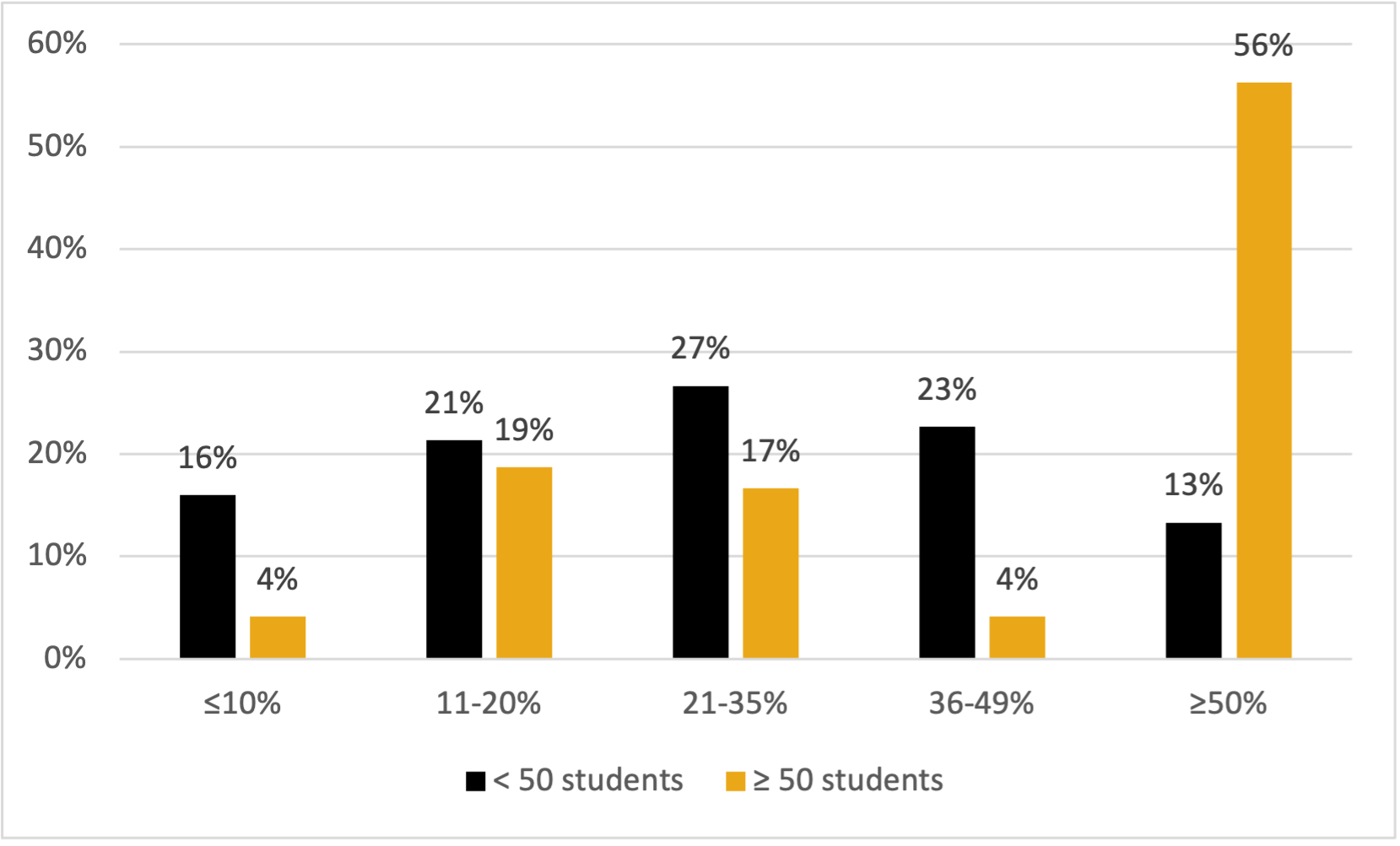
    <div class="html-content">In an effort to gather information on how faculty design and administer tests, DoIT collaborated with the Faculty Development Center (FDC) and Student Disability Services (SDS) to create and distribute a short survey to all 941 instructional faculty teaching in Spring 22. There were 157 complete submissions, representing a 17% response rate. Of these survey participants, 78% were full-time faculty, and about half (54%) were Associate, Assistant, or Full Professor. Almost all were from CAHSS (48%), CNMS (24%), or COEIT (22%), and 86% primarily teach undergraduate students.<br><br><div>The quantitative data, as illustrated below in <em>Figure 1</em>, indicate that faculty teaching larger courses and those teaching courses with high percentages of the overall grade contingent on a small number of tests (i.e., high-stakes testing) are considerably more concerned about academic integrity. Also, the survey's open responses suggest instructors believe assessments are important, but were not of a single voice in regards to balancing formative and summative approaches in face-to-face and virtual environments. <br></div><div><br></div><div><strong>Figure 1: Percent of Final Grade from High-stakes Testing, by Course Enrollment</strong></div><img src="https://my3.my.umbc.edu/groups/instructional-technology/posts/119088/attachments/43292" style="max-width: 100%; height: auto;"><br><div><br></div><div>The majority of respondents (59%) taught classes of 50 or fewer students, and about one in five (19%) taught classes with more than 100 students. Additionally, of those instructors teaching courses with at least half of their students' final grades determined by high-stakes tests, 72% agreed or strongly agreed that "Academic integrity on high-stake assessments is a major concern in my course(s)." That same level of sentiment is shared with less than half (49%) of instructors with grading schemas that are not as dependent on high-stakes testing.</div><br>Academic integrity is approached in several ways, including the use of psychology (lecturing students and/or acknowledgment of an "honor" statement or pledge) and overall design of the assessments, such as question banks, randomization, synchronous testing, and, in direct conflict with student accomodation concerns, time constraints.<sup>1</sup> These approaches are carried out in two different environments: in-person and online. In the case of the former, respondents indicated traditional means of face-to-face proctoring. With the latter, instructors may use Blackboard, along with the Respondus Lockdown Browser, and potentially the Monitor option. Other respondents described having their students turn their computer cameras on during the assessments. Plagiarism checkers such as SafeAssign and Turnitin are also leveraged.<br><br>There is an acknowledgement by some, however, that there may not be anything that can be done to fully redress issues concerning academic integrity "other than theatrics." As one respondent noted, "it is impossible to keep students from posting the questions (from memory) on the Internet as soon as they are done with their own test." Some stated, however, that they believe their tests are relatively impervious to cheating due to the tailoring and formatting of the questions. Others stated they didn't think they have a big problem with cheating, or did little to curtail it beyond making sure students aren't using their phones or looking at other students' papers, which can be of particular concern when rooms are at full seating capacity.<br><br>The student disability-based testing accommodations described universally involve faculty providing more time on assessments for individual students, or through the course of the pandemic, expanding the testing window for all students. Few faculty indicated a pervasiveness of need, with some emphasizing how few occurrences of student accommodations they've received in their teaching careers. Additionally, multiple respondents seemed to be under the false impression that SDS has a testing center to support this need, rather than just ad hoc space allocation that is only available for SDS registered students with disabilities. Meaning it is not for general make up test proctoring for all students, can only seat 15 students at a time, and has computer stations only intended for specialized assistive technology needs..<br><br>Interestingly, when asked about the possibility of a dedicated UMBC testing center, only 14% of respondents teaching 50 or more students don't believe a testing center would help them; none of the respondents teaching more than 100 students are of that opinion. In fact, several respondents voiced support for this kind of facility, with one saying "I would be THRILLED for a testing center at UMBC!"<br><br>Some faculty, however, never use high-stakes testing. They may choose not to due to a lack of familiarity or experience with it (e.g., having begun teaching during the pandemic), while other instructors stated they did not believe in using high-stakes assessments on pedagogical grounds, or employ qualitatively graded assessments, such as case studies or written assessments, rather than discrete answer assessments. These types of assessments, of course, can still be high stakes, although much more difficult to scale for larger classes than multiple choice bubble sheets. Other faculty described offering more "smaller" assignments or quizzes. One respondent specifically cited their PIVOT training for adoption of this "best practice."<sup>2</sup> Of those who did make use of high-stakes assessments, some stated they were important to encourage students' motivation to learn. "You have to have some high-stakes testing to get students to study," responded one instructor.<br><br><div>In short, faculty vary in their approach to testing, but there are similarities based on course enrollment size and discipline/college. Also, adoption of a testing center could potentially benefit faculty conducting testing, particularly in high-stakes/enrollment environments to support academic integrity and accessibility needs.</div><div><br></div><div>[1] As one respondent points out, "Many institutions also offer disability accommodations within a broader testing center, which helps to reduce stigma for students with disabilities."<br></div><div>[2] About one in five respondents are now offering fewer high stakes tests since the pandemic shift to online learning.<br></div><div><br></div><div>~By <a href="https://doit.umbc.edu/itnm/staff/penniston/" rel="nofollow external" class="bo">Tom Penniston</a><br></div></div>
]]>
</Body>
<Summary>In an effort to gather information on how faculty design and administer tests, DoIT collaborated with the Faculty Development Center (FDC) and Student Disability Services (SDS) to create and...</Summary>
<Website>https://doit.umbc.edu/post/119088/</Website>
<AttachmentKind>Image</AttachmentKind>
<AttachmentUrl>https://assets2-beta.my.umbc.edu/system/shared/attachments/1eaa1d1112d627e21231eb67dc12703d/69edf0b2/news/000/119/088/91ae48805e8e96055d454f043054059b/graph.png?1651516050</AttachmentUrl>
<Attachments>
<Attachment kind="Image" url="https://beta.my.umbc.edu/groups/instructional-technology/posts/119088/attachments/43292"></Attachment>
</Attachments>
<TrackingUrl>https://beta.my.umbc.edu/api/v0/pixel/news/119088/guest@my.umbc.edu/ae416d0c70ca650c993873d57b444f0b/api/pixel</TrackingUrl>
<Tag>doit</Tag>
<Tag>fdc</Tag>
<Tag>high-stakes</Tag>
<Tag>itnm</Tag>
<Tag>penniston</Tag>
<Tag>sds</Tag>
<Tag>testing</Tag>
<Group token="instructional-technology">Instructional Technology</Group>
<GroupUrl>https://beta.my.umbc.edu/groups/instructional-technology</GroupUrl>
<AvatarUrl>https://assets2-beta.my.umbc.edu/system/shared/avatars/groups/000/001/164/dec3b026b81ee6d890a8f82f75c94a2e/xsmall.png?1446126703</AvatarUrl>
<AvatarUrl size="original">https://assets1-beta.my.umbc.edu/system/shared/avatars/groups/000/001/164/dec3b026b81ee6d890a8f82f75c94a2e/original.png?1446126703</AvatarUrl>
<AvatarUrl size="xxlarge">https://assets2-beta.my.umbc.edu/system/shared/avatars/groups/000/001/164/dec3b026b81ee6d890a8f82f75c94a2e/xxlarge.png?1446126703</AvatarUrl>
<AvatarUrl size="xlarge">https://assets1-beta.my.umbc.edu/system/shared/avatars/groups/000/001/164/dec3b026b81ee6d890a8f82f75c94a2e/xlarge.png?1446126703</AvatarUrl>
<AvatarUrl size="large">https://assets1-beta.my.umbc.edu/system/shared/avatars/groups/000/001/164/dec3b026b81ee6d890a8f82f75c94a2e/large.png?1446126703</AvatarUrl>
<AvatarUrl size="medium">https://assets4-beta.my.umbc.edu/system/shared/avatars/groups/000/001/164/dec3b026b81ee6d890a8f82f75c94a2e/medium.png?1446126703</AvatarUrl>
<AvatarUrl size="small">https://assets3-beta.my.umbc.edu/system/shared/avatars/groups/000/001/164/dec3b026b81ee6d890a8f82f75c94a2e/small.png?1446126703</AvatarUrl>
<AvatarUrl size="xsmall">https://assets2-beta.my.umbc.edu/system/shared/avatars/groups/000/001/164/dec3b026b81ee6d890a8f82f75c94a2e/xsmall.png?1446126703</AvatarUrl>
<AvatarUrl size="xxsmall">https://assets3-beta.my.umbc.edu/system/shared/avatars/groups/000/001/164/dec3b026b81ee6d890a8f82f75c94a2e/xxsmall.png?1446126703</AvatarUrl>
<Sponsor>Instructional Technology</Sponsor>
<ThumbnailUrl size="xxlarge">https://assets3-beta.my.umbc.edu/system/shared/thumbnails/news/000/119/088/b77b1b6769516e44273d6690970ff019/xxlarge.jpg?1651504119</ThumbnailUrl>
<ThumbnailUrl size="xlarge">https://assets4-beta.my.umbc.edu/system/shared/thumbnails/news/000/119/088/b77b1b6769516e44273d6690970ff019/xlarge.jpg?1651504119</ThumbnailUrl>
<ThumbnailUrl size="large">https://assets4-beta.my.umbc.edu/system/shared/thumbnails/news/000/119/088/b77b1b6769516e44273d6690970ff019/large.jpg?1651504119</ThumbnailUrl>
<ThumbnailUrl size="medium">https://assets1-beta.my.umbc.edu/system/shared/thumbnails/news/000/119/088/b77b1b6769516e44273d6690970ff019/medium.jpg?1651504119</ThumbnailUrl>
<ThumbnailUrl size="small">https://assets2-beta.my.umbc.edu/system/shared/thumbnails/news/000/119/088/b77b1b6769516e44273d6690970ff019/small.jpg?1651504119</ThumbnailUrl>
<ThumbnailUrl size="xsmall">https://assets4-beta.my.umbc.edu/system/shared/thumbnails/news/000/119/088/b77b1b6769516e44273d6690970ff019/xsmall.jpg?1651504119</ThumbnailUrl>
<ThumbnailUrl size="xxsmall">https://assets1-beta.my.umbc.edu/system/shared/thumbnails/news/000/119/088/b77b1b6769516e44273d6690970ff019/xxsmall.jpg?1651504119</ThumbnailUrl>
<PawCount>6</PawCount>
<CommentCount>0</CommentCount>
<CommentsAllowed>true</CommentsAllowed>
<PostedAt>Mon, 02 May 2022 13:30:19 -0400</PostedAt>
<EditAt>Mon, 02 May 2022 14:56:49 -0400</EditAt>
</NewsItem>

<NewsItem contentIssues="true" id="118750" important="false" status="posted" url="https://beta.my.umbc.edu/groups/instructional-technology/posts/118750">
<Title>Generate &amp; embed captions for Collaborate recordings in May</Title>
<Tagline>Support accessibility for recorded sessions in your classes</Tagline>
<Body>
<![CDATA[
    <div class="html-content"><div><div><span>Creating captioning for recordings from scratch can be very time consuming for instructors or accessibility staff.</span><span> Beginning in May 2022, i</span>nstructors can leverage the help of artificial intelligence to improve the accessibility of their Collaborate recordings <a href="https://wiki.umbc.edu/x/ywFjBw" rel="nofollow external" class="bo">with captioning</a>.  </div><div><br></div><div>With this feature, <a href="https://my3.my.umbc.edu/groups/instructional-technology/posts/102527" rel="nofollow external" class="bo">piloted last summer</a> by UMBC, Collaborate <a href="https://wiki.umbc.edu/x/ywFjBw" rel="nofollow external" class="bo">creates recording captions</a> based on speech to text recognition technology. After a live session concludes, an instructor can <a href="https://wiki.umbc.edu/x/ywFjBw" rel="nofollow external" class="bo">generate the captions for a recording</a>, which can be reviewed, <a href="https://wiki.umbc.edu/pages/viewpage.action?pageId=74973427#HowdoIaddcaptionstoaCollaboraterecording?-upload" rel="nofollow external" class="bo">downloaded, and edited</a> if necessary. Captions immediately appear in the Collaborate player for anyone <a href="https://wiki.umbc.edu/x/ZwAxAg" rel="nofollow external" class="bo">who has access to the recording</a>.</div><div><br></div><div><div>Captions are a valuable instructional resource, improving the accessibility of content for individuals who are deaf or hearing impaired. Moreover, students gain new opportunities to access information in ways they need or want it, thanks to captions. For example:</div><div><ul><li><span>Anyone working in a noisy environment can read captions.</span></li><li><span>Non-native speakers can read captions to reinforce their understanding.</span></li><li><span>Students learning to read can follow along with the speaker.</span></li><li><span>Students can see the spelling of terms that will be on a test.</span></li></ul></div><div>In Collaborate, the <a href="https://wiki.umbc.edu/x/ywFjBw" rel="nofollow external" class="bo">recording transcription feature is enabled</a> by the instructor through the recording settings page for the session. Please <a href="https://wiki.umbc.edu/x/ywFjBw" rel="nofollow external" class="bo">review this FAQ</a> for step by step instructions.</div><div><div><br></div></div></div><div><span>As always, if you have any questions about teaching, learning, and technology at UMBC, please consider the following options:</span></div></div><div><ul><li><span><a href="http://pivot.umbc.edu" rel="nofollow external" class="bo">PIVOT</a> | <a href="https://doit.umbc.edu/itnm/academic-continuity/" rel="nofollow external" class="bo">Academic Continuity</a></span><span> </span><span>|</span><span> </span><span><a href="https://fdc.umbc.edu/teaching/keep-on-teaching/" rel="nofollow external" class="bo">Keep On Teaching</a></span><span> </span><span>|</span><span> </span><span><a href="https://doit.umbc.edu/students" rel="nofollow external" class="bo">Student Technology Resources</a></span></li><li><a href="http://www.umbc.edu/faq" rel="nofollow external" class="bo">Check our extensive FAQ collection</a><span> </span></li><ul><li><span><a href="https://wiki.umbc.edu/x/LohnB" rel="nofollow external" class="bo"><span>What's new in Ultra?</span></a><span> </span><span>|</span><span> </span><a href="https://wiki.umbc.edu/x/bwrSAQ" rel="nofollow external" class="bo"><span>Known Issues</span></a><span> </span></span></li></ul><li><span><a href="http://my.umbc.edu/go/request-help" rel="nofollow external" class="bo">Open a ticket via RT</a></span></li><li><span>Follow the </span><a href="http://my.umbc.edu/groups/instructional-technology" rel="nofollow external" class="bo">Instructional Technology</a><span> &amp; </span><a href="http://my.umbc.edu/groups/doit" rel="nofollow external" class="bo">DoIT</a><span> myUMBC groups</span></li><li><a href="http://doit.umbc.edu/itnm/staff/" rel="nofollow external" class="bo">Request a consult</a><span> with instructional technology staff</span></li></ul></div></div>
]]>
</Body>
<Summary>Creating captioning for recordings from scratch can be very time consuming for instructors or accessibility staff. Beginning in May 2022, instructors can leverage the help of artificial...</Summary>
<Website>https://my3.my.umbc.edu/groups/instructional-technology/posts/118750</Website>
<TrackingUrl>https://beta.my.umbc.edu/api/v0/pixel/news/118750/guest@my.umbc.edu/2b5bbd3b54a474f0b682c4d7905b4551/api/pixel</TrackingUrl>
<Tag>accessibility</Tag>
<Tag>captioning</Tag>
<Tag>collaborate</Tag>
<Tag>online-learning</Tag>
<Tag>sp2022</Tag>
<Tag>ultra-update</Tag>
<Group token="instructional-technology">Instructional Technology</Group>
<GroupUrl>https://beta.my.umbc.edu/groups/instructional-technology</GroupUrl>
<AvatarUrl>https://assets2-beta.my.umbc.edu/system/shared/avatars/groups/000/001/164/dec3b026b81ee6d890a8f82f75c94a2e/xsmall.png?1446126703</AvatarUrl>
<AvatarUrl size="original">https://assets1-beta.my.umbc.edu/system/shared/avatars/groups/000/001/164/dec3b026b81ee6d890a8f82f75c94a2e/original.png?1446126703</AvatarUrl>
<AvatarUrl size="xxlarge">https://assets2-beta.my.umbc.edu/system/shared/avatars/groups/000/001/164/dec3b026b81ee6d890a8f82f75c94a2e/xxlarge.png?1446126703</AvatarUrl>
<AvatarUrl size="xlarge">https://assets1-beta.my.umbc.edu/system/shared/avatars/groups/000/001/164/dec3b026b81ee6d890a8f82f75c94a2e/xlarge.png?1446126703</AvatarUrl>
<AvatarUrl size="large">https://assets1-beta.my.umbc.edu/system/shared/avatars/groups/000/001/164/dec3b026b81ee6d890a8f82f75c94a2e/large.png?1446126703</AvatarUrl>
<AvatarUrl size="medium">https://assets4-beta.my.umbc.edu/system/shared/avatars/groups/000/001/164/dec3b026b81ee6d890a8f82f75c94a2e/medium.png?1446126703</AvatarUrl>
<AvatarUrl size="small">https://assets3-beta.my.umbc.edu/system/shared/avatars/groups/000/001/164/dec3b026b81ee6d890a8f82f75c94a2e/small.png?1446126703</AvatarUrl>
<AvatarUrl size="xsmall">https://assets2-beta.my.umbc.edu/system/shared/avatars/groups/000/001/164/dec3b026b81ee6d890a8f82f75c94a2e/xsmall.png?1446126703</AvatarUrl>
<AvatarUrl size="xxsmall">https://assets3-beta.my.umbc.edu/system/shared/avatars/groups/000/001/164/dec3b026b81ee6d890a8f82f75c94a2e/xxsmall.png?1446126703</AvatarUrl>
<Sponsor>Instructional Technology</Sponsor>
<ThumbnailUrl size="xxlarge">https://assets2-beta.my.umbc.edu/system/shared/thumbnails/news/000/118/750/790b53eee2d338872de855d18e755c98/xxlarge.jpg?1650458829</ThumbnailUrl>
<ThumbnailUrl size="xlarge">https://assets3-beta.my.umbc.edu/system/shared/thumbnails/news/000/118/750/790b53eee2d338872de855d18e755c98/xlarge.jpg?1650458829</ThumbnailUrl>
<ThumbnailUrl size="large">https://assets1-beta.my.umbc.edu/system/shared/thumbnails/news/000/118/750/790b53eee2d338872de855d18e755c98/large.jpg?1650458829</ThumbnailUrl>
<ThumbnailUrl size="medium">https://assets3-beta.my.umbc.edu/system/shared/thumbnails/news/000/118/750/790b53eee2d338872de855d18e755c98/medium.jpg?1650458829</ThumbnailUrl>
<ThumbnailUrl size="small">https://assets3-beta.my.umbc.edu/system/shared/thumbnails/news/000/118/750/790b53eee2d338872de855d18e755c98/small.jpg?1650458829</ThumbnailUrl>
<ThumbnailUrl size="xsmall">https://assets4-beta.my.umbc.edu/system/shared/thumbnails/news/000/118/750/790b53eee2d338872de855d18e755c98/xsmall.jpg?1650458829</ThumbnailUrl>
<ThumbnailUrl size="xxsmall">https://assets1-beta.my.umbc.edu/system/shared/thumbnails/news/000/118/750/790b53eee2d338872de855d18e755c98/xxsmall.jpg?1650458829</ThumbnailUrl>
<PawCount>3</PawCount>
<CommentCount>0</CommentCount>
<CommentsAllowed>true</CommentsAllowed>
<PostedAt>Mon, 02 May 2022 08:22:22 -0400</PostedAt>
</NewsItem>

<NewsItem contentIssues="true" id="118815" important="false" status="posted" url="https://beta.my.umbc.edu/groups/instructional-technology/posts/118815">
<Title>Instructional Technology Essentials for June 2022</Title>
<Tagline>Select from a menu of trainings</Tagline>
<Body>
<![CDATA[
    <div class="html-content"><div><span>Interested in attending an Instructional Technology Essentials session but unsure when it will be? Sign up for one of our sessions by <strong>May 20, 2022.</strong> Interested participants will be sent a Doodle poll on May 23rd to determine a time when all participants can attend. </span></div><div><br></div><div>The Essential tools that will be offered in <strong>June</strong> include: </div><div><br></div><hr><div><strong><br></strong></div><div><strong>Ultra Essentials I - Content &amp; Engagement</strong> | 60 minutes | <strong><a href="https://forms.gle/Bg3S2jWG3SdKX3PA9" rel="nofollow external" class="bo">Sign up here</a></strong></div><div><span>New to Ultra or need a refresher? This hands-on overview focuses on the essentials of using the Ultra Experience Blackboard course interface for communication and content creation. Topics include:</span></div><div><ul><li>Create and organize folders</li><li>Upload files &amp; link to Google Drive</li><li>Post announcements &amp; send messages</li><li>Create discussions forums</li><li>Access Collaborate for virtual web conferencing</li></ul></div><div><br></div><hr><div><strong><br></strong></div><div><strong>Ultra Essentials II - Assessment &amp; Grading</strong> | 60 minutes | <a href="https://forms.gle/kMLoYEoFa41gsmdP6" rel="nofollow external" class="bo"><strong>Sign up here</strong></a></div><div><span>New to Ultra or need a refresher? This hands-on overview focuses on the essentials of using the Ultra Experience Blackboard course interface for tests, assignments, and grading. Topics include:</span></div><div><ul><li>Creating assignments and tests</li><li>Using the new inline grading tools</li><li>Entering grades in the Ultra grade center</li></ul></div><div><br></div><hr><div><strong><br></strong></div><div><strong>Collaborate Essentials</strong> | 60 minutes | <strong><a href="https://forms.gle/LkDpdPaa1RgPMd2Z7" rel="nofollow external" class="bo">Sign up here</a></strong></div><div><span>New to Blackboard Collaborate or need a refresher? This overview focuses on the essentials of using Blackboard Collaborate in your courses. Topics include:</span></div><div><ul><li>Using the Sharing Content Tools </li><li>Examine active learning strategies to get participants involved in the sessions</li><li>Create breakout rooms and polls</li><li>Identify Collaborate features that support the needs of users with disabilities</li><li>Describe how gallery view can be used for live remote proctoring</li></ul></div><div><strong><br></strong></div><hr><div><strong><br></strong></div><div><strong>VoiceThread Essentials</strong> | 60 minutes | <strong><a href="https://forms.gle/kDnzvb2FiSuhbFB99" rel="nofollow external" class="bo">Sign up here</a></strong></div><div><span>VoiceThread is a learning tool for enhancing student engagement and online presence. Instructors and/or students can create, share, and comment on images, Microsoft PowerPoint presentations, videos, audio files, documents, and PDFs, using microphone, webcam, text, phone, and audio-file upload. Session topics include: </span></div><div><ul><li>Upload media, comment and annotate on that media, and share it with others</li><li>Create graded VoiceThread assignments in Blackboard</li><li>Use comment moderation to formatively assess student work, give private feedback, and use threaded commenting</li><li>Use VoiceThread as a catalyst for class discussions</li></ul></div><div><strong><br></strong></div><hr><div><strong><br></strong></div><div><strong>Panopto Essentials</strong> | 60 minutes | <strong><a href="https://forms.gle/rUABY3UiJ6e2m8AM9" rel="nofollow external" class="bo">Sign up here</a></strong> </div><div>Are you interested in learning how to create video screencasts? Using Panopto, faculty can capture and narrate anything they see on their computers, and then publish an online screencast video tutorial or mini-lecture for students to watch and replay on their own time. Panopto provides multiple recording and editing options for video and audio output and a cloud-based video storage platform for new and pre-existing media content. It is available for both Blackboard Original and Ultra courses. Session topics include: </div><div><ul><li>Getting started with Panopto </li><li>Launching Panopto from your Blackboard course</li><li>Recording videos using the Panopto application or browser-based capture tool</li><li>Creating videos by uploading your own media content</li><li>Creating automatic captions. </li></ul></div><div><br></div><hr><div><strong><br></strong></div><div><strong>Something else? | <a href="https://forms.gle/U9f8P1GEZUFFJbQK7" rel="nofollow external" class="bo">Suggest a new topic for July!</a> </strong></div><div><br></div><hr><div><strong><br></strong></div><div>A Doodle Poll will be sent to interested participants by May 23 to determine when the session will be offered. Webinars will take place in a Blackboard Collaborate virtual conference room. </div><div><strong><br></strong></div><div><strong>Prior to the event</strong></div><div><br></div><div>For the best viewing experience, we recommend using Chrome or Firefox, preferably the most recent updates to those browsers. Closing any unnecessary browser tabs will help conserve your bandwidth.   </div><div><br></div><div>If this is your first time joining one of our webinars, please review the <a href="https://help.blackboard.com/Collaborate/Ultra/Participant/Get_Started" rel="nofollow external" class="bo">Bb Getting Started Guide</a> or our <a href="https://wiki.umbc.edu/display/faq/Quick+Start+Guide+for+All+Users" rel="nofollow external" class="bo">Quick Start Guide for All Users</a>. You will also find additional helpful information for using Blackboard Collaborate at <a href="https://wiki.umbc.edu/display/faq/Blackboard+Collaborate" rel="nofollow external" class="bo">our extensive FAQs.</a></div><div><br></div><div>After joining the session, <a href="https://help.blackboard.com/Collaborate/Ultra/Participant/Participate_in_Sessions/Audio_and_Video" rel="nofollow external" class="bo">please configure your audio</a>. Having trouble accessing Collaborate? Please see our Troubleshooting <a href="https://wiki.umbc.edu/display/faq/Troubleshooting+Audio+Problems+in+Collaborate" rel="nofollow external" class="bo">Audio Problems</a> or <a href="https://wiki.umbc.edu/display/faq/Troubleshooting+Networking+Issues+for+Collaborate" rel="nofollow external" class="bo">Networking Issues</a> for Collaborate guides.</div><div><br></div><div>At least 5 registrations are needed for sessions to proceed. Sessions will be recorded if two or more people attend and the link will be distributed to everyone who completed the sign up form.</div><div><br></div><div><div>As always, if you have any questions about teaching, learning, and technology at UMBC, please consider the following options:</div><div><br></div><div><ul><li><a href="http://pivot.umbc.edu/" rel="nofollow external" class="bo">PIVOT</a> | <a href="https://doit.umbc.edu/itnm/academic-continuity/" rel="nofollow external" class="bo">Academic Continuity</a> | <a href="https://fdc.umbc.edu/teaching/keep-on-teaching/" rel="nofollow external" class="bo">Keep On Teaching</a> | <a href="https://doit.umbc.edu/students" rel="nofollow external" class="bo">Student Technology Resources</a></li><li><a href="http://www.umbc.edu/faq" rel="nofollow external" class="bo">Check our extensive FAQ collection</a> </li><ul><li><a href="https://wiki.umbc.edu/x/LohnB" rel="nofollow external" class="bo">What's new in Ultra?</a> | <a href="https://wiki.umbc.edu/x/bwrSAQ" rel="nofollow external" class="bo">Known Issues</a> </li></ul><li><a href="http://my.umbc.edu/go/request-help" rel="nofollow external" class="bo">Open a ticket via RT</a></li><li>Follow the <a href="http://my.umbc.edu/groups/instructional-technology" rel="nofollow external" class="bo">Instructional Technology</a> &amp; <a href="http://my.umbc.edu/groups/doit" rel="nofollow external" class="bo">DoIT</a> myUMBC groups</li><li><a href="http://doit.umbc.edu/itnm/staff/" rel="nofollow external" class="bo">Request a consult</a> with <a href="http://doit.umbc.edu/itnm/staff" rel="nofollow external" class="bo">instructional technology staff</a></li></ul></div></div></div>
]]>
</Body>
<Summary>Interested in attending an Instructional Technology Essentials session but unsure when it will be? Sign up for one of our sessions by May 20, 2022. Interested participants will be sent a Doodle...</Summary>
<TrackingUrl>https://beta.my.umbc.edu/api/v0/pixel/news/118815/guest@my.umbc.edu/b1a10ecbb24d0a281fb0702dca41ff38/api/pixel</TrackingUrl>
<Tag>blackboard</Tag>
<Tag>collaborate</Tag>
<Tag>elearning</Tag>
<Tag>instructional-technology</Tag>
<Tag>online-learning</Tag>
<Tag>panopto</Tag>
<Tag>voicethread</Tag>
<Tag>webinar</Tag>
<Group token="instructional-technology">Instructional Technology</Group>
<GroupUrl>https://beta.my.umbc.edu/groups/instructional-technology</GroupUrl>
<AvatarUrl>https://assets2-beta.my.umbc.edu/system/shared/avatars/groups/000/001/164/dec3b026b81ee6d890a8f82f75c94a2e/xsmall.png?1446126703</AvatarUrl>
<AvatarUrl size="original">https://assets1-beta.my.umbc.edu/system/shared/avatars/groups/000/001/164/dec3b026b81ee6d890a8f82f75c94a2e/original.png?1446126703</AvatarUrl>
<AvatarUrl size="xxlarge">https://assets2-beta.my.umbc.edu/system/shared/avatars/groups/000/001/164/dec3b026b81ee6d890a8f82f75c94a2e/xxlarge.png?1446126703</AvatarUrl>
<AvatarUrl size="xlarge">https://assets1-beta.my.umbc.edu/system/shared/avatars/groups/000/001/164/dec3b026b81ee6d890a8f82f75c94a2e/xlarge.png?1446126703</AvatarUrl>
<AvatarUrl size="large">https://assets1-beta.my.umbc.edu/system/shared/avatars/groups/000/001/164/dec3b026b81ee6d890a8f82f75c94a2e/large.png?1446126703</AvatarUrl>
<AvatarUrl size="medium">https://assets4-beta.my.umbc.edu/system/shared/avatars/groups/000/001/164/dec3b026b81ee6d890a8f82f75c94a2e/medium.png?1446126703</AvatarUrl>
<AvatarUrl size="small">https://assets3-beta.my.umbc.edu/system/shared/avatars/groups/000/001/164/dec3b026b81ee6d890a8f82f75c94a2e/small.png?1446126703</AvatarUrl>
<AvatarUrl size="xsmall">https://assets2-beta.my.umbc.edu/system/shared/avatars/groups/000/001/164/dec3b026b81ee6d890a8f82f75c94a2e/xsmall.png?1446126703</AvatarUrl>
<AvatarUrl size="xxsmall">https://assets3-beta.my.umbc.edu/system/shared/avatars/groups/000/001/164/dec3b026b81ee6d890a8f82f75c94a2e/xxsmall.png?1446126703</AvatarUrl>
<Sponsor>Instructional Technology</Sponsor>
<ThumbnailUrl size="xxlarge">https://assets2-beta.my.umbc.edu/system/shared/thumbnails/news/000/118/815/e1bb9607c4c629f2efeed7cb98418fa1/xxlarge.jpg?1650559821</ThumbnailUrl>
<ThumbnailUrl size="xlarge">https://assets4-beta.my.umbc.edu/system/shared/thumbnails/news/000/118/815/e1bb9607c4c629f2efeed7cb98418fa1/xlarge.jpg?1650559821</ThumbnailUrl>
<ThumbnailUrl size="large">https://assets3-beta.my.umbc.edu/system/shared/thumbnails/news/000/118/815/e1bb9607c4c629f2efeed7cb98418fa1/large.jpg?1650559821</ThumbnailUrl>
<ThumbnailUrl size="medium">https://assets3-beta.my.umbc.edu/system/shared/thumbnails/news/000/118/815/e1bb9607c4c629f2efeed7cb98418fa1/medium.jpg?1650559821</ThumbnailUrl>
<ThumbnailUrl size="small">https://assets2-beta.my.umbc.edu/system/shared/thumbnails/news/000/118/815/e1bb9607c4c629f2efeed7cb98418fa1/small.jpg?1650559821</ThumbnailUrl>
<ThumbnailUrl size="xsmall">https://assets2-beta.my.umbc.edu/system/shared/thumbnails/news/000/118/815/e1bb9607c4c629f2efeed7cb98418fa1/xsmall.jpg?1650559821</ThumbnailUrl>
<ThumbnailUrl size="xxsmall">https://assets4-beta.my.umbc.edu/system/shared/thumbnails/news/000/118/815/e1bb9607c4c629f2efeed7cb98418fa1/xxsmall.jpg?1650559821</ThumbnailUrl>
<PawCount>3</PawCount>
<CommentCount>0</CommentCount>
<CommentsAllowed>true</CommentsAllowed>
<PostedAt>Thu, 21 Apr 2022 12:54:20 -0400</PostedAt>
</NewsItem>

<NewsItem contentIssues="true" id="118156" important="false" status="posted" url="https://beta.my.umbc.edu/groups/instructional-technology/posts/118156">
<Title>Blackboard Courses Scheduled for Server Retirement in FA22</Title>
<Tagline>Courses Before Summer 2019 to be Retired</Tagline>
<Body>
<![CDATA[
    <div class="html-content"><div><span>During Summer 2022, DoIT staff and Blackboard will archive our entire instance of Blackboard, which will save individually backed-up copies of every course and organization through SP2022. Courses offered before and including AY18-19 will be retired by the end of FA2022. </span></div><div><br></div><div><strong>Beginning July 1</strong>, courses offered from the following terms will be scheduled for retirement:</div><div><br></div><div><ul><li>Any courses older than five years</li><li>Fall 2018</li><li>Winter 2019</li><li>Spring 2019</li><li>Summer 2019</li></ul></div><div><br></div><div>The Blackboard system's overall performance and efficiency will improve by removing files and database transactions from the content server and database. AY19-20, AY20-21, and AY21-22 will remain on the server. Fall 2022 will begin a new academic year of data retention (AY22-23).</div><div><br></div><div><strong><u>FAQs about Course Retirement</u></strong></div><div><br></div><div><strong>Is my content gone forever?</strong></div><div><br></div><div>No, Blackboard archived courses captured all course data, files, student submissions, discussions, grades, etc. through SP2022. These archives will reside on a secure cloud storage location.</div><div><br></div><div><strong>When will I lose access to courses that are being retired?</strong></div><div><br></div><div>The archiving process will begin on <strong>July 1st</strong>. <a href="http://my.umbc.edu/go/request-help" rel="nofollow external" class="bo">Faculty can place an RT ticket</a> to have their course content restored through November 2022. </div><div><br></div><div><strong>Can I save a copy of my own courses?</strong></div><div><br></div><div>Yes -- and it is strongly encouraged! Instructors can <a href="https://wiki.umbc.edu/x/FIBaAQ" rel="nofollow external" class="bo">export</a> (course content) and/or archive (course content &amp; student data) their courses. You should also <a href="https://wiki.umbc.edu/x/b4B1AQ" rel="nofollow external" class="bo">download a copy of your gradebook</a>. We recommend saving these files to UMBC’s cloud storage  to ensure long-term access in the event you change computer systems.</div><div><br></div><div><strong>Can I restore (regain access to) only course content?</strong></div><div><br></div><div>Yes. Course content consists of files and course structure (menu, folders, etc.). Faculty can only <a href="https://wiki.umbc.edu/x/HYBaAQ" rel="nofollow external" class="bo">import</a> course content to an existing Blackboard course shell.</div><div><br></div><div><strong>Can I restore course data?</strong></div><div><br></div><div>Course data consists of student submissions, discussions, and grades. We generally prefer not to restore full courses to avoid reinstating user accounts and confusing students with old content. If you must restore archived course data, please open an RT ticket with justification included.</div><div><br></div><div><strong>How long will you keep the retired courses?</strong></div><div><br></div><div>We will keep the retired courses for approximately 2 years after Blackboard archives the courses. Faculty who may need content beyond 2 years should plan to save copies of their exported courses to UMBC Box or other cloud storage.</div><div><br></div><div><p><span>As always, if you have any questions about teaching, learning, and technology, please consider the following options:</span></p><ul><li><p><a href="https://pivot.umbc.edu/" rel="nofollow external" class="bo"><span>PIVOT</span></a><span> | </span><a href="https://doit.umbc.edu/itnm/academic-continuity/" rel="nofollow external" class="bo"><span>Academic Continuity</span></a><span> | </span><a href="https://fdc.umbc.edu/resources/keep-on-teaching/" rel="nofollow external" class="bo"><span>Keep On Teaching</span></a><span> | </span><a href="https://doit.umbc.edu/students" rel="nofollow external" class="bo"><span>Student Technology Resources</span></a><span> </span></p></li><li><p><a href="http://www.umbc.edu/faq" rel="nofollow external" class="bo"><span>Check our extensive FAQ collection</span></a><span> </span></p></li><ul><li><p><a href="https://wiki.umbc.edu/x/MpWEC" rel="nofollow external" class="bo"><u>Course Retirement Information</u></a></p></li><li><p><a href="https://wiki.umbc.edu/x/LohnB" rel="nofollow external" class="bo"><span>What's new in Ultra?</span></a><span> | </span><a href="https://wiki.umbc.edu/x/bwrSAQ" rel="nofollow external" class="bo"><span>Known Issues</span></a><span> </span></p></li></ul><li><p><a href="http://my.umbc.edu/go/request-help" rel="nofollow external" class="bo"><span>Open a ticket via RT</span></a></p></li><li><p><span>Follow the </span><a href="http://my.umbc.edu/groups/instructional-technology" rel="nofollow external" class="bo"><span>Instructional Technology</span></a><span> &amp; </span><a href="http://my.umbc.edu/groups/doit" rel="nofollow external" class="bo"><span>DoIT</span></a><span> myUMBC groups</span></p></li><li><p><a href="http://doit.umbc.edu/itnm/staff/" rel="nofollow external" class="bo"><span>Request a consult</span></a><span> with instructional technology staff</span></p></li></ul></div></div>
]]>
</Body>
<Summary>During Summer 2022, DoIT staff and Blackboard will archive our entire instance of Blackboard, which will save individually backed-up copies of every course and organization through SP2022. Courses...</Summary>
<TrackingUrl>https://beta.my.umbc.edu/api/v0/pixel/news/118156/guest@my.umbc.edu/6ed01f668f14b246cf7ddb610f386827/api/pixel</TrackingUrl>
<Tag>archive</Tag>
<Tag>blackboard</Tag>
<Tag>course-retirement</Tag>
<Group token="bbannouncements">Blackboard Announcements</Group>
<GroupUrl>https://beta.my.umbc.edu/groups/bbannouncements</GroupUrl>
<AvatarUrl>https://assets1-beta.my.umbc.edu/system/shared/avatars/groups/000/000/319/f6b35e5217428f5021e113525a55e6f4/xsmall.png?1437137819</AvatarUrl>
<AvatarUrl size="original">https://assets1-beta.my.umbc.edu/system/shared/avatars/groups/000/000/319/f6b35e5217428f5021e113525a55e6f4/original.png?1437137819</AvatarUrl>
<AvatarUrl size="xxlarge">https://assets4-beta.my.umbc.edu/system/shared/avatars/groups/000/000/319/f6b35e5217428f5021e113525a55e6f4/xxlarge.png?1437137819</AvatarUrl>
<AvatarUrl size="xlarge">https://assets4-beta.my.umbc.edu/system/shared/avatars/groups/000/000/319/f6b35e5217428f5021e113525a55e6f4/xlarge.png?1437137819</AvatarUrl>
<AvatarUrl size="large">https://assets1-beta.my.umbc.edu/system/shared/avatars/groups/000/000/319/f6b35e5217428f5021e113525a55e6f4/large.png?1437137819</AvatarUrl>
<AvatarUrl size="medium">https://assets4-beta.my.umbc.edu/system/shared/avatars/groups/000/000/319/f6b35e5217428f5021e113525a55e6f4/medium.png?1437137819</AvatarUrl>
<AvatarUrl size="small">https://assets1-beta.my.umbc.edu/system/shared/avatars/groups/000/000/319/f6b35e5217428f5021e113525a55e6f4/small.png?1437137819</AvatarUrl>
<AvatarUrl size="xsmall">https://assets1-beta.my.umbc.edu/system/shared/avatars/groups/000/000/319/f6b35e5217428f5021e113525a55e6f4/xsmall.png?1437137819</AvatarUrl>
<AvatarUrl size="xxsmall">https://assets4-beta.my.umbc.edu/system/shared/avatars/groups/000/000/319/f6b35e5217428f5021e113525a55e6f4/xxsmall.png?1437137819</AvatarUrl>
<Sponsor>Blackboard Announcements</Sponsor>
<ThumbnailUrl size="xxlarge">https://assets1-beta.my.umbc.edu/system/shared/thumbnails/news/000/118/156/f5a708494dac82a9bf78263ef72307b2/xxlarge.jpg?1648841987</ThumbnailUrl>
<ThumbnailUrl size="xlarge">https://assets3-beta.my.umbc.edu/system/shared/thumbnails/news/000/118/156/f5a708494dac82a9bf78263ef72307b2/xlarge.jpg?1648841987</ThumbnailUrl>
<ThumbnailUrl size="large">https://assets4-beta.my.umbc.edu/system/shared/thumbnails/news/000/118/156/f5a708494dac82a9bf78263ef72307b2/large.jpg?1648841987</ThumbnailUrl>
<ThumbnailUrl size="medium">https://assets3-beta.my.umbc.edu/system/shared/thumbnails/news/000/118/156/f5a708494dac82a9bf78263ef72307b2/medium.jpg?1648841987</ThumbnailUrl>
<ThumbnailUrl size="small">https://assets2-beta.my.umbc.edu/system/shared/thumbnails/news/000/118/156/f5a708494dac82a9bf78263ef72307b2/small.jpg?1648841987</ThumbnailUrl>
<ThumbnailUrl size="xsmall">https://assets2-beta.my.umbc.edu/system/shared/thumbnails/news/000/118/156/f5a708494dac82a9bf78263ef72307b2/xsmall.jpg?1648841987</ThumbnailUrl>
<ThumbnailUrl size="xxsmall">https://assets2-beta.my.umbc.edu/system/shared/thumbnails/news/000/118/156/f5a708494dac82a9bf78263ef72307b2/xxsmall.jpg?1648841987</ThumbnailUrl>
<PawCount>2</PawCount>
<CommentCount>0</CommentCount>
<CommentsAllowed>true</CommentsAllowed>
<PostedAt>Wed, 13 Apr 2022 14:40:39 -0400</PostedAt>
<EditAt>Wed, 13 Apr 2022 14:45:03 -0400</EditAt>
</NewsItem>

<NewsItem contentIssues="true" id="118158" important="false" status="posted" url="https://beta.my.umbc.edu/groups/instructional-technology/posts/118158">
<Title>Gain insights on student engagement during Collab session</Title>
<Tagline>Also discover student views of Collab recordings</Tagline>
<Body>
<![CDATA[
    <div class="html-content"><div><div>While teaching a synchronous session using web conferencing tools, instructors juggle content, conversation, and context. Engaging participants and maintaining a high level of interaction is an essential outcome of an online experience. Even when webcams are on, how do you know if students are engaged? </div><div><span><br></span></div><div><span>In late SP2022, Collaborate launches a new </span>Engagement Insights Panel as a companion <span>tool</span> for faculty moderators to reveal how the student audience is engaging while the session is occurring. In this first release, instructors will be able to toggle a panel at the bottom of their live Collaborate session to show the percentage of hands raised and chat messages sent in both the main room and in breakout rooms. <span>As the data refreshes, faculty can use this information to note high and low engagement in the live session.</span></div><div><span><br></span></div><div><img src="https://blackboard.umbc.edu/bbcswebdav/institution/doitnews/ultra-updates/collab_moderator_engagement_insights-2.png" alt="Example of Collaborate Live Engagement Insights" style="max-width: 100%; height: auto;"></div><div><em>Image 1: Example of Collaborate Live Engagement Insights</em></div><div><br></div><div>Collaborate will also offer metrics for session recordings including h<span>ow many students have watched the recordings or downloaded the recording file (if downloads are enabled). Faculty can also see the last date and time when a recording was viewed or downloaded. This information will be available on the Recordings tab.</span></div><div><span><br></span></div><div><span>As always, if you have any questions about teaching, learning, and technology at UMBC, please consider the following options:</span></div></div><div><ul><li><span><a href="http://pivot.umbc.edu" rel="nofollow external" class="bo">PIVOT</a> | <a href="https://doit.umbc.edu/itnm/academic-continuity/" rel="nofollow external" class="bo">Academic Continuity</a></span><span> </span><span>|</span><span> </span><span><a href="https://fdc.umbc.edu/teaching/keep-on-teaching/" rel="nofollow external" class="bo">Keep On Teaching</a></span><span> </span><span>|</span><span> </span><span><a href="https://doit.umbc.edu/students" rel="nofollow external" class="bo">Student Technology Resources</a></span></li><li><a href="http://www.umbc.edu/faq" rel="nofollow external" class="bo">Check our extensive FAQ collection</a><span> </span></li><ul><li><span><a href="https://wiki.umbc.edu/x/LohnB" rel="nofollow external" class="bo"><span>What's new in Ultra?</span></a><span> </span><span>|</span><span> </span><a href="https://wiki.umbc.edu/x/bwrSAQ" rel="nofollow external" class="bo"><span>Known Issues</span></a><span> </span></span></li></ul><li><span><a href="http://my.umbc.edu/go/request-help" rel="nofollow external" class="bo">Open a ticket via RT</a></span></li><li><span>Follow the </span><a href="http://my.umbc.edu/groups/instructional-technology" rel="nofollow external" class="bo">Instructional Technology</a><span> &amp; </span><a href="http://my.umbc.edu/groups/doit" rel="nofollow external" class="bo">DoIT</a><span> myUMBC groups</span></li><li><a href="http://doit.umbc.edu/itnm/staff/" rel="nofollow external" class="bo">Request a consult</a><span> with instructional technology staff</span></li></ul></div></div>
]]>
</Body>
<Summary>While teaching a synchronous session using web conferencing tools, instructors juggle content, conversation, and context. Engaging participants and maintaining a high level of interaction is an...</Summary>
<Website>https://my3.my.umbc.edu/groups/instructional-technology/posts/118158</Website>
<TrackingUrl>https://beta.my.umbc.edu/api/v0/pixel/news/118158/guest@my.umbc.edu/a4659fb99294116787d2958780156dfe/api/pixel</TrackingUrl>
<Tag>active-learning</Tag>
<Tag>collaborate</Tag>
<Tag>engagement-insights</Tag>
<Tag>online-learning</Tag>
<Tag>sp2022</Tag>
<Tag>ultra-update</Tag>
<Group token="instructional-technology">Instructional Technology</Group>
<GroupUrl>https://beta.my.umbc.edu/groups/instructional-technology</GroupUrl>
<AvatarUrl>https://assets2-beta.my.umbc.edu/system/shared/avatars/groups/000/001/164/dec3b026b81ee6d890a8f82f75c94a2e/xsmall.png?1446126703</AvatarUrl>
<AvatarUrl size="original">https://assets1-beta.my.umbc.edu/system/shared/avatars/groups/000/001/164/dec3b026b81ee6d890a8f82f75c94a2e/original.png?1446126703</AvatarUrl>
<AvatarUrl size="xxlarge">https://assets2-beta.my.umbc.edu/system/shared/avatars/groups/000/001/164/dec3b026b81ee6d890a8f82f75c94a2e/xxlarge.png?1446126703</AvatarUrl>
<AvatarUrl size="xlarge">https://assets1-beta.my.umbc.edu/system/shared/avatars/groups/000/001/164/dec3b026b81ee6d890a8f82f75c94a2e/xlarge.png?1446126703</AvatarUrl>
<AvatarUrl size="large">https://assets1-beta.my.umbc.edu/system/shared/avatars/groups/000/001/164/dec3b026b81ee6d890a8f82f75c94a2e/large.png?1446126703</AvatarUrl>
<AvatarUrl size="medium">https://assets4-beta.my.umbc.edu/system/shared/avatars/groups/000/001/164/dec3b026b81ee6d890a8f82f75c94a2e/medium.png?1446126703</AvatarUrl>
<AvatarUrl size="small">https://assets3-beta.my.umbc.edu/system/shared/avatars/groups/000/001/164/dec3b026b81ee6d890a8f82f75c94a2e/small.png?1446126703</AvatarUrl>
<AvatarUrl size="xsmall">https://assets2-beta.my.umbc.edu/system/shared/avatars/groups/000/001/164/dec3b026b81ee6d890a8f82f75c94a2e/xsmall.png?1446126703</AvatarUrl>
<AvatarUrl size="xxsmall">https://assets3-beta.my.umbc.edu/system/shared/avatars/groups/000/001/164/dec3b026b81ee6d890a8f82f75c94a2e/xxsmall.png?1446126703</AvatarUrl>
<Sponsor>Instructional Technology</Sponsor>
<ThumbnailUrl size="xxlarge">https://assets3-beta.my.umbc.edu/system/shared/thumbnails/news/000/118/158/330671103d4be2bf266f714e49f8579b/xxlarge.jpg?1648842852</ThumbnailUrl>
<ThumbnailUrl size="xlarge">https://assets3-beta.my.umbc.edu/system/shared/thumbnails/news/000/118/158/330671103d4be2bf266f714e49f8579b/xlarge.jpg?1648842852</ThumbnailUrl>
<ThumbnailUrl size="large">https://assets2-beta.my.umbc.edu/system/shared/thumbnails/news/000/118/158/330671103d4be2bf266f714e49f8579b/large.jpg?1648842852</ThumbnailUrl>
<ThumbnailUrl size="medium">https://assets4-beta.my.umbc.edu/system/shared/thumbnails/news/000/118/158/330671103d4be2bf266f714e49f8579b/medium.jpg?1648842852</ThumbnailUrl>
<ThumbnailUrl size="small">https://assets2-beta.my.umbc.edu/system/shared/thumbnails/news/000/118/158/330671103d4be2bf266f714e49f8579b/small.jpg?1648842852</ThumbnailUrl>
<ThumbnailUrl size="xsmall">https://assets4-beta.my.umbc.edu/system/shared/thumbnails/news/000/118/158/330671103d4be2bf266f714e49f8579b/xsmall.jpg?1648842852</ThumbnailUrl>
<ThumbnailUrl size="xxsmall">https://assets3-beta.my.umbc.edu/system/shared/thumbnails/news/000/118/158/330671103d4be2bf266f714e49f8579b/xxsmall.jpg?1648842852</ThumbnailUrl>
<PawCount>0</PawCount>
<CommentCount>0</CommentCount>
<CommentsAllowed>true</CommentsAllowed>
<PostedAt>Mon, 11 Apr 2022 15:30:07 -0400</PostedAt>
<EditAt>Mon, 11 Apr 2022 15:34:10 -0400</EditAt>
</NewsItem>

<NewsItem contentIssues="true" id="118291" important="false" status="posted" url="https://beta.my.umbc.edu/groups/instructional-technology/posts/118291">
<Title>UMBC Scans Akindi's 9 Millionth Bubble Sheet</Title>
<Tagline>DoIT began the transition to Akindi bubble sheets in FA2021</Tagline>
<Body>
<![CDATA[
    <div class="html-content"><div>At the end of Spring 2021, <a href="https://doit.umbc.edu/post/101680/" rel="nofollow external" class="bo">DoIT announced a pilot of Akindi</a>, <a href="http://akindi.com" rel="nofollow external" class="bo">a tool</a> that serves as a Scantron alternative that allows instructors to print and score bubble sheets from any local printer/scanner. Akindi has been deployed with institutions across the country including Rutgers, Duke, USC Marshall, and the University of Tennessee. </div><div><br></div><div>Since UMBC's roll out, over 18,000 Akindi bubble sheets have been scanned by UMBC faculty and teaching assistants over 200 unique assessments. </div><div><br></div><div>On April 1, Jordan Wilson scanned in bubble sheets for Exam 1 in their CHEM 102L Introductory Chemistry Lab. That scan hit a milestone for our partners at Akindi: it included their 9 millionth scanned bubble sheet. Wilson has been awarded a complementary pair of socks from Akindi to celebrate. </div><div><br></div><div><img src="https://blackboard.umbc.edu/bbcswebdav/institution/doitnews/Akindi-9M.png" style="max-width: 100%; height: auto;"></div><div><br></div><div>As the end of the semester approaches, DoIT reminds faculty of <a href="https://wiki.umbc.edu/x/qZTLBg" rel="nofollow external" class="bo">the advantages of Akindi bubble sheets over Scantrons</a>. Resources are made <a href="https://wiki.umbc.edu/x/gpLLBg" rel="nofollow external" class="bo">available through our FAQs</a>, or faculty can request an Akindi <a href="https://umbc.edu/go/1068" rel="nofollow external" class="bo">consult by placing a ticket via RT</a>.</div></div>
]]>
</Body>
<Summary>At the end of Spring 2021, DoIT announced a pilot of Akindi, a tool that serves as a Scantron alternative that allows instructors to print and score bubble sheets from any local printer/scanner....</Summary>
<TrackingUrl>https://beta.my.umbc.edu/api/v0/pixel/news/118291/guest@my.umbc.edu/6fea6243d5cf9b5f392e69e0db9b7cf1/api/pixel</TrackingUrl>
<Tag>akindi</Tag>
<Tag>assessments</Tag>
<Tag>bubble-sheets</Tag>
<Tag>scantrons</Tag>
<Group token="instructional-technology">Instructional Technology</Group>
<GroupUrl>https://beta.my.umbc.edu/groups/instructional-technology</GroupUrl>
<AvatarUrl>https://assets2-beta.my.umbc.edu/system/shared/avatars/groups/000/001/164/dec3b026b81ee6d890a8f82f75c94a2e/xsmall.png?1446126703</AvatarUrl>
<AvatarUrl size="original">https://assets1-beta.my.umbc.edu/system/shared/avatars/groups/000/001/164/dec3b026b81ee6d890a8f82f75c94a2e/original.png?1446126703</AvatarUrl>
<AvatarUrl size="xxlarge">https://assets2-beta.my.umbc.edu/system/shared/avatars/groups/000/001/164/dec3b026b81ee6d890a8f82f75c94a2e/xxlarge.png?1446126703</AvatarUrl>
<AvatarUrl size="xlarge">https://assets1-beta.my.umbc.edu/system/shared/avatars/groups/000/001/164/dec3b026b81ee6d890a8f82f75c94a2e/xlarge.png?1446126703</AvatarUrl>
<AvatarUrl size="large">https://assets1-beta.my.umbc.edu/system/shared/avatars/groups/000/001/164/dec3b026b81ee6d890a8f82f75c94a2e/large.png?1446126703</AvatarUrl>
<AvatarUrl size="medium">https://assets4-beta.my.umbc.edu/system/shared/avatars/groups/000/001/164/dec3b026b81ee6d890a8f82f75c94a2e/medium.png?1446126703</AvatarUrl>
<AvatarUrl size="small">https://assets3-beta.my.umbc.edu/system/shared/avatars/groups/000/001/164/dec3b026b81ee6d890a8f82f75c94a2e/small.png?1446126703</AvatarUrl>
<AvatarUrl size="xsmall">https://assets2-beta.my.umbc.edu/system/shared/avatars/groups/000/001/164/dec3b026b81ee6d890a8f82f75c94a2e/xsmall.png?1446126703</AvatarUrl>
<AvatarUrl size="xxsmall">https://assets3-beta.my.umbc.edu/system/shared/avatars/groups/000/001/164/dec3b026b81ee6d890a8f82f75c94a2e/xxsmall.png?1446126703</AvatarUrl>
<Sponsor>Instructional Technology</Sponsor>
<ThumbnailUrl size="xxlarge">https://assets3-beta.my.umbc.edu/system/shared/thumbnails/news/000/118/291/75031ea1d671399a97459e083f5d2698/xxlarge.jpg?1649333779</ThumbnailUrl>
<ThumbnailUrl size="xlarge">https://assets1-beta.my.umbc.edu/system/shared/thumbnails/news/000/118/291/75031ea1d671399a97459e083f5d2698/xlarge.jpg?1649333779</ThumbnailUrl>
<ThumbnailUrl size="large">https://assets3-beta.my.umbc.edu/system/shared/thumbnails/news/000/118/291/75031ea1d671399a97459e083f5d2698/large.jpg?1649333779</ThumbnailUrl>
<ThumbnailUrl size="medium">https://assets4-beta.my.umbc.edu/system/shared/thumbnails/news/000/118/291/75031ea1d671399a97459e083f5d2698/medium.jpg?1649333779</ThumbnailUrl>
<ThumbnailUrl size="small">https://assets4-beta.my.umbc.edu/system/shared/thumbnails/news/000/118/291/75031ea1d671399a97459e083f5d2698/small.jpg?1649333779</ThumbnailUrl>
<ThumbnailUrl size="xsmall">https://assets2-beta.my.umbc.edu/system/shared/thumbnails/news/000/118/291/75031ea1d671399a97459e083f5d2698/xsmall.jpg?1649333779</ThumbnailUrl>
<ThumbnailUrl size="xxsmall">https://assets4-beta.my.umbc.edu/system/shared/thumbnails/news/000/118/291/75031ea1d671399a97459e083f5d2698/xxsmall.jpg?1649333779</ThumbnailUrl>
<PawCount>9</PawCount>
<CommentCount>0</CommentCount>
<CommentsAllowed>true</CommentsAllowed>
<PostedAt>Thu, 07 Apr 2022 08:19:22 -0400</PostedAt>
</NewsItem>

<NewsItem contentIssues="true" id="118028" important="false" status="posted" url="https://beta.my.umbc.edu/groups/instructional-technology/posts/118028">
<Title>Six assessment &amp; grading updates for Ultra courses in April</Title>
<Tagline>Review upcoming change &amp; plan a course migration over summer</Tagline>
<Body>
<![CDATA[
    <div class="html-content"><div>Beginning in late spring and moving into summer, faculty will see extensive upgrades to Ultra courses, particularly in the areas of assessment and grading. This focus aligns with feedback from UMBC faculty to Ultra developers, <a href="https://doit.umbc.edu/news/post/101457/" rel="nofollow external" class="bo">prioritizing need on key areas</a>. Six updates will be applied to assessments and grading:</div><div><ul><li><a href="https://youtu.be/MiztZ_obEFM" rel="nofollow external" class="bo">Display questions one at at time</a><span>: Instructors can enable this Settings panel. </span></li><li><span><a href="https://youtu.be/qa4kZOWuc1Y" rel="nofollow external" class="bo">Improved feedback display controls</a>: </span><span>Supporting academic integrity and protecting assessment content is important. </span><span>If selected, the instructor defines when the student can view their assessment submission.</span></li><li><span><a href="https://youtu.be/1hNfSn1nUfk" rel="nofollow external" class="bo">Post grades automatically</a>: </span><span>When selected, an assessment grade appears to the student as soon as the attempt is graded. </span></li><li><span><a href="https://youtu.be/ZpRGB61PP5k" rel="nofollow external" class="bo">Calculated numeric question type</a>: This assessment question type is important for math and other STEM courses. Students enter a number as an answer and the answer field will only validate numeric digits.</span></li><li><span><a href="https://youtu.be/GtsjeTeTJYw" rel="nofollow external" class="bo">Download test results</a>: Instructors can download test results for external analysis and evaluation from either the gradebook grid or list views.</span></li><li><span><a href="https://youtu.be/vWU3dMsh5Z0" rel="nofollow external" class="bo">Search for student submission receipts</a>: For each attempt a student makes, the instructor can search for a receipt confirmation number. This helps instructors find student submissions when extra verification is needed. </span></li></ul></div><div>Learn more about these new features and more in our <a href="https://my3.my.umbc.edu/groups/instructional-technology/events/104518" rel="nofollow external" class="bo">What's New in Assessment &amp; Grading in Ultra webinar</a> on April 19, 2022. We will also offer a dedicated workshop on <a href="https://my3.my.umbc.edu/groups/instructional-technology/events/104516" rel="nofollow external" class="bo">Grading and the Ultra Gradebook</a> on April 14, 2022.</div><div><br></div><div>Further updates to Ultra courses support content creation. Earlier this semester, Ultra courses <a href="https://doit.umbc.edu/news/post/116205/" rel="nofollow external" class="bo">were updated</a> to more easily allow copying content from Original courses. In April, Ultra courses can now <a href="https://youtu.be/CBFV7fggUu0" rel="nofollow external" class="bo">copy content from within the course itself</a>, including folders, documents, tests, assignments, web links, discussions, and journals. This internal copying workflow also includes learning modules and individual items within those learning modules. </div><div><br></div><div>Additionally, instructors and students will be able to author and share computer code in the Ultra content editor <a href="https://youtu.be/bZqzc6Lefcc" rel="nofollow external" class="bo">using a new Code Snippet tool</a>. The content editor identifies eleven programming syntaxes (such as Python, Java, JavaScript, PHP, HTML, and others) to better support STEM courses. </div><div><span><br></span></div><div><div><span>Finally, the Blackboard Instructor app will include a fully <a href="https://www.nngroup.com/articles/responsive-web-design-definition/" rel="nofollow external" class="bo">Responsive Web Design</a> interface for Ultra courses, allowing faculty to:</span></div><div><ul><li><span>build courses, including create and upload content</span></li><li><span>grade students work, including update assessment settings</span></li><li><span>communicate, including participate in discussions</span></li></ul></div><div><span>The enhanced Blackboard Instructor app will be available in mid-April <a href="https://help.blackboard.com/Blackboard_Instructor/Quick_Start" rel="nofollow external" class="bo">from the iOS and Android app stores</a>. If you have already downloaded the app then it will be automatically updated if you have this choice enabled on your device or will require a manual update if this choice is not selected.</span><span> </span></div></div><p><span>The <a href="https://wiki.umbc.edu/x/LohnB" rel="nofollow external" class="bo">next update</a> to our test environment will take place on April 12, 2022. Faculty who are interested in test driving new features before they are released to production should </span><a href="http://my.umbc.edu/go/request-help" rel="nofollow external" class="bo">open an RT ticket</a><span> to request early access. </span><span>Please </span><a href="http://umbc.edu/go/ultra" rel="nofollow external" class="bo">watch the FAQs</a><span>, including </span><a href="https://wiki.umbc.edu/x/LohnB" rel="nofollow external" class="bo">the What's New with Ultra page</a><span>, </span><span>and myUMBC for additional information about Ultra.</span></p><p><span>As always, if you have any questions about teaching, learning, and technology at UMBC, please consider the following options:</span></p><div><div><div><ul><li><span><a href="http://pivot.umbc.edu" rel="nofollow external" class="bo">PIVOT</a> | <a href="https://doit.umbc.edu/itnm/academic-continuity/" rel="nofollow external" class="bo">Academic Continuity</a></span><span> </span><span>|</span><span> </span><span><a href="https://fdc.umbc.edu/teaching/keep-on-teaching/" rel="nofollow external" class="bo">Keep On Teaching</a></span><span> </span><span>|</span><span> </span><span><a href="https://doit.umbc.edu/students" rel="nofollow external" class="bo">Student Technology Resources</a></span></li><li><a href="http://www.umbc.edu/faq" rel="nofollow external" class="bo">Check our extensive FAQ collection</a><span> </span></li><ul><li><span><a href="https://wiki.umbc.edu/x/LohnB" rel="nofollow external" class="bo"><span>What's new in Ultra?</span></a><span> </span><span>|</span><span> </span><a href="https://wiki.umbc.edu/x/bwrSAQ" rel="nofollow external" class="bo"><span>Known Issues</span></a><span> </span></span></li></ul><li><span><a href="http://my.umbc.edu/go/request-help" rel="nofollow external" class="bo">Open a ticket via RT</a></span></li><li><span>Follow the </span><a href="http://my.umbc.edu/groups/instructional-technology" rel="nofollow external" class="bo">Instructional Technology</a><span> &amp; </span><a href="http://my.umbc.edu/groups/doit" rel="nofollow external" class="bo">DoIT</a><span> myUMBC groups</span></li><li><a href="http://doit.umbc.edu/itnm/staff/" rel="nofollow external" class="bo">Request a consult</a><span> with <a href="http://doit.umbc.edu/itnm/staff" rel="nofollow external" class="bo">instructional technology staff</a></span></li></ul></div></div></div></div>
]]>
</Body>
<Summary>Beginning in late spring and moving into summer, faculty will see extensive upgrades to Ultra courses, particularly in the areas of assessment and grading. This focus aligns with feedback from...</Summary>
<Website>https://my3.my.umbc.edu/groups/instructional-technology/posts/118028</Website>
<TrackingUrl>https://beta.my.umbc.edu/api/v0/pixel/news/118028/guest@my.umbc.edu/f98fd627cd433abc1cb05c060ef1cc04/api/pixel</TrackingUrl>
<Tag>blackboard</Tag>
<Tag>ultra-experience</Tag>
<Tag>ultra-update</Tag>
<Group token="instructional-technology">Instructional Technology</Group>
<GroupUrl>https://beta.my.umbc.edu/groups/instructional-technology</GroupUrl>
<AvatarUrl>https://assets2-beta.my.umbc.edu/system/shared/avatars/groups/000/001/164/dec3b026b81ee6d890a8f82f75c94a2e/xsmall.png?1446126703</AvatarUrl>
<AvatarUrl size="original">https://assets1-beta.my.umbc.edu/system/shared/avatars/groups/000/001/164/dec3b026b81ee6d890a8f82f75c94a2e/original.png?1446126703</AvatarUrl>
<AvatarUrl size="xxlarge">https://assets2-beta.my.umbc.edu/system/shared/avatars/groups/000/001/164/dec3b026b81ee6d890a8f82f75c94a2e/xxlarge.png?1446126703</AvatarUrl>
<AvatarUrl size="xlarge">https://assets1-beta.my.umbc.edu/system/shared/avatars/groups/000/001/164/dec3b026b81ee6d890a8f82f75c94a2e/xlarge.png?1446126703</AvatarUrl>
<AvatarUrl size="large">https://assets1-beta.my.umbc.edu/system/shared/avatars/groups/000/001/164/dec3b026b81ee6d890a8f82f75c94a2e/large.png?1446126703</AvatarUrl>
<AvatarUrl size="medium">https://assets4-beta.my.umbc.edu/system/shared/avatars/groups/000/001/164/dec3b026b81ee6d890a8f82f75c94a2e/medium.png?1446126703</AvatarUrl>
<AvatarUrl size="small">https://assets3-beta.my.umbc.edu/system/shared/avatars/groups/000/001/164/dec3b026b81ee6d890a8f82f75c94a2e/small.png?1446126703</AvatarUrl>
<AvatarUrl size="xsmall">https://assets2-beta.my.umbc.edu/system/shared/avatars/groups/000/001/164/dec3b026b81ee6d890a8f82f75c94a2e/xsmall.png?1446126703</AvatarUrl>
<AvatarUrl size="xxsmall">https://assets3-beta.my.umbc.edu/system/shared/avatars/groups/000/001/164/dec3b026b81ee6d890a8f82f75c94a2e/xxsmall.png?1446126703</AvatarUrl>
<Sponsor>Instructional Technology</Sponsor>
<ThumbnailUrl size="xxlarge">https://assets3-beta.my.umbc.edu/system/shared/thumbnails/news/000/118/028/5d6e844653cb4aae8f20dc741165ede2/xxlarge.jpg?1648643013</ThumbnailUrl>
<ThumbnailUrl size="xlarge">https://assets3-beta.my.umbc.edu/system/shared/thumbnails/news/000/118/028/5d6e844653cb4aae8f20dc741165ede2/xlarge.jpg?1648643013</ThumbnailUrl>
<ThumbnailUrl size="large">https://assets2-beta.my.umbc.edu/system/shared/thumbnails/news/000/118/028/5d6e844653cb4aae8f20dc741165ede2/large.jpg?1648643013</ThumbnailUrl>
<ThumbnailUrl size="medium">https://assets4-beta.my.umbc.edu/system/shared/thumbnails/news/000/118/028/5d6e844653cb4aae8f20dc741165ede2/medium.jpg?1648643013</ThumbnailUrl>
<ThumbnailUrl size="small">https://assets2-beta.my.umbc.edu/system/shared/thumbnails/news/000/118/028/5d6e844653cb4aae8f20dc741165ede2/small.jpg?1648643013</ThumbnailUrl>
<ThumbnailUrl size="xsmall">https://assets4-beta.my.umbc.edu/system/shared/thumbnails/news/000/118/028/5d6e844653cb4aae8f20dc741165ede2/xsmall.jpg?1648643013</ThumbnailUrl>
<ThumbnailUrl size="xxsmall">https://assets4-beta.my.umbc.edu/system/shared/thumbnails/news/000/118/028/5d6e844653cb4aae8f20dc741165ede2/xxsmall.jpg?1648643013</ThumbnailUrl>
<PawCount>1</PawCount>
<CommentCount>0</CommentCount>
<CommentsAllowed>true</CommentsAllowed>
<PostedAt>Fri, 01 Apr 2022 09:56:43 -0400</PostedAt>
<EditAt>Fri, 01 Apr 2022 09:59:02 -0400</EditAt>
</NewsItem>

<NewsItem contentIssues="true" id="117499" important="false" status="posted" url="https://beta.my.umbc.edu/groups/instructional-technology/posts/117499">
<Title>Celebrate Open Education Week: March 7-11, 2022</Title>
<Tagline>Discover the latest achievements in Open Education worldwide</Tagline>
<Body>
<![CDATA[
    <div class="html-content"><p>Join the Maryland Open Source Textbook initiative to celebrate <a href="https://oer-maryland.us8.list-manage.com/track/click?u=4ce992e3f6db63c7af9c28afd&amp;id=0fd13bef47&amp;e=42e1dad991" rel="nofollow external" class="bo">Open Education Week 2022</a>! </p><p>Check out the events and webinars happening locally at Montgomery College and all the activities happening globally. </p><ul><li><a href="https://oer-maryland.us8.list-manage.com/track/click?u=4ce992e3f6db63c7af9c28afd&amp;id=fca6d7f363&amp;e=42e1dad991" rel="nofollow external" class="bo">Reusable Learning Object Project: A Coordinated Effort to Address Cost Management, Affordability, and Digital Equity</a> | Tuesday, March 8, 2022 3:00-4:00 pm </li><li><a href="https://oer-maryland.us8.list-manage.com/track/click?u=4ce992e3f6db63c7af9c28afd&amp;id=f259031374&amp;e=42e1dad991" rel="nofollow external" class="bo">Publishing through Pressbooks</a> | Wednesday, March 9, 2022 12:30–1:15 pm</li><li><a href="https://oer-maryland.us8.list-manage.com/track/click?u=4ce992e3f6db63c7af9c28afd&amp;id=c999d75795&amp;e=42e1dad991" rel="nofollow external" class="bo">The Development and Implementation of a OER Nursing Assessment Guide </a>| Thursday, March 9, 2022 12:30–1:15 pm</li><li><a href="https://oer-maryland.us8.list-manage.com/track/click?u=4ce992e3f6db63c7af9c28afd&amp;id=b19491efc2&amp;e=42e1dad991" rel="nofollow external" class="bo">Student Voices: Student Panel Discussion</a> | Friday, March 10, 2022 1:00-2:00 pm</li></ul><strong>Check out these <a href="https://oer-maryland.us8.list-manage.com/track/click?u=4ce992e3f6db63c7af9c28afd&amp;id=58b07ad469&amp;e=42e1dad991" rel="nofollow external" class="bo">Global </a></strong><strong><a href="https://oer-maryland.us8.list-manage.com/track/click?u=4ce992e3f6db63c7af9c28afd&amp;id=2fc8ffedff&amp;e=42e1dad991" rel="nofollow external" class="bo">Open Education Week Events!</a></strong><div><em>Follow <a href="https://twitter.com/OEWeek" rel="nofollow external" class="bo">@OEWeek</a> and #OEWeek on social media to get updates.</em></div></div>
]]>
</Body>
<Summary>Join the Maryland Open Source Textbook initiative to celebrate Open Education Week 2022!   Check out the events and webinars happening locally at Montgomery College and all the activities...</Summary>
<Website>https://my3.my.umbc.edu/groups/oer/posts/117499</Website>
<TrackingUrl>https://beta.my.umbc.edu/api/v0/pixel/news/117499/guest@my.umbc.edu/9c6fbd83c369dde020e239c6633ec5eb/api/pixel</TrackingUrl>
<Tag>most</Tag>
<Tag>oer</Tag>
<Tag>open-education-week</Tag>
<Tag>open-educational-resources</Tag>
<Group token="oer">Open Educational Resources at UMBC</Group>
<GroupUrl>https://beta.my.umbc.edu/groups/oer</GroupUrl>
<AvatarUrl>https://assets1-beta.my.umbc.edu/system/shared/avatars/groups/000/001/664/0e7fb0a3d658c358b4e5e9561f35099e/xsmall.png?1562590436</AvatarUrl>
<AvatarUrl size="original">https://assets2-beta.my.umbc.edu/system/shared/avatars/groups/000/001/664/0e7fb0a3d658c358b4e5e9561f35099e/original.png?1562590436</AvatarUrl>
<AvatarUrl size="xxlarge">https://assets1-beta.my.umbc.edu/system/shared/avatars/groups/000/001/664/0e7fb0a3d658c358b4e5e9561f35099e/xxlarge.png?1562590436</AvatarUrl>
<AvatarUrl size="xlarge">https://assets1-beta.my.umbc.edu/system/shared/avatars/groups/000/001/664/0e7fb0a3d658c358b4e5e9561f35099e/xlarge.png?1562590436</AvatarUrl>
<AvatarUrl size="large">https://assets4-beta.my.umbc.edu/system/shared/avatars/groups/000/001/664/0e7fb0a3d658c358b4e5e9561f35099e/large.png?1562590436</AvatarUrl>
<AvatarUrl size="medium">https://assets1-beta.my.umbc.edu/system/shared/avatars/groups/000/001/664/0e7fb0a3d658c358b4e5e9561f35099e/medium.png?1562590436</AvatarUrl>
<AvatarUrl size="small">https://assets2-beta.my.umbc.edu/system/shared/avatars/groups/000/001/664/0e7fb0a3d658c358b4e5e9561f35099e/small.png?1562590436</AvatarUrl>
<AvatarUrl size="xsmall">https://assets1-beta.my.umbc.edu/system/shared/avatars/groups/000/001/664/0e7fb0a3d658c358b4e5e9561f35099e/xsmall.png?1562590436</AvatarUrl>
<AvatarUrl size="xxsmall">https://assets1-beta.my.umbc.edu/system/shared/avatars/groups/000/001/664/0e7fb0a3d658c358b4e5e9561f35099e/xxsmall.png?1562590436</AvatarUrl>
<Sponsor>Open Educational Resources at UMBC</Sponsor>
<ThumbnailUrl size="xxlarge">https://assets1-beta.my.umbc.edu/system/shared/thumbnails/news/000/117/499/a99d0fb9b3d4eec1b97e733ffe60e3ec/xxlarge.jpg?1646676517</ThumbnailUrl>
<ThumbnailUrl size="xlarge">https://assets1-beta.my.umbc.edu/system/shared/thumbnails/news/000/117/499/a99d0fb9b3d4eec1b97e733ffe60e3ec/xlarge.jpg?1646676517</ThumbnailUrl>
<ThumbnailUrl size="large">https://assets4-beta.my.umbc.edu/system/shared/thumbnails/news/000/117/499/a99d0fb9b3d4eec1b97e733ffe60e3ec/large.jpg?1646676517</ThumbnailUrl>
<ThumbnailUrl size="medium">https://assets2-beta.my.umbc.edu/system/shared/thumbnails/news/000/117/499/a99d0fb9b3d4eec1b97e733ffe60e3ec/medium.jpg?1646676517</ThumbnailUrl>
<ThumbnailUrl size="small">https://assets3-beta.my.umbc.edu/system/shared/thumbnails/news/000/117/499/a99d0fb9b3d4eec1b97e733ffe60e3ec/small.jpg?1646676517</ThumbnailUrl>
<ThumbnailUrl size="xsmall">https://assets1-beta.my.umbc.edu/system/shared/thumbnails/news/000/117/499/a99d0fb9b3d4eec1b97e733ffe60e3ec/xsmall.jpg?1646676517</ThumbnailUrl>
<ThumbnailUrl size="xxsmall">https://assets3-beta.my.umbc.edu/system/shared/thumbnails/news/000/117/499/a99d0fb9b3d4eec1b97e733ffe60e3ec/xxsmall.jpg?1646676517</ThumbnailUrl>
<PawCount>2</PawCount>
<CommentCount>1</CommentCount>
<CommentsAllowed>true</CommentsAllowed>
<PostedAt>Mon, 07 Mar 2022 13:11:29 -0500</PostedAt>
<EditAt>Mon, 07 Mar 2022 13:11:49 -0500</EditAt>
</NewsItem>

<NewsItem contentIssues="true" id="117361" important="false" status="posted" url="https://beta.my.umbc.edu/groups/instructional-technology/posts/117361">
<Title>Free Training for Respondus Lockdown Browser &amp; Monitor</Title>
<Tagline>Join an upcoming webinar to see the latest features</Tagline>
<Body>
<![CDATA[
    <div class="html-content"><div><span>Join an upcoming training webinar from Respondus to see the latest features and integrations for LockDown Browser and Monitor. Learn how these applications are used with a range of online testing environments, virtual proctoring and Blackboard. </span></div><div><br></div><div><div><strong>Instructor Training: LockDown Browser &amp; Respondus Monitor</strong></div><div>This comprehensive 45-minute training is intended for instructors who plan to use LockDown Browser and/or Respondus Monitor to protect academic integrity and ensure student identity during online testing. <span>The training will cover:</span></div><div><div><ul><li><span>How to use LockDown Browser to prevent digital cheating in proctored testing environments</span></li><li><span>How to use Respondus Monitor in non-proctored environments, to protect exam integrity and confirm student identity</span></li><li><span>The student perspective using each application</span></li><li><span>Efficient review of the assessment data collected, including the Review Priority system, timeline, and milestone features</span></li><li><span>Best practices and tips for success with both applications</span></li></ul></div><div><span>Pick your date/time and register directly with Respondus:</span></div></div><div><ul><li><a href="https://attendee.gotowebinar.com/register/5228710374678864140" rel="nofollow external" class="bo">Tuesday, March 8 at 3 pm ET</a></li><li><a href="https://attendee.gotowebinar.com/register/7001617899063277839" rel="nofollow external" class="bo">Tuesday, March 15 at 1 pm ET</a></li><li><a href="https://attendee.gotowebinar.com/register/8573743604922576912" rel="nofollow external" class="bo">Thursday, March 17 at 3 pm ET</a></li><li><a href="https://attendee.gotowebinar.com/register/150199207241388047" rel="nofollow external" class="bo">Wednesday, March 23 at 2 pm ET</a></li><li><a href="https://attendee.gotowebinar.com/register/8978732220515324430" rel="nofollow external" class="bo">Tuesday, March 29 at 1 pm ET</a></li><li><a href="https://attendee.gotowebinar.com/register/7595304700215026703" rel="nofollow external" class="bo">Thursday, March 31 at 3 pm ET</a></li></ul></div><div></div><div>All attendees will receive a link to a recording after the session.</div></div><div><br></div><div><div>NOTE: Students should not register for any instructor training session but instead, contact use the Respondus support tools embedded in RLDB, or <a href="https://wiki.umbc.edu/x/BQb9Aw" rel="nofollow external" class="bo">review this FAQ</a> for further help.</div></div><div><br></div><div><strong>About Respondus Lockdown Browser</strong></div><div><span><br></span></div><div><span>RLDB is a custom browser that locks down the testing environment within Blackboard. Students are unable to copy, print, access other applications, or visit other websites during an online exam. </span>For additional information, please review <a href="https://wiki.umbc.edu/x/0AI9BQ" rel="nofollow external" class="bo">our FAQ collection</a>.</div><div><br></div><div><em>ALSO AVAILABLE</em></div><div><br></div><div><div><strong>Respondus 4: Quickly Create Online Exams</strong></div><div><br></div><div>Find out how Respondus 4 allows you to create and manage exams that can be printed to paper or exported to upload directly to Blackboard. <span>Exams can be created offline using the Windows environment and imported into Blackboard. For additional information, please</span><span> </span><a href="https://wiki.umbc.edu/display/faq/Respondus" rel="nofollow external" class="bo">review our FAQ collection</a><span>.</span></div><div><ul><li><a href="https://attendee.gotowebinar.com/register/1639410740896945676" rel="nofollow external" class="bo">Wednesday, March 16 at 2 pm ET</a></li></ul></div></div></div>
]]>
</Body>
<Summary>Join an upcoming training webinar from Respondus to see the latest features and integrations for LockDown Browser and Monitor. Learn how these applications are used with a range of online testing...</Summary>
<Website>https://my3.my.umbc.edu/groups/instructional-technology/posts/117361</Website>
<TrackingUrl>https://beta.my.umbc.edu/api/v0/pixel/news/117361/guest@my.umbc.edu/010ef22e19300767ea0c5c622b4bd95f/api/pixel</TrackingUrl>
<Tag>respondus-4</Tag>
<Tag>respondus-lockdown-browser</Tag>
<Tag>respondus-monitor</Tag>
<Tag>rldb</Tag>
<Tag>training</Tag>
<Tag>webinar</Tag>
<Group token="instructional-technology">Instructional Technology</Group>
<GroupUrl>https://beta.my.umbc.edu/groups/instructional-technology</GroupUrl>
<AvatarUrl>https://assets2-beta.my.umbc.edu/system/shared/avatars/groups/000/001/164/dec3b026b81ee6d890a8f82f75c94a2e/xsmall.png?1446126703</AvatarUrl>
<AvatarUrl size="original">https://assets1-beta.my.umbc.edu/system/shared/avatars/groups/000/001/164/dec3b026b81ee6d890a8f82f75c94a2e/original.png?1446126703</AvatarUrl>
<AvatarUrl size="xxlarge">https://assets2-beta.my.umbc.edu/system/shared/avatars/groups/000/001/164/dec3b026b81ee6d890a8f82f75c94a2e/xxlarge.png?1446126703</AvatarUrl>
<AvatarUrl size="xlarge">https://assets1-beta.my.umbc.edu/system/shared/avatars/groups/000/001/164/dec3b026b81ee6d890a8f82f75c94a2e/xlarge.png?1446126703</AvatarUrl>
<AvatarUrl size="large">https://assets1-beta.my.umbc.edu/system/shared/avatars/groups/000/001/164/dec3b026b81ee6d890a8f82f75c94a2e/large.png?1446126703</AvatarUrl>
<AvatarUrl size="medium">https://assets4-beta.my.umbc.edu/system/shared/avatars/groups/000/001/164/dec3b026b81ee6d890a8f82f75c94a2e/medium.png?1446126703</AvatarUrl>
<AvatarUrl size="small">https://assets3-beta.my.umbc.edu/system/shared/avatars/groups/000/001/164/dec3b026b81ee6d890a8f82f75c94a2e/small.png?1446126703</AvatarUrl>
<AvatarUrl size="xsmall">https://assets2-beta.my.umbc.edu/system/shared/avatars/groups/000/001/164/dec3b026b81ee6d890a8f82f75c94a2e/xsmall.png?1446126703</AvatarUrl>
<AvatarUrl size="xxsmall">https://assets3-beta.my.umbc.edu/system/shared/avatars/groups/000/001/164/dec3b026b81ee6d890a8f82f75c94a2e/xxsmall.png?1446126703</AvatarUrl>
<Sponsor>Instructional Technology</Sponsor>
<ThumbnailUrl size="xxlarge">https://assets2-beta.my.umbc.edu/system/shared/thumbnails/news/000/117/361/1858432f025e72a4c1a58cec49aa4e86/xxlarge.jpg?1646230153</ThumbnailUrl>
<ThumbnailUrl size="xlarge">https://assets1-beta.my.umbc.edu/system/shared/thumbnails/news/000/117/361/1858432f025e72a4c1a58cec49aa4e86/xlarge.jpg?1646230153</ThumbnailUrl>
<ThumbnailUrl size="large">https://assets4-beta.my.umbc.edu/system/shared/thumbnails/news/000/117/361/1858432f025e72a4c1a58cec49aa4e86/large.jpg?1646230153</ThumbnailUrl>
<ThumbnailUrl size="medium">https://assets3-beta.my.umbc.edu/system/shared/thumbnails/news/000/117/361/1858432f025e72a4c1a58cec49aa4e86/medium.jpg?1646230153</ThumbnailUrl>
<ThumbnailUrl size="small">https://assets4-beta.my.umbc.edu/system/shared/thumbnails/news/000/117/361/1858432f025e72a4c1a58cec49aa4e86/small.jpg?1646230153</ThumbnailUrl>
<ThumbnailUrl size="xsmall">https://assets4-beta.my.umbc.edu/system/shared/thumbnails/news/000/117/361/1858432f025e72a4c1a58cec49aa4e86/xsmall.jpg?1646230153</ThumbnailUrl>
<ThumbnailUrl size="xxsmall">https://assets2-beta.my.umbc.edu/system/shared/thumbnails/news/000/117/361/1858432f025e72a4c1a58cec49aa4e86/xxsmall.jpg?1646230153</ThumbnailUrl>
<PawCount>0</PawCount>
<CommentCount>0</CommentCount>
<CommentsAllowed>true</CommentsAllowed>
<PostedAt>Fri, 04 Mar 2022 12:54:30 -0500</PostedAt>
</NewsItem>

</News>