<?xml version="1.0"?>
<News hasArchived="false" page="1" pageCount="1" pageSize="10" timestamp="Tue, 21 Apr 2026 19:58:03 -0400" url="https://beta.my.umbc.edu/groups/doit/posts.xml?tag=wt2025">
<NewsItem contentIssues="false" id="146228" important="false" status="posted" url="https://beta.my.umbc.edu/groups/doit/posts/146228">
<Title>WT2025 Instructional Technology Update</Title>
<Body>
<![CDATA[
    <div class="html-content"><p><span>The UMBC Instructional Technology Update is provided by the </span><a href="http://umbc.edu/doit" rel="nofollow external" class="bo"><span>Division of Information Technology</span></a><span> for students, faculty and staff. If you have questions or need help, please consult the </span><a href="https://wiki.umbc.edu/display/faq/Blackboard" rel="nofollow external" class="bo"><span>Blackboard Help FAQs</span></a><span> or directly at </span><a href="http://www.umbc.edu/blackboard/help" rel="nofollow external" class="bo"><span>www.umbc.edu/blackboard/help</span></a><span>.  You can also contact the </span><a href="http://doit.umbc.edu/tsc" rel="nofollow external" class="bo"><span>Technology Support Center</span></a><span> at 410.455.3838 or </span><a href="https://wiki.umbc.edu/pages/viewpage.action?pageId=1867859" rel="nofollow external" class="bo"><span>submit an RT (Request Tracker) ticket</span></a><span> via the </span><a href="https://rt.umbc.edu/UMBC/RequestHelp.html" rel="nofollow external" class="bo"><span>myUMBC Help Menu</span></a><span> or directly at </span><a href="http://my.umbc.edu/help" rel="nofollow external" class="bo"><span>my.umbc.edu/help</span></a><span>.</span></p><br><p><span><strong>HEADLINES</strong>
    </span></p><p><strong>What’s New</strong></p><ul><li><a href="https://blackboard.my.site.com/Support/s/article/Upcoming-Maintenance-Scheduled-for-Blackboard-SaaS-Staging-and-Production-Instances2?language=en_US" rel="nofollow external" class="bo">Blackboard offline for required system maintenance</a> on 12/25 (12 AM - 6 AM)</li><ul><li><a href="https://doit.umbc.edu/news/post/145780/" rel="nofollow external" class="bo">WT/SP2025 Bb courses created on Nov 22</a></li><li><a href="https://doit.umbc.edu/news/post/145784/" rel="nofollow external" class="bo">Publisher Integration Updates to VitalSource, Cengage, Pearson, Macmillan on Dec 19</a></li></ul><li><a href="https://doit.umbc.edu/news/post/143990/" rel="nofollow external" class="bo">Ultra's Progress Tracking Tools Help Instructors Identify, Connect, and Support Learners</a></li><li><a href="https://doit.umbc.edu/news/post/145871/" rel="nofollow external" class="bo">New Course Management Features in Poll Everywhere Starting Jan 6</a></li><li><a href="https://doit.umbc.edu/news/post/145353/" rel="nofollow external" class="bo">Introducing Qwickly Attendance Plus Pilot with Upgraded Features for SP2025</a></li><li><a href="https://doit.umbc.edu/news/post/145116/" rel="nofollow external" class="bo">National IT Survey Highlights Teaching and Learning Trends in Online Learning</a></li><li><a href="https://doit.umbc.edu/news/post/142272/" rel="nofollow external" class="bo">Vasbinder Creates OER Course from 2023 M.O.S.T. Faculty Grant</a></li><li><a href="https://doit.umbc.edu/news/post/146186/" rel="nofollow external" class="bo">Exploring the Faculty Journey from QM Course Certification to becoming a Master Reviewe</a>r</li></ul>
    
    <p><strong>Training &amp; Professional Development</strong> (<a href="https://umbc.edu/go/edtech-training-archive" rel="nofollow external" class="bo">recording archive</a> | <a href="https://my3.my.umbc.edu/groups/instructional-technology/events" rel="nofollow external" class="bo">view upcoming events</a>)</p><ul><li><a href="https://my3.my.umbc.edu/groups/instructional-technology/events/136208" rel="nofollow external" class="bo">Applying the Quality Matters Rubric Asynchronous Online Workshop</a> (01.06 - 01.24) </li><li><a href="https://my3.my.umbc.edu/groups/instructional-technology/events/136577" rel="nofollow external" class="bo">Getting Started with Microsoft Teams</a> (01.06) </li><li><a href="https://my3.my.umbc.edu/groups/instructional-technology/events/136590" rel="nofollow external" class="bo">Blackboard Ultra's AI Course Design Assistant Tool</a> (01.08)</li><li><a href="https://my3.my.umbc.edu/groups/instructional-technology/events/136591" rel="nofollow external" class="bo">Ultra Content Release and Visibility Settings</a> (01.09)</li><li><a href="https://my3.my.umbc.edu/groups/instructional-technology/events/136494" rel="nofollow external" class="bo">CourseArc Essentials</a> (01.10)</li><li><a href="https://my3.my.umbc.edu/groups/instructional-technology/events/136165" rel="nofollow external" class="bo">Getting Started with Google Meet</a> (01.13)</li><li><a href="https://my3.my.umbc.edu/groups/instructional-technology/events/135980" rel="nofollow external" class="bo">Copy Content into Blackboard Ultra</a> (01.14)</li><li><a href="https://my3.my.umbc.edu/groups/instructional-technology/events/135772" rel="nofollow external" class="bo">What's New in Ultra Courses for Teaching &amp; Learning SP2025</a> (01.17)</li><li><a href="https://my3.my.umbc.edu/groups/instructional-technology/events/136152" rel="nofollow external" class="bo">Create Assessments in Blackboard Ultra</a> (01.21)</li><li><a href="https://my3.my.umbc.edu/groups/instructional-technology/events/136583" rel="nofollow external" class="bo">Semester-Start Gradebook Management for Ultra Courses</a> (01.21)</li><li><a href="https://my3.my.umbc.edu/groups/instructional-technology/events/136477" rel="nofollow external" class="bo">Poll Everywhere New Course Management Features Training</a> (01.22)</li><li><a href="https://my3.my.umbc.edu/groups/instructional-technology/events/136188" rel="nofollow external" class="bo">Improve Course Accessibility with Ally's Remediation Tools</a> (01.24)</li></ul>
    
    <p><strong>In Case You Missed It: Recordings &amp; Tips</strong></p><ul><li>Creating Accessible Content Series </li><ul><li><a href="https://docs.google.com/document/d/1dy3rYbPDmne449AO_Dm-sOiCcnwsQW-qNXBIENqO9ac/edit?tab=t.0#heading=h.bmslkh4ugfwr" rel="nofollow external" class="bo">Digital Accessibility Guidelines Checklist</a></li><li><a href="https://umbc.hosted.panopto.com/Panopto/Pages/Viewer.aspx?id=23ff3318-2bd9-4e58-82f9-b24000fe9702" rel="nofollow external" class="bo">Creating Accessible Documents</a> (44:51)</li><li><a href="https://umbc.hosted.panopto.com/Panopto/Pages/Viewer.aspx?id=4294c539-77ae-4cf2-bfba-b24000fea732" rel="nofollow external" class="bo">Creating Accessible Presentations</a> (31:24) </li><li><a href="https://umbc.hosted.panopto.com/Panopto/Pages/Viewer.aspx?id=24c49d44-ead1-46f1-a3bb-b24000feabfa" rel="nofollow external" class="bo">Creating Accessible Instructional Videos</a> (45:19)</li></ul><li>Learning Analytics Community of Practice Talks</li><ul><li><a href="https://doit.umbc.edu/analytics/community/events/event/133717/" rel="nofollow external" class="bo">Using AI to Create, Align and Assess Multiple Choice Questions</a> (10/3/24)</li><li><a href="https://doit.umbc.edu/analytics/community/events/event/133897/" rel="nofollow external" class="bo">Lessons Learned Nudging Students with myUMBC Personal Posts</a> (11/14/24)</li></ul><li>Course Prep Checklists</li><ul><li><a href="https://doit.umbc.edu/post/115516/" rel="nofollow external" class="bo">Tips to Wrap Up Your Blackboard Course for the Semester</a> </li><li><a href="https://doit.umbc.edu/post/101114/" rel="nofollow external" class="bo">Effective Practices for Delivering Blackboard Tests</a></li><li><a href="https://doit.umbc.edu/post/111595" rel="nofollow external" class="bo">Tips to Get Your Blackboard Course Ready for Next Semester</a></li></ul></ul>
    
    <p><strong>Other DoIT &amp; UMBC News</strong></p><ul><li><a href="https://doit.umbc.edu/news/post/144007/" rel="nofollow external" class="bo">Important Notice: Google Quotas Established</a></li><li><a href="https://doit.umbc.edu/news/post/143845/" rel="nofollow external" class="bo">DoIT Receives NSF Grant for Campus Cyber Infrastructure</a></li><li><a href="https://doit.umbc.edu/news/post/145632/" rel="nofollow external" class="bo">4 Faculty, 2 Staff Named 2024-25 Learning Analytics Fellows</a></li><li><a href="https://doit.umbc.edu/news/post/145358/" rel="nofollow external" class="bo">Technology Tested and Updated in Classrooms</a></li><li><a href="https://doit.umbc.edu/news/post/144051/" rel="nofollow external" class="bo">DoIT Project Report, FY2024 Q3 &amp; Q4</a></li><li><a href="https://doit.umbc.edu/news/post/143743/" rel="nofollow external" class="bo">Campus Phone Upgrades</a></li></ul></div>
]]>
</Body>
<Summary>The UMBC Instructional Technology Update is provided by the Division of Information Technology for students, faculty and staff. If you have questions or need help, please consult the Blackboard...</Summary>
<Website>https://my3.my.umbc.edu/groups/doit/posts/146228</Website>
<TrackingUrl>https://beta.my.umbc.edu/api/v0/pixel/news/146228/guest@my.umbc.edu/b8b32aea0a34cbb9cea79cbd4779f179/api/pixel</TrackingUrl>
<Tag>doit-news</Tag>
<Tag>wt2025</Tag>
<Group token="doit">Division of Information Technology (DoIT)</Group>
<GroupUrl>https://beta.my.umbc.edu/groups/doit</GroupUrl>
<AvatarUrl>https://assets2-beta.my.umbc.edu/system/shared/avatars/groups/000/000/021/d27760c5de12c74b73faec8d0e631acf/xsmall.png?1727453227</AvatarUrl>
<AvatarUrl size="original">https://assets2-beta.my.umbc.edu/system/shared/avatars/groups/000/000/021/d27760c5de12c74b73faec8d0e631acf/original.JPG?1727453227</AvatarUrl>
<AvatarUrl size="xxlarge">https://assets1-beta.my.umbc.edu/system/shared/avatars/groups/000/000/021/d27760c5de12c74b73faec8d0e631acf/xxlarge.png?1727453227</AvatarUrl>
<AvatarUrl size="xlarge">https://assets3-beta.my.umbc.edu/system/shared/avatars/groups/000/000/021/d27760c5de12c74b73faec8d0e631acf/xlarge.png?1727453227</AvatarUrl>
<AvatarUrl size="large">https://assets2-beta.my.umbc.edu/system/shared/avatars/groups/000/000/021/d27760c5de12c74b73faec8d0e631acf/large.png?1727453227</AvatarUrl>
<AvatarUrl size="medium">https://assets2-beta.my.umbc.edu/system/shared/avatars/groups/000/000/021/d27760c5de12c74b73faec8d0e631acf/medium.png?1727453227</AvatarUrl>
<AvatarUrl size="small">https://assets2-beta.my.umbc.edu/system/shared/avatars/groups/000/000/021/d27760c5de12c74b73faec8d0e631acf/small.png?1727453227</AvatarUrl>
<AvatarUrl size="xsmall">https://assets2-beta.my.umbc.edu/system/shared/avatars/groups/000/000/021/d27760c5de12c74b73faec8d0e631acf/xsmall.png?1727453227</AvatarUrl>
<AvatarUrl size="xxsmall">https://assets4-beta.my.umbc.edu/system/shared/avatars/groups/000/000/021/d27760c5de12c74b73faec8d0e631acf/xxsmall.png?1727453227</AvatarUrl>
<Sponsor>Division of Information Technology (DoIT)</Sponsor>
<PawCount>0</PawCount>
<CommentCount>0</CommentCount>
<CommentsAllowed>true</CommentsAllowed>
<PostedAt>Wed, 11 Dec 2024 15:02:11 -0500</PostedAt>
</NewsItem>

<NewsItem contentIssues="true" id="145784" important="false" status="posted" url="https://beta.my.umbc.edu/groups/doit/posts/145784">
<Title>Blackboard Publisher Integration Updates to VitalSource, Cengage, Pearson, Macmillan on December 19</Title>
<Tagline>Faculty Can Link Publisher Tools Beginning December 20</Tagline>
<Body>
<![CDATA[
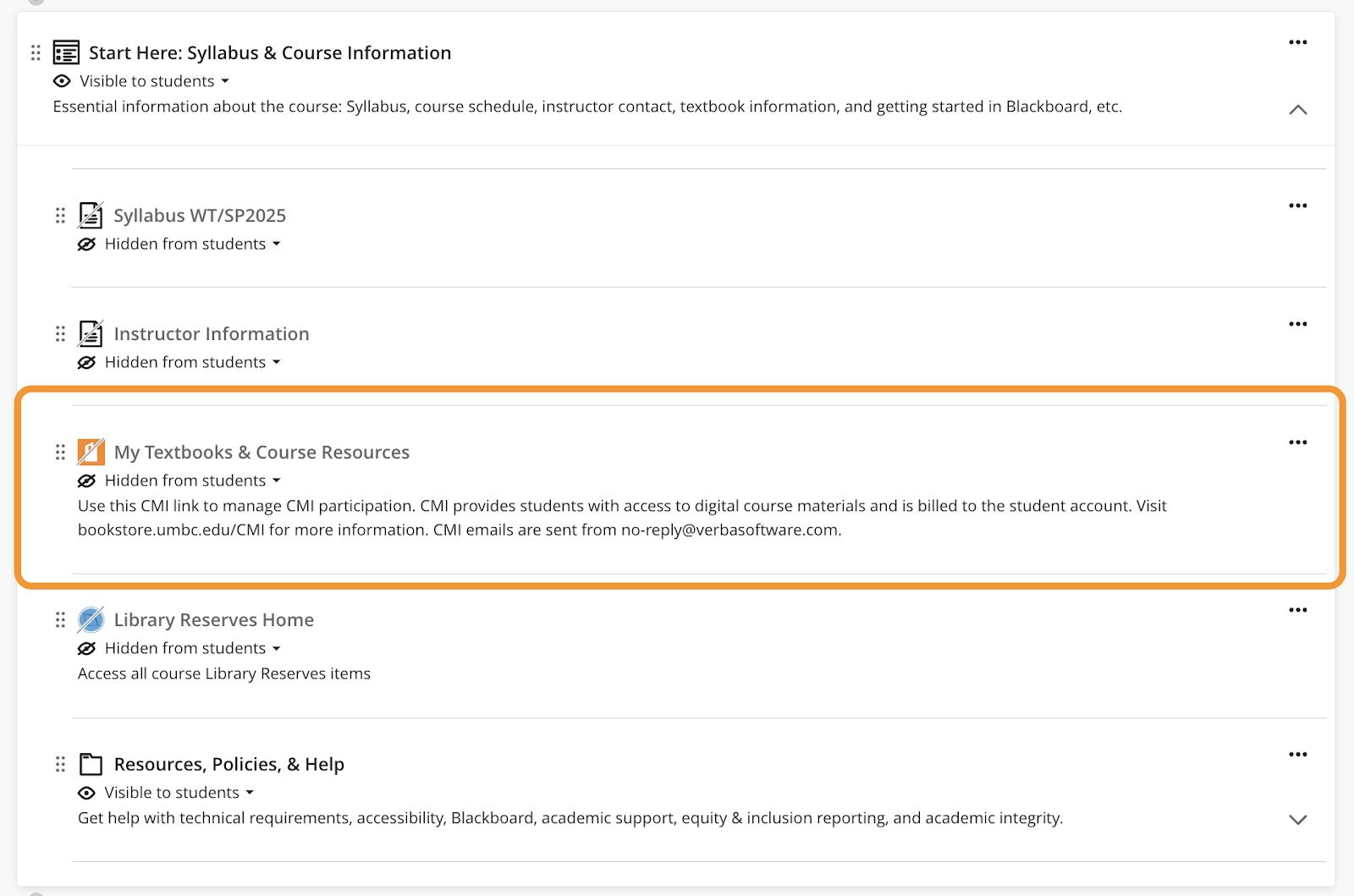
    <div class="html-content"><span><p><span>Blackboard publisher integrations for VitalSource, Cengage, Pearson, and Macmillan will be updated to the latest version on December 19, 2024. To ensure your courses receive the latest update and function properly when using these third party tools, instructors should not link to any VitalSource, Cengage, Pearson, or Macmillan resources in <a href="https://my3.my.umbc.edu/groups/instructional-technology/posts/145780/" rel="nofollow external" class="bo">Winter 2025 or Spring 2025 courses</a> until December 20th. </span></p><p><span><strong>Preparing for the Update</strong></span></p><p><span>Instructors using these publisher integrations in Fall 2024 courses should access grades from the publisher prior to December 19th. Grades will remain available by accessing your instructor account on the publisher site directly after this date. Please see details for each integration below.</span></p><p><span><strong>VitalSource</strong></span></p><p><span>VitalSource links will be updated dynamically in Blackboard courses. Following the update, access VitalSource using the MyTextbooks &amp; Course Materials link in the “Start Here” module. </span></p><p><span><span><img src="https://lh7-rt.googleusercontent.com/docsz/AD_4nXdmwq50OG-i5YofV-7YwfcTZoInhvXLi0avbRYsrunXysZGnuKxQ0kw6EbD3rNRAu1xdFeRCGa67u_iw825oPRoJtO6T-gVmVzNJ8DrL4EQWqRD9RBF9ecC_y1lpKNjrHiZYLhg?key=4R3R5zH3CqiIAxcILC6BcDRa" width="528" height="349" style="max-width: 100%; height: auto;"></span></span></p><p><span><em>Image 1. The Start Here module in Blackboard courses includes a “My Textbooks &amp; Course Resources” link to VitalSource.</em></span></p><p><span><strong>Cengage</strong></span></p><p><span>Existing Cengage links in your Fall 2024 courses will be migrated automatically to the updated integration on December 19th. However, we recommend accessing grades from Cengage prior to the update. Following the update, new Cengage links may be added to Winter and Spring 2025 courses via the Content Market beginning December 20th. Access </span><a href="https://www.cengage.com/training/webassign/?terms=&amp;pageSize=300&amp;pageNumber=1&amp;sortBy=cengage:sequenceNumber&amp;audience=Instructor&amp;lmsType=Blackboard%20Ultra&amp;platform=WebAssign" rel="nofollow external" class="bo"><span>WebAssign</span></a><span> and </span><a href="https://www.cengage.com/training/mindtap/?terms=&amp;pageSize=300&amp;pageNumber=1&amp;sortBy=cengage:sequenceNumber&amp;lmsType=Blackboard%20Ultra&amp;platform=MindTap" rel="nofollow external" class="bo"><span>MindTap</span></a><span> instructor resources for more details. Note: Cengage will no longer appear at the top of the Content Market page, but will appear alphabetically in the list of Content Market tools.</span></p><p><span><strong>Macmillan</strong></span></p><p><span>If you are currently using Macmillan course materials in your Fall 2024 courses, we recommend accessing grades from Macmillan prior to the update. However, if needed, you will be able to relink your active Blackboard courses to Achieve </span><a href="https://mhe.my.site.com/macmillanlearning/s/article/Instructor-guide-to-LTI-Advantage-LTI-1-3-integration-with-Blackboard-Ultra" rel="nofollow external" class="bo"><span>using the updated LTI 1.3 steps</span></a><span> and import any previously completed work to the BB gradebook. Following the update, please use the Macmillan link in the Content Market to add Macmillan content to your upcoming courses. Note: Macmillan will no longer appear at the top of the Content Market page, but will appear alphabetically in the list of Content Market tools.</span></p><p><span><strong>Pearson</strong></span></p><p><span>If you are currently using Pearson course materials in your Fall 2024 courses, we recommend accessing grades from Pearson prior to the update. Pearson links created prior to December 20th will be deactivated following the update. However, if needed, instructors will be able to access grades from Pearson by logging into their instructor Pearson account directly. Following the December update, you may add Pearson links to Winter and Spring 2025 courses by accessing the Blackboard Ultra Books &amp; Tools menu. </span><a href="https://support.pearson.com/getsupport/s/document-item?bundleId=3pl-cg-instructor&amp;topicId=Content/get_started-bb_ultra-13.htm&amp;_LANG=enus" rel="nofollow external" class="bo"><span>Pearson resources</span></a><span> review how to configure your Blackboard course. </span></p><p><span><strong>Course Materials Support</strong></span></p><p><span>Publisher support is available directly from </span><a href="http://support.cengage.com/" rel="nofollow external" class="bo"><span>Cengage</span></a><span>, </span><a href="https://mhe.my.site.com/macmillanlearning/s/chat-with-us" rel="nofollow external" class="bo"><span>Macmillan</span></a><span>, and </span><a href="https://support.pearson.com/getsupport/s/contactsupport" rel="nofollow external" class="bo"><span>Pearson</span></a><span>. If you have questions related to the publisher integration updates, please </span><a href="https://umbc.edu/go/bbsupport" rel="nofollow external" class="bo"><span>submit an RT request</span></a><span> for concerns related to Blackboard. Please contact Jocelyn Ochoa-Garcia (<a href="mailto:textbook@umbc.edu">textbook@umbc.edu</a>) in the UMBC Bookstore for <a href="https://bookstore.umbc.edu/SiteText?id=52872" rel="nofollow external" class="bo">CMI-related</a> questions. </span></p><p><span><strong>Connect with Instructional Technology</strong></span></p><span>As always, if you have any questions about teaching, learning, and technology at UMBC, please consider the following options:</span><br><ul><span><li><a href="http://www.umbc.edu/faq" rel="nofollow external" class="bo"><span>Check our extensive FAQ collection</span></a><span> </span></li></span><ul><li><span><a href="https://wiki.umbc.edu/x/LohnB" rel="nofollow external" class="bo"><span>What's new in Ultra?</span></a><span> | </span><a href="https://wiki.umbc.edu/x/bwrSAQ" rel="nofollow external" class="bo"><span>Known Issues</span></a><span> </span></span></li></ul><span><li><a href="http://my.umbc.edu/go/request-help" rel="nofollow external" class="bo"><span>Open a ticket via RT</span></a></li><li><span>Follow the </span><a href="http://my.umbc.edu/groups/instructional-technology" rel="nofollow external" class="bo"><span>Instructional Technology</span></a><span> &amp; </span><a href="http://my.umbc.edu/groups/doit" rel="nofollow external" class="bo"><span>DoIT</span></a><span> myUMBC groups</span></li><li><a href="http://doit.umbc.edu/itnm/staff/" rel="nofollow external" class="bo"><span>Request a consult</span></a><span> with </span><a href="http://doit.umbc.edu/itnm/staff" rel="nofollow external" class="bo"><span>instructional technology staff</span></a></li><li><a href="http://pivot.umbc.edu/" rel="nofollow external" class="bo"><span>PIVOT</span></a><span> | </span><a href="https://doit.umbc.edu/itnm/academic-continuity/" rel="nofollow external" class="bo"><span>Academic Continuity</span></a><span> | </span><a href="https://fdc.umbc.edu/teaching/keep-on-teaching/" rel="nofollow external" class="bo"><span>Keep On Teaching</span></a><span> | </span><a href="https://doit.umbc.edu/students" rel="nofollow external" class="bo"><span>Student Technology Resources</span></a></li></span></ul><p></p><div><em>Thumbnail-image: decorative </em></div></span></div>
]]>
</Body>
<Summary>Blackboard publisher integrations for VitalSource, Cengage, Pearson, and Macmillan will be updated to the latest version on December 19, 2024. To ensure your courses receive the latest update and...</Summary>
<Website>https://my3.my.umbc.edu/groups/instructional-technology/posts/145784/</Website>
<TrackingUrl>https://beta.my.umbc.edu/api/v0/pixel/news/145784/guest@my.umbc.edu/7083e63fceed8ee9f96962bf5d824427/api/pixel</TrackingUrl>
<Tag>bookstore</Tag>
<Tag>cengage</Tag>
<Tag>cmi</Tag>
<Tag>course-materials-initiative</Tag>
<Tag>lti</Tag>
<Tag>macmillan</Tag>
<Tag>pearson</Tag>
<Tag>publisher</Tag>
<Tag>sp2025</Tag>
<Tag>textbooks</Tag>
<Tag>vitalsource</Tag>
<Tag>wt2025</Tag>
<Group token="instructional-technology">Instructional Technology</Group>
<GroupUrl>https://beta.my.umbc.edu/groups/instructional-technology</GroupUrl>
<AvatarUrl>https://assets2-beta.my.umbc.edu/system/shared/avatars/groups/000/001/164/dec3b026b81ee6d890a8f82f75c94a2e/xsmall.png?1446126703</AvatarUrl>
<AvatarUrl size="original">https://assets1-beta.my.umbc.edu/system/shared/avatars/groups/000/001/164/dec3b026b81ee6d890a8f82f75c94a2e/original.png?1446126703</AvatarUrl>
<AvatarUrl size="xxlarge">https://assets2-beta.my.umbc.edu/system/shared/avatars/groups/000/001/164/dec3b026b81ee6d890a8f82f75c94a2e/xxlarge.png?1446126703</AvatarUrl>
<AvatarUrl size="xlarge">https://assets1-beta.my.umbc.edu/system/shared/avatars/groups/000/001/164/dec3b026b81ee6d890a8f82f75c94a2e/xlarge.png?1446126703</AvatarUrl>
<AvatarUrl size="large">https://assets1-beta.my.umbc.edu/system/shared/avatars/groups/000/001/164/dec3b026b81ee6d890a8f82f75c94a2e/large.png?1446126703</AvatarUrl>
<AvatarUrl size="medium">https://assets4-beta.my.umbc.edu/system/shared/avatars/groups/000/001/164/dec3b026b81ee6d890a8f82f75c94a2e/medium.png?1446126703</AvatarUrl>
<AvatarUrl size="small">https://assets3-beta.my.umbc.edu/system/shared/avatars/groups/000/001/164/dec3b026b81ee6d890a8f82f75c94a2e/small.png?1446126703</AvatarUrl>
<AvatarUrl size="xsmall">https://assets2-beta.my.umbc.edu/system/shared/avatars/groups/000/001/164/dec3b026b81ee6d890a8f82f75c94a2e/xsmall.png?1446126703</AvatarUrl>
<AvatarUrl size="xxsmall">https://assets3-beta.my.umbc.edu/system/shared/avatars/groups/000/001/164/dec3b026b81ee6d890a8f82f75c94a2e/xxsmall.png?1446126703</AvatarUrl>
<Sponsor>Instructional Technology</Sponsor>
<ThumbnailUrl size="xxlarge">https://assets1-beta.my.umbc.edu/system/shared/thumbnails/news/000/145/784/52e49441c8adc1846da506281492d505/xxlarge.jpg?1732129555</ThumbnailUrl>
<ThumbnailUrl size="xlarge">https://assets2-beta.my.umbc.edu/system/shared/thumbnails/news/000/145/784/52e49441c8adc1846da506281492d505/xlarge.jpg?1732129555</ThumbnailUrl>
<ThumbnailUrl size="large">https://assets3-beta.my.umbc.edu/system/shared/thumbnails/news/000/145/784/52e49441c8adc1846da506281492d505/large.jpg?1732129555</ThumbnailUrl>
<ThumbnailUrl size="medium">https://assets2-beta.my.umbc.edu/system/shared/thumbnails/news/000/145/784/52e49441c8adc1846da506281492d505/medium.jpg?1732129555</ThumbnailUrl>
<ThumbnailUrl size="small">https://assets4-beta.my.umbc.edu/system/shared/thumbnails/news/000/145/784/52e49441c8adc1846da506281492d505/small.jpg?1732129555</ThumbnailUrl>
<ThumbnailUrl size="xsmall">https://assets1-beta.my.umbc.edu/system/shared/thumbnails/news/000/145/784/52e49441c8adc1846da506281492d505/xsmall.jpg?1732129555</ThumbnailUrl>
<ThumbnailUrl size="xxsmall">https://assets1-beta.my.umbc.edu/system/shared/thumbnails/news/000/145/784/52e49441c8adc1846da506281492d505/xxsmall.jpg?1732129555</ThumbnailUrl>
<PawCount>5</PawCount>
<CommentCount>0</CommentCount>
<CommentsAllowed>true</CommentsAllowed>
<PostedAt>Fri, 22 Nov 2024 12:37:01 -0500</PostedAt>
</NewsItem>

<NewsItem contentIssues="true" id="145780" important="false" status="posted" url="https://beta.my.umbc.edu/groups/doit/posts/145780">
<Title>WT/SP2025 Courses Created in Blackboard on November 22, 2024</Title>
<Tagline>Prepare your Ultra courses for the upcoming term</Tagline>
<Body>
<![CDATA[
    <div class="html-content"><p><span>Blackboard course shells for WT/SP2025 were created on November 22, 2024. All courses now use Ultra </span><a href="https://doit.umbc.edu/news/post/130227/" rel="nofollow external" class="bo"><span>per our earlier announcement</span></a><span>.</span><span> </span></p><p><span><strong>Course Materials Publisher Integration Updates in December</strong></span></p><p><span>Blackboard integrations for VitalSource, Cengage, Pearson, and Macmillan publisher tools <a href="https://my3.my.umbc.edu/groups/instructional-technology/posts/145784/" rel="nofollow external" class="bo">will be updated</a> on December 19, 2024. </span><span>Please do not link any VitalSource, Cengage, Pearson, or Macmillan resources in your Winter 2025 or Spring 2025 courses until December 20th. </span></p><p><span><strong>Training &amp; Support for Ultra</strong></span></p><ul><li><span>Attend an </span><a href="https://my3.my.umbc.edu/groups/instructional-technology/events?mode=upcoming" rel="nofollow external" class="bo"><span>upcoming January training</span></a><span> to prepare for the fall semester.</span></li><li><span>Request a consult </span><span>from our staff </span><a href="https://calendar.app.google/g1NUBauLXnQzavZP8" rel="nofollow external" class="bo"><span>Ultra “office hours”</span></a><span>or download our </span><a href="https://docs.google.com/document/d/1moTh6n0xTLW64IHYoXN8lZ8t1j1rI_L6r_NCiObX6aA/preview?usp=sharing" rel="nofollow external" class="bo"><span>8-step migration guide</span></a><span>.</span></li><li><span>Explore  </span><a href="https://umbc.hosted.panopto.com/Panopto/Pages/Sessions/List.aspx#folderID=%2274ac9d58-1779-44c1-92b7-ab6900dfe6e9%22" rel="nofollow external" class="bo"><span>our Panopto folder</span></a><span> for a wide variety of recorded webinars on various instructional technologies available at UMBC.</span></li><li><span>Have a question about Ultra? Ask  </span><a href="https://wiki.umbc.edu/x/kAU9BQ" rel="nofollow external" class="bo"><span>an Ultra Ambassador</span></a><span>!</span></li></ul><p><span><strong>Create an Inclusive &amp; Accessible Course Environment</strong></span></p><p><span>Plan your accessibility and Universal Design for Learning strategy before students begin working with course materials. Ally, an </span><a href="https://doit.umbc.edu/news/?id=82487" rel="nofollow external" class="bo"><span>accessibility tool</span></a><span>, is enabled in all course shells. Ally automatically scans uploaded and created course content, then performs a series of steps to make that content more accessible. Please review the </span><a href="https://wiki.umbc.edu/x/2IGdB" rel="nofollow external" class="bo"><span>Ally FAQs</span></a><span> for more information about the</span><a href="https://wiki.umbc.edu/x/_YGdB" rel="nofollow external" class="bo"><span>  </span><span>accessibility indicators</span></a><span> on course content and </span><a href="https://wiki.umbc.edu/x/3IGdB" rel="nofollow external" class="bo"><span>alternative formats</span></a><span>. Use Ally’s new AI alt-text generator to add alt text to course images. Training will be  </span><a href="https://my3.my.umbc.edu/groups/doit/events/136188" rel="nofollow external" class="bo"><span>offered on January 24, 2025</span></a><span>.</span></p><p><span>Instructional Technology also offers resources for creating accessible content including three webinar recordings:</span></p><ul><li><a href="https://docs.google.com/document/d/1dy3rYbPDmne449AO_Dm-sOiCcnwsQW-qNXBIENqO9ac/edit?tab=t.0#heading=h.bmslkh4ugfwr" rel="nofollow external" class="bo"><span>Digital Accessibility Guidelines Checklist</span></a></li><li><a href="https://umbc.hosted.panopto.com/Panopto/Pages/Viewer.aspx?id=8da73af3-4992-45bc-9985-b20d013e9ae9&amp;start=0" rel="nofollow external" class="bo"><span>Creating Accessible Documents</span></a><span> (44:51)</span></li><li><a href="https://umbc.hosted.panopto.com/Panopto/Pages/Viewer.aspx?id=dc391e2b-f47d-4ace-b19d-b218018493ee&amp;start=0" rel="nofollow external" class="bo"><span>Creating Accessible Presentations</span></a><span> (31:24) </span></li><li><a href="https://umbc.hosted.panopto.com/Panopto/Pages/Viewer.aspx?id=3998acbb-a6cc-43f2-a102-b2260144d0af&amp;start=0" rel="nofollow external" class="bo"><span>Creating Accessible Instructional Videos</span></a><span> (45:19)</span></li></ul><p><span><strong>About Course Creation</strong></span></p><p><span>Bb shells for WT/SP2025 are available for all courses (designated as lecture, lab, field or discussion) listed in the </span><a href="http://my.umbc.edu/go/schedule" rel="nofollow external" class="bo"><span>UMBC Schedule of Classes (SOC)</span></a><span>, provided that there is an </span><a href="http://www.umbc.edu/blogs/oit-news/archives/2010/08/how_new_employe_1.html" rel="nofollow external" class="bo"><span>instructor of record</span></a><span> listed. As new course sections and/or instructors are added to the SOC by </span><a href="https://registrar.umbc.edu/services/classroom-scheduling/" rel="nofollow external" class="bo"><span>Department Scheduling Coordinators</span></a><span>, corresponding Bb shells are automatically generated overnight. </span></p><ul><li><span>If you are an instructor, and your name is not associated with the course you are teaching in the </span><a href="http://my.umbc.edu/go/schedule" rel="nofollow external" class="bo"><span>SOC</span></a><span>, please see your </span><a href="https://swsupport.umbc.edu/scheduling-coordinators/" rel="nofollow external" class="bo"><span>Departmental Scheduling Coordinator</span></a><span> to resolve the issue. Once you are listed in the </span><a href="https://my.umbc.edu/go/schedule" rel="nofollow external" class="bo"><span>SOC</span></a><span>, your Bb course shell will be created automatically. </span></li><li><span>If you and your </span><a href="https://swsupport.umbc.edu/scheduling-coordinators/" rel="nofollow external" class="bo"><span>Department Scheduling Coordinator</span></a><span> believe you are correctly assigned as the instructor of record in the SOC and you do not see your course shell in Blackboard, please submit a Request Tracker (RT) ticket via </span><a href="https://my.umbc.edu/help" rel="nofollow external" class="bo"><span>my.umbc.edu/help</span></a><span>.</span></li><li><span>If you need a Bb shell for a research or independent study course, please submit a </span><a href="http://www.umbc.edu/doit/blackboard/requestbbshell.html" rel="nofollow external" class="bo"><span>new course request</span></a><span>.</span></li></ul><p><span>Instructors who teach multiple sections of the same course will find those enrollments merged into one Bb course shell. These sections may be split upon </span><a href="https://my.umbc.edu/go/request-help" rel="nofollow external" class="bo"><span>request by an RT ticket</span></a><span>, which we recommend </span><a href="https://wiki.umbc.edu/x/d4HGAw" rel="nofollow external" class="bo"><span>submitting at least one week</span></a><span> before the semester starts, if not as soon as courses are created in Blackboard. </span><strong><span>NOTE:</span></strong><span>Courses should not be split after student grade data and engagement activity is recorded since it will be purged as part of the separation process.</span></p><p><span>Student enrollment in Bb mirrors the official registration in SA and updates hourly. However, courses are not accessible to students by default until the instructor of record </span><a href="https://wiki.umbc.edu/x/VoAc" rel="nofollow external" class="bo"><span>makes them available</span></a><span>.</span></p><p><span><strong>Connect with Instructional Technology</strong></span></p><p><span>As always, if you have any questions about teaching, learning, and technology at UMBC, please consider the following options:</span></p><ul><li><a href="http://www.umbc.edu/faq" rel="nofollow external" class="bo"><span>Check our extensive FAQ collection</span></a><span> </span></li><ul><li><a href="https://wiki.umbc.edu/x/LohnB" rel="nofollow external" class="bo"><span>What's new in Ultra?</span></a><span> | </span><a href="https://wiki.umbc.edu/x/bwrSAQ" rel="nofollow external" class="bo"><span>Known Issues</span></a><span> </span></li></ul><li><a href="http://my.umbc.edu/go/request-help" rel="nofollow external" class="bo"><span>Open a ticket via RT</span></a></li><li><span>Follow the </span><a href="http://my.umbc.edu/groups/instructional-technology" rel="nofollow external" class="bo"><span>Instructional Technology</span></a><span> &amp; </span><a href="http://my.umbc.edu/groups/doit" rel="nofollow external" class="bo"><span>DoIT</span></a><span> myUMBC groups</span></li><li><a href="http://doit.umbc.edu/itnm/staff/" rel="nofollow external" class="bo"><span>Request a consult</span></a><span> with </span><a href="http://doit.umbc.edu/itnm/staff" rel="nofollow external" class="bo"><span>instructional technology staff</span></a></li><li><a href="http://pivot.umbc.edu/" rel="nofollow external" class="bo"><span>PIVOT</span></a><span> | </span><a href="https://doit.umbc.edu/itnm/academic-continuity/" rel="nofollow external" class="bo"><span>Academic Continuity</span></a><span> | </span><a href="https://fdc.umbc.edu/teaching/keep-on-teaching/" rel="nofollow external" class="bo"><span>Keep On Teaching</span></a><span> | </span><a href="https://doit.umbc.edu/students" rel="nofollow external" class="bo"><span>Student Technology Resources</span></a></li></ul><div><br></div><div><em>Thumbnail-image: decorative</em></div></div>
]]>
</Body>
<Summary>Blackboard course shells for WT/SP2025 were created on November 22, 2024. All courses now use Ultra per our earlier announcement.   Course Materials Publisher Integration Updates in December...</Summary>
<Website>https://my3.my.umbc.edu/groups/instructional-technology/posts/145780</Website>
<TrackingUrl>https://beta.my.umbc.edu/api/v0/pixel/news/145780/guest@my.umbc.edu/9524cb0ef1fc593502803da624e1785c/api/pixel</TrackingUrl>
<Tag>blackboard</Tag>
<Tag>course-creation</Tag>
<Tag>sp2025</Tag>
<Tag>spring</Tag>
<Tag>ultra</Tag>
<Tag>winter</Tag>
<Tag>wt2025</Tag>
<Group token="instructional-technology">Instructional Technology</Group>
<GroupUrl>https://beta.my.umbc.edu/groups/instructional-technology</GroupUrl>
<AvatarUrl>https://assets2-beta.my.umbc.edu/system/shared/avatars/groups/000/001/164/dec3b026b81ee6d890a8f82f75c94a2e/xsmall.png?1446126703</AvatarUrl>
<AvatarUrl size="original">https://assets1-beta.my.umbc.edu/system/shared/avatars/groups/000/001/164/dec3b026b81ee6d890a8f82f75c94a2e/original.png?1446126703</AvatarUrl>
<AvatarUrl size="xxlarge">https://assets2-beta.my.umbc.edu/system/shared/avatars/groups/000/001/164/dec3b026b81ee6d890a8f82f75c94a2e/xxlarge.png?1446126703</AvatarUrl>
<AvatarUrl size="xlarge">https://assets1-beta.my.umbc.edu/system/shared/avatars/groups/000/001/164/dec3b026b81ee6d890a8f82f75c94a2e/xlarge.png?1446126703</AvatarUrl>
<AvatarUrl size="large">https://assets1-beta.my.umbc.edu/system/shared/avatars/groups/000/001/164/dec3b026b81ee6d890a8f82f75c94a2e/large.png?1446126703</AvatarUrl>
<AvatarUrl size="medium">https://assets4-beta.my.umbc.edu/system/shared/avatars/groups/000/001/164/dec3b026b81ee6d890a8f82f75c94a2e/medium.png?1446126703</AvatarUrl>
<AvatarUrl size="small">https://assets3-beta.my.umbc.edu/system/shared/avatars/groups/000/001/164/dec3b026b81ee6d890a8f82f75c94a2e/small.png?1446126703</AvatarUrl>
<AvatarUrl size="xsmall">https://assets2-beta.my.umbc.edu/system/shared/avatars/groups/000/001/164/dec3b026b81ee6d890a8f82f75c94a2e/xsmall.png?1446126703</AvatarUrl>
<AvatarUrl size="xxsmall">https://assets3-beta.my.umbc.edu/system/shared/avatars/groups/000/001/164/dec3b026b81ee6d890a8f82f75c94a2e/xxsmall.png?1446126703</AvatarUrl>
<Sponsor>Instructional Technology</Sponsor>
<ThumbnailUrl size="xxlarge">https://assets4-beta.my.umbc.edu/system/shared/thumbnails/news/000/145/780/c050e4694a21c903823dc48315decf0d/xxlarge.jpg?1732129240</ThumbnailUrl>
<ThumbnailUrl size="xlarge">https://assets1-beta.my.umbc.edu/system/shared/thumbnails/news/000/145/780/c050e4694a21c903823dc48315decf0d/xlarge.jpg?1732129240</ThumbnailUrl>
<ThumbnailUrl size="large">https://assets4-beta.my.umbc.edu/system/shared/thumbnails/news/000/145/780/c050e4694a21c903823dc48315decf0d/large.jpg?1732129240</ThumbnailUrl>
<ThumbnailUrl size="medium">https://assets4-beta.my.umbc.edu/system/shared/thumbnails/news/000/145/780/c050e4694a21c903823dc48315decf0d/medium.jpg?1732129240</ThumbnailUrl>
<ThumbnailUrl size="small">https://assets2-beta.my.umbc.edu/system/shared/thumbnails/news/000/145/780/c050e4694a21c903823dc48315decf0d/small.jpg?1732129240</ThumbnailUrl>
<ThumbnailUrl size="xsmall">https://assets1-beta.my.umbc.edu/system/shared/thumbnails/news/000/145/780/c050e4694a21c903823dc48315decf0d/xsmall.jpg?1732129240</ThumbnailUrl>
<ThumbnailUrl size="xxsmall">https://assets3-beta.my.umbc.edu/system/shared/thumbnails/news/000/145/780/c050e4694a21c903823dc48315decf0d/xxsmall.jpg?1732129240</ThumbnailUrl>
<PawCount>4</PawCount>
<CommentCount>0</CommentCount>
<CommentsAllowed>true</CommentsAllowed>
<PostedAt>Fri, 22 Nov 2024 12:36:57 -0500</PostedAt>
</NewsItem>

</News>
