<?xml version="1.0"?>
<News hasArchived="false" page="1" pageCount="1" pageSize="10" timestamp="Sun, 19 Apr 2026 02:59:19 -0400" url="https://beta.my.umbc.edu/groups/doit/posts.xml?tag=updates">
<NewsItem contentIssues="false" id="150647" important="true" status="posted" url="https://beta.my.umbc.edu/groups/doit/posts/150647">
<Title>Major Cloud Service Outage Impacting Campus Applications</Title>
<Body>
<![CDATA[
    <div class="html-content"><p><strong>Date: June 12, 2025</strong></p><p><strong>Time: 3:45 PM </strong></p><p>The Division of Information Technology is aware of a widespread outage with a major cloud service provider that is currently impacting access to a number of online services used by the campus community.</p><p>This is a global issue affecting many organizations and is not the result of an outage or issue with the university's internal IT systems.</p><p><strong>Impacted services may include, but are not limited to:</strong></p><ul><li>Google (including Gmail, Google Drive, Google Docs, and other G Suite applications)</li><li>Box</li><li>VitalSource</li><li>Poll Everywhere</li></ul><p>Users may experience slow loading times, errors, or be unable to access these services altogether. We understand the critical nature of these tools for teaching, learning, and administrative work and apologize for the disruption this external issue is causing.</p><p>Our team is closely monitoring the situation with the cloud provider. </p><p>We appreciate your patience as the external provider works to resolve this major incident.</p></div>
]]>
</Body>
<Summary>Date: June 12, 2025  Time: 3:45 PM   The Division of Information Technology is aware of a widespread outage with a major cloud service provider that is currently impacting access to a number of...</Summary>
<TrackingUrl>https://beta.my.umbc.edu/api/v0/pixel/news/150647/guest@my.umbc.edu/bfa618fba7559c72afda37007586a058/api/pixel</TrackingUrl>
<Tag>updates</Tag>
<Group token="doit">Division of Information Technology (DoIT)</Group>
<GroupUrl>https://beta.my.umbc.edu/groups/doit</GroupUrl>
<AvatarUrl>https://assets2-beta.my.umbc.edu/system/shared/avatars/groups/000/000/021/d27760c5de12c74b73faec8d0e631acf/xsmall.png?1727453227</AvatarUrl>
<AvatarUrl size="original">https://assets2-beta.my.umbc.edu/system/shared/avatars/groups/000/000/021/d27760c5de12c74b73faec8d0e631acf/original.JPG?1727453227</AvatarUrl>
<AvatarUrl size="xxlarge">https://assets1-beta.my.umbc.edu/system/shared/avatars/groups/000/000/021/d27760c5de12c74b73faec8d0e631acf/xxlarge.png?1727453227</AvatarUrl>
<AvatarUrl size="xlarge">https://assets3-beta.my.umbc.edu/system/shared/avatars/groups/000/000/021/d27760c5de12c74b73faec8d0e631acf/xlarge.png?1727453227</AvatarUrl>
<AvatarUrl size="large">https://assets2-beta.my.umbc.edu/system/shared/avatars/groups/000/000/021/d27760c5de12c74b73faec8d0e631acf/large.png?1727453227</AvatarUrl>
<AvatarUrl size="medium">https://assets2-beta.my.umbc.edu/system/shared/avatars/groups/000/000/021/d27760c5de12c74b73faec8d0e631acf/medium.png?1727453227</AvatarUrl>
<AvatarUrl size="small">https://assets2-beta.my.umbc.edu/system/shared/avatars/groups/000/000/021/d27760c5de12c74b73faec8d0e631acf/small.png?1727453227</AvatarUrl>
<AvatarUrl size="xsmall">https://assets2-beta.my.umbc.edu/system/shared/avatars/groups/000/000/021/d27760c5de12c74b73faec8d0e631acf/xsmall.png?1727453227</AvatarUrl>
<AvatarUrl size="xxsmall">https://assets4-beta.my.umbc.edu/system/shared/avatars/groups/000/000/021/d27760c5de12c74b73faec8d0e631acf/xxsmall.png?1727453227</AvatarUrl>
<Sponsor>Division of Information Technology (DoIT)</Sponsor>
<PawCount>2</PawCount>
<CommentCount>0</CommentCount>
<CommentsAllowed>true</CommentsAllowed>
<PostedAt>Thu, 12 Jun 2025 15:47:29 -0400</PostedAt>
<EditAt>Thu, 12 Jun 2025 15:53:47 -0400</EditAt>
</NewsItem>

<NewsItem contentIssues="true" id="145112" important="false" status="posted" url="https://beta.my.umbc.edu/groups/doit/posts/145112">
<Title>Cybersecurity Awareness: Install Updates</Title>
<Tagline>Keep your system up-to-date by installing updates</Tagline>
<Body>
<![CDATA[
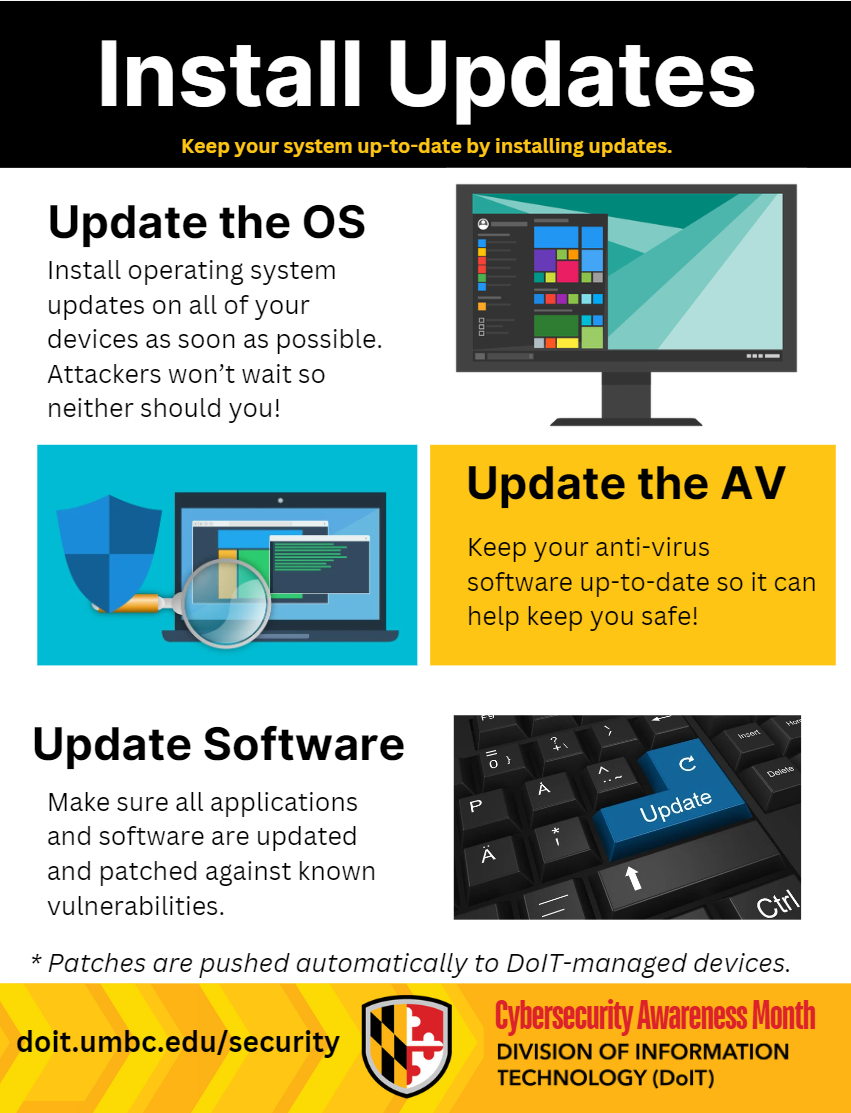
    <div class="html-content"><span><h4><span>Update the Operating System (OS)</span></h4><p><span>Install operating system updates on all of your devices as soon as possible. Attackers won’t wait so neither should you!</span></p><br><h4><span>Update Anti-Virus (AV)</span></h4><p><span>Keep your anti-virus up-to-date so it can help keep you safe.</span></p><br><h4><span>Update Software</span></h4><p><span>Make sure all applications and software are updated and patched against known vulnerabilities. **</span><span>Patches are pushed automatically to DoIT-Managed devices.**</span></p><br><h2><span><span><img src="https://lh7-rt.googleusercontent.com/docsz/AD_4nXcUcr5uykqmzdpLLZUS_0KRAo5fJq_dvUQDIKmbqosx9CCVKetOuBq6UX6Mm1cZFCkbChtCE_PjnJ_hfRAiDf7sKJzqykRmgUV-cmr7MezVOW_7oczu94NXkZ0smBtDd2pOrPn0dOskMApfeUAgdw-Zqeh7?key=ciB3wloKbf3CHOE_YTEWCg" width="323" height="424" style="max-width: 100%; height: auto;"></span></span><span> </span></h2><h3><span><u><br></u></span></h3><h3><span><u>Keep Software Up to Date with 3 Simple Steps</u></span></h3><div><span><br></span></div><h4><span>1. Watch for notifications</span></h4><p><span>Our devices will usually notify us that we need to run updates. This includes our devices’ operating systems, programs, and apps. It’s important to install ALL updates, especially for our web browsers and antivirus software. </span></p><h4><span>2. Install updates as soon as possible</span></h4><p><span>When notified about software updates, especially critical updates, we should be sure to install them as soon as possible. Malicious online criminals won’t wait, so we shouldn’t either!   </span></p><h4><span>3. Turn on automatic updates</span></h4><p><span>With automatic updates, our devices will install updates without any input from us as soon as the update is available—Easy! </span></p><p><span>To turn on the automatic updates feature, look in the device’s settings, possibly under Software or Security. Search settings for “automatic updates” if needed.</span></p><p><br></p><p><span>Source: <a href="https://www.cisa.gov/secure-our-world/update-software">https://www.cisa.gov/secure-our-world/update-software</a></span></p><div><span><br></span></div><div><span><span><p><span>For more information about UMBC’s cybersecurity initiatives, go to </span><a href="http://doit.umbc.edu/security" rel="nofollow external" class="bo"><span>doit.umbc.edu/security</span></a><span>. </span></p><div><span><br></span></div></span></span></div></span></div>
]]>
</Body>
<Summary>Update the Operating System (OS)  Install operating system updates on all of your devices as soon as possible. Attackers won’t wait so neither should you!   Update Anti-Virus (AV)  Keep your...</Summary>
<TrackingUrl>https://beta.my.umbc.edu/api/v0/pixel/news/145112/guest@my.umbc.edu/307eac6d4ff335c840d58031476c98d2/api/pixel</TrackingUrl>
<Tag>cybersecurity</Tag>
<Tag>software</Tag>
<Tag>updates</Tag>
<Group token="doit">Division of Information Technology (DoIT)</Group>
<GroupUrl>https://beta.my.umbc.edu/groups/doit</GroupUrl>
<AvatarUrl>https://assets2-beta.my.umbc.edu/system/shared/avatars/groups/000/000/021/d27760c5de12c74b73faec8d0e631acf/xsmall.png?1727453227</AvatarUrl>
<AvatarUrl size="original">https://assets2-beta.my.umbc.edu/system/shared/avatars/groups/000/000/021/d27760c5de12c74b73faec8d0e631acf/original.JPG?1727453227</AvatarUrl>
<AvatarUrl size="xxlarge">https://assets1-beta.my.umbc.edu/system/shared/avatars/groups/000/000/021/d27760c5de12c74b73faec8d0e631acf/xxlarge.png?1727453227</AvatarUrl>
<AvatarUrl size="xlarge">https://assets3-beta.my.umbc.edu/system/shared/avatars/groups/000/000/021/d27760c5de12c74b73faec8d0e631acf/xlarge.png?1727453227</AvatarUrl>
<AvatarUrl size="large">https://assets2-beta.my.umbc.edu/system/shared/avatars/groups/000/000/021/d27760c5de12c74b73faec8d0e631acf/large.png?1727453227</AvatarUrl>
<AvatarUrl size="medium">https://assets2-beta.my.umbc.edu/system/shared/avatars/groups/000/000/021/d27760c5de12c74b73faec8d0e631acf/medium.png?1727453227</AvatarUrl>
<AvatarUrl size="small">https://assets2-beta.my.umbc.edu/system/shared/avatars/groups/000/000/021/d27760c5de12c74b73faec8d0e631acf/small.png?1727453227</AvatarUrl>
<AvatarUrl size="xsmall">https://assets2-beta.my.umbc.edu/system/shared/avatars/groups/000/000/021/d27760c5de12c74b73faec8d0e631acf/xsmall.png?1727453227</AvatarUrl>
<AvatarUrl size="xxsmall">https://assets4-beta.my.umbc.edu/system/shared/avatars/groups/000/000/021/d27760c5de12c74b73faec8d0e631acf/xxsmall.png?1727453227</AvatarUrl>
<Sponsor>Division of Information Technology (DoIT)</Sponsor>
<ThumbnailUrl size="xxlarge">https://assets3-beta.my.umbc.edu/system/shared/thumbnails/news/000/145/112/9c9b99ca6d934d5f49a87743a2178453/xxlarge.jpg?1730123371</ThumbnailUrl>
<ThumbnailUrl size="xlarge">https://assets4-beta.my.umbc.edu/system/shared/thumbnails/news/000/145/112/9c9b99ca6d934d5f49a87743a2178453/xlarge.jpg?1730123371</ThumbnailUrl>
<ThumbnailUrl size="large">https://assets3-beta.my.umbc.edu/system/shared/thumbnails/news/000/145/112/9c9b99ca6d934d5f49a87743a2178453/large.jpg?1730123371</ThumbnailUrl>
<ThumbnailUrl size="medium">https://assets3-beta.my.umbc.edu/system/shared/thumbnails/news/000/145/112/9c9b99ca6d934d5f49a87743a2178453/medium.jpg?1730123371</ThumbnailUrl>
<ThumbnailUrl size="small">https://assets4-beta.my.umbc.edu/system/shared/thumbnails/news/000/145/112/9c9b99ca6d934d5f49a87743a2178453/small.jpg?1730123371</ThumbnailUrl>
<ThumbnailUrl size="xsmall">https://assets4-beta.my.umbc.edu/system/shared/thumbnails/news/000/145/112/9c9b99ca6d934d5f49a87743a2178453/xsmall.jpg?1730123371</ThumbnailUrl>
<ThumbnailUrl size="xxsmall">https://assets1-beta.my.umbc.edu/system/shared/thumbnails/news/000/145/112/9c9b99ca6d934d5f49a87743a2178453/xxsmall.jpg?1730123371</ThumbnailUrl>
<PawCount>2</PawCount>
<CommentCount>1</CommentCount>
<CommentsAllowed>true</CommentsAllowed>
<PostedAt>Thu, 31 Oct 2024 08:47:14 -0400</PostedAt>
</NewsItem>

</News>