<?xml version="1.0"?>
<News hasArchived="false" page="1" pageCount="1" pageSize="10" timestamp="Thu, 23 Apr 2026 10:13:03 -0400" url="https://beta.my.umbc.edu/groups/doit/posts.xml?tag=passwords">
<NewsItem contentIssues="true" id="144932" important="false" status="posted" url="https://beta.my.umbc.edu/groups/doit/posts/144932">
<Title>Cybersecurity Awareness Month: Multi-factor Authentication (MFA)</Title>
<Tagline>Use Duo MFA for myUMBC!</Tagline>
<Body>
<![CDATA[
    <div class="html-content"><span><h3><span>What is multi-factor authentication?</span></h3><p><span>Multi-factor authentication adds a second layer of security to your online accounts. Verifying your identity using an additional factor (like your phone or other mobile device) prevents anyone but you from logging in, even if they know your password.</span></p><p><span>This additional factor of authentication is separate and independent from your username and password — Duo never sees your password.</span></p><p><br></p><h4><span>How It Works</span></h4><p><span><span><img src="https://lh7-rt.googleusercontent.com/docsz/AD_4nXdIbopXJoeGiZ06rsHhOMcFZxWZJE71ULmqP77ZsZRsE8i43GO66Vg3TjC-HzDthw3SnbWYKdxMTKmQ_iSMSQ5Cj1_rda1nRhvqrHB4tgThoXUHKBh7Y7bHKbYms0x4kCtQ61Ufwex_V_RkIhRzMTN1xvg?key=ciB3wloKbf3CHOE_YTEWCg" width="624" height="163" style="max-width: 100%; height: auto;"></span></span></p><ol><li><p><span>Enter username and password as usual</span></p></li><li><p><span>Use your phone to verify your identity</span></p></li><li><p><span>Securely log in</span></p></li></ol><p><br></p><h4><span>Why do I need this?</span></h4><p><span>Passwords are surprisingly easy to compromise. They can often be stolen, guessed, or hacked — you might not even know someone is accessing your account. Multi-factor authentication helps keep your account secure even if your password is compromised. With Duo Push, you'll be alerted immediately (on your phone) if someone is trying to log in as you.</span></p><p><span><br></span></p><h4><span>What services are supported by Duo?</span></h4><p><span>Duo has apps for iOS and Android. Duo also allows you to authenticate using SMS passcodes sent to your cell phone, hardware tokens, or via a phone call (faculty/staff only). Duo is checked whenever you authenticate using WebAuth or myUMBC. This also applies to systems such as PeopleSoft and services such as </span><a href="https://umbc.atlassian.net/wiki/display/faq/Box" rel="nofollow external" class="bo"><span>Box</span></a><span>, </span><a href="https://umbc.atlassian.net/wiki/display/faq/Microsoft+Office+365" rel="nofollow external" class="bo"><span>Microsoft Office</span></a><span>, </span><a href="https://umbc.atlassian.net/wiki/pages/viewpage.action?pageId=30741112" rel="nofollow external" class="bo"><span>VPN</span></a><span>, and </span><a href="https://umbc.atlassian.net/wiki/display/faq/Google+Drive" rel="nofollow external" class="bo"><span>Google Apps (Drive)</span></a><span>.  Those who are identified as having access to sensitive data are administratively enrolled in Duo.</span></p><br><h4><span>What should you do if you receive a Duo push notification that you didn’t initiate?</span></h4><p><span>If you receive a Duo push notification that you didn’t initiate, DO NOT APPROVE IT! Instead, mark it as fraudulent and change your password on a trusted machine. </span></p><br><p><span><span><img src="https://lh7-rt.googleusercontent.com/docsz/AD_4nXdgpKgM_AP0zEZutaCSrByTP_RxYVIcdPIWTNvmArbZ2_9bAQOOj59XASaoJGgf5-oK9qq20t-bxvjeRbZ9UbGKH7dTgM2BSyHkeL4DET1AhxFJGj8W_2zm2OJmbMRgpfVPZ9IQ5PC_Ot8oG_hi1PJobsEr?key=ciB3wloKbf3CHOE_YTEWCg" width="383" height="497" style="max-width: 100%; height: auto;"></span></span></p><div><span><span><span><p><span><br></span></p><p><span>For more information about UMBC’s cybersecurity initiatives, go to </span><a href="http://doit.umbc.edu/security" rel="nofollow external" class="bo"><span>doit.umbc.edu/security</span></a><span>. </span></p><div><span><br></span></div></span></span></span></div></span></div>
]]>
</Body>
<Summary>What is multi-factor authentication?  Multi-factor authentication adds a second layer of security to your online accounts. Verifying your identity using an additional factor (like your phone or...</Summary>
<Website>http://doit.umbc.edu/security</Website>
<TrackingUrl>https://beta.my.umbc.edu/api/v0/pixel/news/144932/guest@my.umbc.edu/6173ad16e8dbe0281ab5809322516904/api/pixel</TrackingUrl>
<Tag>cyber</Tag>
<Tag>cybersecurity</Tag>
<Tag>passwords</Tag>
<Group token="doit">Division of Information Technology (DoIT)</Group>
<GroupUrl>https://beta.my.umbc.edu/groups/doit</GroupUrl>
<AvatarUrl>https://assets2-beta.my.umbc.edu/system/shared/avatars/groups/000/000/021/d27760c5de12c74b73faec8d0e631acf/xsmall.png?1727453227</AvatarUrl>
<AvatarUrl size="original">https://assets2-beta.my.umbc.edu/system/shared/avatars/groups/000/000/021/d27760c5de12c74b73faec8d0e631acf/original.JPG?1727453227</AvatarUrl>
<AvatarUrl size="xxlarge">https://assets1-beta.my.umbc.edu/system/shared/avatars/groups/000/000/021/d27760c5de12c74b73faec8d0e631acf/xxlarge.png?1727453227</AvatarUrl>
<AvatarUrl size="xlarge">https://assets3-beta.my.umbc.edu/system/shared/avatars/groups/000/000/021/d27760c5de12c74b73faec8d0e631acf/xlarge.png?1727453227</AvatarUrl>
<AvatarUrl size="large">https://assets2-beta.my.umbc.edu/system/shared/avatars/groups/000/000/021/d27760c5de12c74b73faec8d0e631acf/large.png?1727453227</AvatarUrl>
<AvatarUrl size="medium">https://assets2-beta.my.umbc.edu/system/shared/avatars/groups/000/000/021/d27760c5de12c74b73faec8d0e631acf/medium.png?1727453227</AvatarUrl>
<AvatarUrl size="small">https://assets2-beta.my.umbc.edu/system/shared/avatars/groups/000/000/021/d27760c5de12c74b73faec8d0e631acf/small.png?1727453227</AvatarUrl>
<AvatarUrl size="xsmall">https://assets2-beta.my.umbc.edu/system/shared/avatars/groups/000/000/021/d27760c5de12c74b73faec8d0e631acf/xsmall.png?1727453227</AvatarUrl>
<AvatarUrl size="xxsmall">https://assets4-beta.my.umbc.edu/system/shared/avatars/groups/000/000/021/d27760c5de12c74b73faec8d0e631acf/xxsmall.png?1727453227</AvatarUrl>
<Sponsor>Division of Information Technology (DoIT)</Sponsor>
<ThumbnailUrl size="xxlarge">https://assets4-beta.my.umbc.edu/system/shared/thumbnails/news/000/144/932/f76563954d408a6ba732106941fe0003/xxlarge.jpg?1729516268</ThumbnailUrl>
<ThumbnailUrl size="xlarge">https://assets3-beta.my.umbc.edu/system/shared/thumbnails/news/000/144/932/f76563954d408a6ba732106941fe0003/xlarge.jpg?1729516268</ThumbnailUrl>
<ThumbnailUrl size="large">https://assets4-beta.my.umbc.edu/system/shared/thumbnails/news/000/144/932/f76563954d408a6ba732106941fe0003/large.jpg?1729516268</ThumbnailUrl>
<ThumbnailUrl size="medium">https://assets1-beta.my.umbc.edu/system/shared/thumbnails/news/000/144/932/f76563954d408a6ba732106941fe0003/medium.jpg?1729516268</ThumbnailUrl>
<ThumbnailUrl size="small">https://assets4-beta.my.umbc.edu/system/shared/thumbnails/news/000/144/932/f76563954d408a6ba732106941fe0003/small.jpg?1729516268</ThumbnailUrl>
<ThumbnailUrl size="xsmall">https://assets2-beta.my.umbc.edu/system/shared/thumbnails/news/000/144/932/f76563954d408a6ba732106941fe0003/xsmall.jpg?1729516268</ThumbnailUrl>
<ThumbnailUrl size="xxsmall">https://assets4-beta.my.umbc.edu/system/shared/thumbnails/news/000/144/932/f76563954d408a6ba732106941fe0003/xxsmall.jpg?1729516268</ThumbnailUrl>
<PawCount>1</PawCount>
<CommentCount>0</CommentCount>
<CommentsAllowed>true</CommentsAllowed>
<PostedAt>Mon, 21 Oct 2024 09:15:53 -0400</PostedAt>
<EditAt>Mon, 21 Oct 2024 15:50:32 -0400</EditAt>
</NewsItem>

<NewsItem contentIssues="true" id="144740" important="false" status="posted" url="https://beta.my.umbc.edu/groups/doit/posts/144740">
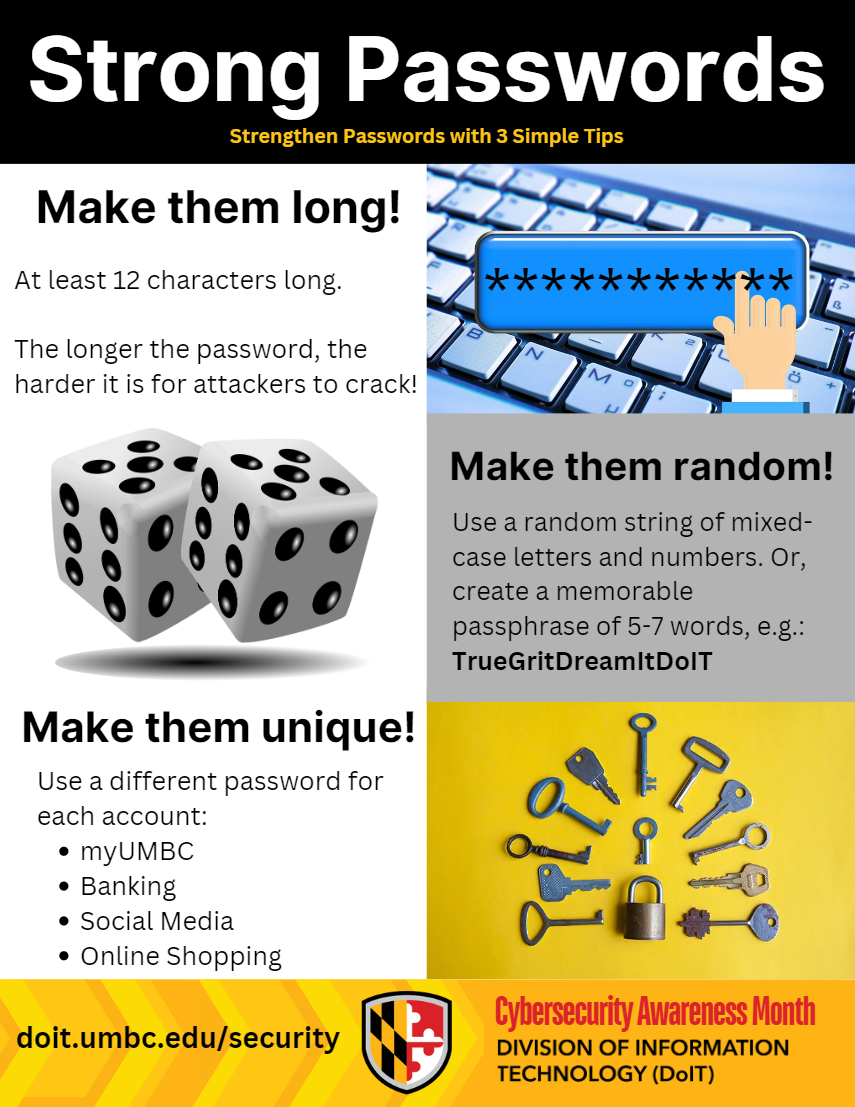
<Title>Cybersecurity Awareness Month: Create Strong Passwords</Title>
<Tagline>Strengthen Passwords with Three Simple Tips</Tagline>
<Body>
<![CDATA[
    <div class="html-content"><span><h3><span>1. Use Unique Passwords: </span></h3><ul><li><p><span>UMBC requires all students and staff to have a strong password for their account to help keep it secure. Find the UMBC </span><a href="https://umbc.atlassian.net/wiki/spaces/faq/pages/30736444/What+are+the+requirements+for+creating+a+myUMBC+password" rel="nofollow external" class="bo"><span>requirements for creating strong passwords here</span></a>.</p></li></ul><h3><span>2. Do Not Reuse Passwords:</span></h3><ul><li><p><span>Use different secure passwords for all of your personal, banking, and UMBC accounts. If one password were to appear in a data breach that you actively use in other accounts, attackers may try to use this password to access these accounts.</span></p></li><li><p><span>A password manager can be used to manage your different passwords easily. For an additional level of security for sensitive accounts, you can store part of the password in the password manager and add additional characters to the password when you are logging in. </span></p></li></ul><h3><span>3. Do Not Use Similar Passwords:</span></h3><ul><li><p><span>When changing your password, UMBC will not let you use a password that has been previously set.</span></p></li><li><p><span>Refrain from using your old passwords and slightly modifying them. For example, if your previous password was D0gL0vEr1, do not change the new password to D0gL0vEr2. This makes it easier for the hacker to guess the new password if they already know the previous password.</span></p></li></ul><p><span><span><img src="https://lh7-rt.googleusercontent.com/docsz/AD_4nXd8ZUqPKW6n8WgSyj3et4Ug16tRpUX2O6c20mQf_WBlgSQibqofGBb0QRmldTDdi4oCrkBZTr0zz5Na_Z6_ngsP08jFWEW5BnKQvFrxIyXAmkMkq8ZDUOec-b-QiQfKTVvH84m-zQxQvjmoaJqoDFSOKEy9?key=ciB3wloKbf3CHOE_YTEWCg" width="463" height="600" style="max-width: 100%; height: auto;"></span></span><span></span></p><br><h5><span>For more information about UMBC’s cybersecurity initiatives, go to </span><a href="http://doit.umbc.edu/security" rel="nofollow external" class="bo"><span>doit.umbc.edu/security</span></a><span>. </span></h5><div><span><div><span><br></span></div></span></div></span></div>
]]>
</Body>
<Summary>1. Use Unique Passwords:     UMBC requires all students and staff to have a strong password for their account to help keep it secure. Find the UMBC requirements for creating strong passwords here....</Summary>
<Website>http://doit.umbc.edu/security</Website>
<TrackingUrl>https://beta.my.umbc.edu/api/v0/pixel/news/144740/guest@my.umbc.edu/ee92262a03ce5fc594d682b40d375d56/api/pixel</TrackingUrl>
<Tag>cyber</Tag>
<Tag>cybersecurity</Tag>
<Tag>passwords</Tag>
<Group token="doit">Division of Information Technology (DoIT)</Group>
<GroupUrl>https://beta.my.umbc.edu/groups/doit</GroupUrl>
<AvatarUrl>https://assets2-beta.my.umbc.edu/system/shared/avatars/groups/000/000/021/d27760c5de12c74b73faec8d0e631acf/xsmall.png?1727453227</AvatarUrl>
<AvatarUrl size="original">https://assets2-beta.my.umbc.edu/system/shared/avatars/groups/000/000/021/d27760c5de12c74b73faec8d0e631acf/original.JPG?1727453227</AvatarUrl>
<AvatarUrl size="xxlarge">https://assets1-beta.my.umbc.edu/system/shared/avatars/groups/000/000/021/d27760c5de12c74b73faec8d0e631acf/xxlarge.png?1727453227</AvatarUrl>
<AvatarUrl size="xlarge">https://assets3-beta.my.umbc.edu/system/shared/avatars/groups/000/000/021/d27760c5de12c74b73faec8d0e631acf/xlarge.png?1727453227</AvatarUrl>
<AvatarUrl size="large">https://assets2-beta.my.umbc.edu/system/shared/avatars/groups/000/000/021/d27760c5de12c74b73faec8d0e631acf/large.png?1727453227</AvatarUrl>
<AvatarUrl size="medium">https://assets2-beta.my.umbc.edu/system/shared/avatars/groups/000/000/021/d27760c5de12c74b73faec8d0e631acf/medium.png?1727453227</AvatarUrl>
<AvatarUrl size="small">https://assets2-beta.my.umbc.edu/system/shared/avatars/groups/000/000/021/d27760c5de12c74b73faec8d0e631acf/small.png?1727453227</AvatarUrl>
<AvatarUrl size="xsmall">https://assets2-beta.my.umbc.edu/system/shared/avatars/groups/000/000/021/d27760c5de12c74b73faec8d0e631acf/xsmall.png?1727453227</AvatarUrl>
<AvatarUrl size="xxsmall">https://assets4-beta.my.umbc.edu/system/shared/avatars/groups/000/000/021/d27760c5de12c74b73faec8d0e631acf/xxsmall.png?1727453227</AvatarUrl>
<Sponsor>Division of Information Technology (DoIT)</Sponsor>
<ThumbnailUrl size="xxlarge">https://assets4-beta.my.umbc.edu/system/shared/thumbnails/news/000/144/740/0ec52b1e1eac533c53d3d855486809d2/xxlarge.jpg?1728913586</ThumbnailUrl>
<ThumbnailUrl size="xlarge">https://assets1-beta.my.umbc.edu/system/shared/thumbnails/news/000/144/740/0ec52b1e1eac533c53d3d855486809d2/xlarge.jpg?1728913586</ThumbnailUrl>
<ThumbnailUrl size="large">https://assets2-beta.my.umbc.edu/system/shared/thumbnails/news/000/144/740/0ec52b1e1eac533c53d3d855486809d2/large.jpg?1728913586</ThumbnailUrl>
<ThumbnailUrl size="medium">https://assets4-beta.my.umbc.edu/system/shared/thumbnails/news/000/144/740/0ec52b1e1eac533c53d3d855486809d2/medium.jpg?1728913586</ThumbnailUrl>
<ThumbnailUrl size="small">https://assets1-beta.my.umbc.edu/system/shared/thumbnails/news/000/144/740/0ec52b1e1eac533c53d3d855486809d2/small.jpg?1728913586</ThumbnailUrl>
<ThumbnailUrl size="xsmall">https://assets2-beta.my.umbc.edu/system/shared/thumbnails/news/000/144/740/0ec52b1e1eac533c53d3d855486809d2/xsmall.jpg?1728913586</ThumbnailUrl>
<ThumbnailUrl size="xxsmall">https://assets4-beta.my.umbc.edu/system/shared/thumbnails/news/000/144/740/0ec52b1e1eac533c53d3d855486809d2/xxsmall.jpg?1728913586</ThumbnailUrl>
<PawCount>2</PawCount>
<CommentCount>0</CommentCount>
<CommentsAllowed>true</CommentsAllowed>
<PostedAt>Mon, 14 Oct 2024 09:53:52 -0400</PostedAt>
</NewsItem>

</News>