Recent Change to UMBC's Authentication Experience
On Monday, April 26th, DoIT applied a patch to UMBC’s single sign-on solution, WebAuth, that improves security and lays the foundation for future enhancements. As a result of this change, WebAuth now briefly shows an intermediate page before redirecting the web browser to the requested site. This page quickly shows "Loading/Saving login session information from/to the browser..." . Several users have expressed questions and concerns about this page, because it often is not on-screen long enough to read in its entirety. Rest assured that the intermediate pages are not malicious. DoIT is actively working on improving this experience and making it less intrusive. Within the next week you will see improvements to the text and look and feel of the pages. Feel free to contact us if you have further questions. Thanks for bearing with us while we work to keep our infrastructure updated.
Todd Haddaway
Senior Director, Middleware and Application Infrastructure
DoIT
]]>
On Monday, April 26th, DoIT applied a patch to UMBC’s single sign-on solution, WebAuth, that improves security and lays the foundation for future enhancements. As a result of this change, WebAuth...
https://beta.my.umbc.edu/api/v0/pixel/news/101463/guest@my.umbc.edu/c8aade5ece4bb579f568147e092a2985/api/pixel
it
IT Security - DoIT Cybersecurity Assurance and Digital Trust
https://beta.my.umbc.edu/groups/itsecurity
https://assets3-beta.my.umbc.edu/images/avatars/group/7/xsmall.png?1776995010
https://assets2-beta.my.umbc.edu/images/avatars/group/7/original.png?1776995010
https://assets4-beta.my.umbc.edu/images/avatars/group/7/xxlarge.png?1776995010
https://assets1-beta.my.umbc.edu/images/avatars/group/7/xlarge.png?1776995010
https://assets2-beta.my.umbc.edu/images/avatars/group/7/large.png?1776995010
https://assets3-beta.my.umbc.edu/images/avatars/group/7/medium.png?1776995010
https://assets4-beta.my.umbc.edu/images/avatars/group/7/small.png?1776995010
https://assets3-beta.my.umbc.edu/images/avatars/group/7/xsmall.png?1776995010
https://assets2-beta.my.umbc.edu/images/avatars/group/7/xxsmall.png?1776995010
IT Security - DoIT
https://assets4-beta.my.umbc.edu/system/shared/thumbnails/news/000/101/463/414e575fa599a7464adea05ececd9510/xxlarge.jpg?1620074439
https://assets4-beta.my.umbc.edu/system/shared/thumbnails/news/000/101/463/414e575fa599a7464adea05ececd9510/xlarge.jpg?1620074439
https://assets2-beta.my.umbc.edu/system/shared/thumbnails/news/000/101/463/414e575fa599a7464adea05ececd9510/large.jpg?1620074439
https://assets2-beta.my.umbc.edu/system/shared/thumbnails/news/000/101/463/414e575fa599a7464adea05ececd9510/medium.jpg?1620074439
https://assets4-beta.my.umbc.edu/system/shared/thumbnails/news/000/101/463/414e575fa599a7464adea05ececd9510/small.jpg?1620074439
https://assets2-beta.my.umbc.edu/system/shared/thumbnails/news/000/101/463/414e575fa599a7464adea05ececd9510/xsmall.jpg?1620074439
https://assets4-beta.my.umbc.edu/system/shared/thumbnails/news/000/101/463/414e575fa599a7464adea05ececd9510/xxsmall.jpg?1620074439
2
1
true
Mon, 03 May 2021 16:41:16 -0400
Recent Change to UMBC's Authentication Experience
On Monday, April 26th, DoIT applied a patch to UMBC’s single sign-on solution, WebAuth, that improves security and lays the foundation for future enhancements. As a result of this change, WebAuth now briefly shows an intermediate page before redirecting the web browser to the requested site. This page quickly shows "Loading/Saving login session information from/to the browser..." . Several users have expressed questions and concerns about this page, because it often is not on-screen long enough to read in its entirety. Rest assured that the intermediate pages are not malicious. DoIT is actively working on improving this experience and making it less intrusive. Within the next week you will see improvements to the text and look and feel of the pages. Feel free to contact us if you have further questions. Thanks for bearing with us while we work to keep our infrastructure updated.
Todd Haddaway
Senior Director, Middleware and Application Infrastructure
DoIT
]]>
On Monday, April 26th, DoIT applied a patch to UMBC’s single sign-on solution, WebAuth, that improves security and lays the foundation for future enhancements. As a result of this change, WebAuth...
https://beta.my.umbc.edu/api/v0/pixel/news/101462/guest@my.umbc.edu/f9cccb2a571d3c2ab8d5aa7fee24541c/api/pixel
Division of Information Technology (DoIT)
https://beta.my.umbc.edu/groups/doit
https://assets2-beta.my.umbc.edu/system/shared/avatars/groups/000/000/021/d27760c5de12c74b73faec8d0e631acf/xsmall.png?1727453227
https://assets2-beta.my.umbc.edu/system/shared/avatars/groups/000/000/021/d27760c5de12c74b73faec8d0e631acf/original.JPG?1727453227
https://assets1-beta.my.umbc.edu/system/shared/avatars/groups/000/000/021/d27760c5de12c74b73faec8d0e631acf/xxlarge.png?1727453227
https://assets3-beta.my.umbc.edu/system/shared/avatars/groups/000/000/021/d27760c5de12c74b73faec8d0e631acf/xlarge.png?1727453227
https://assets2-beta.my.umbc.edu/system/shared/avatars/groups/000/000/021/d27760c5de12c74b73faec8d0e631acf/large.png?1727453227
https://assets2-beta.my.umbc.edu/system/shared/avatars/groups/000/000/021/d27760c5de12c74b73faec8d0e631acf/medium.png?1727453227
https://assets2-beta.my.umbc.edu/system/shared/avatars/groups/000/000/021/d27760c5de12c74b73faec8d0e631acf/small.png?1727453227
https://assets2-beta.my.umbc.edu/system/shared/avatars/groups/000/000/021/d27760c5de12c74b73faec8d0e631acf/xsmall.png?1727453227
https://assets4-beta.my.umbc.edu/system/shared/avatars/groups/000/000/021/d27760c5de12c74b73faec8d0e631acf/xxsmall.png?1727453227
Division of Information Technology (DoIT)
0
0
false
Mon, 03 May 2021 16:00:25 -0400
Three PIVOT Resources to Prepare for Summer Online Teaching
The Planning Instructional Variety for Online Teaching (PIVOT) program is designed to support faculty as they prepare for the virtual classroom. For faculty who will be teaching this summer, the instructional technology team would like to share several resources to support online course development and instruction.
- Choose from our PIVOT Solo lessons to refresh or enhance your online teaching preparation. Five key topics cover course organization, active learning, community building, assessment, and supporting students.
- Explore our Panopto folder for a wide variety of recorded webinars on various instructional technologies available at UMBC.
- Attend a PIVOT Office Hours session to ask questions about strategies, effective practices, and available tools. Sessions include:
As always, if you have any questions, please consider the following options:
]]>
The Planning Instructional Variety for Online Teaching (PIVOT) program is designed to support faculty as they prepare for the virtual classroom. For faculty who will be teaching this summer, the...
https://my3.my.umbc.edu/groups/instructional-technology/posts/100989
https://beta.my.umbc.edu/api/v0/pixel/news/100989/guest@my.umbc.edu/1ae30c425d908eb836c55b39f45cb349/api/pixel
online-learning
pivot
su2021
Instructional Technology
https://beta.my.umbc.edu/groups/instructional-technology
https://assets2-beta.my.umbc.edu/system/shared/avatars/groups/000/001/164/dec3b026b81ee6d890a8f82f75c94a2e/xsmall.png?1446126703
https://assets1-beta.my.umbc.edu/system/shared/avatars/groups/000/001/164/dec3b026b81ee6d890a8f82f75c94a2e/original.png?1446126703
https://assets2-beta.my.umbc.edu/system/shared/avatars/groups/000/001/164/dec3b026b81ee6d890a8f82f75c94a2e/xxlarge.png?1446126703
https://assets1-beta.my.umbc.edu/system/shared/avatars/groups/000/001/164/dec3b026b81ee6d890a8f82f75c94a2e/xlarge.png?1446126703
https://assets1-beta.my.umbc.edu/system/shared/avatars/groups/000/001/164/dec3b026b81ee6d890a8f82f75c94a2e/large.png?1446126703
https://assets4-beta.my.umbc.edu/system/shared/avatars/groups/000/001/164/dec3b026b81ee6d890a8f82f75c94a2e/medium.png?1446126703
https://assets3-beta.my.umbc.edu/system/shared/avatars/groups/000/001/164/dec3b026b81ee6d890a8f82f75c94a2e/small.png?1446126703
https://assets2-beta.my.umbc.edu/system/shared/avatars/groups/000/001/164/dec3b026b81ee6d890a8f82f75c94a2e/xsmall.png?1446126703
https://assets3-beta.my.umbc.edu/system/shared/avatars/groups/000/001/164/dec3b026b81ee6d890a8f82f75c94a2e/xxsmall.png?1446126703
Instructional Technology
https://assets1-beta.my.umbc.edu/system/shared/thumbnails/news/000/100/989/c232b706f1f4c989b207ae2f750ce352/xxlarge.jpg?1618599329
https://assets3-beta.my.umbc.edu/system/shared/thumbnails/news/000/100/989/c232b706f1f4c989b207ae2f750ce352/xlarge.jpg?1618599329
https://assets4-beta.my.umbc.edu/system/shared/thumbnails/news/000/100/989/c232b706f1f4c989b207ae2f750ce352/large.jpg?1618599329
https://assets4-beta.my.umbc.edu/system/shared/thumbnails/news/000/100/989/c232b706f1f4c989b207ae2f750ce352/medium.jpg?1618599329
https://assets4-beta.my.umbc.edu/system/shared/thumbnails/news/000/100/989/c232b706f1f4c989b207ae2f750ce352/small.jpg?1618599329
https://assets3-beta.my.umbc.edu/system/shared/thumbnails/news/000/100/989/c232b706f1f4c989b207ae2f750ce352/xsmall.jpg?1618599329
https://assets3-beta.my.umbc.edu/system/shared/thumbnails/news/000/100/989/c232b706f1f4c989b207ae2f750ce352/xxsmall.jpg?1618599329
4
0
true
Wed, 28 Apr 2021 10:11:31 -0400
Wed, 28 Apr 2021 10:11:40 -0400
SU2021 Courses Created in Blackboard on April 27, 2021
Blackboard course shells for SU2021 were created on April 27, 2021.
The Ultra Course Preview setting is again enabled in SU2021 courses to allow faculty adoption with anupdated support schedule of Ultra (see prior announcement). The Ultra Course Preview tool allows faculty to convert an existing Original course and see what it looks like in Ultra.
Ally, an accessibility tool, is also enabled in all new course shells as of SU2019 Ally automatically scans uploaded and created course content, then performs a series of steps to make that content more accessible. Please review the Ally FAQs for more information about the accessibility indicators on course content and alternative formats.
Check out these 3 PIVOT resources to prepare for summer online teaching.
About Course Creation
- If you are an instructor, and your name is not associated with the course you are teaching in the SOC, please see your Departmental Scheduling Coordinator to resolve the issue. Once you are listed in the SOC, your Bb course shell will be created automatically.
- If you and your Department Scheduling Coordinator believe you are correctly assigned as the instructor of record in the SOC and you do not see your course shell in Blackboard, please submit a Request Tracker (RT) ticket via my.umbc.edu/help.
- If you need a Bb shell for a research or independent study course, please submit a new course request.
Instructors who teach multiple sections of the same course will find those enrollments merged into one Bb course shell. These sections may be split upon request by an RT ticket, which we recommend submitting at least one week before the semester starts, if not as soon as courses are created in Blackboard.
Student enrollment in Bb mirrors the official registration in SA and updates hourly. However, courses are not accessible to students by default until the instructor of record makes them available.
As always, if you have any questions, please consider the following options:
]]>
Blackboard course shells for SU2021 were created on April 27, 2021. The Ultra Course Preview setting is again enabled in SU2021 courses to allow faculty adoption with anupdated support schedule...
https://my3.my.umbc.edu/groups/bbannouncements/posts/101311
https://beta.my.umbc.edu/api/v0/pixel/news/101311/guest@my.umbc.edu/53052e905493555ebb3ab8e08305d5df/api/pixel
blackboard
course-creation
su2021
summer
ultra-course-preview
Blackboard Announcements
https://beta.my.umbc.edu/groups/bbannouncements
https://assets1-beta.my.umbc.edu/system/shared/avatars/groups/000/000/319/f6b35e5217428f5021e113525a55e6f4/xsmall.png?1437137819
https://assets1-beta.my.umbc.edu/system/shared/avatars/groups/000/000/319/f6b35e5217428f5021e113525a55e6f4/original.png?1437137819
https://assets4-beta.my.umbc.edu/system/shared/avatars/groups/000/000/319/f6b35e5217428f5021e113525a55e6f4/xxlarge.png?1437137819
https://assets4-beta.my.umbc.edu/system/shared/avatars/groups/000/000/319/f6b35e5217428f5021e113525a55e6f4/xlarge.png?1437137819
https://assets1-beta.my.umbc.edu/system/shared/avatars/groups/000/000/319/f6b35e5217428f5021e113525a55e6f4/large.png?1437137819
https://assets4-beta.my.umbc.edu/system/shared/avatars/groups/000/000/319/f6b35e5217428f5021e113525a55e6f4/medium.png?1437137819
https://assets1-beta.my.umbc.edu/system/shared/avatars/groups/000/000/319/f6b35e5217428f5021e113525a55e6f4/small.png?1437137819
https://assets1-beta.my.umbc.edu/system/shared/avatars/groups/000/000/319/f6b35e5217428f5021e113525a55e6f4/xsmall.png?1437137819
https://assets4-beta.my.umbc.edu/system/shared/avatars/groups/000/000/319/f6b35e5217428f5021e113525a55e6f4/xxsmall.png?1437137819
Blackboard Announcements
https://assets2-beta.my.umbc.edu/system/shared/thumbnails/news/000/101/311/5e0492bd7b072c58f867a8981cd03380/xxlarge.jpg?1619618638
https://assets1-beta.my.umbc.edu/system/shared/thumbnails/news/000/101/311/5e0492bd7b072c58f867a8981cd03380/xlarge.jpg?1619618638
https://assets3-beta.my.umbc.edu/system/shared/thumbnails/news/000/101/311/5e0492bd7b072c58f867a8981cd03380/large.jpg?1619618638
https://assets3-beta.my.umbc.edu/system/shared/thumbnails/news/000/101/311/5e0492bd7b072c58f867a8981cd03380/medium.jpg?1619618638
https://assets3-beta.my.umbc.edu/system/shared/thumbnails/news/000/101/311/5e0492bd7b072c58f867a8981cd03380/small.jpg?1619618638
https://assets1-beta.my.umbc.edu/system/shared/thumbnails/news/000/101/311/5e0492bd7b072c58f867a8981cd03380/xsmall.jpg?1619618638
https://assets1-beta.my.umbc.edu/system/shared/thumbnails/news/000/101/311/5e0492bd7b072c58f867a8981cd03380/xxsmall.jpg?1619618638
1
0
true
Wed, 28 Apr 2021 10:11:28 -0400
Tue, 25 Mar 2025 14:17:59 -0400
End of Semester Sprint Offers Customized Consults to Faculty
Two Sprints. One Day. Choose your time & topic.
The end of semester is a busy time of year for everyone, especially faculty. Instructional Technology will host two 2-hour sprint sessions on Thursday, May 13, 2021 for faculty to virtually drop-in and receive a shared consult on key topics including: - Recording & sharing videos with Panopto: Flip your classroom & prepare lectures.
- Building online community: Schedule, deliver & record virtual classes with Collaborate.
- Delivering & configuring virtual tests: Create online tests and promote academic integrity in online testing using Bb and Respondus Lockdown Browser.
- Tuning up your Blackboard gradebook: Create columns, drop scores, check calculations, verify weighted totals, etc.
The May 13th sprint will occur in two time slots to accommodate varied schedules.
The virtual drop-in will take place in a Blackboard Collaborate virtual conference room. Please view either the Morning Sprint or Afternoon Sprint myUMBC events and join the session by clicking the "Join Online Event" button at the top of the event page.
Prior to the sprint
Please note that this is not formal training.
There have been reports to the Division of Information Technology (DoIT) that a scammer is calling people and claiming to be from UMBC.The scammer is said to be trying to run an insurance scam and is calling from <14438873438>. The caller ID shows up as UMBC.
According to usa.gov here are some helpful tips to protect yourself from telephone scams. For more information please see the link below.
You can register your phone number with the National Do Not Call registry. If you continue to receive telemarketing calls after you register they are most likely scams.
Be wary of calls claiming that you have won a prize or vacation.
Hang up or do not answer any suspicious phone calls.
Be cautious of caller ID as scammers can spoof or change the phone number that appears on the screen.
Do not give into any pressure from the scammer to take immediate actions.
Do not say anything if the scammer begins by asking “Can you hear me?” as it is stated that this is a common tactic for scammers to record and have proof of you saying “yes”.
Do not provide any financial or personal information to the caller.
Do not send money over the phone especially if the caller asks for it to be wire transferred or with prepaid cards.
The usa.gov article also gives a few links to report telephone scams.
What to do now?
If you received this or a similar scam and have provided any banking or financial information, please notify your bank or financial institution immediately. If you have been sent a check, you should not attempt to cash or deposit it. If you have deposited a check already, please contact your bank and tell them that it may be part of a scam.
Whether you responded to the scam or not, please report it to security@umbc.edu. If any part of the scam was through email please provide full email headers as well. We will also keep track of any other information you submit about the scammers, such as their phone numbers. If you were sent a check or other materials, please send pictures of it and the envelope they came in.
For more information from usa.gov please visit:
https://www.usa.gov/common-scams-frauds
How do I forward full email headers?
https://wiki.umbc.edu/pages/viewpage.action?pageId=1867970
To read more articles published by DoIT Security please visit:
https://itsecurity.umbc.edu/critical/?tag=notice.
https://itsecurity.umbc.edu/home/covid-19-news/?tag=covid19
]]>
There have been reports to the Division of Information Technology (DoIT) that a scammer is calling people and claiming to be from UMBC.The scammer is said to be trying to run an insurance scam and...
https://beta.my.umbc.edu/api/v0/pixel/news/101261/guest@my.umbc.edu/fde6b0c9767e936ecabd5641222a66bb/api/pixel
notice
IT Security - DoIT Cybersecurity Assurance and Digital Trust
https://beta.my.umbc.edu/groups/itsecurity
https://assets3-beta.my.umbc.edu/images/avatars/group/7/xsmall.png?1776995010
https://assets2-beta.my.umbc.edu/images/avatars/group/7/original.png?1776995010
https://assets4-beta.my.umbc.edu/images/avatars/group/7/xxlarge.png?1776995010
https://assets1-beta.my.umbc.edu/images/avatars/group/7/xlarge.png?1776995010
https://assets2-beta.my.umbc.edu/images/avatars/group/7/large.png?1776995010
https://assets3-beta.my.umbc.edu/images/avatars/group/7/medium.png?1776995010
https://assets4-beta.my.umbc.edu/images/avatars/group/7/small.png?1776995010
https://assets3-beta.my.umbc.edu/images/avatars/group/7/xsmall.png?1776995010
https://assets2-beta.my.umbc.edu/images/avatars/group/7/xxsmall.png?1776995010
IT Security - DoIT
0
0
true
Mon, 26 Apr 2021 15:52:09 -0400
Fake Paycheck
Fake Paychecks for Fake Jobs
The Department of Information Technology (DoIT) has been notified of a scam. The scammer, impersonating a member of the UMBC staff, asks users to deposit a fake check. Attached below is a sample of the message and the check. Please note that the name of the recipient was removed for privacy reasons.
__________________________________________________________________________
From: Lisa Drouillard
Date: Thu, Apr 22, 2021 at 8:42 AM
Subject: Paycheck
To: <Your Email>
Hello <Your Name>
Follow the instruction below to deposit the check
Print out at 67% and Cut to a ( check size/shape ) At the back of your check Endorse by writing Your
Full name
Mobile Deposit Only
Your account number
Sign.
Once you done you make a mobile deposit
Thank You
Account Officer
Lisa Drouillard
Account Officer
__________________________________________________________________________
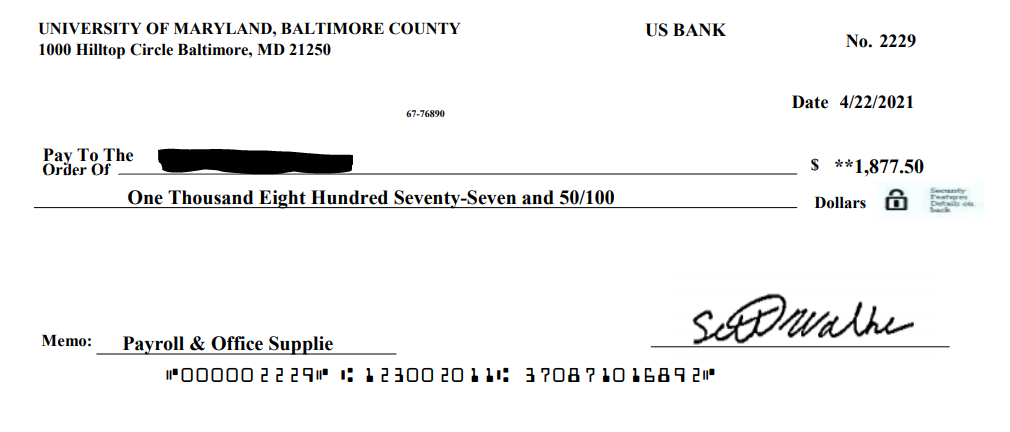
If you have received this email, DO NOT DEPOSIT THE CHECK. If you have ALREADY DEPOSITED the check, please contact your bank and tell them that it may be part of a scam.
IMMEDIATELY forward the email and the check to security@umbc.edu along with the email headers.
Instruction on how to locate the email headers can be found here: https://wiki.umbc.edu/pages/viewpage.action?pageId=1867970
Follow us on myUMBC:https://my3.my.umbc.edu/groups/itsecurity
]]>
The Department of Information Technology (DoIT) has been notified of a scam. The scammer, impersonating a member of the UMBC staff, asks users to deposit a fake check. Attached below is a sample...
https://beta.my.umbc.edu/api/v0/pixel/news/101260/guest@my.umbc.edu/6b0e41acc9858ecef37efccd95d8a439/api/pixel
notice
IT Security - DoIT Cybersecurity Assurance and Digital Trust
https://beta.my.umbc.edu/groups/itsecurity
https://assets3-beta.my.umbc.edu/images/avatars/group/7/xsmall.png?1776995010
https://assets2-beta.my.umbc.edu/images/avatars/group/7/original.png?1776995010
https://assets4-beta.my.umbc.edu/images/avatars/group/7/xxlarge.png?1776995010
https://assets1-beta.my.umbc.edu/images/avatars/group/7/xlarge.png?1776995010
https://assets2-beta.my.umbc.edu/images/avatars/group/7/large.png?1776995010
https://assets3-beta.my.umbc.edu/images/avatars/group/7/medium.png?1776995010
https://assets4-beta.my.umbc.edu/images/avatars/group/7/small.png?1776995010
https://assets3-beta.my.umbc.edu/images/avatars/group/7/xsmall.png?1776995010
https://assets2-beta.my.umbc.edu/images/avatars/group/7/xxsmall.png?1776995010
IT Security - DoIT
0
1
true
Mon, 26 Apr 2021 15:49:07 -0400
12 Effective Practices for Delivering Blackboard Tests
Get ready for final exams with these test prep tips
Online tests and assignments are an effective and convenient way to assess students in the virtual environment. Throughout the semester, faculty can leverage many different options and settings for digital assessments. Here are a dozen tips to improve your test administration and assignment collection as the semester reaches its conclusion.
1. Avoid Force Complete on Original Tests
This legacy setting on Original tests prevents students from accessing the test environment if they prematurely leave. Unfortunately, if students lose internet access, have technical difficulties, double-click a link, they can be kicked out of the exam, requiring that you add a new attempt or reset the attempt altogether. Instead of using force complete, set your exam to Auto Submit, which will allow students back into the test and collect the student’s submission at the end of the allotted time whether or not the student is finished.
2. Practice Before Proctoring
Before you use Respondus Lockdown Browser (alone or with live proctoring or with Monitor enabled), create a no-points practice quiz with unlimited attempts so students can experience the testing environment and configure their computers before they take an exam. If you do not have a practice quiz, be sure to allow plenty of extra time for students to set up. This is especially important if students need to update their lockdown browser.
3. Describe Test Expectations
Let students know how many questions and what kind of questions they will have on the test. Post the test limit, whether the test will auto-submit when time is up, and if there is more than one attempt. Include start and end times. Link to relevant FAQs on test taking tips or using Respondus Lockdown Browser, if enabled.
4. Communicate Your Handling of Technical Difficulties
Tell students how you will address any potential technical issues during a test. Be fair and swift, especially if your test timer is limited. Consider whether you will respond to individual emails or post an announcement. Some technical issues may be deferred until business hours the next day so please consider how you will handle these types of questions. Know which vendors offer 24/7 support (e.g., Respondus) so you can refer students to those resources.
5. Stagger Access to the Test
Avoid having too many students access your test at the same time. You can set a wide window when students can start the test, but create a timer so once the test starts, students only have a fixed amount of time to complete it. You can also apply Adaptive Release (Original) or Conditional Release (Ultra) rules to restrict access to specific groups of students.
6. Set Question Display for the Right Situation
Showing all questions on one page can be great for short tests during a short amount of time. However, for longer tests (25+ questions or taking more than 1 hour), consider that students may benefit from displaying one question at a time. Additionally, Blackboard can time out if the test is too long: See #7 next on our list!
7. Break Up Large Tests
Blackboard will time out after three hours of general inactivity. Instead of delivering one long 2-hour test, provide four 30-minute tests. Chunking the test eases impact on Blackboard and student network connections while also providing opportunities for those screen and stretching breaks. Adaptive Release (Original) or Conditional Release (Ultra) rules can also be leveraged to open the next part of an assessment based on specific criteria such as a minimum grade or date/time.
8. Allow Backtracking on Original Tests
Students like to check their answers or skip questions if they are uncertain about an answer. If you don’t allow students to backtrack, they will attempt to use the back arrow on the browser and inadvertently cause an issue with the test or lock themselves out.
9. Dip Into the Pool
Leverage question pools to generate randomized and unique tests for students. Random blocks (Original) and Question pools (Ultra) allow you to choose a defined number of questions (5) out of a larger collection of questions (50) and randomly distribute those questions to students so each one sees a different set. Learn how CHEM 101 and CHEM 102 used nearly 1500 questions to create a robust assessment series.
10. Set Access Codes on Ultra Tests to Prevent Late Submissions
Instead of hiding an Ultra test with a date restriction, use an access code after the test period ends. This allows students to see their grades and feedback and prevents any late submissions.
11. Remind Students to Check Technology
Students should use the latest version of Chrome or Firefox when taking a Blackboard test, and they should check for browser updates regularly. To optimize performance, all other applications should be closed unless you allow access during the test. Students should verify that cookies are enabled for Blackboard, Collaborate, and related third-party tools. Respondus Lockdown Browser has its own requirements, including manual update of its application, and restrictions as well as settings for faculty if there are specific use cases for accessing websites, calculators, and spreadsheets.
12. Skip Timed Tests and Go Authentic
Last semester, students told us they appreciated flexible online test formats and alternative, authentic assessments. In Redesigning Assessments for Interaction and Engagement, a recorded presentation from Quality Matters, discover assessment types, examples, and strategies, including designing authentic assessments and using LMS tools, to support your assessment goals.
As always, if you have any questions, please consider the following options:
By: Mariann Hawken
]]>
Online tests and assignments are an effective and convenient way to assess students in the virtual environment. Throughout the semester, faculty can leverage many different options and settings...
https://my3.my.umbc.edu/groups/instructional-technology/posts/101114
https://beta.my.umbc.edu/api/v0/pixel/news/101114/guest@my.umbc.edu/252eba2b67e1650697d0d10c2a16a19b/api/pixel
assessments
blackboard
effective-practices
hawken
Instructional Technology
https://beta.my.umbc.edu/groups/instructional-technology
https://assets2-beta.my.umbc.edu/system/shared/avatars/groups/000/001/164/dec3b026b81ee6d890a8f82f75c94a2e/xsmall.png?1446126703
https://assets1-beta.my.umbc.edu/system/shared/avatars/groups/000/001/164/dec3b026b81ee6d890a8f82f75c94a2e/original.png?1446126703
https://assets2-beta.my.umbc.edu/system/shared/avatars/groups/000/001/164/dec3b026b81ee6d890a8f82f75c94a2e/xxlarge.png?1446126703
https://assets1-beta.my.umbc.edu/system/shared/avatars/groups/000/001/164/dec3b026b81ee6d890a8f82f75c94a2e/xlarge.png?1446126703
https://assets1-beta.my.umbc.edu/system/shared/avatars/groups/000/001/164/dec3b026b81ee6d890a8f82f75c94a2e/large.png?1446126703
https://assets4-beta.my.umbc.edu/system/shared/avatars/groups/000/001/164/dec3b026b81ee6d890a8f82f75c94a2e/medium.png?1446126703
https://assets3-beta.my.umbc.edu/system/shared/avatars/groups/000/001/164/dec3b026b81ee6d890a8f82f75c94a2e/small.png?1446126703
https://assets2-beta.my.umbc.edu/system/shared/avatars/groups/000/001/164/dec3b026b81ee6d890a8f82f75c94a2e/xsmall.png?1446126703
https://assets3-beta.my.umbc.edu/system/shared/avatars/groups/000/001/164/dec3b026b81ee6d890a8f82f75c94a2e/xxsmall.png?1446126703
Instructional Technology
https://assets2-beta.my.umbc.edu/system/shared/thumbnails/news/000/101/114/71c7604597a4f2060c4de9e5a2b890df/xxlarge.jpg?1619029472
https://assets2-beta.my.umbc.edu/system/shared/thumbnails/news/000/101/114/71c7604597a4f2060c4de9e5a2b890df/xlarge.jpg?1619029472
https://assets4-beta.my.umbc.edu/system/shared/thumbnails/news/000/101/114/71c7604597a4f2060c4de9e5a2b890df/large.jpg?1619029472
https://assets1-beta.my.umbc.edu/system/shared/thumbnails/news/000/101/114/71c7604597a4f2060c4de9e5a2b890df/medium.jpg?1619029472
https://assets2-beta.my.umbc.edu/system/shared/thumbnails/news/000/101/114/71c7604597a4f2060c4de9e5a2b890df/small.jpg?1619029472
https://assets2-beta.my.umbc.edu/system/shared/thumbnails/news/000/101/114/71c7604597a4f2060c4de9e5a2b890df/xsmall.jpg?1619029472
https://assets1-beta.my.umbc.edu/system/shared/thumbnails/news/000/101/114/71c7604597a4f2060c4de9e5a2b890df/xxsmall.jpg?1619029472
11
0
true
Mon, 26 Apr 2021 12:38:48 -0400
Tue, 11 May 2021 11:55:15 -0400
Job Scam: “UMBC HAPP Employment”
Fake Job Offer for Health Administration and Policy Program
The Division of Information Technology (DoIT) has received reports of another administrative assistant job scam. Below is an example of this job scam email in which the scammer is claiming to be Robert Williams. Mr. Williams does work for UMBC, but not in the Health Administration and Policy Program (HAPP). He is not advertising for an administrative assistant. He did not send this message. The From field is a fake. The phone number below is not his.
This is a scam.
From: Robert Williams <robwill@umbc.edu> Date: Thu, Apr 22, 2021 at 10:20 AM Subject: UMBC HAPP Employment To:
University of Maryland, Baltimore County is seeking a Research Administrative Assistant /services of a competent HAPP Dept Student, Administrative Assistant to work Part-time and get paid $350 weekly. Tasks will be carried out remotely. If interested, Do text your name to (443) 437-4263 so as to proceed
Best Regards,
Dr Robert Williams Assistant Director, Decision Support Institutional Research Administration Bldg, Room 405 CA84489 (443) 437-4263 |
The scammer is attempting to establish contact in order to fake an offer of employment, build trust, and then get you to purchase something expensive (e.g., iTunes gift cards, cryptocurrency, etc.) that can be transmitted back to them by text message or email. At that time, you will receive a picture of a check to print and scan for deposit using your bank-by-phone app. The check will bounce but your bank will take from 3-5 days to tell you this. Your money will be gone. You will not get it back.
You can avoid all of that. If you receive this or any similar message, please do not respond.
What to do now?
If you do receive this or a similar scam, please DO NOT respond any further or click on any URLs. If you have provided any banking or financial information, please notify your bank or financial institution immediately. If you have been sent a check, you should not attempt to cash or deposit it. If you have deposited a check already, please contact your bank and tell them that it may be part of a scam.
Whether you responded to the scam or not, please forward the message (with the email headers) to security@umbc.edu. We will also keep track of any other information you submit about the scammers, such as their phone numbers. If you were sent a check or other materials, please send pictures of it and the envelope they came in.
How do I forward full email headers?
https://wiki.umbc.edu/pages/viewpage.action?pageId=1867970
To read more articles published by DoIT Security please visit:
https://itsecurity.umbc.edu/critical/?tag=notice.
https://itsecurity.umbc.edu/home/covid-19-news/?tag=covid19
]]>
The Division of Information Technology (DoIT) has received reports of another administrative assistant job scam. Below is an example of this job scam email in which the scammer is claiming to be...
https://beta.my.umbc.edu/api/v0/pixel/news/101180/guest@my.umbc.edu/29b5e491af854e949848caf1f9d437c5/api/pixel
notice
IT Security - DoIT Cybersecurity Assurance and Digital Trust
https://beta.my.umbc.edu/groups/itsecurity
https://assets3-beta.my.umbc.edu/images/avatars/group/7/xsmall.png?1776995010
https://assets2-beta.my.umbc.edu/images/avatars/group/7/original.png?1776995010
https://assets4-beta.my.umbc.edu/images/avatars/group/7/xxlarge.png?1776995010
https://assets1-beta.my.umbc.edu/images/avatars/group/7/xlarge.png?1776995010
https://assets2-beta.my.umbc.edu/images/avatars/group/7/large.png?1776995010
https://assets3-beta.my.umbc.edu/images/avatars/group/7/medium.png?1776995010
https://assets4-beta.my.umbc.edu/images/avatars/group/7/small.png?1776995010
https://assets3-beta.my.umbc.edu/images/avatars/group/7/xsmall.png?1776995010
https://assets2-beta.my.umbc.edu/images/avatars/group/7/xxsmall.png?1776995010
IT Security - DoIT
0
0
true
Thu, 22 Apr 2021 20:27:35 -0400
Thu, 22 Apr 2021 20:28:53 -0400
“Are you available?” Impersonation Scam
No. Really. Your Supervisor Can Buy Their Own Gift Cards
The scam email below has recently been reported to the Division of Information Technology (DoIT). The example below has the scammer claiming to be UMBC’s Sarah Chard but please note that the scammer impersonated many different people during this campaign.
From: Sarah Chard <(Impersonated)@umbc.edu> Date: Thu, Apr 15, 2021 Subject: Are you on campus or available? To:
Are you available? I need you to handle something for me. I'm currently in a meeting with limited access. Please send me your cell# where I can text you on right away. Best regards, Sarah Chard Chair, Sociology, Anthropology, and Public Health University of Maryland, Baltimore County 213 Public Policy, 1000 Hilltop Circle Baltimore, MD 21250 |
The scam email above is asking users to help them because the scammer claims that they are currently in a meeting. Through different reports it has been seen that the scammer is claiming to be not only UMBC’s Sarah Chard but also David Mitch, Amy Froide, Vandana Janeja, Philip Farabaugh, Michael Hayden, Mark Marten and Jean Fernandez.
Even though this scam email campaign seems to be coming from UMBC accounts, please note that within the headers it shows that the reply-to is <hiredes111@gmail.com> and the X-sender is <robert.baker@westworksstudios.com>.
The scammer is asking for users to reply with their cell phone number. In the past, similar scams have asked users who replied to purchase gift cards or crypto currencies. If you have received this or a similar message, please do not respond or make any purchases for the scammers.
What to do now?
If you do receive this or a similar scam, please DO NOT respond any further or click on any URLs. If you have provided any banking or financial information, please notify your bank or financial institution immediately. If you have been sent a check, you should not attempt to cash or deposit it. If you have deposited a check already, please contact your bank and tell them that it may be part of a scam.
Whether you responded to the scam or not, please forward the message (with the email headers) to security@umbc.edu. We will also keep track of any other information you submit about the scammers, such as their phone numbers. If you were sent a check or other materials, please send pictures of it and the envelope they came in.
How do I forward full email headers?
https://wiki.umbc.edu/pages/viewpage.action?pageId=1867970
To read more articles published by DoIT Security please visit:
https://itsecurity.umbc.edu/critical/?tag=notice.
https://itsecurity.umbc.edu/home/covid-19-news/?tag=covid19
]]>
The scam email below has recently been reported to the Division of Information Technology (DoIT). The example below has the scammer claiming to be UMBC’s Sarah Chard but please note that the...
https://beta.my.umbc.edu/api/v0/pixel/news/101179/guest@my.umbc.edu/e7f522bc88b4f822b4308996b7581c70/api/pixel
notice
IT Security - DoIT Cybersecurity Assurance and Digital Trust
https://beta.my.umbc.edu/groups/itsecurity
https://assets3-beta.my.umbc.edu/images/avatars/group/7/xsmall.png?1776995010
https://assets2-beta.my.umbc.edu/images/avatars/group/7/original.png?1776995010
https://assets4-beta.my.umbc.edu/images/avatars/group/7/xxlarge.png?1776995010
https://assets1-beta.my.umbc.edu/images/avatars/group/7/xlarge.png?1776995010
https://assets2-beta.my.umbc.edu/images/avatars/group/7/large.png?1776995010
https://assets3-beta.my.umbc.edu/images/avatars/group/7/medium.png?1776995010
https://assets4-beta.my.umbc.edu/images/avatars/group/7/small.png?1776995010
https://assets3-beta.my.umbc.edu/images/avatars/group/7/xsmall.png?1776995010
https://assets2-beta.my.umbc.edu/images/avatars/group/7/xxsmall.png?1776995010
IT Security - DoIT
0
0
true
Thu, 22 Apr 2021 20:09:00 -0400