<?xml version="1.0"?>
<News hasArchived="false" page="2" pageCount="3" pageSize="10" timestamp="Sun, 26 Apr 2026 22:20:07 -0400" url="https://beta.my.umbc.edu/groups/doit/posts.xml?page=2&amp;tag=google">
<NewsItem contentIssues="false" id="151983" important="false" status="posted" url="https://beta.my.umbc.edu/groups/doit/posts/151983">
<Title>Declutter Your Inbox: A Guide to Cleaning Up Your Email</Title>
<Tagline>Free up space, reduce stress, and find what you need faster!</Tagline>
<Body>
<![CDATA[
    <div class="html-content">Is your Google Drive nearing its storage limit? Feeling overwhelmed by a cluttered inbox? Cleaning up your Gmail can help with both! Follow these simple steps to free up storage space and make it easier to find the emails that matter.<div><br></div><div><strong>Check Your Google Storage</strong></div><div>To see how much storage you’re using, click here: <a href="https://one.google.com/storage?g1_landing_page=2" rel="nofollow external" class="bo">Check my Google Storage Usage</a></div><div><br><span><h3><span>1. Tackle Emails with Large Attachments</span> </h3><p><span>Attachments in emails are often the biggest culprits for using up your cloud storage. You can quickly find all emails with attachments by using Gmail's search function. Just type </span><span>has:attachment</span><span> into the search bar. Review the results and delete any emails you no longer need.</span></p><ul><li><p><span><strong>Pro-tip:</strong></span><span> If an attachment is important, download and save it to your computer or a more permanent cloud service before deleting the email.</span></p></li></ul><h3><span>2. Unsubscribe from Unwanted Mailing Lists</span><span> </span></h3><p><span>Subscription emails from mailing lists can flood your inbox and contribute significantly to clutter and storage usage. If you're no longer interested in a newsletter or promotional emails, look for the "Unsubscribe" link at the bottom of the email. Unsubscribing stops the emails entirely, saving you the hassle of deleting them one by one.</span></p><h3><span>3. Delete Old and Unnecessary Emails</span><span> </span></h3><p><span>While large attachments are the main culprits, a large volume of old emails also adds up. Take some time to search for and delete emails you no longer need. You can use search terms like </span><span>before:YYYY/MM/DD</span><span> to find emails from a specific date range (e.g., </span><span>before:2024/01/01</span><span> to find emails from last year).</span></p></span></div><img src="https://my3.my.umbc.edu/groups/doit/posts/151983/attachments/58346" alt='A screenshot taken from the Gmail homepage of a slider icon, which has text below it reading "Show search options"' style="max-width: 100%; height: auto;"><div><span><p><em>Advanced Search can also be accessed by clicking the slider icon at the end of the search bar</em></p></span></div><div><span><h3><span>4. Clear Out Your Spam Folder</span><span> </span></h3><p><span>While Gmail automatically empties your spam folder every 30 days, it's a good habit to clear it out more frequently, especially if you receive a lot of spam. This is a quick and easy way to reclaim a small amount of storage space.</span></p><h3><span>5. Empty the Trash Bin</span><span> </span></h3><p><span>This is a critical final step! Remember that moving emails to the trash doesn't delete them permanently—they still take up storage space. Make sure you empty your trash folder regularly after deleting emails to fully recover your storage.</span></p><div><span><h3><span>Do you want to learn more? </span></h3><br><p><span></span><span><strong>Here are some Frequently Asked Questions and Resources
    
    </strong></span></p><ul><li><span><a href="https://umbc.atlassian.net/wiki/x/c3bVAQ" rel="nofollow external" class="bo">How do I use Gmail filters to remove unwanted mail?</a></span></li><li><span><span><a href="https://umbc.atlassian.net/wiki/x/RADVAQ" rel="nofollow external" class="bo">How do I use Gmail Filters?</a></span>
    </span></li><li><span><a href="https://umbc.atlassian.net/wiki/x/RQDVAQ" rel="nofollow external" class="bo">UMBC Gmail FAQs</a></span></li><li><span><a href="https://support.google.com/mail/answer/7190?hl=en&amp;ref_topic=3394593" rel="nofollow external" class="bo">Refine searches in Gmail</a></span></li><li><span><a href="https://support.google.com/mail/answer/6593?hl=en&amp;ref_topic=3394593" rel="nofollow external" class="bo">Search in Gmail</a> </span></li><li><span><a href="https://umbc.atlassian.net/wiki/x/A4CpLQ" rel="nofollow external" class="bo">UMBC Cloud Storage Quotas &amp; Changes</a></span></li></ul></span></div></span></div><div><br></div><div><strong>Recommended Articles:</strong></div><div><div><ul><li><a href="https://umbc.atlassian.net/wiki/external/Y2MxNjE1MTM3M2M3NGEzMzhmMDhkZGYzMmZkM2E0Njc" rel="nofollow external" class="bo">How do I clean up my trash, spam, and large documents in Google Drive?</a></li><li><a href="https://umbc.atlassian.net/l/cp/ubW7gRSf" rel="nofollow external" class="bo">How do I use Google Takeout?</a></li><li><a href="https://support.google.com/accounts/answer/6386856#zippy=" rel="nofollow external" class="bo">How do I copy content from my UMBC account to a personal account?</a></li></ul></div><div><br></div></div></div>
]]>
</Body>
<Summary>Is your Google Drive nearing its storage limit? Feeling overwhelmed by a cluttered inbox? Cleaning up your Gmail can help with both! Follow these simple steps to free up storage space and make it...</Summary>
<AttachmentKind>Image</AttachmentKind>
<AttachmentUrl>https://assets2-beta.my.umbc.edu/system/shared/attachments/6fcf2b97e569c4e7a6a34488d8130fa8/69eec7d8/news/000/151/983/22dc46a29506b300ee44a39343702b3c/Gmail Settings.png?1756870711</AttachmentUrl>
<Attachments>
<Attachment kind="Image" url="https://beta.my.umbc.edu/groups/doit/posts/151983/attachments/58346"></Attachment>
</Attachments>
<TrackingUrl>https://beta.my.umbc.edu/api/v0/pixel/news/151983/guest@my.umbc.edu/e2b929a34021e5c62a5acaac7cd3f10f/api/pixel</TrackingUrl>
<Tag>box</Tag>
<Tag>cloud</Tag>
<Tag>google</Tag>
<Tag>project</Tag>
<Group token="doit">Division of Information Technology (DoIT)</Group>
<GroupUrl>https://beta.my.umbc.edu/groups/doit</GroupUrl>
<AvatarUrl>https://assets2-beta.my.umbc.edu/system/shared/avatars/groups/000/000/021/d27760c5de12c74b73faec8d0e631acf/xsmall.png?1727453227</AvatarUrl>
<AvatarUrl size="original">https://assets2-beta.my.umbc.edu/system/shared/avatars/groups/000/000/021/d27760c5de12c74b73faec8d0e631acf/original.JPG?1727453227</AvatarUrl>
<AvatarUrl size="xxlarge">https://assets1-beta.my.umbc.edu/system/shared/avatars/groups/000/000/021/d27760c5de12c74b73faec8d0e631acf/xxlarge.png?1727453227</AvatarUrl>
<AvatarUrl size="xlarge">https://assets3-beta.my.umbc.edu/system/shared/avatars/groups/000/000/021/d27760c5de12c74b73faec8d0e631acf/xlarge.png?1727453227</AvatarUrl>
<AvatarUrl size="large">https://assets2-beta.my.umbc.edu/system/shared/avatars/groups/000/000/021/d27760c5de12c74b73faec8d0e631acf/large.png?1727453227</AvatarUrl>
<AvatarUrl size="medium">https://assets2-beta.my.umbc.edu/system/shared/avatars/groups/000/000/021/d27760c5de12c74b73faec8d0e631acf/medium.png?1727453227</AvatarUrl>
<AvatarUrl size="small">https://assets2-beta.my.umbc.edu/system/shared/avatars/groups/000/000/021/d27760c5de12c74b73faec8d0e631acf/small.png?1727453227</AvatarUrl>
<AvatarUrl size="xsmall">https://assets2-beta.my.umbc.edu/system/shared/avatars/groups/000/000/021/d27760c5de12c74b73faec8d0e631acf/xsmall.png?1727453227</AvatarUrl>
<AvatarUrl size="xxsmall">https://assets4-beta.my.umbc.edu/system/shared/avatars/groups/000/000/021/d27760c5de12c74b73faec8d0e631acf/xxsmall.png?1727453227</AvatarUrl>
<Sponsor>Division of Information Technology (DoIT)</Sponsor>
<ThumbnailUrl size="xxlarge">https://assets3-beta.my.umbc.edu/system/shared/thumbnails/news/000/151/983/e52df2199ab03184391b2c47fdc8b7e3/xxlarge.jpg?1756870600</ThumbnailUrl>
<ThumbnailUrl size="xlarge">https://assets4-beta.my.umbc.edu/system/shared/thumbnails/news/000/151/983/e52df2199ab03184391b2c47fdc8b7e3/xlarge.jpg?1756870600</ThumbnailUrl>
<ThumbnailUrl size="large">https://assets3-beta.my.umbc.edu/system/shared/thumbnails/news/000/151/983/e52df2199ab03184391b2c47fdc8b7e3/large.jpg?1756870600</ThumbnailUrl>
<ThumbnailUrl size="medium">https://assets3-beta.my.umbc.edu/system/shared/thumbnails/news/000/151/983/e52df2199ab03184391b2c47fdc8b7e3/medium.jpg?1756870600</ThumbnailUrl>
<ThumbnailUrl size="small">https://assets1-beta.my.umbc.edu/system/shared/thumbnails/news/000/151/983/e52df2199ab03184391b2c47fdc8b7e3/small.jpg?1756870600</ThumbnailUrl>
<ThumbnailUrl size="xsmall">https://assets1-beta.my.umbc.edu/system/shared/thumbnails/news/000/151/983/e52df2199ab03184391b2c47fdc8b7e3/xsmall.jpg?1756870600</ThumbnailUrl>
<ThumbnailUrl size="xxsmall">https://assets2-beta.my.umbc.edu/system/shared/thumbnails/news/000/151/983/e52df2199ab03184391b2c47fdc8b7e3/xxsmall.jpg?1756870600</ThumbnailUrl>
<ThumbnailAltText>A graphic of the Gmail logo in front of a black Maryland flag pattern with yellow graphics in the corners. The icons include an envelope icon (top left), an attachment icon (top right), a trash can (bottom left), and an icon of copied documents (bottom right)</ThumbnailAltText>
<PawCount>5</PawCount>
<CommentCount>0</CommentCount>
<CommentsAllowed>true</CommentsAllowed>
<PostedAt>Wed, 03 Sep 2025 10:33:42 -0400</PostedAt>
</NewsItem>

<NewsItem contentIssues="false" id="151960" important="false" status="posted" url="https://beta.my.umbc.edu/groups/doit/posts/151960">
<Title>Accelerate Your Job Search with AI</Title>
<Tagline>Access Google Career Certs in AI, Data Analytics, and More!</Tagline>
<Body>
<![CDATA[
    <div class="html-content"><div><div>In partnership with Google, The National Association of Higher Education Systems (NASH), The University System of Maryland (USM), and the University of Texas System (UT), UMBC is offering a limited number of free licenses to help learners build high-demand skills in fields such as cybersecurity, data analytics, IT support, digital marketing, project management, UX design, and artificial intelligence (AI).</div><div><br></div><div><div><strong>New this semester:</strong> all Google Career Certificates now include an optional course, <a href="https://www.coursera.org/learn/accelerate-your-job-search-with-ai" rel="nofollow external" class="bo"><strong>Accelerate Your Job Search with AI</strong></a>. This course was designed by Google experts and informed by employers, workforce nonprofits, and educational institutions to help you navigate your job search more efficiently and confidently.</div></div><div><br></div><div><h4>Why Take Accelerate Your Job Search with AI?</h4><div><ul><li>Learn from Industry Experts – Gain practical job search strategies informed by real employer needs.</li><li>Harness the Power of AI – Use tools like Gemini and NotebookLM to uncover your most valuable skills, create a personalized job search plan, manage applications, and prepare for interviews.</li><li>Build a Job Search Portfolio – Complete the course with tangible resources, including a resume, career identity statement, job search plan tracker, and more.</li><li>Accessible to Everyone – No prior AI experience required.</li></ul></div></div><div><br></div><h5>How It Works</h5><div><ol><li>Visit the <a href="https://googlecerts.umbc.edu/" rel="nofollow external" class="bo">UMBC Google Career Certificates</a> website to explore available certificates.</li><li>Complete the <a href="https://googlecerts.umbc.edu/enroll/" rel="nofollow external" class="bo">enrollment form</a> to request access to the program. (UMBC has 500 licenses to distribute on a first-come, first-serve basis, so we encourage you to apply early)</li><li>If approved, you’ll receive an email invitation from Coursera with instructions on how to get started.</li><li>Start learning at your own pace and earn your credential to advance your career!</li></ol></div><div>Important: We ask that learners enroll and complete one certificate at a time to ensure as many learners as possible can benefit from this program. Licenses are assigned for a set duration based on your expected completion time. </div><div><br></div><h5>Who Can Participate?</h5><div><ul><li>Current UMBC Undergraduate &amp; Graduate Students</li><li>Recent UMBC Alumni</li><li>UMBC Faculty &amp; Staff</li></ul></div><div>No prior experience is needed—just a desire to learn and grow!</div><div><br></div><h5>Get Started Today!</h5><div>Don’t miss this opportunity to earn a Google Career Certificate for free and develop the skills needed for your future career.</div><div><br></div><div>Visit <a href="https://googlecerts.umbc.edu/" rel="nofollow external" class="bo">UMBC’s Google Career Certificates</a> website to explore certificates and enroll today!</div><div><br></div><div>Questions? <a href="https://googlecerts.umbc.edu/contact/" rel="nofollow external" class="bo">Visit this Contact &amp; Support page</a> for more information.</div></div></div>
]]>
</Body>
<Summary>In partnership with Google, The National Association of Higher Education Systems (NASH), The University System of Maryland (USM), and the University of Texas System (UT), UMBC is offering a...</Summary>
<Website>https://googlecerts.umbc.edu</Website>
<TrackingUrl>https://beta.my.umbc.edu/api/v0/pixel/news/151960/guest@my.umbc.edu/978dadc707898a5cea0170e5dfb3a36e/api/pixel</TrackingUrl>
<Tag>badges</Tag>
<Tag>google</Tag>
<Tag>google-career</Tag>
<Tag>google-career-certificates</Tag>
<Tag>microcredentials</Tag>
<Tag>mooc</Tag>
<Tag>online-learning</Tag>
<Group token="nash-google">Google Career Certificates</Group>
<GroupUrl>https://beta.my.umbc.edu/groups/nash-google</GroupUrl>
<AvatarUrl>https://assets4-beta.my.umbc.edu/system/shared/avatars/groups/000/002/178/300740fb0162c44955417d0e685dfb57/xsmall.png?1734025542</AvatarUrl>
<AvatarUrl size="original">https://assets2-beta.my.umbc.edu/system/shared/avatars/groups/000/002/178/300740fb0162c44955417d0e685dfb57/original.png?1734025542</AvatarUrl>
<AvatarUrl size="xxlarge">https://assets1-beta.my.umbc.edu/system/shared/avatars/groups/000/002/178/300740fb0162c44955417d0e685dfb57/xxlarge.png?1734025542</AvatarUrl>
<AvatarUrl size="xlarge">https://assets2-beta.my.umbc.edu/system/shared/avatars/groups/000/002/178/300740fb0162c44955417d0e685dfb57/xlarge.png?1734025542</AvatarUrl>
<AvatarUrl size="large">https://assets4-beta.my.umbc.edu/system/shared/avatars/groups/000/002/178/300740fb0162c44955417d0e685dfb57/large.png?1734025542</AvatarUrl>
<AvatarUrl size="medium">https://assets2-beta.my.umbc.edu/system/shared/avatars/groups/000/002/178/300740fb0162c44955417d0e685dfb57/medium.png?1734025542</AvatarUrl>
<AvatarUrl size="small">https://assets1-beta.my.umbc.edu/system/shared/avatars/groups/000/002/178/300740fb0162c44955417d0e685dfb57/small.png?1734025542</AvatarUrl>
<AvatarUrl size="xsmall">https://assets4-beta.my.umbc.edu/system/shared/avatars/groups/000/002/178/300740fb0162c44955417d0e685dfb57/xsmall.png?1734025542</AvatarUrl>
<AvatarUrl size="xxsmall">https://assets3-beta.my.umbc.edu/system/shared/avatars/groups/000/002/178/300740fb0162c44955417d0e685dfb57/xxsmall.png?1734025542</AvatarUrl>
<Sponsor>Google Career Certificates</Sponsor>
<ThumbnailUrl size="xxlarge">https://assets3-beta.my.umbc.edu/system/shared/thumbnails/news/000/151/960/d3fb5d935ec022c01916d6e1ab6c199b/xxlarge.jpg?1756841471</ThumbnailUrl>
<ThumbnailUrl size="xlarge">https://assets4-beta.my.umbc.edu/system/shared/thumbnails/news/000/151/960/d3fb5d935ec022c01916d6e1ab6c199b/xlarge.jpg?1756841471</ThumbnailUrl>
<ThumbnailUrl size="large">https://assets2-beta.my.umbc.edu/system/shared/thumbnails/news/000/151/960/d3fb5d935ec022c01916d6e1ab6c199b/large.jpg?1756841471</ThumbnailUrl>
<ThumbnailUrl size="medium">https://assets1-beta.my.umbc.edu/system/shared/thumbnails/news/000/151/960/d3fb5d935ec022c01916d6e1ab6c199b/medium.jpg?1756841471</ThumbnailUrl>
<ThumbnailUrl size="small">https://assets3-beta.my.umbc.edu/system/shared/thumbnails/news/000/151/960/d3fb5d935ec022c01916d6e1ab6c199b/small.jpg?1756841471</ThumbnailUrl>
<ThumbnailUrl size="xsmall">https://assets2-beta.my.umbc.edu/system/shared/thumbnails/news/000/151/960/d3fb5d935ec022c01916d6e1ab6c199b/xsmall.jpg?1756841471</ThumbnailUrl>
<ThumbnailUrl size="xxsmall">https://assets1-beta.my.umbc.edu/system/shared/thumbnails/news/000/151/960/d3fb5d935ec022c01916d6e1ab6c199b/xxsmall.jpg?1756841471</ThumbnailUrl>
<ThumbnailAltText>Google Career Certificates logo with decorative iconography</ThumbnailAltText>
<PawCount>3</PawCount>
<CommentCount>0</CommentCount>
<CommentsAllowed>true</CommentsAllowed>
<PostedAt>Tue, 02 Sep 2025 15:39:15 -0400</PostedAt>
</NewsItem>

<NewsItem contentIssues="false" id="149673" important="false" status="posted" url="https://beta.my.umbc.edu/groups/doit/posts/149673">
<Title>Faculty Opportunity: Enroll in Free Google Generative AI Courses This Summer</Title>
<Tagline>Google Career Certs in AI Essentials &amp; Prompt Engineering</Tagline>
<Body>
<![CDATA[
    <div class="html-content"><div>Through a partnership between the University System of Maryland (USM) and the National Association of System Heads (NASH), faculty at USM institutions—including UMBC—can enroll in two free, self-paced Google courses on generative AI:</div><div><br></div><div><ul><li><strong>Google Prompting Essentials </strong>helps you master writing effective prompts for generative AI tools. In less than 10 hours, you’ll learn a five-step prompting framework and build a reusable library of prompts—no prior experience required.</li></ul><ul><li><strong>Google AI Essentials </strong>provides hands-on training in utilizing generative AI for tasks such as content creation, data analysis, and decision-making. This course lasts less than 15 hours and culminates in an industry-recognized Google credential.</li></ul></div><div><br></div><div>These courses are part of the NASH-Google Career Certificate initiative and are offered in collaboration with the USM Kirwan Center for Academic Innovation. They are 100% online, flexible, and open to faculty from all disciplines.</div><div><br></div><div>Two enrollment periods are available this summer:</div><div><ul><li>May–June cohort (immediate start)</li><li>July–August cohort</li></ul></div><div><br></div><div>Although the priority deadline has passed, faculty can still enroll—especially for the July–August cohort.</div><div><br></div><div><strong>Ready to sign up or want to learn more? </strong><a href="https://rtforms.umbc.edu/rt_authenticated/doit/Coursera.php" rel="nofollow external" class="bo">Complete this short enrollment form</a> or contact <a href="mailto:collinsullivan@umbc.edu" rel="nofollow external" class="bo">Collin Sullivan</a>. Spots are limited, so early interest is encouraged!</div></div>
]]>
</Body>
<Summary>Through a partnership between the University System of Maryland (USM) and the National Association of System Heads (NASH), faculty at USM institutions—including UMBC—can enroll in two free,...</Summary>
<Website>https://googlecerts.umbc.edu</Website>
<TrackingUrl>https://beta.my.umbc.edu/api/v0/pixel/news/149673/guest@my.umbc.edu/00d017a9d4de801eb23ffcf55ee16e60/api/pixel</TrackingUrl>
<Tag>badges</Tag>
<Tag>google</Tag>
<Tag>google-career</Tag>
<Tag>google-career-certificates</Tag>
<Tag>microcredentials</Tag>
<Tag>mooc</Tag>
<Tag>online-learning</Tag>
<Group token="nash-google">Google Career Certificates</Group>
<GroupUrl>https://beta.my.umbc.edu/groups/nash-google</GroupUrl>
<AvatarUrl>https://assets4-beta.my.umbc.edu/system/shared/avatars/groups/000/002/178/300740fb0162c44955417d0e685dfb57/xsmall.png?1734025542</AvatarUrl>
<AvatarUrl size="original">https://assets2-beta.my.umbc.edu/system/shared/avatars/groups/000/002/178/300740fb0162c44955417d0e685dfb57/original.png?1734025542</AvatarUrl>
<AvatarUrl size="xxlarge">https://assets1-beta.my.umbc.edu/system/shared/avatars/groups/000/002/178/300740fb0162c44955417d0e685dfb57/xxlarge.png?1734025542</AvatarUrl>
<AvatarUrl size="xlarge">https://assets2-beta.my.umbc.edu/system/shared/avatars/groups/000/002/178/300740fb0162c44955417d0e685dfb57/xlarge.png?1734025542</AvatarUrl>
<AvatarUrl size="large">https://assets4-beta.my.umbc.edu/system/shared/avatars/groups/000/002/178/300740fb0162c44955417d0e685dfb57/large.png?1734025542</AvatarUrl>
<AvatarUrl size="medium">https://assets2-beta.my.umbc.edu/system/shared/avatars/groups/000/002/178/300740fb0162c44955417d0e685dfb57/medium.png?1734025542</AvatarUrl>
<AvatarUrl size="small">https://assets1-beta.my.umbc.edu/system/shared/avatars/groups/000/002/178/300740fb0162c44955417d0e685dfb57/small.png?1734025542</AvatarUrl>
<AvatarUrl size="xsmall">https://assets4-beta.my.umbc.edu/system/shared/avatars/groups/000/002/178/300740fb0162c44955417d0e685dfb57/xsmall.png?1734025542</AvatarUrl>
<AvatarUrl size="xxsmall">https://assets3-beta.my.umbc.edu/system/shared/avatars/groups/000/002/178/300740fb0162c44955417d0e685dfb57/xxsmall.png?1734025542</AvatarUrl>
<Sponsor>Google Career Certificates</Sponsor>
<ThumbnailUrl size="xxlarge">https://assets3-beta.my.umbc.edu/system/shared/thumbnails/news/000/149/673/af69eea1768d0a2b3c549901dfd8ab23/xxlarge.jpg?1746108111</ThumbnailUrl>
<ThumbnailUrl size="xlarge">https://assets1-beta.my.umbc.edu/system/shared/thumbnails/news/000/149/673/af69eea1768d0a2b3c549901dfd8ab23/xlarge.jpg?1746108111</ThumbnailUrl>
<ThumbnailUrl size="large">https://assets4-beta.my.umbc.edu/system/shared/thumbnails/news/000/149/673/af69eea1768d0a2b3c549901dfd8ab23/large.jpg?1746108111</ThumbnailUrl>
<ThumbnailUrl size="medium">https://assets3-beta.my.umbc.edu/system/shared/thumbnails/news/000/149/673/af69eea1768d0a2b3c549901dfd8ab23/medium.jpg?1746108111</ThumbnailUrl>
<ThumbnailUrl size="small">https://assets3-beta.my.umbc.edu/system/shared/thumbnails/news/000/149/673/af69eea1768d0a2b3c549901dfd8ab23/small.jpg?1746108111</ThumbnailUrl>
<ThumbnailUrl size="xsmall">https://assets2-beta.my.umbc.edu/system/shared/thumbnails/news/000/149/673/af69eea1768d0a2b3c549901dfd8ab23/xsmall.jpg?1746108111</ThumbnailUrl>
<ThumbnailUrl size="xxsmall">https://assets3-beta.my.umbc.edu/system/shared/thumbnails/news/000/149/673/af69eea1768d0a2b3c549901dfd8ab23/xxsmall.jpg?1746108111</ThumbnailUrl>
<ThumbnailAltText>Google Career Certificates logo with decorative iconography</ThumbnailAltText>
<PawCount>2</PawCount>
<CommentCount>0</CommentCount>
<CommentsAllowed>true</CommentsAllowed>
<PostedAt>Thu, 01 May 2025 10:12:31 -0400</PostedAt>
</NewsItem>

<NewsItem contentIssues="false" id="147474" important="false" status="posted" url="https://beta.my.umbc.edu/groups/doit/posts/147474">
<Title>Google Career Certificates Available to Help You Gain In-Demand Skills</Title>
<Tagline>Access Google Career Certs in AI, Data Analytics, and More!</Tagline>
<Body>
<![CDATA[
    <div class="html-content"><div><div>In partnership with Google, The National Association of Higher Education Systems (NASH), The University System of Maryland (USM), and the University of Texas System (UT), UMBC is offering a limited number of free licenses to help learners build high-demand skills in fields such as cybersecurity, data analytics, IT support, digital marketing, project management, UX design, and artificial intelligence (AI).</div><div><br></div><div>These certificates are 100% online, self-paced, and designed for learners with no prior experience. </div><div><br></div><div>Whether you’re a student looking to gain a competitive edge in the job market, an alumnus reskilling for a career transition, or a faculty member wanting to integrate industry certifications into your course, this program provides an accessible, flexible, and career-ready learning experience.</div><div><br></div><h5>Why Earn a Google Career Certificate?</h5><div><ul><li>Gain Job-Ready Skills – Develop expertise in cybersecurity, AI, data analytics, project management, and more.</li><li>Boost Your Resume – Earn an industry-recognized credential that is valued by top employers.</li><li>Flexible &amp; Self-Paced – Learn at your own speed with high-quality courses developed by Google experts.</li><li>Free for UMBC Learners – This initiative provides access to Google Career Certificates at no cost during the Spring 2025 pilot.</li></ul></div><div><br></div><h5>How It Works</h5><div><ol><li>Visit the UMBC Google Career Certificates website to explore available certificates.</li><li>Complete the enrollment form to request access to the program. (Limited licenses available! First-come, first-serve)</li><li>If approved, you’ll receive an email invitation from Coursera with instructions on how to get started.</li><li>Start learning at your own pace and earn your credential to advance your career!</li></ol></div><div>Important: We ask that learners enroll and complete one certificate at a time to ensure as many learners as possible can benefit from this program. Licenses are assigned for a set duration based on your expected completion time. </div><div><br></div><h5>Who Can Participate?</h5><div><ul><li>Current UMBC Undergraduate &amp; Graduate Students</li><li>Recent UMBC Alumni</li><li>UMBC Faculty &amp; Staff</li></ul></div><div>No prior experience is needed—just a desire to learn and grow!</div><div><br></div><h5>Get Started Today!</h5><div>Don’t miss this opportunity to earn a Google Career Certificate for free and develop the skills needed for your future career.</div><div><br></div><div>Visit <a href="https://googlecerts.umbc.edu/" rel="nofollow external" class="bo">UMBC’s Google Career Certificates</a> website to explore certificates and enroll today!</div><div><br></div><div>Questions? <a href="https://googlecerts.umbc.edu/contact/" rel="nofollow external" class="bo">Visit this Contact &amp; Support page</a> for more information.</div></div></div>
]]>
</Body>
<Summary>In partnership with Google, The National Association of Higher Education Systems (NASH), The University System of Maryland (USM), and the University of Texas System (UT), UMBC is offering a...</Summary>
<Website>https://googlecerts.umbc.edu</Website>
<TrackingUrl>https://beta.my.umbc.edu/api/v0/pixel/news/147474/guest@my.umbc.edu/9ec30b0940953f0db9e8f3a4b5780cc9/api/pixel</TrackingUrl>
<Tag>badges</Tag>
<Tag>google</Tag>
<Tag>google-career</Tag>
<Tag>google-career-certificates</Tag>
<Tag>microcredentials</Tag>
<Tag>mooc</Tag>
<Tag>online-learning</Tag>
<Group token="nash-google">Google Career Certificates</Group>
<GroupUrl>https://beta.my.umbc.edu/groups/nash-google</GroupUrl>
<AvatarUrl>https://assets4-beta.my.umbc.edu/system/shared/avatars/groups/000/002/178/300740fb0162c44955417d0e685dfb57/xsmall.png?1734025542</AvatarUrl>
<AvatarUrl size="original">https://assets2-beta.my.umbc.edu/system/shared/avatars/groups/000/002/178/300740fb0162c44955417d0e685dfb57/original.png?1734025542</AvatarUrl>
<AvatarUrl size="xxlarge">https://assets1-beta.my.umbc.edu/system/shared/avatars/groups/000/002/178/300740fb0162c44955417d0e685dfb57/xxlarge.png?1734025542</AvatarUrl>
<AvatarUrl size="xlarge">https://assets2-beta.my.umbc.edu/system/shared/avatars/groups/000/002/178/300740fb0162c44955417d0e685dfb57/xlarge.png?1734025542</AvatarUrl>
<AvatarUrl size="large">https://assets4-beta.my.umbc.edu/system/shared/avatars/groups/000/002/178/300740fb0162c44955417d0e685dfb57/large.png?1734025542</AvatarUrl>
<AvatarUrl size="medium">https://assets2-beta.my.umbc.edu/system/shared/avatars/groups/000/002/178/300740fb0162c44955417d0e685dfb57/medium.png?1734025542</AvatarUrl>
<AvatarUrl size="small">https://assets1-beta.my.umbc.edu/system/shared/avatars/groups/000/002/178/300740fb0162c44955417d0e685dfb57/small.png?1734025542</AvatarUrl>
<AvatarUrl size="xsmall">https://assets4-beta.my.umbc.edu/system/shared/avatars/groups/000/002/178/300740fb0162c44955417d0e685dfb57/xsmall.png?1734025542</AvatarUrl>
<AvatarUrl size="xxsmall">https://assets3-beta.my.umbc.edu/system/shared/avatars/groups/000/002/178/300740fb0162c44955417d0e685dfb57/xxsmall.png?1734025542</AvatarUrl>
<Sponsor>Google Career Certificates</Sponsor>
<ThumbnailUrl size="xxlarge">https://assets4-beta.my.umbc.edu/system/shared/thumbnails/news/000/147/474/5546b9e736fa8c8de8c71b97cb6d3bd1/xxlarge.jpg?1739979791</ThumbnailUrl>
<ThumbnailUrl size="xlarge">https://assets3-beta.my.umbc.edu/system/shared/thumbnails/news/000/147/474/5546b9e736fa8c8de8c71b97cb6d3bd1/xlarge.jpg?1739979791</ThumbnailUrl>
<ThumbnailUrl size="large">https://assets4-beta.my.umbc.edu/system/shared/thumbnails/news/000/147/474/5546b9e736fa8c8de8c71b97cb6d3bd1/large.jpg?1739979791</ThumbnailUrl>
<ThumbnailUrl size="medium">https://assets4-beta.my.umbc.edu/system/shared/thumbnails/news/000/147/474/5546b9e736fa8c8de8c71b97cb6d3bd1/medium.jpg?1739979791</ThumbnailUrl>
<ThumbnailUrl size="small">https://assets2-beta.my.umbc.edu/system/shared/thumbnails/news/000/147/474/5546b9e736fa8c8de8c71b97cb6d3bd1/small.jpg?1739979791</ThumbnailUrl>
<ThumbnailUrl size="xsmall">https://assets2-beta.my.umbc.edu/system/shared/thumbnails/news/000/147/474/5546b9e736fa8c8de8c71b97cb6d3bd1/xsmall.jpg?1739979791</ThumbnailUrl>
<ThumbnailUrl size="xxsmall">https://assets2-beta.my.umbc.edu/system/shared/thumbnails/news/000/147/474/5546b9e736fa8c8de8c71b97cb6d3bd1/xxsmall.jpg?1739979791</ThumbnailUrl>
<ThumbnailAltText>Google Career Certificates logo with decorative iconography</ThumbnailAltText>
<PawCount>32</PawCount>
<CommentCount>0</CommentCount>
<CommentsAllowed>true</CommentsAllowed>
<PostedAt>Wed, 19 Feb 2025 10:48:21 -0500</PostedAt>
<EditAt>Thu, 01 May 2025 10:12:43 -0400</EditAt>
</NewsItem>

<NewsItem contentIssues="true" id="144007" important="true" status="posted" url="https://beta.my.umbc.edu/groups/doit/posts/144007">
<Title>Important Notice: Google Quotas Established</Title>
<Tagline>Unlimited Storage is Going Away</Tagline>
<Body>
<![CDATA[
    <div class="html-content"><div>The UMBC Division of Information Technology team is taking key steps to continue providing secure accounts and workspaces and ensure your information is protected. Several cloud service providers are phasing out unlimited cloud storage, including Google, Box, and Microsoft.</div><div><br></div><div>Google storage has been unlimited for all UMBC accounts for many years, and the amount of data some users have in their accounts has increased drastically. Google no longer provides unlimited cloud storage for higher education users. We must take action to reduce the amount of data we are storing as an institution in Google, and to this end, quotas have been established in Google for all UMBC accounts.</div><div><br></div><div><strong>Please note that every effort is being made to ensure existing users in our campus community are not adversely affected by the storage quotas. Your data is important. Existing users have been provided additional space based on their current Google storage use. </strong>New UMBC accounts will be given the default quotas below to ensure we remain under our storage limits. To assess your stored data and check your storage usage, <a href="https://drive.google.com/settings/storage" rel="nofollow external" class="bo">visit your Drive storage page</a>.</div><div><br></div><h6>Key Takeaways</h6><div><strong>Storage Quotas for Existing Users:</strong></div><div><ul><li><strong>Existing users have a cap that allows them 5GB+ headroom.</strong></li><li>If you are a student with less than 3GB, you are in the 5GB quota group. Faculty and staff are provided a minimum of 25GB.</li><li>If you currently have 3 - 15 GB, you are in a 25GB quota group.</li><li>If you have 15 - 90 GB = 100GB quota.</li><li>If you have 90 - 900GB = 1TB quota.</li><li>If you have over 900GB = 100TB quota.</li><li>If you are a member of the 100TB group, you may be contacted by DoIT to determine if Google is the best place to store your data.</li><li>To assess your stored data and check your storage usage, visit <a href="https://drive.google.com/settings/storage" rel="nofollow external" class="bo">your Drive storage page</a>.</li></ul></div><div><strong>Storage Quotas for New Users:</strong></div><div><ul><li>New faculty and staff members will receive a default of 25GB.</li><li>New students will receive a default of 5GB.</li></ul></div><div><strong>Where does my storage number come from? </strong></div><div><ul><li>Storage is comprised of data in Google Drive, Gmail, and Google Photos.</li></ul></div><div>If you have questions or concerns, please reach out to the Technology Support Center at 410-455-3838 or <a href="https://rtforms.umbc.edu/rt_myumbcHelpPage/computingTechnology/computingTechnology-requestHelp.php?r=SSdtIG5vdCBzdXJlIC8gT3RoZXI=" rel="nofollow external" class="bo">submit a ticket</a>.</div></div>
]]>
</Body>
<Summary>The UMBC Division of Information Technology team is taking key steps to continue providing secure accounts and workspaces and ensure your information is protected. Several cloud service providers...</Summary>
<TrackingUrl>https://beta.my.umbc.edu/api/v0/pixel/news/144007/guest@my.umbc.edu/78c8305e291613fa5c2969d925fc14a9/api/pixel</TrackingUrl>
<Tag>cloud</Tag>
<Tag>drive</Tag>
<Tag>google</Tag>
<Tag>project</Tag>
<Tag>storage</Tag>
<Group token="doit">Division of Information Technology (DoIT)</Group>
<GroupUrl>https://beta.my.umbc.edu/groups/doit</GroupUrl>
<AvatarUrl>https://assets2-beta.my.umbc.edu/system/shared/avatars/groups/000/000/021/d27760c5de12c74b73faec8d0e631acf/xsmall.png?1727453227</AvatarUrl>
<AvatarUrl size="original">https://assets2-beta.my.umbc.edu/system/shared/avatars/groups/000/000/021/d27760c5de12c74b73faec8d0e631acf/original.JPG?1727453227</AvatarUrl>
<AvatarUrl size="xxlarge">https://assets1-beta.my.umbc.edu/system/shared/avatars/groups/000/000/021/d27760c5de12c74b73faec8d0e631acf/xxlarge.png?1727453227</AvatarUrl>
<AvatarUrl size="xlarge">https://assets3-beta.my.umbc.edu/system/shared/avatars/groups/000/000/021/d27760c5de12c74b73faec8d0e631acf/xlarge.png?1727453227</AvatarUrl>
<AvatarUrl size="large">https://assets2-beta.my.umbc.edu/system/shared/avatars/groups/000/000/021/d27760c5de12c74b73faec8d0e631acf/large.png?1727453227</AvatarUrl>
<AvatarUrl size="medium">https://assets2-beta.my.umbc.edu/system/shared/avatars/groups/000/000/021/d27760c5de12c74b73faec8d0e631acf/medium.png?1727453227</AvatarUrl>
<AvatarUrl size="small">https://assets2-beta.my.umbc.edu/system/shared/avatars/groups/000/000/021/d27760c5de12c74b73faec8d0e631acf/small.png?1727453227</AvatarUrl>
<AvatarUrl size="xsmall">https://assets2-beta.my.umbc.edu/system/shared/avatars/groups/000/000/021/d27760c5de12c74b73faec8d0e631acf/xsmall.png?1727453227</AvatarUrl>
<AvatarUrl size="xxsmall">https://assets4-beta.my.umbc.edu/system/shared/avatars/groups/000/000/021/d27760c5de12c74b73faec8d0e631acf/xxsmall.png?1727453227</AvatarUrl>
<Sponsor>Division of Information Technology (DoIT)</Sponsor>
<ThumbnailUrl size="xxlarge">https://assets3-beta.my.umbc.edu/system/shared/thumbnails/news/000/144/007/0a1495097f6963b2b55e52f72585078c/xxlarge.jpg?1726666229</ThumbnailUrl>
<ThumbnailUrl size="xlarge">https://assets4-beta.my.umbc.edu/system/shared/thumbnails/news/000/144/007/0a1495097f6963b2b55e52f72585078c/xlarge.jpg?1726666229</ThumbnailUrl>
<ThumbnailUrl size="large">https://assets2-beta.my.umbc.edu/system/shared/thumbnails/news/000/144/007/0a1495097f6963b2b55e52f72585078c/large.jpg?1726666229</ThumbnailUrl>
<ThumbnailUrl size="medium">https://assets1-beta.my.umbc.edu/system/shared/thumbnails/news/000/144/007/0a1495097f6963b2b55e52f72585078c/medium.jpg?1726666229</ThumbnailUrl>
<ThumbnailUrl size="small">https://assets4-beta.my.umbc.edu/system/shared/thumbnails/news/000/144/007/0a1495097f6963b2b55e52f72585078c/small.jpg?1726666229</ThumbnailUrl>
<ThumbnailUrl size="xsmall">https://assets1-beta.my.umbc.edu/system/shared/thumbnails/news/000/144/007/0a1495097f6963b2b55e52f72585078c/xsmall.jpg?1726666229</ThumbnailUrl>
<ThumbnailUrl size="xxsmall">https://assets2-beta.my.umbc.edu/system/shared/thumbnails/news/000/144/007/0a1495097f6963b2b55e52f72585078c/xxsmall.jpg?1726666229</ThumbnailUrl>
<PawCount>17</PawCount>
<CommentCount>2</CommentCount>
<CommentsAllowed>true</CommentsAllowed>
<PostedAt>Wed, 18 Sep 2024 09:34:21 -0400</PostedAt>
<EditAt>Wed, 18 Sep 2024 14:52:11 -0400</EditAt>
</NewsItem>

<NewsItem contentIssues="true" id="136980" important="false" status="posted" url="https://beta.my.umbc.edu/groups/doit/posts/136980">
<Title>Unlock collaborative learning with cloud tools in Blackboard</Title>
<Tagline>Discover Google Workspace and Microsoft OneDrive</Tagline>
<Body>
<![CDATA[
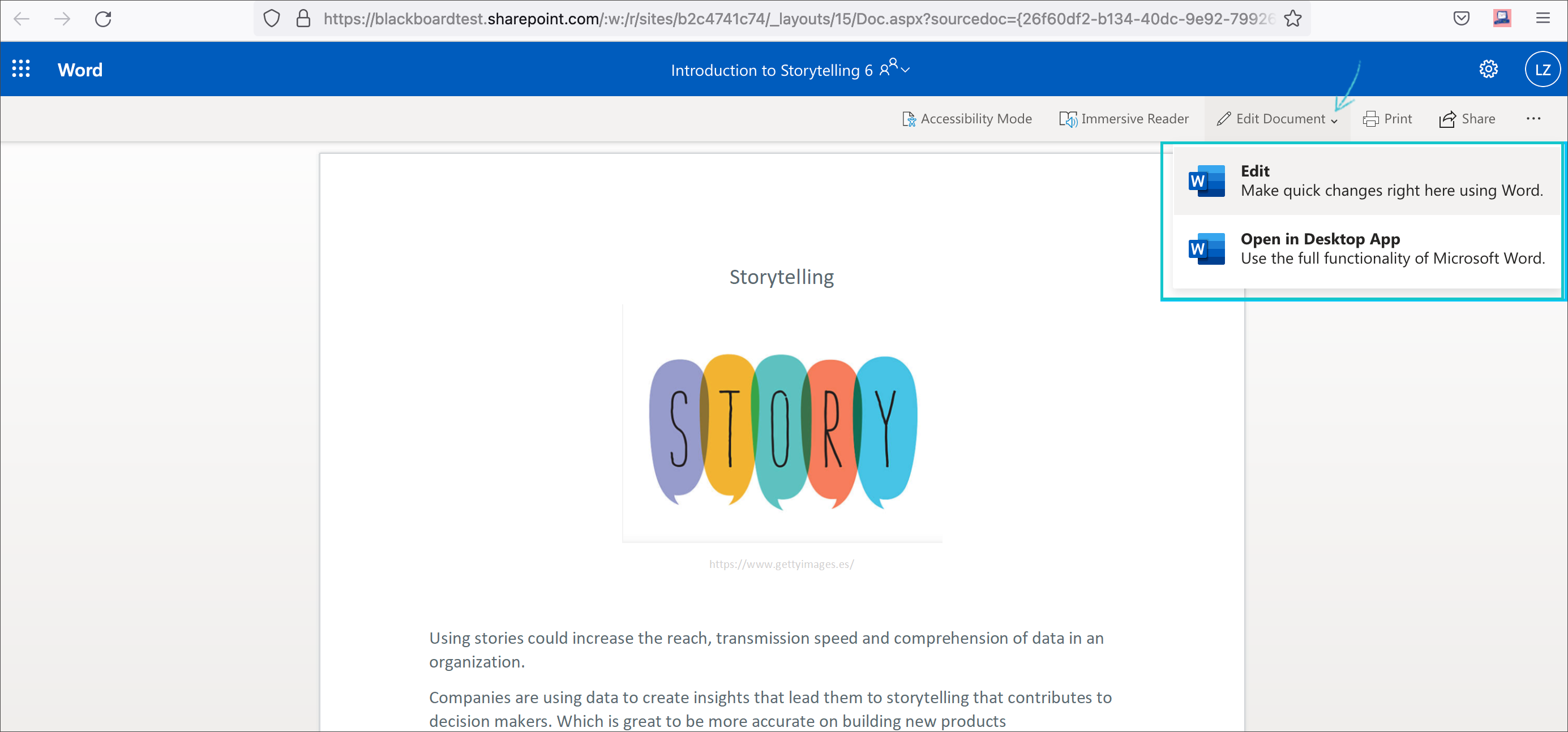
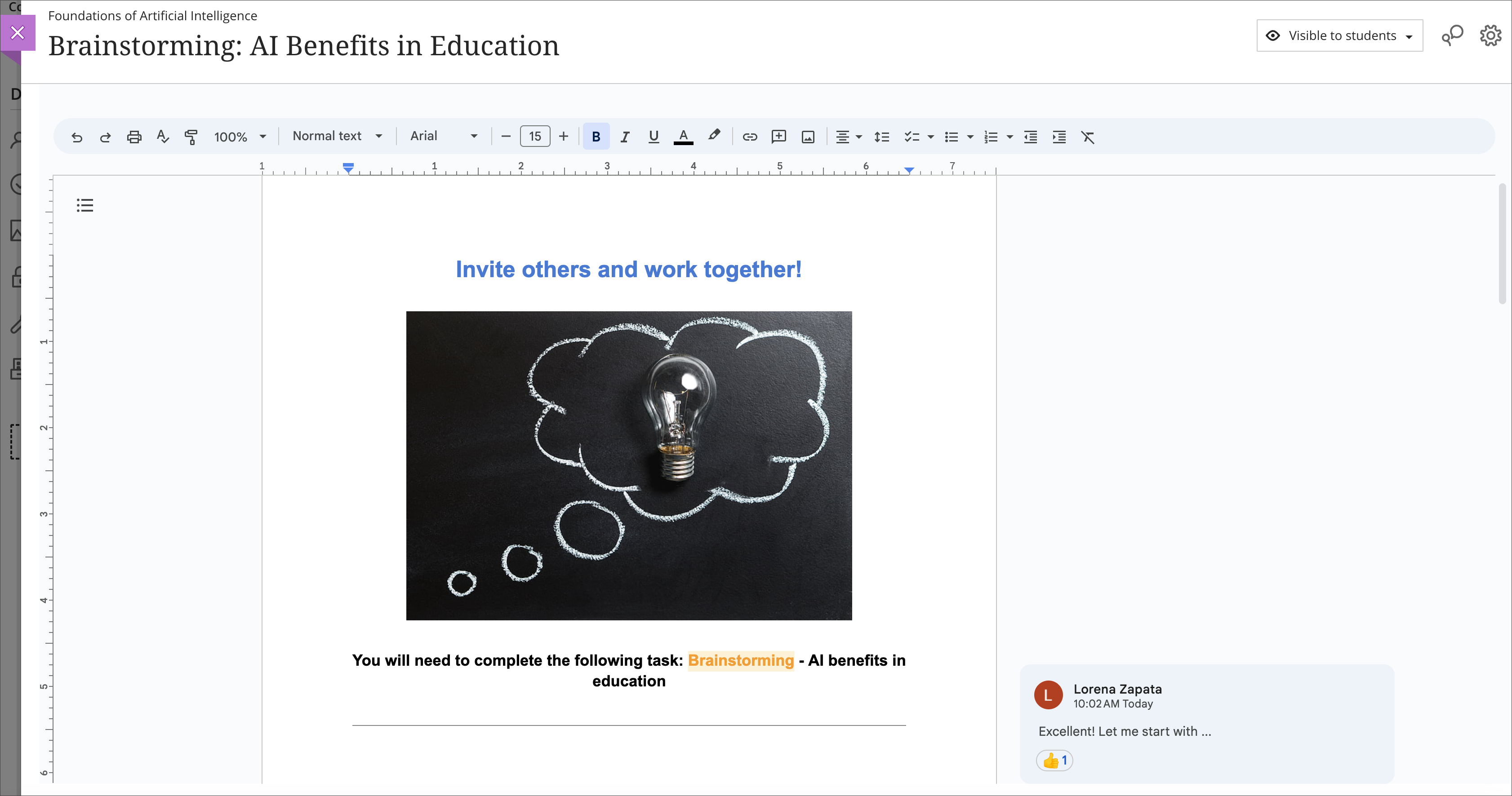
    <div class="html-content"><span><p><span>Cloud resources can transform a course design with streamlined document display and reduce storage footprint. Two new integrations from Google Workspace and Microsoft OneDrive offer cloud-based file management for Ultra courses. These tools allow faculty to select existing files, such as a syllabus or course schedule, and embed them seamlessly into a course for students to view. Customized privileges ensure only the document owner can modify the file within the framework of the course or the cloud drive while keeping the learner's access restricted to read-only.</span></p><p><span>Additionally, these tools support student collaboration, allowing for dynamic exchange of ideas, peer learning, co-authorship, and presentation planning. Creating a collaborative document in Google or Microsoft provides an exciting opportunity for faculty to support student teamwork in a shared environment directly embedded in the Ultra course space. Leverage these tools with students for real-time writing and editing, brainstorming, project planning, and other collaborative experiences.</span></p><p><span><strong>Learn more about using Google Workspace</strong> (Docs, Slides, Sheets)</span></p><ul><li><p><a href="https://help.blackboard.com/Learn/Instructor/Ultra/Course_Content/Create_Content/Cloud_Document/Google_Workspace#link_Google_document" rel="nofollow external" class="bo"><span>Embed a read-only Google document</span></a></p></li><li><p><a href="https://help.blackboard.com/Learn/Instructor/Ultra/Course_Content/Create_Content/Cloud_Document/Google_Workspace#create_Google_collaborative_document" rel="nofollow external" class="bo"><span>Create a Google collaborative document</span></a></p></li></ul><p><span><img src="https://help.blackboard.com/sites/default/files/images/2023-08/learn_ultra_instructor_GoogleWorkspace_EmbeddedCollabDoc.png" width="500" alt="Image 1: Example of an embedded Google collaborative document for students" style="max-width: 100%; height: auto;"></span></p><p><span><em>Image 1: Example of an embedded Google collaborative document for students</em></span></p><p><span><strong>Learn more about using Microsoft OneDrive</strong> (Word, PowerPoint, Excel)</span></p><ul><li><p><a href="https://help.blackboard.com/Learn/Instructor/Ultra/Course_Content/Create_Content/Create_Course_Materials/Open_Files_From_OneDrive#open_file" rel="nofollow external" class="bo"><span>Create embedded Microsoft cloud document</span></a></p></li><li><p><span><a href="https://help.blackboard.com/Learn/Instructor/Ultra/Course_Content/Create_Content/Create_Course_Materials/Open_Files_From_OneDrive#create_file" rel="nofollow external" class="bo">Create a Microsoft cloud collaboration</a></span></p></li></ul><p><span><img src="https://help.blackboard.com/sites/default/files/images/2022-02/learn_ultra_instructor_AddFile_OpenFromOneDrive_5.png" width="500" alt="Image 2: Example of an embedded Microsoft Word document for students to read only" style="max-width: 100%; height: auto;"></span></p><p><span><em>Image 2: Example of an embedded Microsoft Word document for students to read only</em></span></p><p><span>Both Google Workspace and Microsoft OneDrive are available now. Faculty can learn more about these tools at <a href="https://my3.my.umbc.edu/groups/instructional-technology/events/123991" rel="nofollow external" class="bo">an upcoming webinar on January 9, 2024</a>.</span></p><h5><strong>Connect with Instructional Technology</strong></h5><div>As always, if you have any questions about teaching, learning, and technology at UMBC, please consider the following options:</div><ul><li><a href="http://www.umbc.edu/faq" rel="nofollow external" class="bo">Check our extensive FAQ collection</a> </li><ul><li><a href="https://wiki.umbc.edu/x/LohnB" rel="nofollow external" class="bo">What's new in Ultra?</a> | <a href="https://wiki.umbc.edu/x/bwrSAQ" rel="nofollow external" class="bo">Known Issues</a> </li></ul><li><a href="http://umbc.edu/go/bbsupport" rel="nofollow external" class="bo">Open a ticket via RT</a></li><li>Follow the <a href="http://my.umbc.edu/groups/instructional-technology" rel="nofollow external" class="bo">Instructional Technology</a> &amp; <a href="http://my.umbc.edu/groups/doit" rel="nofollow external" class="bo">DoIT</a> myUMBC groups</li><li><a href="http://umbc.edu/go/bbsupport" rel="nofollow external" class="bo">Request a consult</a> with <a href="http://doit.umbc.edu/itnm/staff" rel="nofollow external" class="bo">instructional technology staff</a></li><li><a href="http://pivot.umbc.edu/" rel="nofollow external" class="bo">PIVOT</a> | <a href="https://doit.umbc.edu/itnm/academic-continuity/" rel="nofollow external" class="bo">Academic Continuity</a> | <a href="https://fdc.umbc.edu/teaching/keep-on-teaching/" rel="nofollow external" class="bo">Keep On Teaching</a> | <a href="https://doit.umbc.edu/students" rel="nofollow external" class="bo">Student Technology Resources</a></li></ul><p></p><p><span><em>UMBC is committed to providing a consistent learning experience for everyone. The last day we will support Blackboard Original is December 31, 2024. Please check out our training and support: <a href="https://umbc.edu/go/ultra" rel="nofollow external" class="bo">https://umbc.edu/go/ultra</a>.</em></span></p></span></div>
]]>
</Body>
<Summary>Cloud resources can transform a course design with streamlined document display and reduce storage footprint. Two new integrations from Google Workspace and Microsoft OneDrive offer cloud-based...</Summary>
<Website>https://my3.my.umbc.edu/groups/instructional-technology/posts/136980</Website>
<TrackingUrl>https://beta.my.umbc.edu/api/v0/pixel/news/136980/guest@my.umbc.edu/974acebe5a361d0883d8400183637bac/api/pixel</TrackingUrl>
<Tag>blackboard</Tag>
<Tag>cloud-collaboration</Tag>
<Tag>cloud-storage</Tag>
<Tag>engagement</Tag>
<Tag>google</Tag>
<Tag>groups</Tag>
<Tag>microsoft</Tag>
<Tag>one-drive</Tag>
<Tag>online-learning</Tag>
<Tag>ultra</Tag>
<Group token="instructional-technology">Instructional Technology</Group>
<GroupUrl>https://beta.my.umbc.edu/groups/instructional-technology</GroupUrl>
<AvatarUrl>https://assets2-beta.my.umbc.edu/system/shared/avatars/groups/000/001/164/dec3b026b81ee6d890a8f82f75c94a2e/xsmall.png?1446126703</AvatarUrl>
<AvatarUrl size="original">https://assets1-beta.my.umbc.edu/system/shared/avatars/groups/000/001/164/dec3b026b81ee6d890a8f82f75c94a2e/original.png?1446126703</AvatarUrl>
<AvatarUrl size="xxlarge">https://assets2-beta.my.umbc.edu/system/shared/avatars/groups/000/001/164/dec3b026b81ee6d890a8f82f75c94a2e/xxlarge.png?1446126703</AvatarUrl>
<AvatarUrl size="xlarge">https://assets1-beta.my.umbc.edu/system/shared/avatars/groups/000/001/164/dec3b026b81ee6d890a8f82f75c94a2e/xlarge.png?1446126703</AvatarUrl>
<AvatarUrl size="large">https://assets1-beta.my.umbc.edu/system/shared/avatars/groups/000/001/164/dec3b026b81ee6d890a8f82f75c94a2e/large.png?1446126703</AvatarUrl>
<AvatarUrl size="medium">https://assets4-beta.my.umbc.edu/system/shared/avatars/groups/000/001/164/dec3b026b81ee6d890a8f82f75c94a2e/medium.png?1446126703</AvatarUrl>
<AvatarUrl size="small">https://assets3-beta.my.umbc.edu/system/shared/avatars/groups/000/001/164/dec3b026b81ee6d890a8f82f75c94a2e/small.png?1446126703</AvatarUrl>
<AvatarUrl size="xsmall">https://assets2-beta.my.umbc.edu/system/shared/avatars/groups/000/001/164/dec3b026b81ee6d890a8f82f75c94a2e/xsmall.png?1446126703</AvatarUrl>
<AvatarUrl size="xxsmall">https://assets3-beta.my.umbc.edu/system/shared/avatars/groups/000/001/164/dec3b026b81ee6d890a8f82f75c94a2e/xxsmall.png?1446126703</AvatarUrl>
<Sponsor>Instructional Technology</Sponsor>
<ThumbnailUrl size="xxlarge">https://assets2-beta.my.umbc.edu/system/shared/thumbnails/news/000/136/980/61c10de9e6bdc7965c908b02b14ada96/xxlarge.jpg?1699624920</ThumbnailUrl>
<ThumbnailUrl size="xlarge">https://assets3-beta.my.umbc.edu/system/shared/thumbnails/news/000/136/980/61c10de9e6bdc7965c908b02b14ada96/xlarge.jpg?1699624920</ThumbnailUrl>
<ThumbnailUrl size="large">https://assets2-beta.my.umbc.edu/system/shared/thumbnails/news/000/136/980/61c10de9e6bdc7965c908b02b14ada96/large.jpg?1699624920</ThumbnailUrl>
<ThumbnailUrl size="medium">https://assets3-beta.my.umbc.edu/system/shared/thumbnails/news/000/136/980/61c10de9e6bdc7965c908b02b14ada96/medium.jpg?1699624920</ThumbnailUrl>
<ThumbnailUrl size="small">https://assets1-beta.my.umbc.edu/system/shared/thumbnails/news/000/136/980/61c10de9e6bdc7965c908b02b14ada96/small.jpg?1699624920</ThumbnailUrl>
<ThumbnailUrl size="xsmall">https://assets4-beta.my.umbc.edu/system/shared/thumbnails/news/000/136/980/61c10de9e6bdc7965c908b02b14ada96/xsmall.jpg?1699624920</ThumbnailUrl>
<ThumbnailUrl size="xxsmall">https://assets2-beta.my.umbc.edu/system/shared/thumbnails/news/000/136/980/61c10de9e6bdc7965c908b02b14ada96/xxsmall.jpg?1699624920</ThumbnailUrl>
<PawCount>6</PawCount>
<CommentCount>0</CommentCount>
<CommentsAllowed>true</CommentsAllowed>
<PostedAt>Tue, 28 Nov 2023 12:10:44 -0500</PostedAt>
</NewsItem>

<NewsItem contentIssues="false" id="98059" important="true" status="posted" url="https://beta.my.umbc.edu/groups/doit/posts/98059">
<Title>Google Widespread Outage early Monday Morning</Title>
<Tagline>Email, Calendar and Docs are unavailable until 8:00am</Tagline>
<Body>
<![CDATA[
    <div class="html-content">This morning Google had a widespread outage that affected all of their services, including Gmail, Calendar, Google Docs, Google Meet and Youtube. Service was quickly restored by approximately 8:00am but users may have noticed connection issues getting into their Email or accessing other Google services this morning. <div><br></div><div>This wasn't specific to UMBC, it was a larger outage within Google itself. Other UMBC services like Blackboard and Peoplesoft were unaffected. </div><div><br></div><div>At this point we don't have any additional information on the cause of the outage. </div><div><br></div><div>Feel free to contact me if you have any questions. </div><div><br></div><div>Damian Doyle</div><div>Associate Vice President of Enterprise Infrastructure</div><div>DoIT - <span>UMBC</span></div></div>
]]>
</Body>
<Summary>This morning Google had a widespread outage that affected all of their services, including Gmail, Calendar, Google Docs, Google Meet and Youtube. Service was quickly restored by approximately...</Summary>
<TrackingUrl>https://beta.my.umbc.edu/api/v0/pixel/news/98059/guest@my.umbc.edu/6af3f741e33be5eb266bd271dc0372be/api/pixel</TrackingUrl>
<Tag>google</Tag>
<Tag>outage</Tag>
<Group token="doit">Division of Information Technology (DoIT)</Group>
<GroupUrl>https://beta.my.umbc.edu/groups/doit</GroupUrl>
<AvatarUrl>https://assets2-beta.my.umbc.edu/system/shared/avatars/groups/000/000/021/d27760c5de12c74b73faec8d0e631acf/xsmall.png?1727453227</AvatarUrl>
<AvatarUrl size="original">https://assets2-beta.my.umbc.edu/system/shared/avatars/groups/000/000/021/d27760c5de12c74b73faec8d0e631acf/original.JPG?1727453227</AvatarUrl>
<AvatarUrl size="xxlarge">https://assets1-beta.my.umbc.edu/system/shared/avatars/groups/000/000/021/d27760c5de12c74b73faec8d0e631acf/xxlarge.png?1727453227</AvatarUrl>
<AvatarUrl size="xlarge">https://assets3-beta.my.umbc.edu/system/shared/avatars/groups/000/000/021/d27760c5de12c74b73faec8d0e631acf/xlarge.png?1727453227</AvatarUrl>
<AvatarUrl size="large">https://assets2-beta.my.umbc.edu/system/shared/avatars/groups/000/000/021/d27760c5de12c74b73faec8d0e631acf/large.png?1727453227</AvatarUrl>
<AvatarUrl size="medium">https://assets2-beta.my.umbc.edu/system/shared/avatars/groups/000/000/021/d27760c5de12c74b73faec8d0e631acf/medium.png?1727453227</AvatarUrl>
<AvatarUrl size="small">https://assets2-beta.my.umbc.edu/system/shared/avatars/groups/000/000/021/d27760c5de12c74b73faec8d0e631acf/small.png?1727453227</AvatarUrl>
<AvatarUrl size="xsmall">https://assets2-beta.my.umbc.edu/system/shared/avatars/groups/000/000/021/d27760c5de12c74b73faec8d0e631acf/xsmall.png?1727453227</AvatarUrl>
<AvatarUrl size="xxsmall">https://assets4-beta.my.umbc.edu/system/shared/avatars/groups/000/000/021/d27760c5de12c74b73faec8d0e631acf/xxsmall.png?1727453227</AvatarUrl>
<Sponsor>Division of Information Technology (DoIT)</Sponsor>
<PawCount>0</PawCount>
<CommentCount>0</CommentCount>
<CommentsAllowed>false</CommentsAllowed>
<PostedAt>Mon, 14 Dec 2020 08:23:22 -0500</PostedAt>
</NewsItem>

<NewsItem contentIssues="true" id="89495" important="false" status="posted" url="https://beta.my.umbc.edu/groups/doit/posts/89495">
<Title>Google Assignments and File Embed Available for Bb Courses</Title>
<Tagline>Use Google's Rich Editor to Provide Student Feedback</Tagline>
<Body>
<![CDATA[
    <div class="html-content"><div>In January 2018, <a href="https://my3.my.umbc.edu/groups/bbannouncements/posts/71945" rel="nofollow external" class="bo">Box discontinued Crocodoc in favor of the Box inline grading tool</a>. The goal of this transition was to provide a similar and simpler experience users know from the traditional Box interface. For instructors, the new Box inline grading tool reflects a simpler design, but the tools are often not robust enough to provide feedback. </div><div><br></div><div>Earlier in 2019, <a href="https://edu.google.com/assignments/" rel="nofollow external" class="bo">Google announced Google Assignments</a>, a new tool that would allow faculty to create and share Google Suite files (Google Docs, Google Slides, and Google Sheets), as assignment templates for individual students and student groups. Google Assignments can be edited by students and faculty, changes tracked by all contributors, and submitted for a grade. When faculty review the submitted Google file, it is locked from further edits. Faculty can embed comments, grade with rubrics, check for plagiarism, or provide feedback from a reusable comment bank. After you post grades through Google Assignments, scores will automatically transfer to Blackboard. </div><div><br></div><div>Since <a href="https://help.blackboard.com/Learn/Student/Assignments/Cloud_Storage#access-cloud-storage-in-your-course_OTP-3" rel="nofollow external" class="bo">current student submissions via cloud</a> storage will not render and display Google Suite file types, often resulting in students having to download and resubmit their assignment, this new tool addresses a challenge with Blackboard’s current cloud storage support.</div><div><br></div><div>Additionally, instructors will be able to leverage <a href="https://my3.my.umbc.edu/groups/doit/posts/48703" rel="nofollow external" class="bo">unlimited Google Drive storage</a>, and use the Google Drive File Embed tool into their Blackboard Original and Blackboard Ultra courses. The Google Drive File Embed tool places a link to a native Google Suite file from the instructor's drive directly into a Blackboard course, and provides students with view-only access to the file. </div><div><br></div><div>Google Assignments and Google Drive File embed are available for both Blackboard Original and Blackboard Ultra courses! Check out the <a href="https://wiki.umbc.edu/display/faq/Google+Assignments+and+Google+Drive+File+Embed" rel="nofollow external" class="bo">Google Assignments and Google Drive File Embed FAQs</a> and some of our <a href="https://my3.my.umbc.edu/groups/instructional-technology/events?mode=upcoming&amp;tag=google-assignments" rel="nofollow external" class="bo">upcoming trainings</a> on these tools.</div><div><br></div><div>DoIT offers all active members of the UMBC community with three cloud storage options:</div><div><ul><li>Box, with unlimited storage, is strongly recommended for institutional data</li><li>Google Drive from Google Suite, with unlimited storage</li><li>OneDrive from Office 365, with 1TB storage </li></ul></div><div><br></div><div>As always, if you have any questions, please consider the following options:</div><div><ul><li><a href="http://www.umbc.edu/faq" rel="nofollow external" class="bo">Check our extensive FAQ collection</a></li><li><a href="http://my.umbc.edu/go/request-help" rel="nofollow external" class="bo">Open a ticket via RT</a></li><li>Follow the <a href="http://my.umbc.edu/groups/instructional-technology" rel="nofollow external" class="bo">Instructional Technology</a> &amp; <a href="http://my.umbc.edu/groups/doit" rel="nofollow external" class="bo">DoIT</a> myUMBC groups</li><li><a href="http://doit.umbc.edu/itnm/staff/" rel="nofollow external" class="bo">Request a consult with instructional technology staff</a></li></ul></div></div>
]]>
</Body>
<Summary>In January 2018, Box discontinued Crocodoc in favor of the Box inline grading tool. The goal of this transition was to provide a similar and simpler experience users know from the traditional Box...</Summary>
<TrackingUrl>https://beta.my.umbc.edu/api/v0/pixel/news/89495/guest@my.umbc.edu/6b4e2b79f380f7a7e67405885b716222/api/pixel</TrackingUrl>
<Tag>blackboard</Tag>
<Tag>google</Tag>
<Tag>google-assignments</Tag>
<Tag>lti</Tag>
<Tag>ultra-experience</Tag>
<Group token="instructional-technology">Instructional Technology</Group>
<GroupUrl>https://beta.my.umbc.edu/groups/instructional-technology</GroupUrl>
<AvatarUrl>https://assets2-beta.my.umbc.edu/system/shared/avatars/groups/000/001/164/dec3b026b81ee6d890a8f82f75c94a2e/xsmall.png?1446126703</AvatarUrl>
<AvatarUrl size="original">https://assets1-beta.my.umbc.edu/system/shared/avatars/groups/000/001/164/dec3b026b81ee6d890a8f82f75c94a2e/original.png?1446126703</AvatarUrl>
<AvatarUrl size="xxlarge">https://assets2-beta.my.umbc.edu/system/shared/avatars/groups/000/001/164/dec3b026b81ee6d890a8f82f75c94a2e/xxlarge.png?1446126703</AvatarUrl>
<AvatarUrl size="xlarge">https://assets1-beta.my.umbc.edu/system/shared/avatars/groups/000/001/164/dec3b026b81ee6d890a8f82f75c94a2e/xlarge.png?1446126703</AvatarUrl>
<AvatarUrl size="large">https://assets1-beta.my.umbc.edu/system/shared/avatars/groups/000/001/164/dec3b026b81ee6d890a8f82f75c94a2e/large.png?1446126703</AvatarUrl>
<AvatarUrl size="medium">https://assets4-beta.my.umbc.edu/system/shared/avatars/groups/000/001/164/dec3b026b81ee6d890a8f82f75c94a2e/medium.png?1446126703</AvatarUrl>
<AvatarUrl size="small">https://assets3-beta.my.umbc.edu/system/shared/avatars/groups/000/001/164/dec3b026b81ee6d890a8f82f75c94a2e/small.png?1446126703</AvatarUrl>
<AvatarUrl size="xsmall">https://assets2-beta.my.umbc.edu/system/shared/avatars/groups/000/001/164/dec3b026b81ee6d890a8f82f75c94a2e/xsmall.png?1446126703</AvatarUrl>
<AvatarUrl size="xxsmall">https://assets3-beta.my.umbc.edu/system/shared/avatars/groups/000/001/164/dec3b026b81ee6d890a8f82f75c94a2e/xxsmall.png?1446126703</AvatarUrl>
<Sponsor>Instructional Technology</Sponsor>
<ThumbnailUrl size="xxlarge">https://assets4-beta.my.umbc.edu/system/shared/thumbnails/news/000/089/495/134d250453ab702890e092fa58f90778/xxlarge.jpg?1578500809</ThumbnailUrl>
<ThumbnailUrl size="xlarge">https://assets3-beta.my.umbc.edu/system/shared/thumbnails/news/000/089/495/134d250453ab702890e092fa58f90778/xlarge.jpg?1578500809</ThumbnailUrl>
<ThumbnailUrl size="large">https://assets3-beta.my.umbc.edu/system/shared/thumbnails/news/000/089/495/134d250453ab702890e092fa58f90778/large.jpg?1578500809</ThumbnailUrl>
<ThumbnailUrl size="medium">https://assets3-beta.my.umbc.edu/system/shared/thumbnails/news/000/089/495/134d250453ab702890e092fa58f90778/medium.jpg?1578500809</ThumbnailUrl>
<ThumbnailUrl size="small">https://assets2-beta.my.umbc.edu/system/shared/thumbnails/news/000/089/495/134d250453ab702890e092fa58f90778/small.jpg?1578500809</ThumbnailUrl>
<ThumbnailUrl size="xsmall">https://assets4-beta.my.umbc.edu/system/shared/thumbnails/news/000/089/495/134d250453ab702890e092fa58f90778/xsmall.jpg?1578500809</ThumbnailUrl>
<ThumbnailUrl size="xxsmall">https://assets1-beta.my.umbc.edu/system/shared/thumbnails/news/000/089/495/134d250453ab702890e092fa58f90778/xxsmall.jpg?1578500809</ThumbnailUrl>
<PawCount>1</PawCount>
<CommentCount>0</CommentCount>
<CommentsAllowed>true</CommentsAllowed>
<PostedAt>Wed, 08 Jan 2020 11:32:54 -0500</PostedAt>
<EditAt>Wed, 08 Jan 2020 11:36:48 -0500</EditAt>
</NewsItem>

<NewsItem contentIssues="true" id="67871" important="true" status="posted" url="https://beta.my.umbc.edu/groups/doit/posts/67871">
<Title>Notice: DoIT Is Changing Mailing List Vendor</Title>
<Tagline>Google Groups &amp; myUMBC will be used for communications</Tagline>
<Body>
<![CDATA[
    <div class="html-content"><div>DoIT has begun transitioning users off mailing lists to Google Groups and myUMBC. We expect this transition to be completed by the end of June 2017. Sympa, the campus software used for handling email lists, is being discontinued, triggering this migration. Mailing list will not be going away. Instead, the software used to access and administer them is changing. DoIT is working with list owners to talk about migration strategies, and how Google Groups &amp; myUMBC can be used to make sure that the transition is as painless as possible for list owners and administrators.</div><div><br></div><div>Google Groups functions like the traditional Sympa mailing list. You can <a href="https://groups.google.com/forum/#!overview" rel="nofollow external" class="bo">read more about Google Groups here</a>. </div><div><br></div><div>If you are mainly using your group for announcements and events, we recommend using myUMBC Groups. myUMBC is a robust platform for managing your group for both internal and external communications. </div><div><br></div><div>With myUMBC Groups, you’ll have more control over who joins your group, what their positions are, and the ability to make the group either public or private. Through subscriptions, you can also pull content into your group from other myUMBC groups and from outside of myUMBC. There are additional features in myUMBC, such as events where you can track attendees and participants. If you have an important post, you can pin it to the top of your group for members to see. Groups can have customized avatars and banner images to give a more unique feel. </div><div><br></div><div>For any questions about this transition, please contact Damian Doyle: <a href="mailto:damian@umbc.edu">damian@umbc.edu</a></div><div><br></div><div><em><a href="http://my.umbc.edu/groups/doit" rel="nofollow external" class="bo">Follow the DoIT myUMBC group</a> for more news and updates.</em></div></div>
]]>
</Body>
<Summary>DoIT has begun transitioning users off mailing lists to Google Groups and myUMBC. We expect this transition to be completed by the end of June 2017. Sympa, the campus software used for handling...</Summary>
<Website>http://my.umbc.edu/groups/doit</Website>
<TrackingUrl>https://beta.my.umbc.edu/api/v0/pixel/news/67871/guest@my.umbc.edu/4383226ce786d6f9508f7e73c96a282b/api/pixel</TrackingUrl>
<Tag>administrators</Tag>
<Tag>google</Tag>
<Tag>groups</Tag>
<Tag>list</Tag>
<Tag>mailing</Tag>
<Tag>myumbc</Tag>
<Tag>sympa</Tag>
<Group token="doit">Division of Information Technology (DoIT)</Group>
<GroupUrl>https://beta.my.umbc.edu/groups/doit</GroupUrl>
<AvatarUrl>https://assets2-beta.my.umbc.edu/system/shared/avatars/groups/000/000/021/d27760c5de12c74b73faec8d0e631acf/xsmall.png?1727453227</AvatarUrl>
<AvatarUrl size="original">https://assets2-beta.my.umbc.edu/system/shared/avatars/groups/000/000/021/d27760c5de12c74b73faec8d0e631acf/original.JPG?1727453227</AvatarUrl>
<AvatarUrl size="xxlarge">https://assets1-beta.my.umbc.edu/system/shared/avatars/groups/000/000/021/d27760c5de12c74b73faec8d0e631acf/xxlarge.png?1727453227</AvatarUrl>
<AvatarUrl size="xlarge">https://assets3-beta.my.umbc.edu/system/shared/avatars/groups/000/000/021/d27760c5de12c74b73faec8d0e631acf/xlarge.png?1727453227</AvatarUrl>
<AvatarUrl size="large">https://assets2-beta.my.umbc.edu/system/shared/avatars/groups/000/000/021/d27760c5de12c74b73faec8d0e631acf/large.png?1727453227</AvatarUrl>
<AvatarUrl size="medium">https://assets2-beta.my.umbc.edu/system/shared/avatars/groups/000/000/021/d27760c5de12c74b73faec8d0e631acf/medium.png?1727453227</AvatarUrl>
<AvatarUrl size="small">https://assets2-beta.my.umbc.edu/system/shared/avatars/groups/000/000/021/d27760c5de12c74b73faec8d0e631acf/small.png?1727453227</AvatarUrl>
<AvatarUrl size="xsmall">https://assets2-beta.my.umbc.edu/system/shared/avatars/groups/000/000/021/d27760c5de12c74b73faec8d0e631acf/xsmall.png?1727453227</AvatarUrl>
<AvatarUrl size="xxsmall">https://assets4-beta.my.umbc.edu/system/shared/avatars/groups/000/000/021/d27760c5de12c74b73faec8d0e631acf/xxsmall.png?1727453227</AvatarUrl>
<Sponsor>Division of Information Technology (DoIT)</Sponsor>
<ThumbnailUrl size="xxlarge">https://assets2-beta.my.umbc.edu/system/shared/thumbnails/news/000/067/871/247299ce1acd905563275d15e82fa7d4/xxlarge.jpg?1494258240</ThumbnailUrl>
<ThumbnailUrl size="xlarge">https://assets3-beta.my.umbc.edu/system/shared/thumbnails/news/000/067/871/247299ce1acd905563275d15e82fa7d4/xlarge.jpg?1494258240</ThumbnailUrl>
<ThumbnailUrl size="large">https://assets2-beta.my.umbc.edu/system/shared/thumbnails/news/000/067/871/247299ce1acd905563275d15e82fa7d4/large.jpg?1494258240</ThumbnailUrl>
<ThumbnailUrl size="medium">https://assets2-beta.my.umbc.edu/system/shared/thumbnails/news/000/067/871/247299ce1acd905563275d15e82fa7d4/medium.jpg?1494258240</ThumbnailUrl>
<ThumbnailUrl size="small">https://assets4-beta.my.umbc.edu/system/shared/thumbnails/news/000/067/871/247299ce1acd905563275d15e82fa7d4/small.jpg?1494258240</ThumbnailUrl>
<ThumbnailUrl size="xsmall">https://assets4-beta.my.umbc.edu/system/shared/thumbnails/news/000/067/871/247299ce1acd905563275d15e82fa7d4/xsmall.jpg?1494258240</ThumbnailUrl>
<ThumbnailUrl size="xxsmall">https://assets1-beta.my.umbc.edu/system/shared/thumbnails/news/000/067/871/247299ce1acd905563275d15e82fa7d4/xxsmall.jpg?1494258240</ThumbnailUrl>
<PawCount>3</PawCount>
<CommentCount>3</CommentCount>
<CommentsAllowed>true</CommentsAllowed>
<PostedAt>Mon, 08 May 2017 11:48:06 -0400</PostedAt>
</NewsItem>

<NewsItem contentIssues="true" id="64474" important="false" status="posted" url="https://beta.my.umbc.edu/groups/doit/posts/64474">
<Title>DEADLINE EXTENDED TechFest 2017: Submit Your Proposal Today!</Title>
<Tagline>Share your favorite technologies with the UMBC Community</Tagline>
<Body>
<![CDATA[
    <div class="html-content"><span><p><span>Last year, the Instructional Technology team held UMBC’s first <a href="http://my.umbc.edu/groups/instructional-technology/posts/58552" rel="nofollow external" class="bo">TechFest</a>. TechFest is  designed to bring together UMBC students, faculty, and staff to share their favorite technologies with the campus community through workshops and presentations. </span></p><div><span>The <a href="http://my.umbc.edu/groups/instructional-technology" rel="nofollow external" class="bo">Instructional Technology Team</a> cordially invites any interested groups and/or individuals to propose sessions for TechFest 2017 to demonstrate a favorite instructional technology tool, and share best practices. Last year, </span><a href="http://my.umbc.edu/groups/instructional-technology/posts/57904" rel="nofollow external" class="bo">session topics</a><span> included such as Google Calendar, Box, LinkedIn, Microsoft OneNote, and Blackboard.  </span></div><p><span>There are two types of sessions that will be offered at TechFest 2017:</span></p><ul><li><p><span><span>Workshop Session (35 minutes)-</span><em><span>Presenter(s) provide a brief overview of the instructional technology and offer information based on best practices and use. Participants are provided with at least three take aways implementing use of the technology. </span></em></span></p></li><li><p><span>Power Session (70 minutes)-</span><span><em><span>Presenter(s) provide a more in-depth  overview of the instructional technology and offer information based on best practices and use. In Power Sessions, participants are </span><span>given the opportunity to explore the technology through "hands-on" activities. </span></em></span></p></li></ul><div><br></div><p><span><strong>Deadlines and Notifications</strong></span></p><p><span>Proposals must be submitted no later than 5pm on<strong> FRIDAY, FEBRUARY 10</strong></span><span> by completing</span><span> this </span><a href="https://docs.google.com/a/umbc.edu/forms/d/e/1FAIpQLSdyIQM2fd7UyQFnNb7ENn0EDhCwB8MBtTss1tHN_TjiQ6DBlQ/viewform" rel="nofollow external" class="bo"><span>Google Form</span></a><span>.  Applicants will be notified about acceptances approximately two weeks after the submission deadline. Selection will be based on how well the proposal connects to the themes, goals, and overall contribution to TechFest. </span></p><p><span>Mark your calendars: TechFest 2017 will be held on </span><span><strong>Monday, April 10, 2017</strong></span><span>. More details are forthcoming. <a href="https://goo.gl/ZEFS13" rel="nofollow external" class="bo">Sign up here</a> to be notified when registration opens for this event. </span></p><p><span>For more information, please contact Holly Owens at </span><a href="mailto:holly3@umbc.edu" rel="nofollow external" class="bo"><span>holly3@umbc.edu</span></a><span> or Collin Sullivan at </span><a href="mailto:csulli1@umbc.edu" rel="nofollow external" class="bo"><span>csulli1@umbc.edu</span></a><span>. </span></p><div><span><br></span></div></span></div>
]]>
</Body>
<Summary>Last year, the Instructional Technology team held UMBC’s first TechFest. TechFest is  designed to bring together UMBC students, faculty, and staff to share their favorite technologies with the...</Summary>
<Website>http://my.umbc.edu/groups/instructional-technology/posts/64474</Website>
<TrackingUrl>https://beta.my.umbc.edu/api/v0/pixel/news/64474/guest@my.umbc.edu/42f04fc7786516a48d1e9e058fba8607/api/pixel</TrackingUrl>
<Tag>blackboard</Tag>
<Tag>clickers</Tag>
<Tag>google</Tag>
<Tag>techfest</Tag>
<Tag>training</Tag>
<Tag>workshops</Tag>
<Group token="instructional-technology">Instructional Technology</Group>
<GroupUrl>https://beta.my.umbc.edu/groups/instructional-technology</GroupUrl>
<AvatarUrl>https://assets2-beta.my.umbc.edu/system/shared/avatars/groups/000/001/164/dec3b026b81ee6d890a8f82f75c94a2e/xsmall.png?1446126703</AvatarUrl>
<AvatarUrl size="original">https://assets1-beta.my.umbc.edu/system/shared/avatars/groups/000/001/164/dec3b026b81ee6d890a8f82f75c94a2e/original.png?1446126703</AvatarUrl>
<AvatarUrl size="xxlarge">https://assets2-beta.my.umbc.edu/system/shared/avatars/groups/000/001/164/dec3b026b81ee6d890a8f82f75c94a2e/xxlarge.png?1446126703</AvatarUrl>
<AvatarUrl size="xlarge">https://assets1-beta.my.umbc.edu/system/shared/avatars/groups/000/001/164/dec3b026b81ee6d890a8f82f75c94a2e/xlarge.png?1446126703</AvatarUrl>
<AvatarUrl size="large">https://assets1-beta.my.umbc.edu/system/shared/avatars/groups/000/001/164/dec3b026b81ee6d890a8f82f75c94a2e/large.png?1446126703</AvatarUrl>
<AvatarUrl size="medium">https://assets4-beta.my.umbc.edu/system/shared/avatars/groups/000/001/164/dec3b026b81ee6d890a8f82f75c94a2e/medium.png?1446126703</AvatarUrl>
<AvatarUrl size="small">https://assets3-beta.my.umbc.edu/system/shared/avatars/groups/000/001/164/dec3b026b81ee6d890a8f82f75c94a2e/small.png?1446126703</AvatarUrl>
<AvatarUrl size="xsmall">https://assets2-beta.my.umbc.edu/system/shared/avatars/groups/000/001/164/dec3b026b81ee6d890a8f82f75c94a2e/xsmall.png?1446126703</AvatarUrl>
<AvatarUrl size="xxsmall">https://assets3-beta.my.umbc.edu/system/shared/avatars/groups/000/001/164/dec3b026b81ee6d890a8f82f75c94a2e/xxsmall.png?1446126703</AvatarUrl>
<Sponsor>Instructional Technology</Sponsor>
<ThumbnailUrl size="xxlarge">https://assets2-beta.my.umbc.edu/system/shared/thumbnails/news/000/064/474/b5ea9736b6a0b6f8a54f9f27c6e08c3e/xxlarge.jpg?1481128394</ThumbnailUrl>
<ThumbnailUrl size="xlarge">https://assets2-beta.my.umbc.edu/system/shared/thumbnails/news/000/064/474/b5ea9736b6a0b6f8a54f9f27c6e08c3e/xlarge.jpg?1481128394</ThumbnailUrl>
<ThumbnailUrl size="large">https://assets1-beta.my.umbc.edu/system/shared/thumbnails/news/000/064/474/b5ea9736b6a0b6f8a54f9f27c6e08c3e/large.jpg?1481128394</ThumbnailUrl>
<ThumbnailUrl size="medium">https://assets2-beta.my.umbc.edu/system/shared/thumbnails/news/000/064/474/b5ea9736b6a0b6f8a54f9f27c6e08c3e/medium.jpg?1481128394</ThumbnailUrl>
<ThumbnailUrl size="small">https://assets3-beta.my.umbc.edu/system/shared/thumbnails/news/000/064/474/b5ea9736b6a0b6f8a54f9f27c6e08c3e/small.jpg?1481128394</ThumbnailUrl>
<ThumbnailUrl size="xsmall">https://assets3-beta.my.umbc.edu/system/shared/thumbnails/news/000/064/474/b5ea9736b6a0b6f8a54f9f27c6e08c3e/xsmall.jpg?1481128394</ThumbnailUrl>
<ThumbnailUrl size="xxsmall">https://assets2-beta.my.umbc.edu/system/shared/thumbnails/news/000/064/474/b5ea9736b6a0b6f8a54f9f27c6e08c3e/xxsmall.jpg?1481128394</ThumbnailUrl>
<PawCount>18</PawCount>
<CommentCount>0</CommentCount>
<CommentsAllowed>true</CommentsAllowed>
<PostedAt>Wed, 07 Dec 2016 12:34:02 -0500</PostedAt>
<EditAt>Wed, 01 Feb 2017 10:04:02 -0500</EditAt>
</NewsItem>

</News>