<?xml version="1.0"?>
<News hasArchived="false" page="120" pageCount="242" pageSize="10" timestamp="Sat, 25 Apr 2026 11:37:50 -0400" url="https://beta.my.umbc.edu/groups/doit/posts.xml?page=120">
<NewsItem contentIssues="true" id="91736" important="false" status="posted" url="https://beta.my.umbc.edu/groups/doit/posts/91736">
<Title>Fake DocuSign Phishing Message</Title>
<Tagline>Look out for fake DocuSign Messages</Tagline>
<Body>
<![CDATA[
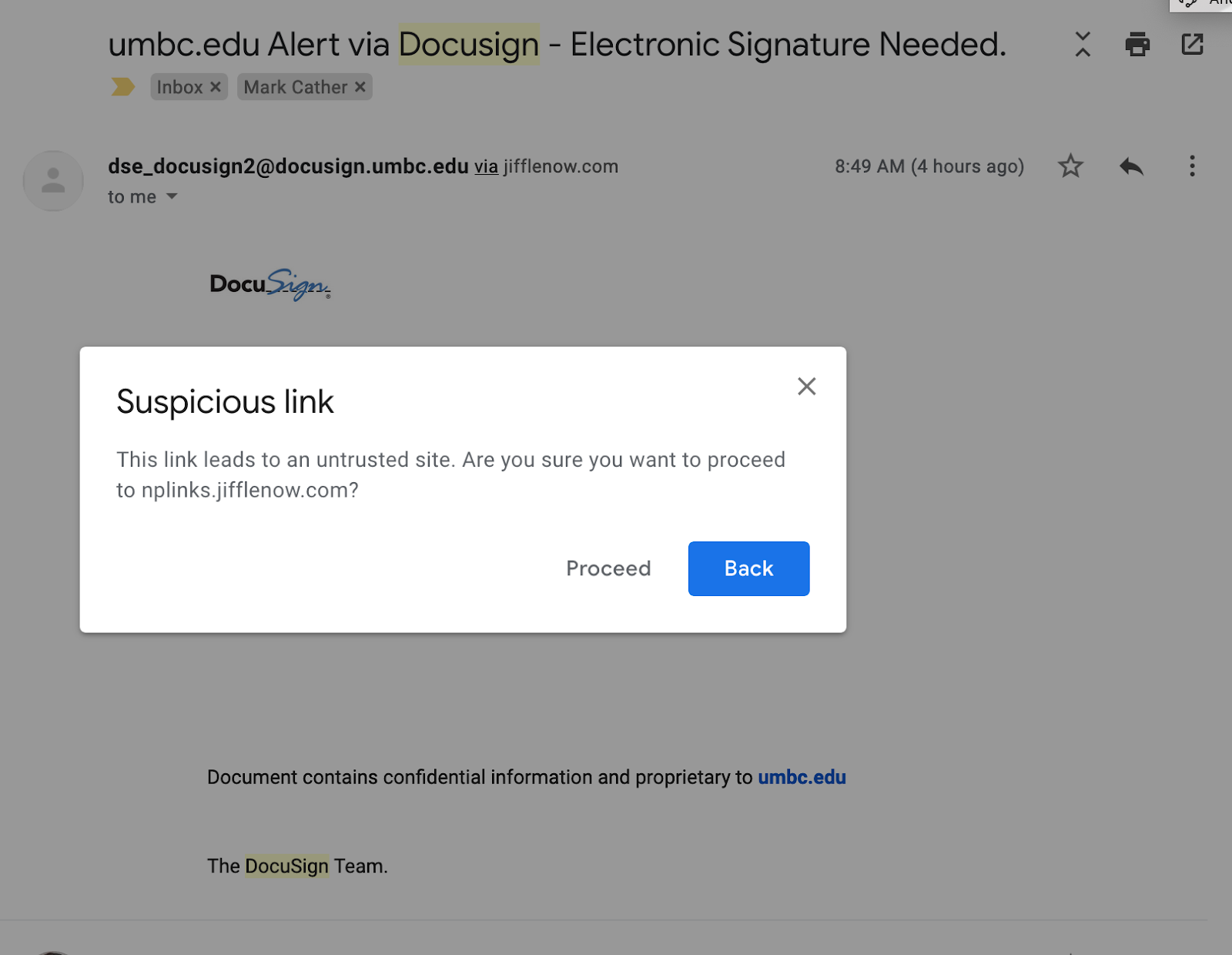
    <div class="html-content"><span><p><span>Yesterday morning, between 8:45am and 10:00am, several UMBC users received DocuSign messages offering access to a document called “News Update.pdf” with a button labeled “View Document Now”.  </span></p><br><p><span>The From address of the email “</span><a href="mailto:dse_docusign2@docusign.umbc.edu" rel="nofollow external" class="bo"><span>dse_docusign2@docusign.umbc.edu</span></a><span>” was forged.  This message did not originate from the UMBC’s DocuSign system.  It is, however, an unusually good design for a phishing attack.</span></p><br><p><span>In the current work climate, it is easy to overlook unusual features of messages we get in our UMBC email inboxes.  We are also using tools, like Docusign, more than ever.  There are people who will try to take advantage of that.  While the source of this message is currently under investigation, DoIT wanted to share some of the key features of this message that raise suspicions about its origin.</span></p><br><br><p><span>Example of </span><span>Malicious DocuSign Forgery</span><span>:</span></p><br><br><div><table><colgroup></colgroup><tbody><tr><td><p><span><span><img src="https://lh5.googleusercontent.com/pf7f-GQkMLl5bslm69aYUUHK7qbHgtSnZRhoWsLXkKzvGau2LE7-dnBBujZ9lUThFiX7Zo71l3MWtoAiYcOOMLtxqsJRZ5iUOlhecoApumNy1LXuSds-pD4x30-TbMOvOVWSNWl2" width="610" height="240" style="max-width: 100%; height: auto;"></span></span></p></td></tr></tbody></table></div><br><br><p><span>In the example above there are some tell-tale signs that should raise suspicions.  </span></p><br><ul><li><p><span>The message begins with the salutation “DocuSign,” and is from “The DocuSign Team”.  They seem to be addressing themselves.</span></p></li><li><p><span>There is no “DocuSign Team”.  DocuSign notifications are from UMBC staff.</span></p></li><li><p><span>The From: header in the upper left says “</span><a href="mailto:dse_docusign2@docusign.umbc.edu" rel="nofollow external" class="bo"><span>dse_docusign2@docusign.umbc.edu</span></a><span>”.  In an actual docusign message, that header would be something like “</span><span>Andy Johnston via DocuSign &lt;<a href="mailto:dse_na2@docusign.net">dse_na2@docusign.net</a>&gt;</span><span>”</span></p></li><li><p><span>DocuSign message subjects normally start with the words “Please DocuSign”.  This one does not.</span></p></li><li><p><span>The point of DocuSign is to be able to verify, by signing, that you have received a document.  There is no reason to do that for a news update.  UMBC News is sent out in regular email messages.</span></p></li></ul><h3><span>Did You Click on the Button?</span></h3><p><span>If you are one of the people who got this message and clicked on the button, you should have gotten this message:</span></p><br><p><span><span><img src="https://lh4.googleusercontent.com/Uux4FYix2Ex-T7YqaV8r4CJgGLHzJYc0xmXrg9RHe7i3mLvbRCh2q2bmz4AjlshFYc5YwAflolmofpITX8Q5mnrcpq8CDfRmjoicVp1smOsBxsGVCnhUESo7v6QQEZFYyj-Uusee" width="624" height="484" style="max-width: 100%; height: auto;"></span></span></p><br><span>If you selected ‘Proceed’, you would probably have gotten a message that the page was unreachable or the link was invalid.  If you got anything else, please submit a ticket to </span><a href="mailto:security@umbc.edu" rel="nofollow external" class="bo"><span>security@umbc.edu</span></a><span> so that we can contact you.</span></span></div>
]]>
</Body>
<Summary>Yesterday morning, between 8:45am and 10:00am, several UMBC users received DocuSign messages offering access to a document called “News Update.pdf” with a button labeled “View Document Now”.  ...</Summary>
<TrackingUrl>https://beta.my.umbc.edu/api/v0/pixel/news/91736/guest@my.umbc.edu/815dcbac850730795560e529bbcf3828/api/pixel</TrackingUrl>
<Tag>covid19</Tag>
<Tag>notice</Tag>
<Group token="itsecurity">IT Security - DoIT Cybersecurity Assurance and Digital Trust</Group>
<GroupUrl>https://beta.my.umbc.edu/groups/itsecurity</GroupUrl>
<AvatarUrl>https://assets1-beta.my.umbc.edu/images/avatars/group/7/xsmall.png?1777130152</AvatarUrl>
<AvatarUrl size="original">https://assets1-beta.my.umbc.edu/images/avatars/group/7/original.png?1777130152</AvatarUrl>
<AvatarUrl size="xxlarge">https://assets3-beta.my.umbc.edu/images/avatars/group/7/xxlarge.png?1777130152</AvatarUrl>
<AvatarUrl size="xlarge">https://assets2-beta.my.umbc.edu/images/avatars/group/7/xlarge.png?1777130152</AvatarUrl>
<AvatarUrl size="large">https://assets1-beta.my.umbc.edu/images/avatars/group/7/large.png?1777130152</AvatarUrl>
<AvatarUrl size="medium">https://assets2-beta.my.umbc.edu/images/avatars/group/7/medium.png?1777130152</AvatarUrl>
<AvatarUrl size="small">https://assets4-beta.my.umbc.edu/images/avatars/group/7/small.png?1777130152</AvatarUrl>
<AvatarUrl size="xsmall">https://assets1-beta.my.umbc.edu/images/avatars/group/7/xsmall.png?1777130152</AvatarUrl>
<AvatarUrl size="xxsmall">https://assets4-beta.my.umbc.edu/images/avatars/group/7/xxsmall.png?1777130152</AvatarUrl>
<Sponsor>IT Security - DoIT</Sponsor>
<PawCount>0</PawCount>
<CommentCount>0</CommentCount>
<CommentsAllowed>true</CommentsAllowed>
<PostedAt>Tue, 31 Mar 2020 16:35:38 -0400</PostedAt>
<EditAt>Tue, 31 Mar 2020 16:36:06 -0400</EditAt>
</NewsItem>

<NewsItem contentIssues="false" id="91732" important="false" status="posted" url="https://beta.my.umbc.edu/groups/doit/posts/91732">
<Title>Home Network Security</Title>
<Tagline>As we all work and study at home, we need to stay secure.</Tagline>
<Body>
<![CDATA[
    <div class="html-content"><div>If you are part of the UMBC community and are reading this in the spring of 2020, then you are very likely working and/or teaching and/or learning from home over the Internet.  In most cases, you have an Internet provider such as Comcast or Verizon and you have a router in your home to connect to them.  The router is your gateway to the Internet.  It is also the Internet’s gateway to you. (See links below for information about  recently discovered vulnerabilities in home routers.)</div><div><br></div><div><u>The Basics</u></div><div>For most people, the home router does two things.  </div><div><ol><li>It creates a small network that your devices can access either through WiFi or through a cable physically connected to the router.</li><li>It also connects that little network to your provider and, through them, to the Internet.</li></ol></div><div>Your router comes out of the box pretty much ready to go to work for you, but it’s not usually as secure as it could or should be.  There are a number of settings, especially in older routers, that should be verified or changed to make sure that:</div><div><ul><li>No one joins your small home network without your knowledge and permission.</li><li>No one out on the Internet can tell the router to behave in ways you don’t want it to.</li></ul></div><div>How you view and change these settings will vary with the make and model of your router.  There are some links at the end which may help you, but your best bet is to get the make and model of your router (usually printed on the back or the bottom) and search for them on Google, Bing, or some other search service.  Include terms like “setup”, “manual” and “secure”.  Try to use a site belonging to the router’s manufacturer.  (You will probably be accessing your router through a web browser on your home network.)</div><div><br></div><div>Here is an initial to-do list:</div><div><ul><li>Secure your wireless connection</li><ul><li>This is the connection between your wireless devices (laptop, tablet, etc.) and your router on the “small network” in your house.  Make sure encryption is enabled and set to WPA2 or WPA3.  If there is an option for WPS encryption, disable it if possible.  If not possible, consider getting a new router.</li></ul><li>Change the router’s administrative password</li><ul><li>There are two different passwords associated with your router.  There’s your WiFi password that is entered in every device on your home WiFi network, and there’s that administrative password that you use to go into your router to view and change its settings.  Modern routers often come with pre-set WiFi passwords.</li></ul><li>Update your router’s firmware</li><ul><li>If you’re a Windows user, you have dealt with software updates since you first booted the machine.  This is much the same.   Precisely how you update your router depends on its make and model. If your router has an auto-update feature, you should probably use it.</li></ul><li>MAC filtering</li><ul><li>This is not about Apple computers.  Each wifi device, that connects with your router, no matter what kind of device it is, has a unique MAC address that you normally don’t see but can discover.  This allows you to refuse access to all devices other than those whose MAC addresses you explicitly ‘whitelist’ (allow) in your router.  If you’re comfortable doing this, consider implementing it..  WARNING: There’s a security vs. convenience trade-off here. You will have to whitelist every new device that you want to appear on your home network.  </li></ul><li>If your router has a ‘remote management’ setting, turn it off.</li></ul></div><div><br></div><div>Links for more information:</div><div><ul><li><a href="https://www.wired.com/story/secure-your-wi-fi-router/">https://www.wired.com/story/secure-your-wi-fi-router/</a></li><li><a href="https://lifehacker.com/how-to-make-your-wifi-router-as-secure-as-possible-1827695547">https://lifehacker.com/how-to-make-your-wifi-router-as-secure-as-possible-1827695547</a></li><li><a href="https://www.consumer.ftc.gov/blog/2020/03/online-security-tips-working-home">https://www.consumer.ftc.gov/blog/2020/03/online-security-tips-working-home</a></li><li><a href="https://www.cisecurity.org/white-papers/cis-controls-telework-and-small-office-network-security-guide/">https://www.cisecurity.org/white-papers/cis-controls-telework-and-small-office-network-security-guide/</a></li></ul></div><div>Links for more information about recently discovered vulnerabilities in home routers:</div><div><ul><li><a href="https://arstechnica.com/information-technology/2020/03/new-attack-on-home-routers-sends-users-to-spoofed-sites-that-push-malware/">https://arstechnica.com/information-technology/2020/03/new-attack-on-home-routers-sends-users-to-spoofed-sites-that-push-malware/</a></li><li><a href="https://labs.bitdefender.com/2020/03/new-router-dns-hijacking-attacks-abuse-bitbucket-to-host-infostealer/">https://labs.bitdefender.com/2020/03/new-router-dns-hijacking-attacks-abuse-bitbucket-to-host-infostealer/</a></li><li><a href="https://www.bleepingcomputer.com/news/security/hackers-hijack-routers-dns-to-spread-malicious-covid-19-apps/">https://www.bleepingcomputer.com/news/security/hackers-hijack-routers-dns-to-spread-malicious-covid-19-apps/</a></li></ul></div><div><br></div></div>
]]>
</Body>
<Summary>If you are part of the UMBC community and are reading this in the spring of 2020, then you are very likely working and/or teaching and/or learning from home over the Internet.  In most cases, you...</Summary>
<TrackingUrl>https://beta.my.umbc.edu/api/v0/pixel/news/91732/guest@my.umbc.edu/5359b0cf8623ce3a26a5ae8ef53ac62d/api/pixel</TrackingUrl>
<Tag>covid19</Tag>
<Tag>notice</Tag>
<Group token="itsecurity">IT Security - DoIT Cybersecurity Assurance and Digital Trust</Group>
<GroupUrl>https://beta.my.umbc.edu/groups/itsecurity</GroupUrl>
<AvatarUrl>https://assets1-beta.my.umbc.edu/images/avatars/group/7/xsmall.png?1777130152</AvatarUrl>
<AvatarUrl size="original">https://assets1-beta.my.umbc.edu/images/avatars/group/7/original.png?1777130152</AvatarUrl>
<AvatarUrl size="xxlarge">https://assets3-beta.my.umbc.edu/images/avatars/group/7/xxlarge.png?1777130152</AvatarUrl>
<AvatarUrl size="xlarge">https://assets2-beta.my.umbc.edu/images/avatars/group/7/xlarge.png?1777130152</AvatarUrl>
<AvatarUrl size="large">https://assets1-beta.my.umbc.edu/images/avatars/group/7/large.png?1777130152</AvatarUrl>
<AvatarUrl size="medium">https://assets2-beta.my.umbc.edu/images/avatars/group/7/medium.png?1777130152</AvatarUrl>
<AvatarUrl size="small">https://assets4-beta.my.umbc.edu/images/avatars/group/7/small.png?1777130152</AvatarUrl>
<AvatarUrl size="xsmall">https://assets1-beta.my.umbc.edu/images/avatars/group/7/xsmall.png?1777130152</AvatarUrl>
<AvatarUrl size="xxsmall">https://assets4-beta.my.umbc.edu/images/avatars/group/7/xxsmall.png?1777130152</AvatarUrl>
<Sponsor>IT Security - DoIT</Sponsor>
<PawCount>0</PawCount>
<CommentCount>0</CommentCount>
<CommentsAllowed>true</CommentsAllowed>
<PostedAt>Tue, 31 Mar 2020 16:16:36 -0400</PostedAt>
</NewsItem>

<NewsItem contentIssues="false" id="91731" important="false" status="posted" url="https://beta.my.umbc.edu/groups/doit/posts/91731">
<Title>Telework Security Resources</Title>
<Tagline>Here are some good resources for securing your telework...</Tagline>
<Body>
<![CDATA[
    <div class="html-content">More people throughout the United States are teleworking now, including many who have never done so before.  The UMBC community is no exception as many of us work, learn and teach from our keyboards.  All this remote work is opening up new avenues of exploitation for unscrupulous scammers.  DoIT will be posting resources and suggestions to help you maintain security as more of your life moves on-line.<div><br></div><div><div>The SANS Institute is offering the SANS Security Awareness Work-from-Home Deployment Kit.</div><div><ul><li><a href="https://www.sans.org/security-awareness-training/sans-security-awareness-work-home-deployment-kit">https://www.sans.org/security-awareness-training/sans-security-awareness-work-home-deployment-kit</a></li></ul></div><div><br></div><div>As part of the kit, SANS has posted a five-step guide to teleworking security.  You can find it (in several languages) here:</div><div><ul><li><a href="https://www.sans.org/security-awareness-training/fact-sheet">https://www.sans.org/security-awareness-training/fact-sheet</a></li></ul></div><div><br></div><div>LinkedIn is offering registered users several LinkedIn Learning courses that focus on being productive while working from home, including tips on using virtual meeting tools to build relationships in a new working environment. </div><div><ul><li><a href="https://www.linkedin.com/learning/paths/remote-working-setting-yourself-and-your-teams-up-for-success">https://www.linkedin.com/learning/paths/remote-working-setting-yourself-and-your-teams-up-for-success</a></li></ul></div><div><br></div><div>NIST has posted a well-designed graphic to help organizations secure conference calls.</div><div><ul><li><a href="https://www.nist.gov/image/conference-call-security-graphic">https://www.nist.gov/image/conference-call-security-graphic</a></li></ul></div><div><br></div><div>INFOSEC has published an article that discusses remote working security, including a brief description of VPN technology.</div><div><ul><li><a href="https://resources.infosecinstitute.com/category/enterprise/securityawareness/security-awareness-roles/security-awareness-issues-for-remote-workers/#gref">https://resources.infosecinstitute.com/category/enterprise/securityawareness/security-awareness-roles/security-awareness-issues-for-remote-workers/#gref</a></li></ul></div><div><br></div><div>The National Cyber Security Alliance (NCSA) has posted the “COVID-19 Security Resource Library” of security links for teleworkers.</div><div><ul><li><a href="https://staysafeonline.org/covid-19-security-resource-library/">https://staysafeonline.org/covid-19-security-resource-library/</a></li></ul></div></div><div><br></div></div>
]]>
</Body>
<Summary>More people throughout the United States are teleworking now, including many who have never done so before.  The UMBC community is no exception as many of us work, learn and teach from our...</Summary>
<TrackingUrl>https://beta.my.umbc.edu/api/v0/pixel/news/91731/guest@my.umbc.edu/5953a0b0826f029855bc77da1d65b6e8/api/pixel</TrackingUrl>
<Tag>covid19</Tag>
<Tag>notice</Tag>
<Group token="itsecurity">IT Security - DoIT Cybersecurity Assurance and Digital Trust</Group>
<GroupUrl>https://beta.my.umbc.edu/groups/itsecurity</GroupUrl>
<AvatarUrl>https://assets1-beta.my.umbc.edu/images/avatars/group/7/xsmall.png?1777130152</AvatarUrl>
<AvatarUrl size="original">https://assets1-beta.my.umbc.edu/images/avatars/group/7/original.png?1777130152</AvatarUrl>
<AvatarUrl size="xxlarge">https://assets3-beta.my.umbc.edu/images/avatars/group/7/xxlarge.png?1777130152</AvatarUrl>
<AvatarUrl size="xlarge">https://assets2-beta.my.umbc.edu/images/avatars/group/7/xlarge.png?1777130152</AvatarUrl>
<AvatarUrl size="large">https://assets1-beta.my.umbc.edu/images/avatars/group/7/large.png?1777130152</AvatarUrl>
<AvatarUrl size="medium">https://assets2-beta.my.umbc.edu/images/avatars/group/7/medium.png?1777130152</AvatarUrl>
<AvatarUrl size="small">https://assets4-beta.my.umbc.edu/images/avatars/group/7/small.png?1777130152</AvatarUrl>
<AvatarUrl size="xsmall">https://assets1-beta.my.umbc.edu/images/avatars/group/7/xsmall.png?1777130152</AvatarUrl>
<AvatarUrl size="xxsmall">https://assets4-beta.my.umbc.edu/images/avatars/group/7/xxsmall.png?1777130152</AvatarUrl>
<Sponsor>IT Security - DoIT</Sponsor>
<PawCount>0</PawCount>
<CommentCount>0</CommentCount>
<CommentsAllowed>true</CommentsAllowed>
<PostedAt>Tue, 31 Mar 2020 15:47:52 -0400</PostedAt>
<EditAt>Tue, 31 Mar 2020 15:48:15 -0400</EditAt>
</NewsItem>

<NewsItem contentIssues="true" id="91704" important="false" status="posted" url="https://beta.my.umbc.edu/groups/doit/posts/91704">
<Title>MOST Commons: A Resource to Support Remote Teaching</Title>
<Tagline>OER online webinar</Tagline>
<Body>
<![CDATA[
    <div class="html-content"><p>Dear Colleague,<br><br>I thought you might be interested in this webinar sponsored by MarylandOnline which will take place next Tuesday, March 31st. Please see the description and registration information below.<br><br><strong>M.O.S.T. Commons: A Resource to Support the Shift to Remote Teaching</strong></p><ul><li>Mindy Boland (Director, OER Services, ISKME/ OER Commons);</li><li>Colleen McKnight (Director of Library Services, Frederick Community College, M.O.S.T. Commons Library Fellow)</li><li>Moderator: Melissa Goldberg (Consultant, edBridge Partners)</li></ul><p>The Coronavirus pandemic continues to cause major disruptions for Maryland’s communities, institutions, faculty, and students. We recognize the challenges of preparing programs and courses for remote delivery and are encouraging faculty and staff to consider the Maryland Open Source Textbook (M.O.S.T.) Commons as a resource for locating openly licensed educational resources to support learning.<br><br>During this webinar, presenters will discuss how M.O.S.T. Commons can support institutions and faculty in finding high-quality digital materials; how digital rights and responsibilities change when remote teaching; how colleges and systems in other states are using OER to address their transition to remote teaching; and ways the M.O.S.T. team can support your efforts.<br><br>There will be plenty of time to answer your questions and address your concerns. <br><br><a href="https://oer-maryland.us8.list-manage.com/track/click?u=4ce992e3f6db63c7af9c28afd&amp;id=5b63b45f4c&amp;e=b54e6989f4" rel="nofollow external" class="bo">CLICK HERE TO REGISTER </a>(<a href="https://www.surveymonkey.com/r/CZF29Y6" rel="nofollow external" class="bo">https://www.surveymonkey.com/r/CZF29Y6</a>)<br><br>The M.O.S.T. initiative is here to support your efforts to ensure academic continuity and the well-being of your students during this stressful time.  Please let us know if there is something we can do to help at <a href="mailto:most@usmd.edu" rel="nofollow external" class="bo"><span>most@usmd.edu</span></a>.  <br><br>For additional resources related to remote teaching from across the USM and beyond, please visit <a href="https://oer-maryland.us8.list-manage.com/track/click?u=4ce992e3f6db63c7af9c28afd&amp;id=46dfe626eb&amp;e=b54e6989f4" rel="nofollow external" class="bo">https://www.usmd.edu/cai/remote-teaching-usm</a><br><br><br>MJ</p><div> <div><span>Dr. MJ Bishop</span><div><span>Associate Vice Chancellor and Director</span></div><div><span>William E. Kirwan Center for Academic Innovation</span></div><div><span>University System of Maryland</span></div></div></div></div>
]]>
</Body>
<Summary>Dear Colleague,  I thought you might be interested in this webinar sponsored by MarylandOnline which will take place next Tuesday, March 31st. Please see the description and registration...</Summary>
<Website>https://www.surveymonkey.com/r/CZF29Y6)</Website>
<TrackingUrl>https://beta.my.umbc.edu/api/v0/pixel/news/91704/guest@my.umbc.edu/c9b501a43837c2eccfb567e2c5d048ca/api/pixel</TrackingUrl>
<Tag>development</Tag>
<Tag>distance</Tag>
<Tag>learning</Tag>
<Tag>oer</Tag>
<Tag>professional</Tag>
<Tag>webinar</Tag>
<Group token="oer">Open Educational Resources at UMBC</Group>
<GroupUrl>https://beta.my.umbc.edu/groups/oer</GroupUrl>
<AvatarUrl>https://assets1-beta.my.umbc.edu/system/shared/avatars/groups/000/001/664/0e7fb0a3d658c358b4e5e9561f35099e/xsmall.png?1562590436</AvatarUrl>
<AvatarUrl size="original">https://assets2-beta.my.umbc.edu/system/shared/avatars/groups/000/001/664/0e7fb0a3d658c358b4e5e9561f35099e/original.png?1562590436</AvatarUrl>
<AvatarUrl size="xxlarge">https://assets1-beta.my.umbc.edu/system/shared/avatars/groups/000/001/664/0e7fb0a3d658c358b4e5e9561f35099e/xxlarge.png?1562590436</AvatarUrl>
<AvatarUrl size="xlarge">https://assets1-beta.my.umbc.edu/system/shared/avatars/groups/000/001/664/0e7fb0a3d658c358b4e5e9561f35099e/xlarge.png?1562590436</AvatarUrl>
<AvatarUrl size="large">https://assets4-beta.my.umbc.edu/system/shared/avatars/groups/000/001/664/0e7fb0a3d658c358b4e5e9561f35099e/large.png?1562590436</AvatarUrl>
<AvatarUrl size="medium">https://assets1-beta.my.umbc.edu/system/shared/avatars/groups/000/001/664/0e7fb0a3d658c358b4e5e9561f35099e/medium.png?1562590436</AvatarUrl>
<AvatarUrl size="small">https://assets2-beta.my.umbc.edu/system/shared/avatars/groups/000/001/664/0e7fb0a3d658c358b4e5e9561f35099e/small.png?1562590436</AvatarUrl>
<AvatarUrl size="xsmall">https://assets1-beta.my.umbc.edu/system/shared/avatars/groups/000/001/664/0e7fb0a3d658c358b4e5e9561f35099e/xsmall.png?1562590436</AvatarUrl>
<AvatarUrl size="xxsmall">https://assets1-beta.my.umbc.edu/system/shared/avatars/groups/000/001/664/0e7fb0a3d658c358b4e5e9561f35099e/xxsmall.png?1562590436</AvatarUrl>
<Sponsor>Open Educational Resources at UMBC</Sponsor>
<ThumbnailUrl size="xxlarge">https://assets3-beta.my.umbc.edu/system/shared/thumbnails/news/000/091/704/bf922daa39c96d15f59eb453a7177fbb/xxlarge.jpg?1585597324</ThumbnailUrl>
<ThumbnailUrl size="xlarge">https://assets3-beta.my.umbc.edu/system/shared/thumbnails/news/000/091/704/bf922daa39c96d15f59eb453a7177fbb/xlarge.jpg?1585597324</ThumbnailUrl>
<ThumbnailUrl size="large">https://assets2-beta.my.umbc.edu/system/shared/thumbnails/news/000/091/704/bf922daa39c96d15f59eb453a7177fbb/large.jpg?1585597324</ThumbnailUrl>
<ThumbnailUrl size="medium">https://assets1-beta.my.umbc.edu/system/shared/thumbnails/news/000/091/704/bf922daa39c96d15f59eb453a7177fbb/medium.jpg?1585597324</ThumbnailUrl>
<ThumbnailUrl size="small">https://assets3-beta.my.umbc.edu/system/shared/thumbnails/news/000/091/704/bf922daa39c96d15f59eb453a7177fbb/small.jpg?1585597324</ThumbnailUrl>
<ThumbnailUrl size="xsmall">https://assets3-beta.my.umbc.edu/system/shared/thumbnails/news/000/091/704/bf922daa39c96d15f59eb453a7177fbb/xsmall.jpg?1585597324</ThumbnailUrl>
<ThumbnailUrl size="xxsmall">https://assets4-beta.my.umbc.edu/system/shared/thumbnails/news/000/091/704/bf922daa39c96d15f59eb453a7177fbb/xxsmall.jpg?1585597324</ThumbnailUrl>
<PawCount>2</PawCount>
<CommentCount>0</CommentCount>
<CommentsAllowed>true</CommentsAllowed>
<PostedAt>Mon, 30 Mar 2020 15:42:20 -0400</PostedAt>
</NewsItem>

<NewsItem contentIssues="true" id="91490" important="false" status="posted" url="https://beta.my.umbc.edu/groups/doit/posts/91490">
<Title>Learn how to use VoiceThread with these free workshops!</Title>
<Tagline>Add media-rich, asynchronous engagement in your courses</Tagline>
<Body>
<![CDATA[
    <div class="html-content"><div><div><span>VoiceThread is a collaborative, multimedia slide show that holds </span><a href="https://voicethread.com/about/features/media/" rel="nofollow external" class="bo">images, documents, and videos</a><span> and allows people to navigate slides and leave </span><a href="https://voicethread.com/about/features/commenting/" rel="nofollow external" class="bo">comments</a><span> in several ways – text, voice, audio file, or webcam</span><span>. </span><span>VoiceThread is available to any instructor who would like to incorporate this engagement tool into <a href="https://doit.umbc.edu/itnm/academic-continuity/" rel="nofollow external" class="bo">their digital toolkit for academic continuity</a>. </span><span>With VoiceThread, faculty and students can:</span></div><div><div><ul><li><span><strong>Demonstrate</strong> procedures to help students prepare for a practical exam</span></li><li><span><strong>Explain</strong> decisions when selecting subjects for a painting’s composition</span></li><li><span><strong>Foster</strong> greater community in large, lecture-based classes </span></li><li><span><strong>Debate</strong> the pros and cons of a controversial issue</span></li><li><span><strong>Practice</strong> foreign language skills during role-play</span></li><li><span><strong>Critique</strong> a classmate’s composition</span></li></ul></div></div><div><span>VoiceThread was </span><a href="https://doit.umbc.edu/news/?id=56223" rel="nofollow external" class="bo">piloted at UMBC</a><span> </span><span>in 2016 </span><a href="https://my3.my.umbc.edu/groups/doit/events/41624" rel="nofollow external" class="bo">by Ancient Studies lecturer, Dr. Tim Phin</a> and it is available through Blackboard or <a href="https://wiki.umbc.edu/x/FAvBBQ" rel="nofollow external" class="bo">single sign-on</a> via VoiceThread itself. </div><div><br></div><div><strong>VoiceThread Basics: Upload, Comment &amp; Share</strong></div></div><div>March 31, 2020 at 1:00pm ET - <a href="https://attendee.gototraining.com/r/9171820740275931650" rel="nofollow external" class="bo">Register here</a></div><div><br></div><div>Participants will learn how to upload media, comment and annotate on that media, and share it with others. This will be a slow paced, step-by-step, hands-on workshop.</div><div><br></div><div><strong>Using VoiceThread with Blackboard</strong></div><div>April 2, 2020 at 1:00pm ET - <a href="https://attendee.gototraining.com/r/2300116058765067522" rel="nofollow external" class="bo">Register here</a> </div><div><br></div><div>In this hands-on workshop, you will learn how to create VoiceThreads and then add them to your Blackboard course as lessons or assessments.</div><div><br></div><div><strong>About the Workshops</strong></div><div><br></div><div><span>These workshops are completely free. The sessions are led by VoiceThread's instructional designer and online educator George Haines.  George will share his expertise to help you get the most from VoiceThread. </span>Participants are provided with a recording link after the session concludes. </div><div><span><br></span></div><div><span>View past recordings on </span><a href="https://voicethread.com/workshop-categories/workshop-archive" rel="nofollow external" class="bo">the VoiceThread workshop archive</a><span> including:</span></div><div><ul><li><a href="https://voicethread.com/workshops/voicethread-basics-1-upload-comment-and-share-24/" rel="nofollow external" class="bo">Creating VoiceThreads</a></li><li><a href="https://voicethread.com/workshops/voicethread-basics-2-groups-and-secure-sharing-14/" rel="nofollow external" class="bo">Managing VoiceThread groups</a></li><li><a href="https://voicethread.com/workshops/voicethread-basics-3-moderating-comments-private-and-threaded-replies-and-copying/" rel="nofollow external" class="bo">Moderating VoiceThread comments</a><span> </span></li><li><a href="https://voicethread.com/workshops/voicethread-basics-4-voicethread-and-your-lms/" rel="nofollow external" class="bo">Using VoiceThread in Blackboard</a></li></ul><div><p><span><em>*** BONUS: Instructional Technology staff will host a VoiceThread remote workshop on April 1 at noon. <a href="https://my3.my.umbc.edu/groups/instructional-technology/events/82741" rel="nofollow external" class="bo">Learn more</a>.</em></span></p><p><span>As always, if you have any questions, please consider the following options:</span></p><ul><li><a href="http://www.umbc.edu/faq" rel="nofollow external" class="bo">Check our extensive FAQ collection</a><span> </span></li><li><span><a href="https://wiki.umbc.edu/x/4IrNAw" rel="nofollow external" class="bo">Review our FAQs on VoiceThread</a></span></li><li><a href="http://my.umbc.edu/go/request-help" rel="nofollow external" class="bo">Open a ticket via RT</a></li><li><span>Follow the </span><a href="http://my.umbc.edu/groups/instructional-technology" rel="nofollow external" class="bo">Instructional Technology</a> &amp; <a href="http://my.umbc.edu/groups/doit" rel="nofollow external" class="bo">DoIT</a><span> myUMBC groups</span></li><ul><li><span>Sign up for </span><a href="https://my3.my.umbc.edu/groups/instructional-technology/events" rel="nofollow external" class="bo">a webinar &amp; other training</a><span> </span></li></ul><li><a href="http://doit.umbc.edu/itnm/staff/" rel="nofollow external" class="bo">Request a consult</a><span> with instructional technology staff</span></li></ul></div></div></div>
]]>
</Body>
<Summary>VoiceThread is a collaborative, multimedia slide show that holds images, documents, and videos and allows people to navigate slides and leave comments in several ways – text, voice, audio file, or...</Summary>
<Website>https://my3.my.umbc.edu/groups/instructional-technology/posts/91490</Website>
<TrackingUrl>https://beta.my.umbc.edu/api/v0/pixel/news/91490/guest@my.umbc.edu/e8eeb1b33c201a99fe4852f578e9ef92/api/pixel</TrackingUrl>
<Tag>training</Tag>
<Tag>voicethread</Tag>
<Tag>webinar</Tag>
<Group token="instructional-technology">Instructional Technology</Group>
<GroupUrl>https://beta.my.umbc.edu/groups/instructional-technology</GroupUrl>
<AvatarUrl>https://assets2-beta.my.umbc.edu/system/shared/avatars/groups/000/001/164/dec3b026b81ee6d890a8f82f75c94a2e/xsmall.png?1446126703</AvatarUrl>
<AvatarUrl size="original">https://assets1-beta.my.umbc.edu/system/shared/avatars/groups/000/001/164/dec3b026b81ee6d890a8f82f75c94a2e/original.png?1446126703</AvatarUrl>
<AvatarUrl size="xxlarge">https://assets2-beta.my.umbc.edu/system/shared/avatars/groups/000/001/164/dec3b026b81ee6d890a8f82f75c94a2e/xxlarge.png?1446126703</AvatarUrl>
<AvatarUrl size="xlarge">https://assets1-beta.my.umbc.edu/system/shared/avatars/groups/000/001/164/dec3b026b81ee6d890a8f82f75c94a2e/xlarge.png?1446126703</AvatarUrl>
<AvatarUrl size="large">https://assets1-beta.my.umbc.edu/system/shared/avatars/groups/000/001/164/dec3b026b81ee6d890a8f82f75c94a2e/large.png?1446126703</AvatarUrl>
<AvatarUrl size="medium">https://assets4-beta.my.umbc.edu/system/shared/avatars/groups/000/001/164/dec3b026b81ee6d890a8f82f75c94a2e/medium.png?1446126703</AvatarUrl>
<AvatarUrl size="small">https://assets3-beta.my.umbc.edu/system/shared/avatars/groups/000/001/164/dec3b026b81ee6d890a8f82f75c94a2e/small.png?1446126703</AvatarUrl>
<AvatarUrl size="xsmall">https://assets2-beta.my.umbc.edu/system/shared/avatars/groups/000/001/164/dec3b026b81ee6d890a8f82f75c94a2e/xsmall.png?1446126703</AvatarUrl>
<AvatarUrl size="xxsmall">https://assets3-beta.my.umbc.edu/system/shared/avatars/groups/000/001/164/dec3b026b81ee6d890a8f82f75c94a2e/xxsmall.png?1446126703</AvatarUrl>
<Sponsor>Instructional Technology</Sponsor>
<ThumbnailUrl size="xxlarge">https://assets2-beta.my.umbc.edu/system/shared/thumbnails/news/000/091/490/c68f3a5ead4184401ba1093ab317ec7f/xxlarge.jpg?1584983721</ThumbnailUrl>
<ThumbnailUrl size="xlarge">https://assets2-beta.my.umbc.edu/system/shared/thumbnails/news/000/091/490/c68f3a5ead4184401ba1093ab317ec7f/xlarge.jpg?1584983721</ThumbnailUrl>
<ThumbnailUrl size="large">https://assets4-beta.my.umbc.edu/system/shared/thumbnails/news/000/091/490/c68f3a5ead4184401ba1093ab317ec7f/large.jpg?1584983721</ThumbnailUrl>
<ThumbnailUrl size="medium">https://assets2-beta.my.umbc.edu/system/shared/thumbnails/news/000/091/490/c68f3a5ead4184401ba1093ab317ec7f/medium.jpg?1584983721</ThumbnailUrl>
<ThumbnailUrl size="small">https://assets4-beta.my.umbc.edu/system/shared/thumbnails/news/000/091/490/c68f3a5ead4184401ba1093ab317ec7f/small.jpg?1584983721</ThumbnailUrl>
<ThumbnailUrl size="xsmall">https://assets1-beta.my.umbc.edu/system/shared/thumbnails/news/000/091/490/c68f3a5ead4184401ba1093ab317ec7f/xsmall.jpg?1584983721</ThumbnailUrl>
<ThumbnailUrl size="xxsmall">https://assets4-beta.my.umbc.edu/system/shared/thumbnails/news/000/091/490/c68f3a5ead4184401ba1093ab317ec7f/xxsmall.jpg?1584983721</ThumbnailUrl>
<PawCount>1</PawCount>
<CommentCount>0</CommentCount>
<CommentsAllowed>true</CommentsAllowed>
<PostedAt>Mon, 30 Mar 2020 12:47:30 -0400</PostedAt>
<EditAt>Mon, 30 Mar 2020 12:50:07 -0400</EditAt>
</NewsItem>

<NewsItem contentIssues="true" id="91642" important="false" status="posted" url="https://beta.my.umbc.edu/groups/doit/posts/91642">
<Title>Effective practices for managing the live virtual classroom</Title>
<Tagline>Promoting positive engagement in Collaborate and Webex</Tagline>
<Body>
<![CDATA[
    <div class="html-content"><span><p><span>Keeping your classroom on topic and safe from trolling shouldn't be something you have to worry about when teaching. Unfortunately, misbehavior can and does happen. These tips should help you keep your class on track and safe from disruption when using Collaborate or Webex for live, remote instruction. (Many of these tips are applicable to business meetings.)</span></p><ul><li><p><span>Avoid sharing your guest link via email or social media. The guest link allows anyone to access a meeting so if a stranger clicks the link, that person can also join. </span></p></li><ul><li><p><span><strong>Collaborate</strong>: Tell students to </span><a href="https://wiki.umbc.edu/x/E4I6B" rel="nofollow external" class="bo"><span>use the Course Room link or specific session</span></a><span> that's available in the Blackboard course unless you have no other means to get the link to them. Do not share the guest link. The Collaborate link is associated with your student usernames for </span><a href="https://wiki.umbc.edu/x/pwfBBQ" rel="nofollow external" class="bo"><span>tracking attendance</span></a><span> while the guest link lets students enter any name and share the link with other people. <em>Do not share the guest link with students!</em></span></p></li><li><p><span><strong>Webex</strong>: Limit the use of your personal meeting room for class or large meetings </span><a href="https://wiki.umbc.edu/x/aATBBQ" rel="nofollow external" class="bo"><span>by generating a new session link</span></a><span> per meeting through the Google Calendar integration. A passcode is automatically added for extra security. This link cannot be shared since it is uniquely coded to each invited person.</span></p></li></ul><li><p><span>If you do have a disruptive participant in the session, you can remove that person.</span></p></li><ul><li><p><span><strong>Collaborate</strong>: </span><a href="https://help.blackboard.com/Collaborate/Ultra/Moderator/Moderate_Sessions/Manage_Attendees#remove-attendees_OTP-10" rel="nofollow external" class="bo"><span>Remove Attendees</span></a></p></li><li><p><span><strong>Webex</strong>: </span><span><a href="https://help.webex.com/en-us/WBX30745/How-Do-I-Expel-a-Meeting-Participant" rel="nofollow external" class="bo">Expel a Participant</a></span></p></li></ul><li><p><span>Take note of the default settings participants have to share their screen. Unlike Zoom, both Collaborate and Webex do not allow participants to share by default.</span></p></li><ul><li><p><span><strong>Collaborate</strong>: Only </span><a href="https://wiki.umbc.edu/x/WgfBBQ" rel="nofollow external" class="bo"><span>moderators and presenters</span></a><span> can share their screens. Participants must be </span><a href="https://wiki.umbc.edu/x/YoQWB" rel="nofollow external" class="bo"><span>promoted to presenter</span></a><span> to share their screen with the room.</span></p></li><li><p><span><strong>Webex</strong>: Default settings in Webex prevent attendees from sharing their screen unless the host allows. To allow an attendee to share their screen, right click on the attendee and </span><a href="https://help.webex.com/en-us/noyihh6/Make-Someone-the-Host-in-Cisco-Webex-Meetings" rel="nofollow external" class="bo"><span>select Make Presenter</span></a><span>.</span></p></li></ul><li><p><span>Chat, voice, and webcam functionality IS available by default to participants. Collaborate and Webex handle these settings differently.</span></p></li><ul><li><p><span><strong>Collaborate</strong>: You can </span><a href="https://help.blackboard.com/Collaborate/Ultra/Moderator/Schedule_Sessions/Session_Settings#settings-you-can-change-during-a-session_OTP-3" rel="nofollow external" class="bo"><span>disable these functions</span></a><span> by default through the Session Settings before or during a live meeting. Ask students to raise their hands in the session if they want to speak and then </span><a href="https://wiki.umbc.edu/x/YoQWB" rel="nofollow external" class="bo"><span>promote them to presenter</span></a><span>. Once they are finished, you can demote them back to participants.</span></p></li><li><p><span><strong>Webex</strong>: You can control the permissions your attendees have when scheduling the meeting </span><a href="https://webex.umbc.edu/" rel="nofollow external" class="bo"><span>via the web</span></a><span>. Under Attendee Privileges, default settings allow attendees to view participants, request remote control, and participate in private chats with presenters, hosts, and other participants. Once in the meeting, the host has the power to </span><a href="https://help.webex.com/en-us/r2cdv1/Mute-or-Unmute-Others-as-a-Host-in-the-Cisco-Webex-Meetings-Suite" rel="nofollow external" class="bo"><span>mute other participants</span></a><span> or </span><a href="https://help.webex.com/en-us/WBX56449/How-Do-I-Disable-Automatic-Switching-of-the-Video-Panel-when-a-Participant-Speaks" rel="nofollow external" class="bo"><span>disable individual video feeds</span></a><span>.</span></p></li></ul><li><p><span>Turn off private chat. </span></p></li><ul><li><p><span><strong>Collaborate</strong>: This </span><a href="https://wiki.umbc.edu/x/FgRfB" rel="nofollow external" class="bo"><span>setting must be disabled</span></a><span> in Collaborate BEFORE the live session. Turning it off prevents someone from messaging another participant during the live session.</span></p></li><li><p><span><strong>Webex</strong>: By default, chat is enabled. When scheduling the meeting </span><a href="https://webex.umbc.edu/" rel="nofollow external" class="bo"><span>via the web</span></a><span>, you can disable chat through Advanced Options. The meeting options allow you to disable public chat while attendee privileges allow you to turn off private chat.</span></p></li></ul><li><p><a href="https://www.insidehighered.com/news/2020/03/26/zoombombers-disrupt-online-classes-racist-pornographic-content" rel="nofollow external" class="bo"><span>Don’t use Zoom</span></a><span>: It’s not licensed or supported by UMBC.</span></p></li></ul><p><span>Additionally, you and your class may want to observe some general tips for presenting and attending in a live session:</span></p><ul><li><p><span>Establish expectations early. Review any </span><a href="https://umbc.coursearc.com/umbc/elearning-resources/start-here/netiquette/" rel="nofollow external" class="bo"><span>netiquette guidelines</span></a><span> with your students.</span></p></li><li><p><span>Remind students to check their microphone buttons in the session. When participants do not need to talk, they should turn their microphones OFF.</span></p></li><li><p><span>Be patient during a live session, especially if your class is large. A co-moderator is essential to manage large numbers. Tell students to raise their hands if they have a question or use chat. Some instructors have students use private chat to ask a moderator a question directly.</span></p></li><li><p><span>Remind students that their peers and/or instructor are also working from home and they may have children in the same space. Let your audience know if content will be sensitive, especially if you think minors may be in the background. </span></p></li><li><p><span>Anyone who is asked to share video should check the background area to avoid inappropriate content within view.</span></p></li><li><p><span>Be aware of ambient noise (televisions, barking dogs, flushing toilets, doorbells). If someone is speaking, make sure people in the space around know not to interrupt.</span></p></li></ul><p><span>As always, if you have any questions, please consider the following options:</span></p><ul><li><p><a href="http://www.umbc.edu/faq" rel="nofollow external" class="bo"><span>Check our extensive FAQ collection</span></a><span> </span></p></li><li><p><a href="http://my.umbc.edu/go/request-help" rel="nofollow external" class="bo"><span>Open a ticket via RT</span></a></p></li><li><p><span>Follow the </span><a href="http://my.umbc.edu/groups/instructional-technology" rel="nofollow external" class="bo"><span>Instructional Technology</span></a><span> &amp; </span><a href="http://my.umbc.edu/groups/doit" rel="nofollow external" class="bo"><span>DoIT</span></a><span> myUMBC groups</span></p></li></ul></span></div>
]]>
</Body>
<Summary>Keeping your classroom on topic and safe from trolling shouldn't be something you have to worry about when teaching. Unfortunately, misbehavior can and does happen. These tips should help you keep...</Summary>
<Website>https://my3.my.umbc.edu/groups/doit/posts/91642</Website>
<TrackingUrl>https://beta.my.umbc.edu/api/v0/pixel/news/91642/guest@my.umbc.edu/9f8c0c28d2305c42ceabbdeb2bef8d2e/api/pixel</TrackingUrl>
<Tag>academic-continuity</Tag>
<Tag>collaborate</Tag>
<Tag>web-conferencing</Tag>
<Tag>webex</Tag>
<Group token="doit">Division of Information Technology (DoIT)</Group>
<GroupUrl>https://beta.my.umbc.edu/groups/doit</GroupUrl>
<AvatarUrl>https://assets2-beta.my.umbc.edu/system/shared/avatars/groups/000/000/021/d27760c5de12c74b73faec8d0e631acf/xsmall.png?1727453227</AvatarUrl>
<AvatarUrl size="original">https://assets2-beta.my.umbc.edu/system/shared/avatars/groups/000/000/021/d27760c5de12c74b73faec8d0e631acf/original.JPG?1727453227</AvatarUrl>
<AvatarUrl size="xxlarge">https://assets1-beta.my.umbc.edu/system/shared/avatars/groups/000/000/021/d27760c5de12c74b73faec8d0e631acf/xxlarge.png?1727453227</AvatarUrl>
<AvatarUrl size="xlarge">https://assets3-beta.my.umbc.edu/system/shared/avatars/groups/000/000/021/d27760c5de12c74b73faec8d0e631acf/xlarge.png?1727453227</AvatarUrl>
<AvatarUrl size="large">https://assets2-beta.my.umbc.edu/system/shared/avatars/groups/000/000/021/d27760c5de12c74b73faec8d0e631acf/large.png?1727453227</AvatarUrl>
<AvatarUrl size="medium">https://assets2-beta.my.umbc.edu/system/shared/avatars/groups/000/000/021/d27760c5de12c74b73faec8d0e631acf/medium.png?1727453227</AvatarUrl>
<AvatarUrl size="small">https://assets2-beta.my.umbc.edu/system/shared/avatars/groups/000/000/021/d27760c5de12c74b73faec8d0e631acf/small.png?1727453227</AvatarUrl>
<AvatarUrl size="xsmall">https://assets2-beta.my.umbc.edu/system/shared/avatars/groups/000/000/021/d27760c5de12c74b73faec8d0e631acf/xsmall.png?1727453227</AvatarUrl>
<AvatarUrl size="xxsmall">https://assets4-beta.my.umbc.edu/system/shared/avatars/groups/000/000/021/d27760c5de12c74b73faec8d0e631acf/xxsmall.png?1727453227</AvatarUrl>
<Sponsor>Division of Information Technology (DoIT)</Sponsor>
<ThumbnailUrl size="xxlarge">https://assets2-beta.my.umbc.edu/system/shared/thumbnails/news/000/091/642/73bf2efe21d936a5a84c3645d0857bc1/xxlarge.jpg?1585320455</ThumbnailUrl>
<ThumbnailUrl size="xlarge">https://assets2-beta.my.umbc.edu/system/shared/thumbnails/news/000/091/642/73bf2efe21d936a5a84c3645d0857bc1/xlarge.jpg?1585320455</ThumbnailUrl>
<ThumbnailUrl size="large">https://assets3-beta.my.umbc.edu/system/shared/thumbnails/news/000/091/642/73bf2efe21d936a5a84c3645d0857bc1/large.jpg?1585320455</ThumbnailUrl>
<ThumbnailUrl size="medium">https://assets2-beta.my.umbc.edu/system/shared/thumbnails/news/000/091/642/73bf2efe21d936a5a84c3645d0857bc1/medium.jpg?1585320455</ThumbnailUrl>
<ThumbnailUrl size="small">https://assets4-beta.my.umbc.edu/system/shared/thumbnails/news/000/091/642/73bf2efe21d936a5a84c3645d0857bc1/small.jpg?1585320455</ThumbnailUrl>
<ThumbnailUrl size="xsmall">https://assets3-beta.my.umbc.edu/system/shared/thumbnails/news/000/091/642/73bf2efe21d936a5a84c3645d0857bc1/xsmall.jpg?1585320455</ThumbnailUrl>
<ThumbnailUrl size="xxsmall">https://assets4-beta.my.umbc.edu/system/shared/thumbnails/news/000/091/642/73bf2efe21d936a5a84c3645d0857bc1/xxsmall.jpg?1585320455</ThumbnailUrl>
<PawCount>21</PawCount>
<CommentCount>3</CommentCount>
<CommentsAllowed>true</CommentsAllowed>
<PostedAt>Fri, 27 Mar 2020 10:53:42 -0400</PostedAt>
<EditAt>Fri, 27 Mar 2020 10:54:08 -0400</EditAt>
</NewsItem>

<NewsItem contentIssues="false" id="91621" important="false" status="posted" url="https://beta.my.umbc.edu/groups/doit/posts/91621">
<Title>Unexpected Calendar Invites and Meeting/Class Messages</Title>
<Tagline>Beware of Unexpected Calendar Invites and Meeting Messages</Tagline>
<Body>
<![CDATA[
    <div class="html-content">As we have all begun to work and attend classes remotely, we are receiving more and more meeting messages and calendar invites.  Almost all of these messages and calendar entries include links to Webex, Google Hangouts, or Blackboard Collaborate sessions.  <div><br></div><div>Email messages can be easily faked and anyone can send a calendar invitation that could pop up on your google calendar.  Neither email nor Google Calendar validate the identity of the sender of a message or invite.  It is essential that we be on the lookout for hackers potentially sending fake messages for meetings/classes and calendar invites with links that could include malware.  </div><div><br></div><div>Some signs to look out for include:</div><div><ul><li>A meeting/class or calendar entry that you did not expect.</li><li>An invitation or meeting/class message from outside of UMBC.</li><li>A meeting/class on a service other than Webex, Google, or Blackboard Collaborate.</li><li>A meeting/class at a strange time.</li><li>An unusual list of guests for meetings/classes you typically attend.</li></ul></div><div>Also, please be wary of messages with poor grammar, punctuation, spelling, or other telltale signs of phishing.  See our FAQ Collection for more details on spotting spam and phishing.  <a href="https://wiki.umbc.edu/x/HwMxAg" rel="nofollow external" class="bo">Phishing &amp; Spam</a></div><div><br></div><div>As always, if a message or calendar invite looks suspicious, please contact the meeting host or professor directly to validate the meeting <strong><u>before clicking on the meeting link</u>.  </strong></div><div><br></div><div>If you see a suspicious meeting/class related message or calendar entry, please notify <a href="mailto:security@umbc.edu">security@umbc.edu</a> immediately.  </div></div>
]]>
</Body>
<Summary>As we have all begun to work and attend classes remotely, we are receiving more and more meeting messages and calendar invites.  Almost all of these messages and calendar entries include links to...</Summary>
<TrackingUrl>https://beta.my.umbc.edu/api/v0/pixel/news/91621/guest@my.umbc.edu/f98a8ddcd68e5c2797c5444edb881d92/api/pixel</TrackingUrl>
<Tag>covid19</Tag>
<Tag>notice</Tag>
<Group token="itsecurity">IT Security - DoIT Cybersecurity Assurance and Digital Trust</Group>
<GroupUrl>https://beta.my.umbc.edu/groups/itsecurity</GroupUrl>
<AvatarUrl>https://assets1-beta.my.umbc.edu/images/avatars/group/7/xsmall.png?1777130152</AvatarUrl>
<AvatarUrl size="original">https://assets1-beta.my.umbc.edu/images/avatars/group/7/original.png?1777130152</AvatarUrl>
<AvatarUrl size="xxlarge">https://assets3-beta.my.umbc.edu/images/avatars/group/7/xxlarge.png?1777130152</AvatarUrl>
<AvatarUrl size="xlarge">https://assets2-beta.my.umbc.edu/images/avatars/group/7/xlarge.png?1777130152</AvatarUrl>
<AvatarUrl size="large">https://assets1-beta.my.umbc.edu/images/avatars/group/7/large.png?1777130152</AvatarUrl>
<AvatarUrl size="medium">https://assets2-beta.my.umbc.edu/images/avatars/group/7/medium.png?1777130152</AvatarUrl>
<AvatarUrl size="small">https://assets4-beta.my.umbc.edu/images/avatars/group/7/small.png?1777130152</AvatarUrl>
<AvatarUrl size="xsmall">https://assets1-beta.my.umbc.edu/images/avatars/group/7/xsmall.png?1777130152</AvatarUrl>
<AvatarUrl size="xxsmall">https://assets4-beta.my.umbc.edu/images/avatars/group/7/xxsmall.png?1777130152</AvatarUrl>
<Sponsor>IT Security - DoIT</Sponsor>
<PawCount>0</PawCount>
<CommentCount>0</CommentCount>
<CommentsAllowed>true</CommentsAllowed>
<PostedAt>Fri, 27 Mar 2020 00:45:09 -0400</PostedAt>
</NewsItem>

<NewsItem contentIssues="false" id="91620" important="false" status="posted" url="https://beta.my.umbc.edu/groups/doit/posts/91620">
<Title>COVID-19 Insurance Scams</Title>
<Tagline>Beware of Insurance Scams</Tagline>
<Body>
<![CDATA[
    <div class="html-content"><div>There are many efforts underway to steal information and money through insurance scams.  Some of the recent scams involve:</div><div><ul><li>Fake "corona" insurance,</li><li>Bogus calls warning that your health insurance was cancelled,</li><li>Offers of all sorts of coronavirus medications,</li><li>Robocalls offering "special virus test kits" and asking for Medicare numbers, SSNs, insurance information, and other medical information, and</li><li>Fake coronavirus travel insurance.</li></ul><div>As mentioned in the article:</div></div><div><br></div><div><div><em>Caution is your best corona vaccine:</em></div><div><ul><li><em>Never give out your personal info unless you requested. This includes medical, healthcare policy, SSN, credit or other info to a stranger or robocall. It’s a scam.</em></li><li><em>Don’t click on emails, attachments, weblinks or social-media posts unless they’re from people or organizations you know.</em></li><li><em>Hang up on recorded robocalls or live callers pitching low-cost insurance, or who ask for your personal information unsolicited.</em></li><li><em>Don’t click on links from unknown sources in a text message or e-mail. The links could download viruses or malware.</em></li><li><em>Ignore online offers for vaccinations. There currently are no vaccines, pills, “organic” or other prescription or over-the-counter products for coronavirus.</em></li></ul><div>Article:  <a href="https://www.insurancefraud.org/blog/mar-2020/lets-vaccinate-against-corona-insur" rel="nofollow external" class="bo">https://www.insurancefraud.org/blog/mar-2020/lets-vaccinate-against-corona-insur</a></div></div></div></div>
]]>
</Body>
<Summary>There are many efforts underway to steal information and money through insurance scams.  Some of the recent scams involve:    Fake "corona" insurance,  Bogus calls warning that your health...</Summary>
<TrackingUrl>https://beta.my.umbc.edu/api/v0/pixel/news/91620/guest@my.umbc.edu/61da533e61dcc6bbb00baaddf6eabd8a/api/pixel</TrackingUrl>
<Tag>covid19</Tag>
<Tag>notice</Tag>
<Group token="itsecurity">IT Security - DoIT Cybersecurity Assurance and Digital Trust</Group>
<GroupUrl>https://beta.my.umbc.edu/groups/itsecurity</GroupUrl>
<AvatarUrl>https://assets1-beta.my.umbc.edu/images/avatars/group/7/xsmall.png?1777130152</AvatarUrl>
<AvatarUrl size="original">https://assets1-beta.my.umbc.edu/images/avatars/group/7/original.png?1777130152</AvatarUrl>
<AvatarUrl size="xxlarge">https://assets3-beta.my.umbc.edu/images/avatars/group/7/xxlarge.png?1777130152</AvatarUrl>
<AvatarUrl size="xlarge">https://assets2-beta.my.umbc.edu/images/avatars/group/7/xlarge.png?1777130152</AvatarUrl>
<AvatarUrl size="large">https://assets1-beta.my.umbc.edu/images/avatars/group/7/large.png?1777130152</AvatarUrl>
<AvatarUrl size="medium">https://assets2-beta.my.umbc.edu/images/avatars/group/7/medium.png?1777130152</AvatarUrl>
<AvatarUrl size="small">https://assets4-beta.my.umbc.edu/images/avatars/group/7/small.png?1777130152</AvatarUrl>
<AvatarUrl size="xsmall">https://assets1-beta.my.umbc.edu/images/avatars/group/7/xsmall.png?1777130152</AvatarUrl>
<AvatarUrl size="xxsmall">https://assets4-beta.my.umbc.edu/images/avatars/group/7/xxsmall.png?1777130152</AvatarUrl>
<Sponsor>IT Security - DoIT</Sponsor>
<PawCount>0</PawCount>
<CommentCount>0</CommentCount>
<CommentsAllowed>true</CommentsAllowed>
<PostedAt>Fri, 27 Mar 2020 00:16:15 -0400</PostedAt>
<EditAt>Fri, 27 Mar 2020 00:18:49 -0400</EditAt>
</NewsItem>

<NewsItem contentIssues="false" id="91619" important="false" status="posted" url="https://beta.my.umbc.edu/groups/doit/posts/91619">
<Title>Fraudulent Requests for Medicare Information and $1000 Offer</Title>
<Tagline>Don't Give out Information or Fall for Unreal Offers</Tagline>
<Body>
<![CDATA[
    <div class="html-content"><span><p><span>The South Florida Sun-Sentinel reports a warning from the Florida Attorney General about recent COVID-19 scams.  In one case, ”a 90-year-old woman was asked for her Medicare number so she could receive a free COVID-19 testing kit”.  In another, people received unsolicited text messages asking them to click a link for a $1000 support payment.  See the following news article for details:  <a href="https://www.sun-sentinel.com/coronavirus/fl-ne-florida-covid-19-scams-20200324-umjjybk5vba3hgrt2ub65kir6e-story.html" rel="nofollow external" class="bo">COVID-19 scams prompt statewide warnings</a></span></p><p><span><br></span></p><p><span>If you receive an unsolicited call, email message, or text message asking for personal information or making an offer that is too good to be true, don't respond.  Contact the organization making the request or offer directly and make sure the request or offer is valid.  </span></p><p><span><br></span></p><p><span>Please report all scams to <a href="mailto:security@umbc.edu">security@umbc.edu</a>.</span></p><p><span><br></span></p><p><span><br></span></p><div><span><br></span></div></span></div>
]]>
</Body>
<Summary>The South Florida Sun-Sentinel reports a warning from the Florida Attorney General about recent COVID-19 scams.  In one case, ”a 90-year-old woman was asked for her Medicare number so she could...</Summary>
<TrackingUrl>https://beta.my.umbc.edu/api/v0/pixel/news/91619/guest@my.umbc.edu/aa8400e83d4f4ede952e17e8354a7b06/api/pixel</TrackingUrl>
<Tag>covid19</Tag>
<Tag>notice</Tag>
<Group token="itsecurity">IT Security - DoIT Cybersecurity Assurance and Digital Trust</Group>
<GroupUrl>https://beta.my.umbc.edu/groups/itsecurity</GroupUrl>
<AvatarUrl>https://assets1-beta.my.umbc.edu/images/avatars/group/7/xsmall.png?1777130152</AvatarUrl>
<AvatarUrl size="original">https://assets1-beta.my.umbc.edu/images/avatars/group/7/original.png?1777130152</AvatarUrl>
<AvatarUrl size="xxlarge">https://assets3-beta.my.umbc.edu/images/avatars/group/7/xxlarge.png?1777130152</AvatarUrl>
<AvatarUrl size="xlarge">https://assets2-beta.my.umbc.edu/images/avatars/group/7/xlarge.png?1777130152</AvatarUrl>
<AvatarUrl size="large">https://assets1-beta.my.umbc.edu/images/avatars/group/7/large.png?1777130152</AvatarUrl>
<AvatarUrl size="medium">https://assets2-beta.my.umbc.edu/images/avatars/group/7/medium.png?1777130152</AvatarUrl>
<AvatarUrl size="small">https://assets4-beta.my.umbc.edu/images/avatars/group/7/small.png?1777130152</AvatarUrl>
<AvatarUrl size="xsmall">https://assets1-beta.my.umbc.edu/images/avatars/group/7/xsmall.png?1777130152</AvatarUrl>
<AvatarUrl size="xxsmall">https://assets4-beta.my.umbc.edu/images/avatars/group/7/xxsmall.png?1777130152</AvatarUrl>
<Sponsor>IT Security - DoIT</Sponsor>
<PawCount>0</PawCount>
<CommentCount>0</CommentCount>
<CommentsAllowed>true</CommentsAllowed>
<PostedAt>Thu, 26 Mar 2020 23:57:22 -0400</PostedAt>
<EditAt>Fri, 27 Mar 2020 00:19:07 -0400</EditAt>
</NewsItem>

<NewsItem contentIssues="false" id="91617" important="false" status="posted" url="https://beta.my.umbc.edu/groups/doit/posts/91617">
<Title>Fake COVID-19 Giftcards</Title>
<Tagline>If an offer seems too good to be true, it probably is...</Tagline>
<Body>
<![CDATA[
    <div class="html-content"><span><span>For several days, there have been reports of fake gift cards supposedly distributed by Starbucks, Lowes, and Walmart as an ‘apology’ for closing their stores due to social distancing requirements.  T</span></span><span>he Starbucks messages include the offer of a $100 gift card.</span><div><span><br></span></div><div><span>If a person clicks on the link in the email message, the person will be taken to a page that will ask for their personal information.  Any information that is submitted will be sent to scammers.  Malware will also often be installed onto the person's computer.  </span></div><div><span><br></span></div><div><span>If an offer seems too good to be true, it usually is.  When something seems suspicious, the best thing to do is to contact the company directly to ask if the offer is valid.  In the case of Starbucks, you can check the Starbucks app, contact the corporate customer service center, or contact a local store.</span></div><div><span><br></span></div><div><span>For more details, see the following websites:  </span></div><div><ul><li><span><a href="https://www.kamloopsthisweek.com/news/beware-pandemic-related-scam-involving-starbucks-email-1.24105164">https://www.kamloopsthisweek.com/news/beware-pandemic-related-scam-involving-starbucks-email-1.24105164</a></span></li><li><span><a href="https://bc.ctvnews.ca/warning-about-fake-starbucks-covid-19-apology-email-with-gift-card-offer-1.4862503">https://bc.ctvnews.ca/warning-about-fake-starbucks-covid-19-apology-email-with-gift-card-offer-1.4862503</a></span></li><li><span><a href="https://www.snopes.com/fact-check/starbucks-coupon-scam/">https://www.snopes.com/fact-check/starbucks-coupon-scam/</a></span></li></ul></div><div><br></div></div>
]]>
</Body>
<Summary>For several days, there have been reports of fake gift cards supposedly distributed by Starbucks, Lowes, and Walmart as an ‘apology’ for closing their stores due to social distancing...</Summary>
<TrackingUrl>https://beta.my.umbc.edu/api/v0/pixel/news/91617/guest@my.umbc.edu/18e95940ddd9459e74d6281278190ea8/api/pixel</TrackingUrl>
<Tag>covid19</Tag>
<Tag>notice</Tag>
<Group token="itsecurity">IT Security - DoIT Cybersecurity Assurance and Digital Trust</Group>
<GroupUrl>https://beta.my.umbc.edu/groups/itsecurity</GroupUrl>
<AvatarUrl>https://assets1-beta.my.umbc.edu/images/avatars/group/7/xsmall.png?1777130152</AvatarUrl>
<AvatarUrl size="original">https://assets1-beta.my.umbc.edu/images/avatars/group/7/original.png?1777130152</AvatarUrl>
<AvatarUrl size="xxlarge">https://assets3-beta.my.umbc.edu/images/avatars/group/7/xxlarge.png?1777130152</AvatarUrl>
<AvatarUrl size="xlarge">https://assets2-beta.my.umbc.edu/images/avatars/group/7/xlarge.png?1777130152</AvatarUrl>
<AvatarUrl size="large">https://assets1-beta.my.umbc.edu/images/avatars/group/7/large.png?1777130152</AvatarUrl>
<AvatarUrl size="medium">https://assets2-beta.my.umbc.edu/images/avatars/group/7/medium.png?1777130152</AvatarUrl>
<AvatarUrl size="small">https://assets4-beta.my.umbc.edu/images/avatars/group/7/small.png?1777130152</AvatarUrl>
<AvatarUrl size="xsmall">https://assets1-beta.my.umbc.edu/images/avatars/group/7/xsmall.png?1777130152</AvatarUrl>
<AvatarUrl size="xxsmall">https://assets4-beta.my.umbc.edu/images/avatars/group/7/xxsmall.png?1777130152</AvatarUrl>
<Sponsor>IT Security - DoIT</Sponsor>
<PawCount>0</PawCount>
<CommentCount>0</CommentCount>
<CommentsAllowed>true</CommentsAllowed>
<PostedAt>Thu, 26 Mar 2020 23:35:39 -0400</PostedAt>
<EditAt>Thu, 26 Mar 2020 23:46:28 -0400</EditAt>
</NewsItem>

</News>