RT Security Update
Over the last 10+ years DoIT has developed nearly 200 forms for various offices across campus, providing enhanced business processing options. These forms deliver a better user experience, and a more efficient process while also allowing information to be captured in a structured manner prior to the creation of an RT ticket.
On the evening of 6/23/2020, DoIT applied a security enhancement to address a new issue, referred to as clickjacking, from within these forms. The goal was to provide the necessary security enhancement transparently, with no interruption to campus users.
The DoIT team of Collier Jones, Jacob Lutz, and Paul Riddle collaborated earlier this summer to develop the strategy to deal with this security concern. Once the strategy was determined, Jacob Lutz architected a solution that avoided a major effort of individually adjusting each form used by the community.
While the majority of users were not impacted after the security solution was applied, we were alerted that a few older forms reacted adversely to the change. Jacob was able to resolve the 2 incidents identified very quickly.
How do RT forms and authentication work?
- Authentication is enforced for all UMBC software via Single Sign On. Most campus users experience this as they log into myUMBC.
- Once you have authenticated in a browser session (logged in) you are able to open up many tabs accessing various UMBC software without being prompted to log in.
- If you are already logged in somewhere in a browser session with your UMBC information when initiating a RT form, you will not see any change at all.
- In the past, if the RT form was the initial software to be accessed within that browser session, you would be prompted to login via the normal login prompt below.
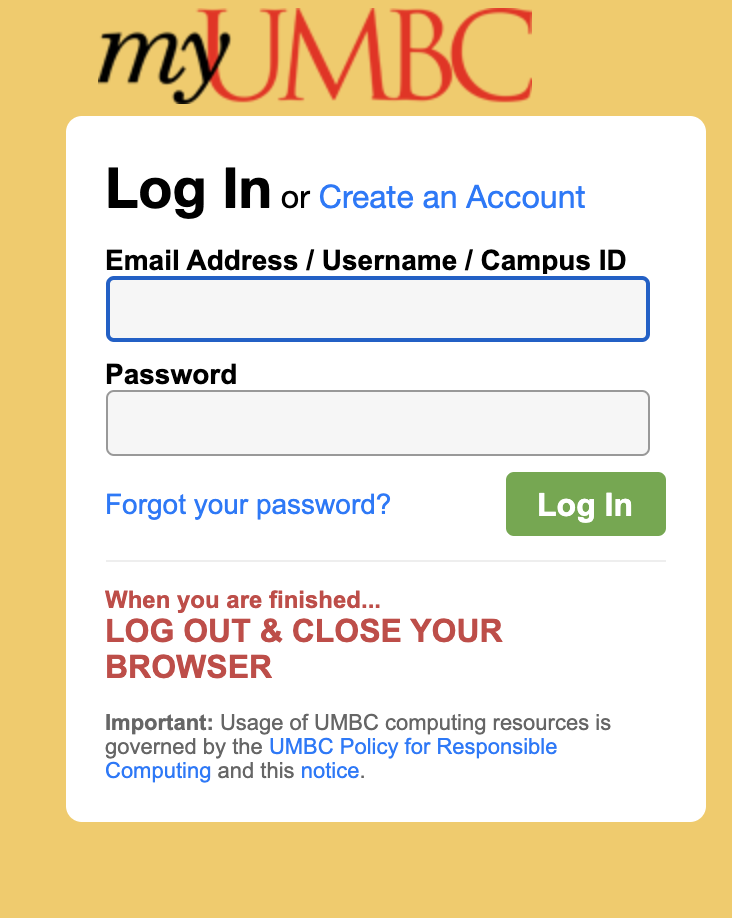
Now, however, if the RT form is the initial software to be accessed within that browser session, with the new security, you will be presented with a new Login prompt below.
Upon clicking this Login button a new tab will be created and you will be provided with the familiar, normal login prompt below. Yes, this is an extra step, but it was the only way available to achieve security without some major rework of all your existing forms.
*Note that this only impacts RT forms if they are accessed prior to authentication.
Please
submit an RT ticket if you have any issues or questions. If unable to submit a ticket please contact Joe Kirby at
kirby@umbc.eduThe USM Kirwan Center for Academic Innovation is hosting a day-long virtual summit to introduce participants to the ins and outs of adaptive courseware. Sessions will include lessons learned from faculty users, vendor demos, “birds of a feather” break-outs by discipline and role, and a closing plenary focused on pedagogical uses of adaptive courseware.
Adaptive Tools for High-enrollment Online Courses: Improving the COVID-19 Learning Experience for Students and Faculty
A virtual summit organized by the USM Kirwan Center for Academic Innovation
Thursday, July 16, 2020, 8:30 am to 4:00 pm
Participants in the summit will have a chance to learn about an array of adaptive technologies from organizations such as Lumen Learning, Carnegie Mellon’s Online Learning Initiative (OLI), CogBooks, RealizeIt, and McGraw Hill ALEKS. Faculty users will share lessons learned about these tools and delve into how adaptive courseware has helped them to support student success.
The Summit will be geared toward high-enrollment (large lecture, multi-section) courses for which high-quality, adaptive courseware exists: General education, introductory courses in the major, and first-year experience and other transitions courses.
Event Details:
- When: Thursday, July 16, 2020, 8:30 am to 4:00 pm
- Where: Kirwan Center-hosted virtual meetings in Zoom
- Who should attend: USM faculty, instructional designers, faculty developers, and administrators
- Cost: Free to USM faculty & staff
Planned Program Highlights:
- Opening Framing
- Meet the Courseware: Choose from among sessions to hear faculty stories and view vendor demos based on your interests/discipline.
- “Birds of a Feather” Brown Bag Lunch by disciplinary area
- Closing Plenary: Using Adaptive Courseware for to Improve the Learning Experience for Students and Faculty
USM OnTrack has pre-purchased a pool of online teaching professional development workshops from Quality Matters (QM) on beginning to advanced topics, including designing for learner engagement, flipping the online course, setting expectations with students, active learning strategies, accessibility, and online assessment.
Registration is now open for the
first set of workshops, being offered from July 7th through July 30th (see attached list). Links to workshops after July 30th will be forthcoming in the next few weeks.
There is no cost for any USM faculty or staff member to attend these workshops, but each workshop does have a 30-person limit, so please sign up as soon as possible!
QM Coordinator information:
Dr. Sherri Braxton - University of Maryland-Baltimore County
]]>
USM OnTrack has pre-purchased a pool of online teaching professional development workshops from Quality Matters (QM) on beginning to advanced topics, including designing for learner engagement,...
https://www.usmd.edu/newsroom/news/2056
Document
https://assets2-beta.my.umbc.edu/system/shared/attachments/19d7f4130e82e8823078fe9c13515c3b/69f0969c/news/000/093/933/52bd90a3be645143af3c4ad082803269/USM OnTrack QM Live! Web Conferencing Workshop Schedule - Registration Links as of 062220.xlsx?1592923528
https://beta.my.umbc.edu/api/v0/pixel/news/93933/guest@my.umbc.edu/8f33ce4265521dace582d9940d816bb8/api/pixel
online
qm
quality-matters
Instructional Technology
https://beta.my.umbc.edu/groups/instructional-technology
https://assets2-beta.my.umbc.edu/system/shared/avatars/groups/000/001/164/dec3b026b81ee6d890a8f82f75c94a2e/xsmall.png?1446126703
https://assets1-beta.my.umbc.edu/system/shared/avatars/groups/000/001/164/dec3b026b81ee6d890a8f82f75c94a2e/original.png?1446126703
https://assets2-beta.my.umbc.edu/system/shared/avatars/groups/000/001/164/dec3b026b81ee6d890a8f82f75c94a2e/xxlarge.png?1446126703
https://assets1-beta.my.umbc.edu/system/shared/avatars/groups/000/001/164/dec3b026b81ee6d890a8f82f75c94a2e/xlarge.png?1446126703
https://assets1-beta.my.umbc.edu/system/shared/avatars/groups/000/001/164/dec3b026b81ee6d890a8f82f75c94a2e/large.png?1446126703
https://assets4-beta.my.umbc.edu/system/shared/avatars/groups/000/001/164/dec3b026b81ee6d890a8f82f75c94a2e/medium.png?1446126703
https://assets3-beta.my.umbc.edu/system/shared/avatars/groups/000/001/164/dec3b026b81ee6d890a8f82f75c94a2e/small.png?1446126703
https://assets2-beta.my.umbc.edu/system/shared/avatars/groups/000/001/164/dec3b026b81ee6d890a8f82f75c94a2e/xsmall.png?1446126703
https://assets3-beta.my.umbc.edu/system/shared/avatars/groups/000/001/164/dec3b026b81ee6d890a8f82f75c94a2e/xxsmall.png?1446126703
Instructional Technology
https://assets4-beta.my.umbc.edu/system/shared/thumbnails/news/000/093/933/78fa1b4c07f8922f9f348794f59e0db3/xxlarge.jpg?1592923714
https://assets2-beta.my.umbc.edu/system/shared/thumbnails/news/000/093/933/78fa1b4c07f8922f9f348794f59e0db3/xlarge.jpg?1592923714
https://assets3-beta.my.umbc.edu/system/shared/thumbnails/news/000/093/933/78fa1b4c07f8922f9f348794f59e0db3/large.jpg?1592923714
https://assets2-beta.my.umbc.edu/system/shared/thumbnails/news/000/093/933/78fa1b4c07f8922f9f348794f59e0db3/medium.jpg?1592923714
https://assets3-beta.my.umbc.edu/system/shared/thumbnails/news/000/093/933/78fa1b4c07f8922f9f348794f59e0db3/small.jpg?1592923714
https://assets4-beta.my.umbc.edu/system/shared/thumbnails/news/000/093/933/78fa1b4c07f8922f9f348794f59e0db3/xsmall.jpg?1592923714
https://assets3-beta.my.umbc.edu/system/shared/thumbnails/news/000/093/933/78fa1b4c07f8922f9f348794f59e0db3/xxsmall.jpg?1592923714
3
0
true
Tue, 23 Jun 2020 10:49:42 -0400
Tue, 23 Jun 2020 11:17:58 -0400
How to Spot a Scam
Follow the Three Golden Rules
Scammers are always inventing new ways to exploit people. However, some of the basic tactics don’t change much. The Cybercrime Support Network (CSN), in partnership with Google, has set up the ScamSpotter web site (https://scamspotter.org/) . Scam Spotter lists Three Golden Rules for spotting a scam.
Slow Down: If any organization is rushing you to act fast, this is a red flag. Take your time to get more information. Do not rush.
Spot check: Utilize the internet, search for that organization online. If you get unexpected calls, unhang up, then search to verify the phone number.
Stop, Don’t Send: Scammers are always demanding payment on the spot, A trustworthy organization would not ask you to send your credit card over texts, phone calls or emails. Scammers love gift cards. Do not send any gift cards to anyone, who you have not verified or know.
If you receive email and are not sure whether it’s a scam, please send the complete headers to security@umbc.edu. The UMBC guide to displaying complete email headers can be found at:
https://wiki.umbc.edu/pages/viewpage.action?pageId=1867970
Source: https://scamspotter.org/scams
]]>
Scammers are always inventing new ways to exploit people. However, some of the basic tactics don’t change much. The Cybercrime Support Network (CSN), in partnership with Google, has set up the...
https://beta.my.umbc.edu/api/v0/pixel/news/93891/guest@my.umbc.edu/cbdccb6751f92b391d8803891110e11e/api/pixel
notice
IT Security - DoIT Cybersecurity Assurance and Digital Trust
https://beta.my.umbc.edu/groups/itsecurity
https://assets3-beta.my.umbc.edu/images/avatars/group/7/xsmall.png?1777368069
https://assets3-beta.my.umbc.edu/images/avatars/group/7/original.png?1777368069
https://assets3-beta.my.umbc.edu/images/avatars/group/7/xxlarge.png?1777368069
https://assets2-beta.my.umbc.edu/images/avatars/group/7/xlarge.png?1777368069
https://assets2-beta.my.umbc.edu/images/avatars/group/7/large.png?1777368069
https://assets3-beta.my.umbc.edu/images/avatars/group/7/medium.png?1777368069
https://assets1-beta.my.umbc.edu/images/avatars/group/7/small.png?1777368069
https://assets3-beta.my.umbc.edu/images/avatars/group/7/xsmall.png?1777368069
https://assets4-beta.my.umbc.edu/images/avatars/group/7/xxsmall.png?1777368069
IT Security - DoIT
0
0
true
Fri, 19 Jun 2020 14:07:25 -0400
Fri, 19 Jun 2020 14:12:38 -0400
How to Spot a Scam
Follow the Three Golden Rules
Scammers are always inventing new ways to exploit people. However, some of the basic tactics don’t change much. The Cybercrime Support Network (CSN), in partnership with Google, has set up the ScamSpotter web site (https://scamspotter.org/) . Scam Spotter lists Three Golden Rules for spotting a scam.
Slow Down: If any organization is rushing you to act fast, this is a red flag. Take your time to get more information. Do not rush.
Spot check: Utilize the internet, search for that organization online. If you get unexpected calls, unhang up, then search to verify the phone number.
Stop, Don’t Send. Scammers are always demanding payment on the spot, A trustworthy organization would not ask you to send your credit card over texts, phone calls or emails. Scammers love gift cards. Do not send any gift cards to anyone, who you have not verified or know.
If you receive email and are not sure whether it’s a scam, please send the complete headers to security@umbc.edu. The UMBC guide to displaying complete email headers can be found at:
https://wiki.umbc.edu/pages/viewpage.action?pageId=1867970
Source: https://scamspotter.org/scams
]]>
Scammers are always inventing new ways to exploit people. However, some of the basic tactics don’t change much. The Cybercrime Support Network (CSN), in partnership with Google, has set up the...
https://beta.my.umbc.edu/api/v0/pixel/news/93883/guest@my.umbc.edu/e37265d9704e2160094c095237743956/api/pixel
notice
students
Division of Information Technology (DoIT)
https://beta.my.umbc.edu/groups/doit
https://assets2-beta.my.umbc.edu/system/shared/avatars/groups/000/000/021/d27760c5de12c74b73faec8d0e631acf/xsmall.png?1727453227
https://assets2-beta.my.umbc.edu/system/shared/avatars/groups/000/000/021/d27760c5de12c74b73faec8d0e631acf/original.JPG?1727453227
https://assets1-beta.my.umbc.edu/system/shared/avatars/groups/000/000/021/d27760c5de12c74b73faec8d0e631acf/xxlarge.png?1727453227
https://assets3-beta.my.umbc.edu/system/shared/avatars/groups/000/000/021/d27760c5de12c74b73faec8d0e631acf/xlarge.png?1727453227
https://assets2-beta.my.umbc.edu/system/shared/avatars/groups/000/000/021/d27760c5de12c74b73faec8d0e631acf/large.png?1727453227
https://assets2-beta.my.umbc.edu/system/shared/avatars/groups/000/000/021/d27760c5de12c74b73faec8d0e631acf/medium.png?1727453227
https://assets2-beta.my.umbc.edu/system/shared/avatars/groups/000/000/021/d27760c5de12c74b73faec8d0e631acf/small.png?1727453227
https://assets2-beta.my.umbc.edu/system/shared/avatars/groups/000/000/021/d27760c5de12c74b73faec8d0e631acf/xsmall.png?1727453227
https://assets4-beta.my.umbc.edu/system/shared/avatars/groups/000/000/021/d27760c5de12c74b73faec8d0e631acf/xxsmall.png?1727453227
Division of Information Technology (DoIT)
0
0
true
Fri, 19 Jun 2020 12:25:25 -0400
Thu, 13 Aug 2020 04:06:44 -0400
IRS Warning of COVID-19 Scams
Financial Scammers Taking Advantage Of COVID-19 Uncertainty
With COVID-19 present in our day to day lives, malicious actors are taking this opportunity to scam people out of their personal and financial information. Recently the IRS Criminal Investigation Division (IRS-CI) has noticed various campaigns targeting Economic Impact Payments as well as other COVID-19 related scams.
The IRS-CI warns that some of these scams will offer more money from the government or even faster check delivery if the reader shares personal information and pays a small “processing fee.” The IRS warns that there are no shortcuts for stimulus checks. Malicious actors have also been trying to convince people to “apply” for a second stimulus check. According to a Forbes article, as of right now, there is currently no second stimulus check in the works.
Malicious actors are also setting up fake charities soliciting donations for individuals, groups and areas affected by COVID-19. Some malicious actors are even offering the chance to invest in companies working on a vaccine, promising that the “company” will dramatically increase in value as a result. Some are even selling fake products like at-home test kits, fake cures, vaccines, pills and giving advice on unproven treatments.
They also warn of phishing campaigns being sent out either through text or emails. These campaigns are using keywords like “Corona Virus,” “COVID-19,” and “Stimulus.” For these campaigns the IRS-CI says the malicious actors' targets are people's personal and financial information.
If you do receive any email that you suspect is a scam, please do not click on any URL or reply. Either of those actions confirms to the sender that your email address is valid. Please forward the message (with the email headers) to security@umbc.edu.
How do I forward full email headers?
https://wiki.umbc.edu/pages/viewpage.action?pageId=1867970
For more information, please check out:
https://www.irs.gov/newsroom/irs-warns-against-covid-19-fraud-other-financial-schemes
https://www.forbes.com/sites/kellyphillipserb/2020/06/08/irs-warns-on-covid-19-scams-involving-stimulus-checks-fake-cures--more/#67cdbd937a98
]]>
With COVID-19 present in our day to day lives, malicious actors are taking this opportunity to scam people out of their personal and financial information. Recently the IRS Criminal Investigation...
https://beta.my.umbc.edu/api/v0/pixel/news/93877/guest@my.umbc.edu/1ab03c667e38e69440aee5210dae2cc9/api/pixel
covid19
notice
IT Security - DoIT Cybersecurity Assurance and Digital Trust
https://beta.my.umbc.edu/groups/itsecurity
https://assets3-beta.my.umbc.edu/images/avatars/group/7/xsmall.png?1777368069
https://assets3-beta.my.umbc.edu/images/avatars/group/7/original.png?1777368069
https://assets3-beta.my.umbc.edu/images/avatars/group/7/xxlarge.png?1777368069
https://assets2-beta.my.umbc.edu/images/avatars/group/7/xlarge.png?1777368069
https://assets2-beta.my.umbc.edu/images/avatars/group/7/large.png?1777368069
https://assets3-beta.my.umbc.edu/images/avatars/group/7/medium.png?1777368069
https://assets1-beta.my.umbc.edu/images/avatars/group/7/small.png?1777368069
https://assets3-beta.my.umbc.edu/images/avatars/group/7/xsmall.png?1777368069
https://assets4-beta.my.umbc.edu/images/avatars/group/7/xxsmall.png?1777368069
IT Security - DoIT
0
0
true
Fri, 19 Jun 2020 10:22:15 -0400
Fake Virus Alert Scam
Scareware doesn’t just exploit panic, it creates panic
You are working from home, web browser open to whatever resources you need to write a paper, prepare a class, review a budget, or whatever else you need to get your job done. Suddenly a window you didn’t ask for appears on your screen. It may look sort of like a normal security product or perhaps it is flashing red and yellow. There may even be - no kidding - sirens. The message seared into your eyes tells you that your computer is infectedwith viruses, possibly hundreds of them. The message says your data may be stolen, or erased, or both. The message tells you that it is urgent that you click a link to buy and download an antivirus product and/or call a phone number where you will be able to buy a support contract (they just need your bank’s routing number and your account number and they will take care of the details). If you try to close this window, it wither won’t close or gets replaced by more such windows. In any case, the message is telling you that the most important thing for you to do immediately is to panic. The pop-up window is doing it’s very best to get you to act without asking any questions.
This type of malware has become quite common and falls into a class called ‘scareware’. The goal is to get you to act without thinking about what you’re doing. If the window won’t go away, turn your computer off and then back on. Some scareware is attached to your browser and will only reappear when you start whichever browser you were using before. Other scareware is installed as a program and may reappear when your computer restarts. It can be extremely annoying, but the real threat is the link and/or phone number that you are asked to use to fix the problem. DO NOT CLICK THE LINK AND/OR DO NOT CALL THE NUMBER.
General Rule: Anything, windows, email, articles, etc. that you see on your computer that seems to be trying to induce panic, is probably trying to do just that. Stay calm and think, don’t click!
Here are some references where you can find out more:
]]>
You are working from home, web browser open to whatever resources you need to write a paper, prepare a class, review a budget, or whatever else you need to get your job done. Suddenly a window...
https://beta.my.umbc.edu/api/v0/pixel/news/93808/guest@my.umbc.edu/a7505e6af92d587a3543ef14fb368572/api/pixel
notice
IT Security - DoIT Cybersecurity Assurance and Digital Trust
https://beta.my.umbc.edu/groups/itsecurity
https://assets3-beta.my.umbc.edu/images/avatars/group/7/xsmall.png?1777368069
https://assets3-beta.my.umbc.edu/images/avatars/group/7/original.png?1777368069
https://assets3-beta.my.umbc.edu/images/avatars/group/7/xxlarge.png?1777368069
https://assets2-beta.my.umbc.edu/images/avatars/group/7/xlarge.png?1777368069
https://assets2-beta.my.umbc.edu/images/avatars/group/7/large.png?1777368069
https://assets3-beta.my.umbc.edu/images/avatars/group/7/medium.png?1777368069
https://assets1-beta.my.umbc.edu/images/avatars/group/7/small.png?1777368069
https://assets3-beta.my.umbc.edu/images/avatars/group/7/xsmall.png?1777368069
https://assets4-beta.my.umbc.edu/images/avatars/group/7/xxsmall.png?1777368069
IT Security - DoIT
0
0
true
Mon, 15 Jun 2020 16:25:51 -0400
Blackboard Offers Free Virtual Conference July 21-22
Follow BbWorld 20 via live streaming sessions & recordings
Once a year Blackboard hosts the BbWorld conference over several days for faculty, students, administrators, instructional technology specialists, training professionals, developers, and system administrators. Due to COVID-19, the BbWorld 2020 conference was rescheduled for a virtual platform on July 21-22.
Registration is now open for this free virtual event. Sessions will be offered from 6 AM to 11 PM to support a global audience. Themes include new models of teaching & learning, accessibility & inclusivity, student engagement, and the impact of COVID-19 on education. The conference will feature interactive breakout sessions, experiential discovery hall, and a virtual partner exhibit.
Although the full schedule is not yet posted, this year's BbWorld features two sessions from Instructional Technology staff:
- “Hacking Ultra: Innovating & Redesigning Original Courses”
- “Preparing your GO (Go Online) Kit for Learning Continuity”
Most sessions will be recorded. Once registered, download the mobile app for iOS or Android to get access to session handouts and slide decks. During the BbWorld conference, follow social media via Twitter hashtag #BbWorld20.
The technical side of Bb World, known as DevCon, is scheduled for July 6-20. Targeted primarily to developers, system admins, and analytics specialists, DevCon is also free this year.
]]>
Once a year Blackboard hosts the BbWorld conference over several days for faculty, students, administrators, instructional technology specialists, training professionals, developers, and system...
https://my3.my.umbc.edu/groups/instructional-technology/posts/93744
https://beta.my.umbc.edu/api/v0/pixel/news/93744/guest@my.umbc.edu/b664d6e881dcee0904da45e4ada4ae07/api/pixel
bbworld
bbworld-live
blackboard
conferences
Instructional Technology
https://beta.my.umbc.edu/groups/instructional-technology
https://assets2-beta.my.umbc.edu/system/shared/avatars/groups/000/001/164/dec3b026b81ee6d890a8f82f75c94a2e/xsmall.png?1446126703
https://assets1-beta.my.umbc.edu/system/shared/avatars/groups/000/001/164/dec3b026b81ee6d890a8f82f75c94a2e/original.png?1446126703
https://assets2-beta.my.umbc.edu/system/shared/avatars/groups/000/001/164/dec3b026b81ee6d890a8f82f75c94a2e/xxlarge.png?1446126703
https://assets1-beta.my.umbc.edu/system/shared/avatars/groups/000/001/164/dec3b026b81ee6d890a8f82f75c94a2e/xlarge.png?1446126703
https://assets1-beta.my.umbc.edu/system/shared/avatars/groups/000/001/164/dec3b026b81ee6d890a8f82f75c94a2e/large.png?1446126703
https://assets4-beta.my.umbc.edu/system/shared/avatars/groups/000/001/164/dec3b026b81ee6d890a8f82f75c94a2e/medium.png?1446126703
https://assets3-beta.my.umbc.edu/system/shared/avatars/groups/000/001/164/dec3b026b81ee6d890a8f82f75c94a2e/small.png?1446126703
https://assets2-beta.my.umbc.edu/system/shared/avatars/groups/000/001/164/dec3b026b81ee6d890a8f82f75c94a2e/xsmall.png?1446126703
https://assets3-beta.my.umbc.edu/system/shared/avatars/groups/000/001/164/dec3b026b81ee6d890a8f82f75c94a2e/xxsmall.png?1446126703
Instructional Technology
https://assets1-beta.my.umbc.edu/system/shared/thumbnails/news/000/093/744/3750ca1490724cf77e0e9888c50874f3/xxlarge.jpg?1591874471
https://assets1-beta.my.umbc.edu/system/shared/thumbnails/news/000/093/744/3750ca1490724cf77e0e9888c50874f3/xlarge.jpg?1591874471
https://assets3-beta.my.umbc.edu/system/shared/thumbnails/news/000/093/744/3750ca1490724cf77e0e9888c50874f3/large.jpg?1591874471
https://assets1-beta.my.umbc.edu/system/shared/thumbnails/news/000/093/744/3750ca1490724cf77e0e9888c50874f3/medium.jpg?1591874471
https://assets2-beta.my.umbc.edu/system/shared/thumbnails/news/000/093/744/3750ca1490724cf77e0e9888c50874f3/small.jpg?1591874471
https://assets3-beta.my.umbc.edu/system/shared/thumbnails/news/000/093/744/3750ca1490724cf77e0e9888c50874f3/xsmall.jpg?1591874471
https://assets4-beta.my.umbc.edu/system/shared/thumbnails/news/000/093/744/3750ca1490724cf77e0e9888c50874f3/xxsmall.jpg?1591874471
3
0
true
Thu, 11 Jun 2020 07:41:12 -0400
How to Spot a Job Scam
Scammers Are Sill Exploiting The Pandemic
With Covid-19 causing many Americans to file for unemployment, many people are looking for jobs. Some malicious actors are taking advantage of them by creating new job scams. Here is a list of tips from Forbes to help spot potential job scams.
Malicious actors will use keywords when describing a job such as “work-from-home”, “work-at-home”, “quick money”, or even “unlimited earning potential”. A legitimate job will usually use keywords along the lines of “remote work”, “virtual work” or “telecommute job”.
Descriptions and emails for scam jobs will usually have grammatical or spelling errors, while legitimate jobs will not have major errors.
A malicious actor will want to hire very quickly, they may include keywords like “immediate hire” in the description and any communication will feel urgent. A legitimate job will usually take some time as they want to hire the right people.
If the job description seems “too good to be true” then it probably is.
Scam jobs are known for asking for an upfront fee for things like applications, background checks, employee processing or even uniforms. They could also request personal information prior to completing the hiring process. A legitimate job will only request information like tax documents after agreeing to the terms of hire.
A malicious actor will request to communicate through email or even chat rooms like Google Hangout. Their emails might even try to mimic the real company’s emails. Even if a legitimate job will contact you through websites like LinkedIn. They will not hire someone without having a phone or video conference interview.
The key to quick scams is urgency. The scammer doesn’t want you to stop and think, and certainly not to ask questions. If you are urged to act immediately and told that you will lose a good opportunity or that something bad will happen if you delay, be suspicious.
Lack of business details is another warning flag. If someone offers you a job without giving you a phone number, street address, or a link to their business to check out, be suspicious.
If the message tells you that your name was provided by UMBC, but asks you to reply from your personal email, ask yourself why they don’t want to use the UMBC email address they just used to contact you. If you see something inconsistent, be suspicious.
If you do receive any email that you suspect is a scam, please do not click on any URL or reply. Either of those actions confirms to the sender that your email address is valid. Please forward the message (with the email headers) to security@umbc.edu and delete the message.
How do I forward full email headers?
https://wiki.umbc.edu/pages/viewpage.action?pageId=1867970
For more information, please check out:
https://www.forbes.com/sites/ashleystahl/2020/05/11/job-hunting-scams-amid-covid-19-pandemic/#57724b253c57
]]>
With Covid-19 causing many Americans to file for unemployment, many people are looking for jobs. Some malicious actors are taking advantage of them by creating new job scams. Here is a list of...
https://beta.my.umbc.edu/api/v0/pixel/news/93743/guest@my.umbc.edu/887e86dc64d75cf47997e6125abf6b46/api/pixel
notice
IT Security - DoIT Cybersecurity Assurance and Digital Trust
https://beta.my.umbc.edu/groups/itsecurity
https://assets3-beta.my.umbc.edu/images/avatars/group/7/xsmall.png?1777368069
https://assets3-beta.my.umbc.edu/images/avatars/group/7/original.png?1777368069
https://assets3-beta.my.umbc.edu/images/avatars/group/7/xxlarge.png?1777368069
https://assets2-beta.my.umbc.edu/images/avatars/group/7/xlarge.png?1777368069
https://assets2-beta.my.umbc.edu/images/avatars/group/7/large.png?1777368069
https://assets3-beta.my.umbc.edu/images/avatars/group/7/medium.png?1777368069
https://assets1-beta.my.umbc.edu/images/avatars/group/7/small.png?1777368069
https://assets3-beta.my.umbc.edu/images/avatars/group/7/xsmall.png?1777368069
https://assets4-beta.my.umbc.edu/images/avatars/group/7/xxsmall.png?1777368069
IT Security - DoIT
0
0
true
Wed, 10 Jun 2020 19:52:47 -0400
Wed, 10 Jun 2020 19:56:52 -0400
Protect UMBC - Ransomware Attacks Still Active
Your Own Computer Held Hostage
Many of us lived our lives, at least in part, through computers even before telework and distance learning became the norm. You may use your computer for writing reports, designing presentations, tracking budgets, email, banking, checking medical records, filing your taxes, and dozens of other necessary work and life-related chores. Now, suppose someone took your computer and demanded a hundred dollars for its return. Suppose someone took all the computers in your office or university away and demanded thousands of dollars for their return. This is what ransomware does.
Just to be clear, no one shows up, grabs the computer, and runs out the door. During a ransomware attack, the computer is still there. The data on the computer, however, all the email, documents, spreadsheets, bookmarks and whatever else you have stored on it is unusable. It has been encrypted, and you don’t know the password. The data is, for all intents and purposes, gone.
Ransomware will leave your computer just functional enough to pop a ransom note up on the screen. The note directs the victim to pay a specified amount in cryptocurrency in return for the password. The payment will be effectively untraceable. Like most ransom situations, you have no assurance beyond the word of obvious criminals that you will get that password, or even that they have it. Two departments at Michigan State University were struck with ransomware around last Memorial Day and have announced the ransom will not be paid.
Ransomware is delivered in the same way as other malware. It usually gets a foothold when a computer user opens infected email, clicks on a malicious link, or installs software from an untrusted source. It is just as likely to strike any computer as any other malicious program.
Updating your computer regularly with security patches and installing anti-virus protection is always a good idea. The absolute best defense against ransomware, is to make a backup. If you have recent copies of your files stored somewhere other than on your computer, you can restore all your data if ransomware hits. You don’t need to backup all the information on the computer, just the information that is important and irreproducible. Documents, pictures, address lists, etc. can all be backed up, either to removable media such as a USB thumb drive or an external drive, or to cloud storage. Microsoft and Apple have both tried to make automatic backup to cloud storage as easy as possible (see Resources below). There are other options such as Box storage with Box Sync.
IMPORTANT: If you are working from home using data belonging to UMBC, there may be restrictions on where that data can be stored. Check with the Division of Information Technology (security@umbc.edu) to find out what options are available. It is essential that backups of sensitive data be protected and not breached.
Resources
Windows Backup to Microsoft OneDrive
https://www.microsoft.com/en-us/microsoft-365/onedrive/pc-cloud-backup
Macintosh Backup to iCloud
https://support.apple.com/en-us/HT204025
For more information:
https://www.insidehighered.com/quicktakes/2020/06/04/michigan-state-refuses-pay-ransom-hackers
]]>
Many of us lived our lives, at least in part, through computers even before telework and distance learning became the norm. You may use your computer for writing reports, designing presentations,...
https://beta.my.umbc.edu/api/v0/pixel/news/93655/guest@my.umbc.edu/bc9ab72cb5b67dc4a73792313df79f1f/api/pixel
notice
IT Security - DoIT Cybersecurity Assurance and Digital Trust
https://beta.my.umbc.edu/groups/itsecurity
https://assets3-beta.my.umbc.edu/images/avatars/group/7/xsmall.png?1777368069
https://assets3-beta.my.umbc.edu/images/avatars/group/7/original.png?1777368069
https://assets3-beta.my.umbc.edu/images/avatars/group/7/xxlarge.png?1777368069
https://assets2-beta.my.umbc.edu/images/avatars/group/7/xlarge.png?1777368069
https://assets2-beta.my.umbc.edu/images/avatars/group/7/large.png?1777368069
https://assets3-beta.my.umbc.edu/images/avatars/group/7/medium.png?1777368069
https://assets1-beta.my.umbc.edu/images/avatars/group/7/small.png?1777368069
https://assets3-beta.my.umbc.edu/images/avatars/group/7/xsmall.png?1777368069
https://assets4-beta.my.umbc.edu/images/avatars/group/7/xxsmall.png?1777368069
IT Security - DoIT
0
0
true
Mon, 08 Jun 2020 10:28:17 -0400